
Most business cases for AI automation get written around one moment: go-live. The spreadsheet adds up build hours, license fees, and the labor the workflow will save. Then it projects those savings forward in a straight line for three years.
That straight line is almost never what happens. An AI-powered invoice matcher, support triage bot, or contract summarizer is not a machine you install once. It sits on top of a model that its vendor will retire, data sources that will change shape, and business rules that will drift away from what the prompt was written for.
Software engineers have a name for this: technical debt. In AI automation, the debt builds faster and stays harder to see, because the system usually keeps running. It just gets slightly worse, slightly more expensive, and slightly more dependent on people quietly fixing its output.
This article isn’t about picking your first automation or proving a 90-day ROI. Those are launch questions. This one is about everything after launch: the recurring costs that show up in month 7, month 14, and month 30, why they’re structurally built into how AI systems work in 2026, and how to price them into the plan from the start.
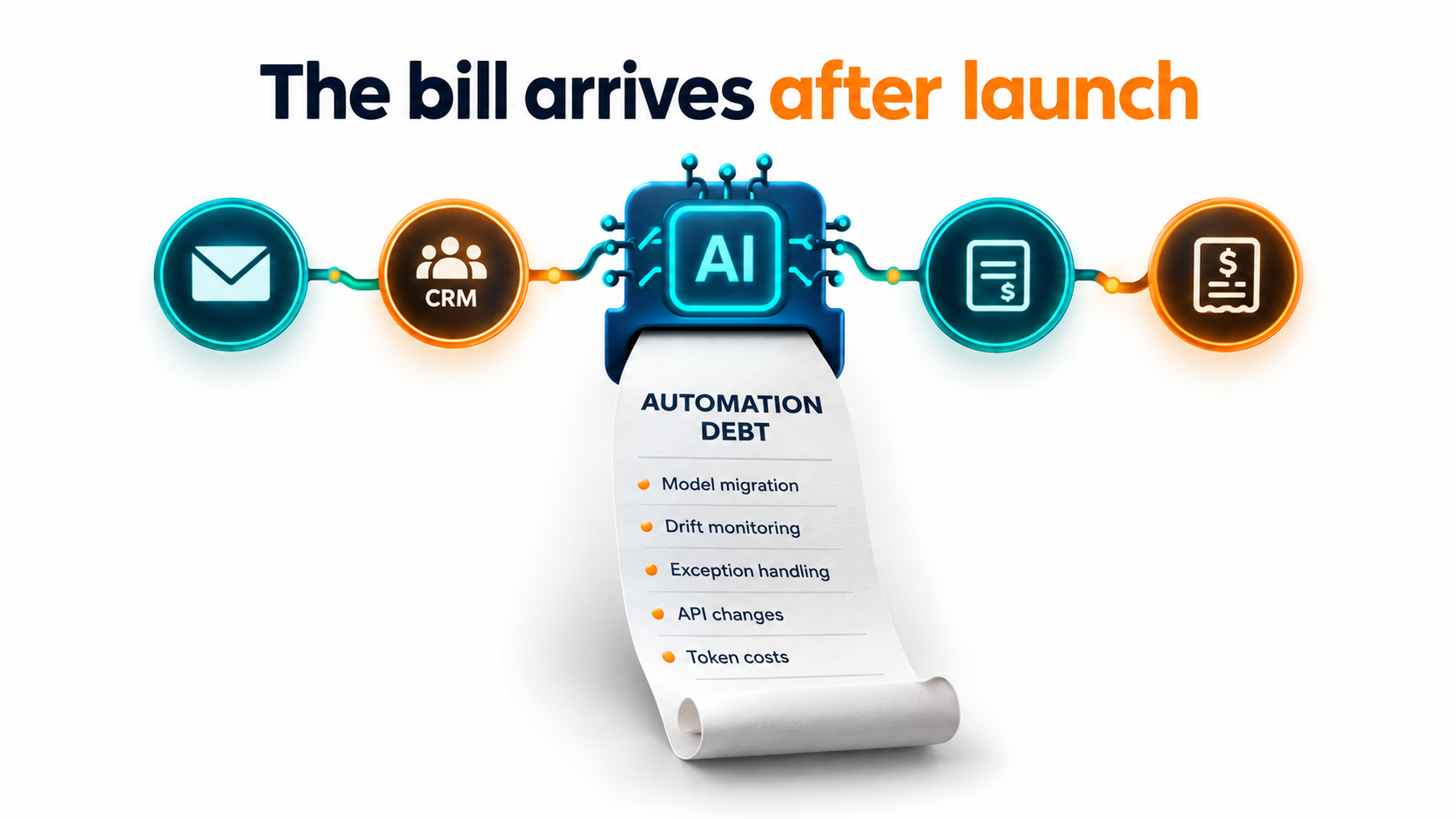
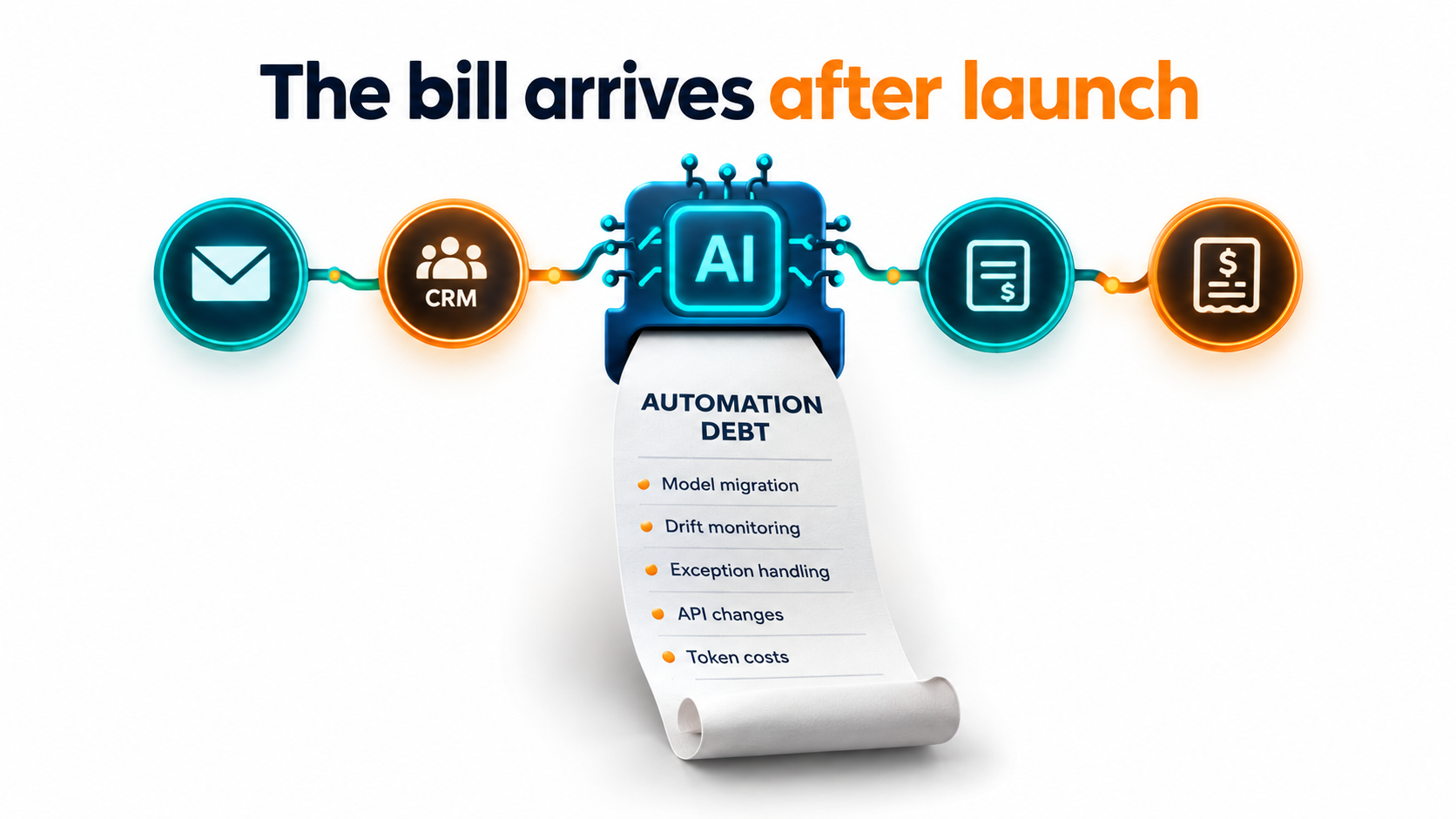
We’ll cover six kinds of “interest payments” on automation debt: model churn, silent behavioral drift, exception labor, integration rot, usage cost creep, and ownership decay. Then we’ll put them together into a total-cost-of-ownership worksheet and a set of operating habits that keep the debt manageable.
If you run operations, finance, or IT at a company that has already shipped a handful of AI workflows, this is the conversation that probably hasn’t happened yet.
Why Launch Day Is the Cheapest Day of an AI Automation’s Life
On launch day, everything lines up. The prompt was just tuned against current data. The model is the one the team tested. The integrations were wired against current API versions. The people who built it are still on the project and remember why every decision was made.
From that point on, each of those conditions starts to degrade. Not dramatically, and not all at once. But steadily.
The original definition still applies
Ward Cunningham coined the term “technical debt” in 1992 to explain to his manager why a financial software product needed refactoring. His framing is worth quoting because it maps so cleanly onto AI automation:
“Shipping first time code is like going into debt. A little debt speeds development so long as it is paid back promptly with a rewrite… The danger occurs when the debt is not repaid. Every minute spent on not-quite-right code counts as interest on that debt.”
Even earlier, in 1980, Meir “Manny” Lehman described a law of software evolution: as a program keeps changing, its complexity increases unless work is done to maintain or reduce it. Neither idea was written with large language models in mind. Both describe them perfectly.
Machine learning makes the debt worse, not better
In 2015, a team of Google engineers led by D. Sculley published Hidden Technical Debt in Machine Learning Systems at NeurIPS. Their central argument was blunt: quick wins with ML don’t come for free, and it is “common to incur massive ongoing maintenance costs in real-world ML systems.”
The paper listed ML-specific risk factors that traditional software doesn’t have to the same degree. These included boundary erosion, entanglement, hidden feedback loops, undeclared consumers, data dependencies, configuration issues, and “changes in the external world.”
A decade later, most businesses aren’t training their own models. They’re calling a hosted LLM through an API, often through a no-code automation platform. That shifts some of the burden to the vendor. But it adds a new category of risk Sculley’s team barely had to consider: your core component is owned, updated, and eventually retired by someone else.
Why the business case misses it
The reason running costs get left out is not carelessness. It’s that they’re hard to see before you’ve lived through them. Nobody has a line item for “the week in month nine when the model we used was deprecated and we had to re-test 40 prompts.”
The costs are also spread out. Exception handling lands on the operations team’s calendar. API upkeep lands on IT. Usage bills land on finance. No single budget owner sees the full picture, so no single owner pushes back when the savings quietly shrink.
There’s a signal from analysts here too. In mid-2025, Gartner predicted that over 40% of agentic AI projects would be canceled by the end of 2027, citing escalating costs, unclear business value, and inadequate risk controls. “Escalating costs” is exactly the problem this article describes: costs that weren’t in the original plan, building up after the demo worked.
The Six Interest Payments on Automation Debt
Before going deep on each, it helps to have the full map. Every production AI automation pays some combination of these six recurring costs. Smaller workflows pay smaller amounts, but none pay zero.
- Model churn. The model your workflow runs on gets deprecated and retired on the vendor’s schedule, forcing a migration and re-test.
- Silent drift. The model’s behavior changes, or your input data changes, and output quality slips without any error being thrown.
- Exception labor. The cases the automation can’t handle get routed to people. That queue grows, and it’s often staffed by the same people whose time the automation was meant to free.
- Integration rot. Upstream systems change their APIs, field names, file formats, and permissions. Connectors break or, worse, keep working with wrong data.
- Usage cost creep. Volume grows, prompts get longer as edge cases are patched in, and per-task costs climb above the original estimate.
- Ownership decay. The builder moves on, documentation was thin, and nobody knows what the automation does, who depends on it, or whether it can be safely turned off.
Each of these is predictable. That’s the good news. Predictable costs can be budgeted, scheduled, and reduced. The bad news is that most organizations treat each one as a surprise, every single time.
Principal vs. interest
It helps to borrow the financial metaphor fully. The principal is the shortcut you took at build time: hard-coding a model name, skipping a test set, wiring directly to a vendor’s API with no abstraction layer, writing no runbook.
The interest is the recurring cost that shortcut creates. Hard-coding a model name costs nothing on day one. It costs a frantic search through every workflow on the day that model is retired. Skipping a test set saves a week at build time. It costs you the ability to know whether a new model is safe to switch to.
The rest of this article walks through each interest payment, then turns to how to reduce the principal.
Model Churn: When Your Vendor Retires the Brain of Your Workflow
Traditional enterprise software has long support windows. A version of an ERP or database might be supported for years, sometimes a decade. Hosted AI models work on a very different clock.
What the vendors actually commit to
The major model providers publish their deprecation policies, and they’re worth reading closely, because they set the pace at which your automations will need maintenance.
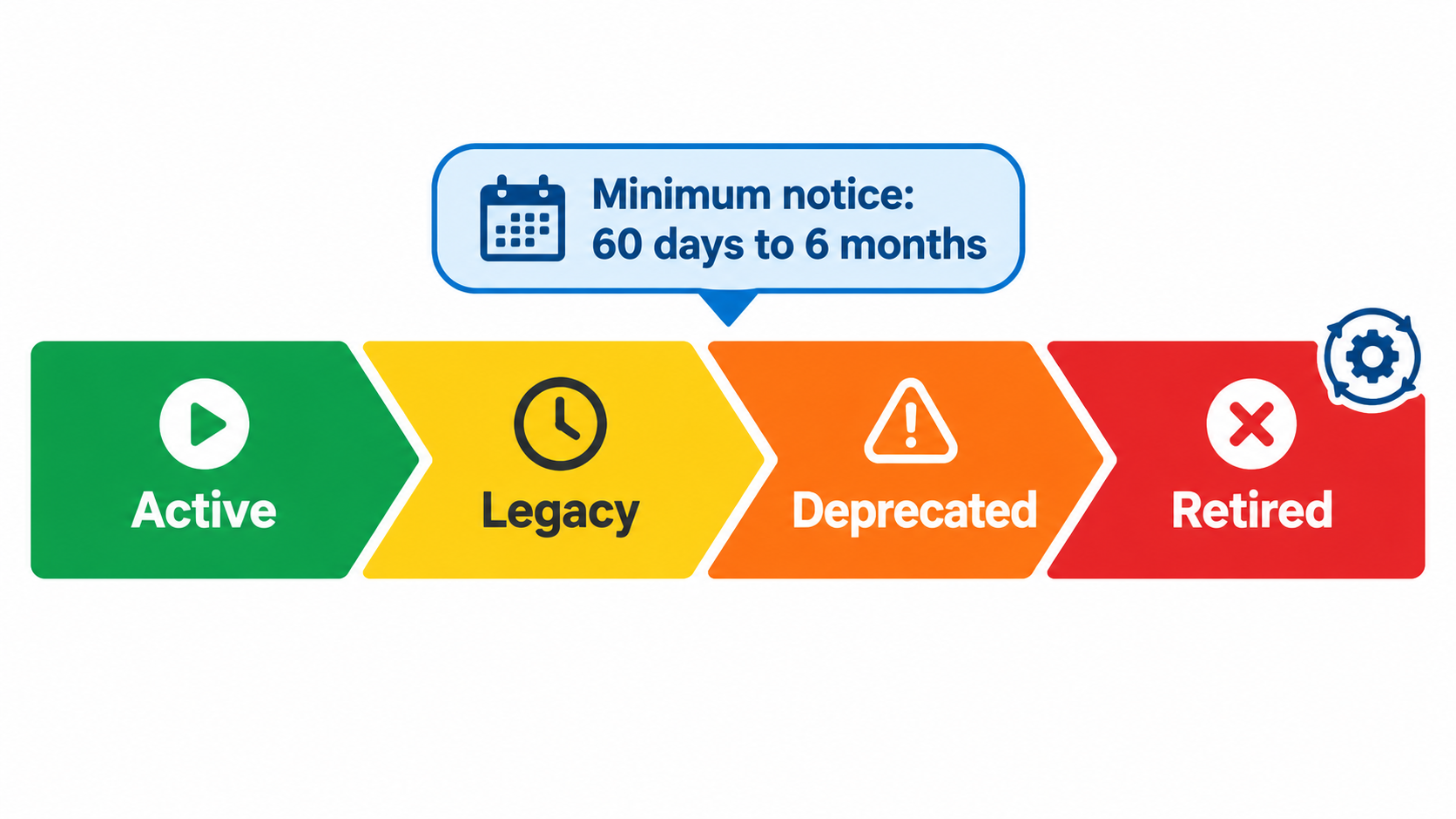
OpenAI states minimum notice periods before retirement: at least six months for generally available models, at least three months for specialized variants (such as chat, Codex, or deep research variants), and much shorter notice, “such as 2 weeks,” for preview models. The documentation is direct about the risk: “We don’t recommend using preview models for business-critical production workloads unless you can migrate on short notice.”
Anthropic commits to at least 60 days’ notice before retiring publicly released models. Its lifecycle has four states: Active, Legacy, Deprecated, and Retired. Its documentation notes that “requests to retired models will fail” and that “deprecated models are likely to be less reliable than active models.”
Those are minimums, and in practice notices often come earlier. But the planning point stands: you should expect to migrate every production AI automation at least once a year, and plan for it.
How fast models actually turn over
Anthropic’s own published model table shows the pace. Claude Sonnet 4, released with a May 2025 snapshot date, was deprecated in April 2026 and retired on June 15, 2026. Claude 3.7 Sonnet, with a February 2025 snapshot date, was retired on February 19, 2026. That’s roughly 12 to 13 months from release to shutdown for models that were flagship-tier when they launched.
OpenAI’s deprecations page tells a similar story. In the second half of 2026 alone, it logged separate retirement notices covering legacy audio and realtime models, transcription models including whisper-1, text-to-speech models including tts-1, and several GPT-5.x models. A business running voice transcription, call summaries, and a text-generation workflow could get three separate migration notices within a few months.
The hidden wrinkle: platform-specific schedules
Many businesses don’t call models directly. They go through a cloud provider or an automation platform. Anthropic’s documentation notes that partner-operated platforms such as Amazon Bedrock and Google Cloud “set their own retirement schedules, so a model’s lifecycle status and dates can differ.”
That means a single model can carry different retirement dates depending on where you access it. If your company uses the same model through two channels, perhaps directly for one team and through a cloud marketplace for another, you have two migration calendars to track.
What a migration really costs
Swapping a model name in a config file takes seconds. The real cost is everything around it:
- Finding every place the model is used. Anthropic suggests exporting usage data from its console, broken down by API key and model, to find lingering calls to deprecated models. Many teams discover workflows they didn’t know existed this way.
- Re-testing output quality. A newer model is usually more capable overall, but “better on benchmarks” doesn’t mean “identical on your invoices.” Formatting, verbosity, refusal behavior, and edge-case handling can all shift.
- Re-tuning prompts. Prompts written to work around one model’s quirks may be unnecessary, or actively harmful, on the next.
- Downstream validation. If the output feeds another system, such as a parser expecting JSON in a precise shape, that system has to be checked too.
- Change management. Users who rely on the output need to know that behavior may differ slightly.
Actionable takeaway: keep a simple register of every production AI automation, the exact model and access channel it uses, and that model’s current lifecycle status. Review it monthly. Never put a preview model into a business-critical workflow.
Silent Drift: When the “Same” Model Stops Behaving the Same
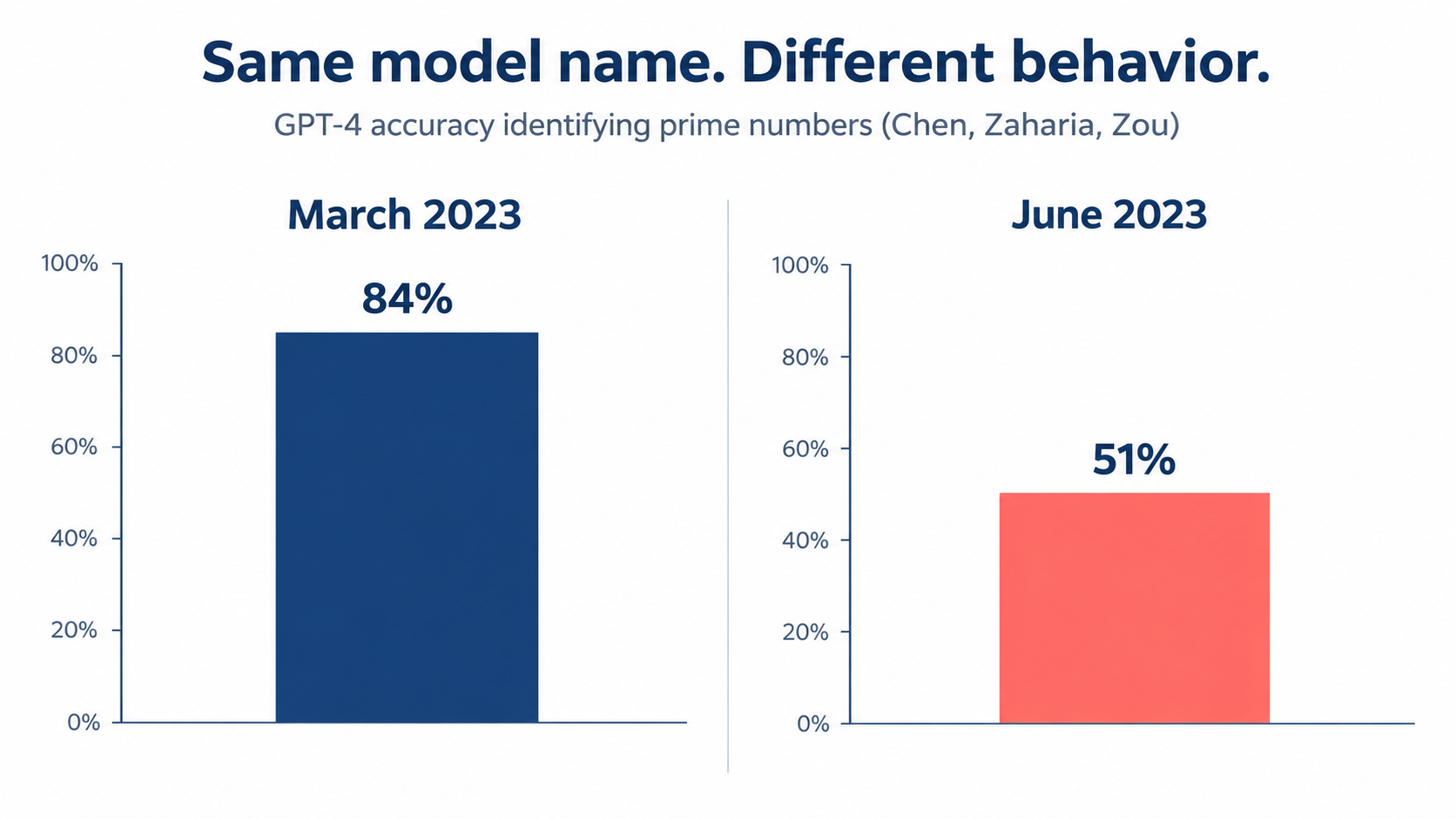
Model retirement is at least loud. You get an email and a date. Drift is quieter, and in many ways more expensive, because nobody notices until the damage has built up.
The research that put a number on it
In 2023, researchers Lingjiao Chen, Matei Zaharia, and James Zou of Stanford and UC Berkeley published a study titled How is ChatGPT’s behavior changing over time? They tested the March 2023 and June 2023 versions of GPT-3.5 and GPT-4 on the same tasks.
The results were striking. GPT-4’s accuracy at identifying prime versus composite numbers fell from 84% in March to 51% in June. Both models made more formatting mistakes in code generation in June than in March. GPT-4 became less willing to answer certain sensitive and opinion-survey questions. Meanwhile, some capabilities improved. GPT-4 got better at multi-hop questions, while GPT-3.5 got worse at them.
The authors concluded that “the behavior of the ‘same’ LLM service can change substantially in a relatively short amount of time, highlighting the need for continuous monitoring of LLMs.”
Vendors have since moved toward pinned, dated model snapshots, which helps a lot. But many tools and automation platforms still default to “latest” aliases that update underneath you. And pinning a snapshot just trades drift for scheduled retirement, which brings us back to model churn.
Three kinds of drift that matter for business
1. Model drift. The model itself changes, either because you’re on a moving alias or because you migrated. The Chen, Zaharia, and Zou finding about formatting mistakes is especially relevant here. A small change in how a model formats output can break a downstream parser without changing the content at all.
2. Data drift. Your inputs change. A new supplier sends invoices in a different layout. Customers start asking about a product you launched last month. A regulatory change introduces new contract clauses. The prompt was written for last year’s inputs, and it keeps applying last year’s logic.
3. Policy drift. Your business rules change, but the automation doesn’t. The refund policy moved from 30 days to 14. The approval threshold rose from $5,000 to $10,000. Someone updated the policy document but not the system prompt, so the automation enforces an outdated rule with complete confidence.
Why drift is so expensive
Traditional software tends to fail loudly. A broken integration throws an error, and someone gets paged. AI automations tend to fail quietly. They produce plausible-looking output that happens to be wrong.
That means the cost of drift isn’t the fix itself. It’s the time to detection multiplied by the volume processed while the drift went unnoticed. A support classifier that starts misrouting 8% more tickets might go unnoticed for six weeks. That’s six weeks of slower resolutions, frustrated customers, and agents re-routing tickets by hand without telling anyone it’s become a pattern.
What monitoring for drift actually looks like
- A golden test set. A fixed collection of real inputs with known-correct outputs, ideally 50 to 200 examples covering common cases and known edge cases. Run it on a schedule and whenever anything changes.
- Output sampling. A human reviews a small random sample of production outputs every week. Five minutes of review catches problems that dashboards miss.
- Proxy metrics. Track signals that move when quality slips: the rate of human overrides, the rate of downstream parsing failures, average output length, and the share of cases routed to exceptions.
- Change logging. Record every prompt edit, model change, and upstream data change with a date, so when a metric moves you can match it to a cause.
Actionable takeaway: if an automation has no golden test set, you can’t safely migrate it, can’t detect drift, and can’t prove it still works. Building one is the single highest-return piece of maintenance work in most AI programs.
The Exception Queue: Where Human Labor Quietly Comes Back
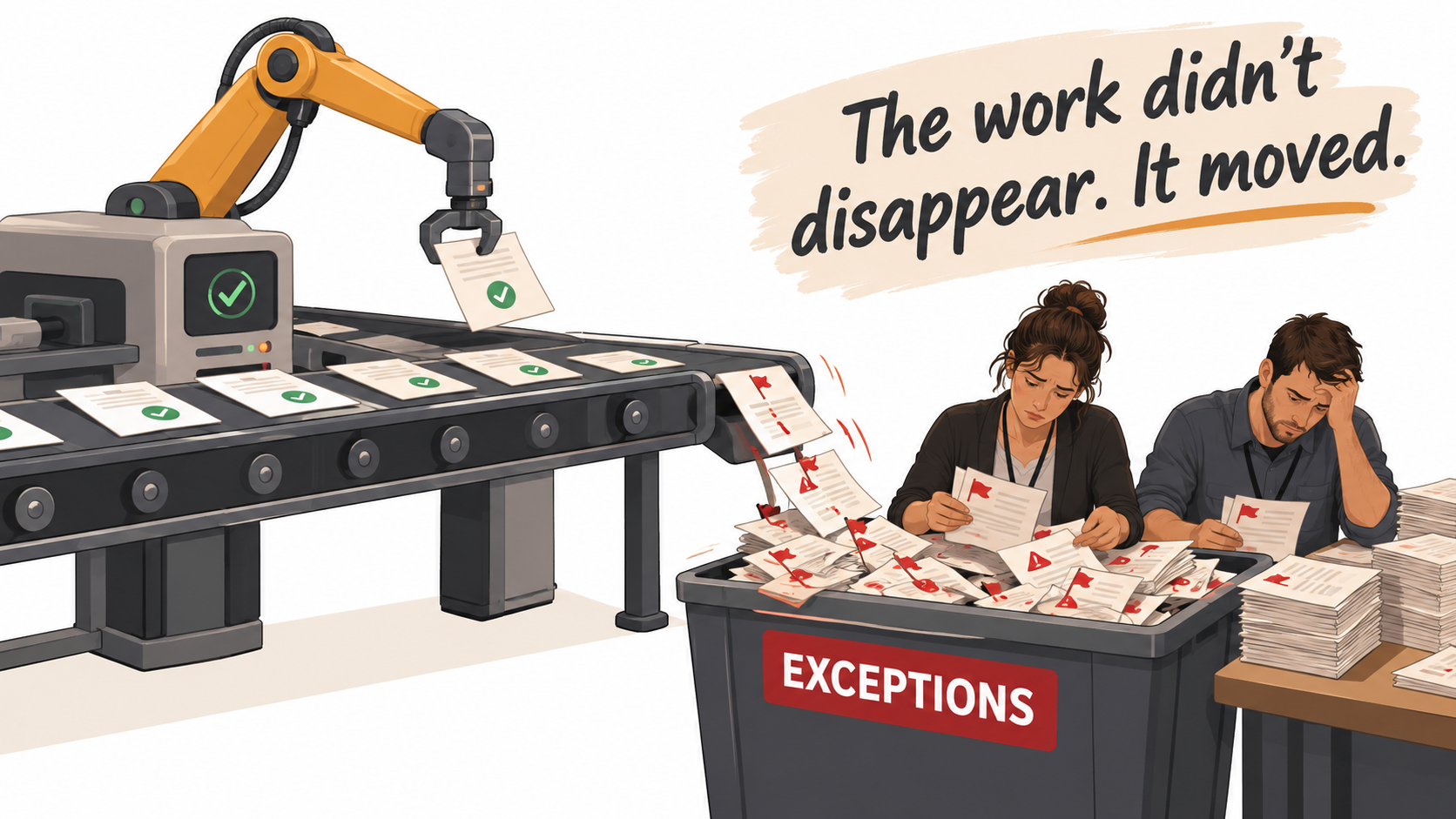
Every business case for AI automation includes a labor-savings figure. Very few include a realistic figure for the labor the automation creates.
Automation doesn’t remove work. It reshapes it.
When a well-designed automation can’t handle a case confidently, it routes that case to a person. That’s correct behavior. But it means the work is reshaped, not removed. The routine 80% gets automated. The hard 20% stays human, and now it arrives without the context a person would have built up by handling the easy cases too.
Consider an accounts payable team. Before automation, a clerk processes 200 invoices a day, most of them routine. After automation, the system handles the routine ones and routes 30 exceptions a day to the same clerk. But those 30 are the mismatched POs, the duplicate submissions, the foreign-currency invoices, and the vendors with unusual terms. Each one takes much longer than an average invoice used to.
The headline says “85% automated.” The clerk’s day may only be 40% shorter, and noticeably more draining.
The four ways exception costs grow
1. Confidence thresholds get loosened. When the exception queue backs up, someone lowers the threshold so fewer cases get routed to humans. Throughput improves. Error rates rise. The cost moves from visible labor to invisible mistakes.
2. Exceptions don’t feed back. People fix exceptions one at a time, but nobody analyzes them in aggregate. The same category of failure keeps showing up because the fixes never make it back into the prompt, the rules, or the test set.
3. Rubber-stamping sets in. When reviewers see that the automation is usually right, they start approving its suggestions without really checking. Review becomes a formality. Researchers call this automation bias, and it means your “human in the loop” stops being a real control.
4. Shadow correction. Downstream teams start silently fixing the automation’s mistakes as part of their normal work. The finance team adjusts misclassified expenses at month-end. Sales cleans up CRM fields the enrichment bot got wrong. That labor never shows up in any automation dashboard.
Designing the exception queue as a product
The exception queue deserves the same design attention as the automation itself. A few practices make a large difference:
- Route with context. When a case is sent to a human, include why: which field was uncertain, what the model’s best guess was, and which rule it couldn’t satisfy. That turns a 10-minute investigation into a 2-minute decision.
- Tag every exception by cause. Use a short, fixed list of reasons. Review the distribution monthly. The top category is your next improvement project.
- Measure exception handling time, not just exception rate. A 5% exception rate where each takes 20 minutes costs more than a 10% rate where each takes 3.
- Spot-audit approved outputs. Periodically pull cases a human approved and check whether they were actually right. This is the only reliable way to detect rubber-stamping.
- Ask downstream teams directly. Once a quarter, ask the people who consume the automation’s output how much time they spend fixing it. The answer is often surprising.
Actionable takeaway: in the business case, replace “hours saved” with “hours saved minus exception handling hours minus downstream correction hours.” Re-measure it at 3, 6, and 12 months. That net figure is the real return.
Integration Rot: The Connectors Nobody Watches
An AI automation is rarely just a model. It’s a model wired into an inbox, a CRM, an ERP, a document store, a ticketing system, and a messaging tool. Every one of those connections is a dependency that can change without warning.
What changes upstream
Sculley and colleagues flagged “data dependencies” and “changes in the external world” as core sources of ML debt. In business automation, those show up in mundane, constant ways:
- API version changes. SaaS vendors deprecate API versions and endpoints on their own schedules, which rarely line up with yours.
- Schema changes. An admin renames a CRM field, adds a required property, or changes a picklist value. The automation either fails or, worse, writes to the wrong field.
- Authentication changes. Tokens expire. The service account belonged to an employee who left. A security team rotates credentials or tightens OAuth scopes.
- Format changes. A partner switches from CSV to XLSX, a bank changes its statement layout, or a supplier redesigns its invoice template.
- Rate limits and quotas. Volume grows past a tier limit, and calls start getting throttled at peak times.
Undeclared consumers: the dependency you didn’t know you had
One of the subtler risks Sculley’s team described is “undeclared consumers.” This means systems that quietly depend on another system’s output without the owner knowing.
In business automation this happens all the time. Someone builds an automation that writes AI-generated summaries into a CRM field. Six months later, a sales manager builds a report filtering on that field. Then a marketing workflow starts triggering emails based on it. When the original automation changes its output format, or gets switched off, two other processes break, and nobody understands why.
Silent failure is the real problem
A connector that throws an error is a nuisance. A connector that keeps running against the wrong data is a liability. If a field is renamed and the automation starts reading an empty value, a model will often still produce a confident answer. It just won’t be grounded in anything.
This is why “the automation ran successfully” is not the same as “the automation worked.” Run logs show green checkmarks while the output degrades.
Reducing integration debt
- Validate inputs before they reach the model. If a required field is empty or a value is outside its expected range, stop and route to exceptions rather than letting the model guess.
- Validate outputs before they reach downstream systems. Check structure, required fields, and allowed values. Reject and alert rather than writing bad data.
- Use service accounts, not personal credentials. Tie every automation’s authentication to a role, not a person who might leave.
- Map consumers. For each automation, record which systems and reports read its output. Update the map when someone builds on top of it.
- Subscribe to change notices. Track the developer changelogs for the five or six SaaS tools your automations depend on most.
Actionable takeaway: add a “heartbeat” check to every important automation. A scheduled test that pushes a known input through the full chain and verifies the expected output arrives at the end. If the heartbeat fails, you’ll know before your users do.
Usage Cost Creep: Why Per-Task Costs Rarely Stay Where You Estimated
The cost estimate in most AI business cases is built from a pilot: a few hundred test runs at a measured cost per task, multiplied by forecast volume. That number almost always proves too low over time, for reasons that have little to do with vendor pricing.
Prompt bloat
Every time an edge case surfaces, the fastest fix is to add a sentence to the prompt. “If the invoice is in euros, convert using…” “Never classify a ticket as billing if…” “When the customer mentions a competitor…”
After a year, a 400-word prompt can become a 3,000-word prompt. Since most model pricing is based on tokens processed, and the system prompt is sent with every request, the cost per task climbs in step. The prompt also gets harder to reason about, and instructions start to conflict.
Context expansion
Teams naturally want better answers, and the easiest lever is more context. Retrieval systems start pulling ten documents instead of three. Conversation history gets passed in full. Whole email threads get attached instead of the latest message. Each change improves quality a little and raises cost a lot.
Retries and chains
Production workflows add reliability layers that pilots didn’t have: retries on failure, a second model call to check the first, a verification step, a summarization step to shorten context. A single “task” in production might involve four or five model calls where the pilot measured one.
Agentic workflows amplify this. An agent that plans, calls tools, reviews results, and re-plans can use many times the tokens of a single-shot prompt, and the number varies a lot from run to run. That variability makes budgeting harder, which is part of why “escalating costs” featured in Gartner’s prediction about agentic project cancellations.
Success-driven volume
The best automations attract more use. Other teams want the same workflow. Users run it on tasks it wasn’t designed for. Volume can far exceed the original forecast. That’s a good problem, but it’s still a budget problem if nobody planned for it.
Model migrations can cut either way
When a model is retired, its replacement may be priced differently. Sometimes the newer model is cheaper per token. Sometimes the recommended replacement is a larger, pricier tier, or it produces longer outputs by default. Every forced migration is also a repricing event, and it should be modeled as one.
Keeping usage costs honest
- Track cost per completed task, not just total monthly spend. Total spend hides whether growth comes from volume (fine) or from inefficiency (fixable).
- Review prompts quarterly. Consolidate, remove obsolete instructions, and re-test against the golden set. Treat prompt length as a metric.
- Match model size to task. Classification, extraction, and routing often run fine on smaller, cheaper models. Save the largest models for tasks that truly need them.
- Cap agent loops. Set a maximum number of steps or tool calls per run, and route to a human when it’s reached.
- Set budget alerts per workflow, not just per account, so one runaway automation is visible on its own.
Actionable takeaway: in the original business case, model the cost per task at roughly double the pilot figure as a planning assumption, then track the actual number monthly. If it comes in lower, that’s upside. If it doesn’t, you’ve already budgeted for it.
Ownership Decay: Orphaned Automations and the People Problem
The most expensive form of automation debt often has nothing to do with technology. It’s the gradual loss of knowledge about what an automation does, why it was built that way, and who is responsible for it.
How automations become orphans
The pattern is familiar. An enthusiastic operations analyst builds a clever workflow in a no-code platform. It works well. The analyst gets promoted, changes teams, or leaves the company. The automation keeps running under their account.
A year later, something breaks. Nobody knows how it works. The prompt contains business logic nobody remembers agreeing to. There’s no documentation, no test set, and no record of which downstream processes depend on it. Fixing it means reverse-engineering it first.
This is Lehman’s law in action: the system’s complexity increased because no work was done to maintain it. It’s also the “undeclared consumers” problem in organizational form.
Shadow automation
The rise of accessible AI tools and no-code platforms has made it easy for anyone to build an automation. That’s broadly a good thing. But it means many organizations have dozens or hundreds of AI workflows running that IT, security, and finance don’t know exist.
These shadow automations carry every type of debt described above, plus extra risk. They may send customer data to unapproved services, run on personal API keys charged to corporate cards, or make decisions that should have had compliance review.
The questions every automation should be able to answer
A useful test: for any production AI automation, can someone in the organization answer these questions within five minutes?
- Who owns this automation, by name and by role?
- What business process does it support, and what happens if it stops?
- Which model and version does it use, through which platform?
- What data does it read, and where does it write?
- Who or what depends on its output?
- How do we know it’s still working correctly?
- How do we turn it off safely?
If the answer to any of these is “nobody knows,” that automation carries ownership debt, and it will charge interest at the worst possible moment.
Making ownership stick
- Assign a business owner and a technical owner to every production automation. The business owner decides whether it’s still worth running. The technical owner keeps it working.
- Write a one-page runbook. Purpose, inputs, outputs, model, consumers, test procedure, known failure modes, and shutdown steps. One page is enough. Zero pages is not.
- Add ownership transfer to offboarding. When someone changes roles or leaves, their automations get reassigned explicitly, just like their accounts and equipment.
- Run a discovery sweep twice a year. Check usage exports from model providers, automation platform account lists, and expense reports for AI-related charges to find workflows that aren’t in the register.
Actionable takeaway: an automation without a named owner should be treated as scheduled for shutdown. That one policy forces the ownership conversation to happen.
Pricing It In: A Total-Cost-of-Ownership Worksheet for AI Automation
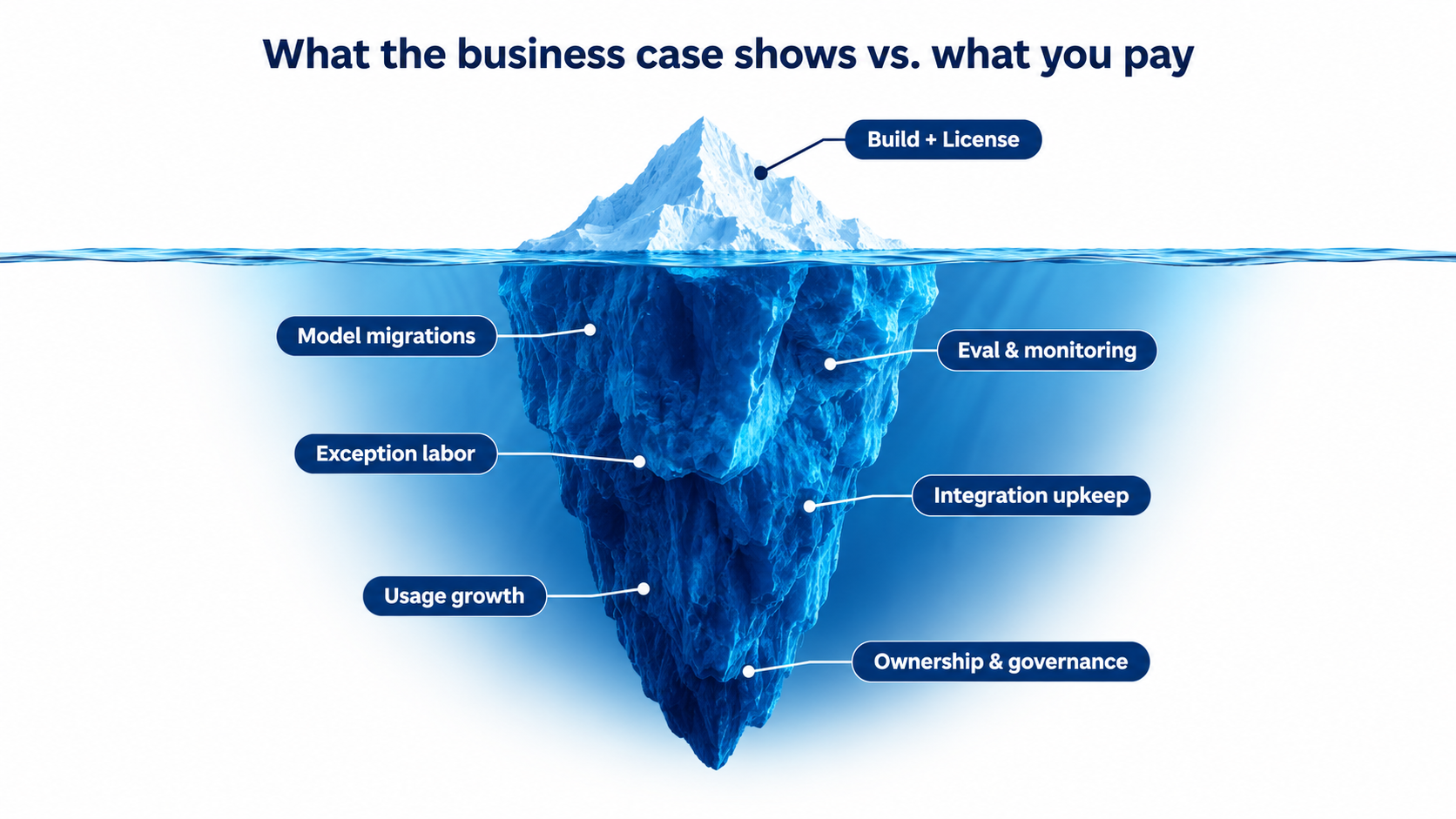
Knowing the six interest payments is useful. Turning them into numbers is what changes decisions. Below is a worksheet structure any team can adapt. The figures are placeholders; the categories are the point.
One-time costs (the principal)
- Discovery and process mapping: hours spent understanding the current process and its exceptions.
- Build: prompt design, workflow configuration, integration work.
- Golden test set creation: gathering and labeling representative examples. Often skipped; shouldn’t be.
- Input and output validation: guardrails at both ends of the model call.
- Documentation and runbook.
- Change management and training for the people who will work alongside it.
Recurring costs (the interest)
Estimate each of these per year:
- Model and platform usage: forecast volume × realistic cost per task (including retries, chains, and prompt growth).
- Platform and license fees: automation platform seats, vector database, monitoring tools.
- Model migrations: plan for at least one per year per automation. Estimate hours to find usage, re-test against the golden set, re-tune prompts, and validate downstream.
- Monitoring and evaluation: weekly output sampling, scheduled test runs, metric review.
- Exception handling labor: exception volume × average handling time × loaded hourly cost.
- Downstream correction labor: time other teams spend fixing output. Measure this; don’t assume zero.
- Integration upkeep: responding to upstream API, schema, and auth changes.
- Prompt and rules maintenance: quarterly reviews, policy updates, edge-case fixes.
- Governance overhead: security reviews, access reviews, audit support.
A worked illustration
Take a hypothetical support-ticket triage automation. The pilot showed it could classify and route tickets that previously took agents about two minutes each to triage manually. At 10,000 tickets a month, the business case claimed roughly 330 hours saved monthly.
Now apply the recurring costs. Suppose 12% of tickets land in the exception queue and take four minutes each to handle with context, about 80 hours a month. Suppose downstream agents re-route another 3% of tickets that were misclassified, at three minutes each, about 15 hours. Add a few hours a week for monitoring and sampling, and a quarterly prompt review.
The net savings are still real, but they might land closer to 200 hours a month than 330. And that’s before a model migration week, an integration break, or a policy change that requires rework.
None of this means the automation was a bad idea. It means the honest number was smaller than the pitch, and the team that budgets for 200 hours will make better decisions than the team expecting 330 and wondering where the rest went.
The “maintenance ratio” as a planning heuristic
One useful habit is to express recurring maintenance as a percentage of the original build effort per year. Traditional software teams often think this way. For AI automations, given annual model turnover and drift risk, it’s reasonable to assume the ratio will be meaningful rather than negligible, and to measure your actual ratio after the first year.
Once you have real numbers from a few automations, you’ll have an internal benchmark that makes every future business case more accurate.
Actionable takeaway: require every new AI automation proposal to include a recurring-cost section with all nine categories above, even if some are estimated at zero. The act of filling it in surfaces assumptions that would otherwise stay hidden.
Paying Down the Debt: Operating Habits That Keep AI Automation Healthy
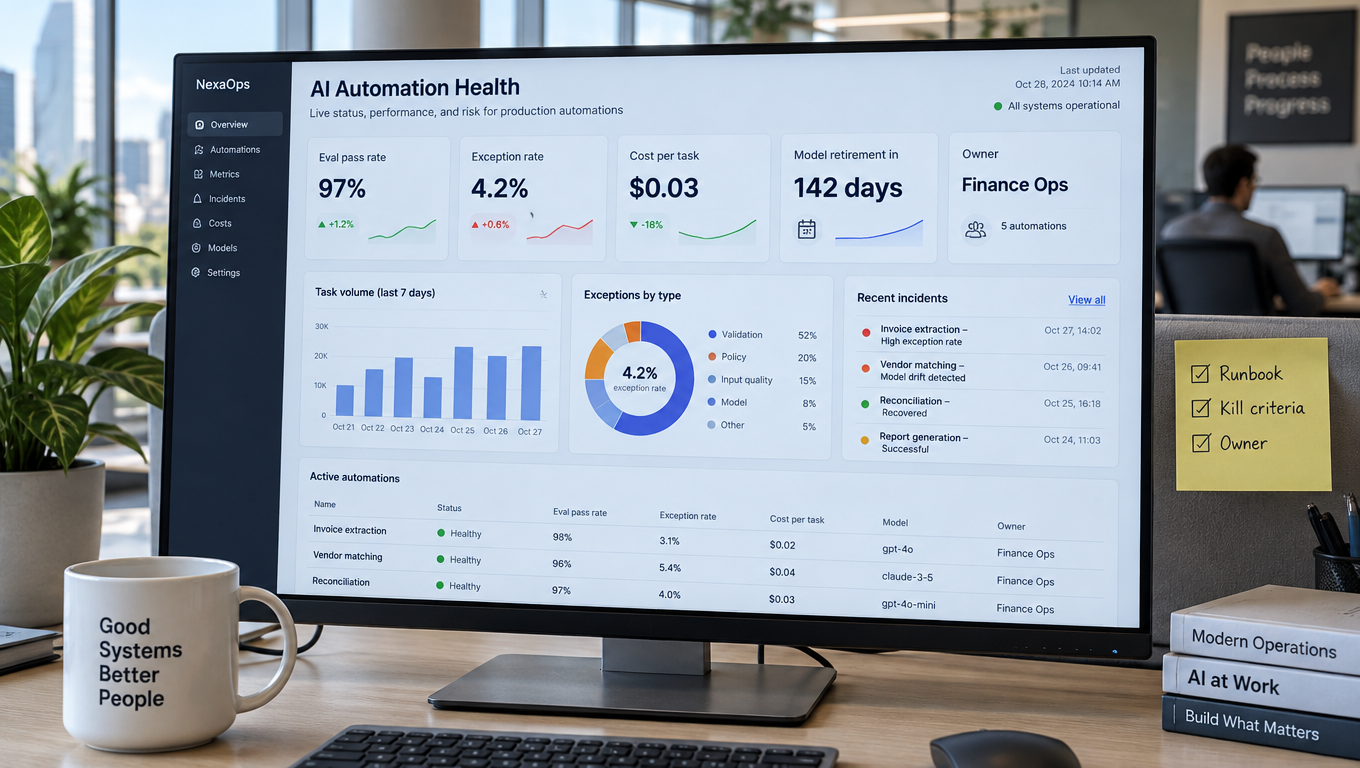
Automation debt can’t be eliminated. But it can be kept small, visible, and predictable. These habits are what separate teams whose AI automations keep delivering from teams that end up with a graveyard of half-working workflows.
1. Put a thin layer between your workflows and the model
Don’t hard-code model names in dozens of places. Route model calls through a single configuration point, whether that’s a shared settings file, an internal gateway, or a platform feature that lets you set models centrally. When a retirement notice arrives, you change it once, test, and roll out.
The same goes for prompts. Store them in version control or a managed prompt registry, not pasted into individual workflow steps where nobody can see their history.
2. Treat the golden test set as infrastructure
Every production automation gets a test set before launch. Every new edge case that reaches the exception queue becomes a candidate for the test set. Every change, whether model, prompt, or integration, gets run against it before going live.
This is the practice that turns model migrations from a stressful scramble into a routine afternoon. It also gives you evidence when someone asks, “Is this still working?”
3. Build a maintenance calendar
Debt is cheapest to pay on a schedule. A simple calendar might look like this:
- Weekly: sample and review a handful of outputs per automation; check exception volume and cost per task.
- Monthly: review the automation register against vendor deprecation pages; analyze exception causes; run golden tests.
- Quarterly: prompt review and consolidation; downstream team check-in; access and credential review.
- Twice yearly: discovery sweep for shadow automations; keep-or-kill review for every workflow.
4. Set kill criteria up front
Every automation should launch with written conditions under which it gets shut down or redesigned. For example: net hours saved fall below a threshold for two consecutive quarters, the exception rate exceeds a set percentage, or no owner has been assigned for 30 days.
Kill criteria sound negative, but they protect the program. They stop sunk-cost thinking, free up budget for workflows that are actually paying off, and make the cancellation rates analysts predict into deliberate choices rather than slow failures.
5. Plan migrations before notices arrive
With models turning over roughly annually, you can predict that a migration is coming even before the email does. Teams that evaluate new models as they’re released, running their golden sets against them early, are rarely caught off guard. When the deprecation notice arrives, they already know which replacement works and what needs adjusting.
6. Make the debt visible to leadership
Build a simple health view for each automation: owner, model and its lifecycle status, days until retirement if announced, golden test pass rate, exception rate, cost per task, and net hours saved. Share it monthly.
When leaders can see the running costs next to the benefits, they make better portfolio decisions. They fund maintenance before things break, rather than paying for emergency fixes after.
7. Design for the exception path from day one
The best AI automations are designed backward from failure. What happens when the model isn’t sure? When the input is malformed? When the upstream system is down? A workflow with a clear, well-contextualized exception path ages gracefully. One that assumes the happy path collects debt from the first week.
Conclusion: Budget for the Life of the Automation, Not the Launch
AI automation for business is valuable, and in 2026 it’s increasingly table stakes for operations teams. But the value isn’t a one-time install. It’s a stream of benefits minus a stream of costs, and the costs are structurally built into how hosted AI works today.
Vendors retire models on schedules measured in months, with published minimum notice periods of 60 days to six months depending on the provider and model type. Research has shown that the “same” model service can change behavior substantially in a short time. Upstream systems change. Prompts bloat. Builders move on. None of this is a sign that something went wrong. It’s what running AI in production actually involves.
The organizations that get lasting returns from AI automation aren’t the ones that avoid debt entirely. They’re the ones that take it on deliberately, see it clearly, and pay it down on a schedule.
Key takeaways
- Plan for at least one model migration per automation per year. Recent flagship models have gone from release to retirement in roughly 12 to 13 months.
- Never run business-critical workflows on preview models. Notice periods for previews can be as short as two weeks.
- Build a golden test set before launch. It’s the foundation for safe migrations, drift detection, and proof that the automation still works.
- Measure net savings, not gross. Subtract exception handling and downstream correction time, and re-measure at 3, 6, and 12 months.
- Validate inputs and outputs at every integration point so silent failures become loud ones.
- Track cost per completed task and review prompts quarterly to control bloat.
- Give every automation a named owner and a one-page runbook. Treat ownerless automations as scheduled for shutdown.
- Write kill criteria before launch so retiring an underperforming workflow is a decision, not a drift.
- Add a recurring-cost section to every AI business case, covering usage, migrations, monitoring, exceptions, integrations, prompt upkeep, and governance.
Cunningham’s warning from 1992 still holds: a little debt speeds development, as long as it’s paid back promptly. The danger is the debt nobody’s tracking. For AI automation, the first step is simply writing it down.