


There is a moment many e-commerce sellers and content creators know intimately: you decide to finally set up an AI automation tool — something to handle order confirmations, product descriptions, social media scheduling, or customer chat. You open the documentation. Two hours later, you’re still configuring API keys, debugging a webhook, and watching a YouTube tutorial recorded in 2022 that no longer matches the interface you’re looking at. Twelve hours after that, you’ve either given up or handed it off to a developer who charges by the hour.
This is not a fringe experience. Technical setup barriers averaging 8 to 15 hours continue to be one of the most cited reasons AI adoption stalls among small and mid-sized businesses. According to industry research, 46% of business leaders identify skills and training gaps as their top AI implementation challenge, while 28% flag data readiness issues and integration complexity as equally severe blockers. For sellers running lean operations or solo content creators managing every aspect of their brand, those hours simply don’t exist.
The landscape in 2025 and 2026, however, looks meaningfully different. A new generation of no-code AI platforms — built around pre-built templates, visual workflow builders, and guided onboarding sequences — has compressed that 8-to-15-hour setup window down to under 30 minutes for many common automation use cases. This shift isn’t about cutting corners. It’s about removing the technical scaffolding that was never the point in the first place, so business owners can focus on outcomes rather than infrastructure.
This article examines what’s driving the change, which platforms are leading it, what the real-world time savings look like, and how to pick the right tool for your specific operation.
Why Traditional AI Setup Has Always Taken So Long
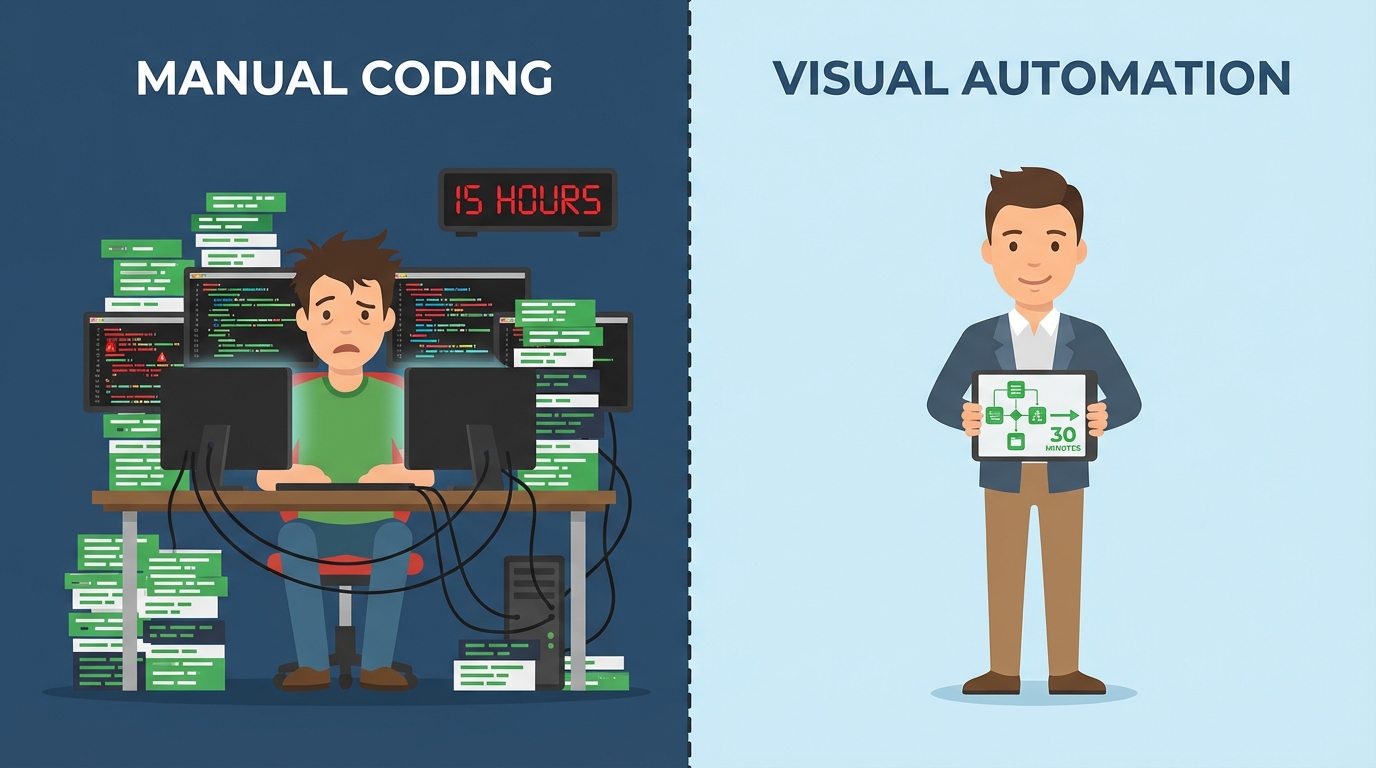
Before understanding how no-code platforms are collapsing setup times, it helps to understand what was eating all those hours in the first place. Traditional AI implementation for e-commerce and content workflows involves a chain of technical dependencies, each with its own failure points.
The API Authentication Maze
Most AI services — whether it’s a language model API, a product recommendation engine, or a predictive analytics tool — require authentication credentials to be generated, stored, and passed correctly between systems. For a non-technical user, generating an API key is only step one. Configuring OAuth tokens, setting rate limits, managing environment variables, and ensuring credentials are stored securely can consume two to three hours alone — especially if documentation is outdated or platform-specific quirks aren’t well-documented.
Integration with Existing Systems
An AI tool that doesn’t talk to your existing store, CRM, or email platform is nearly useless in isolation. Connecting AI features to platforms like Shopify, WooCommerce, or Klaviyo traditionally required webhook configuration, endpoint mapping, and sometimes custom middleware code. Each integration point introduces the possibility of mismatched data formats, version conflicts, and latency issues that only surface after hours of testing.
Training Data Preparation
Many early AI tools for e-commerce required sellers to format and upload training data — product catalogs in specific CSV schemas, customer interaction logs in defined JSON structures, or historical order data cleaned to remove null values. Data preparation work is notoriously time-consuming; research consistently shows it consumes 60–80% of a data project’s total time. For a seller with thousands of SKUs and years of order history, getting the data into a usable shape could easily represent a multi-day effort.
Testing, Debugging, and Iteration
Once a tool is nominally configured, the real clock starts. Testing automated workflows across edge cases — what happens when an order is partially fulfilled? When a customer returns an item before the confirmation email fires? — requires systematic verification. Bugs in workflow logic, missed conditional branches, and integration failures under real load conditions can push total setup time well past the initial estimate.
The Compounding Skill Gap
Gartner projected that by 2026, citizen developers — non-technical professionals who build their own tools — would outnumber professional developers four to one. Yet this shift is only possible if the tools themselves don’t demand developer-level knowledge. Research shows that talent shortages in technical AI roles could threaten $8.5 trillion in revenue by 2030 globally. The setup time problem is, at its core, a skill gap problem: the tools were built by engineers, for engineers, and the assumptions baked into their interfaces reflected that.
What No-Code AI Platforms Actually Are
The term “no-code” gets applied to a wide range of products, from simple form builders to fully visual application development environments. In the context of AI automation for e-commerce and content creation, a no-code AI platform refers to a tool that allows users to build, deploy, and manage AI-powered workflows without writing a single line of code.
The Core Architecture
Most mature no-code AI platforms share a few foundational components. First, a visual canvas or workflow builder — a graphical interface where automation steps are represented as connected blocks or nodes rather than code. Second, a library of pre-built connectors (sometimes called integrations, apps, or triggers) that handle the technical work of connecting to third-party services like Shopify, Gmail, Slack, or OpenAI. Third, a template gallery that provides ready-made workflow configurations for common use cases, allowing users to start from a working example rather than a blank slate.
Where AI Fits In
What distinguishes a no-code AI platform from a basic no-code automation tool is the inclusion of AI modules — pre-configured connections to language models, image recognition engines, sentiment analysis tools, predictive analytics APIs, or conversational AI builders — that can be inserted into a workflow as easily as any other step. In practice, this means a user can add an “AI text generation” step to a workflow that fires when a new product is added to their store, automatically drafting a product description and sending it for review, without knowing anything about the underlying model API.
The Spectrum of No-Code AI Tools
It’s worth noting that no-code AI platforms exist on a spectrum. At one end are dedicated automation platforms like Zapier, Make.com, and n8n — tools designed primarily for connecting apps and automating multi-step processes. At the other end are vertically focused AI tools with no-code interfaces purpose-built for specific functions: customer support (Tidio, Gorgias), email marketing (Klaviyo, Mailchimp AI), content creation (Jasper, Predis.ai), or analytics (Obviously AI). In between are full-stack no-code app builders like Bubble and DrapCode, which allow users to build entire custom applications without code, with AI features embedded throughout.
How Pre-Built Templates Collapse Implementation Time

If there is a single feature most responsible for the drop from 15 hours to 30 minutes, it is the pre-built template. Templates effectively pre-answer the hardest question in automation setup: How do I structure this workflow?
What a Template Actually Contains
A pre-built automation template is not just a screenshot or a guide — it is a functional workflow configuration that can be copied directly into a user’s account and activated with minimal modification. A good template includes the trigger (the event that starts the automation), all the intermediate steps with their logic already defined, connections to the most commonly used apps in that category, error handling for the most frequent failure scenarios, and documentation notes explaining what each step does and why.
When a Shopify seller finds a template titled “Auto-generate product descriptions with AI when new product is added,” they are inheriting the work of the platform’s engineers and early users who already debugged the connector, mapped the correct data fields, and verified that the AI prompt produces useful output. Starting from that template instead of from scratch is the difference between 25 minutes and 12 hours.
Template Volume Matters
The value of a template library scales with its breadth and quality. Zapier, one of the most widely adopted no-code automation platforms, offers more than 7,000 pre-built “Zap” templates covering AI integration scenarios across thousands of app combinations. Make.com (formerly Integromat) provides an extensive library of scenario templates optimized for complex, multi-branch AI workflows. For e-commerce specifically, Shopify Flow offers a curated set of templates for the most common merchant automation needs — order tagging, fraud risk scoring, customer segmentation, and inventory alerts — that deploy in a reported average of approximately two minutes.
The Customization Layer
Templates reduce setup time precisely because they separate the structural work from the customization work. A seller can activate a “Send abandoned cart email with AI-personalized message” template in minutes, then spend another five to ten minutes adjusting the email tone, the AI prompt instructions, and the timing delay. That customization work is intuitive because the hard parts — connecting Shopify to the AI module to the email platform, with the right data fields flowing between them — are already handled.
Community-Contributed Templates
Many platforms have layered a community contribution model on top of their official template libraries. Zapier’s community template system, Make.com’s scenario sharing, and n8n’s open-source workflow library all allow experienced users to publish their own automations for others to reuse. This means the template library grows continuously with real-world use cases, including niche e-commerce scenarios and content creator workflows that the platform’s own team might never have prioritized.
Visual Workflow Builders: Drag, Drop, Deploy
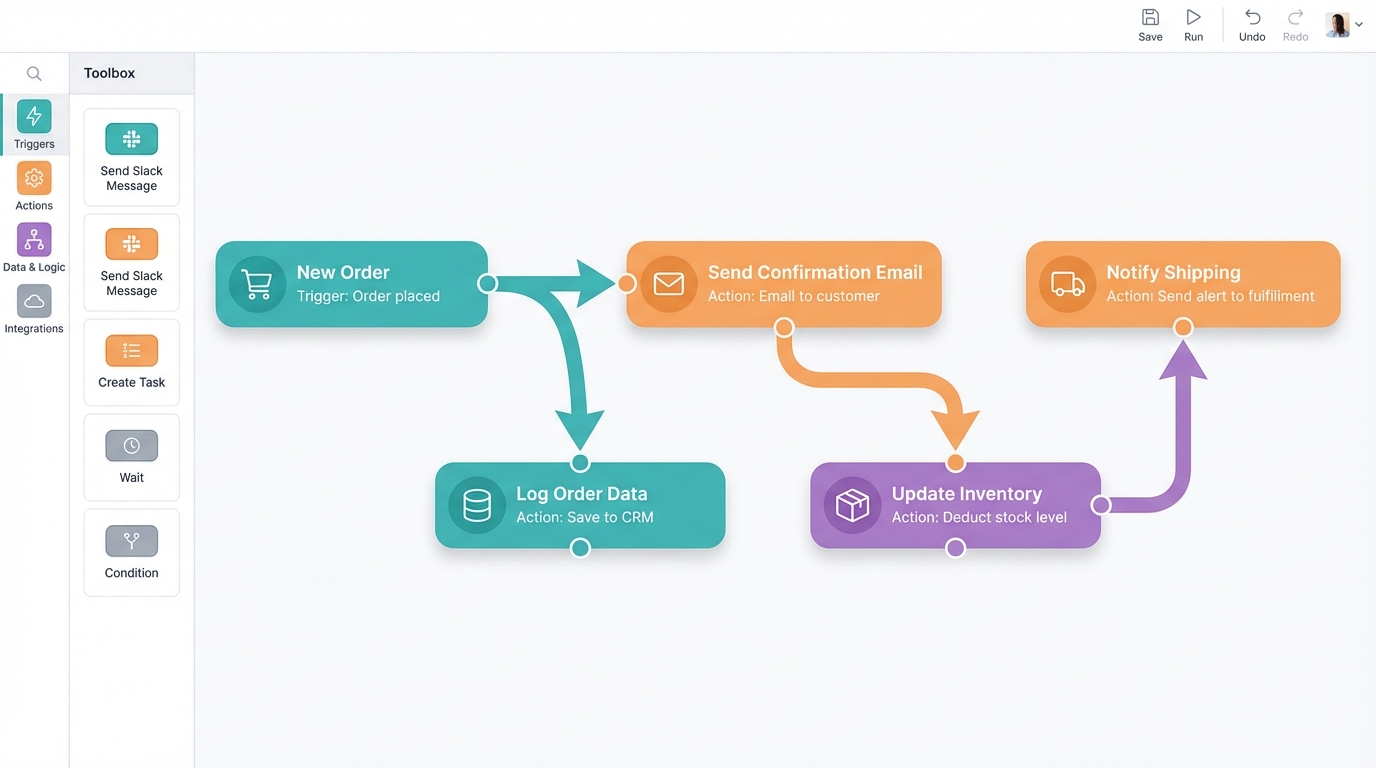
Alongside templates, the visual workflow builder is the second architectural pillar that makes 30-minute AI setup possible. Rather than editing JSON configuration files or writing trigger-action scripts, users interact with a graphical canvas where each automation step is a visual block, and connections between steps are drawn with lines.
Why Visual Representations Work
The cognitive advantage of visual workflow builders over code-based setup is not just aesthetic. When a user can see the entire automation as a connected diagram, they can immediately identify gaps, redundant steps, and logical errors without needing to mentally simulate code execution. Conditional branches — “if the order value is over $100, do X; otherwise, do Y” — are represented as visible fork points in the workflow, making complex logic comprehensible to non-programmers.
Research in cognitive psychology consistently shows that humans process visual spatial relationships faster and more accurately than symbolic text. For automation setup, this translates to dramatically shorter debugging cycles and a much lower error rate on first deployment.
Make.com’s Scenario Builder
Make.com’s visual scenario builder is widely cited as one of the most capable in the no-code space. It supports complex conditional logic, parallel processing branches, and real-time execution monitoring — all visible on a single canvas. For AI-heavy automations requiring data transformation between steps (for example, taking raw customer review text, running it through a sentiment analysis AI module, and routing it to different teams based on the result), Make.com’s visual approach handles sophistication that would traditionally require a developer-written script.
Zapier Canvas
Zapier introduced Zapier Canvas, a visual process-mapping layer that allows users to sketch out entire automation ecosystems before building them — a planning-to-deployment pipeline that keeps non-technical users oriented throughout setup. Zapier’s core workflow builder uses a linear trigger-action model that is deliberately simpler than Make.com’s branching approach, prioritizing quick deployment for straightforward automations. For users who need an AI tool connected to three or four apps without complex branching logic, Zapier’s linear model means setup in under 15 minutes.
n8n’s Open-Source Flexibility
n8n has gained significant traction among technically adjacent users — those who want no-code simplicity but are comfortable with self-hosting and occasional logic configuration. Its visual builder supports AI-assisted automation creation where users can describe what they want in plain language and have the tool suggest workflow structures. n8n’s open-source nature also means it’s free to self-host, which matters for cost-conscious content creators and small e-commerce operations.
Shopify Flow for Merchants
For Shopify sellers specifically, Shopify Flow represents a native no-code automation builder that requires no external account setup, no API configuration, and no third-party connection management. Simple automations — tagging high-value customers, alerting a team when inventory drops below a threshold, pausing ad campaigns when stock runs out — can be configured in the Flow interface in under two minutes using the built-in trigger-condition-action structure. The tradeoff is scope: Flow only works within the Shopify ecosystem, limiting its utility for multi-platform operations.
Top No-Code AI Platforms for E-Commerce Sellers in 2025–2026

The no-code AI platform market reached approximately $6.06 billion in 2025, with e-commerce holding roughly 22% of the automation market share. The field is crowded, but a handful of platforms have established clear differentiation for merchant use cases.
Shopify Flow + Shopify Magic
Best for: Shopify merchants wanting native, zero-configuration AI automation.
Shopify Flow handles the operational automation layer — inventory management, order processing rules, customer tagging, fraud risk workflows — while Shopify Magic (Shopify’s AI layer) handles content generation: product descriptions, email subject lines, and store copy. Together, they represent the most frictionless AI automation entry point for Shopify sellers, requiring no external accounts and deploying from within the existing Shopify admin. The limitation is platform lock-in: these tools work exclusively within Shopify’s ecosystem and cannot connect to external CRMs, analytics platforms, or multi-channel inventory systems.
Make.com (formerly Integromat)
Best for: Multi-platform e-commerce operations needing complex AI logic.
Make.com scores a reported 9 out of 10 for AI and machine learning capabilities among no-code automation platforms. Its native AI modules connect directly to OpenAI, Anthropic Claude, and Google AI without requiring users to manage API keys manually. For e-commerce sellers running operations across Shopify, Amazon, WooCommerce, and multiple fulfillment systems, Make.com’s ability to handle conditional logic, parallel processing, and data transformation makes it the most capable no-code option. The initial learning curve — approximately one to two hours for first-time users — is higher than Zapier, but the long-term time savings for complex workflows are substantial.
Zapier with AI Features
Best for: Sellers who need fast, simple connections between many different apps.
With more than 8,000 app integrations and thousands of pre-built Zap templates, Zapier is the broadest integration platform available without code. Beginners with pre-built templates typically configure simple AI workflows in 15 to 45 minutes. Zapier’s AI features include natural language workflow creation (describe what you want, and Zapier builds the Zap), AI-powered data formatting, and an AI Agent builder for conversational automation. The pricing model — based on task volume — can become expensive at scale, but for sellers running moderate automation volumes, it offers the fastest time-to-value.
Tidio
Best for: E-commerce sellers prioritizing AI customer support automation.
Tidio is a purpose-built customer communication platform with AI features specifically designed for e-commerce. Its Lyro AI chatbot can be configured and deployed on a Shopify or WooCommerce store in under 30 minutes, without any developer involvement. Tidio uses a visual conversation flow builder — similar in concept to a workflow canvas — to define how the AI handles different customer queries. Research suggests AI-powered chat tools like Tidio can automate up to 60% of routine customer support queries, representing significant labor savings for merchants who currently handle support manually.
Parabola
Best for: Data-heavy e-commerce operations needing AI-powered data pipeline automation.
Parabola occupies a specific niche in the no-code AI landscape: data transformation and pipeline automation. For e-commerce sellers who regularly export reports from multiple platforms, clean and reformat the data, and then push it into a central dashboard or another tool, Parabola’s visual data flow builder can automate the entire process. AI features within Parabola can categorize products, flag anomalies in sales data, and generate descriptive summaries — all without SQL or Python knowledge.
DrapCode
Best for: Sellers who need custom e-commerce applications without development resources.
DrapCode allows merchants to build complete, database-backed online store applications in a single day — compared to weeks with traditional development. It combines a visual app builder with built-in mobile responsiveness, AI integrations via plugins, and Shopify compatibility. For sellers who have outgrown Shopify’s standard templates but can’t justify custom development costs, DrapCode offers a practical middle path.
Top No-Code AI Platforms for Content Creators
Content creators — YouTubers, newsletter writers, podcasters, social media managers, and bloggers — face a different set of automation needs than e-commerce sellers. Their bottlenecks are typically content production volume, cross-platform distribution, audience engagement tracking, and campaign analytics rather than order processing or inventory management. The no-code AI ecosystem has developed strong solutions for each of these areas.
Zapier + AI Content Workflows
Zapier’s template library includes dozens of pre-built workflows specifically for content creators: automatically posting new blog articles to social media, transcribing podcast recordings with AI and sending summaries to a newsletter draft, generating social media captions from long-form content using a connected language model, and routing engagement data from multiple platforms into a single tracking spreadsheet. Because Zapier connects to virtually every major content platform — YouTube, Instagram, TikTok, Substack, Ghost, WordPress, Beehiiv, and more — it serves as the connective tissue of a creator’s automation stack.
Predis.ai
Best for: Social media content creators needing AI-generated visual and written content at scale.
Predis.ai combines AI text generation, image creation, and scheduling in a single no-code platform. Creators input a topic, URL, or prompt, and the platform generates social media posts — including images — across multiple formats simultaneously. Setup involves connecting social media accounts (typically a five to ten minute OAuth process) and selecting content preferences. The full workflow, from account connection to scheduled AI-generated content pipeline, routinely takes under 30 minutes.
Jasper
Best for: Content creators and marketers producing high volumes of written content.
Jasper is a purpose-built AI writing platform with templates for blog posts, email newsletters, product descriptions, ad copy, and social media content. Its no-code interface uses a document editor paradigm that most users find immediately intuitive — there is no workflow canvas to navigate. Creators select a template, define parameters (tone, audience, topic, length), and generate drafts within seconds. More than 50% of marketers now report using AI tools for content creation, and Jasper is among the most cited platforms in that adoption wave.
Ocoya
Best for: E-commerce-adjacent content creators managing product-focused social media.
Ocoya sits at the intersection of e-commerce and content creation: it integrates with Shopify to pull product data, then uses AI to generate social media content, schedule posts, and track performance. For creators who monetize through affiliate marketing or run product-focused channels, Ocoya’s ability to turn a product catalog into a content calendar in minutes represents a meaningful acceleration of the content production process.
Mailchimp AI
Best for: Newsletter creators and email marketers wanting AI-assisted campaign automation.
Mailchimp’s AI features — including AI-generated subject lines, send time optimization, content personalization, and audience segmentation — are embedded directly into the existing Mailchimp interface that millions of users already know. There is no new platform to learn, no additional setup, and no API configuration. For content creators who already use Mailchimp for newsletters, activating AI features is a matter of toggling settings rather than building new infrastructure. Research indicates that no-code AI users in marketing see 42% faster campaign launches and 27% higher audience engagement compared to non-AI users.
Real-World Time Savings: From Hours to Minutes
The 8-to-15 hour vs. 30-minute comparison is not a marketing claim — it reflects a genuine structural difference in how traditional AI implementation and modern no-code deployment work. But what does that look like in concrete scenarios?
Scenario 1: AI-Powered Customer Support Chatbot for an E-Commerce Store
Traditional setup (estimated 10–14 hours): Select a chatbot framework, configure the model API, map the conversation intents and entities, write training dialogues, integrate with the Shopify customer order API via webhooks, test across conversation scenarios, deploy, and monitor for errors.
No-code setup with Tidio (estimated 20–30 minutes): Install the Tidio app from the Shopify App Store, connect the Lyro AI chatbot with one click, select the customer FAQs the chatbot should handle from a pre-populated list, set a live agent escalation threshold, and activate. Tidio handles the model, the intent recognition, the Shopify integration, and the deployment infrastructure automatically.
Scenario 2: Automated Social Media Content Pipeline for a Content Creator
Traditional setup (estimated 8–12 hours): Research API documentation for each social media platform, generate developer credentials for each, write scripts to pull content from the creator’s CMS, integrate with an AI text generation API, handle OAuth refresh token management, schedule cron jobs, and test the pipeline end-to-end.
No-code setup with Zapier + Predis.ai (estimated 15–25 minutes): Open a Predis.ai account, connect Instagram, Facebook, and LinkedIn via OAuth (guided step-by-step), select a content template, define posting preferences, and activate the AI content generation schedule. Use a pre-built Zapier template to also push new posts to Twitter/X and schedule a weekly digest to a newsletter tool.
Scenario 3: AI Product Description Generator for a Dropshipping Store
Traditional setup (estimated 12–15 hours): Set up an OpenAI API account, write a prompt engineering system, build a script that reads from the product catalog, calls the API, formats the output, and pushes it back to the store. Handle API error responses and rate limits.
No-code setup with Shopify Magic or Make.com (estimated 10–20 minutes): In Shopify Magic, simply open a product draft and click “Generate description” — the AI is already integrated. In Make.com, use the pre-built “Generate product description with OpenAI when product added to Shopify” scenario template, enter store credentials, confirm the AI prompt, and activate. Make.com handles the API calls, rate limiting, and data mapping automatically.
The AgentiveAIQ Example
One illustrative example of rapid AI deployment in e-commerce: pre-built AI sales agent templates for Shopify and WooCommerce are reported to allow merchants to deploy a 24/7 AI sales agent in under one hour. An early user in the direct-to-consumer skincare space reportedly saw a 22% increase in conversion rate within two weeks of deployment, without any developer involvement in the setup process. While individual results vary based on store traffic, product complexity, and customer demographics, the pattern — fast setup, measurable commercial outcome — illustrates the value proposition of the no-code approach.
The ROI Case: Beyond Just Saving Time
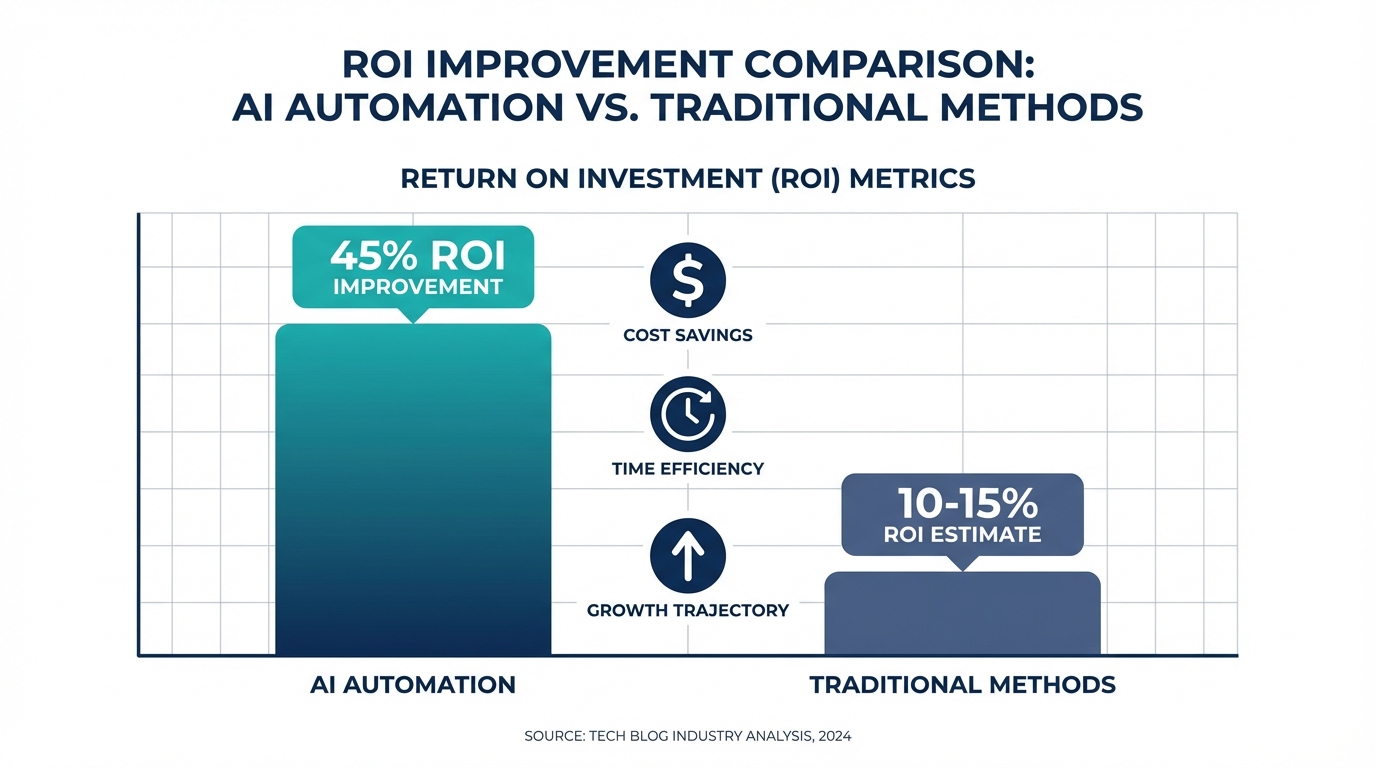
The case for no-code AI platforms isn’t made only in hours saved during setup. The downstream commercial benefits — when automation is actually running — represent the larger share of the value equation.
Quantified Business Impact
Several metrics from recent research illustrate the scale of potential returns:
- E-commerce ROI from automation: Businesses adopting AI automation report an average 45% improvement in overall ROI and an 80% increase in lead generation effectiveness.
- Personalization revenue uplift: AI-driven personalization, enabled through no-code platforms that connect customer data to recommendation engines, yields reported sales ROI uplifts of 10–20% (McKinsey) and as high as $79 revenue per $1 spent in some e-commerce deployments.
- Content marketing efficiency: Generative AI reduces content production costs by approximately 67%, while enabling more than 50% of marketers to produce blog posts, product descriptions, and social media content at scale.
- Customer support cost reduction: AI chatbots handling 60% of routine queries translate directly into reduced support staffing costs — or freed capacity to focus on complex, high-value customer interactions.
- Faster purchase completion: Shoppers interacting with AI-assisted store experiences complete purchases 47% faster, with AI chat driving conversion rates of 12.3% compared to 3.4% for traditional browsing experiences.
Development Cost Savings
No-code AI platforms don’t just save setup time — they save money that would otherwise go to developers. Research across the industry consistently shows that no-code approaches reduce development costs by 60–70% compared to custom-coded solutions. For a small e-commerce operation that might otherwise pay a freelance developer $75–$150 per hour to build and maintain AI integrations, the cost difference is not marginal.
Faster Time-to-Market
In e-commerce and content, speed is a competitive variable. A seasonal campaign that would take three weeks to build with custom development can be deployed in three days with no-code AI tools. A content creator who wants to test an AI-assisted posting strategy can validate the hypothesis within a week rather than spending a month on setup. This speed advantage compounds over time: teams that iterate faster learn faster and reach effective automation strategies sooner.
The Democratization Dividend
Perhaps the most significant ROI argument for no-code AI is the one hardest to quantify: access. A solo e-commerce seller running a $200,000-per-year operation has never had access to AI personalization, predictive inventory management, and automated content generation — those capabilities existed only for enterprises with engineering teams. No-code platforms have fundamentally changed that access equation. The same capabilities that drove Sephora’s 53% ROAS increase through AI-powered marketing are now accessible to a boutique candle shop owner with a Shopify store and a Make.com account.
Limitations and Trade-Offs to Understand Before You Start
No-code AI platforms have genuine limitations that are worth understanding before committing to one. The 30-minute setup claim is real for many common workflows — but it is not universal, and there are scenarios where the no-code approach introduces its own constraints.
Template Fit vs. Custom Needs
Pre-built templates work best when your use case is common. When your automation requirements are unusual — a non-standard fulfillment process, a proprietary CRM, or a workflow logic that doesn’t match any available template — setup time increases substantially. The no-code platform still offers advantages over custom code in most cases, but the 30-minute promise assumes a reasonably standard configuration. Highly customized scenarios may still require professional setup assistance or a developer familiar with the platform’s API.
Vendor Lock-In and Platform Risk
Building your operations on a third-party no-code platform introduces dependency. If the platform changes pricing, deprecates features, or experiences downtime, your automations are affected. This risk is manageable — most established platforms have strong uptime guarantees and change management processes — but it is a real consideration for businesses that have made automation central to their operations. Where possible, maintaining documentation of your workflow logic provides a migration path if platform changes become disruptive.
Data Privacy and Compliance
Routing customer data — names, email addresses, order histories, behavioral data — through third-party automation platforms introduces GDPR, CCPA, and data processing compliance considerations. Most major no-code platforms offer data processing agreements and compliance documentation, but users need to actively review these terms rather than assuming compliance is automatic. E-commerce sellers handling European customers in particular should verify that their no-code platform’s data storage and processing practices meet applicable requirements.
Pricing Model Complexity
No-code automation platforms frequently charge based on the volume of tasks or operations processed per month. A Zapier workflow that runs hundreds of times daily can accumulate task counts quickly, moving users into higher pricing tiers than expected. Make.com uses an “operations” model with similar scaling dynamics. Understanding the volume characteristics of your planned automations before committing to a pricing tier prevents unexpected cost surprises. Most platforms offer free tiers that are adequate for testing and low-volume use, but businesses running at meaningful scale should model projected monthly volumes before assuming the platform will remain affordable.
AI Output Quality Requires Oversight
No-code AI platforms make AI capabilities accessible, but they don’t guarantee AI output quality. An automated product description generator will produce descriptions that require human review before publication. An AI chatbot will occasionally mishandle edge-case customer queries. A sentiment analysis workflow will sometimes misclassify nuanced feedback. The reduction in setup time does not eliminate the ongoing need to monitor AI outputs, refine prompts, and maintain quality standards. Businesses that treat no-code AI deployment as “set it and forget it” will eventually encounter automation failures that would have been caught with regular review.
How to Choose the Right No-Code AI Platform for Your Operation
Given the breadth of options — from native platform tools like Shopify Flow to versatile automation hubs like Make.com and Zapier to purpose-built vertical tools like Tidio and Predis.ai — selecting the right platform requires a structured evaluation rather than picking the one with the most reviews or the most aggressive marketing.
Step 1: Define Your Top Three Automation Priorities
Before evaluating any platform, identify the three workflows in your business that consume the most manual time or create the most friction. For e-commerce sellers, these commonly are: customer support response volume, product listing creation and update, and order processing/fulfillment notification. For content creators, typical priorities are: content scheduling across platforms, analytics aggregation, and content repurposing from long-form to short-form. Your top three priorities will immediately narrow the field — some platforms are purpose-built for specific workflows, and matching platform strengths to your actual needs is more important than platform popularity.
Step 2: Map Your Existing Tech Stack
List every tool your business currently uses: your e-commerce platform, email service provider, CRM, social media tools, analytics platforms, communication tools, and any existing AI services. Then verify that your candidate no-code platform has native, well-maintained connectors for each of these. A connector that was last updated two years ago is a liability. Platform integration pages typically list connector quality; community forums and review sites like G2 and Capterra often contain user reports on which connectors work reliably and which have known issues.
Step 3: Evaluate Template Library Quality for Your Specific Use Cases
Search the template library of each candidate platform specifically for your top three automation priorities — not just for your industry in general. A platform with 7,000 templates might have only two that are relevant to your specific workflow, while a more focused platform might have 50 precisely matched templates. Quality matters more than quantity: a well-documented, recently maintained template for your exact use case is worth more than a large library of loosely relevant options.
Step 4: Test with a Free Tier or Trial
Every major no-code AI platform offers either a free tier or a trial period. Use this to attempt your highest-priority automation before committing to a paid plan. Specifically, measure your actual setup time using a template. If you find yourself blocked, frustrated, or spending more than 45 minutes on what should be a straightforward workflow, that is meaningful signal about whether this platform fits your technical comfort level and your use case. The 30-minute benchmark is achievable with the right platform and the right template — but it requires a match between platform design and user context.
Step 5: Consider Total Cost of Ownership
Factor in not just the subscription cost but also any usage-based fees (task counts, AI token costs, operation credits), the cost of any required paid integrations, and the time cost of ongoing maintenance. A “free” platform that requires significant ongoing configuration time is not actually free. A paid platform at $50 per month that reliably handles your top workflows without maintenance issues is likely a positive investment relative to the labor it saves.
Platform Quick-Reference Guide
- Shopify merchants, simple automation needs: Start with Shopify Flow (free, native, under 2 minutes for basic workflows) + Shopify Magic for content generation.
- Shopify merchants, complex multi-platform needs: Make.com for workflow logic + Shopify Flow for native triggers.
- Multi-platform sellers needing broad app connectivity: Zapier for maximum integration breadth, especially for simpler trigger-action workflows.
- Customer support automation: Tidio (e-commerce AI chatbot) or Gorgias (e-commerce helpdesk with AI automation).
- Content creators, social media focus: Predis.ai for AI content generation + Zapier for cross-platform scheduling.
- Newsletter and email creators: Mailchimp AI (if already on Mailchimp) or Klaviyo AI for e-commerce email.
- Data-heavy operations needing pipeline automation: Parabola for no-code data transformation workflows.
- Self-hosting preference or open-source flexibility: n8n for visual AI workflows with full data control.
Conclusion: What This Actually Changes for Sellers and Creators
The compression of AI setup time from 8–15 hours to under 30 minutes is not a technical curiosity. It is a genuine shift in who gets to use AI-powered automation and when they start seeing returns from it.
For the e-commerce seller managing a $150,000-per-year store alone or with a small team, the old setup time barrier was effectively a prohibition. Spending a full working day configuring an AI tool — or paying a developer to do it — was a cost and time investment that many operations simply couldn’t absorb. No-code platforms with pre-built templates and visual workflow builders have removed that barrier. A seller can now stand up a working AI customer support chatbot, an automated product description pipeline, and an inventory alert system in a single afternoon.
For the content creator managing a newsletter, a YouTube channel, and a social media presence simultaneously, the old AI integration model required either deep technical knowledge or a technical collaborator. No-code tools like Predis.ai, Zapier’s content templates, and Mailchimp’s embedded AI features put automation within reach of anyone comfortable with a modern web interface — which is to say, nearly everyone.
Actionable Takeaways
- Identify your single highest-friction manual task and search for a pre-built template that addresses it before building anything from scratch. The template library is the fastest path to a working automation.
- Start with your existing platform’s native tools first. Shopify sellers should explore Shopify Flow and Shopify Magic before adding external platforms. The native tools are the fastest, most integrated, and lowest maintenance option for common workflows.
- Use the free tier to validate before paying. Every serious candidate platform offers a meaningful free tier. Deploy your most important automation on the free tier, measure the output quality, and only upgrade when the value is demonstrated.
- Plan for ongoing oversight. A 30-minute setup is a start, not a finish. Budget regular time — even 30 minutes per week — to review AI outputs, refine prompts, and catch any workflow failures before they affect customers.
- Document your workflow logic independently. As you build automations, keep a simple written record of what each workflow does and why. This protects you against platform changes and speeds up any future migration or expansion work.
- Match the platform to the complexity of your workflow. Shopify Flow for simple Shopify tasks, Zapier for straightforward multi-app connections, Make.com for complex logic, purpose-built tools for specific functions. Fighting against a platform’s design philosophy costs more time than switching tools.
The no-code AI market is valued at approximately $9 billion in 2026 and projected to grow at over 31% annually through the end of the decade. The platforms available today are significantly more capable and easier to use than what existed three years ago — and they will continue to improve. For sellers and creators who have been waiting for AI automation to become accessible enough to be worth the effort, the assessment in 2025 and 2026 is straightforward: that time has arrived.