
Most writing about AI automation for business asks the same question: can AI do this job? In 2026 the answer is usually “partly, yes.” That turns out to be the wrong question.
The companies that have struggled most with automation over the past two years didn’t pick tasks AI couldn’t do at all. They picked tasks AI could do most of the time, then built their staffing, processes and customer promises as if “most of the time” meant “all of the time.”
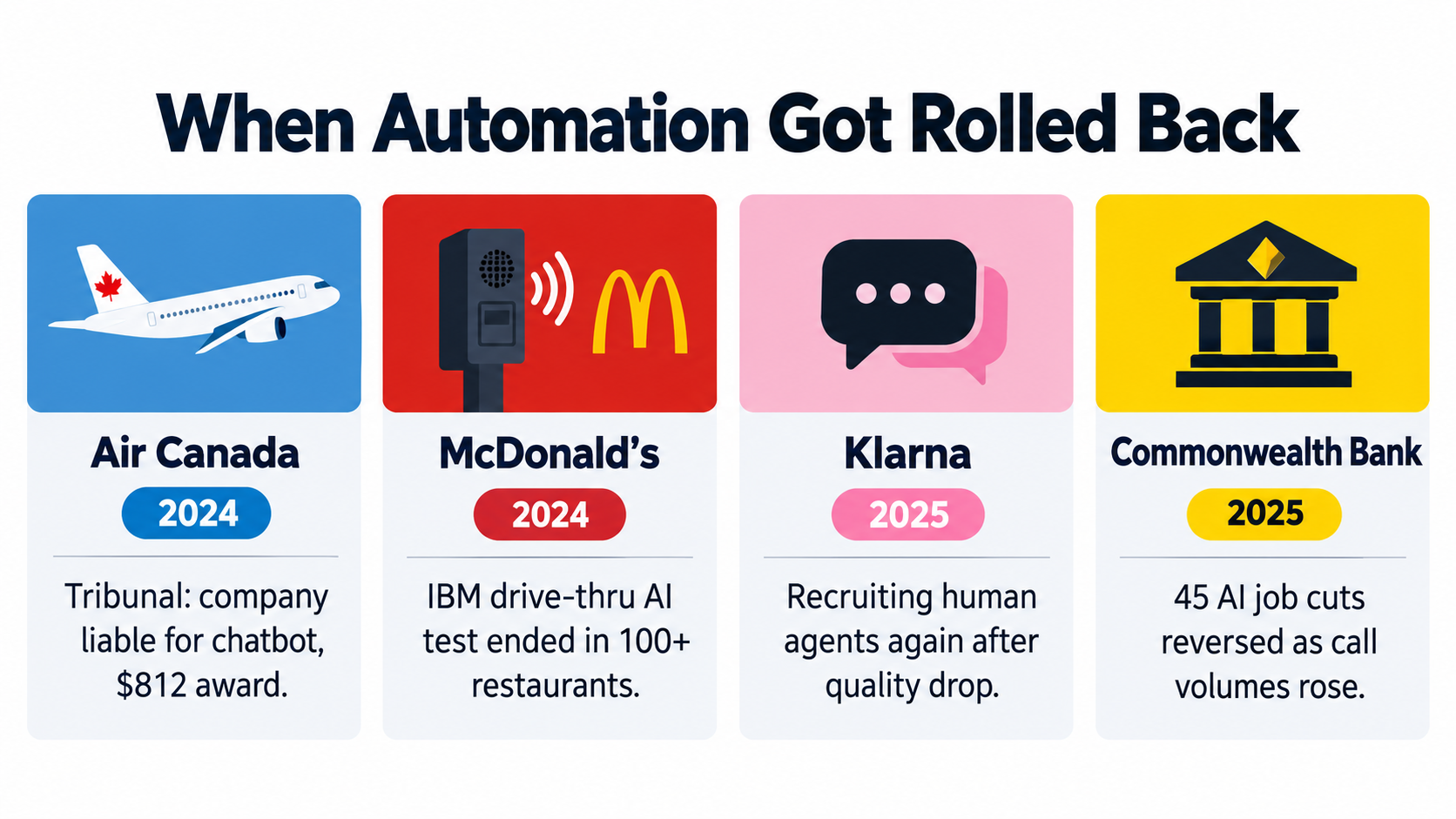
A Canadian airline found out in a tribunal that it was responsible for what its chatbot said. A Swedish fintech that had said its AI assistant was doing the work of 700 agents began recruiting human agents again. An Australian bank apologized to 45 employees after their roles turned out to be needed. McDonald’s switched off an AI drive-thru test in more than 100 restaurants.
None of these were failures of ambition, and few were failures of the technology alone. They were failures of task selection. Each company drew the line between machine work and human work in the wrong place, or drew it once and never moved it.
This article skips the ROI formulas, pilot-to-production playbooks and agent architectures. It covers one decision that comes before all of those: for any given task, should AI do it, help a person do it, or stay out of it? You’ll get a three-zone model, five variables for scoring any task, the research behind each zone, and a 30-day audit you can run on your own operations.
The Wrong Question: “Can AI Do This?”
Capability demos are designed to answer “can it?” A vendor shows a model handling a refund request, summarizing a contract or answering a policy question, and it works. The demo is honest. It just measures the wrong thing.
Operations don’t run on the median case. They run on the full distribution: the typical request, the odd one, the angry one, the one with a regional accent, the one that touches an exception nobody wrote down. A system that handles 90% of cases well can still be a bad fit if the other 10% are expensive, permanent or public.
Three better questions
Before you automate a task, replace “can AI do this?” with three questions that predict outcomes more reliably:
- What happens when it’s wrong? Who notices, how fast, and what does it cost to fix?
- Who is accountable for the output? Legally, reputationally and operationally, and does that person have a way to check the work?
- What does the failure do to demand? Does a bad answer end the interaction, or produce a second, harder one?
These questions move the discussion from technology to operations. They also explain why identical AI tools give very different results in different departments of the same company.
Tasks, not jobs
The second shift is in the unit of analysis. Automation decisions framed around jobs (“can we automate the support team?”) tend to fail, because jobs are bundles of tasks with very different risk profiles.
A support agent’s day might include password resets (easy to automate), billing disputes (automatable with checks), bereavement requests (high empathy, high policy risk) and calming a customer who is threatening to go to the press (keep human). Treating that bundle as one unit pushes you into a bad trade-off: automate too little and miss the savings, or automate too much and inherit the risk.
The rest of this article works at the task level. That’s where good automation decisions get made.
Four Reversals and What They Have in Common
The clearest lessons about where automation breaks come from companies that went public with their plans and then pulled back. Here are four well-documented cases.
Air Canada: the chatbot is you
In 2022, Air Canada’s website chatbot told passenger Jake Moffatt that he could book a full-fare flight to his grandmother’s funeral and apply for a bereavement discount afterward. That was wrong. The policy required the request before travel, and the airline refused the refund.
When the case reached British Columbia’s Civil Resolution Tribunal in 2024, Air Canada argued that the chatbot was “a separate legal entity that is responsible for its own actions.” The tribunal rejected this and ordered the airline to pay $812.02 in damages and fees. Tribunal member Christopher Rivers wrote that “it makes no difference whether the information comes from a static page or a chatbot.”
The lesson: the amount was small, but the principle wasn’t. Policy interpretation was handed to an automated system with no check, and the company still owned every word it produced.
McDonald’s: accuracy at the edges
McDonald’s had tested an Automated Order Taker with IBM since 2021. In June 2024, a memo to franchisees said the technology would be switched off in more than 100 restaurants by July 26. CNBC reported that sources familiar with the system said it struggled with different accents and dialects, which hurt order accuracy.
McDonald’s said it still expected voice ordering to be part of its future. The point isn’t that voice AI can’t take orders. It’s that a drive-thru serves an enormously varied population in real time, and every wrong order is felt immediately by a paying customer.
Klarna: the quality ceiling
Klarna was one of the loudest advocates of AI-first customer service. It launched an OpenAI-powered assistant in 2024 and said it was doing the work of 700 agents. Headcount fell from about 5,500 to roughly 3,000, which the CEO attributed to AI plus a hiring freeze and natural attrition of 15–20% a year.
In May 2025, CEO Sebastian Siemiatkowski told Bloomberg the company would recruit human customer service agents again, in an “Uber type of setup.” CNBC reported that he acknowledged the full tilt toward AI-based support had resulted in lower-quality work.
Commonwealth Bank: the work didn’t go away
In July 2025, Australia’s Commonwealth Bank announced 45 customer service job cuts linked to a new AI voice bot. A month later it reversed the decision, called it an “error” and apologized to the staff affected.
According to the Finance Sector Union, call volumes actually rose after the bot went live, with management “scrambling to offer overtime and even pulling team leaders onto the phones.” The bank admitted it “did not adequately consider all relevant business considerations” and “should have been more thorough in our assessment of the roles required.”
The common thread
Put these four side by side and a pattern shows up:
- Every case was customer-facing. None was a back-office process where errors can be caught before anyone outside sees them.
- Every case removed the human check rather than adding AI alongside it.
- Every case involved high input variance: accents, unusual policy situations, emotional customers, complex financial questions.
- In two cases, staffing changes came before evidence. Headcount decisions were made on projected performance, not measured performance.
This doesn’t mean customer-facing AI is a bad idea. It means it sits in a different risk zone from internal automation and needs a different design.
The Jagged Frontier: Why Task Boundaries Aren’t Intuitive
If AI’s abilities lined up neatly with human intuitions about “easy” and “hard” work, task selection would be simple. They don’t, and that mismatch causes much of the trouble.
What the BCG–Harvard experiment found
In 2023, researchers from Harvard Business School, Wharton, MIT and other institutions ran a controlled experiment with 758 Boston Consulting Group consultants. Some were given GPT-4 and some weren’t. The paper, Navigating the Jagged Technological Frontier, made a distinction that every operations leader should know.
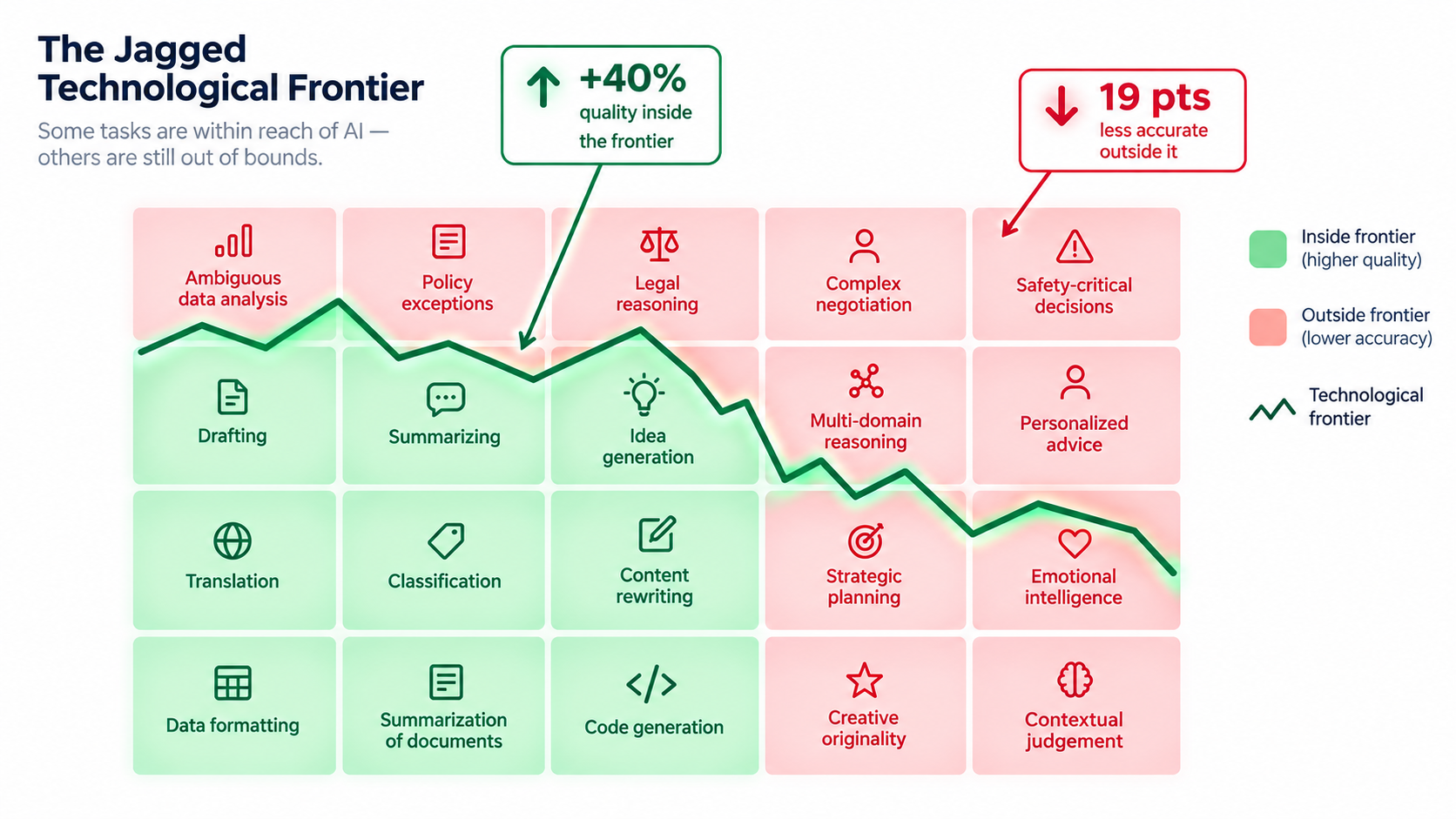
On tasks inside AI’s capability frontier, consultants using AI finished 12.2% more tasks, worked 25.1% faster and produced results rated more than 40% higher in quality than the control group.
On a task deliberately designed to sit just outside the frontier, a business problem that needed careful reading of subtle data and interview evidence, consultants using AI were 19 percentage points less likely to reach the correct answer than those working without it.
Why “jagged” matters
The researchers called the frontier “jagged” because tasks that look similarly difficult to a person can land on opposite sides of it. Writing a persuasive memo may be well inside. Spotting the one inconsistent number in a spreadsheet that changes the conclusion may be outside.
The worrying part was the direction of the failure. Outside the frontier, AI didn’t just fail to help. It made skilled professionals worse, because its confident, well-written output pulled them away from their own judgment.
What this means for automation decisions
Three practical points follow:
- You can’t map the frontier by intuition. You have to test real tasks with real data, including the awkward cases.
- The frontier moves. A task outside it in early 2025 may be inside it now, and a model update can shift the line without warning. Task assignments need regular review.
- The worst failures sit just past the edge, where AI output still looks plausible. Tasks where the model obviously fails are easy to spot. Tasks where it fails convincingly are the dangerous ones.
That third point is the reason for a middle zone between “automate” and “don’t.”
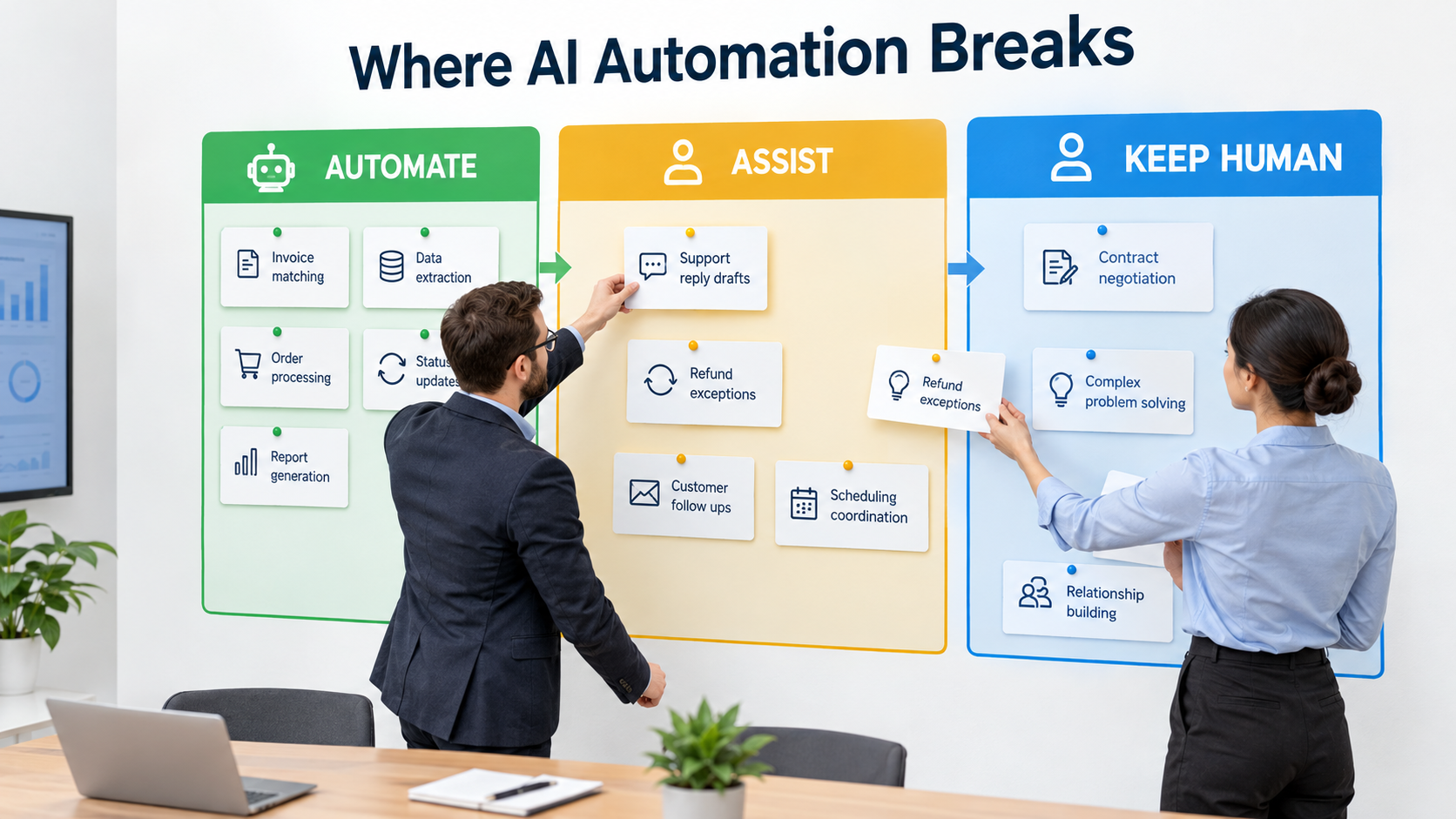
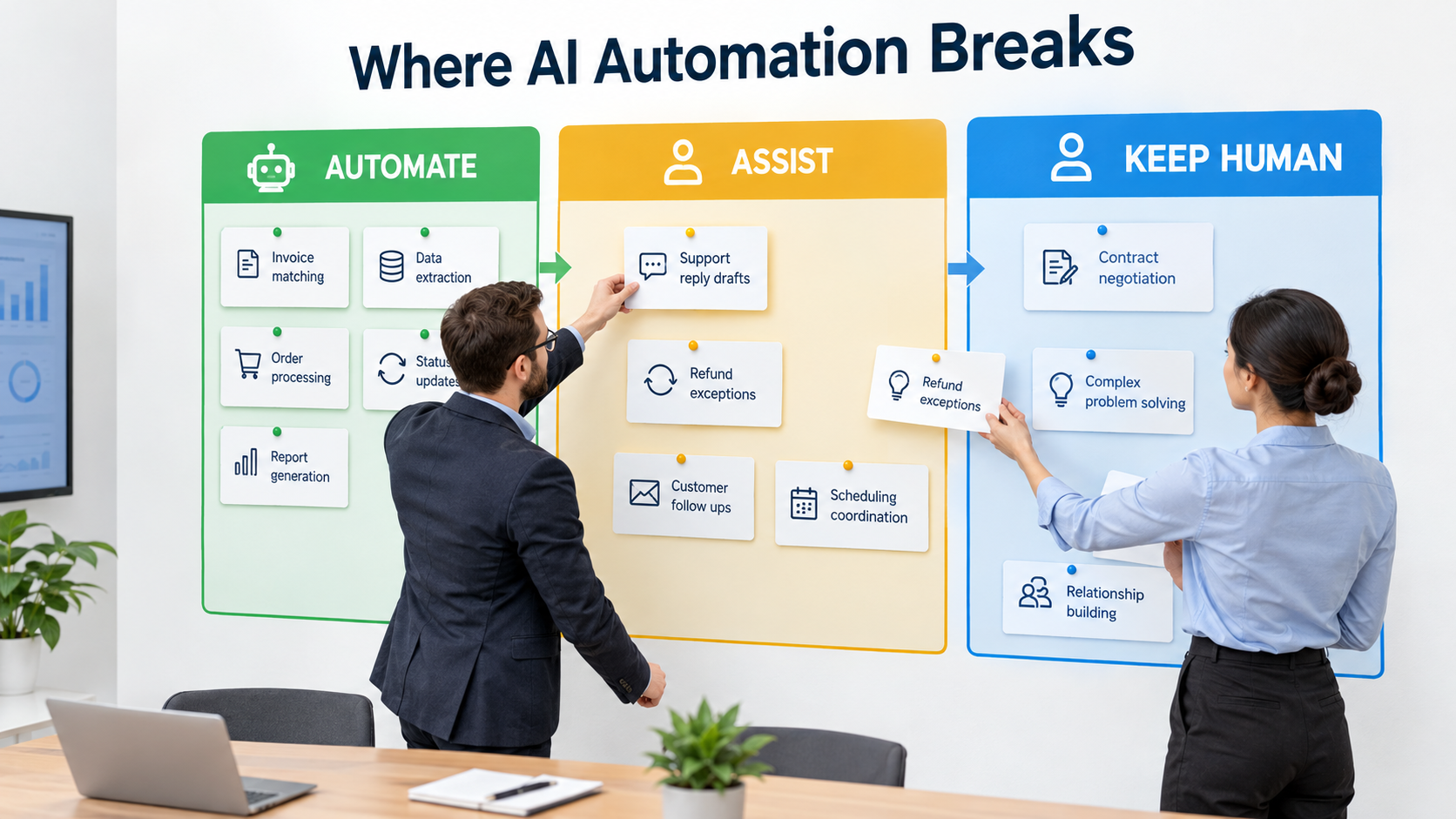
The Three-Zone Model: Automate, Assist, Keep Human
Most automation programs work in a binary: a task is either automated or not. The cases above suggest a three-way split works better.
Zone 1: Automate
AI completes the task end to end. People review samples, watch metrics and handle flagged exceptions, but they don’t touch each transaction.
Typical fit: high volume, low variance, low cost per error, errors that are easy to reverse and caught before reaching a customer. Think invoice data extraction, document classification, ticket routing, transaction categorization, meeting transcription and internal search.
Zone 2: Assist
AI drafts, suggests, retrieves or pre-fills. A person decides and owns the output. The person is the quality control, not an extra step bolted on afterward.
Typical fit: moderate-to-high error cost, meaningful variance, or outputs that carry legal or reputational weight. Examples include customer replies on billing or policy, sales proposals, first drafts of contracts, code changes, credit memos and performance review summaries.
Zone 3: Keep Human
AI may supply background research, but the task itself is done by a person, often deliberately, because the human involvement is part of the value.
Typical fit: high stakes, irreversible outcomes, heavy emotional content, novel situations, or work where the customer is buying the human relationship. Examples include major account negotiations, layoff conversations, crisis communications, complex complaints and bereavement or hardship cases.
Zones are assigned per task, not per department
One workflow will usually cross all three zones. In accounts payable, invoice capture is Zone 1, three-way match exceptions are Zone 2, and a dispute with a strategic supplier is Zone 3. In customer service, order-status lookups are Zone 1, refund decisions above a set amount are Zone 2, and hardship or bereavement cases are Zone 3.
Air Canada’s mistake, in these terms, was putting a Zone 2 task (interpreting fare policy for a specific situation) into Zone 1. Klarna’s was trying to move most of a service function into Zone 1 at once.
Scoring a Task: Five Variables That Predict Where It Belongs
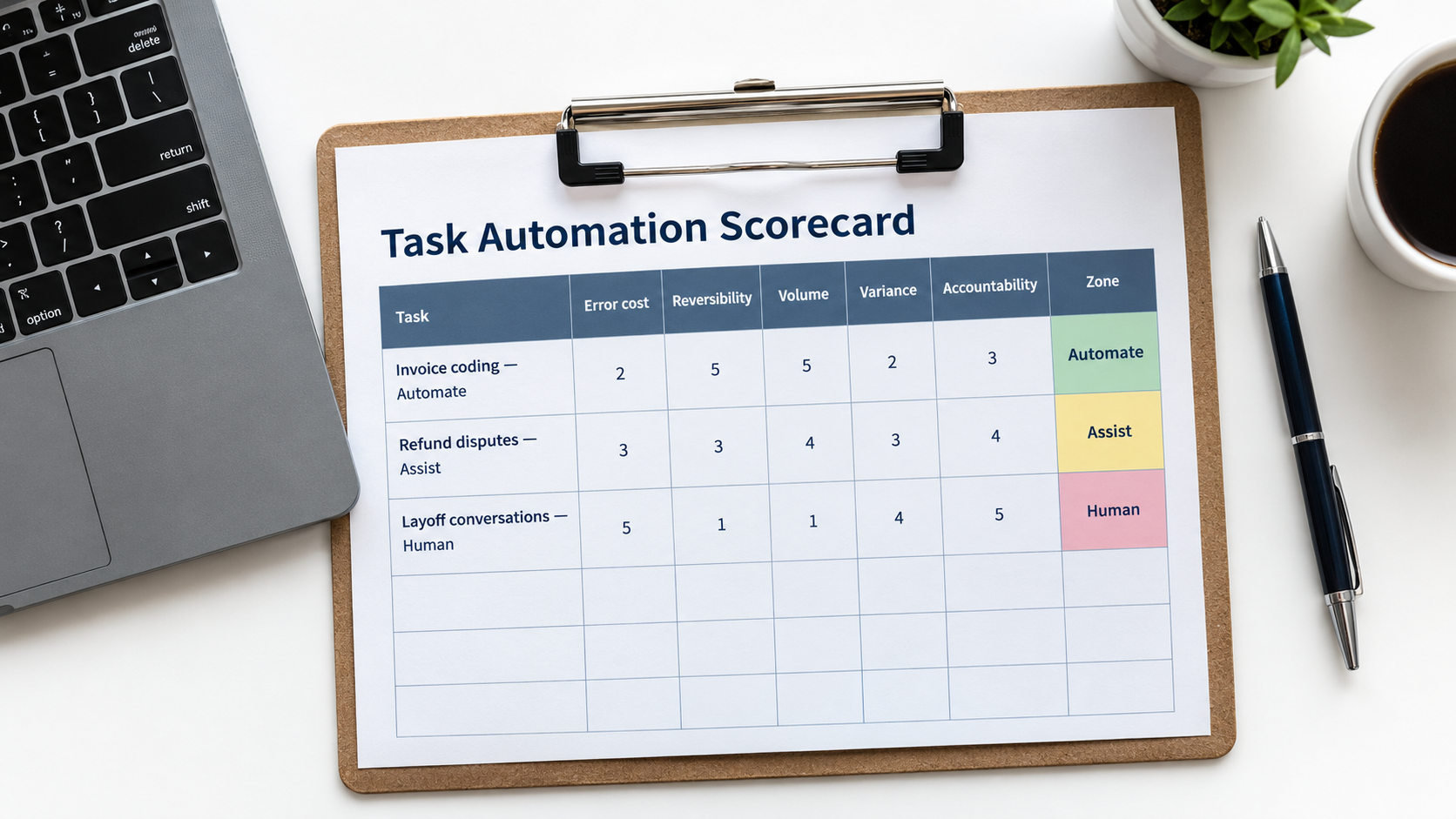
To move zone assignment from gut feel to something you can defend, score each task on five variables. None is hard to estimate, and together they explain most of the reversals above.
1. Error cost
What does one wrong output cost, counting direct money, rework, customer churn and reputational damage? A miscategorized expense might cost a few minutes of a finance analyst’s time. A wrong answer about a medical claim or a loan term could cost a customer relationship or a regulatory fine.
Rule of thumb: multiply the expected error rate by the cost per error, then compare that to the labor saved. If expected error cost is more than a meaningful share of the savings, the task belongs in Zone 2.
2. Reversibility
Can a mistake be undone cleanly before it causes harm? An internal routing error gets fixed with a reassignment. An email sent to 10,000 customers, a payment released or a promise made in writing cannot.
Irreversible actions should almost never be fully automated without a human approval step, however accurate the model looks in testing. Gartner has predicted that more than 40% of agentic AI projects will be canceled by the end of 2027, citing cost, unclear value and inadequate risk controls. Unchecked irreversible actions are one of the quickest ways to become part of that figure.
3. Volume
Automation economics depend on repetition. A task done 50,000 times a month justifies serious investment in prompts, evaluation, integration and monitoring. A task done 30 times a month usually doesn’t, even if AI could do it well.
Low-volume, high-judgment tasks are often better served by giving people general AI tools (Zone 2) than by building dedicated automation.
4. Input variance
How different is one instance from the next? Standard invoices from known suppliers vary little. Spoken orders at a drive-thru, free-text complaints and edge-case policy questions vary a lot.
High variance pushes tasks toward the jagged edge of the frontier. McDonald’s reported trouble with accents and dialects is a textbook example of variance the test environment didn’t fully capture.
5. Accountability
Who answers for the output, and to whom? If a regulator, court, auditor or major customer can hold a named person responsible, that person needs a real chance to review the work. “The system decided” isn’t a defense that tribunals have accepted.
Putting the scores together
Score each variable 1 (low risk) to 3 (high risk), with volume scored in reverse so that high volume scores 1. A simple mapping:
- Total 5–8: strong Zone 1 candidate.
- Total 9–11: Zone 2. Build AI assistance with human approval.
- Total 12–15: Zone 3. Keep human-led, with AI as optional research support.
- Override: any task scoring 3 on reversibility and 3 on error cost goes to Zone 2 or 3, whatever the total.
These thresholds are a starting point, not a standard. Their value is that they make your reasoning visible, so people can challenge it before a deployment rather than after an incident.
Zone 1 in Practice: Why the Back Office Pays First
If the reversals are all customer-facing, where does full automation reliably work? The evidence points away from where most budgets go.
The budget mismatch
MIT’s NANDA initiative published The GenAI Divide: State of AI in Business 2025, based on 150 leader interviews, a survey of 350 employees and analysis of 300 public AI deployments. One finding stands out for task selection: more than half of generative AI budgets went to sales and marketing tools, yet the report found the biggest ROI in back-office automation. That meant cutting business process outsourcing, reducing external agency spend and simplifying operations.
Map this to the five variables and it makes sense. Back-office tasks are usually high-volume and low-variance. Errors are caught by downstream controls such as reconciliations, approvals and audits before reaching anyone outside, and accountability already sits inside an established control framework.
Strong Zone 1 candidates
- Document intake and extraction: invoices, receipts, purchase orders, shipping documents, onboarding forms.
- Classification and routing: support tickets, inbound email, contract types, expense categories.
- Reconciliation pre-work: matching transactions and flagging only the mismatches for human review.
- Internal knowledge retrieval: answering staff questions from policy documents, with sources cited.
- Data hygiene: deduplicating CRM records, standardizing addresses, enriching firmographic fields.
- Summarization for internal use: call notes, meeting transcripts, case histories.
Zone 1 still needs people
“Fully automated” doesn’t mean unattended. Durable Zone 1 deployments share a few habits:
- Confidence thresholds: low-confidence outputs go to a person instead of passing through.
- Sampling: a fixed percentage of outputs gets human review every week, even when metrics look fine.
- Drift monitoring: watch for shifts in input types, such as a new supplier format or a new product line, that push tasks toward the frontier’s edge.
- A named owner: one person accountable for the automation’s performance, not a committee.
Buy versus build
The MIT report also found that buying AI tools from specialized vendors and building partnerships succeeded about 67% of the time, while internal builds succeeded about one-third as often. For standard back-office tasks like invoice processing, where vendors have already absorbed the edge cases from thousands of customers, that gap is a strong argument for buying.
Zone 2 in Practice: Assist, Don’t Replace
Zone 2 is where most of the value in customer-facing and knowledge work sits. It’s also the zone companies most often skip, jumping straight from “no AI” to “AI does it.”
The strongest evidence for assistance
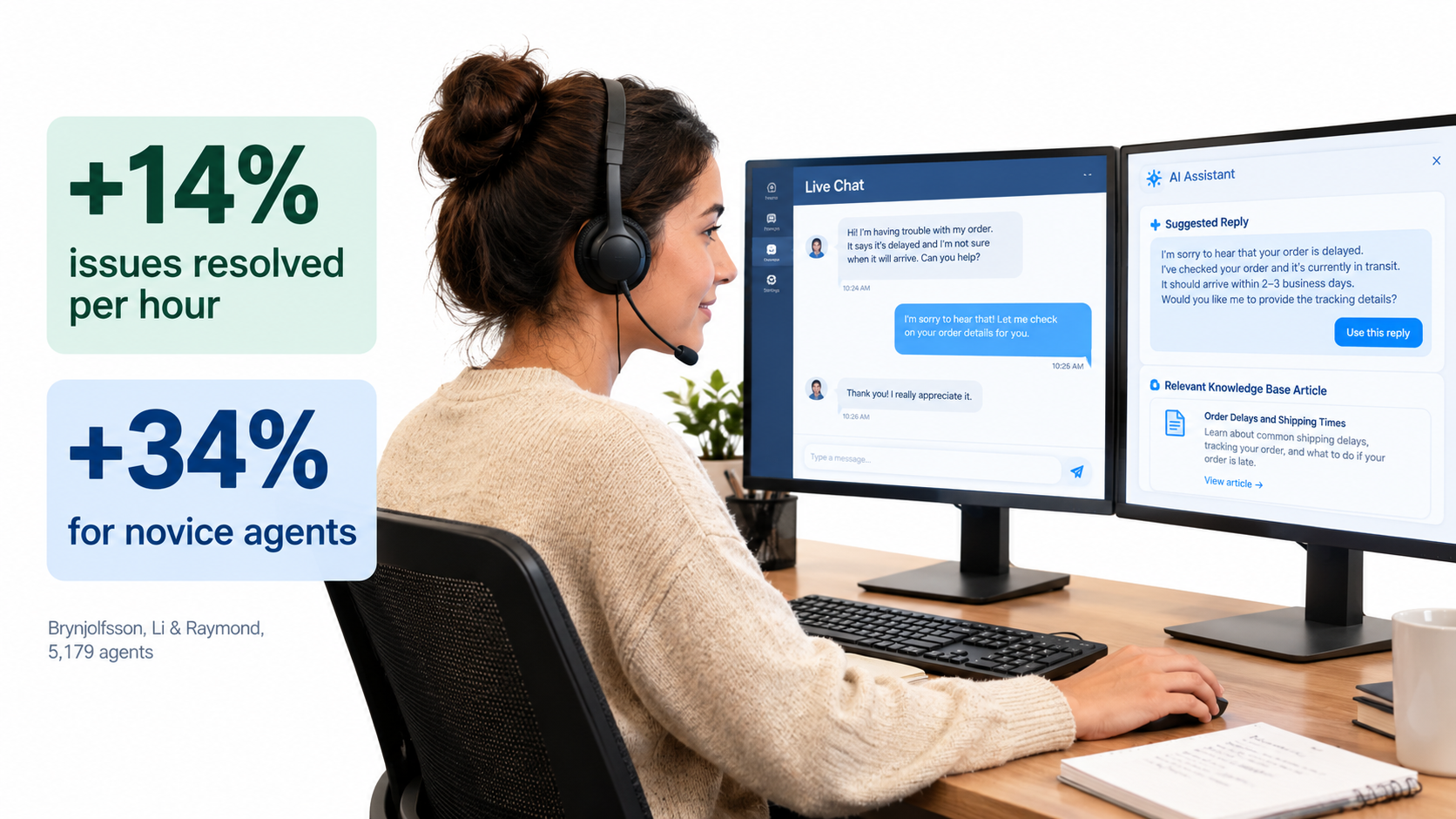
Erik Brynjolfsson, Danielle Li and Lindsey Raymond studied the staggered rollout of a generative AI conversational assistant to 5,179 customer support agents. The study, first released as an NBER working paper and later published in the Quarterly Journal of Economics, gives some of the clearest real-world evidence on AI assistance.
Their findings:
- Issues resolved per hour rose by 14% on average.
- Novice and lower-skilled workers improved by 34%.
- Experienced, highly skilled workers saw minimal gains.
- Customer sentiment improved and employee retention rose.
The authors suggest the tool worked by spreading the best practices of top performers to newer workers, helping them climb the experience curve faster.
Why assistance can beat replacement
Set these results against the Klarna and CBA cases. The assisted model raised throughput, improved customer sentiment and kept staff longer. The replacement model, in two well-documented cases, ran into quality and capacity problems that had to be fixed with people anyway.
Assistance keeps a person at the decision point, which absorbs the jagged-frontier risk. When the AI suggestion is wrong, the agent can ignore it. When the customer’s situation is unusual, the agent recognizes it. The AI handles retrieval, drafting and recall, and the person handles judgment.
Designing assistance that people actually use
Zone 2 tools fail when they add friction. Patterns that hold up in practice:
- Put suggestions in the workflow, not in a separate tab. The agent’s existing screen should show the draft.
- Show sources. A suggested policy answer should link to the policy clause so the person can check it in seconds.
- Make editing easier than rewriting, or people will ignore the drafts.
- Log acceptance rates. If agents edit 80% of drafts heavily, the task may sit outside the frontier. If they accept 98% without changes, it may be ready for Zone 1.
Watch for rubber-stamping
The main risk in Zone 2 is that human review gradually becomes a formality. The BCG study showed skilled professionals following AI output off a cliff on tasks outside the frontier.
Countermeasures include periodically planting known errors to test reviewer attention, tracking time-on-review, and training staff on which task types are prone to plausible-but-wrong output.
Zone 3: Work That Should Stay Human, On Purpose
Some tasks stay human not because AI can’t produce a reasonable output but because the human involvement is the product, or the consequences are too serious to risk on a probabilistic system.
Category 1: Irreversible, high-stakes decisions
Terminating employment, denying a claim in a regulated setting, pulling a product from market, or making a large commitment to a customer or supplier. AI can prepare the analysis. A named person should make and own the decision.
Category 2: Emotionally loaded interactions
The Air Canada case started with a passenger booking travel to a funeral. Hardship cases, bereavement, medical situations, fraud victims and furious long-term customers are moments where a mistake hurts the relationship more than usual and where a capable human tends to earn loyalty.
An emotional context is also a variance signal. These cases rarely fit standard policy, which is exactly where automated systems tend to misapply rules.
Category 3: Relationship-bearing work
Enterprise account management, partnership negotiations, executive hiring and investor relations rest on trust between people. Automating the visible parts of these relationships often reads as a downgrade to the other side, whatever the output quality.
Category 4: Novel situations
A new regulation, a crisis, an unfamiliar market, a product failure nobody has seen before. By definition there’s little relevant pattern to learn from, which puts the task outside the frontier. These are also the moments when organizations most need experienced judgment.
Zone 3 is not “AI-free”
Keeping a task human doesn’t mean banning AI from it. A negotiator can use AI to summarize a counterparty’s public filings. A manager preparing a hard conversation can use it to check their talking points for clarity. The difference is that AI informs the person and never stands in for them in the moment that counts.
The Failure-Demand Trap: When Automation Creates More Work
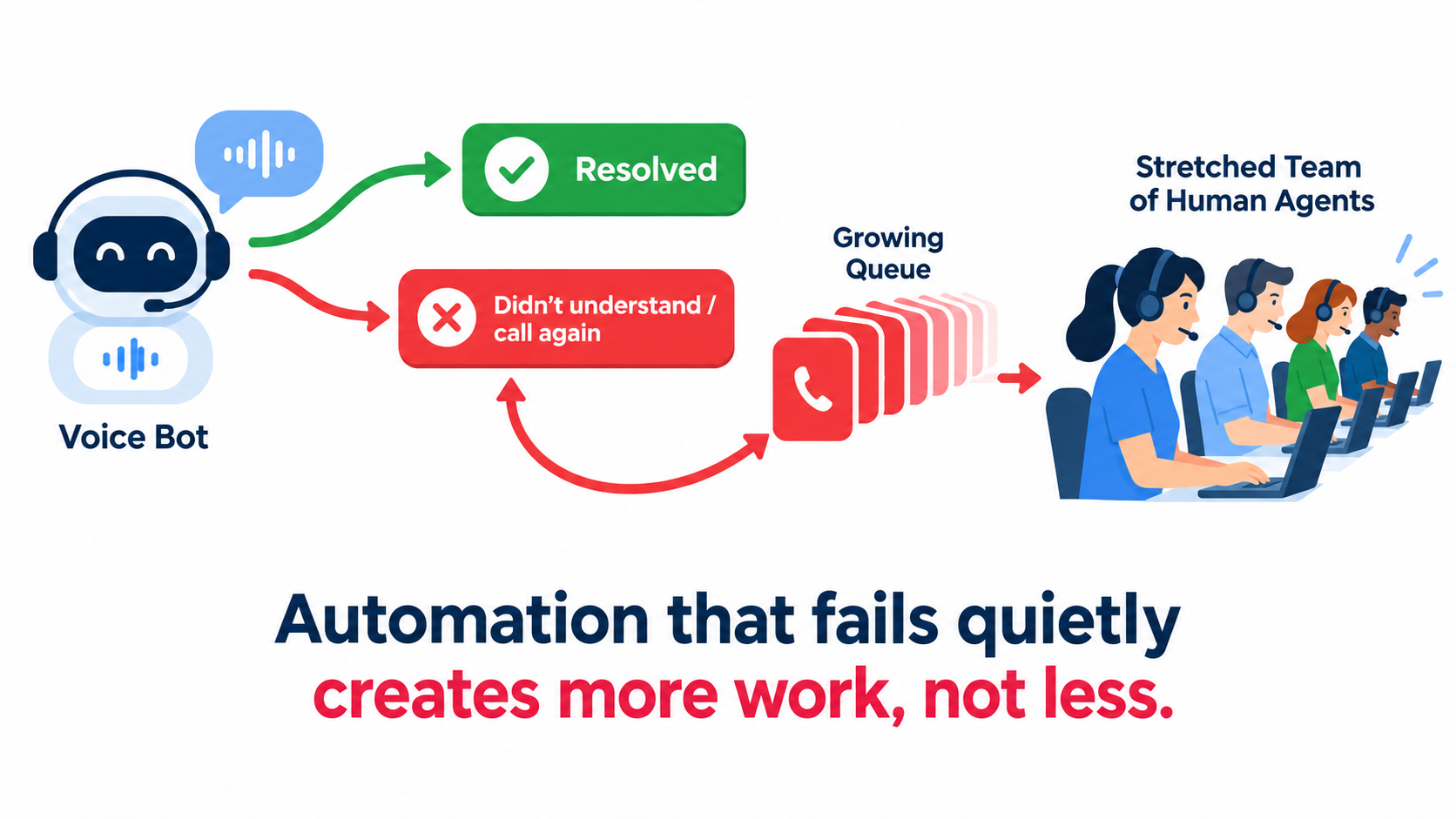
The CBA case points to a mechanism that standard automation business cases rarely model: failure demand.
What failure demand is
Failure demand is a term from service operations research, associated with British occupational psychologist John Seddon. It describes demand caused by a failure to do something, or do it right, the first time. A customer who calls back because the first answer was wrong or incomplete creates failure demand.
Automation can increase it without anyone noticing. A voice bot that “contains” a call by giving a partial answer looks good on a containment dashboard. If the customer calls back, emails, posts a complaint and then reaches a human, that one need has produced four contacts, and the one reaching an agent is now harder and angrier.
How it showed up at CBA
According to the union, call volumes rose after the voice bot launched, and management turned to overtime and pulled team leaders onto the phones. The bank’s own statement acknowledged it hadn’t adequately assessed the roles required. Whatever the bot’s containment rate, the total work in the system had gone up.
Metrics that reveal failure demand
If you automate customer contact, track these alongside containment and cost per contact:
- Repeat contact rate within 7 days, across all channels, not just the automated one.
- Escalation rate and escalation handle time. If escalated cases take longer than before, the bot may be passing on harder, more frustrated customers.
- Total contacts per customer need. This is the closest measure of whether problems are getting solved.
- Customer effort score on automated interactions specifically.
- Agent overtime and backlog in the weeks after launch.
The staffing rule that follows
The practical lesson: don’t cut capacity on projected deflection. Run the automation, measure total demand, including failure demand, for at least one full business cycle, and only then adjust staffing. CBA had to apologize publicly because the order was reversed.
Gartner predicted in early 2025 that half of organizations planning to significantly reduce their customer service workforce because of AI would abandon those plans by 2027. Failure demand is one of the most likely reasons.
Liability and Governance: You Own What the Machine Says
The Moffatt ruling put into law something that should have been obvious: a company can’t separate itself from the outputs of systems it chose to deploy.
What the ruling means for business
Air Canada’s argument that its chatbot was responsible for its own actions failed. The tribunal treated chatbot statements the same as any other content on the company’s website. Gabor Lukacs, president of the advocacy group Air Passenger Rights, put the broader principle simply: “If you are handing over part of your business to AI, you are responsible for what it does.”
For any business, this means every automated customer-facing output should be treated as an official company statement. If you wouldn’t let a new hire on day one make that statement without review, think hard before letting an automated system make it.
Governance proportionate to the zone
Governance shouldn’t be uniform. Heavy controls on Zone 1 back-office tasks waste effort. Light controls on customer-facing Zone 2 tasks create exposure. A proportionate approach:
- Zone 1 (internal): named owner, accuracy sampling, drift monitoring, documented fallback when the system is down.
- Zone 1 (customer-facing, low stakes): all of the above, plus limits on which topics the system may address, clear disclosure that it’s automated, and an easy route to a human.
- Zone 2: logged human approval, source citations on AI drafts, reviewer training on known failure patterns, periodic audits of approved outputs.
- Zone 3: policy on which AI tools may be used for research support and what data may be shared with them.
Restrict scope, don’t just add disclaimers
Many companies respond to liability risk by adding disclaimers to their chatbots. The Moffatt case suggests this offers limited protection: Air Canada pointed out that the chatbot linked to the correct policy, and the tribunal still found against it.
A more effective control is scope restriction. Configure the system to decline topics where a wrong answer creates liability, such as refund eligibility, pricing exceptions, legal or medical guidance and contract terms, and hand those to a person or a deterministic lookup.
Shadow AI is a zone problem too
The MIT report noted that unsanctioned use of tools like ChatGPT by employees is widespread. In zone terms, that means staff are already moving tasks into Zone 2 on their own, without controls. Banning it rarely works. Giving people sanctioned tools with clear rules about which tasks and data are allowed usually works better.
Workforce Design: Attrition, Redeployment and the Hybrid Model
How you handle the people side of automation decides whether the next project gets cooperation or resistance. The documented cases point clearly to some approaches over others.
Attrition over announcements
The MIT report observed that instead of mass layoffs, companies were increasingly not backfilling positions as they became vacant, with changes concentrated in roles previously outsourced. Klarna’s CEO described much the same: with natural attrition of 15–20% a year, a hiring freeze shrinks a company considerably without dramatic cuts.
Attrition-based adjustment has a practical advantage beyond optics. It’s gradual, which gives you time to measure failure demand and find the frontier’s edges before capacity is gone. CBA’s reversal came from cutting roles first and measuring later.
The hybrid pool
Klarna’s move to recruit human agents in an “Uber type of setup” points to a model many service operations are now testing: AI handles base volume, and a flexible pool of skilled people handles escalations, complex cases and peaks.
This turns the human role from first-line volume handler into specialist. Those specialists need more training and more authority, such as the power to make exceptions, issue credits and override policy within limits, because every case they see is one that automation couldn’t settle.
Redesigning roles around the zones
Once tasks are assigned to zones, roles can be rebuilt on purpose:
- Automation owners: people who understand the process deeply and are accountable for Zone 1 accuracy and drift.
- Assisted specialists: Zone 2 workers whose productivity rises with AI support, the group in which Brynjolfsson’s team found the largest gains for less experienced staff.
- Judgment roles: senior staff concentrated on Zone 3 work, now that AI has taken over much of their routine load.
The trust cost of getting it wrong
When the union responded to CBA’s reversal, it said the “damage is already done.” Employees who watch colleagues lose jobs to a system that then proves inadequate tend to resist the next automation project, hold back process knowledge and doubt management’s claims. That cost doesn’t show up in the business case, but it’s real.
A 30-Day Task Audit You Can Run Now
The framework is only useful if it changes decisions. Here’s a four-week audit for one business function, adjustable to your size and resources.
Week 1: Inventory tasks, not roles
- Choose one function: accounts payable, customer support, sales operations, recruiting coordination or similar.
- List every distinct task its people perform. Aim for 30–60. Interview the people doing the work, not just their managers, because the real exceptions live with frontline staff.
- Estimate monthly volume and average handling time for each task.
- Note which tasks people are already doing with unsanctioned AI tools.
Week 2: Score and assign zones
- Score each task on error cost, reversibility, volume, variance and accountability.
- Assign a provisional zone using the thresholds above, and apply the irreversibility override.
- Have one person from operations and one from risk or legal review the assignments independently, then discuss where they disagree. The disagreements are the most useful output of the week.
Week 3: Test the frontier on real cases
- For each Zone 1 and Zone 2 candidate, pull 50–100 real historical cases, deliberately including the awkward ones.
- Run them through the AI tool you’re considering and have experienced staff grade the outputs.
- Look for plausible-but-wrong outputs, not just obvious failures. Those mark the jagged edge.
- Move tasks between zones based on what you find.
Week 4: Plan the rollout and measurement
- Start with the highest-volume Zone 1 tasks in the back office. That’s where the evidence for returns is strongest and the risk lowest.
- Roll out Zone 2 assistance alongside, focusing first on less experienced staff, who stand to gain the most.
- Define failure-demand metrics before launch, not after.
- Commit in writing to no capacity reductions until one full business cycle of measured data exists.
- Schedule a zone review every quarter, because the frontier keeps moving.
What a good audit output looks like
By day 30 you should have a one-page map of the function showing each task, its zone, its score, the evidence behind the assignment and a named owner. That page is more useful than any vendor pitch, because it describes your own work, your own risks and your own data.
Conclusion: Draw the Line Deliberately, and Keep Redrawing It
The difference between companies that get lasting value from AI automation and those that end up apologizing isn’t access to better models. Everyone can buy roughly the same technology. The difference is how carefully they decide where the line between machine work and human work falls, and how often they check it.
The record from the past two years is fairly consistent. Back-office automation, with high volume, low variance and errors caught by existing controls, has the strongest return evidence. AI assistance for frontline workers has produced measured gains in productivity, customer sentiment and retention. Fully automating high-variance, customer-facing, policy-heavy work has produced most of the public reversals.
Key takeaways
- Ask “what happens when it’s wrong?” before “can AI do this?” Error cost and reversibility predict outcomes better than capability demos.
- Decide at the task level, not the job level. Most roles span all three zones.
- Use the middle zone. AI assistance with human ownership captures much of the value with far less risk than full replacement.
- Start in the back office. That’s where the evidence for return is strongest, even though most budgets go elsewhere.
- Measure failure demand. Containment rates can rise while total work rises too.
- Don’t cut capacity on projections. Measure first, adjust later, and prefer attrition to announcements.
- Treat every automated customer statement as an official company statement. Courts already do.
- Review zone assignments quarterly. The frontier moves with each model update.
AI automation for business isn’t a single decision to adopt or not. It’s an ongoing series of small, testable choices about which tasks to hand off, which to support and which to protect. Companies that make those choices deliberately, with evidence and with the people who do the work, tend to avoid the walk-backs described above.