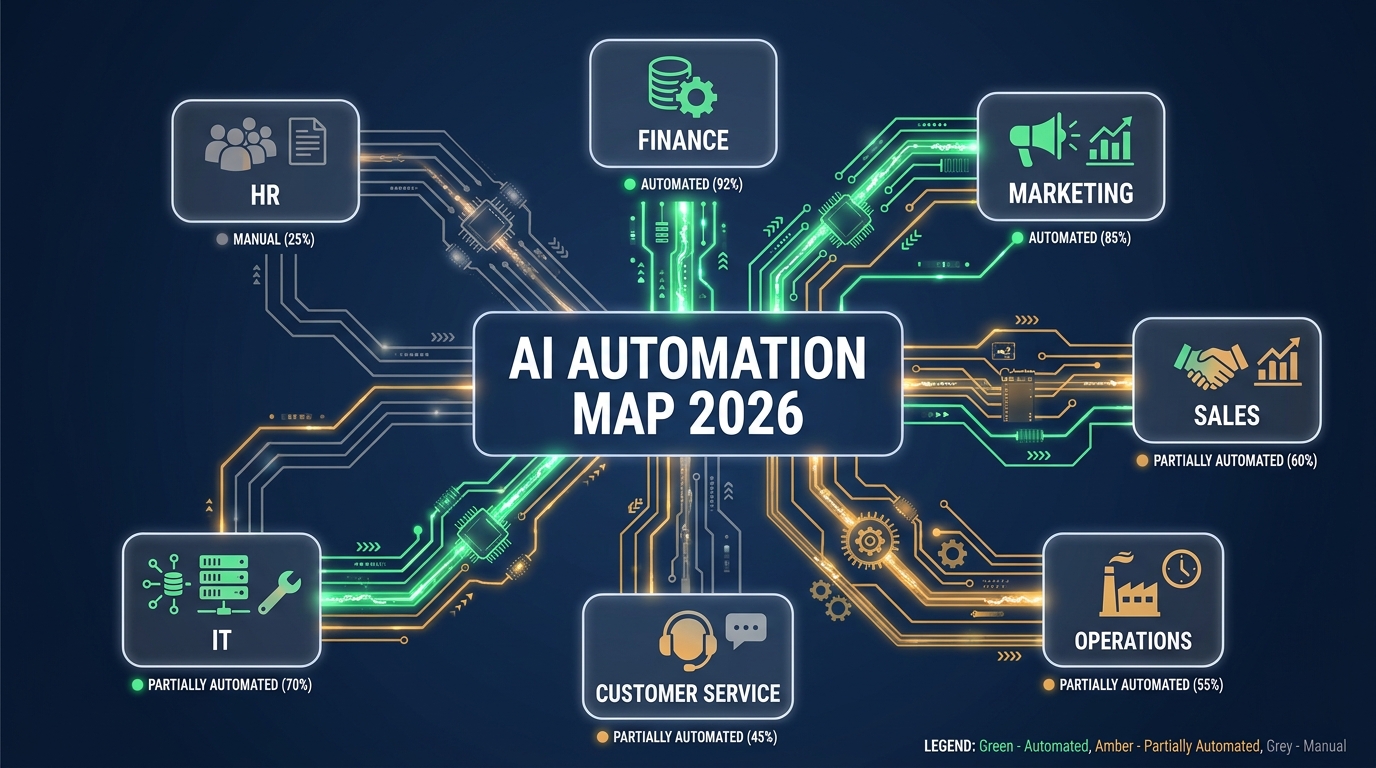

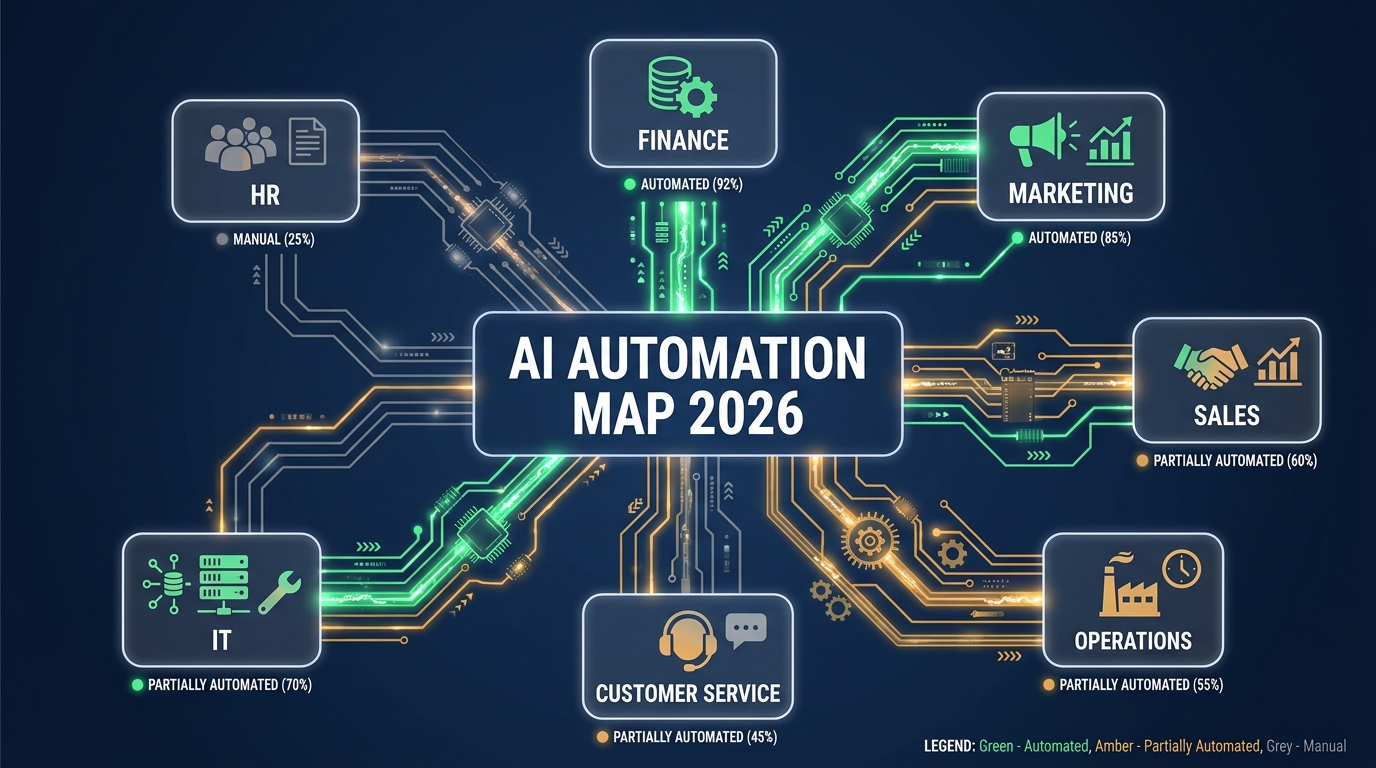
Ask ten business leaders what “AI automation” means and you’ll get ten different answers. Ask which of their departments are actually running automated workflows right now, and the answers get murkier still. There’s a wide gap between where AI automation is being talked about and where it’s genuinely deployed, delivering repeatable results, and improving over time.
Most published guidance on this topic falls into one of two camps: either it’s a high-altitude survey of what’s theoretically possible, or it’s a deep-dive into one specific tool. What’s missing is a practical, ground-level map — department by department — of what’s actually being automated inside real businesses in 2026, what the implementation genuinely looks like, which processes are showing strong returns, and — critically — which ones are being automated when they shouldn’t be.
That’s the gap this article fills. Whether you’re a founder trying to figure out where to start, an operations leader assessing your current stack, or a department head being asked to justify or expand your automation investment, this breakdown gives you the specificity you’ve been missing. We’ll move through finance, HR, sales, marketing, customer service, operations, and IT — covering the real wins, the realistic limits, the sequencing logic, and the non-negotiable checkpoints where human judgment should never be replaced by an algorithm.
Let’s build the map.
How to Read This Map: What Makes a Process Automation-Ready
Before diving into departments, it’s worth establishing a shared framework for evaluating whether a given process is a good automation candidate. Not every repetitive task is worth automating, and not every complex task is too nuanced to hand off to AI. The real filter sits at the intersection of four dimensions.
The Four-Dimensional Readiness Test
1. Rule Clarity — Can the process be described with consistent, documentable logic? If your team does the same task ten times and follows a genuinely different decision tree each time based on gut feel and context, it’s not automation-ready yet. If the decisions follow a discernible pattern — even a complex one — AI can learn to replicate it.
2. Data Availability — Is there structured or semi-structured input data to work from? AI automation doesn’t invent data; it processes it. Processes that depend on rich, accessible data (transaction records, email threads, form submissions, calendar events) are far more tractable than those that depend on implicit organizational knowledge or institutional memory.
3. Volume and Frequency — Does the task happen enough times to justify the setup cost? A task done once a month by one person may not warrant a full automation build. A task done 200 times a day across five team members almost certainly does. The ROI math gets simple fast when volume is high.
4. Error Tolerance — What happens when it goes wrong? Low-stakes, reversible tasks (routing an email, categorizing a support ticket, scheduling a meeting) have high error tolerance. High-stakes, hard-to-reverse tasks (sending a legal notice, terminating a vendor contract, making a hiring decision) have low error tolerance and require human checkpoints even when automation handles the upstream work.
The Automation Maturity Spectrum
It also helps to think in terms of maturity levels rather than binary “automated vs. not automated” categories:
- Level 1 — Task automation: Single-step, rules-based triggers (e.g., auto-filing an email into a folder when a keyword is detected)
- Level 2 — Process automation: Multi-step workflows where AI handles sequential tasks with conditional logic (e.g., lead enrichment → scoring → CRM entry → rep notification)
- Level 3 — Intelligent automation: Workflows that incorporate judgment, learn from feedback, and adapt over time (e.g., a fraud detection system that refines its own risk thresholds based on outcomes)
- Level 4 — Agentic automation: Autonomous agents that operate across multiple systems, set sub-goals, and complete end-to-end objectives with minimal intervention
Most businesses in 2026 are operating at Level 1–2 in the majority of their departments, with pockets of Level 3 in finance and customer service. Level 4 exists but is not yet operationally stable enough for most organizations to rely on without significant oversight infrastructure. Keep that in mind as we work through the map — understanding your current maturity level helps set realistic expectations for what’s achievable in the next 12 months.
Finance and Accounting: Where AI Automation Is Already Paying Off
Finance is, by most measures, the department where AI automation has delivered the most consistent, measurable returns — and it’s not hard to see why. Financial data is inherently structured. The rules governing most accounting processes are explicit and codified (generally accepted accounting principles don’t leave much room for improvisation). And the volume is high enough in almost every organization to make automation ROI straightforward to calculate.
What’s Being Automated Right Now
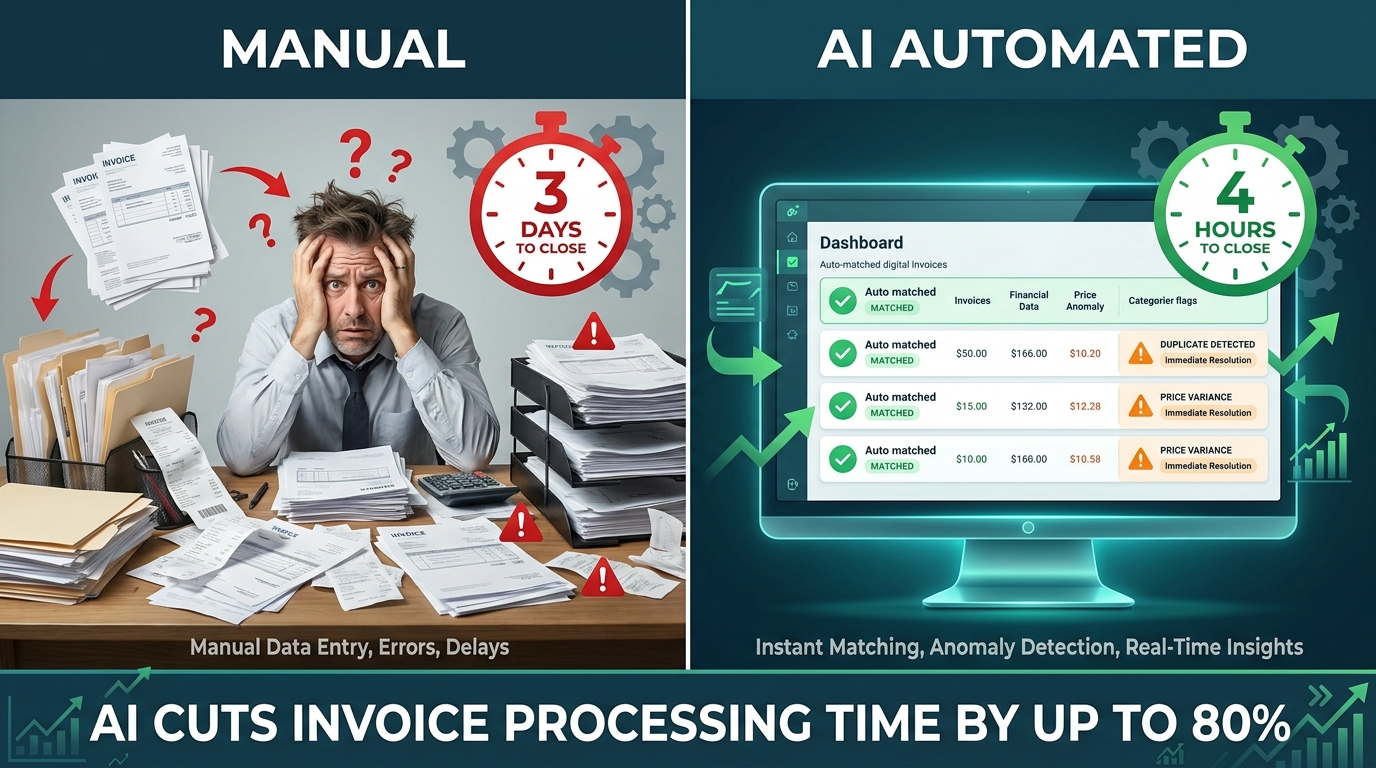
Accounts payable and invoice processing is the single highest-volume automation deployment in finance. Modern AI-powered AP systems use optical character recognition (OCR) combined with machine learning to extract data from invoices regardless of format — PDF, image, email body, or electronic data interchange. They then match extracted line items against purchase orders and receipts in a three-way match process, flag discrepancies for human review, and route approvals based on configurable thresholds. The IBM Institute for Business Value estimates that AI-driven AP automation can reduce invoice processing costs by up to 80% and shrink cycle times from several days to hours.
Expense management and reporting is another area where automation has moved from experimental to standard. AI systems now read receipts from photos taken on mobile devices, categorize expenses against company policy, flag policy violations automatically, and route out-of-policy items to managers for approval. What used to require a dedicated finance analyst reviewing submissions by hand is now largely handled by the system itself, with humans only touching the exception queue.
Financial close and reconciliation has historically been one of the most painful processes in any finance department — a multi-day scramble at month-end involving dozens of manual reconciliation steps. Intelligent automation platforms can now handle a substantial portion of these reconciliations automatically, matching transactions across systems, identifying unreconciled items, and generating draft journal entries. Companies using these tools report cutting their average monthly close time by 30–50%.
Audit preparation and compliance monitoring is an area where AI’s ability to analyze large data sets continuously — rather than in point-in-time snapshots — creates genuine value. AI systems can monitor transactions in real time for anomalies that might indicate fraud, error, or policy violation, alerting auditors immediately rather than surfacing issues weeks later during a manual review cycle.
What Finance Teams Should Not Automate
The areas to protect from full automation in finance are the judgment-intensive ones: interpreting ambiguous accounting standards in novel situations, negotiating payment terms with key suppliers, deciding how to respond to a regulatory inquiry, or signing off on a restatement. AI can prepare the analysis and surface the options — but the decision and the accountability have to stay with a human. Automating the input and analysis layer while keeping humans at the output and accountability layer is the right model here.
Human Resources: The Surprising Wins (and the Hard Limits)
HR is a department where the automation conversation gets more nuanced quickly — and where the consequences of getting it wrong are more serious than they are in finance. HR decisions touch people’s livelihoods, careers, and dignity. That doesn’t mean automation has no place here; it means the placement of human checkpoints matters more than in almost any other function.
Where HR Automation Is Delivering Real Value
Recruitment pipeline management is the single most widely deployed HR automation use case. This includes: job description optimization using AI trained on high-performing historical postings; automated job board distribution; resume parsing and initial screening against objective role criteria (experience level, required certifications, location); interview scheduling via AI-powered calendar tools that coordinate across multiple stakeholders; and automated follow-up communications keeping candidates informed at each stage.
The productivity gains here are material. Companies with high-volume recruiting report that AI-assisted screening can reduce the time spent on initial resume review by 60–75%, freeing recruiters to spend more time on the assessment and relationship-building steps where human judgment genuinely matters. A McKinsey analysis found that routine recruitment administration was one of the top three tasks where generative AI was delivering measurable productivity gains in professional services firms.
Onboarding workflow automation has become a major focus as distributed and hybrid workforces have made manual onboarding coordination more difficult. AI automation can manage task assignment across IT, facilities, payroll, and the hiring team; send timed communications to new hires over their first 30, 60, and 90 days; collect and route paperwork; assign training modules based on role; and flag completions or bottlenecks to HR coordinators. What used to require a dedicated onboarding coordinator managing a checklist by hand can now largely run on autopilot, with humans focused on the cultural integration and personal connection elements.
Benefits administration and HR service desk queries are high-volume, largely repetitive, and well-suited to intelligent automation. AI chatbots trained on company benefits documentation can handle the vast majority of employee queries about PTO balances, healthcare enrollment windows, 401(k) contribution limits, and expense policy. IBM’s own deployment of AI-powered HR assistants reportedly handles over a million employee queries annually, with significant reduction in HR service desk staffing needs.
Workforce analytics and attrition prediction is an area where AI is moving from descriptive (“here’s our current turnover rate”) to predictive (“here are the 12 employees most at risk of leaving in the next 90 days, based on these signals”). These systems analyze engagement survey scores, manager feedback patterns, tenure, compensation benchmarking data, and sometimes even behavioral signals like email response time changes to generate risk flags. Used responsibly, this gives HR leadership early warning to intervene constructively — not to punish employees for a score, but to have the right conversation at the right time.
The Hard Limits in HR
The places where AI automation must not be given final authority in HR are clearly defined: hiring decisions, termination decisions, performance improvement plans, and anything touching compensation or promotion. This isn’t only an ethical position — it’s increasingly a legal one. Regulators in the EU, several US states, and other jurisdictions are actively legislating requirements for human oversight in high-stakes HR decisions. Using AI to surface information, compare candidates against role criteria, or flag performance patterns is appropriate. Using it to make the call is not.
Sales: Automating the Pipeline Without Killing the Relationship
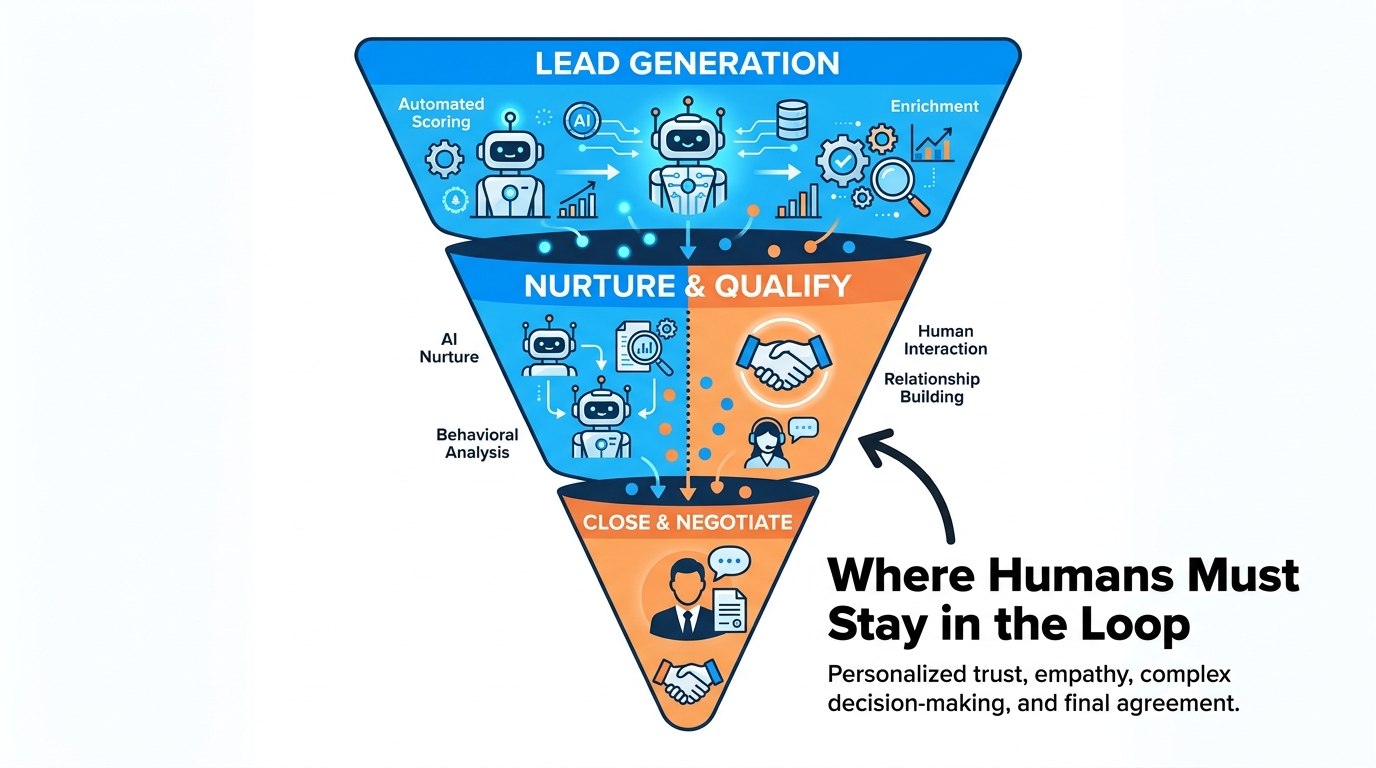
Sales is a function where automation has enormous potential and carries significant risk if deployed without clear thinking about where human relationships drive revenue. The mistake many teams make is treating sales automation as a volume game — more automated outreach equals more pipeline. In practice, the automation approaches that perform best in 2026 are the ones that use AI to make each human interaction better, not to replace it with a robot.
High-Value Automation in the Sales Function
Lead enrichment and scoring is the backbone of modern sales automation. AI systems can take a raw inbound lead — typically just an email address and company name — and automatically pull firmographic data, technographic data, social profiles, recent funding events, intent signals from third-party data providers, and behavioral data from your own website and content interactions. They then score that lead against your ideal customer profile, route it to the right rep, and populate the CRM with a fully enriched record, all before a human has looked at it once.
The value here is not just speed — it’s consistency. Human SDRs vary enormously in how thoroughly they research prospects before reaching out. An automated enrichment layer ensures every lead gets the same quality of research regardless of who’s handling it or what time of day the lead comes in.
Outreach sequencing and follow-up automation is widespread but increasingly competitive. The basic pattern — AI-drafted email sequences, automated follow-up cadences, A/B testing of subject lines and CTAs — is now table stakes. The differentiation in 2026 is in personalization depth: AI systems that tailor outreach language based on the prospect’s recent LinkedIn activity, company news, or shared connections; systems that pause sequences automatically when a prospect opens a proposal and re-route to direct rep follow-up; and tools that analyze reply sentiment to flag which responses suggest genuine interest versus polite deflection.
CRM hygiene and pipeline forecasting are areas where AI is quietly saving thousands of hours. Most CRM data is shockingly stale — deal stages are updated infrequently, notes are sparse, close dates drift without anyone updating the record. AI assistants that listen to call recordings (with consent), extract deal status, identified next steps, and competitor mentions, then auto-update the CRM in real time, are showing strong adoption in enterprise sales teams. The downstream benefit is better forecast accuracy, which has real financial value.
Sales coaching at scale is a newer automation category that’s gaining rapid traction. AI systems analyze recorded sales calls, score them against conversion-correlated behaviors (talk-to-listen ratio, specific objection handling, use of social proof, next step commitment), and generate coaching recommendations automatically. Sales managers at companies with large teams can now surface the calls most in need of coaching attention rather than listening to a random sample.
Where Sales Automation Backfires
The pattern that consistently produces poor results is full automation of outreach at the point of a meaningful commercial relationship. AI-written cold outreach has become so pervasive that recipients are increasingly desensitized to it — and when they detect automation in an email from someone they’ve already spoken to, trust collapses fast. The closing and negotiation phases of a sales process, along with any communication that requires real empathy or contextual judgment (handling a procurement delay, responding to a competitive threat, managing a troubled implementation), need a human voice behind them. Automation’s job in sales is to clear the path and equip the rep — not to replace the conversation.
Marketing: What AI Can Run Autonomously vs. What It Breaks
Marketing has become one of the heaviest automation adopters across all business functions — and also one of the functions where the disconnect between AI output and brand quality is most visible when things go wrong. The key is understanding which marketing tasks benefit from AI’s speed and scale, and which ones require the kind of creative judgment and cultural sensitivity that AI still struggles with consistently.
Marketing Automation That’s Genuinely Working
Audience segmentation and campaign targeting is an area where AI has significantly outperformed manual approaches. Traditional segmentation was static — marketers defined segments based on demographics or historical purchase categories and pushed the same messages to everyone in a bucket. AI-powered segmentation is dynamic, continuously updating based on behavioral signals, engagement patterns, and predictive lifetime value models. This results in meaningfully more relevant audience targeting, higher open rates, lower unsubscribe rates, and better ad spend efficiency.
Content personalization at scale — adapting landing page copy, email subject lines, product recommendations, and dynamic ad creative based on user context — is now achievable without a dedicated engineering team. Platforms like HubSpot, Klaviyo, and Salesforce Marketing Cloud all embed AI personalization engines that make these adaptations automatically. The impact on email marketing alone is significant: personalized subject lines generated by AI have shown consistent lift in open rates versus static alternatives.
Paid media optimization is increasingly handled by AI systems that adjust bids, budgets, and audience targeting in real time based on performance signals. This includes Google’s Performance Max and Meta’s Advantage+ campaigns — AI-managed campaign types that use machine learning to distribute budget toward highest-performing placements and audiences dynamically. When these systems are properly constrained with appropriate audience exclusions and creative guardrails, they consistently outperform manual management for conversion volume optimization.
Social media scheduling, monitoring, and reporting are well-established automation use cases. AI tools that monitor brand mentions, classify sentiment, identify trending topics relevant to the business, and generate first-draft responses to comments dramatically reduce the manual time spent on social presence management. Weekly and monthly performance reports that used to require an analyst building slides can now be generated automatically and distributed on schedule.
What Marketing Should Keep Human
Brand voice and creative strategy are not automation candidates. AI can assist with ideation, generate first drafts, and handle production-level variations of approved concepts — but the foundational creative decisions about how a brand presents itself, what it stands for, and how it responds to cultural moments require human judgment. AI-generated campaigns that have not been reviewed for cultural context, brand consistency, or potential misinterpretation have caused visible brand damage across multiple high-profile cases. The review layer is not optional.
Customer Service: Beyond Chatbots — The Real Stack
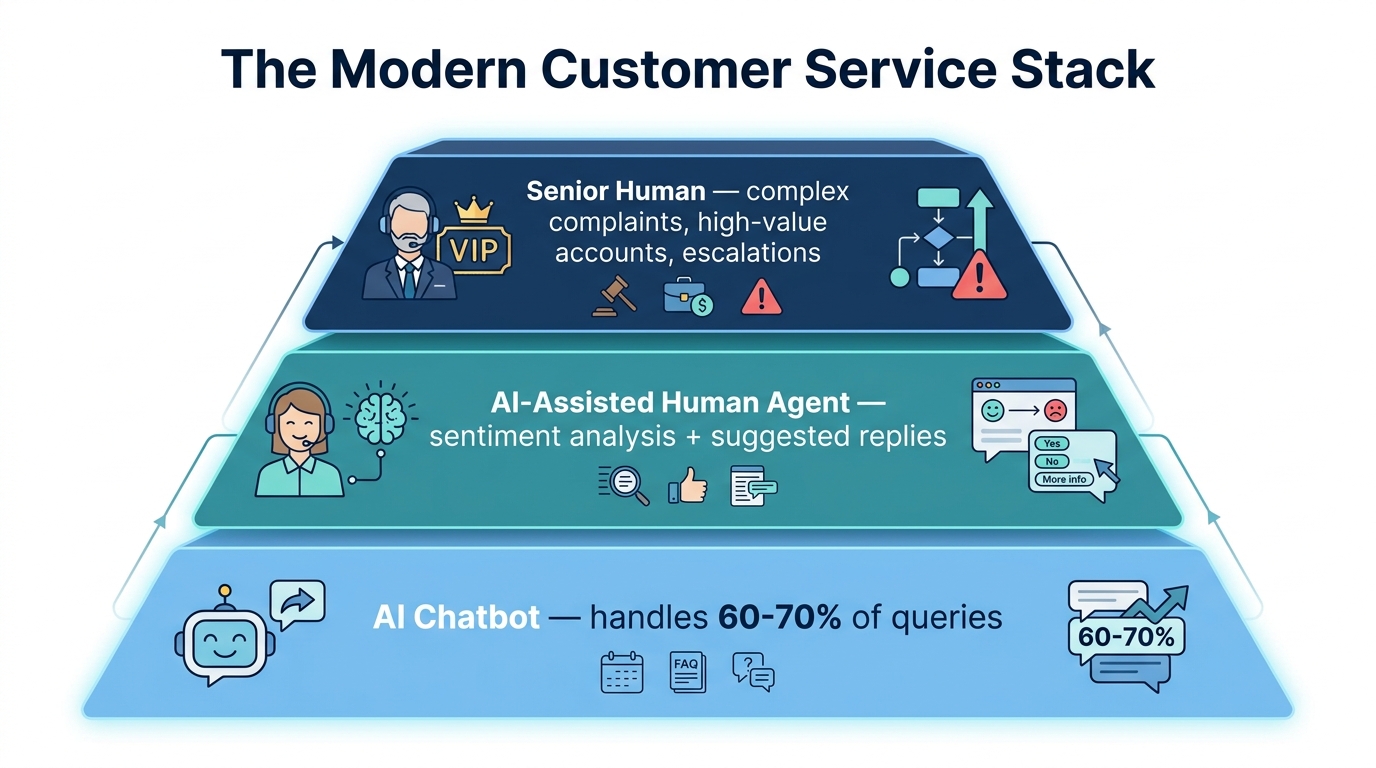
Customer service is one of the most automation-saturated functions in business — and also one of the most unevenly executed. Most companies think about customer service automation primarily in terms of chatbots. That’s the most visible layer, but it’s only one component of a full intelligent automation stack. Understanding the full picture — and where each layer works — is what separates teams with genuinely improved customer satisfaction scores from those who have just offloaded frustration onto self-service tools customers hate.
The Modern Customer Service Automation Stack
Tier 1 — Conversational AI and self-service: AI-powered chatbots and voice assistants handle the highest-volume, lowest-complexity queries: order status, account balance, password reset, basic troubleshooting, return initiation, appointment scheduling. Well-trained on company knowledge bases and integrated with back-end systems, these tools can handle 60–70% of total inbound query volume without human involvement. The technology here has matured significantly — modern conversational AI systems understand intent, handle multi-turn conversations, and know when to escalate rather than continuing to frustrate a customer with circular responses.
Tier 2 — AI-assisted human agents: This is the layer most organizations underinvest in. Agents handling escalated or complex queries work better — and faster — with real-time AI support. This includes: automated call and chat transcription; live sentiment analysis that flags when a customer is escalating emotionally; suggested response recommendations pulled from the knowledge base; automatic screen population with relevant customer history; and after-call work automation (summarizing the interaction, categorizing the issue, logging resolution steps) that can cut after-call handling time by 30–50%.
Microsoft’s deployment data indicates that nearly 70% of Fortune 500 companies are now using AI assistants in some form for customer-facing workflows. Companies using AI-assisted agent tools report handling 20–30% more contacts per agent without service quality degradation — not because agents are rushing, but because they spend less time searching for information and completing administrative tasks.
Tier 3 — Expert human specialists: Complex complaints, high-value relationship management, regulatory escalations, and any situation involving genuine exception-handling judgment should route to experienced agents who are supported by AI context but empowered to exercise their own judgment. This tier is smaller, better compensated, and more effective when the AI layers below it are doing their job well.
Proactive Customer Service Automation
One underutilized area of customer service automation is the proactive side — using AI to identify and address issues before customers contact you. This includes: detecting patterns in usage data that predict churn risk and triggering proactive outreach; identifying products or accounts with elevated return probability based on shipping and handling signals; flagging billing anomalies that are likely to generate inbound contacts; and sending automated status updates when an order is delayed. Every contact prevented is both a cost reduction and a customer experience improvement. The best service automation keeps customers from needing to reach out in the first place.
Operations and Supply Chain: Where the Biggest ROI Lives
If you’re looking for the department with the highest hard-dollar ROI from AI automation across the broadest range of business types, operations and supply chain is the answer. The processes here are typically high-volume, data-rich, and outcome-measurable in ways that make the value of automation objectively quantifiable.
Inventory and Demand Forecasting
Traditional inventory management relied on historical averages, seasonal adjustment factors, and a lot of manual intervention when things went wrong. AI-powered demand forecasting incorporates far more signal: real-time POS data, social media trend monitoring, weather forecasts, competitor pricing changes, macroeconomic indicators, and supplier lead time variability. Companies using AI-driven demand forecasting consistently report inventory reduction of 20–30% while maintaining or improving fill rates — a combination that was genuinely difficult to achieve with legacy forecasting approaches.
For e-commerce and retail businesses, this directly translates to lower holding costs, reduced obsolescence write-offs, and fewer lost sales from stockout events. For manufacturers, it means better raw material purchasing decisions and more reliable production scheduling. The ROI case for demand forecasting automation is usually among the fastest and most defensible to build.
Procurement and Vendor Management
AI automation in procurement ranges from basic (automated PO generation against reorder points) to sophisticated (AI-assisted vendor evaluation that synthesizes performance data, market pricing intelligence, and risk signals into comparative dashboards). Contract intelligence — AI systems that extract key terms, obligations, and renewal dates from supplier agreements — is moving from enterprise-only to mainstream, with tools like Ironclad, Icertis, and ContractPodAi making this accessible to mid-market companies.
Spend analysis automation is particularly valuable: AI tools that continuously categorize and analyze procurement spend, identify consolidation opportunities, flag off-contract purchasing, and surface savings opportunities across categories have shown consistent ROI multiples of 3–8x their implementation cost in organizations with significant indirect spend.
Quality Control and Anomaly Detection
For manufacturers and logistics operators, AI-powered visual inspection and anomaly detection systems have become one of the most impactful automation investments available. Computer vision models trained on images of defective and acceptable products can inspect at speeds and consistency levels that manual inspection cannot match, and they don’t experience fatigue-related accuracy degradation. In logistics, AI systems monitoring package routing and delivery data in real time can flag exceptions — damaged items, routing errors, weather-related delay risks — automatically and trigger corrective actions without waiting for a human to notice.
IT and Security: The Automation Frontier Most Teams Ignore
IT is one of the most automation-receptive functions in any organization, and yet many IT teams still spend a disproportionate amount of time on repetitive tasks that could be handled by well-designed automation. There’s an irony here: the teams building automation infrastructure for other departments often have the least automation applied to their own workflows.
IT Operations Automation (ITOps)
Incident management and triage is the area with the most immediate payoff. AI systems that monitor infrastructure metrics, application performance, and log data in real time can detect anomalies, classify them by likely root cause, assess severity, notify the right team, and initiate standard remediation scripts — all before a human has been alerted. For common incidents (server performance degradation, storage threshold alerts, certificate expiration warnings), this can mean issues are resolved before any user experiences impact. The reduction in mean time to resolution (MTTR) across organizations that have deployed AIOps platforms is typically in the 40–60% range.
Patch management and vulnerability remediation has historically been a painful, manual process of identifying vulnerabilities, prioritizing by severity, scheduling maintenance windows, testing patches, and deploying them carefully to avoid service interruptions. AI-assisted patch management tools now handle the vulnerability-to-patch matching, risk-based prioritization, scheduling optimization, and post-patch validation steps automatically, reducing both the labor burden and the exposure window between vulnerability discovery and remediation.
User provisioning and access management is an automation use case that sits at the intersection of IT operations and HR. Every time a new employee is onboarded, moved between roles, or offboarded, a set of access provisioning and de-provisioning actions needs to happen accurately and quickly. Missed de-provisioning is one of the most common security vulnerabilities in organizations of all sizes. AI-powered identity governance systems that connect HR system events to automated provisioning workflows ensure that access changes happen within minutes of a status change, with full audit trail logging.
Security Operations (SecOps) Automation
Threat detection and alert triage in security operations centers (SOCs) is one of the highest-value automation investments available to any organization with meaningful security requirements. Security monitoring generates enormous volumes of alerts — most of which are false positives. Analysts spending their days manually triaging alerts are both expensive and prone to alert fatigue that causes genuine threats to be missed. AI triage systems that correlate alerts across data sources, enrich them with threat intelligence context, score them by probability of genuine threat, and prioritize the analyst queue automatically can dramatically improve the quality of human analyst time while reducing costs.
IBM’s Cost of a Data Breach Report for 2026 notes a 56% increase in AI-driven attacks, making automated threat detection not just an efficiency play but a genuine security necessity. Attackers are moving faster than manual detection can match.
The Sequencing Problem: Why the Order of Implementation Matters
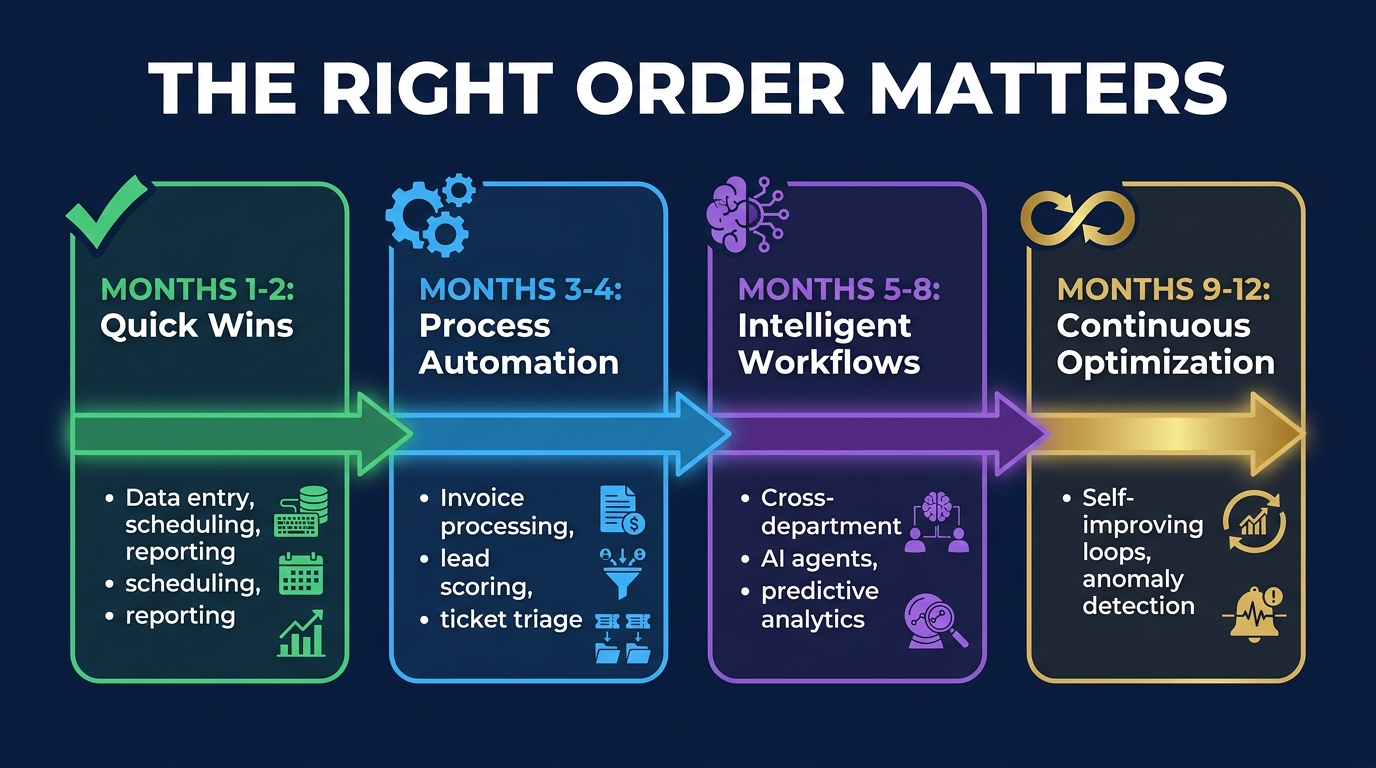
One of the most consistent patterns in failed AI automation initiatives is not the wrong technology choice or the wrong use case — it’s the wrong order. Teams jump to high-complexity, cross-department automation workflows before they’ve established the data quality, process documentation, and organizational trust that make those workflows viable. The result is expensive, fragile, and demoralizing.
Phase 1 (Months 1–2): Establish Foundations With Quick Wins
The purpose of Phase 1 is not to drive significant ROI — it’s to establish proof of concept, build internal confidence, and surface the data quality and process documentation gaps that will block more sophisticated automation later. Target single-step, high-volume, low-risk tasks: automated email routing, meeting scheduling, report generation, data entry from standardized forms. These are Level 1 automations that can be configured in days and demonstrate results immediately.
Critically, Phase 1 should be accompanied by process documentation. Before you automate anything, write down exactly how the current manual process works — every step, every decision, every exception. You’ll almost always discover that the process as it exists on paper is different from the process as it’s actually executed. That gap needs to be resolved before automation can be reliable.
Phase 2 (Months 3–4): Process Automation With Controlled Scope
With foundations established, Phase 2 targets multi-step process automations within single departments: invoice processing workflows, candidate screening sequences, customer ticket triage, or expense report processing. These are Level 2 automations with clearly defined inputs, outputs, and exception-handling logic. Each workflow should have a named human owner who reviews performance metrics weekly during the first 60 days of operation.
Phase 3 (Months 5–8): Cross-Department Intelligent Workflows
Phase 3 is where the compounding value starts to appear — when automation workflows connect across departments and begin to incorporate adaptive elements. A lead scoring model that connects marketing attribution data with CRM pipeline outcomes and finance revenue actuals. An inventory reorder workflow that connects supplier lead time performance data with demand forecast outputs and finance cashflow constraints. These cross-functional automations require data integration work that Phase 1 and 2 should have progressed.
Phase 4 (Months 9–12): Optimization and Continuous Learning
By Phase 4, the focus shifts from building new automations to making existing ones smarter and more self-sufficient. This includes implementing feedback loops that allow AI models to improve from operational outcomes, running systematic A/B tests on automation parameters, expanding coverage within workflows that have proven stable, and consolidating measurement frameworks to track total automation ROI across functions.
Organizations that try to skip to Phase 3 without completing Phase 1 and 2 consistently report higher implementation failure rates, longer time-to-value, and lower employee adoption. The sequencing isn’t bureaucratic process — it’s the mechanism by which automation investments become durable rather than fragile.
The Non-Negotiable Human Checkpoints
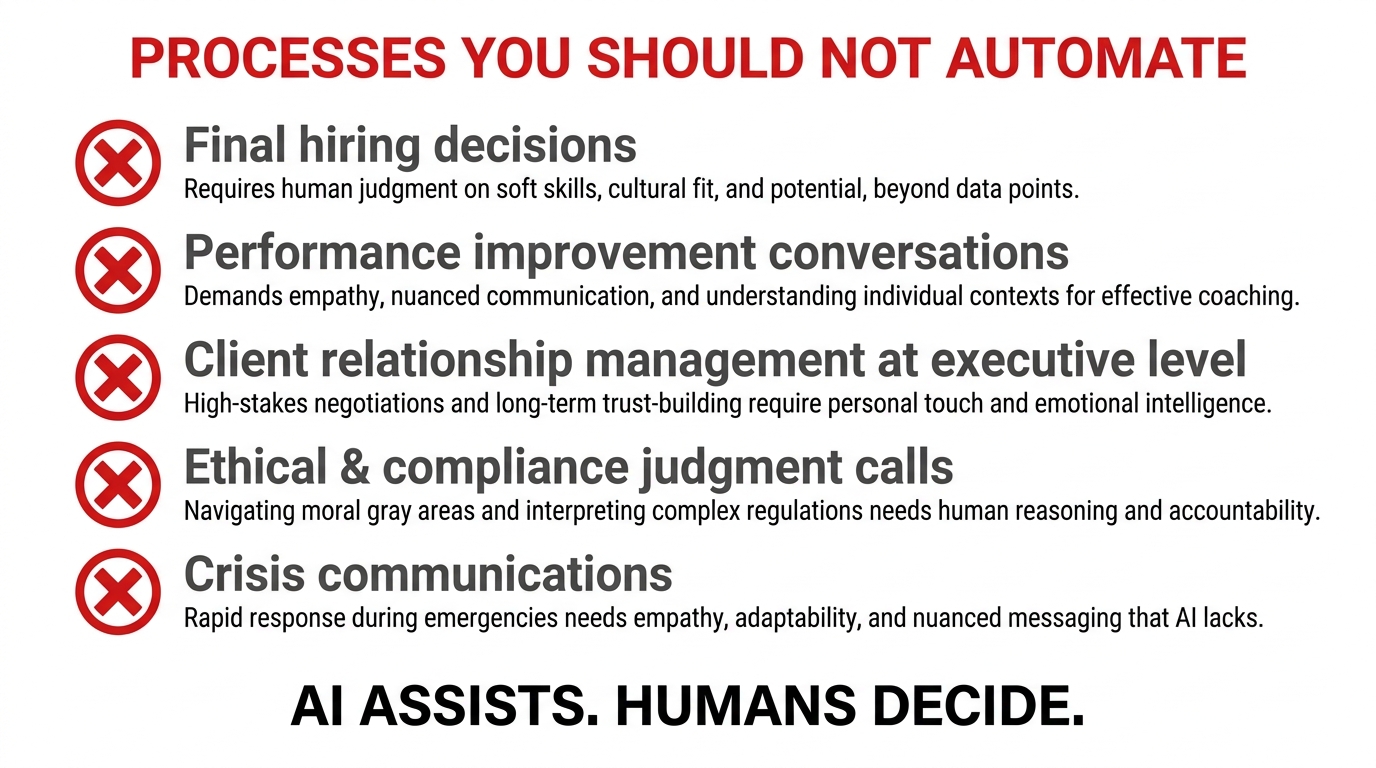
The most important design decision in any AI automation system is not what to automate — it’s where to require human sign-off. These are the checkpoints where the cost of an AI error is high enough, or the importance of human judgment is significant enough, that no efficiency gain justifies removing the human from the loop.
Category 1: Irreversible Decisions With Significant Personal Impact
Any decision that materially changes someone’s employment status, compensation, or legal standing needs a human decision-maker with full context and accountability. This includes: termination decisions, hiring offers, performance improvement plan issuance, disciplinary actions, and legal demand responses. AI can prepare every piece of analysis that informs these decisions — but the decision itself requires a person who can be held accountable for it.
This isn’t just an ethical stance — it’s an increasingly legal requirement. The EU AI Act classifies automated systems making consequential decisions about individuals in employment as “high risk” and requires meaningful human oversight and explainability. Several US states are following with similar requirements. Getting ahead of these requirements now is easier than retrofitting compliance later.
Category 2: High-Consequence Communications
Crisis communications, executive-level client communications, and any outreach that will be seen as representing the organization’s official position on a sensitive matter should not be sent without human review and approval. AI drafting is entirely appropriate here — having AI generate a first draft of a crisis statement, regulatory response, or executive letter is a legitimate productivity tool. But the review and approval gate must exist. Automated sending without review creates reputational and legal exposure that no efficiency gain justifies.
Category 3: Novel Situations Outside Training Data
Every AI system has a boundary at the edge of its training data — situations it hasn’t encountered before and for which its pattern-matching is unreliable. Well-designed automation systems should be able to recognize when they’re operating outside this boundary and escalate to human judgment rather than proceeding with low-confidence outputs. Building reliable uncertainty detection and escalation triggers into automation workflows is one of the most important engineering decisions in the design phase. Systems that don’t know what they don’t know — and proceed confidently regardless — cause the most damaging failure modes.
Category 4: Ethical and Values-Aligned Judgment
Decisions that require weighing competing values — how to respond to a supplier who’s been a long-term partner but is now underperforming; whether to accept a commercially attractive customer whose business conflicts with company values; how to handle a regulatory grey area — involve judgment that AI cannot reliably replicate. These are situations where institutional knowledge, stakeholder relationships, and principled decision-making frameworks matter more than optimization. Keeping humans here isn’t a limitation — it’s the correct design choice.
Building the Business Case: What the Numbers Actually Support
For leaders who need to take an AI automation proposal to a budget committee, having a grounded view of realistic returns — rather than vendor-supplied projections — is essential. The research consistently shows that the highest returns come from the unglamorous, high-volume process automations rather than the sophisticated AI applications that get the most press coverage.
Where Returns Are Predictable
The clearest ROI cases in 2026 are found in: accounts payable processing (60–80% cost reduction per invoice); IT helpdesk tier 1 (50–70% deflection rate to self-service); customer service chatbots on well-defined query types (60–70% containment rate with appropriate training and integration); recruitment screening for high-volume roles (50–60% reduction in time-to-screen); and report generation and distribution (80–90% reduction in analyst time for standardized reports).
These returns are achievable within 6–9 months with well-scoped implementations and don’t require frontier AI. They require good process documentation, quality training data, proper integration with source systems, and disciplined deployment and monitoring practices.
Where Returns Are Real But Slower
Predictive analytics, demand forecasting, and intelligent workflow automation across departments deliver larger long-term returns but require longer implementation timelines, more data infrastructure investment, and more organizational change management effort. ROI timelines here are typically 12–18 months, and the value is often partially reflected in risk reduction (fewer stockouts, fewer compliance failures, earlier fraud detection) that’s harder to translate directly to a P&L line. Building these ROI cases requires a broader measurement framework than simple cost-per-transaction calculations.
The Change Management Dimension
The most common non-technical reason AI automation initiatives fall short of their ROI projections is underestimating the change management requirement. Technology adoption is the easy part; behavioral change across a department is hard. Employees who are concerned about their role security may resist providing the feedback and workflow transparency that AI systems need to improve. Managers who weren’t involved in the automation design may actively undermine tools that feel imposed on them. Addressing these dynamics — through clear communication about what automation is and isn’t intended to replace, genuine involvement of frontline workers in design and testing, and transparent measurement of outcomes — is as important as any technical decision in the implementation.
The Practical Takeaways: Your AI Automation Starting Points
Across every department and every organization type, a handful of consistent principles emerge from the evidence on what makes AI automation initiatives succeed where others fail. These aren’t abstract frameworks — they’re the specific action decisions that separate organizations with compounding automation ROI from those perpetually stuck in pilot mode.
Start with Process, Not Technology
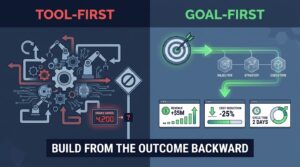
The single most common mistake in AI automation planning is beginning with a tool decision rather than a process decision. “We should implement AI” is not a strategy. “We want to reduce our month-end close from 5 days to 2 days by automating the reconciliation and journal entry steps” is a strategy — and from there, the technology decision follows naturally. Every successful automation initiative starts with a specific, documented, outcome-defined process target.
Measure Relentlessly From Day One
Define your baseline before you automate anything. Measure the current cost, time, error rate, and employee time consumption of the process you’re targeting. Then measure the same metrics after automation goes live, at 30, 60, and 90 days. Without this baseline measurement discipline, you cannot credibly demonstrate value to stakeholders or identify where automation is underperforming expectations.
Design for Exception Handling First
The process steps that automation handles easily aren’t the design problem — the exception cases are. Before any automation goes live, map every realistic exception scenario and define exactly what should happen: escalate to a specific human, pause the workflow, log for batch review, or trigger an alert. Automation systems without clear exception handling become organizational liabilities that quietly process edge cases incorrectly until a significant error surfaces.
Build a Center of Excellence, Not a Series of One-Offs
Organizations that achieve compounding returns from AI automation tend to build a central competency — whether that’s a formal Center of Excellence, a cross-functional automation steering group, or a dedicated platform team — that establishes shared standards, reusable components, and institutional knowledge about what works. Organizations that pursue automation as a series of disconnected departmental projects end up with a fragmented, unmaintainable landscape of point solutions that can’t integrate or improve together.
Keep the Human Value Proposition Clear
This is the strategic communication decision that determines whether employees become automation advocates or resistors. The message that works is specific: “Automation takes away the tasks you like least — the data entry, the repetitive queries, the reporting — so you can do more of the work that actually requires your expertise and judgment.” This message is only credible if the organization then invests in upskilling employees for the higher-judgment roles that automation creates demand for. Companies that automate tasks and then redistribute the time saved to more meaningful work consistently report higher employee satisfaction after automation than before. Companies that automate and then cut headcount create the fear dynamic that poisons future adoption.
Conclusion: The Map Is a Starting Point, Not a Destination
AI automation for business has moved firmly past the experimental stage. Across finance, HR, sales, marketing, customer service, operations, and IT, there are now well-documented use cases with reliable ROI profiles, mature tooling, and a growing body of implementation evidence to learn from. The technology advantage is real — but it’s no longer the constraint. The constraint is execution quality: how well you document your processes before automating them, how clearly you define success metrics, how deliberately you sequence your implementations, and how seriously you take the change management and human oversight elements that most automation vendors underemphasize.
The businesses pulling ahead in 2026 are not the ones with access to the most sophisticated AI. They’re the ones that have identified the highest-leverage process targets in each department, built the measurement infrastructure to prove value, sequenced their implementations to build on each other rather than compete for resources, and maintained clear human accountability at every point where the cost of an AI error is significant.
The map in this article gives you the coordinates. The route is yours to navigate — and the clearer your process documentation, measurement framework, and sequencing logic, the faster and more reliably you’ll get where you’re trying to go.
Your Next Five Actions
- Audit one department this week: Pick your highest-volume, most manual-process-heavy function and document every process step, who owns it, how long it takes, and how often it runs. This documentation is the prerequisite for everything else.
- Apply the four-dimensional readiness test: Score each documented process against rule clarity, data availability, volume/frequency, and error tolerance. The processes with the highest composite scores are your first automation targets.
- Set a baseline: Before any automation goes live, measure current cost, time, and error rate for the target process. Without this, ROI measurement is impossible.
- Define your human checkpoints explicitly: For every automation you’re considering, write down the specific conditions under which the system should pause and require human review. Review this list with legal and compliance before launch.
- Plan Phase 1 with a 60-day horizon: Identify two to three Level 1 automations you can deploy within 60 days. Focus on demonstrable outcomes, not ambitious scope. The credibility built by Phase 1 wins is the currency you’ll need to fund Phase 3 and 4.