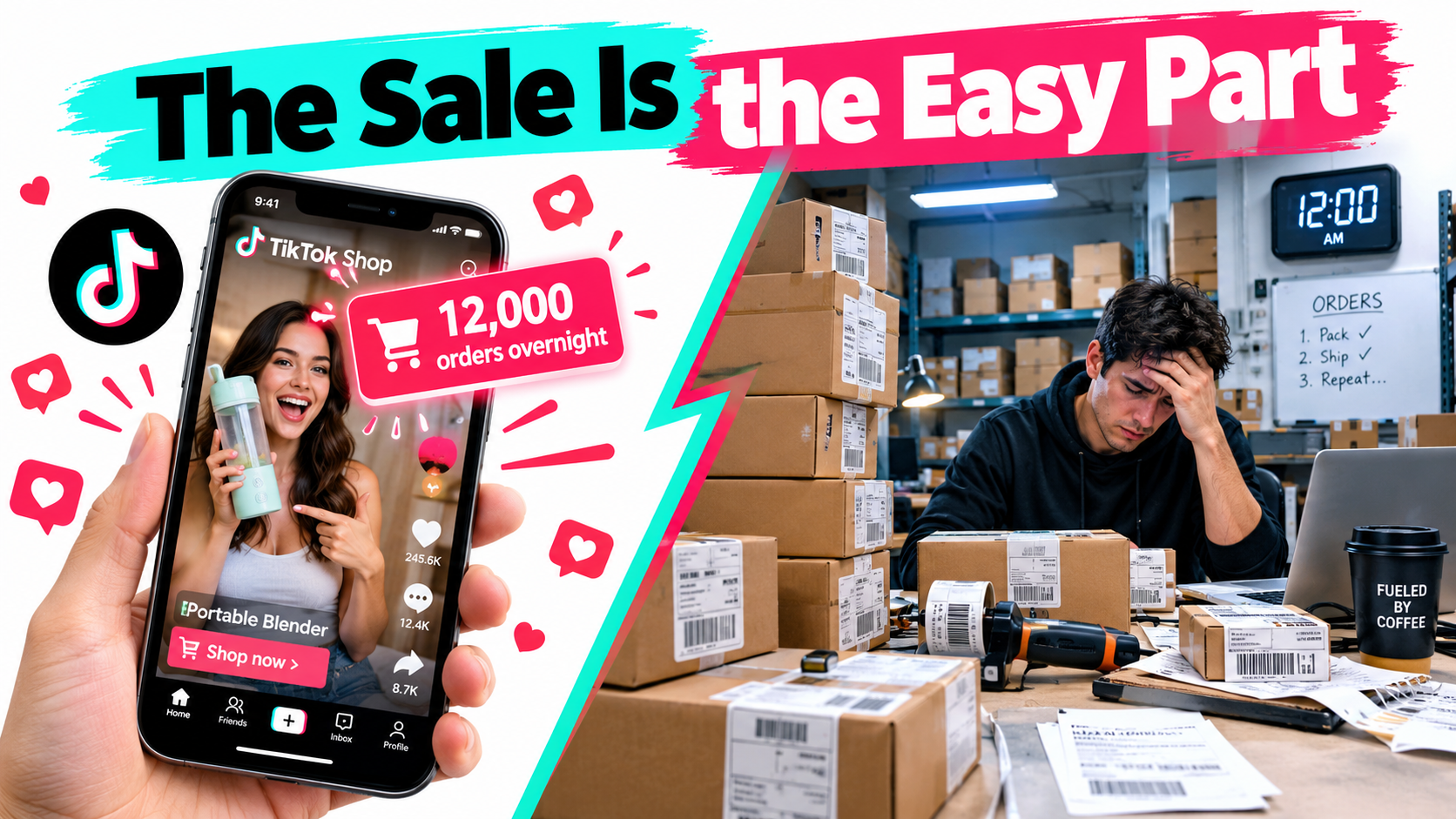

Most advice about TikTok Shop selling stops at the moment a video takes off. The hook, the creator, the trending sound, the product that “sold out overnight.” That’s the part everyone screenshots and shares.
What gets far less attention is the next 72 hours. That’s when thousands of orders need labels, a supplier needs to be called at 2 a.m., customer messages pile up faster than anyone can answer, and the platform starts quietly scoring how well you’re handling all of it.
That gap between demand and delivery is where a lot of TikTok Shop sellers lose. They go viral, ship late, rack up cancellations, get flooded with refund requests, and watch their visibility drop just as momentum should be building. Some end up with restricted accounts. Others make plenty of sales but see little profit once returns, sample costs, and payout timing catch up with them.
TikTok Shop has grown fast since its official US launch in September 2023. Daily sales reportedly averaged about $7 million within weeks of launch, and the platform passed $100 million in sales during Black Friday 2024. Social commerce as a whole is projected to top $1 trillion by 2028. That growth brings in more sellers, which means more competition. And when everyone has access to the same creators and the same trends, the thing that separates sellers is increasingly operations.
This article skips the content playbook and covers the back end instead: performance scoring, inventory planning for demand you can’t forecast, fulfillment models, shipping deadlines, returns, customer service, affiliate sample logistics, cash flow, and running a LIVE selling operation. If you already know how to get attention on TikTok, this is about how to hold onto the money it brings in.
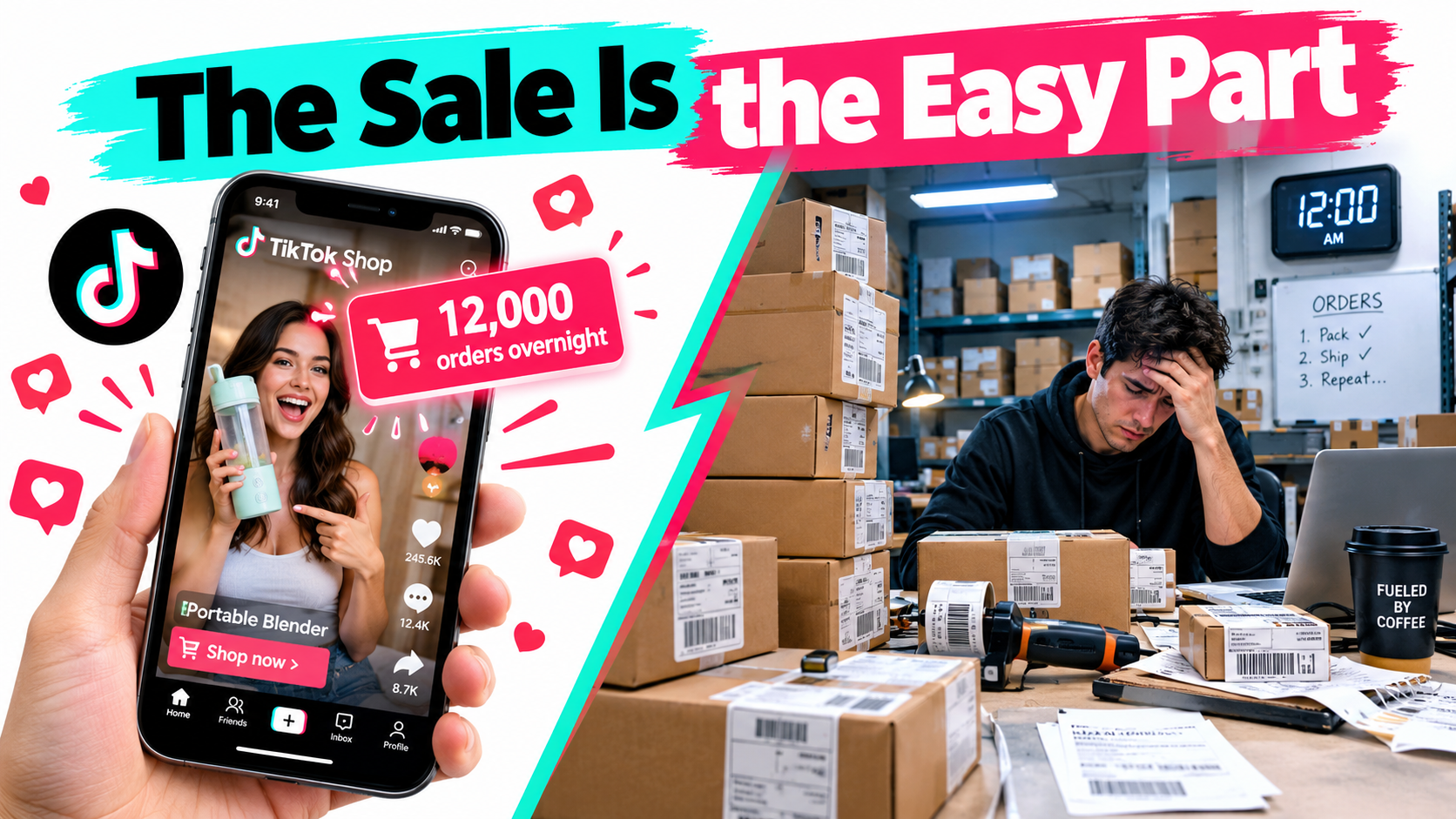
TikTok Shop Is an Operations Business Wearing a Content Costume
On Amazon, demand usually builds over time. Rankings climb, reviews pile up, and sales velocity rises in a way you can more or less predict. TikTok Shop runs on a different engine. Discovery is pushed by a recommendation algorithm, so one video can take a product from ten orders a day to thousands with almost no warning.
That changes what running the business involves. On a search-driven marketplace, you mostly plan around steady demand. On TikTok Shop, you plan around volatility.
Why the content-first mindset breaks down
Plenty of sellers come to TikTok Shop from creator or marketing backgrounds. They’re good at making things people want to watch. But the platform doesn’t stop judging you once the video lands. It keeps tracking how fast you ship, how often you cancel, how many buyers complain, and whether you follow product and listing rules.
Those signals feed back into how much exposure your products and shop get. A seller with great content and weak fulfillment is effectively paying for attention and then throwing part of it away.
The three phases of every TikTok Shop order
It helps to break each sale into three phases, each with its own ways to fail:
- Pre-dispatch: The order is placed and you have to confirm it, pick it, pack it, and hand it to a carrier within the platform’s window. Failures here look like late dispatches and seller-initiated cancellations.
- In-transit: The package has to show valid tracking and arrive within the promised timeframe. Failures here look like invalid tracking, lost parcels, and “where is my order” messages.
- Post-delivery: The buyer reviews, returns, asks for a refund, or opens a dispute. Failures here look like negative reviews, high return rates, and escalations.
Each phase generates data the platform uses to judge you. Most sellers watch conversion rate and GMV closely and barely look at these three phases, even though they have a real effect on both.
What this means in practice
Before you scale content spend or sign up more affiliates, ask yourself one blunt question: if orders went up ten times tomorrow, what breaks first? For most small sellers it’s inventory, packing capacity, or customer service. Knowing which one it is ahead of time is the whole point of operational planning.
Shop Performance Score vs. Account Health: Two Systems, Very Different Stakes
A lot of confusion in TikTok Shop selling comes from mixing up two separate evaluation systems. They measure different things, and the consequences of doing badly on each are very different.
Shop Performance Score: the visibility lever
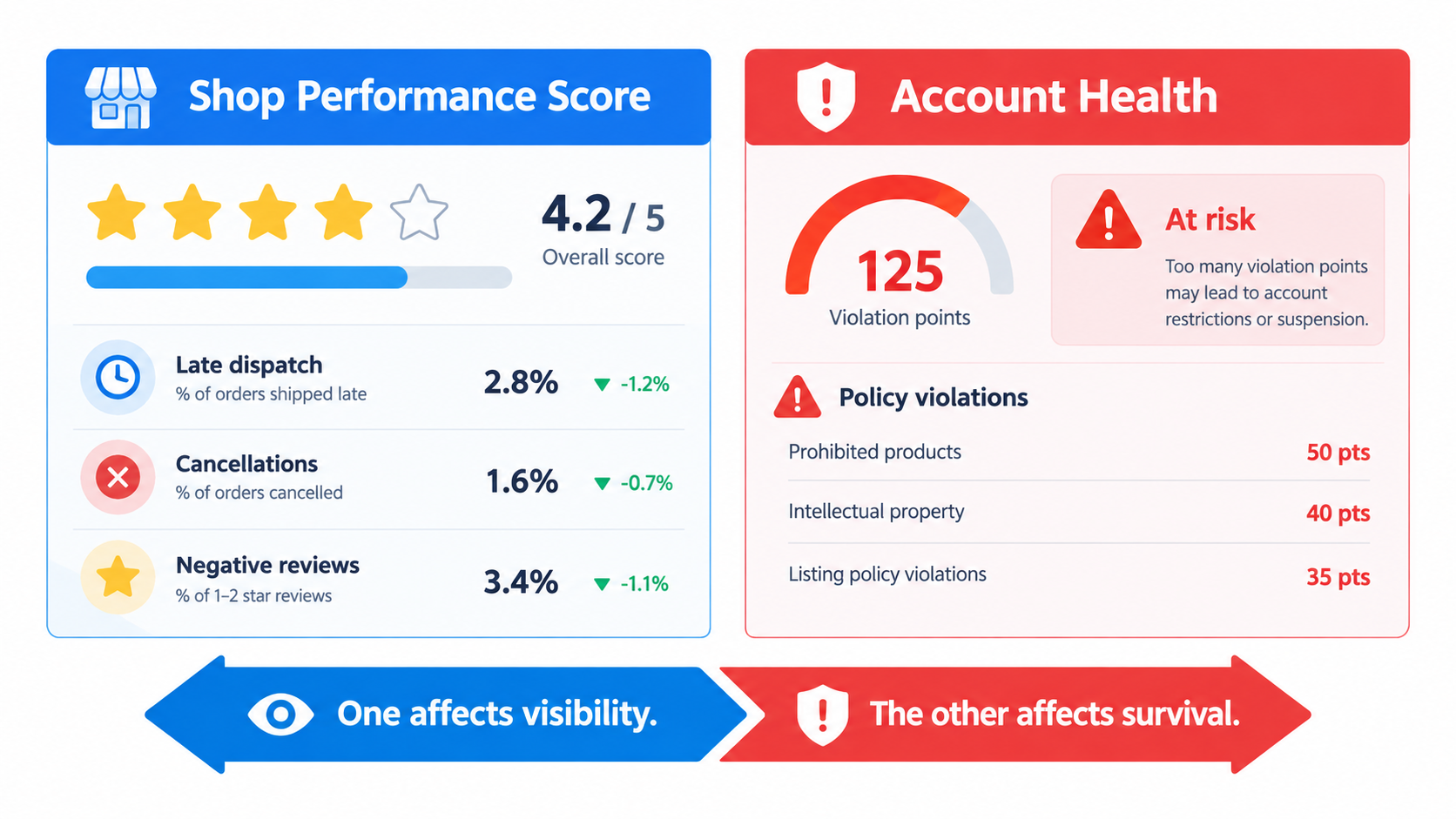
The Shop Performance Score (SPS) is TikTok Shop’s rating of how well you serve customers, shown on a scale that tops out at 5. It’s built from a mix of customer-experience metrics, typically covering fulfillment (late dispatch, cancellations, tracking), product quality (negative reviews, return rates tied to product issues), and service (how quickly and how well you respond to buyers).
SPS usually affects things like eligibility for campaigns, how appealing your shop looks to affiliate creators, and how much the platform is willing to promote you. A falling score rarely shuts a shop down on its own terms. It works more like a slow squeeze on growth.
The exact metrics, weightings, and thresholds change from time to time and differ by region. Always check the current definitions in your Seller Center and don’t rely on numbers passed around in seller forums.
Account Health: the survival lever
Account Health is about policy compliance. It’s generally tracked through violation points given for things like prohibited or restricted products, misleading listings, intellectual property complaints, off-platform transaction attempts, or fake fulfillment data. Build up enough points and the penalties escalate, from feature restrictions up to suspension or permanent deactivation.
The key difference: SPS reflects how well you operate, while Account Health reflects whether you follow the rules. An excellent operator can still lose a shop over a handful of policy violations. A fully compliant seller can still stall out on a weak SPS.
How to monitor both without it becoming a full-time job
- Weekly SPS review: Look at the component metrics, not only the headline number. A score that holds steady can hide one metric getting worse while another improves.
- Daily violation check: Check for new violation notices every day. Appeal windows are usually short, so a notice left sitting for a week can turn into a missed chance to contest it.
- Pre-listing compliance review: Most violations start when a product is listed. Check claims (especially for health, beauty, and supplements), images, and category placement before publishing, not after a flag shows up.
- Affiliate content audit: Creators who make exaggerated or prohibited claims about your product can cause trouble for you. Give creators a short list of approved claims and phrases to avoid.
The compliance trap for fast-moving categories
Health, wellness, beauty, and supplement products tend to do very well on TikTok Shop, and they also carry some of the strictest claim rules. Words like “cures,” “treats,” or before-and-after promises can create compliance problems, both for listings and for affiliate videos. TikTok Shop has also faced public criticism over product misinformation and AI-generated reviews, which suggests enforcement in these areas is more likely to tighten than loosen.
The Viral Spike Problem: Inventory Planning for Demand You Can’t Forecast
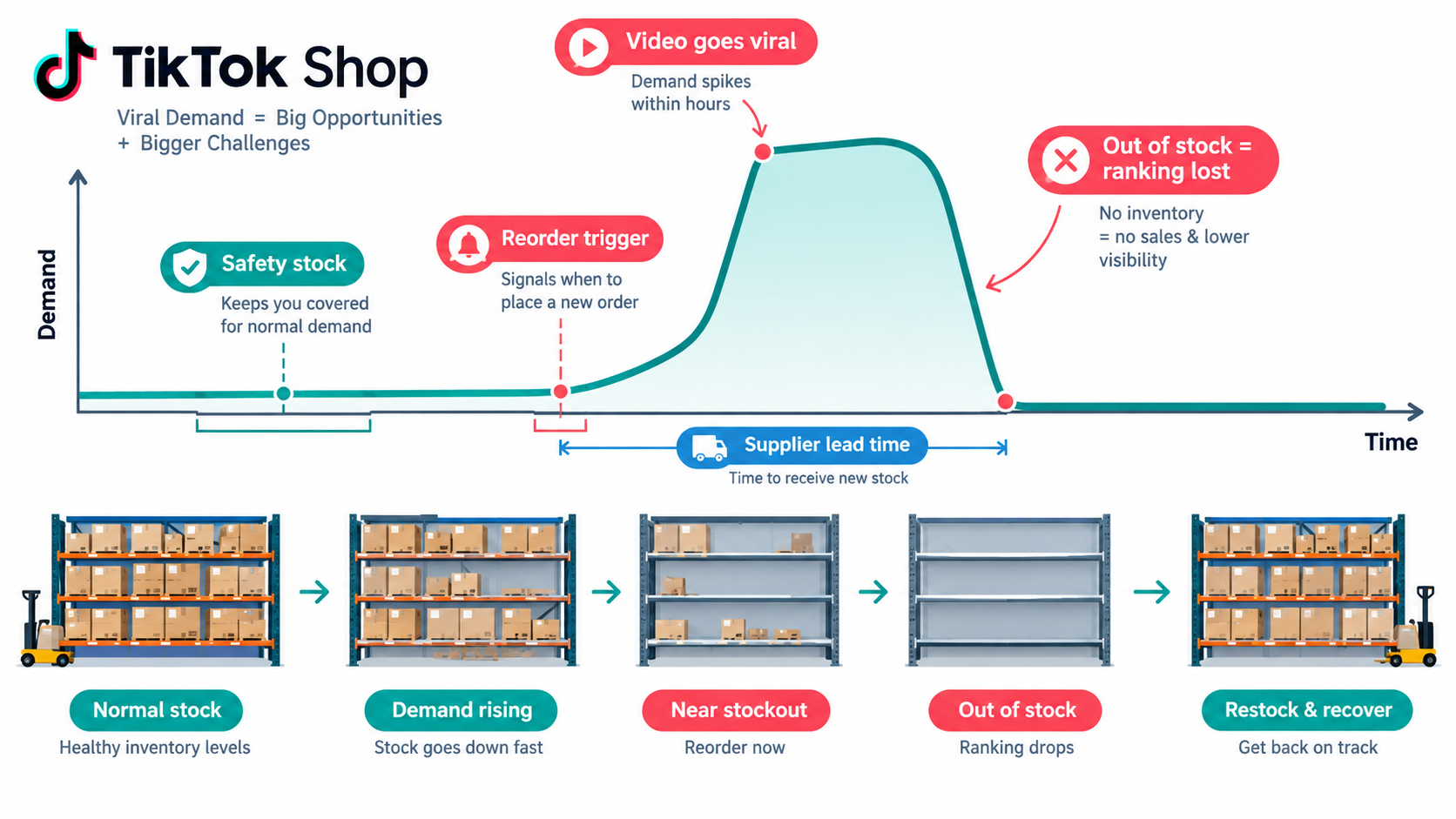
Standard inventory planning relies on historical sales, seasonality, and lead times. TikTok Shop makes the first input unreliable. Your sales history tells you what happened before a video went viral, not what happens after.
Why stockouts cost more on TikTok Shop
When a product sells out on a traditional marketplace, you lose sales for a while and then recover. On TikTok Shop, a stockout in the middle of a spike cuts off momentum while the algorithm is actively pushing your product. Creators who were about to post about it may move to a competitor’s version. The videos keep getting views, but the traffic has nowhere to go.
Overselling is the other risk. If your inventory counts aren’t synced and you take more orders than you can fill, you end up cancelling orders yourself. That hurts your fulfillment metrics and your customer experience at the same time.
Scenario planning instead of forecasting
Since you can’t forecast viral demand with any precision, plan in scenarios. For each hero SKU, write out three:
- Baseline: Normal daily velocity with no viral content. This sets your standard reorder point.
- Moderate spike: Something like 3–5x baseline for one to two weeks, the kind of lift a well-performing affiliate video or small campaign produces.
- Breakout: 10x or more for a short burst. You probably won’t hold this much stock, but you should know how you’d react.
For each scenario, work out how many days of stock you’d have, how long your supplier needs to restock, and what you’d do to fill the gap.
Practical buffers that don’t lock up all your cash
- Supplier surge agreements: Negotiate priority production or partially finished inventory (unbranded, unpackaged units) that can be completed quickly when demand jumps.
- Tiered safety stock: Keep deeper buffers only on SKUs with active affiliate momentum, and keep the rest of the catalog lean.
- Real-time inventory sync: If you sell on more than one channel, use software that updates stock across all of them within minutes, not hours.
- Affiliate pipeline as a leading indicator: Track how many creators have requested samples and how many have posted. A jump in sample requests often comes before a sales spike by one to three weeks.
- Controlled throttling: If stock is running low, pausing paid promotion or campaign participation before you sell out can be smarter than overselling.
The multi-channel inventory question
Many TikTok Shop sellers also sell on Amazon, Shopify, or Walmart. Sharing one pool of inventory across channels spreads out risk, but a TikTok spike can wipe out stock meant for your steadier channels. Some sellers keep a ring-fenced reserve for their most important channel so a viral burst doesn’t damage ranking elsewhere. There isn’t one correct answer. The mistake is not deciding at all.
Choosing a Fulfillment Model: Self-Ship, 3PL, or Fulfilled by TikTok
How you get orders to customers affects cost, speed, control, and how easily you can absorb spikes. There are three main options, and each fits a different stage and type of business.
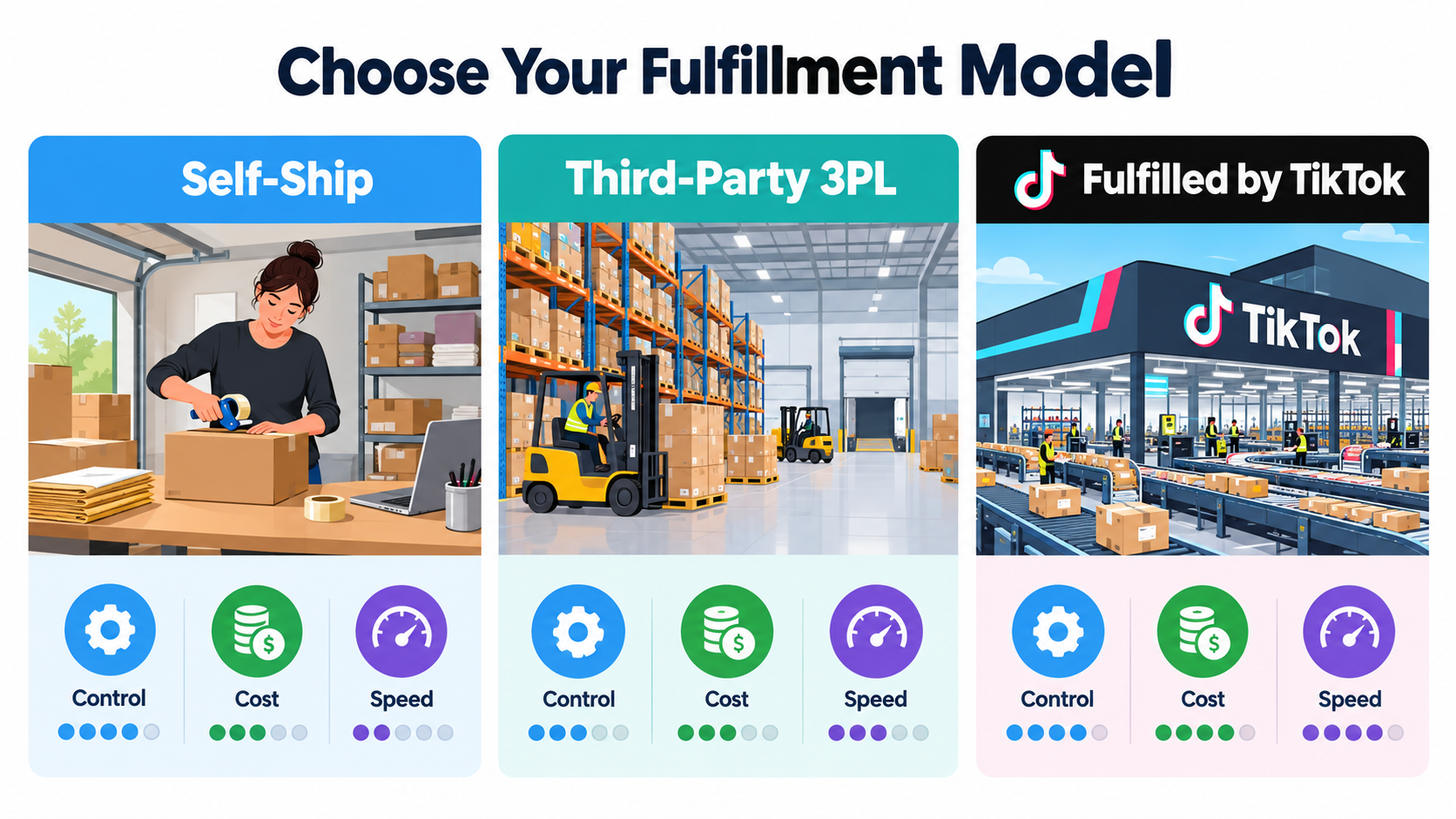
Option 1: Self-fulfillment
You store, pick, pack, and ship orders yourself, from a garage, a small warehouse, or a shared space. It makes sense early on, when volume is low and you want full control over packaging and quality.
- Strengths: Lowest fixed cost, full control over the unboxing experience, fast iteration on packaging and inserts.
- Weaknesses: Capacity is limited by your own hours. A viral spike can bury a one- or two-person team within a day. You also have to handle carrier pickups and tracking uploads yourself, and mistakes there turn directly into fulfillment metric problems.
- Best for: New sellers testing products, handmade or custom goods, and low-volume, high-margin items.
Option 2: Third-party logistics (3PL)
A 3PL stores your inventory and handles fulfillment, usually connected to TikTok Shop through a direct integration or middleware. Many 3PLs now advertise specific experience with TikTok Shop order flows.
- Strengths: Labor capacity that flexes with volume, multi-channel fulfillment from a single inventory pool, and professional carrier rates.
- Weaknesses: Onboarding takes time. Pricing includes receiving, storage, pick-and-pack, and often minimums. A 3PL’s own delays during peak periods still count against your metrics.
- Best for: Established sellers doing steady volume across several channels.
Option 3: Fulfilled by TikTok (FBT)
In markets where it’s available, Fulfilled by TikTok lets sellers send inventory to TikTok-run warehouses, and the platform handles fulfillment. It’s the same basic idea as Amazon’s FBA.
- Strengths: Tight integration with the platform. FBT orders are generally treated favorably on fulfillment metrics, since the platform controls that part of the process. Depending on the region, FBT products may also get badges or faster delivery promises that help conversion.
- Weaknesses: The inventory is only useful for TikTok orders unless multi-channel options are offered. There are inbound shipping requirements, prep rules, and fees for storage and fulfillment. You also give up control over packaging.
- Best for: Sellers whose TikTok Shop volume is big and steady enough to justify a dedicated inventory pool.
A hybrid approach many sellers use
A common setup is to keep hero SKUs in FBT for speed and metric protection, while long-tail SKUs and multi-channel inventory sit with a 3PL or in-house. That puts your highest-volume products, which are the ones most likely to spike, in the system best equipped to handle them.
Fee structures, eligibility, and program terms for FBT and TikTok’s shipping programs change regularly and vary by market. Compare current rate cards directly before committing inventory, and model total landed cost per unit, not just the fulfillment fee.
Shipping Deadlines and the Handoff Clock
Every TikTok Shop order starts a clock the moment it’s placed. The platform expects you to dispatch within a set window and to provide tracking that shows real carrier movement. Missing that window, or uploading tracking that never scans, counts against you.
What “dispatched” actually means
A common and costly misunderstanding is assuming that printing a label counts as shipping. Generally, the platform looks for evidence that the carrier actually has the package, meaning a first scan. A stack of labeled boxes waiting for Monday’s pickup may look like late dispatch in the data even though you “shipped” on Friday.
Uploading fake or recycled tracking numbers to beat the clock is treated as a serious policy violation, not just a performance problem. It falls under Account Health, not SPS.
Designing a daily shipping rhythm
- Set a daily order cutoff that fits your carrier pickup time. Orders before the cutoff ship the same day, and later orders go out first thing the next day.
- Schedule daily carrier pickups or plan a drop-off routine. Don’t rely on “whenever we have enough boxes.”
- Batch by SKU during spikes. Picking 400 of the same item goes much faster than picking 400 mixed orders.
- Pre-pack hero SKUs when you expect a surge, such as before a campaign, a big affiliate post, or a LIVE session.
- Plan for weekends and holidays. If you don’t ship on Sundays, know how your dispatch window treats weekend orders and adjust staffing or processing settings to match.
Handling carrier failures
Carriers lose packages, miss pickups, and fall behind in peak season. Even if the carrier is at fault, the buyer’s experience still reflects on you. Keep records of failed pickups and carrier delays, since some platforms allow appeals or exemptions for documented carrier problems. Using more than one carrier also gives you a fallback when your main one struggles.
Shipping promises and conversion
Delivery speed affects more than your metrics. It affects whether people buy. Impulse purchases, which make up much of TikTok Shop, are especially sensitive to delivery time. A buyer who sees a long estimated delivery date may simply scroll on. Faster shipping raises conversion on the traffic you already have.
Returns, Refunds, and Disputes: Where Margin Quietly Disappears
Impulse buying cuts both ways. The same quick decision that makes TikTok Shop convert so well can also lead to regret after delivery. Returns and refunds are a real line item in TikTok Shop unit economics, and many sellers don’t plan for them properly.
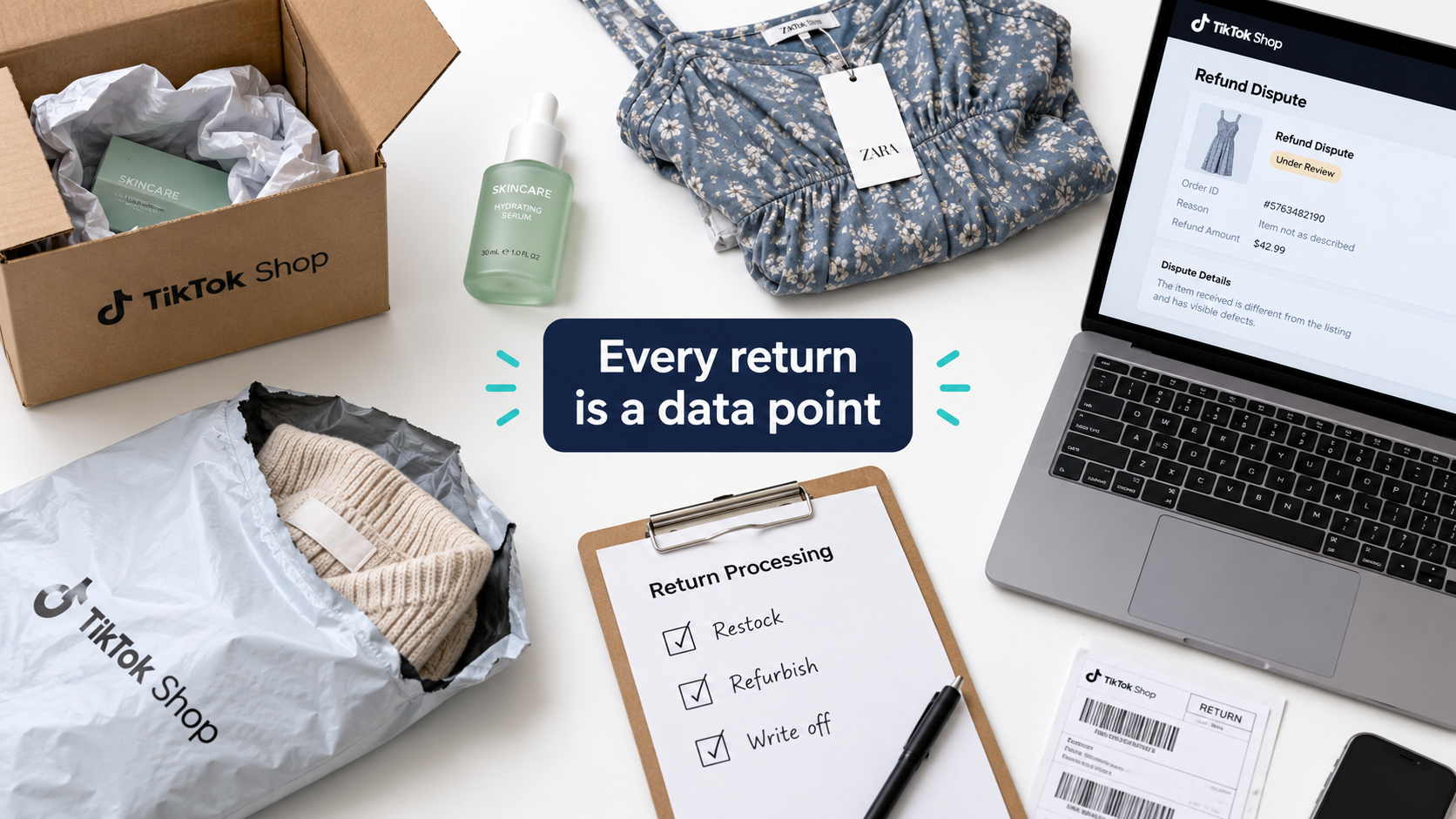
Why returns hit harder here
Several things make returns especially costly on TikTok Shop:
- Expectation gaps from content: A creator’s video might show the product in perfect lighting, give an enthusiastic but loose demo, or exaggerate what it can do. When reality falls short, returns go up.
- Return shipping costs: Depending on the return reason and platform policy, the seller may cover return shipping, especially when the buyer reports the item as defective or not as described.
- Refund-only resolutions: For low-value items, it’s sometimes cheaper, or required by policy, to refund without asking for the item back. That’s a total loss on the unit.
- Performance score effects: Returns tied to product quality or inaccurate listings can count against your SPS.
Categorize every return
The most useful thing you can do is tag each return by its real cause, not only the reason the buyer picked from a dropdown. Useful categories include:
- Product defect: A manufacturing or quality-control failure. Take it to your supplier.
- Shipping damage: Packaging failed. Fix it with better materials or a different carrier.
- Expectation mismatch: The product works but isn’t what the buyer expected. Fix it through listing accuracy and creator briefs.
- Sizing or fit: Common in apparel. Fix it with better size charts and fit notes.
- Buyer’s remorse: No product issue. Some amount of this is unavoidable, but a high rate may mean your content is pulling in low-intent buyers.
Winning legitimate disputes
Not every refund request is valid. When you contest one, evidence matters. Keep photos of packed orders for high-value items, record weights at packing, save carrier delivery confirmations, and respond within the platform’s deadlines. Missed response windows often default in the buyer’s favor.
Deciding what to do with returned stock
Set a clear rule for returned units: restock as new, resell as open-box through another channel, refurbish, or write off. Hygiene-sensitive categories like cosmetics and personal care usually can’t be restocked at all, so return rate matters even more for those unit economics. Include a realistic return and refund allowance in your pricing model from the beginning.
Customer Service as a Ranking Input, Not a Cost Center
On many marketplaces, customer service mostly means preventing damage. On TikTok Shop, response behavior is tracked and scored. How fast and how well you answer buyer messages can affect your performance standing, which in turn affects visibility.
The response-time expectation
TikTok Shop generally measures how quickly sellers reply to buyer messages, and many sellers treat a response within hours, not days, as the working standard. During a viral spike, message volume can jump along with orders, and a small team can fall behind fast. The exact measured windows and targets are listed in Seller Center and should be checked there.
Building a message triage system
- Canned responses for the top ten questions: Shipping times, order status, sizing, how to use the product, returns process. Write them ahead of time and personalize them lightly when you send them.
- Proactive messaging: If you know about a delay, such as a restock or carrier problem, tell affected buyers before they ask. It cuts inbound messages and reduces negative reviews.
- Coverage schedule: Decide who covers messages in the evening and on weekends, since that’s when a lot of TikTok browsing and buying happens.
- Escalation rules: Define which issues frontline staff can handle alone (a resend, a partial refund below a set amount) and which go to a manager.
Reviews as operational feedback
Product reviews on TikTok Shop act as social proof and as a diagnostic tool. Read negative reviews every week and sort them into the same categories you use for returns. If several reviews mention the same packaging problem or confusing instructions, you’ve found an operational fix that improves reviews, returns, and SPS together.
Avoid shortcuts like offering incentives for positive reviews or asking buyers to change a review in exchange for a refund. Platform rules generally ban review manipulation, and given the public scrutiny of fake reviews on TikTok Shop, enforcement risk is real.
Service as a conversion tool
Questions asked before purchase, in comments, DMs, or during LIVE sessions, are buying signals. A quick, clear answer to “Does this work on curly hair?” or “Will this fit a queen bed?” often turns directly into a sale. Treat pre-purchase support as part of the sales funnel, not as overhead.
The Hidden Logistics of Affiliate Samples
The affiliate program is one of TikTok Shop’s main growth engines. Through the Creator Affiliate Program, creators promote products in exchange for commission on sales. What gets discussed less often is the operational work behind it: getting samples to creators, tracking who actually posts, and managing the cost.
Samples are inventory with a marketing budget attached
Every free sample is a unit you won’t sell, plus the cost of shipping it. Sellers running aggressive affiliate programs can send out hundreds or thousands of samples a month. If most of those creators never post, or post content that doesn’t convert, the program is burning inventory and margin.
Building a sample qualification process
- Set approval criteria: Look at a creator’s past shoppable content, how well their audience matches your product, and their record of posting after receiving samples, not only follower count.
- Track sample-to-post rate: Measure what share of samples lead to at least one video within a set timeframe. This is the key efficiency metric for your program.
- Track post-to-sale performance: Among creators who post, which ones actually generate orders? Put future sample budget toward that group.
- Follow up systematically: A polite reminder at a set interval after delivery can meaningfully improve posting rates.
Keeping sample fulfillment separate
Mixing sample shipments with customer orders makes both harder to track. Many sellers keep a separate sample inventory count and a fixed weekly shipping day for samples. That makes the cost visible and stops sample volume from competing with paid orders for packing capacity during a spike.
Briefs that protect you
Every sample should come with a short creator brief covering key product benefits, correct usage, approved claims, and phrases to avoid. This does two jobs. It makes content more accurate, which lowers returns from expectation mismatch, and it lowers the chance that a creator’s exaggerated claims lead to policy problems. The brief is marketing and compliance in one document.
Watching for pipeline signals
As covered in the inventory section, your affiliate pipeline is one of the best early warnings of demand. A sudden jump in sample requests, especially from creators with proven sales records, is a reason to check stock levels and alert your supplier.
Cash Flow: Payouts, Reserves, and the Working Capital Squeeze
Here’s a TikTok Shop surprise that catches many sellers off guard: a viral month can leave you short on cash. Sales go up, but so do inventory purchases, sample costs, shipping outlays, and refunds, and platform payouts arrive after all of those bills are due.
How payout timing creates a gap
TikTok Shop generally releases funds after an order is delivered, and sometimes only after an additional holding period. New sellers or shops with certain risk signals may see longer holds or reserves. In the meantime, you’ve already paid your supplier, your 3PL, your carrier, and possibly for ads and samples.
When volume is flat, this gap is manageable. When volume jumps five or ten times, the gap grows just as fast. You may need to reorder inventory for the spike before you’ve been paid for the first wave of orders.
Modeling your true unit economics
To know whether a TikTok Shop product actually makes money, model every cost per unit:
- Product cost (landed, including inbound freight and duties)
- Platform referral or commission fees
- Affiliate commission (if the sale came through a creator)
- Fulfillment cost (pick, pack, storage, or FBT fees)
- Outbound shipping (net of any platform shipping subsidies)
- Payment processing, if charged separately in your market
- Return and refund allowance (as a percentage of units)
- Sample cost, spread across units sold
- Paid promotion cost per order, if you run ads
Sellers who only compare product cost to selling price often think they’re profitable when they aren’t. Affiliate commissions, returns, and samples together can take a large share of what looks like a healthy gross margin.
Protecting your working capital
- Know your payout schedule and forecast cash inflows by expected release date, not order date.
- Keep a cash buffer sized to cover a restock order for your top SKU at spike volume.
- Arrange financing ahead of time. Inventory financing or a line of credit is much easier to set up before you need it than during a crisis.
- Negotiate supplier terms. Even partial payment terms can close much of the gap between buying inventory and getting paid.
- Take advantage of platform incentives carefully. TikTok Shop regularly offers new-seller incentives. In the UK, for example, it advertises up to £800 in incentives, no fees to get started, and TikTok-funded discounts. These help early on, but don’t build your pricing around subsidies that will eventually end.
Running LIVE Selling Like a Production, Not a Hangout
LIVE shopping is one of TikTok Shop’s most distinctive features. Livestreams let sellers show products, answer questions in real time, and create urgency in a way pre-recorded videos can’t. TikTok provides tools such as a Live Planner in Seller Center to help schedule sessions. But a successful LIVE session is an operational event as much as a content one.
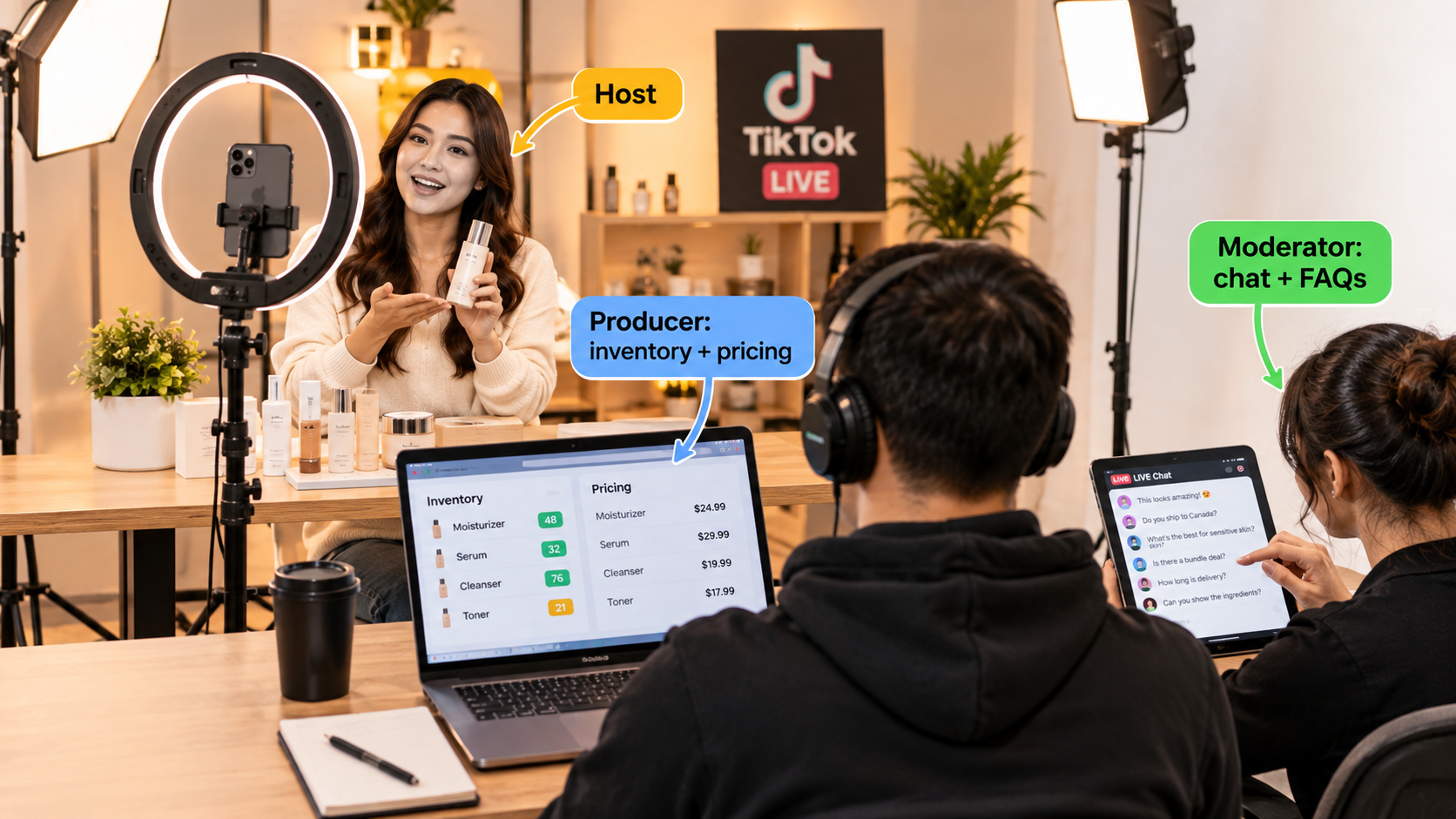
The three-role structure
Serious LIVE sellers usually split the work into at least three roles, even if one person covers two of them:
- Host: The on-camera presenter who demos products, tells stories, and keeps energy up.
- Producer: Off camera. Manages which products are pinned, launches flash deals, watches inventory in real time, and tells the host when stock is running low.
- Moderator: Handles chat, answers common questions, removes spam, and passes the most useful buyer questions to the host.
A solo host trying to do all three usually ends up with slow answers, missed questions, and pricing mistakes like launching a deal on a product that’s already sold out.
Pre-LIVE operational checklist
- Confirm inventory for every featured product, with extra buffer for any flash deals.
- Set up promotions ahead of time. Flash sales, vouchers, and bundles should be configured and tested before going live.
- Prepare a run of show: Product order, talking points, timing, and when each deal launches.
- Brief the fulfillment team. A strong LIVE can create a burst of orders that needs to ship on time. Make sure packing capacity is ready for the following day.
- Test your tech: Connection stability, lighting, audio, and backup devices.
Post-LIVE review
After each session, look at viewer count over time, product clicks, conversion by product, average watch time, and which moments led to order spikes. Then look at the operational side: Did anything oversell? Were there pricing errors? How quickly did LIVE orders ship? Over time, this review process builds a record of what works for your audience.
Consistency beats spectacle
One big, heavily promoted LIVE event can produce a spike, but regular recurring sessions on a predictable schedule tend to build a returning audience. A steady schedule is also easier to staff and to plan inventory around, which ties back to the main point of this article: predictability is valuable on a platform built around unpredictable demand.
Building Your TikTok Shop Operations Stack: A 30/60/90-Day Plan
Everything above can feel like a lot at once. Here’s a staged plan for putting operational discipline in place without stopping sales to do it.
Days 1–30: Visibility and baselines
- Set up a weekly review of your Shop Performance Score components and a daily check for Account Health violations.
- Document your current fulfillment process from start to finish, including order cutoff, carrier pickup schedule, and who handles what.
- Build your full unit economics model for your top five SKUs, including returns, affiliate commission, and sample costs.
- Write canned responses for your ten most common customer questions.
- Start tagging every return by its real cause.
Days 31–60: Resilience
- Write baseline, moderate-spike, and breakout scenarios for each hero SKU, and talk through surge options with suppliers.
- Evaluate fulfillment options. Get quotes from 3PLs and check FBT eligibility and current fees for your top products.
- Put inventory sync across channels in place if you sell in more than one place.
- Formalize affiliate sample criteria and start tracking sample-to-post and post-to-sale rates.
- Create a standard creator brief with approved and prohibited claims.
Days 61–90: Readiness for scale
- Arrange working capital, whether financing, supplier terms, or a cash buffer, sized to your breakout scenario.
- Set up a recurring LIVE schedule with defined roles and a pre-LIVE checklist.
- Run a “spike drill”: pick a date, assume orders jump five times, and walk through what each part of your operation would do. Fix whatever breaks on paper before it breaks for real.
- Review return categories from the past 60 days and make at least two changes based on them, such as packaging, listing copy, size charts, or creator briefs.
- Recalculate unit economics with 90 days of real data, not assumptions.
Tools worth considering
You don’t need expensive enterprise software to run TikTok Shop well. At minimum, most growing sellers benefit from:
- An inventory or order management system that connects to TikTok Shop and any other channels.
- A shipping platform or 3PL integration that uploads valid tracking automatically.
- A simple spreadsheet or BI dashboard tracking SPS components, return reasons, and affiliate program metrics.
- A shared inbox or helpdesk tool if more than one person handles customer messages.
Conclusion: The Sellers Who Keep the Money
TikTok Shop selling rewards attention, but it doesn’t keep paying for attention you can’t deliver on. The platform watches what happens after the sale: how fast you ship, how often you cancel, how buyers feel when the package arrives, and whether you follow the rules. Those signals determine how much future attention you get.
As more sellers join and the easy content wins get harder to find, operations becomes more of a competitive advantage. Two sellers can get the same viral moment. The one who has inventory on hand, ships on time, handles returns quickly, and has the cash to restock will keep growing. The other will end up with stockouts, cancellations, and a performance score that takes months to rebuild.
Key takeaways
- Keep your two scorecards separate: Shop Performance Score affects visibility, and Account Health affects whether you stay on the platform. Monitor both, on different schedules.
- Plan in scenarios, not forecasts: Know how you’d handle a 3x spike and a 10x spike before either one happens.
- Pick fulfillment based on volume and volatility: Self-ship to test, a 3PL for steady multi-channel volume, and FBT for high-volume hero SKUs, or a mix.
- Dispatch means a carrier scan: A printed label isn’t shipped. Build a daily rhythm around pickup times.
- Tag every return by its real cause: Returns are feedback on product, packaging, listings, and creator content.
- Treat customer service as part of ranking and conversion: Fast, accurate answers protect your score and close sales.
- Manage affiliate samples like inventory: Track sample-to-post and post-to-sale rates, and brief every creator on approved claims.
- Model cash, not just profit: Payout timing can make a viral month tight on cash. Arrange working capital before you need it.
- Run LIVE as a production: Host, producer, and moderator roles, a pre-LIVE checklist, and a post-LIVE review.
The content gets people to your shop. Operations decides whether you actually keep the money. Most of the TikTok Shop playbooks out there focus on the first part, and the sellers who put real work into the second part are more likely to still be around a year from now.