
The conversation about AI automation in business has been dominated by two extremes for years. On one side, breathless promises that AI will handle everything and your headcount will drop by half. On the other, skeptics insisting the technology is overhyped and the ROI never materialises. Both camps are wrong — and both are missing the actual story, which is considerably more nuanced and considerably more useful.
The truth is that AI automation works extremely well in some parts of your business, adequately in others, and poorly in a few areas that vendors would rather you not ask about. The problem is that most companies approach it as a monolithic initiative — an “AI transformation” — when the actual value lives at the department level, in specific workflows, tied to specific data sources and specific pain points.
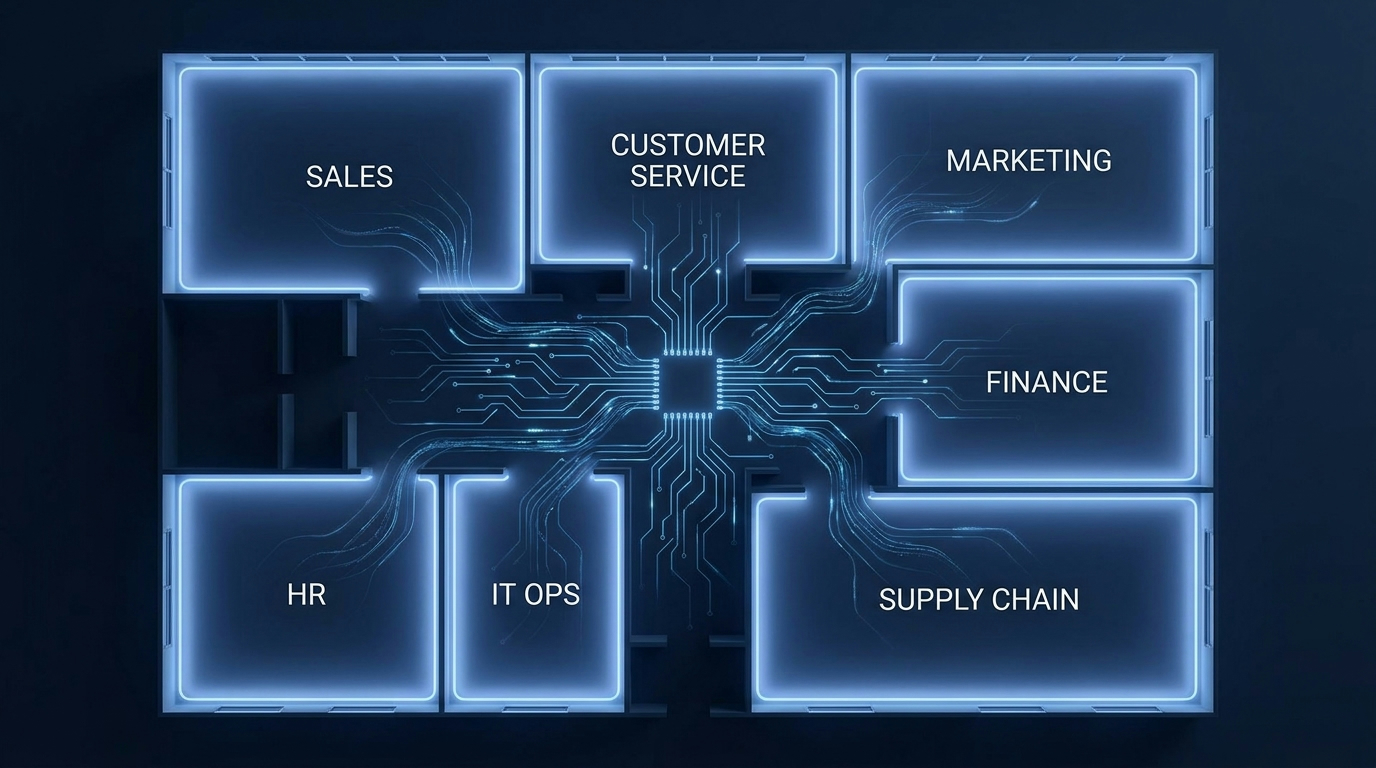
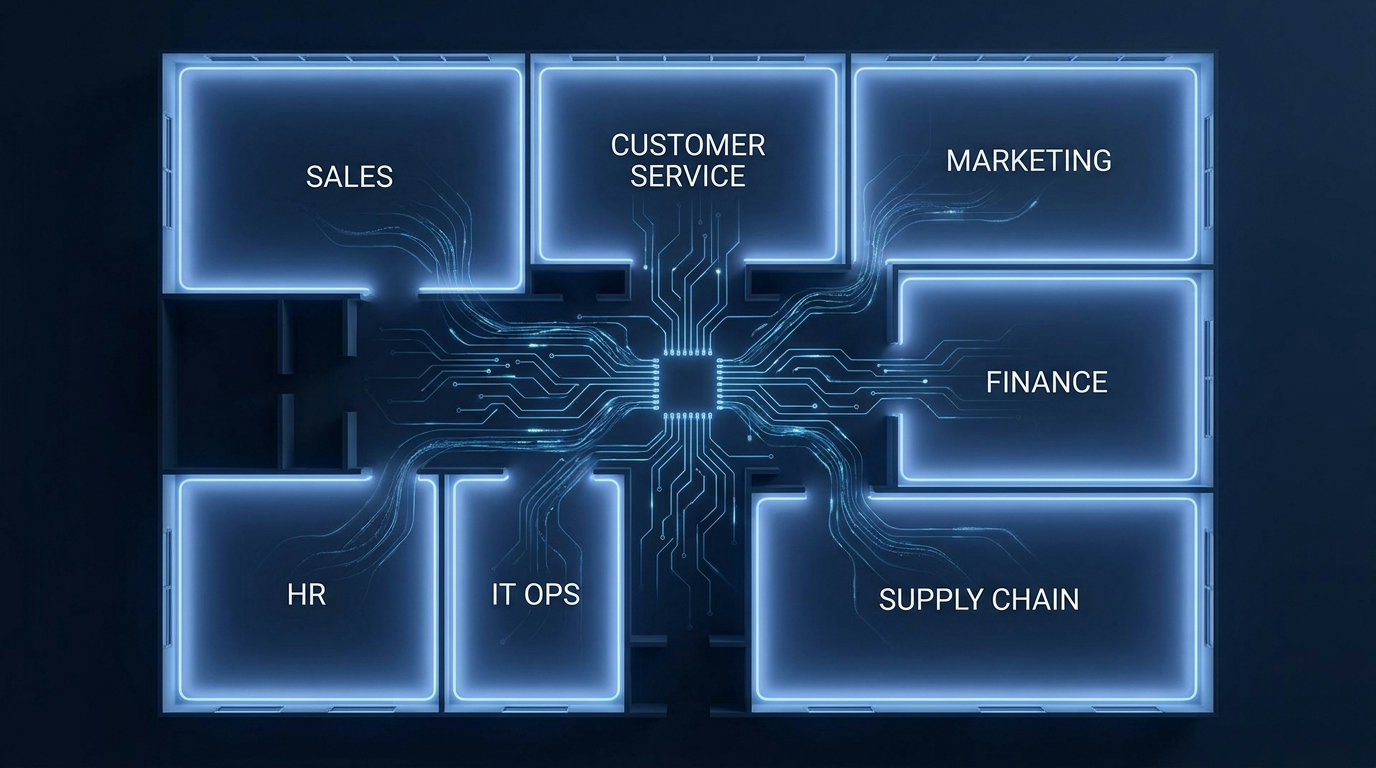
This post takes a different approach. Instead of talking about AI automation in the abstract, we’re going to walk through each major business function — sales, customer service, marketing, finance, HR, IT operations, and supply chain — and look at what automation actually does in each one. What tasks it reliably handles. What it still struggles with. What the implementation really costs. And how to decide which department should move first.
The data here comes from documented case studies, published research from IBM, McKinsey, Salesforce, and Zapier, and real implementation outcomes — not vendor slide decks. If you’re a business owner, operations lead, or department head trying to make a grounded decision about where to start with AI automation in 2026, this is the analysis you need.
Why Department-Level Thinking Beats Company-Wide AI Rollouts
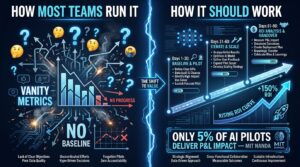
Most failed AI automation projects share a common origin story: a senior leader gets excited about the technology, commissions a company-wide “AI strategy,” hires a consultancy, and kicks off a transformation programme with a six-figure budget and an eighteen-month timeline. Eighteen months later, very little has changed. The team is exhausted, the budget is gone, and the board is asking pointed questions.
The reason this pattern repeats so consistently is that company-wide AI rollouts treat automation as infrastructure — something you lay down universally and then use everywhere. But the reality is that AI automation is deeply contextual. The data that exists in your sales CRM is structured completely differently from the unstructured text in your customer support inbox, which is different again from the numerical ledger data in your accounting system. Each department needs different models, different integrations, different governance, and different success metrics.
The Compounding Complexity Problem
When you try to automate everything at once, the integration complexity compounds quickly. Every new system you add requires data mapping, API connections, authentication protocols, and testing across all the other systems it touches. A company with seven departments, each running three to five core tools, can easily end up managing forty or fifty data pipeline connections for a single automation layer. That’s not a transformation — that’s a maintenance nightmare.
Department-level automation sidesteps most of this. You pick one function, identify the two or three workflows within it that create the most friction, and you automate those specifically. The integration footprint is small. The failure modes are predictable. The success metrics are clear from the start.
The 92% Statistic Worth Paying Attention To
IBM’s Institute for Business Value found that 92% of C-suite executives plan to digitise workflows and use AI-powered automation by 2026. That number sounds impressive until you ask the follow-up question: how many have actually done it in a way that delivers measurable results? The gap between intent and execution is where most AI automation spending disappears.
The companies closing that gap consistently share one characteristic: they started with a specific department, a specific problem, and a specific measurement framework. Then they expanded. The companies that started with “we’re going to be an AI-first organisation” almost universally stalled at the strategy phase.
The Right Starting Frame
Think of AI automation not as a technology layer, but as a departmental decision. The question isn’t “should we automate?” The questions are: Which workflows inside this department consume the most time relative to the value they produce? Do we have clean enough data to feed an AI system? Do we have the change management bandwidth to actually get adoption? If the answers align, you’ve found your starting point. If they don’t, you don’t have an automation problem — you have a data problem or an operations problem, and automating it will just make that problem faster.
Sales Teams: Scoring Leads, Routing Prospects, and Eliminating Admin Overhead
Sales is where AI automation tends to deliver its most clearly measurable early wins, for a simple reason: sales teams generate a huge volume of structured, trackable data. Every call, every email, every CRM entry, every conversion event — it’s all logged. That data density is exactly what AI models need to operate well.
Lead Scoring: From Gut Feel to Ranked Intelligence
Traditional lead scoring is a mess. Most CRMs offer scoring built on simple rules: if a contact has visited the pricing page, add ten points; if they opened three emails, add five points. These rules are designed by marketing teams based on assumptions that may have been valid two years ago and probably aren’t today. The result is a lead list that technically has scores on it, but that sales reps routinely ignore because the scores don’t match what actually converts.
AI-driven lead scoring works differently. Instead of applying static rules, machine learning models analyse historical conversion data — which leads actually became customers, what their engagement patterns looked like, what firmographic attributes they shared — and use that to score incoming leads dynamically. The model updates as new conversions come in. The scores reflect actual buying behaviour, not marketing assumptions.
Rush Home, a residential real estate brokerage documented in Zapier’s case studies, deployed an AI agent called “Russ” that scores a database of over 11,000 leads using Claude and Zapier MCP. Every morning, each sales agent receives a ranked brief of their leads, with the top prospects highlighted and follow-up tactics drawn from CRM notes. The result isn’t just faster prospecting — it’s that reps start every day aligned on priority, which eliminates the friction of figuring out who to call first.
Post-Call Admin: The 300-Day Problem
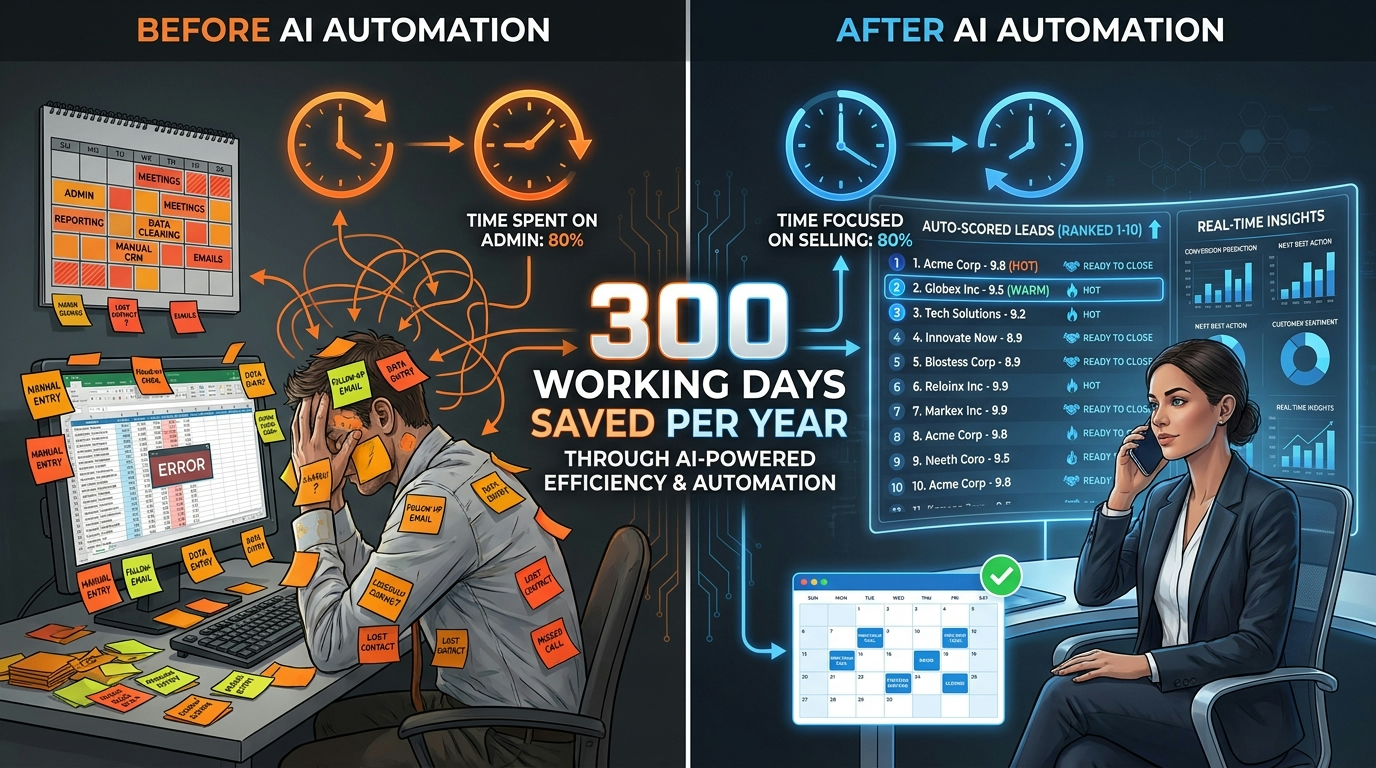
Vendasta, a SaaS platform for digital agencies, discovered that its sales reps were collectively losing nearly 300 working days per year to manual CRM updates, contact enrichment, and internal recordkeeping. That’s not 300 days of bad morale — that’s 300 days of revenue-generating activity that wasn’t happening because people were typing data into boxes.
Their solution used AI to automate the entire post-call workflow: call transcripts are processed automatically, key details are extracted and logged to the CRM, a follow-up email is drafted and staged for rep approval, and the contact record is enriched with firmographic data from Apollo and Clay. The rep’s job after a call is to review and send — not to document everything from scratch. Vendasta reports recovering approximately $1 million in revenue as a result, though the exact figure includes multiple automation improvements rather than post-call admin alone.
Lead Enrichment: Knowing Who You’re Calling Before You Call
ActiveCampaign built an enrichment workflow that automatically queries Apollo for firmographic data, Similarweb for website traffic and industry signals, and ChatGPT to interpret and synthesise the picture — all before a lead enters the pipeline. By the time a rep touches a new inbound contact, they already know the company’s industry, approximate revenue band, headcount, tech stack, and how the contact’s company is performing online.
The impact lands in two places: routing accuracy (reps are matched to leads that actually fit their specialisation) and conversion rates (personalised outreach informed by real context outperforms generic templates). The automation doesn’t replace the rep’s judgement — it gives them the context to exercise it better.
What Sales AI Still Gets Wrong
Lead scoring models are only as good as the historical data they’re trained on. If your CRM has inconsistent data hygiene — missing fields, duplicate records, variable entry formats — the model will learn from noise and produce unreliable scores. Before automating lead scoring, audit your CRM data first. The automation is the easy part; the cleanup is the real work.
AI also struggles with relationship-driven sales where the buying decision involves politics, personal trust, and organisational dynamics that don’t appear in any data field. In enterprise deals, AI can tell you which account looks ripe for expansion — but it can’t tell you that the champion you’ve been building a relationship with for eight months is about to leave the company. Human intelligence still owns that layer.
Customer Service: When AI Handles Tier-1 (and When It Absolutely Shouldn’t)
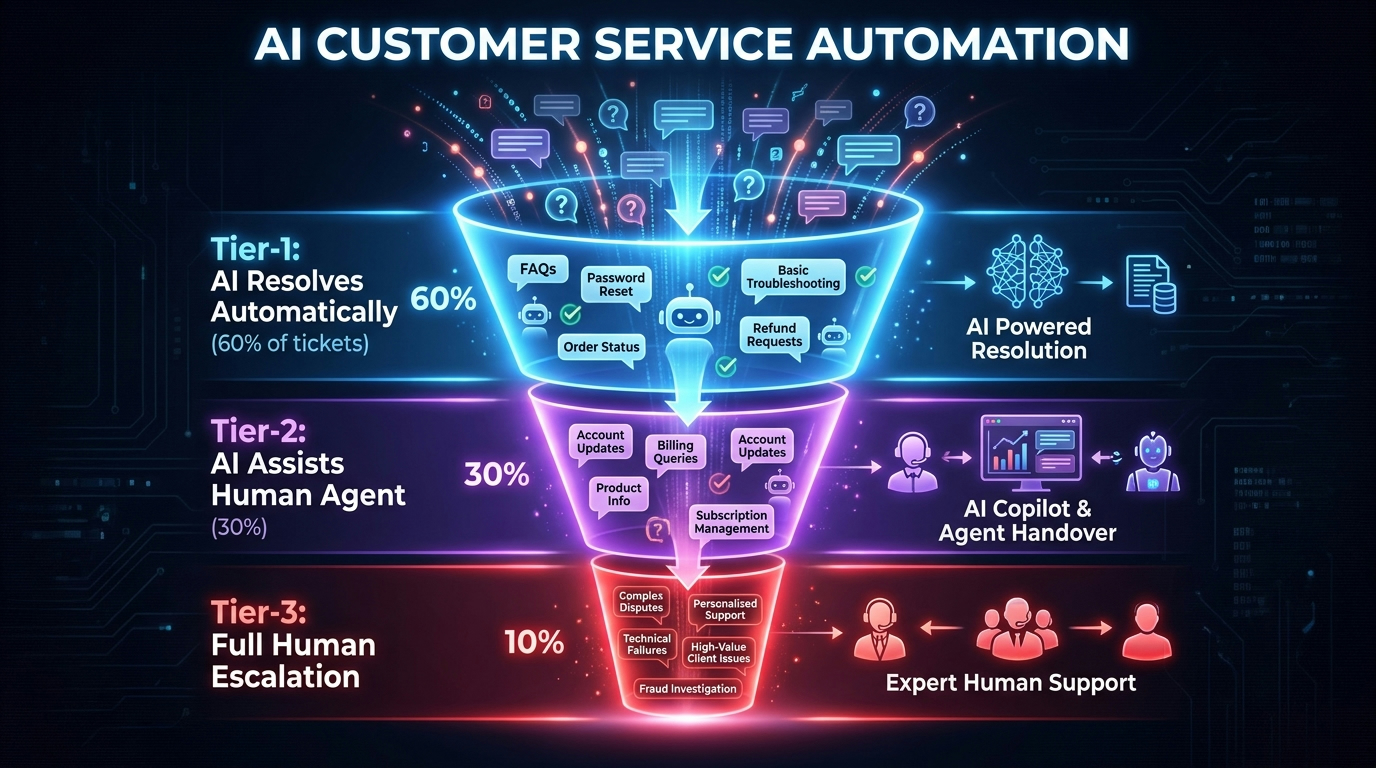
Customer service is the department where AI automation has the highest public visibility and, simultaneously, the highest rate of implementation failure. The failures get noticed because they affect customers directly — a chatbot that loops endlessly, a virtual assistant that confidently gives wrong answers, an AI system that can’t recognise when a customer is distressed. These experiences erode trust in ways that take time to rebuild.
The successful implementations share a common architecture: they define very clearly which interactions AI handles independently, which interactions AI assists a human with, and which interactions AI shouldn’t touch at all.
The Three-Tier Model That Actually Works
Think of customer service automation as a tiered system rather than a binary choice between “humans” and “bots.”
Tier 1 — Full AI Resolution: These are high-volume, low-complexity interactions where the answer is deterministic and the customer’s emotional state is neutral. Order status checks. Password resets. FAQ responses. Business hours and location queries. Return policy explanations. For a mid-size e-commerce company, these interactions can represent 50–65% of total ticket volume. AI handles them completely, instantly, and at a fraction of the cost of a human agent. Done correctly, customers often don’t know or care that they’re not talking to a person — they got their answer in thirty seconds instead of waiting in a queue.
Tier 2 — AI Assists Human: These are interactions that require judgment, context, or personalisation, but where AI can dramatically reduce the cognitive load on the agent. The AI reads the ticket, pulls the customer’s history, surfaces relevant knowledge base articles, drafts a suggested response, and flags the sentiment. The human reviews, edits if needed, and sends. Agent handle time drops significantly. The quality of responses improves because agents aren’t starting from scratch under time pressure.
Tier 3 — Human Only: Complaints involving significant financial loss, emotionally charged situations, legal or compliance implications, and any interaction where a customer explicitly requests a human. AI should route these efficiently but not attempt to resolve them. An AI trying to handle a customer who is furious about a defective product that injured their child is not just ineffective — it’s reputationally dangerous.
Intelligent Automation in Customer Service: The Real Numbers
IBM’s research on intelligent automation in customer service highlights a consistent finding: AI-powered virtual assistants reduce costs while enabling smarter interactions between customers and human agents. The key phrase is “smarter interactions” — not “replaced interactions.” The best deployments use AI to make human agents better, not to route customers away from humans entirely.
Microsoft reports that nearly 70% of Fortune 500 companies are now using Microsoft 365 Copilot for email search and note-taking. In customer service terms, that means agents are increasingly working alongside AI tools that surface context, draft responses, and log outcomes automatically — rather than working in isolation and manually maintaining their own notes.
The Sentiment Detection Layer
One of the less-discussed but high-value AI capabilities in customer service is real-time sentiment detection. Natural language processing models can read incoming tickets and flag elevated frustration, urgency signals, or distress indicators that might not be obvious from the ticket category alone. A return request from a customer who has been escalated three times in the past thirty days and who uses language indicating high frustration should be routed differently than a straightforward return from a first-time buyer.
This kind of intelligent routing — not just by topic, but by emotional context and customer history — is where AI genuinely outperforms rule-based systems. Rules can route by keyword; AI can route by intent and context.
The Shadow Risk: Over-Automation
Salesforce research found that more than half of generative AI adopters are using unapproved tools at work. In customer service, this manifests as agents using consumer AI tools to draft responses — tools that aren’t connected to your product knowledge base, your customer data, or your compliance guidelines. The output sounds professional but may be factually wrong about your product, inconsistent with your brand voice, or in violation of your service terms. This shadow AI risk is as real as any automation failure, and it’s harder to detect because it doesn’t show up in your system logs.
Marketing: Content Workflows, Sentiment Analysis, and Campaign Triage
Marketing teams were among the earliest adopters of generative AI, and by 2026 the novelty has worn off and the real patterns have emerged. Teams that used AI simply to produce more content discovered quickly that more content doesn’t mean better results — and that AI-generated content that isn’t grounded in genuine customer insight performs poorly regardless of how polished it looks. Teams that used AI to systematise their existing strengths fared much better.
Content Production vs. Content Strategy
The practical distinction that successful marketing teams have landed on is this: AI handles production, humans handle strategy. That means AI drafts the first version of a blog post, email sequence, or social caption based on a brief that a human has written. The human then edits, fact-checks, injects brand perspective, and approves. The time savings are real — a piece that would take four hours to write from scratch might take ninety minutes with AI doing the heavy lifting on the first draft. But the strategic decisions — what topic to cover, what angle to take, what the audience actually cares about — remain human calls.
Teams that tried to let AI make the strategic decisions, too, ended up publishing content that was technically competent but strategically inert. It ranked for long-tail keywords no one was searching with buying intent. It covered topics competitors had already exhausted. It sounded like every other piece of AI-assisted content in the category — which is to say, it sounded like nothing in particular.
Workflow Automation: The Operational Gains
Where AI automation creates the most durable marketing value is in the operational layer beneath content creation. Specifically:
- Content repurposing pipelines: A long-form blog post is automatically summarised into email newsletter sections, social post variants, and short-form video scripts. This used to require a producer to manually condense and reformat. Now it’s a workflow that runs on publication.
- Campaign performance triage: AI monitors ad performance in real time, flags underperforming assets against predetermined thresholds, and surfaces the specific elements — headline, visual, audience segment — that are dragging performance. Marketing teams get prioritised alerts rather than having to dig through dashboards.
- Sentiment analysis on customer reviews and social mentions: AI reads incoming reviews and social commentary at scale, tags sentiment and topic, and surfaces emerging themes. A product team can know within hours that a new feature launch is generating confusion about a specific function — rather than discovering it three weeks later in the quarterly review.
- Email personalisation at scale: Behavioural triggers — a contact viewing a pricing page twice in a week, downloading a specific resource — fire personalised email sequences automatically. The content of those sequences adapts based on industry, company size, or previous interactions with the brand. Static drip sequences are rapidly being replaced by dynamic flows that change based on what the contact actually does.
The Audience Intelligence Gap
AI automation can tell you what content performed well last quarter. It cannot tell you why. It can surface that a particular campaign drove 3x the usual click-through rate, but understanding whether that was because of the headline, the timing, the audience segment, the offer, or some combination of all four still requires human analysis and judgement. The data AI generates is genuinely useful — but it’s most useful when a skilled marketer is interpreting it, not when it’s being used as a substitute for that interpretation.
Finance and Accounting: Invoice Processing, Fraud Detection, and Reporting Automation
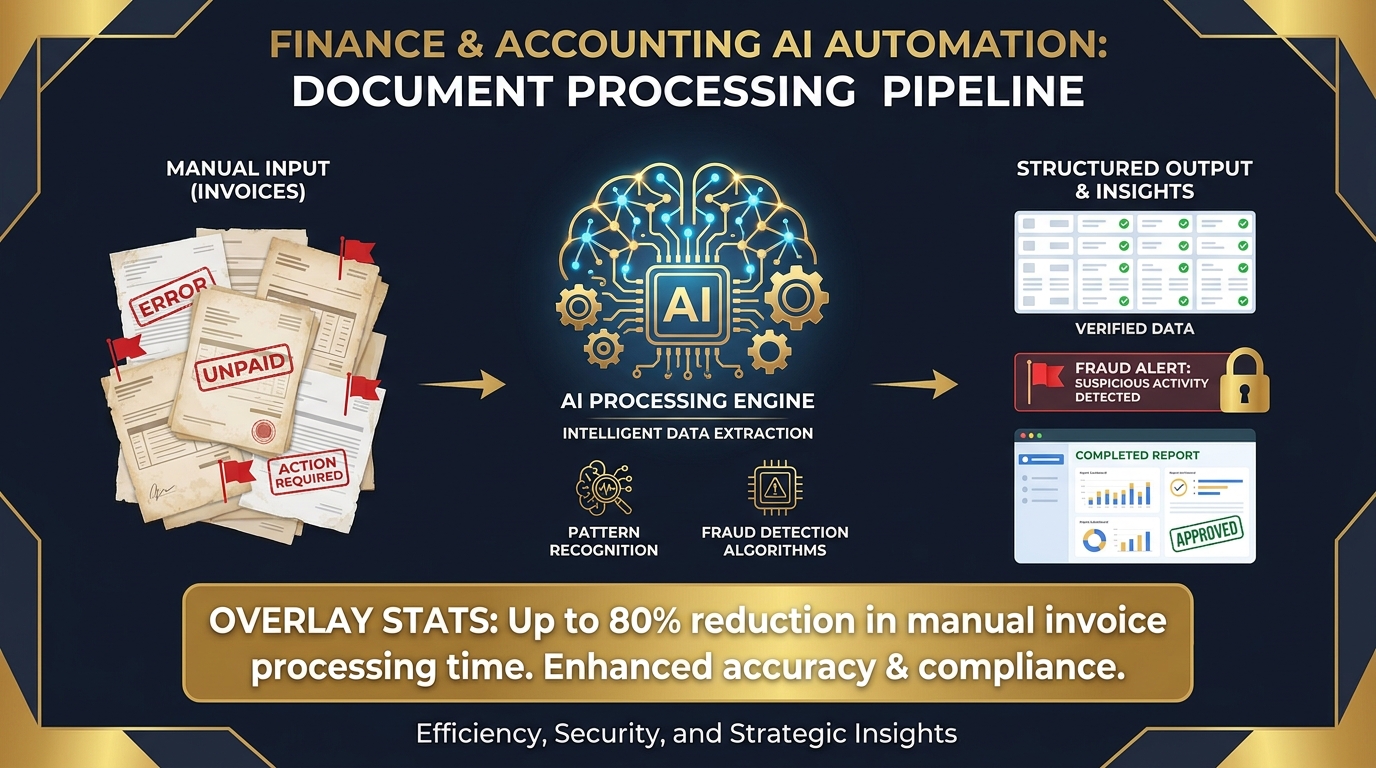
Finance and accounting is, in many ways, the ideal department for AI automation: the data is structured, the rules are well-defined, the outcomes are measurable, and the cost of errors is high enough that efficiency improvements have obvious dollar value. It’s also the department where automation has been happening longest — robotic process automation (RPA) has been processing invoices and reconciling accounts for years. The AI layer adds intelligence on top of that existing foundation.
Accounts Payable and Invoice Processing
Manual invoice processing is a well-documented productivity drain. A typical mid-market finance team spends significant time on a task that is, at its core, data extraction and matching: pull the vendor name, invoice number, line items, and total from the document; match it against the purchase order; flag discrepancies; route for approval. It’s precise, repetitive, and important enough that errors matter — but it doesn’t require human judgement in the vast majority of cases.
AI-powered accounts payable automation handles this workflow end-to-end. Optical character recognition (OCR) extracts data from incoming invoices regardless of format — PDFs, scanned images, emails with attachments. NLP parses the extracted data into structured fields. Machine learning matches the invoice to the corresponding purchase order and flags exceptions automatically. Approval routing happens based on rules the finance team sets. IBM’s data suggests implementations of this kind deliver up to 50% productivity gains in the affected workflows.
The business case is straightforward to model: if your team processes 2,000 invoices per month and each one takes 15 minutes of manual work, that’s 500 hours of labour per month. Automating 80% of that — the invoices that match cleanly — frees 400 hours. The remaining 100 hours focuses on the exceptions that genuinely require human review. The AP team doesn’t shrink necessarily; they redirect their time toward supplier relationship management, cash flow analysis, and exception investigation instead of data entry.
Fraud Detection: Pattern Recognition at Machine Speed
Fraud detection is one of the most compelling AI use cases in finance because it requires doing something humans simply cannot do at scale: analysing every transaction against thousands of historical patterns simultaneously, in real time. A human fraud analyst can review flagged transactions reactively. An AI system can identify anomalous patterns across the entire transaction set — vendor payment amounts that deviate from historical norms, duplicate invoices with slight variations in vendor name or bank details, expense claims that cluster suspiciously around approval thresholds — before money leaves the business.
The models improve continuously. As new fraud patterns emerge, the system’s training data grows, and the detection accuracy improves. This is a genuine advantage of machine learning over rule-based systems: rules catch known fraud patterns; ML catches previously unseen ones.
Financial Reporting and Forecasting
Month-end close is another pain point that AI automation is progressively reducing. Data aggregation from multiple systems, reconciliation of intercompany transactions, variance analysis against budget, and the production of management accounts — these are workflows that historically consumed weeks of finance team time and were highly sensitive to human error under time pressure.
Workflow automation handles the aggregation and reconciliation layers. AI assists with variance analysis by surfacing the largest deviations from forecast and providing context — for example, flagging that the COGS overrun in month three correlates with the supplier price increase that was logged in the procurement system in month two. The finance team still reviews, interprets, and presents the data — but they’re not building the spreadsheet from scratch anymore.
The Compliance and Audit Trail Dimension
One underappreciated benefit of AI-driven finance automation is the audit trail it creates automatically. Every decision made by an automated system is logged with a timestamp, the input data it used, and the rule or model output that drove the decision. For regulatory compliance and external audit purposes, this level of documentation would take significant time to produce manually. With automation, it exists by default.
HR and Recruiting: Screening at Scale, Onboarding Workflows, and Compliance Automation
HR automation is one of the most politically complex areas to address, because it sits at the intersection of efficiency and human dignity. Automating the process of evaluating people for jobs raises legitimate questions about bias, fairness, and the reduction of humans to data points. Those concerns are valid and deserve serious consideration — but they don’t argue against automation in HR; they argue for doing it carefully, with clear human oversight and regular auditing of model outputs.
High-Volume Recruiting: The Application Volume Problem
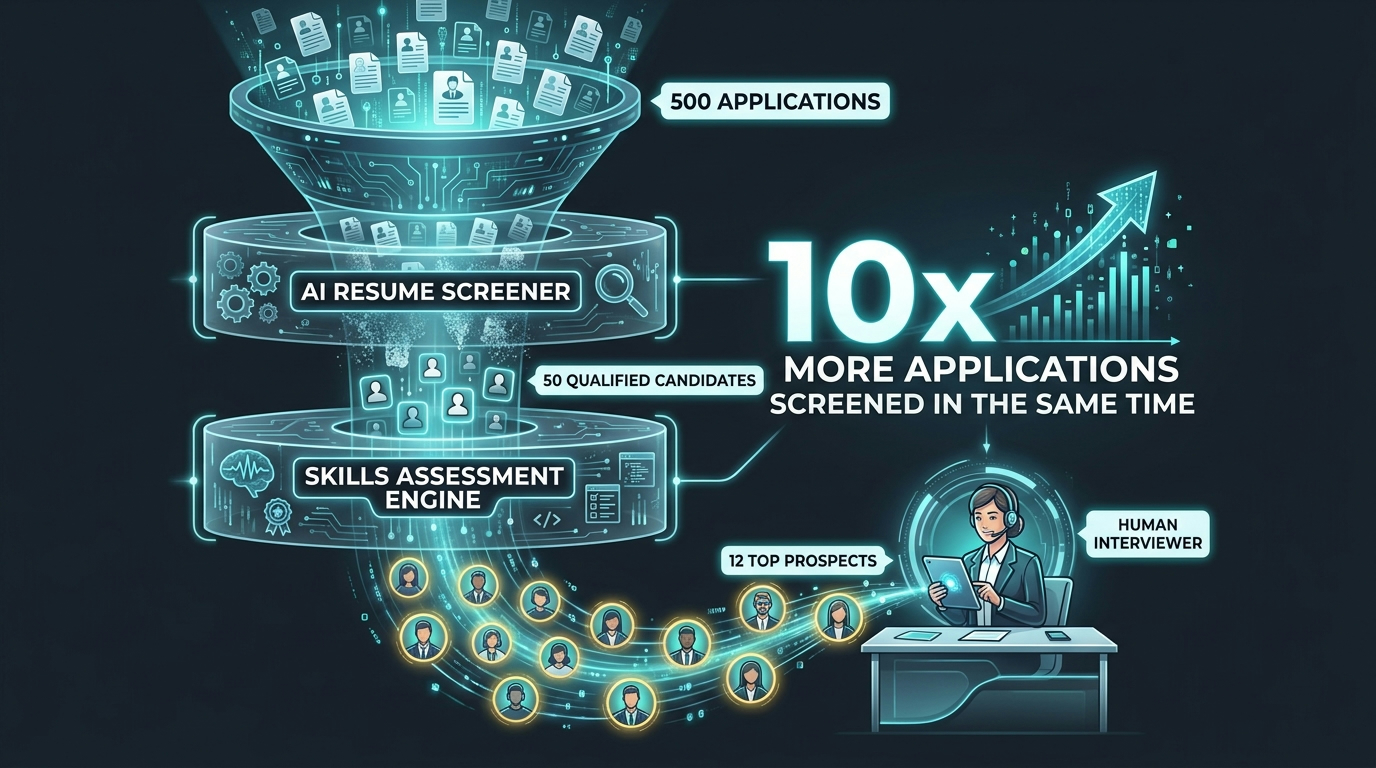
A mid-size company with a reasonable employer brand can receive 300–500 applications for a single open role. A larger company or a desirable tech role can easily receive several thousand. It is physically impossible for a recruiter to read every application with the attention it deserves. The current reality without AI is that most applications are evaluated in thirty seconds or less — not because recruiters are lazy, but because volume forces it.
AI screening doesn’t eliminate the human judgment call — it restructures when that judgment is applied. Instead of every recruiter spending thirty seconds on five hundred applications, the AI does a first pass on structured criteria: relevant experience, required qualifications, skills match, and red flags like employment gaps that the recruiter wants to review. This passes a shortlist of genuinely relevant candidates to the recruiter, who can then spend meaningful time evaluating each one.
The time savings are substantial. Research consistently shows that AI screening can process applications ten times faster than manual review. The quality improvement is more contested — it depends heavily on the quality of the criteria the model is trained on. If historical hiring decisions embedded bias (favouring candidates from certain universities, penalising employment gaps that disproportionately affect certain demographics), an AI model trained on that data will reproduce those biases at scale.
The Bias Audit Requirement
This is not optional. Any organisation using AI for candidate screening should run regular audits of model outcomes across demographic dimensions — gender, age, ethnicity, educational background — to ensure the model isn’t systematically disadvantaging any group. Several jurisdictions, including New York City, already require this by law for employers using automated employment decision tools. The regulatory direction of travel is clear: audit requirements will expand, not contract, in the years ahead.
The practical implication is that AI screening requires ongoing maintenance, not one-time setup. The model that works well today may drift in ways that create disparate impact outcomes as the candidate pool and job market shift. HR teams adopting AI screening need a monitoring protocol, not just an implementation.
Onboarding Workflow Automation
New employee onboarding is a process with a predictable structure — a sequence of documents to sign, accounts to create, training modules to complete, meetings to schedule, equipment to provision — that varies by role and department but follows the same general pattern every time. It’s an ideal candidate for workflow automation.
United Foods, documented in IBM’s case studies, used IBM Cloud Pak for Business Automation to streamline HR, finance, and reporting workflows across the organisation. The onboarding component alone reduced the manual coordination burden on HR teams significantly — new hires received structured, sequenced onboarding experiences with automated reminders, document collection, and task tracking, rather than relying on a coordinator to manually chase each step.
The employee experience benefit is equally important: a well-automated onboarding process feels professional and organised. A manual one — where the new hire’s laptop hasn’t arrived, their system access isn’t set up, and no one is sure who they’re supposed to meet with first — creates a poor first impression that correlates with higher early attrition.
Compliance and Policy Management
HR compliance — tracking certification renewals, ensuring policy acknowledgments are current, managing leave entitlements across jurisdictions, monitoring for training completion — is a significant administrative burden in organisations of any size. AI and automation handle this at scale: automated reminders go out before deadlines, completion is logged automatically, and dashboards surface compliance gaps without requiring someone to manually check spreadsheets.
For multi-jurisdictional businesses, this is especially valuable. Employment law requirements vary significantly across states and countries, and staying compliant manually requires either specialist expertise or significant consultant spend. AI-assisted compliance tools that flag when local requirements differ from company-wide policy are increasingly becoming table stakes for mid-market HR operations.
IT Operations: Security Scanning, Incident Response, and Code Review Automation
IT operations was an early adopter of automation long before generative AI arrived — monitoring systems, alerting pipelines, and deployment automation have existed for years. What AI adds is intelligent pattern recognition in environments too complex for static rules to cover effectively.
Security: The Threat That Never Sleeps
IBM’s 2026 Cost of a Data Breach Report notes a 56% increase in AI-driven attacks year over year. The threat landscape is evolving faster than any team of human analysts can track manually. AI-powered security tools respond to this by doing what they do best: continuous monitoring at machine speed, pattern matching against known threat signatures, and behavioural anomaly detection that flags deviations from established baseline behaviour.
The practical workflow looks like this: an AI-powered security information and event management (SIEM) system ingests logs from every endpoint, network device, and cloud service simultaneously. It applies machine learning models trained on threat intelligence data to identify indicators of compromise. When an anomaly is detected — an account attempting to access systems it has never touched before, an unusual volume of data being moved to an external endpoint, authentication attempts at unusual hours — it fires an alert with context already assembled for the incident responder.
The human analyst doesn’t start an investigation from scratch; they start from a pre-assembled evidence package. Mean time to detect and respond drops significantly. According to IBM’s security research, organisations with AI-powered security see substantially lower breach costs than those relying on fully manual detection — primarily because faster detection limits the window in which attackers can move laterally and exfiltrate data.
Incident Response: Automated Triage and Remediation
For many categories of security incidents — known malware signatures, phishing emails matching established patterns, suspicious login attempts — the response playbook is well-defined. Isolate the affected endpoint. Block the IP. Reset the credentials. Notify the affected user. These are deterministic steps that an automated system can execute in seconds, compared to the minutes or hours it takes a human to work through the same checklist.
Automated incident response systems execute the first line of defence immediately, then escalate to human analysts for investigation and any decisions that require judgement — such as whether the isolated endpoint belongs to a critical system that can’t be taken offline without business impact. The combination of machine speed for known threats and human judgement for novel ones is more effective than either alone.
Code Review and Development Operations
Microsoft’s GitHub Copilot and similar AI coding assistants have reshaped the development workflow significantly. But the automation value isn’t just in code generation — it’s in the review layer. AI code reviewers scan pull requests for security vulnerabilities, flag deprecated functions, identify patterns that violate coding standards, and surface potential logic errors before a human reviewer even opens the file.
The result is that human code review becomes genuinely strategic: senior engineers focus on architectural decisions, logic flow, and design patterns, rather than hunting for missing null checks and hardcoded credentials. Code quality improves, and senior engineer time is used more effectively.
Supply Chain and Operations: Demand Forecasting, Vendor Communications, and Quality Control
Supply chain management is one of the most data-intensive functions in any product business, and data intensity is precisely where AI automation delivers its strongest results. The challenge is that supply chain data is often fragmented across legacy systems, spreadsheets, and third-party platforms — meaning the data cleaning and integration work required before AI can operate effectively is substantial.
Demand Forecasting: Beyond the Spreadsheet
Traditional demand forecasting relies on historical sales data, seasonal patterns, and human judgment about market conditions. It works reasonably well when conditions are stable, but it fails badly during disruption — new product launches, supply constraints, competitor actions, or the kind of demand shocks that have become more frequent in recent years.
AI forecasting models consume a much broader data set: historical sales, seasonality patterns, economic indicators, competitor pricing signals (scraped from public sources), social media sentiment, weather data for geographically sensitive products, and real-time inventory positions across the network. The result is a forecast that updates continuously rather than monthly, and that surfaces confidence intervals rather than single-point projections — which means operations teams can see not just the expected demand, but the range of scenarios they need to plan for.
The most sophisticated deployments connect the forecast directly to purchase order generation, so when a model detects high confidence that demand for a specific SKU is trending up in a particular region, it automatically triggers a replenishment order against pre-approved vendor contracts — within parameters set by the operations team. Human approval is still required above defined thresholds, but the routine replenishment is handled without manual intervention.
Vendor and Supplier Communications
Purchase order generation, acknowledgment tracking, delivery confirmation, and invoice matching are workflows that consume significant time in procurement teams — and that are almost entirely rule-based. Workflow automation handles all of them: POs generated from the forecasting system are sent to vendors automatically, acknowledgments are logged when they arrive, delivery tracking integrates with logistics platforms, and invoices are matched against POs before routing to accounts payable.
Exceptions — vendor acknowledgments that don’t arrive within the expected window, deliveries that don’t match the PO quantity, invoices with price discrepancies — are flagged for human review. The procurement team’s time shifts from processing transactions to managing supplier relationships and handling genuine exceptions.
Quality Control: Computer Vision at Scale
For manufacturing businesses, AI-powered computer vision is changing what’s possible in quality control. Traditional visual inspection is slow, expensive, and prone to fatigue — human inspectors miss more defects at the end of a shift than at the beginning. Computer vision systems scan products continuously, at line speed, applying trained models that identify specific defect signatures with consistency no human can match across an eight-hour production run.
The economics are compelling for high-volume manufacturing. IBM’s asset management research on visual inspection highlights how AI can detect defects in both in-person and remote settings by examining digital images. Implementation requires training the model with sufficient examples of both acceptable products and the specific defects you’re trying to detect — which means the data collection phase is genuinely labour-intensive. But once the model is trained, the ongoing cost per inspection is negligible.
The Hidden Costs That Don’t Appear in the Vendor Proposal
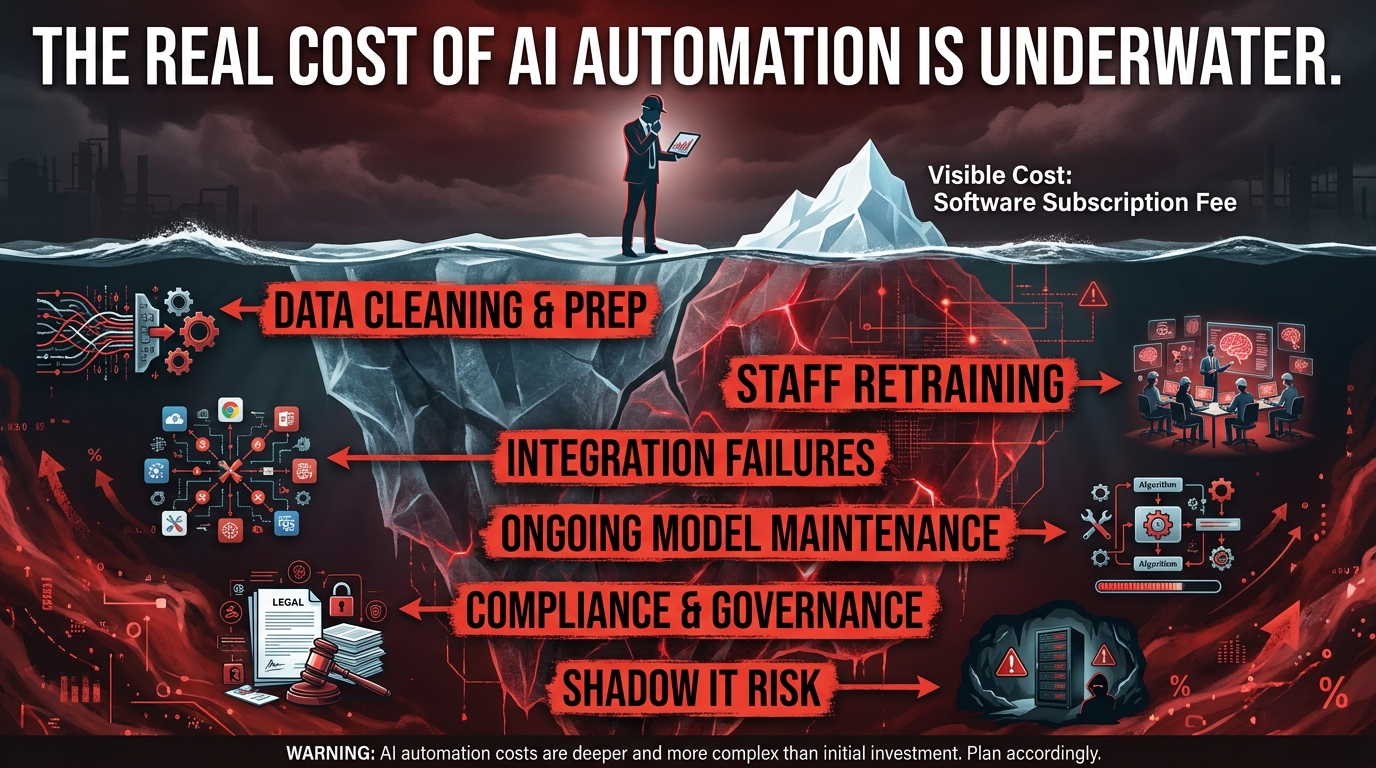
Every AI automation vendor will show you a total cost of ownership model that looks reasonable. It typically includes the platform licence, implementation services, and ongoing support. What it rarely includes in full transparency is the real cost of everything that has to happen before, during, and after the implementation to make it work. Here’s what the proposal usually leaves out.
Data Cleaning and Preparation
AI models run on data. If your data is messy — and in most organisations, it is — cleaning it is a prerequisite for getting useful outputs. This means deduplicating records, standardising formats, filling gaps, reconciling inconsistencies across systems, and building the data pipelines that will keep the model’s inputs clean going forward. Depending on the state of your data, this can consume as much time and budget as the implementation itself.
The rule of thumb used by experienced AI implementation teams is that data preparation represents 60–80% of the total project effort. Vendors who tell you this is a small, manageable task are telling you what you want to hear.
Staff Retraining and Change Management
A McKinsey study found that most employees who reported time savings from automation used that additional time working on new activities — not, as is sometimes feared, sitting idle or being made redundant. But the transition to those new activities requires training. People need to learn what the automation handles, how to interpret its outputs, when to override it, and how to feed back corrections when it gets things wrong.
This training is not a one-time event. As models update and workflows evolve, training needs to keep pace. Organisations that budget for implementation but not for ongoing training find adoption rates plateau — teams learn the basic functions but never develop the deeper workflow fluency that drives real productivity gains.
Integration Complexity and Technical Debt
Connecting an AI automation platform to your existing systems — your CRM, your ERP, your HRIS, your communication tools — requires integration work that is almost always more complex than anticipated. APIs break. Data schemas don’t match. Authentication systems need updating. Edge cases emerge that weren’t covered in the scoping phase. Every integration is also a new dependency: when one system changes, the integrations that depend on it need updating too.
For organisations with legacy systems, this can be genuinely prohibitive. A core ERP system from the early 2000s may not have the API surface area needed to support modern automation workflows. In those cases, the automation project becomes an ERP modernisation project — which is a fundamentally different scope and budget conversation.
Ongoing Model Maintenance
AI models degrade over time. The phenomenon is called model drift: as the world changes, the patterns the model learned from historical data become less representative of current reality. A fraud detection model trained on 2024 transaction patterns may be less accurate by 2026 as fraud tactics evolve. A lead scoring model trained on last year’s conversion data may produce different results as your sales team’s targeting strategy shifts.
Models need to be retrained periodically, monitored continuously, and sometimes rebuilt when the underlying patterns change significantly enough that retraining from the existing baseline isn’t sufficient. This is ongoing engineering work that needs to be staffed and budgeted for — it’s not included in most platform licence fees.
Governance and Compliance
As AI use in business matures, governance requirements are expanding. Data privacy regulations affect how AI models can use customer data. Employment law affects how AI can be used in hiring decisions. Financial regulation affects how automated decisions in fraud detection and credit can be documented and appealed. In several jurisdictions, AI systems used in high-stakes decisions require explainability — the organisation must be able to show why the system made a particular decision, not just that it did.
Building governance frameworks, maintaining audit trails, and ensuring ongoing regulatory compliance is specialist work. It’s often invisible in vendor proposals and frequently underestimated in implementation budgets.
How to Decide Which Department Goes First
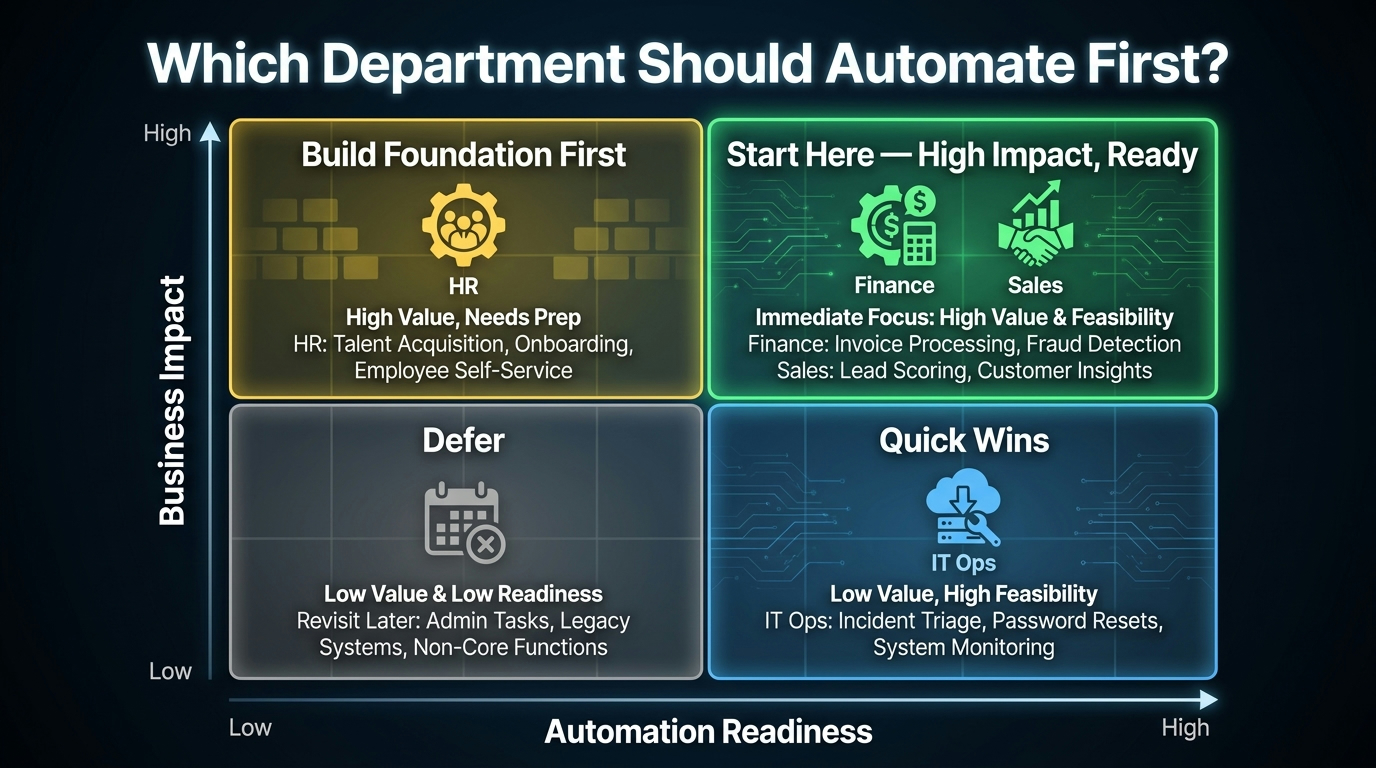
With a clear picture of what AI automation actually does in each department, the decision about where to start becomes more tractable. It’s not an abstract question about which technology is most exciting. It’s a concrete question about where you have the right combination of conditions for automation to succeed.
The Four Conditions That Predict Success
1. High-volume, structured, repetitive workflows: AI automation delivers the best results where there’s volume. A workflow you run ten times a month is a poor automation candidate. A workflow you run ten thousand times a month is an excellent one. The higher the volume, the greater the labour savings and the faster the data accumulates for model improvement.
2. Clean, accessible data: Before committing to an automation project, assess the data it will depend on. Is the data structured? Is it accessible via API or will it require manual extraction? Is it clean and consistent, or does it need significant remediation? The answers to these questions determine whether your automation project starts with implementation or with a data cleanup initiative.
3. Well-defined success metrics: Automation projects without clear success criteria tend to drift. Define upfront what success looks like — how many hours will be saved, what error rate reduction is acceptable, what threshold the model needs to hit before it’s trusted with autonomous decisions — and measure against those criteria from day one.
4. Change management capacity: Even the best automation implementation fails if the people affected by it don’t adopt it. Assess whether the department head is genuinely behind the initiative, whether there’s a plan to retrain affected team members, and whether there’s a feedback mechanism for staff to flag when the automation is producing wrong outputs. Without these elements, you’re building infrastructure that no one will use.
The Prioritisation Matrix
Map your departments against two dimensions: business impact (how much value would automation deliver, in saved time, reduced errors, or revenue generated?) and automation readiness (how structured is the data, how well-defined are the workflows, how strong is the departmental leadership buy-in?). Departments that score high on both dimensions should go first. Departments that score high on impact but low on readiness need preparatory work before you can automate. Departments that score low on impact but high on readiness offer quick wins that build organisational confidence. Departments that score low on both should be deferred.
In most businesses, finance and sales tend to sit in the high-impact, high-readiness quadrant — structured data, clear ROI, well-defined workflows. Customer service and marketing often need more readiness work, because the data (unstructured text, multi-channel conversations) requires more preparation. HR sits in a nuanced position: readiness is high for administrative workflows, but the governance requirements for hiring automation add complexity. Supply chain readiness depends heavily on the state of your existing systems — if your inventory data is reliable and accessible, it’s a strong candidate; if it’s fragmented across legacy tools, readiness work comes first.
Starting Small Is a Strategy, Not a Compromise
Starting with a single department and a single workflow isn’t a timid approach — it’s the approach that most frequently leads to sustained expansion. A successful first implementation builds organisational confidence, produces a documented case study for internal advocacy, generates lessons that inform the next implementation, and creates champions within the department who push for broader adoption.
The alternative — trying to automate across the organisation simultaneously — creates a situation where you’re managing multiple complex projects in parallel, each drawing on the same limited pool of IT, data, and change management resources. Failure in any one of them creates political risk for the others. A focused, sequential approach is more resilient.
The Honest Automation Roadmap: What a Realistic Two-Year Timeline Looks Like
Let’s ground this in something concrete. If a mid-market business of 200–500 employees committed to a disciplined, department-by-department AI automation programme starting today, what would a realistic two-year roadmap look like?
Months 1–3: Foundation and First Deployment
The first quarter is not the time to deploy AI. It’s the time to make AI deployment possible. That means auditing data quality across the target department, mapping the specific workflows you intend to automate, selecting the platform and vendor that fits your integration environment, and building the governance framework that will govern AI use. Done properly, this phase is unglamorous but it determines whether everything that follows succeeds or struggles.
The first actual automation deployment should happen in month two or three — something modest, measurable, and low-risk. An invoice processing automation in finance, a lead scoring model in sales, or an FAQ chatbot in customer service. The goal isn’t impact at this stage; it’s proof of concept that builds internal confidence and generates real operational data.
Months 4–9: Expand Within the Department
Once the first workflow is live and performing within agreed parameters, expand within the same department. Add the next highest-value workflow. Refine the first model with the data it’s accumulated. Build the training and change management capability within the department. By the end of this period, you should have two or three automated workflows operating reliably in the target department, measurable results you can document, and a team that understands how to work alongside the automation rather than around it.
Months 10–18: Second Department, Apply Lessons
The second department implementation benefits from everything learned in the first. You know what the data preparation work actually costs. You know where change management resistance is most likely to come from and how to address it. You have a template for governance documentation. You have an internal case study to use for advocacy. The second implementation typically moves faster and delivers results more quickly than the first.
Months 19–24: Cross-Department Integration and Optimisation
By the time you have two departments running automated workflows, opportunities for cross-department integration begin to emerge. The lead scoring data in sales connects to the personalisation system in marketing. The onboarding workflow in HR connects to the account provisioning system in IT ops. The demand forecast in supply chain connects to cash flow forecasting in finance. These integrations compound the value of the individual department implementations — and they’re achievable because each department has already done its own data and workflow work separately.
This is the phase where “AI transformation” starts to feel real. But it’s only reachable because you built it sequentially rather than trying to land here at the start.
The Practical Case for Taking AI Automation Seriously Without Getting Swept Up in It
AI automation for business is neither the panacea its loudest advocates claim nor the overhyped distraction its sharpest critics suggest. The honest assessment is that it’s a set of genuinely powerful tools that work very well in specific contexts, require real investment to implement properly, and deliver results that are proportional to the discipline of the approach taken.
The businesses that are extracting the most value from AI automation in 2026 are not the ones that committed to the biggest transformation programmes. They’re the ones that picked a specific department, identified the workflows with the clearest ROI, invested in their data quality before deploying anything, and measured rigorously from day one. They moved sequentially, built on what worked, and applied lessons from what didn’t.
That’s not a dramatic story. It’s not the kind of thing that generates conference keynotes. But it’s the thing that actually works — and at the end of a two-year journey built on that foundation, the results are measurable, compounding, and genuinely competitive.
The department-by-department lens offered in this post is a starting framework, not a final answer. Every business has different data maturity, different workflow complexity, different competitive pressures, and different change management capacity. The specific starting point that makes sense for your organisation may differ from the general guidance here. But the underlying principles — start specific, invest in data, measure everything, expand sequentially — apply universally.
AI automation is not something that happens to your business. It’s something your business has to actively build, maintain, and govern. The companies that understand that distinction are the ones who are actually getting somewhere with it.
Key Takeaways:
- Department-level automation consistently outperforms company-wide rollouts — start with one function, one workflow.
- Sales and finance typically offer the strongest early ROI due to structured data and clear metrics.
- Customer service automation works best as a tiered model — AI for Tier-1, AI-assisted for Tier-2, human-only for Tier-3.
- Data cleaning and preparation represents 60–80% of real implementation effort — budget accordingly.
- HR automation requires ongoing bias auditing — not a one-time setup.
- AI models degrade over time and require continuous monitoring and periodic retraining.
- The most effective two-year roadmap builds sequentially: first department → second department → cross-department integration.
- Change management and staff retraining are as important as the technology itself — and are more often the reason implementations fail.