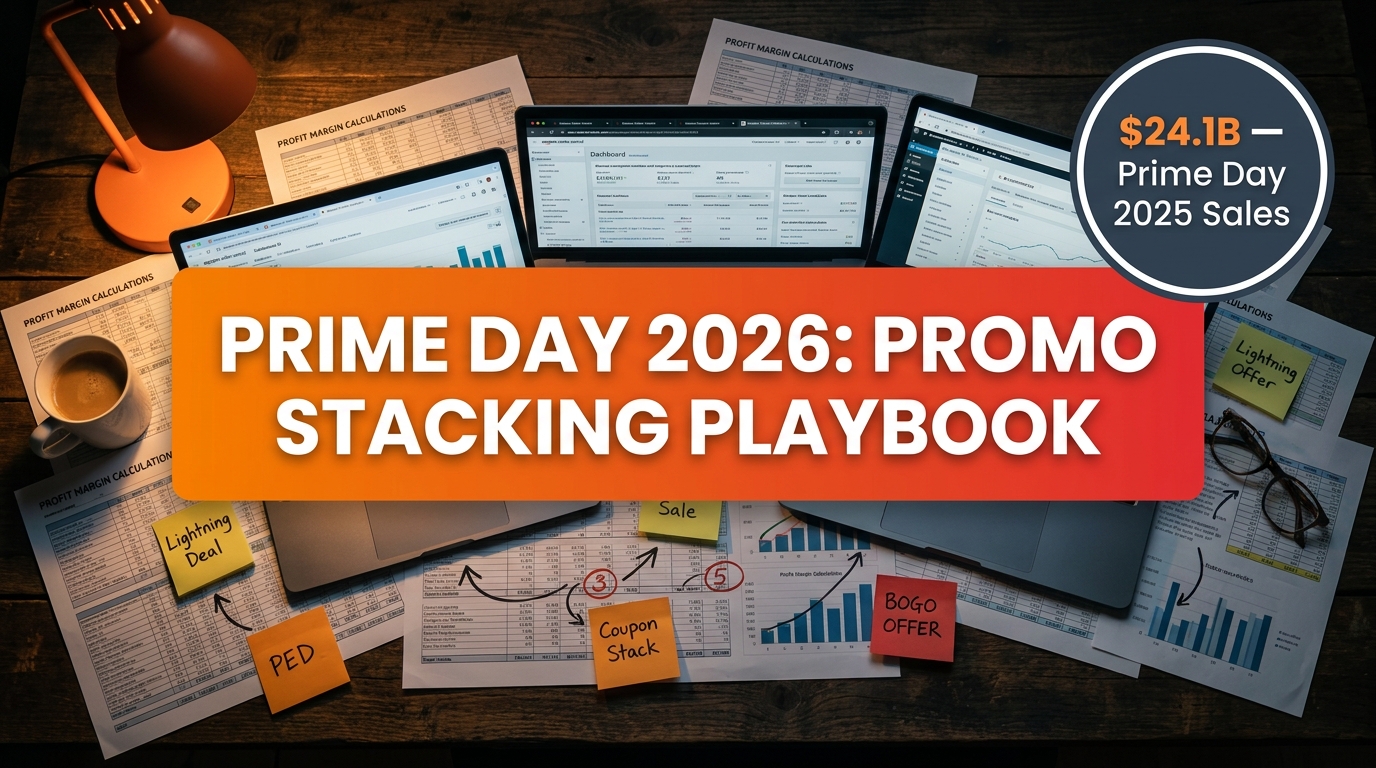

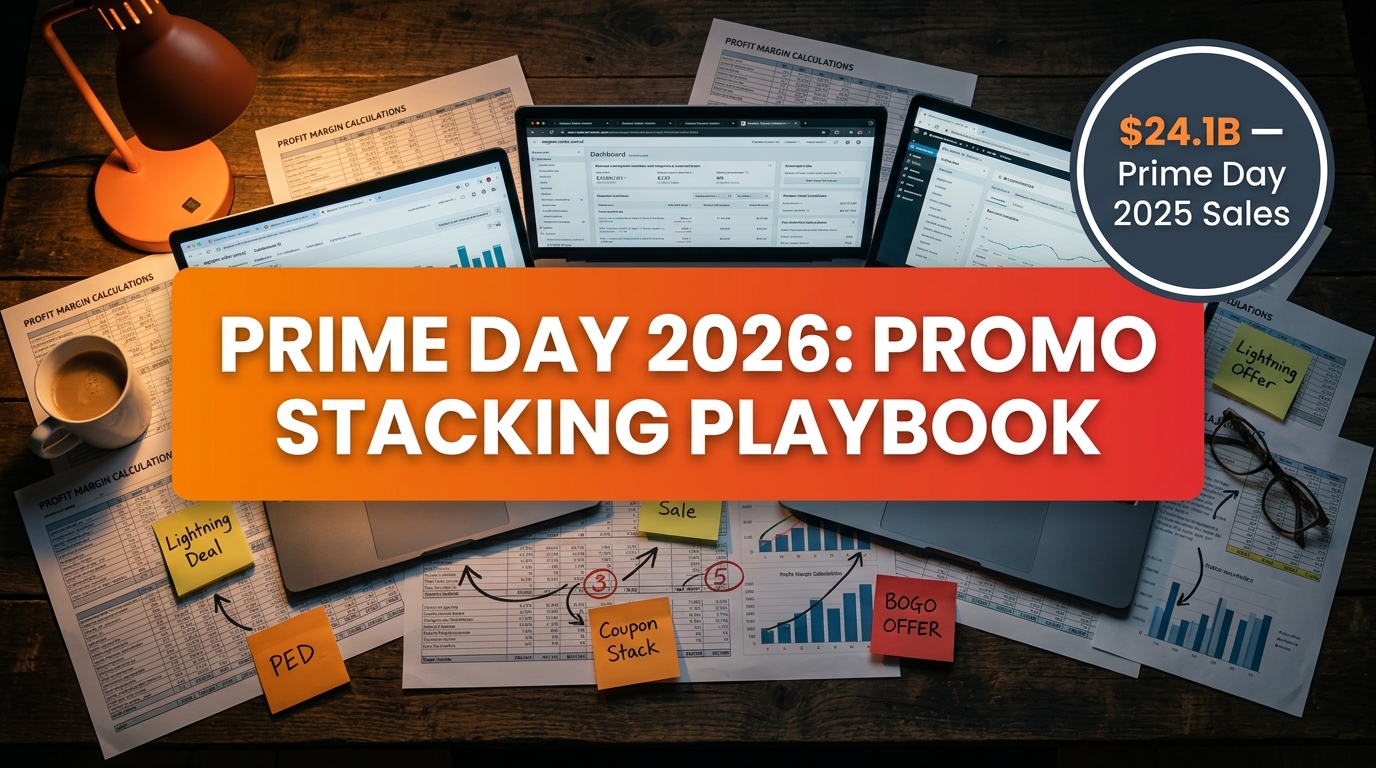
Prime Day 2025 generated $24.1 billion in U.S. e-commerce sales — a 30.3% jump year over year. It was, by every external measure, the biggest Prime Day ever. And yet, inside seller accounts across every category, the post-event debrief kept surfacing the same uncomfortable truth: a lot of sellers ran their best revenue week ever and still barely broke even on it.
That’s the Prime Day paradox. The traffic is real. The conversion lift is real. The sales velocity spike — sometimes 3× a normal week — is absolutely real. But when you add up every layer of the promotional stack you’ve built — Lightning Deals fees, Prime Exclusive Discount margins, coupon redemption costs, ballooning PPC spend, rushed FBA shipments — the math stops being obvious very quickly.
Prime Day 2026 arrives in late June, four weeks earlier than the July slot sellers have planned around for years. That compression changes everything: your FBA deadlines, your PPC warm-up window, your deal submission calendar. And it arrives at a moment when Amazon has tightened deal pricing floors, introduced a hybrid Lightning Deal fee model, and made it significantly harder to fake a “discount” against an inflated reference price.
This playbook is about one thing: making Prime Day profitable, not just busy. That means knowing how each promo mechanic works at the margin level, which ASINs deserve a full promotional stack and which ones will quietly bleed cash if you run them, and how to build the three-phase PPC system that captures sales before, during, and after the event window. It also means understanding the 14-day halo period that most sellers leave 30 to 50 percent of their Prime Day revenue sitting in.
The sellers who win Prime Day 2026 won’t necessarily be the ones with the deepest discounts. They’ll be the ones with the tightest math.
What’s Actually Different About Prime Day 2026
Before you build a single promotion or set a single bid, you need to internalize the structural differences between Prime Day 2026 and every prior year. These aren’t cosmetic changes — they cascade directly into your deal strategy, inventory planning, and ad budgets.
The June Shift Changes Your Entire Prep Window
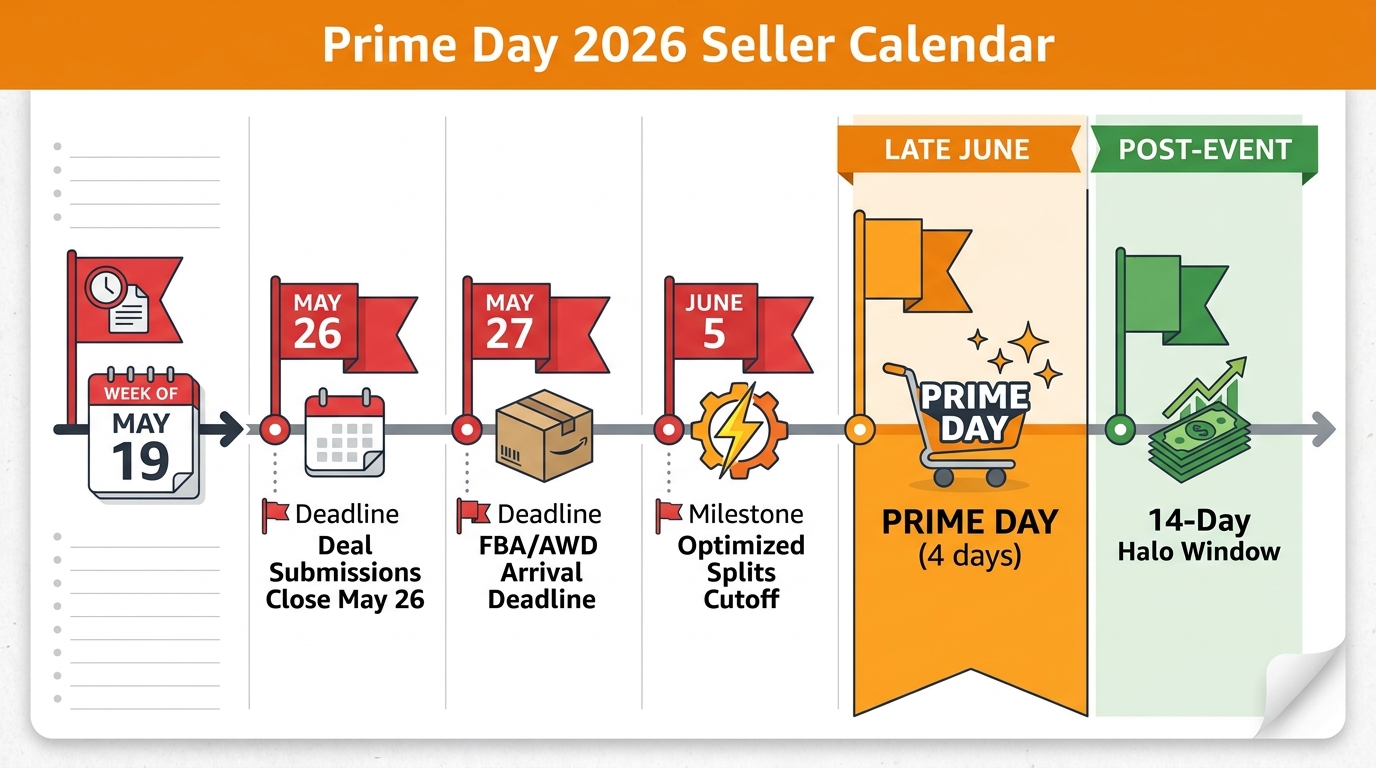
Amazon has officially confirmed Prime Day 2026 will take place in June, with industry consensus pointing to a late-June event window around the week of June 23–25. The event runs across 26 countries (with Australia, Brazil, India, and Japan on a separate summer schedule). It remains a four-day format, consistent with 2025.
What’s not obvious until you map it against a calendar: June Prime Day pulls every single preparation deadline forward by approximately four weeks compared to the prior July timeline. That sounds abstract until you realize it means deal submissions closed May 26, FBA inventory needed to arrive by May 27 (AWD and minimal splits) or June 5 (Amazon-optimized splits), and your PPC warm-up campaigns should have started in early-to-mid May.
For sellers who planned Prime Day as a “late Q2 / early Q3” event, this is a meaningful operational shock. The brands that underperform in 2026 will largely do so because they missed deadlines that crept up two weeks faster than expected.
Amazon’s New Deal Pricing Floor Rules
Amazon tightened its deal eligibility requirements for 2026 in a way that directly impacts your discount strategy. The core change: deals must represent a genuine discount from a verified reference price, and Amazon’s enforcement of what constitutes a legitimate reference price has meaningfully hardened. You can no longer run a price up in April and then “discount” it back to normal in June and call it a Lightning Deal.
This matters operationally because many sellers have historically padded their pre-Prime Day prices to make the discount look deeper. That play is increasingly difficult to execute cleanly. Your reference price needs to be defensible, and your actual discount needs to hit a real minimum threshold — typically at least 15% for Lightning Deals, though category minimums vary.
Lightning Deal Fee Restructuring
Amazon replaced the flat per-deal Lightning Deal fee structure (which had reached approximately $500 per ASIN for Prime Day events in 2025) with a hybrid model for 2026: a lower upfront submission fee combined with a variable performance component. The practical implication is that high-traffic, high-conversion deals may cost more in total under the new model, while low-velocity deals may actually see fee relief.
Sellers need to model both fee scenarios — the floor fee and the upside fee exposure — before committing to Lightning Deals. The “upfront is all I pay” assumption that worked in prior years no longer holds uniformly.
The Four-Day Format Has Changed Shopper Behavior
One finding from Prime Day 2025 that carries directly into 2026 planning: the four-day format appears to have shifted shopper behavior toward longer consideration windows and more late-event buying. Shoppers who once impulse-purchased in the first 24 hours are now comparison shopping across days two and three. Your in-event PPC strategy needs to account for this: don’t front-load all your budget into day one and let days three and four run on empty.
The Promo Stack Architecture: How the Three Main Mechanics Actually Interact
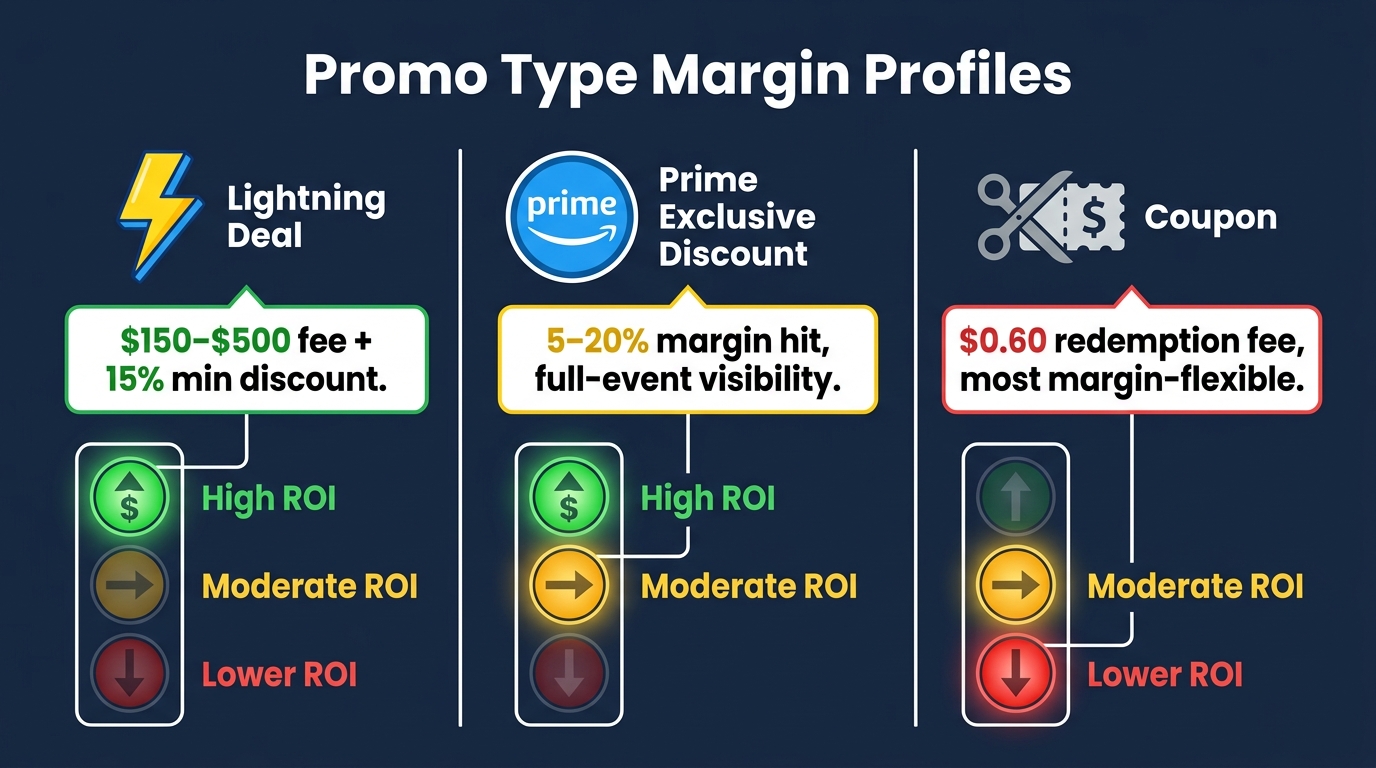
When most sellers talk about “promo stacking,” they mean layering multiple promotional mechanics on the same ASIN during Prime Day. In theory, this maximizes visibility and conversion. In practice, if you don’t understand how each layer interacts with the others — and with your margin — you can build a stack that loses money on every unit sold.
There are three primary promotional tools Amazon offers for Prime Day: Lightning Deals, Prime Exclusive Discounts (PEDs), and Coupons. They behave very differently from each other.
Lightning Deals: High Visibility, High Cost, Finite Window
Lightning Deals are time-limited offers — typically four to six hours during the event — that appear in Amazon’s dedicated Deals section and carry the distinctive countdown clock. The visibility premium is real: Lightning Deals get prominent placement in the Deals store and are surfaced actively to Prime members browsing the event. Conversion rates during the active window can be exceptional.
The cost structure is what catches sellers. Beyond the deal fee itself (now a hybrid upfront-plus-variable model), Lightning Deals require a minimum discount depth that puts real pressure on margin. For most categories that’s 15%, but in competitive categories Amazon may require more to approve the deal. You’re also competing for time slots — Lightning Deals are awarded by Amazon, not chosen by sellers, and your proposed deal may get a less favorable window.
Best use case for Lightning Deals: High-gross-margin products (40%+ before the discount) where the visibility premium will generate enough velocity to meaningfully move organic rank. Don’t use them for inventory clearance on margin-thin products — the fee plus discount will almost certainly destroy your economics.
Prime Exclusive Discounts: Event-Long Presence at a Different Cost
Prime Exclusive Discounts (PEDs) are available for the full duration of Prime Day — all four days — rather than a limited window. They appear with a Prime logo badge on the product listing and in search results, signaling the deal to Prime members browsing organically. Because PEDs persist across the entire event, they accumulate traffic consistently rather than in a single burst.
The margin math on PEDs is different from Lightning Deals. There’s no fixed deal submission fee, but you’re sustaining the discount across the full event window, which means if your sell-through is high, the per-unit promo cost is simply the discount percentage applied to every unit sold. For ASINs with predictably high velocity during Prime Day, this can be more expensive in total than a Lightning Deal — but distributed across a larger volume of sales rather than concentrated in a fee.
PEDs also work well as a fallback mechanism. If your Lightning Deal submission is not approved, running a PED on the same ASIN ensures you still have a badged deal during the event rather than missing participation entirely.
Best use case for PEDs: Mid-to-high gross margin products where you expect consistent demand throughout the event rather than a concentrated burst. Particularly valuable for browse-and-compare categories (home goods, apparel, kitchen) where shoppers take two or three days to decide.
Coupons: The Most Margin-Flexible Tool
Amazon coupons clip to the product listing and appear as a visible savings badge — “Clip coupon to save X%” or a dollar amount. The fee structure is a $0.60 redemption fee per coupon claimed, plus the discount itself. Coupons are not limited to Prime Day and can run before, during, and after the event, making them the most flexible tool in the stack.
Coupons are particularly valuable for sellers who need event presence but cannot hit the margin thresholds for Lightning Deals or PEDs. A 10% coupon on a product with a 35% gross margin is survivable. The same 15%+ discount required for Lightning Deal eligibility may not be.
One important interaction: if a shopper sees both a coupon and a PED applied to the same ASIN, Amazon typically shows both badges but applies the more advantageous discount to the buyer. In some configurations, both discounts apply — which the seller may not have modeled. This is one of the most common sources of unintended margin erosion in a promo stack, and it needs to be tested in Seller Central before the event goes live.
Best use case for Coupons: Margin-constrained products, defensive plays against competitors who are running deals, and the post-event halo period where coupons can sustain conversion lift after Lightning Deals and PEDs have expired.
Can You Run All Three Simultaneously?
Yes — and some sellers do. But running Lightning Deal + PED + Coupon on the same ASIN simultaneously is a high-risk configuration. The effective discount seen by the shopper may exceed what you modeled, the total promotional cost per unit can easily erode margin to zero or below, and Amazon’s deal pricing floor rules make it harder to maintain a reference price that makes all three discounts appear legitimate simultaneously.
The more disciplined approach: use Lightning Deal as your primary event mechanism, PED as a full-event floor for ASINs that don’t get a Lightning Deal slot, and coupons as a targeted overlay for specific audiences or the post-event window — not all three at full volume on the same ASIN at the same time.
The Margin Calculation Most Sellers Skip
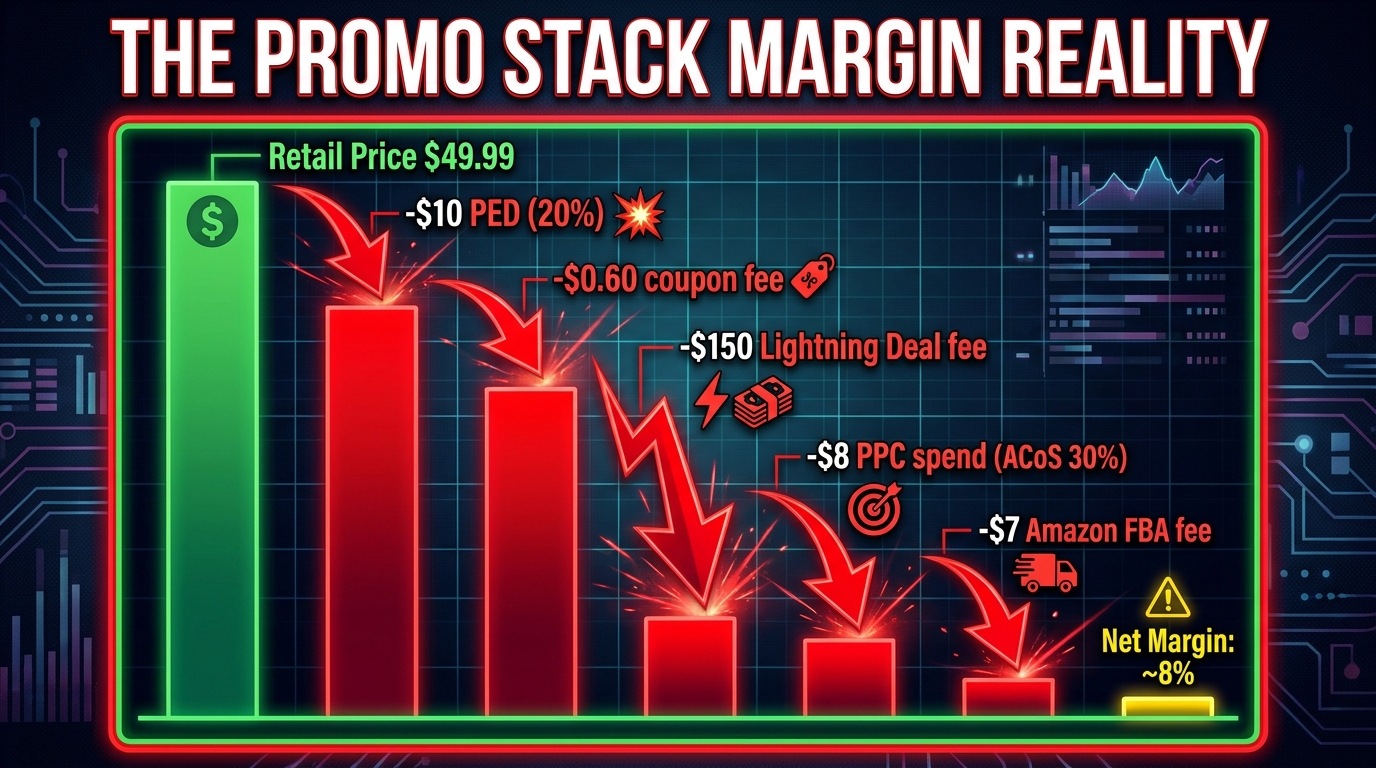
Here is the uncomfortable truth that most Prime Day planning materials skip over: a seller can run record-breaking revenue during Prime Day and still generate a negative contribution margin on every unit sold. This isn’t theoretical — it happens every year, at scale, across sellers who did not do the unit economics before launching their promo stack.
The core error is modeling promotions in isolation. Sellers calculate: “My margin is 35%, and my discount is 20%, so I still have 15% margin.” What they don’t model is the compounding effect of every fee and cost that touches that unit during the event.
The Full Unit Economics Waterfall
Consider a product with a retail price of $49.99. A typical, moderately aggressive Prime Day stack might look like this:
- Revenue after PED (20% discount): $39.99
- Less Amazon FBA fee (size/weight dependent): approximately $7.00
- Less Amazon referral fee (category rate, approximately 15%): $6.00
- Less COGS: approximately $14.00 (assumes 35% gross margin at full price)
- Less Lightning Deal fee (allocated per unit based on event volume): $1.50–$3.00
- Less coupon redemption fee: $0.60
- Less PPC cost (at 30% ACoS on $39.99): $12.00
Total costs applied against $39.99 revenue: approximately $41–$43. That’s a negative contribution margin on a product that looked profitable at first glance.
The numbers will vary by product. The point is the structure: when you add FBA fees, referral fees, COGS, deal fees, and PPC together, the margin available before all costs is consumed faster than most sellers model. During Prime Day specifically, PPC spend is particularly dangerous because CPCs spike 30–60% above normal levels while ACoS targets are simultaneously being pushed by aggressive bidding across all competitors.
The Minimum Gross Margin Threshold
As a directional rule: products with a pre-discount gross margin below 40% require very careful analysis before running a full promotional stack on Prime Day. Products below 30% gross margin should generally not run Lightning Deals (which require a minimum 15% discount before any other costs) and should use coupons only if the incremental volume justifies the fee at that margin level.
Products above 50% gross margin have meaningful room to absorb the full stack and still contribute positively — particularly if high sales velocity during the event also improves organic rank and review velocity in the following weeks, which has real long-term value beyond the event-day P&L.
Building Your Prime Day Promo Calculator
Every seller should run through a per-unit economics model for each ASIN before submitting any Prime Day deal. The model needs six inputs:
- Selling price at the deal discount (not full retail)
- Amazon fees (FBA + referral, pulled from Seller Central fee preview)
- COGS (including inbound shipping)
- Deal type fee (Lightning Deal hybrid fee amortized across projected units, or $0.60 per coupon)
- PPC cost (estimated using your historical Prime Day ACoS or a 30% ACoS baseline if no prior data)
- Return/refund rate (Prime Day often carries slightly elevated return rates, especially in electronics and apparel)
If the unit contribution margin at the end of this waterfall is positive — even marginally — you can proceed and decide whether the volume, rank improvement, and review velocity justify running the promo. If it’s negative before accounting for long-term organic rank benefit, you either need to reduce the discount depth, switch to a cheaper promo type, or remove that ASIN from the Prime Day stack entirely.
Hero ASIN Selection: The Discipline That Separates Profitable from Busy
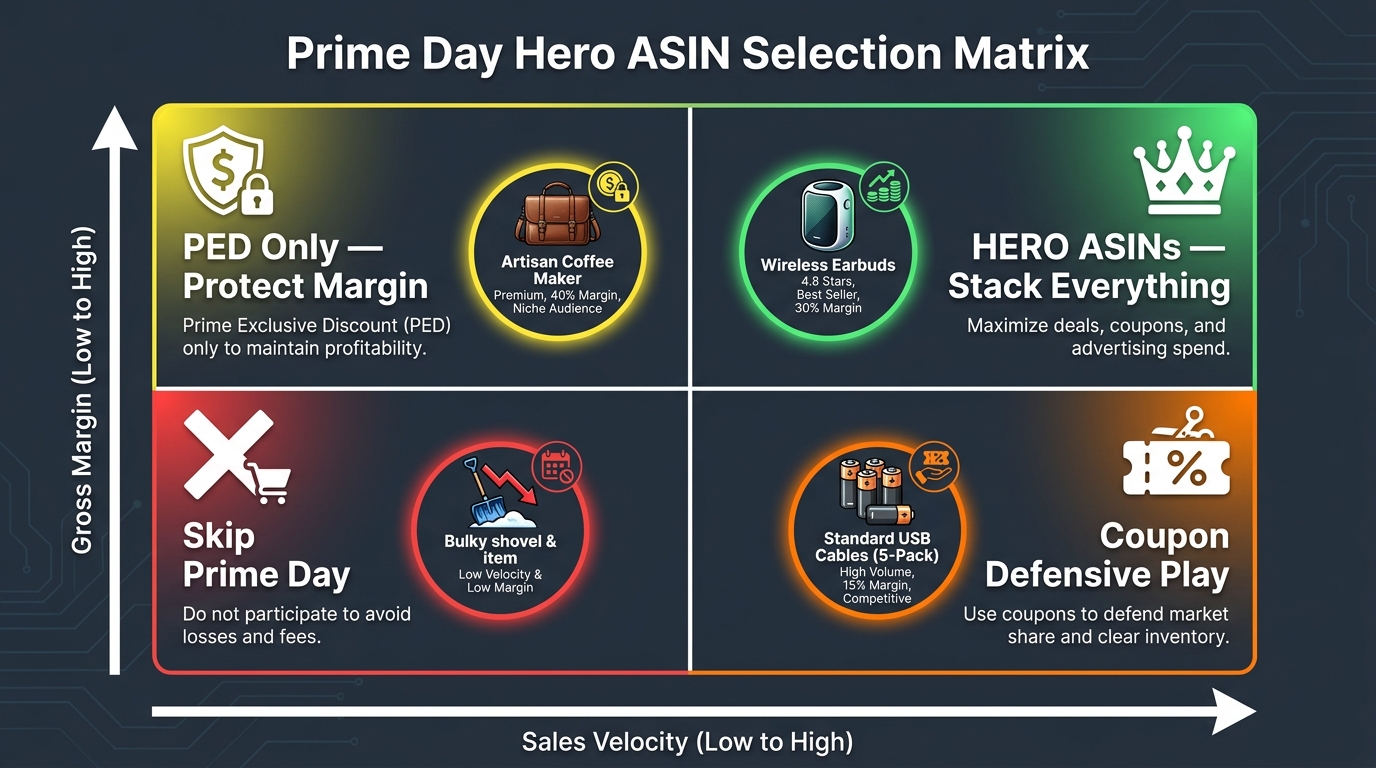
One of the clearest patterns emerging from agency and seller post-mortems after Prime Day 2025: the sellers who ran profitable events ran deep promotional stacks on a small number of ASINs, while the sellers who ran disappointing events spread moderate promotions across large swaths of their catalog. The math rewards concentration, not breadth.
Why Concentration Outperforms Breadth
Running a full promo stack — Lightning Deal + PED + incremental PPC — on 20 ASINs simultaneously means your advertising budget is diluted, your inventory planning is complicated across too many SKUs, your deal submission process is chaotic, and your post-event analysis is nearly impossible to action. More importantly, Amazon’s deal mechanisms reward velocity. A single ASIN that generates 500 units in two hours during a Lightning Deal drives a meaningfully better BSR movement and rank signal than 20 ASINs each generating 25 units over four days.
The discipline is choosing three to ten hero ASINs that will receive your full promotional investment, and making deliberate, tiered decisions about everything else in your catalog.
The Hero ASIN Selection Framework
Use a two-dimensional evaluation across every potentially eligible ASIN in your catalog:
Axis 1 — Gross Margin: The pre-discount gross margin available to absorb your promotional stack. Target a minimum of 40% for full Lightning Deal + PED + PPC stacking; 35–40% for PED or coupon only; below 35% warrants a coupon-only or “skip” decision.
Axis 2 — Sales Velocity and Rank Opportunity: Products that are already selling well and have a realistic path to a meaningful BSR improvement with a velocity spike will generate the highest return on promotional investment. Products that are stagnant on marginal categories with crowded competition will absorb your investment without generating lasting rank gains.
Plotting every ASIN on these two dimensions produces a natural sorting:
- High margin + high velocity potential: Hero ASINs. Run the full stack. These are your Prime Day investments.
- High margin + lower velocity potential: PED or coupon only. They can handle the discount, but a Lightning Deal fee is unlikely to be recouped by the volume spike.
- Lower margin + high velocity potential: Coupon-only defensive play. You need event presence without destroying margin on high-volume units.
- Lower margin + lower velocity potential: Skip Prime Day entirely for these ASINs. There is no scenario where investing promotional dollars here makes financial sense unless you have a specific inventory clearance goal you’ve budgeted for explicitly.
Launch vs. Mature ASIN Logic
New product launches deserve a different framework. For an ASIN launched in 2026 that hasn’t yet established strong organic rank, Prime Day’s velocity spike can compress months of ranking work into a single four-day event. The math may justify running at a loss on unit economics if the post-event organic position and review volume are structurally more valuable than the promotional cost. But this is a deliberate investment decision, not an oversight — model it explicitly as a launch investment, not a promotional play you expect to be margin-positive on event day.
The Three-Phase PPC System That Actually Works
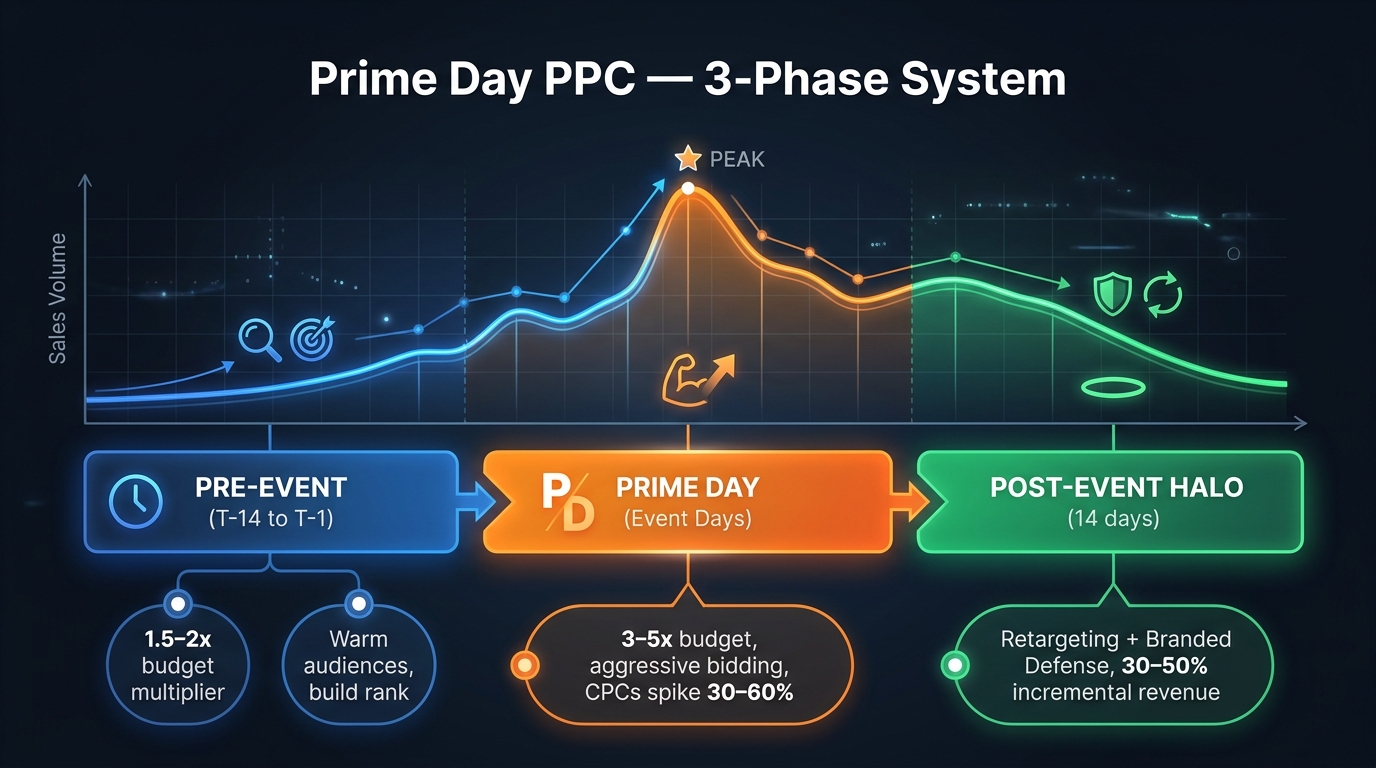
PPC is simultaneously the most powerful lever in your Prime Day stack and the most dangerous one. CPCs spike 30–60% above normal levels during the event. ACoS deteriorates. Budgets that look comfortable on a normal day run dry in two hours on Prime Day morning. And yet, brands that cut their PPC aggression during the event to protect ACoS typically watch their deal-page traffic collapse and their Lightning Deal windows fail to clear minimum velocity thresholds.
The answer isn’t spending more or spending less — it’s spending across the right phases with the right campaign architecture.
Phase 1: Pre-Event (T-14 to T-1) — Rank Building and Audience Warming
The two weeks before Prime Day are your organic rank insurance. Every sale you generate in this window, and every click signal you accumulate, builds the algorithmic foundation that determines how well Amazon’s search system surfaces your deal during the event. Sellers who start their pre-event PPC ramp the week before — rather than two weeks before — are starting at a disadvantage.
Pre-event PPC approach:
- Increase budgets to approximately 1.5–2× your normal daily spend on hero ASIN campaigns.
- Focus on exact-match keyword campaigns for your highest-converting search terms — this is rank-building, not awareness.
- Run Sponsored Display campaigns to begin building retargeting audiences. Shoppers who viewed your product but didn’t purchase are your most valuable Prime Day retargeting pool.
- Pause or heavily reduce spend on non-hero ASINs to concentrate budget where it matters.
- Do not increase bids aggressively in the pre-event phase — you’re building data and rank signals, not trying to win an auction war yet.
The pre-event phase is also when you should finalize your keyword list by pulling the previous 60 days of Search Term reports and identifying the highest-converting exact-match terms for your hero ASINs. Prime Day campaigns should be clean, focused, and separate from your evergreen campaigns — running them mixed means you can’t isolate performance data afterward.
Phase 2: Event Days — Controlled Aggression
During the four event days, your objective changes. This is no longer about rank building. It’s about capturing every qualified shopper who searches your keywords while the deal badge drives elevated conversion rates. The conversion lift from a badged deal (Lightning Deal or PED) means your effective ACoS improves even as your CPC rises — but only if you have the budget to sustain visibility throughout each day.
Event-day PPC approach:
- Scale budgets to 3–5× your normal daily spend on hero ASIN campaigns. Under-budgeting on Prime Day is one of the most expensive mistakes sellers make — paused campaigns due to exhausted budgets mean missed sales at peak conversion windows.
- Set hourly budget monitoring. Many agencies and sophisticated sellers use rules-based automation to maintain minimum budgets per hour rather than setting a single daily budget that may run out before noon.
- Bid on branded keywords aggressively. Competitors will try to steal traffic from your deal pages using Sponsored Display and Sponsored Products. Bidding on your own brand terms is a defensive necessity during Prime Day.
- Use broad and phrase match selectively for discovery, but bias toward your proven exact-match terms during the event window. Wasted spend on irrelevant terms hurts more when CPCs are elevated.
- Accept that your event-day ACoS will be higher than normal. A product with a normal 18% ACoS might run at 28–35% on Prime Day. This is expected and, depending on your margin stack, potentially acceptable. Do not pause campaigns because your ACoS target is temporarily exceeded — evaluate efficiency across the full three-phase period, not on individual event days.
One tactical consideration for 2026 specifically: because the four-day format has shifted shopper behavior toward later-event buying, don’t let your budgets run down on days three and four. Some sellers observed in 2025 that day three conversion rates rivaled day one — budget exhaustion on the back half of the event was a real profit leak.
Phase 3: Post-Event Halo (Days 1–14 After Prime Day) — Retargeting and Defense
Most sellers wind down their PPC aggressively on the day Prime Day ends. This is a significant error. The post-event halo window — the 7 to 14 days immediately following Prime Day — is where brands that sustain advertising momentum can capture an estimated 30–50% incremental revenue above baseline, according to agency reporting from the 2025 event cycle.
The mechanism: Prime Day generates an enormous volume of product page views, wishlist additions, and cart abandonment events. Shoppers who didn’t buy during the event — either because the deal expired, they comparison-shopped too long, or they simply deferred the decision — are a warm, high-intent audience in the days immediately after. Sponsored Display retargeting campaigns, ASIN-targeted ads, and branded searches all benefit from this elevated intent pool.
Post-event PPC approach:
- Shift Sponsored Display budget toward retargeting (views remarketing) for your hero ASINs.
- Maintain branded keyword defense at elevated levels — competitors will continue running conquest campaigns against your deal-page traffic even after the event ends.
- Keep coupons live on hero ASINs for 7–10 days post-event to capture conversion-hesitant shoppers at a lower promotional cost than event-day discounts.
- Reduce pure prospecting spend (broad match, discovery) gradually over 7–10 days rather than cutting it sharply on day one post-event.
FBA Timing and the Inventory Trap
Inventory planning for Prime Day 2026 is a different calculation than any prior year, specifically because the June timing creates a collision with two other operational realities: Q2 inventory cycles that many sellers have not aligned to a June event, and Amazon’s tightened storage fee structure that makes holding excess inventory through late June expensive.
The Hard Deadlines You Cannot Negotiate
Amazon has set definitive FBA inbound deadlines for Prime Day 2026:
- May 27, 2026: Arrival deadline for Amazon Warehousing & Distribution (AWD) inventory and FBA shipments using minimal splits.
- June 5, 2026: Arrival deadline for FBA shipments using Amazon-optimized splits.
- May 26, 2026: Deal submission deadline (Lightning Deals and Prime Exclusive Discounts).
- June 9, 2026: Extended deal sourcing deadline for some deal types.
Missing the May 27 deadline for your primary FBA inventory doesn’t just mean late arrival — it means your inventory may not be Prime-eligible for the event. Products that are not available for Prime two-day shipping during Prime Day lose the vast majority of their deal conversion potential. Prime members don’t buy deals on non-Prime eligible products at anything close to the rate they buy Prime-eligible ones.
How Much Inventory to Send
The standard Prime Day inventory formula: start with your average daily units sold in the 30 days before the event, multiply by your expected Prime Day velocity multiplier (conservatively 2–3× for established products, up to 5× for products with strong deal placement), and multiply by the event duration (four days) plus the halo period (add 50% of four days for the post-event tail).
Then apply a sell-through risk buffer. Sending too little means stockouts mid-event (which causes your deal to deactivate and your BSR gains to collapse). Sending too much means storage fee exposure on unsold inventory through the peak-season storage period.
The practical recommendation: for hero ASINs running Lightning Deals, target a sell-through buffer of 20–25% above your event demand forecast. For PED and coupon-only ASINs, 10–15% buffer is usually sufficient given the more predictable (and slower) velocity curve compared to Lightning Deals.
The Stockout-During-Event Problem
Running out of stock during an active Lightning Deal is one of the most damaging Prime Day outcomes a seller can experience. When inventory hits zero, the deal deactivates immediately. Amazon may deprioritize that ASIN for future Lightning Deal applications. And the organic rank signal that the velocity spike was building reverses sharply — algorithms interpret the sudden sales halt as a negative demand signal.
This makes conservative inventory forecasting — specifically, erring toward slightly more inventory rather than slightly less on hero ASINs — the right risk posture for Prime Day 2026. The storage cost of 20% excess inventory for 30 days is nearly always less expensive than the lost sales and rank degradation from a mid-event stockout.
TACoS vs ACoS: Measuring Prime Day the Right Way
One of the most common mistakes in post-Prime Day analysis is evaluating the event on event-day ACoS. This metric, in isolation, will almost always make Prime Day look like a poor advertising decision. CPCs spike. ACoS deteriorates. In-event efficiency looks worse than a normal Tuesday.
But Prime Day’s value to a seller’s business isn’t captured in event-day ACoS. It’s captured in Total Advertising Cost of Sales (TACoS) measured across the full post-event cycle — and in the organic rank, review velocity, and brand awareness that persist weeks after the event window closes.
Why TACoS Is the Right Prime Day Metric
TACoS measures advertising spend as a percentage of total revenue (both ad-attributed and organic), not just ad-attributed revenue. This matters enormously for Prime Day because the whole strategic justification for aggressive promotional stacking is that the velocity spike drives organic rank improvements, which generate organic sales in the weeks that follow.
If you spend aggressively on PPC during Prime Day and your event-day ACoS is 40%, that looks terrible. But if the post-event organic rank improvement drives 35% higher organic daily revenue for the following three weeks, your TACoS across the full 30-day window might be 12% — well within healthy thresholds for a mature product.
Industry benchmarks for TACoS on mature products typically cluster around 5–10% on a steady-state basis. During Prime Day, it’s reasonable to see TACoS spike to 20–25% for the event days. The question to ask is not “what was my TACoS on day two of Prime Day” but rather “what is my blended TACoS across the six weeks before, during, and after the event?”
Setting Your Prime Day TACoS Threshold
Before the event, calculate the maximum TACoS your hero ASINs can sustain profitably. This is simply: gross margin percentage minus all non-PPC costs (referral fee, FBA fee, deal fees as a per-unit allocation). The remaining percentage is the maximum you can spend on advertising per dollar of revenue and break even. Any TACoS below that threshold is, by definition, profitable advertising.
For example: a product with 45% gross margin, 15% referral fee, and 18% FBA + deal fee allocation has a maximum TACoS threshold of approximately 12%. Advertising at or below 12% TACoS across the full event cycle is profitable. Above 12%, you’re buying rank and reviews — which may still be the right decision, just one that needs to be made explicitly.
Review Velocity as a Hidden Prime Day Return
One asset that doesn’t appear in any P&L calculation but materially affects the long-term ROI of Prime Day investment: review velocity. A product that generates 500 verified purchases in four days will accumulate reviews at an accelerated rate in the two to four weeks following the event. For ASINs with under 100 reviews, this can mean moving from “marginal social proof” to “credible conversion driver” in a single month.
In categories where review count has a documented conversion rate impact, this review acceleration is worth assigning a dollar value in your Prime Day ROI model — even a rough one. A new review that contributes to conversion rate improvement over the following 12 months has real NPV that belongs in the spreadsheet.
The Post-Event Halo: Where Most Sellers Leave Money on the Table
The fourteen days after Prime Day ends are, for most sellers, a period of deceleration. Deals expire. PPC budgets return to normal. The operational intensity of the event winds down. Sellers pull data and build post-mortems. This is understandable — it’s exhausting to run a major event at the intensity Prime Day demands.
It’s also where the sellers who actually win Prime Day separate themselves from the ones who just participated in it.
What the Halo Window Actually Is
The halo effect is structural, not accidental. Prime Day generates a significant volume of behavioral data for Amazon’s algorithm: product views, add-to-carts, purchases, wishlists. The organic rank improvements from the velocity spike don’t decay immediately — they persist for a period that varies by category and competitive pressure, but typically ranges from 7 to 21 days.
During that window, your ASIN may be appearing higher in organic search results than it was before the event. That means every advertising dollar you spend in the halo period has a higher-quality organic context surrounding it, which typically means better conversion rates and more efficient ad spend than you’d see in normal periods.
The Nécessaire case study (reported following Prime Day 2025) is instructive here: 65% of Prime Day sales were organic, and Prime Day revenue reached 7× the prior week. The brands that sustain that organic momentum through active advertising in the halo period continue to see elevated revenue well into the weeks following. The ones that pull back immediately watch the rank gains decay faster than they need to.
Post-Halo Tactical Moves
Keep coupons running for 7 to 10 days post-event. At $0.60 per redemption, coupon costs are manageable, and they capture price-sensitive shoppers who bookmarked your product during Prime Day and return afterward expecting some residual deal availability.
Activate Sponsored Display view remarketing on every shopper who visited your hero ASIN pages during the event but did not purchase. This is a warm, high-intent audience — they engaged with your product at a moment of peak purchase intent. Reaching them again within 72 hours of the event’s close, when they may still be in decision mode, is reliably cost-effective.
Sequence review request communications thoughtfully. The post-purchase review request timing matters more following Prime Day than in normal periods because the volume of transactions is concentrated. Sending requests too soon (before the product arrives) or too late (after the engagement window expires) wastes the review velocity opportunity that the event generated.
The Five Most Expensive Prime Day Mistakes (And How to Avoid Them)
Prime Day’s margin environment is unforgiving. Small structural errors in your approach — the kind that don’t matter much on a normal sales day — get amplified by the event’s volume and fee concentration. These are the five most common and most costly mistakes sellers make.
Mistake 1: Modeling Discounts Independently from Fees
Already covered above, but worth restating as its own mistake because it’s the most universal one. Every discount must be modeled in the context of every other cost that touches the unit. The “20% discount on a 35% margin product leaves me with 15% margin” calculation ignores Amazon fees, deal fees, and PPC — and is almost always wrong by the time those are added.
Mistake 2: Spreading Promo Budget Across the Full Catalog
Running a 15% PED on 30 ASINs simultaneously does not generate the same outcome as running a full Lightning Deal + PED + PPC stack on five hero ASINs. The algorithmic signals are weaker, the inventory planning is harder, and the per-ASIN ad budget available is fractionally small. Concentration wins.
Mistake 3: Running Out of Budget by Midday on Day One
Set daily PPC budgets for Prime Day at a level you would genuinely be comfortable sustaining for all four days at peak intensity. Then add 30%. Budget exhaustion mid-event is one of the most common sources of missed sales, and missed sales during an active Lightning Deal can cause the deal to underperform its required velocity threshold.
Mistake 4: Ignoring the Pricing Floor Rules
Amazon’s tightened deal pricing requirements for 2026 mean that artificially inflated reference prices are no longer a reliable way to manufacture a large-looking discount. Sellers who submit deals based on inflated reference prices risk deal rejection — and late deal rejection (after the submission deadline) leaves no time to activate a backup promo strategy. Know your actual reference price, model your actual discount, and submit deals accordingly.
Mistake 5: Treating Prime Day as an Isolated Event
Prime Day’s value is not contained within its four days. Its value is the velocity spike that improves rank, the review acceleration that improves conversion for months, and the halo traffic that sustains elevated sales for two weeks after the event. Sellers who evaluate Prime Day purely on event-day unit economics and conclude it was unprofitable are measuring the wrong thing. Evaluate it on the six-week window that surrounds it.
Putting It All Together: Your Pre-Event Readiness Checklist
The following checklist consolidates the operational priorities for Prime Day 2026 into a sequenced action list. Work backward from your target event date to assign ownership and deadlines.
Six Weeks Out (Early May)
- Identify hero ASINs using the Margin × Velocity matrix. Target 3–10 ASINs for full stack; categorize the rest as PED-only, coupon-only, or skip.
- Run the full unit economics waterfall for each hero ASIN at the intended discount depth. Confirm contribution margin is positive or explicitly budget the negative margin as a rank/review investment.
- Begin forecasting Prime Day inventory volumes for hero ASINs. Place purchase orders if lead times require it.
- Set up dedicated Prime Day PPC campaigns — separate from evergreen campaigns — so performance data is clean and actionable.
Four Weeks Out (Mid-May)
- Submit Lightning Deal applications before the May 26 deadline. Have PED applications ready as backup for any deals not approved.
- Confirm FBA inbound shipments are on track to arrive by May 27 (AWD/minimal splits) or June 5 (optimized splits).
- Activate pre-event PPC at 1.5–2× normal spend. Begin building retargeting audiences via Sponsored Display.
- Review reference prices on hero ASINs. Confirm they align with Amazon’s 2026 deal pricing floor requirements.
Two Weeks Out (Early June)
- Confirm Lightning Deal approvals and time slots. Activate PED backup strategy for any rejected deals.
- Set coupon activations to run during the event on hero ASINs as needed (model margin impact before setting live).
- Brief all team members or agency partners on event-day budget rules, escalation thresholds, and monitoring cadence.
- Prepare post-event retargeting campaign assets (Sponsored Display audiences, creative, budgets).
During the Event
- Monitor PPC budgets at least every two hours. Reinstate budgets if campaigns exhaust before end of day.
- Watch inventory levels on hero ASINs daily. Flag any ASIN approaching 10% remaining stock for emergency action.
- Track BSR movement on hero ASINs throughout the event — this is your leading indicator of whether the promo stack is working.
Post-Event (Days 1–14)
- Keep Sponsored Display retargeting active at moderate spend. Do not cut PPC sharply on the first day after the event.
- Maintain coupons on hero ASINs for 7–10 days.
- Pull TACoS data across the full event cycle — not event-day ACoS — to evaluate actual efficiency.
- Sequence review request communications for the purchase cohort from the event.
- Build your post-mortem: which ASINs performed, what the actual vs. modeled unit economics looked like, and what you’ll change in your promo stack for the next major event.
The Bottom Line on Profitable Promo Stacking
Prime Day 2026 is going to generate enormous traffic, elevated conversion rates, and a significant volume of revenue across every category on Amazon’s platform. That’s not the variable. The variable is how much of that revenue converts into actual profit — and how much of it disappears into a stack of fees, discounts, and ad costs that sellers didn’t fully model before the event started.
The sellers who will look back on June 2026 as a genuinely profitable event share a specific set of behaviors. They started earlier than they thought necessary, because the June timeline compressed every deadline. They concentrated promotional investment on a small number of high-margin, high-velocity hero ASINs instead of spreading thin across the catalog. They modeled every promotional cost — deal fees, coupon fees, PPC spend, FBA, referral fees — against a per-unit margin waterfall before submitting a single deal. They built a three-phase PPC system that warmed traffic before the event, captured it aggressively during the event, and sustained momentum in the post-event halo. And they measured success with TACoS over a six-week window, not event-day ACoS over four days.
The Prime Day paradox — record revenue, thin margins — is solvable. It requires less excitement about the event’s gross numbers and more discipline about the unit economics underneath them. The playbook above gives you the framework. What it can’t do is make the spreadsheet decisions for you.
That part is yours to own before June.