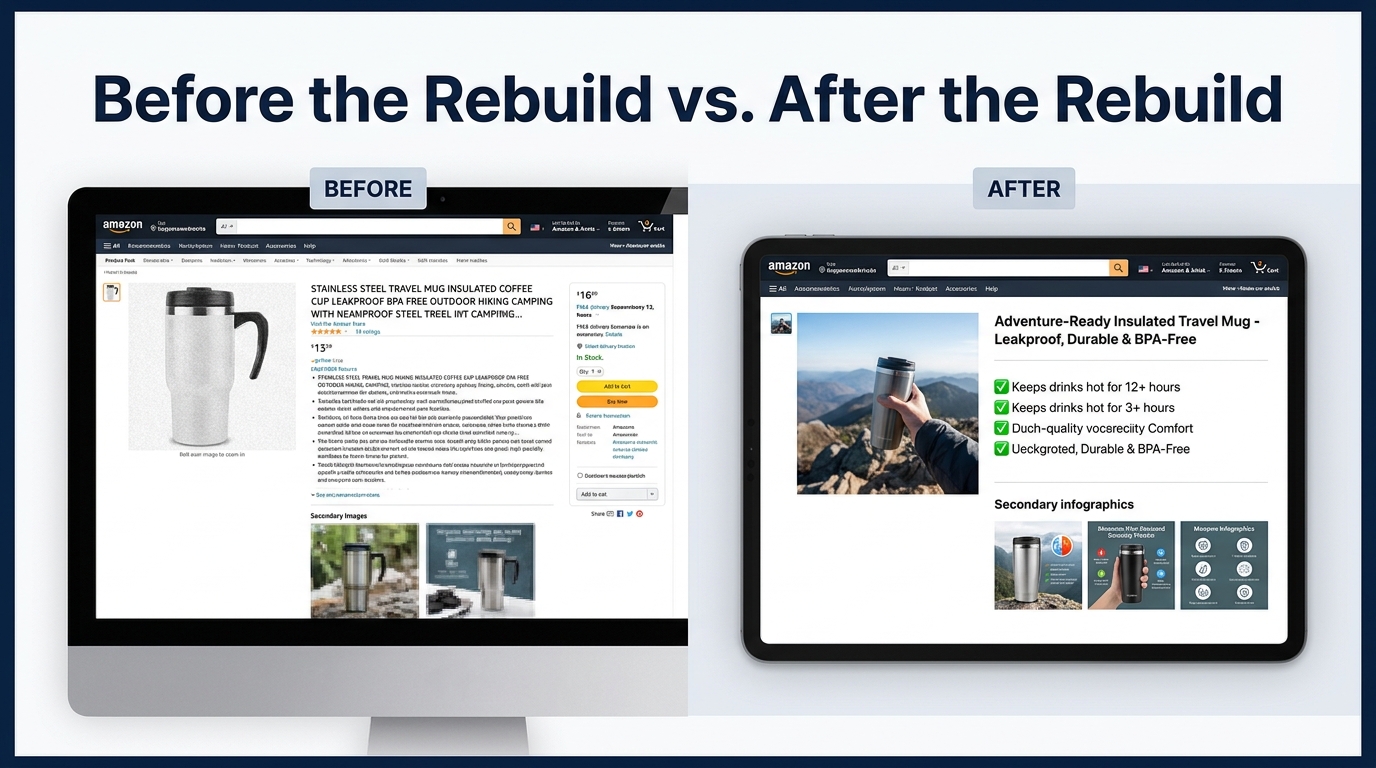

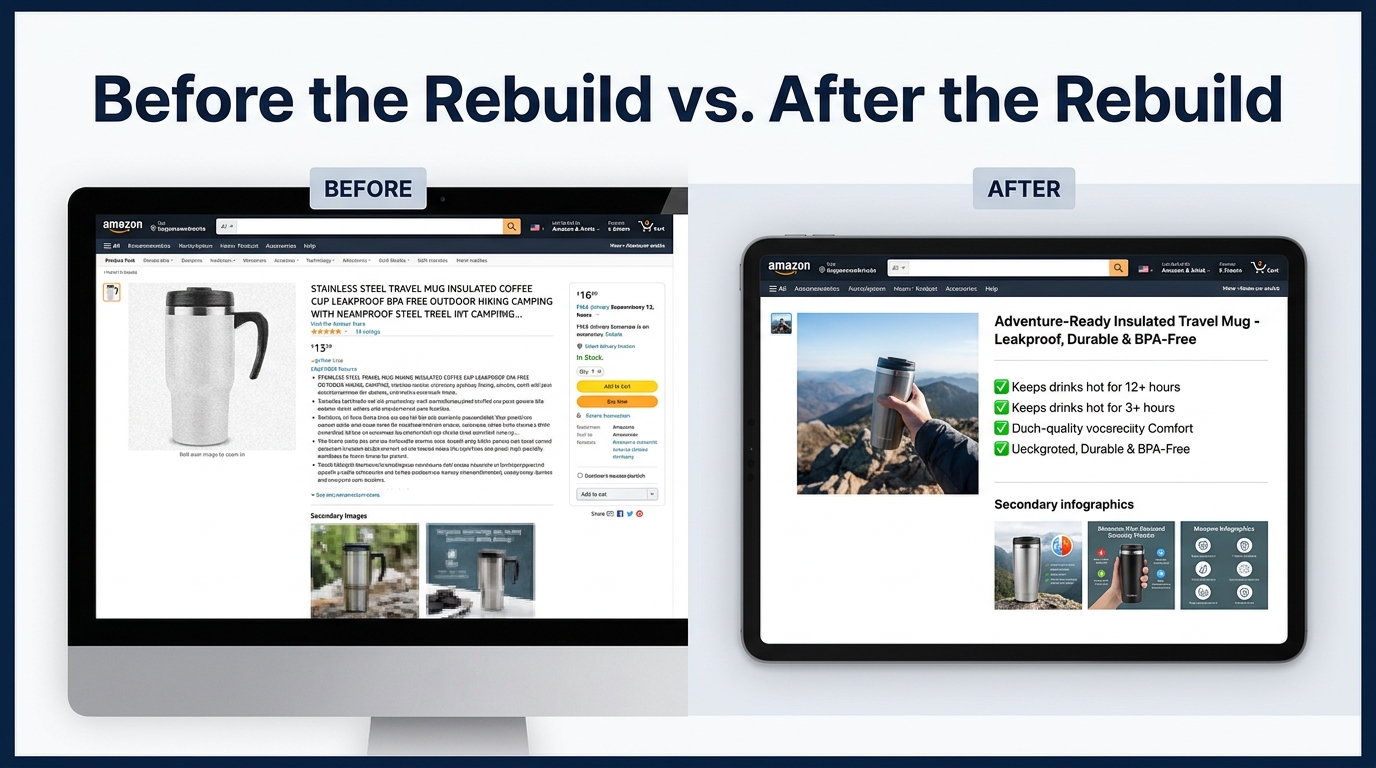
There is a version of the AI listing rebuild story that gets told constantly, and it goes roughly like this: you feed a product’s specs into an AI tool, hit generate, paste the output into Seller Central, and watch your conversion rate climb. It is a clean narrative. It is also largely fiction.
The sellers and brands who are seeing real, measurable conversion gains from AI-assisted listing work in 2026 are not the ones who have found a better prompt. They are the ones who have built a structured process — one where AI handles the drafting speed and language pattern matching, while human operators handle the strategic inputs, the quality gates, and the experimental validation. The tool is not the edge. The workflow is.
This article is about that workflow. It covers the full arc of a listing rebuild: from the diagnostic phase where you figure out exactly what is broken, through the AI-assisted drafting of titles and bullets, into the image strategy that most sellers still treat as an afterthought, and finally into the testing infrastructure that tells you whether any of it actually worked. There will be specific frameworks, decision criteria, and a clear-eyed look at where AI assistance genuinely accelerates the work versus where it introduces risk you need to manage.
If you are running a multi-ASIN catalog and need a repeatable system, or managing a single hero product that has plateaued, what follows applies to both. The principles do not change with catalog size. The execution cadence does.
Why Most AI Listing Rebuilds Fail Before They Start
The failure mode is consistent and almost always invisible until you look at the data. A seller installs an AI listing tool — or prompts ChatGPT, or uses Amazon’s native “Enhance My Listing” feature — and generates new titles and bullets. The copy sounds better. It reads more fluently. It has keywords in the right places. It goes live. And three weeks later, the conversion rate has not meaningfully moved.
The reason is diagnostic avoidance. Most AI-assisted listing rebuilds skip directly to content generation without first establishing why the current listing is underperforming. The AI does not know whether your problem is a traffic problem, a conversion problem, a positioning problem, or a trust problem. It only knows how to write. You can give it all the keyword data in the world, but if you are sending the wrong visitors to a listing that answers the wrong questions, better copy will not fix it.
The Three Root Causes AI Cannot Diagnose Alone
Before any content work begins, a listing needs to be evaluated against three distinct failure modes:
- Positioning mismatch: Your listing is attracting clicks from buyers whose intent does not match your product. They arrive, scan the page, and leave — not because the copy is bad, but because the product does not solve the problem they came with. This looks like high traffic and low conversion. AI-generated copy will not fix this; repositioning the product for a different or more specific audience will.
- Trust deficit: The listing lacks the signals that make a buyer feel confident: review count, review sentiment, image quality, and specificity of claims. A well-written title does not move a buyer who cannot find a reason to trust the product over the next three results on the page.
- Content gap: The listing genuinely fails to answer the questions buyers are asking. This is the most fixable problem and the one where AI assistance delivers the clearest return. If the copy is not addressing use cases, compatibility questions, size guidance, or common objections — AI can rapidly help you fill those gaps in a structured way.
Only the third failure mode responds to an AI content rebuild. Diagnosing which problem you actually have — before you write a single word — is the difference between a rebuild that moves the needle and one that consumes time and produces noise.
What Amazon’s Own Data Reveals
By early 2026, Amazon’s native AI listing tools inside Seller Central were being used by more than 900,000 sellers, with seller acceptance of AI-generated drafts running at approximately 90% of the time. That adoption rate sounds encouraging. The risk embedded in it is that near-universal acceptance of AI drafts does not correlate with near-universal improvement in conversion. Acceptance is not validation. Most of those sellers have no formal before-and-after measurement in place. They are producing more copy faster, but faster is not the same as better.
The Diagnostic Phase: Reading Your Listing’s Performance Data
A listing rebuild should begin with data, not drafts. The goal of the diagnostic phase is to establish a baseline — a clear numerical picture of where your listing is performing relative to its potential — and to identify the specific elements that are most likely responsible for the gap.
The Core Metrics That Matter
Pull four numbers from your Seller Central business reports before touching the listing:
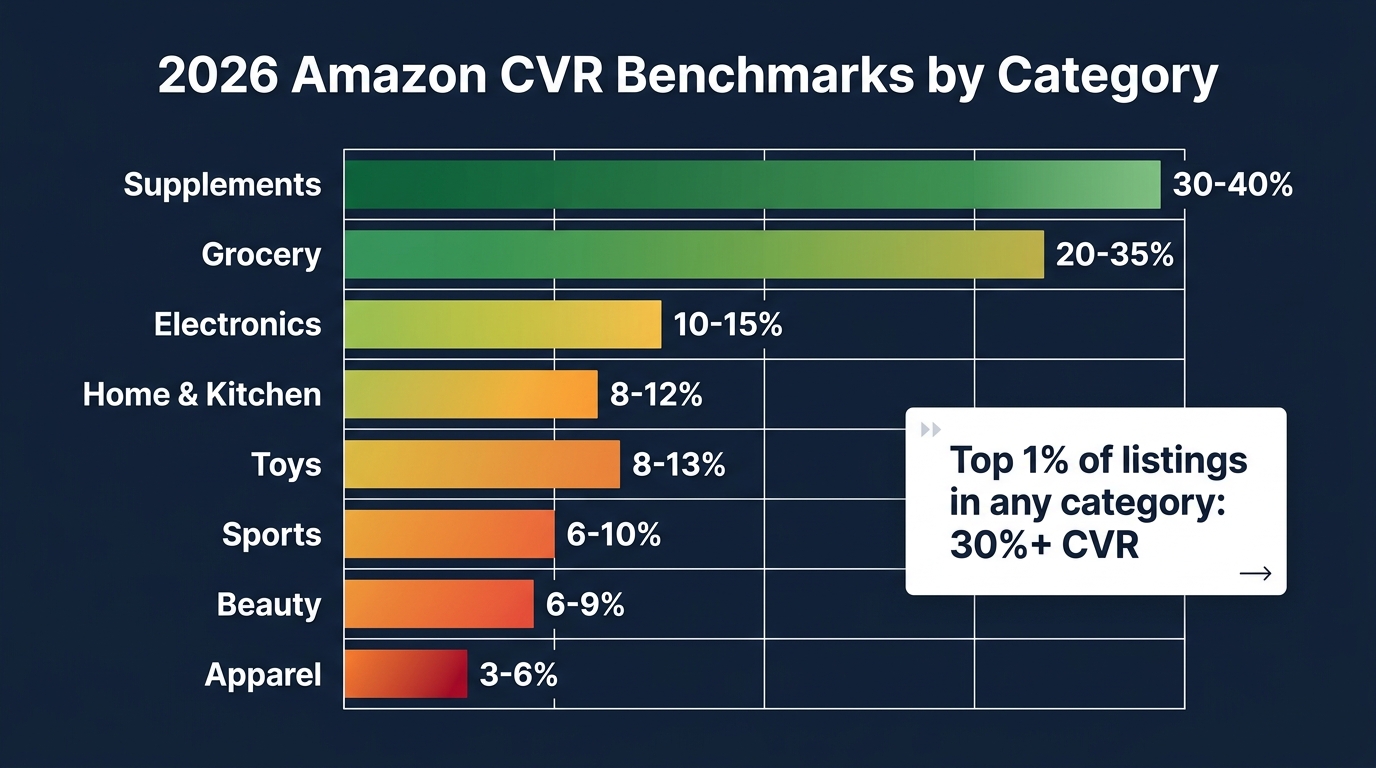
- Unit session percentage (your effective CVR): This is the percentage of listing sessions that result in a purchase. Category benchmarks in 2026 vary significantly — supplements run 25–40%, home and kitchen runs 8–12%, apparel runs 3–6%. If you are below your category floor, you have a conversion problem. If you are at or above the floor but not growing, you may have a positioning problem or a traffic quality problem.
- Click-through rate from sponsored placements: If your paid CTR is significantly below average (typically 0.3–0.5% for sponsored products), your main image and title are failing before buyers even reach your listing. This tells you where to focus first.
- Search query performance data: Amazon’s Search Query Performance report shows you which queries are driving impressions, clicks, and purchases. A high impression-to-click gap on your highest-volume keywords means your title and main image are not compelling enough in the search results view. A high click-to-purchase gap means buyers are arriving but something on the listing is stopping them.
- Return rate and return reason codes: High return rates in categories like electronics or apparel often signal a listing that over-promises or under-describes. If you see “item not as described” or “not compatible” in your return reasons, your listing has an accuracy problem that AI content generation could actually make worse if you are not careful.
Competitive Context: The Benchmark Reverse ASIN
The second diagnostic step is a competitive gap analysis. Identify your top three to five organic competitors in the target search results — not necessarily the bestseller, but the products consistently appearing in positions two through six. Run a reverse ASIN analysis on each using a tool like Helium 10’s Cerebro or Data Dive. The goal is not to find keywords to stuff into your listing. It is to identify topics and buyer scenarios that your competitors cover in their content that you do not.
Map those topics against your current listing. Any use case, benefit claim, or objection-handler that appears in three or more competitor listings but is absent from yours is a content gap that represents genuine conversion opportunity. This becomes your brief for the AI drafting phase.
Building the Product Truth Card: The Foundation AI Cannot Fabricate
This is the step that most AI-assisted listing workflows skip entirely, and it is the one that determines the quality ceiling of everything that follows.
A Product Truth Card is a structured document you write before prompting any AI tool. It is not marketing copy. It is not keyword research. It is a factual, granular inventory of what your product actually is, what it does, who it is for, and what makes it defensibly different from the next option. The AI’s job is to find language patterns that communicate this well. It cannot determine what the truth is.
What the Product Truth Card Covers
A well-built Product Truth Card has six components:
- Physical facts: Exact dimensions, materials, weight, certifications, compatibility details, and any relevant specifications. These must be accurate. AI tools have a documented tendency to hallucinate specs — outputting plausible-sounding but incorrect numbers when given vague inputs. If you give it a fact sheet, it cannot invent one.
- Primary use cases: Specific, concrete scenarios in which a buyer uses this product. Not “great for home use” — that is worthless. “Fits under a standard 30-inch kitchen cabinet when mounted vertically” is specific. “Holds a standard wine bottle without a tray liner” is specific. The more concrete the use cases, the more specific and compelling the resulting copy.
- Buyer persona clarity: Who is the most likely buyer — not demographically, but situationally? What problem are they trying to solve? What do they currently use instead? What would make them hesitate? This informs tone, vocabulary level, and which benefits to lead with.
- Competitive differentiators: What does your product do, have, or include that the two or three alternatives at the same price point do not? Be specific and honest. “Better quality” is not a differentiator. “Double-stitched seams rated to 80 lbs pull strength, versus the category standard of single-stitch” is.
- Review-sourced language: Pull your five-star reviews and identify the specific phrases buyers use to describe what they love about the product. This is how real buyers talk about real outcomes. It is also what Amazon’s AI-powered search systems are increasingly rewarding — natural language that matches how people phrase questions, not how manufacturers write spec sheets.
- Known objections: What do your one- and two-star reviews complain about? What do the Q&A questions ask repeatedly? Every common objection that your listing fails to address is a buyer who clicks away. You do not need to hide weaknesses — you need to pre-empt mismatched expectations before they become returns.
This document takes 60 to 90 minutes to build for a single ASIN. For a catalog rebuild, you can often share 70–80% of the content across product variations with ASIN-level addenda. The time investment is front-loaded, but it is what prevents an AI tool from producing generic, untethered copy that sounds professional and converts like cardboard.
Title Architecture: The Three-Layer Formula That Requires Human Judgment
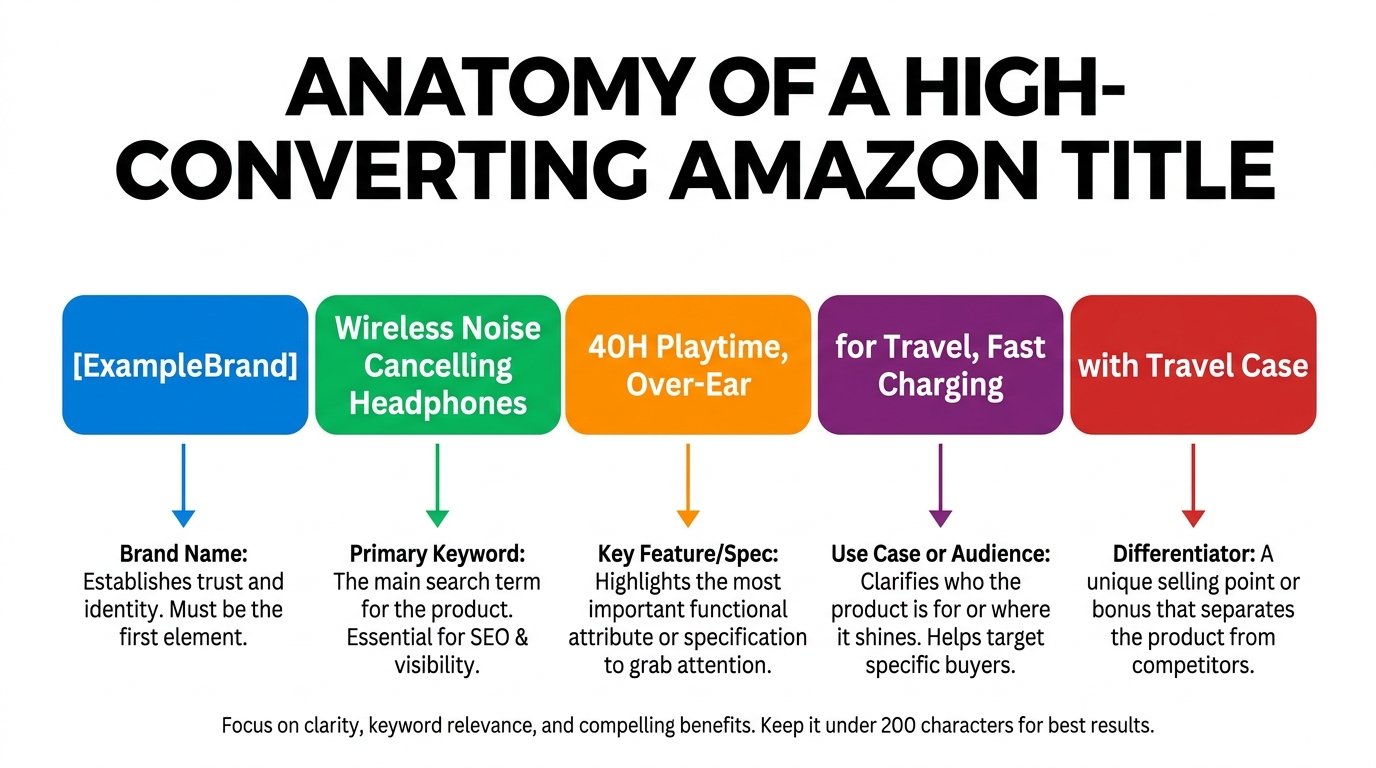
The Amazon product title is doing more simultaneous jobs than any other single element on the page. It is driving click-through from search results. It is communicating product relevance to the A9 indexing system. It is being parsed by Amazon’s COSMO intent layer for buyer-query matching. It is being displayed — often truncated — on mobile screens. And it is creating the first impression that determines whether a buyer wants to know more.
AI tools are genuinely helpful for title generation, but the quality of what they produce depends entirely on the structure of the brief they receive. A vague prompt produces a vague title. A structured brief with clear inputs produces something worth iterating on.
Layer One: The Indexing Foundation
The first layer of a high-performing title is the keyword foundation — the primary search term and one or two close variants that represent your highest-volume, most relevant query targets. This is where most AI-assisted titles start and finish, which is why they fail. Keyword placement is necessary but not sufficient. A title built entirely on keyword optimization will rank for terms and fail to earn clicks, because it reads like a specification list rather than a product identity.
The rule for the keyword layer: place your primary keyword close to the front of the title (within the first 80 characters), and ensure it appears in a natural construction that does not require a buyer to parse it as a string of disconnected words. “Stainless Steel Water Bottle 32 oz” is a keyword-first title. “32 oz Stainless Steel Water Bottle — Leakproof, Insulated, Fits Car Cup Holders” leads with the keyword in a natural phrase and immediately adds a benefit string.
Layer Two: The Differentiating Claim
The second layer is the element that separates your title from the five or six other results appearing alongside it. This is a single, specific, credible claim that a buyer scanning the search results page can process in under two seconds. “48-Hour Temperature Retention” is a differentiating claim. “Wide-mouth lid for easy ice loading” is a differentiating claim. “FDA-approved food-grade interior” is a differentiating claim. These are specific enough to be meaningful and compact enough to survive on a mobile display.
AI is good at generating candidates for this layer. It is not good at selecting which candidate is actually most important to your specific buyer. That judgment comes from the review-sourced language in your Product Truth Card and from your understanding of what the competing titles are not saying. Give the AI five candidates and pick the one your five-star reviews talk about most.
Layer Three: The Mobile Reality Check
Amazon’s mobile app truncates product titles at approximately 70–80 characters in most search result displays. This is not a guideline — it is a hard visual cutoff that determines what most buyers actually read. Whatever appears in the first 80 characters of your title is your real title in the majority of purchase scenarios.
Run every AI-generated title candidate through a simple character-count test. If the most important claim is buried in character 95, it does not exist on mobile. Restructure accordingly. This is a mechanical check, but it is one that AI tools routinely miss when generating to Amazon’s formal 200-character limit without being explicitly instructed to optimize for the mobile truncation point.
Title length itself is a variable worth testing. Shorter titles (under 100 characters) can outperform longer titles in high-competition categories where buyers are scanning rapidly. In complex or technical categories, longer titles with more specification detail can improve conversion by pre-qualifying buyers. Neither rule is universal — which is exactly why testing matters.
Bullet Points That Convert: From Feature Lists to Decision Accelerators
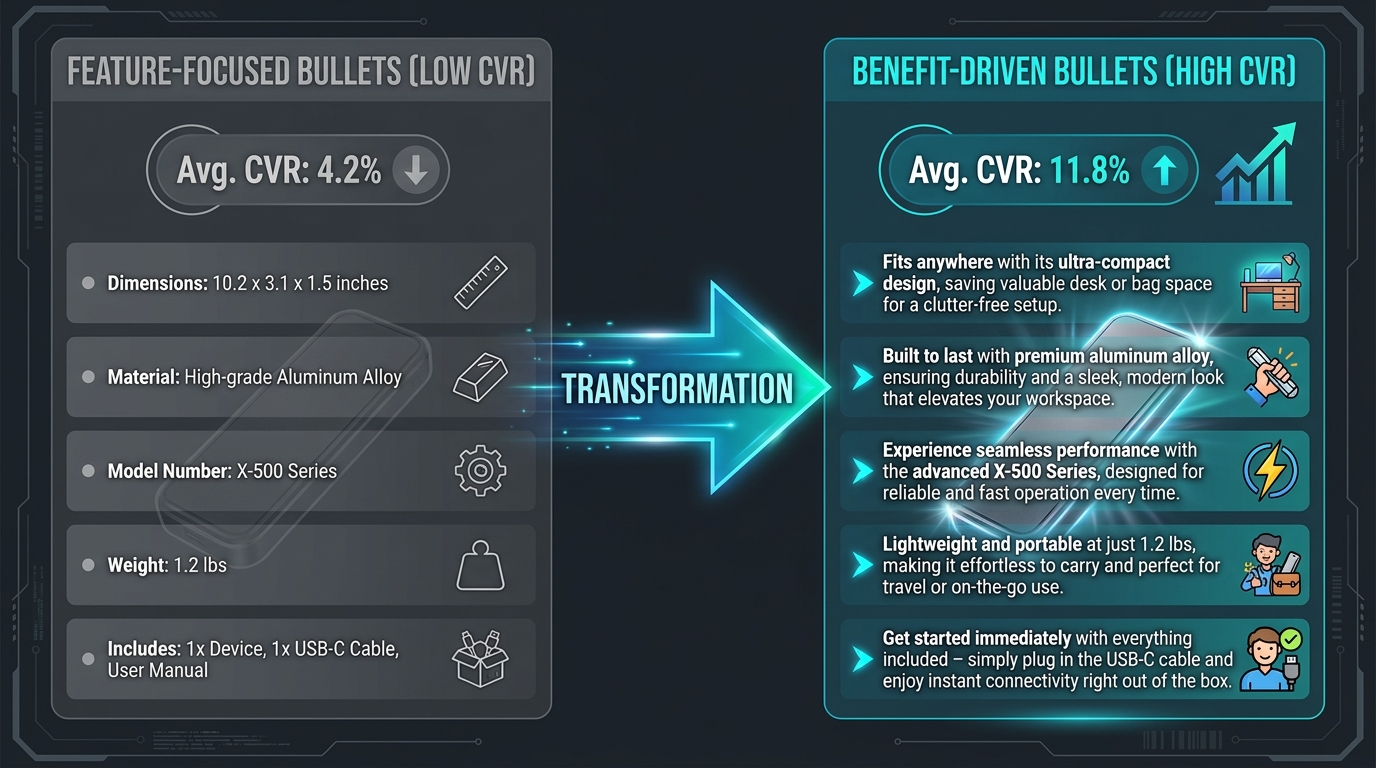
Amazon allows five bullet points. Across thousands of listings, the most common misuse of those five slots is using them as a feature inventory — a list of what the product is rather than what the product does for the person buying it. This is the distinction that consistently separates listings converting at 4–5% from those converting at 12–15% in the same category.
The Bullet Anatomy That Works
Each bullet should follow a three-part structure: Lead with the outcome. Support with the feature. Close with the reassurance.
An example for a foam roller:
- Feature-first (weak): “EVA foam construction with textured surface and 13-inch length”
- Outcome-first (strong): “Reduces post-workout soreness in 10 minutes or less — the textured EVA surface applies targeted pressure to release muscle knots, sized at 13 inches to reach the full back and IT band”
The feature-first version tells you what the product is. The outcome-first version tells you what it does, why the feature enables that outcome, and reassures you that it covers the area you care about. The buyer arrives at the listing with a problem — sore muscles, limited recovery time — not with a desire for a specific foam density. Lead with their reality.
Bullet Architecture Across the Five Slots
There is a strategic sequence to the five slots that most AI tools do not observe unless you explicitly instruct them to. A high-converting bullet sequence typically follows this order:
- Primary benefit: The single most important thing this product does for the buyer. Lead with the strongest proof point.
- Differentiator: The thing your product does that the alternatives do not, or does measurably better. This should be specific and verifiable.
- Compatibility or fit: Who this product works for, what it works with, what size or specification applies. This reduces returns and increases purchase confidence by pre-qualifying the buyer.
- Objection handler: The question that appears most frequently in your Q&A section or the concern raised most often in middling reviews. Address it directly. Pre-empting an objection in the bullet points is vastly more effective than leaving it for the buyer to discover in the reviews.
- Trust and commitment signal: Warranty terms, certification details, satisfaction guarantees, or customer support availability. This is not about claims — it is about reducing the perceived risk of clicking “Add to Cart.”
AI tools can produce drafts in this format if you provide this structure explicitly in your prompt. Without the structure, they tend to generate five loosely related feature bullets that cover the product broadly but do not follow any conversion logic. The prompt is not “write me five bullet points about this foam roller.” The prompt is “write me five bullet points in this specific order, using these specific outcome claims, for a buyer whose primary concern is recovery time.”
Capitalized Lead-Ins: A Persistent but Contested Tactic
Many high-converting listings use a capitalized phrase at the start of each bullet — “FASTER RECOVERY —”, “LEAKPROOF GUARANTEED —” — as a scanning aid for mobile users who see bullet text in a compressed format. This has been a standard tactic for several years and remains common in 2026 despite Amazon’s official style guidelines technically discouraging it. The practical reality is that enforcement on this particular policy is inconsistent. It is worth noting as an option for testing, but it is not a substitute for substantive, outcome-driven bullet content.
The Image Brief: Where AI Assistance Starts Long Before the Creative Work
Most conversations about AI and product images focus on generation tools — AI-created lifestyle backgrounds, AI-generated product renders, AI-enhanced photography. That conversation is real and relevant. But there is a prior, more important application of AI in the image development process that almost no one talks about: using AI to build the creative brief that tells you what images to make before you make them.
Mining Reviews and Q&A for Visual Priorities
A structured review mining process — either manually or using an AI summarization tool — can identify the specific product attributes, use scenarios, and comparison moments that buyers reference most frequently. This is the input that should drive your image sequence, not aesthetic preference.
If 40% of your five-star reviews mention how the product fits into a specific context — under-desk storage, inside a gym bag, in a car cup holder — that context deserves a lifestyle image. If buyers frequently mention surprise at the actual size (“much larger than I expected” or “smaller than the photos suggest”), you need a size-reference image before they raise that objection in the reviews. If buyers frequently compare your product favorably to a well-known alternative, you have the basis for a comparison infographic.
Use an AI tool — ChatGPT, Claude, or a purpose-built review analytics platform — to process your reviews and Q&A at scale and surface these patterns. A prompt as simple as “analyze these 200 product reviews and identify the five most frequently mentioned physical attributes, use scenarios, and purchase concerns” will return a prioritized brief in minutes. That brief should drive the image sequence, not the other way around.
Secondary Images and Infographics: The Conversion Engine Most Sellers Underuse
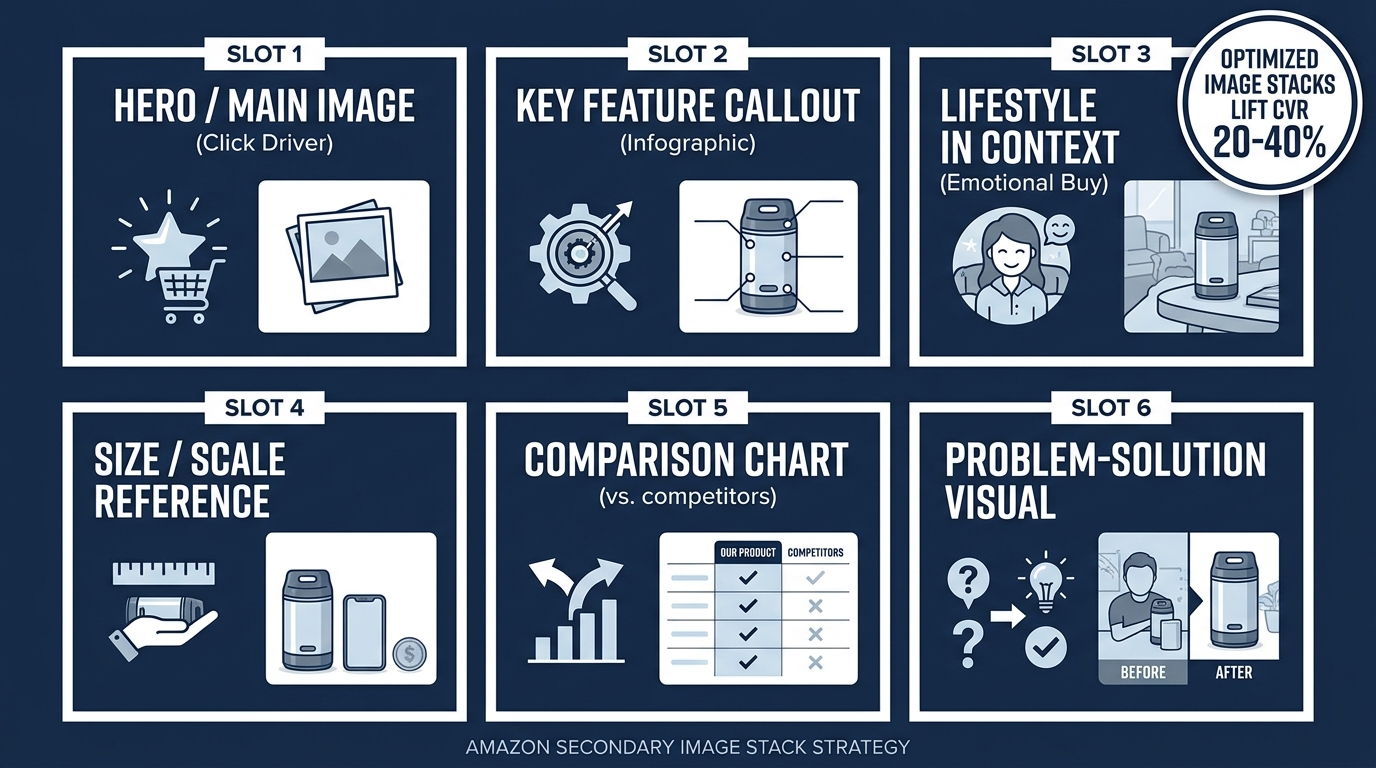
Amazon’s main image has a single job: generate the click from search results. Everything after that — the secondary image carousel — has a different and arguably more important job: convert the buyer who has already clicked. These are distinct functions requiring distinct strategies, and most listings treat the secondary images as an afterthought to the main image rather than as a separate conversion system.
Industry data from agencies including EvolveAMZ consistently shows that optimized secondary image stacks — ones built around a deliberate sequence of information and emotional cues — can lift conversion rates by 20–40% over generic or unstructured image sets. That is not a marginal improvement. For a mid-volume product doing $30,000 a month at a 6% CVR, moving to 8% CVR on the same traffic is worth approximately $10,000 per month in additional revenue.
The Six-Slot Image Strategy
Think of your image carousel as a six-slot sales conversation. Each slot plays a specific role:
- Slot 1 — Main image (the click trigger): Pure white background, product filling at least 85% of frame, highest-resolution possible. This image’s only job is to earn the click. Do not add text, badges, or lifestyle elements — Amazon prohibits them and they reduce clarity at thumbnail scale anyway.
- Slot 2 — Feature callout infographic: A secondary product view with labeled annotations pointing to two or three key features. This is the bridge between “I clicked because it looked right” and “I understand what makes this product work.” Text overlays are permitted in secondary images and should be used deliberately here.
- Slot 3 — Lifestyle in context: The product being used by a real person in a specific, recognizable scenario that matches your buyer persona. This is the emotional buy moment. It answers the question “can I see myself using this?” without requiring the buyer to imagine it. The scenario should come directly from your review-sourced use cases.
- Slot 4 — Size and scale reference: The product next to a familiar object, or in the environment where it will be used, with dimensions labeled. This single image eliminates the most common source of low-star reviews across physical product categories: “not the size I expected.”
- Slot 5 — Comparison chart: A side-by-side comparison of your product against the category standard or the two closest alternatives, using specific, verifiable attributes. This is the objection-killer image. It answers “why this one and not the other one” without requiring the buyer to leave the listing to find out.
- Slot 6 — Trust and commitment visual: Certification logos, warranty terms, satisfaction guarantee, award badges if applicable. This is the final confidence signal before the Add to Cart button. It reduces perceived purchase risk at the moment of decision.
Amazon’s Standard A+ Content and the Infographic Layer
For Brand Registry sellers, Standard A+ Content adds a below-the-fold visual layer that Amazon itself reports drives an average 5–6% conversion rate lift. This figure is often cited as if it is the ceiling of what A+ can do. It is actually closer to a floor — it represents the average across all A+ implementations, including the many that are visually weak, poorly structured, or simply replicate the bullet points in banner format. Well-built A+ modules with clear hierarchy, benefit-led headlines, and genuine comparative content can outperform that baseline significantly. The infographic-style A+ modules — those that use visual frameworks rather than advertising-style layouts — consistently perform better than lifestyle-heavy designs in most categories outside of premium fashion and beauty.
The Rufus and COSMO Factor: Writing for Conversational Search
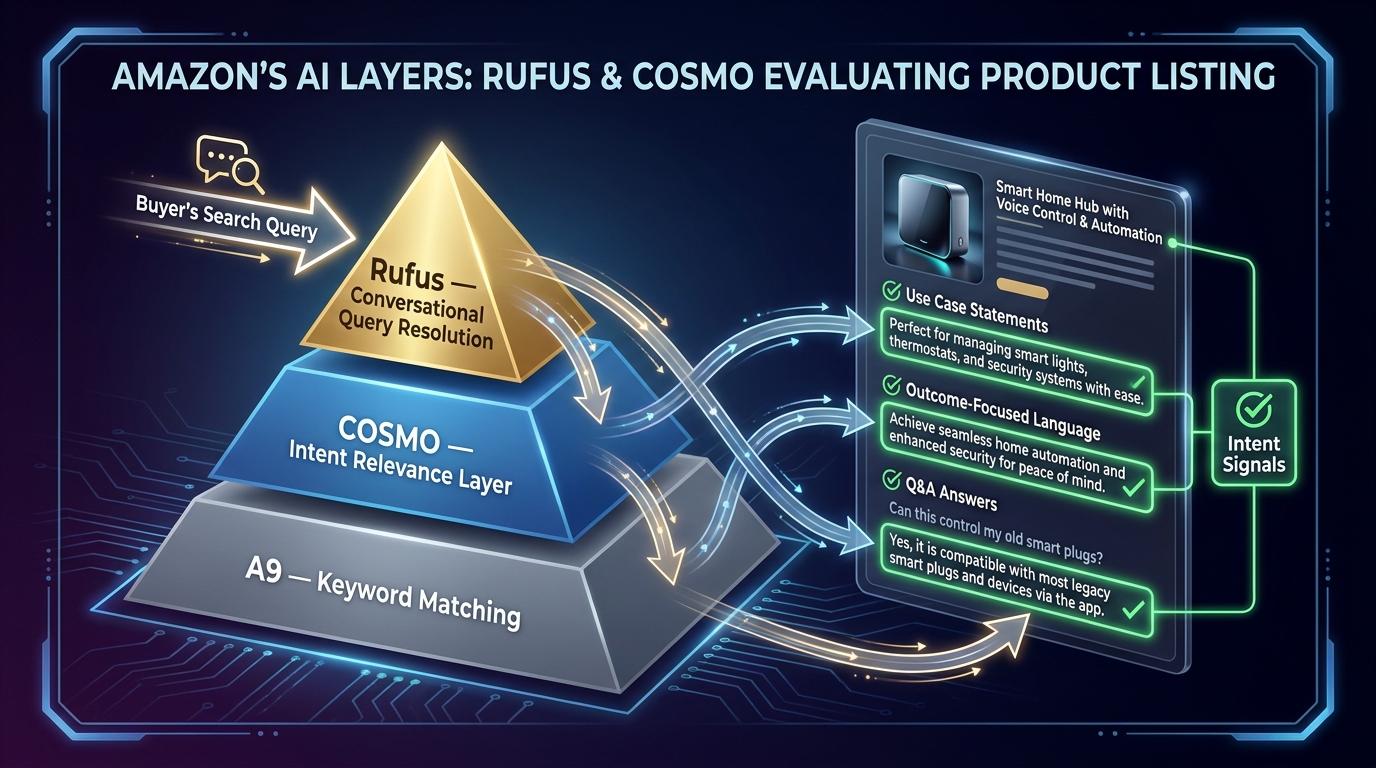
Amazon’s search environment in 2026 operates across two distinct systems that require different content strategies. The legacy A9 system — still active and still important — evaluates keyword relevance, sales velocity, CTR, and CVR. The newer intent layer, comprising the COSMO relevance model and the Rufus shopping assistant, evaluates whether your product actually solves the problem a buyer expressed in a natural-language query.
These systems are not mutually exclusive. A well-built listing can serve both simultaneously. But they require content in different forms, and ignoring the intent layer is increasingly costly as Rufus usage grows and conversational queries account for a larger share of the purchase discovery path.
What COSMO Is Actually Looking For
COSMO is Amazon’s context-aware relevance system. Rather than asking “does this listing contain the query keyword?”, it asks a more demanding question: “does this product plausibly solve the problem implied by this query?” This shift matters because it means listings optimized purely for keyword density can lose ground to listings that are contextually richer, even if the pure keyword score is lower.
In practical terms, COSMO rewards listings that address use cases explicitly, connect product features to buyer outcomes, and contain enough contextual language to allow the system to infer product appropriateness across a range of related queries. A listing that describes a blender as “1200W motor” is less contextually rich to COSMO than one that says “powerful enough to break down frozen fruit and ice for smoothies in under 30 seconds.” The latter tells the system what the product does in the real world. The former just tells it the motor rating.
Writing for Rufus Queries
Rufus handles shopper-facing conversational queries — questions like “what’s the best travel pillow for long-haul flights?” or “can I use this in a dishwasher?” It draws answers from listing content, reviews, Q&A, and product attribute data. Listings that answer these questions explicitly within their content are better positioned to be surfaced by Rufus than those that require the system to infer answers.
The practical implication is that your listing should contain direct answers to the five or six most common use-case questions for your product. These do not need to be formatted as questions and answers — they can be embedded naturally in bullet points and descriptions. “Safe for top-rack dishwasher cleaning” is a Rufus-friendly statement. “Dishwasher compatible” as a bare phrase is less so, because it does not specify the context in which the buyer would ask. “Works in extreme cold down to -20°F, making it suitable for winter outdoor use” is a Rufus-targeted statement that a conversational query like “what water bottle works in freezing temperatures?” can match to directly.
The Google AI Overview Problem
External search adds another dimension to this in 2026. SellerLabs research indicates that Google impressions for Amazon product listings are up, but clicks are down approximately 37% year-over-year due to Google’s AI Overviews absorbing the response. This is not purely a problem for external SEO — it highlights a structural shift in how buyers discover products before they reach Amazon. Listings with structured, factual, specific content are better positioned to be surfaced within those AI Overview responses, which means the same content discipline that serves Rufus also partially compensates for the Google click reduction.
Quality Control and the Compliance Trap: Where AI Copy Goes Wrong at Scale
Amazon’s own policy on AI-generated listing content is unambiguous: every word in a listing is treated as if it were written by a human seller. There is no “the AI made a claim I did not intend” defense. Exaggerated performance claims, unverifiable certifications, unapproved health or medical benefit statements, and false specifications are policy violations whether a human or an AI wrote them — and AI tools are measurably more likely to produce each of these categories of error than a careful human writer.
The Four Categories of AI-Generated Error
Understanding where AI-generated copy reliably introduces risk allows you to build a targeted quality control process rather than rereading every word with equal scrutiny:
- Hallucinated specifications: AI tools given vague product inputs will generate plausible-sounding specs. “Made from 304 food-grade stainless steel” might be correct — or the AI might have inferred that from a similar product in its training data. Every material, certification, dimension, and compatibility claim must be verified against your physical product before the copy goes live. This is non-negotiable.
- Health and performance overclaims: In categories like supplements, health devices, and fitness equipment, AI-generated copy consistently produces claims that cross into FDA-regulated or Amazon-prohibited territory. “Supports immune function” is within policy for a supplement with the appropriate disclaimer context; “boosts immunity” is not. AI tools do not reliably observe this distinction. A category-specific compliance review is essential for any AI-drafted content in health-adjacent categories.
- Generic superlatives: “Best-in-class,” “superior quality,” “unmatched durability” — AI tools default to these phrases because they appear frequently in marketing copy training data. Amazon’s policy prohibits most superlative claims that are not verifiably number-one in a category. These phrases also tend to reduce buyer trust rather than increase it. They are easy to catch and easy to remove, but they require a human eye to identify.
- Competitor name violations: AI tools occasionally include competitor brand names in comparison copy. Amazon prohibits the use of competitor brand names in listing content in most contexts. Check AI-generated comparison language carefully.
Building a Lightweight QC Checklist
A practical quality control checklist for AI-generated listing content does not need to be lengthy. It needs to cover five things: factual accuracy of all specifications, compliance with category-specific claim restrictions, removal of prohibited superlatives, confirmation that no competitor brand names appear, and a final read for natural language fluency. The last point matters because AI tools occasionally produce grammatically correct but stilted sentences that read as machine-generated to a human buyer — and buyers notice this, even if they cannot articulate why the copy feels slightly off.
Manage Your Experiments: Validating the Rebuild With Real Data
The rebuild is not complete when the new content goes live. It is complete when you have statistically validated that the new content outperforms the old. Amazon’s native A/B testing tool — Manage Your Experiments (MYE) — is available to Brand Registry sellers and supports testing of titles, bullet points, main images, A+ content, and brand story elements. This is the measurement infrastructure that converts a rebuild from a hypothesis into a confirmed result.
How to Structure a Valid Experiment
MYE runs a 50/50 traffic split between your current listing version and your test version for a user-defined period, typically four to ten weeks. Amazon recommends running experiments until they reach approximately 95% statistical significance. For high-traffic products, this can happen in as little as four weeks. For lower-velocity ASINs, you may need eight to twelve weeks to reach significance.
The most important discipline in experiment design is isolating variables. Test one element at a time — either the title or the bullets or the main image, not all three simultaneously. If you change three elements and conversion improves, you know the rebuild worked. You do not know which element drove the improvement. You cannot replicate the decision logic across other ASINs. Single-variable testing is slower, but it builds genuine knowledge about what your specific buyer responds to.
Prioritizing What to Test First
Given the 50/50 traffic split and the time required to reach significance, sequencing your experiments strategically is important. The general order of priority based on impact potential:
- Main image first: If your click-through rate from search is below your category average, this is the highest-leverage test. CTR improvements compound through every downstream metric — more clicks means more data for the algorithm, which means more impressions. Fix the click problem before optimizing the conversion problem.
- Title second: If CTR is adequate but conversion is below the category floor, test the title. A benefit-forward restructuring of a keyword-heavy title often produces measurable conversion gains, particularly on mobile.
- Bullets third: Once the title and main image are performing, bullets are the next lever. Test the outcome-first structure against your current feature-first structure. The improvement here is usually more modest than title or image changes, but it is real and stackable.
- A+ content last: A+ is the most resource-intensive element to produce and test. Run it after the above elements have been validated, so you are not spending design resources on a listing that still has a broken title or weak main image.
What Statistical Significance Actually Means in Practice
Amazon reports experiment results with a confidence percentage. A 95% confidence result means there is a 5% probability that the observed difference is random variation rather than a true effect. For listing optimization decisions — where the cost of making the wrong choice is a few weeks of suboptimal conversion — 90% confidence is generally sufficient to act on. For high-stakes decisions on hero products, wait for 95%. Chasing 99% confidence is rarely worth the extended testing period at the typical ASIN traffic volumes most sellers deal with.
Building a Repeatable Rebuild Process Across a Catalog
Everything described in this article can be done once for a single ASIN. The compounding value comes from building it as a repeatable system that can be applied across a catalog efficiently. For sellers managing 20, 50, or 200 ASINs, the challenge is not understanding the framework — it is operationalizing it without requiring the same 90-minute, high-attention-per-ASIN effort for every product.
Tiering Your Catalog
Not every ASIN deserves the same depth of rebuild work. A practical catalog tiering approach:
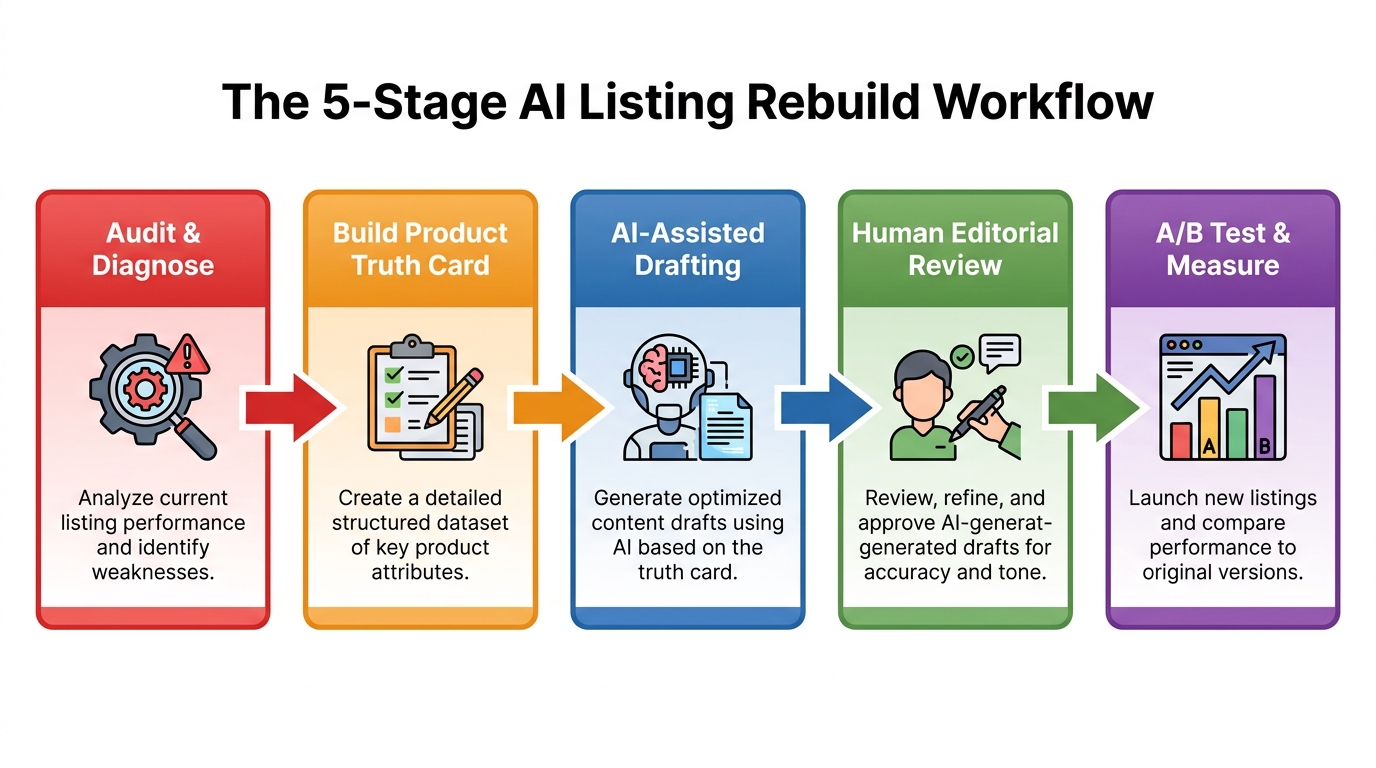
- Tier 1 — Hero products (top 20% of revenue): Full rebuild protocol: Product Truth Card, competitive gap analysis, AI-assisted drafting with structured brief, human editorial review, QC checklist, MYE testing for each major element. These ASINs justify the full investment.
- Tier 2 — Mid-range products (next 30% of revenue): Abbreviated rebuild: AI-assisted drafting against a shared Product Truth Card template with ASIN-specific addenda, QC checklist, title and main image MYE test only.
- Tier 3 — Tail products (bottom 50% of revenue): Bulk AI refresh using standardized prompts and templates from the Tier 1 work, compliance QC pass, no formal testing unless traffic volumes support it. The goal here is baseline hygiene, not optimization.
Building Shared Prompt Templates From Your Best-Performing Rebuilds
After your first three to five full Tier 1 rebuilds, you will have a documented prompt set that reflects your brand’s voice, your product category’s content requirements, and the QC rules that have caught real errors. These prompts are reusable assets. A prompt template that reliably produces outcome-first bullet structures for a home kitchen brand, built on the framework that worked for your hero ASIN, can be applied — with ASIN-specific input variables — across your entire catalog with meaningful time savings and consistent quality floors.
Document every successful rebuild as a case study: what the before state was, what changes were made, what the MYE result showed, and which specific content decisions drove the improvement. Over time, this becomes an internal knowledge base that makes every subsequent rebuild faster and more likely to succeed because it is grounded in your own validated data, not general best practices that may not apply to your category or buyer demographic.
Review Cycle Cadence
Listing optimization is not a one-time event. Competitive dynamics shift, Amazon’s policy environment evolves, buyer language changes, and new product features may emerge. A reasonable review cadence for optimized listings is quarterly for Tier 1 ASINs and semi-annually for Tier 2. The review does not require a full rebuild — it requires checking whether your content gaps analysis still holds (new competitors may have entered with content that outclasses yours), whether your main image is still competitive at the thumbnail scale in current search results, and whether your review mining reveals new buyer language that should be incorporated into bullets or title.
Conversion Is a System, Not a Sprint
The sellers who extract the most from AI-assisted listing work are not the ones who have found the cleverest prompt. They are the ones who understand that AI is a speed and pattern-matching tool layered on top of a strategic process — and that the process is what generates the result, not the tool.
The framework this article has described — diagnostic first, Product Truth Card before prompting, structured brief for every content element, single-variable testing, tiered catalog management — is not complicated. It is disciplined. And it is the discipline that most sellers skip when AI tools make the content generation part feel so fast and effortless that the strategic work surrounding it seems unnecessary.
AI can write faster than any human. It cannot decide what to say, who to say it to, or whether what it said was true. Those decisions belong to operators.
The specific outputs of this work — a better title, a more compelling bullet sequence, an image carousel that answers objections before they arise — are not endpoints. They are validated inputs into a conversion system that compounds over time as you build more data, refine your templates, and deepen your understanding of what your specific buyer actually needs to hear before they buy.
Key Takeaways
- Always diagnose before drafting. Identify whether you have a positioning problem, a trust problem, or a content gap problem — AI only fixes the third.
- Build a Product Truth Card before prompting any AI tool. The quality ceiling of AI output is the quality of your inputs.
- Titles need to serve three simultaneous functions: A9 indexing, mobile CTR, and COSMO intent matching. Optimize for all three explicitly.
- Bullet points should lead with outcomes, not features. Use the five-slot sequence: primary benefit, differentiator, compatibility, objection handler, trust signal.
- Secondary images are a distinct conversion system from the main image. Build a deliberate six-slot strategy for each.
- Embed use-case and outcome language throughout your listing to serve Rufus conversational queries.
- Every AI-generated listing requires a four-category QC pass: spec accuracy, claim compliance, superlative removal, competitor name check.
- Use Manage Your Experiments to validate changes. Test one variable at a time. Act at 90–95% confidence.
- Tier your catalog. Not every ASIN justifies a full rebuild. Allocate depth of effort in proportion to revenue contribution.
- Treat your best rebuild prompts and results as reusable assets. The knowledge compounds. The process gets faster. The results get more predictable.