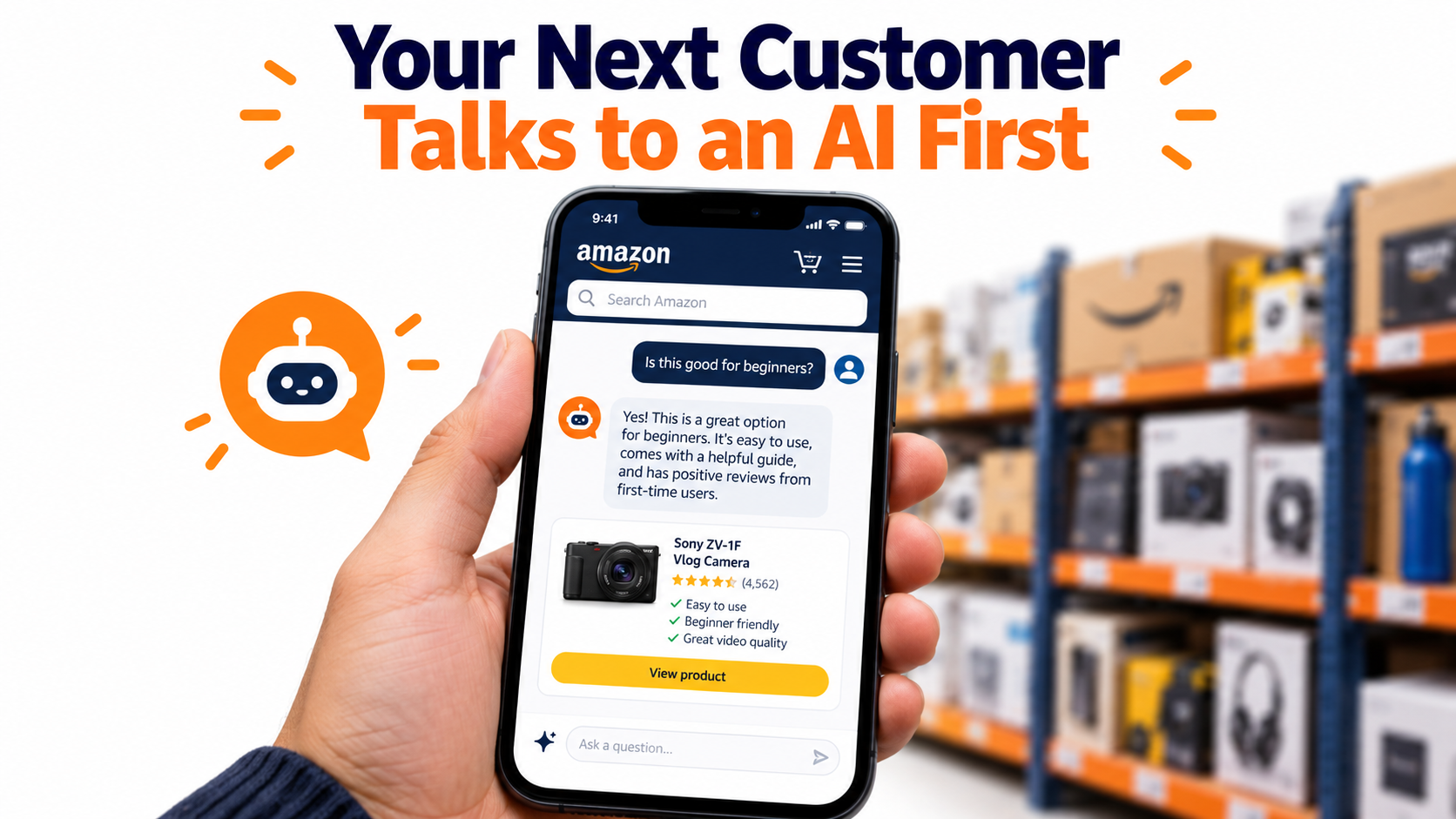

For most of Amazon’s history, selling on the marketplace came down to one interface: a search bar, a results page, and a shopper scrolling until something caught their eye. Sellers built entire businesses around that page. Keyword research, title stuffing, main-image tests, and sponsored placements all assumed a human was scanning a grid of products.
That assumption is weakening. On May 13, 2026, Amazon renamed its Rufus shopping assistant to Alexa for Shopping, folding Rufus and Alexa+ into a single AI assistant. The rename sounds cosmetic. It isn’t. It signals that Amazon now treats conversational, AI-assisted shopping as a core way people buy, not a side feature sitting in a chat bubble.
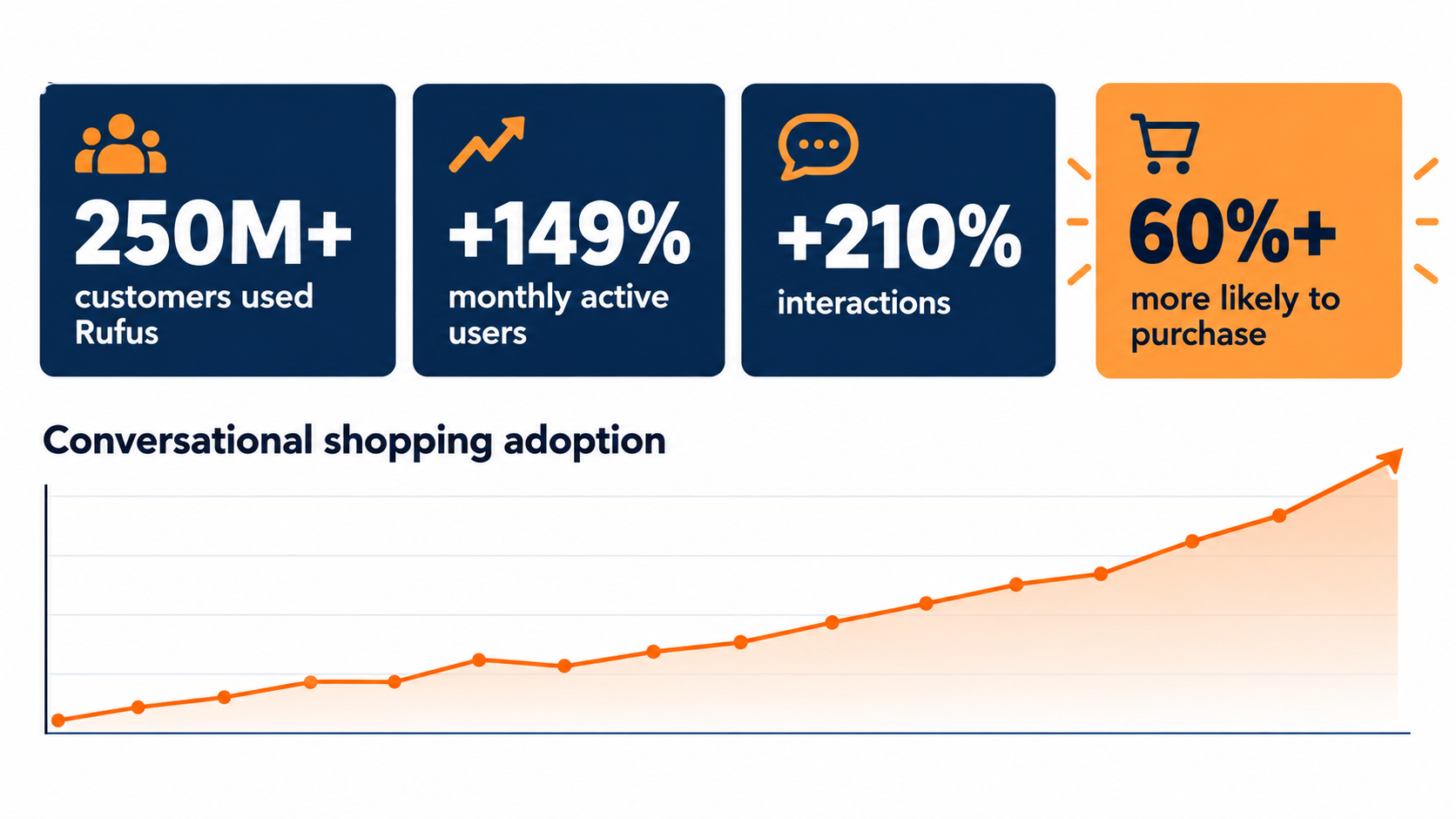
The usage numbers back this up. According to Amazon, more than 250 million customers used Rufus over the past year, monthly active users grew 149%, and interactions grew 210%. Shoppers who used the assistant during a session were over 60% more likely to buy during that trip.
For sellers, this raises a practical question: when an AI reads your listing before your customer does, what does it actually see? This article is not another list of general Amazon tips. It’s a close look at how Amazon’s assistant builds its answers, the data sources it draws from, the research behind its product reasoning, and the specific changes sellers can make to show up when a shopper asks a question instead of typing a keyword.
We’ll cover what changed with the rebrand, how the system is built, why “commonsense” product context now matters as much as keywords, how reviews and Q&A have become listing copy you don’t fully control, and a 30-day plan to get your catalog ready.
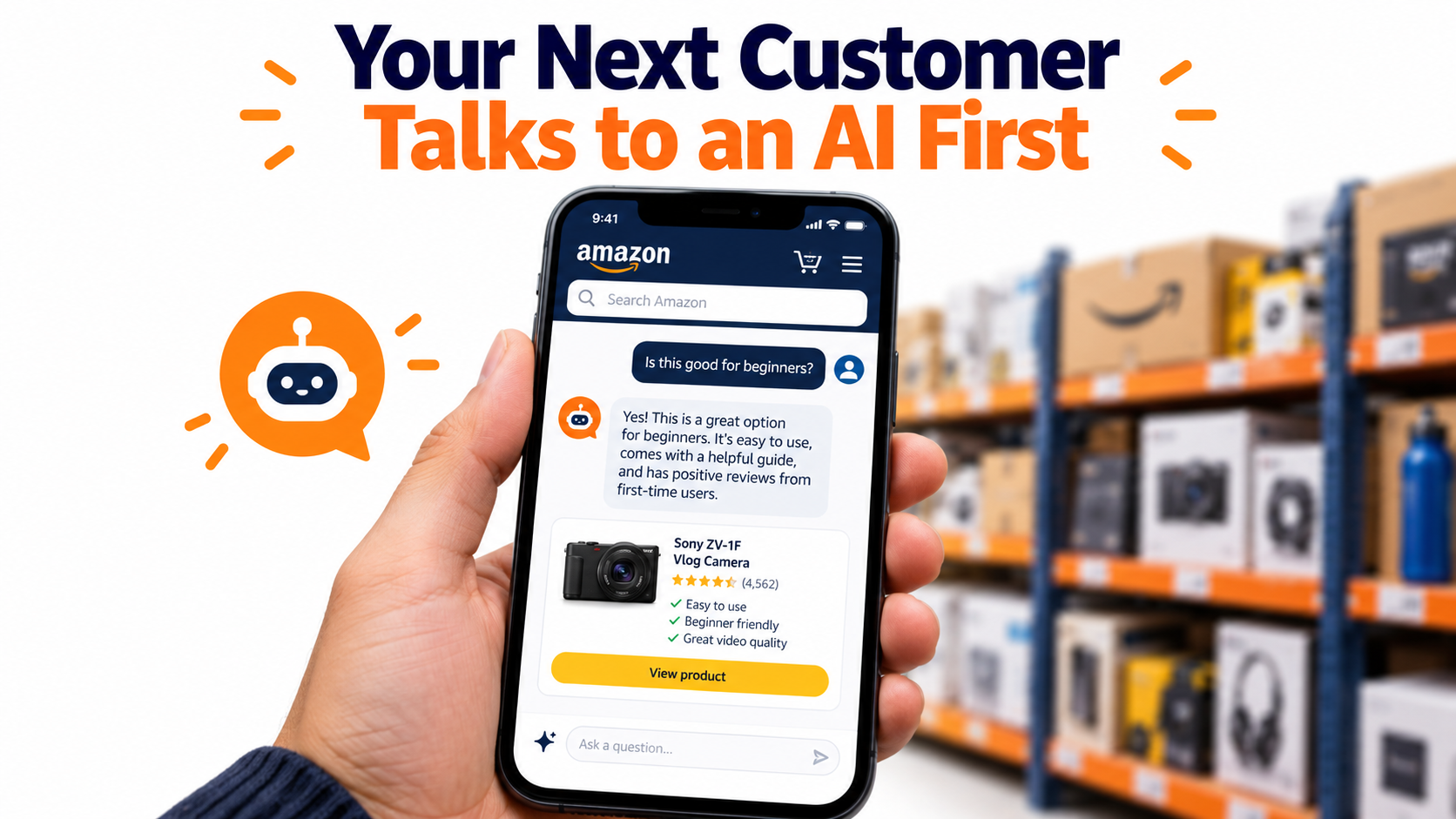
What Actually Happened on May 13, 2026
Amazon’s own news pages now carry a short line at the top of every Rufus article: “On May 13, 2026, Rufus was renamed Alexa for Shopping.” Amazon describes the new product as one that “brings together Rufus and Alexa+” into what it calls a personalized AI assistant for shopping.
To understand why that matters, it helps to look at where Rufus started and how far it moved in a short time.
From beta chat bubble to default shopping layer
Rufus launched in beta to a small group of U.S. customers in the Amazon mobile app. Amazon described it as “a generative AI-powered expert shopping assistant trained on Amazon’s extensive product catalog, customer reviews, community Q&As, and information from across the web.” It later rolled out to all U.S. customers on the app and desktop. Within its early months, Amazon reported that customers had already asked it “tens of millions of questions.”
The assistant was originally pitched around five jobs:
- Category education: “What to consider when buying headphones?”
- Shopping by occasion or purpose: “What do I need for cold weather golf?”
- Category comparisons: “What’s the difference between lip gloss and lip oil?”
- Recommendations: “Best dinosaur toys for a 5-year-old.”
- Product-page questions: “Is this pickleball paddle good for beginners?”
Every one of those jobs used to happen elsewhere: on Google, on Reddit, on YouTube review channels, or in the shopper’s own head while scrolling search results. Rufus pulled them inside Amazon’s store.
Why the Alexa name matters
Merging with Alexa+ connects the shopping assistant to Amazon’s broader voice and home ecosystem. Practically, that means the same assistant logic can surface products whether a shopper is typing in the app, speaking to a device, or using visual search. Amazon already lists the assistant on the homepage, on product detail pages, and inside the Amazon Lens Live experience.
For sellers, the takeaway is simple. There are now more surfaces where a shopper never sees a traditional search results grid. In voice and chat contexts, the assistant may name one, two, or three products. Being the fourth-best match can mean not being mentioned at all.
Agentic features, not just answers
Amazon describes the assistant as “powered by generative and agentic AI.” Rajiv Mehta, Amazon’s vice president of Search and Conversational Shopping, put it this way: the goal is an assistant “that knows you and your preferences, can help you discover products, compare options and prices, make informed buying decisions, and even take action to get things done faster for you.”
That last phrase, “take action,” is the part sellers should watch. As the assistant moves from answering questions to completing tasks, the gap between “recommended” and “purchased” shrinks. The assistant isn’t just a research tool anymore. It’s increasingly part of checkout.
The Numbers That Make Conversational Shopping Impossible to Ignore
Plenty of AI features launch with noise and fade. The reason sellers can’t treat this one that way is the adoption data Amazon has published.
The core figures
In its update on the assistant’s capabilities, Amazon reported:
- More than 250 million customers used Rufus during the year.
- Monthly average users up 149% year over year.
- Interactions up 210% year over year.
- Customers using it while shopping were over 60% more likely to make a purchase during that shopping trip.
- The assistant had helped customers “billions of times.”
- Amazon shipped more than 50 technical upgrades, enhancements, and new features to the assistant over that period.
How to read the 60% figure carefully
The 60% number is the one most likely to be misquoted. It does not mean the assistant raises conversion by 60% for every listing. It means shoppers who engage with the assistant are more likely to buy in that session.
Part of that gap is selection: people who ask detailed questions are often further along in their buying decision. But even with that caveat, the signal for sellers is clear. The shoppers using the assistant are high-intent shoppers. If your product isn’t represented well in those conversations, you’re missing the most valuable traffic, not the casual browsers.
Interactions growing faster than users
Notice that interactions (210%) grew faster than users (149%). That means the average user is asking more questions per session or returning more often. Shoppers aren’t just trying the feature once. They’re building it into how they shop.
That has a direct effect on discovery. When a shopper asks three or four follow-up questions, each one is a filter. “Which of these is easiest to clean?” “Which works with a 15-inch laptop?” “Which has the best reviews for durability?” Every follow-up narrows the field. A listing that answers those questions clearly survives the filtering. A listing that’s vague gets dropped.
What this means for traffic attribution
Here’s the uncomfortable part. Most sellers still measure performance through keyword rank, sessions, and conversion rate from search. Conversational sessions don’t fit cleanly into those reports. A shopper who arrives at your detail page from an assistant recommendation may look like any other session in your Business Reports, with no clear label explaining why they arrived.
We’ll cover practical ways to measure assistant visibility later. For now, the point is that a growing share of high-intent shopping is happening in a channel that traditional keyword-rank tools weren’t built to track.
How the Assistant Builds an Answer: Retrieval, Not Just Ranking
To sell well into an AI assistant, you need a working model of how it decides what to say. Amazon has published a surprising amount about this, through both its corporate news site and Amazon Science.
A custom model trained on shopping data
Trishul Chilimbi, who leads the scientific and engineering effort behind Rufus, wrote on Amazon Science that the team’s aim “was to train it primarily with shopping data — the entire Amazon catalogue, for starters, as well as customer reviews and information from community Q&A posts.” Public web information was added, with the team “carefully curating the contribution of each data source for model training.”
That detail matters. The base model’s understanding of products was shaped by Amazon’s catalog and reviews. The way your category is described across thousands of listings and millions of reviews influences what the model thinks a “good” product in your category looks like.
A router that picks the model per question
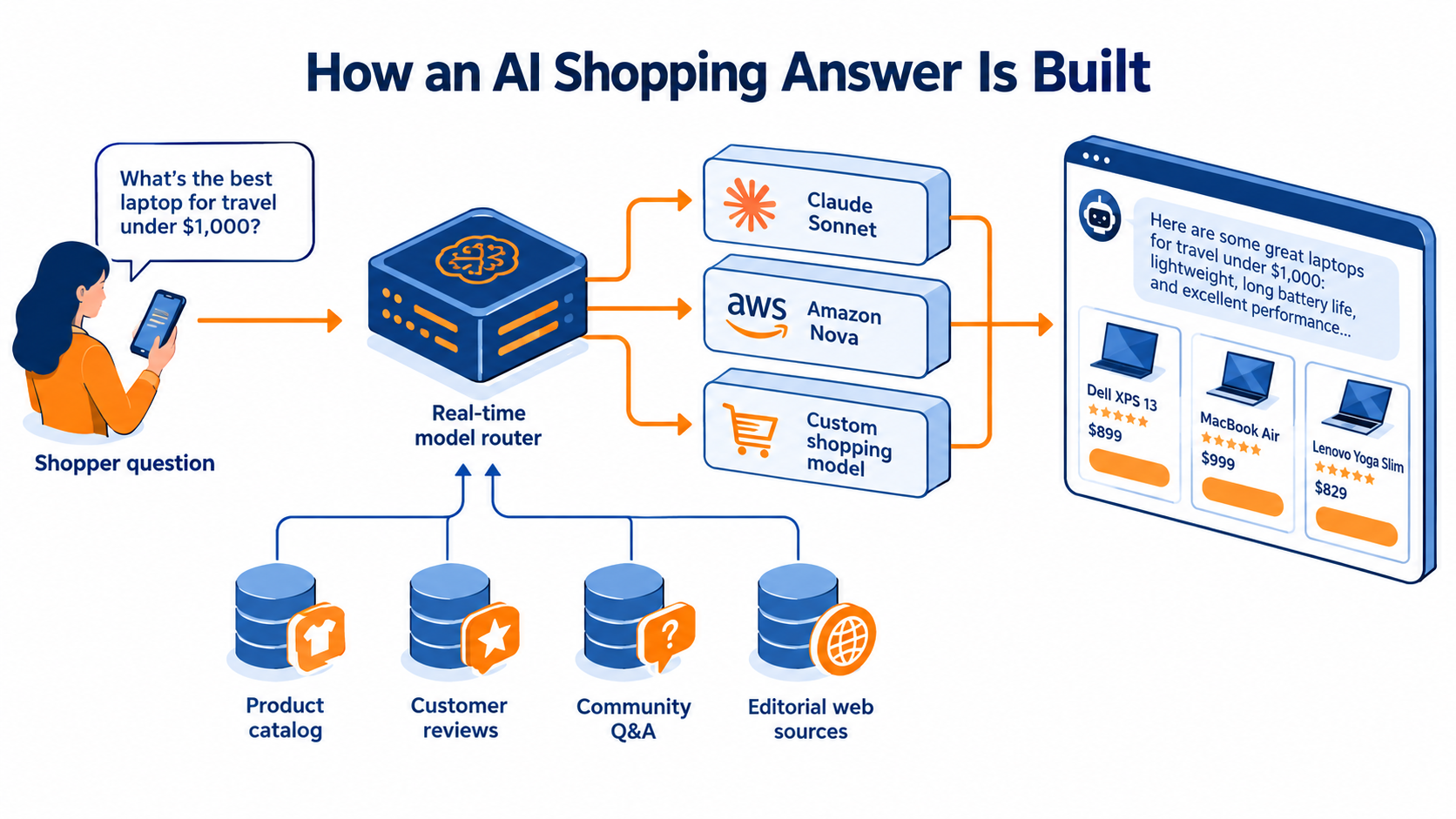
Amazon’s more recent update explains that the assistant is built on Amazon Bedrock and uses “a real-time router” to choose among several models, including Anthropic’s Claude Sonnet, Amazon Nova, and a custom model built on Amazon’s store knowledge. Different query types get sent to different models depending on what the question needs.
For sellers, the implication is that there isn’t one fixed “algorithm” to game. A broad research question (“what should I look for in a stand mixer?”) and a narrow product question (“does this mixer fit under a 16-inch cabinet?”) may be handled by different models drawing on different evidence.
Retrieval-augmented generation is the key mechanism
The most important technical concept here is retrieval-augmented generation, or RAG. Chilimbi explains it plainly: “before generating a response, the LLM first selects information that may be helpful in answering the shopper’s questions.”
He lists the sources the system treats as reliable: “customer reviews, the product catalogue, and community questions and answers, along with calling relevant Stores APIs.” He also notes that the relevance of each source differs depending on the question.
Put simply, the assistant doesn’t just rank your listing. It reads pieces of it, along with your reviews and Q&A, and then writes an answer. If the information needed to answer a shopper’s question isn’t present in those sources, the assistant can’t cite it, and your product is less likely to be the one it recommends.
Feedback loops shape future answers
Amazon also uses reinforcement learning from customer feedback. Shoppers can like or dislike answers, and “over time, Rufus learns from customer feedback and improves its responses.” That creates a compounding effect. Products that lead to satisfying answers and good outcomes help reinforce answer patterns that include them.
The practical takeaway
Traditional Amazon SEO asks: “Does my listing contain the keyword?” Assistant-era selling asks a different question: “Does my listing, review base, and Q&A contain a clear, retrievable answer to the questions shoppers actually ask about this product type?” Those are not the same thing, and the second one is harder.
COSMO and the Commonsense Layer: Why Context Beats Keywords
One of the most useful pieces of public research for Amazon sellers is a 2024 Amazon Science paper on a system called COSMO, presented at the ACM SIGMOD conference. It explains how Amazon teaches its systems to connect products to the human situations where they’re used.
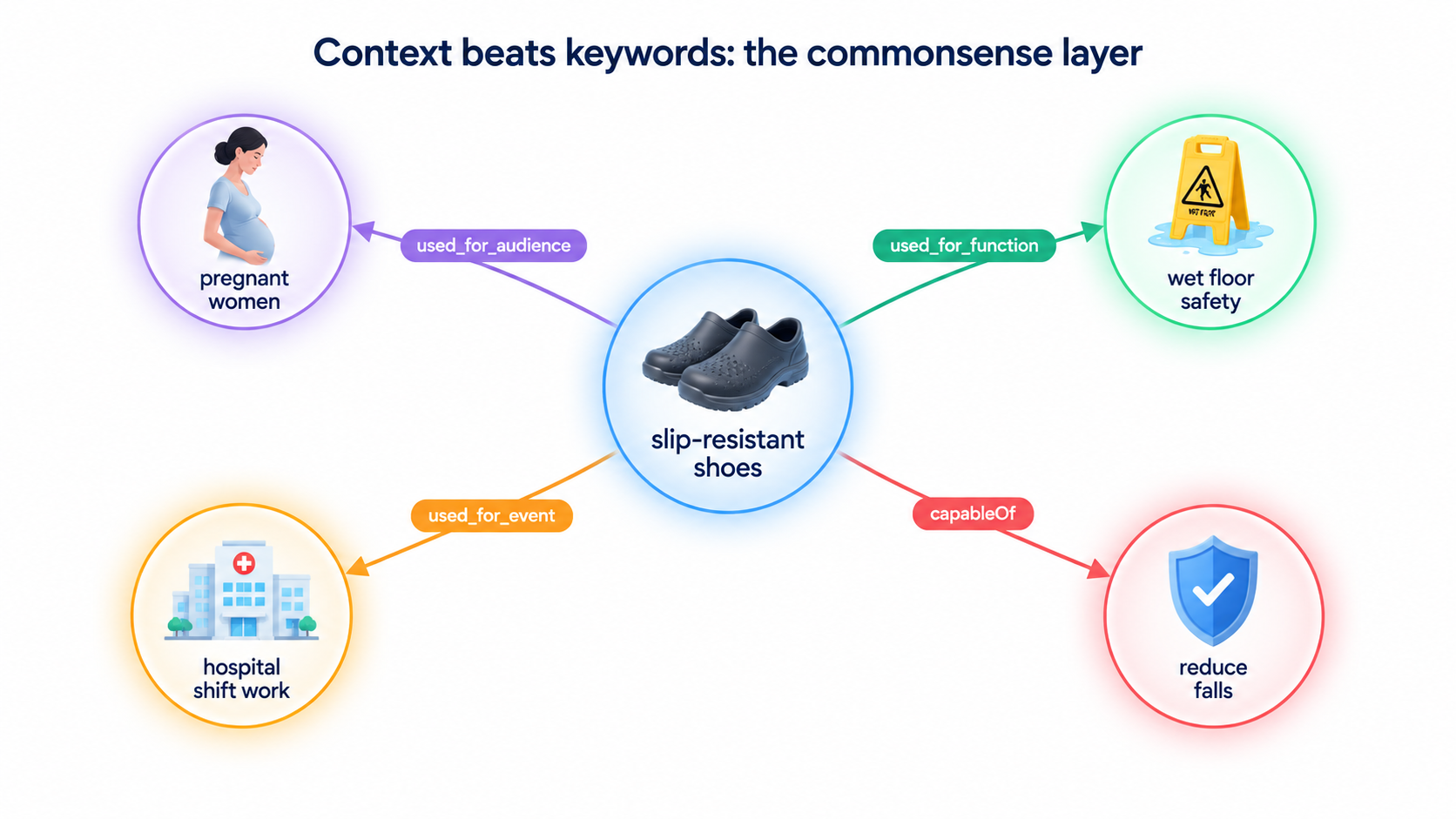
The “shoes for pregnant women” problem
The researchers describe a simple example. If a customer searches for “shoes for pregnant women,” the system should be able to infer that pregnant women may want slip-resistant shoes. Nothing in that query mentions slip resistance. A pure keyword match would miss the connection entirely.
COSMO addresses this by building a knowledge graph that links products to “the human contexts in which they play a role — their functions, their audiences, the locations in which they’re used, and the like.” In the example, a used_for_audience relationship links slip-resistant shoes to pregnant women.
How COSMO builds its graph
According to the paper, the process starts with two kinds of behavioral data:
- Query-purchase pairs: what shoppers searched for, matched with what they bought within a set window.
- Co-purchase pairs: products bought together in the same session.
A large language model then generates hypotheses about why those pairs exist, using four broad relationship types: usedFor, capableOf, isA, and cause. Those are refined into more specific relationships such as used_for_function, used_for_event, and used_for_audience. Human reviewers and filtering models remove weak or empty explanations, like “customers bought them together because they like them.”
The performance gains were large
On Amazon’s Shopping Queries dataset, a model enhanced with COSMO relationships achieved a 60% increase in macro F1 score over the best baseline when encoders were fixed. When models were fine-tuned, the COSMO-based model still held a 28% edge in macro F1 and a 22% edge in micro F1.
In plain terms: adding context about function, audience, and occasion made product matching much more accurate. That’s a strong reason to believe this type of reasoning is now part of how Amazon connects shoppers to products, especially in conversational settings where questions are full of context.
What COSMO means for your listing
Look at your listing through the lens of those relationship types. For each product, can a machine clearly extract:
- Function: What problem does it solve? (“Keeps coffee hot for 12 hours”)
- Audience: Who is it for? (“Designed for nurses on 12-hour shifts”)
- Event or occasion: When is it used? (“Camping, road trips, tailgates”)
- Capability: What can it do that others can’t? (“Fits standard car cup holders”)
- Category identity: What is it, specifically? (“Insulated stainless steel travel mug, 20 oz”)
Many listings are packed with features but thin on context. “Double-wall vacuum insulation, BPA-free, leak-proof lid” tells the system what the product is made of. It doesn’t say who it’s for or when to use it. A shopper asking the assistant “what’s a good gift for a nurse who works night shifts?” needs that context to be visible somewhere.
Behavior still feeds the graph
Remember that COSMO’s raw material is behavior: queries and purchases. Your listing copy can suggest context, but shopper behavior confirms it. If you claim your product is “perfect for nurses” but nurses don’t buy it, the graph won’t strongly connect the two. Context claims work best when they reflect who actually buys your product, which is why review analysis (covered below) is so useful.
Rewriting Listings for Questions, Not Queries
Keyword-era listings were written to match short search strings. Assistant-era listings need to answer full questions. That shift changes how you write titles, bullets, descriptions, and backend attributes.
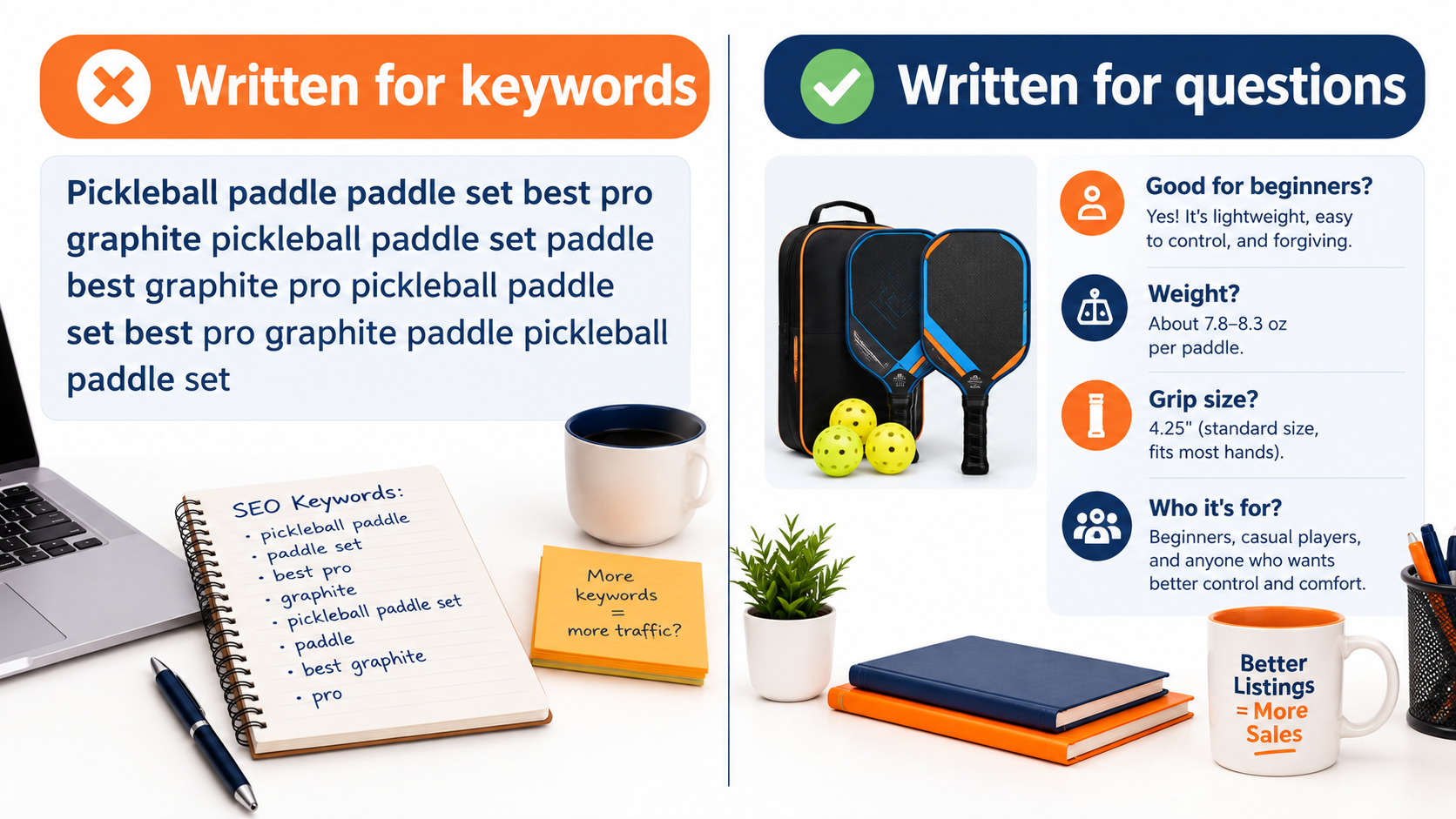
Start with the questions shoppers actually ask
Amazon’s own examples show what assistant questions look like: “Is this coffee maker easy to clean and maintain?” “Is this mascara a clean beauty product?” “What’s the material of the backpack?” “Is this pickleball paddle good for beginners?”
These are not keywords. They’re evaluation questions. Before rewriting anything, build a question bank for each product. Good sources include:
- Your own customer messages in Seller Central’s Buyer-Seller Messaging.
- The community Q&A section on your listing and on top competitors’ listings.
- Recurring themes in 3-star reviews, which often contain “I wish I’d known” details.
- Return reasons in your returns reports.
- Asking the assistant yourself, in your category, and noting the follow-up questions it suggests.
That last tactic is underused. The assistant often surfaces related questions in the chat window. Amazon has noted that shoppers click on those suggested questions to learn more. Those suggestions are a direct view into what the system thinks matters for your product type.
Make answers explicit and extractable
RAG systems pull short passages. A clear sentence is easier to retrieve than a vague one. Compare:
- Vague: “Premium build quality for all skill levels.”
- Extractable: “Weighs 7.8 oz with a widebody face and larger sweet spot, which makes it easier for beginners to make consistent contact.”
The second version answers “Is this good for beginners?” with a reason the assistant can repeat. It also contains concrete facts (weight, face shape) that match follow-up questions.
Structure bullets around decision criteria
A useful pattern is to give each bullet one decision criterion and lead with it:
- Who it’s for: audience and skill level.
- Main job: the core function, with a measurable result.
- Fit and compatibility: dimensions, sizes, what it works with.
- Care and maintenance: cleaning, durability, lifespan.
- What’s included and what isn’t: reduces confusion and returns.
This format reads well to humans and maps closely to the kinds of evaluation questions shoppers ask the assistant.
Don’t neglect structured attributes
Backend attributes and item specifics, such as material, dimensions, compatible devices, age range, and care instructions, are part of the catalog data the assistant draws on. When a shopper filters conversationally (“under 10 inches tall,” “machine washable”), structured data is often the cleanest evidence. Missing attributes are a quiet but serious gap. Audit every field available in your category’s template, not just the required ones.
Say what your product isn’t
Clear limitations help the assistant match you to the right shopper and keep you out of the wrong conversations. “Not recommended for outdoor courts” or “Fits laptops up to 14 inches” can reduce returns and negative reviews, which in turn protects how the assistant summarizes your product later.
Keep it readable
None of this means writing for robots. The assistant is trained to give helpful answers to humans, and Amazon’s feedback loop rewards answers shoppers find useful. Clear, specific, honest copy serves both audiences. Keyword stuffing serves neither.
Reviews and Q&A Are Now Listing Copy You Don’t Fully Control
Amazon has been explicit that the assistant answers product questions “based on the helpful information found in product listing details, customer reviews, and community Q&As.” That puts your reviews on equal footing with your bullet points as a source of answers.
The “What do customers say?” layer
Amazon notes that shoppers can tap “What do customers say?” in the assistant to get a quick overview of reviews. It also runs AI-generated review highlights on product pages, summarizing common themes across “dozens, hundreds, or even thousands of reviews.” For apparel, Fit Review Highlights give size guidance based on review data.
This means the summary of your reviews may be the first thing a shopper sees, before your images, before your bullets. If a recurring complaint appears in enough reviews, it’s likely to show up in that summary.
Theme analysis beats star-rating obsession
Sellers often focus on the star average. In an assistant-driven environment, the themes in reviews matter at least as much. A 4.4-star product whose reviews repeatedly mention “lid leaks after a few weeks” will have that theme surfaced. A 4.2-star product with no consistent negative theme may be described more favorably.
Run a regular review theme audit:
- Pull your last 100–200 reviews.
- Tag each with the product attributes mentioned (fit, durability, cleaning, packaging, instructions, etc.).
- Separate positive and negative mentions for each attribute.
- Identify the top three negative themes and the top three positive themes.
The negative themes are your product and operations priority list. The positive themes are context you should make sure appears clearly in your listing copy, so the assistant finds consistent evidence across both sources.
Fix the product, not just the copy
If a theme reflects a real defect, no amount of listing copy will fix it. The assistant draws from many reviews, and it’s designed to reflect what customers say. The most reliable way to change how your product is summarized is to change the experience that generates the reviews: improve the component, clarify the instructions, adjust the sizing chart, or improve the packaging.
Q&A as a source of answers
Community Q&A has long been treated as a low-priority section. That’s a mistake now. Every answered question is a retrievable answer the assistant can use. Unanswered questions, or questions answered incorrectly by other shoppers, are gaps.
Practical steps:
- Monitor new questions on your listings and respond accurately as the seller.
- Look for questions answered inconsistently or wrongly by customers and add a clear seller answer.
- When the same question appears repeatedly, move the answer into your bullets or description too.
Stay inside the rules
Because reviews matter more, the temptation to manipulate them grows. Don’t. Amazon’s policies on review manipulation and incentivized reviews still apply, and violations can lead to listing removal or account action. The legitimate tools, such as the Request a Review button and Amazon’s Vine program where eligible, are the safe route. Durable assistant visibility comes from real customer experience, not engineered review counts.
Off-Amazon Signals: The Editorial Sources the Assistant Reads
One detail in Amazon’s technical description gets less attention than it should. The assistant “uses Retrieval-Augmented Generation (RAG) to glean insights and recommendations from popular sources like The New York Times, USA Today, Good Housekeeping, and Vogue when answering questions about products and trends.”
Why this changes the brand-building calculus
For years, many Amazon sellers treated off-Amazon marketing as optional, useful mainly for driving external traffic and ranking signals. Now, credible editorial coverage can feed directly into how the assistant answers category questions like “what are the best air fryers for small kitchens?” or “what are denim trends for women?”
Amazon’s AI Shopping Guides, which bring together shopping guidance and product recommendations across more than 100 product types, follow a similar logic. Category-level guidance draws on expert knowledge about what matters in a product type.
Two ways editorial content helps
Direct mentions. If your product is reviewed or recommended by a credible publication, that coverage may become part of the evidence the assistant considers when recommending products in your category.
Category framing. Even without being named, editorial content shapes what the assistant considers important in a category. If expert guides say the most important factor in a hiking backpack is torso-length adjustability, the assistant may emphasize that in its answers. Your listing should address the criteria experts emphasize, explicitly.
Practical steps for smaller brands
Not every seller can get coverage in national outlets. But there are realistic steps:
- Read the guides in your category. Identify the buying criteria that major publications and specialist sites use. Make sure your listing clearly addresses each one.
- Pitch product samples to reviewers who cover your niche, especially for products with a clear, testable advantage.
- Build a credible brand presence off Amazon, such as a brand site with detailed product information, so your product facts are consistent wherever they appear.
- Keep claims consistent. If your listing says 12-hour battery life and a review site measured 9, that discrepancy can hurt credibility in AI-generated comparisons.
Don’t overestimate it either
Amazon names a handful of sources, and we don’t know how much weight editorial content carries compared with on-Amazon data for any given question. Catalog data, reviews, and Q&A remain the core evidence for product-specific questions. Editorial signals are likely most influential for broad research and trend questions. Treat them as one input, not a replacement for listing quality.
Account Memory and Personalization: The End of One Ranking for Everyone
Search results on Amazon have always had some personalization. The assistant takes that much further. Amazon says it “now has account memory, understanding customers based on their individual shopping activity,” and uses “insights from each customer’s individual Amazon shopping activity” to provide “tailored answers and personalized product suggestions.”
What account memory changes
Amazon’s examples include knowing whether someone is “an avid trail runner, a budding artist, a fashionista, or a documentary film buff.” The assistant can also reference past orders. Shoppers already ask questions like “When was the last time I ordered sunscreen?”
The result is that two shoppers asking the same question may get different recommendations. A shopper with a history of buying premium kitchen equipment may be shown a different stand mixer than a shopper who buys mostly budget items. There’s no longer a single “page one” for a given query in conversational shopping.
Why your rank tracker can’t see this
Keyword rank trackers check a query from a neutral or simulated account. They can tell you where you appear in standard search results. They cannot tell you how often the assistant recommends your product to the many personalized shoppers asking related questions. That’s a measurement gap every seller now has.
Positioning becomes more important
When recommendations are personalized, clear positioning helps the assistant match you to the right shoppers. A product trying to appeal to everyone (“perfect for beginners and professionals, home and commercial use”) gives the system weak signals. A product with a clear audience and use case gives the system a confident match for shoppers whose history fits that profile.
Ask yourself: if the assistant knew everything about a shopper’s past purchases, what profile of shopper should it confidently send to your product? Write your listing so that profile is obvious.
Repeat purchases and replenishment
Order-history awareness has a particular effect on consumable and replenishable products. If a shopper asks about reordering something they’ve bought before, the assistant has their history to work with. For sellers of consumables, this makes the first purchase experience even more important. Getting into a customer’s order history, and delivering a good experience, may make you the default when they come back to reorder through the assistant.
Help Me Decide and narrowing choices
Amazon has also introduced a feature called Help Me Decide, which it describes as pairing shoppers with the right product “with the tap of a button.” Features like this compress the decision into fewer options. The pattern across Amazon’s AI tools is consistent: fewer products shown, more weight on fit with the individual shopper. Being the clear best match for a specific shopper profile is more valuable than being a decent match for everyone.
Measuring What You Can’t Fully See: Diagnostics for Assistant Visibility
Amazon doesn’t currently give sellers a dedicated report showing how often the assistant recommends their products. That makes measurement imperfect. But imperfect measurement is better than none, and there are practical ways to build a picture.
Manual assistant audits
The simplest method is also the most revealing: ask the assistant yourself. Build a set of 20–30 questions for each core product, covering:
- Broad research questions: “What should I look for in a [product type]?”
- Use-case questions: “What’s the best [product type] for [audience/occasion]?”
- Comparison questions: “What’s the difference between [your type] and [alternative type]?”
- Product-page questions: Ask specific questions while on your own detail page and your competitors’ pages.
Record whether your product is mentioned, what the assistant says about it, and which competitors appear. Repeat monthly. Because results are personalized, use more than one account if possible, and treat results as directional rather than exact.
Check what the assistant says on your own page
On your detail page, ask the questions shoppers ask most. Is the answer accurate? Does it cite a negative review theme? Does it say “information not available” for something you know is true? Every inaccurate or missing answer points to a specific gap in your listing, reviews, or Q&A.
Watch for unexplained conversion changes
In Business Reports, compare sessions and unit session percentage over time. If conversion rate moves without a matching change in keyword rank, price, or ad spend, assistant-driven traffic may be part of the explanation. This isn’t proof, but it’s a useful flag for further investigation.
Use Brand Analytics where available
Brand-registered sellers can use Amazon Brand Analytics reports, such as Search Query Performance, to see how shoppers search and where your brand captures impressions, clicks, and purchases. Watch for growth in longer, more conversational search terms in your category. Those query patterns often mirror the questions shoppers ask the assistant.
Track review theme shifts
Since review themes feed directly into AI summaries, track them as a key metric. If you fix a product issue, watch whether the negative theme declines in new reviews over the following weeks. Then re-check the “What do customers say?” summary to see whether it has updated.
Build a simple scorecard
For each hero product, a monthly scorecard might include:
- Percentage of audit questions where your product is mentioned.
- Number of inaccurate or “unknown” answers on your own detail page.
- Top three negative review themes and their trend.
- Count of unanswered or incorrectly answered Q&A entries.
- Attribute completeness: filled fields versus available fields in the category template.
- Conversion rate and sessions, compared with the previous period.
None of these is a perfect measure of assistant visibility. Together, they give you a working dashboard in a channel that otherwise stays out of view.
A 30-Day Assistant Readiness Plan
Knowing how the system works is useful only if it changes what you do. Here’s a practical four-week plan for a seller with a small-to-mid catalog. Start with your top five products by revenue, then expand.
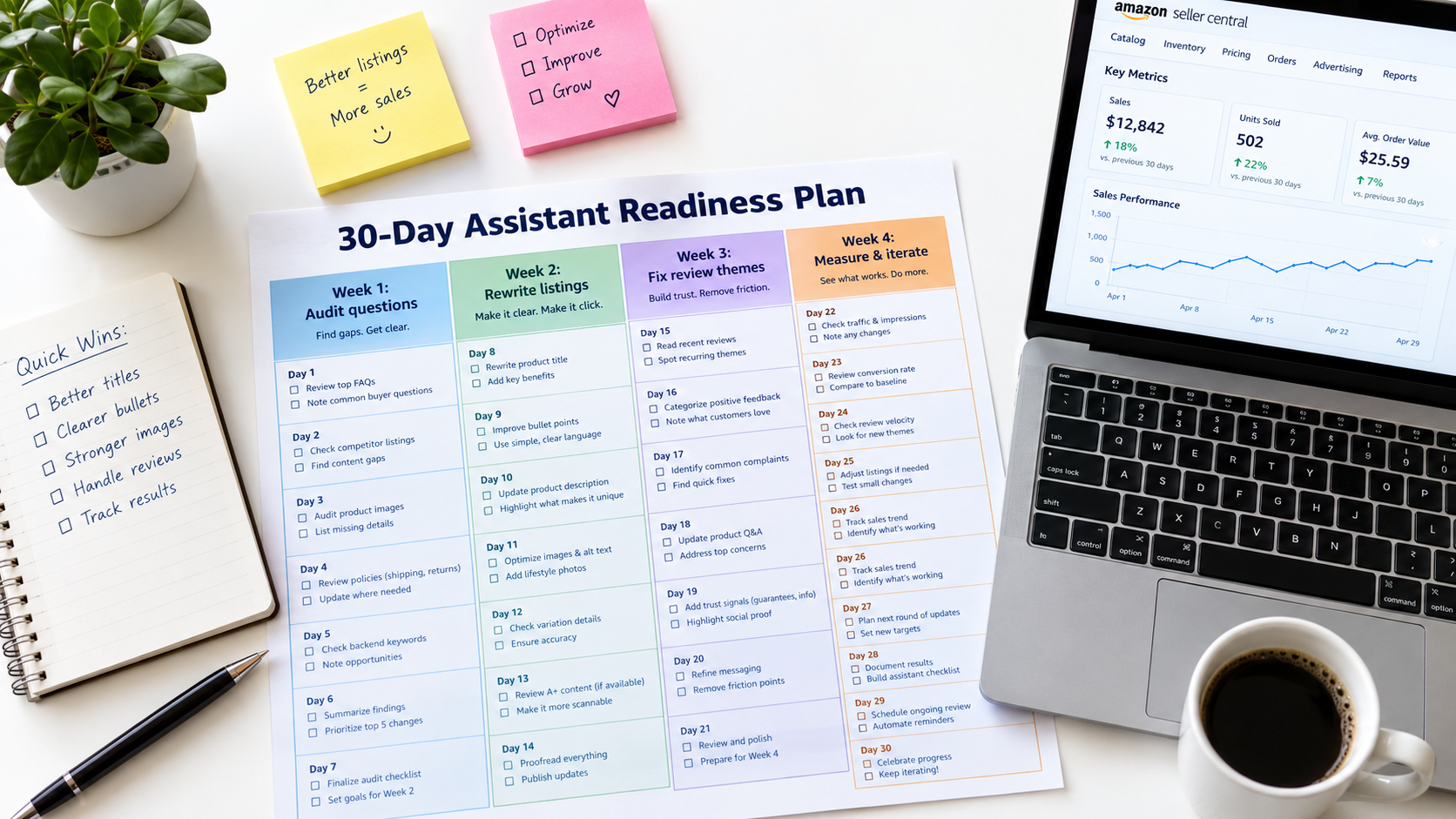
Week 1: Audit the questions
- Build a question bank for each product from buyer messages, Q&A, 3-star reviews, and return reasons.
- Run a baseline assistant audit: 20–30 questions per product, recording mentions and answer accuracy.
- Ask the assistant your top 10 questions on your own detail page. Note every wrong, vague, or missing answer.
- Note the suggested follow-up questions the assistant surfaces in your category.
Week 2: Rewrite for extractable answers
- Restructure bullets around decision criteria: audience, main job, fit and compatibility, care, and what’s included.
- Add context for function, audience, occasion, and capability, reflecting who actually buys the product.
- Replace vague claims with specific, measurable statements.
- Fill every available attribute field in your category template.
- Add clear limitations where relevant.
Week 3: Work on reviews and Q&A
- Complete a review theme audit on your last 100–200 reviews.
- Assign each top negative theme to an owner: product change, instruction change, packaging change, or listing clarification.
- Answer all open Q&A as the seller, and correct inaccurate customer answers.
- Move frequently asked answers into your listing copy.
- Use compliant review requests only.
Week 4: Off-Amazon alignment and re-measurement
- Read three to five editorial buying guides in your category and confirm your listing addresses each key criterion.
- Check that product facts on your brand site and any third-party coverage match your listing.
- Re-run your assistant audit and compare against the Week 1 baseline.
- Set up your monthly scorecard and calendar the next audit.
What to expect
Some changes, such as Q&A answers and listing edits, can be reflected relatively quickly. Others, such as review theme shifts, take weeks or months because they depend on new customer reviews. The behavioral signals that feed systems like COSMO also build over time. Treat this as an ongoing operating rhythm, not a one-time project.
Common mistakes to avoid
- Stuffing listings with conversational phrases. Writing “Is this good for beginners? Yes!” in every bullet reads poorly and doesn’t add real information.
- Claiming audiences you don’t serve. Context claims should match actual buyer behavior.
- Ignoring the product. If reviews show a real flaw, fixing the copy won’t fix the summary.
- Treating one audit as truth. Personalization means results vary. Look for patterns over multiple checks.
Conclusion: Selling to the Shopper Behind the Assistant
The renaming of Rufus to Alexa for Shopping on May 13, 2026 marks a clear point in Amazon’s evolution. Conversational, AI-assisted shopping is now a core part of how hundreds of millions of customers find products. More than 250 million people used the assistant over the past year, interactions grew 210%, and shoppers who engage with it are significantly more likely to buy.
The mechanics matter. The assistant retrieves evidence from your catalog data, reviews, community Q&A, and selected editorial sources, then writes an answer. Research like COSMO shows Amazon has invested heavily in connecting products to the functions, audiences, and occasions where they’re used. Account memory means recommendations differ from shopper to shopper.
None of this makes traditional Amazon fundamentals obsolete. Price, availability, fulfillment speed, images, and advertising still matter. What’s changed is that a growing share of high-intent shoppers now reach your product through a layer that reads, summarizes, and judges your listing before they do.
Key takeaways
- Write for questions, not just keywords. Build a question bank and make sure your listing answers each question clearly and specifically.
- Add context. State function, audience, occasion, and capability explicitly, based on who really buys your product.
- Treat reviews as listing copy. Audit review themes regularly and fix the real issues behind negative ones.
- Own your Q&A. Every accurate seller answer is evidence the assistant can retrieve.
- Complete every attribute. Structured data supports conversational filtering.
- Align off-Amazon facts. Address the criteria experts emphasize and keep claims consistent everywhere.
- Measure what you can. Monthly assistant audits and a simple scorecard are better than flying blind.
The sellers who do well in this phase won’t be the ones who find a trick to fool the assistant. They’ll be the ones whose products, listings, and customer experiences give it clear, accurate, consistent evidence to recommend them. That has always been good selling. Now the assistant can check.