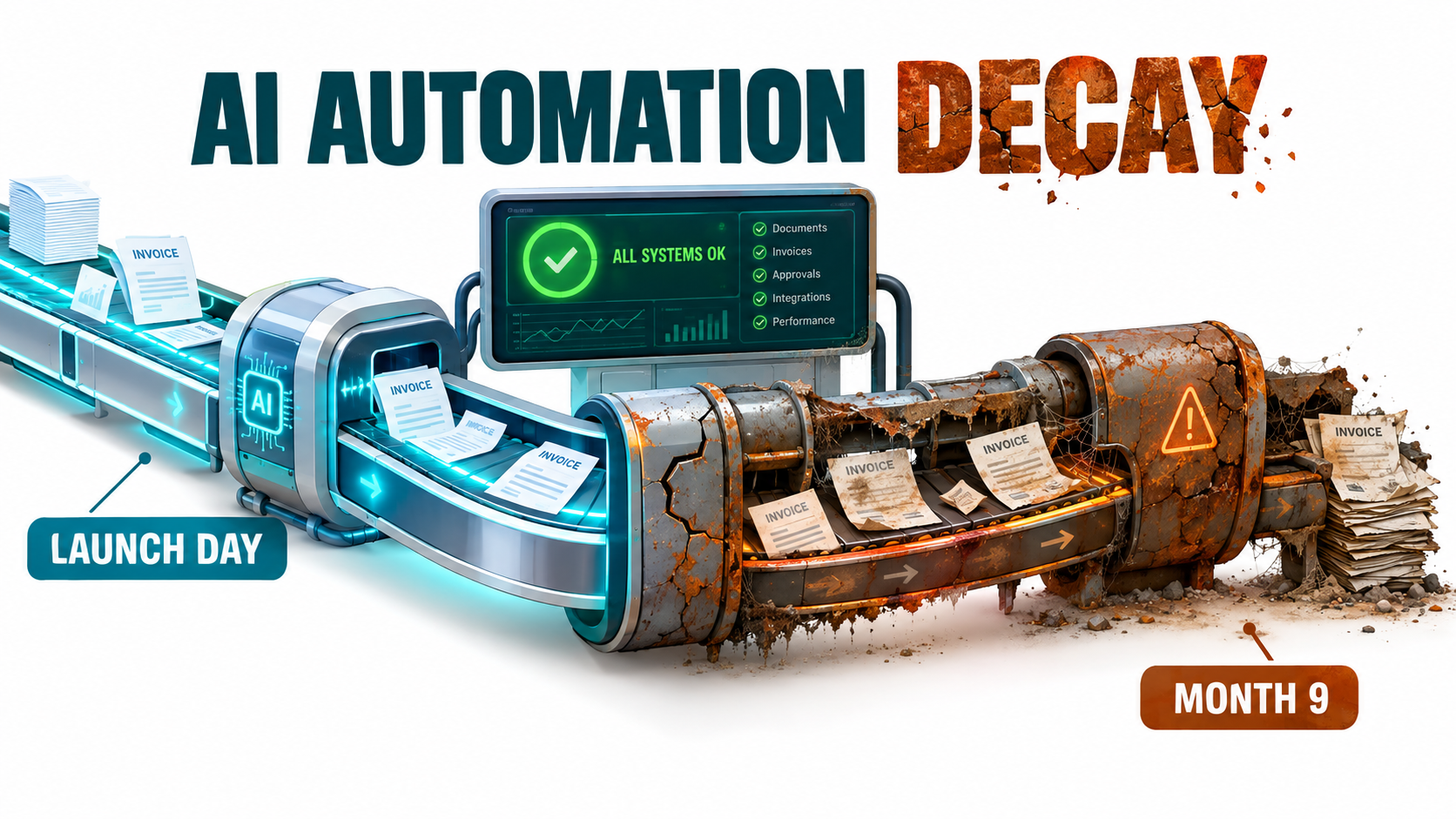

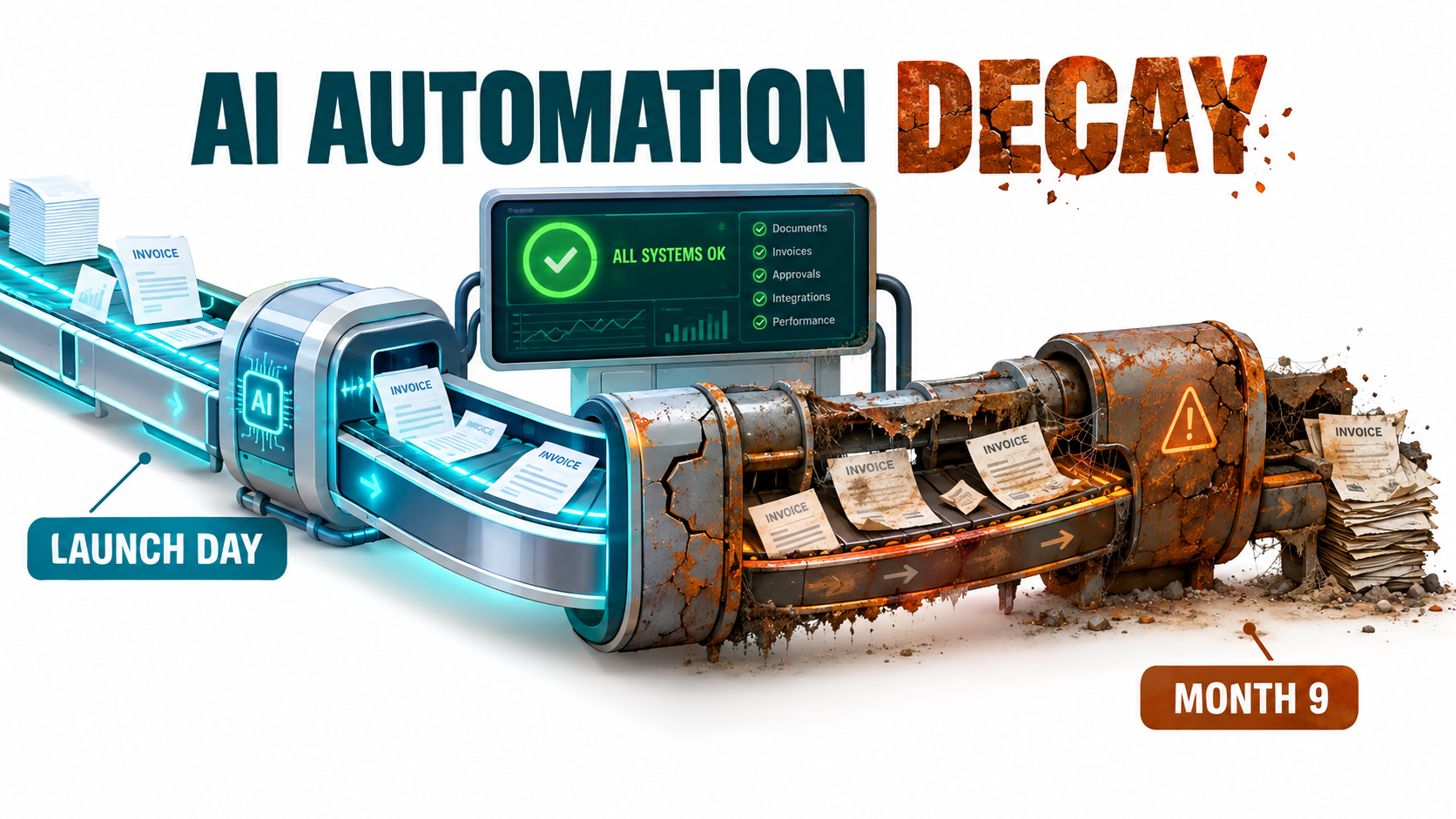
Most conversations about AI automation for business stop at the moment of launch. The demo works. The pilot hits its numbers. Someone posts a screenshot in Slack showing an inbox that sorts itself, invoices that key themselves into the accounting system, or a support bot answering tickets at 2 a.m.
Then everyone moves on to the next project. That is where the real story starts.
AI automations don’t stay the way you built them. The model underneath gets updated or retired. The CRM vendor renames a field. Your refund policy changes, but nobody tells the prompt. A sales manager starts feeding the summarizer a document type it was never tested on. None of these events throw an error. The automation keeps running and keeps producing confident output. It just gets slowly, quietly worse.
This is automation decay, and it is one of the least discussed costs of putting AI into business operations. It doesn’t show up in vendor pitches or pilot business cases. It shows up nine months later, as a customer complaint, a reconciliation mismatch, or a finance team that has quietly stopped trusting the numbers.
Adoption is moving fast enough that this matters now. Anthropic’s September 2025 Economic Index report found that 40% of US employees say they use AI at work, up from 20% in 2023. The same report found that “directive” conversations, where users hand a complete task to the model instead of working through it with the model, rose from 27% to 39% of sampled Claude.ai usage. More delegation means more automated output that nobody reads line by line.
This article isn’t about picking your first use case or proving ROI on a pilot. It covers what happens after: why AI automations decay, the specific ways they break, how to tell whether yours are healthy, and how to budget and design for upkeep so the savings you counted at launch are still there in year two.
Launch Day Is the Cheapest Day: Why AI Automation Ages Differently
Traditional business software ages, but it ages predictably. A rules-based workflow that moves a row from a form into a spreadsheet will do exactly the same thing on day 500 that it did on day one, unless something it depends on changes. When it breaks, it usually breaks loudly: a failed API call, a missing column, an error email.
AI-based automation is different in three ways that matter for anyone running operations.
1. The core component is probabilistic
A large language model or classifier doesn’t follow a fixed code path. It produces the most likely output given its inputs. That means small changes in the inputs, such as a new email template from a supplier or a different phrasing customers start using, can shift the output in ways no one predicted. The system is “working” in the technical sense while producing different answers than it did last quarter.
2. The core component is rented, not owned
Most businesses don’t run their own models. They call a model through an API or use it inside a SaaS tool. Providers regularly release new model versions and retire older ones on published deprecation schedules. Each change can alter tone, formatting, length, refusal behavior, and accuracy on your specific task, even when the new model is better on average.
3. The surrounding system is bigger than the AI
This is the point most business cases miss. In 2015, a team of Google engineers led by D. Sculley published a paper at NeurIPS titled Hidden Technical Debt in Machine Learning Systems. Their central argument: it is “dangerous to think of these quick wins as coming for free.” Using the software engineering idea of technical debt, they found it is “common to incur massive ongoing maintenance costs in real-world ML systems.”
The paper’s best-known diagram shows the actual machine learning code as a small box surrounded by far larger blocks: data collection, data verification, configuration, feature extraction, serving infrastructure, and monitoring. The authors listed specific risk factors, including boundary erosion, entanglement, hidden feedback loops, undeclared consumers, data dependencies, configuration issues, and “changes in the external world.”
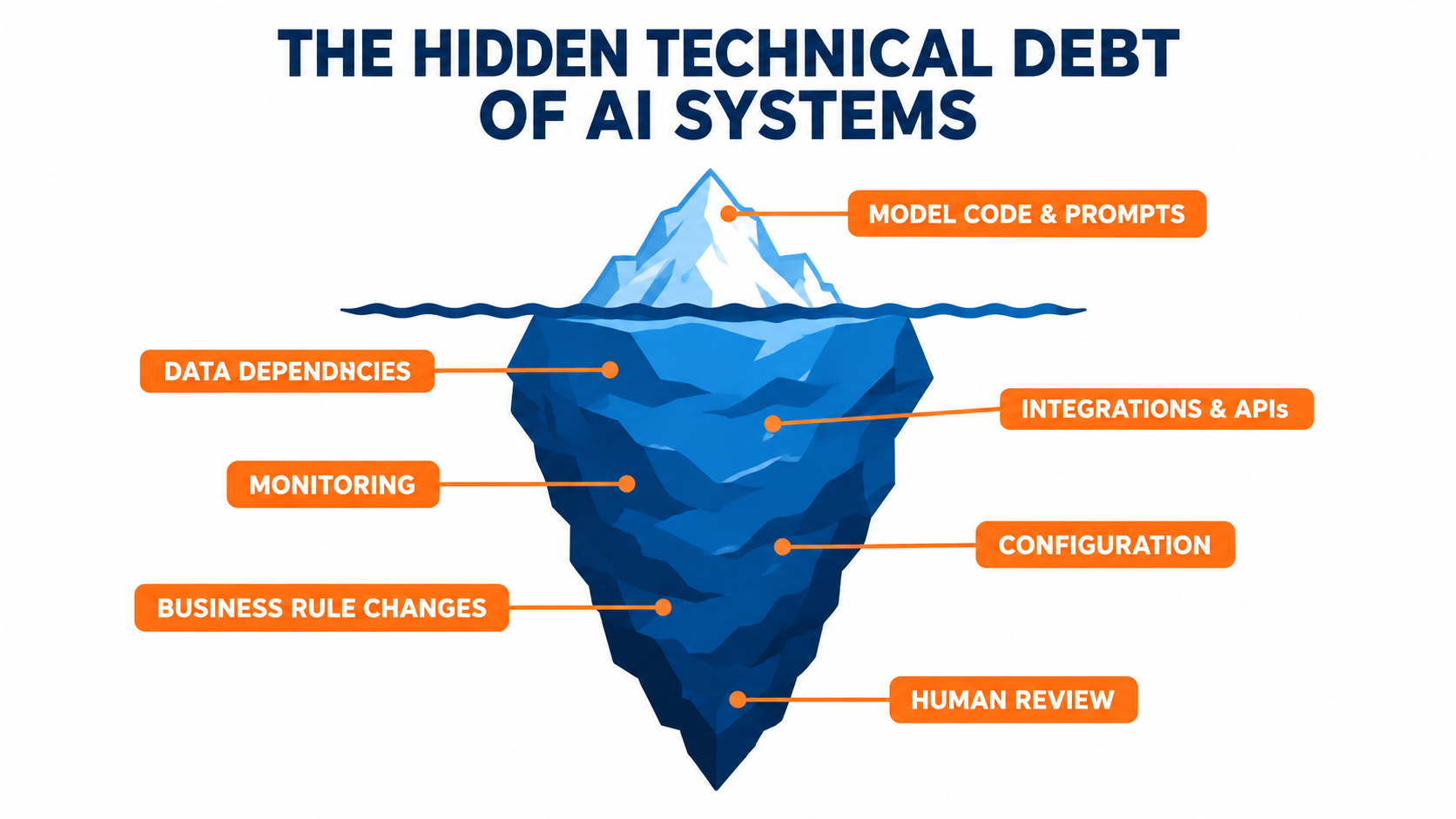
That paper was written before generative AI reached the mainstream, but every one of those risk factors applies to the LLM-powered automations businesses are building now. The prompt and model call are the tip of the iceberg. The connectors, data sources, business rules, review steps, and downstream systems are the mass under the water, and that mass is where most upkeep happens.
What this means in practice
- Build cost is front-loaded and visible. It appears on a project plan with a start and end date.
- Upkeep cost is spread out and invisible. It shows up as ten minutes here, an afternoon there, spread across people who were never assigned the work.
- Decay compounds. A small accuracy drop in step one of a chained workflow becomes a larger error by step four.
If your business case for an automation only counts build cost and run cost (API fees, licenses), it is missing the line item that grows over time.
The Five Decay Vectors: How AI Automations Actually Break
“Decay” is too vague to manage. In practice, AI automations degrade through five distinct channels. Each has different warning signs and different fixes, so it helps to name them separately.
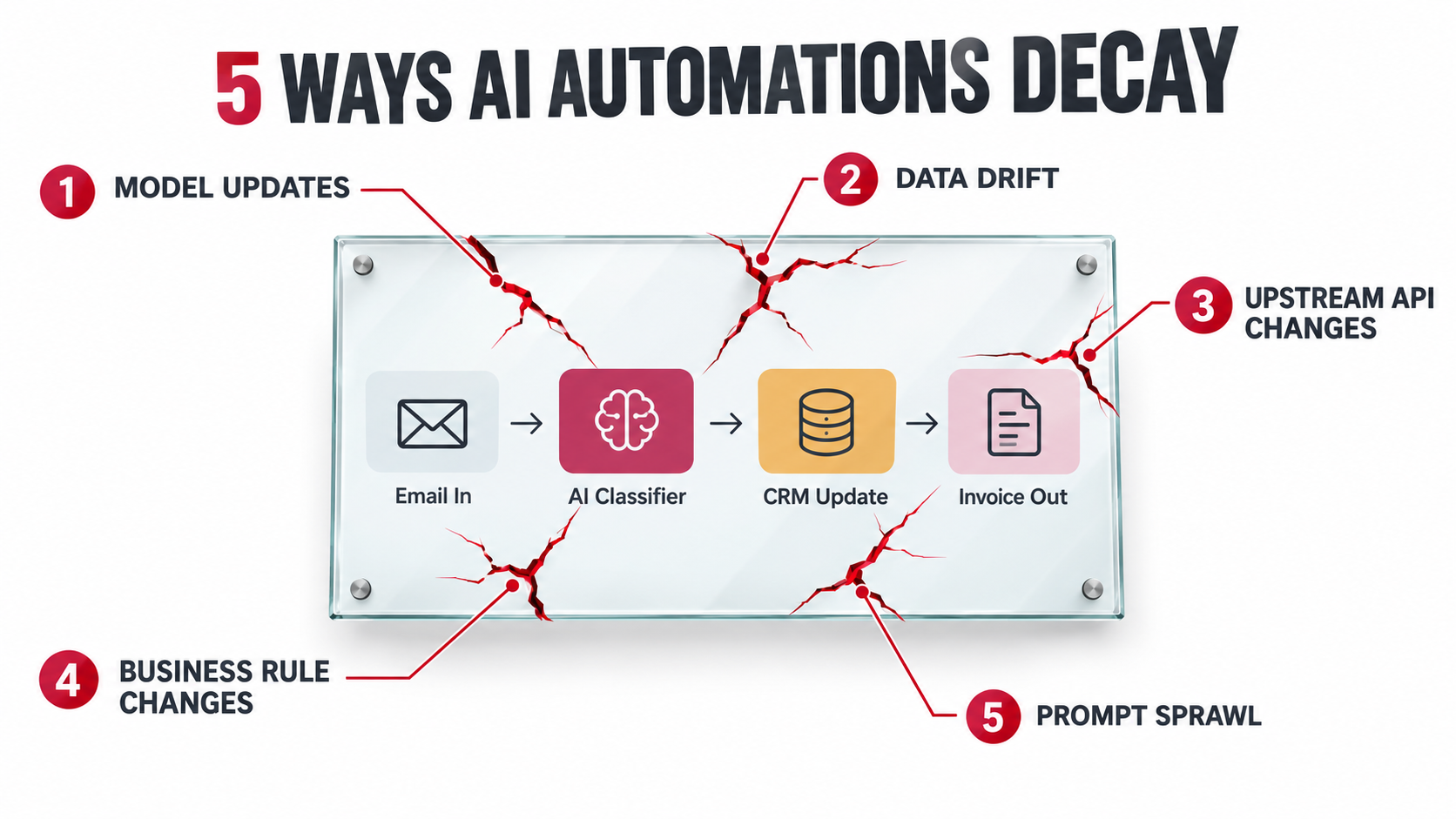
Vector 1: Model updates and retirements
When a provider moves you to a new model version, whether because you chose to upgrade, because an alias like “latest” now points somewhere new, or because the old version was retired, the behavior of your automation changes. Common symptoms include:
- Output that is longer or shorter than before, breaking a downstream character limit or parser.
- Changed formatting, such as different JSON key ordering, added markdown, or extra commentary around structured output.
- Shifts in classification thresholds, where tickets that used to land in “billing” now land in “general.”
- Different refusal behavior on edge-case content.
A newer model can be better on public benchmarks and still worse on your narrow task. The only way to know is to test it on your own data before you switch.
Vector 2: Data drift
Data drift is the oldest problem in machine learning. In the textbook definition, concept drift happens when the statistical properties of what a model is trying to predict change over time in ways nobody planned for, so predictions become less accurate as time passes.
Software engineering literature also breaks data drift into three useful types:
- Infrastructure drift: changes in the software environment, such as a cloud platform update, that invalidate configuration.
- Structural drift: the data schema changes, for example when a form adds a field or a CSV export reorders columns.
- Semantic drift: the structure stays the same, but the meaning changes. A “status” field that used to mean “shipped” now means “label printed.”
For a business, data drift looks like this: your lead-scoring automation was tuned on last year’s inbound leads, but you launched a new product line and the leads look different. Or your invoice extractor was tested on twelve supplier formats, and you’ve since added thirty new suppliers.
Vector 3: Upstream tool and API changes
Most business automations stitch together several SaaS tools: email, CRM, helpdesk, accounting, spreadsheets, and the AI model. Each of those vendors ships updates on its own schedule. A renamed field, a new authentication requirement, a changed rate limit, or a deprecated endpoint can break or partially break your workflow.
The partial breaks are the dangerous ones. A connector that silently drops one field, rather than failing outright, can run for months before anyone notices that a column in the CRM has been empty since spring.
Vector 4: Business rule changes
Every AI automation encodes business knowledge somewhere: in the prompt, in a retrieval knowledge base, in routing logic, or in examples. When the business changes, those encoded rules go stale.
Pricing changes. Return windows change. A product gets discontinued. A new compliance requirement means certain phrases can’t appear in customer communications. The team that changed the policy updates the website and the internal wiki. Almost nobody remembers that a prompt written eight months ago also contains the old policy.
Vector 5: Prompt sprawl
The final vector is self-inflicted. When an automation produces a bad output, the fastest fix is to add a line to the prompt: “Never mention X.” “Always format dates as Y.” “If the customer is from Z, do W.”
Each patch is reasonable on its own. After a year, the prompt is three pages of accumulated exceptions, some of which contradict each other. Nobody remembers why half the lines are there, and everyone is afraid to remove any of them. This is the AI equivalent of spaghetti code, and it makes every future change slower and riskier.
Which vector matters most?
It’s tempting to assume model drift is the main threat, because it gets the most attention. The evidence suggests otherwise. A 2026 industry survey by Radixweb, cited in Wikipedia’s entry on concept drift, attributed only 6.5% of reported AI failure incidents to technical model drift. That suggests the bulk of failures come from the other vectors: integrations, data pipelines, process changes, and ownership gaps. The unglamorous plumbing is where most automations actually fail.
Silent Failure: Why Broken AI Automations Don’t Throw Errors
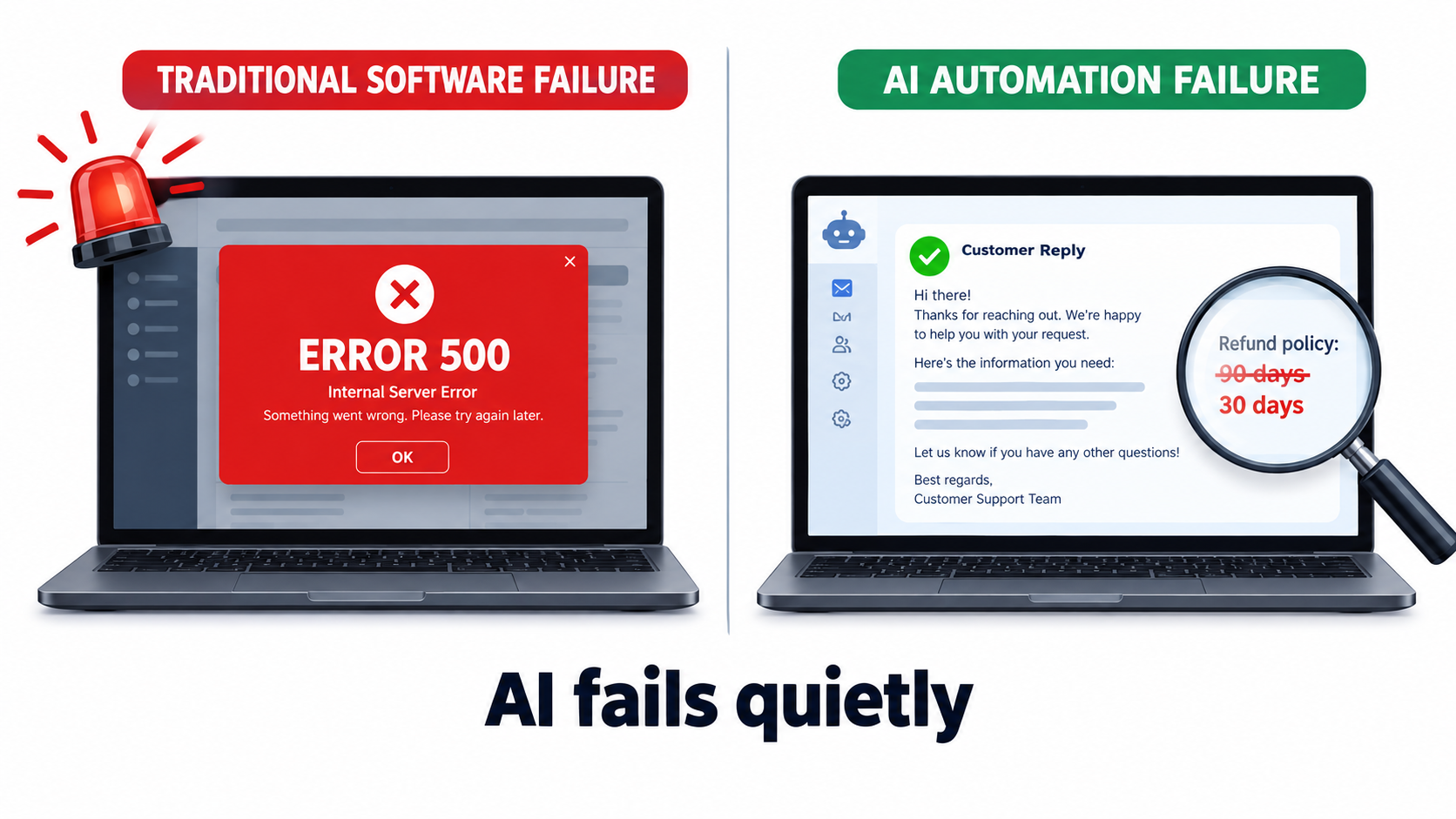
The most expensive feature of AI automation decay is that it is quiet. Traditional software tends to fail loudly. AI systems tend to fail fluently.
Fluent and wrong
When a language model doesn’t know something, or works from outdated context, it usually doesn’t say so. It writes a polished, plausible answer. A customer-facing bot quoting last year’s refund window sounds just as confident as one quoting the current policy. A summarizer that misses the one important clause in a contract still produces a tidy summary.
From a monitoring point of view, this is the worst kind of failure. Uptime is 100%. Latency is normal. The API returns a 200 status code. Every technical health metric is green, while the business output is wrong.
The data failure modes
Data engineering literature names several ways drifted data damages a system without raising alarms:
- Data corrosion: drifted data passes into the system undetected and gets processed as if it were valid.
- Data loss: valid data gets ignored because it doesn’t match the expected schema.
- Squandering: new data fields are added upstream but never make it to the downstream systems that should use them.
All three are common in AI automations that connect several business tools. Corrosion is a misread invoice total posted to the ledger. Loss is the support ticket that was never routed because it arrived in a new format. Squandering is the “customer tier” field your CRM added last quarter that your AI routing logic has never seen.
A real-world example: Air Canada’s chatbot
The best-known public case of a fluent, wrong automation involved Air Canada. In 2024, British Columbia’s Civil Resolution Tribunal ruled on Moffatt v. Air Canada. The airline’s website chatbot had told a customer he could apply for a bereavement fare discount retroactively. The airline’s actual policy said otherwise.
Air Canada argued, in effect, that the chatbot was responsible for its own statements. The tribunal rejected that argument, held the airline responsible for information on its own website, including the chatbot, and ordered it to pay the customer the difference plus fees and interest.
The dollar amount was small. The lesson wasn’t. Your business is accountable for what your automation says, whether or not anyone reviewed it, and whether or not the underlying policy information was current.
Why humans stop catching errors
Most automations launch with a human reviewing outputs. Over time, that review fades. The automation was right 50 times in a row, so the reviewer starts skimming. Then approving in batches. Then not checking at all.
This is a known pattern in automation research, often called automation complacency or the out-of-the-loop performance problem: the more reliable a system appears, the less closely people watch it, and the worse they get at spotting the rare failure. Human review that isn’t structured and measured tends to decay faster than the automation itself.
Usage Creep: When Your Automation Does Jobs You Never Tested
The fourth risk factor on the 2015 Sculley list, “undeclared consumers,” turns out to be one of the most relevant for business AI. It describes a situation where other systems or people start depending on a system’s output without anyone formally registering that dependency.
How usage creep happens
Consider a typical progression:
- Operations builds an automation that summarizes inbound customer emails for the support team.
- Sales notices the summaries and starts reading them to spot upsell opportunities.
- Someone in marketing exports the summaries weekly to track product sentiment.
- A manager starts using the sentiment trend in a board presentation.
The automation was tested for one job: helping support agents triage faster. It is now quietly feeding a board-level metric. Nobody validated whether the summaries capture sentiment accurately, and the operations team doesn’t know the board deck depends on their prompt. If they change the prompt to make summaries shorter for agents, they may break the sentiment trend without realizing it.
Delegation is rising
Usage creep is getting more likely because people are handing AI more of the work. The Anthropic Economic Index found directive, delegate-the-whole-task conversations rising from 27% to 39% over roughly eight months. The same report observed fewer debugging requests and more program creation in coding work, suggesting users increasingly accept a finished output in one exchange.
That is efficient, and also means fewer human checkpoints. When outputs are consumed whole rather than co-created, errors travel further before anyone notices them.
Scope changes that look small
Usage creep also happens within a single team. Common examples:
- An invoice extractor built for domestic suppliers starts receiving international invoices with different tax fields and currency formats.
- A contract summarizer built for NDAs gets used for master services agreements.
- A customer email drafter built for order-status questions starts getting used for complaint responses.
Each expansion feels like a natural extension. Each one moves the automation into territory it was never evaluated on.
How to manage it
- Write down the intended scope. One paragraph: what inputs the automation handles, what outputs it produces, who consumes them, and what it should not be used for.
- Keep a consumer register. A simple list of every team, report, or system that depends on the output. Ask about new consumers in quarterly reviews.
- Route out-of-scope inputs. Add a classification step that flags inputs the automation wasn’t built for and sends them to a human or a separate path, instead of processing them anyway.
- Re-test before expanding. Treat a scope change like a new launch, with a fresh test set for the new input type.
The Ownership Gap: Who Is Responsible for the Bot?
Ask a simple question inside most companies: “Who owns the AI automation that routes support tickets?” You’ll often get three different answers, or none.
Why ownership falls through the cracks
AI automations tend to be built in one of three ways, and each creates its own ownership gap:
- Built by IT or engineering for a business team. Engineering considers it delivered. The business team considers it an IT system. When the output gets worse, the business team files a ticket, and engineering asks for a specification of what “worse” means.
- Built by a business user on a no-code platform. The person who built it understands it. When they change roles or leave, the automation keeps running with nobody who knows how it works.
- Bought as a feature inside a SaaS tool. The vendor owns the model and the prompt. Your team owns the configuration and the knowledge base. Neither side owns the outcome.
What an owner actually does
Ownership doesn’t mean one person does all the maintenance. It means one named person is accountable for the automation’s output quality and knows who to call when something changes. A practical owner role covers:
- Reviewing quality metrics on a fixed schedule (weekly or monthly, depending on risk).
- Receiving notice of model updates, vendor changes, and policy changes that affect the automation.
- Approving changes to prompts, knowledge bases, and routing logic.
- Keeping the scope document and consumer register current.
- Making the call to pause or retire the automation if quality drops below an agreed level.
Business owner plus technical steward
For most mid-sized organizations, a two-role model works well. The business owner sits in the team that uses the output and is accountable for whether it is correct and useful. The technical steward sits in IT, operations, or a center of excellence and is accountable for whether it runs, integrates, and is version-controlled.
The business owner knows when the refund policy changes. The technical steward knows when the model version changes. Both need to be informed when either thing happens.
Connecting policy changes to automations
The simplest structural fix for business-rule decay is a dependency map. For each automation, list the policies, documents, and data sources it relies on. Then add a step to your policy change process: “Which automations reference this policy?”
It sounds bureaucratic. In practice it is a spreadsheet with a few dozen rows, and it prevents the most common, most embarrassing category of AI error: confidently stating a rule that changed months ago.
How to Measure Automation Health Without a Data Science Team
You can’t manage decay you can’t see. The good news is that useful health monitoring for business AI automation doesn’t require a machine learning team. It requires a small amount of discipline and a few simple tools.
Build a golden set
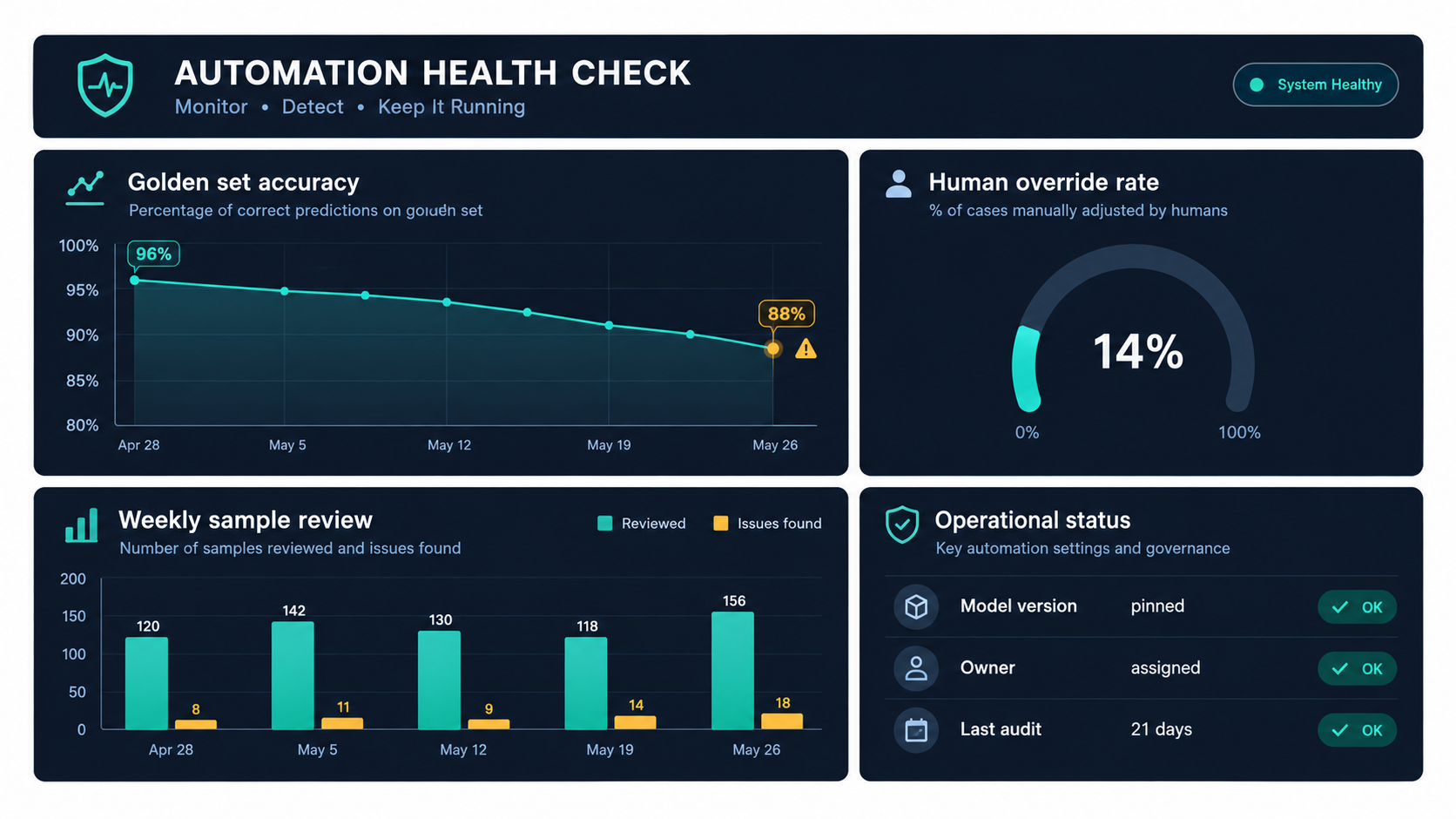
A golden set is a fixed collection of real inputs with known correct outputs. For an invoice extractor, it might be 50 invoices with verified totals, dates, and vendor names. For a ticket router, 100 tickets with the correct category. For a customer email drafter, 30 scenarios with notes on what a good reply must and must not include.
Run the golden set:
- Before launch, to set a baseline.
- Before any model version change.
- Before any significant prompt or knowledge-base change.
- On a regular schedule (monthly is a reasonable default) to catch drift from upstream changes.
If the score drops, you know something changed before your customers do. Keep the golden set fresh by adding new real-world examples every quarter, especially examples of failures you’ve caught.
Sample live output on a schedule
Golden sets catch regressions on known cases. They don’t catch new input types. For that, pull a random sample of live outputs every week and have someone who knows the domain review them against a simple checklist. Twenty items a week is often enough to spot a trend.
The key word is random. Reviewing only the outputs someone complained about gives you a biased picture.
Track proxy metrics that signal trouble
Some metrics can be collected automatically and act as early warnings:
- Human override rate: how often a person edits or rejects the automation’s output. A rising rate is one of the clearest signs of decay.
- Escalation rate: for customer-facing automations, how often conversations get handed to a human.
- Output length and format distribution: sudden shifts often follow a model update.
- “Other” or “unknown” category volume: for classifiers, a growing catch-all bucket usually means new input types are arriving.
- Downstream exceptions: reconciliation mismatches, bounced records, and manual corrections in the systems that receive the automation’s output.
- Cost per transaction: rising token usage can indicate prompt sprawl or retry loops.
Use structured checks wherever possible
Not everything needs human review. Where outputs are structured, validate them in code: Does the extracted invoice total equal the sum of the line items? Is the date in the future? Does the category exist in your taxonomy? Does the email draft mention a product that’s discontinued?
Anthropic’s guidance on building agentic systems recommends adding programmatic checks, which it calls “gates,” on intermediate steps of chained workflows to make sure the process is still on track. These cheap, deterministic checks catch a large share of errors before they reach a person or a customer.
Set thresholds before you need them
Decide in advance what score triggers action. For example: if golden-set accuracy drops more than five points, freeze changes and investigate. If the override rate doubles in a month, review the last ten overrides. Deciding thresholds in a calm moment beats arguing about them during an incident.
Budgeting for Upkeep: A Practical Cost Model
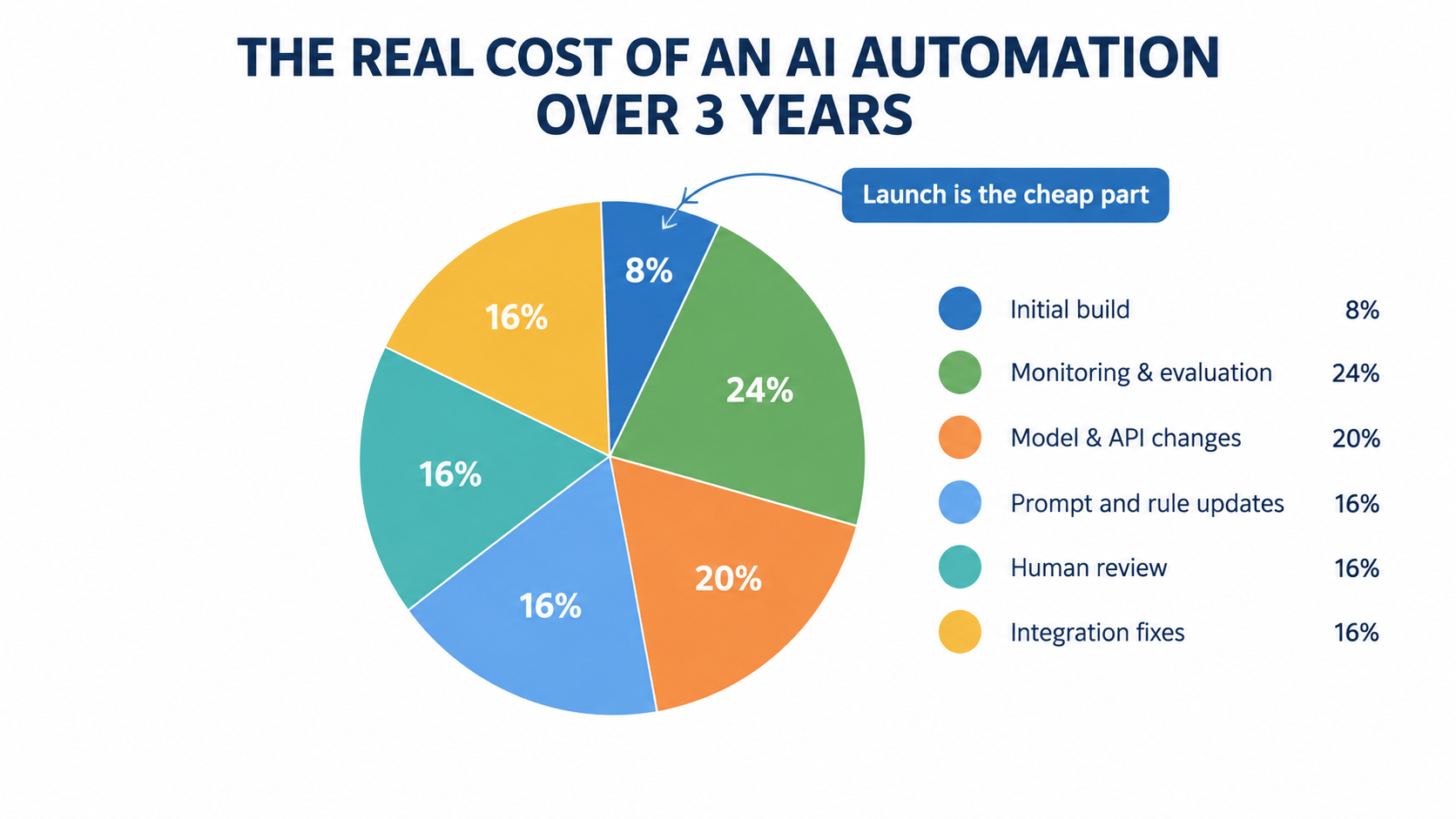
Most AI automation business cases have two cost lines: build and run. The missing third line is upkeep, and it is the one that grows.
The three cost layers
- Build: design, development, testing, and rollout. One-time and visible.
- Run: model API fees, platform licenses, hosting. Recurring and usually tracked.
- Upkeep: monitoring, evaluation, model migration, prompt and knowledge-base updates, integration repairs, human review, and incident response. Recurring and usually untracked.
There’s no universal ratio between these layers, and anyone who quotes you one without knowing your systems is guessing. What’s consistent, going back to the Sculley paper’s finding of “massive ongoing maintenance costs,” is that upkeep is substantial and ongoing, not a rounding error.
Estimating upkeep for your own automations
Instead of a generic percentage, build an estimate from the activities you’ll actually need to do. For each automation, ask:
- Monitoring time: How many hours per month will the weekly sample review and golden-set runs take?
- Change frequency: How often do the underlying policies, products, or data sources change? Monthly? Quarterly? Each change needs a prompt or knowledge-base update and a re-test.
- Integration count: How many external tools does it connect? Each one is a source of breaking changes.
- Model migrations: How often does your provider retire versions? Each migration needs a test cycle.
- Human review load: What percentage of outputs need human eyes, and how long does each review take?
- Incident cost: If it fails silently for a month, what does cleanup cost?
Multiply the hours by loaded labor rates and you have a realistic upkeep figure. Add it to run costs. Then recalculate the payback period.
Why this changes which automations you build
Upkeep-aware budgeting tends to shift priorities in useful ways:
- Automations in stable domains (internal document classification, data entry from consistent forms) look better, because they change rarely.
- Automations in fast-changing domains (pricing communications, promotional content, regulatory responses) look worse, unless the knowledge they depend on is centralized and easy to update.
- Automations with many integrations look worse than their build cost suggests.
- Customer-facing automations carry higher incident costs, which justifies more review.
None of this means you shouldn’t automate fast-changing or customer-facing work. It means you should go in knowing the upkeep load and staff for it.
Make upkeep a named budget line
The most practical step is organizational: give upkeep a line in the budget and hours in someone’s role. Upkeep work that isn’t budgeted gets done as unpaid overtime by whoever notices the problem, or it doesn’t get done at all.
Designing Automations That Are Cheap to Maintain
The cheapest upkeep is the upkeep you design out at the start. Several design choices make a large difference to long-term maintenance load.
Start with the simplest thing that works
Anthropic’s widely cited guide to building effective agents recommends “finding the simplest solution possible, and only increasing complexity when needed,” noting that this “might mean not building agentic systems at all.” The guide observes that for many applications, a single well-crafted model call with retrieval and in-context examples is usually enough.
Every extra step, tool, or autonomous decision point is another thing that can drift. A workflow with three predictable steps is far easier to maintain than an agent that chooses its own path through ten tools.
Prefer workflows over agents for well-defined tasks
The same guide draws a useful line between workflows, where models and tools follow predefined code paths, and agents, where the model dynamically directs its own process and tool use. Workflows offer predictability and consistency for well-defined tasks. Agents suit problems that need flexibility and model-driven decision-making.
Most routine business automation, such as invoice processing, ticket routing, and report generation, is well defined. Building it as a workflow makes testing easier, makes failures easier to locate, and makes behavior after a model update easier to predict.
Be careful with frameworks that hide the prompts
The Anthropic guide also warns that agent frameworks “often create extra layers of abstraction that can obscure the underlying prompts and responses, making them harder to debug,” and that incorrect assumptions about what’s under the hood are a common source of customer error. When something drifts a year later, the person debugging it needs to see exactly what was sent to the model and what came back.
Separate knowledge from instructions
Don’t hard-code business facts into prompts. Keep policies, prices, product details, and rules in a single source, such as a knowledge base, a database table, or a document the automation retrieves at run time. Then the prompt says “Answer according to the current returns policy” and the policy lives somewhere the policy owner already updates.
This one change prevents most business-rule decay. When the policy changes, the automation changes with it.
Pin versions and change deliberately
- Pin model versions instead of using floating “latest” aliases in production, so upgrades happen when you choose, after testing.
- Version-control prompts like code, with a change log explaining why each line exists. This is the best defense against prompt sprawl.
- Track provider deprecation schedules and put migration dates on the calendar well ahead of retirement.
Ask for structured output and validate it
Where downstream systems consume the output, ask the model for structured data (such as JSON with a defined schema) and validate it before passing it on. Schema validation turns many silent failures into loud ones, which is exactly what you want.
Design the human handoff on purpose
Decide which cases always go to a person (high value, low confidence, out of scope, sensitive topics) and build that routing explicitly. A well-designed handoff keeps human review focused where it matters, which makes it more likely to survive the complacency problem.
Knowing When to Retire an Automation
Businesses are good at launching automations and bad at turning them off. Over time, a portfolio accumulates zombie workflows: still running, still costing money, still occasionally producing output someone relies on, but no longer delivering what they were built for.
Signs an automation should be retired or rebuilt
- The override rate is high and steady. If people edit most outputs heavily, the automation may be adding a step rather than removing one.
- The prompt has become unmaintainable. When nobody can explain what half the instructions do, a clean rebuild is often cheaper than more patches.
- The process it supported has changed. The original business need may have moved, but the automation kept running.
- A native feature now does the job. SaaS vendors are adding AI features quickly. A custom automation built two years ago may duplicate something your CRM or helpdesk now does out of the box.
- No owner can be found. An automation with no accountable owner is a liability, regardless of how well it seems to work.
Set kill criteria at launch
The easiest time to decide when to turn something off is before you turn it on. Include in the launch documentation the conditions under which the automation will be paused or retired: a minimum accuracy on the golden set, a maximum override rate, a maximum incident count per quarter. When the criteria are met, the decision is already made.
Retire carefully
Because of usage creep, retiring an automation can break things you didn’t know depended on it. Before shutting one down:
- Check the consumer register and ask around for undeclared consumers.
- Announce the retirement date in advance.
- Run in “shadow off” mode where possible: stop acting on output but keep logging, to see who notices.
- Archive the prompt, configuration, golden set, and change log, so a future rebuild doesn’t start from zero.
Retirement is not failure
An automation that delivered value for 18 months and was then replaced by something better is a success. Treating retirement as a normal stage of the lifecycle makes teams more willing to clean up, which keeps the overall portfolio healthier and cheaper to run.
A 30-Day Automation Decay Audit
If your organization already has AI automations in production, here is a practical way to find out how much decay you are carrying. It is designed to fit into a month without a dedicated team.
Week 1: Inventory
- List every AI-powered automation in production, including AI features turned on inside SaaS tools and no-code workflows built by individual staff.
- For each one, record: what it does, which model and version it uses, what tools it connects, and when it launched.
- Identify a business owner and technical steward for each. Flag any with no clear owner.
Many organizations are surprised by the inventory step alone. Automations built by individuals on no-code platforms are often invisible to IT.
Week 2: Dependencies and scope
- For each automation, list the policies, documents, and data sources it depends on.
- Check whether any of those have changed since launch, and whether the automation was updated to match.
- Build a first consumer register: who uses the output, and for what?
- Compare current usage to the original intended scope. Flag scope creep.
Week 3: Quality check
- For the highest-risk automations (customer-facing, financial, or compliance-related), pull a random sample of 20 to 50 recent outputs and review them against current policy and known-correct answers.
- Where a golden set exists, re-run it and compare against the launch baseline.
- Where one doesn’t exist, start building it from the sample you just reviewed.
- Check override and escalation rates, if they’re being logged. If they aren’t, note that as a gap.
Week 4: Triage and plan
Sort each automation into one of four buckets:
- Healthy: owner assigned, quality at or near baseline, dependencies current. Set up a regular monitoring schedule.
- Needs maintenance: quality slipping or dependencies out of date. Schedule fixes and add monitoring.
- Needs rebuild: prompt sprawl, heavy overrides, or major scope creep. Plan a redesign using the maintainability principles above.
- Retire: no owner, no clear value, or replaced by a native feature. Follow the careful retirement steps.
Finish by adding an upkeep line to next quarter’s budget, based on what the audit revealed about actual maintenance needs.
Make it recurring
One audit is useful. A lighter version every quarter is what keeps decay under control. The second audit is always faster than the first, because the inventory, owners, and golden sets already exist.
Conclusion: Treat AI Automations Like Employees, Not Appliances
The most useful mental shift for AI automation for business is this: an automation is not an appliance you install and forget. It’s closer to a new team member. It needs clear scope, a manager, regular check-ins, updated information when the business changes, and a performance review. Sometimes it needs retraining. Occasionally it needs to be let go.
Businesses that treat automations as appliances get strong results for a few months, followed by a slow slide they don’t notice until a customer, an auditor, or a reconciliation report points it out. Businesses that treat them as managed team members keep their savings.
Key takeaways
- Launch is the cheap part. Research going back to Google’s 2015 Hidden Technical Debt paper shows that real-world ML systems commonly carry large ongoing maintenance costs. Generative AI automations inherit that problem.
- Know the five decay vectors: model updates, data drift, upstream API changes, business rule changes, and prompt sprawl. Model drift gets the headlines, but one 2026 survey attributed only 6.5% of AI failure incidents to it. The plumbing fails more often.
- Expect silent failure. AI automations break fluently, not loudly. Technical health metrics can stay green while business output goes wrong, and as Air Canada learned, you’re accountable for what your automation says.
- Watch for usage creep. Delegation to AI is rising fast. Document scope, keep a consumer register, and re-test before expanding.
- Name an owner. Every automation needs a business owner and a technical steward, plus a link between your policy change process and the automations that depend on those policies.
- Measure health simply: golden sets, random weekly sampling, override rates, and structured validation.
- Budget upkeep as its own line, estimated from real activities rather than a generic percentage.
- Design for maintenance: simple workflows over complex agents where the task is well defined, knowledge separated from instructions, pinned versions, version-controlled prompts.
- Retire deliberately, with kill criteria set at launch.
If you take one action this month, run the Week 1 inventory. Most organizations don’t know how many AI automations they have running, who owns them, or what they depend on. Once you can see the portfolio, decay becomes something you can manage instead of something that happens to you.