
The demos are always convincing. A natural-language command fires an agent inside Slack, which drafts a deal summary, opens a Jira ticket, updates a CRM record, and posts a standup digest — all without a human touching a keyboard. It works flawlessly in the demo environment. Then you ship it to production and, within two weeks, it has sent duplicate messages to a client channel, locked itself waiting for an approval that never came, and quietly filed seventeen identical tickets in your backlog.
This gap — between what Slack AI agents promise and what they actually deliver in uncontrolled, real-world conditions — is where most teams are spending their time in 2026. It is not a model problem. The underlying LLMs are capable enough. It is an architecture and design problem, and the organizations solving it are not necessarily the ones with the biggest AI budgets.
Only 11% of companies report using AI agents in production today, according to recent enterprise surveys, while separate analysis suggests as few as 5% of enterprise agent prototypes ever make it past the pilot phase. The bottleneck is not imagination or investment — it is reliability. This article is a practical engineering and design guide for building Slack-based workflow autopilots that hold up when things get messy: when tools time out, contexts are incomplete, steps partially succeed, and users behave in ways no one anticipated.
We will cover the current state of Slack’s agentic architecture, the specific failure modes that kill most workflows, and the design patterns — idempotency, blast-radius control, risk-calibrated human gates, durable state management, and observability — that separate production-grade autopilots from fragile demos.
What “Agentic Slack” Actually Means in 2026
Slack’s identity has shifted significantly over the past eighteen months. It began as a messaging platform with bolt-on integrations, evolved into a workflow automation layer, and has now positioned itself as what its own product teams call an “agent-first workspace.” Understanding what that actually means in technical terms matters before you can reason about reliability.
Slackbot as an Action-Taking Orchestrator
The most visible change is that Slackbot is no longer a chatbot that surfaces information. On Business+ and Enterprise+ plans, it can now take actions: creating channels, sending direct messages, inviting teammates, updating Slack Canvases, and invoking external tools via integrations. It functions as a conversational front end that can dispatch work rather than just describe it.
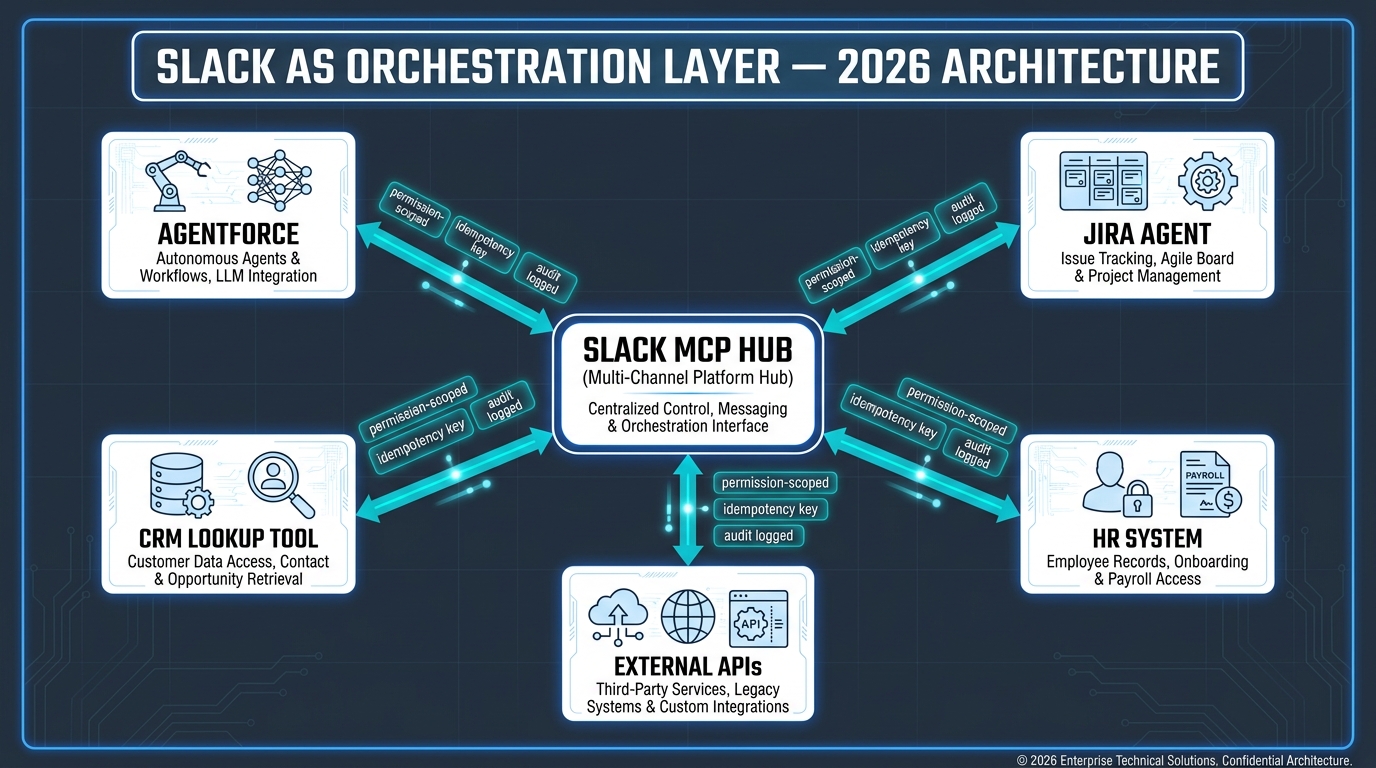
Underneath that surface change is a more significant architectural one. Slack now operates both an MCP Server and an MCP Client. As an MCP Server, Slack exposes workspace data and actions — message history, channel membership, canvas content, lists — as structured tools that any external AI agent can discover and invoke using permission-aware OAuth flows. As an MCP Client, Slackbot can route requests outward to specialized third-party agents and tool servers: a Jira agent, a Salesforce agent, an internal knowledge base agent, and so on.
The practical result is that Slack is no longer just a notification destination for your automations. It can function as the orchestration hub — the place where user intent is captured, decomposed, routed to the right tools, and where results are surfaced back to users in context. Slack reported a 25x increase in Real-time Search queries and MCP tool calls in 2026, which reflects how rapidly this architecture is being adopted by engineering teams.
Workflow Builder’s AI Generate Step
Alongside the agentic Slackbot layer, Slack’s Workflow Builder now includes an AI Generate step that can be inserted into any automated workflow. This step accepts a natural-language prompt and can summarize channel content, translate messages, draft responses, classify incoming requests, extract action items from threads, and transform data — all using Slack channels, canvases, lists, and files as context sources.
Crucially, you can now describe a workflow in plain language and Slack will draft the automation structure for you, which you then review and publish. This removes a significant portion of the no-code configuration overhead that previously made Workflow Builder slow to adopt for non-technical stakeholders. The August 2026 platform update also added Google Docs support in Workflow Builder, agent actions in group DMs, AI-assisted debugging, and new AI analytics metrics — all of which expand the surface area where agents can act and where things can go wrong.
The Two-Layer Model: Predictable vs. Contextual
A useful mental model for 2026 Slack automation distinguishes two layers. The first is predictable workflow automation: deterministic, rule-based processes built in Workflow Builder, triggered by specific events, and executing fixed steps. These handle the majority of repetitive internal tasks — form submissions, standup reminders, approval routing — and are highly reliable precisely because they are not trying to reason about ambiguous inputs.
The second layer is contextual agent automation: LLM-driven agents that interpret natural-language inputs, select tools dynamically, maintain state across multi-turn interactions, and take actions with real-world consequences. This layer handles the complex, judgment-intensive work that rule-based automation cannot. It is also where almost all reliability problems live. The rest of this article is focused on making the second layer production-worthy.
The Four Most Common Failure Modes — and Why They Happen
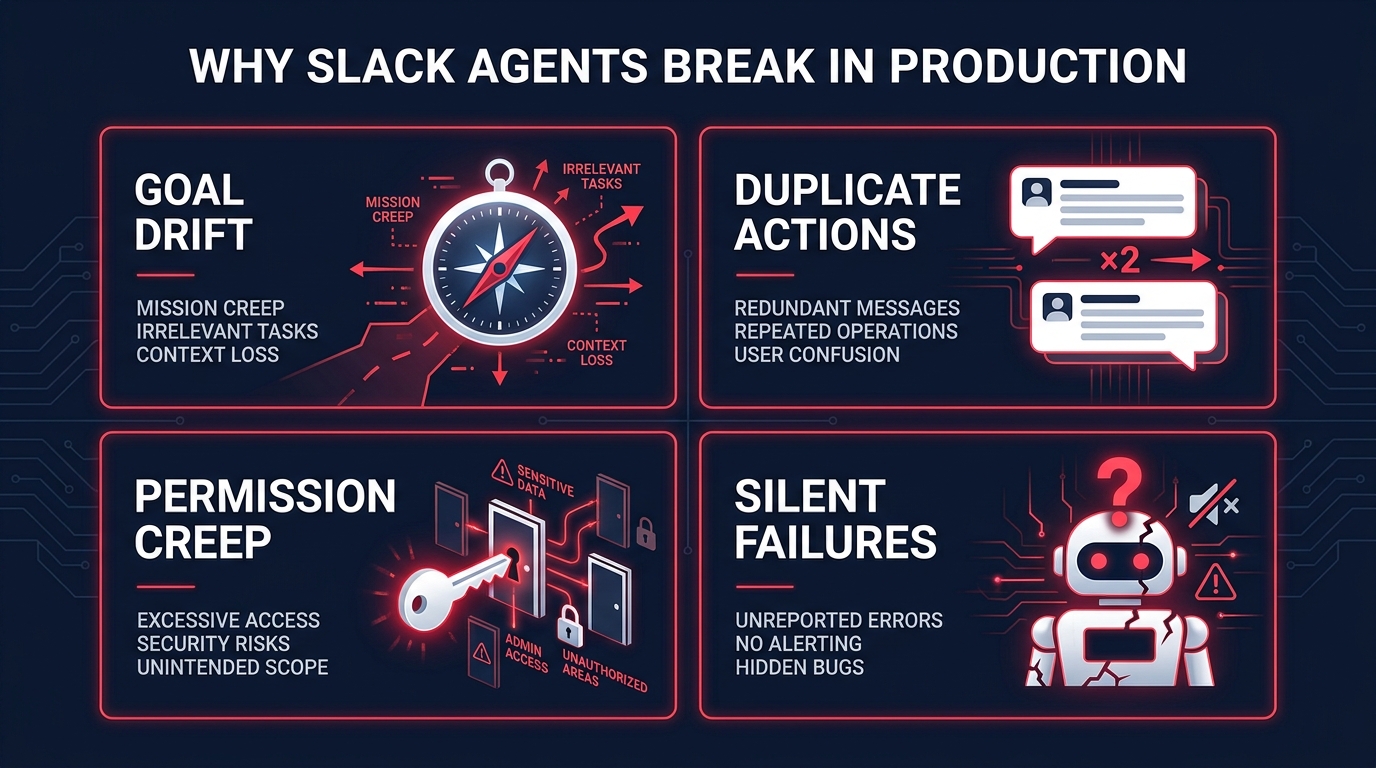
Teams that have run Slack agents through any meaningful production period consistently report the same failure categories. They are not random. Each one is structurally predictable, which means each one is preventable with deliberate design.
Goal Drift and Context Overload
Goal drift happens when an agent begins executing a task correctly and then gradually deviates from the original intent as the conversation context grows or the task requires reasoning across multiple steps. In multi-turn Slack workflows, this is particularly insidious because the agent is operating inside a noisy, high-volume communication environment. Threads are self-correcting — someone posts a plan, then revises it two messages later — and agents that treat thread history as a reliable input often act on superseded information.
The failure pattern looks like this: a user asks an agent to summarize a planning thread and draft a project brief. The thread contains a revised scope posted three hours after the initial discussion. The agent, processing the thread from top to bottom without sufficient weighting for recency or explicit correction signals, drafts a brief based on the original — wrong — scope. It produces a plausible, well-formatted document that nobody reads carefully enough to catch the error until it has been shared downstream.
Context overload is the architectural cousin of goal drift. When an agent is asked to maintain too many variables, reference too many channels, or handle too many tool calls in a single execution, it begins to compress or drop context. The failure is silent: the agent completes the task, returns a confident result, and no one knows anything was missed.
Duplicate Actions and Retry Explosions
This is the most operationally disruptive failure mode. When a Slack agent’s tool call partially succeeds — the message was posted, but the API response timed out before the agent received confirmation — the agent has no way of knowing whether the action completed. If the workflow retries without idempotency controls, it executes the step again. The result is duplicate Slack messages in a client channel, duplicate Jira tickets, duplicate Salesforce records, or duplicate approval requests landing in a manager’s inbox.
Retry explosions occur when failure handling logic is too aggressive. An agent configured to retry tool calls up to five times, across a multi-step workflow with six tool calls, can generate up to thirty API calls during a single failure event. If those calls are not idempotent and not rate-limited, the downstream systems receive a burst of conflicting writes that can corrupt data state entirely.
What makes this worse in Slack specifically is that the channel is visible. Unlike a failed database write that sits silently in a log, a duplicate Slack message is immediately seen by every member of the channel. The reputational cost of an agent behaving erratically in a client-facing channel can significantly undermine confidence in the entire AI program.
Permission Drift
Permission drift is the slow, almost invisible expansion of an agent’s access scope over time. It typically begins when a developer, frustrated by an access denied error during testing, grants the agent broader permissions than it actually needs for its intended function. This broadened scope sits dormant in the agent’s credential set. Over time, as the agent is adapted for new tasks or as new team members configure it for adjacent workflows, it begins accessing data and channels that were never part of its original operational remit.
In Slack’s environment, this is particularly consequential because channels often contain sensitive information — compensation discussions in an HR channel, ongoing deal negotiations in a sales channel, or security incident details in an engineering channel. An agent with accumulated excess permissions operating autonomously on behalf of a lower-privileged user can surface or act on information that user was never meant to access.
Slack’s own platform guidance is explicit on this point: agents should only be able to access what the invoking user can access, and permission sets should be reviewed regularly rather than set once at deployment. Most teams do the former and skip the latter.
Silent Failures and Missing Escalation Paths
The most dangerous failure is one that looks like success. Silent failures occur when an agent encounters a blocking condition — a tool returns an error, a required context field is empty, a downstream API is unavailable — and continues executing rather than stopping and escalating. The agent fills in missing information with plausible assumptions, completes the workflow, and reports back as if everything succeeded. The error surfaces later, when the consequences have already propagated downstream.
Silent failures in Slack-based agents are often the result of overly optimistic prompt design. If an agent is instructed to “always complete the workflow and provide a response,” it will interpret ambiguous or incomplete inputs charitably and proceed. The fix is designing explicit fallback paths: conditions under which the agent saves its current state, explains the blockage in plain language, and offers the user a clear choice between proceeding with assumptions stated explicitly, requesting the missing information, or handing off to a human.
The Architecture That Separates Reliable Autopilots from Fragile Bots
Production-grade Slack agents share a common architectural pattern, even when the specific tools and frameworks differ. That pattern has six components, and skipping any one of them is what most failed deployments have in common.
Narrow, Well-Defined Scope
The single most effective reliability intervention is scope restriction. Agents that try to do too much — handle any question, operate across every channel, invoke any available tool — are reliably less stable than agents with a tightly bounded operational domain. A Slack agent that handles only IT support ticket triage, routing incoming channel messages to the right queue based on classification, will outperform a general-purpose “do anything” assistant in both reliability and user trust.
Scope definition should be done in two dimensions: what the agent can act on (which channels, which data sources, which external systems) and what actions it is permitted to take (read-only versus write, internal-only versus client-facing, reversible versus irreversible). Both dimensions should be documented and enforced at the tool-call layer, not just in the system prompt.
Tool-Level Guardrails, Not Just Prompt Instructions
A common mistake is encoding behavioral constraints only in the system prompt — “never post to client channels without confirmation” — and assuming the model will reliably follow that instruction. In practice, sufficiently complex or long-running multi-turn interactions can cause the model to lose track of prompt-level constraints, especially if the user provides a seemingly reasonable override in natural language.
Reliable autopilots enforce constraints at the tool layer. If the agent should not post to a client channel without confirmation, the tool call that posts to Slack channels should check the target channel’s classification before executing and return a “requires confirmation” response rather than proceeding. The business logic lives in code, not in prose.
Durable State Across Execution Boundaries
Multi-step Slack workflows need durable state management: persisted checkpoints that allow the workflow to resume from the last successful step rather than restarting from scratch after any failure. Without this, a workflow that fails at step four of seven restarts from step one on retry, re-executing the first three steps and potentially duplicating all their side effects.
State persistence in Slack agent workflows should happen at natural step boundaries — after each tool call completes, after each approval gate clears, after each external API write confirms. The checkpoint should record the step ID, the inputs used, the output received, and a stable idempotency key. When the workflow restarts after a failure, it reads the checkpoint, skips already-completed steps, and resumes from the interruption point.
Explicit Fallback and Circuit-Breaker Logic
Every workflow path should have a defined fallback. If a tool call fails, the fallback might be: retry once with exponential back-off, then surface the error to the user with explicit context about what failed and what needs to happen next. If the workflow exceeds a step budget or time limit, the circuit breaker fires: the agent stops, saves state, posts a summary of what it completed and what remains, and requests human continuation.
Circuit breakers prevent runaway agents from consuming API quota, generating cost overruns, or producing cascading side effects during error conditions. They are the agentic equivalent of a fuse. Designing a Slack agent without them is like building a circuit without fuses and hoping nothing overloads.
Designing for Blast Radius: Scope, Permissions, and the Least-Privilege Principle
Blast radius is the maximum possible damage a single agent error can cause before a human catches and stops it. In Slack environments, blast radius is determined by three factors: how many channels the agent can post to, how many external systems it can write to, and how quickly errors propagate before they become visible.
Mapping Your Blast Radius Before You Deploy
Before shipping any Slack agent to production, run a deliberate blast-radius analysis. List every channel the agent has read access to. List every channel it has write access to. List every external system it can invoke, and for each system, categorize its write operations: reversible (can be undone), expensive but reversible (costly to fix but fixable), or irreversible (data deleted, email sent to client, contract executed). The result is your blast-radius map.
For initial production deployments, the target profile is: write access to no more than three to five internal channels, zero direct write access to client-facing channels without a confirmation gate, and zero irreversible external writes without an explicit human approval step. You can expand this profile as the agent proves reliable over time. You cannot shrink it after a public error.
Least-Privilege Access as an Engineering Contract
Least-privilege access means the agent requests only the permissions it needs for each specific workflow, not a broad set of permissions that might be useful eventually. In Slack’s OAuth model, this means requesting token scopes at the granularity of specific actions — chat:write for a specific set of channels, not workspace-wide; channels:read for specific channel IDs, not all channels.
The practical implementation pattern is to define permission sets per workflow, not per agent. A single agent that handles both IT triage and sales deal summaries should request different permission sets for each workflow, and those permission sets should be reviewed independently. This prevents accumulated excess access from propagating across all the things the agent does when it is only legitimately required for one of them.
Scheduling Permission Reviews
Permission drift is a maintenance problem, not a deployment problem. The access scope that was appropriate at launch becomes inappropriate as the agent is extended, as team structures change, as channels are reclassified, and as new sensitive data lands in previously innocuous locations. Treating permission reviews as a quarterly calendar item — the same way you would treat access reviews for human employees — is the operational habit that prevents slow drift from becoming a serious incident.
Slack’s Audit Logs API surfaces a clear record of which channels an agent accessed, which actions it took, and on whose behalf. Running a monthly review of this log against the intended permission scope takes less than an hour and catches drift before it becomes consequential.
Human-in-the-Loop Done Right: Risk-Based Checkpoints, Not Blanket Approval Gates
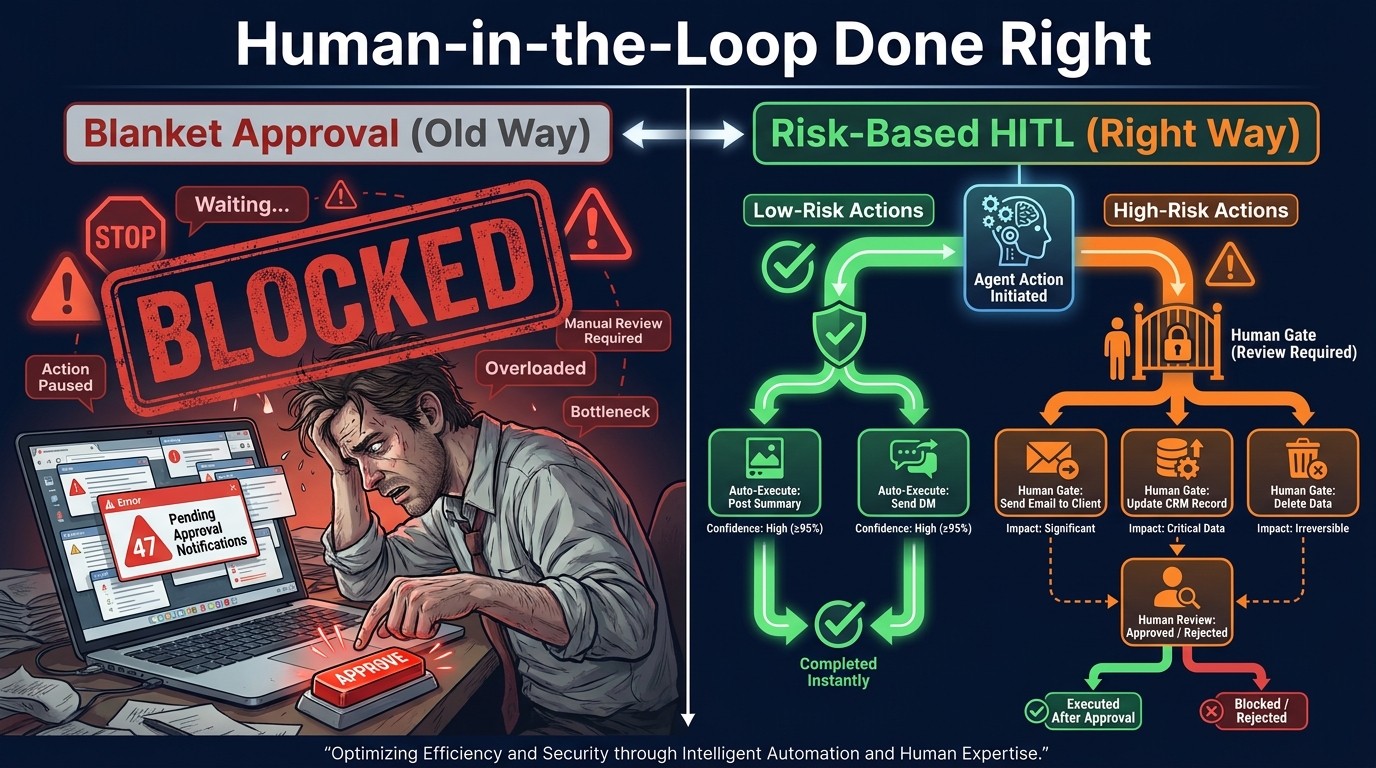
The most common overcorrection to agent failures is requiring human approval for every action. This feels safe, but it defeats the purpose of automation. An agent that cannot send a DM, post a summary, or create an internal channel without a human clicking an approve button is not an autopilot — it is a drafting assistant with extra steps. And it creates a new problem: approval fatigue. When approvals are required for everything, humans stop reading them carefully, and you have exchanged one reliability problem for a different one.
Classifying Actions by Risk and Reversibility
The practical alternative is risk-based human-in-the-loop (HITL) design: gate actions according to their reversibility and blast radius, not uniformly. This produces three action categories.
Auto-execute actions are low-risk, reversible, and narrow in impact. Examples: posting a message to an internal channel, creating a draft canvas, sending a summary DM to a single internal user, adding a tag to a Jira ticket. These run without approval. The worst case if they go wrong is minor and easily corrected.
Soft-gate actions have moderate risk or limited reversibility. Examples: posting to a shared project channel, updating a CRM record field, creating a public-facing document. These surface a confirmation prompt in Slack — “I’m about to do X, confirm or cancel” — before executing. The confirmation is in-line in the conversation and takes one click. This preserves most of the automation benefit while adding a lightweight checkpoint.
Hard-gate actions are irreversible, high-blast-radius, or externally facing. Examples: sending an email to a customer, making a purchase on a procurement system, deleting data, updating a contract record, posting to a client-shared channel. These require explicit, named approval from a designated human before executing. The agent saves its state, posts a structured approval request with full context, and pauses until it receives a response or times out.
Designing the Approval Experience
How the approval request is designed matters as much as which actions require approval. A wall of text with “approve or deny?” at the bottom does not get read carefully. Effective approval experiences in Slack surface exactly the information needed to make the decision — the specific action, the specific target, the specific data being written — alongside the approve and cancel buttons. Nothing more, nothing less.
Every approval request should also include a “show me more context” option for cases where the approver needs to understand the reasoning before deciding. And every approval request should have a timeout: if no response arrives within a defined window (typically four to eight hours for business workflows), the agent saves state and posts a notification that the workflow is waiting rather than silently stalling.
What Changes When You Get HITL Right
Organizations that implement risk-calibrated HITL consistently report two outcomes. First, the approval-related operational overhead drops significantly compared to blanket approval systems, because the majority of low-risk actions now run autonomously. Second, the quality of human review on high-stakes actions improves, because approvers are only seeing the decisions that genuinely require their judgment rather than a stream of trivial confirmations that trained them to click approve without reading.
Idempotency, State Management, and Why Retries Kill Naive Workflows
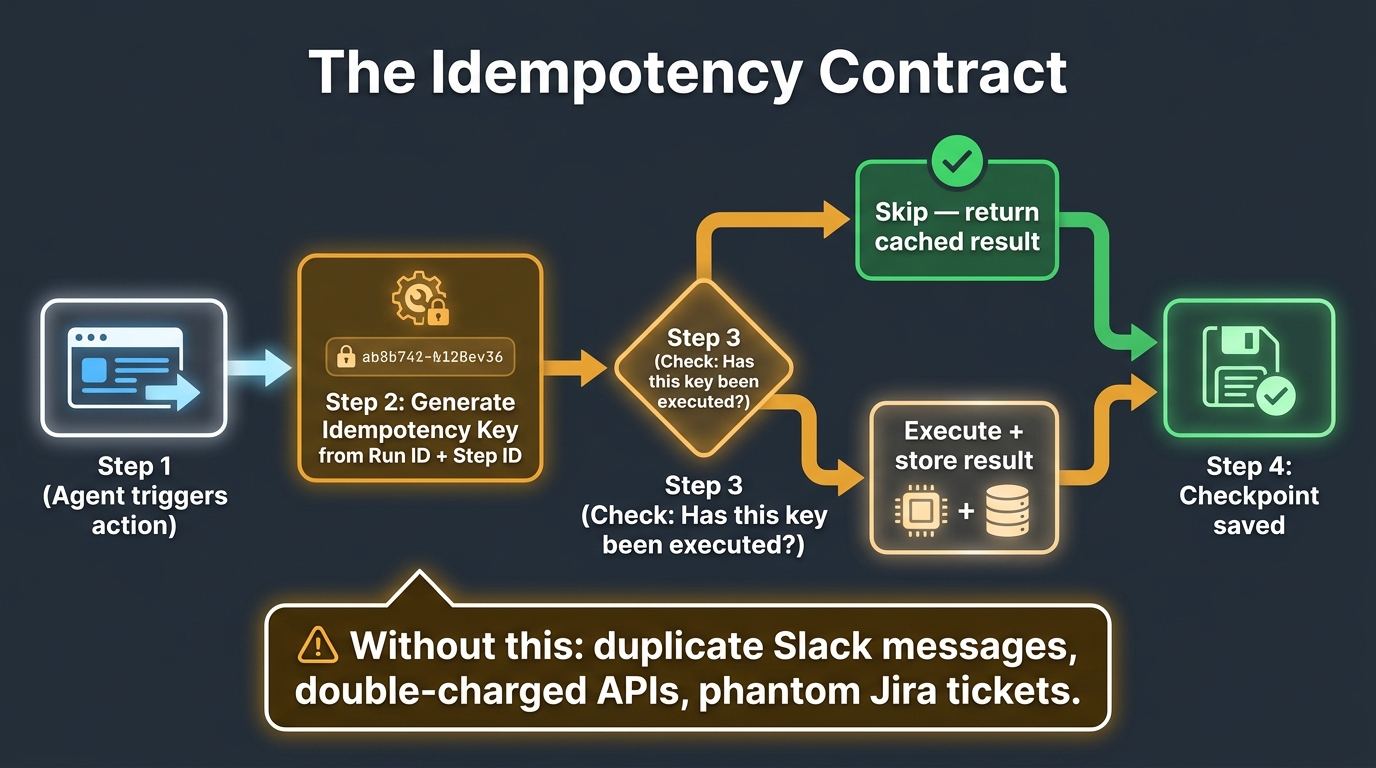
Idempotency is the property that an operation can be executed multiple times and produce the same result as if it had been executed once. In distributed systems, idempotency is considered table stakes. In Slack agent workflows — where tool calls can time out, network connections can drop, and the agent runtime can restart mid-execution — it is equally non-negotiable, but far less commonly implemented.
Why Naive Retries Are Dangerous
The naive implementation of retry logic says: if a tool call fails, wait a moment and try again. This works fine if the tool is truly stateless — if executing it twice leaves the world in the same state as executing it once. But most interesting Slack agent tool calls are not stateless. They post messages, create records, send notifications, or trigger external processes. Executing them twice creates two messages, two records, two notifications, two process invocations.
The failure scenario: an agent calls the Jira API to create a ticket. The API creates the ticket and returns a 200 status, but the response is dropped by a network error before the agent receives it. The agent’s runtime, seeing no confirmation, marks the step as failed and queues a retry. On retry, the API creates a second ticket. If the retry logic runs five times before giving up, there are five identical Jira tickets in the backlog before anyone knows something went wrong. The Slack notification has already been posted four times.
The Structural Idempotency Pattern
The solution is structural idempotency: generate a stable, deterministic idempotency key for each logical operation, derived from durable workflow state rather than from the model’s output. A reliable idempotency key combines the workflow run ID (stable across restarts), the step ID (unique within the run), and optionally a content hash of the inputs. This key is stored with the operation request and submitted to the receiving API as an idempotency header or parameter.
When the workflow retries a step, it uses the same key. If the API has already processed a request with that key, it returns the cached result rather than executing the operation again. If the API does not natively support idempotency keys — many internal tools do not — the workflow layer implements its own deduplication: before executing any mutating step, check whether a record with this run ID and step ID already exists in the state store. If yes, return the stored result. If no, execute and store.
Checkpoint Design for Long-Running Workflows
Checkpoints are the mechanism that allows a long-running Slack workflow to survive interruptions — runtime restarts, network partitions, approval delays, or scheduled maintenance windows — without losing completed work.
An effective checkpoint design stores the following at each step boundary: the step ID and name, the inputs passed to the step, the output received, the timestamp, and the idempotency key used. When the workflow resumes after an interruption, it reads the checkpoint store, identifies the last successfully completed step, and begins execution from the next step rather than from the start.
Checkpoints should be written to durable storage — not to the agent’s in-memory state — before the step’s result is used to trigger the next step. The write-then-proceed ordering ensures that a crash between step completion and checkpoint write results in a retry that produces the same result (because the idempotency key prevents the operation from executing twice), not a skip that loses the work.
Verify-Before-Retry Semantics
For operations that cannot be made idempotent — typically because the downstream system offers no deduplication guarantee — the alternative pattern is verify-before-retry. Before re-attempting a failed operation, the agent queries the target system to check whether the operation already completed. Only if the verification confirms the operation did not complete does the agent proceed with the retry.
This adds one API call per retry but eliminates the duplicate-action risk entirely. For high-stakes operations — customer-facing communications, financial transactions, or data deletions — the cost of one additional verification call is negligible compared to the cost of duplicate execution.
Observability, Audit Trails, and Compliance in a Slack-Native World
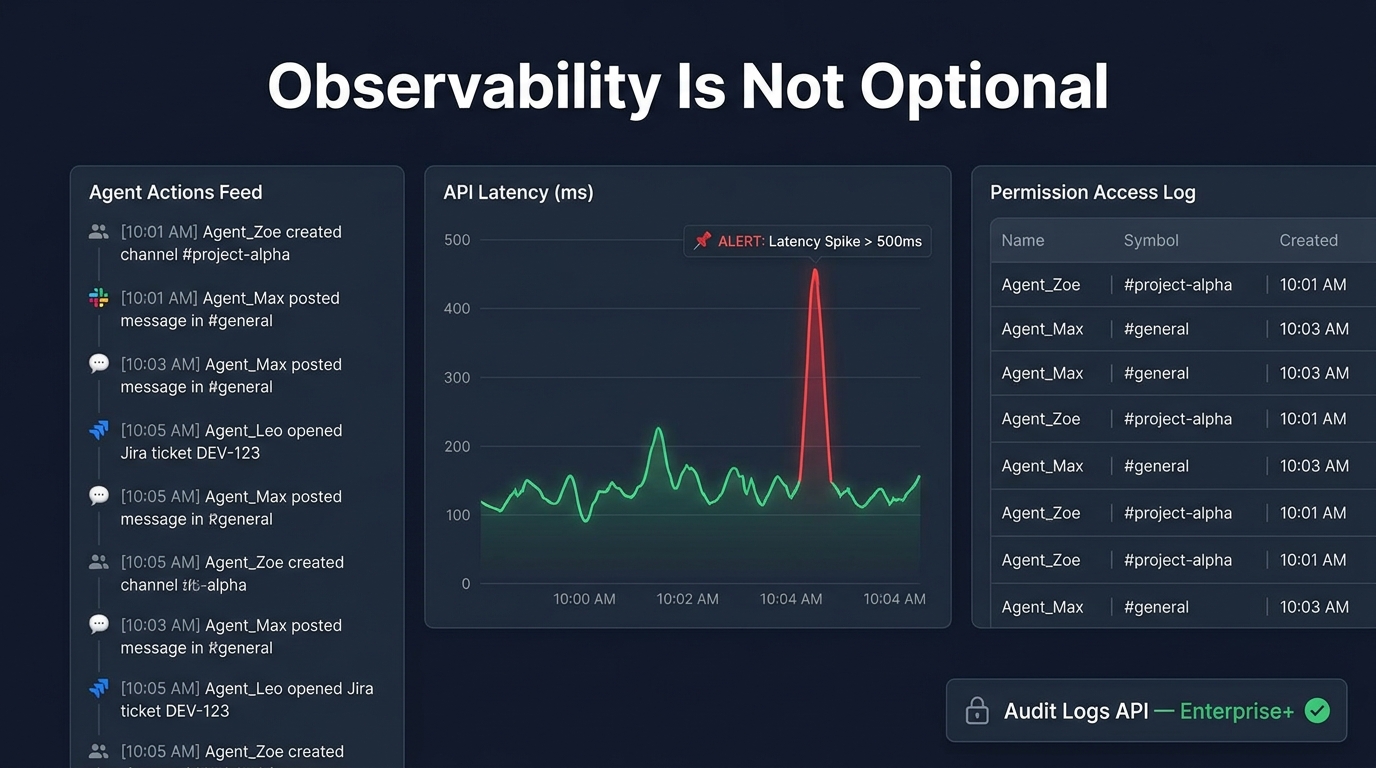
Observability for Slack agents means more than logging. It means having enough visibility into agent behavior, at sufficient granularity and with sufficient context, that you can answer three questions without digging through raw logs: What did the agent do? Why did it do it? What was the outcome?
Three Layers of Observability
The first layer is runtime observability: real-time monitoring of agent behavior as it executes. This includes logging every tool call with its inputs, outputs, latency, and success or failure status. It includes tracking model token usage per workflow execution to detect context expansion that might indicate drift. And it includes alerting on anomaly patterns — an unusual spike in retry attempts, a workflow that has been in a pending-approval state for more than a defined threshold, or tool-call error rates that exceed baseline.
The second layer is audit trail logging: an immutable, compliance-grade record of every action the agent took, who triggered it, and what data it accessed. Slack’s Audit Logs API provides this at the platform level for admin-level events. For application-level agent actions — the specific tool calls, the specific content accessed, the specific outputs generated — teams need to implement their own append-only audit log, written to tamper-evident storage. This log is what compliance and security teams will ask for if anything goes wrong, and what regulated industries require proactively.
The third layer is governance observability: periodic analysis of agent behavior patterns over time to detect drift, scope expansion, or unexpected usage patterns. This is not real-time monitoring — it is a weekly or monthly review of aggregated data asking questions like: Is the agent accessing channels it was not originally intended to access? Is token usage trending upward in ways that might indicate context growth? Are approval requests being approved immediately every time, which might indicate the approver is rubber-stamping without review?
What Slack’s Audit Logs API Actually Surfaces
Slack’s Audit Logs API is available on Enterprise Grid plans and surfaces events including: which user or app accessed which channel, which admin-level configuration changes were made, which files were accessed or shared, and which OAuth scopes were granted or revoked. For agent deployments, the most valuable events are channel access logs (which channels did the agent touch, and when), app token usage logs, and workflow execution events.
One practical pattern is to route Audit Logs API events into a dedicated internal Slack channel — viewable only by the agent’s owners and the security team — where anomalies surface as alerts. This creates a feedback loop where the same platform the agent operates in becomes the oversight layer for that agent’s behavior.
Compliance Considerations for Regulated Environments
For organizations in regulated industries — financial services, healthcare, legal — Slack agent deployments require additional controls beyond standard observability. Data residency requirements may constrain which regions the agent runtime and log storage can operate in. Data retention policies may require that agent-generated content — summaries, drafts, classifications — be retained with the same controls as the source material. And access controls may require that the agent’s effective permissions be auditable as part of access certification cycles.
Slack’s Enterprise+ plan includes enterprise-grade compliance features including eDiscovery integrations, DLP controls, and data retention policy enforcement. For agent deployments in these environments, the key design principle is to treat the agent as a privileged system account, subject to the same access review and compliance requirements as a human employee with equivalent data access.
Real-World Results: What Instrumented Teams Are Actually Seeing
The most instructive data on Slack agent reliability comes from teams that have run production deployments long enough to have meaningful outcome data. The specifics vary by use case, but several patterns appear consistently.
Salesforce’s Internal Agentforce Deployment
Salesforce has published the most detailed self-reported data on a large-scale Slack agent deployment. Over six months of internal testing and production rollout, Salesforce deployed Agentforce inside Slack across its engineering, sales, and customer service teams. The reported outcomes include 86% employee adoption, approximately 64,000 requests handled by its Techforce Agent, and a recovery of approximately 17,000 engineering hours already returned to technical teams — with a projected annual figure of 275,000 hours as the deployment scales.
The company projects total annual savings of 500,000 hours across the business once the full rollout is complete. These are self-reported figures from a vendor with an obvious interest in positive outcomes, and they should be interpreted with appropriate skepticism. But the scale of the deployment and the specificity of the per-team breakdowns (203,000 hours projected for sales, 275,000 for engineering) suggest a level of instrumentation that goes beyond marketing copy.
What is notable from a reliability standpoint is that the Salesforce deployment did not achieve these outcomes with a “fully autonomous” agent configuration. The deployment used phased rollout, starting with low-risk, high-frequency tasks (answering internal policy questions, surfacing documentation) before expanding to action-taking workflows. Human confirmation remained in place for any action that wrote to external systems or triggered customer-facing communications.
The CloudJournee Multi-Agent Orchestration Case
A production case study from CloudJournee provides technical depth on a different deployment model: a supervised multi-agent orchestration system built on Amazon Bedrock, integrated with Slack as the user interface layer. The system handled Jira ticket management, Confluence documentation updates, DevOps workflows, and employee onboarding — all triggered by natural-language commands in Slack channels.
The reliability architecture in this deployment centered on three specific design choices: task decomposition before execution (the orchestrator broke each incoming request into sub-tasks before dispatching to specialist agents, rather than passing the full request to a general agent), explicit state handoffs between agents (each agent’s output was structured and validated before being passed to the next), and human confirmation for any step that wrote to external systems. The team reported that this architecture significantly reduced the rate of compounding errors compared to an earlier single-agent design that had produced cascading failures when any step failed mid-workflow.
The 25x MCP Tool Call Growth Signal
Slack’s own platform metrics are a useful proxy for the state of the ecosystem. The 25x increase in Real-time Search queries and MCP tool calls reported in 2026 suggests that teams are actively building and testing Slack-integrated agent workflows at scale. The parallel data point — that custom agents built on Slack grew more than 300% since January 2026 — reflects that this growth is happening primarily in enterprise environments building custom workflows, not just using off-the-shelf integrations.
The gap between the number of agents being built (growing at 300%) and the number reaching production (still only 11% of companies overall) tells you something important about the state of the field. The bottleneck is not ambition or tooling. It is the engineering depth required to make these agents reliable enough to trust in production.
The Autopilot Readiness Checklist: Before You Ship Any Slack Agent to Production
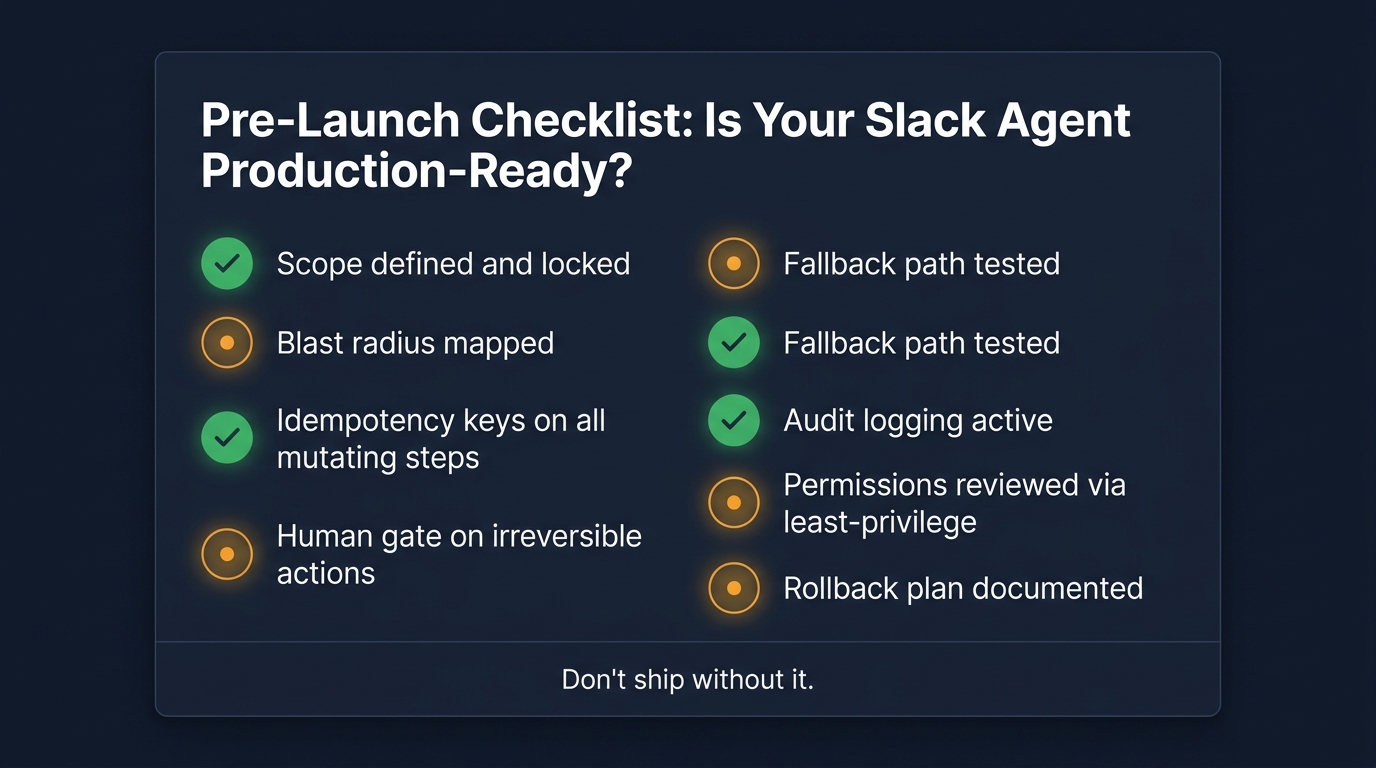
The following checklist synthesizes the architecture and design principles above into a concrete pre-launch gate. Every item should be satisfied before a Slack agent handles real traffic with real consequences. The items are not optional in the sense that you can skip any of them and still ship a reliable autopilot — they are optional only in the sense that you are free to skip them and accept the consequences.
Scope and Access
- Scope is defined in two dimensions. You have documented which channels and data sources the agent can read, and separately, which channels and systems it can write to. Both lists are shorter than the full set of things the agent could access.
- Blast radius is mapped. You have categorized every write operation the agent can perform as reversible, expensive-but-reversible, or irreversible. You know the maximum impact of a single agent malfunction before a human catches it.
- Permissions follow least-privilege. Token scopes are requested at workflow granularity, not agent granularity. No scope is granted speculatively for future use.
- A permission review date is scheduled. You have a calendar reminder to review the agent’s actual access logs against its intended permission set no less than quarterly.
Reliability and State
- Idempotency keys are implemented on every mutating step. No tool call that creates, updates, or deletes data executes without a stable, deterministic idempotency key derived from workflow run state, not model output.
- Checkpoints are written to durable storage before proceeding. After each step boundary, the workflow writes a checkpoint record before using that step’s output to trigger the next step.
- Fallback paths are tested, not assumed. You have deliberately caused each failure mode — tool timeout, API error, missing context, approval timeout — and verified that the agent’s behavior in each case is a clean stop with a clear message, not a silent continuation or a crash.
- Circuit breakers are in place. There is a defined step budget and time limit for every workflow. When either limit is exceeded, the agent stops, saves state, and posts a summary of what it completed and what remains.
Human-in-the-Loop Design
- Every action is classified by risk tier. Auto-execute, soft-gate, and hard-gate action lists exist and are documented. The classification is based on reversibility and blast radius, not intuition.
- Approval UX is tested with real approvers. The approval messages have been reviewed by the people who will actually click them. The right information is present; nothing irrelevant is included. Approvers can make the decision in under thirty seconds.
- Approval timeouts have defined behaviors. When no approval arrives within the timeout window, the agent saves state and notifies relevant parties. It does not stall silently or proceed without approval.
Observability and Compliance
- Runtime logging is active before the first real request. Every tool call is logged with inputs, outputs, latency, and status. Logs are written to durable, queryable storage.
- Audit trail logging is implemented and tested. The audit log captures what the agent did, who triggered it, what data it accessed, and what output it produced. The log is append-only and cannot be modified by the agent or the workflow runtime.
- Anomaly alerts are configured. There are alerts for retry-rate spikes, error-rate increases, approval queue backlog growth, and any action in the hard-gate tier that executes without a logged approval event.
- A rollback plan exists. You know how to disable the agent, what state needs to be reviewed after disabling it, and who is responsible for executing that plan.
Incremental Rollout
- Initial deployment is restricted to a controlled population. The first production cohort is a small group of internal users in a low-blast-radius context. The agent is not deployed to client-facing or high-sensitivity environments until it has a track record in the controlled cohort.
- Expansion criteria are defined before launch. You know what metric thresholds — error rate below X%, approval-override rate below Y%, no P1 incidents in Z days — qualify the agent for the next expansion phase. You are not expanding based on “it seems to be working.”
Designing Autopilots That Get Smarter Without Getting Riskier
One of the counterintuitive challenges of Slack agent deployment is that reliability improvements and capability expansions pull in opposite directions if you let them. As an agent becomes more trusted, there is natural pressure to extend its scope: give it access to more channels, let it handle more complex multi-step tasks, reduce the friction around approval gates. This is how permission drift starts and how blast radius grows, often without a deliberate decision being made by anyone.
The Controlled Expansion Model
Sustainable capability expansion follows a structured model rather than an organic one. Each expansion phase is treated as a new deployment: the new scope is documented, the new blast radius is mapped, any new action tiers are classified, and the permission set is updated deliberately rather than incrementally. The agent does not accumulate access; it is deliberately re-scoped for each new phase.
This approach feels slower than simply granting additional access when a new use case appears. In practice, it is faster overall, because the controlled expansion model prevents the reliability regressions that typically accompany ad-hoc scope growth — regressions that require investigation, remediation, and often a rollback that erases recent capability gains.
Using Agent Behavior Data to Improve Prompts and Tools
The audit trail and runtime logs accumulated during production operation contain something genuinely valuable: a ground-truth record of where the agent succeeded and where it struggled. Workflow steps that consistently generate approval overrides signal that the agent’s judgment on that decision type needs improvement. Tool calls with high retry rates signal brittle integrations that need either better error handling or a verify-before-retry pattern. Channels where the agent’s outputs are frequently edited by human reviewers signal that the underlying prompt or context selection needs refinement.
Teams that treat their agent’s operational data as a feedback loop for continuous improvement — running monthly reviews that identify the top three improvement opportunities and addressing them before expanding scope — build significantly more robust autopilots than teams that ship and move on.
When to Add a New Agent Rather Than Extend an Existing One
A principle borrowed from microservices design applies directly to Slack agent architecture: when you find yourself adding functionality to an existing agent that changes its operational domain, consider whether a new, narrower agent would be more appropriate than extending the existing one. A triage agent that handles IT support routing and a documentation agent that handles knowledge base retrieval are both useful and both operate in Slack. They should not be the same agent. Combining them creates a broader permission surface, a larger blast radius, and more complex fallback logic than either needs independently.
The test is simple: if adding the new functionality requires expanding either the permission set or the scope of the existing agent in ways that affect workflows the agent already runs, that is a signal to build a new agent with its own bounded scope rather than expanding the existing one.
Conclusion: The Engineering Mindset That Makes Autopilots Work
The organizations succeeding with Slack AI agents in 2026 share something that has less to do with model selection or platform choice than with engineering discipline. They treat agents as distributed systems — subject to the same reliability requirements as any other system that takes actions with real-world consequences. They design for failure, not just for the happy path. They instrument before they ship. And they expand capability incrementally, earning trust at each phase rather than assuming it.
The four failure modes — goal drift, duplicate actions, permission drift, and silent failures — are not inevitable properties of AI agents. They are predictable consequences of specific design gaps: insufficient scope definition, missing idempotency, accumulating permissions, and absent fallback paths. Each one has a known mitigation. None of them requires waiting for better models.
The 11% of companies that have Slack agents in production are not smarter or better-resourced than the 89% that do not. They have applied the engineering mindset that distributed systems work has always required: design for failure, implement at the tool layer rather than in the prompt, and instrument everything that matters. The autopilot is not the model. The autopilot is the architecture around the model.
The most reliable Slack agents in production today are not the most capable ones. They are the ones designed by engineers who assumed something would go wrong and built accordingly.
Key Takeaways
- Only 11% of companies have AI agents in production today. The bottleneck is reliability engineering, not capability.
- Define scope in two dimensions — what the agent reads and what it writes — and keep both lists short at launch.
- Use risk-based HITL with three tiers: auto-execute, soft-gate, and hard-gate. Blanket approval is not a safety strategy; it is an approval-fatigue factory.
- Implement idempotency keys on every mutating step. Without them, retries produce duplicate side effects and corrupt state.
- Write checkpoints to durable storage at every step boundary before proceeding. Long-running workflows need to survive interruptions.
- Treat observability as a pre-launch requirement, not a post-incident addition. Log inputs, outputs, latency, and permission access before the first real request.
- Schedule permission reviews quarterly. Permission drift is a maintenance problem, not a deployment problem.
- Use agent behavior data — retry rates, approval overrides, output edits — as a feedback loop for continuous improvement, not just incident response.