
Most of what gets written about AI automation for business assumes you have things a small company doesn’t have. A data team. A transformation office. A budget line called “AI.” Months to run a pilot and a steering committee to review it. If you run a company with 8, 20, or 60 people, you read that material and realize it isn’t about you.
Small businesses aren’t sitting out. The U.S. Chamber of Commerce’s 2025 Empowering Small Business report found that almost 60% of small businesses say they use AI in their operations, more than double the 2023 figure. The question is no longer whether small companies will use AI. The question is whether they’ll use it in a way that actually takes work off people’s plates or whether they’ll collect a pile of subscriptions that nobody opens after the first month.
This article makes a simple argument. A small company doesn’t need an AI strategy. It needs a task list. Break the work into units, find the ones the current generation of AI handles well, keep humans in charge of the ones it handles badly, and put a few lightweight guardrails in place that a team without an IT department can actually keep up.
We’ll lean on some of the best-controlled research on generative AI at work: the Stanford/MIT study of more than 5,000 customer support agents, the MIT writing experiment published in Science, and the Harvard–BCG “jagged frontier” study. We’ll also look at a legal decision every business with a website chatbot should know about. Then we’ll finish with a 30-day sprint you can start next Monday.
Why Small-Business AI Automation Is a Different Problem Than Enterprise AI
Enterprise AI programs deal with integration across dozens of systems, procurement cycles, data governance boards, and change management for thousands of employees. Those are real problems. They just aren’t the problems a 20-person accounting firm, a regional HVAC contractor, or a four-location dental group faces.
The constraints are different
Small businesses have three constraints that shape everything about how they should approach automation:
- Owner attention is the scarcest resource. In most small companies, the owner or one senior manager is the person who knows how everything works. Any automation project that needs that person for weeks will stall.
- There is no one to maintain things. A custom-built workflow that breaks when a vendor changes an API has no one to fix it. Anything you build needs to be simple enough that a non-specialist can understand why it stopped working.
- Every person covers several roles. The office manager is also the bookkeeper, the HR contact, and the person who answers the phone. So automation rarely removes a job. It removes pieces of several jobs.
The advantages are different too
Small companies also have real advantages. Decisions happen in a single conversation. Processes are often undocumented, and that’s a problem, but it also means there’s less legacy structure to fight. And the gap between the person doing the work and the person approving the change is often a single desk.
That makes a task-level approach a natural fit. You don’t need to redesign the organization. You need to find the 15 recurring chores that eat everyone’s week and figure out which ones a model can do, which ones it can help with, and which ones it should never touch.
What “automation” means in this context
In this article, “AI automation” covers a range of things. At one end is assistance: a person uses a chat assistant to draft a proposal faster. In the middle is semi-automation: an incoming invoice is read by a model, the data lands in your accounting software, and a person approves it. At the far end is full automation: a process runs end to end without a human in the loop.
For most small businesses in 2026, the best returns sit in the first two categories. Full automation has its place, but it carries the most risk and needs the most maintenance. We’ll come back to that distinction repeatedly.
What the Adoption Numbers Actually Tell You
The headline figure from the U.S. Chamber, roughly 60% of small businesses using AI, sounds like the market has already moved. Look closer and the picture is more uneven, which matters for how you plan.
Adoption is broad but shallow
The Chamber’s state-by-state data shows AI platform use ranging from the high 50s to above 70%. Connecticut reported 72%, California 60%, and Alabama 57%. But the share using generative AI chatbots specifically is lower and swings more widely: 36% in Arkansas and the District of Columbia, 45% in California, 58% in Connecticut.
That gap suggests a lot of “AI use” is AI built into software businesses already had: spam filtering, auto-categorized transactions, suggested replies. That counts, but it isn’t the same as a team deliberately redesigning work around what AI can do.
Optimism runs ahead of practice
In the same survey, around four in five small businesses in most states said they believe AI will help their business in the future, with state figures from 67% in Delaware to 92% in the District of Columbia. Belief is clearly outpacing structured use.
That gap is where most small-business AI money gets wasted. Owners buy tools because they expect AI to help, without first deciding which specific work they want it to help with. The tool sits unused, or gets used for novelty tasks that don’t touch the parts of the business that cost the most time.
Regulation is a background worry
The Chamber data also shows a clear concern about compliance. In many states, a majority of small businesses worry that a patchwork of state-level tech policies will raise their legal and compliance costs: 76% in Colorado, 68% in Connecticut, 84% in the District of Columbia.
You don’t need to become a policy expert. But this concern is a good reason to adopt a few simple habits early, such as knowing which tools touch customer data and keeping humans responsible for decisions that affect customers. Those habits are cheap to build now and costly to bolt on later.
What to take from the numbers
If you’re already “using AI,” you’re in the majority. If you feel like you aren’t getting much from it, you’re probably in the majority there too. The rest of this article is about moving from passive use (AI features you happen to have) to deliberate use (AI pointed at specific, measured tasks).
Think in Tasks, Not Tools: The Jagged Frontier
The most useful single idea for small-business automation comes from a 2023 field experiment run by researchers from Harvard Business School, Wharton, MIT, and others with Boston Consulting Group. They gave 758 BCG consultants realistic consulting tasks, with and without access to GPT-4.
What the study found
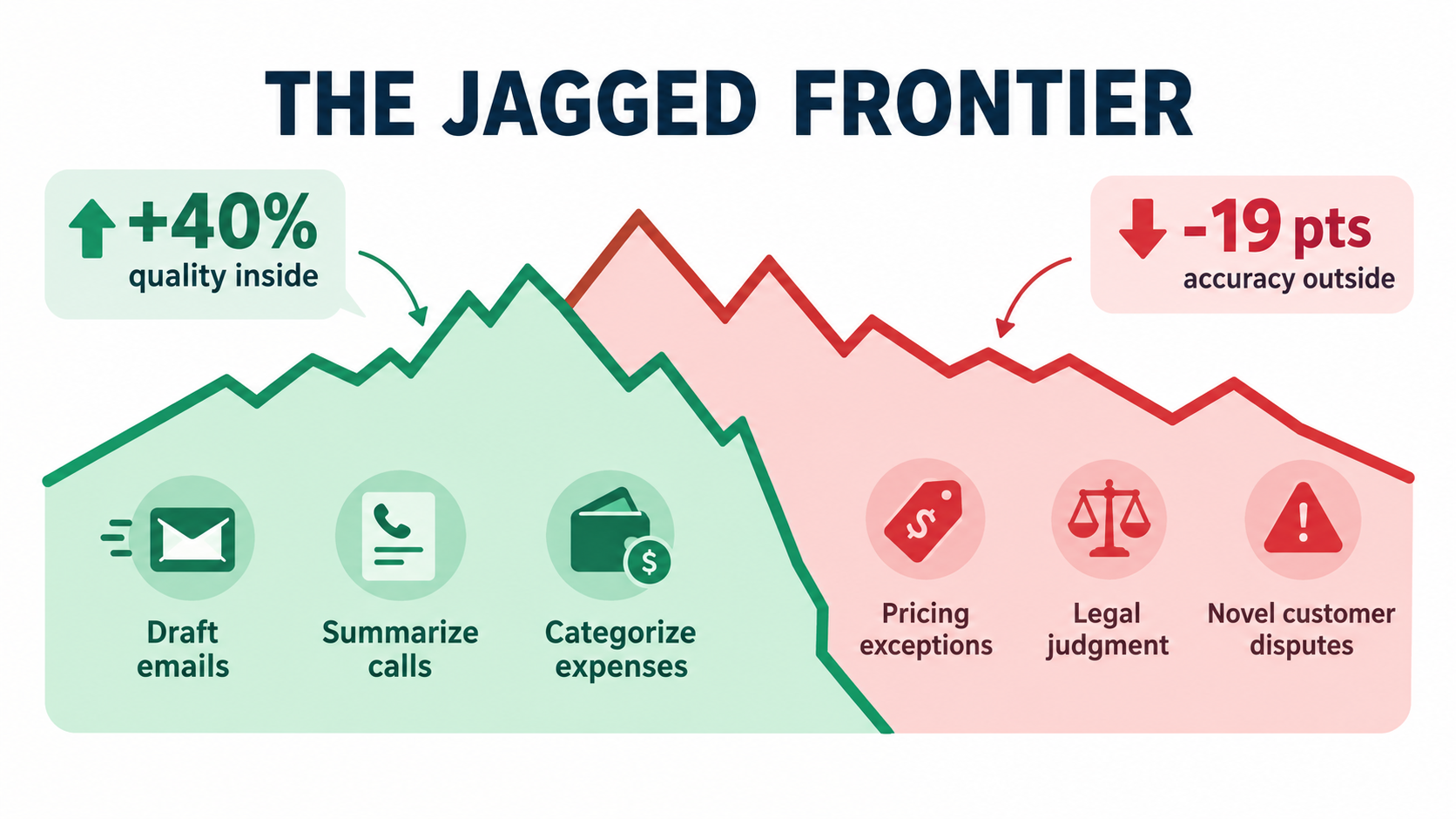
For tasks that fell inside the AI’s capabilities, consultants using AI completed 12.2% more tasks, finished 25.1% faster, and produced work rated more than 40% higher in quality than the control group.
For a task deliberately designed to fall outside those capabilities, one that looked similar but needed careful judgment about subtle evidence, consultants using AI were 19 percentage points less likely to reach the correct answer than those working without it.
The researchers called this the “jagged frontier.” AI capability doesn’t follow a neat line where easy tasks are automatable and hard ones aren’t. Some tasks that feel hard to humans are easy for models. Some that feel easy are places where models fail confidently. And the failures are hard to see, because the output looks just as polished.
Why this matters more for small businesses
In a large company, a bad AI-assisted analysis usually gets caught by a reviewer, a second team, or a formal approval step. In a small company, the person who drafts the customer quote is often the person who sends it. No one else is checking.
So the jagged frontier isn’t an abstract research finding. It’s a practical rule. Before you automate anything, you need to know which side of the frontier the task sits on, and you need to check again as tools change.
How to map your own frontier
You can’t read the frontier off a vendor’s marketing page. You map it by testing on your own work. A practical approach:
- Pick a task and collect ten real past examples. Real emails, real invoices, real call notes, with sensitive details removed where needed.
- Run them through the tool and have the person who normally does the task grade each output. Use a simple scale: usable as is, usable with light edits, needs heavy rework, wrong.
- Look specifically at the failures. Were they random, or do they cluster around a type of input, such as unusual customer requests, handwritten documents, or pricing edge cases?
- Draw the line. The task might be inside the frontier for 80% of cases and outside it for a predictable 20%. That’s fine, as long as you route the 20% to a person.
This test takes an afternoon. It will tell you more than any demo.
Signs a task is probably inside the frontier
- The output is text, a summary, a classification, or structured data pulled from a document.
- A competent person can check the output quickly, faster than producing it from scratch.
- Mistakes are visible and reversible before they reach a customer.
- The task relies on general knowledge or on documents you can provide, not on unwritten context in someone’s head.
Signs a task is probably outside it
- It needs exact facts the model can’t look up, such as specific policies, prices, or legal terms, and there’s no reliable source attached.
- It involves weighing subtle or conflicting evidence.
- An error would be expensive, hard to notice, or would go straight to a customer, regulator, or bank.
- The “right” answer depends on relationships or history nobody has written down.
The Back-Office Tasks That Tend to Pay Off First
With the frontier in mind, a clear pattern emerges. The best early targets for most small businesses are internal, repetitive, text-heavy tasks where a person reviews the result before it matters. These aren’t glamorous. They’re where the hours go.
1. Drafting routine written communication
The MIT experiment by Shakked Noy and Whitney Zhang, published in Science in 2023, tested exactly this. Researchers gave 453 college-educated professionals, including marketers, grant writers, consultants, HR professionals, and managers, writing tasks drawn from their occupations: cover letters for grant applications, emails about organizational restructuring, and analysis plans.
Participants with access to ChatGPT cut the time taken by 40% and, as rated by blinded evaluators from the same professions, improved output quality by 18%. For small businesses, the equivalent tasks are everywhere: follow-up emails after estimates, polite payment reminders, job postings, policy memos, and replies to common customer questions.
The study’s authors flagged an important limitation. The tasks didn’t require precise factual accuracy or context about a specific company or customer, and the researchers didn’t fact-check outputs. That’s exactly the condition under which drafting works best: when a person who knows the facts reviews and sends.
2. Meeting, call, and site-visit notes
Transcription and summarization are among the most dependable AI capabilities today. A contractor who records a walk-through with a client, a consultant who takes discovery calls, or a manager who runs weekly team meetings can get a structured summary with action items in minutes.
The value isn’t only speed. It’s that things stop falling through cracks. Commitments made on a call get written down. That said, recording laws vary by jurisdiction, and some require consent from everyone on the call. Check the rules where you and your clients operate, and tell people when you’re recording.
3. Document extraction
Invoices, receipts, purchase orders, intake forms, and delivery tickets all contain data someone currently retypes. Modern AI tools, including many built into accounting and expense software, can read these documents and pull out vendor names, amounts, dates, and line items.
This is a textbook semi-automation case. The model extracts, a person approves, and the approval step catches the occasional misread total. Even with review, the work shifts from typing to checking, which is usually much faster.
4. Inbox triage and routing
A shared inbox, like info@ or support@, is one of the biggest hidden time sinks in a small company. AI can classify incoming messages (sales inquiry, support request, invoice, spam, job applicant), draft a suggested reply, and route them to the right person.
Start by having the AI label and suggest only. Once you’ve watched it label correctly for a few weeks, you can let it handle the easiest categories, such as auto-acknowledging receipt of a job application, with more independence.
5. Internal knowledge lookup
Every small company has a version of “ask Maria, she knows how we do that.” If your procedures, price sheets, and past proposals exist as documents, AI assistants that search your own files can answer many of those questions. That cuts interruptions for the person who holds the knowledge.
The catch is that this only works if the knowledge is written down. The process of preparing documents for an AI assistant often turns out to be valuable on its own, because it forces the company to document how it actually works.
6. First drafts of proposals, quotes, and reports
Proposals and recurring reports follow templates, but each one needs tailoring. AI can assemble a first draft from notes, past proposals, and a template. The human then does the part that sits outside the frontier: pricing judgment, scope decisions, and anything that commits the company.
What these tasks have in common
Look at the list again. In every case a human reviews the output before it reaches anyone outside the company, or before it changes the books. The task is frequent enough that small time savings add up. And a mistake is cheap to catch. That combination is the sweet spot.
Customer-Facing Automation: The Air Canada Lesson
The tasks above are internal. Things change when AI speaks directly to customers, and one legal decision shows why.
What happened
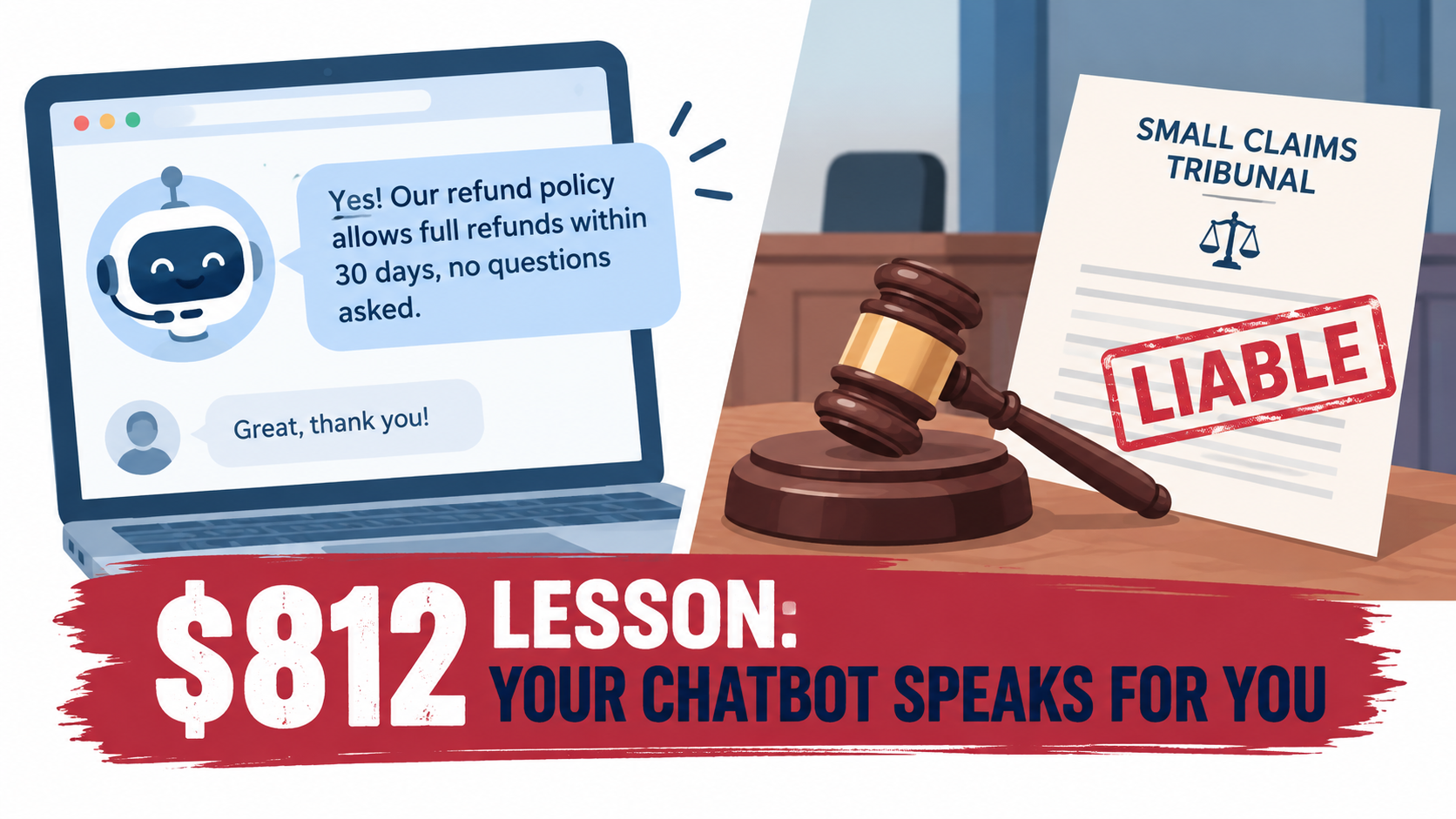
In November 2022, Jake Moffatt’s grandmother died. The same day, Moffatt visited Air Canada’s website and asked its support chatbot about bereavement fares. According to the tribunal decision, as reported by CBC News, the chatbot said that a customer who had already travelled could submit a ticket for a reduced bereavement rate within 90 days of the ticket being issued.
Relying on that answer, Moffatt bought full-price tickets. When Moffatt applied for the partial refund, Air Canada said bereavement rates didn’t apply to completed travel, which was stated on a different page of its website.
The ruling
In February 2024, British Columbia’s Civil Resolution Tribunal ruled against the airline. Air Canada had argued that the chatbot was “a separate legal entity that is responsible for its own actions.” Tribunal member Christopher Rivers called this “a remarkable submission.”
“While a chatbot has an interactive component, it is still just a part of Air Canada’s website. It should be obvious to Air Canada that it is responsible for all the information on its website. It makes no difference whether the information comes from a static page or a chatbot.” — Christopher Rivers, B.C. Civil Resolution Tribunal
The tribunal found that Air Canada “did not take reasonable care to ensure its chatbot was accurate” and ordered it to pay Moffatt $812. It also rejected the argument that the customer should have checked the other page: there was no reason a customer should know that one part of the website is accurate and another isn’t.
Why a small business should care about an $812 case
The dollar amount was small. The principle is not. It’s a single tribunal decision in one Canadian province, not a universal rule, but its reasoning is intuitive and hard to argue with: what your chatbot tells a customer, your business told the customer.
For a small business, the exposure may be proportionally larger. A chatbot that invents a warranty term, promises a delivery date, quotes a price that doesn’t exist, or gives wrong information about a return policy creates a customer expectation you may have to honor, or a dispute you’ll have to handle personally.
Regulators are also paying attention. In September 2024, the U.S. Federal Trade Commission announced a crackdown on deceptive AI claims and schemes, a sign that “the AI said it” isn’t a shield.
A safer approach to customer-facing AI
None of this means you should avoid customer-facing AI. It means you should set it up carefully:
- Ground it in your actual documents. Customer-facing assistants should answer from your written policies, price lists, and FAQs, not from the model’s general knowledge. If the answer isn’t in your documents, the bot should say so.
- Keep commitments human. Refunds, exceptions, discounts, delivery guarantees, and anything contractual should route to a person. The bot can collect the details and hand off.
- Make the handoff easy. A visible “talk to a person” option reduces both frustration and risk.
- Test it the way customers will. Before launch, ask it the awkward questions: edge-case refunds, policies that changed recently, questions phrased badly. Grade the answers.
- Review transcripts regularly. Reading a sample of conversations each week is the cheapest way to catch drift before a customer does.
- Update the source when policies change. Air Canada’s bot and its policy page disagreed. Keep one source of truth and feed the bot from it.
A useful middle path for many small businesses is AI-drafted, human-sent customer replies. The model writes a suggested response based on your documents, and a person approves it with one click. You get most of the speed with a fraction of the risk.
Your Team Is Already Automating Without You
Here’s something many small-business owners don’t realize: the question isn’t whether your employees will use AI. Many already do, often through personal accounts you’ve never heard of.
The “bring your own AI” pattern
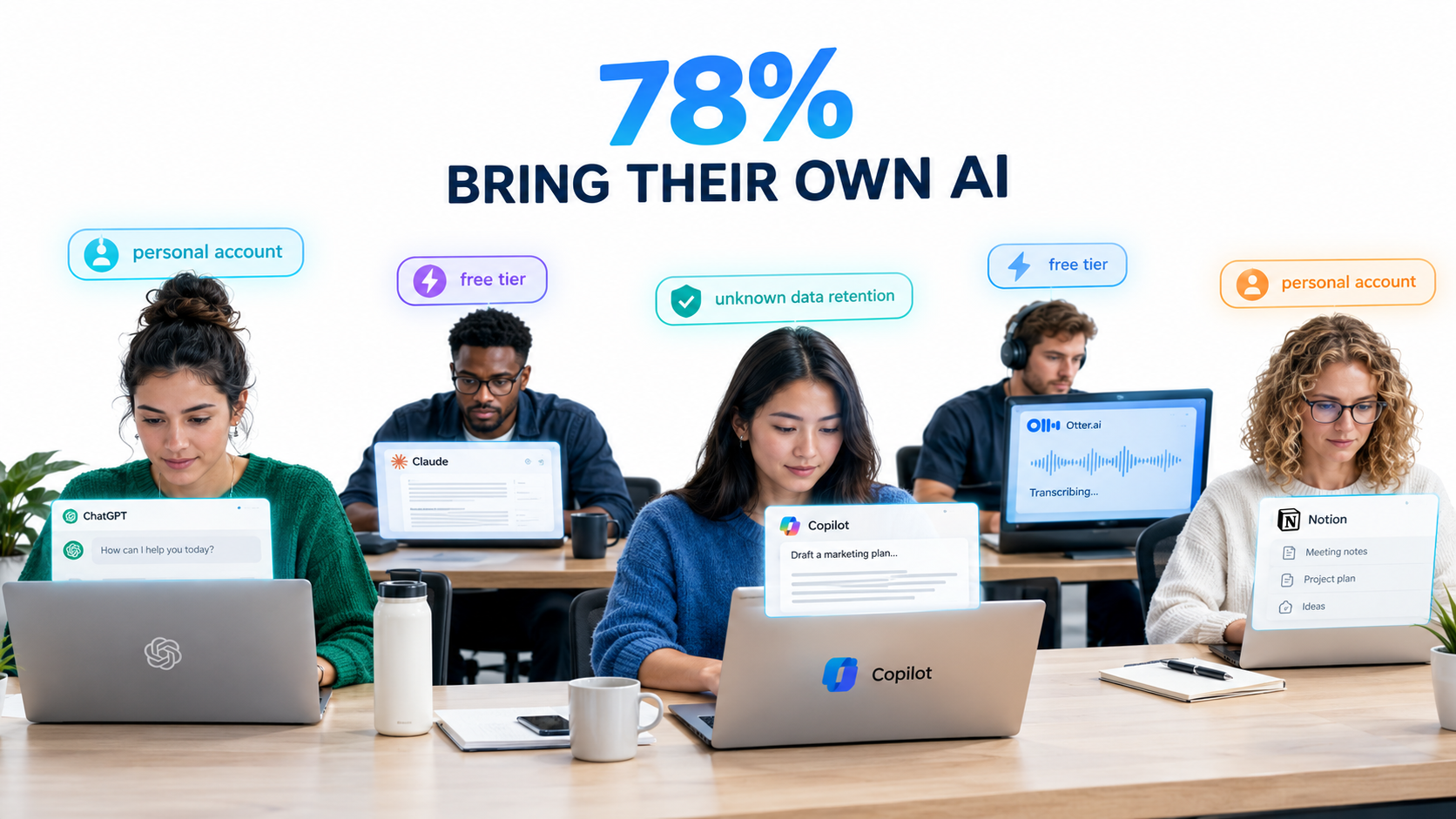
The 2024 Work Trend Index from Microsoft and LinkedIn surveyed knowledge workers across 31 countries. It found that 75% of knowledge workers were using generative AI at work, and that 78% of AI users were bringing their own AI tools to work rather than using tools provided by their employer. That figure was even higher, 80%, at small and medium-sized companies.
The same research found that many users were reluctant to admit using AI for their most important tasks, partly out of worry that it would make them look replaceable. In other words, a lot of AI use at work is quiet.
Why this is both a risk and an opportunity
The risk: When staff paste customer lists, financial data, contracts, or employee information into free consumer tools under personal accounts, you lose track of where that data goes. Data handling terms differ by product and plan. Some consumer tiers may use inputs to improve models unless users opt out, while business tiers typically offer stronger commitments. Check the current terms for any tool your team uses. When an employee leaves, their personal account, and whatever work lives in it, leaves too.
The opportunity: Your employees have already done your discovery work. The person who quietly uses AI to write job descriptions, or to summarize long vendor contracts, has already found a task inside the frontier. They’ve probably also found a few that aren’t.
Turning shadow use into shared practice
The worst response is a blanket ban. It usually pushes use further underground. A better approach:
- Run a no-blame survey. Ask every person: what AI tools do you use, for what tasks, and what’s worked or failed? Make it clear the goal is to learn, not to punish.
- Pick sanctioned tools. Choose one or two business-tier tools with clear data terms and admin controls, and pay for them. A modest per-seat cost is much cheaper than a data leak.
- Share what works. When someone finds a good prompt or workflow for a recurring task, write it down in a shared document. This is how a small company builds institutional knowledge about AI.
- Draw a few bright lines. For example: no customer personal data, employee records, or financial account details in any tool that isn’t on the approved list.
This turns a hidden risk into a working list of automation candidates, tested by the people who know the work best.
The Novice Effect: AI as a Training Layer
One of the most consistent findings in the research is also one of the most useful for small businesses: AI assistance tends to help less experienced workers the most.
The customer support evidence
Erik Brynjolfsson, Danielle Li, and Lindsey Raymond studied the staggered rollout of a generative AI assistant to 5,179 customer support agents at a software company. The work was first released as an NBER working paper and later published in the Quarterly Journal of Economics in 2025.
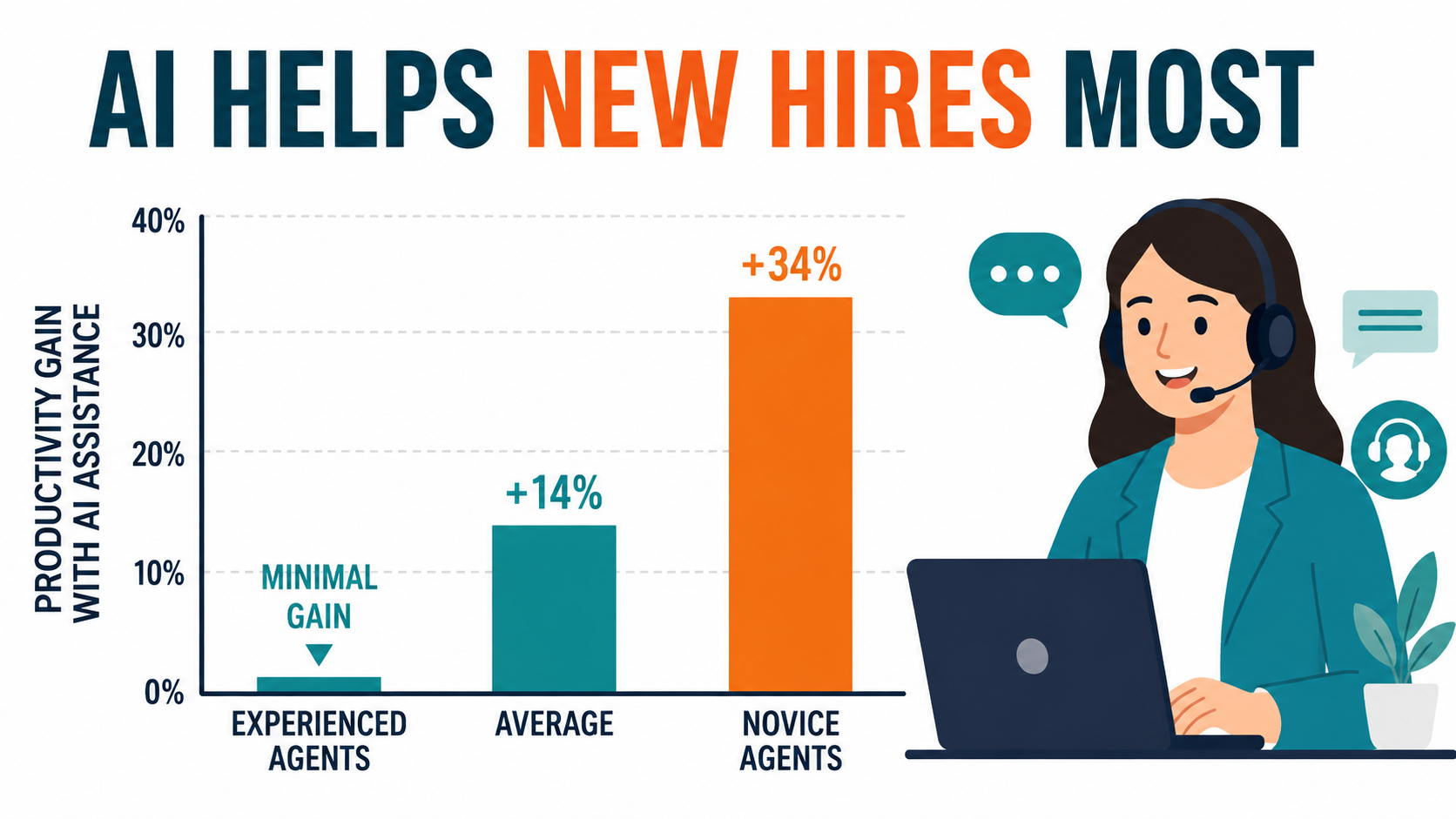
Access to the AI tool increased productivity, measured as issues resolved per hour, by 14% on average. For novice and low-skilled workers, the gain was 34%. For experienced, highly skilled workers, the impact was minimal.
The researchers found suggestive evidence that the AI was spreading the best practices of top agents to newer ones, helping new hires “move down the experience curve” faster. The tool also improved customer sentiment and was associated with better employee retention.
The pattern repeats
The MIT writing study found something similar: performance inequality between workers decreased, and participants who scored lower on the first task benefited more from ChatGPT on the second. The BCG study reported comparable effects, with below-average performers gaining more than top performers on tasks inside the frontier.
What this means for a small company
Small businesses often struggle with onboarding. There’s no training department. New hires learn by shadowing the one experienced person, which slows that person down. When someone good leaves, their know-how leaves with them.
The novice effect suggests a different way to think about AI: as a way to package your best people’s knowledge so newer staff can use it. Practical examples:
- Response libraries: Have your best customer-facing person review and approve AI-drafted answers to your 30 most common questions. New staff then start from answers that reflect your top performer’s judgment.
- Procedure assistants: Feed your written procedures into an internal assistant so a new hire can ask “how do we process a warranty claim?” instead of interrupting someone.
- Draft-then-review training: Let new staff draft with AI, then have an experienced colleague review. The review conversation becomes the training.
A caution about experienced staff
The flip side matters. If your most experienced people see little gain, don’t force a tool on them and then judge the rollout by their reaction. And keep in mind the BCG finding: on tasks outside the frontier, AI use made results worse. Experienced people are often the ones who can spot when the model is wrong. Their judgment is exactly what you want in the review step.
The Stack Decision: Use What You Have Before You Buy or Build
Once you know which tasks to target, you have to decide how to automate them. For small businesses, there are roughly three layers, and the order in which you consider them matters.
Layer 1: AI features inside software you already pay for
Your accounting package, CRM, email platform, help desk, and office suite have probably added AI features over the past two years. The Chamber data showing broad AI platform use but lower chatbot use suggests many businesses have these features and don’t use them deliberately.
Why start here: The data is already in the system. There’s no new integration to build. The vendor maintains it. Costs are often bundled or modest add-ons.
The limitation: These features only work within one tool. They won’t connect your inbox to your accounting system to your project board.
Action: For each piece of core software, spend 30 minutes finding out what AI features exist, whether they’re turned on, and which of your task-list items they cover.
Layer 2: General-purpose assistants and no-code automation
The second layer is a business-tier AI assistant for drafting, summarizing, and analysis, plus a no-code automation platform that connects your apps and moves data between them, with AI steps in the middle.
A typical example: when an invoice arrives in a shared inbox, extract the fields with an AI step, create a draft bill in the accounting system, and post a message to the bookkeeper asking for approval. No code, and each step is visible.
Why it works for small teams: A reasonably technical staff member can build and maintain these workflows. When something breaks, the platform usually shows which step failed.
The limitation: Workflows multiply. Without a simple inventory, you end up with 40 automations nobody remembers building. Keep a list of what each one does, who owns it, and what it touches.
Layer 3: Custom builds and specialist vendors
Custom-built AI applications, or specialist vendors serving your industry, make sense when a task is central to your business, high volume, and not handled by general tools. Examples include a specialized quoting engine for a manufacturer or an intake system for a law firm.
Why be cautious: Custom builds create the maintenance problem described earlier. If the developer or agency who built it moves on, you may own something no one can fix. Specialist vendors can be excellent, but evaluate them the same way you’d evaluate any vendor holding critical data.
Questions to ask any AI vendor
- Is our data used to train models? Can we opt out, and is that in the contract?
- Where is data stored, and how long is it retained?
- Can we export our data and configurations if we leave?
- What happens when the model gets something wrong? Is there logging we can review?
- Can you show us results on our examples, not your demo data?
- What claims are you making about accuracy, and how were they measured?
That last question matters. Regulators, including the FTC, have signaled that exaggerated AI claims are an enforcement priority. A vendor that can’t explain how it measured its accuracy claims is telling you something.
A simple rule of thumb
Exhaust Layer 1 before paying for Layer 2. Prove a task works in Layer 2 before commissioning Layer 3. Most small businesses will find that the first two layers cover the majority of their task list.
Guardrails a Small Team Can Actually Maintain
Enterprise AI governance frameworks run to dozens of pages. A small business needs something that fits on one page and that people will actually follow. Here’s a workable version.
1. A one-page AI use policy
Cover four things in plain language:
- Approved tools: which AI tools and accounts are sanctioned for work.
- Data rules: what may never go into any AI tool (for example, customer payment details, health information, employee records, passwords) and what may go only into approved tools.
- Review rules: which outputs need human review before use (see the tiers below).
- Accountability: the person who sends or approves an AI-assisted output owns it, just as if they’d written it themselves.
The last point echoes the Air Canada ruling. Just as a business owns what its chatbot says, an employee owns what they send, whether they drafted it or a model did.
2. Three review tiers
Not every output needs the same scrutiny. Sort tasks into tiers:
- Tier 1, internal and low stakes: meeting summaries, internal notes, brainstorming. Spot-check occasionally.
- Tier 2, external or financial: customer emails, proposals, bookkeeping entries. A person reviews every output before it goes out or gets posted.
- Tier 3, commitments and sensitive decisions: pricing exceptions, contract terms, hiring decisions, legal or regulatory communications. AI may assist with drafting or research, but a qualified person makes and documents the decision.
3. A task and automation register
Keep a simple spreadsheet with one row per automated or AI-assisted task: what it does, which tool, what data it touches, which review tier, who owns it, and when it was last checked. Update it when something changes.
This one document solves several problems at once. It stops orphaned automations. It helps a new employee understand how things work. And if a customer, auditor, or regulator ever asks how you use AI, you have an answer.
4. A monthly 30-minute review
Once a month, the owner and whoever manages the automations spend half an hour on three questions. Is each automation still working? Have we seen any errors or complaints? Has anything changed in our policies, prices, or tools that the automations need to reflect?
5. A kill switch
For every automation that touches customers or money, know how to turn it off quickly and who is allowed to do it. When something goes wrong, the ability to pause it in minutes matters more than any upfront review.
Why lightweight beats thorough
A detailed policy nobody reads protects no one. A one-page policy, a spreadsheet, and a monthly half-hour conversation will catch most problems before customers do. You can add more structure as you grow.
Measuring Whether It’s Working
Small businesses rarely have analysts to measure automation results, so measurement has to be simple. But skipping it altogether is how tools end up unused and unpaid-for subscriptions pile up.
Measure before you start
The most common measurement mistake is not recording a baseline. Before you automate a task, spend a week noting how often it happens and roughly how long it takes. Estimates are fine: “About 25 invoices a week, around six minutes each.”
Four numbers per task
- Time per instance, before and after, including review time. An AI draft that takes eight minutes to fix isn’t faster than a five-minute manual job.
- Volume, how many times per week the task happens. Small savings on high-volume tasks beat big savings on rare ones.
- Error rate, how often the output needed heavy rework or was wrong. Track this especially for Tier 2 tasks.
- Cost, the tool’s subscription or usage fees attributable to the task.
What to watch beyond the numbers
The support-agent study found improvements in customer sentiment and employee retention, not only speed. Keep an eye on the softer signals too. Are customers responding better or worse? Is the team less swamped, or have they just picked up a new chore of checking AI output?
Be honest about where hours actually go. Time saved only becomes value if it’s used for something: more sales calls, faster response times, fewer late nights for the owner. If the saved time quietly disappears into more email, the automation worked but the business didn’t benefit much.
When to stop
Set a review point, typically after 30 days, and be willing to drop an automation that isn’t earning its place. The goal is fewer, better automations that people trust, not the largest possible number of AI tools.
A 30-Day Task-List Sprint You Can Start Monday
Here’s how to put everything above into practice in a month, without a consultant and without taking the owner away from running the business.
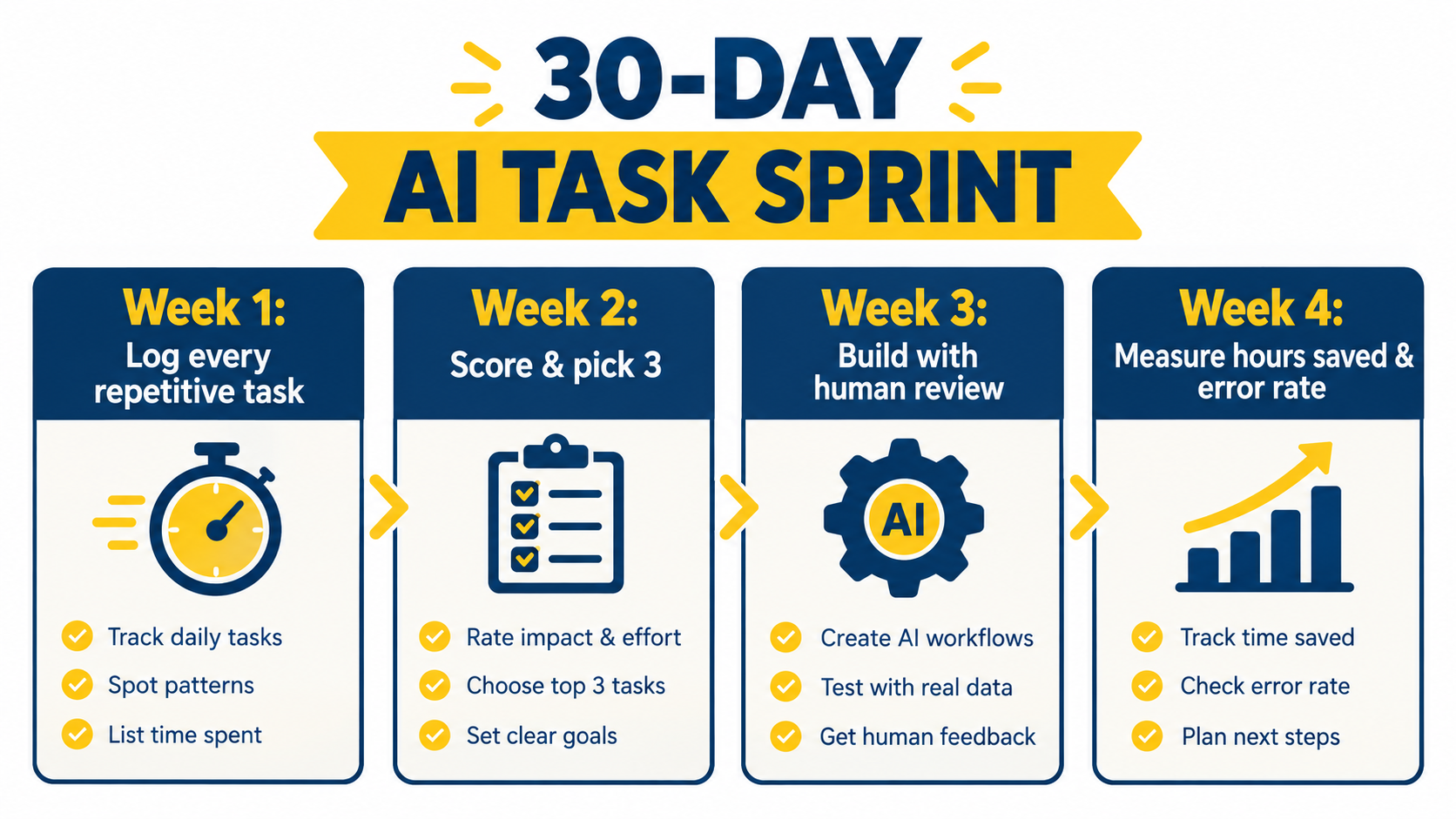
Week 1: Build the task list
- Ask every team member to log recurring tasks for one week: what the task is, how often it happens, roughly how long it takes, and how annoying it is.
- Run the no-blame survey on current AI tool use at the same time.
- Inventory the AI features in the software you already pay for.
By Friday you should have 30 to 80 tasks listed. That list is the most valuable output of the entire sprint.
Week 2: Score and choose three
Score each task on four quick dimensions, from 1 to 5:
- Volume × time: total weekly hours consumed.
- Frontier fit: text, summaries, extraction, or classification score high; judgment and exact facts score low.
- Checkability: how quickly a person can verify the output.
- Stakes: how bad a mistake would be (score low-stakes tasks higher).
Pick the top three. Ideally, at least one should be internal and low stakes so you get an early win. Avoid choosing a customer-facing, Tier 3 task as your first project.
For each, run the ten-example frontier test described earlier. If a task fails badly, swap it for the next one on the list.
Week 3: Build with a human in the loop
- Set up each automation using the lowest layer that works: built-in features first, then assistants or no-code tools.
- Assign each one an owner and a review tier.
- Add them to the task register.
- Write the one-page AI use policy and share it with the team.
Week 4: Measure and decide
- Compare time, volume, error rate, and cost against your Week 1 baseline.
- Ask the people doing the work: is this actually better?
- Keep, adjust, or drop each automation.
- Pick the next three tasks from your list and repeat.
What to expect
You won’t automate the company in a month. What you will have is a ranked list of every recurring task, three tested automations, a policy, a register, and, most importantly, a repeatable habit. After three or four cycles, you’ll have worked through the tasks that matter most, and you’ll know your own frontier better than any vendor could tell you.
Conclusion: Small Steps, Clearly Owned
AI automation for business is often framed as a strategic transformation. For small companies, that framing does more harm than good. It makes the work feel bigger and vaguer than it is, and it encourages buying tools before understanding tasks.
The research points to a more grounded approach. AI delivers real gains on the right tasks: 40% time savings on professional writing in the MIT study, 14% more issues resolved per hour for support agents and 34% for novices in the Stanford/MIT study, and faster, higher-quality work inside the frontier in the BCG study. But the same research shows performance can get worse on tasks outside the frontier. And the Air Canada ruling is a reminder that whatever your AI says to customers, your business said it.
Key takeaways
- Start with a task list, not a tool. Log recurring work for a week before buying anything.
- Test on your own examples. Ten real cases, graded by the person who does the work, will map your frontier better than any demo.
- Begin internally. Drafting, summarizing, document extraction, and inbox triage, all with human review, are reliable first wins.
- Treat customer-facing AI as your own voice. Ground it in your documents, route commitments to people, and review transcripts.
- Bring shadow AI into the open. Survey your team, sanction business-tier tools, and share what works.
- Use AI to spread expertise. The biggest gains often go to newer staff. Package your best people’s judgment for them.
- Use what you already own first. Built-in features, then assistants and no-code tools, then custom builds only when justified.
- Keep guardrails light and real. A one-page policy, three review tiers, a task register, a monthly check, and a kill switch.
- Measure, then keep or drop. Time, volume, errors, and cost, compared against a baseline.
The companies that get the most from AI in 2026 won’t be the ones with the biggest AI budgets. They’ll be the ones that know exactly which tasks they handed to a model, who checks the output, and what happens when it’s wrong. For a small business, that’s not a strategy document. It’s a spreadsheet, a policy, and a habit. And you can start all three on Monday.