
Most conversations about AI automation for business start with the same question: what can we automate? It’s a reasonable place to begin. Vendors demo it, consultants map it, and internal teams build long lists of candidate processes.
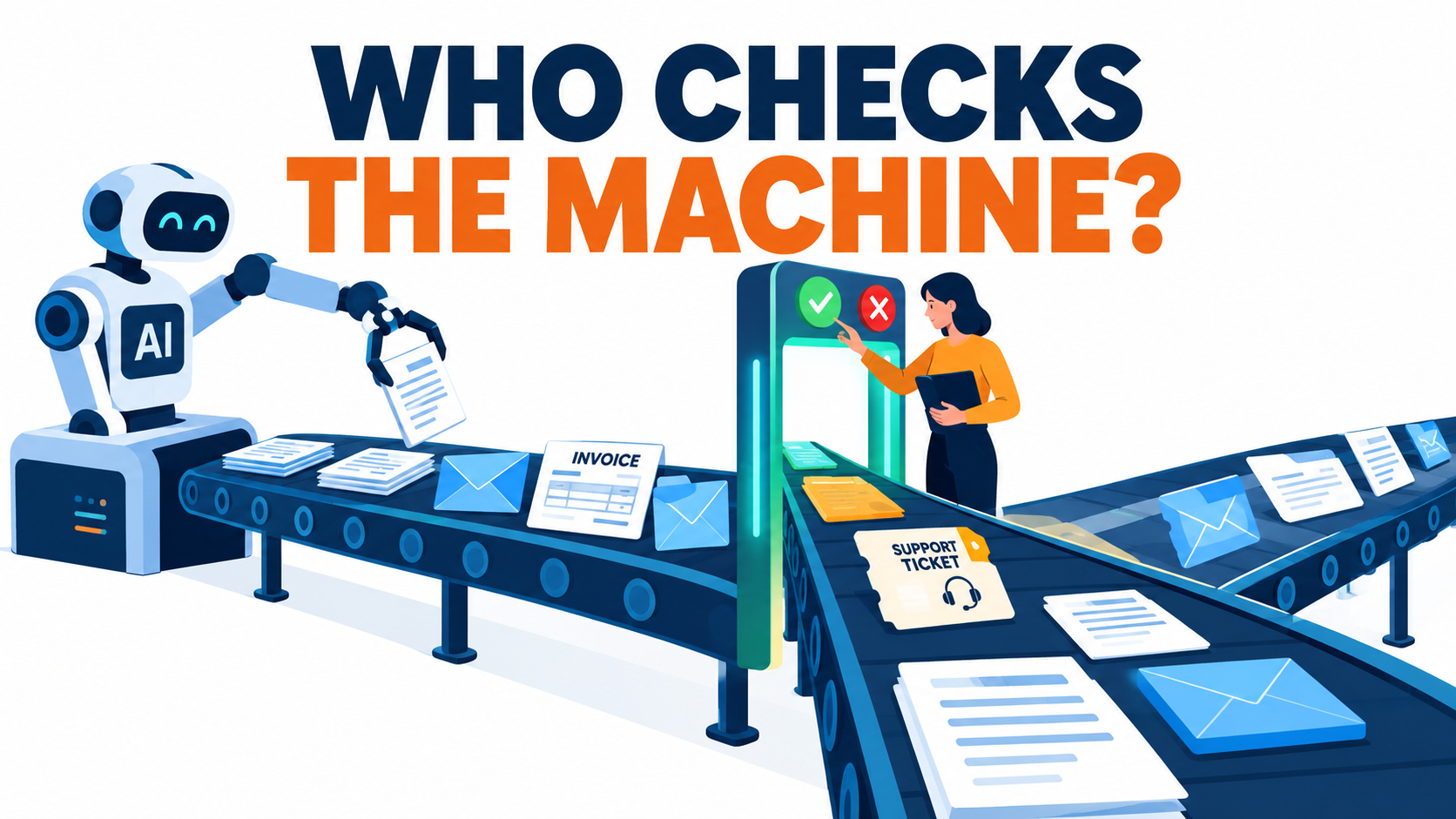
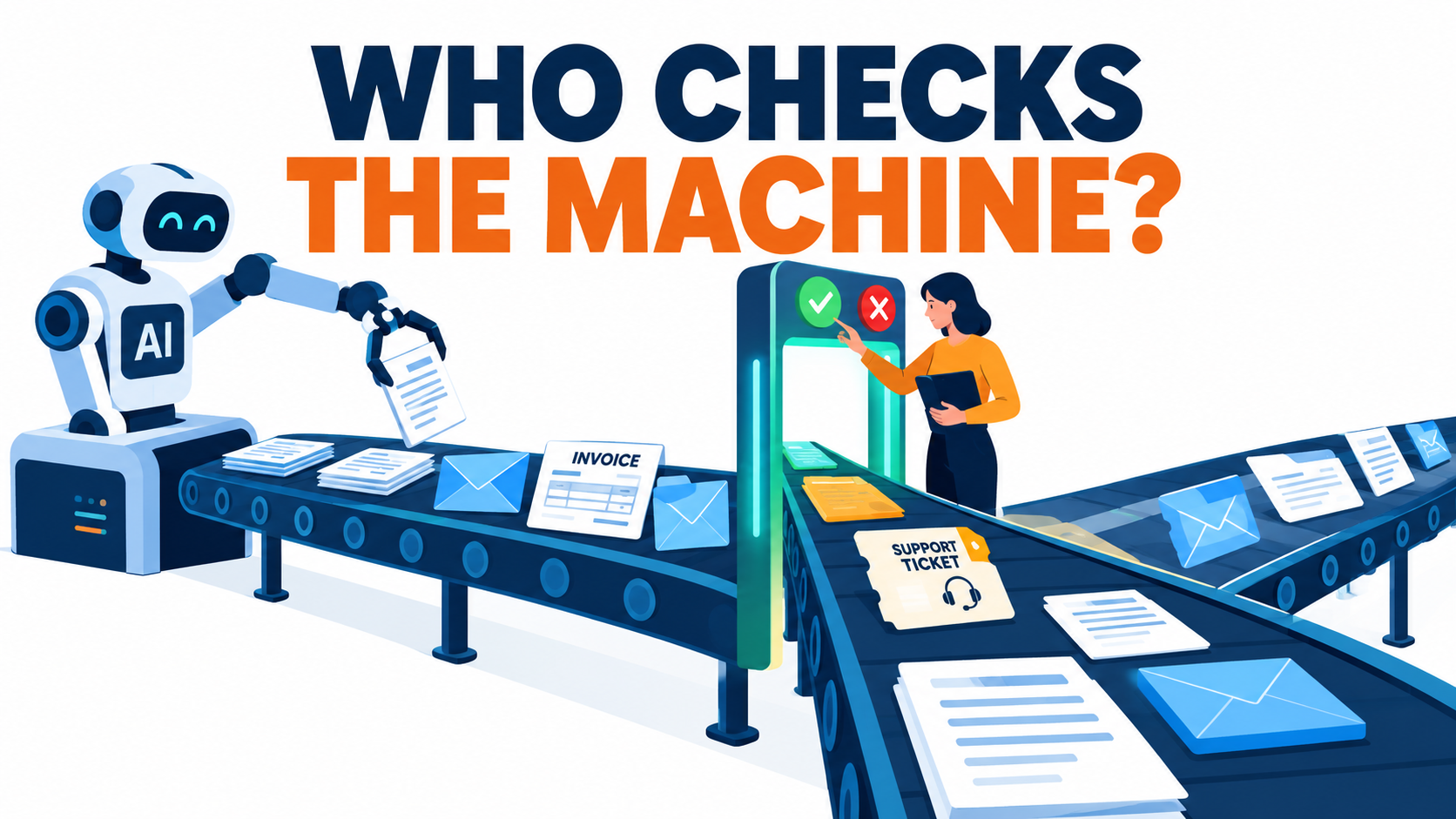
There’s a second question that gets much less airtime, and it decides whether an automation holds up in production or turns into an expensive embarrassment: where exactly does a human check the machine, and does that check actually work?
That question isn’t academic. In 2024 a Canadian tribunal held Air Canada liable for a refund policy its website chatbot made up, and rejected the airline’s argument that the bot was “a separate legal entity.” Klarna became the best-known example of AI replacing support agents in 2024, then publicly shifted back toward human service after its CEO admitted quality had suffered. Meanwhile, some of the best peer-reviewed research on AI at work shows the biggest gains come when people and models split the work deliberately. Handing everything over wholesale doesn’t produce them.
This article doesn’t repeat the ROI-case or pilot-to-production playbooks. It covers the design problem that sits underneath all of them: human checkpoints. We’ll go through what the research says about where AI is reliable and where it isn’t, why “a human reviews it” so often means nobody really does, a four-tier model for matching oversight to risk, how to design the reviewer’s job so it holds up, what regulators are starting to require, and how to measure whether your checkpoints catch anything at all.
If you run operations, own a process, or have signed off on an automation project in the last year, this is the part of the plan most likely to be missing.
The Question Most AI Automation Projects Skip
Walk through a typical automation proposal and you’ll find detailed sections on volume, cycle time, tooling cost, and projected savings. Oversight usually gets one line: “outputs will be reviewed by the team.” Nobody says who, how often, against what standard, or what happens when the reviewer disagrees.
That vagueness is understandable. Oversight looks like a cost that eats into the savings case. Every human touchpoint you add seems to cut the headline number, so there’s a quiet pull toward keeping the review step vague, or dropping it once the pilot “looks fine.”
Why the gap matters more with AI than with older automation
Traditional rules-based automation, the kind described in classic business process automation and robotic process automation (RPA), fails in predictable ways. If a bot is scripted to copy field A into field B, it either does that or it breaks loudly. You can test it exhaustively because its behavior is fixed.
Generative and machine-learning systems behave differently. They handle unstructured inputs like emails, contracts, call transcripts, and images, and that’s exactly why they’re useful. But they fail quietly. A language model that misreads a policy doesn’t throw an error. It writes a fluent, confident, wrong answer that looks just like a right one.
That changes the job of oversight. With RPA, you mostly watch for breakage. With AI, you have to watch for plausible errors, and those are much harder for people to spot.
Three questions every automation plan should answer
- Where is the checkpoint? Before the output reaches a customer or system of record, after it, or on a sample?
- Who owns it, and what are they checking against? A named role, a written standard, and a source of truth.
- How will you know it works? A way to measure whether reviewers catch errors, not just whether they click “approve.”
If your current automation roadmap can’t answer all three for each workflow, the rest of this article is for you.
What the Research Actually Says About Humans and AI Working Together
Much of the discussion about AI automation runs on anecdote and vendor case studies. Fortunately there’s now a small body of rigorous research, including randomized and quasi-experimental studies, that shows what happens when people work alongside AI systems. Three studies are especially useful for thinking about checkpoints.
Study 1: 5,179 customer support agents
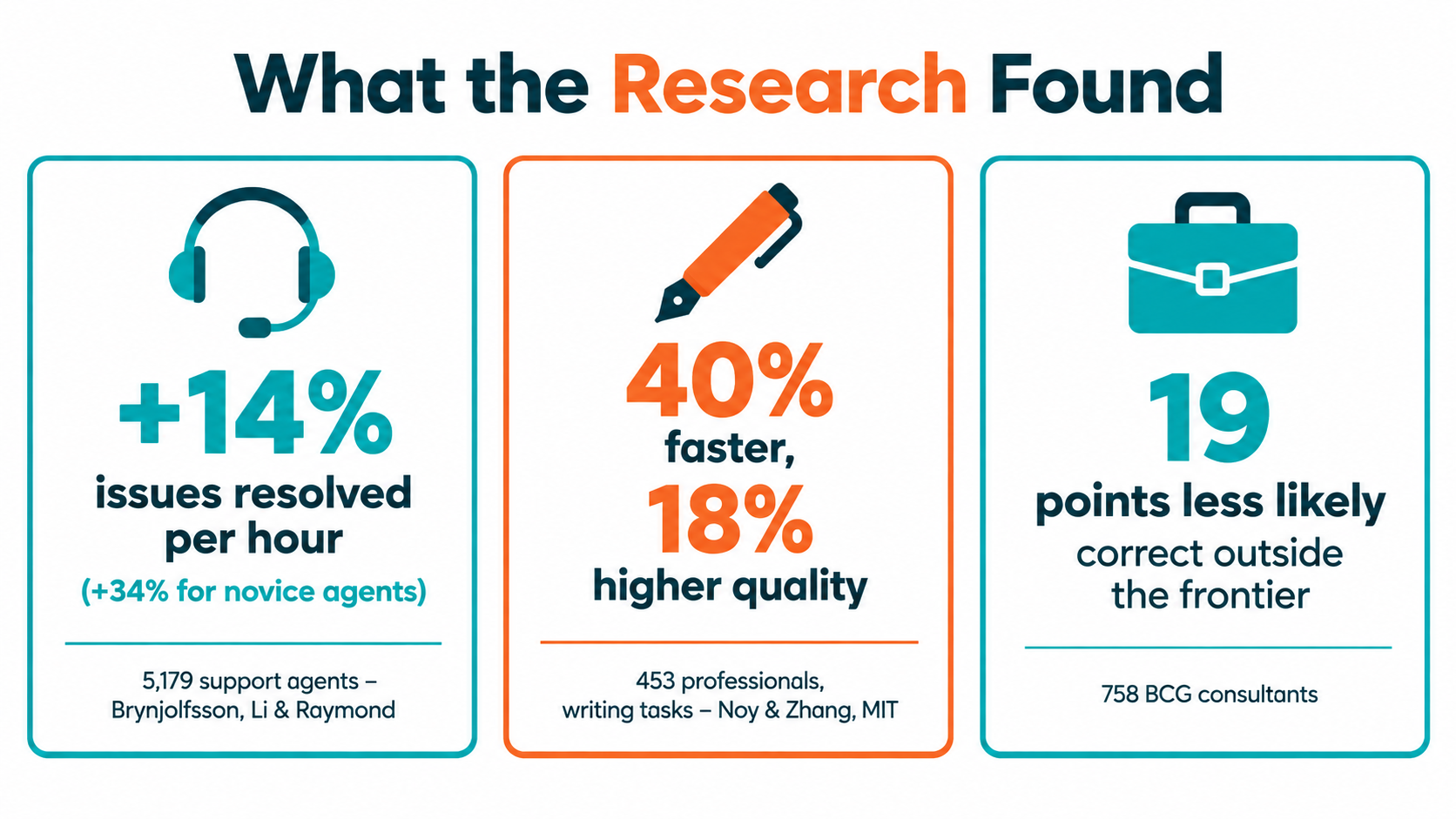
Erik Brynjolfsson, Danielle Li, and Lindsey Raymond studied the staggered rollout of a generative AI conversational assistant to 5,179 customer support agents. The work was later published in The Quarterly Journal of Economics (2025). Access to the tool raised productivity, measured as issues resolved per hour, by 14% on average.
The distribution matters most. Novice and lower-skilled workers improved by 34%, while experienced, highly skilled agents saw minimal impact. The authors found suggestive evidence that the AI spread the best practices of top performers to newer staff. They also reported better customer sentiment and higher employee retention.
Note the design. The AI assisted human agents by suggesting responses. It didn’t replace them. A person stayed in every conversation and decided what to send. That’s a checkpoint built into the workflow itself.
Study 2: 453 professionals on writing tasks
MIT researchers Shakked Noy and Whitney Zhang gave 453 college-educated marketers, grant writers, consultants, data analysts, HR professionals, and managers occupation-specific writing tasks. The results appeared in Science. Participants with ChatGPT access finished about 40% faster (roughly 11 minutes quicker), and independent evaluators rated their output 18% higher in quality.
The researchers were open about the limits. The tasks didn’t require precise factual accuracy or company-specific context, and there was no fact-checking of outputs. In their words, accuracy “is a major problem for today’s generative AI technologies.” So the gains were real, but they were measured on tasks where being confidently wrong carried little cost.
Study 3: 758 consultants and the “jagged frontier”
A field experiment with Boston Consulting Group, led by researchers from Harvard Business School and collaborators, gave 758 consultants access to GPT-4 on realistic consulting tasks. For tasks inside the AI’s capability, consultants completed about 12% more tasks, worked about 25% faster, and produced output rated around 40% higher in quality.
For a task deliberately designed to fall outside the model’s capability, where the AI would produce a persuasive but wrong answer, consultants using AI were about 19 percentage points less likely to reach the correct solution than those working without it. The AI didn’t only fail to help on that task. It pulled people toward the wrong answer.
What these studies mean together
- AI assistance produces large, measurable gains on the right tasks.
- The gains are uneven across people and across tasks.
- On the wrong tasks, AI can make human performance worse, because people trust fluent output.
That third point is the core argument for designing checkpoints deliberately rather than bolting them on.
The Jagged Frontier: Why Oversight Can’t Be One-Size-Fits-All
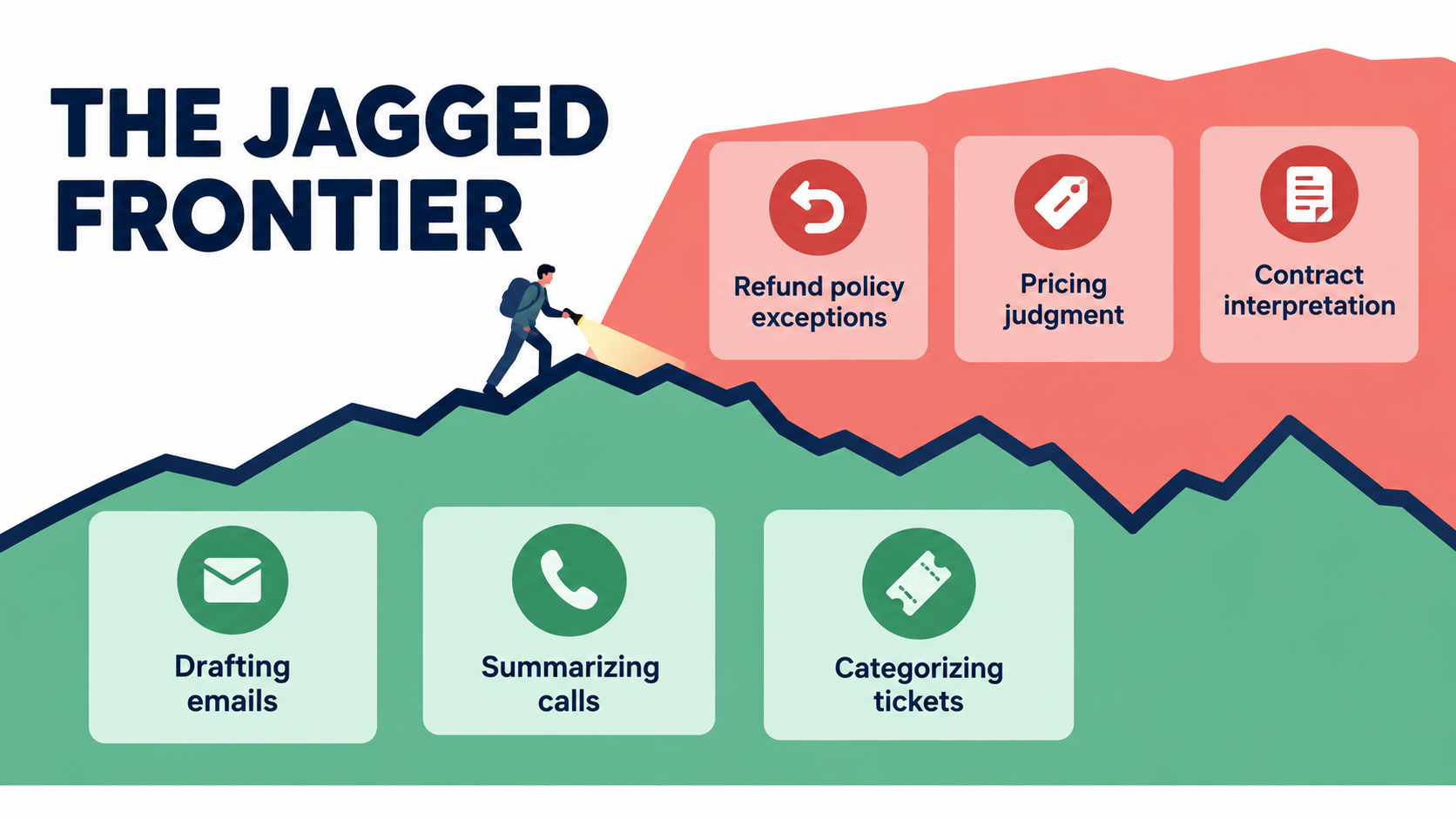
The researchers behind the BCG study coined the phrase “jagged technological frontier” to describe a key feature of AI capability. Tasks that look similar in difficulty to a human can sit on opposite sides of what the model does reliably. The boundary isn’t a smooth line. It zigzags unpredictably through everyday work.
What the frontier looks like inside a typical business
Take a customer operations team. Summarizing a 20-minute call transcript, drafting a polite follow-up email, and tagging a ticket by topic are usually well inside the frontier. Current models do these consistently.
Now look at tasks that seem just as routine: telling a customer whether they qualify for a refund under a policy with exceptions, quoting a price that depends on contract terms, or explaining a bereavement fare rule. These depend on precise facts, current policy, and edge cases. Models are far more likely to produce a confident answer that’s slightly or badly wrong.
Both sets of tasks might sit in the same workflow, handled by the same bot, through the same chat window. That’s why blanket oversight rules like “review everything” or “review nothing” fail. The first wastes human attention on safe tasks. The second leaves risky ones unguarded.
Mapping your own frontier
You can’t read the frontier off a vendor spec sheet. You have to find it empirically for your own processes. A practical approach:
- Break each workflow into sub-tasks. “Handle support email” isn’t a task. “Classify intent,” “look up order status,” “draft reply,” and “decide on refund” are.
- Build a test set from real history. Pull 100–300 past examples per sub-task, including known tricky cases.
- Run the AI blind and have experts grade it. Record not just accuracy but the kind of error: harmless style issue, factual error, or policy violation.
- Tag each sub-task as inside, near, or outside the frontier. This tag drives the checkpoint tier in the model later in this article.
- Re-test when anything changes. New model versions, new policies, and new product lines all move the frontier.
The frontier moves, in both directions
Model upgrades usually push the frontier outward, but not evenly. A newer model might get better at reasoning and worse at following a strict output format your downstream system relies on. Your own business moves the frontier too. Every time you change a policy, the AI’s knowledge of the old one becomes a liability until it’s updated.
That’s why frontier mapping is an ongoing process, not a one-time gate. Teams that treat it as a pre-launch checkbox tend to find out about drift from customers.
Three Case Files: What Happens When Checkpoints Are Missing or Misplaced
Abstract frameworks are easier to take seriously with concrete examples. These three cases show different outcomes of checkpoint design, one missing, one misjudged, and one built in.
Case 1: Air Canada and the invented bereavement policy
In November 2022, after his grandmother died, Jake Moffatt asked Air Canada’s website chatbot about bereavement fares. The chatbot told him he could buy a full-price ticket and apply for a partial refund within 90 days. He bought tickets costing CA$1,630. When he applied, Air Canada refused, pointing to a different page of its website saying bereavement fares couldn’t be claimed retroactively.
In Moffatt v. Air Canada (2024 BCCRT 149), British Columbia’s Civil Resolution Tribunal found the airline liable for negligent misrepresentation and awarded about CA$812 plus interest and costs. Air Canada had argued the chatbot was “a separate legal entity that is responsible for its own actions.” The tribunal member called that submission “remarkable” and rejected it. The chatbot was part of Air Canada’s website, and the company was responsible for what it said.
The checkpoint lesson: policy interpretation that creates a financial commitment sits outside the frontier. The bot answered it autonomously, in real time, with no human check and no grounding that forced it to match the official policy page. The money was trivial. The reputational cost and the legal precedent weren’t.
Case 2: Klarna’s swing from AI-first back toward humans
In early 2024, Klarna announced that its AI assistant was handling about two-thirds of its customer service chats in its first month, doing work the company said was equivalent to roughly 700 full-time agents, and cutting average resolution time from around 11 minutes to under 2. It became the most widely cited example of AI replacing a support function.
By 2025, CEO Sebastian Siemiatkowski was telling the press that the company’s focus on cost had led to lower quality, and that Klarna would invest in making sure customers could always reach a human. The company began recruiting human agents again under a more flexible model.
The checkpoint lesson: speed and volume metrics can look excellent while quality erodes in ways those metrics don’t capture. Klarna’s reversal wasn’t a failure of the technology on routine chats. It showed that the boundary between “AI handles it” and “a human handles it” needs regular re-evaluation, and that customers should have a clear path to a person.
Case 3: The support desk study, with a human in every conversation
Compare those two with the 5,179-agent study described above. The AI suggested responses, and a human agent decided what to send. Productivity rose 14% on average and 34% for novices, customer sentiment improved, and attrition fell.
The checkpoint lesson: when the human is part of the workflow itself, not an auditor tacked on afterwards, you get much of the productivity benefit while keeping judgment in the loop. The trade-off is that you don’t get the headline “we replaced X agents” savings. For many businesses that’s the right trade.
The pattern across all three
None of these outcomes came down to model quality alone. Each depended on a design decision about where the human sits. That decision is yours to make, and it’s usually made by default.
Automation Bias: Why “A Human Reviews It” Often Means Nobody Does
Suppose you’ve decided a workflow needs human review. You assign a reviewer, add an approval button, and write “human-in-the-loop” in the governance document. Problem solved?
Often, no. Decades of research on human-automation interaction point to a well-documented failure called automation bias: people tend to favor suggestions from automated systems and to discount contradictory information, even when that information is correct.
Two kinds of error
Research on automation bias, much of it from aviation, intensive care, and other high-stakes settings, separates two failure types:
- Errors of commission: the human follows an automated recommendation even though other available information shows it’s wrong. Think of an approver signing off on an AI-drafted refund denial that contradicts the customer’s order history on the same screen.
- Errors of omission: the automated system misses a problem, and the human doesn’t notice because they’ve stopped actively monitoring. Think of an AI invoice classifier that silently skips a duplicate payment the reviewer would once have caught by habit.
Omission errors are linked to declining vigilance over time. The more reliable the system seems, the less closely people watch it. That’s the paradox of oversight: a model that’s right 97% of the time trains its reviewers to stop looking for the other 3%.
Why this hits AI harder than older automation
With classic automation, errors often look like errors: garbled output, missing fields, crashes. Generative AI errors look like competent work. The BCG study showed this clearly. When the model gave a persuasive wrong answer, skilled consultants followed it and did worse than colleagues without AI.
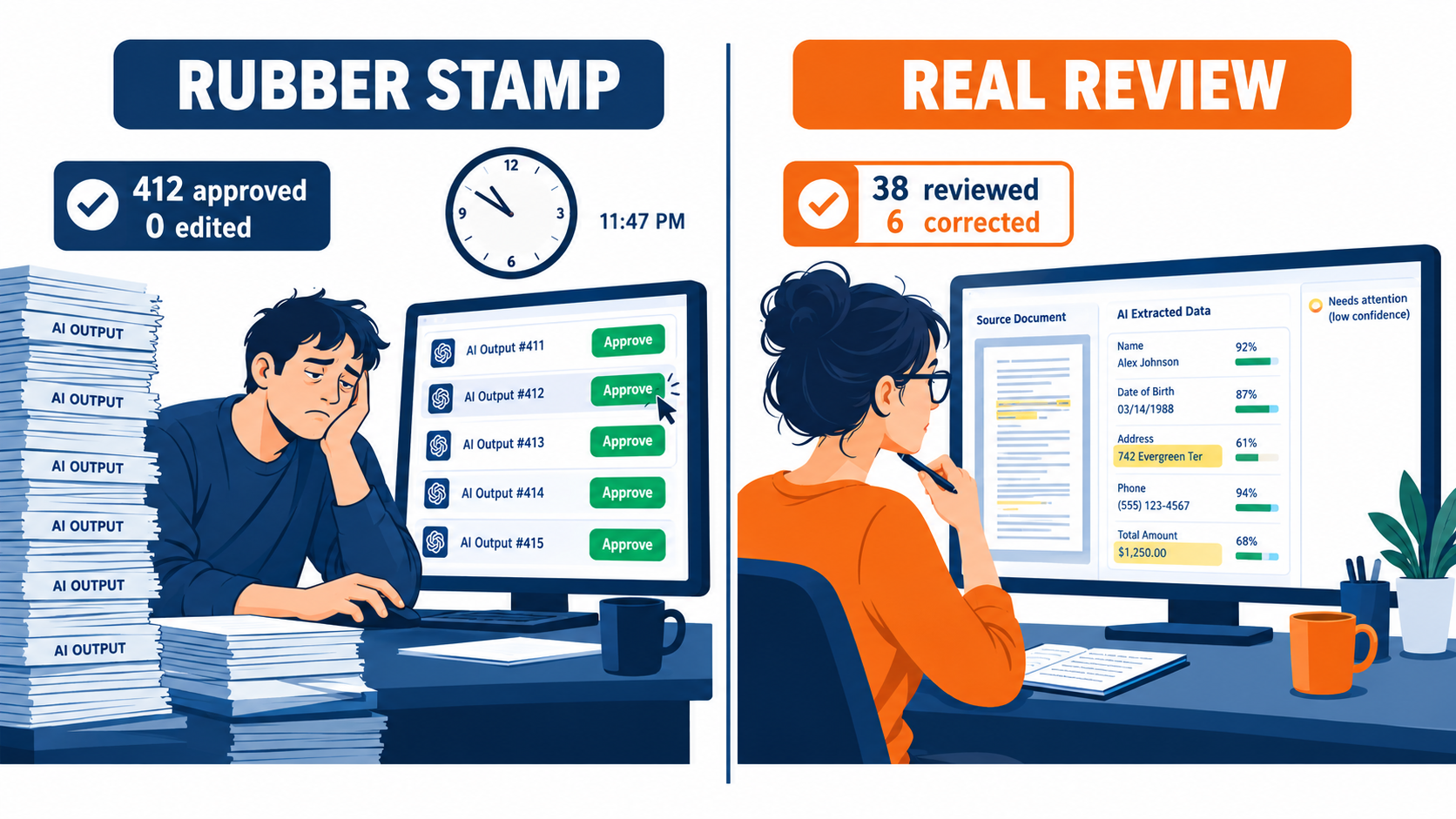
Stack a reviewer’s workload on top. If one person is expected to approve 400 AI-drafted emails a day, they can spend about a minute on each in an eight-hour day, with no breaks. At that pace, “review” becomes skimming for tone. Nobody is verifying facts.
Signs your review step has become a rubber stamp
- The edit or override rate has drifted toward zero over several months.
- Median time per review is only a few seconds for content that needs real verification.
- Reviewers can’t say what specific standard they check against.
- Errors found downstream, by customers, auditors, or finance, were all “approved.”
- Reviewers are measured on throughput, not on catches.
If two or more of these apply, your human-in-the-loop is closer to human-near-the-loop. The fix isn’t to scold reviewers. It’s to redesign the checkpoint, which the next sections cover.
A Risk-Tiered Model for Human Checkpoints
Oversight should match the risk of the task, not the enthusiasm of the project team. A simple four-tier model gives teams a shared vocabulary and stops every workflow from becoming a debate from scratch.
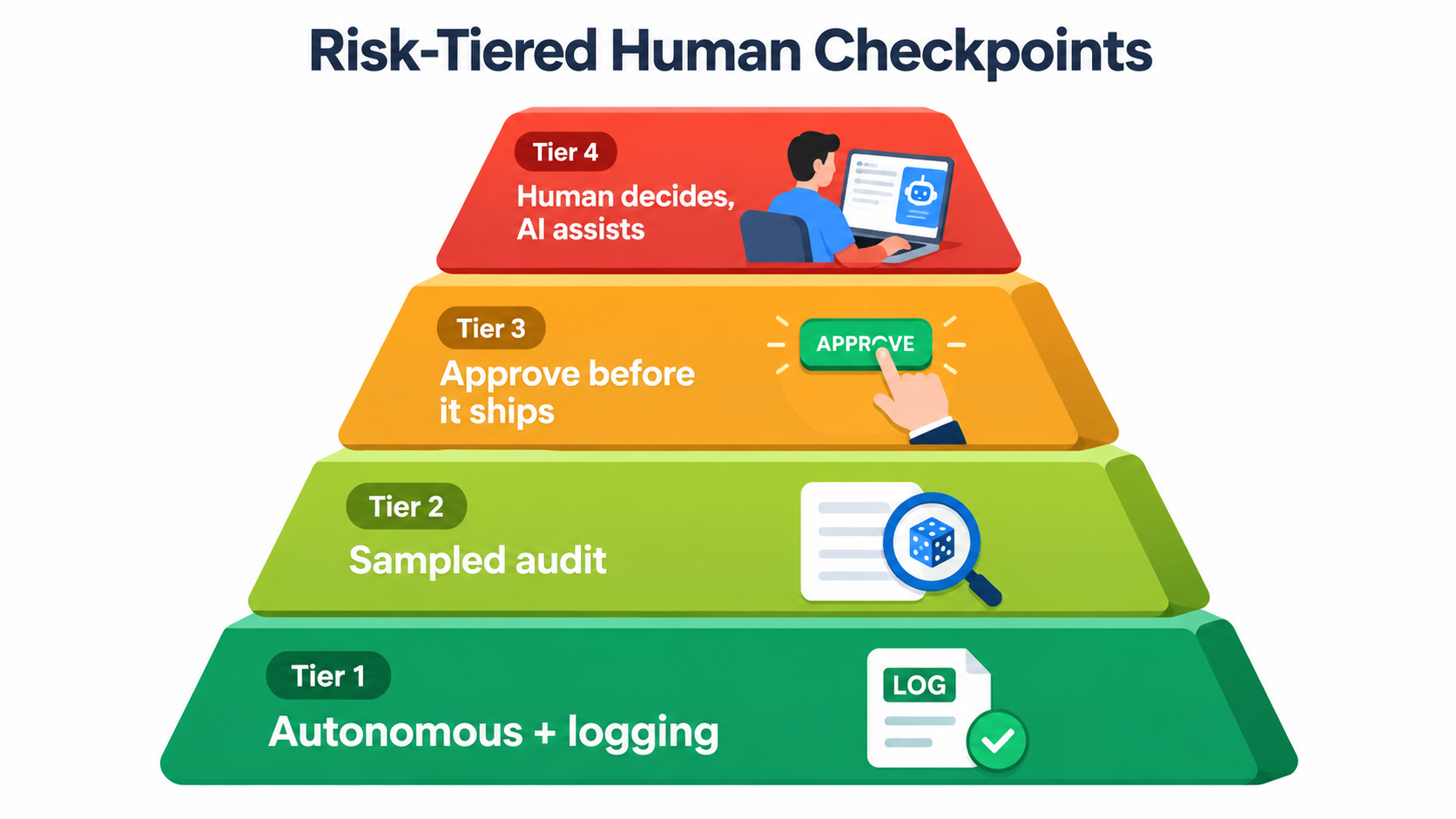
Tier 1: Autonomous with logging
Use for: tasks well inside the frontier where errors are cheap, reversible, and internal. Examples include tagging tickets, routing emails to queues, summarizing meetings for internal notes, or generating first-draft product descriptions that go through another step anyway.
Checkpoint design: no per-item review. Every input and output is logged so problems can be traced. Downstream users get an easy way to flag bad outputs, such as a thumbs-down button or a “wrong category” link.
Tier 2: Sampled audit
Use for: high-volume tasks inside or near the frontier where individual errors are moderate and fixable after the fact. Examples include AI-drafted responses to routine order-status questions, data extraction from standard invoices, or first-pass lead scoring.
Checkpoint design: outputs ship automatically, but a random sample (commonly somewhere around 2–10%, tuned to volume and risk) is reviewed against a written rubric each week. On top of that, targeted sampling pulls anything the model marks as low-confidence and anything touching sensitive keywords. If the audit error rate crosses a set threshold, the workflow drops to Tier 3 until the problem is fixed.
Tier 3: Approve before it ships
Use for: tasks near or outside the frontier, or any output that commits the business to something: money, policy, legal position, or a public statement. Examples include refund decisions above a threshold, contract clause suggestions, customer-facing policy explanations, and payments to new vendors.
Checkpoint design: nothing goes out until a named, qualified person approves it. The review interface shows the source data next to the AI output and highlights uncertain or changed elements. Volume per reviewer is capped so review stays real.
Tier 4: Human decides, AI assists
Use for: decisions with significant consequences for people or the business, such as hiring and firing, credit decisions, medical or safety matters, major pricing moves, and anything regulators may classify as high-risk.
Checkpoint design: the AI never produces a decision, only inputs to one: summaries, retrieved documents, flagged risks, or scenarios. The human forms their own view, and ideally records it before seeing any AI recommendation, to limit anchoring. This mirrors the support-agent study design, where the AI suggests and the human owns the outcome.
Assigning tiers: a quick scoring method
Score each sub-task from 1 to 3 on four dimensions:
- Frontier position: inside (1), near (2), outside (3)
- Reversibility: easily undone (1), costly to undo (2), irreversible (3)
- Exposure: internal only (1), customer-facing (2), legal, financial, or regulatory commitment (3)
- Impact on individuals: none (1), moderate (2), significant, e.g. employment, credit, or health (3)
A total of 4–5 suggests Tier 1, 6–7 Tier 2, 8–10 Tier 3, and 11–12 Tier 4. Treat any single score of 3 on impact to individuals as a floor of Tier 3 regardless of total. The numbers are a starting point for discussion, not a formula to hide behind, but they force the conversation to happen.
Where to Put the Checkpoint: Before, During, or After
Tier tells you how much oversight a task needs. Placement tells you when it happens. The same level of scrutiny can be cheap or expensive depending on where in the workflow it sits.
Pre-execution checkpoints (gates)
A gate stops the workflow until a human approves. It’s the right choice when an action can’t be undone: sending money, emailing a customer, publishing content, or changing a system of record.
The cost is latency. If your approvers are only available during business hours, a gated workflow can’t run overnight. Plan staffing, or accept that gated steps run on human time, and set customer expectations to match.
In-flow checkpoints (co-pilot)
Here the human works with the AI as the task happens. The AI suggests and the human edits and sends. Many of the gains in the research above came from this pattern.
In-flow checkpoints also resist automation bias better than gates, because the human is creating rather than just approving. Editing a draft keeps people more engaged than clicking “OK” on a finished product. The trade-off is that savings come as time per task, not headcount.
Post-execution checkpoints (audits)
Audits review outputs after they’ve shipped, on a sample or a trigger. They fit high-volume, reversible work where occasional errors can be fixed: a corrected email, an adjusted invoice code, a re-routed ticket.
Audits are cheap per item and don’t slow the workflow, but they rely on errors being fixable before they do damage. If an error’s harm happens the moment the output ships, an audit is too late.
Exception-based escalation
Most mature designs combine these with escalation rules. The AI handles the normal path autonomously or with light sampling, and specific triggers route items to a human gate:
- Model confidence below a threshold, or the model says “I’m not sure”
- Monetary value above a limit
- Presence of sensitive terms (legal threats, safety issues, bereavement, discrimination, cancellation)
- First-time counterparties, such as a new vendor or new customer segment
- Customer explicitly asks for a human
One caveat: confidence scores from language models aren’t always well calibrated. Don’t rely on them alone. Combine them with rule-based triggers you can test and explain.
Grounding as a checkpoint in its own right
Not every checkpoint needs a person. Some of the cheapest safeguards are structural. Require the AI to answer policy questions only from an approved knowledge base and cite the passage. Validate extracted numbers against the source document. Block outputs that mention prices or dates not in the retrieved data.
Had the Air Canada chatbot been constrained to quote the actual bereavement policy page, the contradiction at the heart of the case would have been far less likely. Structural checks reduce how much human reviewers need to catch, which makes their real catches more likely.
Designing the Reviewer’s Job So It Actually Works
Once you’ve placed a human checkpoint, the reviewer’s work environment decides whether it works. Most organizations put a lot of effort into the AI and almost none into the human side of the loop.
Give reviewers a standard, not just a button
“Check that it looks right” isn’t a standard. Reviewers need a short written rubric per workflow: which facts must be verified and against which source, which policy clauses apply, what counts as a reject versus an edit, and when to escalate. Keep it to one page. If it needs more, the task probably belongs in a higher tier.
Show the evidence side by side
Review interfaces should put the AI’s output next to the source it relied on: the original email, the invoice PDF, the policy text, the customer record. Highlight fields the model was least sure about, or that differ from prior patterns. Asking reviewers to open three other systems to verify one output guarantees they won’t.
Cap volume and protect time
Work out realistic review time per item by timing experts doing careful reviews, then set daily caps from that. If careful review takes 90 seconds and a reviewer has four focused hours a day for it, the cap is about 160 items, not 500. If volume exceeds capacity, the answer is a different tier or more reviewers. Quietly lowering the standard isn’t an option.
Measure catches, not throughput
If reviewers are rewarded for speed, they’ll get faster, and review will become a formality. Track and recognize caught errors, useful escalations, and feedback that improved the system. Make it clear that rejecting an AI output is a successful review, not a failure.
Rotate, and keep skills alive
Vigilance drops with monotony. Rotate reviewers across workflows or mix review with other work. Also watch for skill erosion. If junior staff only ever approve AI drafts, they may never build the judgment needed to spot errors. The support-agent study found AI helped novices learn, but that depends on them engaging with the content, not just clicking through it.
Close the feedback loop
Every edit and rejection is training data for improving prompts, knowledge bases, and rules. Set up a weekly routine where a process owner reviews the most common corrections and fixes the root cause. Reviewers who see their feedback change the system stay engaged. Reviewers who feel ignored stop giving it.
Regulation and Liability Are Starting to Codify Oversight
Human oversight isn’t only good practice any more. Courts and regulators are starting to define what’s expected, and those expectations will shape how businesses design AI automation over the next few years.
Liability stays with the business
The Air Canada decision is small in dollar terms but clear in principle: a business is responsible for what its AI tools tell customers, just as it would be for a human employee or a static web page. The American Bar Association described the case as “a helpful reminder that companies remain liable for the actions of their AI tools.”
For businesses, this means “the AI said it” isn’t a defense. Any customer-facing output that makes a commitment about price, policy, eligibility, or timing should be treated as if the company made it on purpose, because legally it did.
The EU AI Act’s human oversight requirement
The EU AI Act includes a dedicated article on human oversight for high-risk AI systems. Article 14 requires that such systems “be designed and developed in such a way, including with appropriate human-machine interface tools, that they can be effectively overseen by natural persons during the period in which they are in use.” The stated aim is to prevent or minimize risks to health, safety, and fundamental rights.
According to the AI Act Explorer’s current text, this obligation applies from 2 December 2027 for high-risk systems listed in Annex III (which covers areas like employment, access to essential services, and creditworthiness) and from 2 August 2028 for high-risk systems under Annex I. Businesses selling into the EU, or using AI in these areas, have a limited window to build oversight that is effective, not just nominal.
“Effective” is the operative word
Regulators and courts are unlikely to accept a checkbox approval step as meaningful oversight if reviewers have no time, no information, and no authority to override. The design principles in the previous section, including evidence side by side, volume caps, clear standards, and the authority to reject, are the kind of practices that let a business show its oversight is real.
Documentation as protection
Whatever jurisdiction you’re in, keep records of:
- Which tier each workflow sits in, and why
- Who the named reviewers are and what standard they apply
- Audit samples, error rates, and corrective actions
- When models, prompts, or knowledge bases changed, and what re-testing was done
This paperwork is also good management. It’s how you notice a workflow drifting before a customer or regulator does.
Measuring Whether Your Checkpoints Catch Anything
A checkpoint that’s never tested is a guess. The good news is that the metrics you need are simple, and most can come straight from your workflow tools.
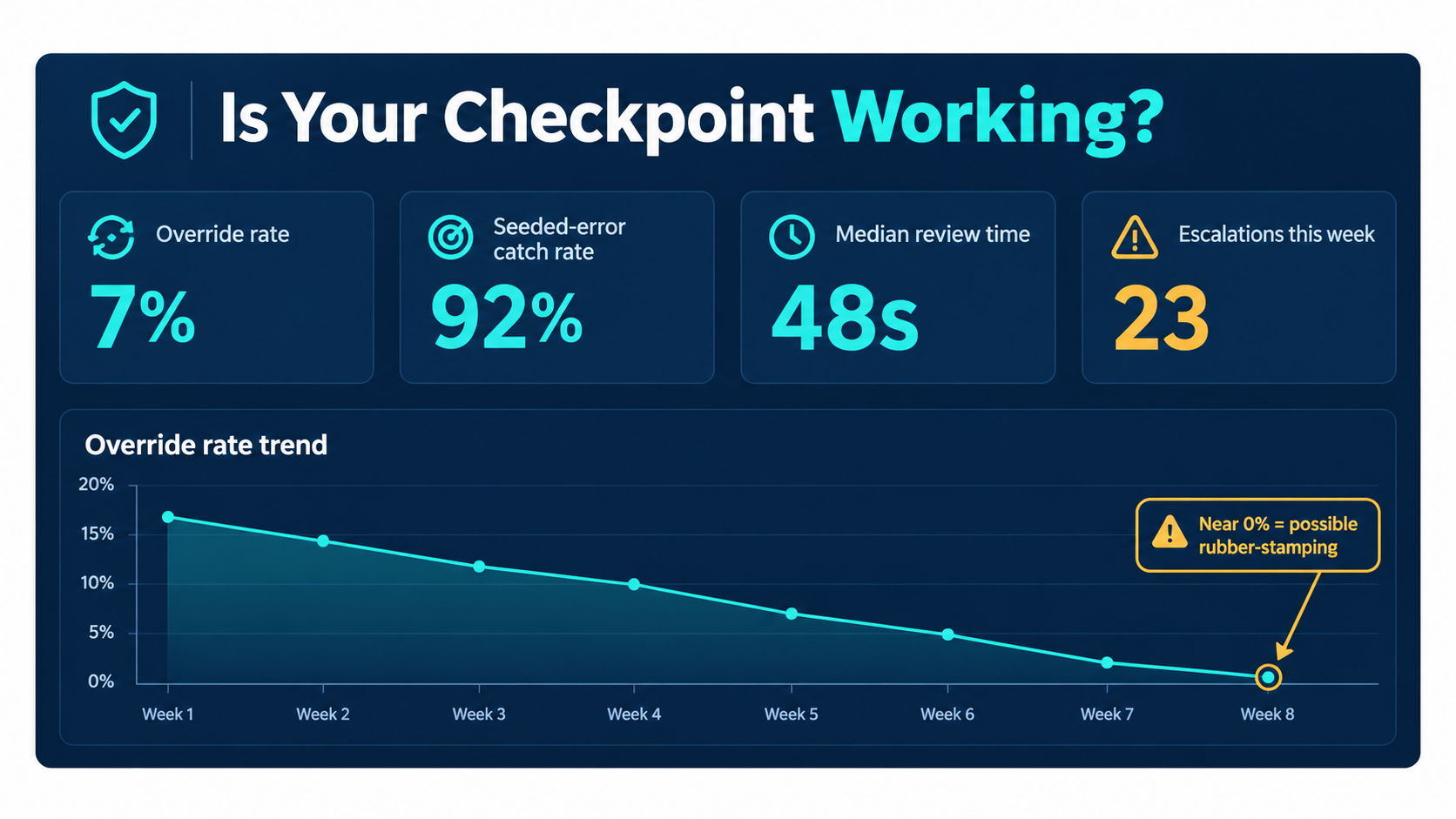
The figures in the dashboard above are illustrative, not benchmarks.
Metric 1: Override or edit rate
This is the share of AI outputs a reviewer changes or rejects. Track it per workflow and per reviewer over time. A sudden spike suggests the model or its inputs have changed. A slow slide toward zero can mean the AI is improving, or that reviewers have stopped looking. You can’t tell which from this number alone, which is why you need the next metric.
Metric 2: Seeded-error catch rate
This is the most useful and least used oversight metric. Deliberately insert known-bad outputs into the review queue, such as a wrong refund amount, a misquoted policy, or an invented date, and measure how many reviewers catch. It’s the same idea as phishing simulations in security training.
If reviewers catch most seeded errors, your checkpoint is working. If they miss many, you know the review step is weak before a real error gets through. Tell reviewers the program exists, since that alone tends to sharpen attention, but not which items are seeded.
Metric 3: Review time distribution
Look at the whole distribution, not just the average. A cluster of reviews completed in two or three seconds on content that needs verification is a red flag. Compare against the time experts take for careful review.
Metric 4: Downstream escape rate
Count errors found after the checkpoint: customer complaints, finance corrections, audit findings. Trace each back to see whether it went through a review step and why it wasn’t caught. Every escape is a design lesson.
Metric 5: Escalation health
Track how often escalation triggers fire, how quickly escalated items are resolved, and how often escalations turn out to be justified. Too few escalations may mean triggers are too loose. Too many unjustified ones means reviewers are drowning and will start ignoring them.
Setting thresholds that trigger action
Metrics only matter if they lead to decisions. For each workflow, agree in advance on thresholds such as “if sampled error rate exceeds X% for two consecutive weeks, move to Tier 3” or “if seeded-error catch rate falls below Y%, retrain reviewers and cut volume caps.” Writing these rules down before launch takes the politics out of tightening oversight later.
Putting It Together: A 30-Day Checkpoint Audit
If you already have AI automations running, you don’t need to start over. A focused 30-day audit can show where oversight is solid, where it’s nominal, and where it’s missing.
Week 1: Inventory and map
- List every AI-assisted workflow in production, including “shadow” ones staff set up on their own.
- Break each into sub-tasks and note who, if anyone, reviews each output today.
- Identify every point where an AI output reaches a customer, moves money, or changes a system of record.
Week 2: Score and tier
- Apply the four-dimension scoring (frontier position, reversibility, exposure, impact on individuals) to each sub-task.
- Compare the tier each sub-task should be in with the oversight it actually gets.
- Flag every gap where a Tier 3 or 4 task runs with Tier 1 or 2 oversight. These are your priorities.
Week 3: Test the checkpoints you have
- Run a seeded-error exercise on each existing review step.
- Pull review time distributions and override rates for the past three months.
- Interview reviewers: what do they check, against what, and how much time do they really have?
Week 4: Fix and formalize
- Close the highest-risk gaps first, usually by adding gates or escalation triggers to customer-facing commitments.
- Add structural safeguards such as grounding, validation rules, and output blocks where possible.
- Write one-page rubrics, set volume caps, and name an owner for each workflow’s oversight.
- Agree on the metrics and thresholds that will trigger future changes, and schedule a quarterly re-test.
What to expect
Most teams that run this kind of audit find a mix. Some workflows are over-reviewed, with people checking low-risk outputs that could safely drop to sampling. Others are under-reviewed, with customer-facing commitments going out unchecked. Rebalancing often cuts total review effort while lowering risk, because attention moves to where it matters.
Conclusion: Oversight Is Part of the Design, Not a Tax on It
AI automation for business is past the question of whether it works. The research is clear that it can deliver large gains. Support agents resolved 14% more issues per hour, writing tasks got 40% faster, and consultants produced much better work on tasks inside the frontier. The same research, and a growing list of real-world incidents, shows that those gains depend on how humans and machines split the work.
The businesses getting durable value from AI aren’t the ones automating the most, or the ones reviewing everything. They know where their AI is reliable and where it isn’t, match oversight to risk, and design human review so it catches things.
Key takeaways
- Map the jagged frontier for your own processes. Test sub-tasks on real historical data, because similar-looking tasks can sit on opposite sides of AI capability.
- Use risk tiers, not blanket rules. Autonomous with logging, sampled audit, approve-before-ship, and human-decides-AI-assists each have a place.
- Choose placement deliberately. Gate irreversible actions, use co-pilot patterns where engagement matters, audit high-volume reversible work, and add escalation triggers everywhere.
- Design the reviewer’s job. Written standards, evidence side by side, realistic volume caps, and rewards for catches rather than speed.
- Assume liability stays with you. Courts have already rejected the idea that a chatbot is responsible for itself, and EU high-risk oversight rules are on the calendar.
- Test your checkpoints. Seeded errors, override rates, review-time distributions, and escape rates tell you whether oversight is real.
- Revisit regularly. Models, policies, and products change, and the frontier moves with them.
The question “what can we automate?” gets an AI project started. The question “who checks the machine, and how do we know they’re catching anything?” is what keeps it running. Answer that second question before launch, and you’ll spend much less time answering for mistakes afterwards.