
Ask most Amazon sellers what their FBA inventory limit is and they’ll give you a number in units. They’ll mention their restock limit, maybe reference their IPI score, and likely say something about not wanting to get “locked out” during Q4. The mental model most sellers are still using was built during the 2021–2022 era, when Amazon’s inventory restrictions were defined in terms of ASIN-level restock limits and quarterly IPI evaluations.
That model is outdated. The system has changed, and the sellers who haven’t updated their thinking are running into problems — overpaying storage fees they didn’t predict, getting hit with low-inventory surcharges they didn’t see coming, and losing FBA allocation at exactly the wrong moment in the selling calendar.
This post is not about “hacks” to game the system. It’s a structured breakdown of how Amazon’s FBA inventory capacity framework actually works in 2026 — what the measurements mean, how the fees interact, where the real danger zones are, and what a rational inventory planning process looks like against these realities. Whether you run 10 SKUs or 1,000, the underlying logic is the same. The sellers who understand it spend less, stock out less, and stop being surprised by their monthly Seller Central statements.
Let’s go through it systematically.
From Units to Cubic Feet: How the Measurement Shift Changes Everything
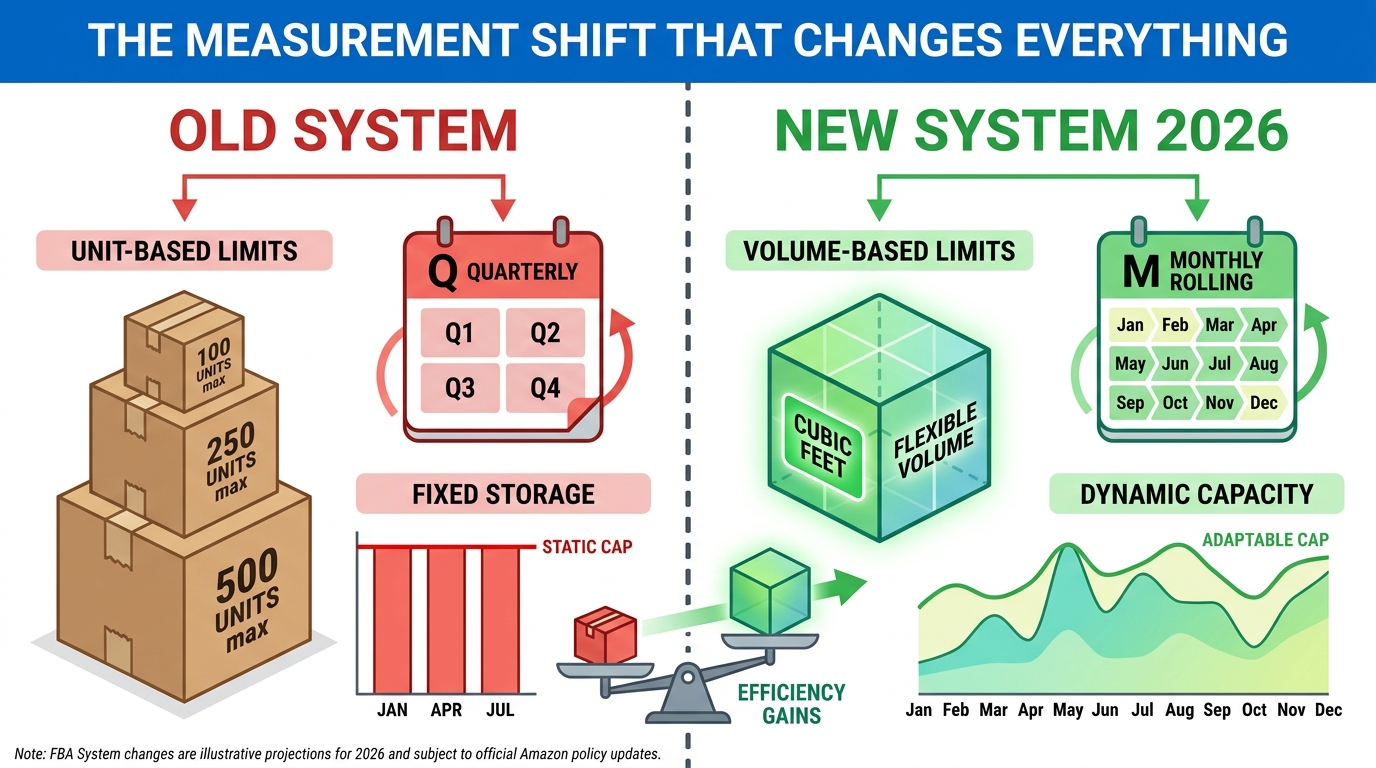
The most fundamental change in Amazon’s FBA inventory management — one that sellers continue to underestimate — is the shift from unit-based thinking to cubic-foot-based capacity. Amazon’s current system measures your FBA allocation in cubic feet per storage type, not in units, not in number of SKUs, not in dollar value of inventory.
This matters because a seller with 2,000 units of a small, flat product (like phone cases) uses dramatically less cubic footage than a seller with 500 units of an oversized product (like camping chairs). Under a unit-based mental model, the camping chair seller “wins” on limit usage. Under the cubic-foot model, they may be consuming 10–15x the FBA capacity per unit. The entire calculus of which SKUs to prioritize for FBA versus external storage changes when you think in cubic feet rather than units.
Storage Types Are Separate Allocations
Amazon doesn’t give you one giant cubic-foot bucket. Capacity limits are issued per storage type, and the storage types are distinct: standard-size, oversize, apparel, footwear, flammable, and aerosol, among others. A seller who primarily ships standard-size items does not benefit from available oversize capacity, and vice versa.
This is why it’s possible for a seller to have plenty of capacity in one storage type while being completely constrained in another. A brand that sells both compact electronics (standard) and large outdoor equipment (oversize) needs to monitor two separate capacity allocations independently and plan replenishment for each on its own timeline.
Why Volumetric Density Is Now a SKU-Selection Factor
For sellers developing new products or deciding which SKUs to prioritize for growth, cubic-foot density — the ratio of your product’s sale price to the cubic footage it occupies — has become a genuine business metric. A high-value, low-volume product generates more revenue per cubic foot of FBA capacity than a low-value, high-volume product.
This doesn’t mean only selling small, expensive products. But it does mean that when you’re deciding how aggressively to restock a marginal SKU versus a high-velocity hero product, you need to compare them in terms of cubic feet consumed, not just unit sales. Some sellers have started building internal “revenue per cubic foot” dashboards specifically because the FBA system now rewards that discipline directly.
The Practical Implication: Rethink Your Catalog Prioritization
One immediate, actionable shift: sort your FBA catalog by cubic feet consumed rather than units stored. Most sellers have never done this calculation. When you run it, you’ll often find that a handful of ASINs — usually oversize or slow-moving products — are consuming a disproportionate share of your monthly capacity allocation. That’s the first place to look for space to reclaim.
The Monthly Recalculation Cycle — and Why Timing Your Shipments Now Matters More Than Volume
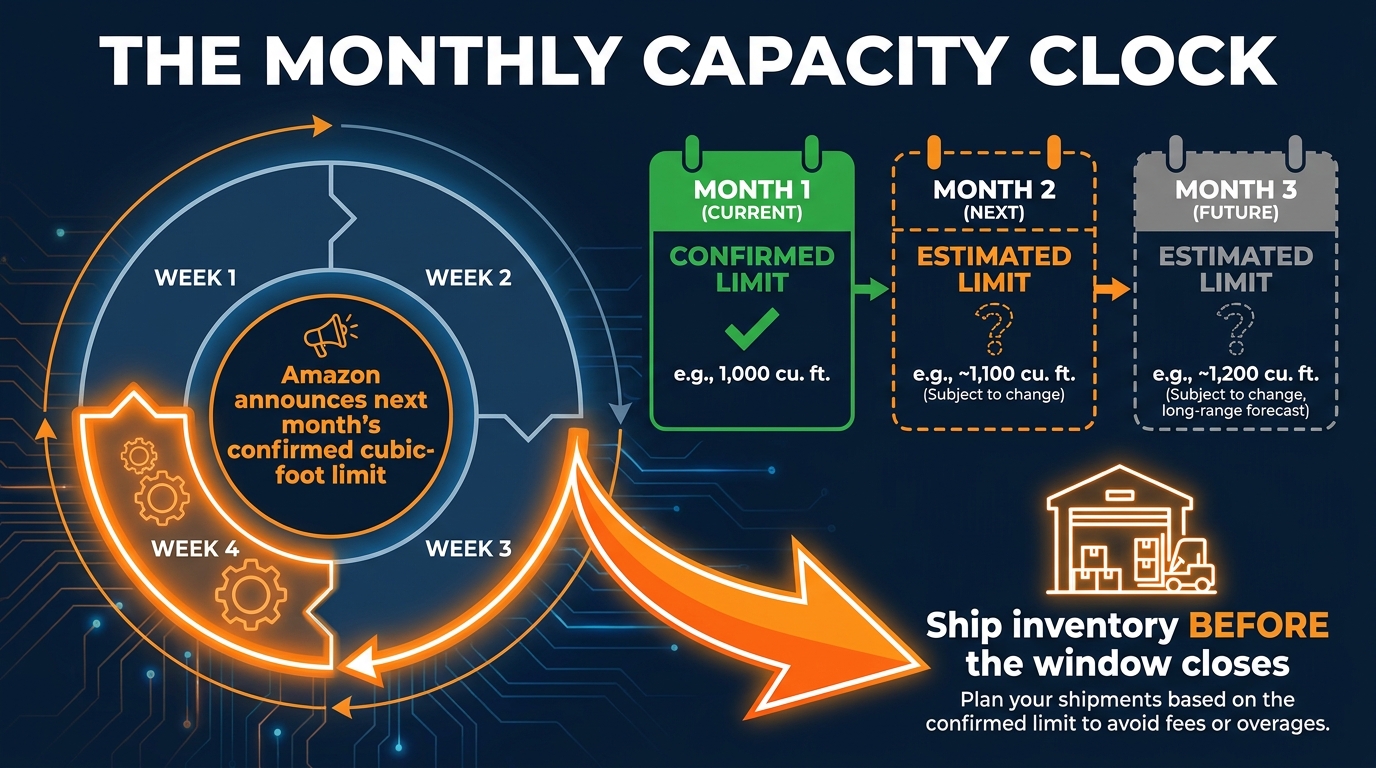
Amazon’s FBA capacity limits are now issued on a monthly cycle, replacing the older quarterly system. The mechanics of that cycle have specific timing implications that sellers need to internalize if they want to avoid being caught flat-footed.
Here is how it works: In the third or fourth week of each month, Amazon publishes two things in your Capacity Monitor — the confirmed capacity limit for the upcoming month, and estimated (not guaranteed) limits for the following two months. The confirmed limit is the number you plan against. The estimated limits give you a planning horizon for ordering decisions, but they can change.
What “Confirmed” and “Estimated” Actually Mean in Practice
The confirmed limit is Amazon’s binding allocation — the cubic footage you’re guaranteed for the upcoming month. The estimated limits for months two and three are Amazon’s best forecast of what your allocation will look like, based on your current performance, IPI score, sales velocity, and fulfillment center availability. They are directionally useful but should not be treated as guaranteed numbers for purchase order decisions.
The practical planning rule most experienced sellers follow: make firm purchase decisions based on your confirmed limit, and use estimated limits only for provisional supplier conversations or lead-time management. Don’t place a large PO against an estimated limit that hasn’t been confirmed yet.
The Timing Trap Most Sellers Fall Into
Because the confirmed limit comes in the third or fourth week of each month, sellers who wait for the confirmation before ordering face a lead-time problem. If your supplier needs 45 days to manufacture and ship, and you don’t know your confirmed FBA allocation until the 22nd of the month, you’re effectively making replenishment decisions blind — or not at all — for inventory that won’t arrive for six weeks.
The solution is to build a two-track planning system. Use your estimated limits to trigger supplier conversations and initiate production. Use your confirmed limit to finalize inbound shipment quantities. This requires accepting some uncertainty in the supplier conversation, but it’s the only way to avoid a perpetual lag between allocation knowledge and inventory availability.
Sell-Through Rate Is the Flywheel
Monthly recalculation means your allocation tomorrow is influenced by how well you sell today. Amazon factors your sales velocity, sell-through rate, and inventory health into its capacity calculations. A seller who consistently sells through inventory quickly gets treated differently — typically more favorably — than one who lets inventory sit and age. This is not a coincidence. Amazon’s capacity system is designed to allocate space to sellers who use it productively.
The implication: your marketing and repricing decisions during a given month directly affect your FBA allocation the following month. Sellers who understand this connection tend to be more aggressive about running promotions on slow-moving inventory precisely because they recognize that clearing stock quickly protects their allocation for the following period.
Restock Limits vs. Storage Limits vs. Capacity Limits — Clearing Up the Confusion
One of the most persistent sources of confusion in the FBA seller community is the terminology Amazon uses to describe its various inventory controls. “Restock limit,” “storage limit,” and “capacity limit” are not synonyms. They describe different things, and conflating them leads to planning errors.
Capacity Limits: The Primary Constraint
FBA capacity limits are the monthly, cubic-foot-based ceilings on the total inventory you can have stored across Amazon’s fulfillment network at any given time. This is the primary constraint most sellers will encounter. It’s measured in cubic feet, broken down by storage type, and recalculated monthly. The Capacity Monitor in Seller Central is where you track it.
Storage Limits: The IPI-Linked Volume Control
Storage limits come into play if your Inventory Performance Index score falls below Amazon’s threshold. If you’re above the threshold (generally around 400, though Amazon can adjust this), storage limits are not an active constraint — your capacity limit is. If your IPI falls below the threshold, Amazon can impose additional storage-volume restrictions on top of the standard capacity system. This creates a two-layer constraint for low-IPI sellers: their base capacity limit plus an IPI-triggered storage restriction.
Restock Limits: The Inbound Flow Control
Restock limits govern how much new inventory you can ship into Amazon’s fulfillment network during a given period — they control inbound flow, not total stored volume. Crucially, Amazon has clarified that restock limits apply regardless of your IPI score. A seller with a perfect IPI of 800 still has restock limits. These limits are about managing inbound shipment volumes across Amazon’s network, not about penalizing performance.
The practical confusion arises because restock limits and capacity limits interact. If your restock limit is low, you can’t top up your FBA inventory to the full level your capacity limit would otherwise allow. You need to monitor both, because a bottleneck in either one will constrain your total FBA inventory level.
The Takeaway on Terminology
When troubleshooting an inventory constraint in Seller Central, identify which specific limit you’re hitting before deciding on a response. Capacity Manager can help with capacity limits. IPI improvement helps with storage limits. Restock limits require different planning — typically splitting shipments more frequently or adjusting lead times. Treating all three as the same problem leads to wasted effort and money spent in the wrong place.
IPI Score in 2026: Still Relevant, Still Misunderstood
The Inventory Performance Index score remains a real factor in the FBA system, even if its role has evolved. Understanding what it actually measures — and more importantly, what moves it — is essential for maintaining healthy FBA access.
What IPI Actually Measures
Amazon has never published a precise formula for IPI calculation, but the inputs it describes officially point to four key factors: sell-through rate, excess inventory, stranded inventory, and in-stock rate on top sellers. These are not equally weighted in every account — different seller profiles seem to respond differently to changes in each factor — but the directional logic holds consistently.
What IPI is measuring, at a fundamental level, is how efficiently you’re using Amazon’s fulfillment network. A seller who maintains high velocity, keeps stock fresh, resolves listing issues quickly, and doesn’t let inventory pile up is a more efficient user of Amazon’s cubic footage. IPI rewards that efficiency.
The 400 Threshold and What’s Changed
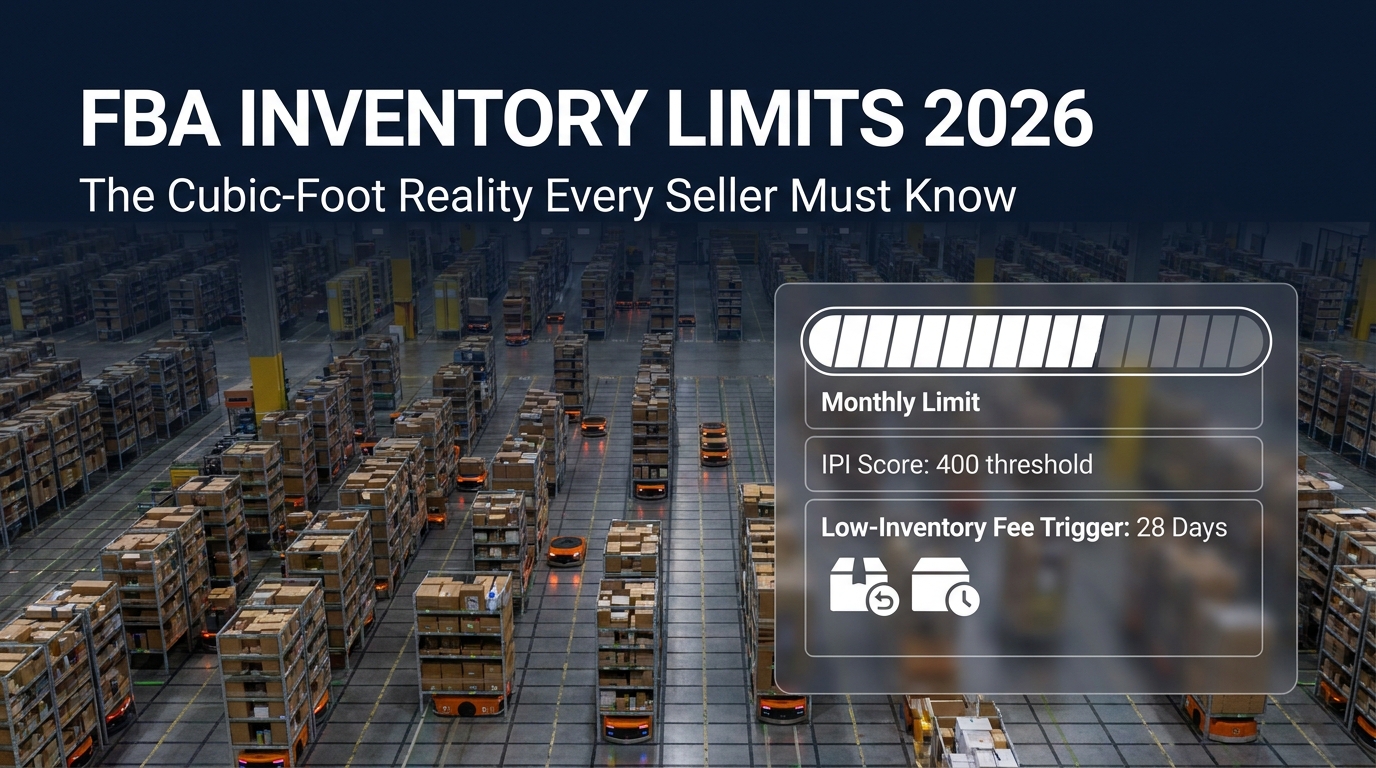
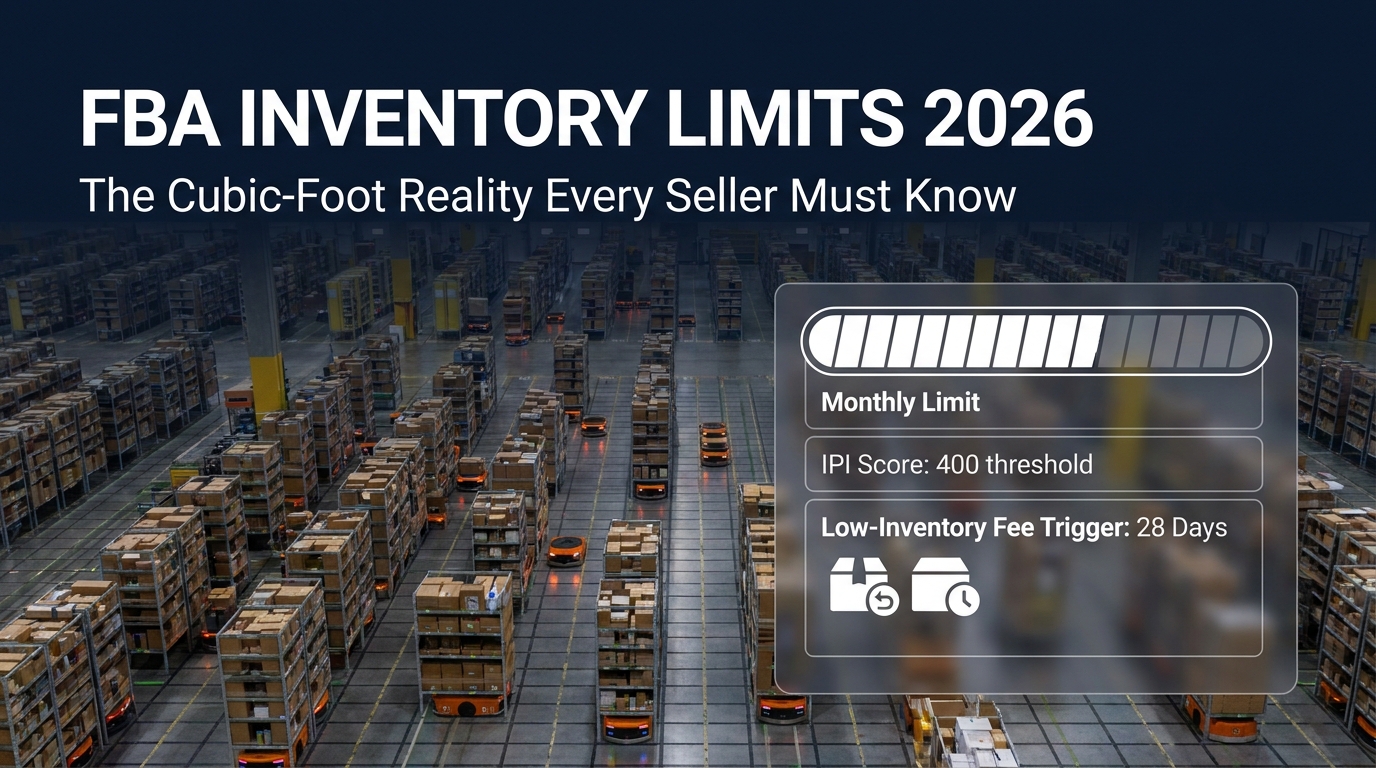
The most widely cited IPI threshold for avoiding storage restrictions is 400. Sellers above 400 generally operate under the standard capacity limit system. Sellers who fall below 400 face the additional storage-limit layer described above. Some third-party sources in early 2026 reported a revised threshold of 350, but this has not been confirmed in official Amazon documentation, and the safer operational assumption remains 400 as the minimum to stay above.
What has become clearer in 2026 is that IPI matters even for sellers well above 400. Amazon uses IPI as one of the inputs in its monthly capacity calculation. A seller hovering at 420 is not treated identically to one at 650. Higher IPI is generally correlated with more generous capacity allocations, faster notification of limit increases, and more favorable treatment in Capacity Manager requests.
The Fastest IPI Improvements — In Order of Impact
Amazon’s own guidance identifies the highest-leverage IPI improvement actions, and seller experience generally confirms the ranking:
- Fix stranded inventory immediately. Stranded inventory — units in the fulfillment network that aren’t actively listed — drags IPI because the units consume space but generate no sales. Stranded inventory shows up in Seller Central’s Fix Stranded Inventory report. Resolving it is usually the quickest IPI win available.
- Reduce excess inventory. Excess inventory is units beyond what Amazon’s demand forecast suggests you need. Removing or discounting excess stock reduces the penalty in your IPI calculation. Creating removal orders or running Lightning Deals on slow SKUs accomplishes this.
- Improve sell-through on existing stock. Running sponsored ads, promotions, or repricing on inventory that’s moving slowly increases your sell-through rate without requiring you to add new inventory to the mix.
- Keep top sellers in stock. Out-of-stock events on your highest-velocity ASINs damage IPI through the in-stock rate component. Maintaining at least 30 days of coverage on your best sellers is the standard recommendation.
The sequence matters. Fix stranded inventory first because it’s usually resolvable in a few hours and the IPI impact can show up relatively quickly. Then address excess inventory. Then work on sell-through improvement.
The Low-Inventory-Level Fee — The Penalty That Hits You From the Other Direction
If the aged inventory surcharge (covered in the next section) is the penalty for having too much inventory, the low-inventory-level fee is the penalty for having too little. Together, they define a narrow operating band that sellers are expected to stay within. Understanding both fees — and how they interact — is central to rational FBA inventory planning in 2026.
How the Fee Is Triggered
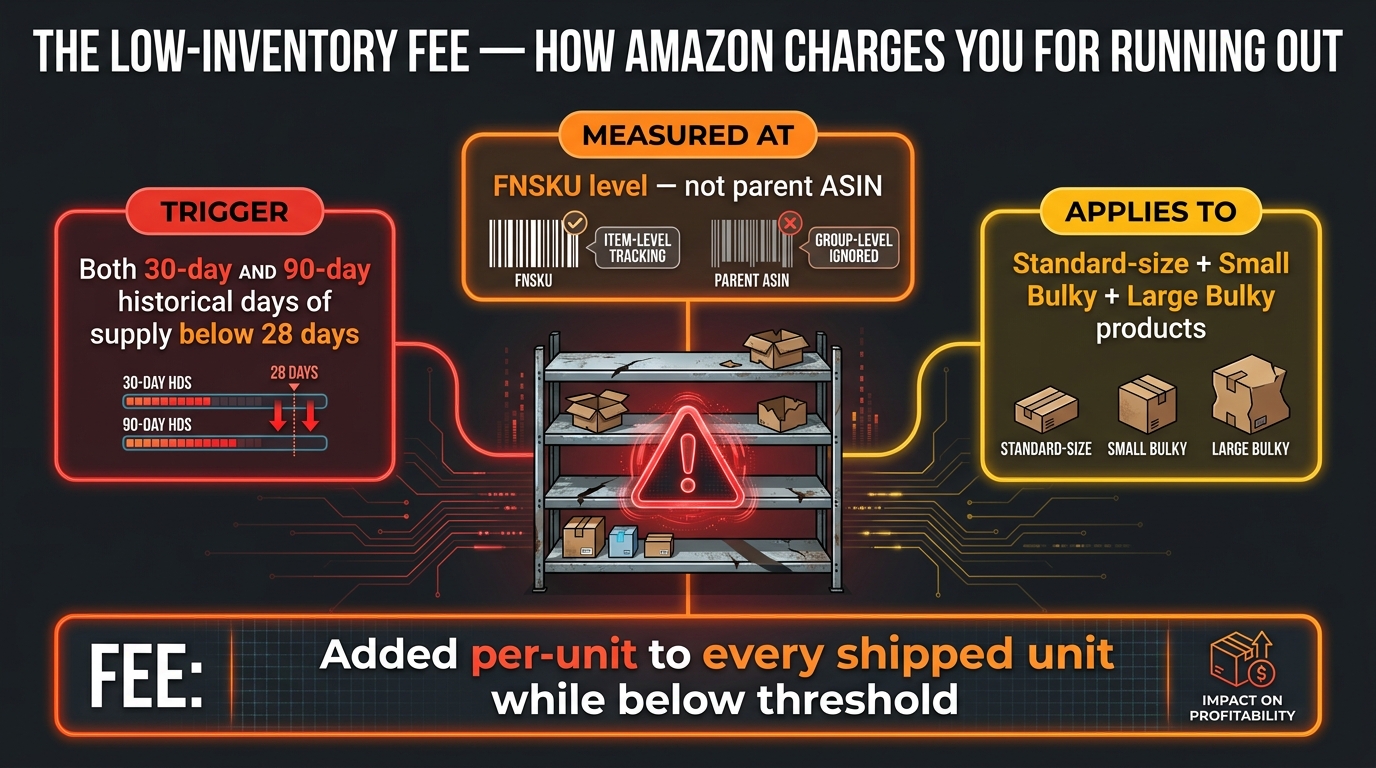
The low-inventory-level fee applies when both of the following conditions are true simultaneously:
- Your 90-day historical days of supply for a given FNSKU falls below 28 days
- Your 30-day historical days of supply for that same FNSKU also falls below 28 days
The dual-threshold requirement is important. A temporary dip that brings your 30-day figure below 28 days won’t trigger the fee if your 90-day figure is still healthy. Amazon is measuring sustained low-inventory conditions, not brief spikes. The fee is designed to penalize sellers who chronically understock rather than those experiencing an occasional stock-low event.
Measurement Level: FNSKU, Not Parent ASIN
This is the detail that catches sellers off guard most often. Amazon measures the low-inventory threshold at the FNSKU level — each individual sellable unit with its own FBA barcode — not at the parent ASIN level. A product with multiple size or color variations is evaluated separately for each variant. If your medium blue version is critically low while your large red version has healthy stock, the medium blue will still trigger the fee even though the parent ASIN appears to have inventory.
For sellers managing products with many variations, this creates a genuine management challenge. It’s not enough to monitor parent-ASIN inventory levels in aggregate. You need FNSKU-level visibility, which requires either manual monitoring in Seller Central’s inventory reports or a third-party inventory management tool that tracks at this level of granularity.
Which Products Are Affected in 2026
In 2026, the low-inventory-level fee applies to:
- Standard-size FBA products
- Small Bulky products
- Large Bulky products
Grocery products are exempt. Extra-large products follow different guidelines. The expansion to include Small and Large Bulky categories was a 2026 change that caught some sellers in those size tiers unprepared.
The Financial Impact of Sustained Low Inventory
The fee is added per-unit to your FBA fulfillment fee on every unit shipped while your FNSKU remains below the threshold. This means it compounds with your sales velocity — the faster you’re selling, the more units get hit with the surcharge while you’re restocking. A high-velocity ASIN that runs low for even a two-week period can generate a meaningful low-inventory fee bill, particularly in categories where fulfillment fees are already a significant cost component.
The most straightforward way to avoid the fee is to maintain at least 28 days of forward coverage on every FNSKU. In practice, most experienced FBA sellers target 30–45 days of supply as a comfortable buffer — enough to avoid the low-inventory fee while not pushing into aged inventory territory on slower-moving products.
The Aged Inventory Surcharge: What the New Tiering Actually Costs You
Amazon renamed the long-term storage fee to the aged inventory surcharge, and the name change came with substantive modifications to both the fee structure and the assessment timing. The core concept hasn’t changed — Amazon charges extra for inventory that sits in its fulfillment centers for extended periods — but the 2026 tiering makes the financial stakes clearer and higher for truly neglected inventory.
When the Surcharge Clock Starts
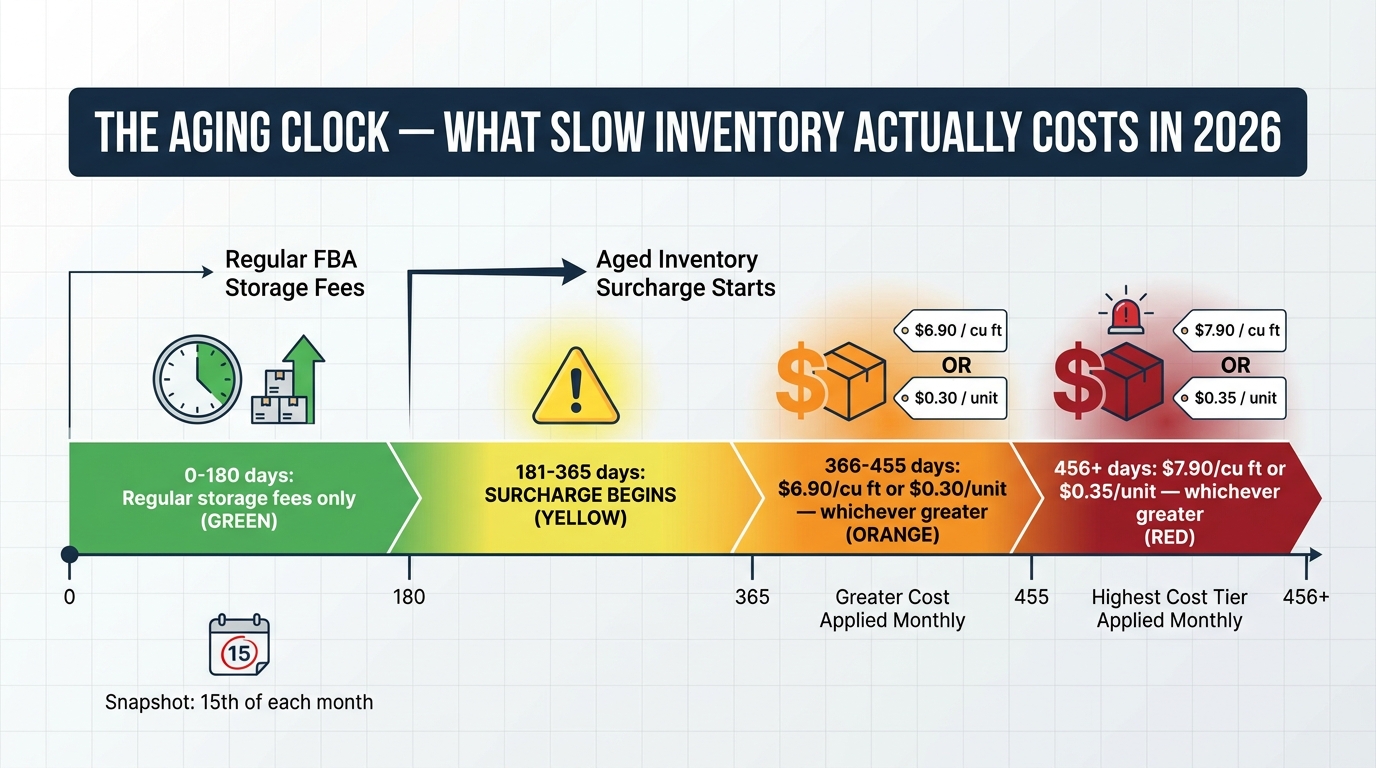
The aged inventory surcharge kicks in at 181 days of storage in Amazon’s fulfillment network. Inventory stored for 180 days or less is subject only to regular monthly FBA storage fees. Day 181 is when the surcharge layer begins.
Amazon takes a snapshot of your FBA inventory on the 15th of each month and applies the surcharge based on that snapshot. The charge typically posts to your account a few days after the 15th. This means there is a specific date each month when aged inventory is counted — and sellers who understand this can make removal or disposal decisions before the 15th to avoid the charge for that period.
The 2026 Fee Tiers
Amazon’s 2026 aged inventory surcharge tiers work on a “greater of” basis — you pay whichever is higher, the per-unit charge or the per-cubic-foot charge:
- 0–180 days: Regular monthly storage fees only. No surcharge.
- 181–365 days: Surcharge begins. (Verify the exact current rates for this tier in your Seller Central fee schedule, as Amazon adjusts them periodically.)
- 366–455 days: $6.90 per cubic foot or $0.30 per unit — whichever is greater.
- 456+ days: $7.90 per cubic foot or $0.35 per unit — whichever is greater.
The “greater of” structure creates an important dynamic: it’s specifically designed to ensure that even large, low-cost items pay meaningful fees. A product that occupies significant cubic footage but has a very low unit cost can’t “escape” by having a low per-unit charge — the per-cubic-foot floor catches it.
Practical Management: The 150-Day Alert
Most sophisticated FBA sellers set an internal alert at 150 days of storage age — 30 days before the surcharge begins. At that point, you have a decision window: can this inventory be sold through organically before day 181, or do you need to take action? Actions include running a promotion or Lightning Deal to accelerate sales, reducing the price to move units, creating a removal order to pull inventory back (at a cost), or requesting disposal.
The economics of early removal versus paying the surcharge are not always obvious. For low-cost, large-volume items, removal can be cheaper than the accumulating surcharge. For high-margin, small-size items, continuing to pay storage fees while running promotions may make more sense. The calculation needs to be run product-by-product, not as a blanket policy.
The Compounding Effect With Capacity Limits
Aged inventory creates a double problem. It triggers the surcharge directly, and it also consumes cubic footage in your FBA capacity allocation — space that could be occupied by fast-moving inventory. A seller with 500 cubic feet of aged inventory sitting at 300 days old is paying the surcharge on those units AND losing 500 cubic feet of capacity they could use for products that actually sell.
This is the reason Amazon frames aged inventory cleanup as an IPI improvement action. It’s not just about fee avoidance — it’s about freeing up capacity for better-performing inventory, which improves sell-through, which improves IPI, which improves next month’s capacity allocation. The connection is direct and mechanical.
Capacity Manager — Amazon’s Pay-to-Play Extra Space System
When a seller needs more FBA capacity than their standard monthly allocation provides, Amazon offers an official mechanism to request it: Capacity Manager. This is not a workaround or an undocumented feature — it’s Amazon’s designed solution for sellers who need to exceed their baseline allocation, and it works on a bidding model.
How the Bidding System Works
In Capacity Manager, you specify:
- The storage type you need additional capacity in
- The future time period you want the extra space for
- The additional cubic footage you’re requesting
- Your maximum reservation fee per cubic foot you’re willing to pay
Amazon then allocates available extra capacity starting with the highest bids first until available capacity is exhausted. You don’t pay the reservation fee upfront — Amazon grants or denies your request based on available capacity and bid competitiveness, and you pay after the period if the request was granted.
Performance Credits Can Offset the Fee
There’s a meaningful nuance in how the reservation fee is charged: Amazon offers performance credits based on sales made using the requested extra capacity. If the inventory you moved into that additional space sells well, the credits can offset some or all of the reservation fee. This means the effective cost of Capacity Manager space depends on how well the inventory you’re placing there performs — which is another way the system is designed to reward sellers who use allocated space productively.
When Capacity Manager Makes Sense — and When It Doesn’t
Capacity Manager is most cost-effective in a few specific scenarios: pre-Q4 buildup when you have confident demand forecasts, a planned promotional event (Prime Day, Black Friday) where extra inventory is clearly justified by projected velocity, or a new product launch where initial demand is expected to exceed your baseline allocation.
It makes less sense as a routine solution for sellers who are simply overstocked on slow-moving products. In that scenario, you’re paying a reservation fee to store inventory that isn’t generating the performance credits needed to offset the cost — you end up paying the full fee on top of your regular storage fees, while the underlying problem (slow inventory) remains unaddressed.
The rule of thumb: use Capacity Manager for velocity, not for storage. If the extra space will be filled with inventory that will sell through quickly, the bid can be economical. If it’s filled with inventory you’re struggling to move, the economics deteriorate fast.
AWD and 3PL: The Two-Layer Inventory Strategy Gaining Traction
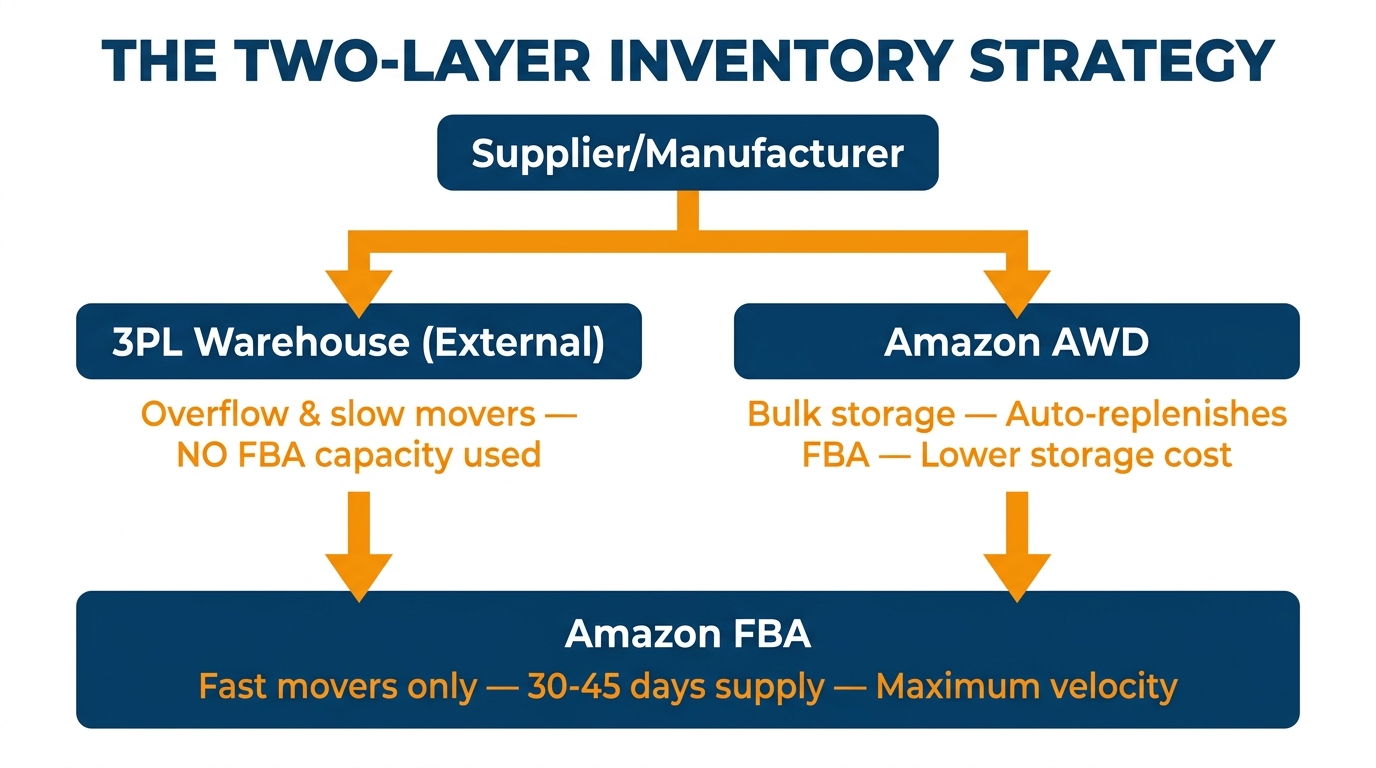
As FBA capacity limits have become tighter and monthly, a growing number of sellers have adopted a two-layer inventory approach: maintaining a lean, fast-moving stock position in FBA while keeping deeper inventory reserves in external storage — either Amazon’s own AWD program or a third-party logistics provider (3PL). Understanding the tradeoffs between these options is increasingly important for any seller operating at significant volume.
Amazon AWD: The Managed Buffer Layer
Amazon Warehousing and Distribution (AWD) is Amazon’s own bulk-storage program, designed explicitly as the layer between your supplier and FBA. AWD inventory doesn’t count against your FBA capacity limits — it’s stored in a separate network — and Amazon’s auto-replenishment feature can automatically transfer units from AWD into FBA as FBA stock is depleted.
The financial case for AWD rests on a few factors. AWD storage rates are generally lower than FBA storage rates, particularly for bulk volumes. AWD inventory is positioned to replenish FBA quickly, which reduces stockout risk without requiring you to keep months of supply in FBA. And when auto-replenishment is active and the 70% threshold conditions are met, AWD sellers can access certain FBA fee exemptions.
However, AWD pricing is not static. In 2026, West Region AWD storage sits at approximately $0.57 per cubic foot per month, while other regions run around $0.48 per cubic foot per month. Transportation fees for moving inventory from AWD to FBA apply at approximately $1.40 per cubic foot plus $1.40 per box processed. These costs need to be modeled against your specific product size and sales velocity to determine whether AWD actually saves money relative to keeping inventory in FBA or using an external 3PL.
Third-Party Logistics (3PL): The Flexibility Layer
External 3PLs offer more control over how your buffer inventory is stored and managed, at the cost of requiring more active management on your part. A 3PL arrangement means you control the facility, the handling, and the replenishment decision-making entirely. You’re not constrained by Amazon’s auto-replenishment thresholds or AWD eligibility criteria.
The tradeoff is operational overhead. Working with a 3PL requires managing another supplier relationship, handling inbound shipping to both the 3PL and Amazon’s fulfillment centers, and making manual replenishment decisions that AWD handles automatically. For large catalogs with complex inventory needs, this complexity can be significant.
The Decision Framework: AWD vs. 3PL
The choice between AWD and a 3PL — or a combination of both — generally comes down to three variables:
- ASIN eligibility: Not all products qualify for AWD auto-replenishment. If your key products don’t qualify, AWD’s main advantage diminishes significantly.
- Replenishment cadence: AWD auto-replenishment works well for steady-state inventory. If you have highly seasonal products or need precise control over FBA inbound timing, a 3PL may give you more flexibility.
- Cost per cubic foot: Model the all-in costs of AWD (storage + transfer + processing) against your 3PL’s rates for storage plus shipping to FBA. Include the time value of the operational management required.
Many mid-to-large sellers end up running both: AWD for their core, high-velocity ASINs that qualify for auto-replenishment, and a 3PL for seasonal products, new launches, or items that don’t meet AWD criteria. This combination gives them the cost efficiency and automation benefits of AWD where it applies, and the flexibility of 3PL where AWD falls short.
The Inventory Math That Actually Works in 2026
The FBA system’s fee structure in 2026 effectively defines a target inventory range for every SKU you sell. Go too low, and you pay the low-inventory-level fee. Go too high, and you accumulate aged inventory surcharges and consume capacity that could be generating more revenue. Staying in the productive middle requires some basic math, applied consistently.
Calculating Your Target FBA Supply Level
For each FNSKU, your target FBA supply level should satisfy the following conditions:
- Minimum: Enough units to maintain at least 28 days of supply based on your trailing 90-day sales velocity. In practice, target 35–45 days to give yourself a buffer above the 28-day low-inventory threshold.
- Maximum: No more than 90–120 days of supply in FBA for most product categories. Beyond this, you’re consuming cubic footage inefficiently and approaching the 181-day aged inventory threshold for any portion of the stock that arrives early.
The practical calculation for replenishment looks like this: take your average daily unit sales rate (based on trailing 30 or 90 days, whichever is more representative), multiply by your target days of supply (say 45), add a safety stock buffer for lead time variability, and subtract your current FBA stock. The result is your reorder quantity.
Lead Time Is the Variable That Breaks Every Formula
The formula above works cleanly in steady-state conditions. It breaks when lead times are uncertain or longer than your supply window. If your supplier needs 60 days from order to Amazon receiving, and your monthly capacity limit is confirmed only 8–10 days before the month begins, there’s a structural timing mismatch that no spreadsheet can fully solve.
Experienced sellers manage this in two ways. First, they maintain a rolling purchase order schedule based on estimated limits, finalizing specific quantities once the confirmed limit is known. Second, they use buffer stock at a 3PL or AWD to bridge the gap — keeping 30–45 days of supply in external storage that can feed FBA while waiting for a fresh inbound shipment to arrive.
The Cubic-Foot Budget Allocation Across SKUs
Once you know your total monthly FBA capacity limit in cubic feet, allocate it across your SKUs based on revenue productivity, not unit count. A simple allocation model ranks each SKU by its revenue-per-cubic-foot metric, then assigns FBA capacity in descending order — your most productive SKUs get full allocation first, and lower-productivity SKUs get whatever remains, with overflow going to 3PL or AWD.
This discipline prevents a common failure mode: sellers who spread limited FBA capacity evenly across their catalog, leaving high-velocity products under-stocked while slow movers occupy space they don’t need. FBA allocation is finite. Treating it as a scarce resource to be prioritized — rather than a shared pool to be distributed equally — produces meaningfully better unit economics.
What to Monitor Weekly, Monthly, and Quarterly
The FBA inventory system in 2026 rewards sellers who check the right metrics at the right intervals. Here is a practical monitoring checklist organized by cadence.
Weekly Monitoring
- Stranded inventory: Check the Fix Stranded Inventory report in Seller Central weekly. Stranded units contribute zero sales velocity and drag IPI. Resolve each stranded listing promptly — usually within 48 hours of identification.
- FNSKU-level days of supply: Review your inventory health dashboard for any FNSKUs approaching the 28-day threshold. Any FNSKU below 35 days of supply should have an active replenishment plan in place.
- FBA capacity utilization: Monitor how much of your monthly capacity limit you’re using versus what remains. If you’re below 70% utilization mid-month, you may have room to pull forward a shipment you’d planned for later. If you’re at 90%+ with two weeks left, manage inbound shipment timing carefully.
Monthly Monitoring
- Capacity limit confirmation: In week three or four, check Capacity Monitor for your confirmed next-month limit and updated estimates for months two and three. Adjust your purchase orders and shipment schedules accordingly.
- IPI score review: Review your IPI score and the component metrics. If the score has dropped since the previous month, identify which component is driving the decline and take targeted action before the next monthly calculation.
- Aged inventory review: On the 10th of each month (before the 15th snapshot), run the Inventory Age report and identify any units crossing or approaching 150 days. Decide by the 13th whether to take action before the snapshot date.
- AWD and 3PL inventory levels: Reconcile your total supply chain inventory — FBA + AWD + 3PL — against your sales velocity projections. Identify any SKUs where the sum of supply chain stock is misaligned with expected demand over the next 90 days.
Quarterly Monitoring
- Catalog productivity audit: Every quarter, run a full audit of your FBA catalog sorted by revenue per cubic foot. Identify the bottom 20% of performers and evaluate whether each one justifies continued FBA placement or should be moved to 3PL or removed entirely.
- Capacity Manager review: Assess whether any upcoming seasonal events or new product launches warrant a Capacity Manager request. If Q4 is approaching, consider submitting requests 6–8 weeks in advance to secure allocation before it fills up.
- Supplier lead time audit: Review actual lead times for your top 10 suppliers against your planning assumptions. If actual lead times have drifted from your planning model, update your reorder points before they cause a stockout.
- Fee impact review: Pull a quarterly summary of aged inventory surcharges and low-inventory-level fees paid. These are visible in your Seller Central transaction reports. If either fee is material relative to your fulfillment costs, identify the specific ASINs responsible and address the root cause.
The Sellers Who Navigate This Well — and What They Do Differently
The FBA inventory system in 2026 is not designed to be punitive — it’s designed to allocate Amazon’s fulfillment capacity to the sellers who use it most productively. Every major element of the system, from the cubic-foot measurement to the monthly recalculation cycle to the low-inventory fee, reinforces the same underlying logic: FBA works best when inventory moves quickly and is managed tightly.
The sellers who struggle under these rules are typically not struggling because of bad products or bad pricing. They’re struggling because they’re using a mental model built for an older version of the system — one that thought in units rather than cubic feet, that planned around quarterly evaluations rather than monthly windows, and that treated all inventory roughly the same regardless of velocity.
The sellers who navigate these constraints well share a few consistent characteristics. They know their cubic-foot footprint by SKU. They track FNSKU-level days of supply, not just parent-ASIN totals. They make the aged inventory calculation before the 15th of every month, not after. They use Capacity Manager selectively for velocity-driven events, not as a default solution for overstocking. And they run a two-layer supply chain — FBA for fast movers, external storage for everything else — that keeps their FBA capacity filled with the right inventory at the right time.
None of this is complicated. It’s systematic. The FBA system rewards sellers who are systematic about it, and it penalizes those who aren’t — reliably, measurably, and every month.
The core discipline of FBA in 2026 is this: treat your monthly cubic-foot allocation as a finite, performance-driven asset that needs to be earned, optimized, and renewed — not assumed. Sellers who adopt that mindset stop being surprised by their Seller Central statements. That’s the competitive advantage hiding inside a system most sellers still find confusing.