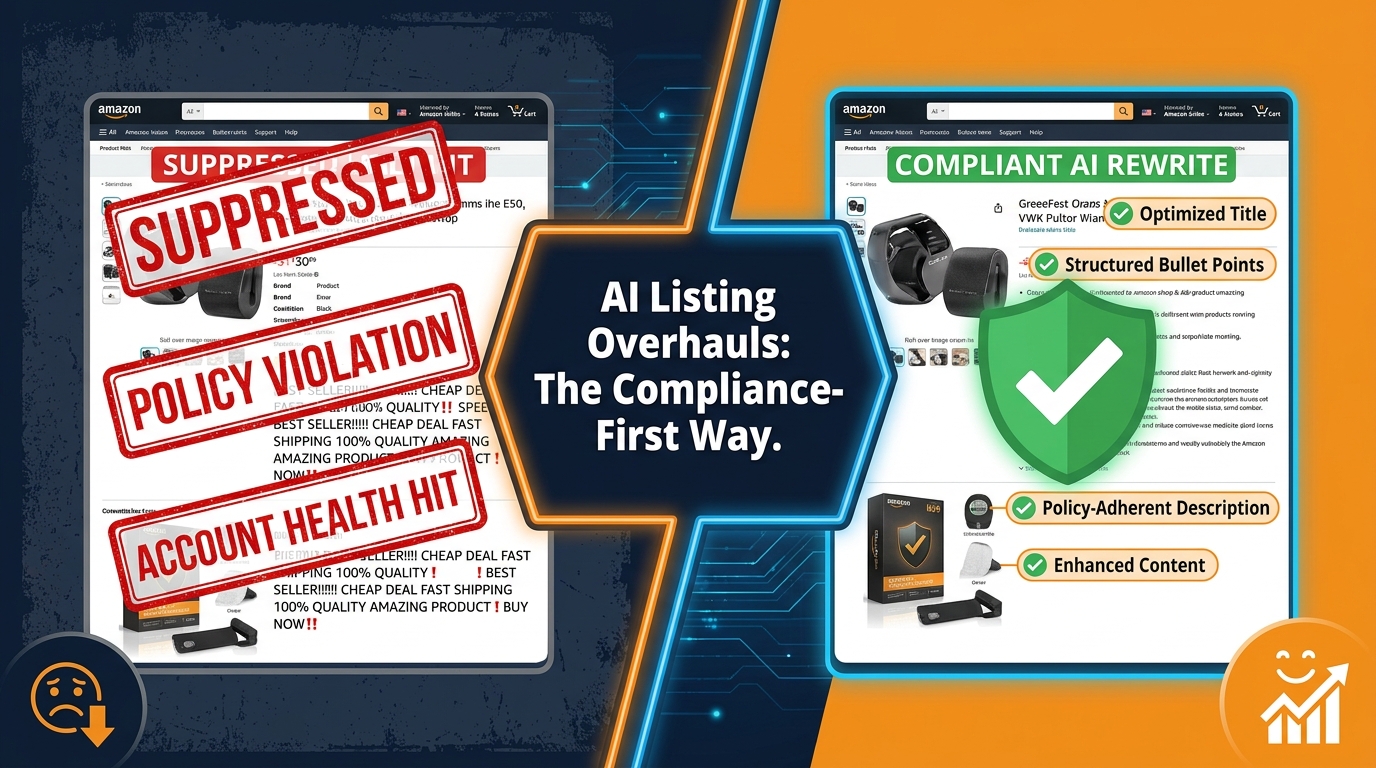

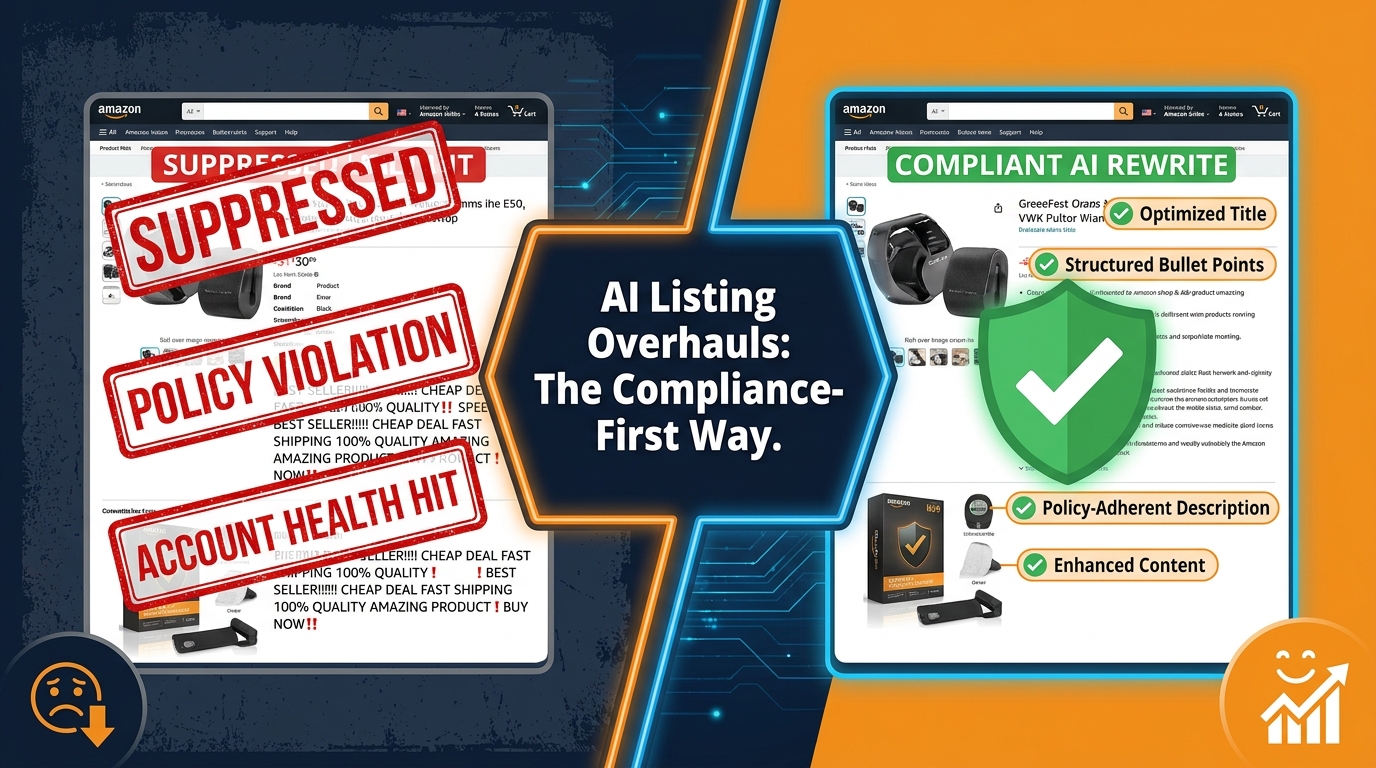
The promise is real: use AI to rewrite your entire Amazon catalog in days instead of months, lift conversion rates, and plug keyword gaps you never knew existed. Hundreds of sellers are doing exactly that. Some of them are winning. Others are walking into a suppression event or an Account Health flag they didn’t see coming.
The difference between those two outcomes has almost nothing to do with how good the AI output is. It has everything to do with whether the seller understood where Amazon’s policy lines sit before they started, which tools they used to run the work, and what happened between AI draft and live publish.
This isn’t a post about whether AI can write a better bullet point than you. It can, in many cases. This is about how to deploy that capability at scale without trading a short-term conversion lift for a long-term catalog problem. Amazon’s enforcement posture changed materially in early 2026, and the workflow most sellers are using hasn’t caught up yet.
What follows is a systematic, field-tested approach: starting with what the new policy landscape actually requires, moving through each listing field with a constraint map for AI, and finishing with the governance layer that keeps a catalog clean over time — not just on day one.
What Amazon’s March 2026 BSA Agent Policy Actually Changed
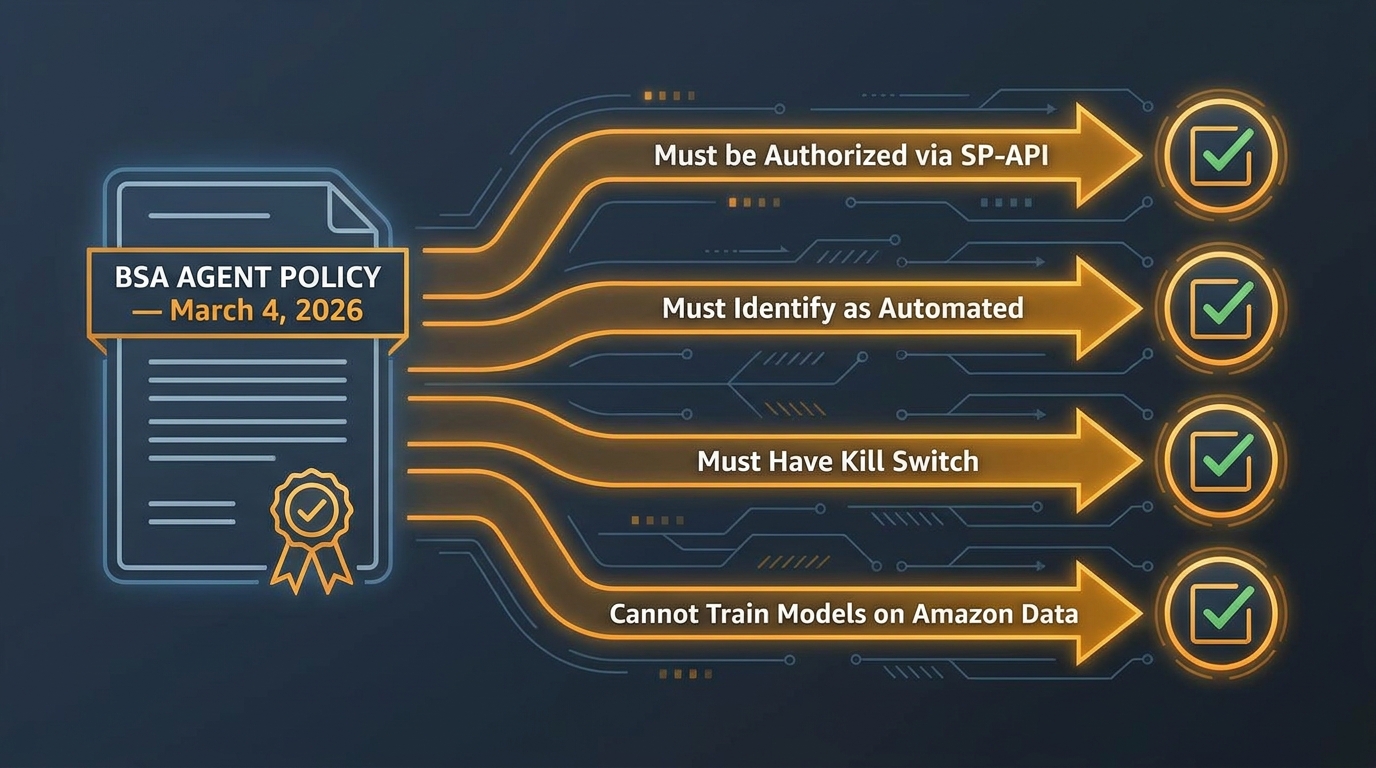
On March 4, 2026, Amazon updated its Business Solutions Agreement to include a formal Agent Policy. Sellers were notified on February 17. The policy went largely under-reported in mainstream seller forums, but its implications for anyone running AI-assisted listing workflows are significant.
What the Agent Policy says
In plain terms, the BSA update establishes that any AI tool or automated system that interacts with Seller Central on your behalf — including listing creation, editing, or optimization tools — is classified as an “agent.” Agents must meet four conditions to operate legitimately:
- Explicit authorization: The tool must be formally authorized to access your account, either through Amazon’s SP-API or through an approved Marketplace Appstore listing. Informal access methods — browser automations, screen scrapers, non-API connections — are not considered authorized.
- Disclosure of automated nature: The agent must identify itself as automated when interacting with Amazon’s systems. This rules out tools that mimic human sessions or obscure their machine origin.
- Immediate shutdown compliance: If Amazon requests that a specific tool stop accessing your account, you must be able to revoke that access immediately. Tools without a clean authorization/deauthorization flow don’t meet this standard.
- Restrictions on Amazon data use: Agents cannot use data accessed through Amazon’s systems to train or fine-tune AI models, unless Amazon explicitly permits it. This has direct implications for tools that claim to “learn” from your catalog data.
What the policy didn’t change
The Agent Policy didn’t introduce new rules about what listings can say. Amazon’s content policies on prohibited claims, accurate product representation, and category style guides were already in force. What changed is the compliance accountability for the tools doing the writing.
Previously, there was a gray zone: if an AI tool created a listing that violated policy, the seller was responsible for the content but the tool itself wasn’t subject to any formal authorization requirement. Now both layers are governed. You’re accountable for the content your AI produces and for whether the tool producing it is operating within Amazon’s authorized ecosystem.
Sellers who continue using unauthorized third-party tools — even tools that produce technically compliant listing copy — are now exposed to two separate enforcement pathways rather than one.
The Three Categories of Policy Risk AI Introduces to Listings
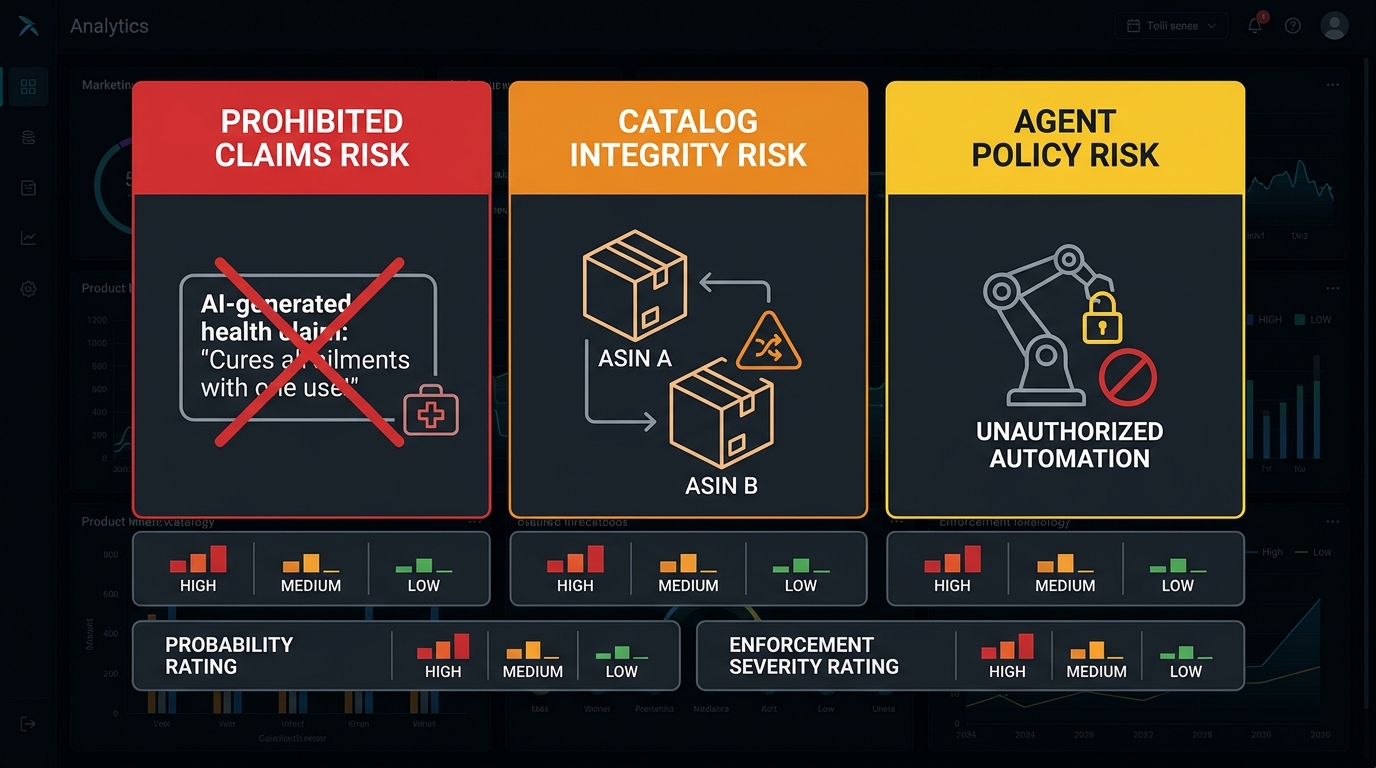
Before you can design a safe AI listing workflow, you need to understand precisely where the risk surfaces. There are three distinct failure modes that AI introduces — and they require different mitigation strategies.
Category 1: Prohibited claims risk
This is the most immediately dangerous risk, and it’s almost always invisible until enforcement hits. AI language models are trained to write persuasively. They will, without specific instruction to the contrary, drift toward superlatives, benefit claims, and comparative language that Amazon prohibits or requires substantiation for.
The clearest examples sit in health and safety adjacent categories. A supplement bullet point that says “supports healthy immune response” is technically permitted if the product has the certifications to back it. The same model, working on a different ASIN, might write “boosts immune function” — which is a prohibited drug claim that triggers a different enforcement bucket entirely. The AI doesn’t know the difference. It’s generating the most compelling copy it can.
Other common AI-generated prohibited content patterns include:
- Unsubstantiated comparative claims — “#1 bestselling,” “better than leading brands,” “outperforms competitors” — without the data to support them
- False urgency or scarcity language in fields where Amazon prohibits it, such as titles
- Missing regulatory disclosures that should appear for specific product types (pesticides, electronics with safety certifications, children’s products)
- Implied medical claims for food, supplement, and wellness products that stray into drug territory without meeting FDA language standards
Category 2: Catalog integrity risk
AI tools that help generate listings at scale — particularly tools that create variation structures or multi-ASIN catalogs — introduce catalog integrity risks that are structurally different from content risk. Amazon’s ASIN Creation Policy enforcement escalated sharply in May 2026, with sellers receiving 30-day deactivation notices at a scale that caught many teams off guard.
The primary triggers in that enforcement wave were brand-generic abuse, duplicate ASIN creation, and improper variation structure. AI can contribute to all three if it’s being used to generate product pages without first validating that the ASIN doesn’t already exist and that the variation relationship being created matches Amazon’s category-specific rules for valid variations.
Category 3: Agent policy risk
As covered in the previous section, this is the newest risk layer. Running listing optimization through a tool that isn’t SP-API authorized, doesn’t identify as automated, or lacks a kill-switch mechanism is a policy violation under the March 2026 BSA update — independent of whether the content the tool produces is compliant. Sellers who have been using browser-based automation tools or non-Appstore-listed software to push listing changes at volume need to audit their tool stack before the next optimization cycle.
Auditing Before You Rewrite: The Data-First Scoping Method
The biggest mistake in AI-powered listing overhauls is starting with the writing. Before a single AI draft is generated, a systematic performance audit should determine which ASINs need work, what kind of work they need, and in what order to prioritize the catalog. This audit phase is also where you surface the data that will constrain your AI prompts — and constraint is what keeps AI output inside policy boundaries.
The four-metric prioritization filter
Pull your catalog through these four metrics from Seller Central and your advertising console. The output tells you where AI investment will generate the fastest return:
- Click-through rate vs. impression share: High impressions with low CTR indicate a title, main image, or price problem. These are your highest-priority rewrites. The listing is being shown but failing to earn the click.
- Sessions vs. unit session percentage: High sessions with low conversion rate means the listing is attracting traffic but failing to convert. This points to bullet points, description, A+ content, or review quality — not a discoverability problem.
- Search term report coverage: Which of your top organic search terms are absent from your current title, bullets, and backend? Any gap of more than 30% of your top-10 impression terms suggests significant indexing opportunity.
- Suppression and quality alert flags: Any ASIN currently flagged in Account Health or carrying a listing quality alert should be prioritized for remediation before optimization. Running an AI rewrite on a suppressed listing without addressing the underlying flag often fails to resolve the issue and can compound it.
The constraint document: what AI needs before it writes
Every AI prompt for a listing rewrite should be preceded by a structured constraint document for that ASIN. This document contains:
- Category: Determines character limits, field requirements, and style guide rules
- Product type and applicable regulations: Determines which claim categories are prohibited
- Verified claims inventory: What the product is actually certified to claim (e.g., “USDA Organic,” “UL Listed,” “FDA registered facility”) — this is the bounded universe the AI must stay within
- Prohibited terms list: Category-specific and brand-specific terms that must not appear in output
- Primary keyword, secondary keywords, and backend terms: Derived from your keyword research, already segmented by where each term should appear
- Brand voice guidelines: If you have them, provide them. If you don’t, define tone (formal/casual), sentence structure preferences, and any competitive positioning language
This constraint document isn’t just good practice — it’s what makes AI output deterministic enough to be useful. An unconstrained AI prompt for “write a better title for this protein powder” will produce copy that might be excellent and might be a policy violation. A constrained prompt is predictable, auditable, and far faster to review.
Title Rewrites With AI: The Field-by-Field Constraint Map
The product title is the highest-weight field for Amazon’s ranking algorithm and the first thing Amazon’s AI-driven moderation systems check for compliance. It’s also the field where sellers most consistently misuse AI — generating long, keyword-dense strings that look like search spam to both shoppers and Amazon’s classifiers.
Character limits by category in 2026
Before generating a single title draft, confirm the enforced character limit for your specific category. Amazon’s category style guides still vary significantly:
- Most categories: Up to 200 characters, with Amazon recommending 70–80 characters for optimal mobile display
- Electronics: 150 characters maximum
- Apparel and fashion: 125 characters (tightened in 2025)
- Some pet and toy categories: As low as 80 characters enforced
Give your AI the exact limit as part of the prompt. If you don’t specify, models will default to generating longer output — and longer titles in categories with strict limits will either be rejected at upload or auto-truncated by Amazon in ways that may break keyword placement.
The winning title structure
The structure that consistently performs in 2026 follows a hierarchy derived from how both human shoppers and Rufus’s AI parse title content:
[Brand] + [Primary Keyword Phrase] + [Key Differentiator or Variant] + [Size/Count/Pack if applicable]
This structure front-loads the highest-intent information and ensures that even when the title is truncated on mobile, the brand and primary search term remain visible. AI should be given this template structure explicitly — not just “write a title” but “write a title following this format with these inputs.”
What AI should never add to titles
Train your reviewers to flag these patterns in AI-generated titles immediately:
- Promotional language (“Best,” “Top Rated,” “#1” without substantiation)
- Price or sale language (“20% Off,” “Sale,” “Free Shipping”)
- Subjective quality claims (“Premium,” “Luxury,” “Professional Grade” unless verifiable)
- Non-product information (seller name when different from brand, promotional dates)
- Special characters used decoratively (pipes are fine as separators; stars, arrows, and emoji are not)
These aren’t obscure edge cases. They’re the patterns AI models default to when optimizing for “compelling” copy — because they work in ad copy, social media, and e-commerce contexts outside Amazon. The model has no inherent reason to suppress them unless you tell it to.
Bullet Points: Writing for Rufus, Not Just Keyword Density
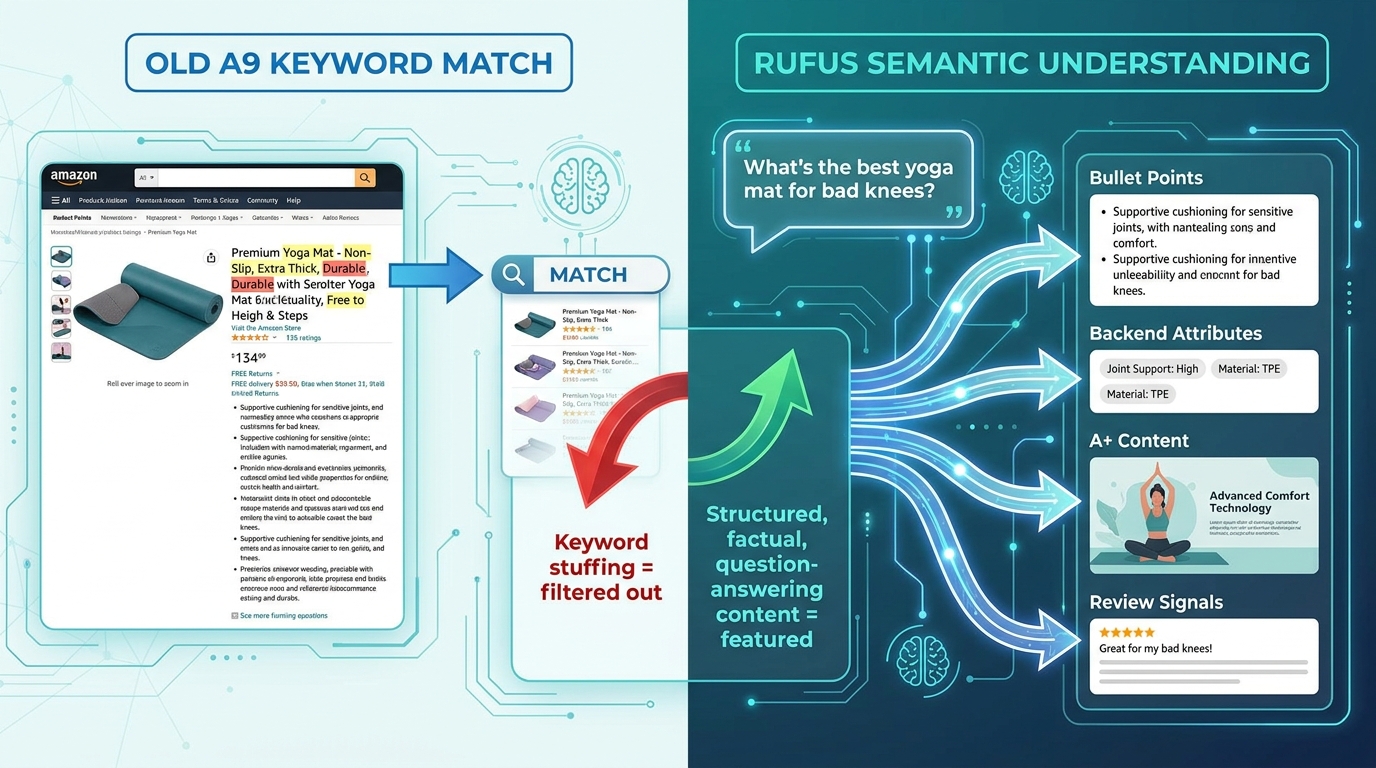
Amazon’s Rufus AI assistant — which now influences product discovery across search, A+ content, and product comparison interfaces — processes listing content differently from the legacy keyword-match model most sellers optimized for. Understanding that difference changes how you instruct AI to write bullet points.
How Rufus reads bullets
Rufus is a retrieval-augmented generation model. When a shopper asks a conversational question (“What’s the best reusable water bottle for hiking?”), Rufus doesn’t match keywords — it reads and quotes from listing content to formulate an answer. Listings that are written in clear, factual, question-answering language are more likely to be cited by Rufus. Keyword-dense bullets that read as fragments (“BPA free stainless steel vacuum insulated leak proof wide mouth”) are harder for Rufus to quote naturally and less likely to surface in conversational results.
Sellers who have restructured bullets to be Rufus-friendly report conversion lifts in the range of 12–18%, based on patterns observed across 2026 optimization projects. The mechanism is likely dual: Rufus citations drive incremental discovery, and clearer copy converts better regardless of discovery channel.
The Rufus-ready bullet structure
Each bullet should follow a three-part structure that AI can be explicitly prompted to use:
- Benefit headline (3–5 words): What the feature does for the customer, not what the feature is. “Stays cold for 24 hours” not “Double-wall vacuum insulation.”
- Feature explanation (1–2 sentences): The specific mechanism or specification that delivers the benefit, written in natural language.
- Use-case anchor: A brief, specific use scenario that helps Rufus match the product to relevant shopper queries. “Ideal for all-day hiking, commuting, or desk use” is more RAG-friendly than “versatile.”
Character limits for bullets vary: most categories allow up to 500 characters per bullet at the API level, but Amazon’s current guidance recommends keeping bullets between 200 and 255 characters for mobile readability. AI tends to write long. Set an explicit upper limit in every bullet prompt.
Keywords in bullets: the 2026 de-duplication principle
The current consensus among listing strategists is that bullets should not repeat terms already in the title. Amazon’s indexing system reads title and bullet content, and exact repetition doesn’t increase ranking weight — it just wastes character budget that could be used for secondary and long-tail keyword coverage.
When prompting AI to write bullets, provide the title text and instruct the model to avoid repeating any phrase that already appears verbatim. This simple constraint improves keyword coverage, eliminates the stuffed-copy aesthetic that Amazon’s quality classifiers are trained to penalize, and produces more readable output for shoppers.
Backend Search Terms: What AI Gets Wrong Every Time
Backend search terms are the field where AI-generated listings most consistently underperform — not because AI writes them poorly, but because the common AI workflow for backend terms doesn’t account for the specific constraints that make them effective or compliant.
The rules AI needs to know
Amazon’s backend search term field has a 250-byte limit (not character — byte, which matters for non-Latin characters). Within that limit, the following rules apply:
- No repetition: Terms that already appear in the title, bullets, or description do not need to appear in backend fields. Amazon indexes visible content. Repeating it in backend doesn’t add ranking weight — it wastes your 250 bytes.
- No competitor brand names: Explicitly prohibited. AI will sometimes suggest competitor terms as “search queries your customers use.” That’s a policy violation.
- No prohibited or misleading claims: Backend terms are indexed and visible to Amazon’s moderation systems, even though shoppers don’t see them. Using “cure,” “treat,” or similar regulated terms in backend fields carries the same enforcement risk as using them in visible copy.
- Separators: Single spaces, not commas. Amazon’s parser treats commas as characters, not separators. AI tools that use comma-separated format waste bytes.
- Case-insensitive: Amazon’s index is case-insensitive. Do not waste bytes on capital-letter variations.
What belongs in backend terms
Backend search terms are the right home for: misspellings your customers commonly use, synonyms that don’t fit naturally in visible copy, long-tail phrases that are too specific for bullets, and international or regional naming variations. They are not a secondary title field, and they are not where you hide the terms your compliance review removed from bullets.
When using AI to generate backend terms, the prompt should provide: the full title text, all five bullets, and a list of previously identified keyword gaps from your search term report. Instruct the model to generate backend terms that cover only the gaps not addressed by visible content. This produces a genuinely additive output rather than repetitive filler.
A+ Content and Brand Story: Where AI Has the Most Latitude (and the Biggest Traps)
A+ content is the listing field that gives sellers the most creative freedom — and therefore the field where AI’s tendency toward overreach is most dangerous. Amazon’s A+ content policies prohibit time-sensitive information, references to competitor products, and certain types of guarantee language. They also have specific rules about image text overlays that catch sellers off guard.
Where AI genuinely adds value in A+
The structured, modular nature of A+ content plays to AI’s strengths. Most A+ modules follow predictable formats: a headline, a short body paragraph, and a supporting feature list. AI can draft these modules at scale quickly, and because the modules are relatively short, the editing and compliance review cycle is fast.
The highest-value AI use cases for A+ content include:
- Comparison chart text: AI can generate structured, parallel-format comparison text across product variants, which is tedious to write manually and prone to inconsistency at scale.
- Feature deep-dives: For technically complex products, AI can translate specification sheets into benefit-led copy faster than most copywriters.
- Brand story narrative sections: AI can generate consistent brand voice across a large catalog when given a clear tone guide and example paragraphs to model.
The A+ content traps AI walks into
Several patterns appear repeatedly in AI-generated A+ content that require specific review flags:
- Warranty and guarantee language that exceeds what you actually offer: AI will write “lifetime guarantee” if that’s persuasive copy, even if your actual warranty is 90 days. This is a misleading claim and a customer service problem waiting to happen.
- Competitor comparisons: A+ policy prohibits naming or implying specific competing products. AI sometimes introduces this through language like “unlike most brands, which use plastic” — a reference to competitors without naming them. Amazon’s moderation systems flag this pattern.
- Contact information and external URLs: Prohibited in A+ content. AI won’t deliberately include these, but some tools with template memory occasionally carry forward boilerplate that includes seller contact details.
- Awards and endorsements that aren’t current: An AI trained on a product’s historical data might reference a 2023 “Best Of” award. If the award is no longer current or verifiable, it’s a misleading claim in 2026.
The Human-in-the-Loop Review Gate: What to Check Before You Push Live
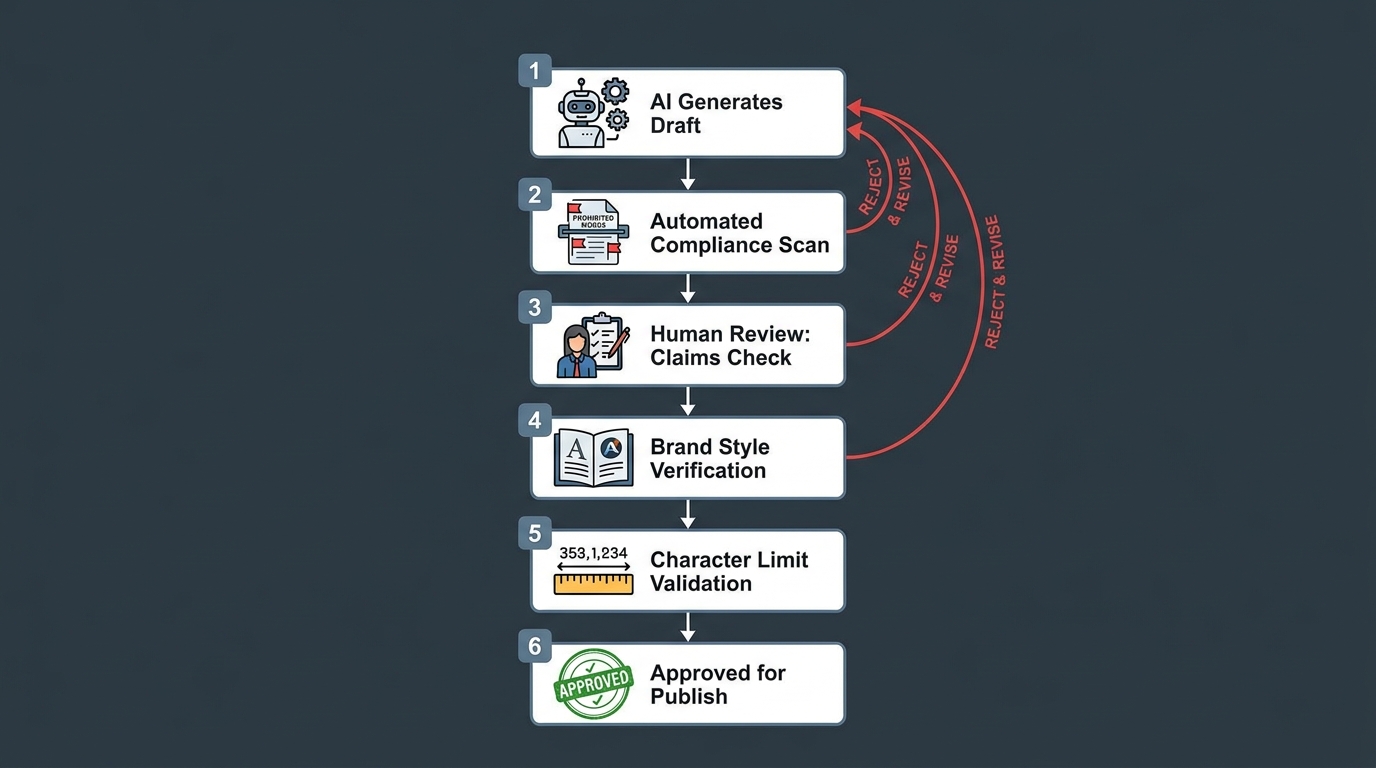
No AI-generated Amazon listing content should go live without a structured human review. This isn’t a question of trust in the technology — it’s a question of accountability structure. Amazon holds the seller responsible for the content of their listings, regardless of how that content was generated. The review gate is where seller accountability gets exercised.
The six-stage review process
This review process is designed to move quickly — an experienced reviewer can clear a single ASIN in 15–20 minutes using this framework — while catching the specific failure modes that AI-generated content introduces.
Stage 1: Automated compliance scan. Before human review, run the AI output through a prohibited keyword scanner. This can be a simple word/phrase list covering your category’s prohibited terms, or a more sophisticated tool that flags phrase-level patterns. The goal is to catch obvious violations before human review time is spent on them. Flag and return to AI with rejection reason rather than manually correcting at this stage.
Stage 2: Claims verification. Every claim in the output — performance claims, certification references, comparison language — must be verified against your verified claims inventory from the constraint document. If a claim appears in the AI output that isn’t in the verified inventory, it fails. No exceptions. The constraint document exists precisely so this check is fast.
Stage 3: Character and format validation. Check title character count against category limit. Check each bullet for length and format compliance. Check backend terms for byte count, spacing format, and repetition of visible content. This is mechanical and can be partially automated, but a human should confirm before upload.
Stage 4: Brand voice review. Does the output sound like your brand? Is the tone consistent with your other listings? This check matters more than sellers often assume — inconsistent brand voice across a catalog is a signal that listings are template-generated at scale, and it undermines shopper trust at the detail page level.
Stage 5: Factual accuracy check. Confirm that specifications, dimensions, compatibility claims, and material descriptions match the actual product. AI trained on product data can transpose numbers, confuse variants, or inherit inaccuracies from source materials. A single transposed dimension in a listing can generate returns, negative reviews, and potential policy issues simultaneously.
Stage 6: Approval and log. After clearing all five preceding stages, the listing is approved for upload. The approval should be logged — who reviewed it, when, and which tool generated the draft. This log becomes your audit trail if a compliance question arises later. Under the March 2026 BSA Agent Policy, maintaining records of which authorized tools were used for which listing changes is a practical compliance requirement.
Authorized vs. Unauthorized Tools: How to Vet Your AI Stack
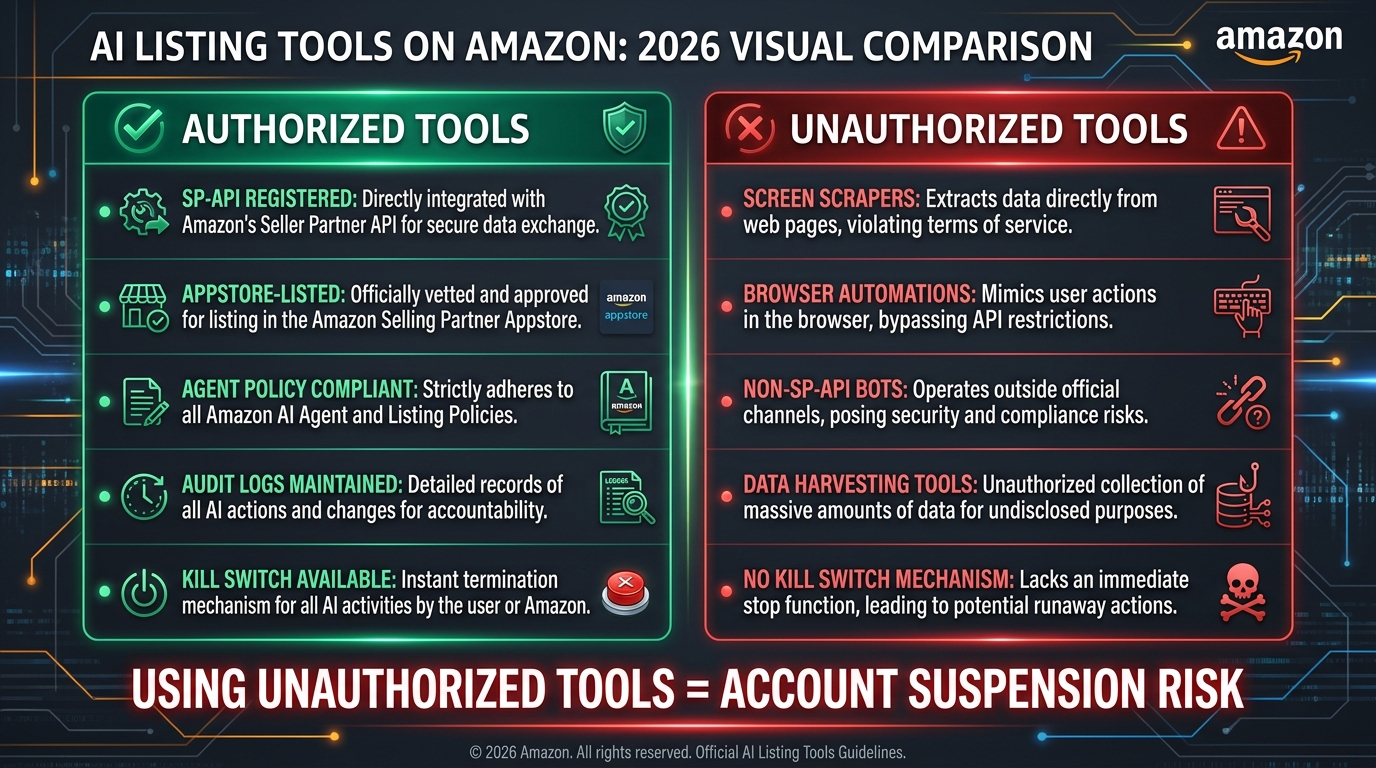
One of the most practical steps any seller can take after the March 2026 BSA update is a tool inventory audit. Not all tools that market themselves as “Amazon listing AI” are operating within Amazon’s authorized framework — and the BSA update means using unauthorized tools is now an independent compliance risk separate from anything the tool produces.
The authorization checklist for any tool you’re evaluating
Ask these questions about every tool in your listing optimization stack:
- Is it listed in the Amazon Selling Partner Appstore? Public apps that access Seller Central data on behalf of multiple sellers are required to be Appstore-listed under the SP-API rules. If a tool accesses your Seller Central account and isn’t in the Appstore, ask the vendor how they handle authorization.
- Does it use SP-API for data access? Legitimate tools connect via SP-API — Amazon’s official programmatic interface for selling partner data. Tools that ask for your Seller Central login credentials or use browser automation to simulate your session are not SP-API authorized.
- Can you revoke its access through Seller Central? Go to your Seller Central account, navigate to Apps and Services, and confirm the tool appears in your authorized application list. If you can’t find it there, you can’t revoke its access cleanly — which is a BSA requirement.
- Does the vendor’s privacy policy address Amazon data restrictions? Under the March 2026 BSA, tools cannot use Amazon-sourced data to train AI models without explicit permission. Any tool that uses your listing performance data, search term reports, or sales data to “improve” its recommendations should be able to articulate clearly how they handle this restriction.
- Is there an audit log available? Any tool writing changes to your listings should maintain a log of what was changed, when, and by what version of their software. This is your documentation layer for compliance purposes.
The workflow hybrid most teams miss
Not all AI listing work has to flow through an Amazon-connected tool. There’s a compliant hybrid approach that many sellers overlook: use a general-purpose AI writing tool (which doesn’t connect to Seller Central at all) to generate listing drafts, then publish those drafts manually or through an authorized SP-API tool. In this model, the AI is a writing assistant — it never touches Amazon’s systems — and the authorized SP-API tool handles the actual data submission.
This hybrid approach removes the Agent Policy risk entirely from the AI generation step, because the AI tool isn’t acting as an “agent” in Amazon’s definition — it’s not accessing Seller Central. The only agent in the workflow is the authorized SP-API tool handling publication, and that tool is compliant by design. For sellers who want to use powerful AI writing capabilities without navigating the Appstore vetting process, this is the cleanest architecture available.
Building a Repeatable Governance System for Ongoing AI Listing Work
A compliance-first AI listing overhaul isn’t a one-time project. Amazon updates its policies. Categories change their style guides. Your product range evolves. The governance system you build needs to maintain compliance over time, not just at the point of initial deployment.
The three-tier governance structure
Effective ongoing governance for AI listing work operates at three levels:
Tier 1: The living constraint document. The constraint document described in the audit section should be a living resource, updated whenever Amazon changes a relevant policy, whenever your product’s certifications change, or whenever a compliance review identifies a pattern issue in AI output. Assign ownership to a specific person. Review it quarterly at minimum. An out-of-date constraint document is as dangerous as no constraint document, because it creates false confidence.
Tier 2: The listing health monitoring cadence. Set up automated monitoring for listing suppression events and Account Health alerts. The monitoring interval matters: if a listing is suppressed after an AI-assisted update, you want to catch it within 24 hours, not at your next monthly review. Most SP-API-authorized listing tools offer suppression alerts. If yours doesn’t, Seller Central’s Account Health dashboard provides suppression data, and you can set up basic SP-API polling if you have development resources.
Tier 3: The policy watch process. Amazon’s listing policies, category style guides, and BSA terms change. Designate someone to monitor the Amazon Seller Central announcements page, the SP-API changelog, and Amazon’s seller forums for policy signals. Seller community reports often surface enforcement pattern shifts weeks before formal policy documentation catches up — the May 2026 ASIN deactivation wave is a recent example of exactly this dynamic.
Handling suppression events when they happen
Despite best-practice workflows, suppression events will occasionally occur. The response process determines whether a suppression becomes a brief interruption or an Account Health spiral. When a listing goes down post-AI-update:
- Pull the suppression reason from Account Health immediately. Amazon’s stated reason, even when vague, tells you which policy was triggered.
- Revert to the prior listing version if the issue isn’t immediately clear. Don’t try to optimize your way out of a suppression — restore first, then investigate.
- Cross-reference the suppressed ASIN’s AI output against your constraint document and review log. The review log you maintained should allow you to reconstruct exactly what changed, when, and through which tool.
- If appealing, provide Amazon with your documented process: the constraint document, the human review log, and a corrected version of the content. Demonstrating process rather than just correcting the specific issue generally results in faster resolution and a lower Account Health impact.
Scaling the system across a large catalog
For sellers with catalogs of hundreds or thousands of ASINs, the governance system described above needs to be operationalized rather than run ad hoc. A few practical approaches that work at scale:
- Batch ASINs by category and risk level: High-risk categories (health, supplements, children’s products, electronics with safety certifications) require stricter human review than commodity categories. Different review SLAs for different risk tiers lets you move faster without lowering your compliance floor.
- Template constraint documents by category: Rather than building a constraint document for every individual ASIN, build one per category and then ASIN-specific addenda for the certified claims inventory. This dramatically reduces the setup overhead for each rewrite cycle.
- Staged rollouts: Don’t publish an AI-rewritten version of your entire catalog simultaneously. Roll out in batches of 50–100 ASINs, monitor for suppression patterns for 48 hours, and proceed only if the first batch is clean. Staged deployment limits the blast radius of any pattern issues that slipped through review.
The Performance Upside When You Get the Compliance Foundation Right
It’s worth being explicit about why this level of process rigor is worth the investment — because “compliance” can sound like constraint, when the actual outcome of a well-designed compliance-first AI workflow is better listing performance, not just safer listings.
The mechanism: why constrained AI output outperforms unconstrained
Unconstrained AI listing copy tends to be generically persuasive. It hits category conventions, avoids obvious errors, and produces copy that is better than a poor listing but rarely better than what an expert human copywriter who knows the category would produce. Constrained AI copy — built around a verified claims inventory, targeted keyword gaps, a specific structure, and character limits — is optimized in ways that generic persuasion can’t achieve.
The constraint document effectively functions as a creative brief. AI that receives a creative brief performs substantially better than AI working from a vague instruction. The compliance layer and the performance layer are produced by the same constraint structure.
What the data shows
Across 2026 case studies and optimization project reports from agencies working this way, the consistent pattern in high-performing AI listing overhauls includes:
- CTR improvements of 15–25% when title rewrites address keyword-mobile display conflicts (front-loading primary terms for mobile truncation)
- Conversion rate improvements of 10–20% when bullets are restructured from keyword fragments to benefit-led, Rufus-readable sentences
- Backend search term expansion that surfaces 30–50% more indexed terms when AI is given the de-duplication instruction (avoid terms already in visible content) and used to fill genuine coverage gaps
- Suppression rate reductions of 40–60% compared to non-governed AI approaches when the six-stage review process is applied consistently
These numbers aren’t guaranteed outcomes for every category or product type. But they represent the directional pattern that emerges when the methodology described in this post is applied systematically.
Conclusion: The Compliance Dividend
The sellers who are winning with AI-powered listing overhauls in 2026 are not the ones generating the most content the fastest. They’re the ones who understood that Amazon’s policy framework — now expanded to include the Agent Policy layer — isn’t an obstacle to AI adoption but a design constraint that, when built into the workflow from the start, produces better results than working around it.
The compliance-first approach described in this post takes more setup time than “prompt an AI and publish.” The constraint document, the review gate, the tool authorization audit, the governance tiers — none of these are zero-effort. But the alternative — building an AI listing workflow without these structures — is producing suppressed listings, Account Health violations, and BSA exposure for sellers who thought they were just getting faster at copywriting.
There’s a useful reframe here: every element of the compliance framework in this post is also a performance framework. The constraint document that keeps AI out of prohibited claims territory is the same document that keeps AI focused on your actual competitive advantages. The six-stage review that catches policy violations also catches factual errors and brand inconsistencies. The governance layer that monitors for suppression also tracks whether your optimization work is moving metrics.
Your immediate action checklist
- Audit your current AI tool stack against the March 2026 BSA Agent Policy requirements. Any tool accessing Seller Central that isn’t SP-API authorized represents independent policy exposure.
- Build constraint documents for your highest-priority categories before your next optimization cycle. Start with your verified claims inventory — that’s the most critical constraint and the one most often missing.
- Run your existing AI-generated listings through a prohibited term scan. If you’ve published AI content without a structured review process, there’s a non-trivial probability that at least some of it carries prohibited claim language that you haven’t caught yet.
- Implement the six-stage review gate as your new publish standard. The short-term slowdown is real. The long-term catalog health improvement is more real.
- Set up suppression monitoring with at minimum a 24-hour alert cadence. Catching a suppression event on day one costs you one day of sales. Catching it on day 15 costs you 15 days and potentially a more complex Account Health resolution.
AI is a genuine productivity advantage for Amazon listing work. The sellers who treat the compliance framework as part of the advantage — not a tax on it — are the ones building catalogs that perform better and stay healthier over time.