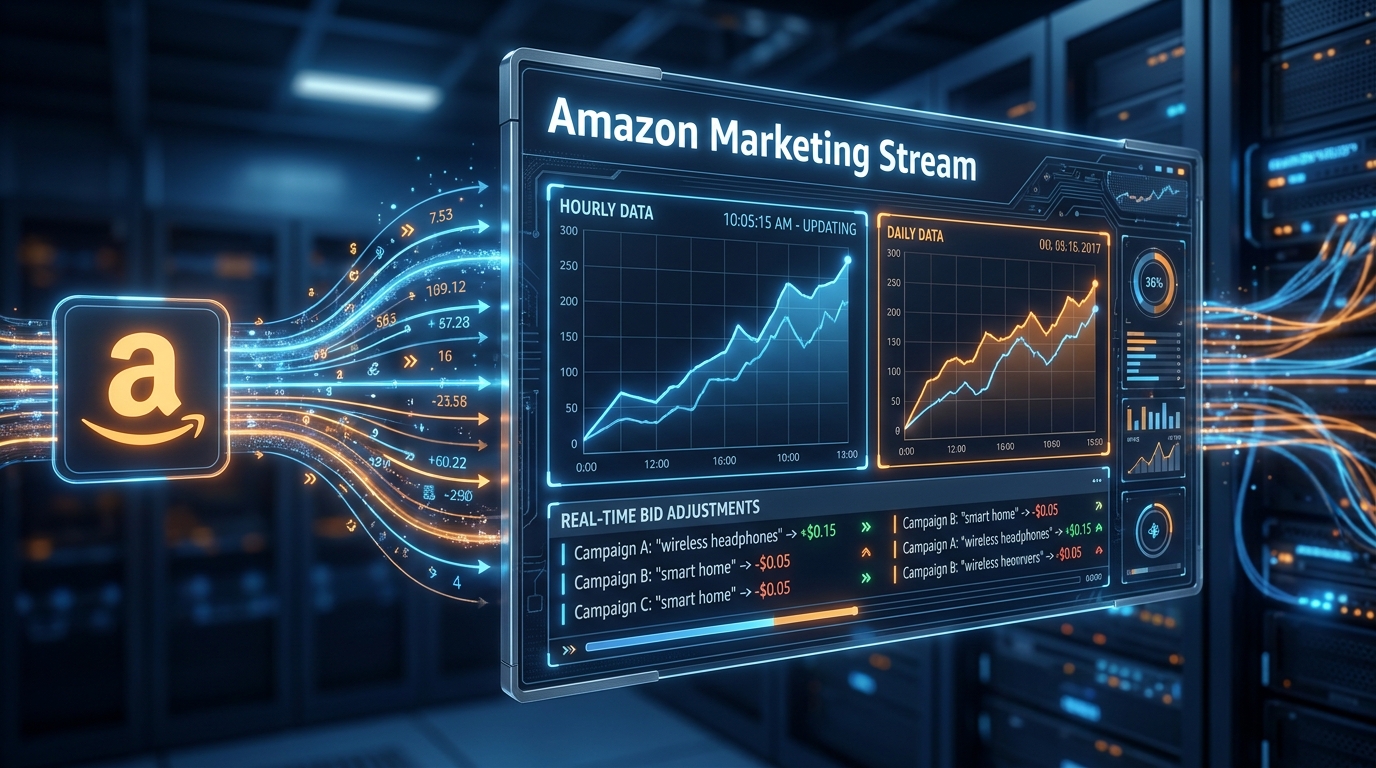

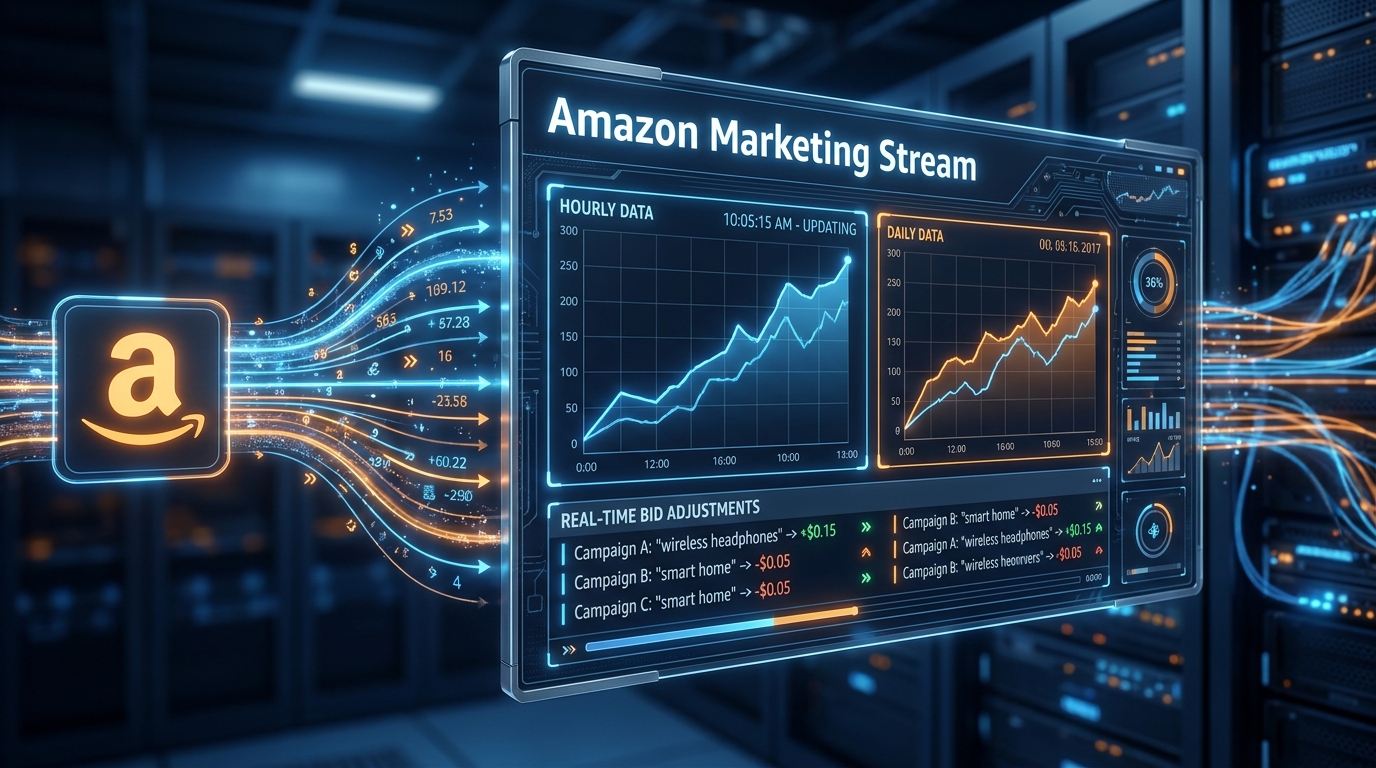
Every morning, thousands of Amazon advertisers open their campaign dashboards, look at yesterday’s aggregate numbers, and make bidding decisions based on data that is already 24 hours stale. They’re flying a plane using last night’s weather report.
That’s the fundamental problem Amazon Marketing Stream was built to solve — and in 2026, it has matured into something far more powerful than most PPC practitioners realize. This isn’t just a faster reporting API. It’s a push-based infrastructure layer that changes the entire economic logic of Amazon advertising, shifting it from reactive daily management to proactive intraday control.
The difference matters enormously. On Amazon, a product’s conversion rate at 9am on a Tuesday can differ by 3x compared to 11pm on the same day. Consumer electronics spike on weekday lunch hours. Grocery consumables peak Sunday evening. Baby products convert highest on weekend mornings. If your bids are static across all those windows, you are either overpaying during low-conversion hours or leaving money on the table during peak ones — and with standard reporting, you never even see it happening.
This guide is not about PPC tactics in the abstract. It’s about the infrastructure, data architecture, and operational workflows that make real-time optimization possible at scale — and specifically, what it takes to build a Marketing Stream implementation that actually delivers measurable ROAS improvement rather than just adding technical complexity.
We’ll cover how the data pipeline works end-to-end, which of the five datasets matter most and why, how to build dayparting schedules grounded in real hourly performance, how to combine Marketing Stream with Amazon Marketing Cloud for full-funnel attribution, and the implementation mistakes that derail most teams before they ever see a result.
Why Daily PPC Reporting Is Fundamentally Broken for Serious Advertisers
Before diving into what Marketing Stream does, it’s worth understanding exactly what it replaces — and why that replacement is necessary rather than optional for any advertiser managing significant spend.
The 24-Hour Blindfold
Standard Amazon Ads reporting operates on a pull-based, daily-grain model. You make an API call, you get a snapshot of yesterday’s performance. That data typically has a 12-to-24-hour delay baked in, and it’s subject to a daily reconciliation process that means numbers you pulled at 3pm may differ from numbers you pull at 10pm for the same day. For budget-pacing decisions, bid adjustments, and campaign health monitoring, this lag is catastrophic.
Consider what happens at scale. An advertiser running $50,000 per day across 200 campaigns might have 15 campaigns exhaust their daily budgets before noon. Under standard reporting, they won’t know this has happened until the following morning — at which point those campaigns have already missed eight to twelve hours of potential conversion windows. The spend was already gone; the opportunity was already lost.
The issue compounds when you factor in the way Amazon’s auction mechanics work. CPCs fluctuate throughout the day based on competitor activity, browsing patterns, and inventory dynamics. A bid that represents excellent value at 7am may be significantly inefficient at 2pm when more competitors are active in the same category. Without intraday visibility, every bid is a guess averaged across these wildly different competitive conditions.
The Averaging Problem
Daily aggregate reporting doesn’t just delay your data — it actively destroys signal by averaging away the most actionable information. A daily ACOS of 28% could actually represent 12% ACOS in the morning, 18% ACOS at midday, and 58% ACOS between 9pm and midnight. The average looks reasonable. The reality is that you’re wasting significant budget on low-quality late-night traffic while potentially underbidding on profitable morning slots.
This is not a marginal efficiency issue. Research on Amazon dayparting consistently shows that the gap between best and worst conversion hours within the same campaign can exceed 300–400%. When your reporting collapses all of that variance into a single daily number, you lose the ability to act on one of the most reliable patterns in all of e-commerce: time-of-day purchase intent.
The Reactive Posture Problem
Perhaps most damaging is the operational posture that daily reporting enforces. Every decision is reactive by definition — you can only respond to what happened yesterday. You cannot detect a budget-drain event and pause it. You cannot see a conversion spike at noon and push more budget into it. You cannot catch a bid inflation event caused by a competitor’s campaign launch and adjust before it costs you meaningful spend.
Amazon Marketing Stream changes all three of these dynamics. With hourly push data, your optimization logic can operate in the same time dimension as the events it’s trying to influence.
What Amazon Marketing Stream Actually Is (and Isn’t)
Amazon Marketing Stream is a push-based messaging system that delivers hourly Amazon Ads campaign metrics and campaign-change information through the Amazon Ads API in near real-time. That technical description is accurate but undersells the architectural shift it represents.
Push vs. Pull: The Fundamental Difference
Every other Amazon Ads reporting mechanism is pull-based: you call an endpoint, you get data. Marketing Stream inverts this model. Amazon pushes data to an AWS destination you configure — typically an SQS queue or Amazon Data Firehose — on a regular hourly cadence without requiring any polling on your side. Your pipeline receives messages as they become available rather than waiting for a scheduled job to fetch them.
This distinction has significant operational implications. Pull-based systems require you to manage polling schedules, handle rate limits, deal with empty results during off-peak hours, and synchronize multiple API calls across different report types. A push-based system eliminates all of this operational overhead. Data arrives at your ingestion endpoint, your consumer processes it, and your optimization logic executes. The system is event-driven rather than schedule-driven.
What Marketing Stream Covers
As of 2026, Marketing Stream covers all three major sponsored ad types — Sponsored Products, Sponsored Brands, and Sponsored Display — as well as Amazon DSP campaigns. The system delivers hourly performance metrics across these ad types, which means advertisers running a mixed sponsored + DSP strategy can get intraday visibility across their entire Amazon Ads portfolio in a single pipeline.
Beyond performance metrics, Marketing Stream also delivers campaign-change messages — notifications when campaign states change, budgets are exhausted, bids are modified, ASINs become ineligible for advertising, and other operational events occur. This makes it useful not just as a performance data feed but as an operational monitoring system.
What Marketing Stream Is Not
It’s important to be clear about the boundaries. Marketing Stream is not a replacement for Amazon Marketing Cloud (AMC) for advanced attribution and multi-touch analysis. It does not currently provide hourly New-to-Brand (NTB) metrics for Sponsored Display — those remain available only in standard daily reporting. It does not carry retail signals, organic search data, or inventory status — integrating those requires pulling from Seller Central and Rapid Retail Analytics separately.
It also is not a bidding platform. Marketing Stream delivers the data signals; acting on those signals requires calling the Amazon Ads API’s bidding endpoints separately, which means your implementation needs both a Stream consumer and a bid-execution layer to complete the optimization loop.
The Architecture: How Data Flows from Amazon to Your Stack
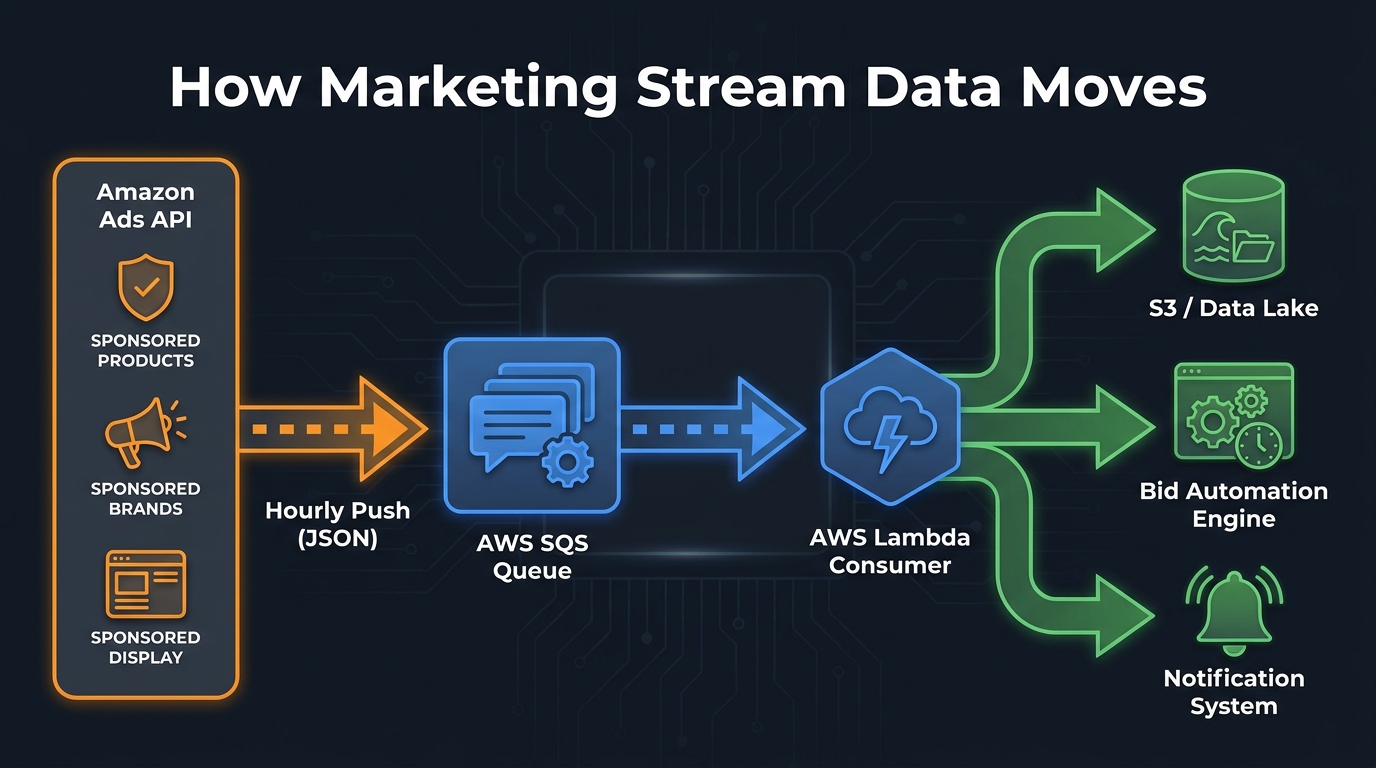
Understanding the data flow architecture is not optional background knowledge — it’s the foundation every optimization decision is built on. Teams that implement Marketing Stream without fully grasping how messages move through the pipeline routinely make errors that either compromise data quality or introduce latency that negates the real-time advantage entirely.
The Core Pipeline Components
The canonical Marketing Stream pipeline has five layers. First, Amazon’s Ads API generates hourly metric packages and campaign-event messages for your subscribed datasets. Second, these messages are delivered to your configured AWS destination — either an SQS queue (the most common pattern) or Amazon Data Firehose with an S3 destination. Third, a consumer layer — typically an AWS Lambda function — picks up messages from the queue, validates them, and classifies them by message type. Fourth, a fan-out layer routes messages to appropriate downstream destinations: bid automation engines, analytics warehouses, monitoring systems, or notification services. Fifth, an execution layer (separate from Stream itself) calls the Amazon Ads API to actually apply any bid or budget changes that the analysis layer triggers.
Amazon provides reference CDK (Cloud Development Kit) implementations for this architecture, which accelerates setup considerably. The reference stack uses SQS as the ingestion buffer, Lambda for fan-out and classification, SNS for downstream distribution, and Firehose with S3 for durable storage. This is a solid starting point, though production deployments typically add a data warehouse layer (Redshift, BigQuery, Snowflake, or Databricks) downstream of S3 for structured querying and historical analysis.
Latency Realities
The “near real-time” description Amazon uses for Marketing Stream requires some clarification. The system delivers hourly data packages — meaning you’re typically seeing data for a given hour within 30 to 90 minutes of that hour closing. The end-to-end latency from SQS arrival to your durable storage layer, when Lambda is properly tuned, is typically in the seconds-to-low-minutes range. Combined, this means your optimization decisions are based on data that is typically 1–2 hours old at most — compared to 24+ hours with standard daily reporting.
That’s a roughly 90% reduction in decision latency, which matters significantly for intraday budget pacing and bid adjustments triggered by real-time conversion patterns.
Regional Alignment Matters
Amazon recommends configuring your SQS queues in the same AWS region as your advertising account’s associated marketplace to minimize message delivery latency. A US-based advertiser running campaigns on Amazon.com should configure their SQS queue in us-east-1. Running an EU SQS destination for a UK or DE marketplace adds unnecessary cross-region latency and introduces potential compliance considerations around data residency that your legal team will want to review.
Subscription Management
Marketing Stream uses a subscription model — you explicitly subscribe to each dataset you want to receive, and subscriptions are confirmed through a handshake process. You need existing Amazon Ads API access (which requires an approved API application), an AWS account with appropriate IAM permissions, and an SQS queue with a resource-based policy that allows Amazon’s Ads service to deliver messages to it. The IAM configuration is where most teams make their first mistake — the policy must explicitly grant sqs:SendMessage permission to the Amazon Ads service principal, and getting this wrong results in subscriptions that appear active but deliver no data.
The Five Datasets and What Each One Tells You
Marketing Stream doesn’t deliver a single monolithic data feed — it exposes five distinct datasets, each with its own schema, message cadence, and optimization use case. Knowing which dataset contains what, and when to use each one, is what separates sophisticated implementations from basic ones.
Dataset 1: Traffic and Conversion Metrics
This is the primary dataset for performance optimization. It delivers hourly aggregations of impressions, clicks, spend, attributed sales, attributed orders, and ROAS broken down by campaign, ad group, and targeting entity. This is the dataset you use to build your dayparting models and intraday bid adjustment logic.
Messages in this dataset arrive as JSON documents with a consistent schema. Each message covers a one-hour window for a specific campaign-adgroup-targeting combination, identified by a timestamp range and entity IDs. Critically, the data is based on ad events (clicks and impressions happening in that hour) but attributed sales may reflect a conversion window that extends beyond that hour — this is a nuance that trips up many implementations and we’ll cover it in the mistakes section.
Dataset 2: Budget Usage
The budget usage dataset delivers near-real-time updates on budget consumption for your campaigns and portfolios. This is what enables true intraday budget pacing — instead of discovering at 8am that yesterday’s top campaign exhausted its budget at 11am and missed the afternoon, you receive budget consumption messages as the spending is happening.
This dataset is particularly valuable for campaigns with fixed daily budgets where budget exhaustion is a recurring problem. With budget usage messages triggering automation logic, you can implement dynamic budget reallocation — shifting unspent budget from underperforming campaigns to ones approaching exhaustion at profitable hours, or spreading budget more evenly across hours to maintain consistent presence throughout the day.
Dataset 3: Campaign Change Log
The campaign change log delivers messages whenever campaign attributes change — bid updates, status changes, targeting modifications, budget adjustments. This is the dataset that makes Marketing Stream valuable as an operational audit trail and monitoring system, not just a performance feed.
For agencies managing multiple clients and multiple team members making changes, the change log provides an always-current record of what changed, when, and (to the extent the API captures it) via which application. This enables change attribution — when performance shifts, you can trace whether a bid change, a targeting modification, or a budget adjustment preceded it.
Dataset 4: Sponsored Display Performance
Sponsored Display has its own dataset within Marketing Stream, reflecting the distinct metric set relevant to display placements — viewable impressions, engagement rates, and display-specific attribution windows. As of 2026, this dataset is available globally in beta, which means the schema may evolve and it warrants more conservative use in production automation logic than the more mature Sponsored Products and Sponsored Brands datasets.
Dataset 5: Amazon DSP
For advertisers running Amazon DSP alongside sponsored ads, Marketing Stream’s DSP dataset extends hourly visibility into programmatic display and video campaigns. This matters particularly for full-funnel advertisers who are using DSP for awareness and retargeting while sponsored ads drive lower-funnel conversion. Having both data streams in the same pipeline enables cross-channel performance correlation that would otherwise require significant manual data joining.
Dayparting Done Right: Building Hourly Bid Schedules That Actually Work
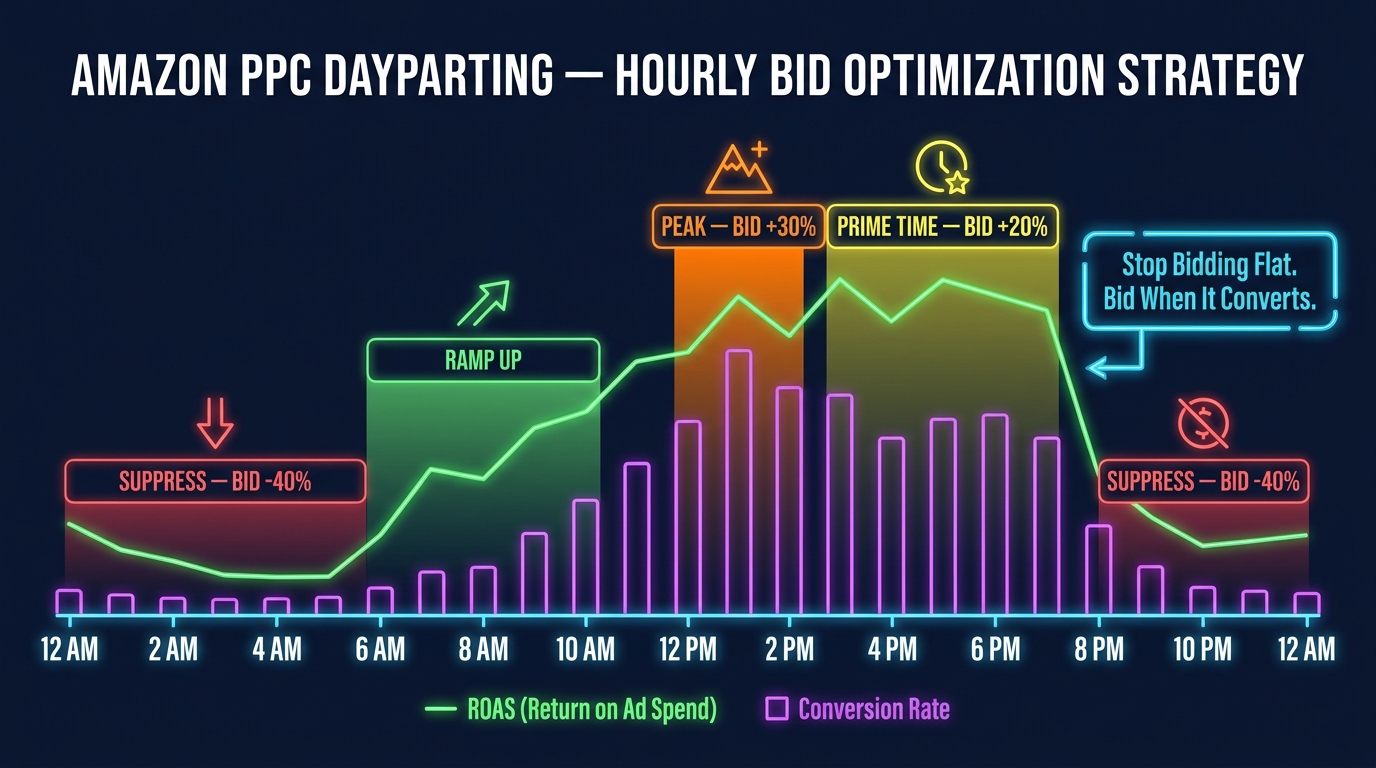
Dayparting — the practice of adjusting bids based on time of day — has existed in paid search advertising for years. On Google and Meta, it’s a native feature accessible through the campaign UI. On Amazon, it has historically been nearly impossible to do well because the data granularity didn’t exist. Marketing Stream changes this. But dayparting done wrong can be just as expensive as not dayparting at all.
Phase 1: Building Your Conversion-by-Hour Baseline
Before you can build a meaningful bid schedule, you need at least 4–6 weeks of hourly data to establish a statistically reliable conversion-by-hour pattern for each campaign or campaign cluster. Rushing this phase is the most common mistake — applying bid multipliers derived from two weeks of data, or worse, from an industry average that doesn’t reflect your specific product category and customer base.
For each campaign, calculate a conversion rate (orders divided by clicks) and an effective ACOS for each hour of the day, averaged across your baseline period. Apply a minimum-click threshold — any hour with fewer than 20–30 clicks in the baseline period has insufficient data for reliable conversion rate estimation and should be treated as a “neutral” bid zone rather than aggressively modified.
Plot this data as a 24-hour curve. In most categories you’ll see a pattern: a slow morning ramp from 6–9am, a midday peak, an afternoon secondary peak, and a significant drop-off after 9–10pm. The exact shape varies dramatically by category, so resist the urge to apply generic assumptions.
Phase 2: Defining Your Bid Adjustment Zones
Once you have your hourly conversion baseline, segment each hour into one of four bid zones based on ACOS performance relative to your target:
- High-performance window (ACOS 30%+ below target): Apply a bid increase of 20–35%. These are hours where your spend is generating outsized returns and you want to capture more impression share.
- Standard window (ACOS within 10% of target): Maintain baseline bids. No modification needed.
- Below-par window (ACOS 10–30% above target): Apply a modest bid reduction of 10–20%. These hours are marginally inefficient but still converting — they warrant softened rather than eliminated bids.
- Suppression window (ACOS 30%+ above target, or very low click volume): Apply bid reductions of 35–50%. These are hours where your category simply isn’t converting at profitable rates.
Important caveat: do not apply zero bids or campaign pauses for low-performance hours. Zero bid periods disrupt Amazon’s algorithmic learning for your campaigns, which can have downstream effects on impression delivery during your high-performance windows. A significant bid reduction is the right lever; a campaign pause is not.
Phase 3: The Execution Loop
The bid adjustment execution cycle runs as follows. Each hour, your Lambda consumer processes the new hourly performance data from Marketing Stream’s traffic/conversion dataset and appends it to your historical baseline. Your analysis layer calculates the current performance for the hour just completed and compares it to your zone thresholds. If the calculated performance has shifted the hour into a different zone — because of recent trend changes, seasonality, or competitive dynamics — your bid engine calls the Amazon Ads API to update the relevant bid modifiers. This creates a continuous feedback loop where your bid schedule adapts to real-world performance rather than staying locked to a static historical baseline.
Refreshing Your Baseline for Seasonality
One discipline that separates mature dayparting implementations from naive ones is baseline refresh cadence. Consumer behavior shifts significantly around Prime Day, Black Friday, the holiday season, back-to-school, and category-specific seasonal events. A dayparting schedule built on January data will perform poorly in November. Build your baseline refresh logic to weight recent data more heavily — using exponential moving averages or rolling 28-day windows — so that your bid zones adjust gradually as seasonal patterns shift rather than requiring manual recalibration.
Intraday Budget Pacing: Stopping the Bleed Before It Happens
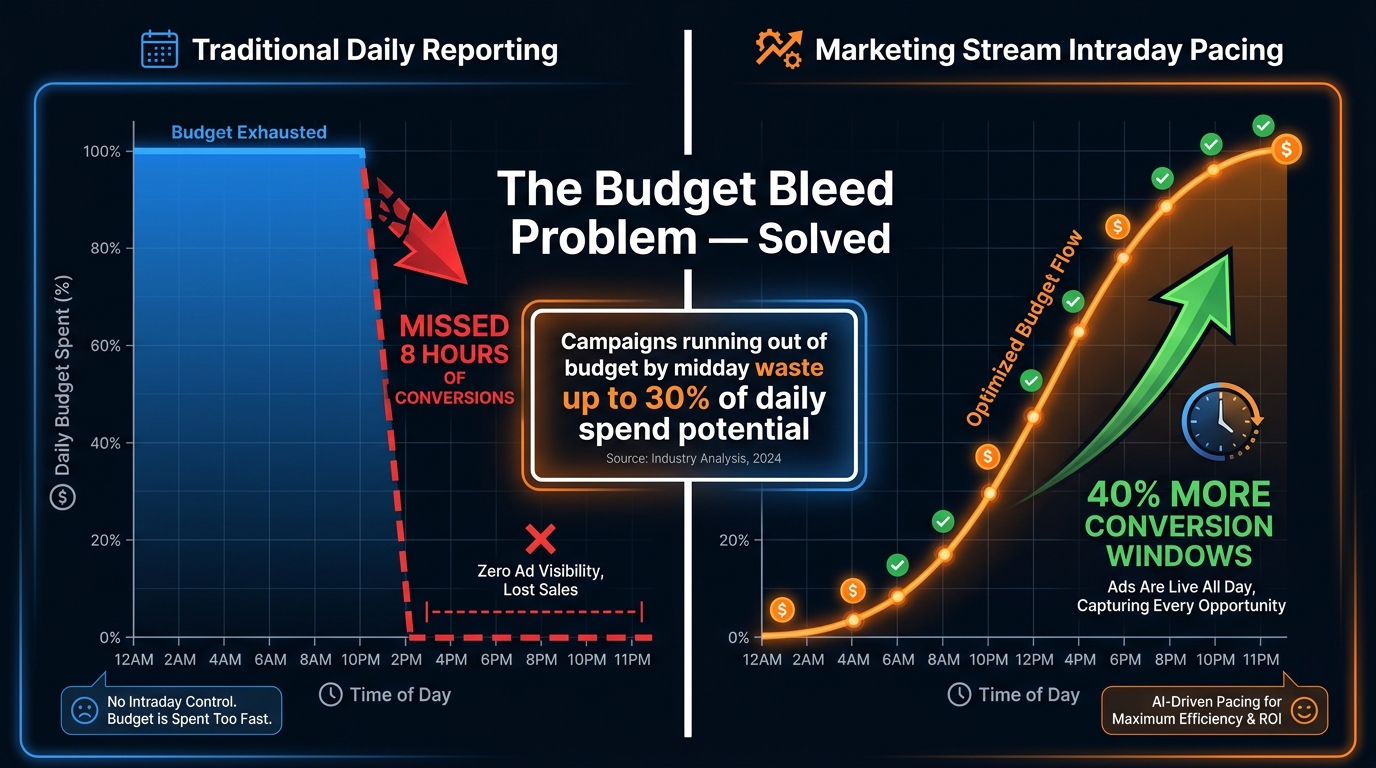
Budget exhaustion before high-value afternoon and evening conversion windows close is one of the most widespread and financially significant problems in Amazon advertising. It’s also one of the most invisible — because by the time you see it in your daily reporting, the damage is already done.
The Anatomy of a Budget-Drain Event
A typical budget-drain event unfolds like this. A campaign with a $300 daily budget begins serving at midnight. By 9am, it has spent $180. A competitor launches an aggressive bid push in the same category, temporarily inflating CPCs. By 11:30am, the campaign has spent its remaining $120 at inflated CPCs with below-average conversion rates, and goes out of budget. The campaign now sits dark through the entire 12pm–8pm window — typically the highest-converting period for most consumer categories. Total damage: loss of potentially 50–60% of the day’s conversion volume at the exact hours when it would have been most profitable.
With Marketing Stream’s budget usage dataset, your monitoring system receives a message as the campaign approaches budget exhaustion — not 16 hours after the fact. That alert can trigger an automated response: pause the campaign during the CPC-inflated morning to preserve budget for the high-value afternoon, increase the campaign’s daily budget if headroom exists in the portfolio, or shift budget from a lower-priority campaign that hasn’t yet spent its allocation.
Building a Portfolio-Level Budget Reallocation Engine
The most sophisticated budget pacing implementations operate at the portfolio level rather than the individual campaign level. The logic works like this:
- Define a portfolio of campaigns with a shared daily budget envelope (Amazon’s portfolio budget feature makes this native, or you can implement it in software).
- Use Marketing Stream budget usage messages to track real-time consumption across the portfolio.
- Use hourly traffic/conversion data to calculate which campaigns are spending at the most efficient ACOS in the current hour.
- When total portfolio spending approaches a defined threshold — say, 80% of daily budget at 60% of the day elapsed — trigger a reallocation: reduce budgets for below-target ACOS campaigns and redistribute to above-target performers.
- Reserve 20–30% of the daily budget for the final hours of the day (typically 5pm–9pm for most consumer categories) by implementing spend rate throttling in earlier hours.
This is substantially more complex than setting-and-forgetting individual campaign budgets. But for accounts spending $10,000 per day or more, the efficiency gains from eliminating mid-day budget exhaustion events typically justify the engineering investment within a few weeks of deployment.
Budget Pacing During Shopping Events
The budget pacing challenge intensifies dramatically during Prime Day, Black Friday, Cyber Monday, and other high-traffic shopping events. During these periods, CPCs can spike 50–200% above normal as advertisers compete for limited inventory, and budget exhaustion can happen within the first 2–3 hours of peak traffic. Marketing Stream’s near-real-time budget usage messages become mission-critical during these events — they’re the only mechanism that lets you respond fast enough to the compressed time windows that major shopping events create. Pre-building your budget pacing automation before these events is not optional; retrofitting it during Prime Day traffic is not feasible.
Campaign Notifications as a Real-Time Early Warning System
Beyond performance metrics and budget usage, Marketing Stream’s campaign change log and status notification capabilities create a category of value that most implementations under-utilize: real-time campaign health monitoring.
The Four Notification Use Cases That Matter Most
ASIN ineligibility alerts: When a product goes out of stock, is suppressed by Amazon for a policy issue, or becomes temporarily ineligible for advertising — due to compliance flags, listing changes, or other catalog events — Marketing Stream can push a notification within the hour. This allows you to automatically pause the campaigns targeting that ASIN and redirect budget to eligible products, rather than spending money driving traffic to a listing that can’t convert.
Campaign deactivation warnings: Campaigns can go inactive for a range of reasons — payment method issues, account compliance flags, budget exhaustion with no daily budget refill, or policy violations. Standard reporting catches these failures at best the next morning. Marketing Stream can surface them within minutes, enabling automated escalation and faster resolution.
Bid change verification: For accounts where multiple team members or automation tools can modify bids, the campaign change log provides a real-time audit trail. If an automation system makes a bid change that looks anomalous — say, a 200% bid increase on a high-spend keyword — a monitoring layer can flag it immediately rather than discovering the consequences in next-day ACOS data.
Competitive displacement detection: A sudden, unexplained drop in impression share within a high-performing campaign often indicates a competitor has significantly raised bids in the same placement. Marketing Stream’s hourly click and impression data can surface this signal within hours, enabling you to investigate and respond — whether by increasing your own bids to maintain placement or accepting the displacement and preserving margin.
Building a Tiered Alert System
Effective notification architecture requires triage — not every event warrants the same response speed. A reasonable three-tier system works like this. Tier 1 (immediate, sub-hour alerts): ASIN ineligibility for campaigns spending more than $100/day, budget exhaustion for campaigns with high ROAS, and any unexpected campaign deactivation. Tier 2 (hourly digest): ACOS deviation greater than 30% from target for the last two hours, unusual CPC spikes, and anomalous click-through rate drops. Tier 3 (daily summary): Low-priority bid changes, targeting modifications, and standard performance drift reports. Routing Tier 1 alerts to mobile push notifications or Slack channels, Tier 2 to email digests, and Tier 3 to a reporting dashboard keeps your team focused on what needs immediate action without creating alert fatigue.
Combining Marketing Stream with AMC for Full-Funnel Attribution
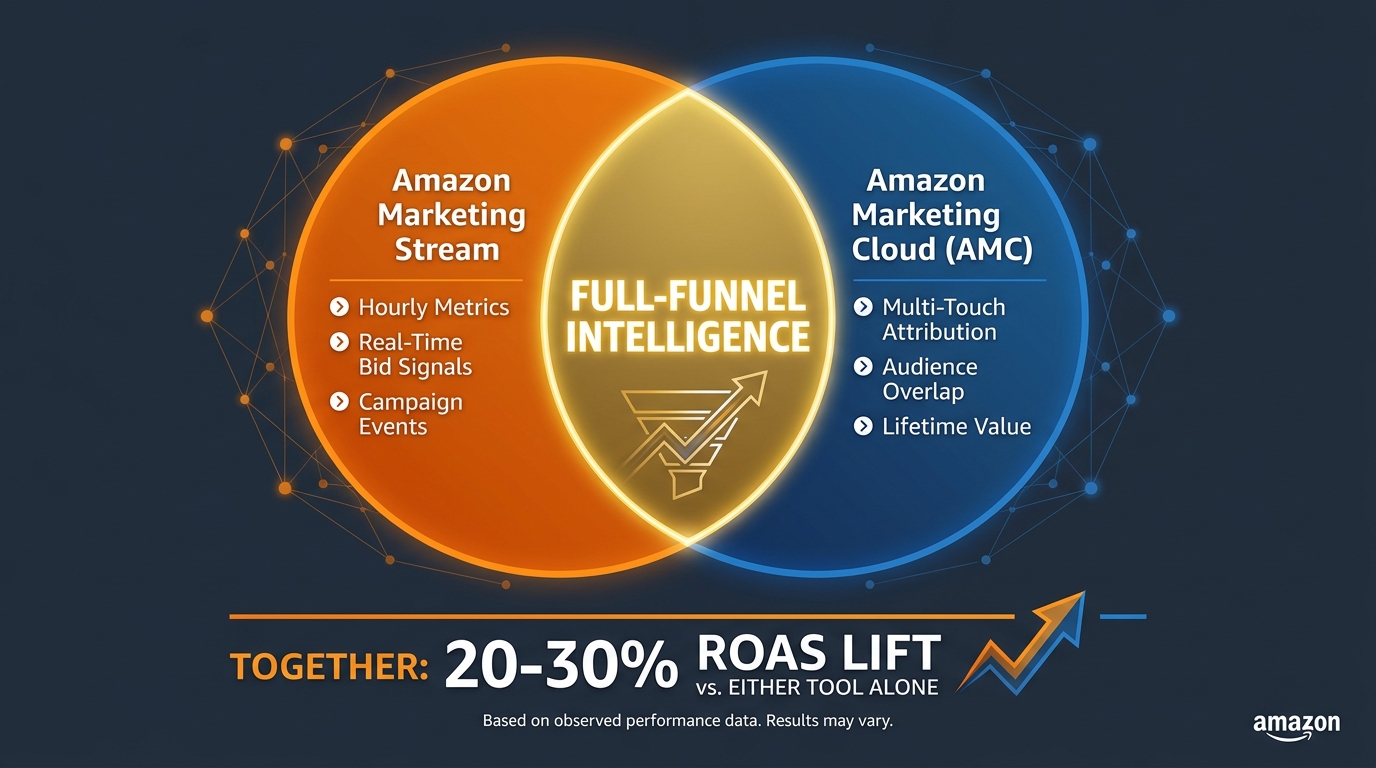
Marketing Stream excels at the execution layer — delivering the intraday signals that drive bid and budget adjustments. But by itself, it operates in a relatively narrow measurement frame: last-click attribution within standard Amazon Ads conversion windows. For advertisers running multi-format, multi-channel strategies, that’s only part of the story.
Where AMC Fills the Gaps
Amazon Marketing Cloud (AMC) is a privacy-safe, clean-room analytics environment where advertisers can analyze their Amazon Ads event-level data using SQL queries. The key differences from Marketing Stream are scope and granularity. While Stream gives you hourly campaign-level metrics, AMC gives you access to event-level data across your entire advertising history — but with a latency of typically 24–48 hours.
The intelligence AMC generates that Marketing Stream cannot includes: multi-touch attribution paths (how many customers saw a Sponsored Display ad, then a Sponsored Brand, then converted via a Sponsored Product click — and what each touchpoint contributed); New-to-Brand analysis at granular audience levels; customer lifetime value modeling based on purchase history; and audience overlap analysis between your DSP and sponsored ads audiences.
The Practical Integration Model
In practice, the most effective teams use these tools in complementary roles. AMC runs weekly or biweekly SQL analyses to identify which campaign types, audiences, and ad formats drive the highest-quality customers — measured by 90-day LTV, NTB rate, and repeat purchase rate. These AMC insights feed strategic decisions: which campaigns to fund more aggressively, which audiences to target via DSP retargeting, which product categories generate the most valuable first-time buyers.
Marketing Stream then handles the tactical execution within those strategic parameters — adjusting bids hour by hour to capture efficient impressions within the audience and creative combinations that AMC has identified as highest-value. The AMC layer tells you what to invest in; the Stream layer ensures you’re deploying that investment as efficiently as possible within each day.
Teams that have implemented this two-layer approach report ROAS improvements in the 20–30% range compared to using either tool independently — though it’s worth noting this reflects favorable self-reported case study data from partner implementations rather than a controlled study result.
The New Attribution Model Complication
Amazon introduced a shopping-signal enhanced last-touch attribution model for Store-served ads effective January 1, 2026. This change affects how conversions are attributed in your standard reporting and — with a lag — in AMC data. If you built your baseline ROAS targets and bidding rules before January 2026, you should audit whether the attribution model change has affected your historical benchmark numbers before applying them to current optimization logic. A campaign that appeared to have a 25% ACOS under the old model may show a different number under the new model without any actual change in underlying performance.
Common Implementation Mistakes — and How to Avoid Them
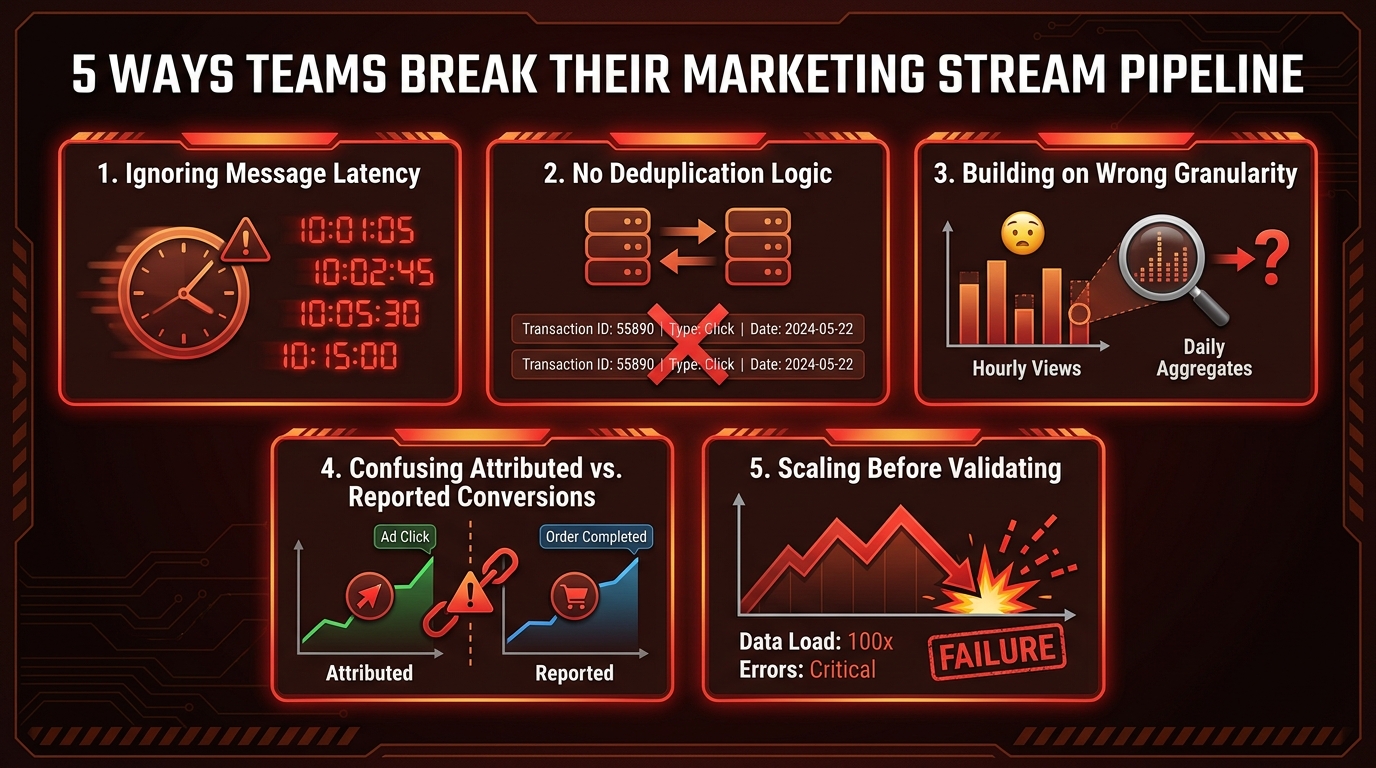
Marketing Stream implementations fail in predictable ways. After examining dozens of agency and advertiser setups, the same categories of mistakes appear repeatedly — and most of them are invisible until they’ve already distorted your optimization logic.
Mistake 1: Ignoring Attribution Window Lag in Hourly Conversion Data
The most technically consequential mistake is treating hourly conversion data from Marketing Stream as if it reflects actual conversions happening in that hour. It doesn’t — not fully. Amazon’s default attribution window for Sponsored Products is 7 days (with a 1-day click attribution option available). This means that a click at 9am might result in a purchase at 11pm, and that conversion will appear in reporting data retroactively.
Marketing Stream delivers attributed sales data for each hour, but because of attribution window effects, the numbers for recent hours are inherently incomplete — they will increase as conversions within the attribution window roll in. If you’re using the most recent 2–3 hours of conversion data to drive bid adjustments, you’re almost certainly under-counting conversions for recent hours and therefore making your current-hour ACOS look worse than it actually is. Build a conversion lag correction model — apply historical conversion lag curves to inflate your recent-hour conversion estimates before using them in bid logic.
Mistake 2: No Deduplication Logic
SQS message delivery is “at-least-once” — meaning the same message can be delivered multiple times under certain conditions (network issues, Lambda timeouts, re-drives from dead-letter queues). If your consumer processes the same hourly metric message twice, you’ll double-count impressions, clicks, and attributed sales, which will distort every calculation downstream — ACOS, ROAS, CPC, all of it.
Every Marketing Stream consumer needs idempotency logic: a mechanism to detect and discard duplicate messages before they reach your data store. The standard approach is to maintain a processed-message-ID cache (in Redis, DynamoDB, or a similar low-latency store) and check each incoming message against it before processing. This adds a few milliseconds of overhead per message but is non-negotiable for data integrity.
Mistake 3: Building Bid Logic on Campaign-Level Averages
Marketing Stream delivers data at the campaign and ad group level, which tempts teams to build bid logic at the same granularity. But within a campaign, there can be enormous variance between individual keywords, product targets, and placements. A campaign-level ACOS of 25% could contain a top-of-search placement with 12% ACOS and a product page placement with 48% ACOS. Applying a campaign-level bid adjustment based on the aggregate makes both situations worse — it simultaneously underbids on your best placement and overbids on your worst one.
The right granularity for bid optimization is at the keyword or targeting entity level. Marketing Stream data gives you the campaign/ad group level signals; you should pair these with targeting-level data from the standard Reporting API (run on a daily basis) to get the full picture and make bidding decisions at the appropriate level of granularity.
Mistake 4: Scaling to Automation Before Validating Results
The enthusiasm around Marketing Stream often pushes teams to build fully automated bid execution before they’ve validated that their analysis logic produces correct results. The appropriate rollout sequence is: instrument the pipeline and log all calculated bid recommendations without executing them (weeks 1–2); compare recommended bids to actual current bids and verify the recommendations make intuitive sense (weeks 2–3); execute recommendations on a small subset of campaigns (10–15%) while monitoring performance closely (weeks 3–6); scale to the full account after validating that the test group shows improved ROAS compared to the control group.
Skipping this validation phase and immediately automating bid changes across a full account is how teams generate significant financial damage quickly — especially when the conversion lag issue described above hasn’t been properly addressed.
Mistake 5: Not Accounting for Amazon’s Own Bidding Adjustments
Amazon’s campaign manager and automated bidding features — dynamic bids up and down, target ROAS, and similar settings — apply their own adjustments on top of your set bids. If you’re running Marketing Stream-driven bid automation on campaigns that also have Amazon’s automated bidding enabled, your custom bid changes may be partially or fully overridden by Amazon’s algorithms. Understand which campaigns are running which Amazon bidding mode before deploying custom bid automation — or you’ll have two layers of competing bid logic fighting each other, producing unpredictable results.
The ROI Case: What the Numbers Actually Show
Any significant infrastructure investment requires a credible ROI case. For Amazon Marketing Stream, the performance evidence comes from a combination of Amazon’s own aggregate data and partner-reported case studies — both of which are worth examining critically.
Amazon’s Aggregate Benchmark
Amazon’s own published benchmark states that partner-managed advertisers using Marketing Stream for Sponsored Ads saw an average 5% increase in ROAS over six months compared to similar advertisers not using it. This is a meaningful but modest figure — and it’s important to understand what it represents. It’s an average across all partner-managed advertisers using Stream in any way, including implementations that are rudimentary or not fully operationalized. It’s also comparing against a control group of advertisers not using Stream at all, which sets a relatively low bar.
The 5% figure should be interpreted as a floor, not a ceiling. It represents the average including underperforming implementations. Well-designed implementations with proper dayparting, budget pacing, and deduplication logic consistently outperform this average.
Partner and Agency Case Study Results
Published agency case studies show much larger gains in specific implementations. The most dramatic documented results involve brands in competitive categories where intraday bid optimization produced ACOS reductions of 40–85% and sales increases of 200–400% — though these are outlier results, typically from situations where the baseline was extremely poorly optimized (a brand spending heavily with static bids across all hours in a category with very pronounced dayparting patterns).
More typical results for well-run accounts implementing Marketing Stream on top of already-reasonable PPC management are in the 10–15% ROAS improvement range — consistent with the 5–15% efficiency gains that expert practitioners cite when discussing dayparting and intraday budget pacing specifically. For a brand spending $50,000 per month on Amazon Ads, a 12% ROAS improvement at consistent spend represents approximately $6,000 in additional attributed revenue per month — or, equivalently, the ability to hit the same revenue target with $5,400 less ad spend.
The Time-to-Value Curve
The time-to-value curve for Marketing Stream is non-linear. The first 4–6 weeks are essentially investment — setting up the pipeline, collecting baseline data, and validating analysis logic. Weeks 6–12 see initial performance improvements as the first optimization cycles execute on statistically reliable baselines. Weeks 12–24 see compounding improvements as the baseline models refine with more data, seasonal adjustments become more accurate, and the bid execution logic is tuned based on observed results. The full efficiency gain typically doesn’t materialize until the 6-month mark — which is consistent with Amazon’s own measurement window in their published benchmark.
Who Should (and Shouldn’t) Build on Marketing Stream
Marketing Stream is not the right infrastructure for every Amazon advertiser. The setup complexity, ongoing engineering requirements, and 4–6 week data collection period before optimization benefits begin mean that there are clear thresholds below which the investment doesn’t generate a positive return.
The Right Fit
Marketing Stream makes clear economic sense for advertisers in the following situations:
- High daily spend with pronounced dayparting patterns: If you’re spending $1,000 or more per day on Amazon Ads, even a 10% ROAS improvement generates $36,500 in additional annual attributed revenue — enough to comfortably justify the engineering investment. If your category has a strong time-of-day purchase pattern (which most do), the improvement potential is real.
- Recurring budget exhaustion problems: If your campaigns regularly exhaust daily budgets before 4pm, the budget pacing use case alone may justify the investment. The opportunity cost of hours without ad coverage during peak conversion windows is measurable and often significant.
- Agencies and tech providers managing multiple accounts: For agencies, Marketing Stream enables a scalable monitoring infrastructure across all client accounts — one pipeline delivering alerts and optimization signals for dozens of advertisers simultaneously. The per-account value accrues rapidly at agency scale.
- Advertisers with strong seasonal peaks: If your business runs 30–40% of annual revenue through Q4 or Prime Day, the ability to optimize intraday bids and budget pacing during those compressed, high-stakes windows has asymmetric value.
Not the Right Fit (Yet)
For advertisers spending under $500/day on Amazon Ads, the engineering overhead of a self-built Marketing Stream implementation is unlikely to generate positive returns in a reasonable timeframe. The better path is to use a Marketing Stream-enabled software platform — several SaaS tools have built the infrastructure and expose dayparting and budget pacing features through a user interface — rather than building custom infrastructure.
Similarly, if your campaigns don’t have sufficient click volume to generate statistically reliable hourly conversion data (roughly 30+ clicks per hour per campaign or campaign cluster), dayparting based on hourly ACOS will produce noisy signals that drive poor decisions. Higher-volume accounts benefit more reliably from hourly optimization than lower-volume ones.
The Partner Path
Amazon offers two pathways to Marketing Stream access: self-service API integration (requiring AWS and Amazon Ads API access) and through Amazon Ads certified partners who have already built the infrastructure. For brands without in-house API engineering capabilities, the partner path — choosing an Amazon Ads tech provider that has built their optimization tools on Marketing Stream — provides access to the optimization benefits without requiring custom infrastructure development. The trade-off is less control and customization compared to a self-built implementation.
From Reactive to Proactive: What Real-Time PPC Control Actually Requires
Amazon Marketing Stream represents a genuine infrastructure shift in how Amazon advertising data can be consumed and acted on. Moving from daily pull reporting to hourly push messaging is not just a technical upgrade — it changes the fundamental operational model of PPC management, from retrospective analysis to real-time intervention.
But the key insight from both Amazon’s aggregate data and partner case studies is that the Stream itself doesn’t generate the value. The value comes from what you build on top of it: the dayparting models informed by statistically reliable hourly baselines, the budget pacing logic that catches exhaustion events before they cost you hours of coverage, the notification systems that surface ASIN ineligibility and campaign health issues within minutes rather than overnight, and the AMC integration that grounds your tactical bid decisions in a full-funnel understanding of which customers and channels actually matter.
The teams that extract 10–15%+ ROAS improvements from Marketing Stream aren’t doing so because they set up an SQS queue and subscribed to datasets. They’re doing it because they invested in the full stack: data quality (deduplication, conversion lag correction), analytical rigor (sufficient baseline periods, proper granularity), operational discipline (validation before scaling, tiered alerting), and strategic clarity (AMC-informed priorities guiding where Stream-driven tactical optimization should focus).
Your Actionable Next Steps
If you’re evaluating Marketing Stream for the first time, start with these concrete steps:
- Audit your current hourly spend patterns first. Request 90 days of campaign data at the most granular level available and manually calculate which hours your best-performing campaigns are generating their best results. If the variance is small (within 20%), dayparting will have modest impact. If the variance is large (50%+), Marketing Stream-driven dayparting will have substantial impact and the investment is clearly justified.
- Quantify your budget exhaustion problem. Check the last 30 days and count how many campaign-days ended with budget fully exhausted before 6pm. Multiply average CPC by estimated clicks lost during those dark hours. That number is your budget pacing opportunity cost — and your business case for the investment.
- Choose build vs. buy based on your engineering capacity. If you have API engineering resources, the self-service path gives you full control. If you don’t, identify Marketing Stream-enabled partners in the Amazon Ads partner directory and evaluate their dayparting and budget pacing features specifically.
- If building, start with the notification use case. The campaign health monitoring and budget exhaustion alert use cases are simpler to implement than full dayparting automation and generate immediate operational value. Use them as your validation that the pipeline is working correctly before layering on bid optimization logic.
- Build baseline data before building automation. Collect 4–6 weeks of hourly performance data before deploying any automated bid changes. The baseline is the foundation everything else rests on. Rushing it produces optimization logic built on noise rather than signal.
The competitive gap between advertisers who have operationalized real-time data and those still managing on daily snapshots is widening. In 2026, the most sophisticated Amazon advertisers are already operating with sub-hour feedback loops between performance data and bid execution. The question for every serious Amazon advertiser is not whether this infrastructure eventually matters — it’s how long it makes sense to operate without it.