
There was no press release. No big announcement. No keynote moment where TikTok declared its ad system had fundamentally changed. The shift happened incrementally — through quiet help center updates, behind-the-scenes product rollouts, and a March 2026 documentation revision that quietly confirmed what sharp sellers had already felt in their dashboards: the TikTok Shop ad system that existed twelve months ago is effectively gone.
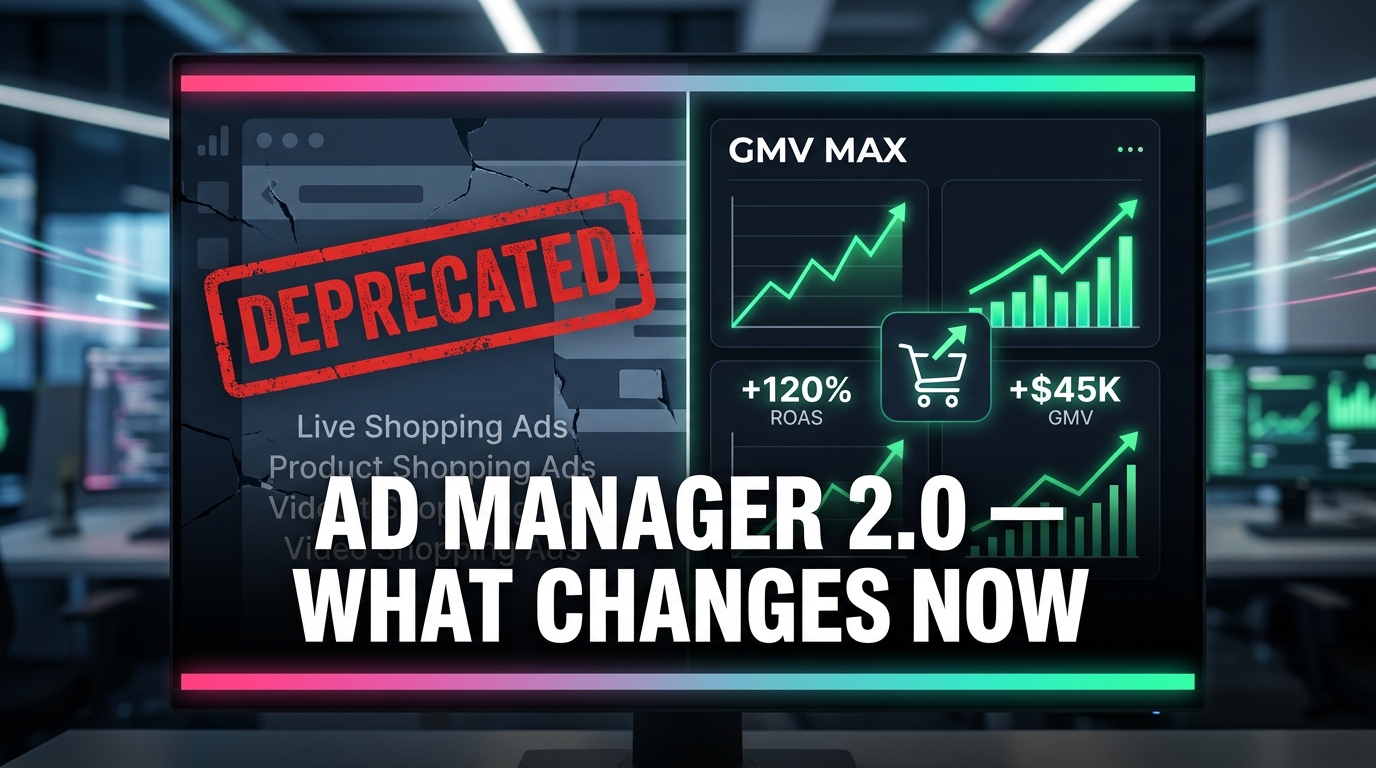
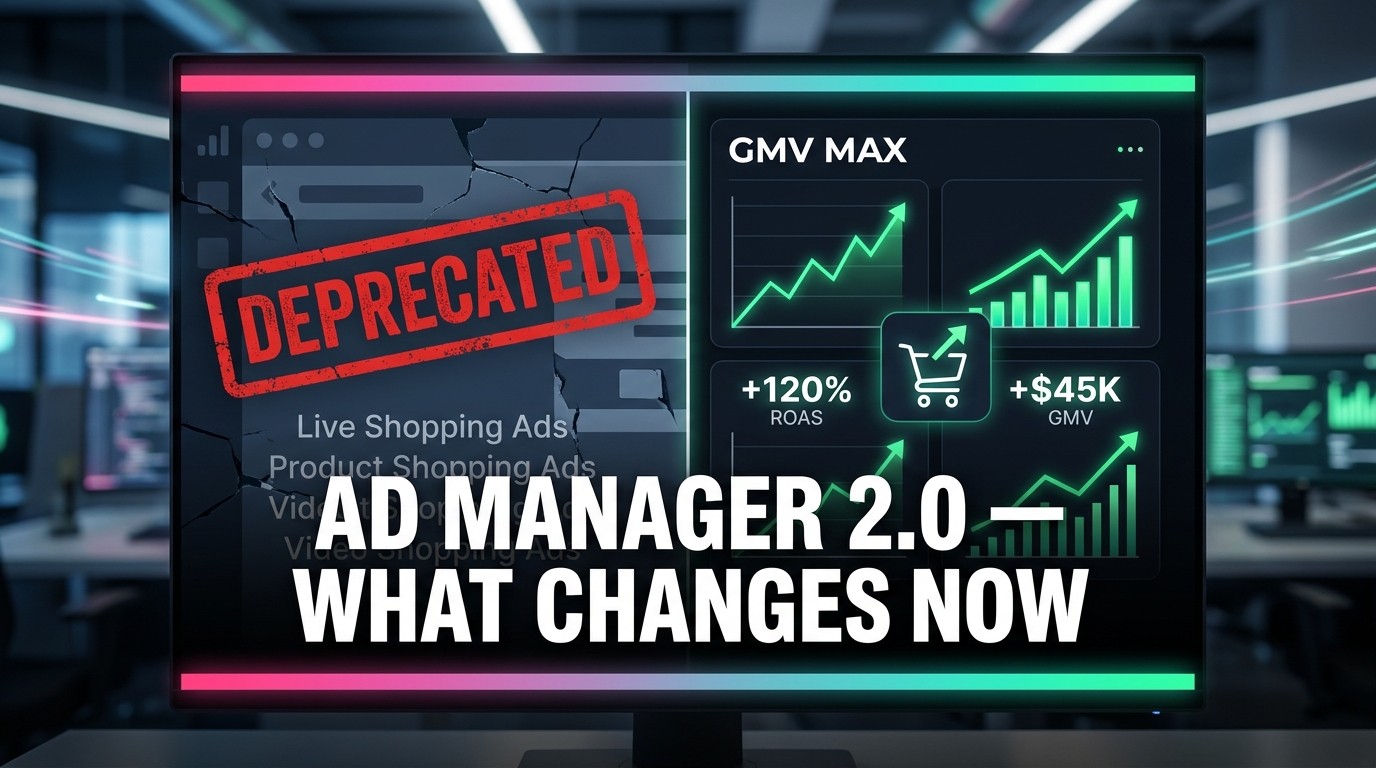
The old campaign types — LIVE Shopping Ads, Product Shopping Ads, Video Shopping Ads under the Sales objective with TikTok Shop as the destination — can no longer be created, edited, or duplicated. GMV Max is now the only game in town. Smart+ has evolved from a simple automation toggle into a modular control system with individual switches per function. A new workflow called One Asset Manager is restructuring how catalogs, creative, and event data connect. And the Collage Carousel format is quietly outperforming video in categories sellers would never have expected.
Meanwhile, sellers who haven’t adapted are watching their reported ROAS hold steady while their actual business margins quietly erode — because the attribution system has changed in ways that make the numbers look better than they are.
This article is not a feature tour. It’s a direct account of what the system change actually means operationally, where sellers are getting caught out, and exactly what needs to change in how you structure, measure, and run campaigns inside this new version of TikTok Ads Manager. The window for treating this as optional is already closed.
The GMV Max Mandate: Your Old Campaigns Are Officially Dead
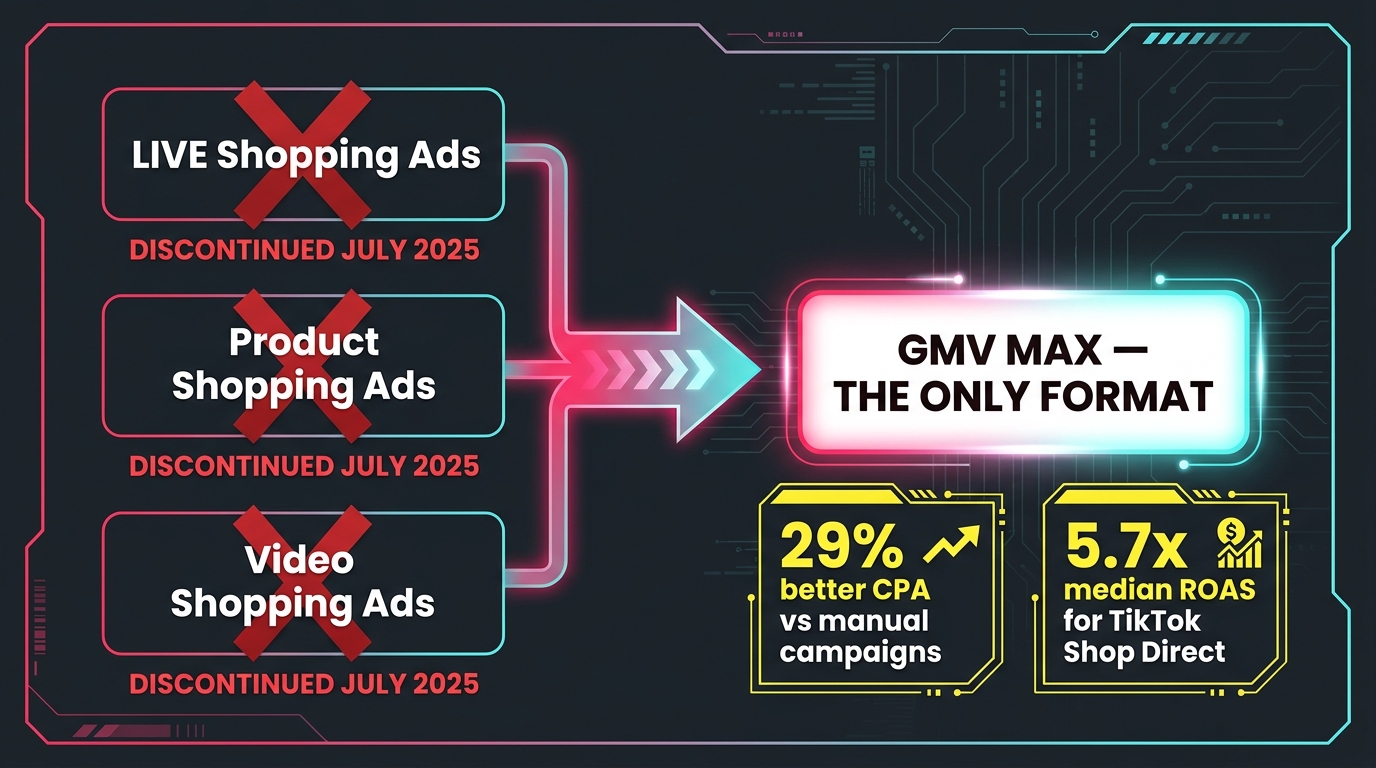
The GMV Max migration is the most consequential structural change TikTok has made to its commerce ad stack in the platform’s history. Starting July 2025, GMV Max became the default and only supported campaign type for TikTok Shop Ads running under a Sales objective. By March 2026, TikTok’s own documentation confirmed the point of no return: existing legacy campaigns could continue delivering, but you could no longer create, edit, or duplicate LIVE Shopping Ads, Product Shopping Ads, or Video Shopping Ads formats in the old manner.
What this means in practice is more disruptive than the phrasing suggests. Sellers who had spent months tuning audiences, testing bid strategies, and calibrating ad group structures inside legacy campaign types now have to start that optimization process over — inside a system that operates on fundamentally different logic.
What GMV Max Actually Is (and Isn’t)
GMV Max is TikTok’s answer to Google’s Performance Max and Meta’s Advantage+ Shopping Campaigns. It’s a fully automated campaign type that uses machine learning to allocate budget, select audiences, choose placements, and rotate creative with a single stated goal: maximize gross merchandise value from your TikTok Shop. You set an ROI target (or let the system self-optimize), connect your product catalog, upload creative assets, and the system does the rest.
The appeal is real. TikTok reports that advertisers testing Smart+ performance solutions (the underlying AI layer powering GMV Max) see 29% better CPA than manual campaigns. Across the industry, TikTok Shop direct-objective campaigns show a median reported ROAS of 5.7x — a number that outpaces most comparable formats on Meta or Google at equivalent spend levels. GMV Max gets to those numbers faster than manual campaigns because it draws on broader signal sets, including organic engagement, affiliate traffic, and historical shop conversion data, not just paid ad interactions.
What You Actually Lose in the Migration
Sellers who spent years on manual audience targeting, bid cap management, and placement-level optimization are justifiably uncomfortable here. GMV Max removes most of those levers by design. You can’t set demographic exclusions with the same granularity. You can’t force the system to run only on the TikTok feed and suppress Search placements. You can’t manually cap bids at the ad group level the way legacy campaigns allowed.
The practical consequence is that sellers with niche audiences — B2B products, age-restricted categories, high-price-point goods with a very specific customer profile — will find GMV Max’s broadening tendency works against them in ways that legacy campaigns didn’t. The system is optimized for volume and scale, not precision targeting. That’s a legitimate trade-off that many sellers will feel, not a bug that will be patched.
How to Migrate Without Losing Performance History
TikTok’s official guidance says to use historical ROI data as your target ROI when setting up GMV Max replacements for legacy campaigns. In practice, this means pulling your 30–60 day ROAS average from the old campaign type, setting that figure as your target ROI floor in the new GMV Max campaign, and giving the system at least 7–14 days to exit the learning phase before drawing conclusions about performance. Sellers who set their target ROI too aggressively on day one — expecting the system to immediately match a legacy campaign’s polished performance — will throttle delivery and stall the learning period.
The safer approach: launch GMV Max with a slightly loosened ROI target (10–15% below your actual floor) for the first week, allow budget to flow and signal accumulation to happen, then tighten the target once you have enough conversion data for the algorithm to work from.
Smart+ Modular Controls: What You Can Now Toggle — and What You Can’t
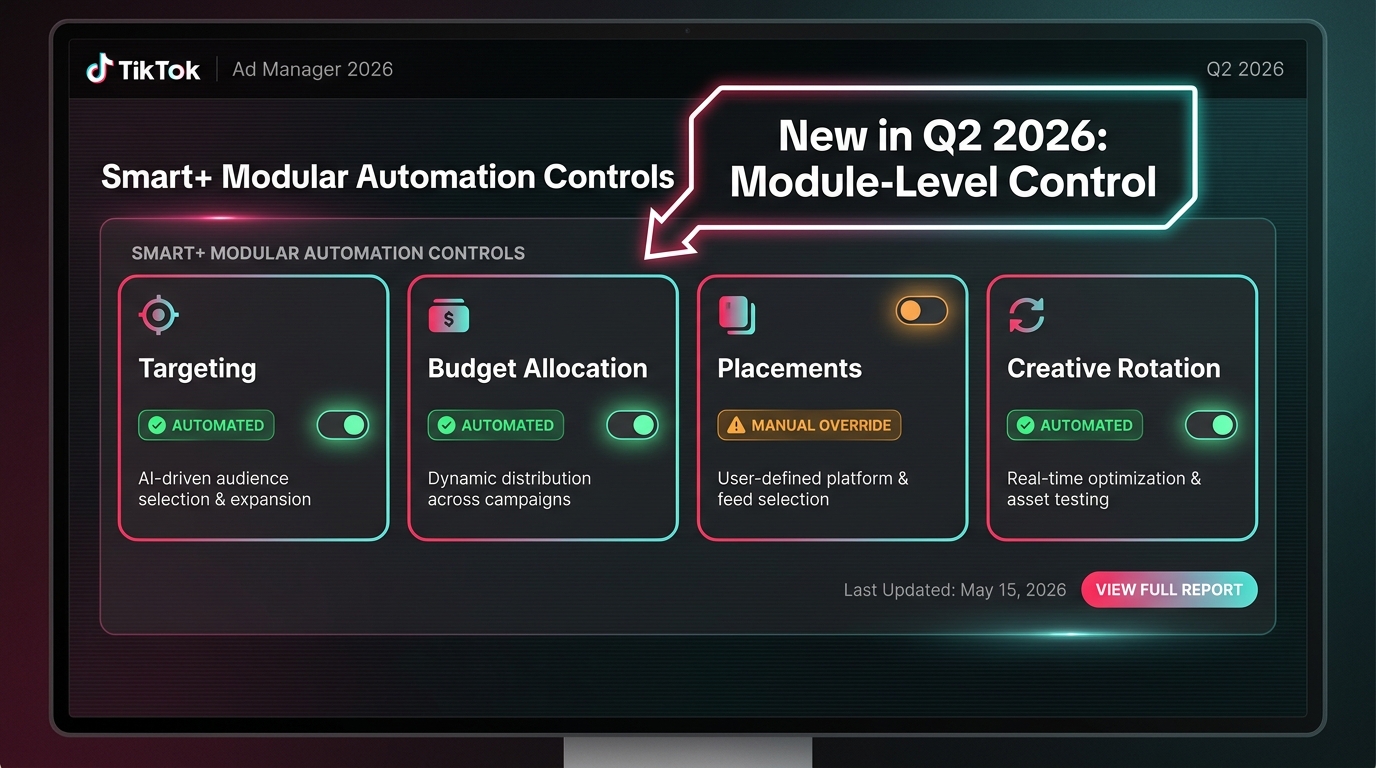
The biggest interface change in Q2 2026 wasn’t GMV Max itself — it was what happened to the Smart+ control layer sitting above it. TikTok has moved from a binary “automation on or off” switch to a modular system where specific functions can be individually toggled between automated and manual modes. This is a meaningful change that the platform hasn’t publicized loudly, but it directly affects how much operational control sellers retain within the new system.
The Four Toggle Categories
The current Smart+ control interface organizes automation into four distinct functional areas, each now independently configurable:
- Targeting: When automated, Smart+ selects audiences based on machine learning signals including shop purchase history, engagement patterns, and lookalike modeling across TikTok’s user base. When switched to manual, you can re-apply demographic, interest, and behavioral parameters — though with less granularity than legacy campaign types allowed.
- Budget Allocation: The automated version lets the system move budget dynamically between ad groups and placements based on real-time performance signals. Manual mode locks allocations at the levels you set, which is slower to react to opportunity but prevents the system from funneling everything into a single ad group that happens to be converting well that hour.
- Placements: This is the toggle most sellers should move to manual. Automated placements mean TikTok will run ads across its entire network — TikTok feed, TikTok Search, Pangle, and partner apps. For TikTok Shop campaigns specifically, the feed and search placements are almost universally better-performing than Pangle. Restricting to manual placement and selecting TikTok only is standard best practice for sellers with limited budgets.
- Creative Rotation: Automated creative rotation lets Smart+ serve whichever creative asset it predicts will perform best for each individual user, drawing from your uploaded pool. Manual mode rotates on a standard schedule. For most sellers with more than three active creative variants, automated rotation consistently outperforms manual schedules — leave this one automated.
The Smart+ Label System
One of the quieter but practically useful changes in the Q2 2026 update is that the interface now labels each module with its current state — a small “Smart+” pill tag appears next to any module running on automation, and a different indicator shows where you’ve applied manual overrides. This sounds like a minor UX detail, but it matters because multi-person teams can now audit campaign settings at a glance without clicking into each ad group to determine who changed what. For agencies managing multiple seller accounts, this labeling system significantly reduces misconfiguration errors.
The Control You Don’t Have
Worth stating plainly: even with all toggles set to manual, you cannot replicate the granular control of legacy shopping campaign structures. GMV Max’s optimization objective is hardwired to GMV, not to ROAS, CPA, or any other blended metric you might prefer. Sellers whose business models require maximizing net margin (rather than gross revenue) will find the system can be steered but not fully redirected. If your 30% margin products and your 8% margin products share a catalog, GMV Max will not automatically distinguish between them — it will optimize for volume across all products unless you actively segment them into separate campaigns with different catalog subsets.
One Asset Manager: The Catalog-Creative-Events Convergence
Before One Asset Manager, running effective TikTok Shop campaigns meant managing three separate asset environments that talked to each other imperfectly: your product catalog in Ads Manager, your creative library, and your pixel/events configuration. Updates to one didn’t automatically propagate to the others. A catalog feed change wouldn’t immediately affect which products appeared in Smart+ Catalog Ads. Creative assets uploaded separately from catalog data couldn’t easily be linked to specific product sets.
One Asset Manager, introduced in Q2 2026 as part of TikTok’s broader commerce stack upgrade, consolidates these three functions into a single unified workflow. It’s positioned as the operational hub that connects catalog data, creative assets, and conversion events so that all three feed the Smart+ optimization layer with consistent, aligned signals.
Why This Changes the Creative Workflow
The most immediate practical change is that product-linked creative — videos and images tied to specific catalog items — can now be managed in one place rather than assembled across multiple interfaces. When you upload a creative asset through One Asset Manager, you tag it to the relevant catalog products at upload time. The system then knows which creative is associated with which product, and Smart+ can serve product-specific creatives to users whose behavioral signals match that product’s historical converter profile.
This is a significant improvement for sellers with large catalogs. Previously, a 500-SKU seller running Smart+ Catalog Ads was effectively letting the system pick creative without direct product-to-creative alignment. The result was often a mismatch: the system would serve a high-energy unboxing video for a product that was featured only incidentally in the footage. One Asset Manager allows explicit product-to-creative mapping, which improves relevance scoring and conversion rates for catalog ads specifically.
The Events Connection
The third pillar — events data — is where many sellers are currently under-utilizing the system. One Asset Manager surfaces your TikTok Pixel events and TikTok Shop purchase events in the same interface as your catalog and creative, making it easier to identify which events are properly firing and whether they’re aligned with the catalog items in your active campaigns.
Sellers who have run TikTok Shop ads without verifying their pixel event configuration — and there are more of these than the industry likes to admit — are feeding the optimization algorithm dirty signal data. If your AddToCart events are firing correctly but your Purchase events are misfiring or double-counting, Smart+ is learning from incorrect conversion signals. The unified view in One Asset Manager surfaces these mismatches more visibly than the previous siloed setup, making audit workflows faster and problems harder to miss.
Collage Carousel: The Commerce Format Most Sellers Haven’t Tried Yet
TikTok built its ad ecosystem on video. The platform’s culture is video-first; its native content format is short-form video; its algorithm has historically rewarded video-style creative in ad auctions. For the past three years, sellers who asked about image-based ad formats on TikTok were typically told they were fighting the platform’s grain.
That calculation shifted in Q2 2026 with the introduction of Collage Carousel — a commerce-focused image ad format that presents a hero image alongside three product thumbnails in a single frame, designed specifically for catalog-driven product discovery. Early results are challenging assumptions about video dominance in ways that sellers focused exclusively on video creation should pay attention to.
How the Format Works
Collage Carousel shows users a large featured image (the “hero”) paired with three smaller product thumbnail images in the same frame. The overall unit functions as a carousel — users can swipe through frames to explore more product combinations. Each product thumbnail is shoppable, linking directly to the product page within TikTok Shop, while the hero image provides the context or lifestyle framing.
The format is designed to reduce the creative production burden for sellers who don’t have high-quality video assets for every SKU. A well-shot product image, a styled lifestyle photo, and clean product thumbnails from a catalog shoot can become a fully functional Collage Carousel without a video production budget.
When Image Beats Video
The categories where Collage Carousel is performing most strongly tend to share a few characteristics: high product clarity requirements (home goods, furniture, kitchen items, fashion accessories), multiple SKUs or colorways that benefit from side-by-side presentation, and purchase decisions driven by product appearance rather than demonstration. For these categories, a clear, well-lit product image at high resolution can communicate purchase intent signals more efficiently than a 15-second video that takes 8 seconds to show the product clearly.
Sellers in these categories should be running Collage Carousel as a complementary format alongside video — not as a replacement, but as an additional creative type that feeds the Smart+ rotation pool. More creative diversity in the asset pool gives the algorithm more options to match to individual users, which statistically improves overall campaign performance.
Technical Specs Worth Knowing
TikTok requires images at a minimum of 500×500 pixels for catalog-sourced thumbnails. JPEG and PNG are the supported formats. The platform policy prohibits watermarks, blurred images, or promotional overlay text that covers a significant portion of the image. For Collage Carousel specifically, white or neutral backgrounds on product thumbnails outperform busy lifestyle backgrounds for the thumbnail positions — save the lifestyle imagery for the hero frame. Aspect ratios of 1:1 for thumbnails and 3:4 or 9:16 for the hero perform best in feed placements.
Attribution Reality Check: Why Your ROAS Is Probably Overstated
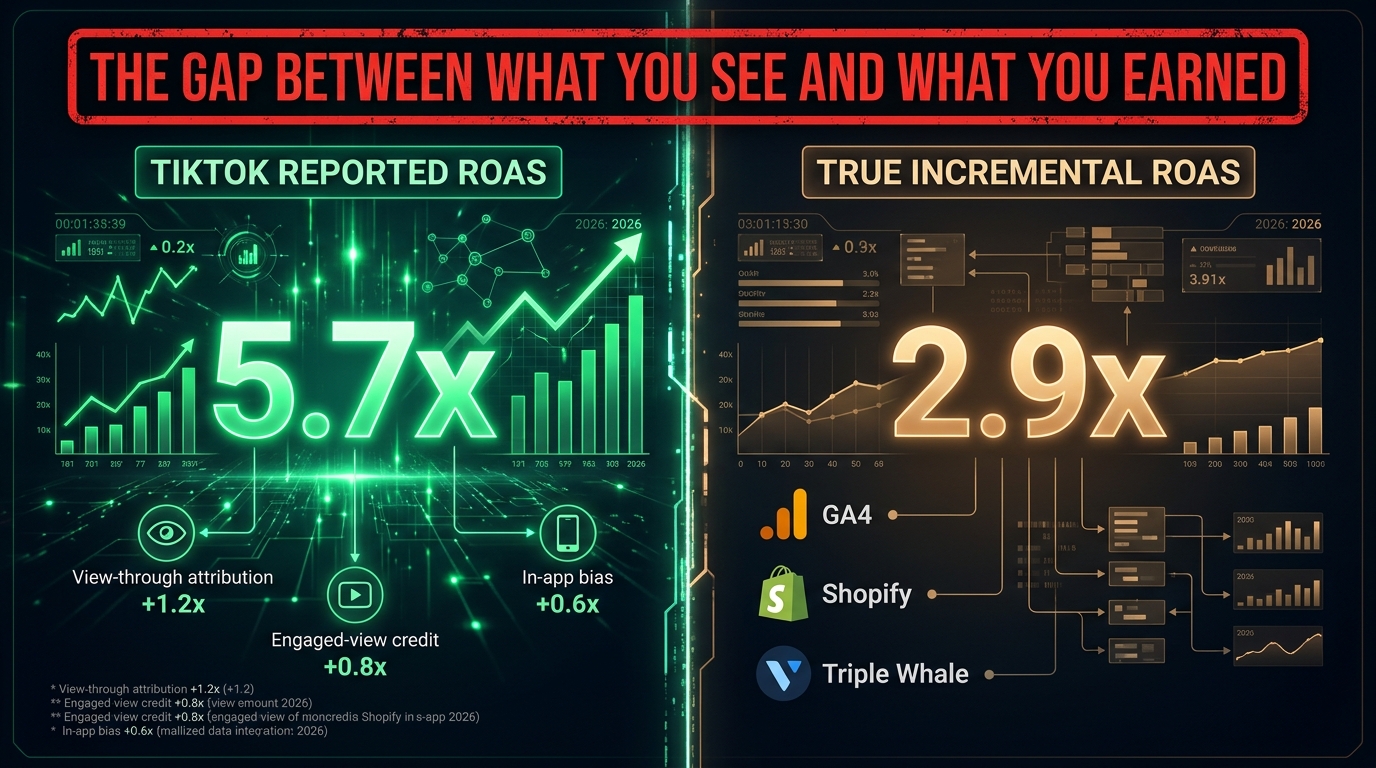
Here is the conversation happening quietly in every serious TikTok Shop seller’s back channel: the numbers in Ads Manager look better than what shows up in Shopify, GA4, or any third-party measurement tool. The gap is not a discrepancy to be explained away — it’s a structural feature of how TikTok’s attribution system works, and it has gotten more consequential, not less, as GMV Max has become the primary campaign type.
The Three Attribution Inflation Sources
TikTok Shop’s attribution operates primarily on a 7-day click, 1-day view window for most campaign types, with engaged-view attribution adding another layer. That means a user who watched 6 seconds of your ad without clicking, then purchased your product within 24 hours through any path (organic search, a friend’s recommendation, a Google ad), can be counted as a TikTok Shop ad conversion. Three specific mechanisms compound each other:
- View-through attribution: Purchases credited to ad views, not clicks. A user who saw your ad and bought the product three hours later via a Google search result still shows as a TikTok conversion. This inflates attributed revenue without reflecting true ad-driven demand.
- Engaged-view attribution: Separate from basic view-through, this category credits conversions to users who paused on your video or interacted with it without clicking through. The threshold for “engagement” is low enough to capture significant numbers of users who had only mild awareness of the ad.
- In-app attribution bias: TikTok Shop purchases made in-app are attributed to TikTok last-touch, but the purchasing journey may have started with organic content, an affiliate link, or an influencer review — none of which are ad spend you controlled. GMV Max’s optimization objective is GMV, and it will route budget toward high-converting placements without distinguishing between ad-assisted and organically-primed purchases.
The Practical Gap
Industry benchmarks and practitioner reports indicate the gap between TikTok-reported ROAS and third-party verified ROAS typically runs between 30–60% for TikTok Shop campaigns. A campaign reporting 5.7x in Ads Manager may be delivering 2.8–3.5x in terms of truly incremental, ad-driven revenue. That’s not a catastrophic underperformance — those are still strong numbers — but the gap matters when you’re making budget allocation decisions, scaling ad spend, or reporting to stakeholders who expect the numbers to reconcile across platforms.
What to Actually Measure Instead
Sophisticated sellers are building a three-source measurement model rather than relying on any single platform’s attribution:
- TikTok Ads Manager reported ROAS: Use as a directional indicator and for campaign-level optimization decisions, not as a source of truth for business profitability.
- Shopify or Seller Center order data: Cross-reference attributed orders in TikTok against actual orders in your order management system. Order-level discrepancies indicate a pixel/event configuration problem rather than normal attribution variance.
- Third-party attribution tools (Triple Whale, Northbeam, Rockerbox): These tools apply consistent, platform-agnostic attribution models across all channels and give you a blended picture of where revenue is actually coming from. For TikTok Shop specifically, they’re the most reliable way to assess true incrementality rather than attributed volume.
Running TikTok Shop ads without this triangulation model means you’re making budget decisions based on inflated data. That doesn’t mean TikTok is lying to you — it means TikTok is measuring what TikTok can see, and using only that measurement to run your business is a structural mistake.
Product Catalog Hygiene: The Foundation the Algorithm Builds On
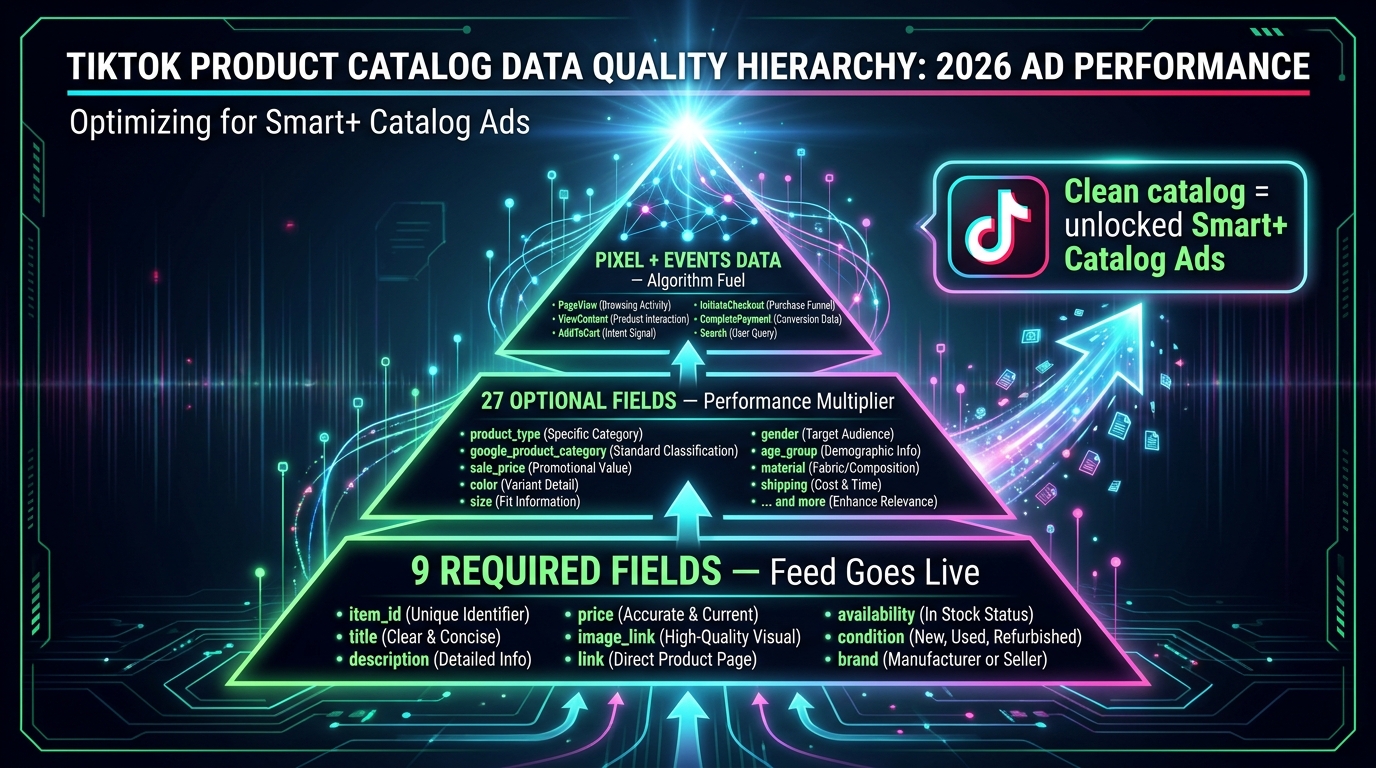
GMV Max’s performance ceiling is set by the quality of the data it’s learning from. The campaign type can access TikTok’s full audience graph and optimization infrastructure, but if the product catalog feeding it is incomplete, inconsistent, or poorly structured, the system will underperform even with aggressive budgets. This is the piece most sellers underestimate.
The 9 Required Fields (And Why “Required” Understates Their Importance)
TikTok’s catalog requires nine fields for a feed to go live: item_id, title, description, price, image_link, link (product page URL), availability, condition, and brand. Technically, meeting these nine fields is enough to activate your catalog and run ads. In practice, a catalog built only on the required fields will generate ads with lower relevance scores, weaker creative quality (for Catalog Ads specifically), and worse product matching in Smart+ Catalog Ads — because the algorithm has less structured data to work from when predicting which product to show which user.
The title field deserves particular attention. Many sellers populate it with their internal SKU code or a truncated marketing name. TikTok’s catalog system uses product titles as part of its relevance matching for catalog ads and search placements. A title like “BLK-YOGA-SM-V2” will not help the system understand what the product is, who should see it, or when it’s contextually relevant. Descriptive, keyword-rich titles within natural language constraints significantly improve catalog ad relevance and search placement performance.
The 27 Optional Fields That Drive Actual Performance
The optional fields in TikTok’s catalog specification are where catalog performance is actually differentiated. The most important optional fields for performance purposes are:
- product_type and google_product_category: These fields allow TikTok’s system to correctly classify your product within its taxonomy, which affects audience matching, seasonal promotion targeting, and placement eligibility in shopping surfaces.
- sale_price and sale_price_effective_date: If you run promotions, populating these fields correctly enables the system to display sale pricing in catalog ads automatically — a feature that materially improves click-through rate for price-sensitive categories without requiring manual ad creative updates.
- color, size, material, pattern: Attribute fields that improve variant matching and reduce wasted impressions from users who would buy the product in a different variant than what’s shown.
- additional_image_link: Allows you to supply multiple product images per SKU, giving Catalog Ads and Collage Carousel more visual options to select from for each impression.
The practical goal is to treat your TikTok catalog like a structured database, not like an afterthought upload. Sellers who maintain clean, complete catalogs with robust optional field coverage consistently outperform otherwise-comparable sellers running sparse catalogs, even when ad spend is held equal.
Feed Maintenance Cadence
TikTok supports CSV, XML (RSS/Atom), ZIP, and GZ feed formats with a maximum file size of 50GB and up to 20 million products. For sellers with frequently changing inventory — flash sales, seasonal stock fluctuations, variants going in and out of stock — automated feed refresh cycles of 4–6 hours prevent the system from serving ads for out-of-stock products. This is a problem that directly harms conversion rates and wastes ad spend on non-purchasable impressions, and it’s entirely preventable with proper feed automation.
Budget Architecture in a GMV Max World
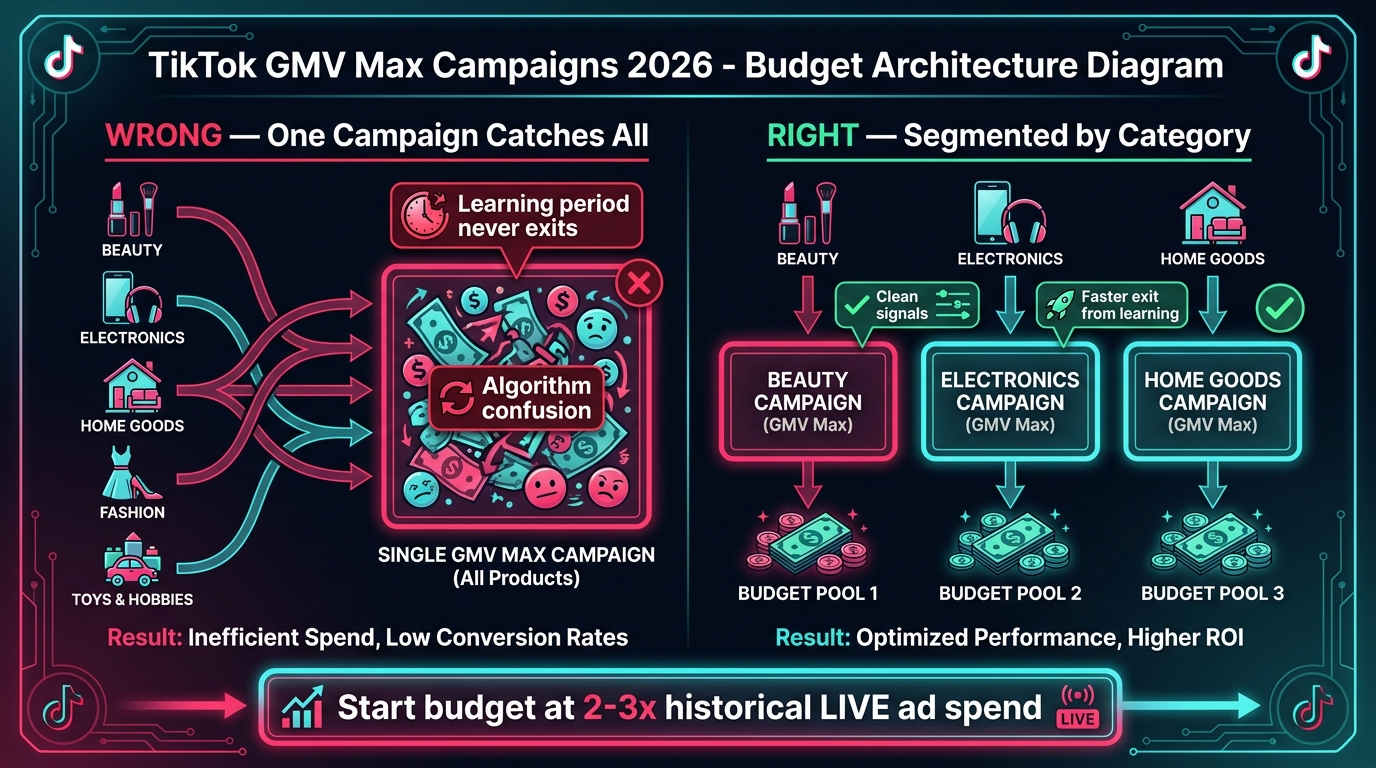
The migration to GMV Max changes not just how you configure campaigns but how you think about budget architecture at the account level. The instinct to consolidate everything into one large campaign — letting the algorithm allocate across your full catalog — runs directly counter to how GMV Max actually learns and performs at scale.
The Segmentation Principle
TikTok’s own documentation recommends creating separate GMV Max campaigns per major product or category rather than running a single all-encompassing campaign. The rationale is signal clarity: the optimization algorithm builds a conversion model for each campaign based on the products, audiences, and creative assets within that campaign. A campaign that contains $15 yoga mats and $200 espresso machines is presenting the algorithm with fundamentally different buyer intent signals across a single optimization pool. The result is a diluted model that doesn’t serve either product category particularly well.
The recommended segmentation approach follows one of two frameworks:
- By product category: Separate campaigns for each major product line. This works well for sellers with diverse catalogs where purchase intent and buyer demographics vary significantly between categories.
- By margin tier: Separate campaigns for high-margin and low-margin products, each with different target ROI settings. This lets the algorithm optimize aggressively for high-margin products while applying a tighter ROI floor for commodity or lower-margin items.
Setting the Right Starting Budget
TikTok’s guidance is to start GMV Max campaigns with budgets set at 2–3x your historical LIVE ad spend for equivalent product categories. For sellers migrating from legacy Video Shopping Ads campaigns, the starting budget recommendation is derived from your previous campaign’s average daily spend. The reason for the multiplier is that GMV Max needs a higher volume of daily conversion signals to exit the learning phase and begin delivering stable, optimized performance. Under-budgeted campaigns stay in extended learning phases, generating inconsistent delivery and unreliable performance data.
The learning phase typically requires 50 conversion events over 7–14 days before the algorithm stabilizes. If your target ROI is set at a level that would generate fewer than 50 conversions per week at current catalog prices and conversion rates, you need to either loosen the ROI target, increase the budget, or expand the catalog subset feeding that campaign.
Budget Adjustment Protocols
A critical operational rule in GMV Max campaigns: avoid frequent budget changes. Every significant budget adjustment — more than 30% up or down — resets or disrupts the algorithm’s delivery model, effectively pushing the campaign back into a partial learning state. The correct approach is to make budget decisions in larger, less frequent increments: evaluate weekly rather than daily, and move budget in 20–25% increments with at least 48–72 hours between adjustments to observe the stabilized impact before making a second move.
Creative Strategy Under the New System
The migration to GMV Max and Smart+ automation doesn’t eliminate the need for creative strategy — it shifts where creative strategy matters. When the algorithm controls audience, bidding, and placements, creative becomes the primary lever sellers can still influence directly. The quality and diversity of your creative pool now has more impact on campaign performance than almost any other variable within your control.
What the Algorithm Rewards
Smart+ creative rotation is not a random sampler. It builds a performance model based on which creative types generate the best engagement-to-conversion pathways for different audience segments. Over time, it identifies patterns: this type of user responds better to UGC-style unboxing; that segment converts from demonstration videos; a third group clicks through on static product images. To work efficiently, the algorithm needs variety to learn from.
The minimum viable creative pool for a well-functioning GMV Max campaign is six to eight distinct assets — not six variations of the same concept, but genuinely different creative approaches. Best practice breaks this pool into three categories:
- Native/UGC-style video: Creator-filmed content, testimonial-style videos, unboxing footage. Feels organic in feed. Typically drives the strongest first-time engagement for cold audiences.
- Demonstration or product feature video: Shows the product in use, highlights key features, communicates the value proposition directly. Converts better for high-consideration purchases where buyers need information before committing.
- Image-based creative (including Collage Carousel): Clean product imagery, lifestyle context, multi-product presentations. Performs strongly for re-engagement of warm audiences who’ve already been exposed to video creative.
Creative Refresh Cycles
Smart+ creative rotation will eventually exhaust the performance potential of any given creative asset as it saturates the audiences the algorithm is targeting. The signal that a creative is reaching saturation is a declining CTR with stable or rising CPM — the algorithm is still serving it because nothing better is available, but fewer people are clicking. Most sellers find that creative assets begin showing saturation signals within 3–6 weeks of consistent delivery, with heavily spent assets saturating faster.
Building a content production calendar around this cycle — aiming to introduce 2–3 net new creative assets per campaign per month — keeps the algorithmic options fresh and prevents performance plateaus driven by creative exhaustion rather than market saturation.
The Hooks That Actually Work in 2026
TikTok’s Creative Center data consistently shows that the first 2–3 seconds of a video ad determine whether a user continues watching or scrolls past. In 2026, the hook formats showing the strongest sustained performance in commerce contexts are: direct product reveals (showing the product immediately, without a long intro), outcome-led openings (starting with the result or benefit before explaining what the product is), and problem-statement hooks (naming a specific pain point in the first second, creating identification before the solution is introduced). Sellers who spend production budget on elaborate mid-ad storytelling without a strong opening hook are systematically losing the audience before the message lands.
Building a Measurement Stack That Actually Works
Sellers operating at scale in 2026 can’t afford to run TikTok Shop campaigns with only TikTok’s native reporting as their measurement infrastructure. The attribution gaps described earlier make this operationally risky — decisions made on inflated data lead to misallocation of budget, overinvestment in channels that look better than they perform, and underinvestment in channels that don’t get credit for the demand they generate.
Server-Side Events: The Non-Optional Foundation
TikTok’s Events API (server-side tracking) is now the baseline for accurate measurement in TikTok Shop campaigns. Browser-based pixel tracking alone — relying on JavaScript to fire purchase events from the user’s browser — is increasingly degraded by ad blockers, browser privacy features (Safari’s ITP, Firefox Enhanced Tracking Protection), and iOS privacy changes. Server-side event tracking sends conversion data directly from your server to TikTok’s API, bypassing client-side signal loss.
For Shopify sellers, TikTok’s official Shopify integration handles server-side event firing automatically when configured correctly. For sellers on other platforms (WooCommerce, custom stacks), the Events API requires a technical implementation that typically needs 2–4 hours of developer time. This is not optional infrastructure — it’s the foundation on which accurate GMV Max optimization depends. Campaigns running without server-side events are operating with partial conversion signal, which directly impairs Smart+ optimization quality.
Incrementality Testing
Beyond baseline tracking, sophisticated sellers are running geo-based incrementality tests to understand the true causal impact of their TikTok ad spend. The simplest version: hold out a geographic market from TikTok advertising for 2–3 weeks, compare sales velocity in that market against an equivalent treated market, and quantify the sales difference. That delta is your actual incremental lift — the portion of revenue that would not have occurred without the advertising.
TikTok’s native measurement suite doesn’t offer built-in holdout testing at the granularity most sellers need, but the approach can be approximated using Shopify geo-reports, third-party attribution tools with holdout functionality, or simply by manually toggling off TikTok campaigns in specific states or regions and monitoring sales for a defined period.
The 30-Day Seller Transition Checklist
If you’re reading this and haven’t yet adapted your TikTok Shop ad setup to the current system, the following is the minimum change set for the next 30 days. Not a strategy to optimize — a floor to reach so you’re not actively losing ground.
Week 1: Audit and Migrate
- Identify all active legacy campaign types (LIVE Shopping Ads, Product Shopping Ads, Video Shopping Ads). Document their 30-day average ROAS and daily spend.
- Pause — don’t delete — legacy campaigns. Keep historical data accessible.
- Set up GMV Max replacement campaigns, segmented by product category, with target ROI floors set 10–15% below your historical legacy campaign ROAS.
- Verify that your TikTok Pixel is firing correctly for all key events: ViewContent, AddToCart, InitiateCheckout, Purchase. Use TikTok’s Pixel Helper Chrome extension and Events Manager to confirm.
- If you haven’t implemented server-side Events API tracking, initiate that setup this week.
Week 2: Catalog and Creative
- Audit your product catalog against the 9 required fields. Fix any missing or malformed values. Check that item_ids match between your catalog and your shop product listings.
- Populate critical optional fields: product_type, google_product_category, sale_price (if applicable), color, and size for relevant products.
- Set up automated feed refresh on a 4–6 hour cycle for live inventory categories.
- Inventory your current creative assets. Identify whether each campaign has at least 6 distinct creative types across the three categories (UGC, demonstration, image-based). Flag gaps.
- Test Collage Carousel in at least one campaign for product categories with strong visual appeal. Set it up as an additional asset type alongside existing video.
Week 3: Smart+ Configuration
- Review Smart+ module settings for each active campaign. Set Placements to manual and select TikTok feed + TikTok Search only, unless you have specific data suggesting Pangle placement performance in your category.
- Leave Creative Rotation on automated unless you have a specific reason to control the rotation schedule manually.
- For campaigns with niche audiences, set Targeting to manual with your known demographic and interest parameters. For broad-reach campaigns, automated targeting is typically the better default.
- Note the Smart+ label status for each module setting. Document your configuration choices so the team can audit without re-opening every setting.
Week 4: Measurement Infrastructure
- Connect a third-party attribution tool (Triple Whale, Northbeam, or equivalent) if not already in place. Configure it to pull TikTok Shop spend and attributed revenue data alongside Shopify or OMS data.
- Establish your baseline ROAS discrepancy benchmark: compare TikTok-reported ROAS to third-party attributed ROAS for the same 30-day period. Document the gap percentage as your reference point.
- Set your internal decision-making ROAS thresholds based on the third-party data, not TikTok’s native reporting. This is the number you use for budget decisions going forward.
- Plan a simple incrementality test for the following month: select one geographic market to hold out from TikTok advertising for 2 weeks, with an equivalent market as a control group.
What the Next Six Months Will Determine
TikTok’s commerce advertising system has moved faster in the past 12 months than in the previous three years combined. GMV Max is the platform’s bet that consolidated, AI-optimized performance buying will deliver better results for most sellers than the manual control systems that preceded it. The 29% CPA improvement data suggests that bet is mostly correct — the automated system does outperform manual campaigns for the average seller at a population level.
But “average seller” is doing a lot of work in that sentence. Sellers with commoditized products, broad audiences, and simple conversion paths will likely find GMV Max works well with minimal adjustment. Sellers with high-AOV products, niche audiences, or complex margin structures will need to work harder to constrain and configure the system in ways that protect profitability rather than just maximize GMV volume.
The sellers who will be best positioned six months from now are not the ones who adapted the fastest — they’re the ones who adapted most thoughtfully. That means migrating to GMV Max without abandoning the analytical rigor that made legacy campaign management work. It means building the measurement infrastructure to see through TikTok’s attribution model rather than accepting it at face value. And it means treating the new tools — One Asset Manager, Collage Carousel, modular Smart+ controls — as genuine operational improvements worth learning deeply, not just boxes to check on a platform compliance list.
TikTok has rewritten the rules of its ad system. The sellers who understand exactly what changed — and exactly what it costs to ignore that change — are the ones who will write the next round of case studies.
Key Takeaways:
- GMV Max is the only supported TikTok Shop campaign type as of March 2026. Stop delaying the migration.
- Smart+ module controls now let you toggle automation individually for targeting, budget, placements, and creative rotation. Set Placements to manual for most Shop campaigns.
- One Asset Manager unifies catalog, creative, and events into a single workflow — and surfaces pixel configuration errors that were easy to miss before.
- Collage Carousel is a legitimate high-performance format for visual product categories. Test it as an additive creative type, not a replacement for video.
- TikTok-reported ROAS typically overstates true incremental performance by 30–60%. Build a three-source measurement model: TikTok native + OMS/Shopify + third-party attribution.
- Catalog quality determines GMV Max’s performance ceiling. Complete the optional fields — they are not optional in any meaningful sense.
- Segment GMV Max campaigns by product category or margin tier. One campaign for everything is not a strategy — it’s signal dilution.