

Most conversations about AI automation for business focus on one question: how much time will this save? It’s a fair question. It’s also incomplete. Once an automation starts answering customer emails, approving refunds, scheduling crews, or drafting quotes, a second question matters at least as much: when it gets something wrong, who answers for it?
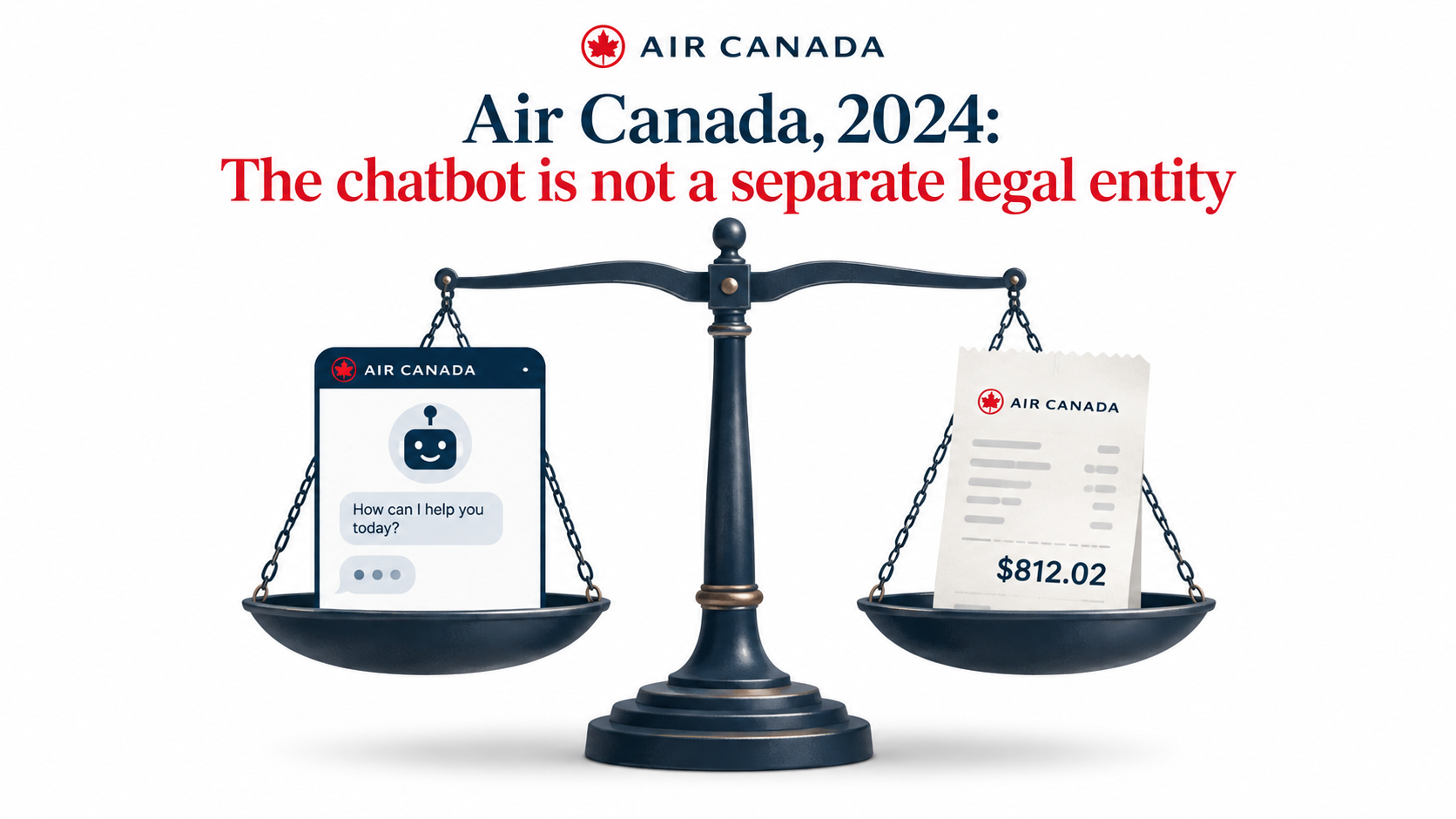
The legal and practical answer is already clear. You do. A tribunal in British Columbia said so in 2024, when Air Canada tried to argue its website chatbot was responsible for its own misleading advice. The tribunal rejected that argument flatly. The bot was part of the business, so its words were the business’s words.
This matters more every quarter because adoption is no longer an early-adopter story. According to the U.S. Chamber of Commerce’s 2025 Empowering Small Business report, almost 60% of small businesses now say they use AI in their operations, more than double the share from 2023. Many of those businesses started with a chatbot or a writing assistant. Many are now moving to automations that act: they send messages, update records, and trigger payments without a person clicking “approve.”
This article isn’t about ROI formulas or how to scale pilots. It’s about the accountability layer that most small and mid-sized businesses skip: deciding which work can be automated safely, how much independence each automation gets, how customers reach a human, how errors get caught, and who on your team owns each workflow by name. Get this layer right and automation becomes something you can trust. Skip it and you’re handing your reputation to software nobody is watching.

The Adoption Curve Has Outrun the Oversight Curve
The speed of small-business AI adoption is striking. The U.S. Chamber’s 2025 report found adoption above half in most states, with Connecticut at 72% and states like Alabama and Colorado at 57%. In many states, 40–50% of small businesses report using generative AI chatbots specifically, and around four in five believe AI will help their business in the future.
That optimism is earned. A three-person bookkeeping firm can now draft client summaries in minutes. A home services company can answer after-hours inquiries without paying for a call center. An online store can tag products, write descriptions, and sort support tickets with tools that cost less per month than a single software license did ten years ago.
From “assistant” to “actor”
The first wave of business AI was mostly assistive. A person asked a question, the AI produced a draft, and the person decided what to do with it. The human was the final checkpoint by default, even if nobody designed it that way.
The current wave is different. Workflow tools, AI features inside CRMs and help desks, and agent-style products increasingly connect the model directly to systems of record. The AI doesn’t just suggest a reply. It sends it. It doesn’t just flag an overdue invoice. It emails the customer, applies a late fee, and updates the ledger.
That shift quietly removes the human checkpoint. And because it happens one integration at a time, few businesses notice the moment it disappears.
Why small businesses carry more risk, not less
Large enterprises have compliance teams, legal review, and formal change management. A 15-person company usually has an owner, an operations lead, and whoever set up the Zapier account. That means:
- Fewer reviewers. Nobody’s job is to audit what the automation did yesterday.
- Thinner margins for reputational damage. One viral bad review hurts a local business more than a national brand.
- Undocumented logic. The rules the automation follows often live in a prompt written once and never revisited.
- Vendor dependence. Small teams rely on vendor defaults, which are tuned for engagement and deflection, not for your specific policies.
None of this argues against automation. It argues for building oversight that matches the size of your team—lightweight, specific, and actually used.
The Air Canada Principle: Your Automation Speaks in Your Name
The Air Canada case is small in dollar terms and large in implication. It’s the clearest public example of how responsibility works when an AI system talks to customers.
What happened
In 2022, passenger Jake Moffatt asked Air Canada’s website chatbot about bereavement fares after his grandmother died. The chatbot told him he could book a full-fare ticket and apply for the bereavement discount afterward. That was wrong; the airline’s actual policy required the request before travel. When Moffatt applied, Air Canada refused the discount.
In the dispute that followed, Air Canada argued that the chatbot was “a separate legal entity that is responsible for its own actions,” and that Moffatt should have followed a link the bot provided to the correct policy. The British Columbia Civil Resolution Tribunal rejected that argument and ordered the airline to pay $812.02 in damages and fees.
“It should be obvious to Air Canada that it is responsible for all the information on its website. It makes no difference whether the information comes from a static page or a chatbot.” — Tribunal member Christopher Rivers, as reported by BBC
Three lessons for any business
Gabor Lukacs of the consumer group Air Passenger Rights summed up the principle bluntly: if you hand part of your business to AI, you are responsible for what it does. For a small business, that translates into three practical rules:
- Disclaimers don’t transfer responsibility. “This assistant may make mistakes” doesn’t cancel a promise the assistant made. Air Canada even linked to the correct policy, and that wasn’t enough.
- Contradictions are your problem. If your bot says one thing and your terms page says another, the customer isn’t expected to work out which one is real.
- Cheap errors scale. $812 is trivial for an airline. But an automation repeating the same wrong answer to hundreds of customers creates hundreds of identical claims.
It isn’t only chatbots
The same logic applies to every automation that communicates or acts externally: auto-generated quotes, AI-written product descriptions that overstate features, automated collection emails with the wrong amounts, AI scheduling that confirms appointments you can’t staff. If your business sent it, your business said it.
The takeaway isn’t fear. It’s design. Every automation that faces outward needs a clear answer to “what’s the worst thing this could promise, and how would we know?”
Customers Are Watching How You Automate
Accountability isn’t only legal. It’s commercial. Customers form judgments about your business based on how your automation treats them, and the data shows they’re skeptical going in.
The trust gap in numbers
A Gartner survey of customers published in July 2024 found that 64% would prefer companies didn’t use AI for customer service, and 53% said they’d consider switching to a competitor if they found out a company was going to use AI for service. The leading concern wasn’t the technology itself. It was the fear that AI would make it harder to reach a real person.
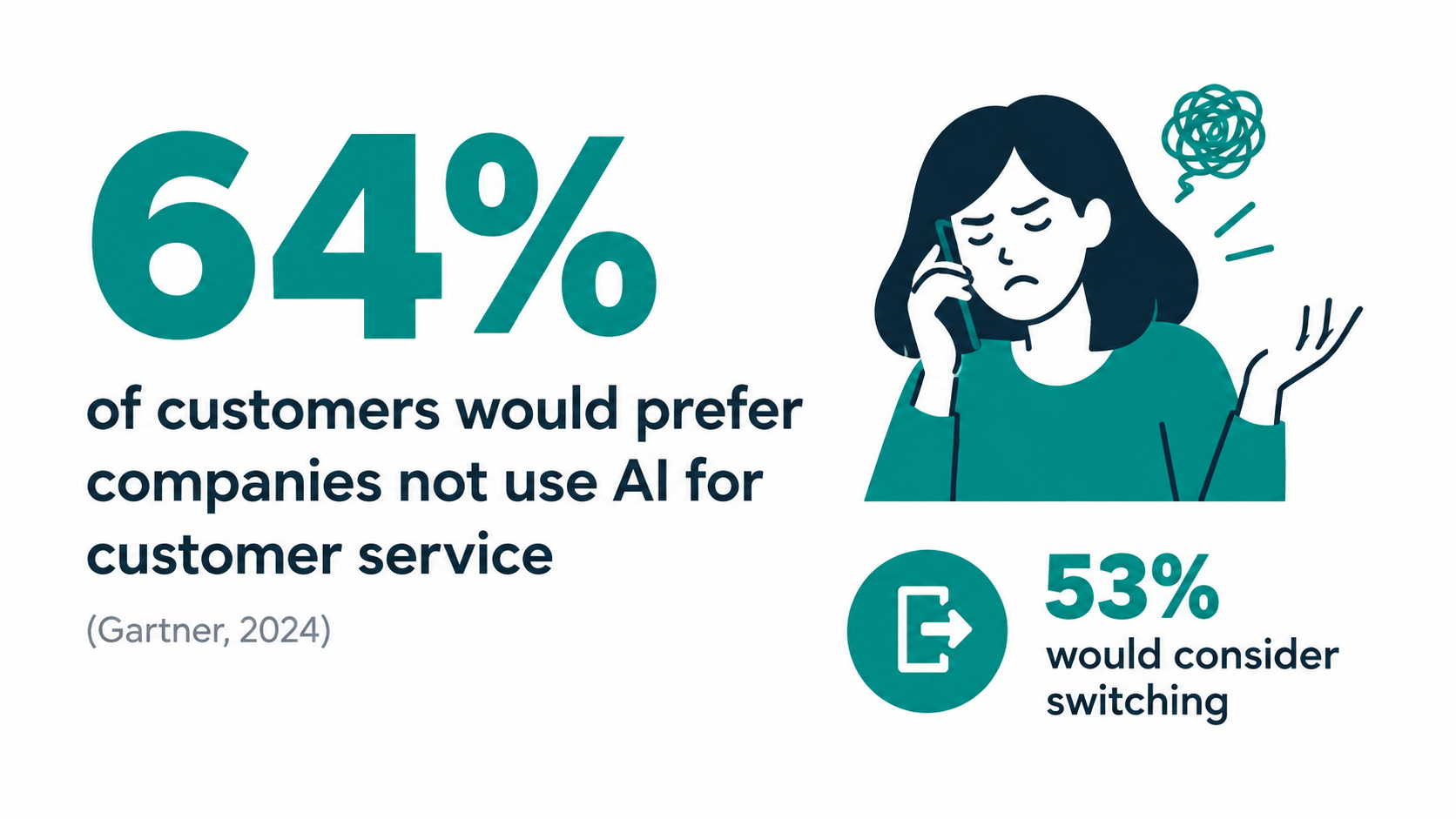
That’s a crucial detail. Customers aren’t rejecting automation as such. They’re rejecting automation used as a wall. If they can see a clear path to a human, much of the resistance fades.
The Klarna lesson
Klarna offers the most widely covered example of a company pushing service automation hard and then recalibrating. In early 2024, the company announced that its AI assistant had handled 2.3 million conversations in its first month—about two-thirds of its customer service chats—and was doing work it compared to roughly 700 full-time agents.
By May 2025, CEO Sebastian Siemiatkowski was telling Bloomberg that cost had been “a too predominant evaluation factor” in the company’s approach, and that the result was lower quality. Klarna began recruiting human agents again, with an emphasis on making sure customers could always reach a person.
The point isn’t that Klarna’s automation failed. By volume, it clearly worked. The point is that efficiency metrics alone hid a quality problem until it showed up in customer experience. A small business has far less room to absorb that kind of lag.
What customers actually reward
Across these examples, a pattern emerges about what makes automated service acceptable:
- Speed on simple things. Order status, hours, booking changes, password resets. Customers are happy with instant answers here.
- Honesty about what it is. Presenting an AI as a named human tends to backfire once customers notice.
- An obvious exit. A visible “talk to a person” option, honored quickly.
- Consistency with your policies. Nothing erodes trust faster than a bot promising something your staff then refuses.
Map Work by Consequence, Not by Effort
Most businesses decide what to automate by asking which tasks eat the most time. That’s a good way to find candidates. It’s a poor way to decide how to automate them. A task can be time-consuming and low-risk (tagging support tickets) or quick and high-risk (approving a refund exception).
A better first filter is consequence: what happens if the automation gets this wrong?
The two questions that matter
For each candidate task, ask:
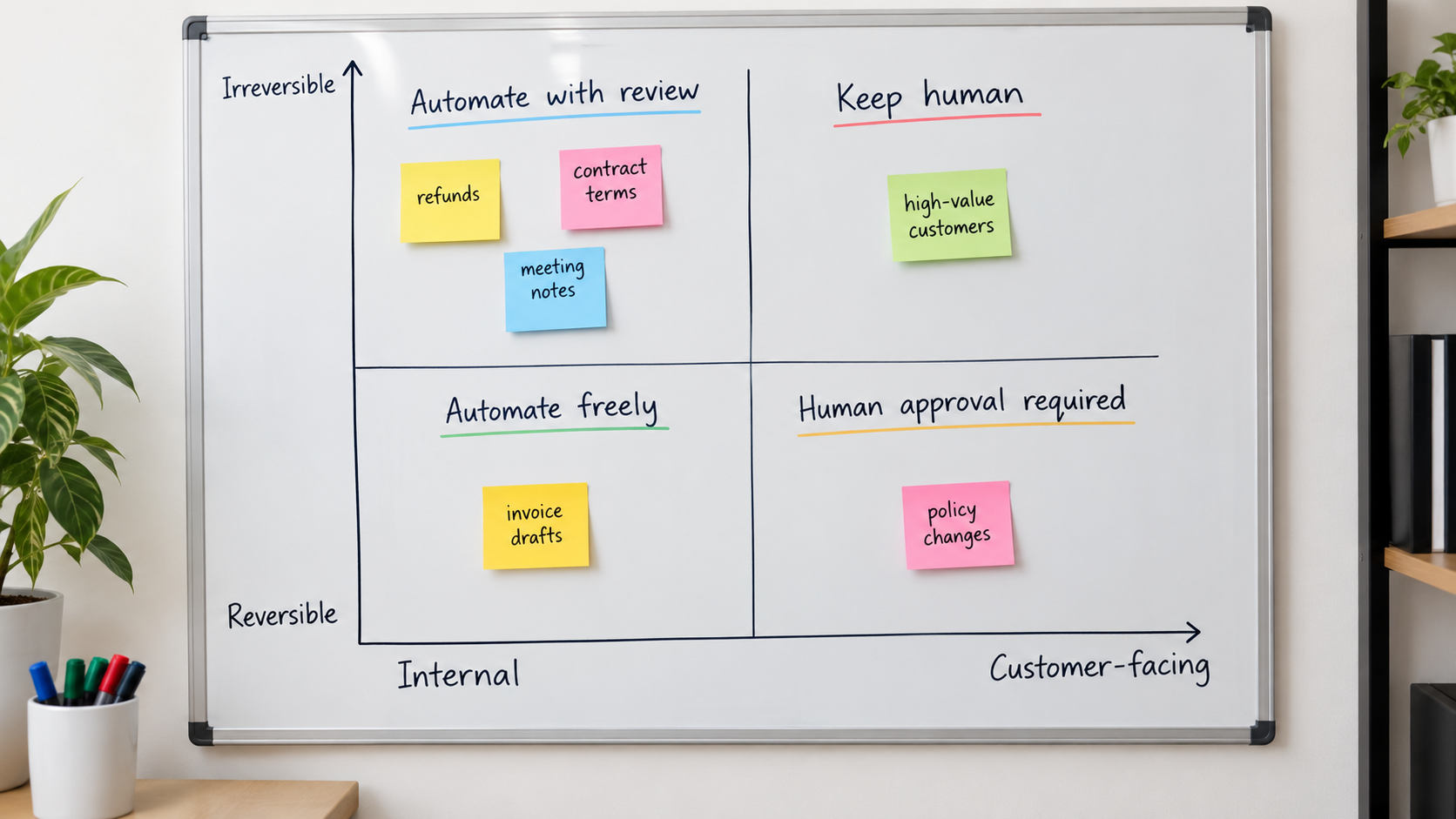
- Is it internal or customer-facing? Internal errors are caught by your team. External errors are caught by customers, regulators, or reviewers.
- Is it reversible or irreversible? A mislabeled ticket can be relabeled. A sent email, a processed payment, or a cancelled booking often can’t be undone cleanly.
The four quadrants
Internal + reversible: automate freely. Meeting notes, draft reports, ticket categorization, data cleanup, internal summaries. If the automation makes a mistake, someone on your team notices and fixes it. This is where most businesses should build confidence first.
Customer-facing + reversible: automate with review. FAQ answers, appointment reminders, order status updates, social media drafts. Errors reach customers but can usually be corrected with a follow-up. Sample and review these regularly.
Internal + irreversible: human approval required. Payroll changes, vendor payments, deleting records, inventory write-offs. The customer may never see these, but a mistake costs real money or data. The automation can prepare the action; a person confirms it.
Customer-facing + irreversible: keep a human in charge. Refund exceptions, pricing commitments, contract terms, anything involving health, safety, legal rights, or hardship situations like the Air Canada bereavement case. AI can help a staff member respond faster, but a person should make and own the decision.
Add a third dimension: volume
Volume multiplies consequence. A one-off mistake in a monthly report is an annoyance. The same mistake in an automation that runs 400 times a day becomes a pattern. When a task is both high-volume and customer-facing, move it one step more cautious than the quadrant suggests until you have evidence it performs reliably.
A worked example
Consider a small HVAC company. Its candidate automations might map like this:
- Summarizing technician job notes into the CRM: internal, reversible. Automate freely.
- Sending appointment reminders and “technician on the way” texts: external, reversible. Automate with sampling.
- Generating repair quotes from technician notes: external, partly irreversible (customers hold you to quotes). Draft automatically, human approves.
- Deciding warranty coverage disputes: external, irreversible, high emotion. Human decides; AI can summarize the history.
Same company, same tools, four very different levels of autonomy. That’s the point.
Four Tiers of Autonomy: Let Automations Earn Independence
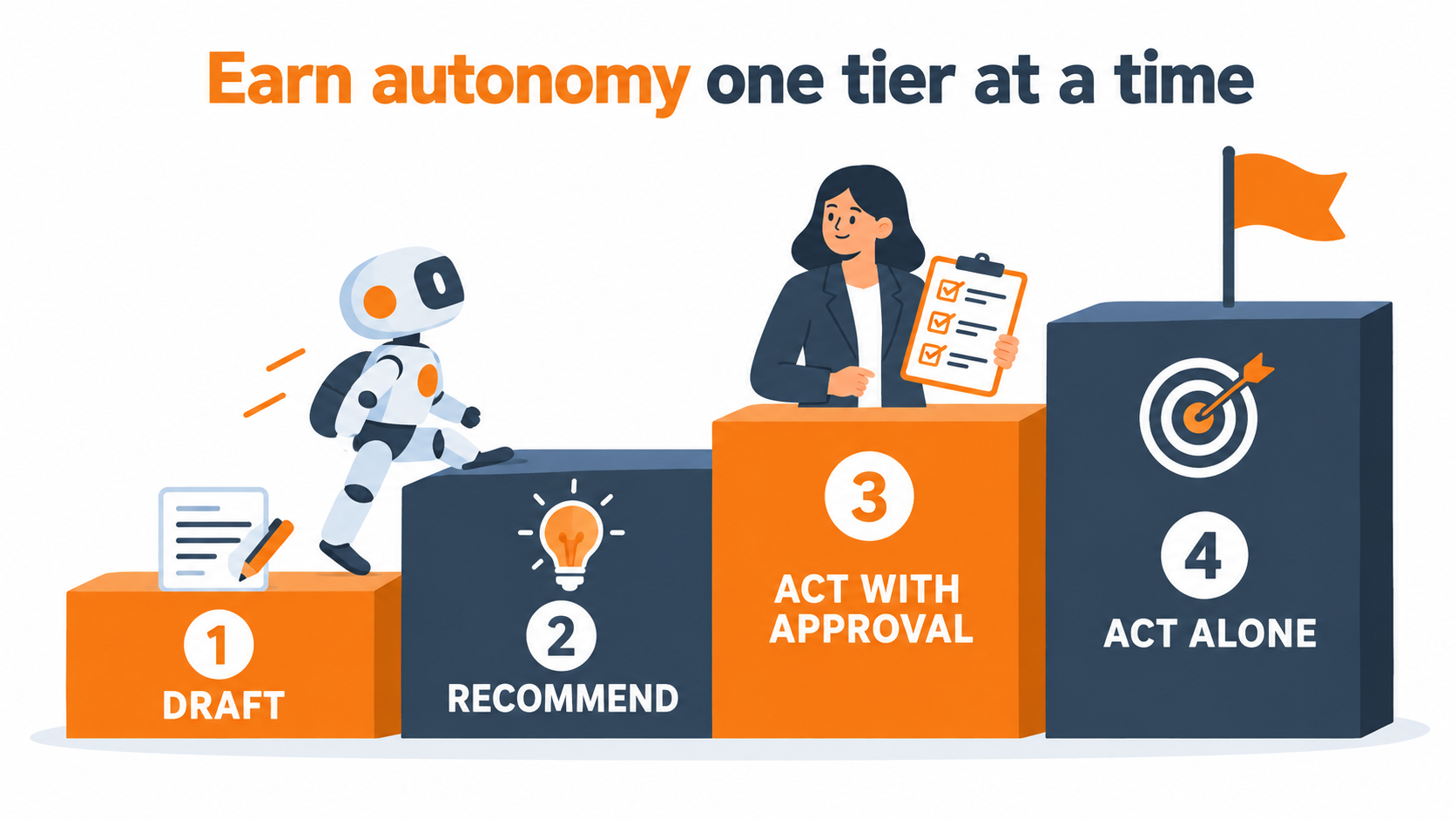
Once you know the consequence of a task, decide how much freedom the automation gets. A useful approach is to treat autonomy as a ladder with four rungs. Every automation starts on a lower rung and moves up only when it has earned it.
Tier 1: Draft
The automation produces something a person reviews before anything happens. Email replies sit in a drafts folder. Quotes appear as unsent documents. Product descriptions wait in a review queue.
This tier captures a large share of the time savings with very little risk. Writing is often the slow part; reviewing is fast. For most customer-facing work, staying at Tier 1 for the first several weeks is sensible.
Tier 2: Recommend
The automation analyzes a situation and suggests an action with its reasoning: “This ticket looks like a billing dispute; suggest routing to accounts,” or “This invoice is 45 days overdue; suggest sending reminder template B.” A person clicks to accept or override.
Tier 2 is valuable because it generates evidence. Every accept-or-override click is a data point on how often the automation is right. Track that rate. It’s the clearest signal of whether the automation is ready to move up.
Tier 3: Act with approval
The automation prepares the full action—filled-in forms, ready-to-send messages, staged payments—and a person approves in batches. Instead of reviewing each item in detail, a manager scans a queue and approves, say, 30 reminder emails at once, pulling out anything that looks off.
This is where many internal-irreversible tasks should live permanently. Approving a batch of vendor payments takes two minutes; recovering a wrongly sent payment can take weeks.
Tier 4: Act alone
The automation runs without per-action approval, and humans review samples after the fact. This tier suits high-volume, reversible, well-understood tasks: ticket tagging, order-status replies, appointment confirmations.
Even at Tier 4, “alone” doesn’t mean “unwatched.” It means review shifts from before the action to after it.
Promotion rules
Write down what it takes to move an automation up a tier. For example:
- At least four weeks at the current tier.
- An acceptance rate above a threshold you set (many teams choose something like 95% for customer-facing work).
- No errors in the last review period that would have caused financial loss or a broken promise to a customer.
- Sign-off from the automation’s named owner.
Equally important: write down demotion rules. If a vendor updates its model, you change your policies, or errors spike, drop the automation back a tier until it proves itself again. Model updates in particular can shift behavior without notice, so treat them like a new hire’s first week.
Design the Escape Hatch Before You Launch
Given that the top customer fear is being trapped without a human, the handoff from automation to person is arguably the most important part of any customer-facing workflow. It’s also the part most often treated as an afterthought.
Make the human path visible
Don’t hide the “talk to a person” option behind three failed attempts. Offer it from the start, and honor it. Customers who know they can leave are more willing to try the automated path first.
Be honest about timing. “A team member will reply within 4 business hours” is better than an instant handoff to a queue nobody monitors on weekends.
Define automatic escalation triggers
Don’t rely only on the customer asking for help. Build triggers that route conversations to people automatically:
- Topic triggers: refunds above a set amount, cancellations, complaints, legal or medical language, bereavement or hardship mentions, anything about safety.
- Sentiment triggers: repeated frustration, profanity, all-caps messages, or phrases like “this is ridiculous.”
- Loop triggers: the same question asked twice, or a conversation exceeding a set number of exchanges without resolution.
- Confidence triggers: where your tool supports it, low-confidence answers or questions outside the knowledge base.
- Value triggers: high-value accounts, wholesale customers, or anyone tagged as a VIP.
Hand off context, not just the customer
A bad handoff forces the customer to repeat everything. A good one gives the staff member a summary: who the customer is, what they asked, what the automation already told them, and why it escalated. That last item matters for accountability. If the automation made a promise, your staff member needs to know before they contradict it.
Decide in advance how you’ll honor automation errors
When your automation tells a customer something wrong, what’s your policy? The Air Canada case suggests the answer most tribunals and customers will expect: the business absorbs reasonable costs of its own automation’s mistakes.
Many small businesses find it simplest to set a threshold. Errors below a certain dollar amount are honored without debate; above it, the owner reviews. Either way, decide before the first incident, not during it. Experts quoted after the Air Canada ruling made the same point: make amends quickly rather than letting a small error turn into a public dispute.
Build a Single Source of Truth for What Your Automation Knows
Many automation errors aren’t really AI errors. They’re knowledge errors. The model was given an outdated price list, an old return policy, or nothing at all, so it filled the gap with something plausible.
Ground automations in your actual documents
Most modern AI tools for business let you connect a knowledge base: help center articles, policy documents, price lists, product specs. The automation then answers from those documents rather than from general training data. This approach (often called retrieval or grounding) sharply reduces made-up answers—but only if the documents themselves are right.
One policy, one place
The Air Canada problem was a contradiction between what the bot said and what the policy page said. The structural fix is to make sure there’s one authoritative version of each policy, and that every channel—website, bot, staff scripts, email templates—pulls from it.
In practice, that means:
- Create a short “policy register” listing each customer-facing policy (returns, refunds, cancellations, warranties, pricing, delivery times) and where its official version lives.
- When a policy changes, update the official version first, then confirm every automation that references it has been refreshed.
- Add a “last reviewed” date to each document. Anything older than six months gets checked.
Write explicit boundaries into instructions
Beyond documents, give each automation clear instructions about what it must not do. Examples that small businesses commonly use:
- “Never promise a refund, discount, or exception. Say a team member will review the request.”
- “If the answer isn’t in the provided documents, say you don’t know and offer to connect the customer with a person.”
- “Never quote a delivery date; share the standard range from the shipping policy.”
- “Don’t give legal, medical, tax, or safety advice.”
These boundaries won’t be followed perfectly every time, which is why review still matters. But they dramatically narrow the range of things that can go wrong.
Watch what you feed it
Knowledge also flows the other way. Check what customer, employee, and financial data your automations can access and where that data goes. Read your vendor’s data-use terms, turn off training on your data where that’s an option and appropriate, and keep sensitive records (health information, payment details, personnel files) out of tools that aren’t designed for them.
Monitoring That a Small Team Will Actually Do
Enterprise AI governance frameworks are thorough and well-intentioned. The NIST AI Risk Management Framework, for instance, organizes the work into four functions—Govern, Map, Measure, and Manage—and it’s a useful reference. But a 12-person company won’t run a formal risk program. It will, however, run a 30-minute weekly meeting if the meeting is useful.

Keep logs you can actually read
Every automation that acts should leave a trail: what triggered it, what it did, what it said, and to whom. Most workflow tools and help desks keep this by default; make sure it’s turned on and retained long enough to investigate a complaint that arrives a month later.
Sample, don’t read everything
You can’t review every automated conversation, and you don’t need to. Pull a random sample each week—for example, 20 to 50 conversations or actions per automation, weighted toward customer-facing ones. Random sampling catches problems that complaint-driven review misses, because most customers who get a bad answer never complain. They just leave.
Track a handful of signals
Pick a few numbers per automation and watch the trend rather than the absolute value:
- Escalation rate: how often conversations go to a person. A sudden drop can be as worrying as a spike—it may mean the bot is answering things it shouldn’t.
- Override rate: for Tier 2 and 3 automations, how often staff change the suggested action.
- Error count from samples: categorized as minor (tone, formatting), moderate (incomplete answer), or serious (wrong policy, broken promise, wrong amount).
- Repeat-contact rate: customers coming back about the same issue within a few days, a common sign the first answer didn’t actually resolve anything.
- Complaints mentioning the bot or automated messages.
The 30-minute weekly review
A simple agenda works:
- Each automation owner shares their numbers (5 minutes).
- Walk through any serious errors found in samples: what happened, why, and what changes (10 minutes).
- Note any upcoming policy, price, or product changes that automations need to know about (5 minutes).
- Decide on any promotions or demotions between autonomy tiers (5 minutes).
- Capture fixes and assign them (5 minutes).
This is the Klarna lesson in miniature. Efficiency metrics will tell you the automation is busy. Only quality review tells you it’s right.
Questions to Ask Before You Buy (or Renew) an AI Tool
Small businesses rarely build automation from scratch. They buy it—inside a help desk, a CRM, an accounting platform, or a standalone agent product. That makes vendor selection an accountability decision, not just a feature comparison.
Control questions
- Can we restrict the automation to answering only from our documents?
- Can we set topics it must always escalate?
- Can we run it in draft or approval mode before letting it act alone?
- Can we pause it instantly if something goes wrong? Who on our team can do that?
Visibility questions
- Do we get full logs of every conversation and action? How long are they retained, and can we export them?
- Can we see which source document an answer came from?
- Will we be notified when the underlying model changes?
Data questions
- Is our data used to train the vendor’s models? Can we opt out?
- Where is data stored, and who at the vendor can access it?
- What happens to our data if we cancel?
Responsibility questions
- What does the contract say about liability for incorrect outputs? (Expect most of it to sit with you.)
- Does the vendor’s marketing make claims you’d be uncomfortable repeating to customers?
That last point deserves attention. U.S. regulators, including the Federal Trade Commission, have signaled that businesses can’t escape responsibility by pointing to “AI” in their marketing or operations. Treat bold vendor promises—”fully autonomous,” “zero errors,” “replaces your support team”—as a reason for more scrutiny, not less.
Every Automation Needs a Named Owner
The most effective accountability control is also the simplest: every automation has one person whose name is on it. Not “the ops team.” Not “whoever set it up.” A specific person.
What the owner does
The owner doesn’t need to be technical. They need to understand the business process the automation handles. Their responsibilities are concrete:
- Know what the automation does, what it can access, and what tier it’s on.
- Run or review the weekly sample.
- Update its instructions and knowledge when policies change.
- Decide whether to pause it if something looks wrong.
- Be the first call when a customer complaint involves it.
A useful rule: the owner should be the person who would have done the work if the automation didn’t exist. The customer service lead owns the support bot. The office manager owns invoice reminders. The person with the deepest knowledge of the task is best placed to spot when the automation gets it subtly wrong.
Keep a one-page automation register
Maintain a simple shared document or spreadsheet with one row per automation:
- Name and purpose
- Owner
- Consequence quadrant and current autonomy tier
- Systems and data it can access
- Escalation triggers
- Source documents it relies on
- Date of last review
- How to pause it
This register solves a problem that sneaks up on growing businesses: automations built by someone who has since left, running on logic nobody remembers, touching systems nobody realized were connected.
Train people for the new job
When automation takes over routine work, the human job changes. Staff spend less time writing and more time reviewing, handling exceptions, and dealing with frustrated customers who’ve already tried the automated path. That’s harder, more judgment-heavy work.
Prepare people for it. Teach them how to spot plausible-but-wrong AI output, how to read the handoff summary, how to honor or correct automation mistakes gracefully, and how to flag problems to the automation’s owner. The team’s trust in the system—and willingness to report its flaws—is a big part of what keeps it safe.
A 30-Day Rollout Built Around Accountability
Here’s a practical sequence for introducing a new customer-facing automation, designed for a team without dedicated AI staff. It focuses on putting the controls in place, not on maximizing early savings.
Week 1: Map and prepare
- Choose one workflow. Place it on the consequence matrix.
- Assign the owner and add the automation to your register.
- Gather and clean the source documents it will rely on. Fix any contradictions between your website, policies, and staff scripts.
- Write the boundaries: what it must never promise, what it must always escalate.
- Decide your policy for honoring automation errors.
Week 2: Shadow mode
- Run the automation at Tier 1 (draft only) on real incoming work. Staff send responses as usual but compare against the AI drafts.
- Log every draft that would have been wrong, incomplete, or off-tone.
- Adjust documents and instructions based on what you find. Most fixes at this stage are knowledge gaps, not model problems.
Week 3: Assisted mode
- Staff now send AI drafts after review, editing where needed. Track the edit and override rates.
- Turn on the escalation triggers and test them deliberately: send test messages about refunds, complaints, and hardship situations to confirm they route to people.
- Confirm logs are being captured and that the owner knows how to pause the automation.
Week 4: Decide
- Review the numbers. If override rates are low and no serious errors appeared, consider moving the lowest-risk parts of the workflow (order status, hours, simple FAQs) to Tier 3 or 4.
- Keep anything involving money, exceptions, or promises at Tier 1 or 2.
- Schedule the recurring weekly review.
- Add a visible “talk to a person” option and tell customers honestly that they’re interacting with an automated assistant.
Thirty days may feel slow for a tool you could switch on in an afternoon. But the time isn’t wasted. You finish the month with an automation you understand, evidence about how it performs, and a team that knows how to catch its mistakes. That’s what lets you expand with confidence rather than hope.
Conclusion: Automation You Can Stand Behind
AI automation for business has crossed into the mainstream. With nearly six in ten small businesses using AI, the competitive question is no longer whether to automate but how. And the “how” increasingly comes down to accountability.
The evidence points one way. A tribunal has ruled that a company’s chatbot speaks for the company. A major survey shows most customers are wary of AI service, mainly because they fear losing access to a human. And one of the most visible service automation stories ended with the CEO admitting that focusing on cost had cost quality. None of these are arguments against automating. They’re arguments for automating deliberately.
Key takeaways
- You own every output. Disclaimers and links don’t shift responsibility for what your automation says or does.
- Sort by consequence first. Internal-and-reversible work can be automated freely; customer-facing and irreversible decisions should stay with people.
- Make autonomy earned. Start at draft or recommend, promote based on evidence, and demote when something changes.
- Build the escape hatch first. A visible, honored path to a human removes most customer resistance.
- Fix knowledge, not just prompts. One authoritative version of each policy, feeding every channel.
- Review samples weekly. Thirty minutes, a few numbers, and a random sample catch what complaints don’t.
- Put a name on every automation. An owner, a register, and a way to pause it.
The businesses that get the most from AI over the next few years won’t necessarily be the ones that automate the most. They’ll be the ones whose customers never have to wonder whether anyone is responsible—because someone clearly is.