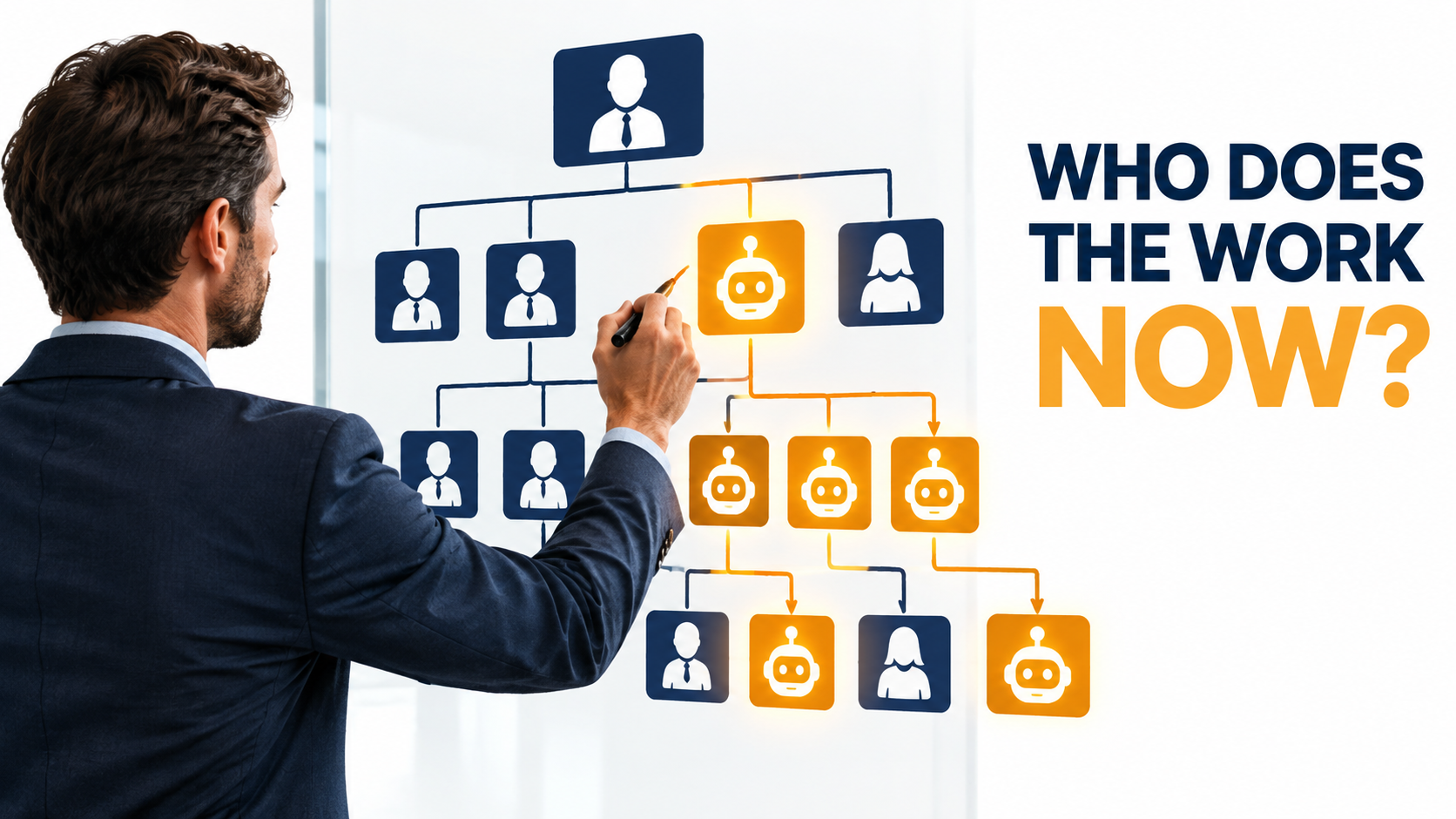

Most writing about AI automation for business is about tools: which platform to buy, which workflow to automate first, how fast the payback comes. Those questions matter. But they skip the one that decides whether automation sticks: once the software is doing part of the work, who does the rest, and how is the team set up around it?
That question is getting harder to put off. In Microsoft’s 2025 Work Trend Index, which surveyed 31,000 workers in 31 countries, 24% of leaders said their companies had already rolled out AI organization-wide. Only 12% said they were still in pilot mode. And 81% expected AI agents to be moderately or extensively built into their company’s AI strategy within 12 to 18 months.
Org charts are already changing, just not in the dramatic way the headlines suggest. Mass layoffs announced on earnings calls are fairly rare. What’s more common is quieter: roles that don’t get backfilled, hiring freezes, junior positions that disappear, and new responsibilities that never get a job title. MIT’s NANDA initiative put it plainly in its 2025 report: companies are increasingly not backfilling positions as they become vacant rather than running mass layoffs.
This article looks at that quieter change. We’ll cover how headcount actually shifts under automation, what Klarna’s high-profile experience shows about the limits of cutting staff, why “workslop” is a hidden tax on teams that automate too fast, what’s happening to entry-level jobs, and which new roles are taking shape. The last section gives you a practical framework for redesigning roles around automation so you don’t just bolt AI onto an org chart built for a different decade.
We won’t spend time on tool selection or ROI formulas. The focus here is the human structure that automation leaves behind, and how to design it on purpose.
The Part of the Automation Conversation Everyone Skips
Every automation project starts with a process map. Someone draws boxes for intake, triage, data entry, approval, and follow-up, then marks which boxes software can take over. Almost no one draws the second map: what each affected person’s job looks like after the boxes are gone.
That gap is where a lot of disappointing results come from. MIT’s The GenAI Divide: State of AI in Business 2025 drew on 150 leader interviews, a survey of 350 employees, and an analysis of 300 public AI deployments. It found that only about 5% of AI pilots achieved rapid revenue acceleration. The lead author, Aditya Challapally, said the main problem wasn’t model quality. It was a “learning gap” for both tools and organizations.
Tasks get automated. Jobs get rearranged.
Automation almost never removes a whole job in one step. It removes tasks, and those tasks were usually spread across several roles. Take an accounts payable clerk who spent 40% of the week on invoice matching. If software takes over the matching, the clerk still has the other 60%, and that 60% was designed to sit next to the matching work.
Multiply that across a department and you get a team of partly hollowed-out roles. Some people end up underloaded. Others become the default catch-all for every exception the automation can’t handle. Nobody’s job description reflects any of it.
Why the second map matters more than the first
The first map, the process map, tells you where efficiency comes from. The second map, the role map, tells you whether you’ll keep that efficiency. Without it, three predictable things happen:
- Exception work goes to whoever is closest, usually your most experienced people, who end up stuck doing cleanup.
- Quality ownership gets blurry. When an automated output is wrong, it’s unclear whose job it was to catch it.
- Headcount savings show up on paper but not in practice, because the remaining staff are busy with coordination work that was never planned for.
Microsoft’s research describes the goal as organizations that are “AI-operated but human-led.” That phrase is a useful test. If you can’t say which human leads each automated process, you don’t yet have an operating model. You have a deployment.
Attrition, Not Layoffs: How Headcount Actually Changes
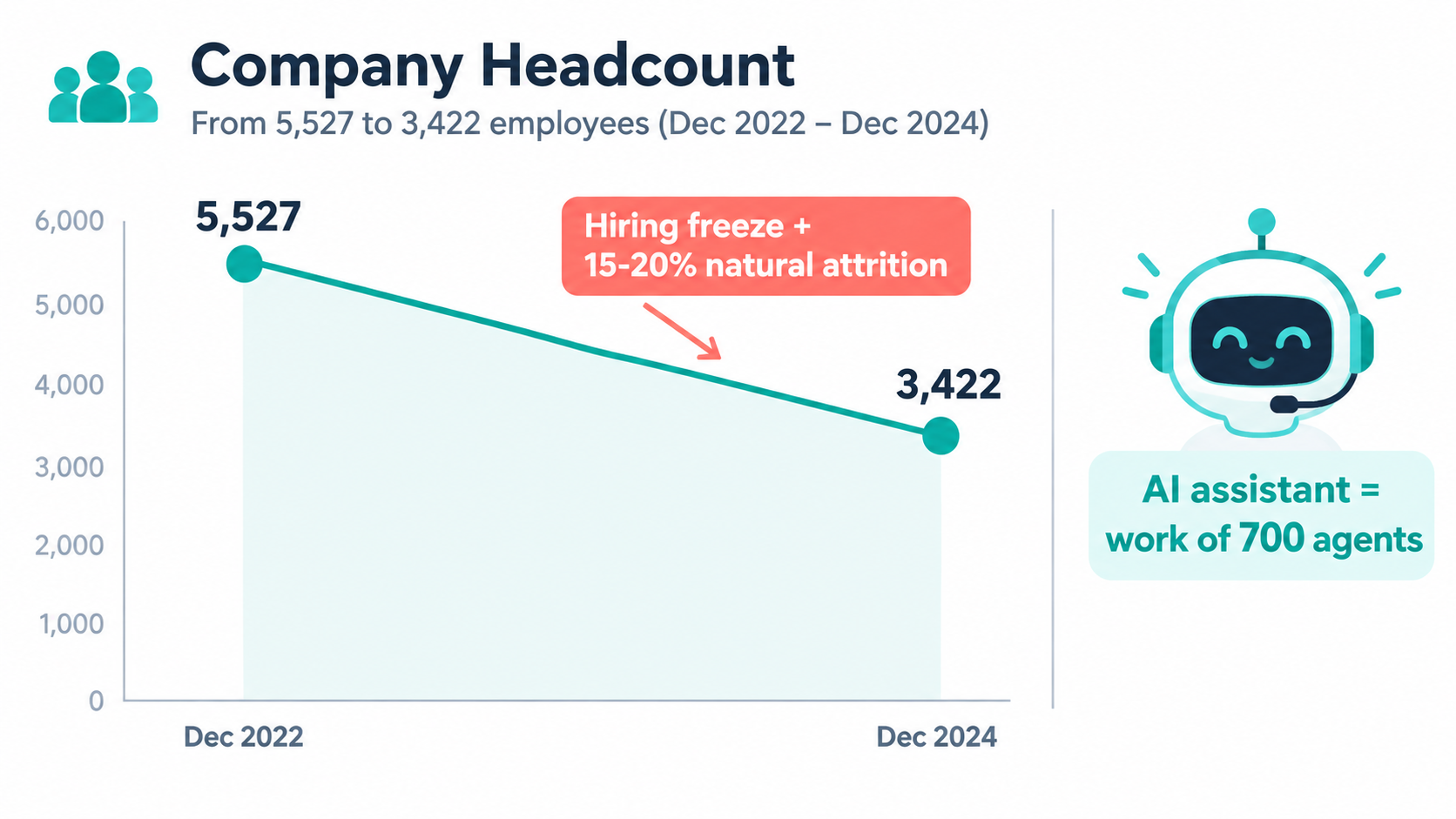
Klarna is the clearest public example of how AI automation shows up in headcount. According to the company’s IPO prospectus, as reported by CNBC, Klarna’s full-time headcount fell from 5,527 at the end of December 2022 to 3,422 at the end of December 2024. CEO Sebastian Siemiatkowski said in May 2025 that the company had shrunk “from about 5,000 to now almost 3,000 employees.”
How that happened is the useful part. It wasn’t one big layoff. Siemiatkowski described a hiring freeze combined with normal turnover: “Natural attrition in a company like ours is 15-20% per year, so we shrink naturally 15-20% by people just leaving.”
The attrition model of automation
This approach is becoming the default in many companies, and it has real advantages:
- Less disruption. No layoff announcements, severance costs, or sudden loss of institutional knowledge.
- Time to adjust. Automation capacity can grow at roughly the same pace as people leave.
- Room to change course. If the automation underperforms, you haven’t already let go of the people you’d need to bring back.
MIT’s research found the same pattern more broadly. Workforce disruption is concentrated in customer support and administrative roles, and it mostly takes the form of not backfilling roles as they open. The report also notes that most changes are in jobs that had previously been outsourced because they were seen as low value.
The hidden costs of shrinking by attrition
Attrition-based shrinking has a structural weakness: you don’t get to choose who leaves. Turnover isn’t random. Your most employable people, who are often your strongest performers and the ones who understand the edge cases, are usually the first to go. The roles that empty out aren’t necessarily the ones automation covers best.
That causes mismatches. A team might lose its one person who understood a particular supplier’s billing quirks while keeping three people whose work is now mostly automated. A hiring freeze stops you from fixing the gap.
Leaders using an attrition model should keep an “irreplaceable knowledge register”, a running list of the specific judgment calls, relationships, and exception-handling skills each person holds. When someone hands in notice, the question shouldn’t be “Can automation absorb this role?” It should be “Which items on the register leave with this person, and who picks them up?”
What leaders should track instead of headcount
Headcount is a lagging and fairly blunt measure of what automation is doing. More useful signals include:
- Work volume per person in the affected process. Is throughput actually rising, or is the same work spread across fewer people?
- Exception rate and exception backlog. How much does automation hand back to humans, and is that queue growing?
- Time to competency for new hires. If you do hire, can new people learn a job that’s now partly automated and partly specialist?
- Customer-facing quality metrics such as resolution rates, complaint volume, and repeat contacts. These tell you whether the savings are real or just pushed somewhere else.
That last point leads straight into the most-discussed part of Klarna’s story.
The Klarna Lesson: When Cost-Per-Ticket Beats Quality
In early 2024, Klarna said its OpenAI-powered customer service assistant was doing the work of 700 customer service agents. For a while it was the go-to example of AI replacing a front-line function.
Then the story got more complicated. In a May 2025 Bloomberg interview, reported by CNBC, Siemiatkowski said Klarna would start recruiting more human customer service agents to work “in an Uber type of setup.” He also acknowledged that going all-in on AI-based support had led to lower-quality work.
What actually went wrong
The lesson isn’t that AI customer service fails. Klarna’s assistant clearly handled a large share of routine contacts. The lesson is about what you measure when deciding how far to automate.
Cost per contact and volume handled are easy to measure, and they improve fast with automation. Quality signals take longer to show up and are harder to trace back to the cause. These include whether a customer felt heard, whether a complicated dispute got resolved fairly, and whether a frustrated customer stayed. By the time those signals turn negative, the staffing decisions have already been made.
The hybrid model that emerged
Klarna’s response, a flexible pool of human agents alongside AI, points to a staffing pattern many companies are adopting:
- AI handles the high-volume, low-ambiguity layer: order status, simple refunds, account questions.
- Humans handle the high-stakes, high-ambiguity layer: disputes, vulnerable customers, and anything with legal or reputational risk.
- Human capacity flexes instead of sitting at a fixed headcount, because demand for human judgment spikes unpredictably.
The structural point is that the human layer doesn’t shrink to zero. It changes shape. It gets smaller, more specialized, and more variable. That has consequences for pay, training, and career paths, which most companies haven’t worked through.
Questions to ask before cutting a front-line team
If you’re thinking about a significant reduction in a customer-facing team because of automation, test the decision against these questions first:
- What share of contacts are truly routine, and how did you measure it? Look at transcripts, not category labels.
- Which quality metric will warn you first if automation is degrading the experience, and how long will that signal take to show up?
- If you need to bring human capacity back in 90 days, what’s the mechanism: contractors, a flexible pool, or rehiring?
- Who owns the decision to send a contact to a human, and are they measured on cost or on outcome?
Klarna’s experience doesn’t argue against automating support. It argues for keeping a way to reverse course.
Workslop: The Hidden Tax When Automation Outruns Judgment
Customer-facing automation is the visible side of AI in business. A less visible effect happens inside teams, where generative AI is used to produce internal work: reports, slide decks, summaries, code, and emails.
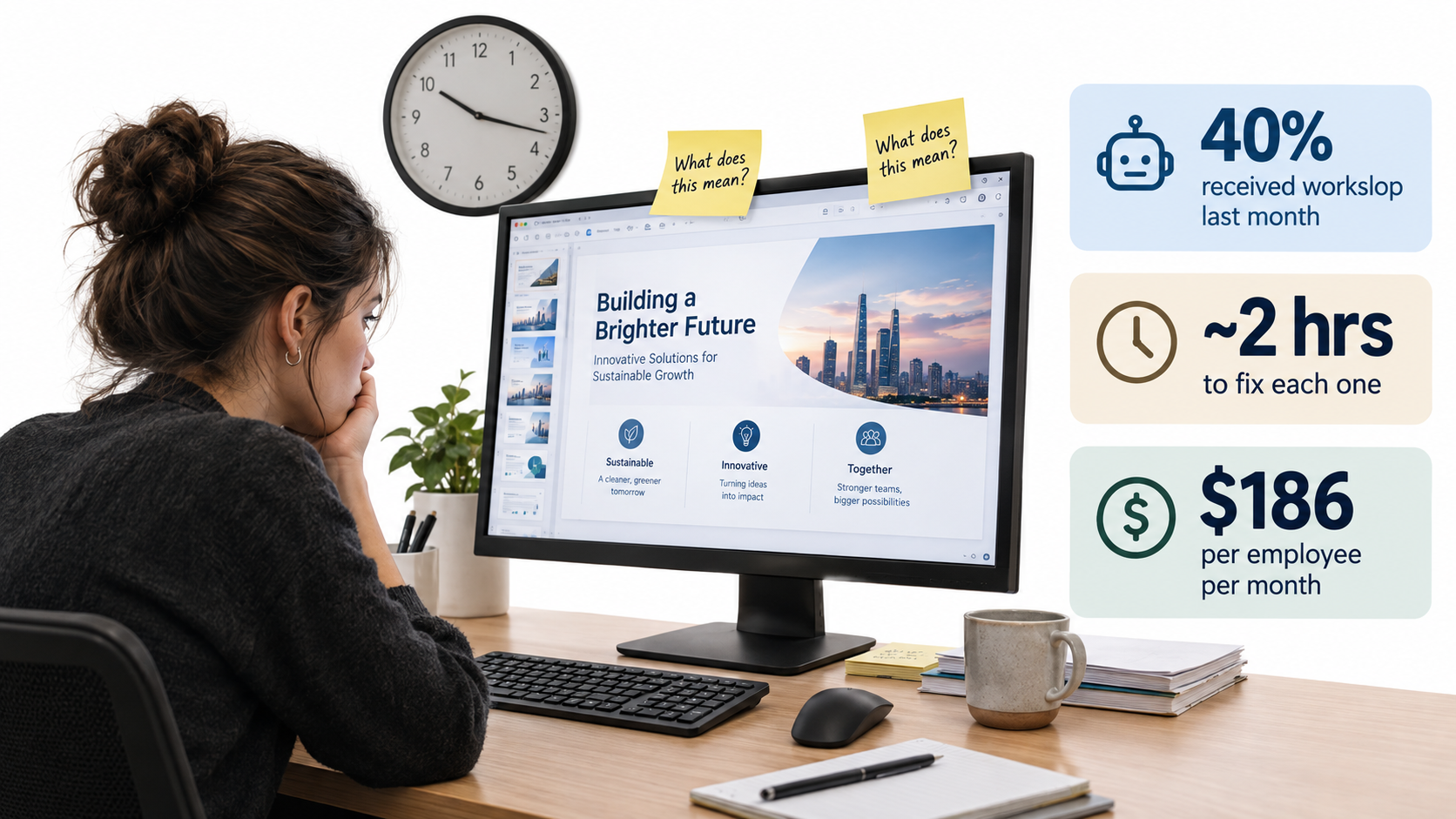
Researchers at BetterUp Labs and the Stanford Social Media Lab named the problem in a widely read September 2025 Harvard Business Review article: “workslop.” They define it as AI-generated content that looks good but lacks substance. It gives the appearance of progress while leaving colleagues to do the real thinking and cleanup.
The numbers
Their online survey of 1,150 full-time U.S. desk workers found:
- 40% had received workslop in the previous month.
- Each incident took about two hours on average to resolve.
- The estimated cost was $186 per employee per month.
- For a 10,000-person company, that adds up to about $9 million a year.
The HBR authors pointed out the paradox: the number of companies with fully AI-led processes nearly doubled, and AI use at work doubled after 2023, yet MIT found that 95% of organizations saw no measurable return. Workslop is one plausible explanation for that gap.
Why workslop is an org design problem, not a discipline problem
It’s tempting to treat workslop as individual laziness. But BetterUp’s research says it spreads when AI work loses context and accountability, and those are structural conditions. A few examples:
- A mandate to “use AI for everything” without saying what good output looks like encourages volume over substance.
- Performance systems that reward visible output, like decks, documents, and pull requests, make polished but empty work pay off.
- Unclear review responsibilities let workslop pass from person to person until someone downstream has to fix it.
One project manager quoted by BetterUp described getting poor-quality AI work from a supervisor. Feeling uncomfortable pushing back, they redid the work themselves, which “got in the way of my other ongoing projects.” That’s a power-dynamics problem as much as a tool problem. In hierarchies, workslop tends to flow downhill.
The relationship cost
The research also found that receiving workslop changes how people see the colleague who sent it. Teams waste cycles, duplicate effort, and lose trust. Over time that erodes the collaboration that automation is supposed to free people up for.
Structural fixes
Companies that keep workslop in check tend to do a few concrete things:
- Define “done” for AI-assisted work. A summary must cite its source sections. A draft must flag what the author personally checked.
- Make the sender accountable. Whoever sends AI-assisted work owns its accuracy, just as if they’d written it by hand.
- Measure outcomes, not artifacts. If people are rewarded for producing documents, they’ll produce more documents.
- Have leaders model careful use. BetterUp’s guidance calls this a “pilot” mindset, using AI to improve collaboration rather than to avoid work, and it starts at the top.
Workslop is what happens when automation goes faster than the org’s ability to judge the output. The fix is clearer roles, not fewer tools.
The Missing Bottom Rung: What Happens to Entry-Level Work
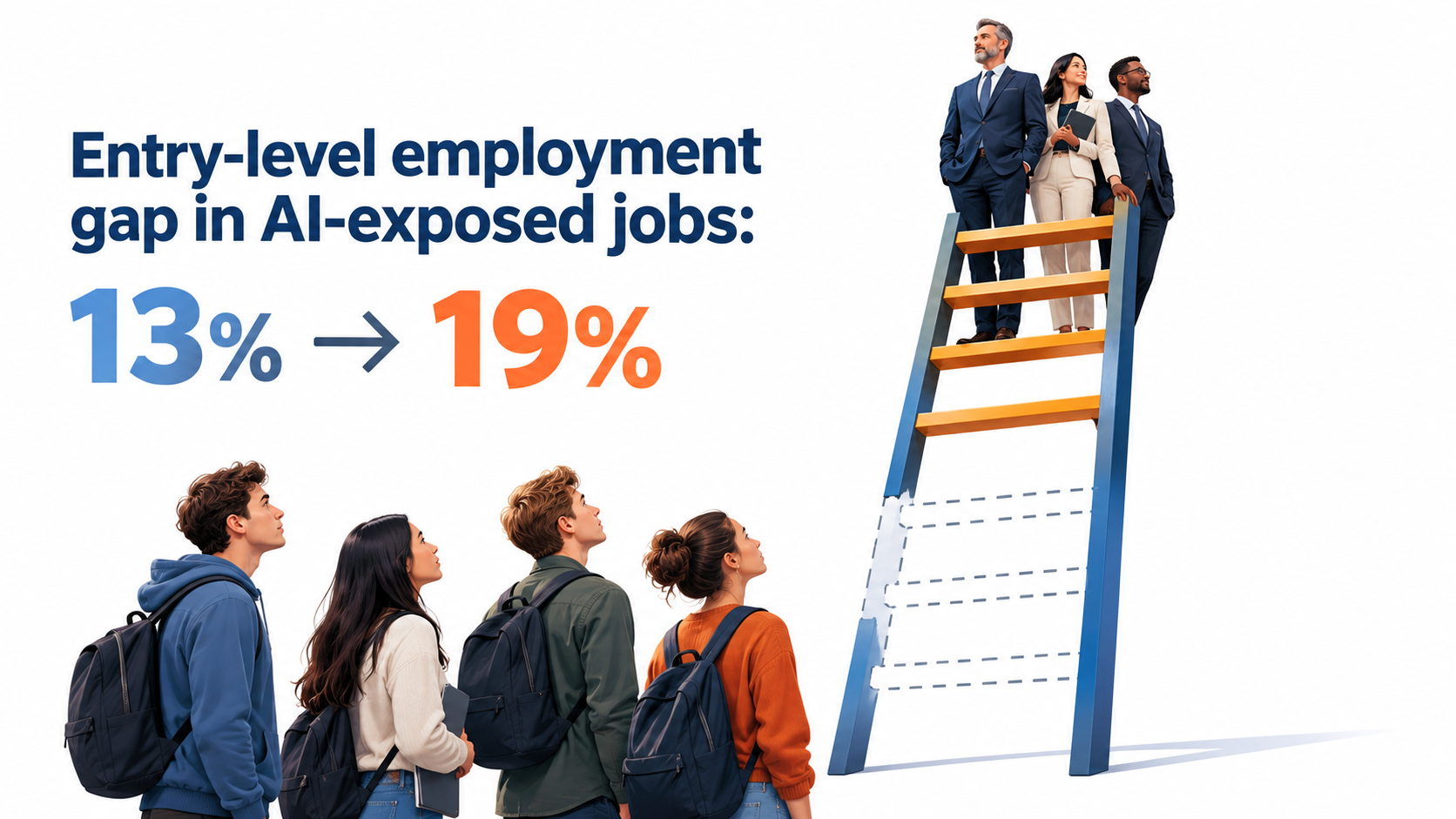
If automation mostly works by not backfilling roles, the people most affected aren’t current employees. They’re the people who would have been hired.
The Stanford Digital Economy Lab’s paper “Canaries in the Coal Mine? Six Facts about the Recent Employment Effects of Artificial Intelligence” by Erik Brynjolfsson and colleagues looked at this using large-scale payroll data. The original 2025 version found a relative employment decline of about 13% for workers aged 22 to 25 in the occupations most exposed to AI, while older workers in the same occupations held steady or grew.
A revised version published in August 2026, using a larger dataset, reported that there is still no widespread displacement, but the AI employment gap for young workers has widened to 19%.
Why this is a business problem, not just a social one
It’s easy to read these findings as a policy issue for governments and universities. For a business, they point to a real operational risk: your future senior people come from today’s junior roles.
Entry-level work has always done two jobs. It gets routine tasks done, and it trains people. A junior analyst who reconciles hundreds of spreadsheets learns what a wrong number looks like. A junior support agent who handles thousands of tickets learns which complaints point to deeper problems. That’s exactly the judgment that automation-heavy organizations need in their exception handlers and reviewers.
Automate the routine tasks and stop hiring juniors, and in five to seven years you’ll have a thin bench of people who can supervise the automation, because nobody built their judgment on the tasks it replaced.
Redesigning the junior role instead of deleting it
Some organizations are rebuilding junior roles rather than removing them. Common approaches include:
- Review-first apprenticeships. Juniors check automated outputs against source material, which builds error-detection skill faster than doing the routine work by hand.
- Exception rotations. New hires spend structured time in the exception queue alongside a senior person, seeing the hard cases early.
- Owning a small automation. A junior employee owns monitoring and improving one narrow automated workflow, learning both the process and the tooling.
- Deliberate “manual mode” training. For a limited period, new staff do the process without automation so they understand what the system is doing for them.
The question for workforce planning
When you decide not to backfill a junior role, add one line to the decision record: “Where will the people who supervise this process in 2031 learn their judgment?” If there’s no answer, the cost of automating that role is higher than it looks.
New Roles Taking Shape: Agent Bosses, Exception Owners, and Workflow Stewards
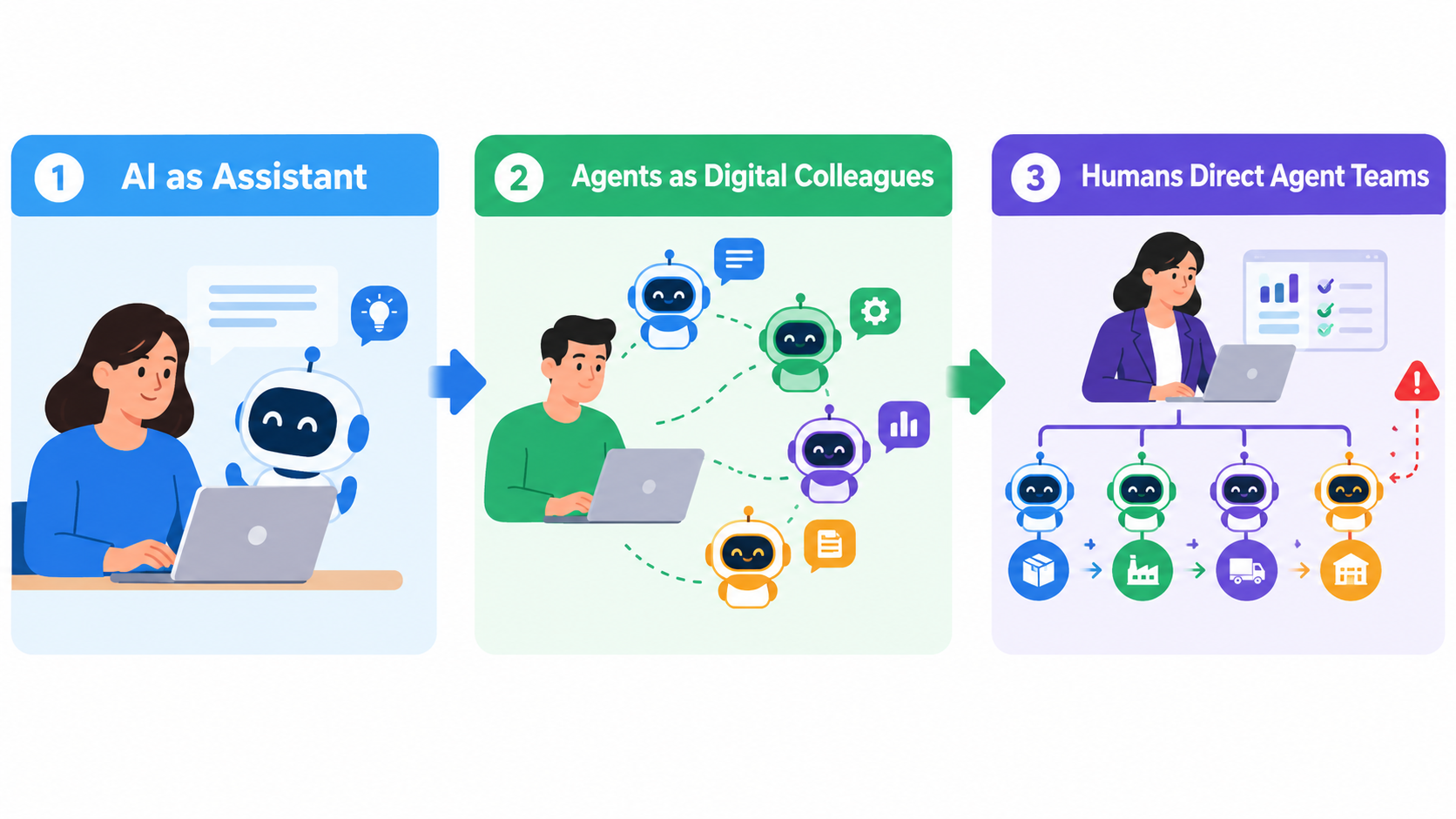
While some roles are shrinking, others are appearing, usually informally at first. Microsoft’s Work Trend Index describes a three-phase progression that helps explain where these roles come from:
- Phase 1: AI as assistant. AI removes drudgery and helps people do the same work better and faster.
- Phase 2: Agents as “digital colleagues.” Agents take on specific tasks at human direction, such as a researcher agent drafting a go-to-market plan.
- Phase 3: Humans direct agents that run entire processes. People set direction and check in as needed.
Microsoft notes that organizations will often be in all three phases at once in different departments. Its supply chain example is useful: agents handle end-to-end logistics while humans “guide the agent system, resolve exceptions, and manage supplier relationships.”
That one sentence contains three distinct roles.
1. The agent boss (or workflow director)
Microsoft uses the term “agent boss” for an employee who builds, delegates to, and manages AI agents to extend their own impact. In practice, this person:
- Decides which tasks go to agents and which stay with people.
- Sets instructions, constraints, and quality thresholds.
- Reviews agent output in samples rather than one item at a time.
- Answers for the results of the whole human-plus-agent system.
This isn’t a technical role. It’s closer to a manager’s job, and it draws on delegation, specification, and quality control. Many of the best agent bosses will come from operations and team leadership rather than engineering.
2. The exception owner
Every automated process produces exceptions: cases that are ambiguous, high-risk, or outside what the system was designed for. Someone has to own that queue. In poorly designed organizations, exceptions land on whoever happens to notice. In well-designed ones, there’s a named owner with:
- Authority to make the call, not just escalate it.
- A target for how fast exceptions get resolved.
- A duty to report recurring exception patterns so the automation can be improved.
Exception owners are often the most experienced people in the original function. That’s another reason the junior pipeline from the previous section matters.
3. The workflow steward
Automated workflows break quietly. An upstream system changes a field format, a vendor updates an API, or a policy change makes old rules wrong. The workflow steward watches the health of automated processes over time. They track error rates, catch drift, and coordinate fixes with IT or the vendor.
In smaller businesses one person may play all three roles. In larger ones they become separate jobs. Either way, they should be written into job descriptions and performance goals, not left as invisible extra work.
The relationship-holder doesn’t go away
Microsoft’s example also keeps “manage supplier relationships” with humans. Across functions, the work that stays human is the work that depends on trust, negotiation, and context built up over years. Org design should protect time for that work instead of letting exception handling crowd it out.
The Human-Agent Ratio: A New Management Metric
One idea from Microsoft’s Frontier Firm research deserves more attention than it gets: the human-agent ratio. It asks how many agents a team needs for which roles and tasks, and how many humans are needed to guide them.
Traditional span of control asks how many people one manager can effectively supervise. The human-agent ratio asks a similar question for mixed teams, and the answer depends heavily on the work.
Factors that push the ratio higher (more agents per human)
- Low-ambiguity, high-volume tasks with clear right answers, such as data extraction, routing, and format conversion.
- Errors that are cheap to fix and easy to spot, so sampling-based review is enough.
- Stable inputs where upstream systems and rules rarely change.
Factors that push the ratio lower (fewer agents per human)
- High-stakes outputs with legal, financial, safety, or reputational consequences.
- Ambiguous judgment calls where reasonable people would disagree.
- Customer-facing interactions where tone and empathy affect results, which is the Klarna lesson again.
- Fast-changing environments where the agent’s instructions go stale quickly.
How to use the ratio in practice
The ratio is a design tool, not a target. A sensible way to use it:
- Start conservative. Begin with a low ratio, meaning close human review, for any new automated process.
- Raise it based on evidence. Increase the ratio only after error rates and exception volumes have been stable for a defined period.
- Lower it when things change. When inputs, regulations, or products change, bring human oversight back up temporarily.
- Budget review time explicitly. If one person oversees ten agents, part of their week has to be set aside for review. It doesn’t happen in the gaps.
The most common mistake is setting the ratio based on how much cost you want to save and then hoping quality holds. That reverses the logic. Quality data should set the ratio, and the savings follow from it.
A note on capacity versus cuts
Microsoft’s data frames agents mainly as a way to close a capacity gap. 53% of leaders said productivity must increase, while 80% of the global workforce said they lacked enough time or energy to do their work. 82% of leaders said they were confident they’d use digital labor to expand workforce capacity in the next 12 to 18 months.
That framing matters for org design. If agents are used to absorb growth and relieve overloaded teams, the human-agent ratio rises while headcount holds steady. That’s a very different change to manage than using agents to shrink the team.
Where to Point Automation: Back Office Before Front Office
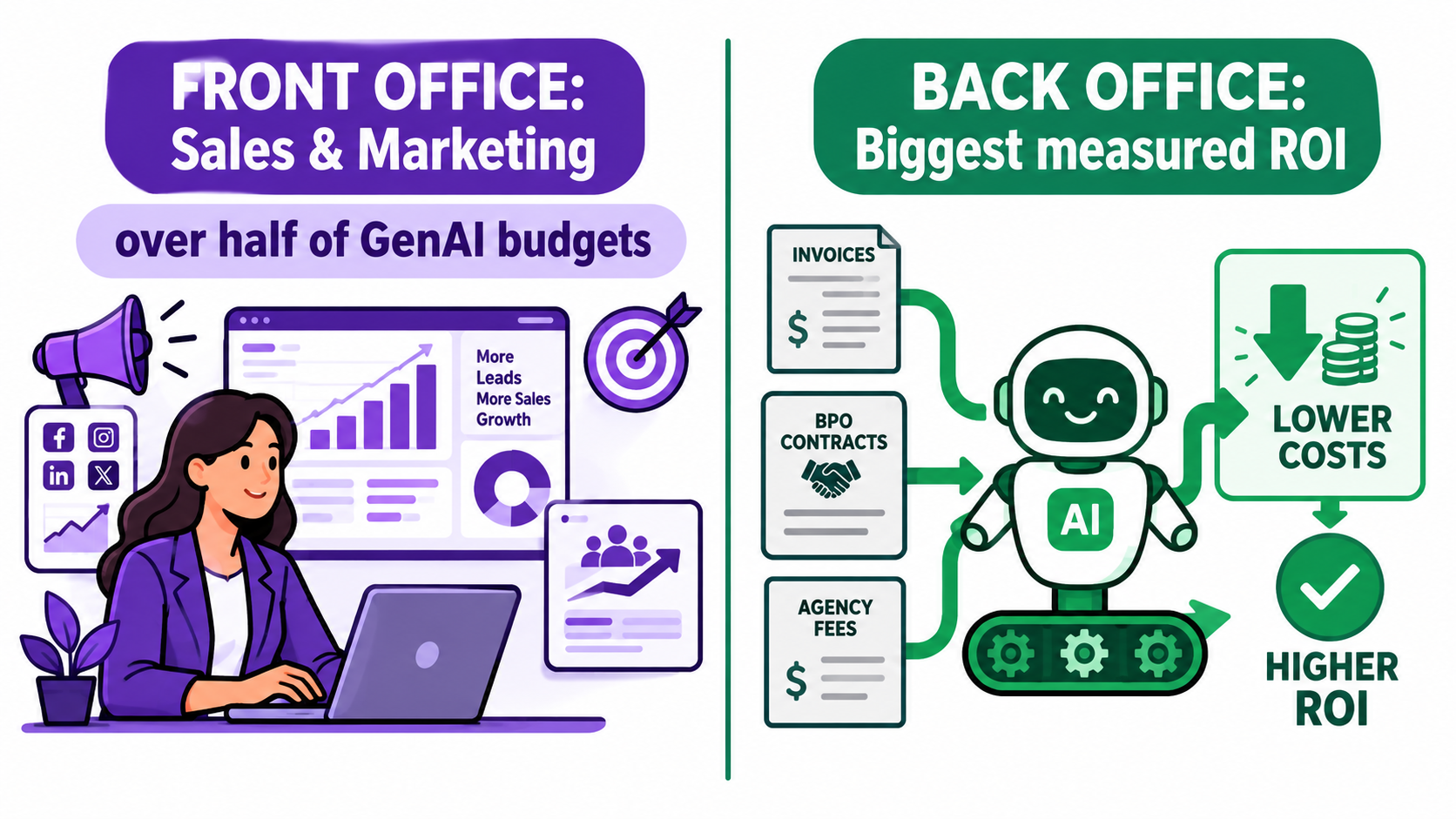
Org design decisions depend on where automation is aimed, and MIT’s findings show a clear gap between where companies spend and where they see returns.
According to the NANDA report, more than half of generative AI budgets go to sales and marketing tools. But the biggest ROI showed up in back-office automation: eliminating business process outsourcing, cutting external agency costs, and making operations more efficient.
Why the back office is often the better org design starting point
From a workforce point of view, back-office automation has several advantages:
- Much of the work is already outsourced. MIT noted that workforce changes are concentrated in jobs that had previously been outsourced. Replacing a BPO contract with automation changes a vendor relationship, not your internal org chart.
- Quality is easier to measure. An invoice either matches or it doesn’t. That makes the human-agent ratio easier to set from evidence.
- Customer risk is lower. Mistakes are caught internally before they reach anyone outside.
- The exception owners already exist. Finance and operations teams usually already have people who handle the hard cases.
Why front-office automation is harder to staff around
Sales and marketing automation is attractive because its outputs are visible: more emails, more content, more outreach. But those are exactly the conditions in which workslop thrives. Volume is easy to produce, and quality is hard to judge quickly.
Front-office automation also affects customer relationships, brand perception, and revenue more directly. When it goes wrong, the cost shows up in churn and reputation, which are the slow-moving signals that caught Klarna out.
A sequencing principle
For most businesses, a reasonable order is:
- Automate outsourced back-office work first. This produces savings with little internal disruption.
- Then automate internal back-office tasks, redesigning affected roles around exception ownership and stewardship.
- Then automate the routine layer of customer-facing work, keeping human capacity flexible.
- Treat high-judgment front-office work as augmentation, not replacement: AI as assistant (Phase 1) rather than as process owner (Phase 3).
This order lets the organization build its agent-boss, exception-owner, and steward skills on lower-risk processes before applying them where mistakes cost more.
Who Owns It? Buy vs. Build and the Role of Line Managers
Two more findings from MIT have direct consequences for structure: who builds the automation, and who drives adoption.
Buying tends to beat building
MIT found that buying AI tools from specialized vendors and building partnerships succeeded about 67% of the time, while internal builds succeeded only about one-third as often. Challapally said that “almost everywhere we went, enterprises were trying to build their own tool,” even though purchased solutions delivered more reliable results.
For org design, this changes which skills you need internally. If most automation is bought rather than built, the key skills shift from engineering toward:
- Vendor evaluation and management. Can you tell a solution that adapts to your workflow from one that just demos well?
- Integration and configuration. MIT stressed choosing tools that integrate deeply and adapt over time.
- Process specification. Can your team describe the workflow precisely enough for any tool, bought or built, to carry it out?
Line managers, not central labs
MIT also identified empowering line managers, rather than only central AI labs, to drive adoption as a key success factor. That cuts against a common structure in which a central AI team owns every initiative and “delivers” automation to business units.
The reasoning is simple. Line managers know where the real friction is, which exceptions matter, and which team members can take on new responsibilities. A central team can provide platforms, guardrails, and expertise, but if it owns the change, business units tend to treat the automation as something done to them rather than something they run.
A practical ownership model
Many organizations are settling on a split like this:
- Central team: sets standards, approves vendors, manages security and data access, runs shared infrastructure, and maintains a catalog of approved tools.
- Line managers: pick which workflows to automate, redesign the roles affected, appoint exception owners and stewards, and answer for outcomes.
- Individual contributors: act as agent bosses for their own tasks within the guardrails, and report what works and what doesn’t.
The shadow AI signal
MIT also documented widespread “shadow AI,” meaning employees using unsanctioned tools like ChatGPT. It’s tempting to treat this only as a compliance problem, but it’s also a useful signal. Shadow AI shows you where employees feel the most friction and where official tools aren’t meeting their needs. Line managers who ask about it openly, rather than punishing it, often find their best automation candidates that way.
A Role-Redesign Framework for AI Automation
Here’s a practical sequence for redesigning roles around AI automation, whether you’re a 30-person firm or a 3,000-person enterprise. It assumes you’ve already chosen a workflow to automate. The framework covers what to do with the people around it.
Step 1: Build a task inventory, not a role inventory
For each role touched by the workflow, list the actual tasks and roughly how much time each one takes. Get this from the people doing the work, not from job descriptions. Mark each task as:
- Automatable: high volume, low ambiguity.
- Assistable: AI can draft or speed it up, but a human decides.
- Human-core: depends on judgment, relationships, or accountability.
Step 2: Map what’s left
Once automatable tasks are removed, what does each role look like? Look for three patterns:
- Roles that are mostly empty. Candidates for consolidation, or for not backfilling when the person leaves.
- Roles that are now overloaded with exceptions. These need explicit exception-owner status and protected time.
- Roles that have changed in nature. These need new job descriptions, new performance goals, and possibly different pay.
Step 3: Assign the three new responsibilities
For every automated workflow, name the following:
- The workflow director (agent boss), who is accountable for overall results.
- The exception owner, who has authority over the hard cases.
- The workflow steward, who watches health and drift over time.
If you can’t name all three, the workflow isn’t ready for production.
Step 4: Set the initial human-agent ratio from risk, not savings
Use the factors from the human-agent ratio section to set a conservative starting point. Write down what evidence would justify raising it, such as a specific error rate held for a specific number of weeks.
Step 5: Protect the learning pipeline
For every junior role you choose not to backfill, write down where future exception owners and directors will get their judgment. Build at least one of the redesigned junior pathways described earlier: review-first apprenticeships, exception rotations, or small-automation ownership.
Step 6: Write workslop guardrails into the role
Update job expectations to say who is accountable for the accuracy of AI-assisted output, what “done” means for AI-assisted work, and how quality gets measured. Make review responsibilities explicit so bad output doesn’t just get passed downstream.
Step 7: Keep a reversal path
Before reducing human capacity in any customer-facing process, document how you’d bring it back. That could be a flexible pool, contractor agreements, or cross-trained staff from nearby teams. Klarna’s move back toward human agents shows that being able to reverse course is worth paying for.
Step 8: Review quarterly
Org design around automation isn’t a one-time project. Every quarter, look at exception volumes, quality metrics, workload distribution, and the irreplaceable knowledge register. Adjust ratios, reassign responsibilities, and update job descriptions as the automation and the business change.
Conclusion: Design the Team, Not Just the Workflow
AI automation for business is usually described as a technology project. The evidence from 2025 and 2026 suggests the harder and more decisive work is organizational.
Klarna showed that automation can change a company’s size substantially, mostly through attrition and hiring freezes rather than layoffs. It also showed that optimizing for cost per contact can quietly erode quality until leaders have to bring humans back. BetterUp and Stanford’s workslop research showed that adopting AI without clear accountability can impose a cost of about $9 million a year on a 10,000-person company. Stanford’s Digital Economy Lab showed that the effects so far fall hardest on the youngest workers, with an employment gap in AI-exposed jobs that has grown from about 13% to 19%. MIT found that most organizations still see little measurable return, and that the ones that do tend to buy rather than build, focus on the back office, and put line managers in charge.
Underneath all of these findings is the same point: the results of automation depend on how deliberately you redesign the human work around it.
Key takeaways
- Draw the second map. For every automated process, map what each affected role looks like afterward, not just which tasks the software takes.
- Treat attrition as a design problem. You don’t choose who leaves, so keep a register of irreplaceable knowledge and plan for its loss.
- Measure quality before cost. Set human-agent ratios from error and exception data, then let savings follow.
- Make accountability explicit. Whoever sends AI-assisted work owns its accuracy. Define “done.”
- Name the new roles. Every workflow needs a director, an exception owner, and a steward, written into real job descriptions.
- Protect the junior pipeline. Redesign entry-level roles instead of deleting them, or you’ll run short of supervisors within a few years.
- Start in the back office. Build organizational skill on lower-risk processes before automating customer relationships.
- Keep a way back. Before shrinking a customer-facing team, document how you’d bring human capacity back.
Microsoft expects that within two to five years, every organization will be on its way to becoming a “Frontier Firm,” one that is AI-operated but human-led. The technology will keep getting cheaper and more capable whatever any single company does. What’s still up to you is the “human-led” part: who leads, what they’re accountable for, and how they’re trained. That’s an org chart question, and it deserves as much attention as any choice of tool.