
Most advice about selling on TikTok Shop LIVE is really about content. Get a better ring light. Write a sharper hook. Smile more. Say “tap the orange basket” every three minutes. None of that is wrong. It just isn’t why most live sessions fail.
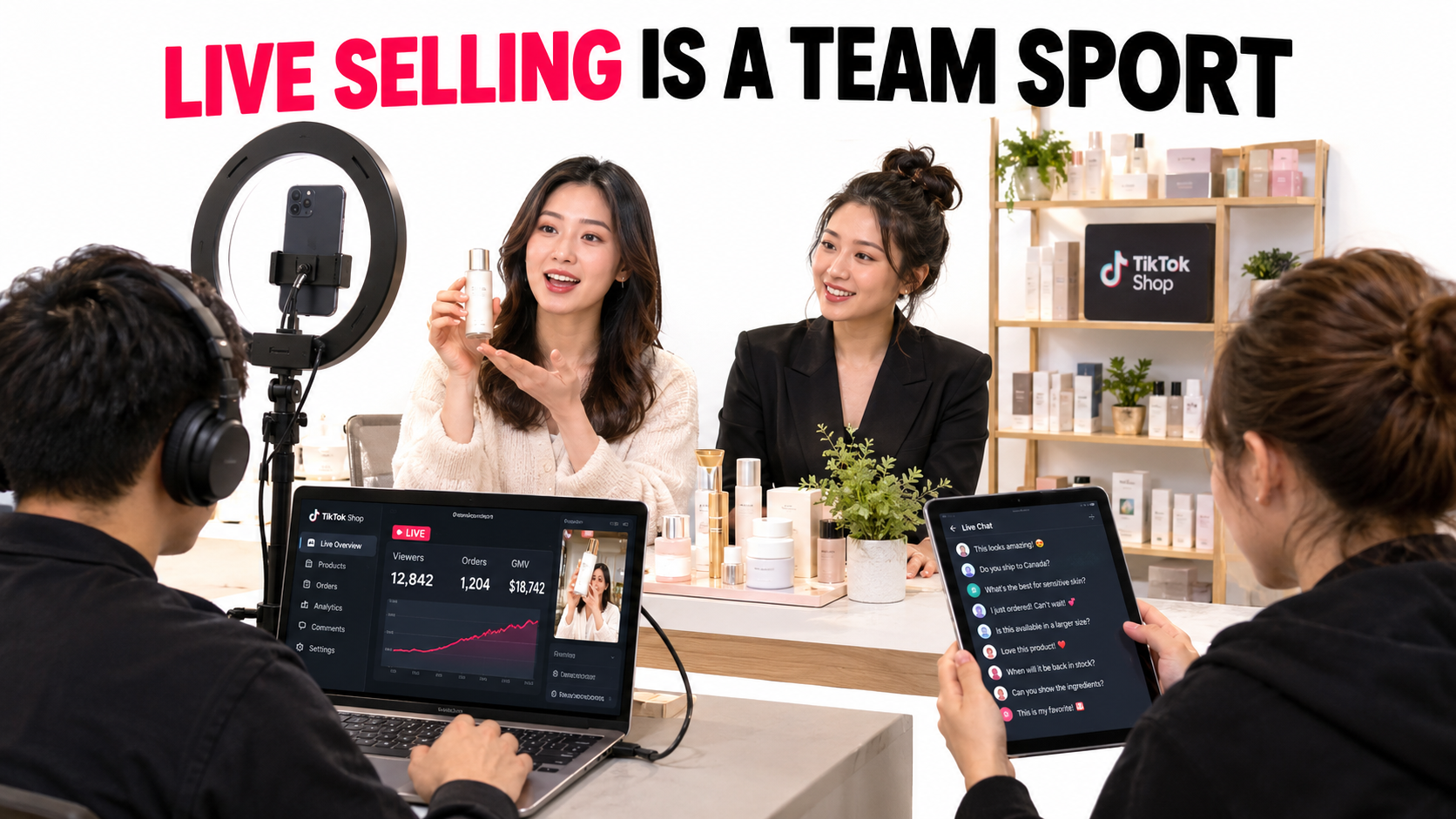
Sellers who give up on LIVE usually describe the same thing. They went live a handful of times, watched 11 people drift in and out, sold two units, and decided the format “doesn’t work for our category.” When you look at those sessions, the problem is rarely the camera. One person is trying to demo the product, read the chat, answer shipping questions, pin products, change prices, and keep the energy up, all at once, for an hour, to an empty room.
That’s an operations problem. A good live room works less like a video and more like a small retail floor with a broadcast attached. It needs roles, a script that repeats, offers built for real-time buying, a way to bring traffic in, and a feedback loop that runs after every session.
The stakes are high enough to get this right. TikTok Shop launched in the US in September 2023. Early reporting put its daily sales at roughly $7 million a month later. By Black Friday 2024 it had passed $100 million in sales for the event. Social commerce overall is projected to top $1 trillion globally by 2028. Livestreams sit at the center of that model, because they’re where the gap between “I saw it” and “I bought it” is shortest.
This guide treats TikTok Shop LIVE as a discipline you staff and run, not a broadcast you hope goes well. It covers the five roles a live room needs, how to build a run-of-show that turns over viewers, how to design offers for live buying, the persuasion mechanics that actually work (and the ones that get you in trouble), how to feed traffic into the room, which metrics matter, and a 30-day plan to launch without burning out your team.
Why TikTok Shop LIVE Breaks Differently Than Short Video
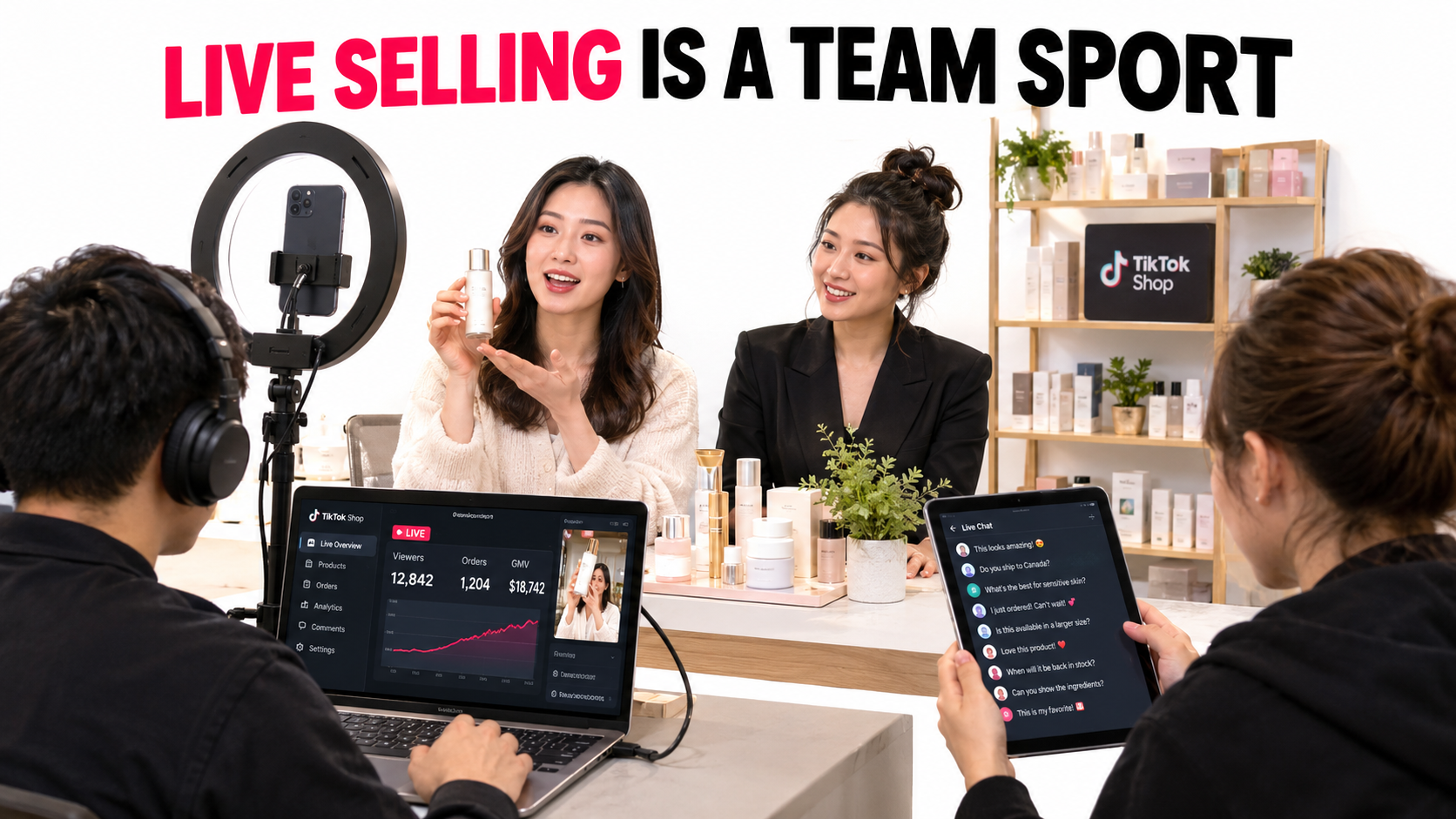
Short video and LIVE sit inside the same app and the same Seller Center, so sellers tend to treat them as two versions of one thing. They aren’t. They fail in different ways, and fixing one doesn’t fix the other.
Short video is a production problem
A shoppable short video is made once and watched many times. You can reshoot, edit, add captions, test three hooks, and post the best one. If it flops, you learn and make another. The work happens before anyone sees it, and one person can do most of it.
That’s why solo sellers and affiliate creators do well with short video. The skills are creative: framing, pacing, the first two seconds. Mistakes are cheap because nobody watches the takes you cut.
LIVE is a real-time operations problem
A livestream is made while people watch it. Every mistake is public. Every question has to be answered now or the viewer leaves. Viewers arrive and leave all the time, so at any moment part of your audience has no idea what you’re selling or why the price is what it is.
That changes what the job is. On LIVE you’re:
- Presenting: showing the product, talking about it, keeping energy up.
- Listening: reading chat, spotting objections, noticing who’s close to buying.
- Selling: pinning products, starting flash deals, releasing vouchers at the right time.
- Running the business: checking stock, fixing price errors, handling a customer who’s upset about a late order.
One person can do one or two of these well. Nobody does all four well for an hour straight. That’s why most solo streams feel flat. The host keeps stopping mid-sentence to look at a second screen.
Why “just go live more” doesn’t work
The usual fix is volume: go live every day and the algorithm will reward you. There’s some truth to it, since a consistent schedule helps viewers find you and gives you more data. But more hours of a broken format mostly give you more hours of a broken format. And a tired host is the most common reason live programs quietly end after six weeks.
The better order is to set up the operation first, then add volume. A two-person, 45-minute session with a clear script will usually teach you more than five solo, 90-minute sessions where you’re making it up as you go.
The Five Roles Every Live Room Needs
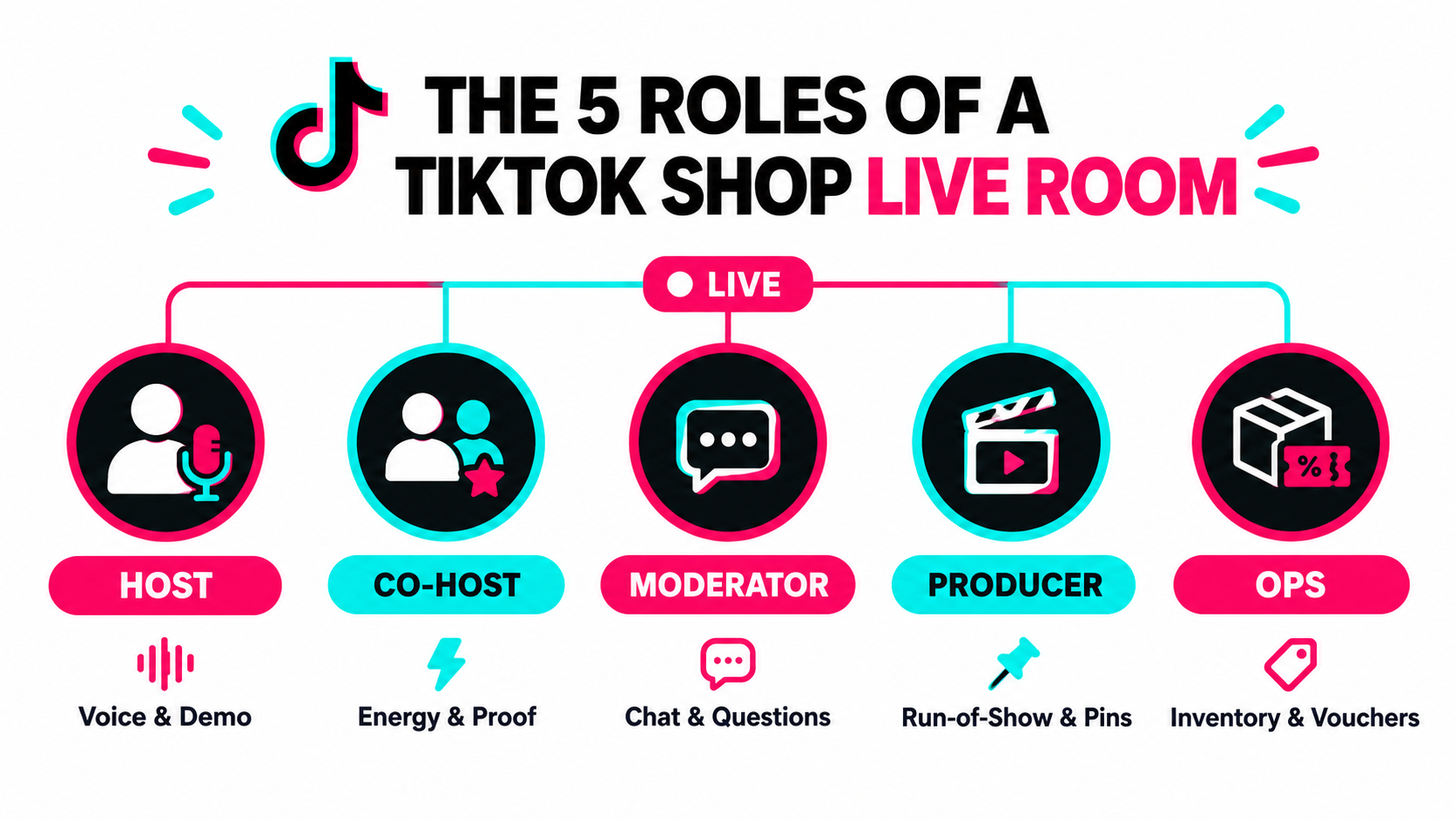
You don’t need five people to go live. You do need to account for five jobs. On small teams, one person can hold more than one role. What matters is that each job has a named owner, so nothing falls to “whoever notices.”
1. The host: voice and demonstration
The host is the face of the stream. Their only job is to talk to the camera, show the product, and respond to what the audience cares about. They shouldn’t be touching Seller Center, typing replies, or looking up tracking numbers.
Good live hosts are rarely the best short-video performers. Short video rewards polish and timing. LIVE rewards stamina, product knowledge, and being able to take a random question (“does it work on 4C hair?”) and turn it into a demo. Many brands find their best host in customer service or retail, not marketing.
2. The co-host: energy and proof
A co-host does three things a solo host can’t. They create conversation, so the host isn’t talking into a void when chat is quiet. They act as the demo subject, putting on the jacket or testing the blender while the host explains. And they act as a stand-in for the skeptical viewer, asking the questions the audience is thinking.
Streams with two people on camera also tend to feel more like a real place to hang out. Viewers stay when there’s something happening, and two people talking is something happening.
3. The moderator: chat and questions
The moderator runs the chat. They answer simple questions directly (sizing, shipping times, whether a voucher stacks), flag good questions to the host, remove spam and abuse, and pass along buying signals like “I’d buy if it came in black.”
This is the most undervalued role in live selling. Chat is where objections show up in real time. A moderator who can pass the host a note like “three people asked if it’s dishwasher safe” is basically running live customer research.
4. The producer: run-of-show and pins
The producer runs the session from behind the camera. They keep time on the script, tell the host when to move to the next product, pin the current product, start flash sales, and release vouchers on cue. On bigger streams they also run camera changes and on-screen overlays.
TikTok offers tools like the LIVE Planner in Seller Center for scheduling streams and preparing product lists. The producer owns that setup before the session and the timing during it. Without a producer, pins lag behind the talk and viewers who hear “grab it now” can’t find the product.
5. Ops: inventory, pricing, and problems
Ops is the safety net. They watch stock levels during flash deals, fix pricing mistakes, check that vouchers apply, and deal with anything that could turn into a customer-service problem later. When a deal sells out in four minutes, ops decides whether to restock the allocation or move on.
On a two-person team, the usual split is host plus a combined moderator/producer/ops. On a three-person team, split out ops. Add a co-host once the basics run smoothly. The rule to follow: the host should never have to look away from the camera to do something operational.
Designing a Run-of-Show That Turns Over Viewers
The biggest mental shift in live selling is accepting that almost nobody watches your whole stream. People arrive in the middle, stay a few minutes, and leave. Your stream isn’t one hour-long show. It’s the same short show performed over and over for a rotating crowd.
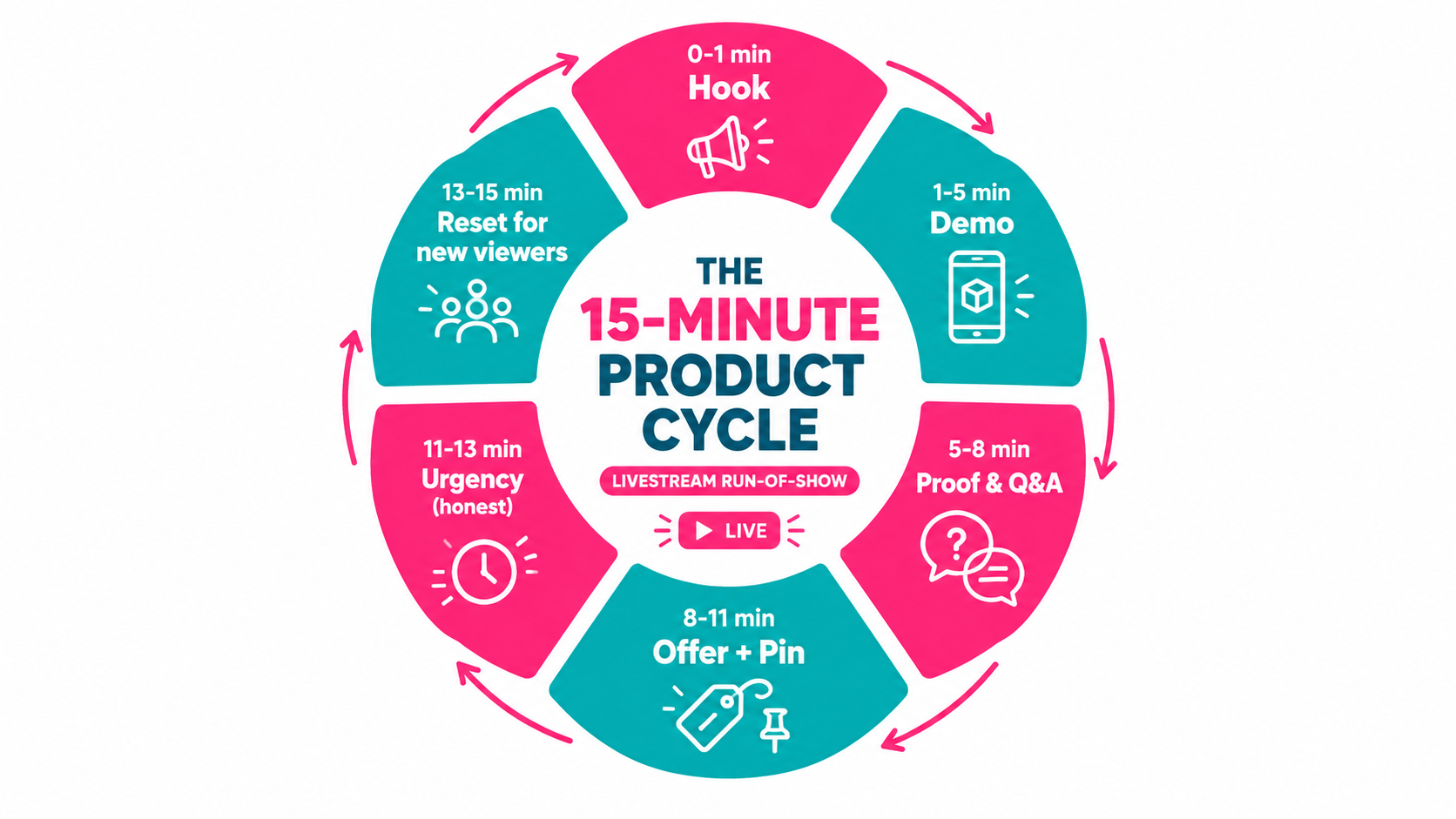
The product cycle
The basic unit of a run-of-show is the product cycle: a repeatable sequence that takes a brand-new viewer from “what is this?” to “add to cart.” A common structure runs 10 to 15 minutes:
- Hook (about 1 minute): Name the problem the product solves, or show the most visual result first. “This is the pan that eggs don’t stick to. Watch.”
- Demo (3–4 minutes): Show it working. Hands on the product, close-ups, a before-and-after if the category allows.
- Proof and Q&A (3 minutes): Reviews, ratings, sales count if it’s real, and questions from chat. This is where the moderator’s notes pay off.
- Offer and pin (2–3 minutes): State the price, the live-only deal, and exactly how to buy. The producer pins the product on cue.
- Honest urgency (1–2 minutes): Why now: a flash deal timer, limited live stock, a voucher that expires when the stream ends. It has to be true.
- Reset (1 minute): Quick recap for new arrivals, a preview of what’s coming, then either repeat the cycle or move to the next product.
The reset loop
The reset is what separates live sellers who think in cycles from those who think in shows. Every few minutes, someone should say something like: “If you just joined, here’s what we’re doing, here’s the deal, it’s pinned at the bottom.” It feels repetitive to the team. To the viewer who just arrived, it’s the first time they’ve heard it.
A useful exercise is to watch a random 90-second clip from your last stream. If a stranger couldn’t tell from that clip what’s for sale and why they should care, your resets aren’t frequent enough.
Sequencing products across a session
Once the cycle works, the next question is what order to put products in. Many live sellers use a structure like this:
- Opener: A popular, low-risk product to warm the room and trigger the first orders. Early purchases create activity that makes the stream feel busy.
- Hero: Your main product, the one with the best margin or the most important launch. Put it in the middle, when the room is warm.
- Bundles and add-ons: Raise order value by pairing the hero with accessories.
- Closer: A strong deal saved for the final segment, which gives viewers a reason to stay and gives late arrivals a way to convert.
Writing the script without sounding scripted
The script shouldn’t be word-for-word. It should be a one-page sheet per product with the hook line, three demo beats, the top three objections with answers, the exact offer, and the reset line. Hosts then say it in their own words. The sheet is there so nothing important gets forgotten at minute 47 when energy is low.
Offer Design for Real-Time Buying
An offer that works on a product page often falls flat on LIVE. Live buyers are making a decision in seconds, with a person talking to them, while the price is on screen. The offer has to be simple enough to explain in one sentence and specific enough to create a reason to act now.
Types of live offers
TikTok Shop gives sellers several promotion tools, including discounts, flash deals, vouchers, and bundles. On LIVE, each does a different job:
- Flash deals create a clear time window. They work best on openers and closers, where the goal is quick action.
- Live-only vouchers reward people for being in the room. They give the host a line to repeat (“this code only exists while we’re live”).
- Bundles raise order value and are easy to demo, since you can show everything in the box.
- Gift-with-purchase often beats a percentage off because it’s easier to picture. “You get the travel size free” lands faster than “12% off.”
Protect your margin before the stream
The most common mistake is deciding discounts on air. A host gets excited, chat asks for a better price, and suddenly the hero product is selling at a loss after platform fees, affiliate commissions, and shipping. Set a price floor for every product before the session. Ops holds it, and the host knows the numbers.
A simple pre-stream margin sheet should list, for each SKU: list price, live price, platform fees, any affiliate or creator commission, fulfillment cost, and what’s left. If the “left” column is negative, the product is a planned loss leader or it shouldn’t be on the deal list.
Stock allocation
Decide in advance how many units each deal gets. Limited allocation creates honest urgency, and it stops a strong session from overselling stock you can’t ship on time. Late shipments hurt shop performance scores and reviews, which cost you far more than a sold-out message.
Keep the offer stack simple
If the host needs 30 seconds to explain how the voucher stacks with the bundle and the free-shipping threshold, the offer is too complicated. A good test: can the moderator explain it in one chat message? If not, cut something.
Persuasion Mechanics That Work Live (and Those That Backfire)
Social commerce works largely because of well-documented principles of influence. Robert Cialdini’s framework — reciprocity, commitment, social proof, authority, liking, scarcity, and community — is often used to explain why buying inside a social feed feels different from buying on a website. LIVE puts all of them on display in real time. That’s why it works, and why it’s easy to abuse.
Social proof you can actually show
Live selling produces proof as it happens. Orders come in, viewers comment about having bought before, a regular says “I have three of these.” Hosts should call these out: “Sarah just grabbed the bundle,” “someone’s asking about the blue one, it’s the most popular.”
Proof only works if it’s real. Planted comments, fake order announcements, and inflated sales claims are exactly the kind of misleading practices that platforms and regulators watch for. Beyond the policy risk, regulars notice, and trust in a live room is fragile.
Liking and community
The most successful live sellers build rooms people come back to. Greet regulars by name. Remember what they bought. Build running jokes. Community is the strongest retention tool in live commerce, and it’s what makes a Tuesday-night stream a habit rather than an interruption.
This is also why host consistency matters. Rotating a different host each night makes it hard for viewers to form a relationship. If you need several hosts, give each one a regular slot.
Reciprocity
Giving value before asking for the sale works. Teach something: how to layer skincare, how to size a hiking boot, three recipes for the air fryer. A viewer who learned something useful is more open to a pitch, and educational segments also give you clips for short videos later.
Scarcity: the one to handle carefully
Scarcity drives live sales more than anything else and gets sellers in trouble more than anything else. Real scarcity — a flash deal with a real timer, a real limit of 50 units at the live price — is fine and effective. Fake scarcity — “only three left!” repeated for an hour, countdown timers that reset — is deceptive. It invites policy enforcement and destroys credibility with repeat viewers.
A useful rule for hosts: never say anything about price, stock, or time limits that ops can’t confirm on their screen at that moment.
Commitment in small steps
Small asks lead to bigger ones. Ask viewers to comment their skin type, vote on which color to demo next, or type “1” if they want the link. Each small action raises engagement and moves the viewer a step closer to buying. It also gives the moderator targets: someone who commented their size is a warm lead.
Feeding the Room: Where LIVE Traffic Actually Comes From
A perfectly run stream with nobody in it sells nothing. Many sellers assume the platform will send viewers once they hit “Go LIVE.” It does send some. But the sellers with steady live traffic almost always bring viewers in from several sources at once.
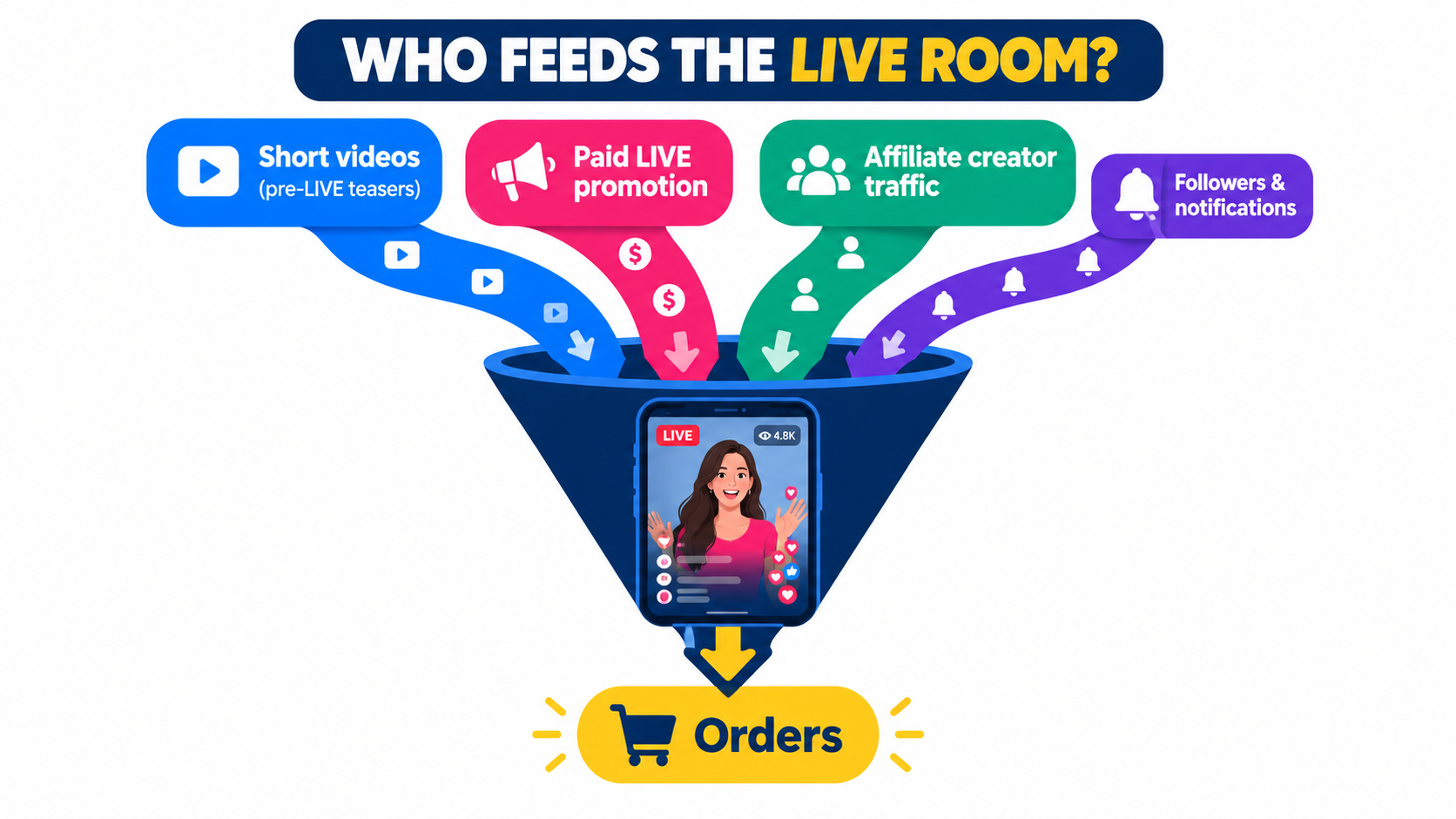
Short video as a pre-LIVE trailer
The simplest traffic source is your own short videos. Post teasers in the hours before a stream: “Going live at 7 with the deal we’ve never done before.” During the stream, some viewers will come from short videos that are circulating while you’re live. After the stream, cut the best moments into new videos.
This makes LIVE and short video one loop instead of two separate programs. Streams create raw material. Short videos send traffic back to the next stream.
Paid promotion for LIVE
TikTok’s ad products include options to promote LIVE sessions directly. Paid traffic is most useful early on, when you have few followers and the algorithm has little data on who converts in your room. The goal isn’t to buy every viewer forever. It’s to get enough real buyers into the room that the system learns who to send.
Watch paid LIVE traffic closely. Track orders and revenue against spend per session, not just viewer numbers. Cheap viewers who don’t buy can pull your conversion signals down.
Affiliate creators hosting your products
Through TikTok Shop’s Creator Affiliate Program, creators can sell your products in their own livestreams for commission. For many brands this becomes the largest source of live sales, because the creator brings an audience that already trusts them.
Treat affiliate live hosts like an extension of your team. Send them your one-page product sheets, top objections, and price floors. Offer exclusive live vouchers for their streams. Brands that treat affiliates as a channel to support, not a list of links, tend to get more consistent results.
Followers and scheduled notifications
Scheduling streams in advance lets followers get reminders. That only works if your schedule is consistent. A stream every Tuesday and Thursday at 7 PM becomes a habit. A stream “whenever we have time” doesn’t.
Timing the session
The best time to go live depends on your audience, not generic advice. Check your follower activity data in TikTok’s analytics, test two or three time slots for a few weeks each, and pick the one where sales per hour, not viewers, is highest.
The Physical Setup: What Actually Matters
Equipment gets too much attention in most live selling advice, but a few technical failures reliably kill sessions. The goal isn’t cinema-quality video. It’s removing anything that makes viewers leave.
Audio beats video
Viewers will put up with slightly soft video. They won’t put up with echo, background noise, or a host who’s hard to hear. A clip-on mic or a small directional mic near the host is usually the best money you’ll spend. If you have a co-host, give each person their own mic or make sure one mic picks up both clearly.
Lighting the product, not just the face
Ring lights make faces look good and often make products look worse, especially anything shiny, textured, or color-sensitive. Use a soft key light on the host and a separate light for the demo area. If color matters (cosmetics, apparel, home décor), check what the product looks like on a phone screen before going live. Colors that look wrong lead to returns.
A demo zone and close-ups
Set up a spot where the host can bring products close to the camera. Many sellers use a second camera or a phone mounted overhead for close-ups of textures, stitching, or small parts. Even a simple “bring it to the lens” habit helps a lot.
Connection and backup
A dropped stream in the middle of a flash deal costs sales and confuses buyers. Use wired internet where possible, test upload speed before each session, and keep the phone plugged in. Have a backup device logged in and ready. It’s a small bit of planning that saves a lot of stress.
A background that sells
The background should tell a new viewer what kind of shop this is in one glance. A shelf of your products, a branded backdrop, or a clearly themed set (a kitchen for cookware, a vanity for beauty) works better than a blank wall or a messy office.
Measuring What Matters: Session Metrics and Per-Minute Thinking
After a stream, the first number most people look at is peak viewers. It’s also one of the least useful. A stream with 40 viewers who buy beats a stream with 400 who don’t. The metrics that matter measure what happens between arrival and purchase.
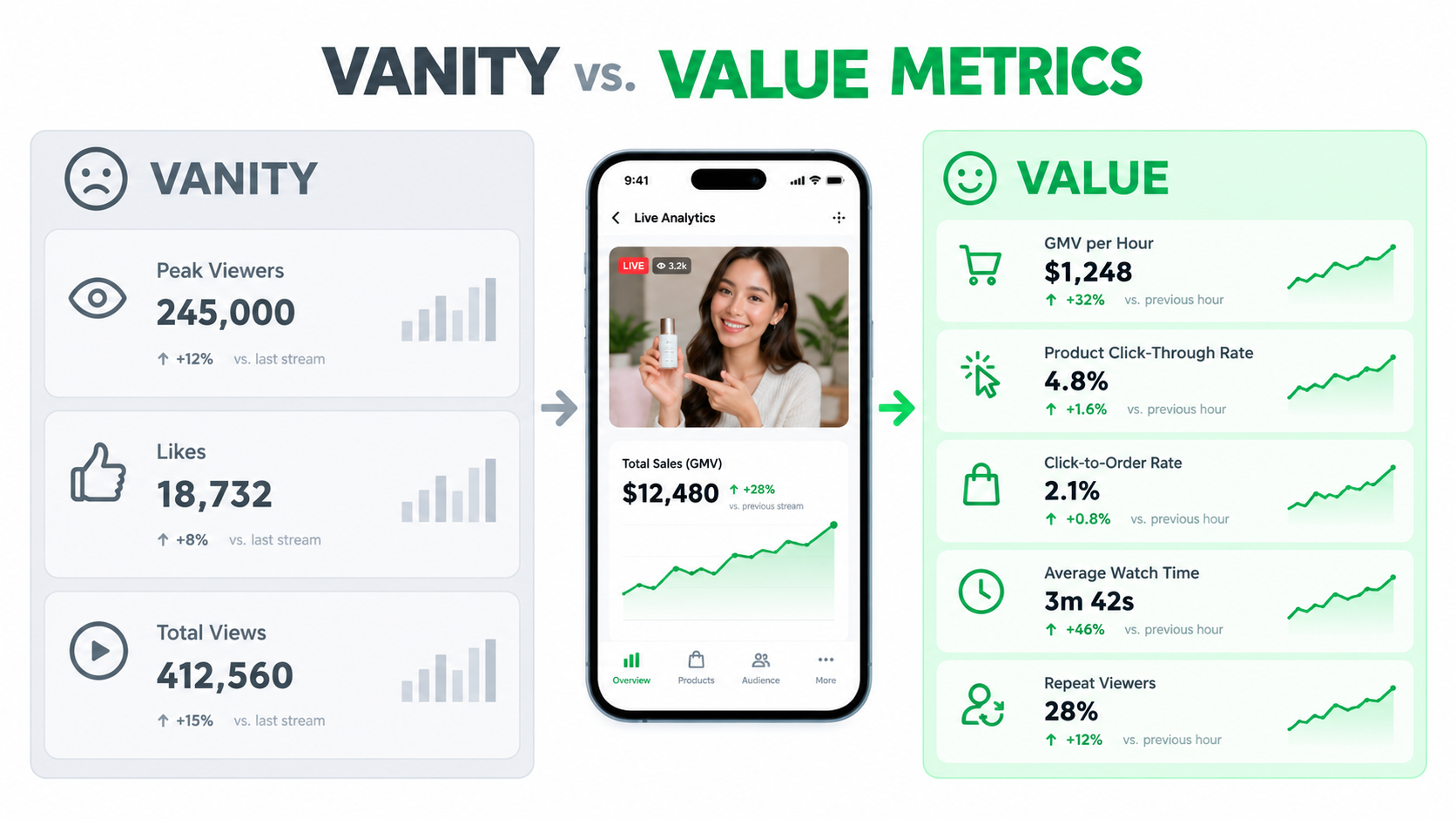
The core session metrics
TikTok Seller Center’s LIVE analytics report a range of session data. The ones worth tracking every time:
- GMV per hour: Revenue divided by stream length. This lets you compare a 45-minute stream with a two-hour stream fairly.
- Average watch time: How long viewers stay. Low watch time usually means weak hooks or resets that don’t come often enough.
- Product click-through rate: The share of viewers who tap a product. Low CTR means the demo isn’t creating interest, or the pin isn’t being called out.
- Click-to-order rate: The share of product clicks that become orders. If CTR is fine but this is low, the problem is price, offer, or product page trust.
- Repeat viewers: How many people come back. This is your community health metric.
Diagnose by stage, not by total
These metrics work together as a funnel: viewers arrive, stay, click, and buy. When sales are low, find the stage where people drop off:
- Few viewers: traffic problem. Look at teasers, paid promotion, scheduling.
- Viewers but short watch time: hook and reset problem. Look at the first 60 seconds of each cycle.
- Watch time but few clicks: demo and pin problem. Is the product visible? Is the pin called out clearly?
- Clicks but few orders: offer problem. Price, shipping cost, reviews, or product page.
Per-minute thinking
Many live platforms show how viewers and orders change across the stream. Line those up with your run-of-show. Did viewers drop when you switched products? Did orders jump when the co-host did the demo? Did the room empty during a long Q&A about shipping?
A 20-minute review after every stream is worth more than another hour of streaming. The producer brings the run-of-show, ops brings the sales data, and the host brings what felt off. Pick one change for next time. Just one, so you can tell whether it worked.
Build your own baselines
Published benchmarks for live conversion rates vary a lot by category, country, and price point, and many are self-reported by agencies or tool vendors. Your own baseline is more useful. Track the same five metrics for your first 10 sessions, then measure every change against your average.
Compliance and Trust: The Risks That Come With Real-Time Selling
Because everything on LIVE is spontaneous, it’s easier to say something you shouldn’t. And because it’s recorded, it’s also easier to get caught. Live sellers need clearer guardrails than short-video sellers, not looser ones.
Product claims
Health, wellness, beauty, and supplement categories are the riskiest. A host saying a cream “cures eczema” or a supplement “burns fat” on air creates the same problem as putting it in a listing, except it’s harder to take back. TikTok Shop’s policies restrict misleading product claims, and TikTok has faced public criticism over product misinformation since the Shop launched.
Give hosts a written list of approved claims and banned phrases for each product. Ops or the moderator should flag any slip right away so the host can correct it on air.
Disclosure and pricing honesty
“Was” prices must be real. Limited stock must be limited. If a creator is hosting for commission, the relationship should be disclosed according to platform rules and local advertising law. These aren’t just legal issues. Regular viewers are sharp, and one caught fib can empty a room that took months to build.
Fulfillment promises
Hosts often promise delivery times to close a sale. If ops isn’t confident in those times, the promise turns into late shipments, cancellations, and bad reviews. Put approved shipping language on the product sheet and stick to it.
Chat moderation
Live chat can attract spam, harassment, and off-topic arguments. The moderator should have clear rules about what gets removed and when to block someone. A clean chat keeps the room pleasant for buyers and protects your brand from being next to content you’d never approve.
Staffing Models: In-House, Agency, or Creator-Led
Once the operating model makes sense, the question is who should run it. There are three main options, and most brands with serious live programs end up using a mix.
In-house team
Building your own live team gives you the most control over product knowledge, brand voice, and data. Your people know the products better than anyone and can answer detailed questions. The downside is cost and burnout: live hosting is tiring, and one great host who quits can take your program with them.
Best for: brands with a deep catalog, technical products, or a strong brand identity that’s hard to hand off.
Live-commerce agency
Agencies that specialize in live selling offer trained hosts, studios, and production teams. They can get a program running quickly and often bring experience from many streams across categories. The trade-offs are cost, less product depth, and sometimes less transparency about what’s driving results.
If you use an agency, insist on access to your own session data, agree on the metrics in advance (GMV per hour and click-to-order rate, not just viewers), and require them to use your approved claims list.
Best for: brands that want to test LIVE seriously without hiring first, or that need to run many hours a week.
Creator-led through affiliates
Creators who host your products in their own streams bring their own audience and trust. You pay commission on sales instead of fixed costs, which lowers risk. You have less control over presentation and schedule, and results depend a lot on the creator’s audience fit.
Best for: brands with products that demo well and suit a clear audience, and brands without the resources for their own studio.
The hybrid most brands land on
A common pattern is a small in-house team running a regular branded stream a few times a week, plus a group of affiliate creators running their own streams on the same products. The in-house stream builds data and community. The affiliates add reach. Both use the same product sheets, price floors, and claims list, so the brand message stays consistent.
A 30-Day Plan to Launch (or Relaunch) Your LIVE Program
Here’s a practical way to get from zero to a steady program in a month without burning out your team. It assumes a small team of two to three people and a product catalog that’s already live in your TikTok Shop.
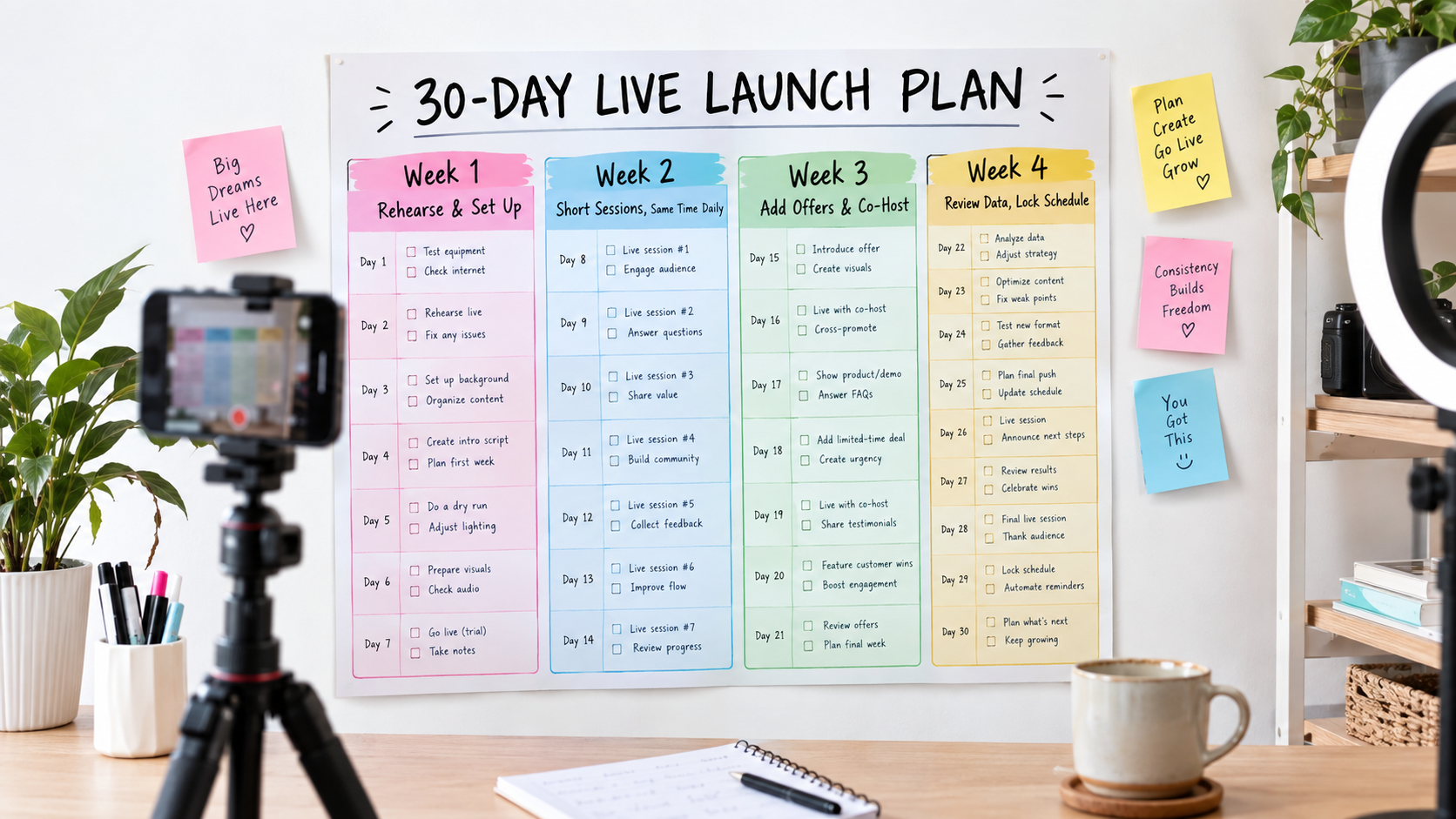
Week 1: Set up and rehearse
- Assign all five roles, even if one person holds three of them.
- Pick three to five products: an opener, a hero, one or two add-ons, and a closer.
- Write a one-page sheet for each: hook, demo beats, top objections, approved claims, offer, reset line.
- Build the margin sheet and set price floors and stock allocations.
- Set up audio, lighting, the demo zone, and a backup device.
- Do two private rehearsals. Time the product cycles.
Week 2: Short, consistent sessions
- Go live three to four times at the same time slot, for 30 to 45 minutes each.
- Focus on getting the cycle and resets right, not on sales.
- Post a teaser short video before each stream.
- Do a 20-minute review after every session. Choose one change for next time.
Week 3: Add offers and a second voice
- Bring in live-only vouchers and one flash deal per session.
- Add a co-host if you haven’t yet.
- Test a small paid LIVE promotion budget on one or two sessions and compare results against unpaid sessions.
- Reach out to a few affiliate creators with your product sheets and a live voucher.
Week 4: Review and lock the schedule
- Compare all sessions on GMV per hour, watch time, CTR, click-to-order rate, and repeat viewers.
- Find your best time slot and your best-performing product sequence.
- Lock a weekly schedule you can actually keep for the next three months.
- Cut your best stream moments into short videos to feed the next round.
At the end of 30 days you should have your baselines, a script that works, a schedule viewers can rely on, and a clear sense of whether to add hours, add hosts, or bring in an agency or more affiliates.
Conclusion: Run the Room, Don’t Just Film It
TikTok Shop LIVE rewards sellers who treat it as a retail operation. The camera, lights, and hooks matter, but they’re the easy part. What separates live programs that grow from ones that fade is structure: named roles, a repeating product cycle, offers planned before the stream, honest persuasion, traffic from several sources, and a quick review after every session.
If you take one thing from this guide, make it this: the host should only have to host. Everything else — chat, pins, pricing, stock, compliance — belongs to someone else, even if that someone is also wearing two other hats.
Key takeaways
- Staff five roles: host, co-host, moderator, producer, ops. Combine them on small teams, but give each one a named owner.
- Think in cycles, not shows: a 10–15 minute product cycle with frequent resets serves a rotating audience.
- Plan offers before going live: set price floors, stock allocations, and simple one-sentence deals.
- Use persuasion honestly: real social proof, real scarcity, real community. Fake urgency costs more than it earns.
- Feed the room: combine short-video teasers, paid LIVE promotion, affiliate hosts, and a consistent schedule.
- Measure the funnel: GMV per hour, watch time, CTR, click-to-order rate, and repeat viewers, reviewed after every session.
- Protect trust: approved claims lists, honest pricing, realistic shipping promises, and active moderation.
- Launch in 30 days: rehearse, run short consistent sessions, add offers, then lock a schedule you can keep.
The sellers who win on LIVE in 2026 won’t be the ones with the most expensive studios. They’ll be the ones whose viewers can drop in at any minute, understand what’s for sale, trust what they hear, and buy without friction. That comes from operations, not luck.