
Most TikTok Shop sellers are leaving an entire channel completely cold. It is not influencer outreach. It is not paid ads. It is email — and the tools to use it are already built into your Seller Center, right now, waiting to be switched on.
That might sound strange. TikTok is a video platform. Email feels like it belongs to a different era of e-commerce. But in 2026, TikTok Shop’s Seller Center contains a quietly expanding suite of email marketing and outreach tools that many sellers have never opened, let alone configured. Some of these features are available to all sellers. Some are still in a gated rollout. All of them represent a meaningful, underused layer of customer retention that the platform’s top performers are starting to take seriously.
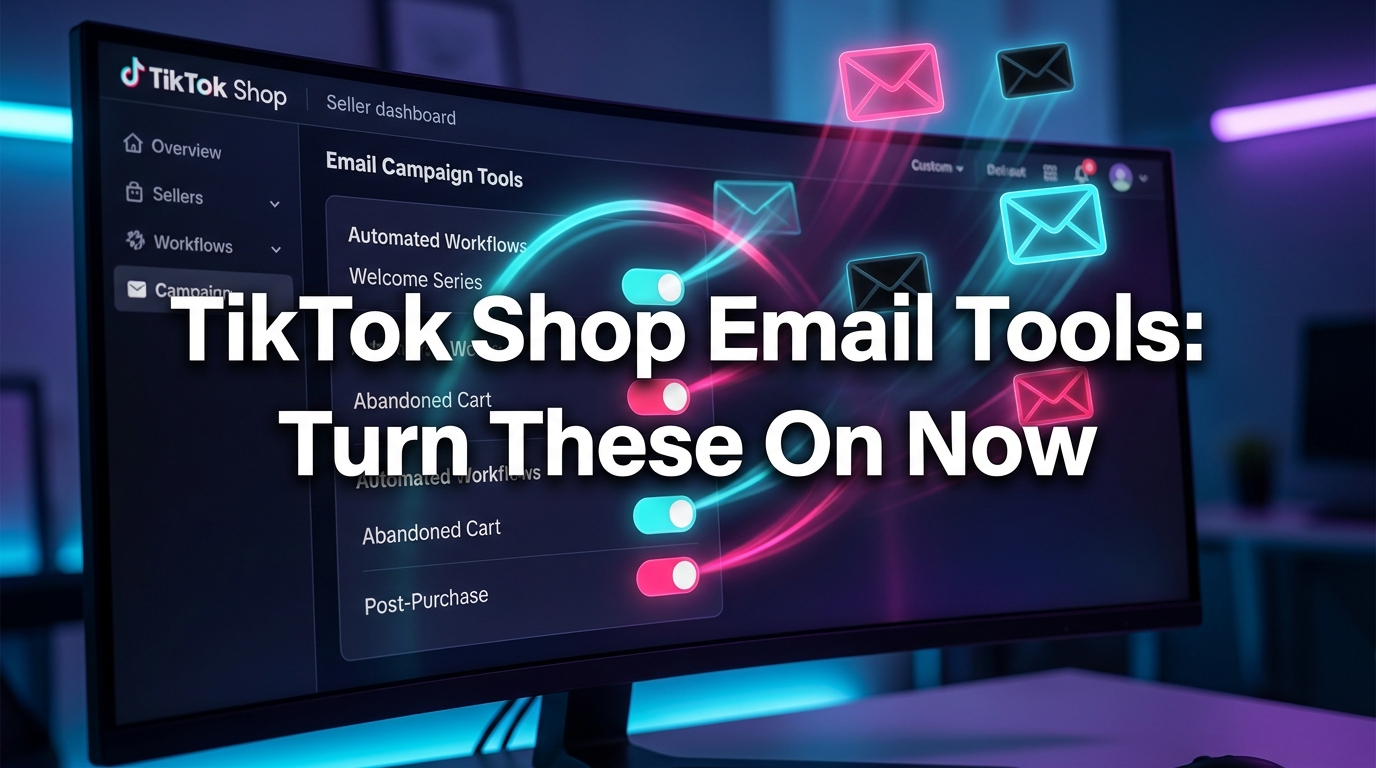
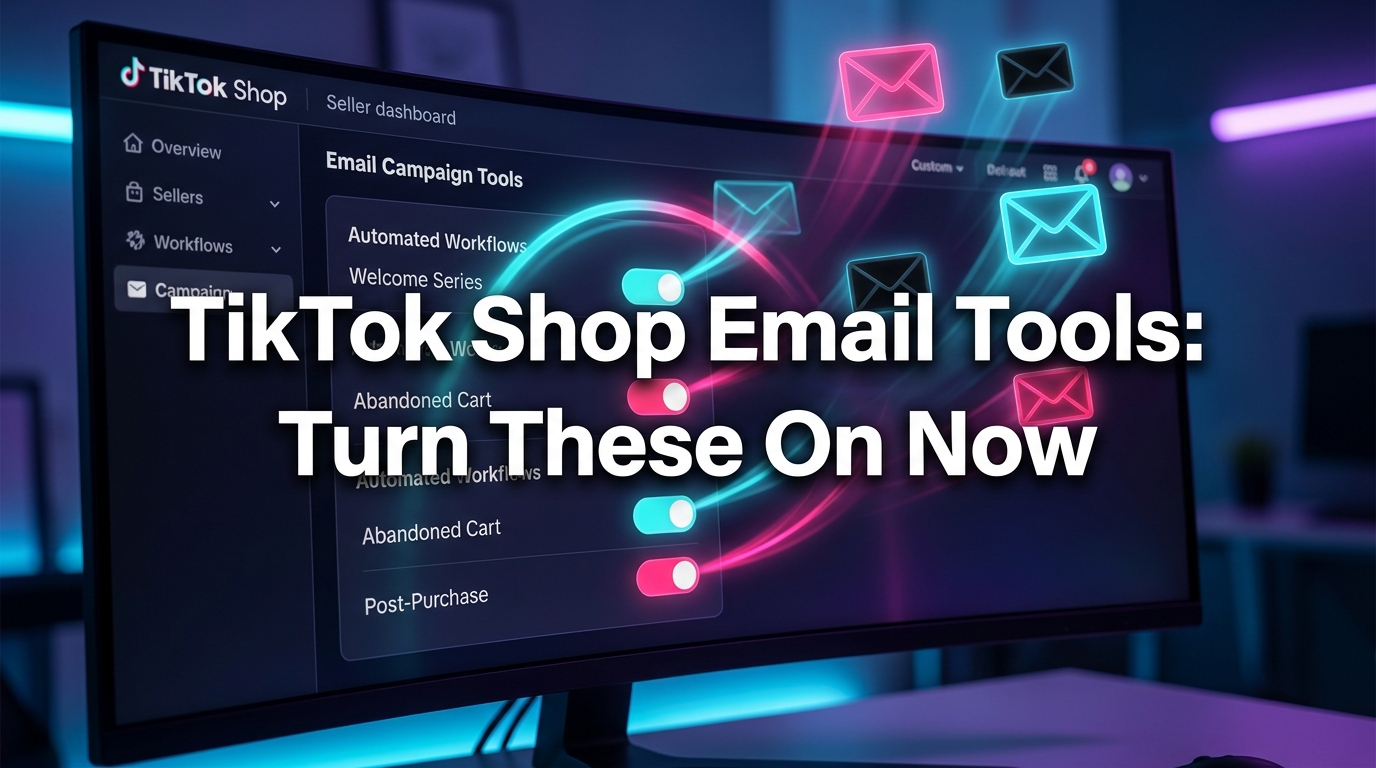
This post is not about the obvious stuff — running TikTok ads, growing your follower count, or working with affiliates. Those angles have been covered. This is specifically about the email tools inside Seller Center: what each one is, what it is designed to do, how to turn it on, and why it matters more than most sellers realise right now. We will walk through the full stack, from operational message alerts to automated lifecycle campaigns, and explain the mechanics, the data, and the setup path for each one.
If you have ever opened the Customers tab in Seller Center and wondered what half of it actually does, this is the guide you have been waiting for.
Why TikTok Built Its Own Email Layer — And What Problem It Is Actually Solving
Understanding why TikTok built email tools into Seller Center matters, because it changes how you think about using them. This was not an obvious product decision for a short-video platform. Email is not TikTok’s core format, and TikTok’s entire identity is built around in-feed discovery. So why build a CRM email stack at all?
The answer comes down to one structural problem with social commerce that every platform eventually confronts: discovery is not retention. TikTok is extraordinarily good at introducing products to new audiences. The algorithm surfaces content to people who have never heard of your brand, generates demand out of nowhere, and converts browsers into first-time buyers at a pace that traditional advertising struggles to match.
But what happens after that first purchase? In most cases, the buyer disappears back into the feed. They follow thousands of accounts. Your next product video may never reach them. The algorithm does not guarantee that your past buyers will see your future content — in fact, the algorithmic feed is specifically designed to prioritise novelty and variety over loyalty. A customer who bought from you last month has no structural reason to encounter you again unless you have a mechanism to reach them directly.
The First-Party Data Opportunity TikTok Is Handing Sellers
This is where TikTok’s email tools become strategically significant. Every follower and every buyer on TikTok Shop is a first-party data point — a real person who has voluntarily engaged with your brand, either by clicking “follow” or by completing a transaction. TikTok’s email and CRM tools exist specifically to let you use that first-party data to re-engage those people through a channel that bypasses the algorithm entirely.
That is a qualitative shift in how TikTok Shop works. Instead of being entirely dependent on video virality and algorithmic distribution to drive repeat purchases, sellers who activate the email layer gain a direct line to their most valuable customers — people who already know and trust the brand.
Platform Incentive: Why TikTok Wants You Using These Tools
TikTok’s own data shows that sellers who actively use CRM outreach see an average 6.17% increase in GMV compared to peers who do not. That is not a marginal gain — it compounds quickly across a growing customer base. From TikTok’s perspective, anything that increases seller GMV also increases platform GMV. The email tools are not an altruistic feature; they are TikTok’s way of improving retention metrics across the entire marketplace, which benefits the platform’s advertisers, creators, and investors simultaneously.
The practical implication for sellers is that TikTok has significant incentive to make these tools work well. They are being invested in, iterated on, and expanded — which makes now an important time to understand and activate them before they become table stakes for competitive sellers.
The Two Campaign Types You Need to Understand First
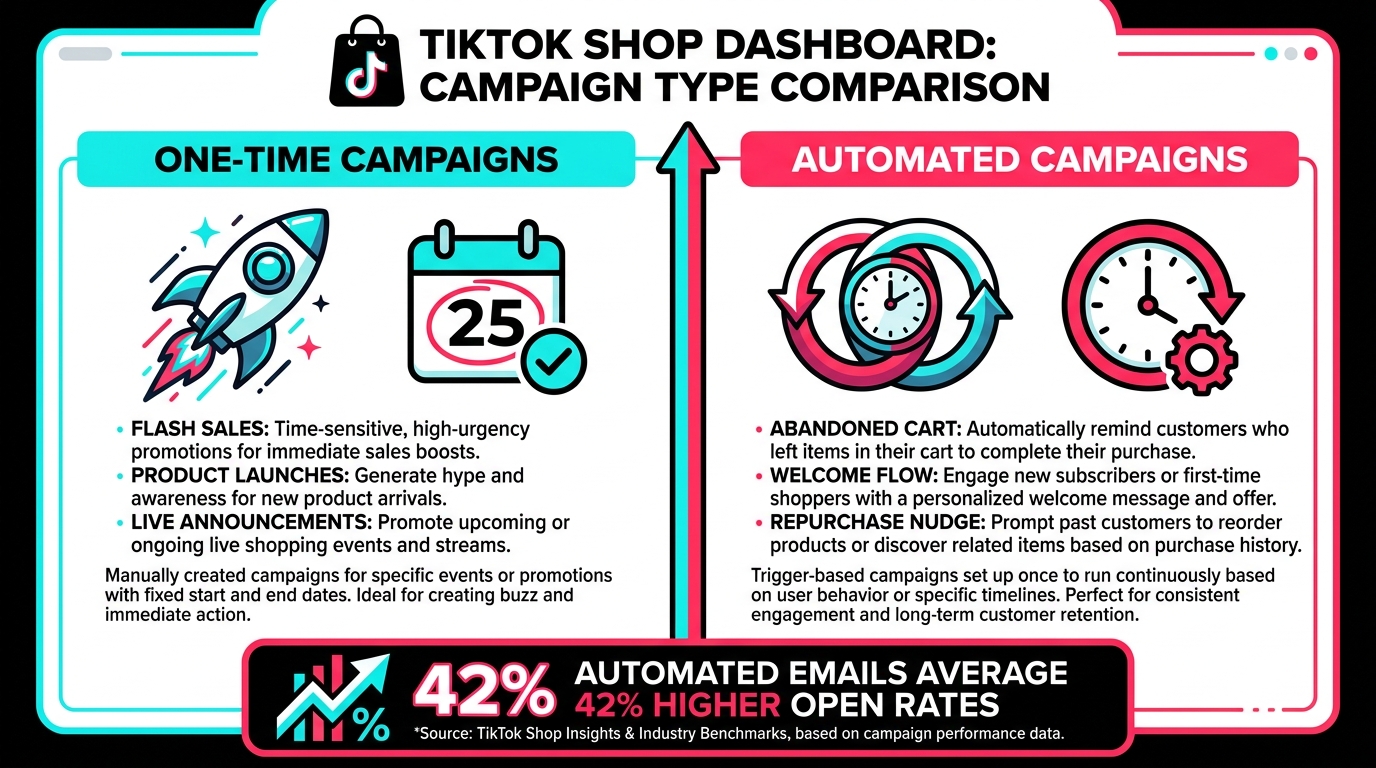
Before diving into the individual tools, it is worth establishing the fundamental framework that TikTok’s email and outreach system is built around. All of the CRM email features in Seller Center operate within one of two campaign types: one-time plans and automated plans. Understanding the difference is the first step to knowing which tool to reach for in any given situation.
One-Time Plans: Scheduled, Intentional, Manual
One-time plans are exactly what they sound like — you create a campaign, choose your audience segment, write or select a template, schedule a send time, and it goes out once. These are your broadcast-style campaigns. Think of them the way a brand would think about a promotional email blast: a specific message, sent to a specific group, at a specific moment.
The use cases that work best with one-time plans tend to be event-driven and time-sensitive:
- New product launches — alerting your follower base or past buyers that something new is available, ideally with an early-access framing to reward the existing audience
- Flash sales and limited-time promotions — creating urgency around a deal that expires within 24-48 hours
- LIVE session announcements — telling your audience about an upcoming livestream, particularly useful for high-value or seasonal events
- Seasonal campaigns — back-to-school, holiday, summer sale, and other calendar-anchored moments
- Follower-exclusive drops — creating a sense of VIP access by offering something only to people who already follow your shop
One-time plans require active effort — you need to plan, write, and schedule them. But their value is in precision: you control the exact message, timing, and audience, which makes them highly effective when used around moments that genuinely matter to your customers.
Automated Plans: Set Once, Run Continuously
Automated plans are trigger-based. You set them up once, define the trigger condition (a customer abandons their cart, someone makes their third purchase, a new follower joins), and the system sends messages automatically whenever those conditions are met — indefinitely, until you pause or stop the plan.
This is where the leverage lives. A single well-configured automated plan can send thousands of targeted messages over the course of a quarter without any ongoing effort from your team. Automated emails also tend to perform better than broadcast campaigns because they are contextually relevant — the message is tied to something the recipient just did or almost did, which makes it feel timely rather than intrusive.
Industry benchmarks consistently show that automated lifecycle emails generate significantly higher open and conversion rates than one-time promotional blasts, primarily because of that contextual relevance. When someone abandons a cart and receives an email referencing exactly what they left behind, the connection between message and need is immediate and obvious.
The practical implication: most sellers should prioritise getting at least two or three automated plans live before worrying about one-time campaigns. The compounding value of automation over time outweighs the short-term GMV bump from a single promotional send.
Tool #1 — Customer CRM Outreach: The Foundation Layer
The core of TikTok Shop’s email and messaging infrastructure is its CRM Outreach tool, accessible inside Seller Center under Customers → Outreach. This is the foundational layer — the one that has been available the longest, is accessible to the broadest range of sellers, and provides the framework within which most of the email features operate.
CRM Outreach in TikTok Shop supports both chat-based messages and email messages, giving sellers the ability to reach customers through whichever channel makes sense for the campaign. The distinction matters because different customer segments behave differently across channels — a cart abandoner might respond better to an in-app chat nudge, while a lapsed buyer who has not opened the TikTok app in 60 days might be better reached via email.
What the CRM Outreach Tool Actually Does
At its core, the CRM Outreach tool gives sellers the ability to:
- Select a customer segment from TikTok’s built-in audience definitions (more on these in the next section)
- Choose a campaign type — one-time or automated, as described above
- Select a use-case template — TikTok provides pre-built templates for each scenario type, which significantly reduces the creative lift required to get a campaign live
- Customise the message — personalise the subject line, body copy, product references, and voucher codes where applicable
- Track performance — view recipient counts, open rates, click-through rates, resulting orders, and attributable GMV through the built-in campaign dashboard
The performance dashboard is more capable than most sellers expect. It does not just show vanity metrics — it directly attributes orders and GMV to specific outreach campaigns, which means you can calculate a concrete return on your CRM activity within days of launching a campaign. For a tool that requires no additional ad spend, this level of attribution reporting is a meaningful advantage.
Chat vs. Email: Which Channel to Choose
When setting up a CRM outreach campaign, sellers with access to both channels need to make a deliberate choice about whether to use chat or email for a given use case. There is no universal right answer, but some principles help:
Use chat for: high-urgency, short-window scenarios like flash sale reminders, LIVE session alerts going out 1-2 hours before start, or same-day shipping cutoff notifications. Chat messages feel more immediate and personal, and they surface inside TikTok’s in-app messaging system where a user who is actively browsing TikTok is likely to notice them quickly.
Use email for: lower-urgency, higher-information scenarios like new product introductions, loyalty rewards, post-purchase follow-ups, and win-back sequences targeting lapsed customers. Email tolerates longer messages, supports richer formatting (including product images and multiple CTAs), and reaches users who may not be actively inside the TikTok app at the moment of send.
For most sellers, the ideal approach is to run both channels in parallel — using chat for immediacy and email for depth — rather than treating them as either/or options.
Tool #2 — Exclusive Email Campaigns / Advanced Email Marketing: The New One to Watch
This is the tool that most sellers have not heard of yet, and it represents the most significant evolution in TikTok Shop’s email capabilities in 2026. Exclusive Email Campaigns — also referred to in some Seller Center interfaces as Advanced Email Marketing — differ from the standard CRM Outreach tool in a fundamental way: with this feature, TikTok sends branded marketing emails on the seller’s behalf, using a shop-branded domain, rather than the seller sending through TikTok’s messaging system.
The practical difference is significant. When TikTok sends an email on your shop’s behalf using a branded domain, it lands in the recipient’s email inbox — their actual email client, not just TikTok’s in-app messaging centre. This means it reaches customers through a channel they check independently of TikTok, making it genuinely additive rather than just another in-app notification.
What Exclusive Email Campaigns Support
According to TikTok’s Seller Center documentation, Exclusive Email Campaigns are designed to cover a specific set of high-value scenarios:
- Flash sale promotions — time-limited deals sent to followers and past buyers
- Coupon and voucher distribution — targeted discount codes delivered to specific customer segments
- New arrival announcements — alerting past buyers when relevant new products are added to the shop
- Price drop notifications — automatically or manually triggered alerts when a product’s price decreases
- Abandoned cart recovery — re-engagement emails for customers who added products to their cart but did not complete the purchase
- Post-purchase follow-ups — thank-you messages, review requests, or complementary product recommendations sent after a completed order
Access and Eligibility
It is important to be transparent about the current rollout status of this feature. As of mid-2026, Exclusive Email Campaigns / Advanced Email Marketing is in a testing phase and available only to selected sellers. Access appears to be tied — at least in part — to the seller’s Shop Performance Score (SPS), with higher-performing shops being prioritised in the rollout.
To check your eligibility, navigate to Seller Center → Customer → Outreach → Create email plans and look for an “Enroll now” or “Apply” option. If you do not see it, your shop may not yet be in the eligible cohort, but this is expected to expand significantly over the remainder of 2026.
For sellers who do have access, the advice is clear: enrol immediately. Being an early adopter of a platform-native email channel gives you access to audiences and data before competitors, and any brand reputation you build through these channels now compounds as the feature scales.
Tool #3 — Unread Message Email Alerts: The Operational Must-Have
This is the least glamorous of the three core email tools in TikTok Shop, but it may be the one with the highest immediate impact for most sellers — because failing to have it configured costs you conversions silently, every day.
Unread Message Email Alerts is a notification setting that forwards incoming buyer messages from TikTok Shop’s customer chat system to an email inbox of your choosing. When a shopper sends a question — “Is this available in blue?” or “How long does shipping take?” — your team receives an email notification, rather than having to monitor the Seller Center messaging dashboard manually or check the TikTok app.
Why This Matters More Than It Sounds
Pre-purchase buyer questions are one of the highest-leverage moments in TikTok Shop selling. A customer who takes the time to send a message is already highly engaged — they have found your product, they are interested enough to seek more information, and they are one satisfactory answer away from completing a purchase. The conversion rate on responded-to pre-purchase inquiries is substantially higher than on cold browse traffic.
But this conversion opportunity has a very short window. TikTok Shop is a mobile-first, impulse-driven commerce environment. A customer who asks a question and does not receive an answer within 30-60 minutes is likely to move on — back to the feed, to a competitor’s product, or simply out of the purchase mindset altogether. Studies across e-commerce platforms consistently show that response time is one of the strongest predictors of conversion from a buyer message.
Most sellers who are not running a full-time customer service operation fail to respond quickly because they simply do not know a message has arrived. They open Seller Center once or twice a day and discover questions that are already 8 hours old. By that point, the purchase window is almost certainly closed.
How to Set It Up
The setup path for Unread Message Email Alerts is straightforward:
- Inside Seller Center, navigate to Customer Messages
- Go to Settings → Notification Settings
- Toggle on Unread message email alerts
- Add the email address — ideally a monitored customer service inbox — where you want the alerts delivered
- Ensure the relevant team members have the correct account permissions to access and respond to messages
This takes less than five minutes to configure and is one of the highest-ROI setup tasks available to any TikTok Shop seller at any stage. If you do nothing else from this article, do this.
Account Communication Preferences
Separately from buyer message alerts, TikTok Shop also lets sellers manage general operational email notifications through My Account → Account Settings → Communication Preferences. This covers things like order updates, policy changes, seller promotions from TikTok, and performance alerts. While this is less directly tied to revenue, keeping your communication preferences correctly configured ensures you do not miss important platform notifications that could affect your shop’s status or operations.
The Audience Segments TikTok Gives You — And Which Ones Perform Best
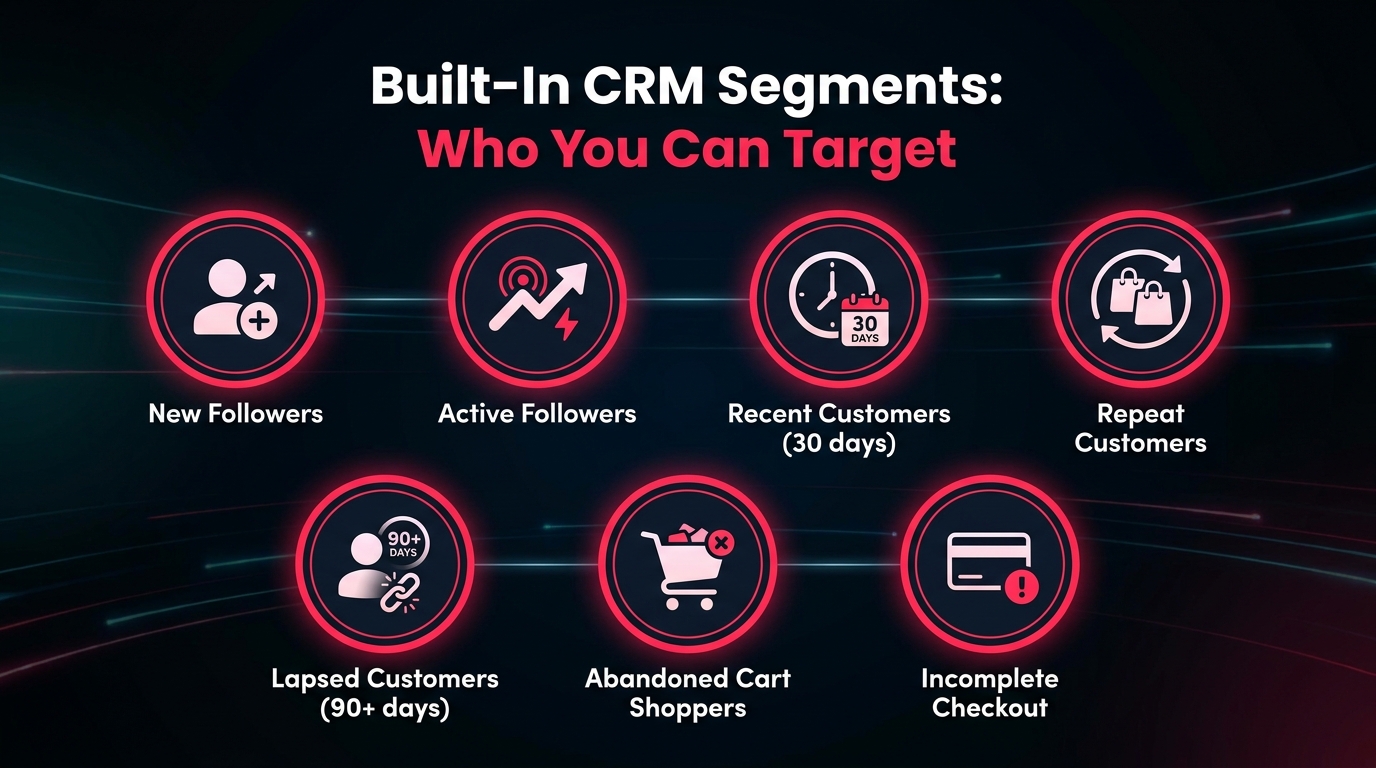
The quality of any email or CRM campaign is only as good as the audience targeting underneath it. Broad, undifferentiated blasts to your entire customer list tend to generate low engagement, high unsubscribe rates, and a skewed impression of what your email tools are actually capable of. Targeted campaigns, sent to segments defined by specific behaviours, consistently outperform them.
TikTok Shop’s CRM tools come with a set of built-in customer segments that do not require any manual list-building or external data integration. These are populated automatically from TikTok Shop’s own commerce data — your followers, your buyers, your browsers — and updated in real time. Understanding what each segment represents, and which messaging approach fits it, is the core skill for running effective CRM campaigns on the platform.
The Built-In Segments Explained
New Followers — People who have recently followed your TikTok Shop account but have not yet made a purchase. This is a warm audience in the awareness-to-consideration phase. The right message here is a first-purchase incentive: a welcome voucher, a best-seller spotlight, or a follower-exclusive offer that rewards the follow with immediate value. The goal is to convert a passive follower into an active buyer as quickly as possible.
Active Followers — Followers who engage regularly with your content but may or may not have purchased. These users are familiar with your brand and likely interested in your products. LIVE session reminders and new product announcements work well here — they are already engaged enough to act, they just need the right prompt at the right moment.
Recent Customers (30-day window) — People who have purchased from you within the last 30 days. This is your highest-intent retention segment. They know your products, they have had a positive enough experience to complete a purchase, and they are at the peak of their brand familiarity. Post-purchase follow-ups, complementary product recommendations, and review requests all perform well here. The 30-day window is the critical retention window — a customer who repurchases within 30 days of their first order is significantly more likely to become a long-term repeat buyer.
Repeat / Frequent Customers — Buyers who have made multiple purchases from your shop. This is your VIP tier. Treat them accordingly: early access to new products, exclusive vouchers, loyalty recognition. These customers are already advocates — they need communication that makes them feel valued, not just marketed to.
Lapsed Customers (90+ days) — Buyers who have not purchased in over 90 days. This segment has drifted but has not fully left — they have a purchase history with you, which means they have shown they are willing to buy. Win-back campaigns with a meaningful incentive (a time-limited discount, a new product they have not seen yet) are the most effective approach. The messaging tone matters here: acknowledge the gap without being awkward about it, and lead with value.
Abandoned Cart Shoppers — Customers who added one or more products to their cart but did not complete the checkout. This is, consistently, the highest-converting segment across all e-commerce platforms. Cart abandonment rates in e-commerce typically run between 70-80%, meaning the majority of people who express strong purchase intent never complete the transaction. A well-timed email referencing the exact products left behind — sent within 1-4 hours of abandonment — can recover a meaningful percentage of this lost revenue.
Incomplete Checkout — Similar to abandoned cart, but specifically for customers who reached the checkout stage and dropped off. These users are even higher intent than standard cart abandoners — they were at the final step. Recovery rates for incomplete checkout segments tend to be higher than for general cart abandonment.
Which Segments to Prioritise
If you are just starting with TikTok Shop’s email and CRM tools and need to decide where to focus first, the priority order based on conversion potential is:
- Incomplete Checkout — highest intent, best recovery rate
- Abandoned Cart Shoppers — second highest intent, very high volume
- Lapsed Customers — known buyers, a good offer can reactivate them
- New Followers — warm but unconverted, first-purchase incentives move them
- Recent Customers — for repeat purchase and review campaigns
- Repeat Customers — for loyalty and VIP treatment
This is not a fixed rule — your specific product category, average order value, and purchase frequency will influence which segments generate the most value for your shop. But it is a reasonable starting framework for most sellers.
The 7 Automated Scenarios You Can Turn On Right Now
Automated plans in TikTok Shop’s CRM are built around specific trigger scenarios — predefined moments in the customer journey that are known to be high-leverage for outreach. TikTok has identified these scenarios based on platform-wide data, which means each one represents a moment where buyers have historically been receptive to receiving a message.
Here are the seven core automated scenarios available in TikTok Shop’s email and CRM tools, along with what each one is designed to do and how to think about messaging for each:
1. Welcome / New Follower Flow
Trigger: A user follows your TikTok Shop account. Message goal: Convert a new follower into a first-time buyer. Best approach: Lead with a specific, valuable first-purchase incentive (a percentage-off voucher or free shipping offer) and highlight your top-selling or most-reviewed product. Keep it short, warm, and concrete. Avoid generic “welcome to our shop!” messaging with no clear CTA.
2. Abandoned Cart Recovery
Trigger: A customer adds products to their cart but does not complete the purchase within a defined window (typically 1-4 hours). Message goal: Remind them of what they left behind and remove any friction preventing completion. Best approach: Reference the specific product(s) in the cart by name and image. If possible, address a common objection in the message (shipping speed, return policy). A time-limited voucher can help convert fence-sitters but should not be used automatically every time — you do not want to train buyers to abandon carts expecting a discount.
3. Incomplete Checkout Recovery
Trigger: A customer proceeds to checkout but does not complete payment. Message goal: Remove the final barrier to purchase. Best approach: Acknowledge that they were close and make it easy to return and complete. A direct link back to the checkout is essential. Payment friction is often the reason — if your message can address common payment concerns or remind them of secure checkout guarantees, it helps.
4. LIVE Session Reminders
Trigger: You schedule a LIVE session and want to notify followers and past buyers in advance. Message goal: Drive attendance and create pre-LIVE anticipation. Best approach: Send the initial reminder 24 hours before and a second reminder 1-2 hours before going live. Include what will be covered, what products will be featured or discounted during the LIVE, and why it is worth attending. TikTok’s own data shows that CRM reminders sent the day before a LIVE session increased viewer counts by 67% and same-day GMV by 20.5% — this is one of the highest-impact automated scenarios on the platform.
5. New Product Arrival Alerts
Trigger: You add new products to your shop. Message goal: Drive early-adoption purchases from your warmest existing audience. Best approach: Frame new arrivals as a privilege for existing customers — they are getting to see it first, before it is promoted more widely. Pair with a short-window introductory price or limited quantity framing if appropriate for your category.
6. Price Drop Notifications
Trigger: A product’s price is reduced below a threshold. Message goal: Re-engage customers who viewed or saved the product but did not purchase at full price. Best approach: Lead with the price change prominently. Buyers who browse but do not buy are often price-sensitive — a concrete, specific price drop is the most compelling message you can send this segment. Include the original price and the new price together so the saving is immediately visible.
7. Repurchase / Win-Back Messages
Trigger: A defined time period since last purchase (e.g., 30, 60, or 90 days). Message goal: Bring lapsed buyers back into the purchase cycle. Best approach: For 30-day lapsed buyers, a relevant complementary product recommendation can feel natural. For 60-90+ day lapsed buyers, a more explicit win-back offer — a discount, a bundle deal, or a “we miss you” framing with a meaningful incentive — is typically more effective. The tone shift matters: a 30-day lapsed buyer needs a gentle nudge; a 90-day lapsed buyer needs a reason to care again.
How to Actually Set These Up: Step by Step
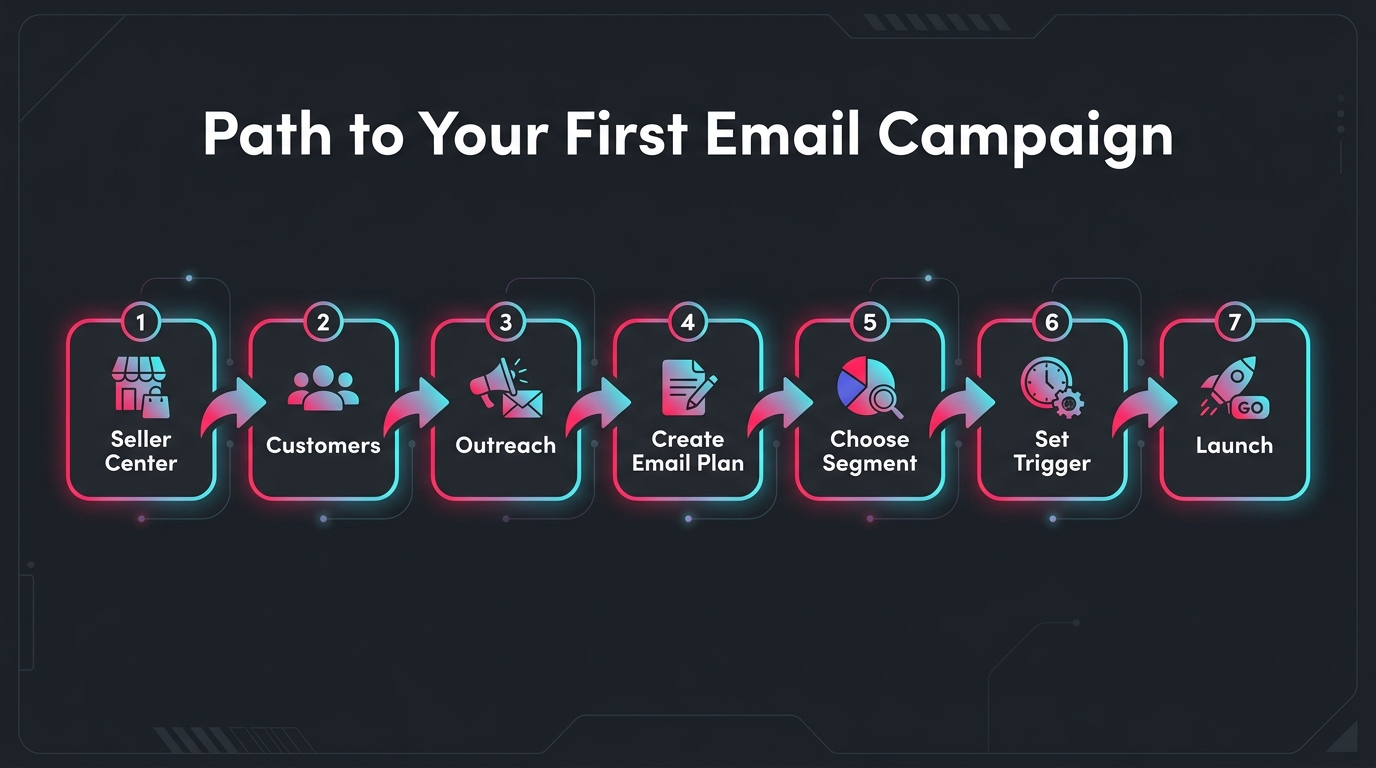
The setup process for TikTok Shop’s email and CRM tools is more straightforward than many sellers expect, but there are enough steps and decision points that a clear walkthrough is useful. Here is how to go from zero to a live campaign for each of the three main tool types.
Setting Up CRM Outreach Campaigns
This covers both one-time and automated campaigns through TikTok’s core CRM Outreach tool:
- Navigate to Seller Center → Customers → Outreach. This is the main hub for all CRM campaign activity. You will see existing campaigns (if any) and an option to create a new one.
- Click “Create Plan” or “Create Email Plan” depending on your interface version. You will be prompted to choose between a one-time plan and an automated plan first — make this choice based on whether you are running a time-specific promotion or setting up a trigger-based flow.
- Select your use case / scenario. TikTok presents a list of pre-defined use cases (abandoned cart, LIVE reminder, new product announcement, etc.). Choose the one that matches your campaign objective. This selection also determines which audience segments are available and which message templates are suggested.
- Choose your audience segment. Select from the built-in segment options. If you are running an automated abandoned cart campaign, the audience is pre-defined by the trigger. For one-time campaigns, you have more flexibility to choose which segment to target.
- Choose your channel: chat or email. For sellers with access to both, make this decision based on the principles covered earlier (urgency and brevity for chat; depth and reach for email).
- Customise the message. TikTok provides template copy as a starting point. Edit the subject line (for email), the body text, any product links or images, and any voucher codes you want to include. Keep messaging specific and action-oriented — a vague “check out our products” CTA performs far worse than a “Shop [specific product name] with 15% off today only” message.
- Set timing and frequency controls. For one-time plans, schedule your send time. For automated plans, define any frequency caps (e.g., a customer should not receive an abandoned cart email more than once per 7-day window). TikTok’s system has some built-in frequency controls, but review these to ensure they match your intended customer experience.
- Review and launch. Check your segment size (TikTok shows an estimated recipient count), review the message preview, and confirm. Your campaign will either send immediately, at your scheduled time, or begin running as an ongoing automated trigger — depending on what type you selected.
Setting Up Unread Message Email Alerts
- In Seller Center, go to Customer Messages.
- Select Settings → Notification Settings.
- Enable Unread message email alerts.
- Enter the destination email address — use a monitored customer service inbox, not a personal email or a generic info@ address that no one checks regularly.
- Save your settings. From this point forward, incoming buyer messages will trigger an email notification to the address you specified.
Setting Up Account Communication Preferences
- Go to My Account → Account Settings → Communication Preferences.
- Review which categories of TikTok notifications are currently enabled or disabled for your account.
- Enable any categories relevant to shop operations (policy updates, performance alerts, seller promotions) and disable categories that create noise without value.
- Save changes.
Checking Eligibility for Advanced Email Marketing
If you want to check whether your shop is eligible for TikTok’s Exclusive Email Campaign / Advanced Email Marketing feature:
- Go to Seller Center → Customer → Outreach → Create email plans.
- Look for an “Enroll now” or similar CTA within the email plan creation workflow. If it appears, your shop is eligible or can apply for access.
- If you do not see the option, check back periodically — the rollout is ongoing throughout 2026 and eligibility appears to be expanding as TikTok scales the feature.
- Focus on maintaining or improving your Shop Performance Score (SPS), as this appears to be a factor in eligibility prioritisation. Fulfil orders on time, maintain low cancellation rates, and respond promptly to buyer messages.
What the Data Says: GMV Lift, Open Rates, and What to Actually Track
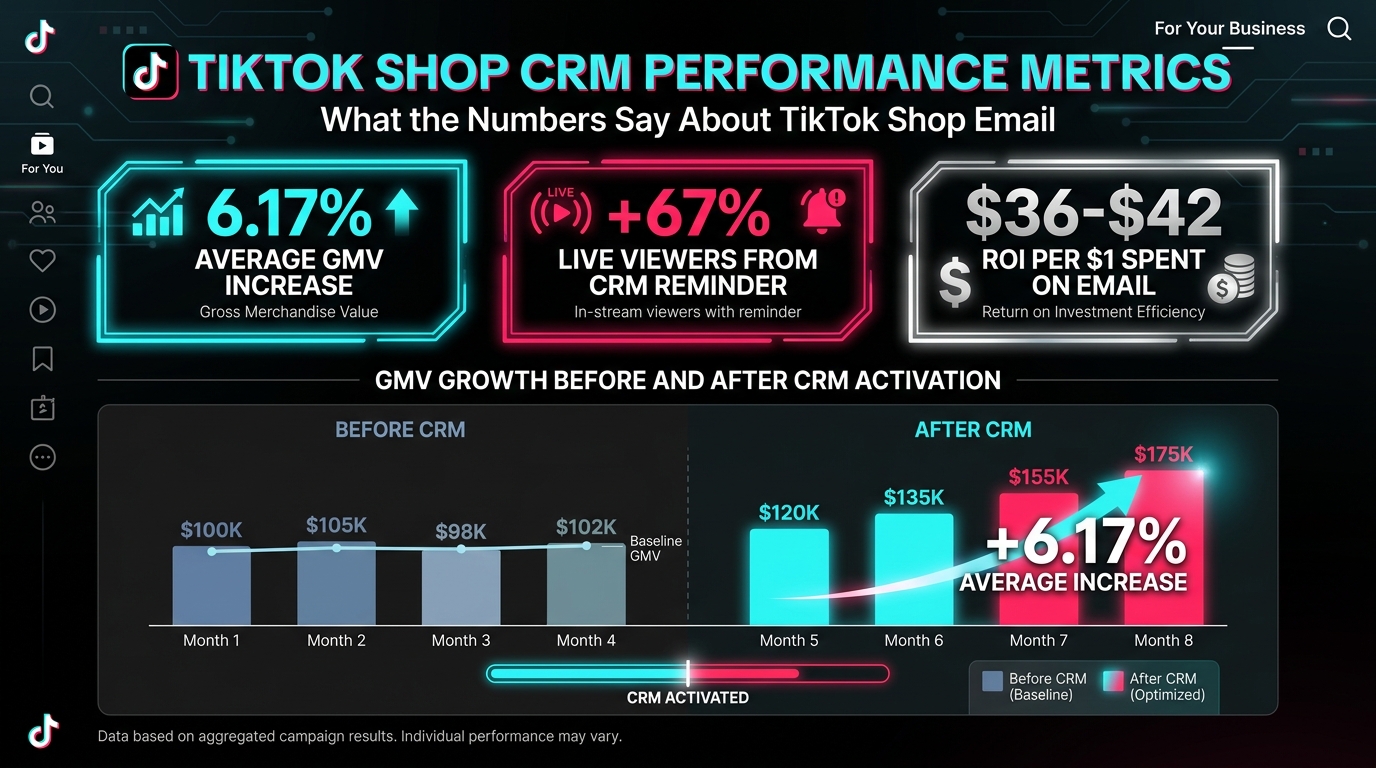
Data on TikTok Shop-specific email performance is still relatively limited in public reporting — the tools are new enough that there is not yet a rich body of independent case studies. But the data that does exist is directionally clear, and when combined with broader e-commerce email benchmarks, it paints a compelling picture of what these tools can deliver when used well.
TikTok’s Own CRM Performance Data
TikTok’s Seller Center publishes several data points from its own platform analytics:
- 6.17% average GMV increase for sellers who actively use CRM outreach tools versus peers who do not. This is a platform-average figure, which means it includes sellers who are using CRM minimally or poorly — sellers who are using it strategically will typically see larger lifts.
- 67% increase in LIVE viewers when CRM reminder messages are sent to followers and past buyers the day before a scheduled livestream.
- 20.5% increase in same-day shop GMV on LIVE event days where CRM reminders were used.
- $175,000+ in GMV from CRM alone in three months — cited in TikTok’s own materials in reference to Neuro Gum’s TikTok Shop performance, illustrating what CRM-driven retention can look like at volume.
Broader E-Commerce Email Benchmarks
Because TikTok Shop’s email tools are relatively new, it is useful to benchmark them against broader e-commerce email performance data to understand the potential ceiling:
- $36-$42 return per $1 spent — the widely-cited average ROI for e-commerce email marketing in 2026. Top-performing merchants with well-optimised automated flows have reported returns as high as $79 per $1 spent.
- 30.7% average open rate for e-commerce emails — a benchmark that TikTok Shop emails may exceed in the short term simply because they are novel to recipients and arrive from a trusted, familiar brand context (the TikTok Shop the buyer already knows).
- 9.0% average click-to-conversion rate — industry benchmark for e-commerce email across automated flows.
- Automated emails of all types generally produce significantly higher engagement rates than one-time broadcast emails, because they are sent at moments of demonstrated buyer intent rather than arbitrarily scheduled send times.
The Metrics That Actually Matter for TikTok Shop Email
TikTok’s CRM dashboard tracks several metrics. Not all of them deserve equal attention. Here is how to think about the metrics that are genuinely useful versus those that are interesting but not actionable:
GMV attributed to campaign — This is the primary success metric. It tells you directly how much revenue can be attributed to a specific outreach effort. Watch this above all other metrics.
Orders generated — Useful for understanding volume and average order value from CRM traffic. Compare this to your overall shop AOV to see whether CRM-acquired orders are larger, smaller, or consistent with your baseline.
Read/open rate — Important as a health metric. A declining open rate over time signals list fatigue or poorly targeted messaging. An unexpectedly high open rate on a particular campaign signals that the subject line or timing is working.
Click-through rate (CTR) — Measures whether the message content is compelling enough to drive action. A high open rate with a low CTR usually means your subject line is strong but your body copy or CTA is not converting interest into clicks.
Unsubscribe rate — TikTok’s system tracks this. Monitor it carefully. A rising unsubscribe rate after a particular campaign type is a strong signal that you are over-messaging, targeting the wrong segment, or sending messages that feel irrelevant. Treat unsubscribes as feedback, not just attrition.
Revenue per recipient — Calculate this yourself by dividing campaign GMV by the number of recipients. It normalises performance across campaigns of different list sizes and is one of the cleanest ways to compare which campaign types and segments are generating the most value.
Common Mistakes Sellers Make With TikTok Shop Email Tools
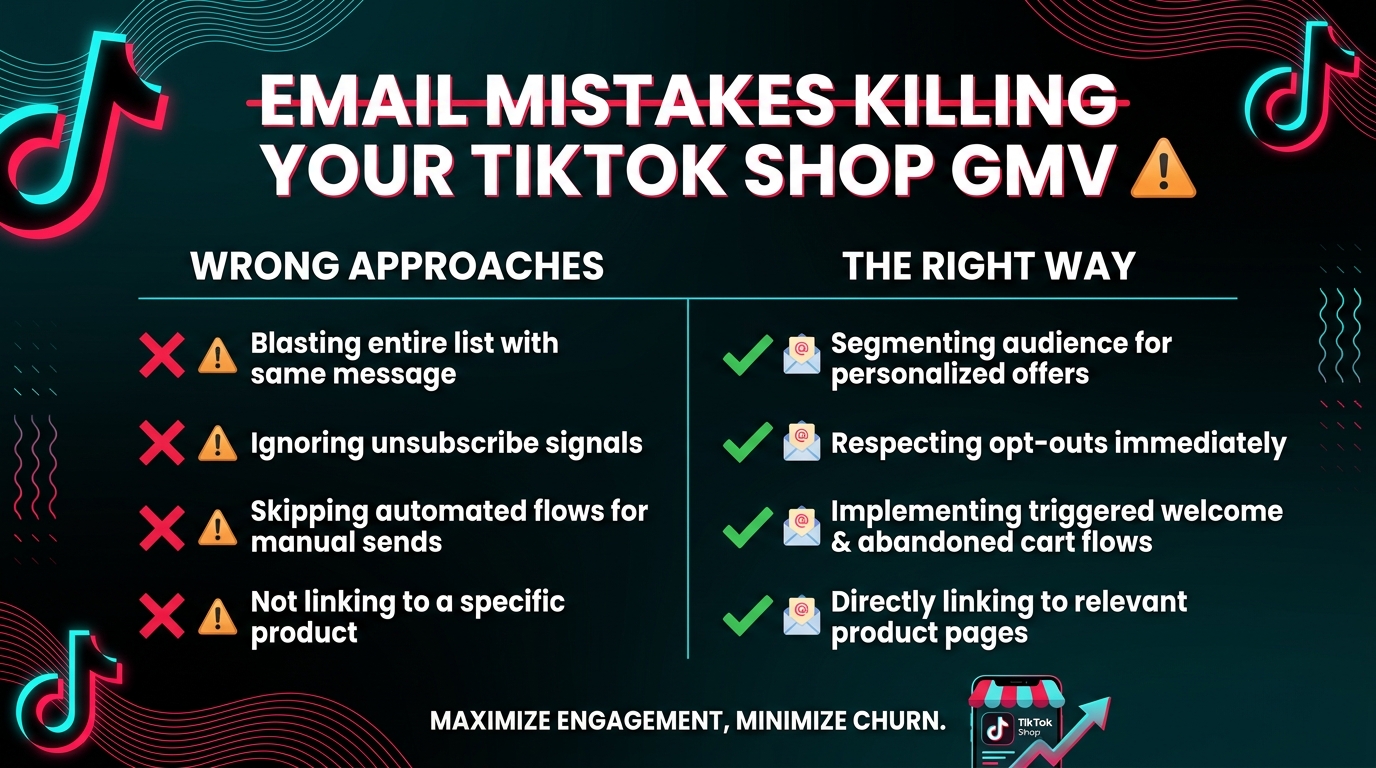
Because TikTok Shop’s email tools are relatively new and most sellers have had limited experience with platform-native CRM systems, certain mistakes show up repeatedly in early adoption. Understanding them in advance can save significant time and protect your sender reputation on the platform.
Mistake 1: Treating All Segments as One Audience
The most common mistake is setting up a one-time campaign and blasting it to every segment simultaneously — followers, past buyers, lapsed customers, everyone. This approach works against you in two ways. First, a single message cannot be optimally relevant to audiences at vastly different points in the customer journey. Second, sending the same message to too many different segments dilutes your performance data, making it impossible to understand which audience is actually responding.
The fix: run separate campaigns for each meaningful segment, even if the promotional hook is similar. A flash sale announcement sent to “new followers” should emphasise first-purchase context and urgency. The same announcement sent to “repeat customers” should emphasise loyalty, perhaps with an enhanced voucher or early access. Same promotion, different framing — and dramatically clearer data on what is working.
Mistake 2: Skipping Automated Plans in Favour of Manual Campaigns
Manual one-time campaigns feel more controllable, and many sellers gravitate toward them because they fit the instinct of “I decide when to send something.” But automated plans are where the sustained ROI lives. A seller who spends 2 hours setting up 3 solid automated flows — abandoned cart, LIVE reminder, and welcome — will generate more CRM-driven GMV over the next 90 days than a seller who manually creates one-time campaigns every week.
The fix: make automated plans your first priority. Get the foundational trigger-based flows live first, then layer one-time campaigns on top of them for specific promotional moments.
Mistake 3: Using Generic Subject Lines and Body Copy
TikTok provides pre-built templates for a reason — they reduce the effort required to get a campaign live. But using the default template copy verbatim, without any personalisation or brand-specific context, results in messages that feel generic and forgettable. “You left something in your cart!” performs worse than “[Product Name] is still waiting for you — and we have reserved your spot.”
The fix: use TikTok’s templates as structural scaffolding, not finished copy. Always edit the subject line to include the specific product name or offer. Always make the CTA specific and time-bound where possible. Personalisation at the product level — even simple personalisation — consistently outperforms generic messaging.
Mistake 4: Ignoring the Unsubscribe Signal
Every unsubscribe is a data point. Most sellers see it as pure loss — a contact gone. But the pattern of unsubscribes tells you something important about your messaging strategy. If unsubscribes spike after a particular campaign type (say, every time you run a broad promotional blast to active followers), the audience is telling you they do not want that type of communication. Ignoring this signal leads to list degradation and declining performance across all campaigns.
The fix: review unsubscribe data after every campaign and look for patterns by segment and campaign type. If a particular combination consistently generates high unsubscribes, either change the message, reduce the frequency, or reconsider whether that segment should be receiving that type of outreach.
Mistake 5: Not Setting Up Unread Message Alerts Immediately
This has been covered already but deserves to be repeated in the context of mistakes, because it is so universally overlooked: the vast majority of TikTok Shop sellers do not have Unread Message Email Alerts configured. This means they are missing buyer questions in real time, failing to convert high-intent shoppers, and losing sales to response latency every single day.
The fix: set this up before doing anything else. It takes five minutes and has immediate impact.
Mistake 6: Not Linking to a Specific Product
A common structural error in TikTok Shop email campaigns is linking to the shop homepage rather than to the specific product referenced in the message. A customer who receives an email about their abandoned cart and clicks through to land on a general storefront has to search for the product they were considering — adding friction at exactly the moment you should be removing it.
The fix: always link directly to the specific product page, cart, or checkout relevant to the campaign’s context. Deep linking reduces the number of steps between the message and the conversion, and every step you remove improves completion rates.
Building a TikTok Shop Email Stack That Compounds Over Time
The sellers who will extract the most value from TikTok Shop’s email tools in 2026 are not the ones who set up the most campaigns — they are the ones who build a coherent, layered stack of communications that covers the customer journey without overlapping or overwhelming.
Here is what that stack looks like in practice:
The Foundation Layer: Three Non-Negotiable Automations
Every TikTok Shop seller — regardless of size, category, or current CRM sophistication — should have these three automated flows live before anything else:
- Abandoned cart recovery — sent within 2 hours of abandonment, referencing the specific product, with a direct link back to cart
- Welcome flow for new followers — sent within 24 hours of a new follow, with a first-purchase incentive
- LIVE session reminder — sent 24 hours and 1-2 hours before each LIVE, to followers and past buyers
These three flows alone, if properly configured and maintained, will generate consistent, attributable GMV lift with minimal ongoing effort. They address three of the highest-intent moments in the customer journey: expressed purchase interest (cart), new brand relationship (follow), and scheduled content consumption (LIVE).
The Retention Layer: Adding Lifecycle Depth
Once the foundation layer is running, the next priority is building out the lifecycle retention stack:
- Repurchase nudge — sent to recent customers at 30 days post-purchase, suggesting a complementary or consumable product
- Win-back campaign — sent to lapsed customers at 90 days, with a meaningful re-engagement incentive
- Incomplete checkout recovery — sent within 1 hour of checkout drop-off, prioritised above standard cart abandonment
The Promotional Layer: Intentional One-Time Campaigns
With the foundation and retention layers in place, one-time promotional campaigns become a high-impact addition rather than the primary CRM strategy. At this point, you should be running targeted one-time campaigns for:
- New product launches — to past buyers and active followers
- Seasonal promotions — to your full eligible list, segmented by purchase history
- Flash sales — to price-sensitive segments with high urgency messaging
The layered approach works because each layer serves a different part of the customer journey and a different type of intent. They do not compete with each other — they fill different gaps in the communication flow between your shop and your customers. A buyer who abandoned their cart gets the automation flow. A past buyer at 30 days gets the repurchase nudge. A new follower gets the welcome incentive. And everyone gets the occasional intentional one-time campaign when something truly worth announcing happens.
Scaling With Advanced Email Marketing
For sellers who gain access to TikTok’s Exclusive Email Campaign / Advanced Email Marketing feature, the stack expands further. Having TikTok send branded marketing emails on your behalf — reaching recipients in their actual email inboxes rather than just the in-app messaging system — means you are now operating a genuinely multi-channel CRM stack inside a single platform. That is a meaningful competitive advantage, particularly as the feature remains in limited rollout and most of your competitors have not yet enrolled.
The long-term opportunity here is significant. As TikTok’s email tools mature and the segmentation and automation capabilities expand, the sellers who have already built their CRM muscle — who understand their segments, have tested their messaging, and have established automated flows — will be positioned to extract substantially more value from whatever features TikTok adds next.
Conclusion: Stop Leaving This Channel Dark
The email tools inside TikTok Shop’s Seller Center are not a side feature or an afterthought. They are a direct, algorithm-independent channel to the customers who have already expressed the strongest interest in your brand — followers, past buyers, cart abandoners, and LIVE attendees. In a platform where organic reach is algorithmically mediated and paid reach requires ongoing spend, this direct channel is one of the most structurally valuable assets a TikTok Shop seller can activate.
The evidence supports this clearly. TikTok’s own data shows a 6.17% average GMV lift for sellers using CRM tools, with specific use cases like LIVE reminders producing lifts of 20.5% in single-day GMV. Broader e-commerce email benchmarks reinforce the channel’s ROI potential — $36-$42 returned per $1 spent at average performance, with top performers reaching $79 per $1 on automated flows.
The setup barrier is low. The tools are already inside your Seller Center. The segments are pre-built from TikTok’s own commerce data. The templates exist to reduce the creative lift. The primary requirement is not technical expertise or significant time investment — it is the decision to actually turn these features on and configure them properly.
Start with the three non-negotiables: Unread Message Alerts (turn on today), Abandoned Cart Recovery (automate this week), and LIVE Session Reminders (run before your next stream). From there, build the retention and promotional layers as your capacity allows.
TikTok Shop is still early enough as a commerce channel that the sellers who build operational depth right now — who master the tools that most competitors are ignoring — will have a structural advantage that compounds as the platform scales. Email is one of those tools. It is sitting there. Turn it on.