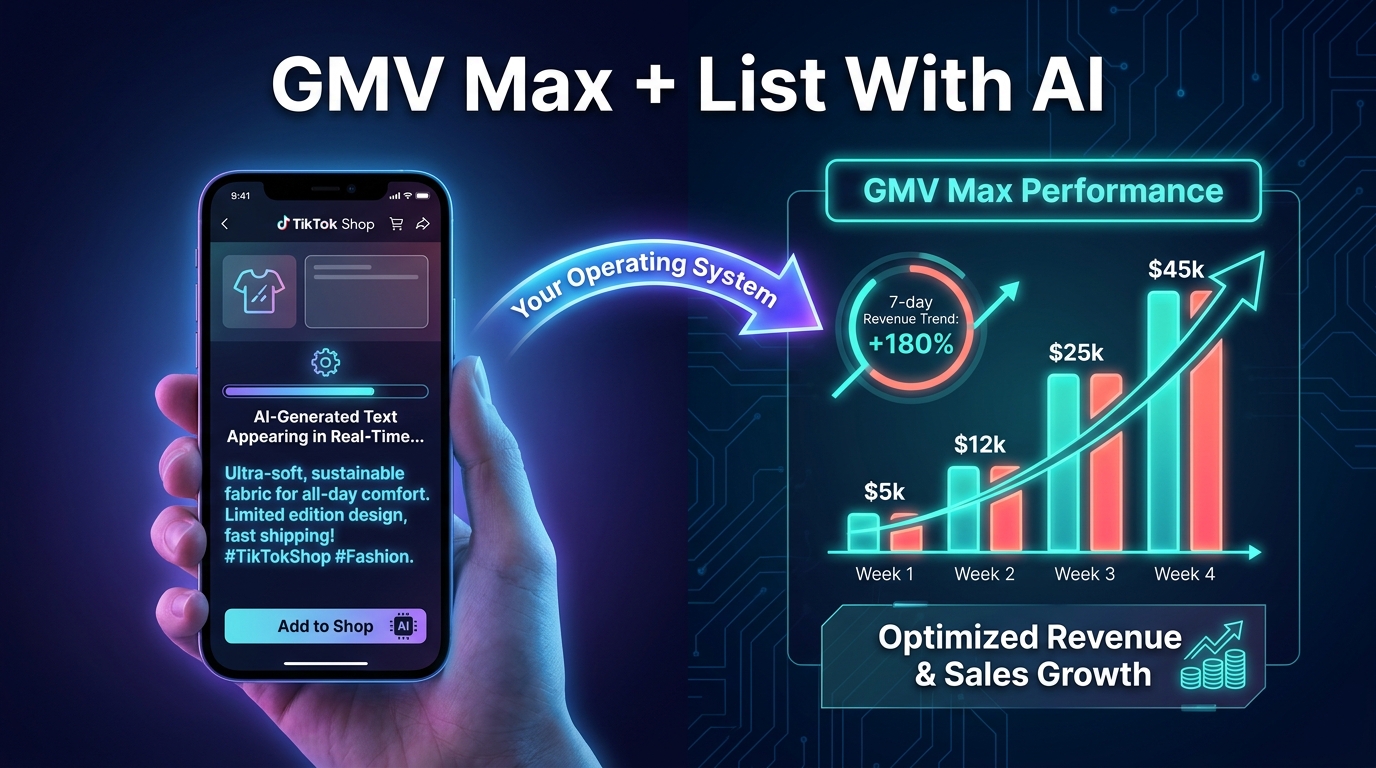

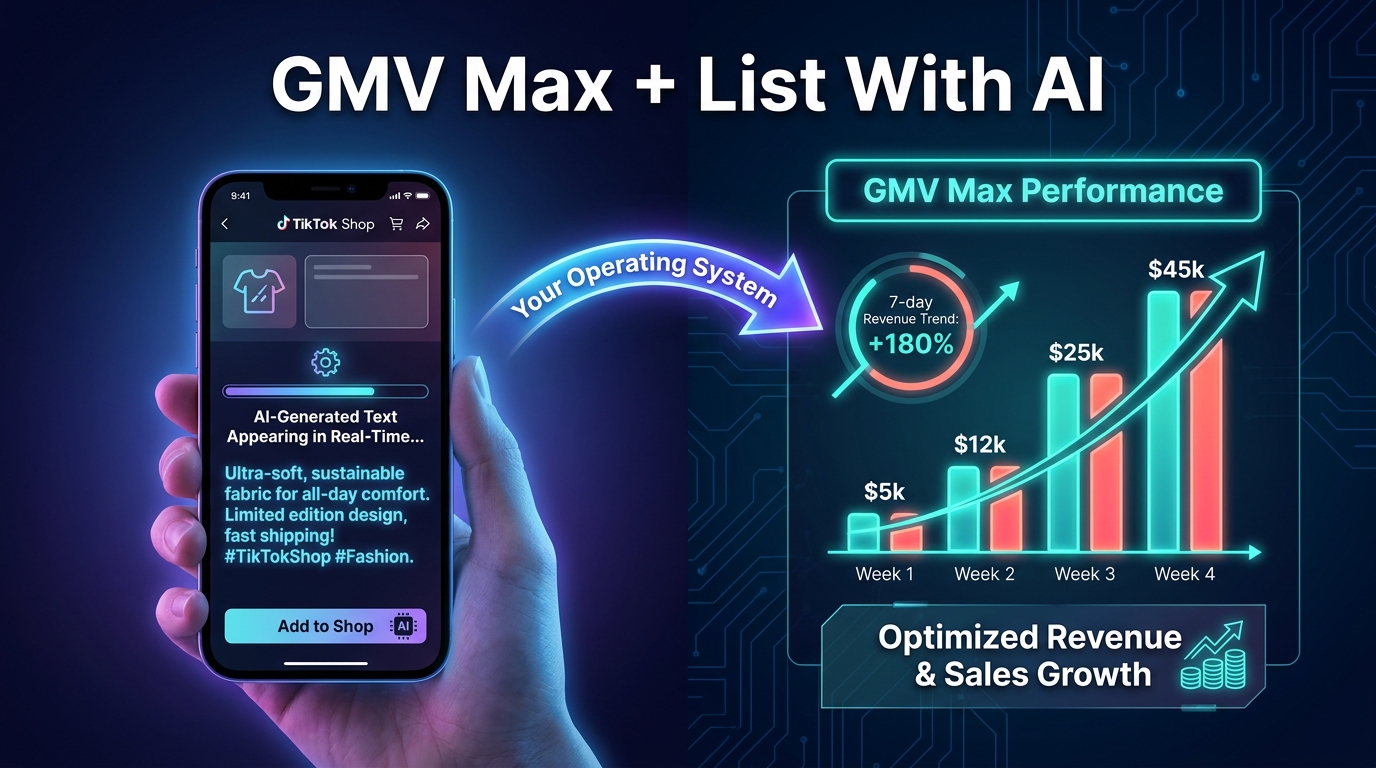
TikTok Shop has handed sellers two of the most consequential tools in its history within the same product cycle: GMV Max, its automated commerce advertising engine, and List With AI, its AI-assisted product listing creator. Most sellers treat them as separate features — one lives in the ads manager, one lives in product onboarding — and activate them independently without any considered relationship between the two.
That separation is a mistake, and it costs money in ways that are easy to miss.
GMV Max is, at its core, a system that surfaces your products and creatives to buyers most likely to convert. The quality, completeness, and search relevance of the listings those products live on directly affects what the algorithm can do with them. A GMV Max campaign built on weak, keyword-sparse, attribute-incomplete listings is asking TikTok’s optimization engine to run uphill. The engine tries its best, but the ceiling is lower than it needs to be.
This playbook treats GMV Max and List With AI as two halves of one operating system. It covers how each tool actually works, where sellers consistently go wrong with each, and how to build a practical workflow that makes them reinforce each other. The goal is not to summarize feature announcements — TikTok’s own Seller Center covers that territory. The goal is to help you make consequential decisions: which products to push through GMV Max first, how to set an ROI target you can actually defend, how to feed the AI listing tools inputs that produce usable outputs rather than generic drafts, and how to protect the learning phase from the most common forms of self-sabotage.
By the end, you should have a clear sequence of actions that brings both tools online in an order that makes sense for your catalog and your budget.
Why These Two Tools Belong in the Same Conversation
Start with a simple question: what does GMV Max actually optimize against?
The official answer is gross merchandise value — the total dollar amount of orders generated through your TikTok Shop, attributed to the campaign. TikTok’s own help center describes it as a system that maximizes total channel ROI across paid, organic, and affiliate traffic combined. The algorithm chooses which products to surface, which creatives to use, which audiences to target, and which placements to serve — all automatically, all in service of the GMV number.
Now ask: what does the algorithm use to decide whether a given product is worth surfacing to a given buyer?
Signals from your listing. Sales history. Pricing. Shipping speed. Creative volume. Review count. Attribute completeness. And critically: how well your listing title, description, and category tags match what TikTok’s recommendation and search systems understand about what the product is.
This is where the connection to List With AI becomes operationally important. If TikTok’s AI cannot cleanly categorize your product — because the title is ambiguous, the category is wrong, or required attributes are missing — the campaign loses access to discovery inventory that would otherwise be available. The listing is the product record the whole system reads. GMV Max can redistribute budget and swap creatives, but it cannot fix a malformed or thin product record.
The practical implication: cleaning and completing your listings is pre-work for paid performance, not just a catalog housekeeping task. Sellers who run GMV Max without auditing their listing quality are spending paid budget to send traffic to underperforming product pages. That shows up as a lower conversion rate, which feeds back into the campaign’s optimization signals, which causes the algorithm to spend less on those products — which looks like a campaign problem when it is actually a catalog problem.
List With AI and the Smart Listing Optimizer are the tools TikTok provides to address this. Understanding which one to use, when, and how to use it well is where the practical lever exists.
What GMV Max Actually Is (And What It Is Not)
Since July 2025, GMV Max has been the default and only supported campaign type for TikTok Shop advertising. Legacy formats — including Video Shopping Ads, Product Shopping Ads, and LIVE Shopping Ads as standalone types — are no longer available for new or edited campaigns. If you are advertising on TikTok Shop today, you are in GMV Max whether you chose it deliberately or not.
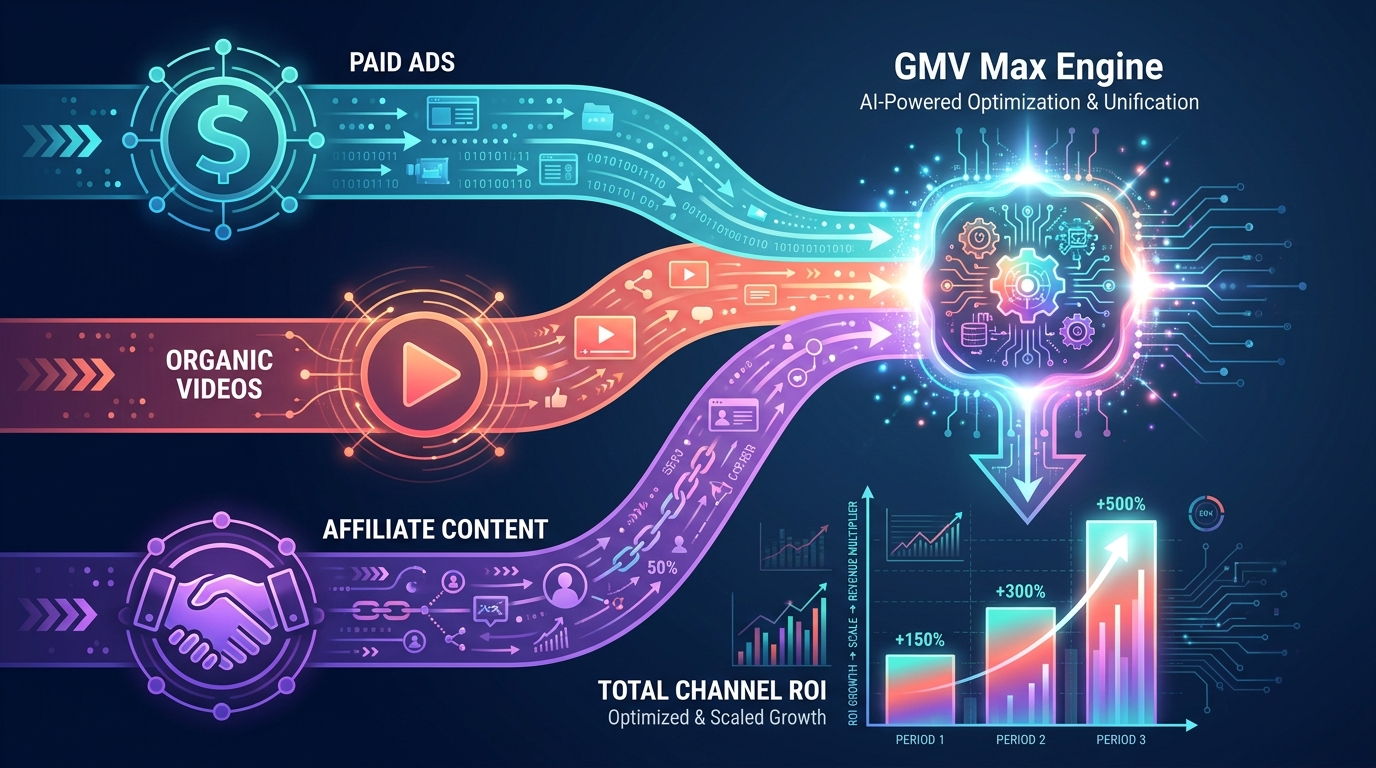
Understanding what that means operationally requires clearing up a common misconception: GMV Max is not a paid ads campaign that also looks at organic. It is a unified optimization system that draws on three traffic pools simultaneously — paid inventory, organic content (your own shop videos and content tagged to your products), and affiliate posts from creators who have authorized their content to your campaign.
The Three-Pool Structure
This is the structural reality that separates GMV Max from conventional ad platforms. When you run a GMV Max campaign, TikTok’s system is not just deciding how to bid on paid placements. It is deciding how to allocate your optimization signal — your budget, your ROI target, your conversion history — across all three pools at once. Paid placements get real spend. Organic content gets surfaced through recommendation and search without direct cost per impression. Affiliate content gets amplified based on its performance signals within the campaign’s inventory.
This means two things practically. First, a seller with a rich library of organic videos and a strong affiliate roster will see their GMV Max campaigns outperform an equally-budgeted seller who relies only on paid creative — because the algorithm has more high-quality inventory to optimize against. Second, turning off affiliate content or restricting organic inclusion in a GMV Max campaign is almost always a mistake, because you are voluntarily shrinking the pool the algorithm can draw from.
What GMV Max Controls vs. What You Control
This matters for knowing where to focus your attention. TikTok’s system controls: audience selection, bid levels, placement, creative rotation, and the weighting between paid, organic, and affiliate inventory. You control: the product set you include, the daily budget, the ROI target, and the creatives you authorize. That is not a long list of levers, but each one is high-stakes. The ROI target, in particular, is the single most important input you make — and also the one sellers most frequently set incorrectly.
One important technical constraint worth noting upfront: one TikTok Shop can only access GMV Max through one ad account at a time, and that must be the shop’s designated primary ad account in Seller Center. If you are running multiple accounts or experimenting with separate ad setups, this constraint will cause delivery problems that look mysterious until you understand the architecture.
The Four Levers That Control GMV Max Performance
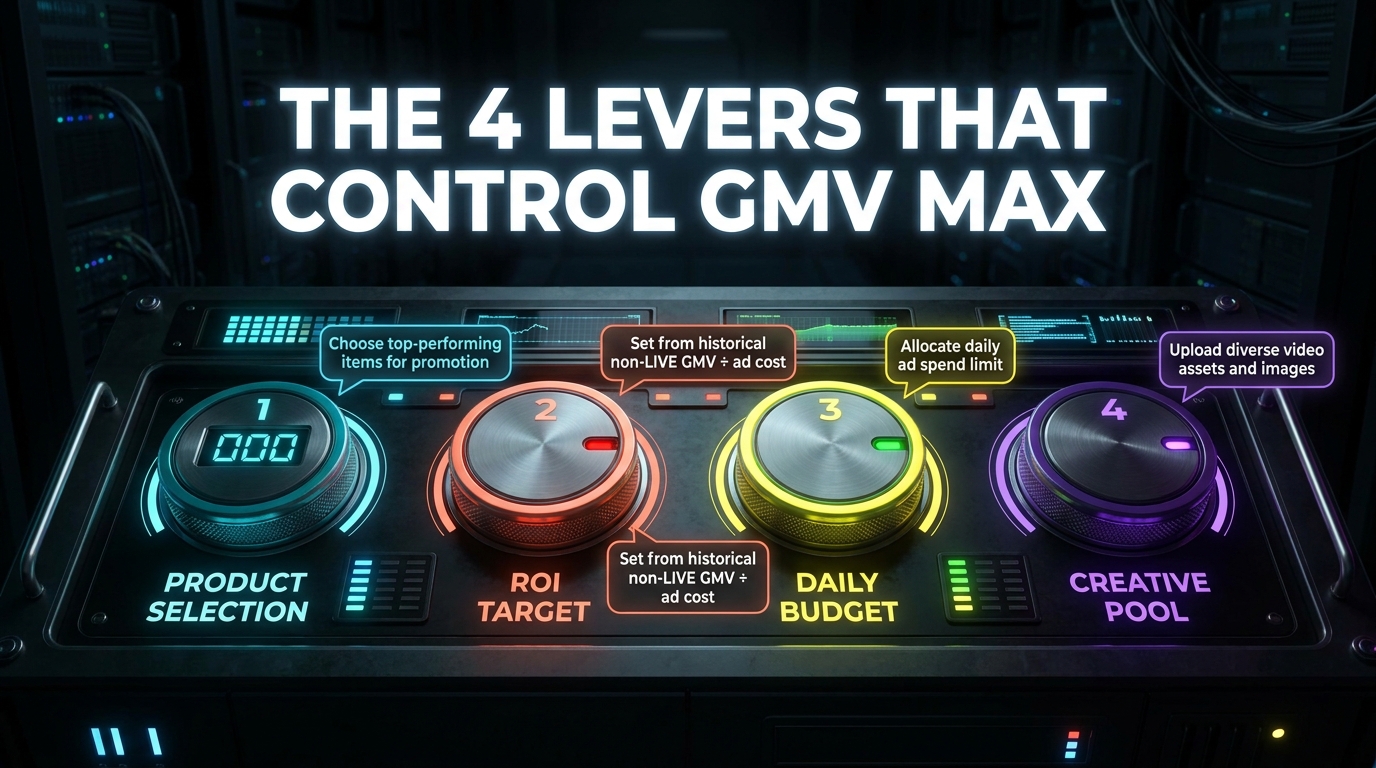
Given how much the system automates, your competitive edge comes from how well you configure the few things you actually control. There are four.
Lever 1: Product Selection
TikTok’s own guidance consistently recommends using as broad a product set as possible — ideally your full catalog. The logic is straightforward: a wider product set gives the algorithm more combinations to test against more audiences. Restricting GMV Max to a handful of SKUs forces the system to find volume through a narrow funnel, which often results in slower learning, fewer conversions, and higher effective CPA.
In practice, most sellers do not run their full catalog through GMV Max on day one, and that is reasonable. The practical approach is to lead with products that already have some sales history, at least a small creative library (paid or affiliate), and complete listing attributes. These are the products the algorithm can learn from fastest. Once you have initial performance signals, expanding the product set broadens the algorithm’s operating space without disrupting what it has already learned.
What to avoid: launching GMV Max campaigns with brand-new SKUs that have zero TikTok Shop sales history and no associated creative. The algorithm has nothing to calibrate against, and the learning phase will drag out or produce misleading signals that inform poor optimization decisions downstream.
Lever 2: ROI Target
This is the single highest-stakes decision in GMV Max setup, and the one most frequently misunderstood. Your ROI target tells TikTok’s system the minimum return you are willing to accept per dollar of spend. Set it too high, and the algorithm restricts delivery to only the safest, narrowest inventory — which often means underspending and missing volume that would have been profitable. Set it too low, and you buy volume at margins that erode your business.
TikTok’s official guidance provides a clear formula: divide your historical non-LIVE GMV by your historical ad cost over the same period. This gives you a baseline ROI that reflects what your shop has actually achieved, rather than what you hope to achieve. Start at or slightly below this number for a new campaign. The slightly-below part is intentional — a target fractionally below your historical rate gives the algorithm room to spend and learn without immediately flagging every impression as below-threshold.
Do not set an aspirational ROI target based on your profitability model alone. If your historical shop ROI is 3x and you launch a campaign with a 6x target, you are telling TikTok to only spend when it is extremely confident of very high returns — which means sparse delivery, a slow learning phase, and data that does not tell you much. The target is a constraint on the algorithm’s behavior, not a goal statement.
Lever 3: Daily Budget
TikTok’s official platform minimum is $50 per day at the campaign level. The practical minimum for reliable optimization is meaningfully higher. Most experienced operators and agency guides put the working floor at $100–$200 per day for a new campaign. At the lower end, the algorithm simply does not have enough spend events to gather conversion data at pace, which extends the learning phase and produces signals too noisy to make good decisions from.
TikTok’s own guidance frames budget sizing around conversion volume: approximately 40 conversions are needed to exit the learning phase and reach stable optimization. If your average CPA is $30 and you budget $50/day, you are on track to reach 40 conversions in roughly 24 days — nearly a month of learning at reduced performance. At $200/day, you may reach that threshold in 6–8 days and start getting reliable optimization much sooner.
The practical implication: size your budget based on your CPA, not on a platform minimum floor. And once the campaign is live, resist the urge to cut spend in the first 7–10 days even if early performance looks weak. Early performance during the learning phase is not a reliable signal of long-term campaign health.
Lever 4: Creative Pool
The creative pool determines what content TikTok can use across the three traffic streams. For GMV Max, this means paid creatives you explicitly upload, organic videos you have created that tag your products, and affiliate content from creators who have listed your products. TikTok’s guidance is clear: enable all available creative sources and keep affiliate posts authorized. Restricting the creative pool narrows the algorithm’s options and almost always reduces performance.
A crucial point that many sellers miss: the volume of creatives matters as much as the quality of individual creatives. A campaign with 15 authorized videos — even if several are average — will generally outperform a campaign with 3 high-quality videos, because the algorithm can test more combinations and find the ones that actually convert for different audiences. Prioritizing creative volume, especially through your affiliate program, is one of the highest-leverage GMV Max activities available to you.
GMV Max Pro: The Full-Cost ROI Picture
GMV Max Pro is the updated optimization mode rolled out in 2026 that extends the ROI calculation beyond ad spend to include coupons, affiliate costs, and platform commissions. Understanding what changes with Pro — and what does not — matters for how you interpret your performance data.
Why Standard GMV Max Can Mislead You
Standard GMV Max optimizes against a return calculated as GMV divided by ad spend. The problem with this metric in isolation is that it ignores material costs that are directly attributable to the campaign. If you are running a 10% coupon to improve conversion rate, that coupon cost is not in the denominator of your standard ROI calculation. If you are paying affiliates 15–20% commission on generated sales, that cost is also invisible to the standard ROI metric. You can appear to be hitting your target return while actually running at a loss if the full cost stack exceeds the implied margin.
GMV Max Pro addresses this by incorporating those costs into the optimization objective. When you enable Pro and input your cost parameters — affiliate commission rates, coupon values, platform fees — the system adjusts its optimization target to reflect what a sale actually costs your business, not just what the media buy costs.
When to Use Pro vs. Standard
Pro mode is most valuable for sellers who are actively running affiliate programs with meaningful commission payouts, using coupon strategies to drive conversion, or operating in competitive categories where margin compression is a real risk. If your affiliate commissions are a major line item and you have not accounted for them in your ROI target, you may be systematically underpricing your bids in ways that look fine in the ads dashboard but erode at the P&L level.
For sellers in the early stages of GMV Max — running lean affiliate programs, minimal coupon activity, and relatively straightforward cost structures — standard mode is fine to start with. The additional complexity of Pro is most valuable when there are real costs outside of media spend that are meaningfully influencing your true return. Add Pro when you have enough cost-structure data to configure it accurately; guessing at your affiliate cost inputs creates worse optimization signals than leaving Pro off entirely.
How List With AI Works — And Where It Sits in Your Workflow
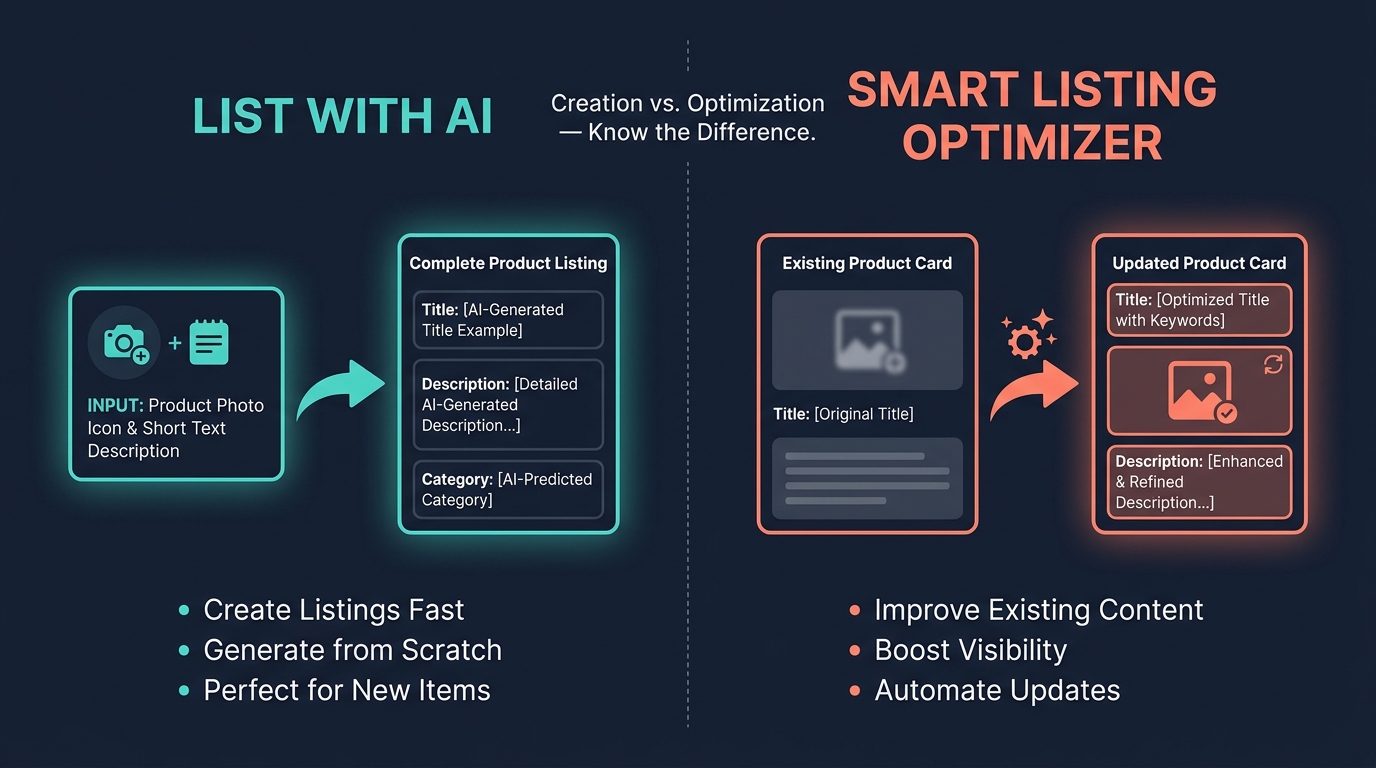
List With AI is TikTok Shop’s AI-assisted listing creation tool. Its function is specific: you provide basic product inputs — a product image, a short description, or a URL — and the AI generates a draft listing that includes a title, category assignment, product attributes, and a description. It is a creation tool, not an optimization tool. That distinction matters enormously for knowing when to use it.
What List With AI Generates
Based on your inputs, the tool attempts to produce:
- A product title structured around keyword-first principles — primary search term front-loaded, followed by use case, key attributes, and variant information
- Category selection drawn from TikTok Shop’s taxonomy based on what the AI identifies the product to be
- Product attributes populated based on the category selected and the product information provided
- A product description that covers features, use cases, and selling points drawn from your input content
The output quality is directly proportional to the quality of your inputs. This is the central practical truth about working with AI listing tools, and it is where most seller disappointment with these tools originates. If you feed List With AI a blurry image and three words of description, you get a generic, low-confidence draft that requires extensive editing. If you feed it a sharp product image, a clear list of key features, your target audience, and the primary use case, you get a draft that is often publishable with minor review.
Availability and Access
As of 2026, List With AI is still rolling out gradually across markets and seller account tiers. Not all sellers have access to it simultaneously. If it is not visible in your Seller Center listing creation flow, it may be in testing for your region or account type. The Smart Listing Optimizer, discussed in the next section, has broader availability and serves a related but different function.
The Step-by-Step Creation Flow
When List With AI is available, the workflow sits inside your standard product creation flow in Seller Center. The practical sequence is:
- Open the product creation flow and select the List With AI option rather than manual entry
- Upload your primary product image — use your clearest, highest-resolution image, ideally on a clean background that makes the product identifiable
- Add a structured description of the product: lead with the product type, follow with 3–5 key features, include material/size/compatibility information if relevant, and note your intended buyer
- Review the generated draft — the AI’s category selection and attribute suggestions especially, since these are where errors most commonly occur
- Edit and verify — correct any inaccurate claims, adjust the title if the keyword placement is off, and fill in any attributes the AI left blank
- Publish with all required attributes complete — incomplete attributes are one of the most common reasons a TikTok Shop listing underperforms in search and recommendation
The final review step is not optional. AI listing tools excel at generating volume and structure, but they will occasionally produce titles with awkward phrasing, descriptions with generic filler language, or category assignments that miss the mark. Treating the AI output as a final draft without review is how sellers end up with listings that technically exist but perform poorly — which then pulls down GMV Max campaign efficiency.
Smart Listing Optimizer vs. List With AI: Knowing Which Tool to Use
These two tools are frequently confused, and using the wrong one for a given situation wastes time and, more importantly, can introduce unintended changes to live listings. The distinction is clear once you understand each tool’s purpose.
List With AI: For Creation
Use List With AI when you are creating a new listing from scratch. It is a listing generator. Its value proposition is reducing the time it takes to go from a product idea or image to a publishable draft. It does not touch existing listings.
Smart Listing Optimizer: For Continuous Improvement
Use Smart Listing Optimizer when you have existing listings that need ongoing improvement. This tool is enabled from inside Seller Center under Manage Products → Improve listing quality. Once enabled, it automatically extracts product details from your existing listings, analyzes sales trends and platform performance data, and applies TikTok’s best practices to improve product names and images over time.
The Optimizer surfaces impact metrics directly — GMV impact, conversion rate (CVR) change — so you can see what its suggested improvements are projected to affect before approving them. TikTok says you can toggle specific optimization types on or off, which means you can use it for title optimization while keeping your own image selection if you have a specific visual strategy.
Workflow Sequence
The practical sequence for a new SKU looks like this: use List With AI to create the initial listing, publish it with complete attributes and reviewed content, give it a short window to accumulate performance data (2–4 weeks), then activate the Smart Listing Optimizer to continuously refine it based on actual TikTok Shop performance signals. This is the intended workflow — creation first, then ongoing optimization based on real data rather than initial AI inference.
Do not run Smart Listing Optimizer on a listing that was published yesterday with no sales history. The Optimizer works best when it has data to learn from. Its recommendations become more accurate as your listing accumulates impressions, clicks, and conversions — the same performance signals that power GMV Max optimization.
Writing for AI to Write Well: How to Feed the Tool
The most underrated skill in working with AI listing tools is knowing how to construct your input. Most sellers hand these tools minimal information and are then disappointed by the quality of the output. The AI is not underperforming — it is reflecting the quality of what it was given. The practical solution is to treat your input as structured product documentation, not a quick note.
The Anatomy of a High-Quality Input
A strong input for List With AI includes the following elements, in roughly this order:
Product type and primary keyword: Start with what the product actually is, using the terms customers search for — not your internal product name or brand codename. “Vitamin C serum” performs better than “Glow Boost Formula.” “Stainless steel water bottle” performs better than “HydraVault 32oz.”
Key features and specifications: List 3–5 concrete, factual product attributes. Materials, dimensions, compatibility, certifications, quantities. Specifics the AI can turn into attribute fields and description points. Avoid subjective language like “premium quality” or “amazing results” — these produce generic descriptions that add no search value.
Intended use case and buyer: Who is this for and what problem does it solve? This gives the AI the contextual frame it needs to write a description with actual relevance rather than a feature list. “For runners with sensitive skin who need a reef-safe, sweat-proof sunscreen” is useful. “Great for everyone” is not.
What makes it different from alternatives: One or two differentiating factors. The AI can use these to shape the description’s angle. Without this, it defaults to category-generic copy that matches dozens of competing listings.
Image Quality as an Input Signal
The image you upload to List With AI is not just a visual for the eventual listing — it is an AI signal. The tool uses image recognition to identify product type, color, form factor, and potentially material. A clean, well-lit, single-product image on a neutral background gives the tool the clearest possible signal. A lifestyle shot with multiple objects, complex backgrounds, or small text on the product packaging produces lower-confidence identification, which results in a weaker initial draft.
For your primary listing image (distinct from the AI-input image), TikTok Shop’s own listing quality guidance recommends a high-resolution image at minimum 500×500 pixels, showing the product clearly against a clean background. Use your best studio-quality shot as your primary listing image even if you also plan to add lifestyle shots.
Post-Output Editing Protocol
After the AI generates a draft, review in this sequence: title first (keyword placement and accuracy), then category (correct taxonomy assignment), then attributes (completeness and accuracy), then description (factual accuracy and removal of generic filler). The most common edits needed are: moving a keyword earlier in the title, correcting a category that is close but not precise, and removing phrases that make unverifiable claims. Unsubstantiated superlatives (“best,” “most effective”) in listings can trigger policy flags and are not useful for search relevance anyway.
Connecting Your Listings to Your GMV Max Creative Pool
This is the integration point that most sellers never explicitly manage — the link between their product listings and the creative inventory that GMV Max draws from. Strong listings without strong creative result in a GMV Max campaign that has good product records but limited performance material to work with. Strong creative without strong listings results in ads that drive traffic to pages that underconvert. You need both sides functioning.
How Creative Authorization Works in GMV Max
GMV Max can draw from three creative sources: your own paid creatives uploaded to the ads manager, your organic TikTok videos that have been linked to or tagged with your shop products, and affiliate creator content where the creator has authorized TikTok to use their video in paid amplification.
The affiliate creative authorization piece is particularly important and frequently underutilized. When an affiliate creates content featuring your product and authorizes it for Spark Ads, GMV Max can include that video in its paid distribution pool. This means every piece of high-performing affiliate content is a potential paid asset — but only if the authorization is in place. Building a habit of requesting Spark Ad authorization from your best-performing affiliates is one of the highest-leverage actions you can take to expand your GMV Max creative pool without producing new paid creative internally.
Organic Video as a GMV Max Signal
Your own organic TikTok content that tags your shop products is also available to GMV Max as inventory. This means the organic content strategy for your shop is not separate from your paid advertising strategy — it feeds directly into it. A shop that consistently publishes product videos, tutorial content, and review amplifications has more inventory for GMV Max to draw from. Sellers who treat organic content and paid advertising as entirely separate functions are missing the integration that makes TikTok Shop’s architecture different from conventional e-commerce ad platforms.
Creative Excellence and the Shoppable Carousel
TikTok’s Creative Excellence add-on — available within the GMV Max campaign setup — adds two additional creative formats: AI-generated product videos via TikTok Symphony, and shoppable carousel ads. Both expand creative volume with relatively low production effort. Symphony-generated product videos draw from your listing images and product information to create short-form video assets. If your listing images are high-quality and your attributes are complete, the output is meaningfully better. Again: the quality of your listing record flows upstream into what your creative assets look like.
The Learning Phase: What Breaks It and How to Protect It
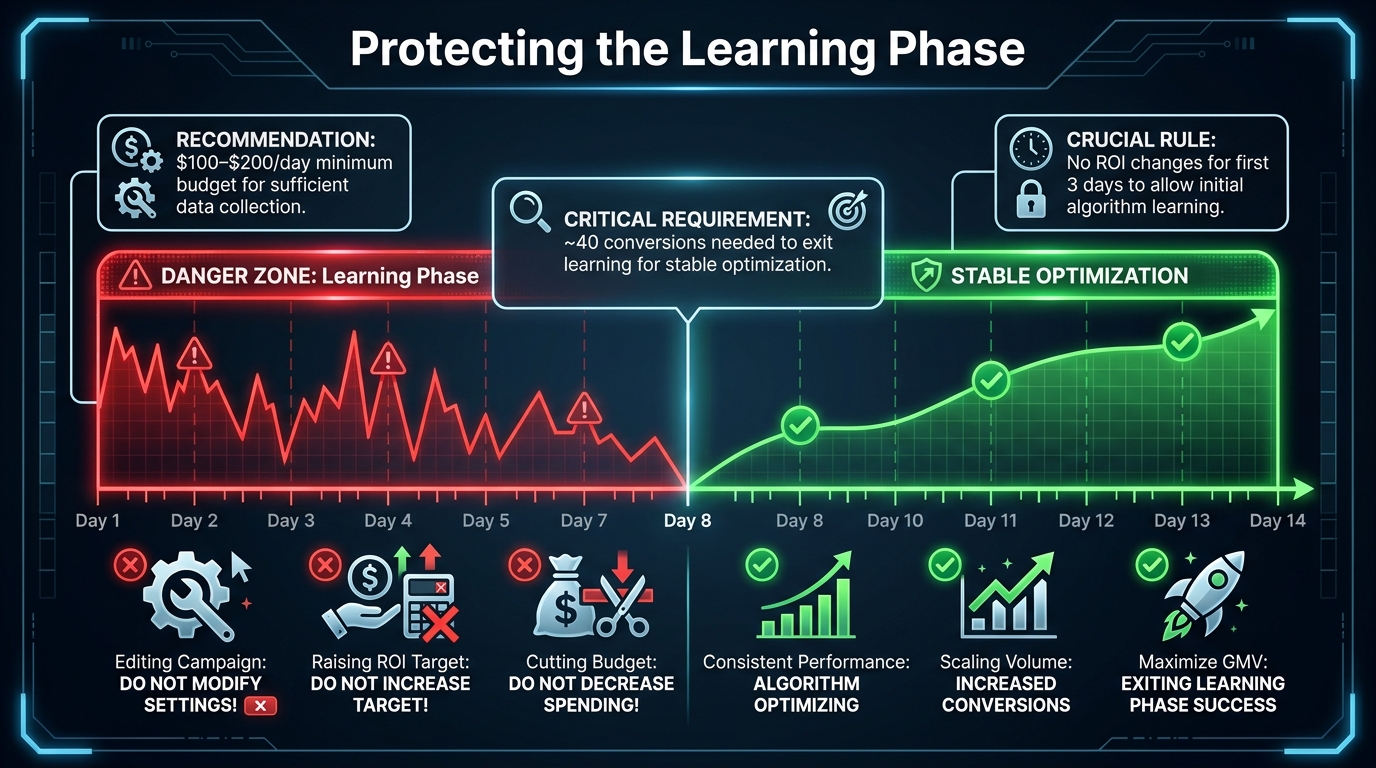
The learning phase is the period after campaign launch during which TikTok’s optimization system is gathering conversion data and adjusting its model to your specific products, audiences, and price points. It is not a passive waiting period — decisions you make during this window have an outsized impact on whether the campaign reaches stable optimization or stays stuck in a perpetual semi-learning state that never delivers consistent results.
The 40-Conversion Threshold
TikTok’s own guidance for Shop campaigns points to approximately 40 conversions as the threshold for exiting the learning phase. Below that number, the algorithm’s model is operating on insufficient data, and optimization decisions it makes are more like informed guesses than learned patterns. This threshold has a direct implication for budget: if your product sells for $50 and converts at a typical rate, you need enough daily spend to accumulate 40 conversions at a reasonable pace — ideally within 7–14 days for the learning to remain relevant to current market conditions.
The math is uncomfortable for small budgets. At a $30 CPA and $100/day spend, you are accumulating roughly 3–4 conversions per day, which means 10–14 days to exit learning. At $50/day, that stretches to 20+ days — by which point the learning-phase signals from Week 1 may be stale. This is why practitioners consistently recommend launching new GMV Max campaigns at $100–$200/day minimum, even if that budget level feels aggressive relative to your normal spend rate.
The Three Actions That Reset Learning
Certain changes to a live campaign force a learning reset — meaning the accumulated conversion data is discarded and the algorithm starts over. The three most commonly triggered resets are:
Changing the ROI target during the learning phase. Even a small upward adjustment signals to the system that the conversion parameters have changed, requiring a recalibration. TikTok’s guidance says to hold the ROI target for at least three full days before any adjustment, and to never make changes while the campaign status still shows “Learning.”
Making significant budget changes too quickly. If you increase or decrease the daily budget by more than 30–40% in a single edit, it can disrupt the system’s pacing model and trigger a partial or full reset. Gradual budget adjustments — 20–25% at a time, with at least a few days between changes — are much less likely to cause disruption.
Adding or removing products from the campaign. Large changes to the product set mid-learning effectively change what the campaign is optimizing for, which forces the algorithm to recalibrate. If you want to expand your product set, do it after the learning phase has concluded, or add products in small batches rather than bulk changes.
What Weak Campaign Performance During Learning Actually Means
The impulse to intervene when a new campaign shows low early performance is understandable but almost always counterproductive. Low conversion rate in days 1–5 is expected — the algorithm is serving broadly while it learns, not efficiently yet. Cutting budget in response to weak early numbers shortens the data collection window and extends the learning phase. Raising the ROI target in response to high early costs resets the learning. Both interventions make the problem worse.
The practical discipline required during the learning phase is to set the campaign up correctly before launch — right ROI target, right budget, complete product selection, full creative authorization — and then leave it alone for at least 7 days. Evaluate performance after the learning phase exits, not during it.
Measurement: Reading GMV Max Attribution Correctly
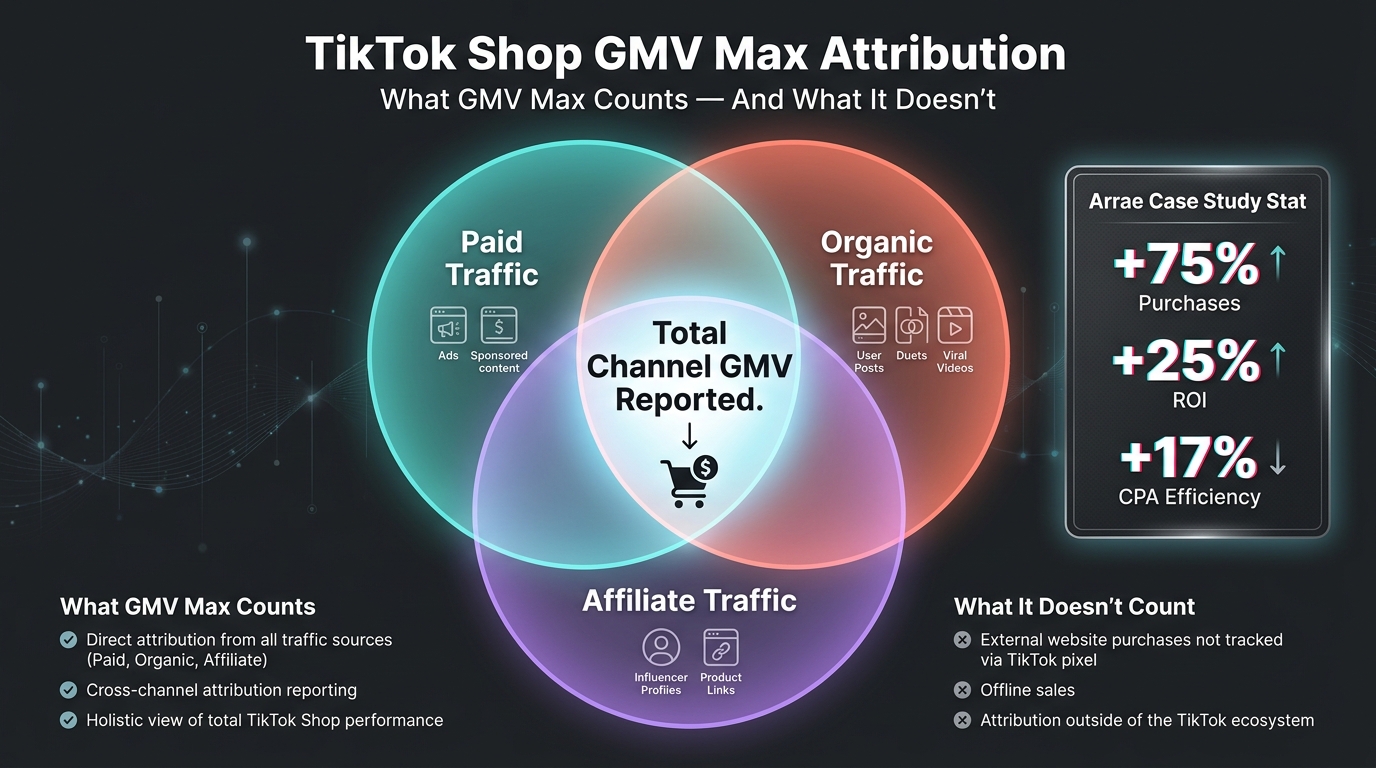
GMV Max attribution is different from traditional paid ad attribution, and treating it the same way leads to bad decisions. Understanding what the numbers in your GMV Max reporting actually represent — and what they do not — is essential for evaluating campaign performance accurately.
What GMV Max Reports Include
According to TikTok’s own help documentation, GMV Max campaign reporting includes total revenue from TikTok Shop orders attributed to the campaign — including both paid and organic traffic. This is not a paid-only ROI figure. The GMV number in your dashboard is a blended total across all three traffic pools that the campaign influenced.
The implication is significant: if you compare your GMV Max ROI to the ROI of a conventional paid ad campaign, you are not comparing like to like. GMV Max’s reported return will typically be higher than an equivalent paid-only campaign because it is capturing GMV from organic and affiliate sources that the campaign influenced but did not fully pay for. This is not inflated reporting — it is a fundamentally different attribution model, and understanding it correctly prevents both overconfidence and underconfidence in campaign performance.
The Arrae Data Point in Context
TikTok’s published case study on the health supplements brand Arrae provides the most detailed public benchmark available for GMV Max performance. The reported results after adding GMV Max to Arrae’s TikTok Shop strategy included a 75% increase in purchases, 25% higher ROI, 17% more efficient CPA, and 7% GMV growth over a two-week period. The campaign also generated 900,000+ video views tied to the best-selling product and a 30% increase in non-affiliate GMV at the point of purchase.
The “30% increase in non-affiliate GMV at purchase” is the most strategically interesting number in this case study. It suggests that GMV Max — by surfacing organic and paid content alongside affiliate content — is driving incrementality beyond what affiliate-only strategy achieves. Buyers are converting through channels they might not have reached via affiliate alone. This is the integrated traffic pool effect in action, and it supports the core operational argument for using GMV Max rather than managing paid, organic, and affiliate separately.
Separating Campaign Learning from Steady-State Attribution
A common measurement mistake is evaluating GMV Max ROI during the learning phase and drawing conclusions about campaign viability. During learning, the campaign is not optimizing efficiently — it is gathering data. Attribution during this window reflects broad, unoptimized spend, not the campaign’s actual potential. Evaluate performance 14–21 days after the learning phase exits, not during it, and use a 7-day rolling average rather than daily snapshots to smooth out the natural variance in any automated campaign system.
Common Seller Mistakes Across Both Tools
Having covered how each tool works and the decisions that shape performance, it is worth cataloging the mistakes that appear most frequently — both because they are instructive individually and because several of them compound on each other in ways that are hard to trace back to root cause.
Mistake 1: Running GMV Max with Incomplete Listings
This is the most common and the most damaging. Sellers launch GMV Max campaigns on products with missing category attributes, thin descriptions, or misassigned categories — and wonder why conversion rates are low despite decent traffic. The algorithm surfaces the product, the buyer clicks through to a listing that does not answer their questions or signal quality, and they leave. The campaign’s conversion signal degrades, and the algorithm learns to spend less on that product. The problem looks like a targeting problem; it is actually a listing quality problem.
Mistake 2: Setting the ROI Target from Margin Math Instead of Historical Data
Sellers who set ROI targets based on their desired profit margin rather than their historical shop performance almost always overshoot the target and create delivery restrictions. The correct starting point is your actual historical non-LIVE GMV divided by actual ad cost — what your shop has demonstrably achieved, not what you need it to achieve to be profitable at scale. Work toward your margin targets through gradual optimization, not by launching with a target the algorithm cannot reach.
Mistake 3: Treating List With AI Output as Final
AI-generated listings are drafts, not finished assets. Every output requires human review before publishing. The most frequent editorial problems are: generic filler language in descriptions that dilutes search relevance, category assignments that are adjacent but not accurate, and attribute fields that are left partially filled because the AI inferred rather than knew the correct value. A 15-minute review of an AI-generated listing is one of the highest-ROI quality control activities in your catalog operation.
Mistake 4: Restricting the Creative Pool to Control Brand Safety
Sellers sometimes restrict affiliate content authorization out of concern about how their products are represented. This is understandable but frequently overcorrected. Limiting affiliate content to zero — or only authorizing one or two creators — dramatically shrinks the creative pool GMV Max can draw from. A more effective approach is proactive affiliate quality management: set clear content guidelines, review authorizations before approving them, and work with a broader affiliate roster rather than a highly curated but tiny one.
Mistake 5: Using Smart Listing Optimizer on Listings Without Performance History
Smart Listing Optimizer makes recommendations based on sales trends and platform performance data. If a listing has been live for three days with no sales, the Optimizer has no meaningful data to work from, and its recommendations are likely to be low-confidence inferences rather than informed optimizations. Let listings accumulate at least 2–4 weeks of data before engaging the Optimizer — or enable it at account level and let it prioritize your higher-volume listings first.
Building the Full Operating System: A Practical Sequence
The goal of this section is to give you a clear sequence of actions that integrates both tools in an order that makes sense for performance. This is not a theoretical framework — it is a practical workflow built around the operational realities covered throughout this playbook.
Phase 1: Catalog Foundation (Week 1–2)
Before launching GMV Max, audit your core catalog — at minimum the 20–30 products most likely to be included in your campaign. For each product, verify: category assignment is accurate, all required attributes are complete, title is keyword-first and under 80 characters, images include at least one clean product shot and ideally 5+ images total, and description covers use case, features, and intended buyer clearly.
For any new SKUs launching during this period, use List With AI to accelerate the creation process. Use the structured input method described earlier — product type, key features, use case, differentiators — rather than feeding the tool minimal information. Review every output before publishing. Do not skip this review step.
Activate Smart Listing Optimizer for your existing catalog. Allow 2–4 weeks for it to accumulate performance data on each listing before evaluating its recommendations, but enable it now so the data collection window has started by the time you review recommendations.
Phase 2: Creative Build (Week 2–3)
Before launching GMV Max, you need a creative pool to work with. The minimum viable creative pool for a new GMV Max campaign is: at least 5–8 paid or organic videos covering your most important products, and affiliate authorization from at least a handful of creators who have posted about your products. If you have no affiliate program yet, this phase is an argument for starting one before running GMV Max — the difference in campaign performance between sellers with a populated affiliate roster and those without is substantial.
Request Spark Ad authorizations from any affiliate creators who have already posted organic content featuring your products. This is often the fastest way to expand your creative pool without producing new content internally.
Phase 3: GMV Max Launch (Week 3–4)
With catalog quality addressed and a creative pool in place, configure your GMV Max campaign. Use all products initially, or lead with your highest-GMV SKUs if a full catalog launch is not practical. Calculate your baseline ROI target using the historical formula — non-LIVE GMV divided by historical ad cost. Set your daily budget at $100–$200 minimum, ideally higher if your category has a high AOV or a CPA that would require 20+ days to accumulate 40 conversions at $100/day. Enable affiliate content and all available creative sources.
Then leave the campaign alone for 7 days. Log the campaign status each day. Intervene only if the campaign shows an error, not if it shows low early performance.
Phase 4: Post-Learning Evaluation and Optimization (Week 5+)
After the learning phase exits — confirmed when campaign status changes from Learning to Active in the ads manager — evaluate 7-day rolling performance. If ROI is above target and volume is acceptable, consider a modest budget increase (20–25%) to test whether incremental spend maintains efficiency. If ROI is below target, make a single small ROI target adjustment (5–10% upward) and allow 3 full days before evaluating the effect.
Continue reviewing Smart Listing Optimizer recommendations for your active product catalog. Prioritize changes the Optimizer flags on high-GMV listings, since these have the greatest upstream impact on campaign performance. Use List With AI to continue onboarding new SKUs efficiently, maintaining the catalog foundation quality that keeps the campaign’s product records strong.
The central operating principle: GMV Max performs to the ceiling set by your catalog quality and creative volume. List With AI and Smart Listing Optimizer raise that ceiling. Running them together — as a deliberate system rather than independent tools — is what separates sellers who find a consistent GMV Max efficiency floor from those who are perpetually troubleshooting campaigns that never quite stabilize.
Conclusion: Making the System Work Together
GMV Max and List With AI are genuinely capable tools. They are also tools that reward operators who understand how they interact, not just operators who understand how each works in isolation. The practical upside of getting this right is significant: campaigns that exit the learning phase efficiently, product records that convert at a higher rate, and a creative pool that grows organically through affiliate integration rather than relying entirely on internally produced paid creative.
The operational checklist to take from this playbook is short but consequential:
- Audit listing quality — category accuracy, attribute completeness, keyword-first titles — before launching GMV Max, not after
- Set your ROI target from historical performance data, not from margin targets alone
- Budget at $100–$200/day minimum for reliable learning, sized to your CPA
- Enable affiliate content and all creative sources — do not voluntarily shrink the pool
- Use List With AI for creation, Smart Listing Optimizer for ongoing improvement
- Review every AI listing output before publishing — treat it as a high-quality first draft, not a final asset
- Protect the learning phase: no ROI target changes, no large budget swings, no significant product additions for at least the first 7 days
- Evaluate post-learning performance on 7-day rolling averages, not daily snapshots
- Request Spark Ad authorizations from affiliate creators proactively — every authorized video expands your creative pool
The sellers who get the most from these tools are the ones who stopped thinking of them as separate features and started treating them as an integrated system with upstream dependencies. Build the foundation, then run the engine. The results are there when the sequencing is right.