Most teams building their first AI workflows spend weeks evaluating platforms, testing integrations, and debating whether to use a no-code orchestration tool or build in-house. They debate model selection, token costs, latency thresholds. They hold steering committee meetings.
What they almost never spend enough time on is the question that actually determines whether any of that effort pays off: which process.
The process selection decision — specifically, the first three workflows you choose to automate — is where most AI programs quietly win or silently fail. Get it right and you build momentum, stakeholder trust, and a repeatable playbook. Get it wrong and you accumulate what practitioners are now calling automation debt: a growing pile of underused, half-governed, poorly sequenced automations that cost more to maintain than they save.
A 2026 survey by Redwood found that 73.2% of businesses increased their automation investment over the past year. In the same data set, 61.3% reported their tools were underutilized because of fragmented strategies and siloed implementation. Only 6% had achieved end-to-end autonomous automation in any core process. Those numbers tell a consistent story: companies are building, but not building the right things.
This post is not about how to build AI workflows. It is about how to decide what to build first — specifically, how to navigate the critical transition from copilot-style assistance into true workflow automation, and how to select three starting processes that will hold up under real operational conditions rather than collapse the moment you remove the demo guardrails.
We will walk through what distinguishes a copilot from a workflow at a functional level, why that distinction shapes everything about process selection, a concrete scoring framework for evaluating candidates, the three process archetypes that consistently work as first automations, the traps that catch most teams, and how to sequence and measure your first three so they compound rather than cancel each other out.
What a Copilot Actually Does — and Where Its Authority Ends
The word “copilot” has become so common that it is starting to lose precision. Microsoft embeds it. Google embeds it. Salesforce embeds it. Every SaaS vendor with an LLM API key now has a copilot feature. That ubiquity makes it easy to conflate copilot-style assistance with actual workflow automation, and that conflation is the root of most early AI program failures.
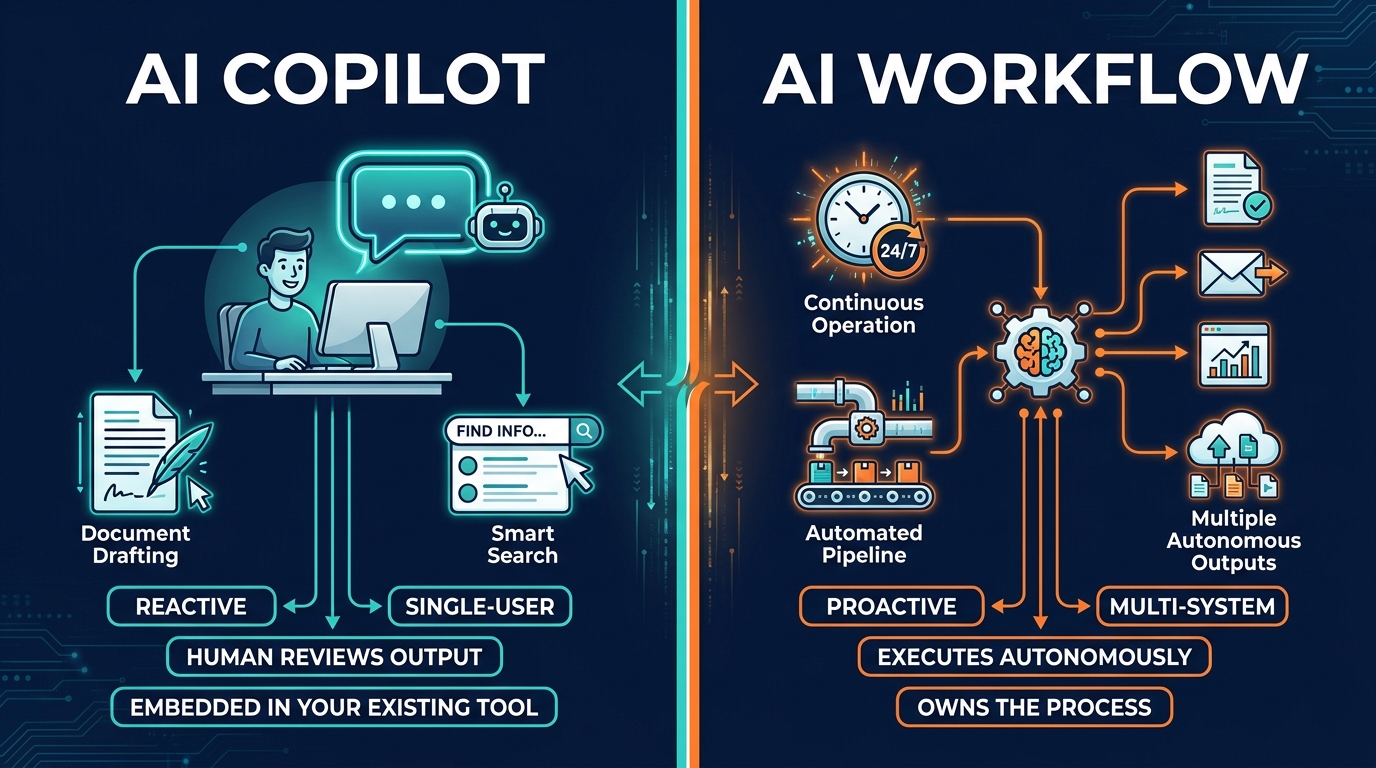
A copilot, in its truest functional definition, is a reactive assistant. It responds to human prompts. It helps one person do their job faster: draft an email, summarize a document, find an answer in a knowledge base, generate a first-pass analysis. It is embedded inside a tool the user is already in — an inbox, a CRM, a code editor, a word processor. When the user closes the window, the copilot stops.
The structural limits of copilot assistance
That model of assistance is genuinely valuable. But it has clear structural ceilings. The copilot does not initiate action on its own. It does not monitor a queue, detect a trigger condition, pull data from a connected system, run a multi-step decision tree, and write output back to a record — all without a human prompt. It does not own a process from input to output. It helps a human who owns the process do their portion faster.
This matters because many organizations measure their AI maturity by copilot adoption, then wonder why productivity gains are harder to quantify at an organizational level. Individual users feel faster. But throughput at the team or process level often does not change meaningfully because the bottleneck was never the drafting time — it was the handoffs, the routing decisions, the data entry between systems, the approval delays. Copilots do not touch those.
Where copilots genuinely belong
To be clear: copilots are the right tool for a significant class of work. Judgment-heavy, context-sensitive, variable tasks where a human needs to make nuanced decisions but benefits from faster preparation are copilot territory. Legal document review, complex customer escalations, strategic planning, code review in novel contexts — these are areas where removing the human from the loop is actively counterproductive. The copilot amplifies the human. That is its purpose.
The mistake organizations make is not using copilots where they belong. The mistake is treating copilot deployment as a substitute for workflow automation, when the two tools address fundamentally different problems. One makes individuals faster. The other changes how a process runs at a structural level.
What an AI Workflow Actually Is — and Why the Distinction Reshapes Everything
An AI workflow is something structurally different. It is not a smarter assistant. It is an execution layer. It owns a defined process from trigger to completion — receiving inputs, running logic (including AI-driven judgment steps), connecting to external systems, making decisions within set parameters, and writing outputs back to the appropriate destination — all without requiring a human to initiate each step.
The best operational definition: a copilot waits for you. A workflow does not wait for anyone.
The architecture of an AI workflow
A functional AI workflow has several components that copilots typically lack. It has a trigger — an event or condition that starts execution automatically (a new form submission, an inbound email, a record change in a database, a scheduled time). It has an execution chain — a defined sequence of steps that may include data retrieval, AI inference, conditional routing, and external API calls. It has output destinations — systems that receive the result, whether that is a database record, a notification, a routed ticket, or an approved transaction. And it has exception handling — defined behavior for when something unexpected occurs, rather than just producing an error or hallucinating an answer.
This architecture is why AI workflows can deliver measurably different organizational outcomes than copilots. They reduce cycle time across entire processes, not just individual tasks. They eliminate the human-in-the-middle for steps that do not require human judgment. They create consistent, auditable output because every run follows the same logic path.
The handoff moment
The shift from copilot to workflow is not really a technology decision. It is a design decision about accountability. When you deploy a copilot, the human is still accountable for every output. They review, they decide, they send. When you deploy an AI workflow, the system is accountable for the execution — and that accountability has to be backed by proper governance, monitoring, and exception design before the first run in production. That transition is where most process selection mistakes originate: teams attempt to automate processes they have not fully defined, with data they have not fully cleaned, without governance structures in place to catch what the system gets wrong.
The Automation Debt Problem: Why Bad Selection Compounds
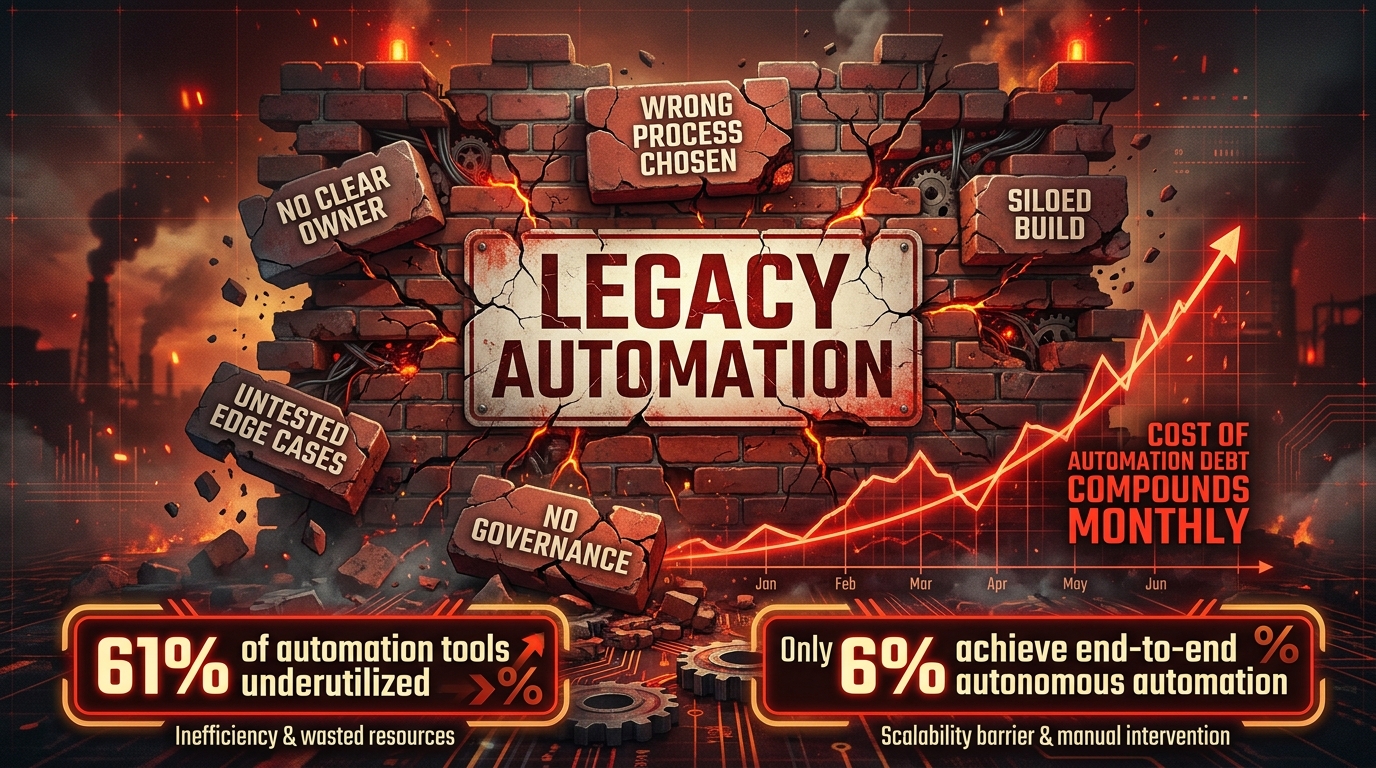
Automation debt is the accumulation of automations that were built quickly, without proper process design, and that now cost more to maintain, govern, and fix than they deliver in efficiency gains. It is analogous to technical debt in software development — except that the interest rate is higher, because automation debt often sits at the intersection of customer-facing processes, compliance requirements, and operational systems.
The mechanism is straightforward. A team picks a process that sounded high-impact in a steering committee meeting. They build it quickly to show progress. The process has more edge cases than expected. They add patches. The integration is fragile. It breaks when an upstream system updates its API. There is no clear owner. The people who built it have moved to another project. Six months later, someone is manually re-processing the cases the automation dropped, and no one is entirely sure what the automation is actually doing at any given moment.
Why first workflows carry disproportionate weight
The first three workflows are not just three data points in a portfolio. They set the organizational template. They define what teams think AI workflow automation looks like. They determine whether leadership sees automation as a reliable operational tool or an experimental toy. They shape the governance practices, the platform choices, the skill sets hired or developed, and the sequencing of everything that comes after.
If the first three workflows are poorly selected — and many are, because they are chosen for visibility rather than suitability — they create friction that slows every subsequent automation. They consume disproportionate maintenance attention. They teach the organization that AI workflows are fragile, high-maintenance, and disappointing. That lesson is very hard to unlearn.
The scale of the problem in 2026
Research from Stonebranch published in early 2026 found that only 21% of organizations run AI workflows at enterprise scale. The other 79% are still in pilot or pre-pilot phases. That number is not primarily a capability gap — the tools exist and they work. It is a selection and sequencing gap. Organizations that have moved past that threshold have almost universally done so by solving the process selection problem first, before investing heavily in platform or tooling. They picked the right processes, proved value fast, and built organizational confidence that justified the investment in broader rollout.
The organizations stuck below that threshold are largely dealing with the aftermath of bad early selections: fragmented automations, skeptical stakeholders, and governance backlogs that prevent new deployments.
The Three-Filter Test: A Framework for Screening Process Candidates
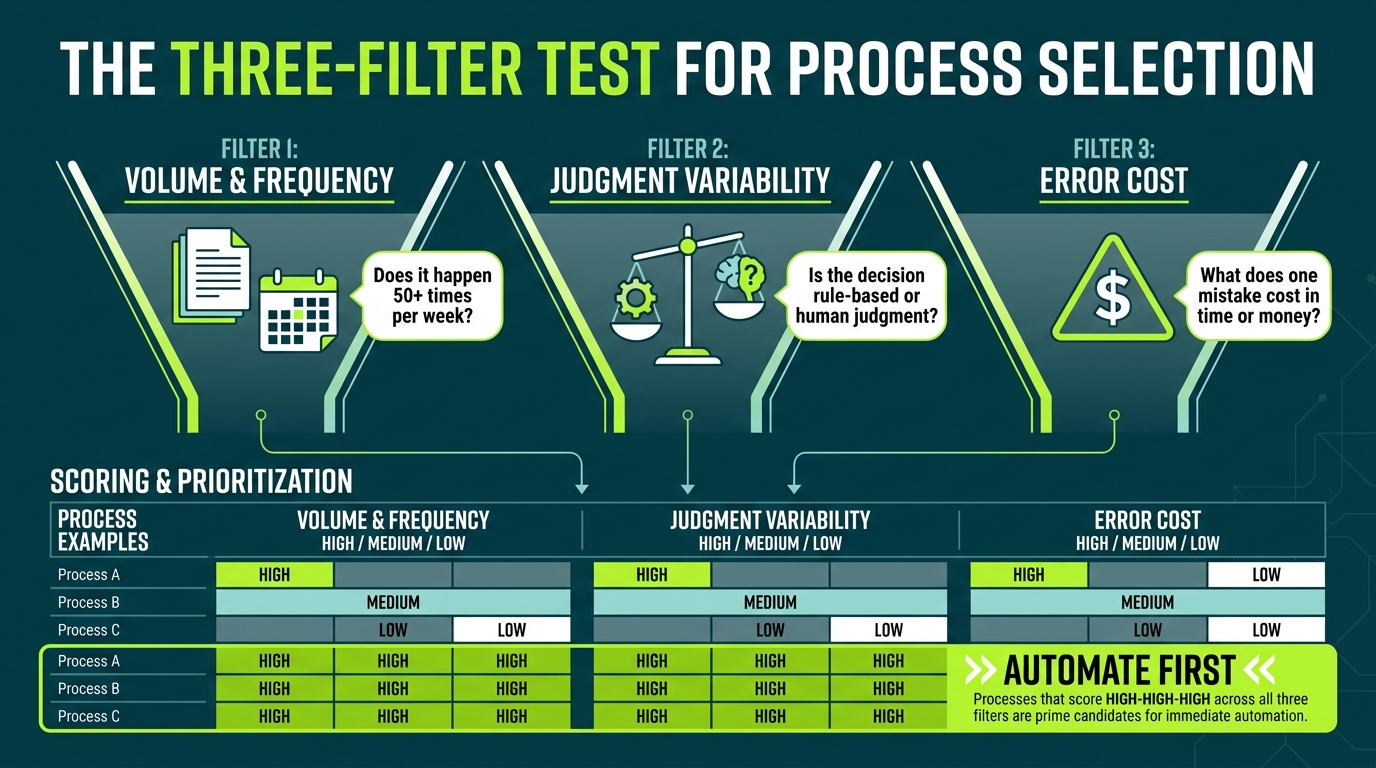
Before evaluating any specific process for automation, it helps to run a simple three-filter test. This is not a detailed process mining analysis — that comes later, for the candidates that survive the filters. This is a rapid screen designed to eliminate poor candidates quickly and surface the ones worth deeper investigation.
Filter 1: Volume and Frequency
The first question is whether the process occurs often enough to justify the build cost and generate meaningful efficiency gains. A good minimum threshold for a first AI workflow is a process that triggers at least 50 times per week, ideally closer to 200 or more. Processes below that threshold may be worth automating eventually, but they should not be your first three — the learning curve, governance overhead, and integration work consume resources that need to be justified by meaningful throughput.
Frequency also matters alongside raw volume. A process that happens 500 times but only twice a year is very different from one that happens 500 times per month. High-frequency processes give you fast feedback on whether the workflow is behaving correctly. They also give you a larger data set for monitoring, anomaly detection, and improvement. For first workflows especially, frequent exposure to real conditions is how you find the edge cases before they become incidents.
Ask the team that currently owns the process: How many times does this happen in a typical week? What happens during peak periods? If the answers are vague — “it varies a lot” or “we don’t really track it” — that is itself a signal. Processes without baseline measurement data are poor automation candidates because you cannot establish a pre-automation baseline, which means you cannot measure the improvement after automation.
Filter 2: Judgment Variability
The second filter asks how much human judgment the process currently requires — and, critically, how much of that judgment is actually rule-based versus genuinely discretionary.
Most processes that teams describe as “requiring judgment” actually involve a set of conditional rules that have never been explicitly documented. Someone looks at a customer support ticket and “judges” its priority — but if you sit with that person for an hour and ask them how they decide, you will usually find they are applying a consistent logic: ticket type, product line, account tier, and escalation history combine in a fairly predictable way to produce a priority rating. That is not judgment — that is an undocumented decision tree. It is automatable.
True judgment is different. It involves weighing factors that are genuinely ambiguous, where reasonable professionals would often disagree, and where the cost of a wrong decision is high enough to justify a human making it every time. Customer complaint escalation involving potential legal exposure, for example, or credit risk decisions above a certain threshold. These are copilot territory, not workflow territory.
The practical test: Could you write a document that clearly specifies how a decision should be made in 90% of cases, and have three people apply that document and get the same answer? If yes, the process is a workflow candidate. If no, keep the human in the loop and use a copilot to assist rather than a workflow to replace.
Filter 3: Error Cost and Visibility
The third filter evaluates what happens when the process produces a wrong output. This filter works in both directions.
On one hand, processes where errors are very costly but also highly visible are good candidates for early automation — because the visibility of errors means the workflow’s exception handling and human review triggers will catch problems before they compound. Invoice processing is a classic example. An AI-misrouted invoice will usually surface quickly when the vendor follows up, the ERP reconciliation fails, or the approval gateway times out. The error is caught.
On the other hand, processes where errors are low-cost individually but invisible at scale can be deceptively dangerous automation targets. A workflow that silently miscategorizes 3% of customer records per day seems fine until six months later when you discover that downstream targeting, reporting, and compliance audits are all built on corrupted data. By then the problem has metastasized.
The practical question: If this workflow makes 100 errors over the next 30 days, when do we find out? What is the downstream impact? For first workflows especially, choose processes where the answer is “quickly” and “recoverable.”
The Three Process Archetypes That Consistently Work as First Workflows
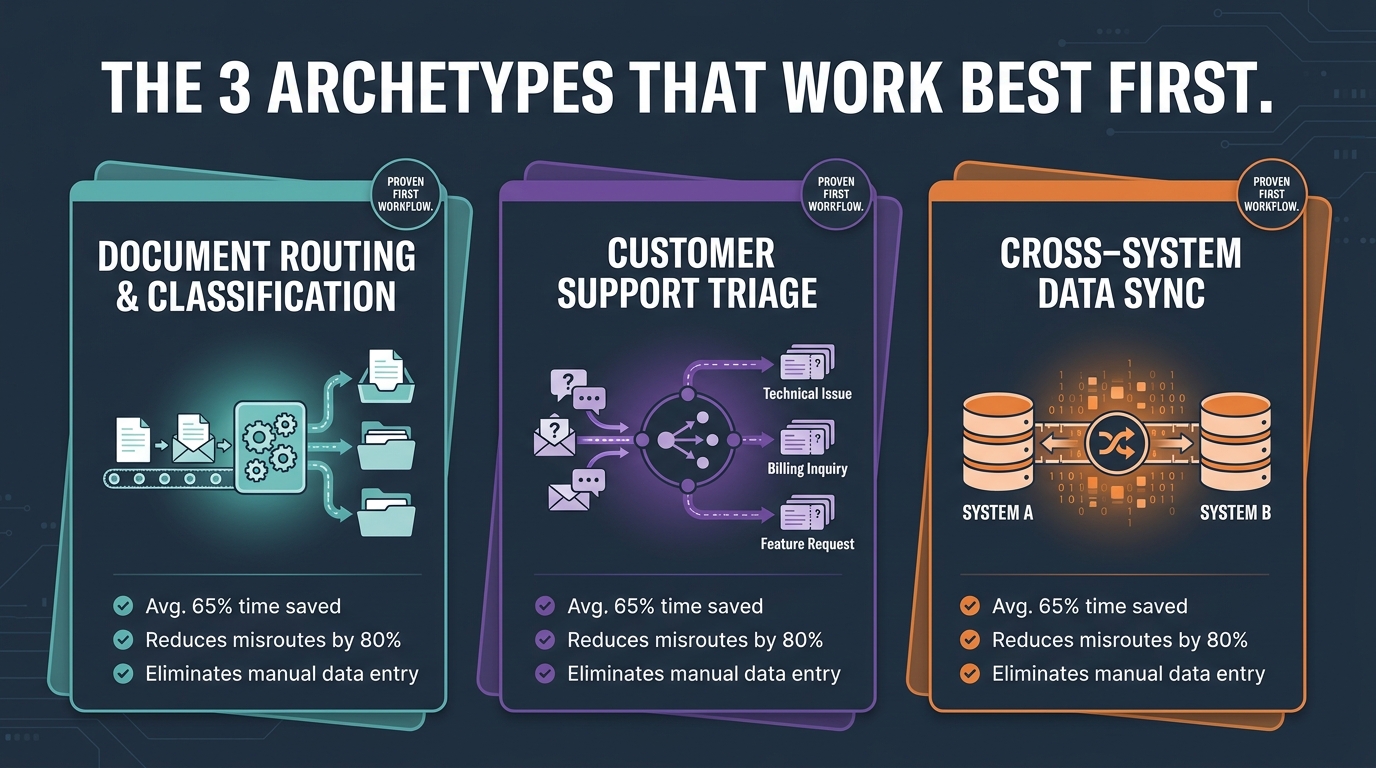
Across the organizations that have successfully moved past the pilot stage, three broad process archetypes appear consistently as effective first AI workflows. They share a common profile: high volume, clear rules, measurable outputs, and visible errors. They also share a practical advantage — they generate fast, unambiguous ROI that builds the organizational case for subsequent automations.
Archetype 1: Document and Request Classification with Routing
This archetype covers any process where something arrives in a queue — an email, a form submission, a document, a ticket — and a human currently has to look at it, classify it, and route it to the right place or person. Invoice routing. Support ticket triage. HR request classification. Contract intake. Permit applications. The pattern is identical across industries: receive, read, classify, route.
This is the single most common successful first AI workflow for good reasons. The input is structured enough (documents, emails, forms) that LLMs can classify it with high accuracy even with moderate training data. The classification taxonomy is usually definable — there are a finite number of categories that things can be routed to. The error type is visible — a misrouted ticket shows up when the wrong team receives something that does not belong to them. And the volume is almost always high enough to generate meaningful time savings quickly.
Teams that have deployed this archetype consistently report 60–80% reduction in manual handling time for the classification and routing step. The workflow does not eliminate human work entirely — it eliminates the lowest-value, most repetitive portion of it (the “look at it and send it somewhere” step) and frees humans for the actual work that requires their expertise.
A critical design detail: the routing workflow should always include a confidence threshold with a human review queue. Any item the model classifies with below, say, 85% confidence goes to a human for routing rather than being auto-routed. This keeps error rates low and gives you a clean data set for improving the model over time. The human review queue also serves as a natural safety valve that builds stakeholder confidence — they can see that the system knows its own limits.
Archetype 2: Cross-System Data Synchronization and Validation
This archetype covers processes where data that exists in one system needs to be moved, reformatted, validated, and written to another system — and where that movement currently requires a human to do it manually or through error-prone spreadsheet manipulation. CRM-to-ERP data sync. Customer onboarding data entering multiple platforms. Product data flowing from a master catalog to multiple sales channels. Compliance reporting aggregation.
The reason this archetype works well as an early workflow is that the ROI is immediate and mathematically unambiguous. If a human currently spends three hours per day copying and validating data between systems, and the workflow reduces that to 20 minutes of exception review, the time savings are observable from week one. There is no ambiguity about whether the workflow is delivering value.
The AI component of this archetype is often more modest than teams expect — much of the work is deterministic transformation and validation rather than generative inference. But that is actually an advantage for a first workflow. It reduces the surface area for AI-specific failures and lets the team build confidence in the orchestration layer before adding more complex reasoning steps. Some of the most reliable first AI workflows are more accurately described as “intelligent RPA” — rules-based automation with an AI layer handling the exceptions and ambiguous cases.
One design consideration that cannot be skipped: data quality validation at the point of ingestion. Cross-system sync workflows that do not validate inputs before processing them will propagate dirty data across multiple systems at machine speed. That is categorically worse than the manual process it replaced. Build validation logic into the first step, not as an afterthought.
Archetype 3: Structured Approval and Compliance Workflows
The third archetype covers processes where a request or event requires review against a set of defined criteria and either approval, rejection, or escalation. Access request management. Expense approval up to a defined threshold. Purchase order processing below authorization limits. Employee onboarding checklist completion tracking. Vendor compliance document verification.
This archetype is powerful as an early workflow because it maps almost perfectly to AI workflow strengths: defined rules, bounded decisions, clear outputs, and audit trail requirements that make governance investment pay for itself. Unlike the previous two archetypes, this one directly touches compliance and accountability — which means the governance infrastructure you build for it will be immediately useful for every subsequent workflow you deploy.
The approval workflow also has a naturally built-in escalation mechanism. Any request that meets defined criteria for automatic approval gets processed instantly. Any request outside those criteria gets routed to a human approver with context pre-populated — the AI workflow does the research and summary work, the human makes the exception decision. This human-in-the-loop design for exceptions is not a compromise; it is correct system design that makes the automation both safer and faster for the cases that matter most.
Teams that deploy this archetype well typically see approval cycle times shrink from days to minutes for the majority of cases, with the remaining complex cases handled faster because the human approver receives pre-organized context rather than having to gather it manually.
The Traps: Processes That Seem Right but Consistently Fail
Understanding what works is only half of the selection problem. The other half is recognizing the patterns that consistently look attractive but fail in production. These are the processes that generate enthusiastic pilot demos and then collapse under real operating conditions.
Trap 1: Automating a Process That Has Not Been Documented
The most common mistake teams make is attempting to automate a process that is currently handled through a combination of institutional knowledge, informal conventions, and individual expertise — and has never been formally documented. When you ask the people who currently do it to describe the process, you get different answers. When you ask them to walk you through their decision logic, the logic differs between individuals and sometimes within the same individual depending on context.
This is not a process that is ready for automation. It is a process that first needs to be designed — the steps explicitly mapped, the decision rules documented and agreed upon, the exception paths identified and resolved. Attempting to automate it in this state means the workflow will embed someone’s informal version of the process as the authoritative version, which creates conflict and usually requires significant rework after launch.
The practical test before selecting any process for automation: can you produce a written specification of the current process that two different people would implement the same way? If not, document the process first. Automation is not process design.
Trap 2: Choosing Processes Primarily for Their Executive Visibility
Strategy conversations, executive reporting generation, customer churn analysis, and competitive intelligence are perennial early automation suggestions in steering committees. They are suggested because they sound impressive and they are things that senior leaders care about. They are usually terrible first workflow choices.
The problem is compound. These processes are typically low-frequency (monthly, quarterly), heavily judgment-dependent (the “insight” part is actually the hard part), and low in error visibility (a wrong conclusion in a strategy briefing may not surface for months). They often require synthesizing unstructured data from many diverse sources in ways that are genuinely difficult for current AI systems to do reliably. And when they fail, the failure is invisible until it has influenced real decisions.
The instinct to automate visible, prestigious processes first is understandable — it signals AI ambition and gets executive attention. But it produces poor first workflows, often fails, and damages organizational credibility for automation more broadly. Start boring. Start measurable. Start operational. The visibility will come when the operational wins generate real numbers worth reporting.
Trap 3: Processes with Deeply Variable Upstream Inputs
Some processes look rule-based and bounded until you examine the inputs they receive. Customer service processes that handle emails are a good example. The rules for routing a support email can be clearly defined. But the variation in how customers actually write emails — the phrasing, the languages, the ambiguity, the emotional context, the incomplete information — means the input space is far wider than the routing taxonomy would suggest. A workflow built on the assumption that inputs will be clear and well-formed will struggle with the reality that many inputs are none of those things.
This does not mean these processes cannot be automated. It means they require careful input validation, generous human review queues for ambiguous cases, and a longer training period before the confidence thresholds are reliable. Teams that underestimate input variability typically over-automate in the early period — setting confidence thresholds too high, routing too many cases without human review — accumulate errors, then lose stakeholder trust when the error volume becomes visible.
For processes with variable inputs, add six to eight weeks of parallel running — where the workflow makes decisions but a human also independently makes the decision and the two are compared — before moving to autonomous operation. That data set is invaluable for calibrating the confidence threshold correctly.
Trap 4: Processes Where the Data Does Not Exist in the Right Form
Many automation plans assume that the data needed to run the workflow is available, accessible, and in a usable format. In practice, it is often in PDFs that have never been OCR’d, in spreadsheets maintained on individual desktops, in a legacy system with no API, or split across two systems with incompatible schemas and no join key.
This is the most expensive trap because it is often discovered late — after platform decisions have been made, after development has started, and sometimes after a demo has been delivered to leadership. When the actual data architecture is examined, it becomes clear that the automation requires a data infrastructure project as a prerequisite, not a parallel workstream. That doubles the timeline and cost at minimum.
The pre-selection data audit is not optional. Before committing to any process as a first workflow, answer these five questions: Where does the input data currently live? What format is it in? What API or export mechanism allows programmatic access? How frequently is it updated? What is the error rate or completeness rate of the existing data? If you cannot answer all five with specific, concrete answers, the process is not ready for workflow automation.
What Changes When You Move from Copilot to Workflow: Governance and Data Readiness
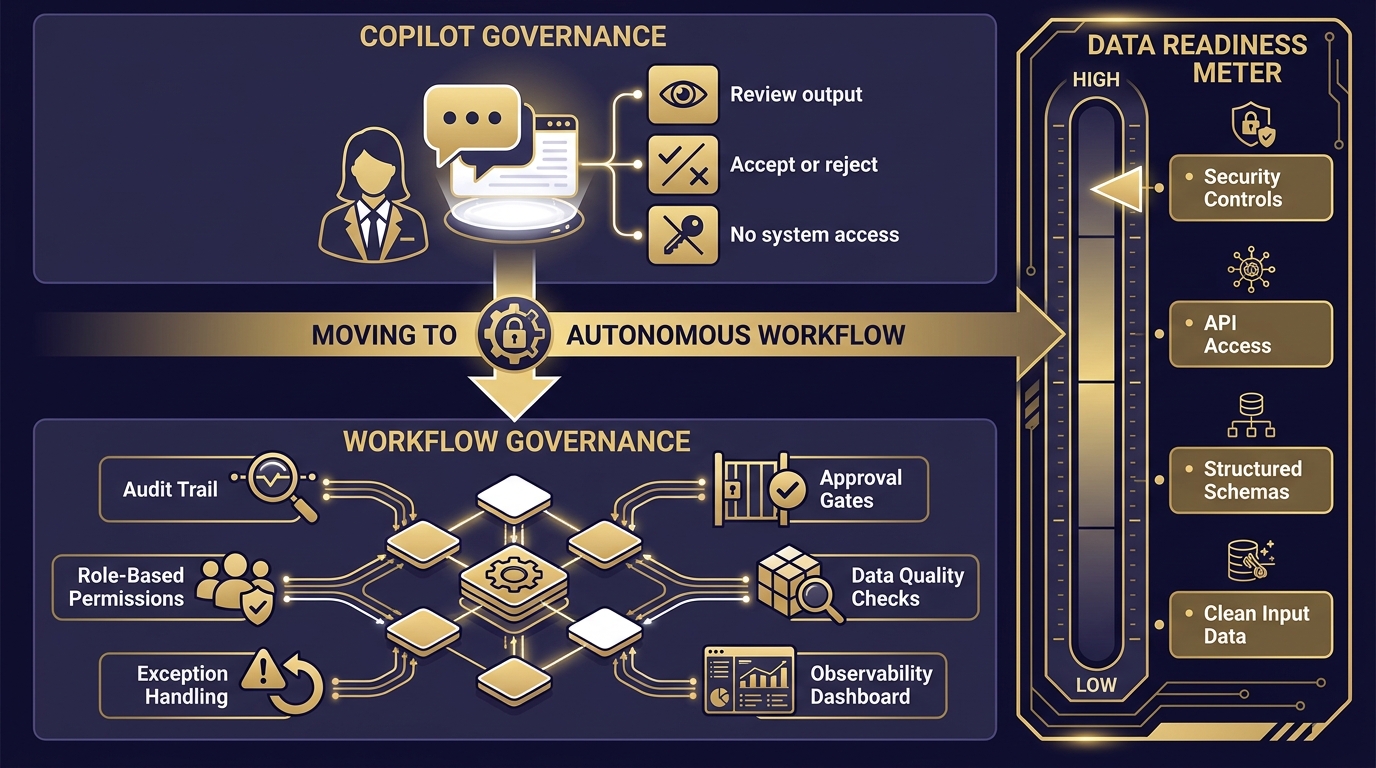
The governance model for a copilot is relatively lightweight. A human reviews every output before it acts on the world. The copilot’s mistakes are caught at the point of human review, before any downstream consequence. The governance requirement is essentially: does the person using the copilot know enough to evaluate the output? That is not a trivial question, but it is a bounded one.
When you move to autonomous workflow automation, the governance requirement expands fundamentally. The workflow acts without human review of every step. Errors may run at machine speed before anyone notices. The workflow touches systems that own real operational data. Governance can no longer be a post-hoc review process — it has to be built into the architecture from the first design decision.
The Five Governance Requirements for AI Workflows
1. Audit trail by default. Every workflow execution should log its inputs, the steps it took, the decisions it made (and the confidence scores or rule branches that determined them), and the outputs it produced. This is not optional and it is not something to add later. Without an audit trail, you cannot diagnose failures, satisfy compliance requirements, or improve the workflow systematically. Build it before the first production run.
2. Role-based access control across the workflow’s system integrations. A workflow that connects to your CRM, ERP, and email system is an authorization boundary that crosses all three systems. The credentials the workflow uses to operate should be the minimum necessary permissions for each action — not a super-user credential that gives the workflow broad access. When workflows run with over-permissioned credentials, a workflow failure or misconfiguration can produce consequences far outside the intended process scope.
3. Exception routing with defined SLAs. Every workflow should have an explicit exception path for cases it cannot handle with sufficient confidence. That path should route to a human, with context, within a defined time window. Exception routing is not failure — it is correct operation for cases outside the workflow’s designed parameters. The SLA for exception handling should be agreed upon before deployment, not defined reactively when the first exception occurs.
4. Observability infrastructure. Workflows need to be monitored in real time, not reviewed periodically after the fact. At minimum, you need a dashboard that shows volume processed, exception rate, confidence distribution, error rate, and cycle time per run. If any of those metrics move outside expected ranges, someone should be alerted automatically. This observability layer is what lets you catch a drift in model performance, a change in upstream data format, or an unexpected edge case pattern before it becomes a significant operational problem.
5. Documented process ownership with a named human owner. Every workflow needs a human owner who is accountable for its performance, authorized to make changes, and responsible for reviewing exception patterns and triggering improvements. Workflows without named owners degrade over time as the environment around them changes and no one is assigned the responsibility of keeping them current.
Data Readiness: The Prerequisite That Kills Most Timelines
Moving from copilot to workflow also requires a step change in data readiness. A copilot can work with messy data because a human reviews the output and catches errors introduced by input quality problems. A workflow cannot. When a workflow receives malformed, incomplete, or inconsistent data, it either produces bad outputs at speed, or it fails — neither of which is acceptable in a production process.
The data readiness checklist for a workflow-ready process: inputs arrive in a consistent, structured format; there is a defined schema with validation rules; there is a mechanism for handling missing or malformed inputs before they reach the workflow’s decision logic; the data has an accessible API or structured export; and the refresh rate of the data is faster than the workflow’s execution frequency. If any of those conditions are not met, the data infrastructure work needs to happen before the workflow build, not during it.
Sequencing Your Three: How to Order Them Without Creating Bottlenecks
Choosing three good processes is necessary but not sufficient. The sequence in which you deploy them matters significantly, for reasons that are both technical and organizational.
Start with Independence
The first workflow you deploy should be as independent as possible from the systems and processes that your second and third workflows will touch. This is not because you should design around dependencies forever — eventually, integration between workflows is where compounding value comes from. It is because during your first deployment, you are still learning how your orchestration platform behaves, how your monitoring infrastructure surfaces issues, and how your teams respond to automation exceptions. You do not want to be debugging three interdependent workflows simultaneously.
Practically: deploy the lowest-dependency workflow first. If two of your three selected processes touch the same upstream system, sequence them at least six to eight weeks apart so you have a stable, data-validated version of the first before the second starts pulling from the same source.
Use the Second Workflow to Extend the First
The most efficient sequencing pattern is to choose a second workflow that is a logical extension of the first — operating on the same data domain, or picking up where the first workflow’s outputs go. This creates compounding efficiency: the first workflow classifies and routes; the second workflow processes what was routed. The two together reduce human touchpoints across a larger portion of the end-to-end process than either does alone.
It also simplifies the data architecture. The integration work done for the first workflow — credentials, API connections, schema validation, audit infrastructure — is largely reusable for the second. The learning curve for the second deployment is materially shorter than for the first.
Use the Third Workflow to Close the Loop
The third workflow in a well-sequenced first program ideally closes a process loop: it handles the reporting, reconciliation, or notification step that currently requires manual effort after the first two workflows complete their work. This final-step automation is often the one that makes the combined efficiency gain visible to stakeholders — because it is the step that previously generated manual reporting work for someone, and once automated, the time savings are obvious and attributable.
Three workflows sequenced this way — a classification and routing workflow, a processing workflow on the output of the first, and a reporting and reconciliation workflow on the combined output — effectively automate a large portion of an end-to-end process. That is a materially different organizational outcome than three independent point automations that each address isolated steps in different processes.
The Pacing Question
How quickly should you move between the three deployments? The instinct, especially when leadership is eager for visible progress, is to move fast — deploy all three in the first 90 days. This is usually a mistake for teams that have not previously deployed production-grade AI workflows.
A more durable pacing: 30 days for the first workflow to reach stable production (where “stable” means it is handling its full target volume with exception rates within defined parameters and observability infrastructure confirmed working). Then 45 days for the second, because the team now has experience but the second workflow’s integration requirements are usually more complex. Then 30–45 days for the third, because by this point the team is genuinely fast and the infrastructure is proven. Total: roughly five to six months for all three. That timeline feels slow when you are in month one. It feels like excellent planning by month seven.
Measuring Whether You Got It Right: The Four Metrics That Actually Matter
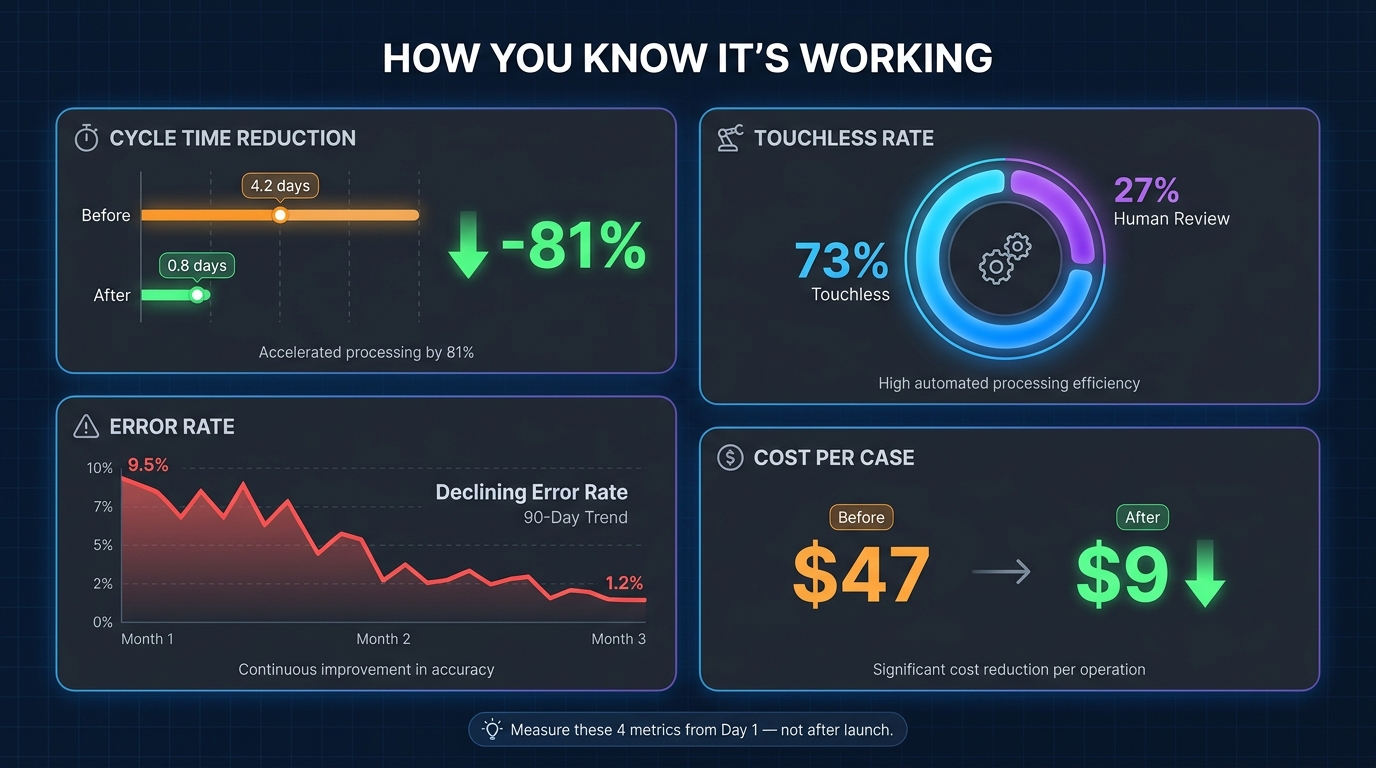
The measurement framework for AI workflow automation is not complicated, but it requires discipline — specifically, the discipline to establish baselines before deployment rather than after. You cannot claim a 60% reduction in processing time if you did not measure processing time before the workflow launched. That sounds obvious, but a significant percentage of automation programs do not capture pre-automation baselines.
Metric 1: Cycle Time
Cycle time is the elapsed time from when a process starts (a trigger fires, a request arrives, a document is received) to when it is complete (routed, approved, data synced, response sent). It is the single most direct measure of whether the workflow is delivering its core value proposition: faster processing.
Measure cycle time in the four-week period before deployment. Then measure it weekly after deployment. Expect cycle time to be inconsistent in the first two to three weeks as you tune thresholds and resolve early exception patterns. A stable reduction of 60% or more in cycle time by week six is a strong signal that the workflow was selected and designed correctly. Less than 40% reduction after six weeks suggests the process had more complexity or variability than the selection assessment indicated.
Metric 2: Touchless Rate
The touchless rate is the percentage of workflow executions that complete from trigger to output without requiring human intervention. This is the most operationally honest measure of a workflow’s real-world automation coverage. A workflow with a 40% touchless rate is, in practice, a pre-processing tool for humans — useful, but not a step-change in operational capacity. A workflow with a 75%+ touchless rate is meaningfully changing how the process works.
Track touchless rate weekly from launch and watch the trend. Most well-designed workflows see touchless rate improve over the first 45 to 60 days as the confidence model calibrates and early exception patterns are resolved. A touchless rate that plateaus below 60% after 60 days usually means the process has more genuine judgment requirements than the original assessment found — and the design should shift toward a copilot-assist model for the judgment-heavy cases rather than trying to force full automation.
Metric 3: Exception Volume and Pattern
Exception volume is not a metric to minimize unconditionally — exceptions are correct workflow behavior when the system encounters something outside its parameters. What matters is the pattern of exceptions over time. A high exception rate in the first two weeks that declines sharply by week four indicates the system is calibrating normally. A high exception rate that persists or increases after six weeks indicates a design or data quality problem that will not self-resolve.
More valuable than exception volume is exception classification: what types of cases are landing in the exception queue? If the same category of case keeps triggering exceptions, that category needs either a specific sub-workflow to handle it, a rule addition to the main workflow, or a deliberate decision to keep that category in human hands permanently. The exception queue is one of the most useful product discovery tools in an automation program — it tells you exactly where the workflow boundaries are and where investment in improvement will have the most impact.
Metric 4: Cost Per Case
Cost per case combines the fully loaded cost of the humans currently handling the process with the infrastructure cost of the workflow, and divides each by the volume processed. Pre-automation: human labor cost divided by weekly volume gives you the baseline cost per case. Post-automation: infrastructure cost plus human exception handling cost divided by weekly volume gives you the automated cost per case.
This metric is what translates workflow performance into business language. Stakeholders who are not interested in touchless rates or confidence thresholds will engage with a number that says “we now process each case at $9 instead of $47.” Track this monthly after deployment and use it as the basis for the business case for the next three workflows.
Process Selection Is the Strategy — Not a Prerequisite to It
There is a tendency in AI transformation programs to treat process selection as a logistical step that happens before the real strategic work begins — before the platform selection, the architecture design, the organizational change management. That framing is backwards.
Process selection is itself the primary strategic decision in the early stage of an AI workflow program. The processes you choose to automate first determine what kind of AI capability your organization develops. They shape the skill sets your team builds, the governance muscles your organization exercises, the metrics your leadership team learns to track, and the expectations your stakeholders develop about what AI automation can and cannot reliably do.
Teams that pick three well-chosen, well-sequenced first workflows do not just complete three automations. They build an institutional capability — a way of identifying, assessing, designing, deploying, and governing AI workflows — that compounds with every subsequent deployment. The first three workflows are the curriculum. Everything else is the exam.
The Practical Starting Point
If you are beginning this process today, the most valuable thing you can do in the next two weeks is not evaluating automation platforms. It is generating a list of every high-volume, repetitive, multi-step process in your operations and running each one through the three-filter test: volume and frequency, judgment variability, and error cost and visibility. Get every candidate scored. Then rank the ones that pass all three filters by the concreteness of their current documentation, the accessibility of their underlying data, and the clarity of their ownership.
The top three on that ranked list are your starting candidates. Not the ones that sound most impressive in a board presentation. Not the ones that the CEO mentioned wanting to automate. The ones that score highest on a grounded assessment of process readiness, data availability, and outcome measurability.
Build those three. Measure them carefully. Publish the results internally. Then use what you learned to select the next three. That compounding selection discipline, repeated, is how organizations move from the 79% stuck in pilots to the 21% who have reached real scale. The gap is not capability. It is selection rigor applied consistently, early, when the foundational choices still shape everything that follows.
Key Takeaways
- Copilots and workflows are not the same tool solving the same problem. Copilots amplify individuals. Workflows own processes. Conflating them leads to mismatched solutions and unmeasured outcomes.
- Automation debt is real and compounds. Poor first workflow selections create maintenance burdens, stakeholder skepticism, and sequencing problems that slow every subsequent automation for months or years.
- Use the three-filter test before committing to any process candidate: volume and frequency, judgment variability, and error cost and visibility. Processes that fail any filter should be deferred or redesigned before automation.
- The three archetypes that consistently work first are document and request classification with routing, cross-system data synchronization and validation, and structured approval and compliance workflows.
- Avoid the four common traps: undocumented processes, visibility-driven selections, high-input-variability processes without calibration time, and processes with inaccessible or unstructured data.
- Governance requirements expand substantially when you move from copilot to workflow. Audit trails, role-based access, exception routing with SLAs, observability infrastructure, and named process ownership are prerequisites for production deployment — not optional additions.
- Sequence your three workflows for compounding value: independent first, extension of the first second, loop closure third. Pace each deployment six to eight weeks apart during the first program.
- Measure with four concrete metrics from day one: cycle time, touchless rate, exception volume and pattern, and cost per case. Baselines must be established before deployment, not after.