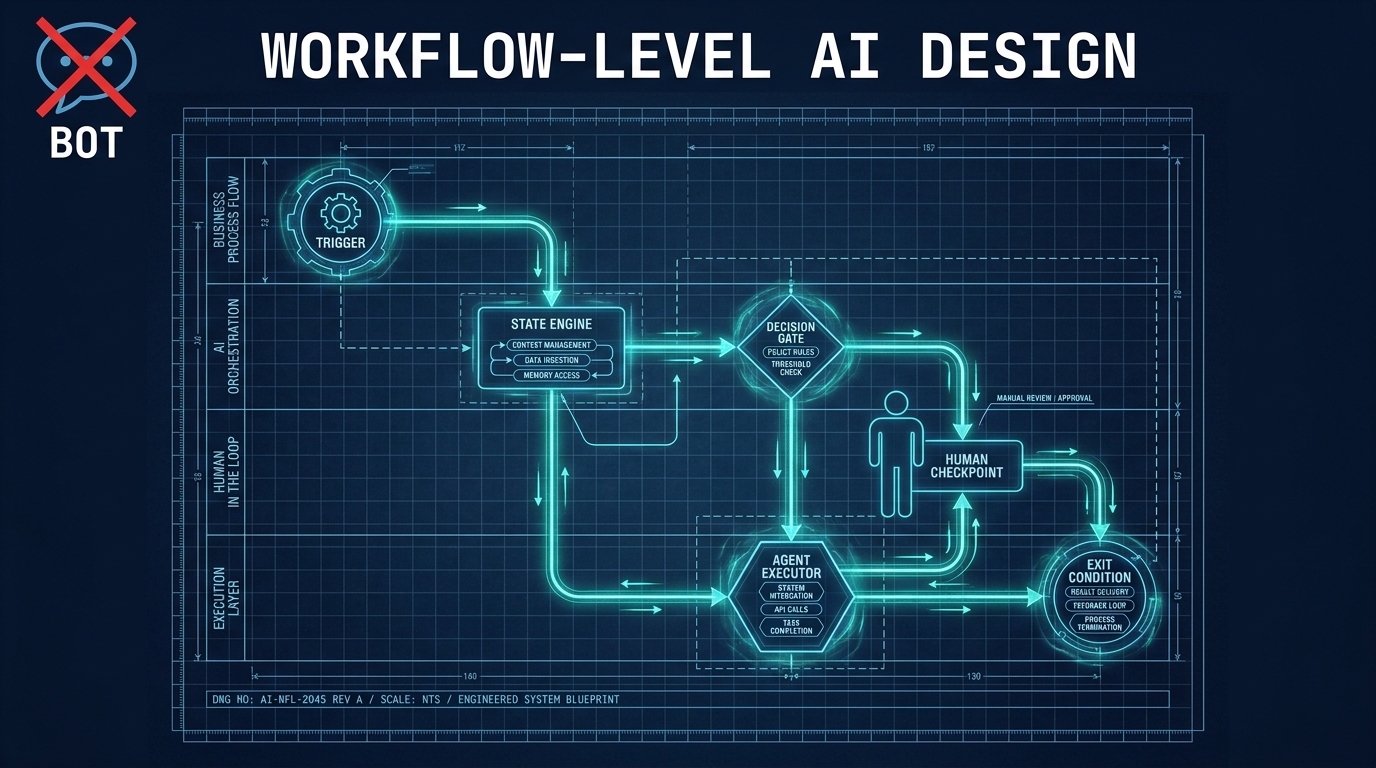

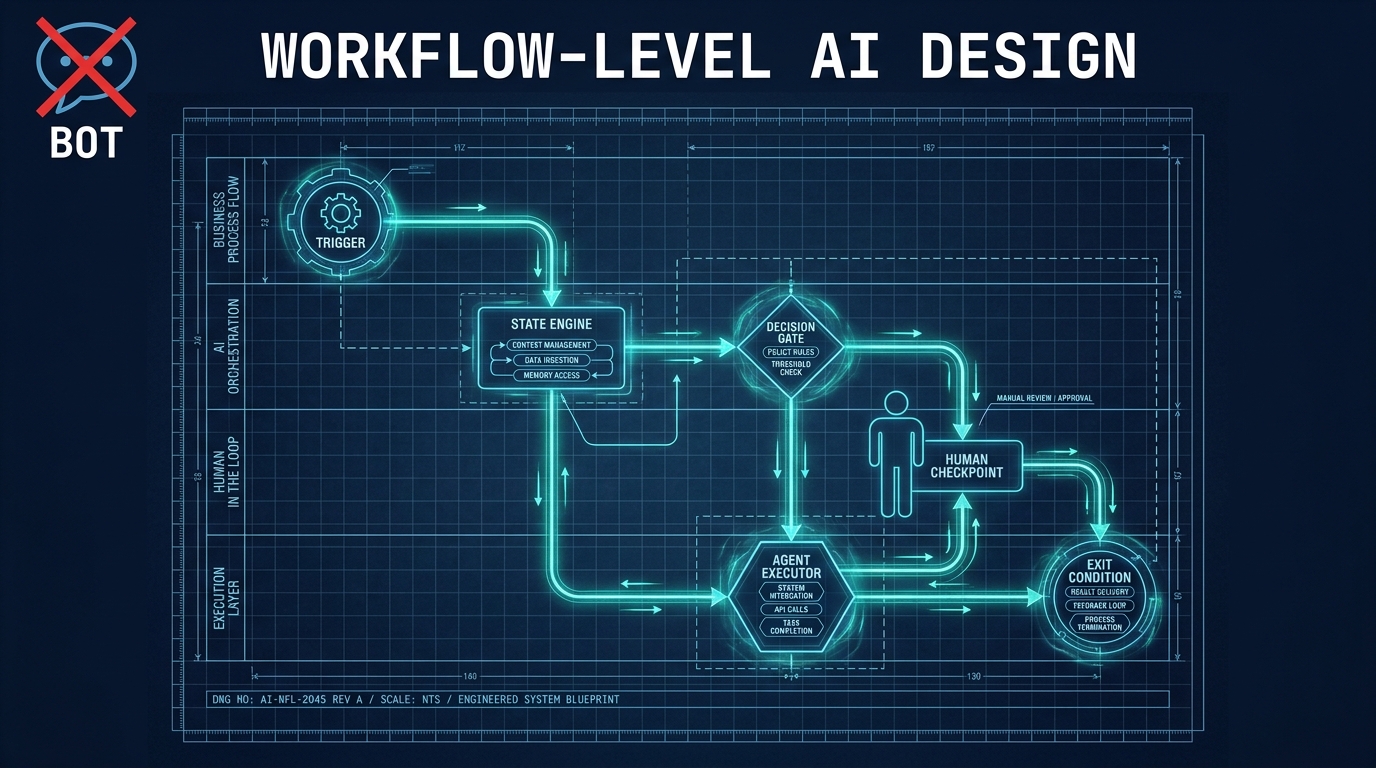
Most organisations that say they are “automating with AI” are doing something much smaller than they think. They have deployed a chatbot that drafts email replies. They have a model that classifies incoming support tickets. They have a summarisation step baked into their CRM. Each of these tools does something useful in isolation — and each one hits a ceiling almost immediately, because none of them is a workflow.
The distinction matters enormously. A bot that answers questions reduces response time. A workflow that intelligently routes, processes, validates, escalates, and closes a support request end-to-end reduces headcount pressure, improves resolution rates, creates an audit trail, and generates feedback data that makes the system better next quarter. The same underlying AI models power both scenarios. The difference is entirely architectural.
This is the design gap that is quietly separating organisations that see real, compounding returns from AI from those that are accumulating a portfolio of expensive experiments. According to recent industry data, end-to-end workflow automation delivers 20–40% process efficiency gains while task-level automation — the “do one thing” bot approach — typically yields single-digit productivity improvements. That gap is not a product gap. It is a design gap.
This article is about how to close it. Not by deploying better models, not by upgrading to a newer AI platform, but by fundamentally rethinking the unit of design: from individual tasks to end-to-end workflows, from bots that respond to systems that execute. What follows is a practical, architectural treatment of what workflow-level AI automation actually requires — from process mapping through orchestration, observability, and governance.
The Unit of Automation Has Changed — Most Teams Haven’t Noticed
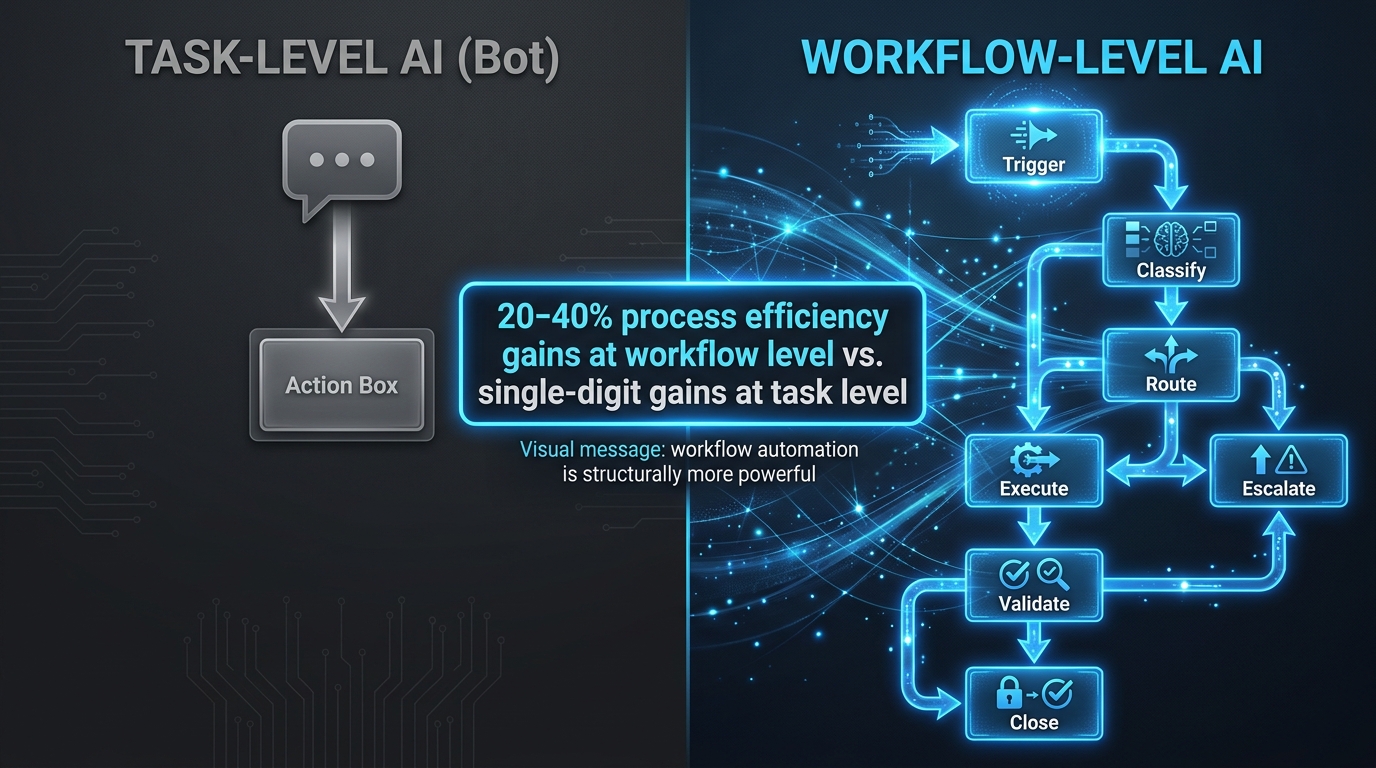
For most of 2023 and 2024, the dominant mental model for AI adoption was the task. You identified something a human did manually — writing a first draft, classifying an input, extracting data from a document — and you replaced it with an AI call. This produced real value quickly and made the capability visible. It was also, in retrospect, a starting point that many teams mistook for the destination.
The problem with task-level thinking is structural. When you automate a task inside an otherwise manual process, you speed up that step. But the surrounding process — the handoffs before and after, the exception handling, the approval routing, the feedback loops — remains human-paced and human-managed. The bottleneck moves. The cycle time may improve marginally. But the process itself hasn’t changed shape.
Why the Bottleneck Just Shifts
Consider a common deployment: an AI tool that drafts contract summaries for a legal team. The model is fast, the summaries are good, and the legal team saves several hours per week on drafting. But the contract still gets queued in a shared inbox, reviewed manually, marked up in a separate tool, sent back through email for approval, and filed by someone updating a spreadsheet. The AI made the drafting step faster. The workflow — with all its coordination overhead — remains unchanged.
This is why the industry’s “unit of automation” is shifting. The meaningful design question is no longer “what task can AI do?” It is “what end-to-end chain of tasks, decisions, handoffs, and feedback loops can be redesigned around AI?” That shift changes everything: the scope of mapping required before building, the architecture of the system, the governance model, the failure modes, and the metrics used to measure success.
What Workflow-Level Thinking Actually Means
Designing at the workflow level means treating an entire business process — with its trigger, its multiple steps, its conditional branches, its exception paths, and its exit conditions — as the atomic unit. You are not deploying a model. You are re-architecting a process. The AI models involved are components inside that architecture, not the architecture itself.
This reframe has a direct organisational consequence. It means the right person to lead an AI automation initiative is not primarily the ML engineer who fine-tunes models. It is the person who understands the process end-to-end: its inputs, its real failure modes, its human touchpoints, and the downstream systems it feeds. Engineering is essential, but process design is the prerequisite.
Workflow Anatomy: The Four Structural Elements You Need Before You Write Any Code
Every meaningful business process, regardless of industry or function, decomposes into the same four structural elements. Getting these defined on paper — clearly, precisely, without ambiguity — is the most valuable work you will do before writing a single line of automation code. Most teams skip this step or rush it. That decision causes the majority of production failures that show up three months later.
1. Triggers
A trigger is the event that starts the workflow. It sounds obvious, but defining it precisely is harder than it appears. Teams routinely discover during mapping exercises that their assumed trigger is actually two or three different events that require different downstream paths. A “new customer inquiry” might arrive via web form, via inbound email, via API from a partner portal, or via a phone call transcribed by a voice tool — and each source carries different data structures, different reliability characteristics, and different urgency levels.
A clean trigger taxonomy documents: the event type, the source system, the data payload it carries, the reliability and latency of that source, and any preprocessing required before the workflow can begin. Triggers that are ambiguously defined at design time become the leading cause of edge-case failures in production.
2. States
Between trigger and exit, a workflow passes through a defined set of states. A state is the current condition of the process — what is known, what has been done, and what is waiting. Explicit state design is the single most important architectural decision you will make in workflow-level automation. A process that knows what state it is in can recover from failures, route exceptions correctly, audit what happened, and be paused and resumed safely. A process without explicit states is a prompt chain — and prompt chains compound errors rather than containing them.
3. Handoffs
A handoff is any transition where responsibility for the workflow moves from one actor to another — from AI to human, from one system to another, from one department to the next. Handoffs are where most workflow failures originate, because the sending actor assumes the receiving actor has context that was never actually transmitted. Designing handoffs means specifying exactly what information travels with the workflow at each transition, in what format, with what acknowledgement mechanism.
4. Exit Conditions
Every workflow needs clearly defined ways to end — both successful exits and failure exits. Successful exits should produce a defined output in a defined system. Failure exits should route to a defined exception handler, not silently drop. Workflows without explicit exit conditions tend to create ghost processes: jobs that are technically running but effectively stuck, consuming resources and producing nothing.
How to Map a Workflow Before You Touch a Model
Process mapping is not a formality. It is the highest-leverage activity in workflow-level AI design, because it is the step where you discover everything that will go wrong in production — before anything is built. Teams that treat it as a documentation exercise to complete after building will spend months debugging issues that a two-day mapping exercise would have surfaced immediately.
The Swim Lane Method for AI Workflows
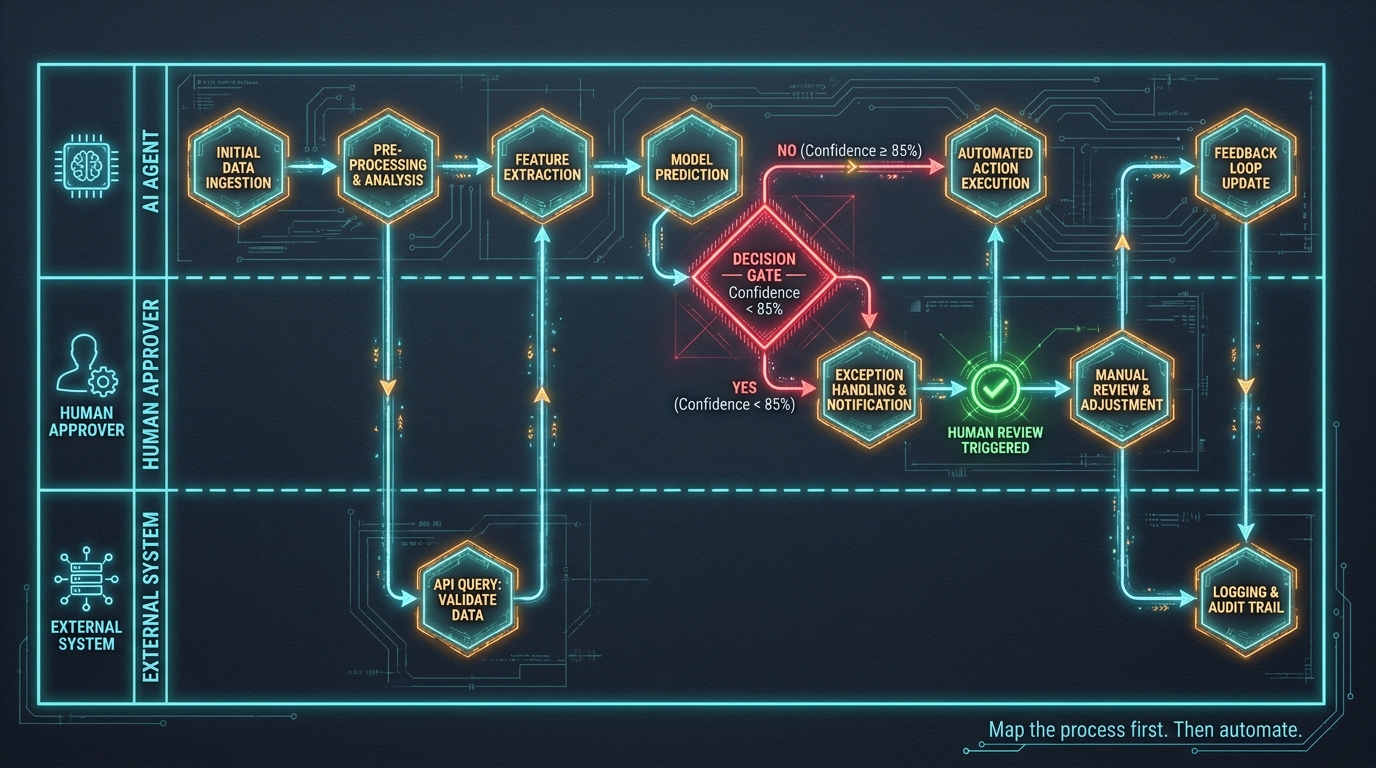
The most effective mapping format for AI workflows is the swim lane diagram, extended to treat AI agents as first-class actors with their own lanes. Each horizontal lane represents an actor: a human role, an AI agent, or an external system. Steps move left to right through time. Arrows that cross lanes represent handoffs. Decision diamonds represent branching logic.
The critical addition for AI workflows is that every AI lane must document: the model or agent handling that step, the inputs it requires, the outputs it produces, its expected confidence range, and what happens when confidence falls below threshold. These aren’t optional annotations. They are the engineering specification.
Finding the Real Process (Not the Ideal One)
The most important skill in process mapping is eliciting what actually happens rather than what is supposed to happen. Every team has an official process description and a real one. The gap between them is where all the interesting failure modes live. Effective mapping sessions ask people to describe what they do when the normal path breaks — when the data is incomplete, when the approver is unavailable, when a system is down, when a request doesn’t fit any category. These exceptions are not edge cases to deal with later. They are the process.
A practical technique: ask the team to walk through the last five cases where something went wrong. What failed? Where did it get stuck? Who had to manually intervene? The answers will define your exception handling requirements more accurately than any specification document.
Separating What to Automate From What to Augment
Once the full process is mapped, the next task is segmenting it. Not every step should be fully automated. The right framework distinguishes three categories:
- Automate fully: Steps that are high-volume, rule-based, structurally consistent, and have low consequence for errors. Data extraction, document classification, status updates, routine notifications.
- Augment with AI: Steps that require judgment but benefit from AI pre-processing — surfacing relevant information, generating draft outputs, scoring options. A human still decides, but AI makes that decision faster and better-informed.
- Keep human: Steps where accountability, relationship, legal liability, or ethical judgement make full automation inappropriate regardless of model capability.
This segmentation is not a permanent assignment. As models improve and as your observability data accumulates, steps that start in “augment” territory may eventually move to “automate.” The mapping exercise should document the reasoning behind each categorisation so it can be revisited systematically.
Decision Architecture: Where AI Should (and Should Not) Choose
The most consequential design decision in any AI workflow is where AI is allowed to make choices autonomously and where it is required to surface options for human review. Getting this wrong in either direction is costly. Too much autonomy and you get silent errors, compounding mistakes, and governance failures. Too little and you negate the efficiency case for automation entirely.
Classifying Decisions by Consequence and Confidence
The most practical framework for decision architecture plots decisions on two axes: consequence (what is the cost of getting this wrong?) and confidence (how reliably can the AI classify this correctly?). This creates four quadrants:
- High confidence, low consequence: Full AI autonomy. Route automatically, act immediately. These are your best automation targets.
- High confidence, high consequence: AI recommends, human confirms. The AI does the cognitive work; a human provides final authorisation with full context surfaced.
- Low confidence, low consequence: AI acts with logging. Allow the action, but flag for periodic review. Accumulate data to improve calibration.
- Low confidence, high consequence: Always escalate. The AI should not be deciding here. Route to human with full context and a clear explanation of why the model was uncertain.
Confidence Thresholds Are a Design Parameter, Not a Default
Most AI platforms expose a confidence score alongside predictions. Most teams use the default threshold — typically somewhere around 70–80% — without examining whether it is appropriate for their specific workflow. This is a mistake. A confidence threshold is a design parameter that should be calibrated against your actual consequence matrix and your actual error costs.
For a workflow that routes low-value support tickets, a 70% confidence threshold might be entirely appropriate. For a workflow that approves credit limit increases or flags compliance exceptions, the threshold might need to be 92% or higher before autonomous action is justified. Calibrating these thresholds requires running the workflow in observation mode — logging all decisions without acting on them — long enough to measure real accuracy against real outcomes.
The Dangerous Middle Ground
There is a pattern that appears frequently in poorly designed AI workflows: the system takes autonomous action on decisions it is not reliable enough to make, but only for cases it classifies with high confidence. The cases it flags for human review are the genuinely ambiguous ones. This sounds reasonable. The problem is that the high-confidence cases may still be systematically wrong in ways the model cannot detect — biased by training data, miscalibrated on a distribution shift, or simply overconfident. The humans who review the escalated cases never see the fully autonomous decisions, so the systematic error propagates unchecked.
The remedy is mandatory sampling: a configurable percentage of high-confidence autonomous decisions should be routed for human review regardless of confidence score. Not to slow the workflow, but to maintain calibration visibility across the full distribution of decisions, not just the uncertain ones.
The Orchestration Layer: Why State Machines Beat Prompt Chains in Production
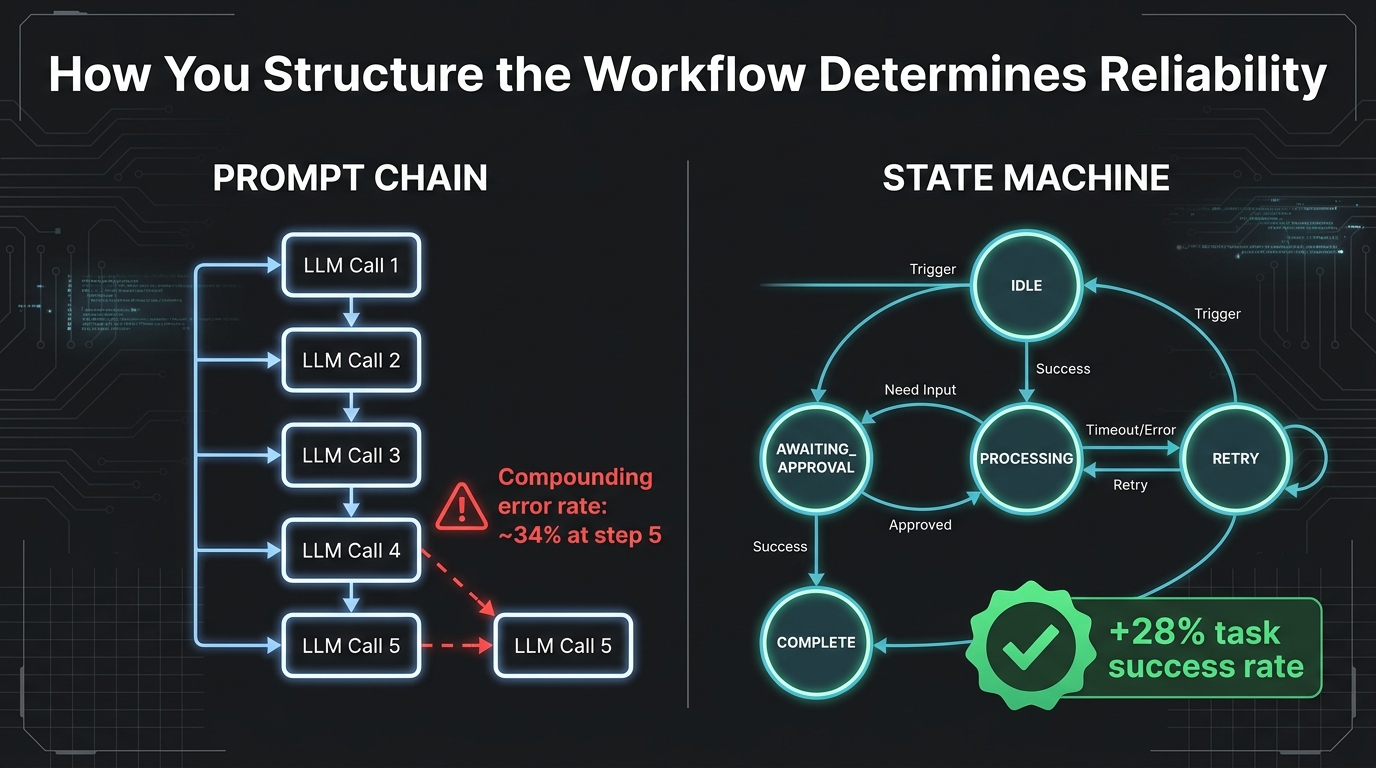
The orchestration layer is the component of a workflow-level AI system that manages state, sequences steps, routes decisions, handles retries, and coordinates between agents and external systems. Most early AI workflow implementations do not have one. They have a prompt chain: a sequence of LLM calls connected by string manipulation and conditional logic, held together by the engineering equivalent of duct tape. Prompt chains work in demos. They fail in production at a predictable rate.
The Compounding Error Problem
In a multi-step AI workflow, each step has an error rate. If step one is 95% accurate, step two is 95% accurate, and step three is 95% accurate, the probability that all three are correct in the same run is roughly 85.7%. Add a fourth step at the same accuracy and you are at about 81%. By step five, you are below 77% — meaning nearly one in four workflow runs produces an incorrect output, even when each individual step looks highly reliable in isolation.
This compounding dynamic is the fundamental reliability problem with unstructured prompt chains. The solution is not to make each step more accurate (though that helps). The solution is to design the orchestration layer so that errors are contained, retried, or escalated rather than silently propagated. That requires explicit state management.
State Machines: The Correct Abstraction
A state machine models a workflow as a set of named states and a set of transitions between them. The workflow always knows exactly what state it is in. Each transition is explicit and triggered by a defined event or condition. Each state has defined entry actions, defined exit conditions, and defined fallback paths if something goes wrong.
Research on production AI workflows comparing state-machine-based orchestration with standard prompt chaining shows consistent, significant reliability advantages. Benchmarking on complex multi-step tasks shows state-machine-constrained workflows achieving 13–28 percentage point higher task success rates than ReAct-style prompt chains, with substantially lower token costs at the same output quality. The reliability advantage grows as task complexity and step count increase — exactly the conditions that matter most for enterprise workflows.
Durable Execution: The Practical Implementation Pattern
In practical terms, durable execution means the orchestration layer persists workflow state to storage at each step. If the process crashes, times out, or encounters a transient error, it can resume from the last saved state rather than restarting from scratch. This is standard practice in conventional workflow systems and has been conspicuously absent from many early AI workflow implementations, because engineers treat LLM calls like function calls — stateless and instant — when they are actually long-running, probabilistic operations that need to be managed accordingly.
Platforms that provide durable execution primitives natively (frameworks like Temporal, Prefect, and certain cloud-native workflow services) significantly simplify building reliable AI workflows. Teams that build their own execution layer from scratch tend to rediscover the same set of problems — retry logic, timeout handling, idempotency, partial completion — that these platforms already solve.
Separating Planning, Execution, and Control
For workflows that involve multiple AI agents, the orchestration architecture should cleanly separate three functions: planning (deciding what to do next), execution (doing it), and control (monitoring whether it was done correctly and responding if not). Conflating these functions — particularly in systems where a single agent both plans and executes — creates the conditions for planner drift: a situation where the system’s internal model of what it is trying to achieve gradually diverges from what it is actually doing, without anyone noticing until significant damage is done.
Designing Human-in-the-Loop Gates That Actually Work
Human-in-the-loop (HITL) design is widely cited as essential for responsible AI deployment. It is also widely implemented in ways that do not work. The most common failure mode is a HITL gate that humans are trained to click through without reading, because the system has not given them the context they need to make a meaningful review in the time they have available. This is not a governance solution. It is a governance theatre solution — it looks like oversight while providing none.
Designing for Actual Human Decision-Making
An effective HITL gate presents the human reviewer with three things: what the AI decided, why it decided that (not the full model internals, but a human-readable summary of the key factors), and what the consequences of approving versus rejecting the decision are. Without all three, the human cannot make an informed choice. They are approving a black box.
The time budget matters too. If your HITL gate is in a workflow that processes 200 items per hour and your human reviewer has time for 30 seconds per item, the gate interface needs to surface all three elements — decision, rationale, consequence — within that window. Designing a gate that requires three minutes of careful reading to use correctly, in a context where reviewers have thirty seconds, produces rubber-stamping, not oversight.
Calibrating When HITL Is Triggered
Well-designed HITL gates are not triggered by everything. They are triggered by specific, pre-defined conditions: confidence below a threshold, input data that falls outside the training distribution, high-consequence decision categories, randomly sampled cases for calibration (as discussed in the decision architecture section), and any case where the model’s output includes a self-assessed uncertainty flag.
Over-triggering HITL gates is as dangerous as under-triggering them. When humans are asked to review everything, they review nothing carefully. The signal-to-noise ratio of the review queue determines how much real oversight actually happens. Designing HITL triggers requires the same deliberate thought as designing the automation itself — it is not a setting to configure after the fact.
Closing the Feedback Loop
Every human decision made at a HITL gate is a labelled data point. The human saw what the AI decided, evaluated it, and either confirmed or overrode it. This is valuable training signal. Systems that do not capture human overrides and surface them for model evaluation are leaving the most relevant feedback data on the table. Over time, a well-instrumented HITL gate should show a declining override rate as the model improves — and a sudden increase in override rate should trigger an immediate investigation into distribution shift or model degradation.
Multi-Agent Coordination and the Hidden Failure Modes
As workflows grow more complex, single-agent systems give way to multi-agent architectures: networks of specialised AI agents that handle different parts of the workflow and pass work between them. Multi-agent systems can handle substantially more complex workflows than any single agent. They also introduce a category of failure modes that single-agent systems do not have, and which are poorly understood by most teams deploying them.
Context Bleed
Context bleed happens when information from one part of a workflow — or from a previous workflow run — leaks into an agent’s context for a different task. In a poorly designed multi-agent system, agents may be sharing context windows, reusing session state, or receiving handoff payloads that contain irrelevant prior information. The agent processes this leaked context alongside the relevant task data, and the result is subtly wrong outputs that are difficult to debug because the error is not in the agent’s logic — it is in the data it was given.
The engineering remedy is strict context isolation: each agent invocation receives exactly the information it needs for its specific task, assembled from the workflow state at the time of invocation, with no carry-over from other agents or previous runs. This requires deliberate context assembly at each handoff, which is more work than passing full session history — and dramatically more reliable.
Planner Drift
Planner drift is the multi-step analogue of a navigation system that updates its route continuously without informing the driver. In agentic workflows, the orchestrating agent (the planner) decomposes the task into sub-tasks and assigns them to worker agents. Over the course of a long workflow, the planner may update its understanding of what needs to be done based on intermediate results — sometimes productively, sometimes not. When a planner silently changes the workflow’s objective based on partial information, the final output may address a different problem than the one that was originally submitted.
Controlling planner drift requires explicit checkpointing: the planner’s current understanding of the task goal should be logged at each major decision point. Any substantial change in the stated goal should trigger a human review gate rather than proceeding autonomously. This adds latency to some workflows, but prevents a class of failure where the system completes successfully — technically — while solving the wrong problem entirely.
Designing Agent Boundaries
The most production-reliable multi-agent architectures in 2026 follow a supervisor-worker pattern: a single orchestrating agent (the supervisor) that decomposes and sequences work, paired with specialised worker agents that each have a narrow, well-defined function. Worker agents should be stateless — they receive a task, complete it, return a result. All state lives in the orchestration layer, not in individual agents. This design makes agents independently testable, replaceable, and debuggable in isolation, which is essential for maintaining complex systems over time.
Observability as a Design Requirement, Not an Afterthought
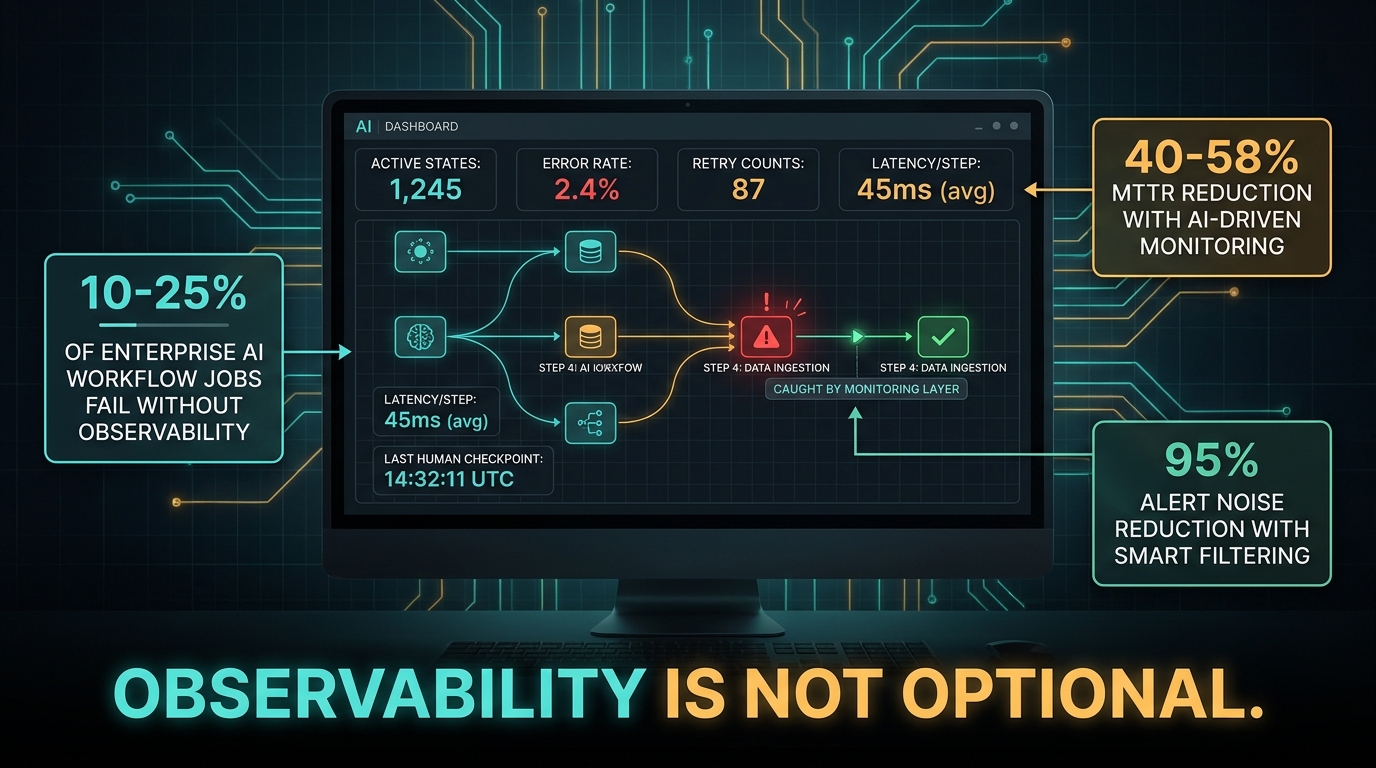
Current industry data shows that between 10% and 25% of enterprise AI workflow jobs fail in production. That is not a model quality problem — the models themselves are generally reliable. It is an observability problem. Failures go undetected, or are detected long after they have cascaded into larger issues, because the observability layer was treated as something to add after the workflow was working rather than something designed in from the beginning.
What AI Workflow Observability Actually Requires
Traditional application monitoring — uptime checks, error rate alerts, latency thresholds — is necessary but insufficient for AI workflows. Traditional monitoring will tell you that an API call returned a 200 status code. It will not tell you that the output was semantically wrong, that the confidence was declining over the past three hundred requests, that the AI is making different types of errors than it was last week, or that a particular sub-population of inputs is performing far worse than average.
AI workflow observability requires instrumenting at the semantic level, not just the infrastructure level. This means logging, for every AI step: the input, the output, the confidence score, the model version, the token count, the latency, and the outcome — what actually happened downstream as a result of this output. Without the outcome data, you can observe whether the workflow ran; you cannot observe whether it worked.
The Metrics That Matter
For workflow-level AI systems, the observability stack should track metrics at three levels:
- Step-level metrics: Per-agent accuracy (measured against human review outcomes), confidence distribution, latency, token cost, error types and rates, retry frequency.
- Workflow-level metrics: End-to-end completion rate, cycle time from trigger to exit, HITL gate trigger rate and override rate, exception path frequency, ghost job rate.
- Business-level metrics: The actual process outcome the workflow was designed to improve — resolution rate, approval time, data quality score, cost per transaction. These are the only metrics that answer the question “is this working?”
Alert Design for AI Workflows
Alert fatigue is as much a problem in AI workflow operations as in general infrastructure management. Organisations that have implemented AI-driven observability with intelligent alert routing report up to 95% reductions in alert volume compared to threshold-based alerting, alongside 40–58% improvements in mean time to resolution when incidents do occur. The design principle: alerts should surface actionable anomalies, not raw metrics crossing static thresholds.
For AI workflows, the most useful alert conditions are: sudden increase in HITL override rate (model accuracy declining), confidence score distribution shift (the input population is changing), step-specific latency spike (an upstream dependency is degrading), and ghost job accumulation (workflows are getting stuck in specific states). Each of these signals a specific, diagnosable problem. “Error rate exceeded 2%” does not.
Governance, Ownership, and the Process Owner Role
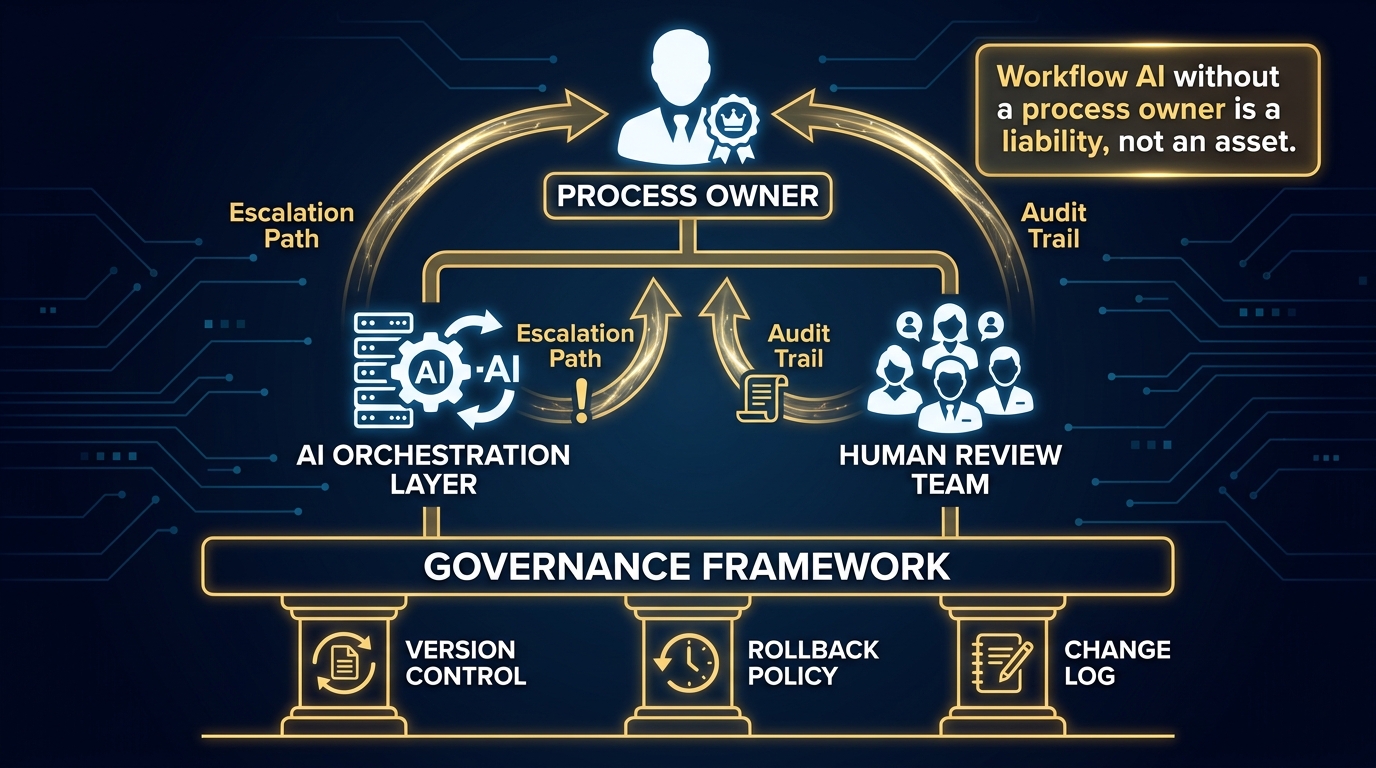
Workflow-level AI automation has a governance requirement that task-level bots do not. When you automate a task, the scope of impact is bounded. When you automate an end-to-end process, you are replacing or restructuring a chain of human decisions and actions that may span multiple teams, touch external parties, and carry legal or regulatory implications. The governance model has to match that scope.
The Process Owner Role
Every production AI workflow needs a named process owner: a person who is accountable for the workflow’s performance, responsible for approving changes to it, and empowered to pause or roll it back if something goes wrong. This is not the ML engineer who built it, though they may be involved. It is the business-side person who understands what the workflow is supposed to achieve and who will be held accountable if it fails to achieve it.
The process owner role is distinctly different from a project sponsor or an executive champion. A project sponsor funds the initiative. A process owner operates it. They should be reviewing the business-level observability metrics regularly, participating in threshold calibration decisions, and serving as the escalation point when the HITL gate identifies patterns that need process-level response rather than technical response.
Workflows that lack a clear process owner tend to drift. Models get updated, thresholds get adjusted, and the workflow gradually evolves away from its original design without anyone ensuring the changes are coherent. In regulated environments, this drift is a compliance risk. In any environment, it is a reliability risk.
Version Control for Workflows
Every component of a workflow-level AI system that can change should be version-controlled: the workflow definition itself, the model versions in use at each step, the prompt templates if they are used, the confidence thresholds, and the HITL trigger conditions. This is not controversial in principle. It is routinely neglected in practice.
The consequence of poor workflow versioning is that when something goes wrong — and something will go wrong — you cannot reliably identify what changed and when. You cannot roll back to the last known good configuration. You cannot compare current performance to a baseline. You are debugging a moving target without a map of what has moved.
Change Management for Automated Processes
Changes to a production AI workflow should follow a defined change management process: proposal, review by the process owner, staging environment testing, phased rollout (perhaps routing 5% of volume through the new version before cutting over fully), metric comparison, and documented sign-off. This is the same discipline applied to any critical production system — it is just routinely omitted from AI workflows because they feel more like software experiments than operational infrastructure. They are operational infrastructure. The discipline should match.
How to Know When a Workflow Is Actually Production-Ready
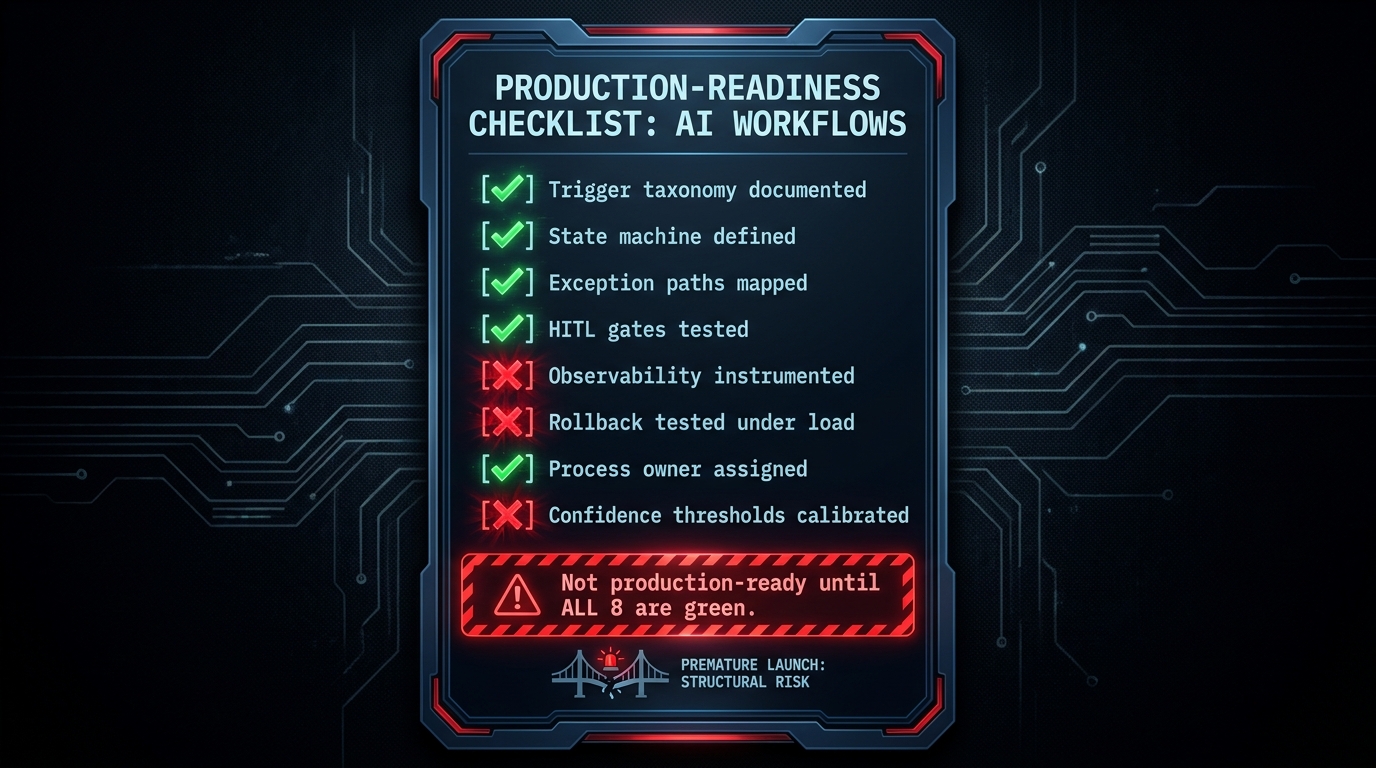
One of the most consistent patterns in enterprise AI automation is premature production deployment. A workflow performs well in the staging environment, the demo goes smoothly, there is organisational pressure to ship, and the team moves to production before the system is genuinely ready. The failures that follow are predictable but nevertheless damage trust in AI automation broadly — not just in the specific workflow that failed.
Production readiness for workflow-level AI automation requires passing a specific set of tests that go beyond functional correctness.
The Eight Production-Readiness Criteria
1. Trigger taxonomy is documented and tested. Every trigger type the workflow can receive has been enumerated, tested with real data, and validated for correct downstream handling. Edge-case trigger formats do not cause silent failures.
2. The state machine is fully defined. Every state the workflow can be in is named and documented. Every transition is explicit. There are no implicit or assumed transitions. The state machine has been reviewed by someone other than the person who built it.
3. Exception paths are mapped and tested. The happy path is tested. The failure paths are tested equally rigorously. Every step that can fail has a documented and tested failure path — not a generic error handler, but a specific, appropriate response.
4. HITL gates have been tested under realistic conditions. Reviewers have used the actual HITL interface with actual workload. The time required for a meaningful review is measured and compared to the time available. Override rates in testing are documented.
5. Observability is instrumented end-to-end. Every step emits the metrics defined in the observability design. Dashboards are built. Alert conditions are defined and tested. The team can answer the question “is this workflow healthy right now?” in under thirty seconds.
6. Rollback has been tested under load. The team has practiced rolling back to the previous version in a staging environment that mirrors production load characteristics. The rollback time is measured and acceptable.
7. A process owner is named and briefed. The process owner understands the workflow, has reviewed the observability setup, knows how to interpret the business-level metrics, and is prepared to act if conditions trigger escalation.
8. Confidence thresholds are calibrated against real data. Thresholds were not left at defaults. They were calibrated against real workflow inputs, with documented accuracy measurements at each threshold level, and set deliberately against the consequence matrix for each decision type.
These eight criteria are not bureaucratic gatekeeping. Each one represents a class of production failure that is prevented by passing it. Teams that shortcut any of them should document the shortcut explicitly and plan a remediation timeline — not because of process compliance, but because the failure mode it leaves open is predictable and avoidable.
The Phased Rollout Requirement
Even a workflow that passes all eight criteria should not go to full production volume immediately. The correct rollout pattern is: start at 5–10% of live volume alongside the existing process, measure business-level outcomes against the baseline, confirm observability is capturing what was expected, and escalate volume in stages with explicit sign-off gates between each stage.
Phased rollout serves two purposes. It limits blast radius if an undetected issue surfaces under real conditions. And it provides the calibration data — real production inputs producing real outcomes, reviewed against real human baselines — that is essential for trusting the system enough to run it at full scale.
From Automation Projects to Automation Architecture: Building the Capability, Not Just the Workflow
The final and perhaps most consequential shift in workflow-level AI automation is treating it as a persistent organisational capability rather than a series of individual projects. Organisations that build one AI workflow successfully and then repeat the pattern for the next workflow, independently, from scratch, are leaving most of the value unrealised. The most significant efficiency gains from workflow-level AI come from compound architectural investment: shared components, reusable patterns, common governance infrastructure, and accumulated operational knowledge.
The Reuse Problem
Most enterprise AI automation teams are, without realising it, rebuilding the same components repeatedly. Every new workflow needs trigger handling. Every new workflow needs a state management layer. Every new workflow needs HITL gate logic, observability instrumentation, and exception path handling. Teams that build these components once, properly, and reuse them across workflows move dramatically faster than teams that build them freshly for each project — and produce dramatically more consistent results, because the shared components carry the hard-won reliability engineering from every previous workflow.
This is the real argument for an internal AI workflow platform, even at organisations too small to justify a dedicated platform team. A library of well-tested workflow components — trigger adapters, state machine templates, HITL gate patterns, observability hooks — reduces the effective cost of each new workflow while increasing its baseline quality. It also creates a single place to apply improvements: fix a bug in the retry logic once and it is fixed for every workflow that uses it.
Accumulating Institutional Knowledge
Workflow-level AI automation also generates knowledge that compounds over time. Which process types automate reliably and which require more augmentation than automation? Which confidence thresholds are appropriate for which consequence levels in your specific business context? What does a healthy HITL override rate look like in your environment, and what rate signals a problem? These questions can only be answered from operational data, and the data accumulates only in organisations that are running production workflows and capturing the results systematically.
Teams that treat each automation project as independent lose this accumulation. Teams that maintain shared observability infrastructure, shared process owner training, and shared post-mortems after workflow failures build an organisation that genuinely knows how to run AI workflows — rather than one that has run a few AI experiments.
When to Expand Scope
The practical question for most organisations is where to apply workflow-level thinking first. The best candidates are processes that are: high-volume (enough throughput to generate meaningful observability data quickly), high-variation-tolerant in their outcomes (some error rate is acceptable, particularly at the start), structurally consistent in their triggers and inputs, and currently creating visible bottlenecks or quality problems. Customer support triage, procurement approval routing, compliance document review, invoice processing, and onboarding workflows are consistently strong early candidates across industries.
Processes that involve novel, one-off situations, that carry high individual-case consequence, or that depend heavily on relationship context that is not captured in any system are better candidates for AI augmentation — supporting human decision-makers — than for full workflow automation, at least until a strong track record and calibration dataset has been established.
Conclusion: The Design Work Is the Hard Work
Workflow-level AI automation is not primarily a technology problem. The models exist. The platforms exist. The tooling has matured considerably. What most organisations are missing is the design discipline — the structured thinking about process anatomy, decision architecture, state management, exception handling, and governance that makes the difference between a workflow that works reliably in production and one that looked great in the demo and failed three weeks after launch.
The central argument of this article is simple: the unit of design should be the workflow, not the task. Designing at the workflow level requires mapping before building, explicit state management, calibrated decision architecture, structured HITL gates, purpose-built observability, and named accountability. Each of these requirements is a design choice, not a technical constraint. They are answered by process thinking, not model selection.
The organisations building durable AI automation capability in 2026 are the ones who understood this early — who treated the mapping session as the highest-leverage investment, who built governance infrastructure before it was required by a failure, and who designed every workflow with an explicit answer to the question: what happens when this breaks? Those teams are accumulating operational knowledge and reusable architecture with every workflow they ship. Teams still deploying isolated bots are accumulating a different kind of portfolio: a collection of point solutions that each require individual maintenance and deliver individual, non-compounding value.
The gap between those two trajectories widens with every quarter. Closing it does not require better models. It requires better architecture.
Key Takeaways
- Redesign before you automate. Map the full workflow — triggers, states, handoffs, exits — before writing any code or configuring any model. The mapping exercise is where you find the real failure modes.
- Use state machines, not prompt chains. Explicit state management produces 13–28% higher task success rates in production and dramatically improves debuggability and recovery.
- Calibrate confidence thresholds deliberately. Defaults are not appropriate. Set thresholds against your specific consequence matrix, validated against real data.
- Design HITL gates for real human capacity. A gate that requires three minutes to use correctly in a thirty-second workflow is not oversight. Test the gate with real reviewers under real time pressure.
- Treat observability as a design requirement. Instrument step-level, workflow-level, and business-level metrics from the start. You cannot improve what you cannot see.
- Name a process owner before going to production. Not a project sponsor — an operational owner who reviews performance regularly and can act when metrics signal a problem.
- Build components for reuse. Trigger adapters, state templates, HITL patterns, and observability hooks built once and reused compound in value with every subsequent workflow.