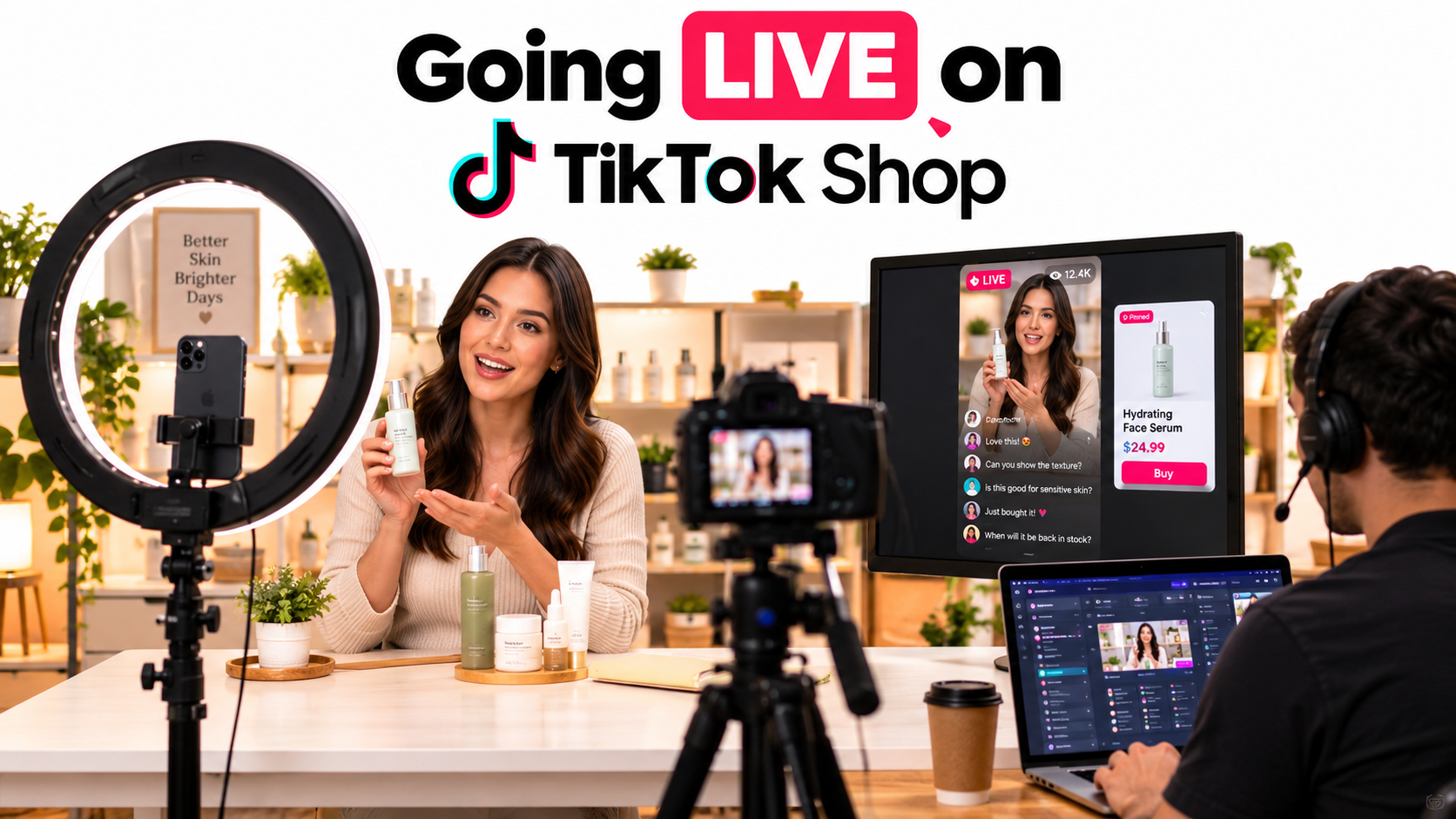

Most TikTok Shop sellers start in the same place. They list products, send out samples to affiliates, post a few short videos, and maybe test some ads. LIVE selling sits on the to-do list as “something we’ll get to,” usually because it looks unpredictable, needs staff, and feels like a performance more than a sales channel.
That hesitation makes sense. A livestream is the one TikTok Shop format where you can’t edit, can’t reshoot, and can’t hide a weak offer behind good editing. It’s also the format where a seller has the most direct control over how a buyer experiences the product, minute by minute.
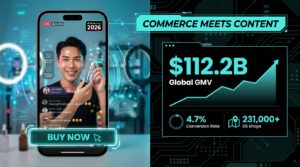
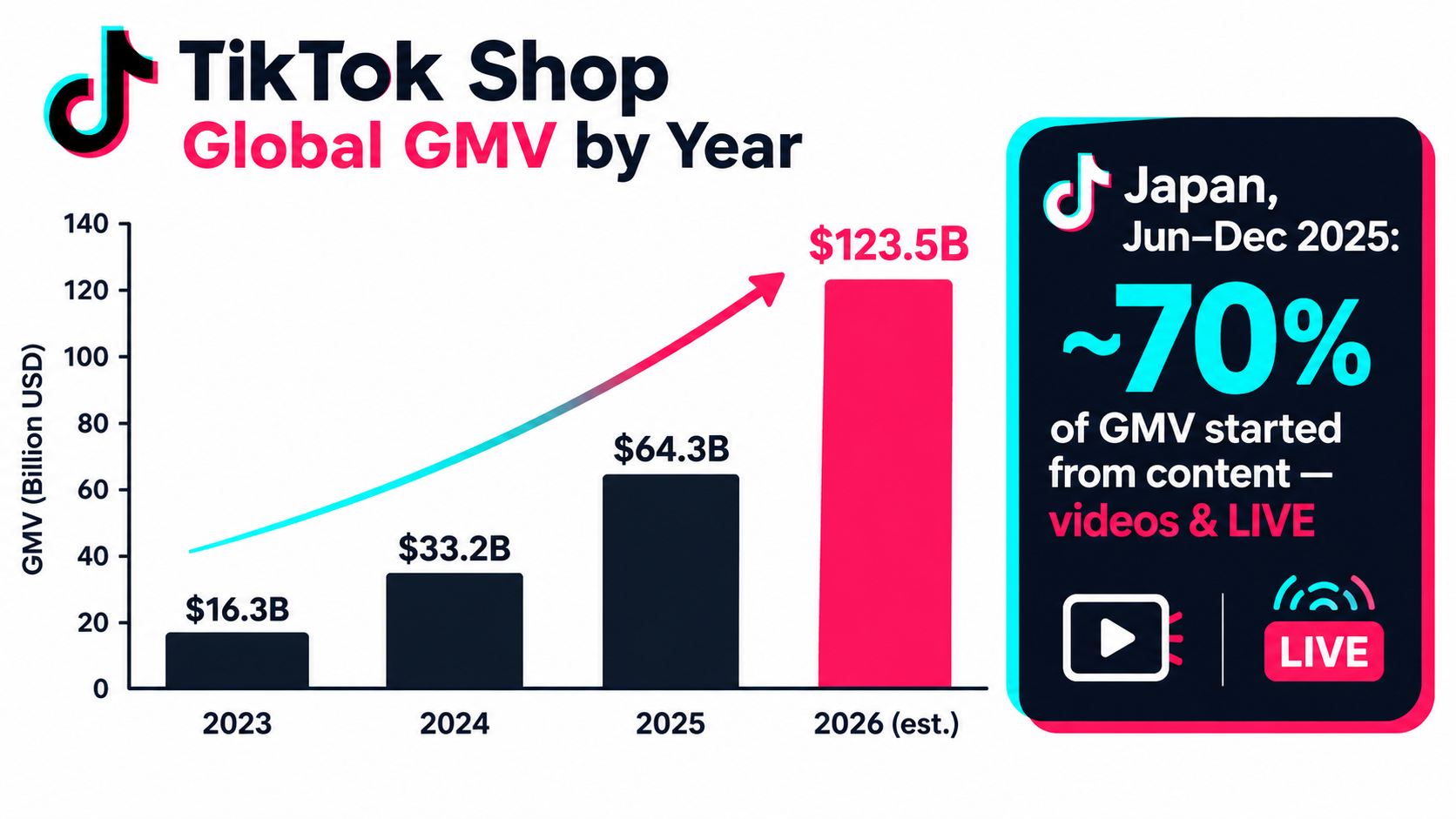
The numbers around TikTok Shop make the question harder to ignore. Global GMV on the platform reached an estimated $64.3 billion in 2025 and is projected to hit roughly $123.5 billion in 2026, according to Statista and Momentum data compiled by DemandSage. In the US alone, TikTok Shop sales reached about $15.8 billion in 2025, and first-half 2026 US GMV came in at around $11.8 billion, more than double the same period a year earlier.
Much of that volume starts with content rather than search. When TikTok reported on its first six months in Japan, it found that about 70% of total GMV between June 30 and December 2025 came from purchases that began with content: creator posts, seller videos, and LIVE streams.
This article doesn’t cover TikTok Shop SEO, algorithm updates, commission structures, or unit economics. Those are separate topics. The focus here is narrower and more practical: how to decide whether LIVE fits your business, and if it does, how to build a livestream operation that runs like a sales channel instead of a hobby. We’ll look at product fit, crew roles, show structure, the short video and creator LIVE flywheel, paid traffic, compliance, measurement, and a 30-day launch plan.
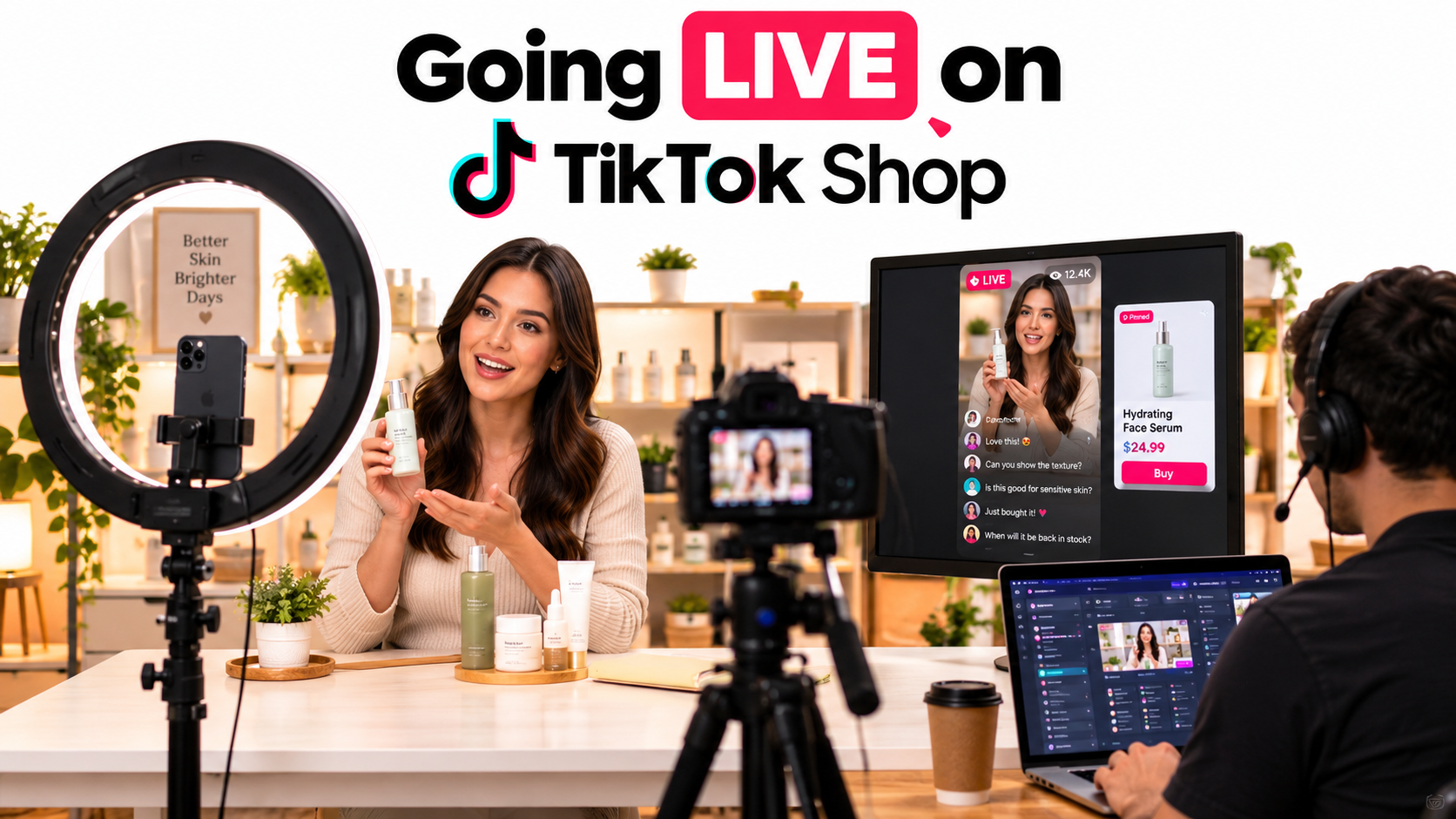
Why LIVE Deserves a Second Look in 2026
For a while, livestream shopping in Western markets carried a reputation problem. Sellers heard stories about massive livestream sales in China and Southeast Asia, then tried a stream in the US or UK and pulled a dozen viewers. The gap between the hype and the first-week reality put many brands off.
Three things have changed the calculation since then.
1. The platform’s scale is now large enough to support routine streaming
TikTok Shop has more than 15 million sellers worldwide. More than 215,000 small businesses sell on the platform in the US, and the UK has around 200,000 small and midsize sellers. US TikTok Shop sales are estimated to reach about $23.4 billion in 2026, which would be roughly 22.8% of US social commerce.
That scale matters for LIVE specifically. A livestream needs a steady supply of viewers who are already in a shopping mindset. As more TikTok users buy through the app, the pool of people who will tap into a LIVE with a product card pinned grows with it. Estimates cited on Wikipedia put the number of US users buying from the platform at around 54 million.
2. Buyers aren’t only young anymore
A common objection to LIVE is that it only works for Gen Z impulse purchases. The Japan data cuts against that. TikTok reported that buyers aged 18–34 and buyers aged 35 and older each made up about half of its Japanese customer base after six months. In the US, users aged 25 to 34 form the largest buyer group, according to DemandSage’s compilation.
Older buyers tend to have larger baskets and more questions. A livestream, where someone can type “does this work on sensitive skin?” and get an answer in ten seconds, suits that kind of buyer well.
3. Domestic sellers have more room
When the US ended the de minimis import exemption in May 2025, sales from foreign sellers dropped sharply, and domestic businesses picked up more of the demand. For a US-based brand with local inventory, that shift makes LIVE more practical: faster shipping lets you make promises during a stream that a cross-border seller can’t.
What the 70% figure really tells you
The Japan figure is easy to misread. It doesn’t say LIVE drives 70% of sales. It says content in general, including videos, creator posts, and livestreams, sparked about 70% of purchases. The takeaway is that TikTok Shop is a discovery channel first. Buyers rarely arrive with a product in mind; they see something and decide.
LIVE is one of the content formats that drives that discovery, and it’s the only one that responds to the viewer in real time. That’s the reason to evaluate it seriously, not because it’s guaranteed to outperform short video.
Anatomy of a High-Commitment LIVE Program: The Oji Pharma Model
The most useful case study from TikTok’s Japan update comes from Oji Pharma (王子製薬), a home and personal care company. Their approach wasn’t subtle. According to TikTok’s February 2026 newsroom release, the company ran LIVE streams of four to six hours almost every day.
The company described the result as a cycle: new viewers came in, some became regulars, and regulars converted to buyers. Alongside the streams, Oji Pharma published creator posts and its own organic videos to reach people who weren’t watching the LIVE. The company reported that ad-driven GMV grew by roughly 4,500% month over month in at least one month.
Why duration and frequency matter
A four-to-six-hour daily stream sounds extreme to most Western brands, but the logic is straightforward. A livestream is a store that’s only open while you’re broadcasting. If you stream for 45 minutes once a week, you have 45 minutes of shelf time. If you stream five hours a day, six days a week, you have 30 hours.
Longer, more frequent streams give the platform more chances to place your LIVE in front of viewers. They also give regular viewers a habit. When people know you’re on every evening from 7 to 11, they come back the way they’d return to a favorite shop.
What this model requires
Running at Oji Pharma’s intensity isn’t a side task. It implies:
- Multiple hosts working in shifts, since one person can’t sustain energy and accuracy for six hours daily.
- A dedicated set that stays built, so setup time doesn’t eat into airtime.
- A product line with repeat purchase. Home and personal care goods get used up and reordered, which is why regular viewers keep buying.
- Supporting content outside the stream, so the LIVE isn’t the only way people find you.
You don’t need to start there
The lesson from Oji Pharma isn’t “stream six hours a day from day one.” It’s that consistency compounds. A brand that streams two hours on a fixed schedule four days a week will build more momentum than one that runs a big three-hour event once a month. Pick a cadence you can sustain for 90 days, then expand once you see which time slots and products respond.
The Product Fit Test: Is Your Catalog Built for LIVE?
Not every product belongs on a livestream. Before you buy a ring light, run your catalog through a simple test. The questions below aren’t official TikTok criteria; they’re a practical filter based on what makes the format work.
Question 1: Can you show something in 60 seconds that a photo can’t?
LIVE rewards products where the demonstration is the pitch. Skincare texture on skin, a stain coming out of fabric, a kitchen gadget slicing vegetables, a foundation shade matched against three skin tones. If the product looks the same in a still image as it does in motion, a livestream adds less.
Beauty and personal care lead TikTok Shop product sales overall, which fits this pattern. They’re visual, tactile, and full of questions about fit and use.
Question 2: Does the product generate questions?
Viewer questions are fuel for a stream. “Is it vegan?” “How long does one bottle last?” “Will it fit a queen bed?” Each question gives the host something to answer, which keeps the stream active and reassures other viewers who had the same doubt but didn’t type it.
Products with no questions to ask, such as a basic phone charging cable, tend to make for flat streams. Products with too many technical questions, such as complex electronics, can bog a host down.
Question 3: Is the price in the impulse-to-considered range?
Very cheap items often don’t justify the airtime, because each sale contributes little. Very expensive items rarely convert on a single viewing. The middle range, where a buyer hesitates for a moment but can decide within the stream, is where LIVE does its best work. Bundles help here, letting you move a lower-priced item into a more meaningful basket.
Question 4: Will people buy it again?
Consumables build the regular audience that makes daily streaming worthwhile. Oji Pharma’s home and personal care line is a good example. If your product is a one-time purchase, LIVE can still work, but you’ll depend more on constantly bringing in new viewers.
Question 5: Do you have enough SKUs to rotate?
A two-hour stream about a single product gets repetitive. Having a hero product plus three to six complementary items, such as refills, add-ons, sizes, or bundles, gives the host natural transitions and lets you raise average order value.
Scoring your catalog
Score each product family from 1 to 5 on each question. Families scoring 18 or above out of 25 are strong LIVE candidates. Those scoring 12 to 17 may work in a mixed show alongside stronger products. Below 12, put your effort into short video and affiliates instead.
Staffing the Stream: The Three Roles Every LIVE Needs
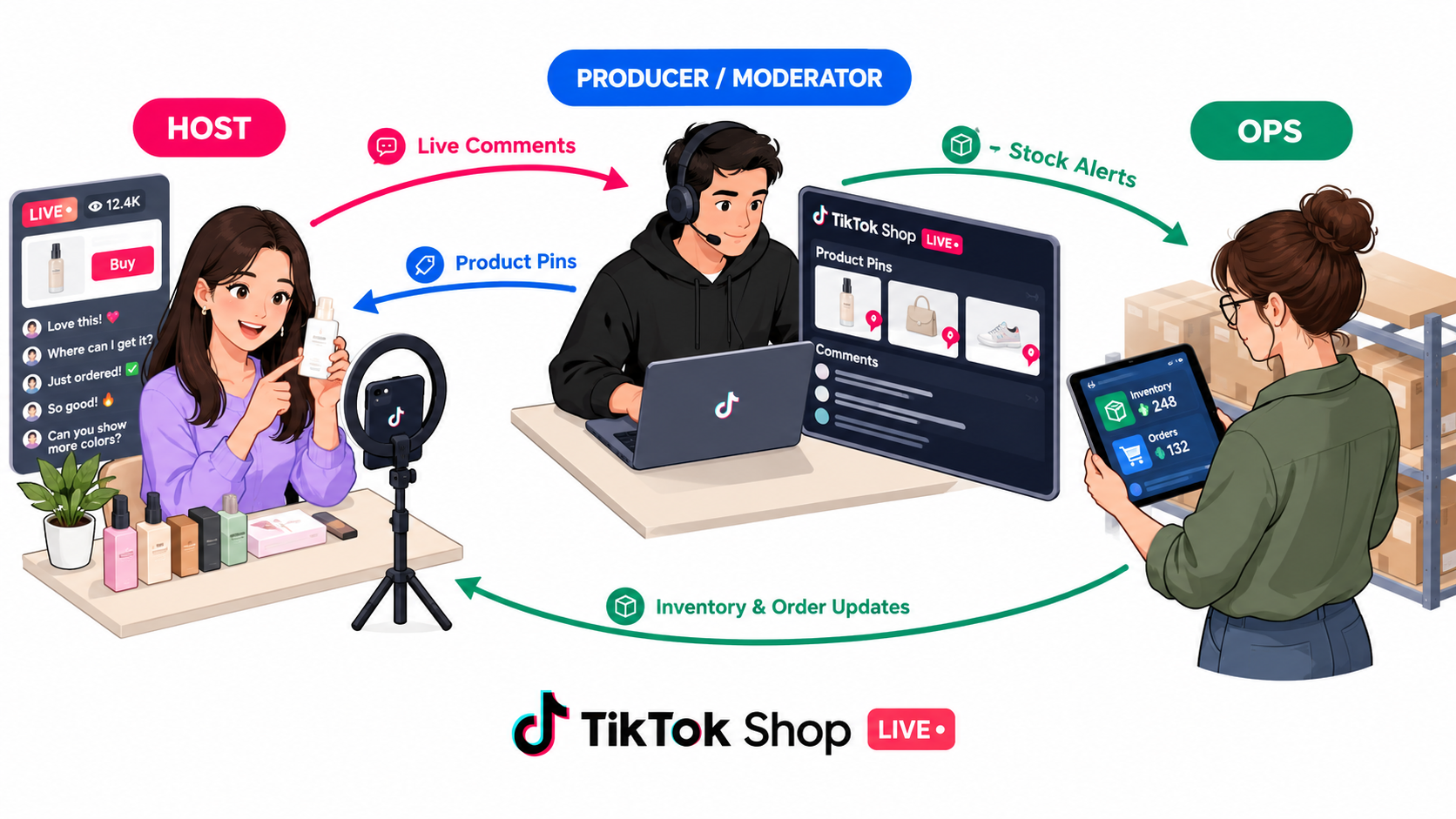
The most common reason first livestreams fall flat isn’t the product or the algorithm. It’s a single person trying to host, read comments, pin products, answer stock questions, and watch the clock all at once. A functional LIVE has at least three jobs, even if one person covers two of them early on.
Role 1: The host
The host is the face of the stream. Their job is to demonstrate, explain, answer questions, and keep the energy steady. Good hosts aren’t necessarily the most charismatic people in the company. They’re the ones who know the product deeply and can talk naturally about it for an extended period without sounding scripted.
Many brands find that people from customer service or product development make better hosts than marketers, because they’ve heard every question already. What matters most is product knowledge, comfort on camera, and the ability to stay accurate about claims under pressure.
Role 2: The producer and moderator
This person runs the stream from behind the camera. They pin and unpin product cards in sync with what the host is showing, surface good questions to the host, remove spam or abusive comments, and keep track of the run-of-show.
The producer is also the stream’s quality control. If the host misstates a price or makes a claim that goes beyond what the product can support, the producer needs to flag it quickly. On longer streams, this role becomes as important as the host.
Role 3: Operations
Operations watches what happens after a tap on “Buy.” They track inventory in real time, flag low stock so the host can say it honestly, check that discounts and vouchers are applying correctly, and keep an eye on order flow.
Nothing damages a stream faster than a host promoting a product that has quietly sold out, or a voucher that fails at checkout. Operations prevents those moments.
Scaling the crew
At the start, a founder might host while a single team member handles both production and operations. As streams lengthen, the setup typically grows to:
- Two or more rotating hosts, so no one hosts more than two to three hours at a stretch.
- A co-host or product assistant who hands items to the host, sets up demos, and adds a second voice.
- A dedicated moderator separate from the producer, once comment volume rises.
Some brands also work with agencies or contracted professional hosts. That can speed up the learning curve, but make sure anyone hosting for you gets thorough product and policy training. Your shop is responsible for what’s said on your stream.
Designing a Run-of-Show That Converts New Viewers Every Few Minutes
A livestream audience is never the same from one minute to the next. People drop in from the For You feed, watch for 30 seconds or five minutes, and leave. At any given moment, a large share of viewers have just arrived and have no idea what’s being sold.
That fact should shape everything about how you structure a stream. A LIVE is less like a TV show with a beginning, middle, and end, and more like a loop that restarts every 10 to 20 minutes.
The repeating block structure
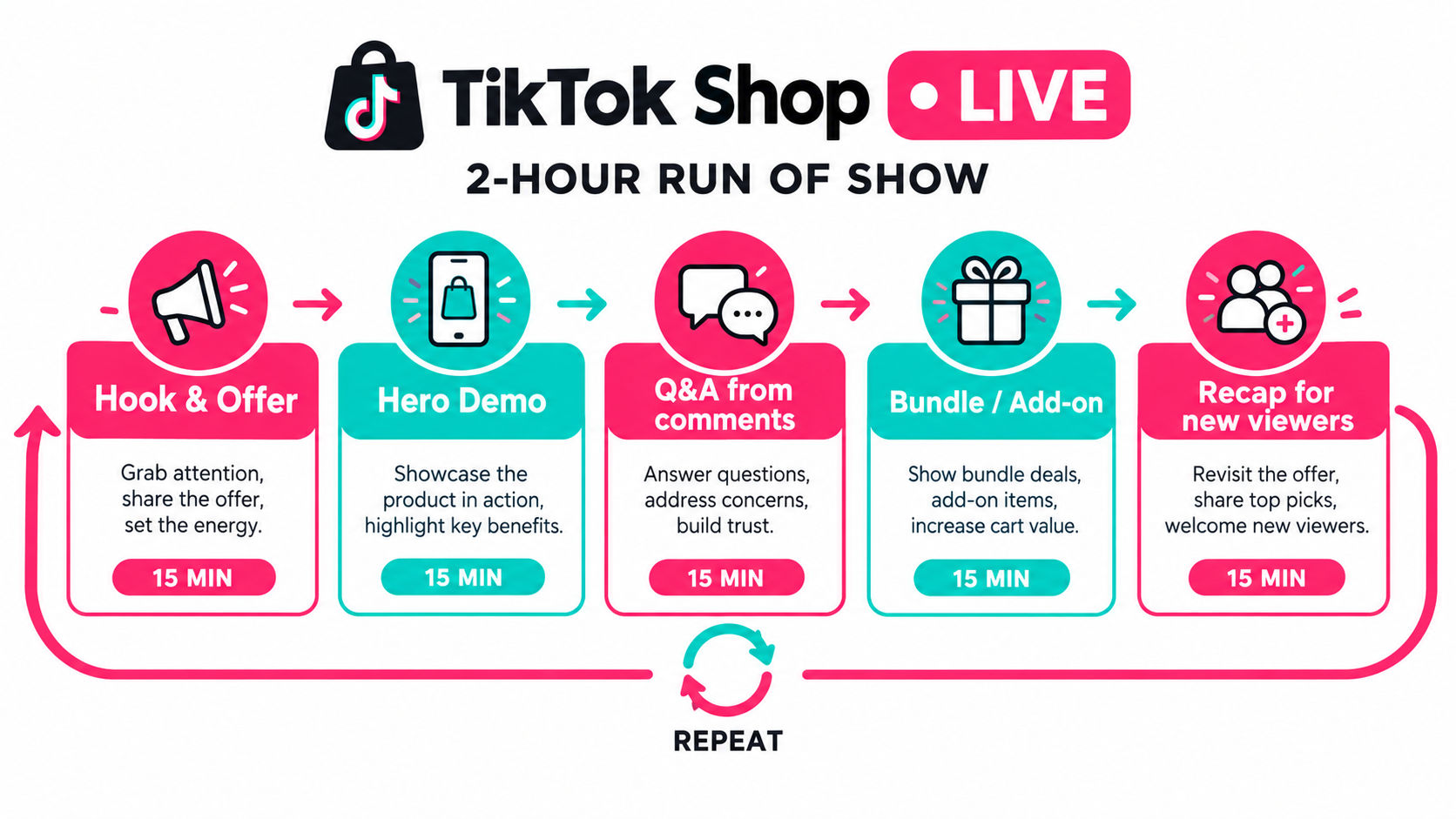
A practical framework is a block of roughly 15 minutes that repeats throughout the stream, with variations in product and angle each time:
- Hook and offer (1–2 minutes): Tell new arrivals who you are, what you’re selling, and why it’s worth staying. “We’re showing our new sunscreen, and today’s bundle includes the travel size.”
- Hero demonstration (4–5 minutes): Show the product doing its job. Apply it, test it, compare it. This is where the format earns its keep.
- Live Q&A (3–4 minutes): Answer questions from comments by name. Answering one viewer’s question often resolves the doubt of ten silent viewers.
- Bundle or add-on (2–3 minutes): Introduce a complementary product or bundle to lift basket size.
- Recap (1–2 minutes): Summarize the offer for everyone who arrived during the demo, then restart the loop.
Rotate the angle, not just the product
If you sell a single hero product, the loop can still feel fresh by rotating the angle: one block focused on texture, another on a before-and-after, another on a customer question, another on how it compares to an alternative. Regular viewers stay engaged, and new viewers still get the core pitch.
Plan for the unplanned
Have a short list of fallback segments ready for slow moments: a behind-the-scenes look at how the product is made, a myth-versus-fact segment, or a reading of real reviews. The OKARAT example from Japan shows how much story matters. That brand, which makes snacks from okara (soy pulp) to reduce food waste, built a following around its factory manager speaking gently to the camera in her work clothes. Videos showing the journey from okara waste to finished product passed roughly 14 million total views. A story like that is perfect filler for a quiet stretch of a stream.
Scripts versus talking points
Avoid full scripts. They sound stiff and break the moment a viewer asks something unexpected. Give hosts a one-page sheet with the offer, key product facts, approved claims, prices, and the block order. Let them speak naturally within those guardrails.
Building the Flywheel: Short Video, Brand LIVE, and Creator LIVE
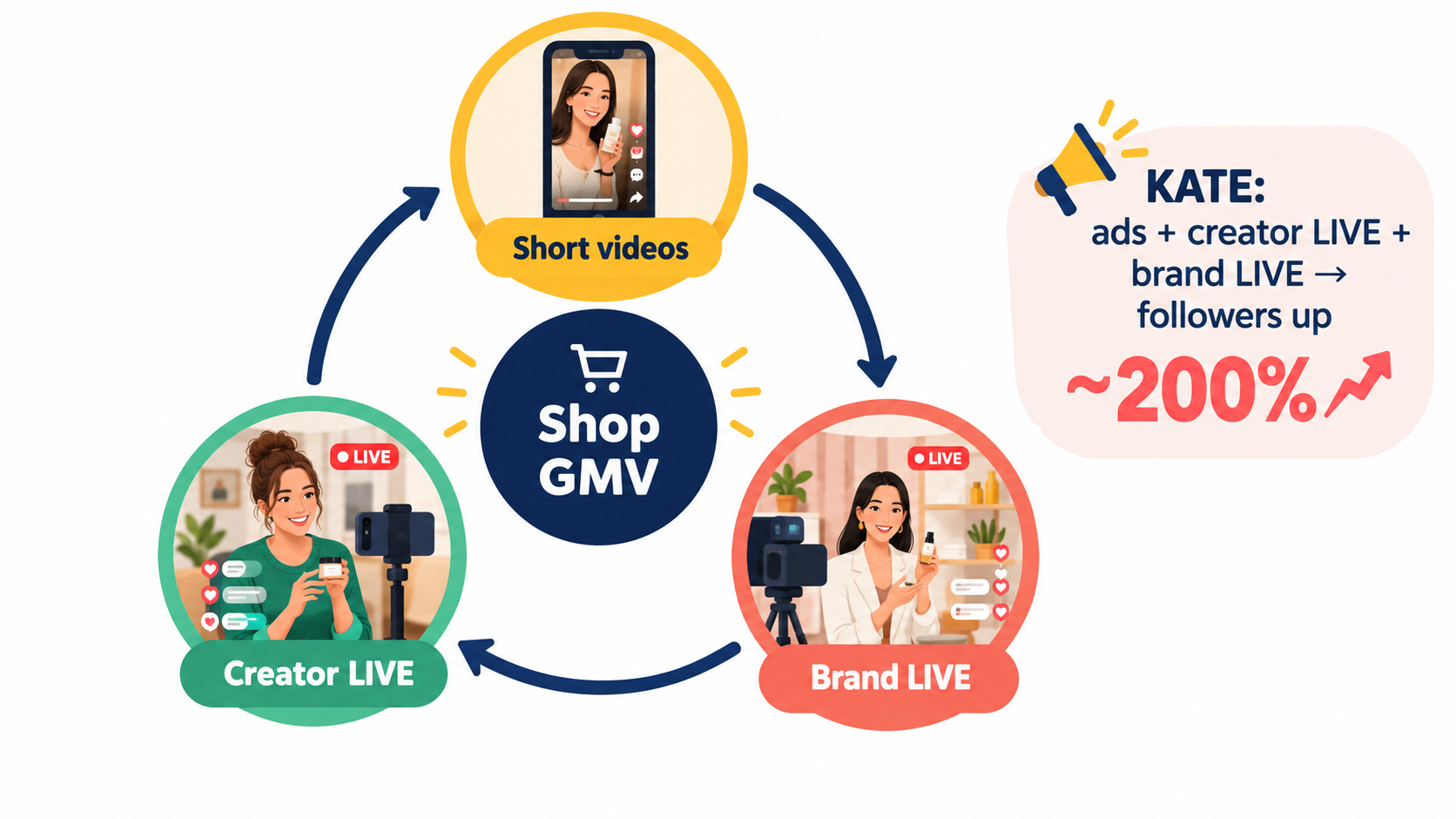
A livestream doesn’t operate in isolation. The brands that do best on TikTok Shop treat LIVE as one part of a connected system in which each format feeds the others. The KATE makeup brand case from TikTok’s Japan update shows how this works in practice.
The KATE approach
KATE had been advertising on TikTok for years before TikTok Shop launched in Japan, building word-of-mouth among digital-native audiences. Once Shop was available, the brand combined three things: ads, creator LIVE streams, and its own brand LIVE streams. According to TikTok, KATE’s follower count grew by about 200% compared with before it joined TikTok Shop.
The brand also saw TikTok experiences lead to offline store visits and purchases, which matters for any brand that also sells through retail.
How the three parts feed each other
- Short videos reach people who will never watch a stream. They also work as trailers: a clip from yesterday’s LIVE showing a dramatic demo can drive people to tonight’s stream.
- Brand LIVE gives you full control over messaging, offers, and product depth. It’s where loyal buyers come back and where you can test new products with real-time feedback.
- Creator LIVE puts your product in front of an audience that already trusts someone else. Creators drive an estimated 42% of US TikTok Shop sales, according to DemandSage’s compilation, and creator streams extend your reach far beyond your own followers.
Repurposing streams into short videos
Every long stream is raw material. A four-hour LIVE might contain a dozen moments worth clipping: a perfect demo, a funny exchange, a viewer question with a strong answer. Building a habit of reviewing recordings and cutting them into short videos turns one production effort into a week of content.
Coordinating creator LIVE with your own
Avoid scheduling creator streams that compete directly with your own at the same hour. Spread them out so your product is live somewhere on TikTok across more of the day. Share your best-performing talking points, demos, and FAQ answers with creators, and give them offers they can present with confidence.
Oji Pharma followed a similar pattern: its near-daily streams were backed by creator posts and its own organic videos, so the brand reached audiences who never tuned in to the LIVE itself.
Paying for Viewers: How Paid Traffic Fits Into a LIVE Program
Organic reach for a new LIVE is often thin. A brand with a small following might open its first stream to a handful of viewers, most of them employees. Paid promotion can fill that gap, but only when the stream is ready to convert the traffic it buys.
Fix the stream before you fund it
Sending paid traffic to a stream with a weak host, a confusing offer, or broken product pins wastes money quickly. Before spending meaningfully on LIVE promotion, run a few organic streams and check the basics: Do viewers stay longer than a few seconds? Do people comment? Do product cards get taps? If not, more traffic won’t fix it.
What Oji Pharma’s growth suggests
Oji Pharma reported ad-driven GMV growing about 4,500% month over month in at least one month. That figure shouldn’t be read as a typical result; month-over-month growth from a small base can look dramatic. What it does show is that paid traffic can multiply results once a stream has a tested format and a steady schedule. The ads amplified something that was already working.
Practical principles for LIVE ad spend
- Start with a modest test budget and increase it only when you see viewers convert into orders, not just views.
- Promote your best time slots and best hosts first. Paid viewers are more expensive than organic ones, so send them to your strongest show.
- Watch what happens in the minutes after a traffic surge. If your host is mid-Q&A and new viewers don’t know what’s on sale, that’s a signal to tighten your recap frequency.
- Use short video ads to drive stream awareness, especially for scheduled events, alongside any direct LIVE promotion.
Ad tools change; principles don’t
TikTok updates its ad products often, including campaign types, bidding options, and automated tools. Check the current options in TikTok Ads Manager and Seller Center rather than relying on older guides. The principle stays the same: paid traffic should amplify a stream that already converts, not substitute for one.
Compliance on LIVE: The Rules Apply in Real Time
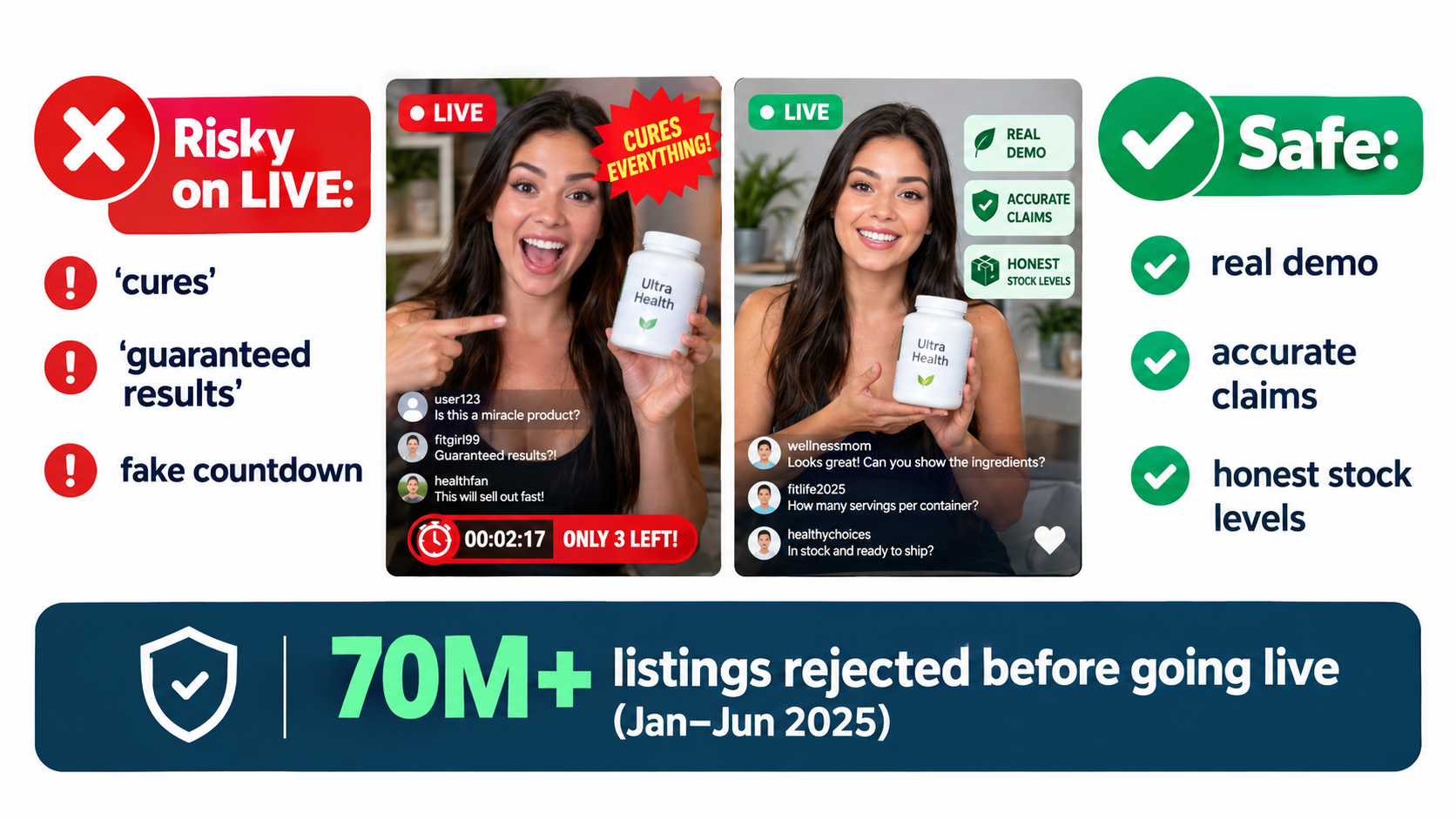
Here’s the uncomfortable truth about livestreams: every claim a host makes is public, recorded, and subject to the same policies as a written listing. There’s no editing step. That makes compliance a live operational task, not a legal review done once before launch.
How seriously TikTok enforces
TikTok publishes a TikTok Shop Safety Report. The edition covering January to June 2025, released November 6, 2025, says that globally the platform:
- Rejected about 1.4 million seller registration applications.
- Used automated detection to reject more than 70 million product listings before they went live.
- Removed 200,000 prohibited or restricted products after listing.
- Reviewed more than 900,000 reports submitted by users while watching TikTok Shop videos and LIVE streams.
That last figure matters for LIVE sellers. Viewers can and do report streams. TikTok’s earlier safety report also made clear that its policies apply across “livestreams, videos, product listings, and our Shop tab,” and that it uses machine learning to detect potential fraud, infringement, unsafe content, and violative listings.
New sellers start on probation
TikTok has said that newly approved sellers are placed on probation for a period, giving them time to learn the rules. If you’re new to the platform, it makes sense to keep your first streams conservative: accurate claims, clear pricing, and products well within policy.
Common LIVE compliance risks
The specifics depend on your category and TikTok’s current policies, which you should review in the Policy Center and TikTok Shop Academy. Common risk areas include:
- Health and efficacy claims that go beyond what the product is approved or substantiated for, especially in supplements, skincare, and wellness.
- False urgency, such as claiming only a few units remain when stock is plentiful, or countdowns that reset.
- Misleading price comparisons, such as inflated “original” prices.
- Showing or mentioning other brands in ways that could raise intellectual property issues.
- Restricted products appearing in the background or in casual mentions.
Building compliance into the show
Give every host an approved claims list and a “never say” list. Make the producer responsible for catching slips during the stream and correcting them on air when needed. A quick “Let me clarify that” protects the shop far better than hoping nobody noticed. Review recordings regularly, not just for sales performance but for anything a reviewer might flag.
Measuring a Livestream: The Metrics That Actually Guide Decisions
Seller Center provides analytics for LIVE sessions, including impressions, conversions, and sales. The challenge isn’t access to data; it’s knowing which numbers should change what you do next. The framework below groups metrics by the decision they inform. Exact metric names in Seller Center may vary and change over time.
Metrics that tell you about reach
- Impressions and LIVE entries: How many people saw your stream in their feed, and how many tapped in. A low entry rate relative to impressions points to a weak opening visual or cover.
- Peak and average concurrent viewers: Useful for comparing time slots and hosts.
Metrics that tell you about the show
- Average watch time: If viewers leave within seconds, the first few seconds of what they see isn’t working. Tighten the hook and make sure the product is visible immediately.
- Comment rate and follows gained: Signs of an engaged audience and of a host who’s building relationships.
Metrics that tell you about the offer
- Product card taps: Show interest in a specific item.
- Conversion from tap to order: If people tap but don’t buy, check price, shipping times, reviews, and voucher behavior.
- Average order value: Indicates whether your bundles and add-ons are working.
The single comparison number: GMV per streaming hour
To compare streams of different lengths, divide session GMV by hours on air. GMV per streaming hour lets you compare hosts, time slots, product lineups, and days of the week on equal terms. Track it alongside the cost of each hour, including host pay, ad spend, and staff time, so you know which hours actually pay for themselves.
Look at trends, not single sessions
Individual streams vary for reasons outside your control. Judge changes over two to four weeks of consistent streaming. If you change the host, the time slot, and the product lineup at once, you won’t know what made the difference, so change one major variable at a time.
A 30-Day LIVE Launch Plan for Sellers Starting From Zero
The plan below is for a brand with an active TikTok Shop, at least a few products that pass the fit test, and a small team. It’s designed to build consistency first and scale second.
Week 1: Preparation
- Score your catalog with the five-question fit test and choose one hero product plus three to five supporting items.
- Assign the three roles: host, producer/moderator, and operations. One person can cover two roles at first.
- Build a permanent or easily repeatable set with good lighting, clear audio, and a clean background.
- Write a one-page host sheet with the offer, prices, approved claims, a never-say list, and the block structure.
- Review TikTok Shop’s current LIVE and product policies in the Policy Center and Academy.
- Run two or three private test streams to rehearse product pinning and the loop structure.
Week 2: First public streams
- Stream three to four times on a fixed schedule, one to two hours per session.
- Post short videos the day before and the day of each stream to build awareness.
- Focus on rhythm, not sales. Can the host run the loop? Does the producer pin cards in sync?
- After each stream, note watch time, comments, product taps, and orders.
Week 3: Refine
- Clip the strongest moments from week-two streams into short videos.
- Adjust the hook, the demo, and the offer based on what kept people watching.
- Test a second time slot or a second host, changing one variable at a time.
- Reach out to a few affiliated creators about running their own LIVE sessions with your product, and share your best talking points.
Week 4: Add fuel carefully
- If watch time and conversion look healthy, begin a small paid promotion test on your best-performing slot.
- Calculate GMV per streaming hour for each session and compare it with the cost of that hour.
- Decide what to scale: more hours, more days, more hosts, or more creator streams.
- Commit to a 90-day schedule based on what you learned.
What success looks like after 30 days
Don’t measure the first month mainly on GMV. A good first month produces a host who’s comfortable on camera, a loop that works, a sense of which products and time slots respond, a library of clips, and a schedule your team can actually keep. Revenue tends to follow consistency, as the Oji Pharma example suggests.
When LIVE Isn’t the Right Move (Yet)
It would be misleading to suggest every seller should be streaming. There are situations where effort is better spent elsewhere, at least for now.
Your products fail the fit test
If your catalog scores low on demonstration value, question volume, and repeat purchase, short video and affiliate programs will probably deliver more per hour of effort.
You can’t staff it consistently
A sporadic LIVE schedule undermines the main benefit of the format, which is building a habit with regular viewers. If you can’t commit to a schedule for at least 90 days, wait until you can.
Your fulfillment isn’t ready
A successful stream can produce a burst of orders. If your inventory is thin or your shipping is slow, a good LIVE can turn into late shipments, cancellations, and poor reviews. Make sure operations can handle a spike before promoting heavily.
Your category is heavily restricted
Some categories have tighter rules around claims and demonstrations. If unscripted conversation creates too much compliance risk for your products, edited short video may be the safer route until you’ve built strong internal guardrails.
Conclusion: Treat LIVE Like a Store, Not an Event
TikTok Shop’s growth, from about $16.3 billion in global GMV in 2023 to a projected $123.5 billion in 2026, has created room for livestream selling to work outside the markets where it first took off. The Japan data, where roughly 70% of GMV started with content, confirms that buyers on the platform discover products first and decide afterward. LIVE is the format that lets you respond to that discovery in real time.
The sellers seeing results don’t treat livestreams as occasional marketing events. Oji Pharma runs four-to-six-hour streams almost daily. KATE combined ads, creator LIVE, and brand LIVE into one system. OKARAT built a following around an authentic story. Each treated LIVE as a channel with a schedule, a crew, and a process.
Key takeaways
- Test product fit first. Demonstration value, question volume, mid-range pricing, repeat purchase, and SKU depth determine whether LIVE suits your catalog.
- Staff three roles. Host, producer/moderator, and operations, even if one person covers two at first.
- Build a loop, not a show. Restart your pitch every 10 to 20 minutes for the viewers who just arrived.
- Connect the formats. Short videos, brand LIVE, and creator LIVE should feed one another.
- Fund what works. Paid traffic amplifies a converting stream; it doesn’t rescue a weak one.
- Make compliance part of the show. Approved claims, a never-say list, and a producer empowered to correct mistakes on air.
- Measure GMV per streaming hour against the cost of each hour, and judge trends over weeks, not single sessions.
- Commit to consistency. A sustainable schedule held for 90 days beats an ambitious one abandoned after two weeks.
If your products pass the test and your team can commit to a schedule, the 30-day plan above gives you a structured way to find out whether LIVE can become a dependable sales channel for your shop. If they don’t, that’s useful to know too, and it lets you put your effort into the formats that fit your business better.