
Most AI automation business cases end on the same slide: the launch date. The build cost is itemized, the hours saved are projected, and the payback period is circled in green. What happens in month seven, month fourteen, or month twenty-six is rarely on the page at all.
That gap is where a lot of disappointment with AI automation for business actually comes from. It’s usually not the pilot that fails. It’s the slow, unbudgeted cost of keeping an automation working after the people who built it have moved on to the next project.
Software engineers have a name for this kind of accumulated, deferred cost: technical debt. In 2015, a team of Google researchers led by D. Sculley published a paper at NeurIPS titled Hidden Technical Debt in Machine Learning Systems. Their warning was blunt: it is “dangerous to think of these quick wins as coming for free,” because real-world ML systems commonly “incur massive ongoing maintenance costs.” They pointed to risk factors such as entanglement, hidden feedback loops, undeclared consumers, data dependencies, and “changes in the external world.”
A decade later, that warning applies far beyond data science teams. Every business that wires a large language model into invoicing, support triage, lead routing, or contract review is now running a machine learning system, whether it thinks of itself that way or not.
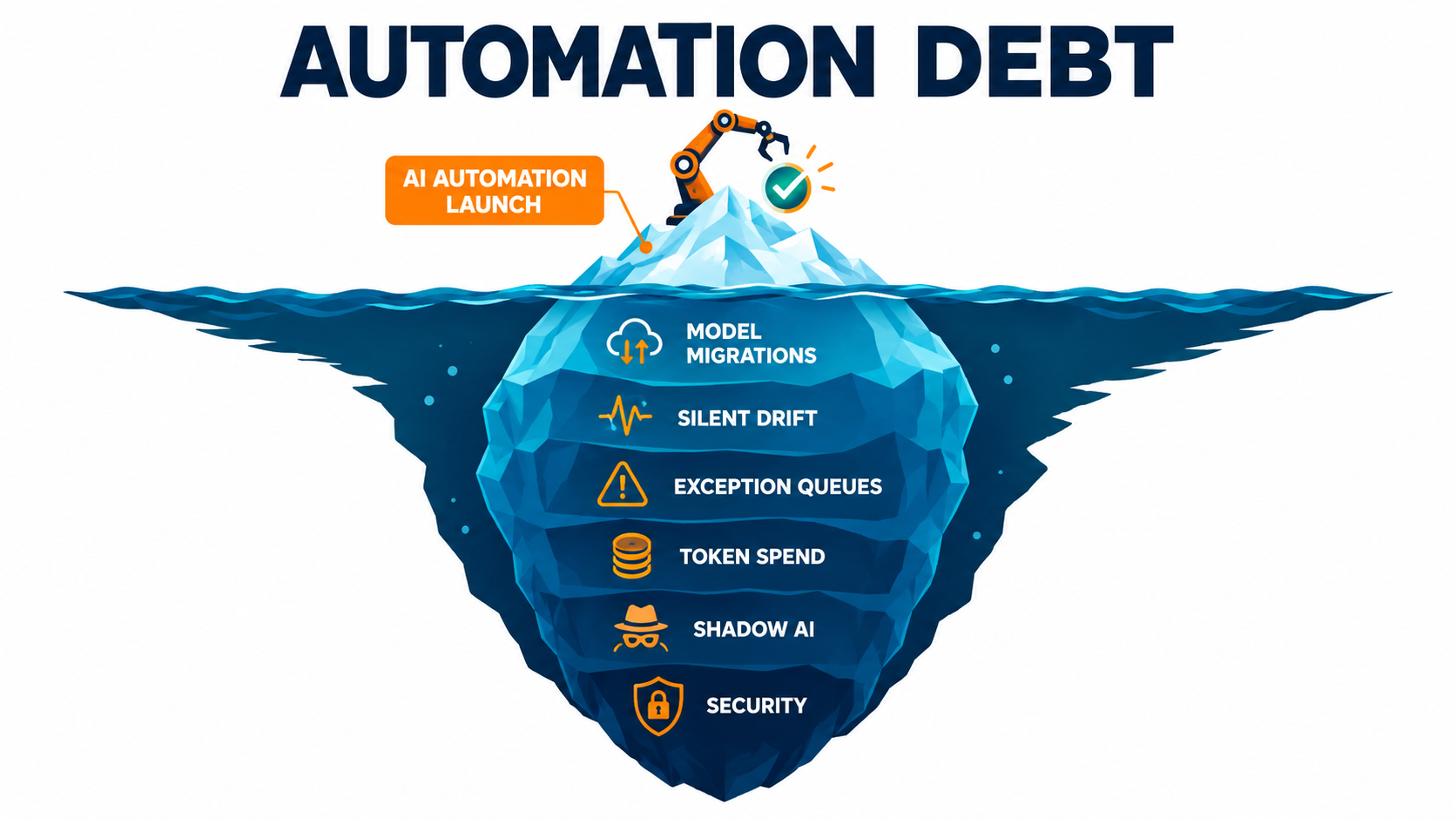
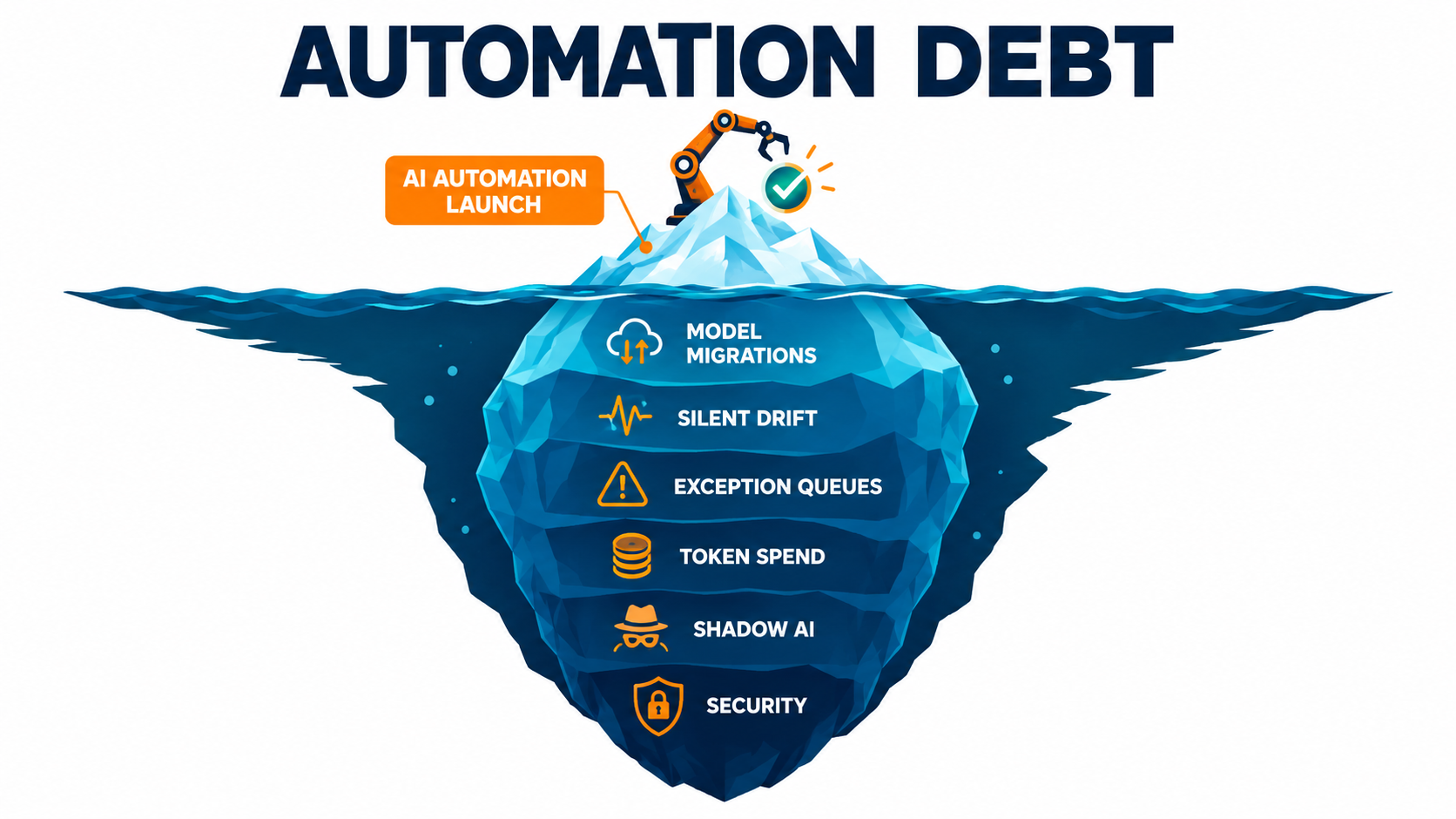
This article is about the debt side of the ledger. We’ll call it automation debt: the recurring costs, risks, and human labor an AI automation creates after launch. We’ll go through where it comes from, why it grows, how to put it in a budget, and the operating rhythm that keeps it from swallowing the savings you promised in the first place.
Why the AI Automation Business Case Stops at Go-Live
There’s a structural reason business cases get written this way. Build costs are concrete: vendor quotes, contractor hours, platform licenses. Run costs are speculative, spread across departments, and easy to wave away as “minor ongoing maintenance.”
Budget processes make it worse. Capital-style project funding pays for the build, then the project closes. The ongoing cost lands in an operating budget that never agreed to absorb it, usually belonging to whichever team “owns” the process being automated.
The warning signs are already in the forecasts
Analysts have started to flag this pattern. In June 2025, Gartner predicted that over 40% of agentic AI projects will be canceled by the end of 2027. The reasons it cited were escalating costs, unclear business value, and inadequate risk controls. Two of those three are run-time problems, not build-time problems.
Escalating costs don’t usually show up on day one. They show up when usage grows, when a model has to be swapped, when the exception rate turns out higher than the demo suggested, or when security asks for an audit trail nobody built.
Automation is not a one-time purchase
Traditional rules-based automation, like a scheduled script or an RPA bot, mostly breaks when something it depends on changes: a screen layout, a file format, an API field. That’s annoying, but it’s visible. The bot fails, someone gets an alert, someone fixes it.
AI automation adds a second failure mode. It can keep running, keep returning outputs that look plausible, and quietly get worse. It also depends on a component — the model — that your vendor will change on its own schedule. Those two facts change the economics entirely.
The practical takeaway: an AI automation should be budgeted the way you budget an employee or a piece of production software, with a recurring cost line, an owner, and a review cycle. It shouldn’t be budgeted like a laptop you buy once and forget.
The Five Line Items of Automation Debt
Automation debt sounds abstract until you break it into categories you can actually assign to someone. In practice, nearly every post-launch cost falls into one of five buckets.
1. Model churn
The underlying model gets deprecated, retired, or replaced. Every swap requires re-testing prompts, re-validating outputs, and sometimes reworking the integration. This is a calendar-driven cost you can see coming, if you look.
2. Silent drift
The inputs change — new product names, new customer language, new document formats, new regulations — while the automation stays the same. Accuracy erodes slowly, with no error message to warn you.
3. The exception queue
Every AI workflow has cases it can’t handle confidently. Those go to humans. If nobody measures that queue, it quietly becomes a part-time job for someone who was supposed to be freed up by the automation.
4. Usage costs
Token-based and per-call pricing grows with volume, but it also grows with retries, longer context windows, multi-step agent loops, and feature creep. Usage costs often rise faster than the work being done.
5. Sprawl and security
Unapproved tools, duplicated automations, orphaned API keys, and agents with more permissions than they need. This is the debt that doesn’t show up in any budget until it shows up as an incident.
The rest of this article takes each of these in turn, then pulls them together into a run-cost model and a quarterly review process. If you take only one thing from this section, take this: assign a named owner to each of the five line items for every production automation. Unowned debt compounds.
Model Churn: Your Vendor’s Release Calendar Is Now Your Maintenance Calendar
When you build on a hosted foundation model, you’re renting a component that has an expiration date. That’s not a criticism of vendors. It’s simply how the market works right now: models are released quickly, older ones are retired to free up capacity, and your automation has to follow along.
What the published notice periods actually say
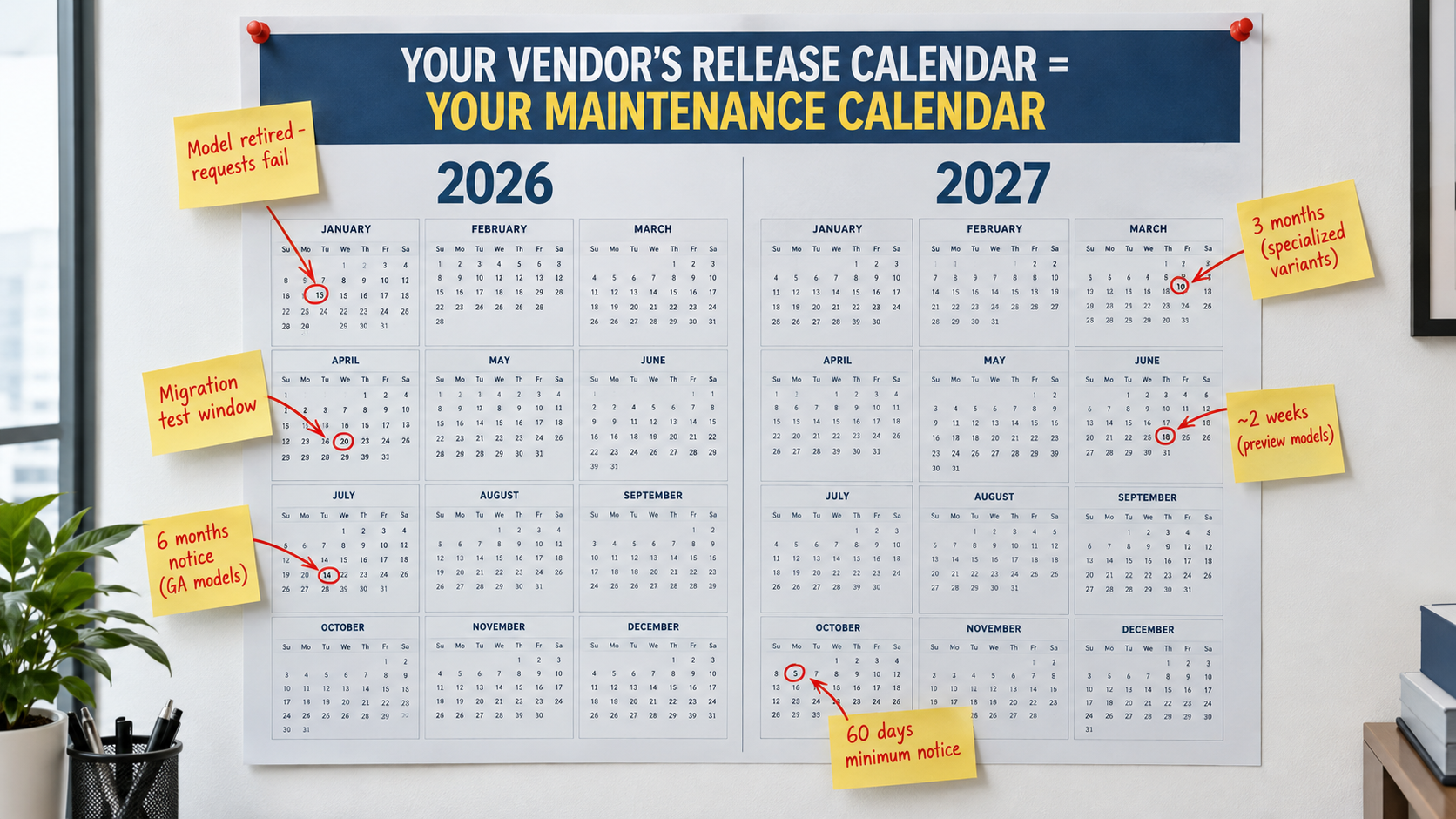
OpenAI’s deprecations documentation spells out its minimum notice periods before retiring a model. Generally available models get at least six months. Specialized variants of those models — such as chat, Codex, or deep research variants — get at least three months. Preview models “may be retired with much shorter notice, such as 2 weeks,” and OpenAI explicitly says it doesn’t recommend preview models “for business-critical production workloads unless you can migrate on short notice.”
Anthropic’s documentation commits to at least 60 days’ notice before retiring publicly released models. It also distinguishes between “legacy,” “deprecated,” and “retired” states, and notes plainly that requests to retired models will fail. Its guidance adds that “deprecated models are likely to be less reliable than active models.”
These are not hypothetical events. Anthropic’s model table lists Claude Sonnet 4 and Claude Opus 4 (the May 2025 releases) as retired as of June 15, 2026, and Claude 3.7 Sonnet as retired on February 19, 2026. OpenAI’s deprecations page lists several GPT-4o and GPT-4.1 snapshots, including their mini versions, scheduled for removal from the API on January 14, 2027 — and notes that fine-tuned versions of those models follow the same shutdown schedule.
Why a “simple swap” rarely is
Recommended replacements are usually more capable. But “more capable” doesn’t mean “behaves identically.” A new model may format JSON differently, be more or less verbose, refuse different edge cases, or interpret an ambiguous instruction in a new way.
For a chat assistant, those differences are cosmetic. For an automation that feeds an ERP, a CRM, or a compliance log, they can break downstream parsing or change decisions. That’s why both vendors recommend testing your application against replacement models well before the retirement date.
The fine-tuning detail matters too. If you invested in a custom fine-tuned model, its lifespan is tied to its base model. When the base is retired, so is your investment, and you’ll be redoing the training work on the replacement.
How to budget for model churn
- Inventory every model ID in production. Anthropic’s console lets customers export usage by API key and model; OpenAI exposes an optional
shutdown_datefield through its models endpoint so you can monitor retirements programmatically. Use these. Most companies discover models they forgot they were calling. - Avoid preview models in business-critical paths. The vendor itself is telling you the notice could be two weeks.
- Keep a regression test set for every automation. A few hundred real, labeled examples is enough to compare an old model against its replacement in an afternoon instead of a month.
- Plan for at least one migration per automation per year. Given current release cadences, assuming your model will outlive your budget cycle is optimistic.
- Abstract the model call. Route requests through a single internal gateway or configuration layer, so swapping a model is a config change plus testing, not a code hunt across ten services.
Model churn is the most predictable form of automation debt. That makes it the most embarrassing one to be surprised by.
Silent Drift: When the Workflow Still Runs but the Output Gets Worse
Sculley’s team listed “changes in the external world” as a core ML risk factor. For business automation, the external world changes constantly. You launch new products. Customers start using new slang. A supplier redesigns its invoice template. A regulation updates the wording you’re required to use.
The automation doesn’t know any of that happened. It keeps doing what it did on launch day, applied to inputs that no longer look like launch day.
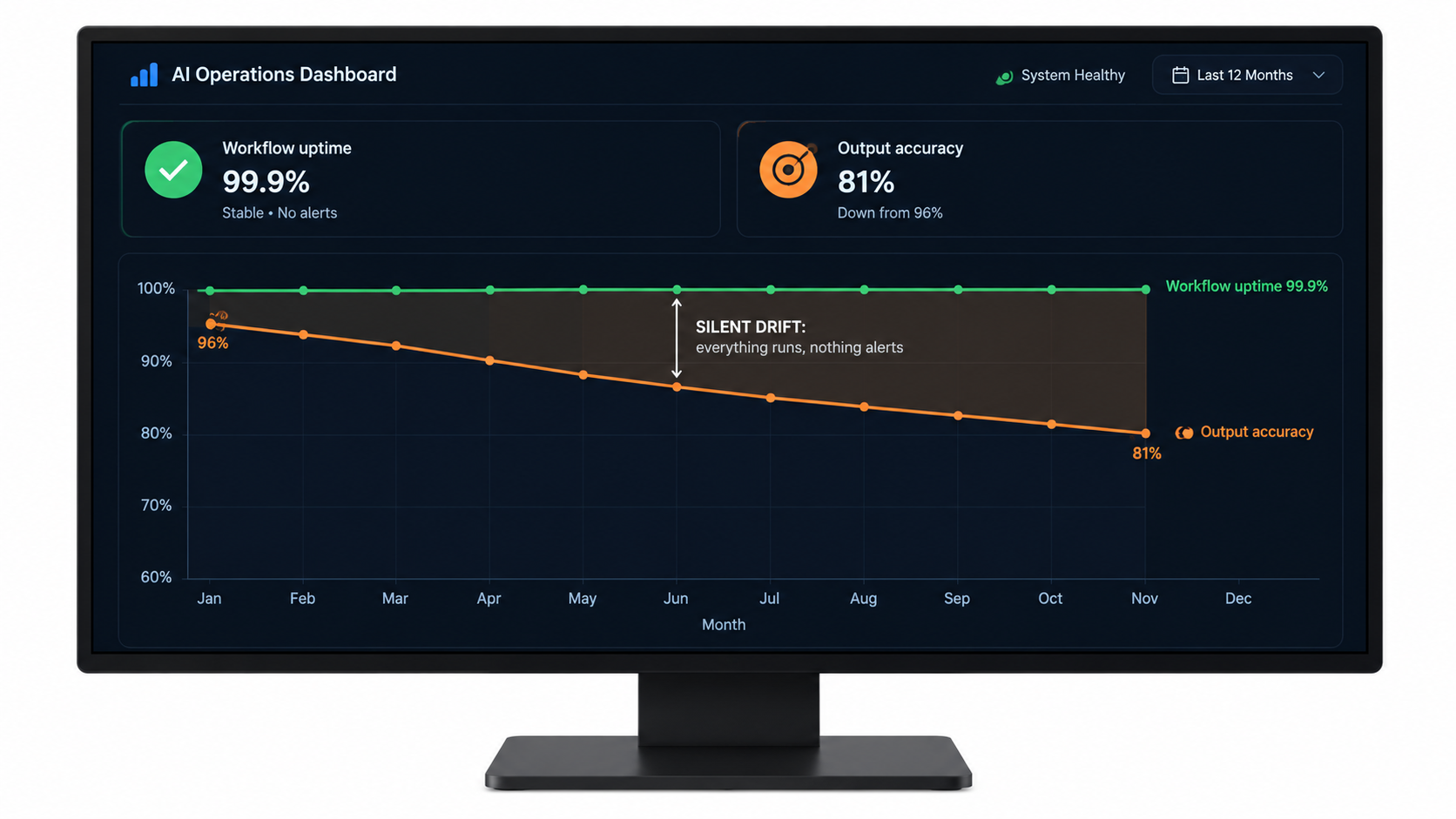
Uptime is not quality
Most monitoring setups track whether a workflow ran: success or failure, latency, error codes. Those metrics will look perfect during drift, because nothing is technically failing. The model returns a well-formed answer every time. It’s just the wrong answer more often.
Consider a support-ticket classifier built when a company had four product lines. Eighteen months later there are seven. Tickets about the three new products get forced into the nearest old category. Routing still “works” — tickets reach a queue — but they reach the wrong queue, and resolution times creep up in a way nobody connects back to the classifier.
Where drift hides in common business automations
- Document extraction: new vendor templates, new tax fields, scanned documents of lower quality than the training samples.
- Lead scoring and routing: changes to your ideal customer profile, new territories, new pricing tiers the prompt has never heard of.
- Customer-facing drafting: outdated policies, discontinued products, old promotions embedded in prompts or retrieval sources.
- Retrieval-based assistants: knowledge bases that grow stale or accumulate contradictory versions of the same document.
How to catch drift before customers do
Sample and grade outputs on a schedule. Pull a small random sample of production outputs every week or two and have a human grade them against a simple rubric. This is the single most effective drift control, and it’s cheap.
Track proxy signals downstream. Reassignment rates on routed tickets, manual edits to AI-drafted emails, corrections to extracted fields, and customer reopen rates all move before anyone files a complaint.
Tie knowledge sources to owners. If an automation relies on a policy document or product catalog, whoever owns that document should know the automation exists. Sculley’s paper called this problem “undeclared consumers”: systems depending on data whose owners don’t know they’re being depended on.
Re-run your regression set monthly. The same test set you use for model migrations doubles as a drift alarm. Refresh it each quarter with recent real examples so it reflects the world as it is now, not as it was at launch.
The Exception Queue: Where Humans Quietly Absorb the Cost
Every honest AI automation design includes a path for cases the system shouldn’t handle alone. Low-confidence extractions, unusual requests, high-value transactions, angry customers. That human-in-the-loop path is good design. The problem is what happens to it over time.
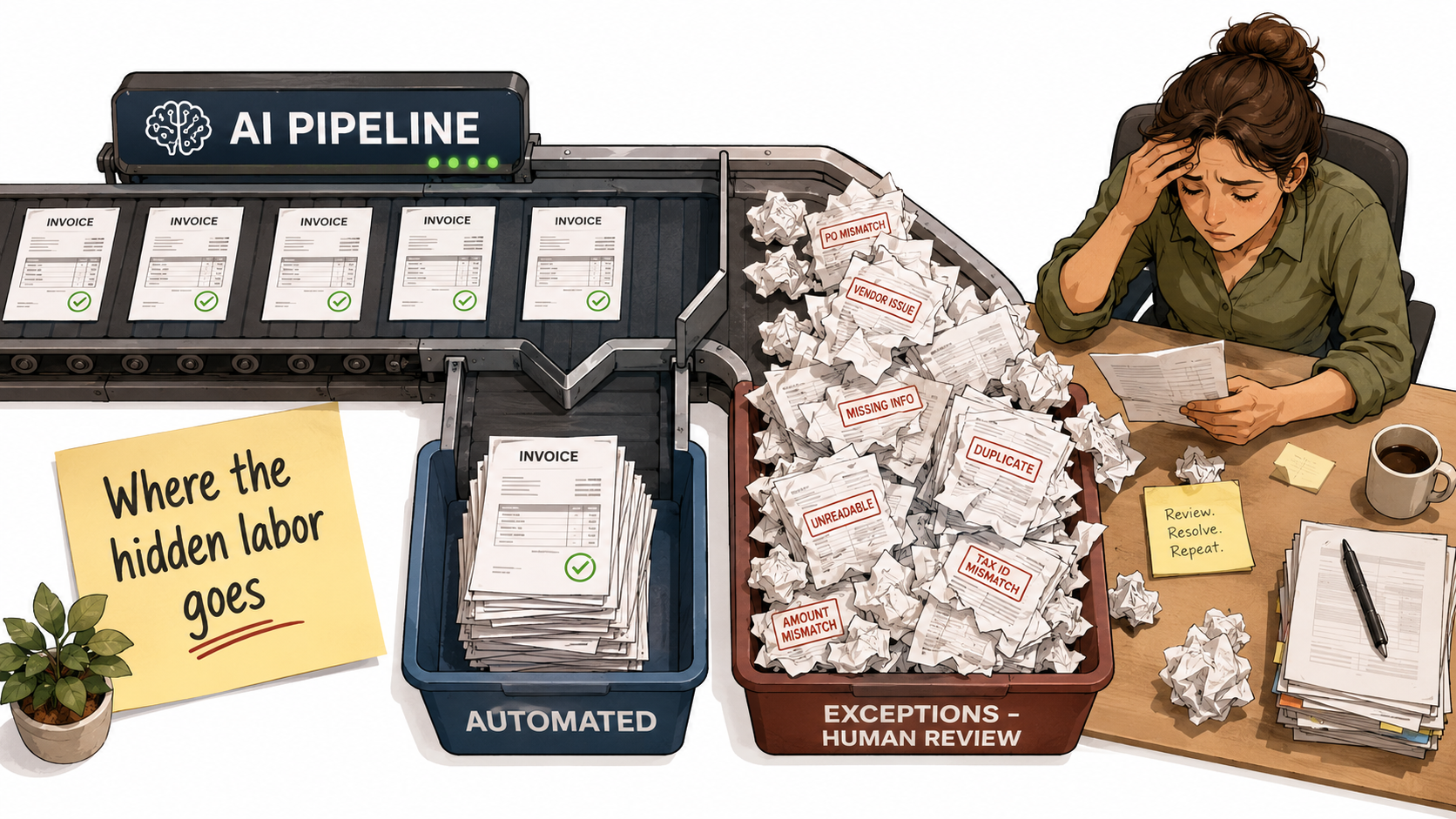
The business case assumes a fixed exception rate
Projected savings are usually calculated as volume multiplied by minutes saved per item, minus some assumed exception percentage. That percentage gets picked during the pilot, on a clean dataset, with the build team watching closely.
In production, the exception rate tends to move. Drift pushes more items into low confidence. A model migration changes how confidence is expressed. A new business line adds categories nobody planned for. If the exception rate doubles, a big share of the projected savings can quietly disappear — and because the work is spread across existing staff, nobody sees a new cost line.
Exceptions are often harder than the original work
There’s a second, subtler cost. Before automation, a staff member handled a mix of easy and hard cases. After automation, the easy ones are gone and the person handles only the hard ones, often with less context, because they didn’t see the case from the start.
Reviewing an AI’s work can also take more effort than people expect. The reviewer has to understand what the system did, check whether it was right, and fix it. For some tasks, a full review takes nearly as long as doing the work from scratch, which undermines the whole premise.
How to keep the exception queue honest
- Measure it as a first-class metric. Exception rate, average handling time per exception, and backlog age should sit on the same dashboard as automation volume.
- Set a threshold that triggers a review. Agree up front on an exception rate that, if crossed, prompts a root-cause investigation rather than just more overtime.
- Categorize exceptions by cause. “Model unsure,” “missing data,” “policy ambiguity,” and “out-of-scope request” need different fixes. Only the first is a model problem.
- Feed exceptions back into the system. Resolved exceptions are the best possible additions to your regression test set and your prompt examples.
- Design for reviewability. Show reviewers the source, the AI’s output, and its reasoning or extracted evidence side by side. Shaving minutes off each review compounds quickly.
The exception queue is where the human cost of automation lives. Make it visible, or it will be absorbed by your most conscientious people until they burn out or leave.
Usage Costs That Grow Faster Than the Work
Per-token and per-call pricing looks wonderfully simple during a pilot. A few thousand test runs cost almost nothing. The surprise comes later, when the real cost drivers turn out to be things the pilot never exercised.
Why consumption outruns volume
Context creep. Automations accumulate instructions. Every edge case someone patches adds a paragraph to the system prompt. Retrieval steps pull in more documents “to be safe.” The same task can cost noticeably more per run a year after launch, simply because the prompt got longer.
Retries and fallbacks. When outputs fail validation, many pipelines retry automatically. When the primary model times out, some fall back to a larger, pricier model. Neither shows up in pilot math, and both grow as drift raises the failure rate.
Agent loops. Multi-step agents that plan, call tools, check results, and re-plan can make many model calls per task. A task that takes three steps on a good day might take a dozen on a bad one. That variance is what blows budgets — not the average, but the long tail.
Feature creep. Once an automation works, people ask for more: a summary on top of the classification, a translation on top of the summary, a sentiment score on top of that. Each addition is small. Together they can multiply the per-item cost.
Model migrations can cut both ways
Replacement models are sometimes cheaper per token, sometimes more expensive, and sometimes cheaper per token but more verbose, which cancels out the savings. Never assume a migration is cost-neutral. Measure cost per completed task, not cost per token, before and after.
Controls that actually work
- Track cost per business outcome. Cost per invoice processed, per ticket resolved, per contract reviewed. That’s the number that should be compared against the human cost it replaced.
- Cap agent steps and spend per task. A hard ceiling on tool calls or tokens per run prevents runaway loops from turning one bad input into a costly incident.
- Right-size models per step. Classification and extraction steps often run fine on smaller, cheaper models; reserve larger models for steps that genuinely need them.
- Audit prompt length quarterly. Prune instructions that address problems which no longer occur.
- Tag spend by automation and owner. Separate API keys or project tags per workflow make it obvious which automation is driving the bill.
Usage costs are rarely what kills an automation outright. But they’re the line item most likely to turn a strong ROI story into a mediocre one without anyone noticing until the annual review.
Shadow AI: The Automation Debt You Never Approved
Everything so far assumes you know which automations exist. In most organizations, that assumption is wrong.
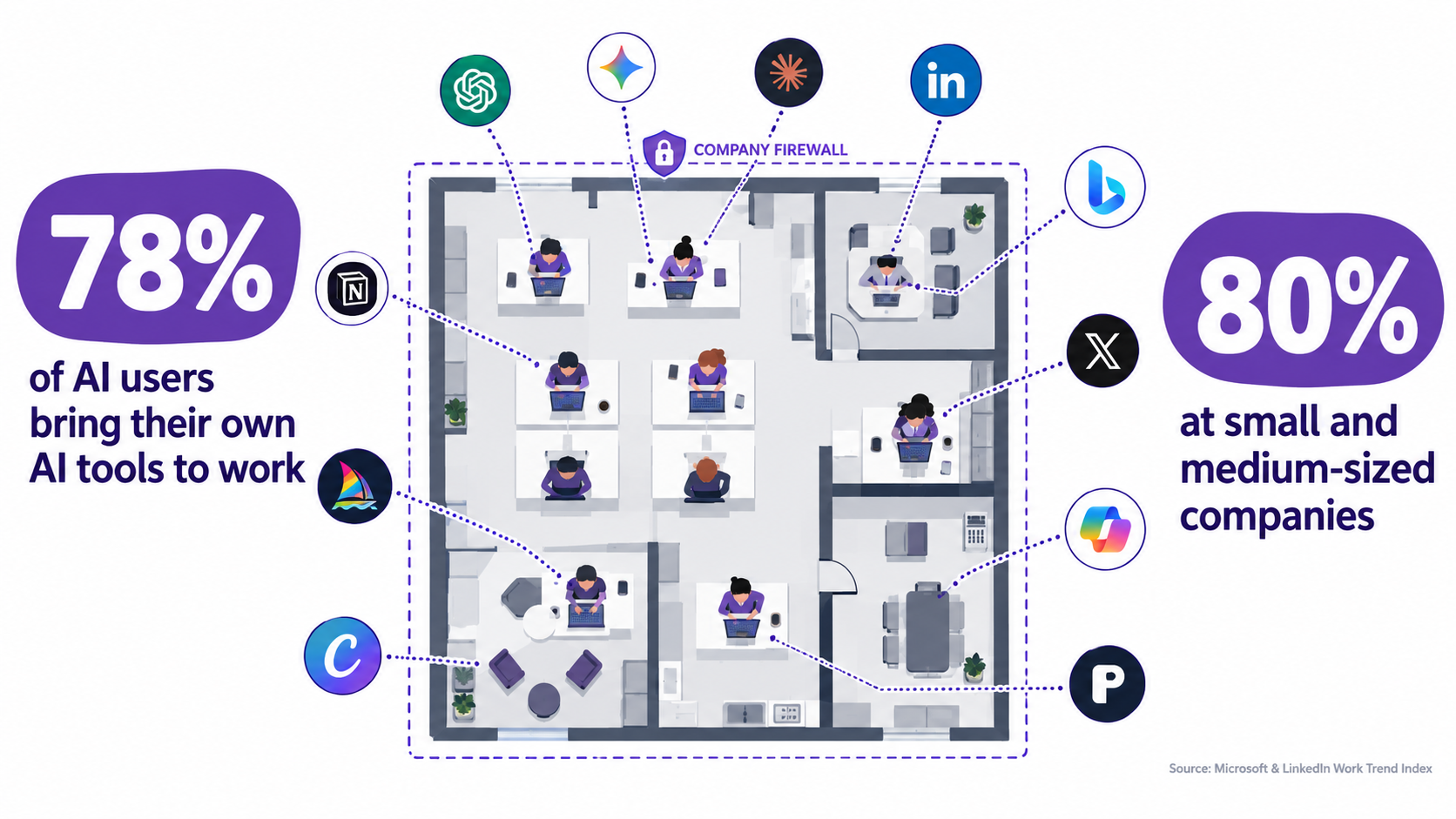
Employees aren’t waiting
The 2024 Work Trend Index from Microsoft and LinkedIn, based on a survey of 31,000 people across 31 countries, found that 75% of knowledge workers were already using generative AI at work. More telling for automation debt: 78% of AI users were bringing their own AI tools to work, rising to 80% at small and medium-sized companies.
The same research found that 52% of people using AI at work were reluctant to admit using it for their most important tasks, and 53% worried that using it on important work made them look replaceable. In other words, a lot of AI use isn’t just unapproved — it’s deliberately hidden.
Microsoft’s report noted the risk directly: this approach “puts company data at risk in an environment where leaders’ #1 concern for the year ahead is cybersecurity and data privacy.”
How shadow AI becomes shadow automation
It starts with someone pasting text into a chatbot. Then they connect a no-code tool to their inbox. Then a spreadsheet starts calling an API with a personal key. Within a year, a business-critical process — say, weekly pricing updates or vendor onboarding emails — depends on an automation that no one in IT knows about, running on an account tied to one employee.
When that employee leaves, changes roles, or simply stops paying for the subscription, the process breaks. There’s no documentation, no regression set, no owner. That’s automation debt in its purest form: all the risk, none of the visibility.
Turning shadow AI into managed AI
Don’t lead with bans. The data shows people use these tools because they help them keep up. Blanket prohibition mostly drives usage further underground.
Provide a sanctioned path that’s genuinely easier. Approved tools with company accounts, clear data-handling rules, and a lightweight request process for new automations.
Run an amnesty inventory. Ask teams to register the automations and AI tools they already rely on, with no penalty. You can’t budget for debt you haven’t counted.
Classify by business criticality. Not every personal productivity hack needs governance. Anything that touches customer data, money, or a regulated process does, and should be moved onto managed infrastructure with an owner.
Security and Identity: Every Automation Is a New Employee With Keys
An AI automation that can read your inbox, update your CRM, or issue refunds is, functionally, a new member of staff. It needs credentials. It has permissions. It can make mistakes or be manipulated. Yet most organizations would never let a new hire start without access reviews — and routinely let automations do exactly that.
The cost of getting it wrong is rising
IBM and the Ponemon Institute’s Cost of a Data Breach Report 2026 puts the global average cost of a data breach at $4.99 million, a 12% increase over the prior year and a record high. The report also found a 56% increase in AI-driven attacks, led by deepfake impersonation and AI-enabled malware, and a global average cost of $6 million for AI model inversion attacks.
IBM’s guidance on agentic AI is specific: security teams need to secure agentic identities through “dynamic, identity-based access controls, tightly scoped permissions continuously enforced at runtime, human attribution and auditability.” The report warns that “racing to adopt agentic AI without strengthening security and governance for agents” puts data, people, and reputation at risk.
There’s also a positive side to this ledger. The same report found organizations making extensive use of AI and automation in security saved an average of $1.93 million in breach costs compared with those using none. Automation used carefully reduces risk; automation deployed carelessly adds it.
The security debt checklist
- Give each automation its own identity. No shared service accounts, no personal API keys. If something goes wrong, you need to know which automation did it.
- Apply least privilege. A ticket summarizer doesn’t need write access to your billing system. Scope permissions to the task, then review them when the task changes.
- Log actions, not just calls. Record what the automation did in business terms — “issued refund of $X to customer Y” — so audits and incident response are possible.
- Treat external content as untrusted input. Automations that read emails, web pages, or uploaded documents can be fed instructions hidden in that content. Keep high-impact actions behind human approval.
- Rotate and retire credentials. When an automation is decommissioned, its keys and permissions should go with it. Orphaned credentials are a common, avoidable risk.
Security work is the part of automation debt most often deferred, because it produces no visible benefit until the day it prevents a disaster. Budget it explicitly or it won’t happen.
How to Build a Run-Cost Model for AI Automation
Once you can name the five line items, you can put them in a budget. The goal isn’t precision. It’s making the recurring costs visible enough that decisions about which automations to build — and which to retire — are based on the full picture.
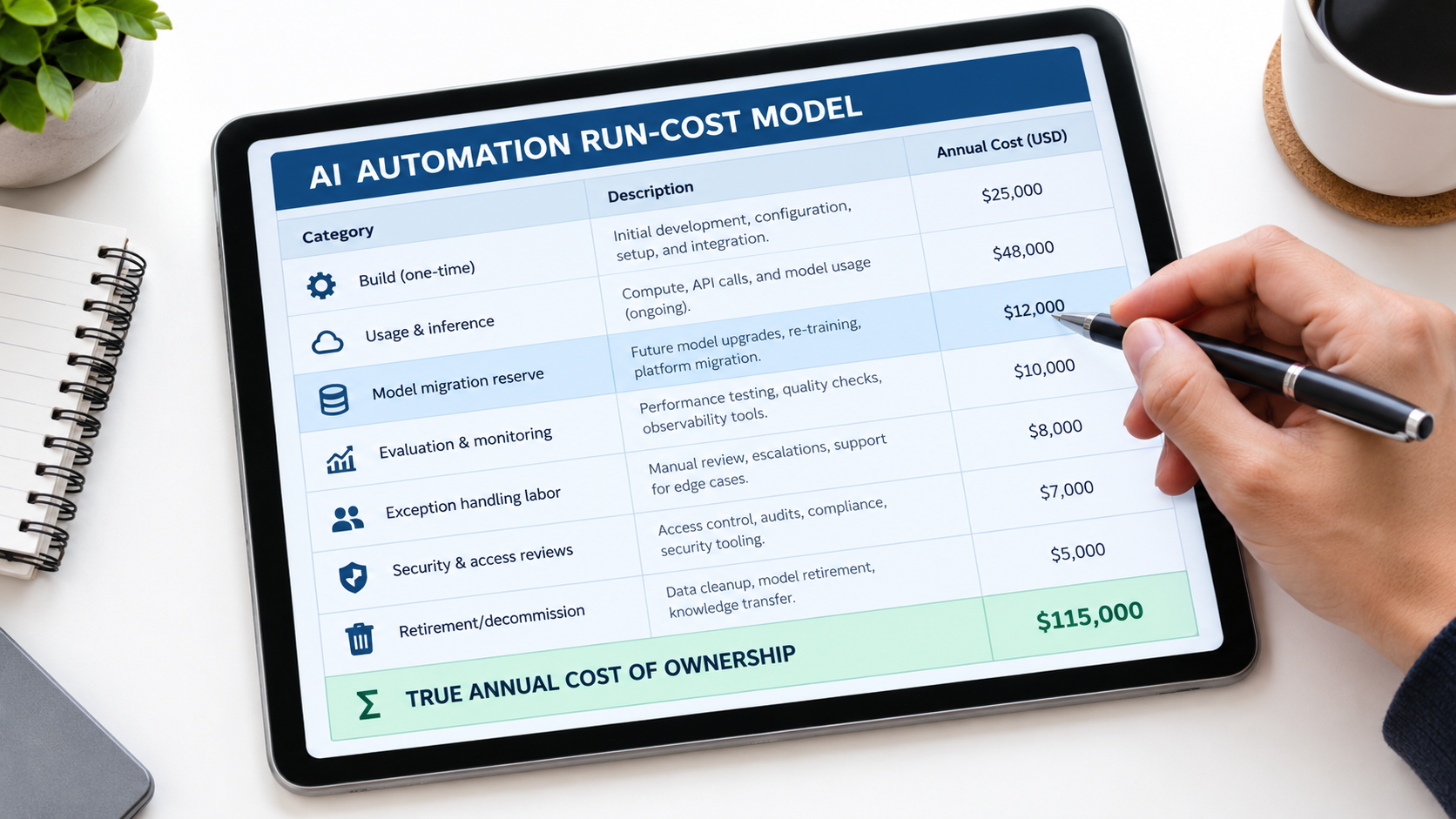
The worksheet
For every production automation, estimate the following on an annual basis:
- Build cost (amortized). The one-time investment spread over the expected useful life. Be realistic: given model churn, plan on a shorter useful life than you would for conventional software.
- Usage and inference. Current monthly spend multiplied by twelve, plus a growth assumption for volume and context creep. Use cost per completed task, measured in production, not pilot numbers.
- Model migration reserve. The engineering and testing hours needed for at least one model swap per year, including re-running regression tests and fixing downstream breakage. Double it if you rely on fine-tuned models.
- Evaluation and monitoring. Hours spent on output sampling and grading, regression set upkeep, and dashboard maintenance.
- Exception handling labor. Measured exception rate multiplied by volume multiplied by average handling time multiplied by loaded hourly cost.
- Security and access reviews. Periodic permission reviews, logging infrastructure, and incident response readiness.
- Decommission cost. The effort needed to retire the automation cleanly someday: revoking credentials, migrating any dependent processes, archiving logs.
Add these up and compare the total against the fully loaded cost of the human work the automation replaces or accelerates. That’s the real ROI — and it’s often less dramatic than the launch-day slide, but far more defensible.
A worked example, in principle
Imagine an accounts-payable invoice extraction workflow. The pilot showed a low exception rate on a clean sample. Six months into production, sampling shows exceptions have roughly doubled, because two large suppliers changed templates. The vendor has announced its model’s retirement, and the replacement produces slightly different date formats.
None of those events is dramatic on its own. Together, they mean the automation now needs a migration sprint, a regression set refresh, and more reviewer hours. A team that budgeted for these line items treats this as routine maintenance. A team that didn’t treats it as a crisis and starts asking whether AI automation “works” at all.
Use the model to make portfolio decisions
A run-cost model is most valuable across your whole portfolio of automations, not for any single one. It lets you spot automations whose debt now exceeds their value, candidates for consolidation where three teams built nearly the same thing, and high-value workflows that deserve more monitoring investment, not less.
Some automations should be retired. That’s not failure. It’s what good portfolio management looks like.
The Quarterly Automation Debt Review
Budgets go stale. The way to keep automation debt under control is a recurring review — short, structured, and owned by someone with authority to fund fixes or kill projects.
What to review every quarter
- Inventory check. Is every production automation registered, with a named business owner and technical owner? Have any new shadow automations surfaced?
- Model calendar. Which model IDs are in use, and which have announced deprecation or retirement dates in the next two quarters? Who owns each migration, and when does testing start?
- Quality trends. Graded sample accuracy, regression test results, and downstream proxy signals compared against the prior quarter. Any automation trending down gets a root-cause review.
- Exception metrics. Rate, handling time, backlog age, and the top causes. Is the human cost still within the range the business case assumed?
- Cost per outcome. Usage spend divided by completed business tasks. Flag anything rising faster than volume.
- Access and security. Permission scopes still appropriate? Any orphaned credentials? Logs complete enough to reconstruct an incident?
- Keep, fix, or retire. For each automation, an explicit decision based on its current value and its current debt.
Who should be in the room
Keep it small: the process owners whose teams depend on the automations, someone from engineering or IT who manages the integrations, someone from security, and someone from finance who can see the spend. The point is to put the people who feel the costs in the same conversation as the people who can fix them.
Make the first review a baseline
Your first review will probably be uncomfortable. You’ll discover automations you didn’t know about, models nearing retirement that nobody was tracking, and exception queues nobody was measuring. That’s the point. The first review creates the baseline; every subsequent one measures whether debt is shrinking or growing.
Over time, the review also improves your build decisions. Teams that have watched an automation accumulate debt write better business cases the next time — with migration reserves, monitoring plans, and exception budgets included from the start.
Conclusion: Plan for the Second Year, Not Just the Launch
AI automation for business is genuinely valuable. The productivity gains are real, and companies that ignore them will fall behind. But the value comes from automations that keep working, keep getting checked, and keep being adjusted as models and businesses change. Launch day is the start of the cost curve, not the end.
The companies most likely to land in Gartner’s 40% cancellation forecast are not the ones with bad ideas. They’re the ones that funded the build, skipped the run, and then were surprised when escalating costs and unclear value caught up with them.
Actionable takeaways
- Name the debt. For every production automation, track the five line items: model churn, silent drift, exception handling, usage costs, and sprawl and security.
- Assign owners. Every automation needs a business owner and a technical owner. Every knowledge source it depends on should know it’s being used.
- Watch the vendor calendar. Inventory model IDs, monitor published deprecation dates, keep preview models out of critical paths, and plan for at least one migration per automation per year.
- Measure quality, not just uptime. Sample and grade outputs regularly, maintain a regression set, and refresh it with recent real examples every quarter.
- Make the exception queue visible. Track rate, handling time, and causes, with a threshold that triggers investigation.
- Track cost per outcome. Cap agent steps, right-size models, prune prompts, and tag spend by automation.
- Bring shadow AI into the light. Offer an easier sanctioned path and run a no-penalty inventory before you try to govern anything.
- Treat automations like employees with keys. Separate identities, least privilege, action-level logs, and human approval for high-impact steps.
- Budget the full lifecycle. Include migration reserves, monitoring, exception labor, security, and decommissioning in every business case.
- Review quarterly and be willing to retire. Killing an automation whose debt outweighs its value is a sign of discipline, not failure.
The businesses that get lasting returns from AI automation won’t necessarily be the ones that build the most workflows. They’ll be the ones that know exactly what each workflow costs to keep running, and decide on purpose which ones are worth it.