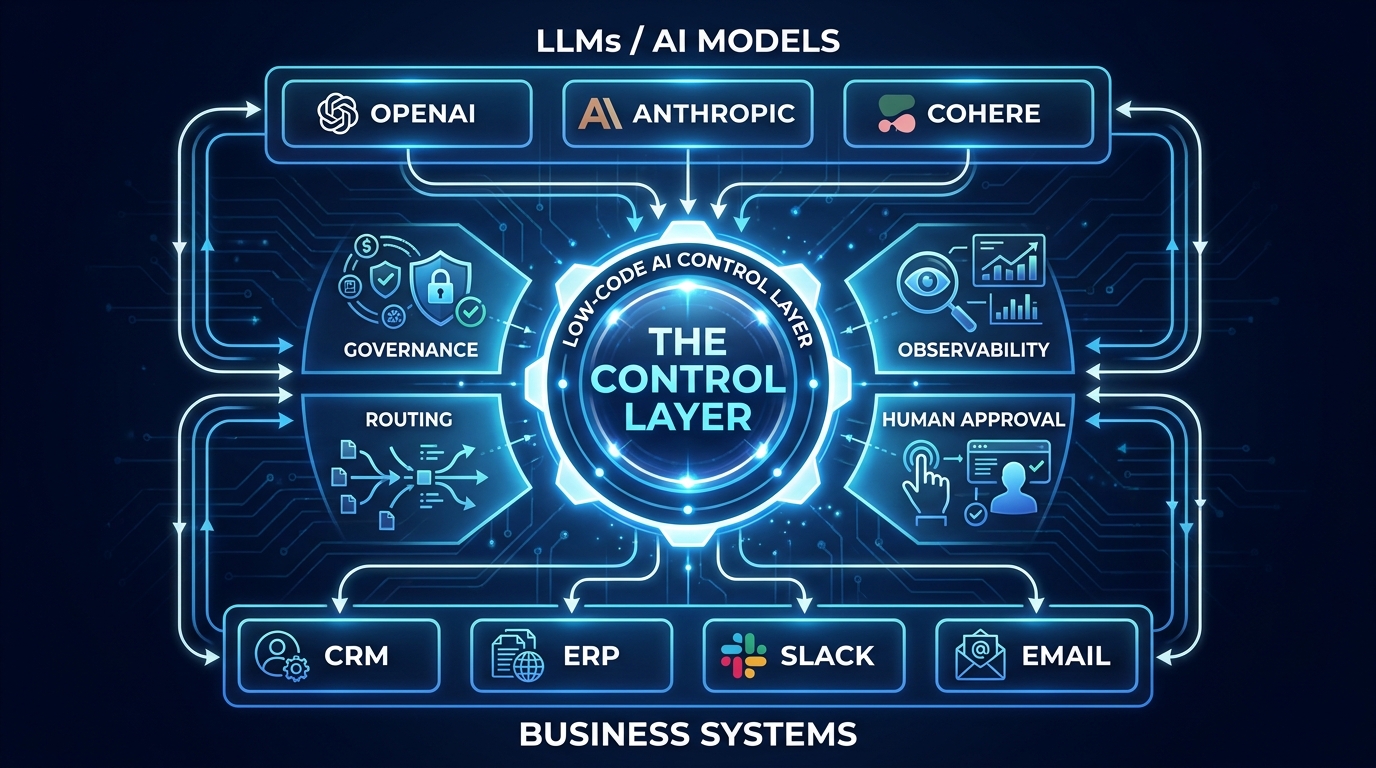

There is a version of low-code AI orchestration that is genuinely powerful. Teams wire together LLMs, APIs, approval workflows, and data pipelines in days rather than months. Workflows that once required a squad of engineers become something a senior operations analyst can design, test, and push to production. The tooling has caught up enough that this is no longer theoretical — it is happening at scale right now across enterprise operations, finance, customer service, and logistics.
And then there is the other version. The one where an enthusiastic operations manager has quietly deployed seventeen AI agents across four cloud services, none of which talk to each other, none of which have audit logs, and two of which are spending money on token usage that no one has approved or noticed. The one where a customer-facing workflow silently fails every third Tuesday because an API rate limit was never set. The one where a compliance audit finds AI-generated outputs in a regulated process that the CISO had no idea were running.
Both versions use the same low-code tools. The difference is whether you built a real control layer or just a collection of connected workflows.
This piece is about the architecture, the decisions, and the operational discipline that separates a genuine AI control layer from an expensive tangle of automation. It covers the platforms, the governance components, the model routing logic, and — critically — the implementation order that most teams get backwards. If you are past the pilot stage and trying to figure out what a production-grade orchestration layer actually looks like without writing everything from scratch, this is the map.
What a “Real” Control Layer Actually Means (And What It Doesn’t)
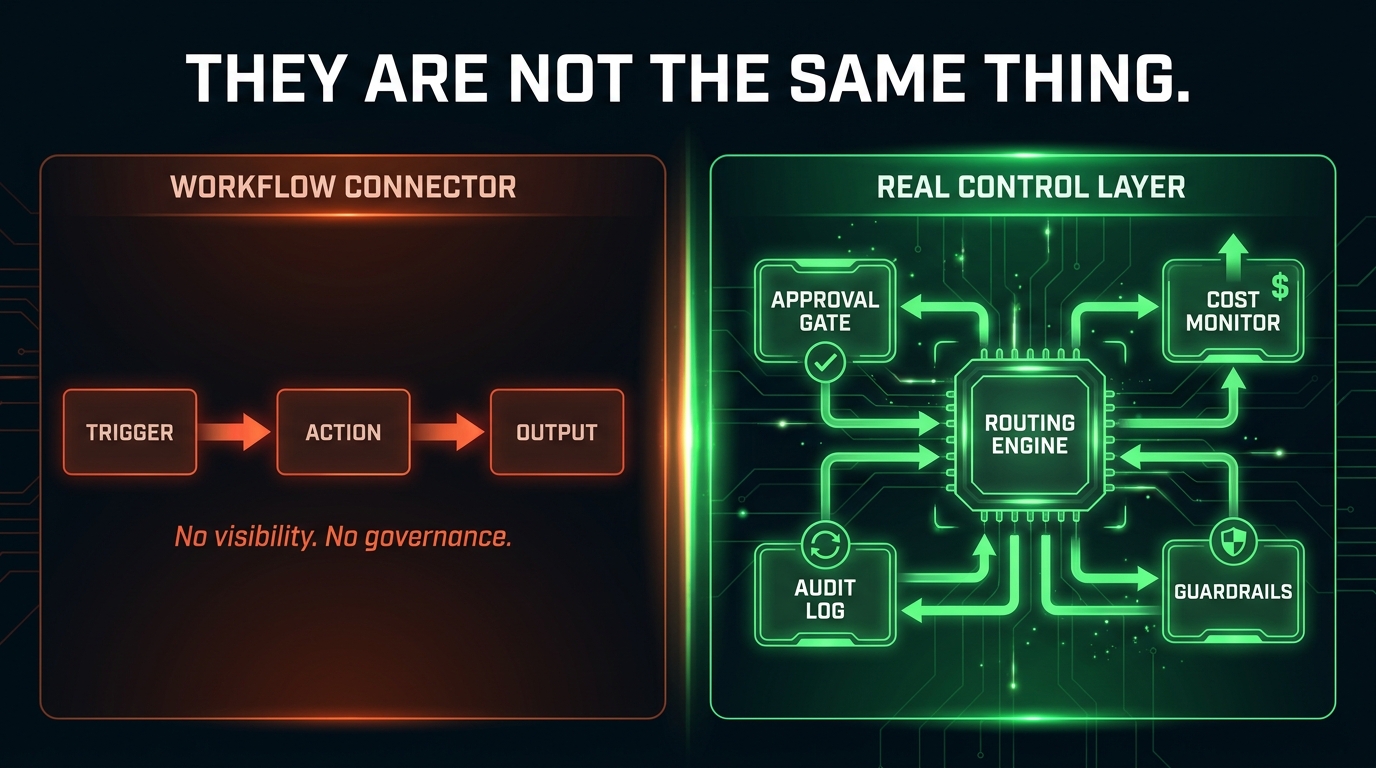
The phrase “control layer” is being used to market almost every low-code platform in 2026. It is worth being precise about what it actually means, because the difference between a workflow connector and a real control layer is the difference between a garden hose and plumbing infrastructure.
What a Workflow Connector Does
A workflow connector — classic Zapier, early Make, even early n8n — does one thing well: it moves data between systems based on triggers. Event fires, condition is checked, action is taken. This is genuinely useful. It can save enormous amounts of manual work. But it is not a control layer. It has no model routing, no cost governance, no enforcement of who can build what, no observability at the execution level, and no systematic way to handle failure. It assumes the happy path. When AI enters that workflow, all of those missing components become critical missing infrastructure.
What a Control Layer Does Instead
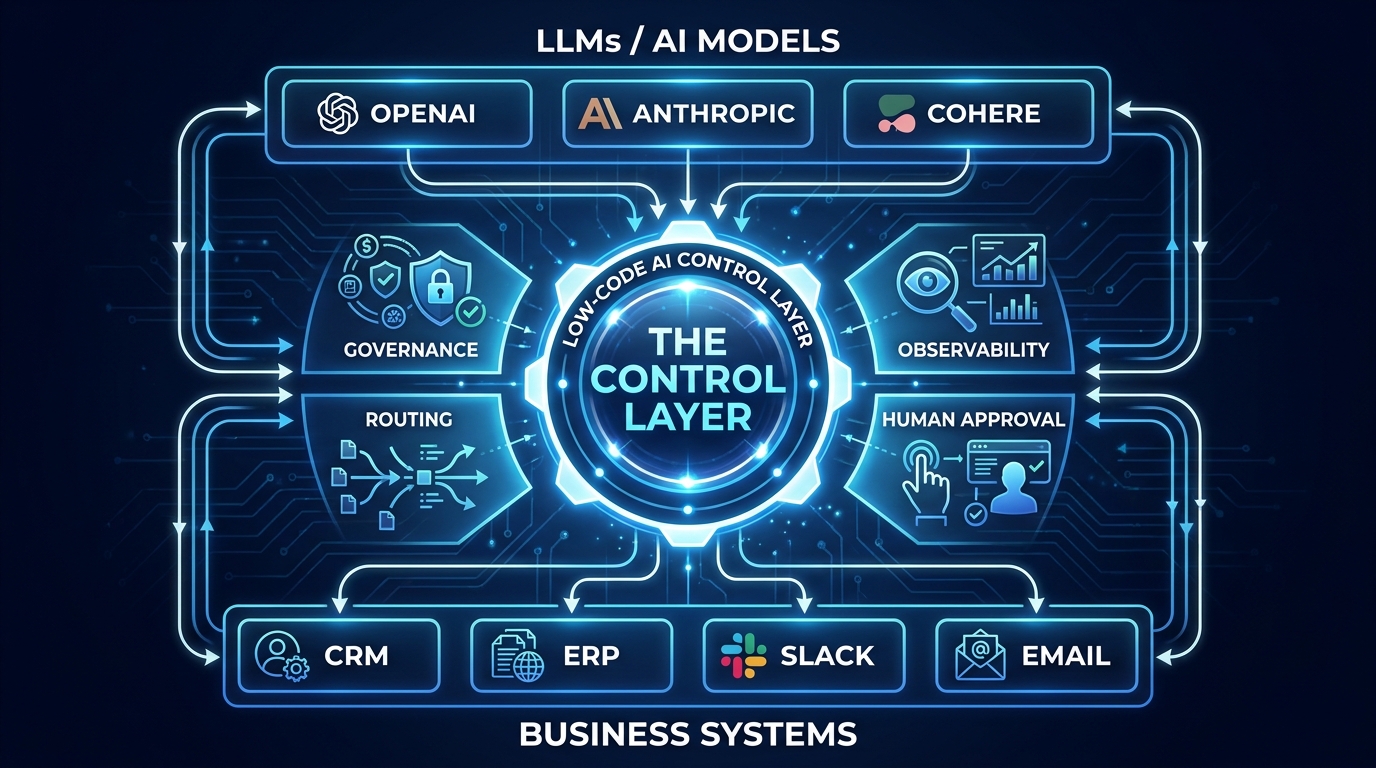
A real AI control layer operates across four distinct planes simultaneously:
- Orchestration plane: Coordinates the execution of multi-step, multi-agent workflows — including sequencing, branching, retry logic, and failure handling — across heterogeneous systems and models.
- Governance plane: Enforces who can build, run, and modify workflows. Manages RBAC (role-based access control), maintains tamper-evident audit logs, and applies policy rules at the workflow level rather than just the user level.
- Observability plane: Provides real-time visibility into what every agent and workflow is doing, including token usage, latency, error rates, and decision traces. This is where you catch silent failures before they become expensive ones.
- Routing plane: Makes intelligent decisions about which model, which version, and which provider handles which task — and enforces cost and quality constraints on those decisions.
A platform can call itself an “AI control layer” and only actually provide one of these four planes. Most of them, in their default configurations, do. The first serious question to ask of any low-code orchestration tool is not “what can it connect?” but “which of these four planes does it genuinely operate?”
The Abstraction That Makes Low-Code Possible
The reason low-code is viable for this architecture in 2026 is that the abstraction has matured. Visual canvas builders, natural language workflow configuration, and pre-built AI nodes now handle enough of the boilerplate that a technically literate but non-engineering team member can construct a meaningful orchestration layer — as long as IT governs the sandbox in which they build. The tooling has crossed the threshold from “prototype helper” to “production candidate.” The governance discipline is the gap that most organizations have not yet crossed.
“Governance is now a primary buying criterion. Low-code AI platforms are being selected on RBAC, audit logs, data access controls, and compliance readiness — not just speed of building.” — Enterprise AI platform analyst commentary, Q2 2026
The Shadow AI Problem Nobody Is Talking About Loudly Enough
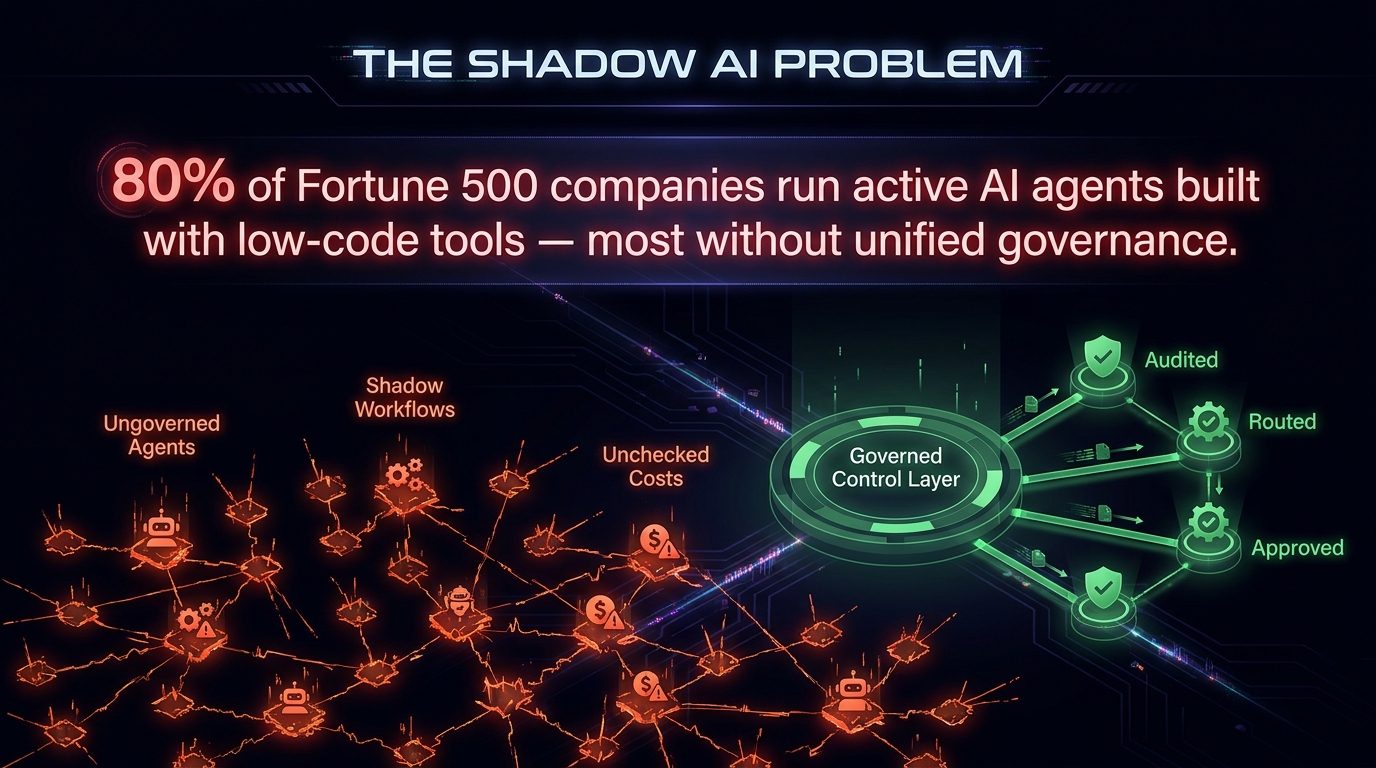
Approximately 80% of Fortune 500 companies are now running active AI agents that were built with low-code or no-code tools. This is not a problem in itself. The problem is that most of those deployments lack unified governance and deterministic process control. The agents are scattered across departments, built by different teams with different tools, running on different credentials, and producing outputs that flow into business processes with no centralized visibility.
This is shadow AI — and it is the predictable result of giving business teams capable AI tooling without simultaneously giving them a governed orchestration framework to build inside.
How Shadow AI Actually Forms
Shadow AI rarely starts maliciously. It starts with a genuinely well-intentioned operations analyst who discovers that they can build a GPT-4-powered email triage workflow in n8n over a weekend. It works. They show it to their team. Three more people build similar workflows. Someone connects it to the CRM. Someone else adds a Slack notification. Within six months, there are a dozen AI-assisted workflows running across the department that were never reviewed by IT, never tested for edge cases, and never registered anywhere.
The risk profile compounds quickly:
- Data exposure: Customer PII is flowing through third-party LLM APIs with no DLP controls.
- Cost accumulation: Token spend is distributed across personal API keys and departmental credit cards, invisible to finance.
- Audit gaps: A regulated workflow is making AI-assisted decisions with no log that a regulator could ever inspect.
- Brittle dependencies: A workflow breaks when a free API key hits its rate limit, and the failure mode is silent — data just stops being processed.
- Model drift: A model update changes output format, and a downstream system that was parsing that output breaks invisibly.
Why Blanket Restrictions Make It Worse
The instinctive IT response to shadow AI is a blanket restriction: block all unauthorized AI tools. This almost never works. It does not eliminate the underlying demand — which is real and legitimate — it just pushes it further underground. Teams route around restrictions using personal accounts, VPNs, and side channels. The result is less visibility and more risk, not less.
The correct response is to make the governed path easier than the ungoverned one. A centralized low-code orchestration platform that is fast to build on, covers the common use cases, and does not require an engineering ticket to get started will pull shadow workflows out of the dark and into a managed environment. The platform wins the adoption battle. The governance comes with it.
Dify’s engineering team, in research published in 2026, framed this precisely: the challenge is not restricting AI use but shifting IT from gatekeeper to governed enabler — creating a centralized AI workflow platform where security and compliance are architecture-level defaults, not late-added constraints.
The Architecture of a Low-Code Control Layer: Four Components You Cannot Skip
Once you accept that a real control layer means more than workflow automation, the design question becomes: what components do you actually need, and in what configuration? Based on production patterns across enterprise low-code AI deployments in 2026, four components are consistently non-negotiable.
Component 1: A Centralized Orchestration Engine
The orchestration engine is the traffic coordinator. It receives workflow triggers, determines execution sequence, manages state across multi-step processes, handles retries on failure, and enforces timeout logic. Without a centralized engine, you have workflows but not orchestration — each automation is isolated, unable to communicate with or be sequenced against others.
In a low-code context, this engine is typically provided by the platform (n8n’s workflow engine, Dify’s pipeline graph, LangFlow’s canvas execution layer). The critical enterprise requirement is that it supports stateful execution — meaning a workflow can pause, wait for external input or human approval, and resume without losing context. Simple trigger-action platforms fail here. Production AI orchestration rarely fits the “fire and forget” pattern.
Component 2: Role-Based Access and Builder Governance
RBAC in a low-code AI platform operates at two levels: who can build workflows, and who can execute them. These are separate permissions that most organizations conflate. A business analyst might have permission to execute approved workflows but not modify them. A department lead might be able to build and test workflows in a sandbox environment but need IT sign-off before pushing to production.
The governance layer also needs to control which AI models are available to which workflows — enforcing, for example, that customer data never touches a non-approved LLM provider, regardless of what a workflow builder tries to configure. This is policy enforcement at the platform layer, not the user layer, and it is the difference between governance that actually holds and governance that depends on individuals making the right choices every time.
Component 3: Observability and Execution Tracing
Observability in an AI orchestration context is more complex than standard application monitoring. You need traces at three levels simultaneously: the workflow level (did this pipeline complete successfully?), the node level (what did this specific AI call return, and how long did it take?), and the decision level (what input triggered what output, and why?).
The decision-level trace is the one that most low-code platforms still handle poorly. For regulated industries — financial services, healthcare, insurance, legal — the ability to reconstruct exactly what input an AI model received, what it returned, and what action was taken as a result is not optional. It is a compliance requirement. Any low-code orchestration platform that cannot produce this trace is not suitable for production use in a regulated context.
Component 4: Cost and Token Governance
LLM token costs are not trivial at production scale, and they are non-linear. A workflow that consumes 500 tokens per execution is cheap to test. At 10,000 daily executions, it generates costs that need to be budgeted, monitored, and governed. Without platform-level cost controls — per-workflow token limits, per-team spending caps, usage dashboards — token spend becomes a financial risk that materializes faster than most finance teams anticipate.
Production-grade control layers enforce token budgets at the workflow level, alert on anomalous consumption patterns, and provide model-level cost allocation so you can see which workflows, which teams, and which AI models are generating which costs. This is not about being cheap. It is about having the information you need to make rational scaling decisions.
Platform Breakdown: n8n, Dify, LangFlow, and Flowise — Which Layer Does What
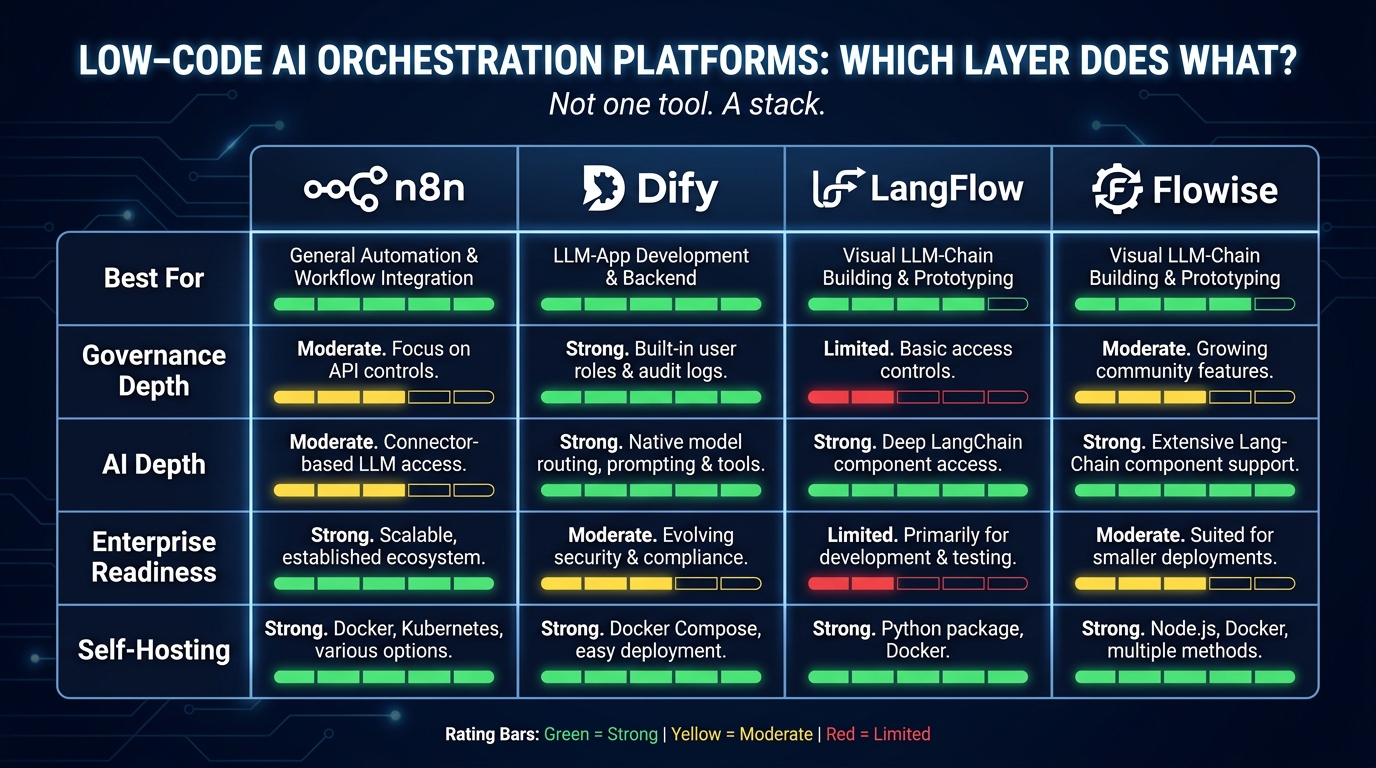
The conversation about low-code AI orchestration tools is frequently framed as a competitive comparison — which platform wins? In practice, the teams doing this most effectively in 2026 are not picking a winner. They are assembling a stack where each platform handles the layer it is genuinely best at.
n8n: The Integration and Automation Backbone
n8n is the strongest general-purpose workflow automation and integration layer in the low-code AI space as of mid-2026. With over 1,000 native integrations, a mature Kubernetes-native scaling model, SAML/SSO in its enterprise edition, and a genuine workflow engine with retry logic and execution history, it handles the connective tissue of an orchestration stack exceptionally well.
Where n8n is strongest: connecting AI capabilities to existing business systems. CRM updates triggered by AI analysis, support ticket triage routed through an LLM, lead enrichment pipelines that pull from multiple APIs and write back to Salesforce — these are n8n’s native territory. Its AI nodes have matured significantly, and it now supports multi-step agent workflows with tool use.
Where n8n is weaker: LLMOps governance, model-specific observability, and RAG pipeline design. These are not n8n’s primary focus, and the platform does not pretend otherwise. For teams that need deep LLM production management, n8n needs to be paired with something further up the stack.
Dify: LLMOps and Governed Production AI
Dify is the closest thing in the low-code space to a dedicated LLMOps platform. Its v1.13.0 release introduced a Human Input node that allows workflows to pause at a specific point, surface a review task to a named approver, and resume with approved, edited, or rejected output. This is a concrete architectural feature, not a conceptual one — and it is the kind of feature that makes Dify viable in regulated enterprise environments.
Dify’s recent $30M Series Pre-A raise (March 2026) was accompanied by an explicit positioning statement: organizations of the future will be built by people and agents working together. That positioning is reflected in the product — Dify’s core design assumption is that AI workflows need human judgment at defined checkpoints, not autonomous execution through to the end.
Dify achieved SOC 2, ISO 27001, and GDPR compliance in early 2026, which matters significantly for enterprises in regulated industries evaluating the platform for production use. Its Template Marketplace and Creator Center, launched in 2026, also enable governed sharing of workflow templates within an organization — a feature that directly reduces shadow AI formation by making the governed path the convenient one.
LangFlow: RAG and Agent Design Workbench
LangFlow occupies the experimental and design layer. Its visual canvas is best suited for designing RAG (retrieval-augmented generation) pipelines and complex agent architectures that are then exported or integrated into production systems. For engineering teams that need to prototype multi-agent reasoning flows before committing them to a production platform, LangFlow provides more flexibility than Dify or n8n at the cost of less built-in governance.
In enterprise stacks, LangFlow typically appears at the design and prototyping stage, with the resulting flow architecture migrated to n8n (for integration-heavy workflows) or Dify (for LLM-heavy, governance-requiring workflows) once it reaches production readiness.
Flowise: Rapid Chatbot and Endpoint Deployment
Flowise is the fastest path from a language model to a deployable chatbot or API endpoint. For teams that need to build and expose AI-powered interfaces quickly — internal knowledge base assistants, customer-facing FAQ bots, support chat overlays — Flowise handles this with minimal configuration overhead.
The enterprise limitation is that Flowise’s governance and observability are shallow compared to Dify. It is an excellent tool for fast deployment of relatively bounded use cases. It is not the right choice as the primary orchestration layer for multi-agent, regulated, or cost-sensitive production environments.
The Stack Answer
The pattern that emerges from enterprise deployments in 2026 is a three-tier stack: LangFlow or Flowise for design and prototyping, n8n for integration and business process automation, and Dify for LLM application management and governed AI production workflows. These are complementary, not competing — and treating them as a single-vendor choice is one of the most common and costly mistakes organizations make in this space.
The Governance Stack: Guardrails, Approval Gates, and Audit Trails Built Into the Flow
Governance in a low-code AI orchestration context is not a separate project that runs alongside workflow development. It has to be built into the workflow architecture from the start, or it will not hold. The following components form the governance stack that production-ready control layers implement.
Input and Output Guardrails
Guardrails are constraints on what can enter and exit AI model calls within your workflows. Input guardrails screen prompts for PII, confidential data patterns, and policy-violating content before they reach the LLM. Output guardrails screen model responses before they are acted upon — checking for hallucination indicators, format violations, confidence thresholds, and policy-violating content in the response.
In a low-code context, guardrails are implemented as nodes in the workflow graph — explicit processing steps that sit before and after every AI model call. The low-code abstraction is that you do not have to write the guardrail logic from scratch; platforms like Dify and n8n provide pre-built nodes for common patterns. But someone has to decide what rules the guardrails enforce, and those rules have to be actively maintained as model behavior evolves.
The critical operational point: guardrails break silently if they are not tested. A guardrail node that was calibrated for GPT-4o behavior may pass outputs from a newer model that it should have caught. Guardrail testing needs to be part of the workflow deployment pipeline, not a one-time setup task.
Approval Gates and Conditional Human Review
Approval gates are the mechanism by which human judgment is inserted into a workflow at defined decision points. Unlike simple notifications, approval gates actually halt execution — the workflow pauses, sends a review task to the appropriate person or queue, and only resumes when an explicit decision is received.
Effective approval gate design requires three decisions: when to trigger human review (which conditions route a workflow to a human rather than auto-executing), who receives the review task (individual, team, or role-based routing), and what options the reviewer has (approve as-is, approve with modifications, reject with reason, escalate further).
The most common failure mode in approval gate implementation is trigger calibration that is too conservative — routing everything to human review defeats the automation purpose and creates review queue backlogs that result in reviewers rubber-stamping decisions without actually reviewing them. The goal is a threshold that reflects genuine risk: low-stakes, high-confidence decisions auto-execute; high-stakes or low-confidence decisions get human review. Getting that threshold right requires running the workflow in observation mode (logging what would have been auto-executed vs. human-reviewed) before going live with actual approvals.
Audit Trails and Tamper-Evidence
An audit trail in an AI orchestration context captures: the trigger event and its parameters, the state of the workflow at each execution step, the inputs and outputs of every AI model call, every human decision made at approval gates, and the final action taken and its outcome. This needs to be stored in a tamper-evident format — meaning entries cannot be modified after the fact, and any attempt to modify them is itself logged.
For regulated industries, the audit trail is not just about internal accountability. It is a direct compliance requirement. The EU AI Act’s requirements for high-risk AI systems, for example, mandate documented audit trails for automated decision-making in areas including credit assessment, employment screening, and critical infrastructure management. Low-code orchestration platforms that cannot produce compliant audit trails are not viable production tools in those contexts.
Model Routing and Cost Control: The Two Levers Most Teams Ignore
Model routing is one of the most underutilized capabilities in enterprise low-code AI orchestration. The default pattern — one model handles everything — is simultaneously the most expensive and the most brittle approach available. Production control layers route different task types to different models based on explicit criteria, and the results in both cost and quality are significant.
The Case for Multi-Model Routing
Not all tasks within a workflow require the same model capability. A workflow that ingests customer feedback, classifies it by topic, summarizes the key complaint, drafts a response, and logs to CRM is performing four fundamentally different operations. Classification is a relatively simple reasoning task that a smaller, faster, cheaper model handles reliably. Summarization of complex, ambiguous text may benefit from a more capable model. Drafting a response has both quality and brand-voice requirements that may point to a specific fine-tuned model. Logging to CRM requires no AI at all.
A routing layer that maps task type to model appropriately will outperform a single-model-for-everything approach on cost by 40–60% in most production workflows, while matching or exceeding quality on the tasks that matter most. This is not a theoretical claim — it is the consistent finding from enterprises that have implemented model-level routing in their orchestration layers.
Routing Criteria in Practice
Practical model routing criteria fall into four categories:
- Task complexity: Simple classification, structured extraction, and format conversion route to smaller, faster models. Open-ended reasoning, multi-step analysis, and synthesis route to more capable models.
- Latency requirements: Customer-facing, real-time workflows have latency budgets that eliminate the slowest models from consideration regardless of their capability. Batch processing workflows have more flexibility.
- Data sensitivity: Workflows involving regulated data or PII may be restricted to on-premises or private deployment models regardless of cost or latency. The routing rule is a policy constraint, not just an optimization.
- Cost budget: Per-workflow token budgets set a maximum cost per execution. When the optimal model would exceed that budget, the routing layer selects the best model within the constraint.
Implementing Cost Controls Without Choking Performance
Token budget enforcement in low-code platforms is typically implemented at the node level (each AI node has a configured maximum token limit for prompt + completion), the workflow level (total token spend per execution is capped), and the team level (monthly token allocation per team or department). These operate as a hierarchy: the most restrictive applicable limit applies.
The operational discipline that makes cost controls work is treating token budget overruns as workflow events, not just billing anomalies. When a workflow execution approaches its token limit, the control layer should alert, log, and if appropriate, route to a fallback path — either a cheaper model completion or a human review queue. Silent token budget hits that truncate model outputs mid-reasoning are one of the most common sources of subtle AI output quality failures in production.
Human-in-the-Loop Is Not a Feature — It’s an Architectural Commitment
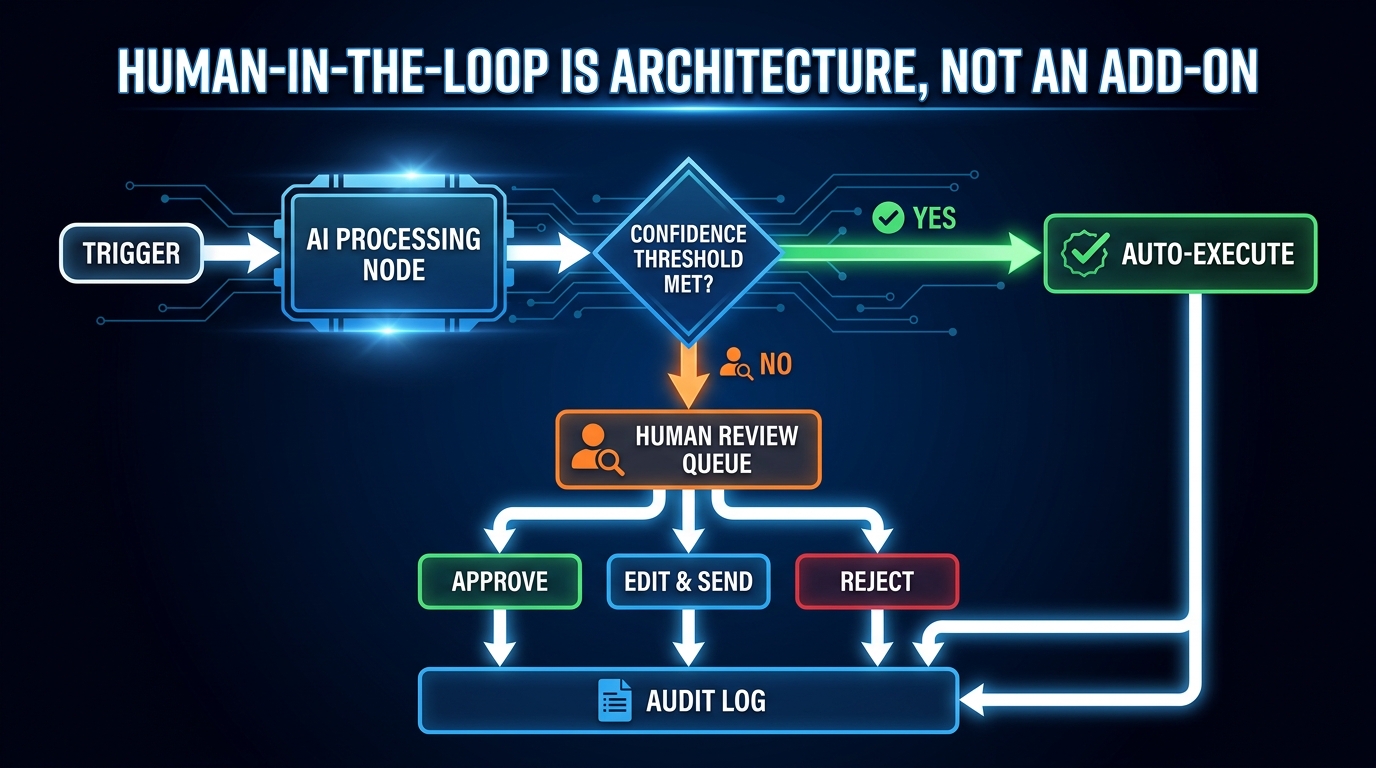
Every platform in the low-code AI space now markets some version of “human-in-the-loop” capability. It is one of the most abused phrases in the industry, because it can mean anything from “you can add a Slack notification” to “execution is architecturally suspended pending an explicit human decision.” The difference between these two things is significant.
The Spectrum of Human Involvement
Human-in-the-loop exists on a spectrum from minimal to maximal involvement:
- Human-on-the-loop: The workflow executes autonomously, but generates notifications or summaries that a human reviews after the fact. If the output was wrong, the human corrects it downstream. This is notification, not control.
- Human-in-the-loop (conditional): The workflow executes autonomously for high-confidence decisions and pauses for human review on low-confidence or high-stakes decisions. This is the most common production pattern for governed AI orchestration.
- Human-in-the-loop (required): Every execution requires explicit human approval before action is taken. This is appropriate for high-stakes, irreversible, or regulatory-sensitive actions — financial commitments, legal document generation, compliance filings.
Most enterprise workflows should operate in the middle tier for AI-generated outputs. The design decision is which specific conditions trigger the conditional review — and those conditions need to be explicitly defined, tested, and revisited as the workflow matures.
What Dify’s Human Input Node Actually Solves
Dify’s Human Input node, released in v1.13.0 in early 2026, addresses a specific technical gap that prevented many organizations from using low-code AI in genuinely regulated processes: the inability to architecturally suspend workflow execution pending human input. Previous approaches required workarounds — external ticketing systems, manual re-triggering of paused workflows, or simply accepting that human review would happen outside the orchestration layer with no connection back to it.
With the Human Input node, a Dify workflow can pause at a defined checkpoint, display the AI-generated content and its context to a named reviewer, accept an approve / edit / reject decision with optional annotation, and resume execution with the reviewed content — all within the platform, fully logged in the audit trail. This is not a minor UX improvement. It is an architectural shift that makes Dify workflows viable in compliance-sensitive contexts that previously required custom-built review infrastructure.
Designing the Review Interface, Not Just the Trigger
A consistently underestimated element of human-in-the-loop design is the quality of the review interface presented to the human reviewer. A poorly designed review interface — one that surfaces the AI’s output without the context that informed it, or that requires the reviewer to navigate to three other systems to understand what they are approving — will produce rubber-stamp approvals at scale. The human is technically in the loop, but not meaningfully in control.
Effective review interfaces present: the trigger event and its key parameters, the AI’s output and the confidence signal that triggered the review, the proposed downstream action and its consequences, and the reviewer’s options with clear differentiation. This interface design is workflow design work, not an afterthought. It determines whether the human-in-the-loop actually functions as a governance control or just as a latency-adding formality.
From Citizen Builder to Governed Operator: Rethinking Who Owns the Workflow
One of the persistent tensions in low-code AI orchestration is the question of who builds and owns the workflows. The “citizen developer” model — empowering non-technical business users to build their own automation — has significant efficiency appeal. It eliminates engineering bottlenecks, puts workflow design in the hands of people who understand the business process, and scales faster than IT-mediated development.
The risk, which the previous two years of enterprise deployments have made concrete, is that citizen developers building without governance scaffolding are the primary source of shadow AI. They are not acting irresponsibly — they are solving real problems with the tools available to them. The problem is structural: the governance framework is not in place, so every workflow they build is built outside it.
The Governed Sandbox Model
The pattern that is emerging as the most viable approach in 2026 is what might be called the governed sandbox: a low-code orchestration environment that business teams have substantial freedom to build within, but that is architecturally constrained by IT-managed policy at its edges.
In practice, this means:
- Approved model catalogue: Business builders can use any AI model in the catalogue. Adding new models to the catalogue requires IT review and approval. Models are not freely accessible from the building interface.
- Data access controls enforced at the platform level: What data a workflow can access is determined by policy, not by the builder’s judgment. A business team building a customer service workflow cannot route customer PII to an unapproved LLM regardless of how they configure the workflow, because the platform enforces the data policy.
- Production promotion requires review: Any workflow can be built and tested in sandbox without oversight. Moving to production requires a review step — automated compliance checking where possible, human review for workflows that touch sensitive data or regulated processes.
- Monitoring is always on: Every workflow that runs in production generates observability data that flows to a central dashboard. This is not opt-in. It is the default state of anything running in the production environment.
This model keeps the speed benefit of citizen development — teams can build and iterate quickly — while ensuring that production-running workflows have cleared a governance gate. The key is that the governance gate is fast enough not to become a bottleneck. Automated compliance checks that run in seconds, combined with a lightweight human review for genuinely complex cases, can maintain the development velocity that makes low-code attractive while eliminating the governance gaps that create risk.
The Role IT Plays in a Low-Code AI Organization
In this model, IT’s role shifts from being the builder to being the infrastructure and policy provider. IT manages the platform, maintains the approved model catalogue, sets the data access policies, runs the production review process, and monitors the observability layer. IT does not build the business workflows — that remains with the business teams. But IT governs the environment in which those workflows run.
This is a meaningful change from both the traditional IT gatekeeper model (where every automation request goes through IT) and the pure citizen-developer model (where business teams build with no oversight). It requires new skills from IT teams — platform governance, AI policy management, LLMOps practices — and a new relationship with business stakeholders built on enablement rather than control.
Real-World Patterns: What Actually Breaks in Low-Code AI Production
Enterprise AI teams in 2026 have enough production experience with low-code orchestration to identify consistent failure patterns. These are not theoretical risks — they are recurring incidents documented across financial services, operations, and customer service deployments. Understanding them is the most efficient way to build control layers that avoid them.
Failure Pattern 1: Silent Partial Completion
A workflow that partially executes — completing some steps but failing on others — and does not surface that failure clearly is one of the most common and costly problems in production AI orchestration. The downstream system receives incomplete or corrupted data. The failure is not immediately obvious. It may propagate through several subsequent processes before it is noticed, by which time diagnosing the cause requires reconstructing a chain of events from whatever logs exist.
The prevention is explicit failure state handling at every workflow node: every step has a defined success path and a defined failure path, and the failure path always produces an observable signal — a log entry, an alert, a human notification. “Default to success unless something obviously explodes” is not a failure handling strategy. It is a liability.
Failure Pattern 2: Model Update Breaks Downstream Parsing
A workflow that depends on parsing structured output from an LLM — JSON, CSV, XML, a specific format with a specific field structure — is brittle in a specific way that many teams do not anticipate. LLM providers update their models. Updated models may produce outputs in subtly different formats, with different field names, different nesting, or different handling of edge cases. The workflow was built for the old format. The new format breaks the parser. Outputs start failing silently or producing corrupted data.
The prevention is output format validation as a standard node in any workflow that depends on structured LLM output. The validation node checks that the output matches the expected schema before passing it downstream. If it does not, the workflow routes to an error handler — not to the next production step. This adds one node and a few minutes of configuration to every AI-to-downstream integration. It prevents an entire class of production incidents.
Failure Pattern 3: Approval Queue Saturation
When approval gate thresholds are miscalibrated, review queues saturate. Reviewers faced with hundreds of items in their queue shift from genuine review to rapid approval to clear the backlog. The human-in-the-loop has become a rubber stamp, and the governance control has been rendered meaningless in practice even though it appears intact in the architecture.
The prevention is ongoing calibration of approval trigger thresholds based on actual reviewer behavior data. If the average review time per item drops below a defined minimum (say, 30 seconds for a decision that should take 2–3 minutes), that is a signal that the queue is saturated and thresholds need adjustment. This is an operational monitoring task, not a one-time design decision.
Failure Pattern 4: Credential and Authentication Rot
Low-code workflows that connect to external APIs authenticate using credentials — API keys, OAuth tokens, service account credentials — that are embedded in the workflow configuration at build time. Those credentials expire, get rotated, get revoked, or lose permissions as systems are updated. The workflow fails. In the best case, the failure is obvious. In the worst case, it fails silently, continuing to look like it is running while actually returning empty or error responses that are propagated forward as valid data.
The prevention is centralized credential management within the orchestration platform — credentials stored in a vault with expiry tracking, workflows referencing credential identifiers rather than raw values, and automated alerting when credentials approach expiry or authentication failures occur. Most enterprise low-code platforms support this natively. Most deployments do not configure it because it takes longer than pasting an API key directly into the workflow form.
Building the Control Layer: The Right Implementation Order
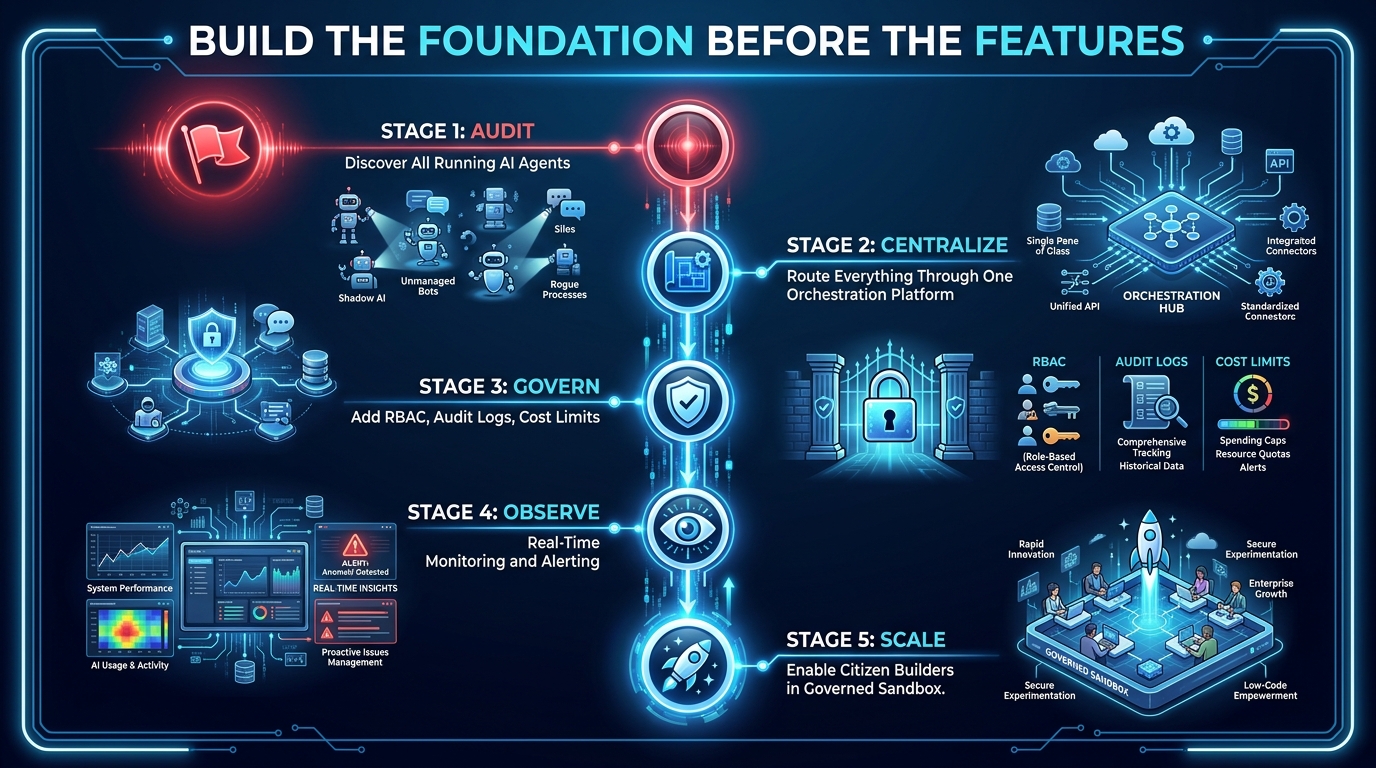
Most organizations approach low-code AI orchestration in the wrong order. They start by building workflows — because building is fast and produces visible results — and try to add governance, observability, and cost controls later. This creates two problems: the governance controls need to be retrofitted to workflows that were not designed for them, and the uncontrolled period produces the shadow AI backlog and technical debt that takes months to unwind.
The correct implementation order builds the control layer first, then populates it with workflows.
Stage 1: Audit — Discover What Is Already Running
Before deploying a centralized orchestration platform, organizations need to know what AI automation is already running in the environment. This means a structured discovery process: surveying teams about AI tools and automations in use, scanning cloud spend for LLM API costs that are not centrally budgeted, reviewing SaaS subscriptions for AI platform tools, and cataloguing any custom scripts or lightweight automations that incorporate AI calls.
The output is an inventory of existing AI automation — approved and shadow — with enough detail to understand what each does, what data it touches, and what risk category it falls into. This inventory becomes the starting prioritization list for the migration to governed orchestration.
Stage 2: Centralize — Select and Deploy the Platform Stack
With the inventory in hand, select the orchestration platform stack based on what types of workflows dominate the inventory and what governance requirements apply. Deploy the platform in both sandbox and production environments. Configure the foundational infrastructure: SSO integration, RBAC structure, credential vault, logging pipeline to your central observability system.
Do not build any business workflows at this stage. The platform needs to be configured correctly before workflows populate it. Shortcuts here create the exact technical debt you are trying to escape.
Stage 3: Govern — Define Policy Before the First Workflow
Define and configure the governance policies that will apply to all workflows: approved model catalogue, data access rules, token budget tiers, and the workflow promotion process (sandbox to production). Write these as explicit platform-level configurations, not as documented guidelines that builders are expected to follow on their own.
Define the audit trail format and retention policy. Confirm that the platform’s audit output satisfies the compliance requirements of your industry and jurisdiction before any production workflow runs. It is significantly easier to validate this with a clean platform than to reconstruct it after workflows are running.
Stage 4: Observe — Implement Monitoring Before Traffic
Configure the observability layer — dashboards, alerting thresholds, anomaly detection — before any workflow goes live in production. This sounds counterintuitive: why set up monitoring before there is anything to monitor? Because configuring monitoring under the pressure of a production incident results in incomplete monitoring. Set it up when there is time to do it properly.
Define what “normal” looks like for each workflow in terms of execution count, token consumption, latency, and error rate. These baselines enable anomaly detection that actually functions — which requires knowing what the baseline is, not discovering it after something has gone wrong.
Stage 5: Scale — Enable Citizen Builders in the Governed Environment
Only at this stage do you open the platform to broader business team building. With the governance framework in place, the citizen development model is viable because the environmental constraints make it hard to build outside the guardrails by accident. Run enablement sessions that focus not just on how to use the platform but on the governance model — why the approval process exists, how to interpret observability data for your own workflows, what the escalation path is for edge cases the guidelines do not cover.
The citizen builder is not just a workflow creator in this model. They are a governed operator — empowered to build, but doing so within an infrastructure that ensures their work meets the quality and compliance standards the organization requires.
The Control Layer Is the Product
There is a fundamental reframe required for organizations to get low-code AI orchestration right in 2026: the control layer is not the infrastructure that supports the AI products. The control layer is the product. The business value — the accelerated workflows, the reduced manual effort, the AI-assisted decisions — only materializes reliably and sustainably when the control layer is sound. Without it, every AI workflow is a liability waiting to manifest.
What This Means for Investment and Prioritization
If the control layer is the product, then investing in it is not overhead — it is the core work. The governance configuration, the observability setup, the approval gate design, the audit trail validation, the model routing logic — these are not adjacent tasks to building the workflows. They are the primary tasks. The workflows are the benefit that flows from doing the primary tasks well.
Organizations that treat control layer investment as a tax on the “real” AI work consistently produce the ungoverned, fragile, expensive automation landscapes that require subsequent remediation. Organizations that treat the control layer as the foundational product produce AI automation that scales, survives compliance reviews, and generates the ROI that justifies the investment in the first place.
The Signals That Tell You Your Control Layer Is Real
There are concrete signals that distinguish a genuine control layer from a collection of managed workflows:
- You can tell a regulator or auditor exactly what AI model processed a specific piece of data on a specific date, what it returned, and what action was taken as a result — and produce that trace in under five minutes.
- When a model provider updates their API, you know which of your workflows use that model, can test them against the new version in a staging environment, and can promote or rollback the change with a documented decision.
- When a team member leaves, their workflows continue running and their review tasks are automatically reassigned — because the workflows are owned by roles, not individuals.
- When token spend spikes anomalously, you receive an alert that identifies the specific workflow, the specific execution run, and the specific node where the excess consumption occurred — within minutes.
- When a new business team wants to build their own AI workflows, the answer is “here is your sandbox, here is the catalogue, here is the promotion process” — not “put in a ticket.”
If your low-code AI orchestration stack cannot produce all five of these outcomes, you have workflow automation. You do not yet have a control layer. The gap between those two things is where most enterprise AI value is being lost right now, and it is a gap that the tooling available in 2026 is entirely capable of closing — if you build in the right order, with the right priorities, and with a clear understanding of what you are actually trying to build.
Actionable Starting Points
If you are at the beginning of this journey, the three most valuable first actions are:
- Run the audit. Spend two weeks mapping every AI tool, automation, and agent running in your organization. The results will be more extensive and more alarming than you expect. That is useful information, not a crisis — but you need it before you can act on it.
- Pick the platform for governance first. Evaluate low-code AI orchestration platforms against their governance capabilities (RBAC, audit trails, human-in-the-loop support, compliance certifications) before evaluating their workflow-building capabilities. The governance capabilities are harder to retrofit. The workflow building capabilities are easier to learn once the platform is chosen.
- Define the production promotion process before the first workflow. Even a simple three-step process — build in sandbox, automated compliance check, human review for sensitive workflows — creates a structural separation between experimentation and production that prevents the shadow AI formation that plagues organizations that skip this step.
The control layer is buildable with the tools available in 2026. It is not a research project or a future-state aspiration. It is an infrastructure decision — one that determines whether your organization’s AI automation compounds in value or compounds in risk. The architecture is clear. The implementation order is known. The platforms are ready. What remains is the decision to build the foundation before the features.