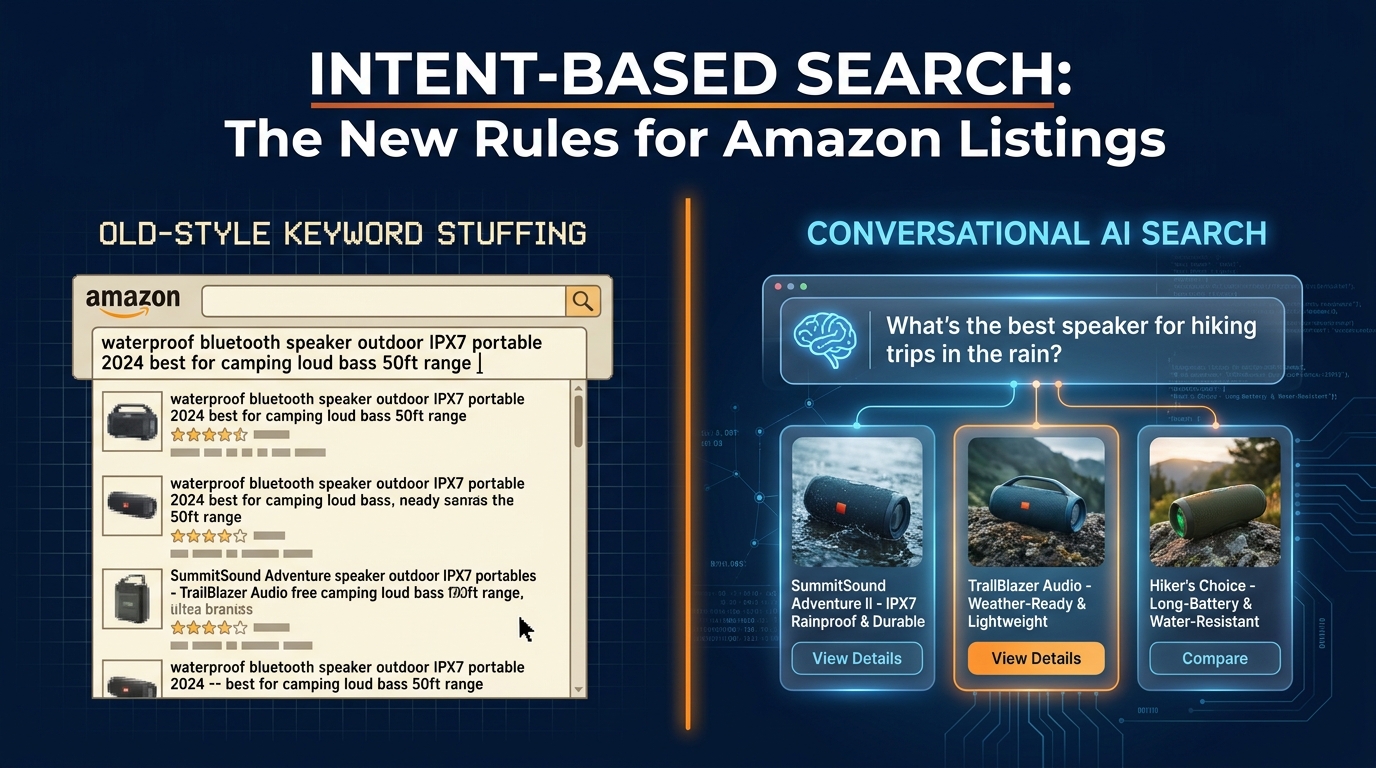

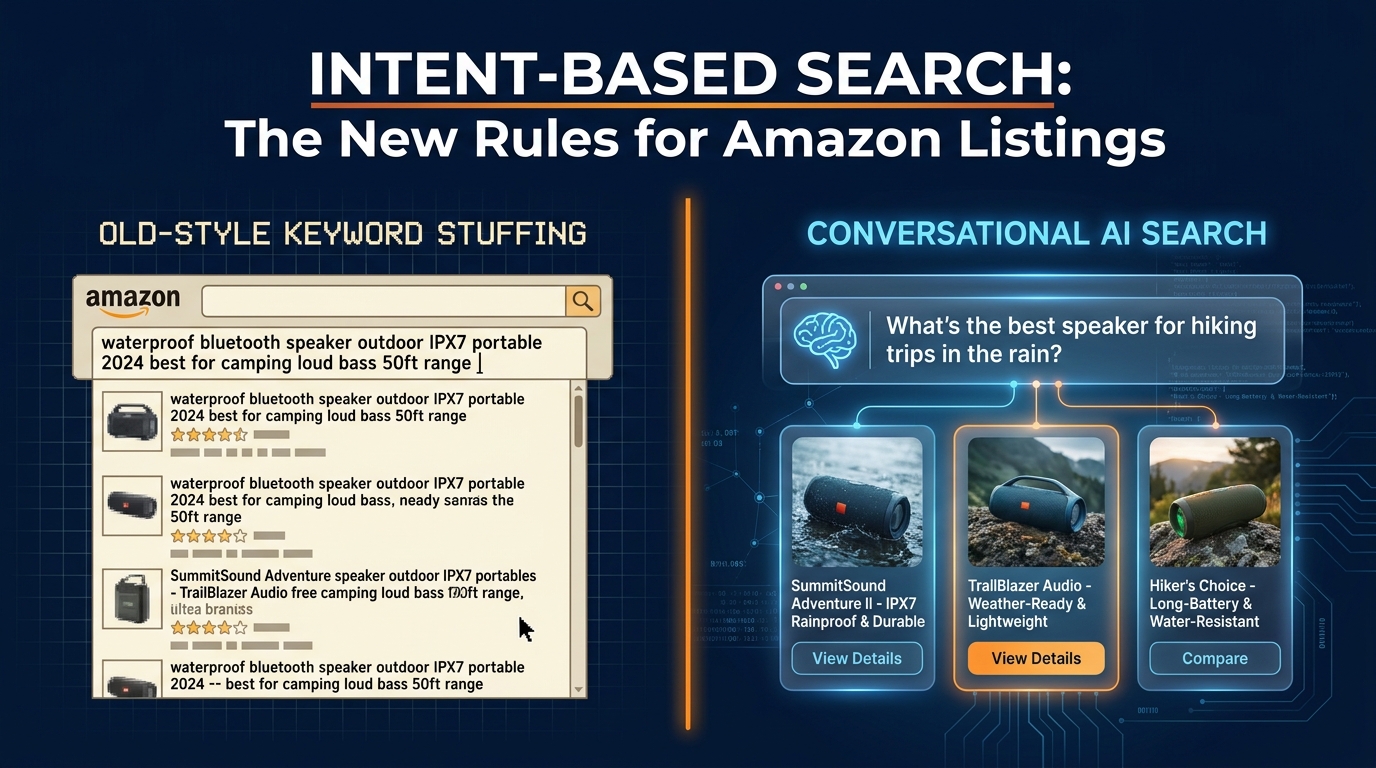
There’s a moment most Amazon sellers remember: the first time a listing they’d carefully keyword-stuffed started underperforming a competitor’s listing that, on paper, looked worse. Fewer keywords in the title. No exact-match phrases crammed into the bullets. And yet it was ranking higher, converting better, and apparently eating traffic that should have been yours.
That moment is no longer an anomaly. It’s the new normal.
Amazon’s search infrastructure has undergone a fundamental shift over the past eighteen months, one that goes well beyond the A9-to-A10 transition that sellers were briefed on years ago. What’s happening now involves a layered stack of AI systems — COSMO, Rufus (now absorbed into Alexa for Shopping), and large language model-powered ranking layers — that collectively do something traditional keyword matching could never do: understand what a shopper is actually trying to accomplish.
The practical consequence is stark. Listings built on keyword density logic are losing ground to listings built on intent alignment logic. And the sellers winning the most ground are the ones who have figured out how to answer three questions the algorithm is now asking about every product on the platform: Who is this for? What problem does it solve? And does this listing prove it?
This is a rewrite playbook for exactly that. Not a surface-level “add more keywords” guide — there are thousands of those. This is a systematic walk through how intent-based search works at the infrastructure level, why it changes the calculus for every element of your listing, and what a structured rewrite process looks like when you’re doing it right in 2026. We’ll cover titles (including the new 75-character mandate that hits in July 2026), bullets, backend fields, A+ content, and the measurement framework that tells you whether any of it is actually moving the needle.
What “Intent-Based Search” Actually Means on Amazon’s Infrastructure

The phrase “intent-based search” gets thrown around a lot, but it means something specific at the infrastructure level that most sellers have never had explained to them clearly. Understanding it changes how you approach every listing decision you make.
COSMO: Amazon’s Commonsense Knowledge Layer
COSMO — Amazon’s large-scale commonsense knowledge and semantic graph system — is the backbone of the shift. Unlike traditional keyword-matching systems that ask “does this listing contain these words?”, COSMO asks something more sophisticated: “Does this product satisfy the real-world need behind this query?”
Amazon’s own research documentation describes COSMO as a system that infers intent using commonsense reasoning — understanding, for example, that a shopper searching for “what to get a new mom recovering from surgery” is looking for comfort items, easy-open packaging, and hands-free functionality, not products that happen to contain those words. COSMO maps queries to intent clusters, and then evaluates which products in the catalog best satisfy those clusters, regardless of whether the exact query phrase appears in the listing.
The deployment numbers matter here. In Amazon’s own A/B testing on approximately 10% of U.S. search traffic, COSMO drove a 0.7% relative increase in product sales and an 8% increase in navigation engagement. At Amazon’s scale, those numbers represent hundreds of millions of dollars in GMV movement. The system is not experimental — it is actively reshaping which products win organic placements.
Rufus / Alexa for Shopping: The Conversational Layer
Rufus — Amazon’s AI shopping assistant, now integrated more deeply into Alexa for Shopping — adds a conversational dimension on top of COSMO’s semantic matching. Agency data from Q1 2026 suggests that Rufus-mediated sessions now account for approximately 15–20% of mobile shopper queries in the U.S. market. Conversion rates on Rufus-surfaced product detail pages are running higher than traditional search-surfaced PDPs: 8–14% CVR versus 6–9% for traditional search results on the same ASINs.
What Rufus changes is scope. Traditional Amazon search reads your title, bullets, and backend keywords. Rufus reads your entire listing — title, bullets, description, A+ content, Q&A section, and customer reviews — to determine whether your product genuinely answers a shopper’s question. A listing that answers “what should I get for a runner who gets shin splints?” needs to have that use case legible somewhere in its content ecosystem, not just in a keyword field.
Intent Clusters vs. Exact Keyword Matching
The practical implication of COSMO and Rufus working together is that Amazon now groups different queries that imply the same need and ranks products against the entire cluster — not just the literal phrase. A shopper searching “portable charger for hiking” and a shopper searching “battery pack that works in cold weather” may be expressing the same underlying intent. If your listing content maps to that underlying need, you become eligible to rank for both without having exact-match text for either.
This is why sellers who rewrite listings around use cases, outcomes, and constraints — rather than keyword phrases — are seeing organic traffic improvements across queries they never explicitly targeted. The algorithm is doing the semantic bridging for them, because their listing content communicates intent clearly enough for COSMO to make the connection.
The Four Buyer Intent Types on Amazon — And How Each One Searches
Amazon is a transactional platform — which leads many sellers to assume all their buyers arrive with credit card in hand, ready to click “Add to Cart.” The reality is considerably more complex, and misreading it is one of the most expensive mistakes you can make in listing copy.
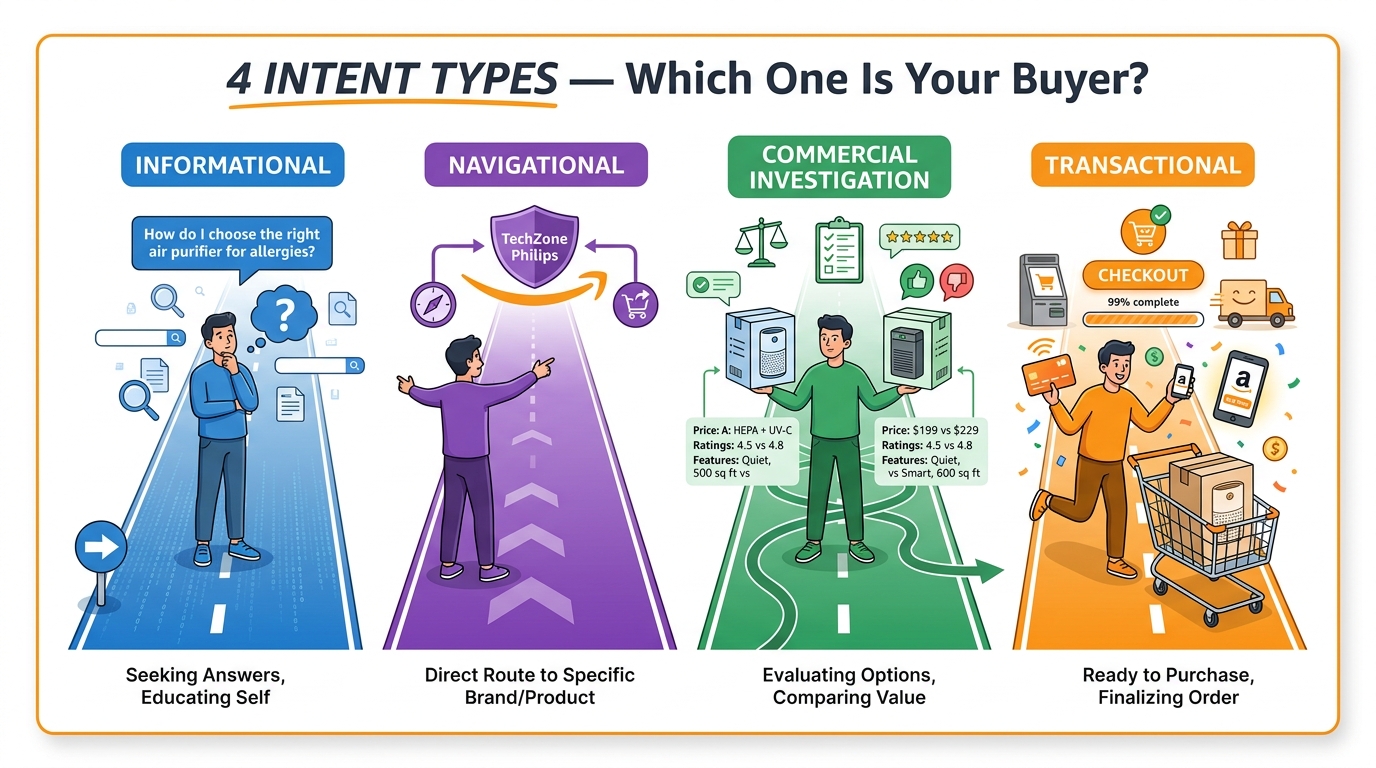
Research consistently maps Amazon search behavior into four intent categories, each of which requires different copy strategies to intercept and convert effectively.
Informational Intent: “Help Me Figure This Out”
These shoppers are in research mode. They’re typing queries like “how do I choose a standing desk for back pain?”, “what type of air purifier is best for pet dander?”, or “difference between whey isolate and whey concentrate.” They have a problem they need to solve, but they haven’t committed to a product type — let alone your ASIN — yet.
Informational intent queries are longer, more conversational, and often include words like “best for,” “how to,” “what is,” or “which.” Rufus is particularly active here, surfacing product listings that contain content matching the underlying question. Your A+ content, Q&A section, and bullet points are the primary surfaces where informational intent can be addressed. Sellers who treat A+ as a brand brochure — rather than an intent-matching content layer — are leaving significant traffic on the table.
Rewrite target: Q&A section, A+ educational modules, bullet point #4 or #5 (the “consideration” bullets).
Navigational Intent: “Take Me to the Right Brand or Product”
Navigational queries are branded or near-branded searches. “Hydro Flask 40oz,” “Instant Pot Duo 7-in-1,” “Burt’s Bees lip balm set” — these shoppers know what they want at the brand or product-line level. They’re not comparison shopping; they’re navigating to a destination.
For your own brand, navigational intent is served by ensuring your brand name, product line names, and model numbers appear prominently and exactly as shoppers type them — in the title, in the brand field, and in backend search terms. For competitor navigational traffic, this is where defensive positioning in your A+ brand story content or sponsored product campaigns becomes relevant. Don’t confuse navigational optimization with keyword stuffing your competitor’s brand names into backend fields — Amazon’s policies prohibit this and their AI systems flag it.
Rewrite target: Title (brand placement), brand field, A+ brand story section.
Commercial Investigation Intent: “Help Me Compare and Choose”
This is the most valuable intent type for conversion, and the one most listings fail to serve well. Commercial investigation queries sound like: “best wireless earbuds under $50,” “which yoga mat is best for hot yoga,” “running shoes for wide feet vs narrow.” Shoppers are comparing options and making a decision.
The key insight here is that these shoppers need reasons to choose you — and those reasons need to be specific, concrete, and relevant to their selection criteria. Generic benefit language (“high quality,” “durable,” “great value”) fails here because it doesn’t differentiate. Specific constraint-matching language wins: “stays in place on sweaty ears during HIIT,” “extra wide toe box fits US wide widths,” “hypoallergenic adhesive tested for sensitive skin.”
Commercial investigation buyers are also the primary Rufus users. They’re asking Amazon’s AI assistant follow-up questions: “which of these is better for camping?”, “does this work with a CPAP machine?” Your listing’s Q&A section — and the review text Amazon’s AI is reading — must contain the answers.
Rewrite target: Bullets #1–3 (lead benefit statements), A+ comparison modules, Q&A section.
Transactional Intent: “I’m Ready to Buy This”
Transactional queries are short, specific, and purchase-ready: “buy stainless steel meal prep containers,” “order organic baby formula 24 pack,” “add to cart Vitamin D3 5000 IU 365 softgels.” These shoppers have done their research and are looking for confirmation that your listing gives them no reason to hesitate.
For transactional intent, friction is the enemy. Price competitiveness, availability signals, shipping speed, review count, and return policy clarity all matter as much as the copy itself. In the copy, the primary job is removing objections: clear size/compatibility specs, explicit return policy language (where permitted), and leading with the specific variant the transactional buyer is looking for — not forcing them to hunt through parent/child ASIN structures.
Rewrite target: Title (specificity of variant), bullet #1 (key purchase reassurance), product description (compatibility and spec clarity).
Why Most Current Listings Are Misaligned With Intent — A Diagnostic Framework
Before you can rewrite, you need to know exactly where your current listing is failing the intent test. The symptom most sellers notice is a conversion rate that doesn’t track with their ranking position — high impressions, disappointing CVR. The root cause is almost always an intent mismatch: the listing is attracting traffic from one intent type and then failing to serve it.
The Three Most Common Misalignment Patterns
Pattern 1: Keyword-first titles attracting the wrong intent. A title like “Stainless Steel Water Bottle 40oz BPA Free Wide Mouth Leak Proof Insulated Gym Sports Travel” is optimized for keyword density but communicates almost nothing about who this bottle is for or when it’s the right choice. It will attract broad search traffic across multiple intent types and convert poorly against all of them, because it doesn’t answer the question any of them are actually asking.
Pattern 2: Generic benefit bullets that don’t match commercial investigation queries. Bullets that read “PREMIUM QUALITY — Made from durable stainless steel for long-lasting use” are invisible to COSMO’s semantic matching for queries like “water bottle that keeps coffee hot during long commutes” or “bottle that fits cup holders in 2024 SUVs.” They’re written in seller language, not buyer language, and they don’t map to any specific intent cluster.
Pattern 3: A+ content that functions as branding, not as intent conversion. Most A+ content is designed by brand teams to look good. It’s full of lifestyle imagery, brand heritage copy, and aspirational language. What it typically lacks is any structured content that addresses the questions commercial investigation buyers are actually bringing to the page. An A+ module that includes “Why it works for desk workers with neck tension” converts that traffic segment; a module that says “Our brand was founded in 2019 with a passion for quality” does not.
Running Your Own Misalignment Audit
Pull your Search Query Performance report from Seller Central (Brand Analytics > Search Query Performance). Sort by impressions and look at the top 25 queries driving traffic to your ASIN. For each query, ask: Does my title clearly communicate that this product answers that query? Does any bullet point map to the specific intent behind that query? Could a COSMO semantic layer reasonably connect this listing to what that query is actually asking for?
Where the answer is no, you have a rewrite target. Where your top-traffic queries map to an intent type your listing doesn’t serve, you have a structural problem that no amount of keyword refinement will solve — you need a copy architecture change.
The 75-Character Title Crunch: Writing Titles That Serve Both Humans and AI
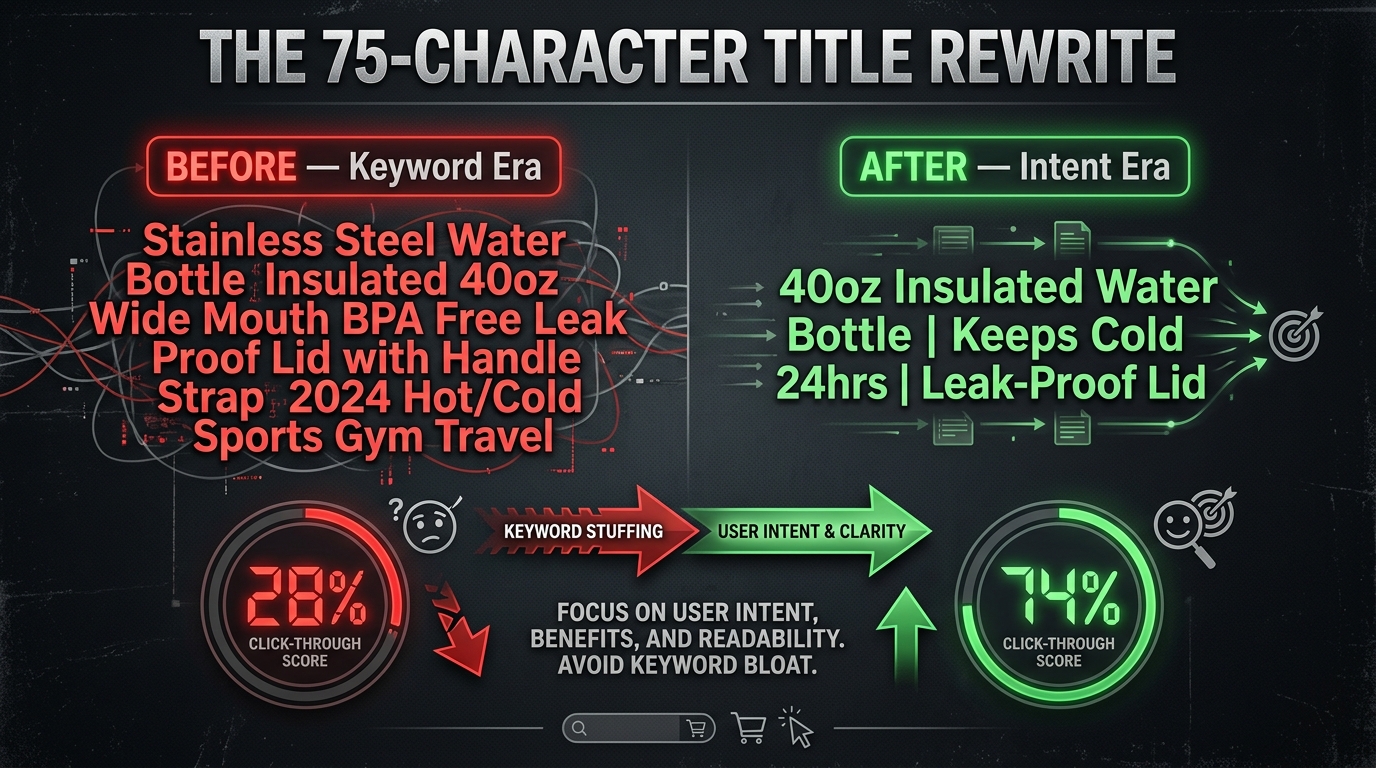
Starting July 27, 2026, Amazon will enforce a hard 75-character limit (including spaces) on product titles in all categories except media. Titles that exceed this limit will be gradually AI-rewritten by Amazon — meaning you either take control of your title now, or you cede it to an algorithm that has no understanding of your brand positioning, your highest-converting use case, or the specific customer segment you’re targeting.
This deadline is also one of the most significant opportunities for intent-based optimization in recent memory, because it forces sellers to make the choices about their titles that keyword-density thinking has historically allowed them to avoid.
What Has to Come Out (And What Has to Stay)
The math is unforgiving. Most keyword-stuffed Amazon titles run 150–200 characters. Getting to 75 characters means cutting 50–60% of your current title. Here’s how to decide what stays:
Non-negotiable inclusions:
- Brand name (navigational intent requires it)
- The primary product type noun (the thing your product is)
- The single most differentiating attribute that matches your top commercial investigation intent (size, flavor, material, or a specific use case)
- One benefit statement if character count allows — and only if it’s specific, not generic
What should be cut from titles:
- Redundant material descriptors that belong in specifications (BPA Free, FDA Approved, etc.) — these can move to Item Highlights or bullets
- Year qualifiers (“2024 Upgraded Version”) — these age poorly and aren’t intent signals
- Keyword repetition — if “insulated” appears in the product type noun, you don’t need it again in a descriptor
- Occasion/use stacking (“Gym Sports Travel Beach Outdoor”) — pick the one most aligned with your primary buyer intent and move the rest to bullets
The New Item Highlights Field: Your 125-Character Safety Valve
Amazon has introduced a new “Item Highlights” field with a 125-character limit, designed to sit beneath the title on the product detail page. Think of this as the space where the critical context that no longer fits in the title can live — compatibility notes, pack size, key variant detail — without cluttering the title itself.
This is not a keyword field in the traditional sense. It’s a shopper-facing display field, so it should be written for human readability first. Use it to answer the most common purchase qualification question your commercial investigation buyers are asking before they commit to clicking “Buy Now.”
Writing Intent-Aligned Titles Within 75 Characters
The most effective framework for a 75-character intent-aligned title follows this structure: [Brand] [Primary Product Noun] | [Top Intent Differentiator] | [One Benefit or Variant Spec]
Applied examples:
- Before: “HydroMax Water Bottle Stainless Steel 32oz Wide Mouth BPA Free Vacuum Insulated Leak Proof Sports Gym Travel” (105 characters)
- After: “HydroMax 32oz Insulated Water Bottle | Keeps Cold 24 Hrs” (57 characters) — use case clear, benefit specific, readable
- Before: “Premium Yoga Mat Non Slip Thick 6mm Exercise Fitness Mat with Carrying Strap for Women Men Pilates Gym Home Workout” (114 characters)
- After: “Yoga Mat 6mm Extra Thick | Non-Slip Surface | Includes Carry Strap” (66 characters) — primary intent answered, specs preserved
Notice that both “after” titles leave room for the algorithm to match semantic intent without requiring exact-phrase keyword stuffing. COSMO doesn’t need the word “gym” in the title to understand a yoga mat is exercise equipment — it needs the product category and the differentiating attribute that helps it answer the commercial investigation query correctly.
Bullet Points as Intent Anchors: Mapping Each Bullet to a Specific Search Intent
Bullet points are the most underutilized piece of intent-based real estate in most Amazon listings. Sellers typically use them to list product features in descending order of what the product team cares about — which rarely corresponds to what the buyer’s intent hierarchy actually looks like.
A rewritten bullet architecture maps each of the five standard bullet points to a distinct intent type, creating a listing that can satisfy shoppers arriving with very different questions.
The Five-Bullet Intent Architecture
Bullet 1 — Transactional Reassurance: This is the bullet for buyers who’ve already decided and need confirmation. Lead with the specific, concrete outcome the product delivers — not a feature, but a result. “Keeps beverages cold for 24 hours and hot for 12 — verified at 72°F ambient temperature” is a transactional reassurance statement. “High-quality vacuum insulation technology” is not. The transactional buyer needs to know the product will do what they’re buying it to do. Be specific, be measurable where possible, and be honest.
Bullet 2 — Commercial Investigation Differentiator: This bullet wins or loses the buyer who is comparing you to a competitor. It must communicate the specific reason your product is the right choice for the use case your primary buyer is shopping for — and that reason must be unique to you, or at least articulated more specifically than your competitors manage. “Designed for wide-brim hats — full coverage for face, neck, and ears in one application” beats “great for outdoor use” in commercial investigation relevance every time.
Bullet 3 — Compatibility and Constraint Resolution: A massive percentage of cart abandonment on Amazon happens when buyers realize at the last moment that a product might not work for their specific situation. Bullet 3 should proactively address the most common compatibility question your category attracts — device compatibility, size fit, material sensitivity, dietary restriction, age range, or whatever constraint is most commonly mentioned in your 1- and 2-star reviews. Addressing it in bullet 3 prevents abandonment and improves review quality.
Bullet 4 — Informational Intent Answer: This is the research buyer’s bullet. It should provide the kind of context that answers a “how” or “why” question: “How does this filter work?”, “Why is this size better for beginners?”, “What makes this formula different from standard options?” This bullet is heavily read by Rufus when responding to conversational queries. It’s also frequently indexed for long-tail informational searches. Keep it genuinely informative — not a disguised feature list.
Bullet 5 — Trust Signal and Risk Reduction: The final bullet is where you address purchase hesitation directly: warranty terms, return policy summary, brand service commitment, certifications relevant to your category (USDA Organic, dermatologist tested, UL Listed, etc.). This bullet isn’t about intent matching in the search sense — it’s about removing the final psychological barrier to conversion for any intent type that has made it this far through the listing.
Backend Keywords in the Intent Era: From Keyword Dumps to Intent Clusters
The backend Search Terms field — the 250-byte hidden keyword field in Seller Central — has been misunderstood and misused since the beginning of Amazon SEO. Most sellers still treat it as a dumping ground for leftover keywords that didn’t fit in the title. In the intent era, that approach wastes one of your most valuable indexation assets.
What Backend Keywords Actually Do in 2026
Backend keywords tell Amazon’s indexation system which queries your product should be considered for when the visible listing content doesn’t contain an exact or near-exact match. In an intent-based system, this means your backend field should contain intent-adjacent language that extends your semantic coverage — not repeat what’s already in your title and bullets (which wastes byte space without adding coverage), and not stuff in high-volume unrelated terms (which confuses the intent signal and can trigger relevance penalties).
The 250-byte limit is not a guideline — it’s a hard constraint. Amazon’s system may ignore the entire backend field if you exceed it, even by a few characters. Every byte counts. Spaces between words count as bytes. Commas between terms waste bytes. Write backend terms as space-separated strings, not comma-separated lists.
Building Intent-Cluster Backend Terms
The right approach is to identify intent clusters your title and bullets can’t cover and fill the backend field with the specific phrases that activate those clusters. A practical three-step process:
Step 1 — Pull your Search Query Performance report and identify queries in positions 11–50 (queries where you’re getting impressions but not strong clicks). These are terms Amazon considers you relevant for, but where you’re not winning the intent match. Many of these should move to backend terms if they aren’t already there.
Step 2 — Mine competitor Q&A sections for the questions buyers ask about products in your category. The phrases shoppers use in Q&A questions are often the exact queries they typed into the search bar before landing on that listing. These are high-intent, specific, and often completely absent from both your visible listing and backend terms.
Step 3 — Build synonym and constraint clusters. Think about how different buyer segments describe the same product. A baby car seat might be searched as “convertible infant car seat,” “newborn to toddler car seat,” “rear-facing car seat for newborns,” and “car seat that grows with baby” — all expressing the same product with different vocabulary. Backend terms should capture the vocabulary variants you can’t fit in the visible copy.
What to Exclude From Backend Terms
Three categories of terms actively hurt you in the backend field and should be removed from existing listings: competitor brand names (policy violation and Amazon flags them), terms already present verbatim in your title (wasted bytes with no indexation benefit), and vague category terms that attract broad, low-intent traffic you can’t convert (e.g., “home goods,” “kitchen accessories,” “health products”). The goal is precision, not volume.
A+ Content as an Intent Conversion Layer — Not a Brand Brochure
Amazon’s own data shows that A+ Content drives an average 5–8% increase in conversion rates for standard implementations, with Premium A+ delivering 10–20% additional lift in the right categories. Those numbers assume the A+ content is doing conversion work. Most A+ content is not doing conversion work — it’s doing brand storytelling work, which is a different thing entirely.
Restructuring A+ Modules Around Buyer Intent
Every A+ module should be audited against a simple question: Which intent type does this module serve? If the honest answer is “none — it’s just our brand aesthetic,” the module needs to be rebuilt or replaced.
An intent-optimized A+ content structure looks like this:
Module 1 — Problem/Solution Lead (Informational & Commercial Intent): Lead your A+ with a clear statement of the problem your product solves and who it solves it for. Not your brand story. Not your founding mission. The specific pain point your primary buyer has, stated in their language, followed immediately by how your product addresses it. This module is doing double duty: it serves the informational researcher who needs to understand why they need your product, and the commercial investigator who needs to understand if this is the right product for their specific problem.
Module 2 — Feature Deep-Dive With Use-Case Context (Commercial Intent): This is where technical specs belong — but always paired with the use-case context that makes those specs meaningful. “3,000 mAh battery” is a spec. “3,000 mAh battery — enough for a full 8-hour workday on a single charge” is a use-case anchored spec. COSMO reads both, but the second version creates a semantic connection to queries about work-from-home battery life, business travel, and productivity tools that the first version cannot.
Module 3 — Comparison Chart (Commercial Investigation): If your product comes in multiple variants or sits in a competitive category where buyers are comparing options, a comparison chart is one of the highest-ROI A+ modules you can build. Map the attributes buyers use in comparison queries (size, capacity, material, compatibility, price tier) and show clearly where your product wins. This module directly addresses commercial investigation intent and reduces the probability of a buyer leaving your listing to compare elsewhere.
Module 4 — Use-Case Scenarios (Informational & Transactional): Show your product in two or three specific use contexts that match your primary buyer personas. Not lifestyle stock photography — specific scenarios with explanatory copy that makes the context legible. “For the home baker who wants consistent results without professional equipment” is a use-case scenario statement. It matches informational queries about baking at home and transactional queries from buyers who’ve identified themselves as home bakers looking for a specific solution.
Module 5 — FAQ / Objection Resolution (Transactional): The final A+ module should address the three to five most common purchase objections in your category, drawn directly from your 2- and 3-star reviews. This module serves transactional buyers who have almost decided and need one more piece of confirmation. It also feeds directly into Rufus’s ability to answer follow-up questions about your product.
Voice of Customer Mining: Using Reviews to Decode Buyer Language
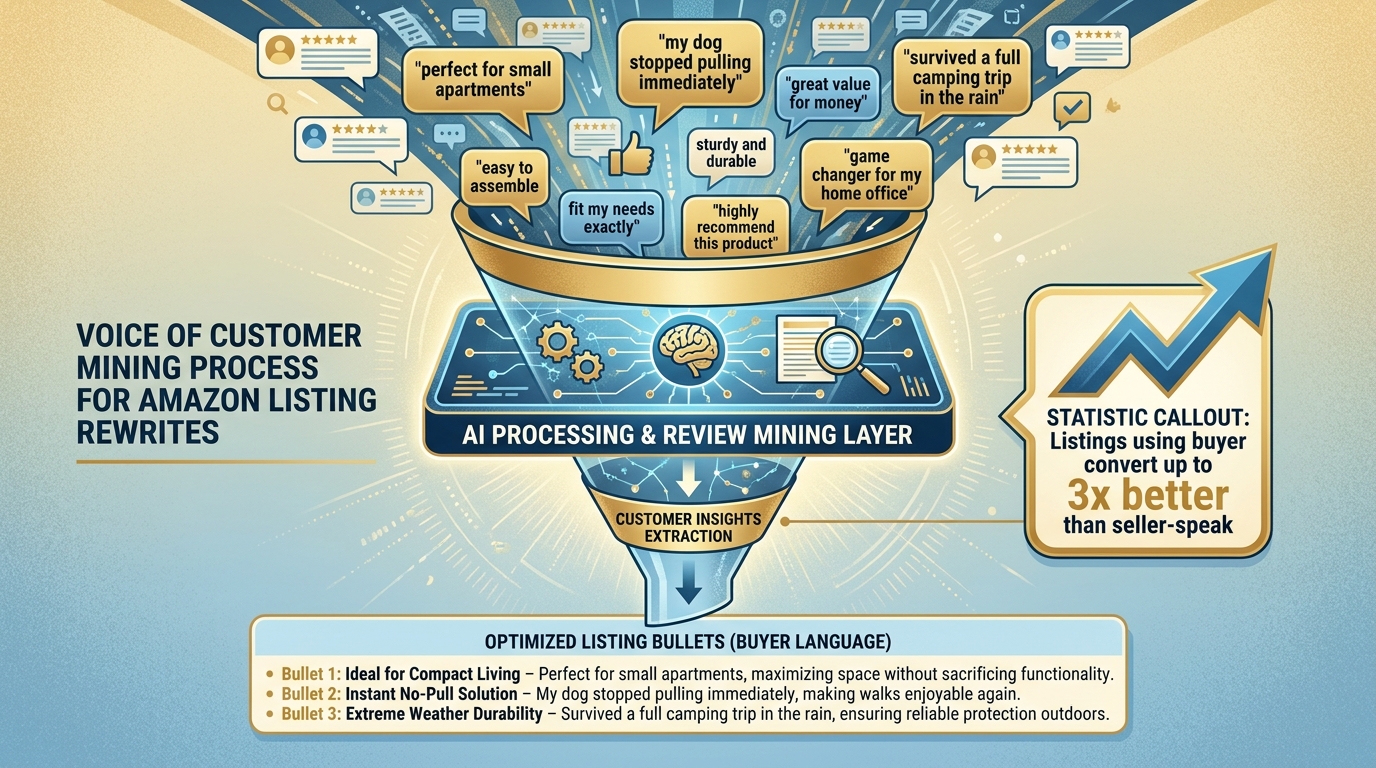
The most reliable source of intent-aligned language for your listing isn’t a keyword tool. It’s the words your buyers actually use when they describe your product to other people — which means your reviews, your competitor’s reviews, and the Q&A sections that appear on both.
This is not a new idea, but the mechanism by which it now matters has changed significantly. In 2026, Amazon’s AI systems — particularly Rufus — are reading reviews as part of how they evaluate whether a product matches a shopper’s query. Reviews are no longer just social proof; they’re part of your listing’s semantic footprint. Which means the language in your reviews, and the language in your listing copy, should be creating a mutually reinforcing signal.
How to Mine Reviews for Intent Language
Start with your own 4- and 5-star reviews. Filter for reviews that are more than three sentences long — these typically contain the highest density of specific use-case language. Pull out phrases that describe when the buyer uses the product, why they chose it, what problem it solved, and who else they’d recommend it to. These phrases are the raw material for your bullet point rewrites.
Mine your 2- and 3-star reviews for constraint language. These reviews often reveal the specific conditions under which your product fails to satisfy — which tells you exactly what the buyer’s unmet constraint was. “Works great but the strap broke after two weeks” tells you durability is a purchase qualifier for your buyer. “Too complicated for elderly parents to use” tells you ease-of-use for older users is a commercial investigation criterion you’re not currently addressing. Every unmet constraint in a negative review is a gap in your current listing’s intent coverage.
Mine your top competitor’s reviews for language your listing is missing. Sort competitor reviews by “most helpful” and read the top 20–30. Buyers often choose competitors explicitly because of attributes your listing doesn’t communicate. The language in those reviews tells you exactly what commercial investigation criteria you’re losing on, and which phrases COSMO is connecting to competitor listings that it isn’t connecting to yours.
Applying Mined Language to Your Listing
The translation from mined review language to listing copy follows a simple rule: preserve the buyer’s vocabulary, not the seller’s. If eight reviewers describe your backpack as “fits under airplane seats perfectly,” that phrase belongs in your listing — in a bullet, in an A+ module, or both — because it’s the exact language shoppers searching for travel-ready backpacks are using. If your current listing says “compact and versatile design,” you’re using seller vocabulary to describe what buyers are expressing in traveler vocabulary, and the semantic bridge is thinner.
Amazon’s VoC (Voice of Customer) dashboard in Seller Central gives you another structured data source: it surfaces the most common themes in your recent reviews, grouped by sentiment. Check this dashboard monthly as part of your listing maintenance cycle, not just when you’re doing a full rewrite — it will surface emerging intent signals and new constraint clusters before they start showing up in your ranking data.
The PPC-to-Listing Feedback Loop: Closing the Intent Gap With Ad Data
Amazon PPC data is one of the most underused inputs for organic listing optimization. Most sellers treat paid search and organic listing optimization as separate workstreams. The sellers who are winning on intent alignment are treating them as a single feedback loop — using ad data to continuously identify and close intent gaps in their listing copy.
Using Search Term Reports as an Intent Diagnostic Tool
Your Sponsored Products search term report contains real shopper queries — not estimated search volume from a tool, but actual queries that triggered your ads, with actual click and conversion data attached. This is arguably the highest-quality intent data you have access to as a seller.
Run a 60-day search term report and sort by conversion rate (not impressions or clicks). Look at the queries with the highest conversion rate. These are the queries where your current listing content is creating the strongest match between what the shopper wanted and what they found. Now ask: are these queries — or the intent behind them — represented in your organic listing copy? If a high-converting query like “stainless steel lunch box for middle schoolers” is driving ad conversions but isn’t reflected in your listing copy, COSMO doesn’t have a clean signal connecting your ASIN to that intent cluster organically.
The fix is straightforward: incorporate the use case, the audience descriptor, or the constraint language from high-converting ad queries into your bullets, A+ content, or backend terms. You’re not keyword stuffing — you’re completing the intent signal that the conversion data has already proven exists.
Identifying Intent Gaps From Low-Converting Ad Traffic
The inverse exercise is equally valuable. Look at queries with high impressions and clicks but low conversion rates. These are cases where your listing appeared relevant enough for a shopper to click, but failed to convert — the classic intent mismatch signal. For each of these queries, diagnose which part of the listing failed to serve the intent they brought:
- Was the title ambiguous about whether this product serves their specific use case?
- Did no bullet point address the constraint their query implied?
- Did your A+ content not contain content relevant to their purchase stage?
These diagnostics give you a prioritized rewrite queue — listing elements to address, in order of commercial impact.
The 90-Day Iteration Cycle
Intent alignment is not a one-time rewrite project. Shopper behavior shifts seasonally, new competitors enter your category and change the comparison landscape, and Amazon’s AI systems continue to evolve their understanding of what constitutes a high-quality intent match. Build a quarterly cadence: pull the last 90 days of PPC search term data, run it against your current listing, identify the top five intent gaps, and update accordingly. Sellers who run this cycle consistently compound their organic ranking advantages over time in a way that one-time rewrites cannot.
Measuring Whether Your Rewrite Actually Worked
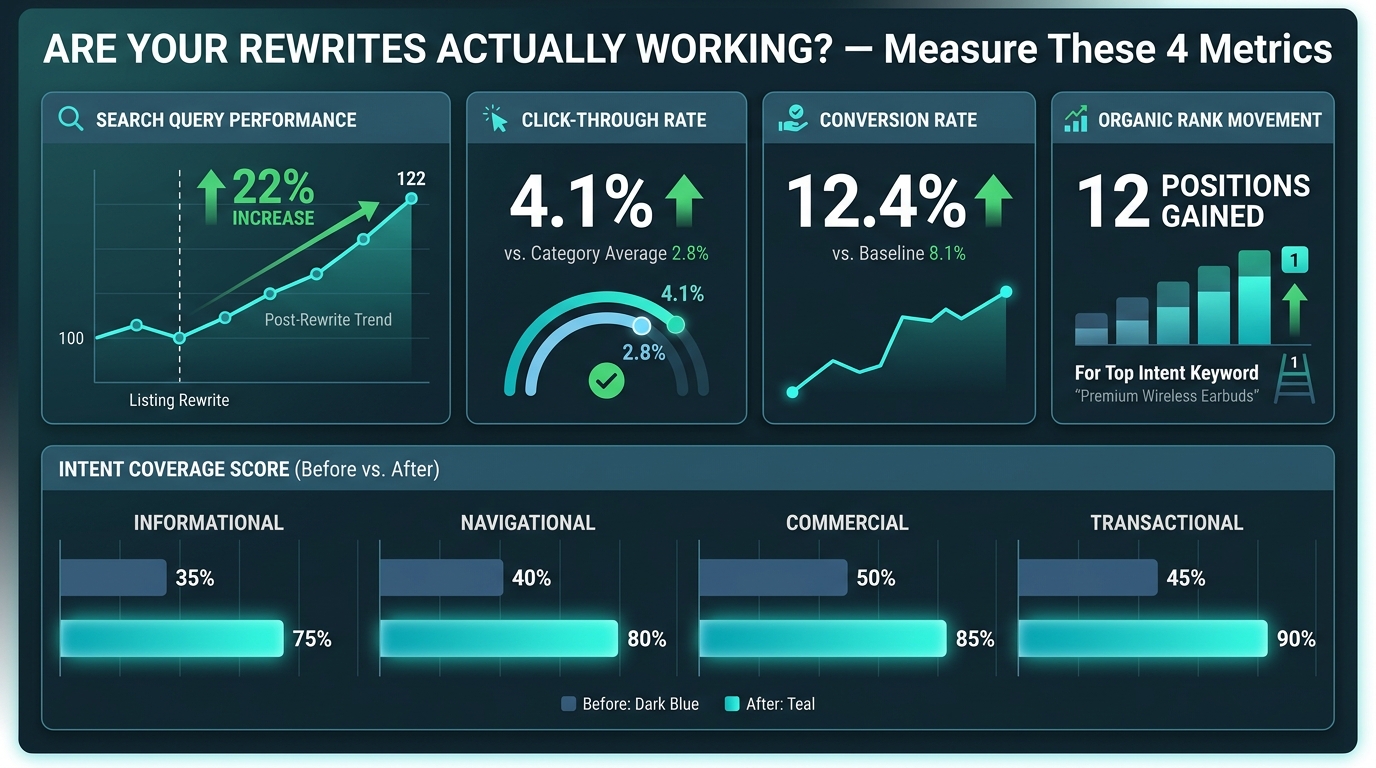
One of the most common mistakes in listing optimization is applying a change and then looking at the wrong metric to evaluate whether it worked. Unit sales are the metric most sellers watch — but they’re a lagging indicator that blends too many variables to be diagnostic about listing copy quality specifically. Here’s what to measure instead, and when to look at it.
The Four Metrics That Actually Reveal Intent Alignment
Search Query Performance (SQP) — Look at this first, 2 weeks post-rewrite. Amazon’s Search Query Performance report in Brand Analytics shows your click share and purchase share for specific queries. After a listing rewrite, you want to see click share improving on your top-intent queries before conversion improvements show up. If click share on your target queries improves but purchase share doesn’t follow within 30 days, the title is doing its job (attracting the right clicks) but the listing body isn’t closing them — meaning the bullet or A+ rewrite may need a second pass.
Click-Through Rate (CTR) — Look at this 3–4 weeks post-rewrite. CTR is available through your Advertising reports for sponsored placements and through SQP for organic. An intent-aligned title rewrite should improve CTR for the specific queries it’s targeting. A CTR improvement without a conversion rate improvement suggests the rewrite is attracting clicks from the right query but failing somewhere in the listing body. A CTR drop with a conversion rate increase is actually a positive signal — it means you’ve narrowed your traffic to higher-intent visitors.
Conversion Rate (CVR) — Look at this 4–6 weeks post-rewrite. CVR is the primary indicator of whether your listing body (bullets, A+, Q&A) is doing its intent-matching job. Track CVR at the ASIN level, segmented by traffic source where possible. A bullet point rewrite targeting commercial investigation intent should show up as CVR improvement on branded and competitor traffic more than on broad generic traffic.
Organic Rank on Intent-Specific Queries — Look at this 6–10 weeks post-rewrite. Amazon’s algorithm adjusts organic ranking based on behavioral signals over time. A listing that now genuinely satisfies a specific intent cluster will accumulate better click and purchase signals for the queries in that cluster, which drives ranking improvements. Track 10–15 specific intent-aligned queries using a rank tracker and watch the trend over a 60–90 day window after a major rewrite. Ranking improvements on queries you didn’t explicitly target (but that share intent with your primary cluster) are the clearest signal that COSMO’s semantic matching is working in your favor.
Setting a Clean Measurement Baseline
None of this measurement is useful without a clean baseline. Before any listing rewrite, record your current metrics for all four dimensions — SQP click share, CTR, CVR, and organic rank for your target queries — and note the date. Wait at least two weeks before pulling post-rewrite data to avoid noise from the natural fluctuation period immediately after a listing change. Amazon’s systems need time to re-index your content and for behavioral signals to accumulate. Impatient sellers who revert changes after 10 days because they “don’t see a difference yet” are sabotaging their own measurement.
Putting the Playbook Together: A Prioritized Rewrite Sequence
With all the elements in place, the question most sellers face is sequencing: where do you start when you have dozens of ASINs that all need intent-aligned rewrites? The answer is to triage by impact potential, not alphabetically or by revenue rank alone.
Tier 1: High-Traffic, Low-Conversion ASINs
Start with the ASINs where the gap between impressions/clicks and conversion is widest. These have proven traffic — meaning Amazon already considers them relevant to significant search volume — but something in the listing body is failing to close that traffic. Intent mismatch is the most common cause. A bullet and A+ rewrite focused on commercial investigation intent typically moves the needle fastest here.
Tier 2: ASINs With Title Non-Compliance (July 2026 Deadline)
Any ASIN with a title currently exceeding 75 characters needs to be rewritten before Amazon’s AI does it for you. Prioritize these by revenue rank — your highest-revenue ASINs have the most to lose from an algorithmically rewritten title that doesn’t reflect your brand positioning or primary intent alignment. Do this rewrite now, not in July.
Tier 3: New Launches and Recently Relisted ASINs
New listings benefit most from intent-first architecture because they haven’t yet accumulated the behavioral signals that help established ASINs maintain ranking despite suboptimal copy. Getting the intent alignment right from launch accelerates the behavioral signal accumulation that feeds organic ranking. A new ASIN that immediately captures strong conversion signals on its target intent cluster can compress the typical 60–90 day ranking ramp significantly.
The Ongoing Maintenance Rhythm
After the initial rewrite triage, establish a quarterly maintenance cycle: pull the latest SQP data, review your VoC dashboard for new review themes, pull 90-day PPC search term data, and identify the top five listing elements to update. This cadence keeps your intent alignment current as shopper language evolves, new competitor listings change the comparison landscape, and Amazon’s AI systems update their semantic understanding.
Conclusion: Intent Alignment Is Now the Competitive Moat
The sellers who built their Amazon businesses on keyword density advantages are watching those advantages erode. Not because keywords stopped mattering, but because keywords are now a floor condition — necessary but not sufficient — in a system that has moved to evaluating how well a listing answers what a shopper is actually trying to accomplish.
Intent-based search is not a trend to watch. It’s the operating reality of Amazon’s platform in 2026, driven by infrastructure investments (COSMO, Rufus/Alexa for Shopping) that are already active on a significant portion of U.S. search traffic and growing. The sellers who respond by rebuilding their listing architecture around buyer intent — rather than around keyword volume — are not just adapting to today’s algorithm. They’re building a content asset whose quality compounds over time through improved behavioral signals, stronger semantic indexation, and a listing that serves multiple buyer intent types simultaneously.
The rewrite playbook in this article covers every layer of that architecture. But the sequencing matters as much as the execution. Start with your misalignment audit. Address your July 2026 title compliance before Amazon does it for you. Rebuild your bullet architecture around the five-intent framework. Restructure your A+ content away from brand brochure and toward intent conversion. Mine your reviews for buyer language. Close the loop between PPC data and organic copy. And measure the right metrics over the right timeframes to know whether it’s working.
Intent alignment is now the competitive moat. The sellers building it systematically are the ones who will still be growing organic traffic when the next algorithm shift arrives — because a listing that genuinely answers what a shopper needs is the one signal every version of Amazon’s search system has always rewarded.
Actionable Checklist: Intent-Based Listing Rewrite
- ✅ Run your Search Query Performance report and identify your top 25 traffic-driving queries
- ✅ Audit each query against your current listing — does any element clearly answer the intent behind it?
- ✅ Identify which of the four intent types (Informational, Navigational, Commercial Investigation, Transactional) each query represents
- ✅ Rewrite titles to 75 characters or fewer — brand name, primary product noun, top differentiating attribute
- ✅ Build each bullet to serve a specific intent type using the five-bullet intent architecture
- ✅ Audit backend search terms — remove duplicates, remove policy-violating competitor names, add intent-cluster phrases not covered in visible copy
- ✅ Rebuild A+ modules with a clear intent assignment for each module (problem/solution, feature+use case, comparison, use-case scenarios, FAQ/objections)
- ✅ Mine your own reviews (4–5 star and 2–3 star) plus top competitor reviews for buyer language gaps
- ✅ Pull 60-day PPC search term report — add high-converting query use cases to bullets or backend terms
- ✅ Record baseline metrics before publishing changes (SQP click share, CTR, CVR, organic rank for 10–15 target queries)
- ✅ Schedule a 90-day review to measure rewrite impact and identify the next round of gaps