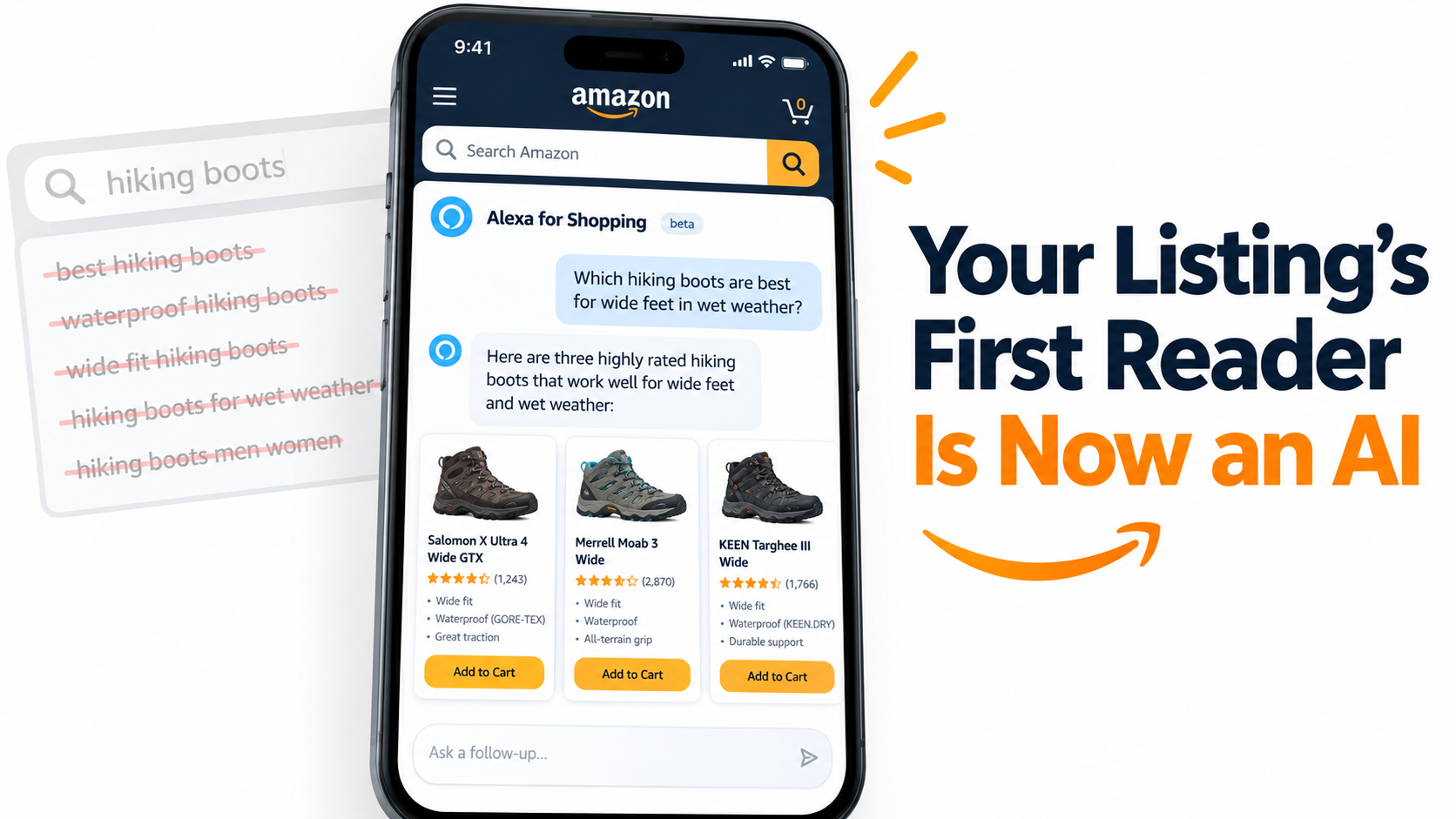

For most of Amazon’s history, a seller’s listing had one main reader: the shopper scrolling a search results page. That shopper typed a few keywords, scanned thumbnails, compared prices and star ratings, and clicked. Every tactic sellers learned over the past decade — keyword-packed titles, backend search terms, main image tests — was built around that one reader.
That is no longer the whole picture. On May 13, 2026, Amazon renamed its AI shopping assistant Rufus to Alexa for Shopping, folding it in with Alexa+ under a single brand. The name change is the smaller part of the story. The bigger part is what it confirms: a growing share of shoppers now meet your product through an AI’s summary of it, not through your listing alone.
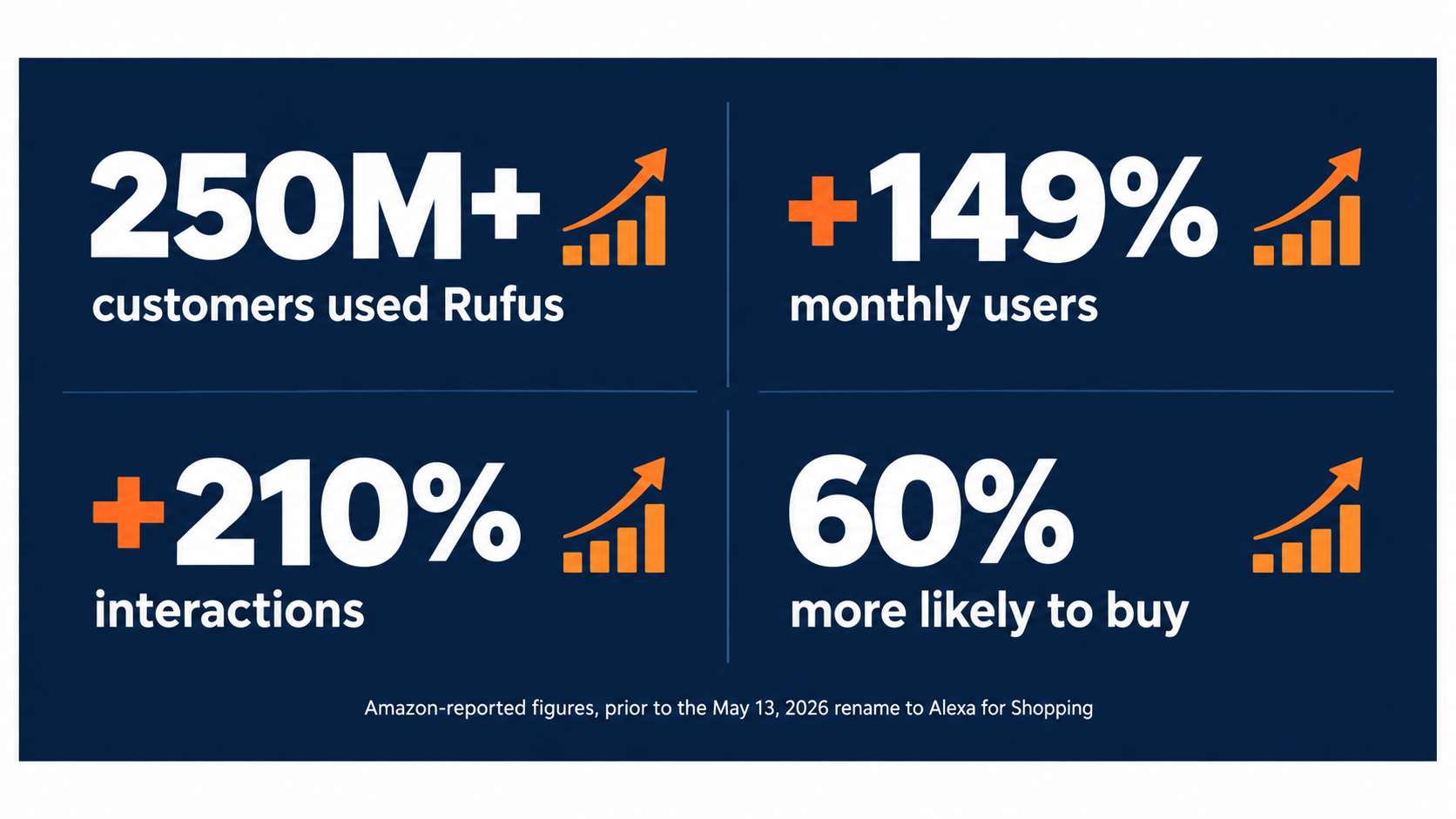
Before the rename, Amazon said more than 250 million customers had used Rufus during the year, with monthly active users up 149% and interactions up 210% year over year. Shoppers who used the assistant during a trip were, according to Amazon, more than 60% more likely to buy during that trip. Those are not experimental numbers. They describe a sales channel.
This article is not another list of listing tips. It takes one question and works through it in detail: when an AI assistant reads your listing before the shopper does, what does it actually read, how does it decide what to say, and what should you change? We’ll look at what Amazon has published about how the assistant works, the research behind its product-matching logic, the role reviews and Q&A now play, how account memory changes who sees your product, and a practical 30-day plan to get your catalog ready.
What Actually Changed on May 13, 2026
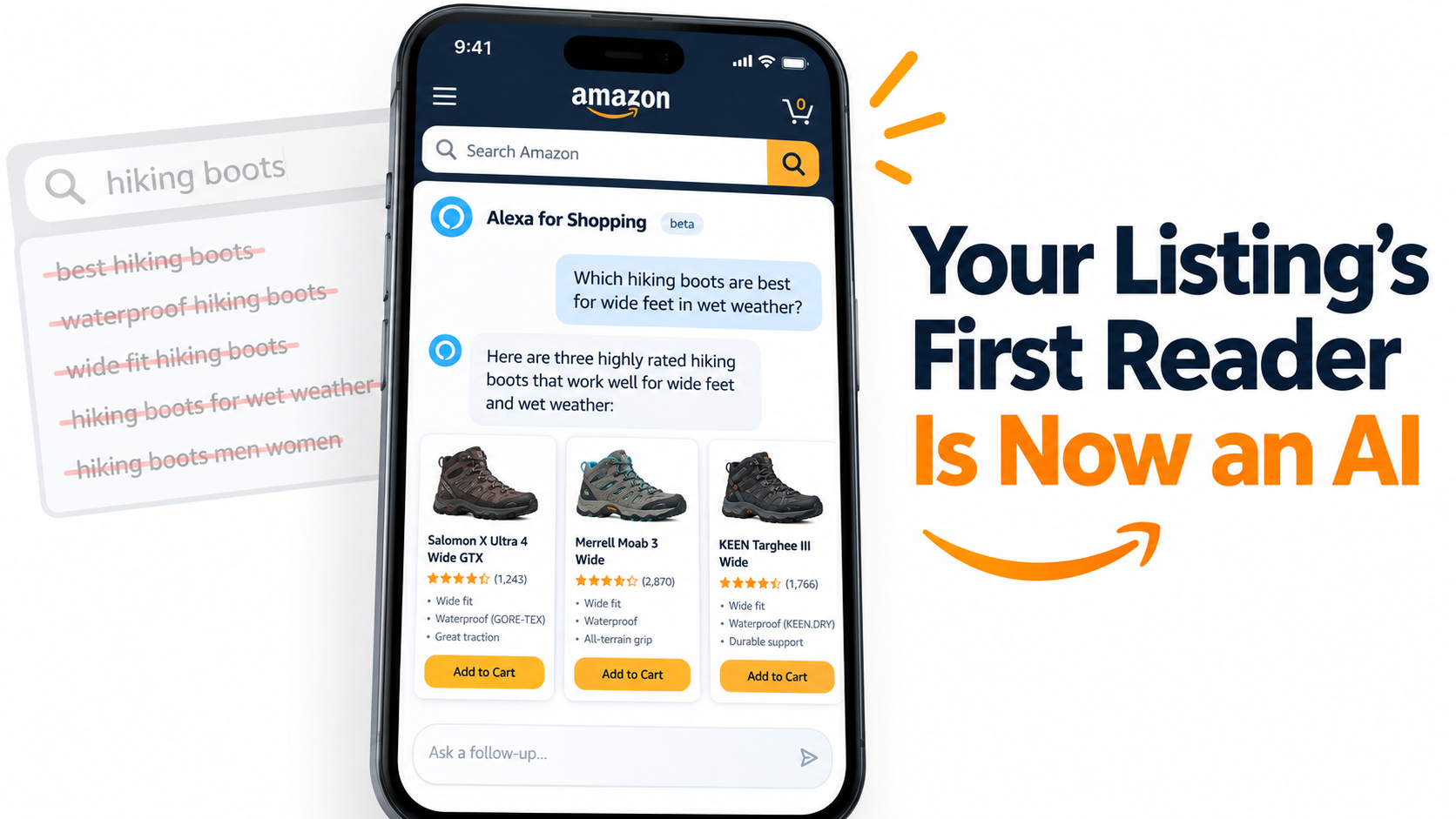
Amazon’s own pages about Rufus now carry a one-line note at the top: “On May 13, 2026, Rufus was renamed Alexa for Shopping.” Amazon describes the new product as bringing together Rufus and Alexa+ into what it calls an AI assistant for shopping. For sellers, it helps to separate the branding from the plumbing.
The branding change
Rufus began as a beta in Amazon’s mobile app, limited to a small group of U.S. customers, and was later rolled out to all U.S. customers on mobile and desktop. It lived in a chat window, reached through a chat-bubble icon in the app’s navigation bar. Alexa+, separately, was Amazon’s upgraded voice assistant. Folding both into “Alexa for Shopping” puts one familiar consumer name on conversational shopping, whether the shopper is typing in the app, speaking to an Echo device, or asking a question on a product page.
The plumbing that stays the same
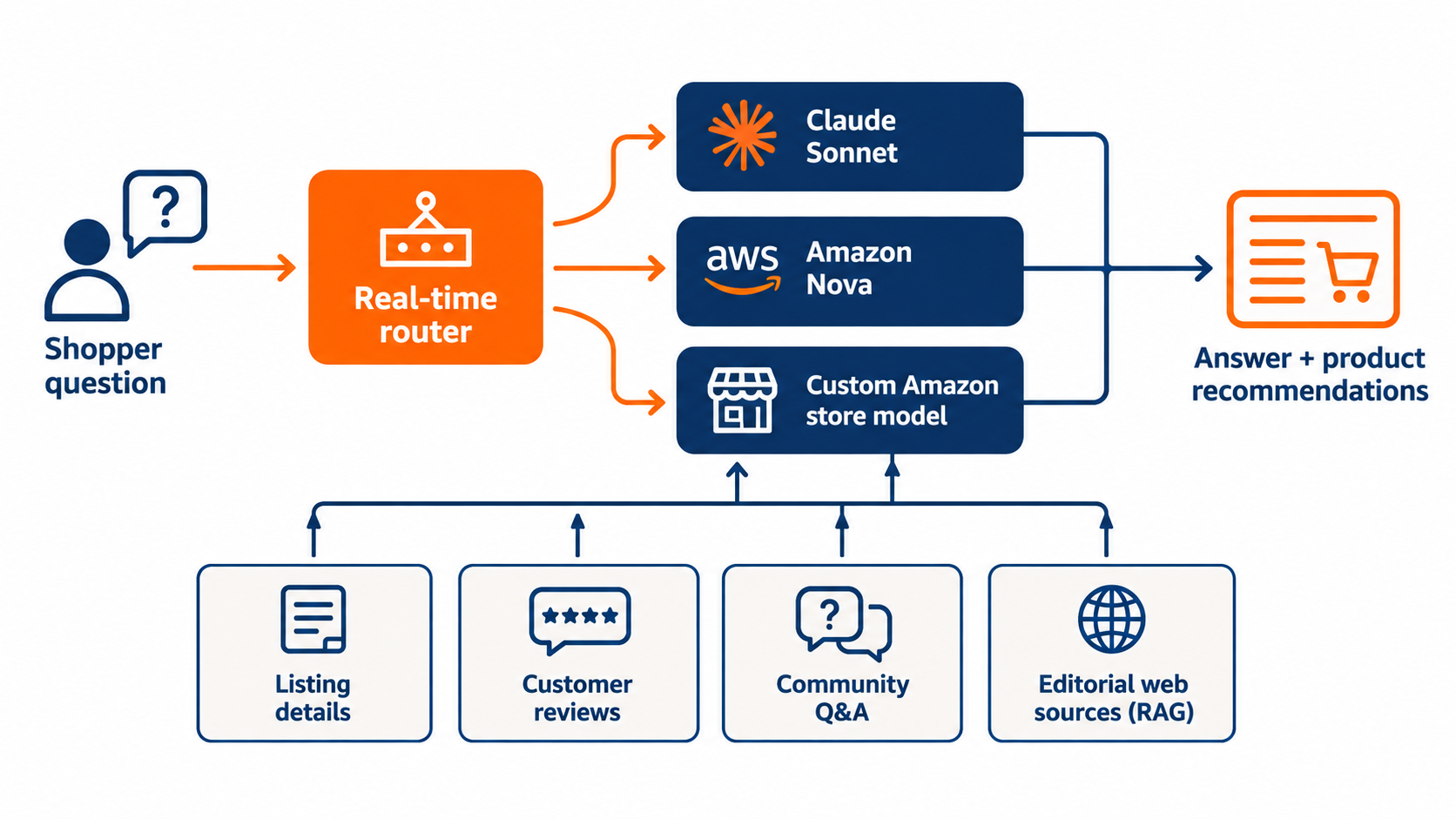
The underlying approach Amazon described for Rufus has not been thrown out. Amazon has said the assistant is built on Amazon Bedrock and uses a real-time router to send different questions to different models, including Anthropic’s Claude Sonnet, Amazon Nova, and a custom model trained on Amazon’s store knowledge. It pulls from the product catalog, customer reviews, community Q&A, and information from across the web.
In other words, the data sources the assistant reads to describe your product are the same ones you already control or influence. The rename does not create a new set of rules. It raises the stakes on the existing ones.
Why the voice angle matters
Merging with Alexa+ matters because voice shopping removes the visual layer almost entirely. A shopper asking an Echo device for “a good cordless vacuum for pet hair under $200” never sees your main image, your title formatting, or your A+ modules. They hear a short spoken answer. Whatever the assistant says about your product in that moment is your entire pitch.
That is the core shift this article deals with. Your listing is turning into source material as much as it is a sales page.
What sellers should take from it
- Treat “Alexa for Shopping” and “Rufus” as the same system for planning purposes. Guidance written about Rufus still applies.
- Expect the assistant to show up in more places — app, desktop, product pages, and voice devices.
- Assume some shoppers will never see your images or formatting, and plan your text so it works when read aloud.
The Numbers That Turn a Chatbot Into a Sales Channel
Sellers have seen plenty of Amazon features come and go. It’s fair to ask whether conversational shopping is a real shift or a side feature. The usage figures Amazon has released answer that fairly clearly.
Adoption
Amazon reported that more than 250 million customers used Rufus during the year, with monthly average users up 149% and interactions up 210% over the prior year. Amazon also said the assistant had “helped customers billions of times.” Early in its rollout, Amazon noted customers had already asked “tens of millions of questions” — so the jump to billions shows how fast usage grew.
Conversion
The figure that matters most to sellers is the purchase link. Amazon stated that customers who use the assistant while shopping are over 60% more likely to complete a purchase during that shopping trip. There’s an obvious caution here: people who open a shopping assistant may already be closer to buying, so this isn’t proof the assistant causes all of that lift. Still, it tells you where high-intent shoppers are spending time.
In Amazon’s Q3 2025 earnings commentary, CEO Andy Jassy also said Rufus was on track to deliver more than $10 billion in incremental annualized sales. Whatever share of that lands in your category, it’s a large enough pool that ignoring it is a choice with a real cost.
Placement
Amazon says the assistant is featured on the homepage, on product detail pages, inside the Amazon Lens Live experience, and throughout the store. Shoppers can type or tap a microphone and speak. When a tool shows up on the product detail page itself, it can step in at the exact moment a shopper is deciding between your product and a competitor’s.
What this means in practice
Consider a typical high-consideration purchase — a stroller, a standing desk, a pair of running shoes. A few years ago the path was: search, filter, open three or four tabs, read reviews, decide. Now a shopper might type, “Which of these is easiest to fold one-handed?” while sitting on your detail page. The assistant answers from your listing, your reviews, and your Q&A. If your content doesn’t address folding, the answer may be vague — or it may point to a competitor whose content does.
The practical takeaway: conversion rate is now partly decided by how well your content answers questions you never saw asked. Search Query Performance and similar Brand Analytics reports still show keyword demand, but they won’t show you the conversational questions happening inside the assistant. You’ll need to infer those, which later sections cover.
How the Assistant Builds an Answer About Your Product
To write for an AI reader, it helps to understand roughly how it assembles a response. Amazon has been unusually open about the architecture, and the details carry direct implications for sellers.
A router, not a single model
Amazon describes using a real-time router that picks among multiple models depending on the type of question, weighing “capability, latency, and answer quality.” A quick factual question (“What’s the battery life on this product?”) might go to a faster, lighter model. A complex comparison or research question might go to a more capable one. The custom model draws on Amazon’s store knowledge.
For sellers, the point is that different questions get handled differently. A simple spec lookup depends heavily on whether the spec is clearly stated in your structured attributes and text. A broad research question depends more on how the assistant understands your product’s purpose and audience.
Retrieval: where the facts come from
Amazon says the assistant uses Retrieval-Augmented Generation (RAG). In plain terms, before generating an answer, it retrieves relevant documents and uses them as grounding. Amazon’s descriptions list these sources:
- Product listing details — title, bullets, description, attributes, and other catalog data
- Customer reviews
- Community Q&A
- Information from across the web, including editorial sources Amazon named as examples: The New York Times, USA Today, Good Housekeeping, and Vogue
Every one of those is a place your product can be described well, poorly, or not at all. The first you write directly. The second and third you influence through product quality and customer experience. The fourth you influence through PR, reviews by publications, and brand presence beyond Amazon.
Multi-step reasoning
Amazon says the assistant handles everything from broad questions that shape a shopping trip (“What’s the weather in Rome in April?”) to granular product details. It describes the assistant as working both as “a knowledgeable shopping consultant for high-level problem solving and product discovery” and as a product expert that can compare similar items.
That two-part role matters. In consultant mode, the assistant decides which product types to recommend before any specific listing comes into play. If someone asks what they need for an indoor herb garden, the assistant might suggest grow lights, seed starters, and potting mix. Your grow light only enters the conversation if the assistant connects it to that need.
The implication
Ranking for the keyword “LED grow light” is still worth doing. But the assistant’s path to your product increasingly runs through needs, situations, and comparisons rather than exact-match terms. That’s where Amazon’s published research on commonsense knowledge comes in.
COSMO: The Research That Explains Why Use-Case Language Matters
Amazon has not published a full blueprint of how Alexa for Shopping ranks products, and sellers should be wary of anyone claiming to know the exact formula. But Amazon Science has published research that shows how the company thinks about matching products to shopper intent. The most relevant is a system called COSMO.
What COSMO is
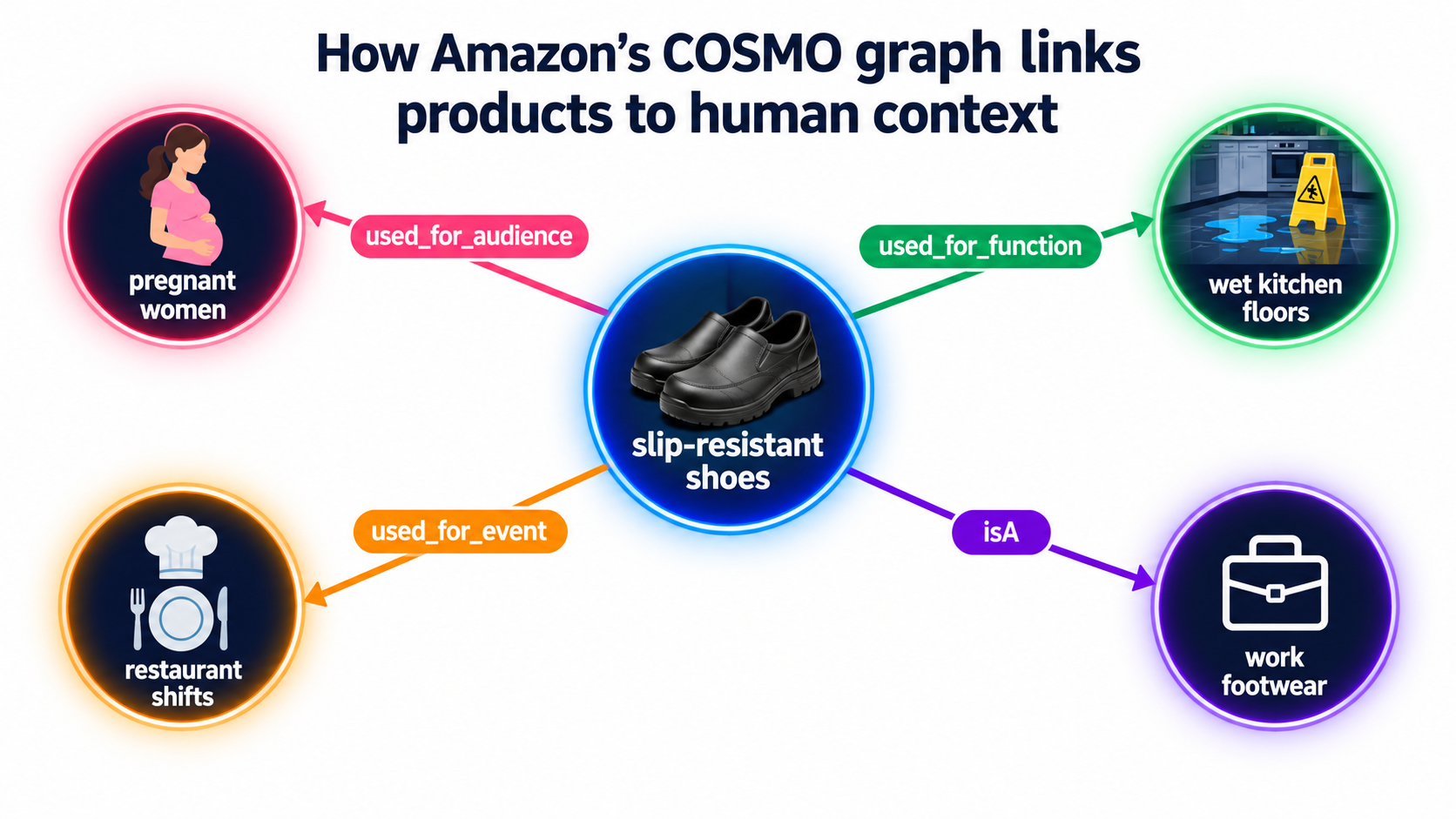
COSMO was described in a paper presented at the ACM SIGMOD conference in June 2024. Amazon researchers Changlong Yu and Zheng Li explained that the goal was to give Amazon’s recommendation systems commonsense reasoning. Their example: if a shopper searches “shoes for pregnant women,” the system should infer that slip-resistant shoes are relevant — even though the query never says “slip-resistant.”
To do this, Amazon builds a knowledge graph linking products to the human contexts they serve: their functions, audiences, locations of use, and events. The slip-resistant shoes example would be connected to pregnant women through a used_for_audience relationship.
How the graph is built
The process, as Amazon described it, starts with two kinds of behavior data:
- Query-purchase pairs — a search followed by a purchase within a set time window or number of clicks
- Co-purchase pairs — products bought in the same shopping session
A large language model generates hypotheses about why those connections exist, using relationship types such as usedFor, capableOf, isA, and cause. These are refined into finer-grained relationships like used_for_function, used_for_event, and used_for_audience. Human annotation and machine learning filters remove weak hypotheses, including vague ones like “customers bought them together because they like them.”
The performance gains
Amazon tested COSMO on the Shopping Queries Data Set it built for KDD Cup 2022. With encoders fixed, a model enhanced with COSMO’s relationship data achieved a 60% increase in macro F1 score over the best baseline. When models were fine-tuned, the COSMO-based model still kept a 28% edge in macro F1 and a 22% edge in micro F1.
Those are large improvements for a search relevance task. They explain why Amazon invests in understanding context rather than only matching words.
What sellers should take from COSMO
Caution is warranted: COSMO is a research system, and Amazon hasn’t said exactly how it feeds Alexa for Shopping today. But the direction is consistent with everything Amazon says about the assistant — matching products to needs, audiences, and situations. A few practical inferences follow:
- State the audience. If your product suits beginners, seniors, small apartments, or people with sensitive skin, say so plainly in your bullets and description.
- State the function. Don’t just say “stainless steel.” Say what that material does for the user — doesn’t hold odors, survives a dishwasher, won’t rust on a boat.
- State the situation. Camping, commuting, a dorm room, a hot car, a toddler’s lunchbox. Situational language gives a system like COSMO something concrete to connect.
- Watch your co-purchase patterns. Because co-purchases feed this kind of graph, bundles and virtual bundles that make sense together reinforce clear context. Odd pairings may muddy it.
From Keywords to Questions: Rewriting Listings for an AI Reader
Most Amazon listings were written for a keyword-matching algorithm and a skimming human. An AI assistant reads differently. It doesn’t skim; it parses. It doesn’t get impressed by capital letters; it looks for facts it can retrieve and repeat with confidence.
Why keyword stuffing works against you
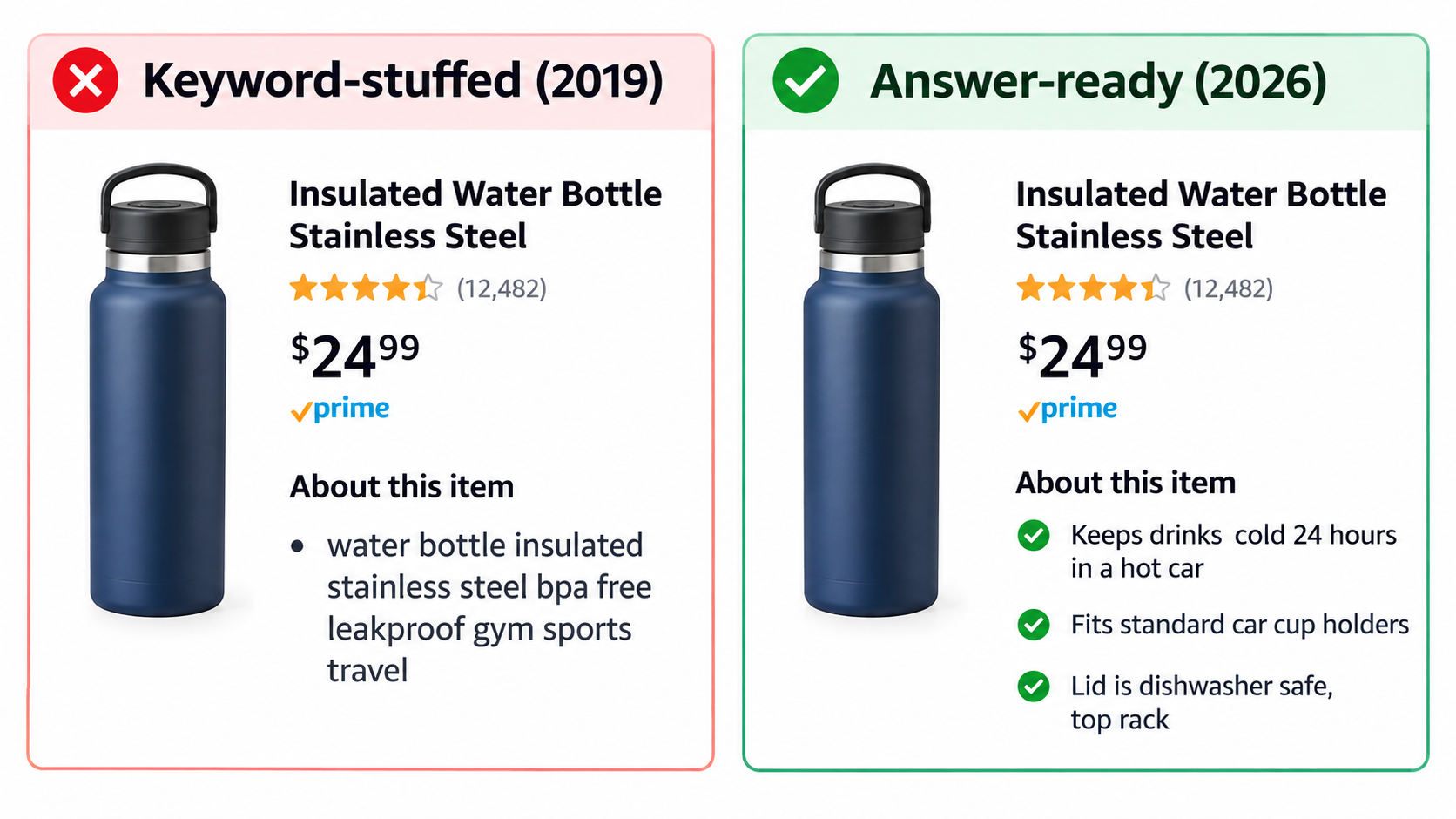
A bullet like “insulated water bottle stainless steel BPA free leakproof gym sports travel hiking” may have once helped indexing. To an LLM, it reads as a jumble with no clear claims. When a shopper asks, “Will this keep ice frozen on a long hike?”, there’s nothing in that bullet the assistant can confidently cite.
Compare that with: “Keeps drinks cold for 24 hours, including on all-day hikes in summer heat.” That sentence holds a measurable claim, a situation, and an implied audience. It gives a retrieval system something solid to pull from.
The answer-ready bullet formula
A useful pattern for each bullet is feature → measurable fact → situation or audience. Some examples:
- “Folds flat to 4 inches deep, so it slides under most beds or into a hall closet.”
- “Weighs 1.2 lbs, light enough for kids ages 6 and up to carry on their own.”
- “Runs at 42 dB on low — quiet enough to leave on overnight in a bedroom.”
- “Lid and straw are top-rack dishwasher safe; the body should be hand-washed.”
Note the last example includes a limitation. That’s deliberate. Assistants often field questions like “Can I put this in the dishwasher?” If your listing is vague, the assistant may fall back on reviews — where an annoyed customer wrote “ruined in the dishwasher.” Clear, honest limits protect you.
Structured attributes are not optional anymore
Much of the assistant’s factual grounding likely comes from structured catalog data — dimensions, weight, material, compatibility, age range, power source, and so on. Many sellers leave optional attribute fields blank because they don’t seem to affect traditional search. When a shopper asks a direct spec question, an empty attribute is a missed answer.
Go through your category’s full attribute list in Seller Central and fill every field that applies, accurately. Make sure attributes match what your bullets and images say. Conflicting data — a bullet that says 12 inches and an attribute that says 14 — gives the assistant two answers and no way to know which is right.
Write the questions into the listing
Think about the top 15–20 questions a shopper would ask a knowledgeable store clerk about your product. Then make sure each one is answered somewhere in your title, bullets, description, A+ content, or attributes. Sources for those questions include:
- Your existing community Q&A
- Your customer service inbox and buyer-seller messages
- Returns reasons and return comments
- Competitors’ reviews (especially 2- and 3-star reviews, which tend to be specific)
- Asking the assistant yourself about your product and competitors’ products
That last one is underused. Open your own detail page, ask the assistant the questions your customers ask, and read what it says. If the answer is wrong, thin, or pulled from a negative review, you’ve found a content gap.
Reviews and Q&A Are Now Source Material, Not Just Social Proof
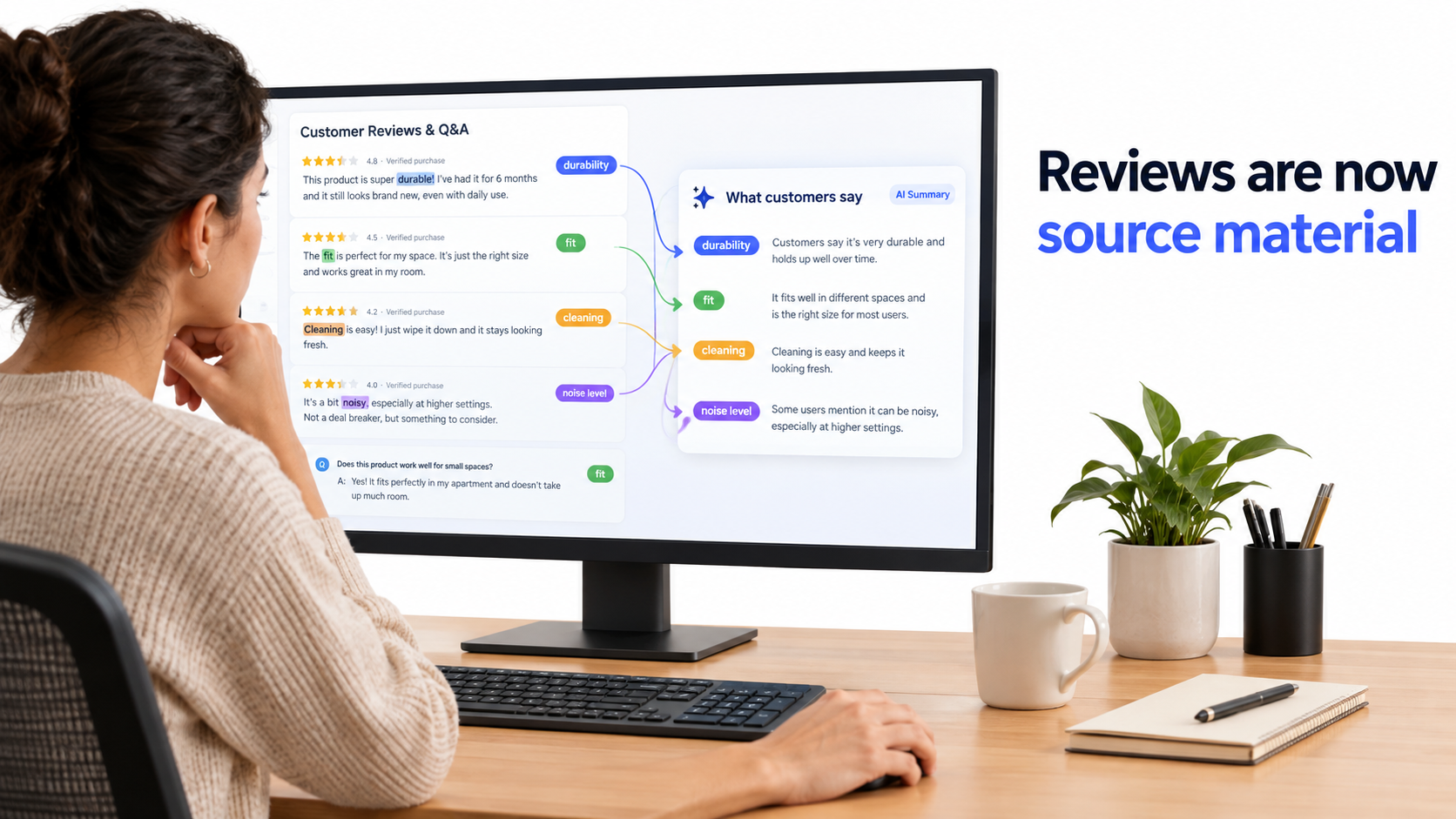
Sellers have always known reviews drive conversion. What’s changed is how reviews get used. They aren’t just read by shoppers anymore; they’re summarized and quoted by an AI that then speaks for your product.
How Amazon already summarizes reviews
Amazon introduced AI-generated review highlights that pull common themes from dozens, hundreds, or thousands of reviews. Within the assistant, shoppers can tap “What do customers say?” to get an overview. Amazon has also noted that customers ask questions like “Is this coffee maker easy to clean and maintain?” and get answers based on listing details, reviews, and Q&A.
The implication is direct: a recurring complaint in your reviews will likely surface in the assistant’s answers, even if it’s a minority view. A single theme that appears across enough reviews becomes part of how the AI describes your product.
Theme management beats star management
Traditional review strategy focused on average star rating. Star ratings still matter, but the assistant reasons about themes. A 4.4-star product with a repeated “zipper broke after a month” theme may be described less favorably for durability questions than a 4.2-star product with no durability complaints.
A practical approach:
- Export and tag your reviews by theme — durability, fit, sizing, ease of use, cleaning, noise, packaging, instructions.
- Rank themes by frequency and sentiment. Which negative themes repeat?
- Fix the root cause where possible. A product change, a better insert card, clearer sizing charts.
- Address the theme in the listing. If people complain the product runs small, say so in the listing and give clear sizing guidance. The assistant can then cite your guidance rather than just the complaint.
Q&A as a direct line to the assistant
Community Q&A is one of the sources Amazon lists. That makes accurate, detailed answers more valuable than they used to be. If a question appears about compatibility, warranty, or a specific use case, a clear answer from the brand gives the assistant something to work with.
Keep answers factual and specific. “Yes, it fits the 2024 model” is better than “It fits most models!” Vague, salesy answers give the assistant little to cite and may reduce shopper trust when quoted.
What not to do
None of this changes Amazon’s rules on reviews. Incentivized reviews, review manipulation, and seeding Q&A with fake questions remain policy violations, and the risk of using them is not worth the gain. The legitimate approach — improving the product, setting accurate expectations, and requesting reviews through Amazon’s approved tools — is also the approach that produces review themes an AI will describe favorably.
Account Memory: Why Different Shoppers Hear Different Answers
One of the most important changes Amazon announced is that the assistant now has account memory. It understands customers based on their individual shopping activity and uses that to tailor answers and product suggestions.
What Amazon has said
Amazon describes the assistant as leveraging “insights from each customer’s individual Amazon shopping activity,” with predictive capabilities that provide tailored answers and personalized suggestions based on conversational context. Its examples include knowing whether a customer is a trail runner, a budding artist, or a documentary fan, and adjusting recommendations accordingly.
Rajiv Mehta, Amazon’s vice president of Search and Conversational Shopping, described the goal as an assistant “that knows you and your preferences, can help you discover products, compare options and prices, make informed buying decisions, and even take action to get things done faster for you.”
Why this complicates “rank tracking”
With traditional search, sellers could track where a product ranked for a keyword and assume most shoppers saw roughly the same results. With personalized conversational answers, there is no single “rank.” Two shoppers asking the same question may get different recommendations depending on past purchases, browsing, and stated preferences.
This means some familiar metrics become less complete. Your keyword rank tracker may show you at position 3, while the assistant recommends you to some shoppers and not others for reasons tied to their history.
How to position for personalized answers
You can’t control a shopper’s history, but you can make it easy for the assistant to match your product to the right type of shopper:
- Be explicit about who the product is for — and who it isn’t for. “Designed for experienced climbers; beginners may prefer a softer shoe” helps the assistant send you the right customers. The wrong customers return products and leave poor reviews.
- Segment variations clearly. If one variation suits small dogs and another suits large breeds, make sure attributes and text say so.
- Build repeat purchase signals. Account memory includes past orders. Amazon notes shoppers ask things like “When was the last time I ordered sunscreen?” Consumables and replenishment products benefit when a customer’s history includes your brand. Subscribe & Save and strong post-purchase experiences support this.
The brand loyalty angle
Personalization may reward brands that customers already know and have bought from. That raises the value of a first purchase, since it shapes future recommendations. Brands that invest in first-order quality, packaging, and follow-through — the things that lead to repeat orders — may find the assistant working in their favor over time.
The Off-Amazon Factor: Editorial Sources and Brand Signals
One detail in Amazon’s description is easy to skip: the assistant uses retrieval to draw insights “from popular sources like The New York Times, USA Today, Good Housekeeping, and Vogue” when answering questions about products and trends.
Why this is new for Amazon sellers
For years, many Amazon sellers treated off-Amazon presence as optional. Traffic came from Amazon search and Sponsored Products; what happened on the open web mattered mostly for external traffic campaigns. If Amazon’s assistant pulls in editorial context when shoppers ask research questions, outside coverage can affect on-Amazon answers.
Consider a shopper asking, “What are the best air purifiers for allergies?” The assistant may draw on product reviews from publications and buying guides on the open web, combine them with catalog and review data, and recommend specific product types or models. A brand that’s been tested and reviewed by a reputable publication has an extra source pointing to it.
Realistic steps for smaller brands
Not every seller can get into The New York Times’ product review coverage. But there are practical steps at different budgets:
- Send products to relevant editors and niche reviewers. Gift guides, category roundups, and specialist publications in your niche are more attainable than national outlets.
- Publish clear product information on your own site. Detailed spec pages, FAQs, and care guides on your brand website add accurate public information about your product.
- Keep naming consistent. If your product is called one thing on Amazon, another on your site, and a third in press coverage, it’s harder for any system to connect the sources.
- Track trend coverage in your category. Amazon says shoppers ask things like “What are denim trends for women?” Editorial trend coverage shapes those answers. Knowing what publications are saying helps you position products and copy around emerging trends.
A note on accuracy
Amazon has not disclosed how much weight editorial sources carry relative to catalog data or reviews, or exactly which sources are used beyond the examples it named. Treat off-Amazon presence as a supporting factor, not a replacement for strong listings and products. But it’s a factor that didn’t matter much a few years ago, and now it does.
Measuring Performance When the Assistant Is in the Middle
One of the hardest parts of selling through an AI assistant is measurement. Amazon doesn’t currently give sellers a dedicated report showing every conversational question that led to their product. You have to piece the picture together from what’s available.
Metrics that still matter
- Unit Session Percentage (conversion rate). If more shoppers arrive on your page after the assistant has already answered their questions, conversion may rise. If the assistant is surfacing objections from your reviews, it may fall. Track it by ASIN over time, especially after listing changes.
- Sessions and page views. Changes here, without matching changes in ad spend or keyword rank, can hint at shifts in assistant-driven discovery.
- Search Query Performance (Brand Analytics). Look for growth in longer, more natural-language queries. These often reflect the conversational way shoppers now phrase requests.
- Return rate and return reasons. If the assistant is sending you mismatched shoppers, returns tend to show it. “Not as described” and “didn’t fit my needs” reasons are worth watching.
- Review theme trends. Track whether negative themes shrink after you address them in the product and listing.
Run your own assistant audits
The most direct measurement tool is manual. Once a month, run a fixed set of prompts through the assistant and record the results:
- Category research prompts (“What should I look for in a [product type]?”)
- Recommendation prompts (“Best [product type] for [audience/situation]”)
- Comparison prompts (“Compare [your product] and [competitor product]”)
- Detail page questions on your own ASIN (“Is this good for beginners?”, “Is it easy to clean?”)
Log whether your product appears, how it’s described, and which sources the answer seems to draw from. Because answers are personalized, results from a single account aren’t the full picture. Use more than one team member’s account where possible, and look for patterns rather than single results.
Before-and-after testing
When you rewrite a listing, record the assistant’s answers to your test prompts beforehand, make the change, then check again after a few weeks. Pair that with conversion and session data. It’s not a controlled experiment, but it’s far better than guessing.
Separate correlation from causation
Seasonality, ad changes, price shifts, and competitor stockouts all move conversion. Annotate your changes in a shared log so that when numbers move, you can see what else happened at the same time. That discipline matters more when part of your funnel is invisible.
A 30-Day Plan to Get Your Catalog Ready for Alexa for Shopping
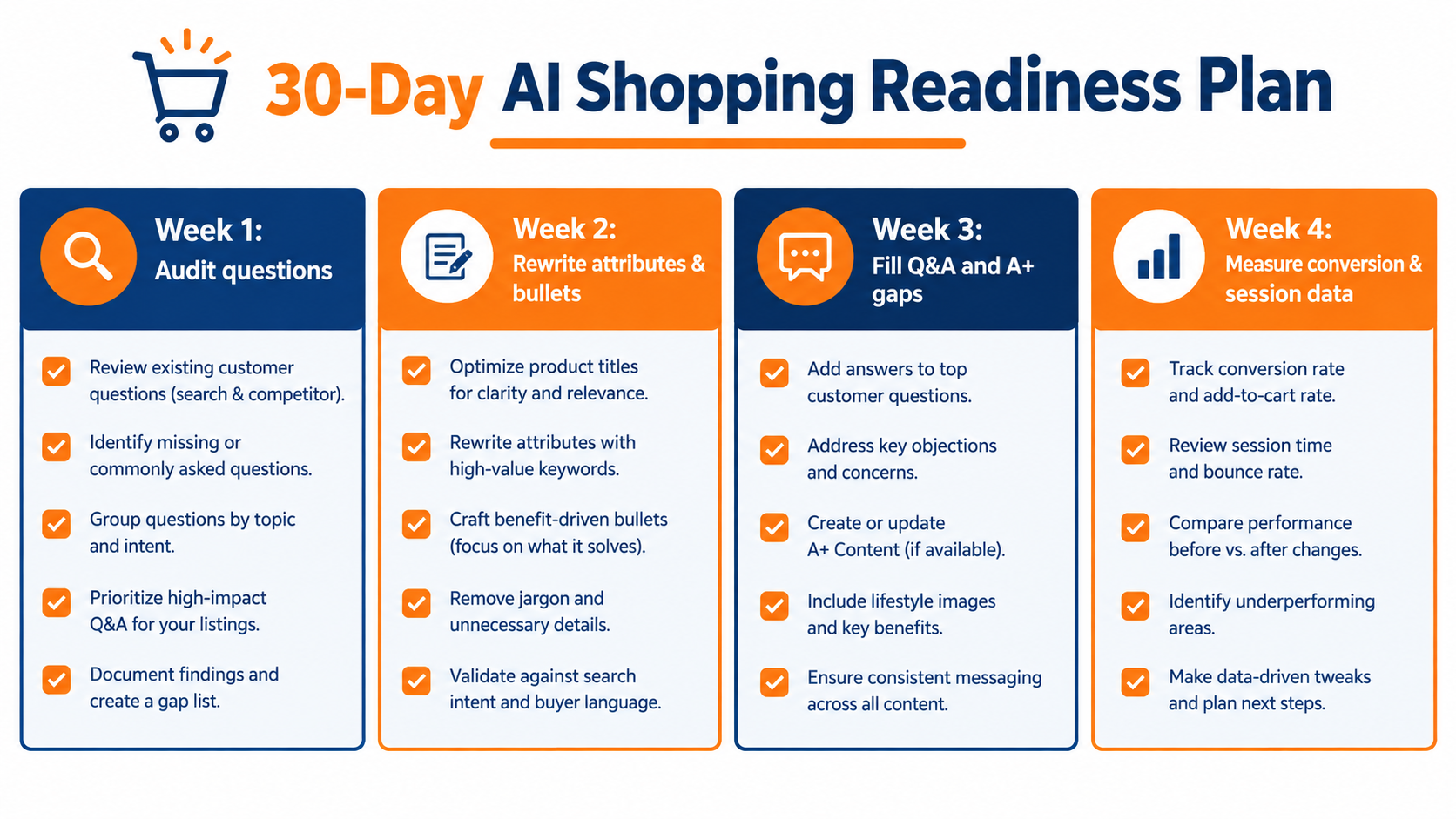
Knowing the theory is useful. Turning it into a sequence of work is what changes results. Here’s a practical four-week plan for a seller with a manageable catalog. Larger catalogs should start with the top 10–20% of ASINs by revenue.
Week 1: Audit the questions
- List your top ASINs and, for each, compile the 15–20 questions shoppers ask most, drawing on Q&A, customer messages, returns comments, and competitor reviews.
- Run your baseline assistant audit with research, recommendation, comparison, and detail-page prompts. Save the answers.
- Export reviews and tag them by theme. Identify the top three negative themes per ASIN.
- Record current conversion rate, sessions, and return rate as your baseline.
Week 2: Rewrite attributes and bullets
- Fill every relevant structured attribute field. Check for conflicts between attributes, bullets, images, and A+ content.
- Rewrite bullets using the feature → measurable fact → situation/audience pattern.
- Add explicit audience statements (who it’s for, who it’s not for).
- State honest limitations where they’re common questions — care instructions, compatibility limits, sizing notes.
- Read the listing aloud. If it doesn’t make sense spoken, a voice answer built from it may not either.
Week 3: Fill Q&A and A+ gaps
- Answer any open community questions accurately and specifically.
- Use A+ content to address recurring questions in a clear format — comparison charts across your own variations, care guides, sizing guides.
- Address top negative review themes in the listing with accurate guidance, and flag product fixes to your sourcing team.
- Update your brand website with matching spec and FAQ pages, using consistent product names.
- Identify two or three niche publications or reviewers to approach about your product.
Week 4: Measure and iterate
- Rerun your assistant audit with the same prompts. Compare answers to your baseline.
- Check conversion, sessions, and returns against your Week 1 numbers, noting any outside factors.
- Document what changed in the assistant’s answers and which edits seem to have mattered.
- Roll the approach out to the next tier of ASINs.
Ongoing habits
After the first 30 days, fold this into routine operations: a monthly assistant audit, a quarterly review theme analysis, and a rule that every new listing launches with complete attributes and answer-ready bullets. The goal is not a one-time cleanup. It’s writing every listing on the assumption that an AI will read it first.
Common Mistakes Sellers Are Making Right Now
As sellers react to conversational shopping, a few predictable mistakes keep showing up. Avoiding them is often as valuable as any new tactic.
Chasing “AI keywords”
Some sellers are stuffing listings with phrases like “best for” and “perfect for everyone” in hopes the assistant will pick them up. That repeats the keyword-stuffing mistake in a new form. An LLM gains nothing from vague superlatives. Specific, checkable claims carry more weight than claims of being the best.
Overclaiming
If your listing claims “lasts forever” and reviews say it broke in two months, the assistant has conflicting sources. At best, it ignores your claim. At worst, it surfaces the contradiction. Accurate claims hold up when cross-checked against reviews; inflated ones don’t.
Ignoring the detail page as a battleground
Because the assistant appears on product detail pages, shoppers can ask comparison questions while looking at your product. Sellers who only focus on getting traffic to the page miss the fact that the conversation on the page can send that traffic elsewhere. Make sure your content wins direct comparisons on the attributes shoppers care about.
Treating images and text separately
Amazon’s assistant appears in Amazon Lens Live, which links visual search to conversation. Images still matter, and the text in and around them should agree with your written claims. Inconsistent dimensions or features between an infographic and the bullets create confusion for both shoppers and systems.
Waiting for an official playbook
Amazon has not published a seller guide titled “How to rank in Alexa for Shopping,” and it may never publish one in detail. Waiting for one means falling behind competitors who are already testing. The principles here — clarity, accuracy, completeness, and answering real questions — fit with Amazon’s own public statements and carry little downside even if specifics change.
Conclusion: Write for the Reader That Reads Everything
The Rufus-to-Alexa-for-Shopping rename on May 13, 2026, is a useful marker. It signals that Amazon sees conversational, AI-assisted shopping as a core part of the store, not an experiment. With more than 250 million customers using the assistant during the year, interactions up 210%, and users more than 60% more likely to buy during a session, it now sits between a large share of shoppers and your listing.
The good news is that the AI reader rewards things good sellers already value: accurate information, clear communication, products that live up to their claims, and attention to what customers actually ask. The difference is that shortcuts that once worked on a keyword algorithm now get exposed by a system that reads every bullet, every review, and every answer before it speaks.
Key takeaways
- Treat your listing as source material. Every sentence should hold up if an AI quotes it to a shopper, in text or out loud.
- Write in needs, audiences, and situations. Amazon’s COSMO research shows how much weight the company puts on linking products to human context.
- Fill every structured attribute accurately and remove conflicts between attributes, bullets, images, and A+ content.
- Manage review themes, not just star ratings. Recurring complaints are likely to show up in AI summaries.
- Answer Q&A specifically and honestly. It’s one of the sources Amazon names.
- Build off-Amazon presence. Editorial coverage and consistent brand information on the open web now feed into on-Amazon answers.
- Audit the assistant monthly with a fixed set of prompts, and pair results with conversion, session, and return data.
- Start with your top ASINs and follow the 30-day plan before rolling changes across your catalog.
The shopper hasn’t gone anywhere. They’ve just picked up an assistant that reads faster than they do. The sellers who do well in 2026 will be the ones whose listings give that assistant something accurate, specific, and useful to say.