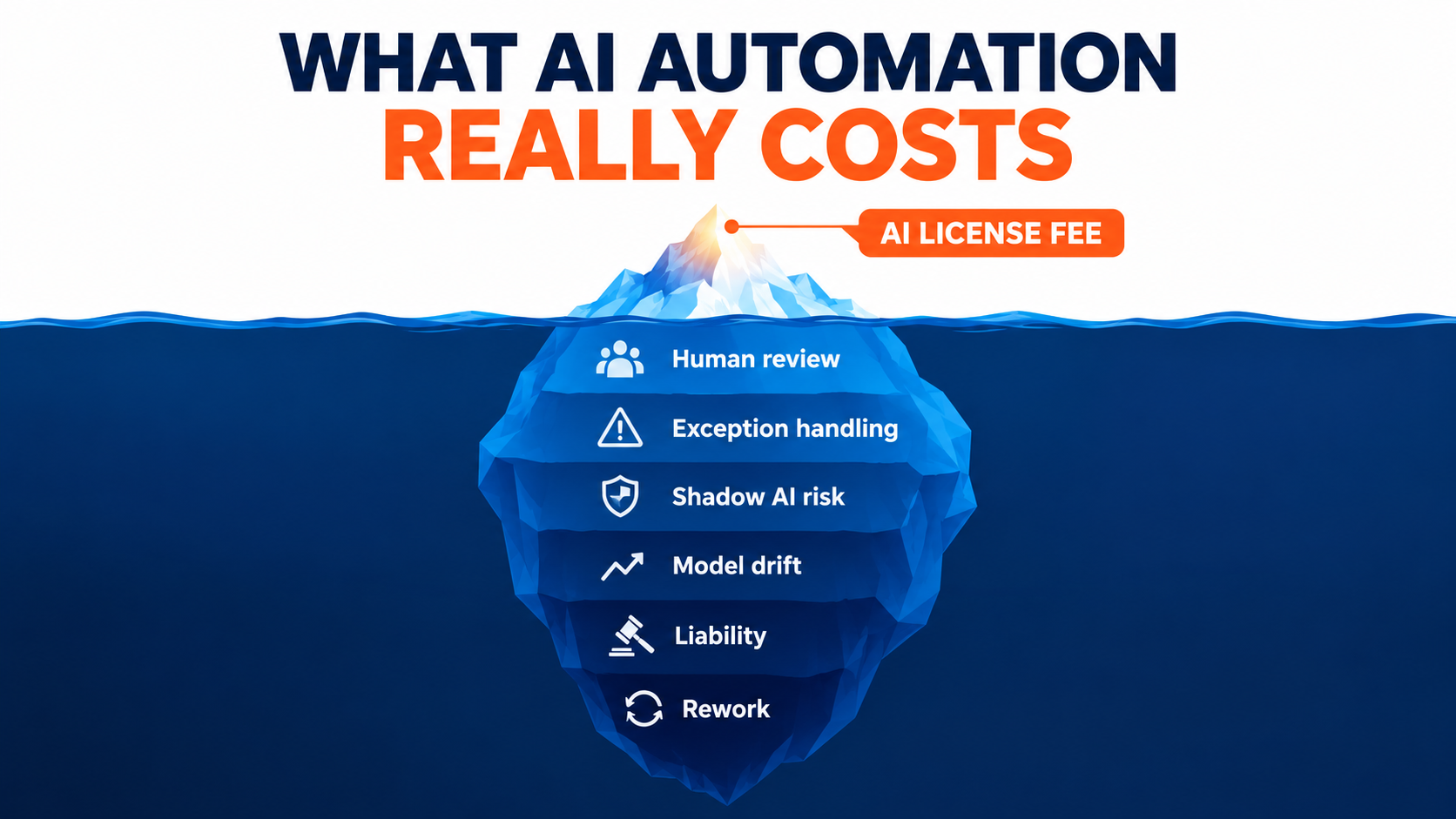

Most business cases for AI automation are built the same way. Someone estimates the hours a task currently takes, multiplies by a loaded labor rate, subtracts the cost of a software subscription or a build, and presents the difference as savings. The spreadsheet looks clean. The payback period looks short.
Then the automation goes live, and a different set of numbers starts to show up. A manager spends part of every morning checking outputs. A colleague downstream quietly rewrites reports that “the AI did.” A customer escalates a wrong answer. An engineer gets pulled in because a model update changed how a prompt behaves. None of these costs appeared in the original business case, and few of them appear on any invoice.
This is not a fringe problem. A report from the MIT Media Lab, cited by researchers in Harvard Business Review in September 2025, found that 95% of organizations see no measurable return on their generative AI investments. Gartner has predicted that over 40% of agentic AI projects will be canceled by the end of 2027, citing escalating costs, unclear business value, and inadequate risk controls. Those are not failures of the technology alone. In many cases they are failures of accounting — businesses budgeting for the visible part of automation and getting surprised by the rest.
This article takes a cost-side view of AI automation for business. Rather than asking “what can we automate?”, it asks “what does automation actually cost once it’s running?” We’ll walk through the post-launch line items that most budgets miss — verification labor, downstream rework, exception handling, liability, shadow AI, drift, and quality rebound — and then assemble them into a total-cost model you can use before approving the next project.
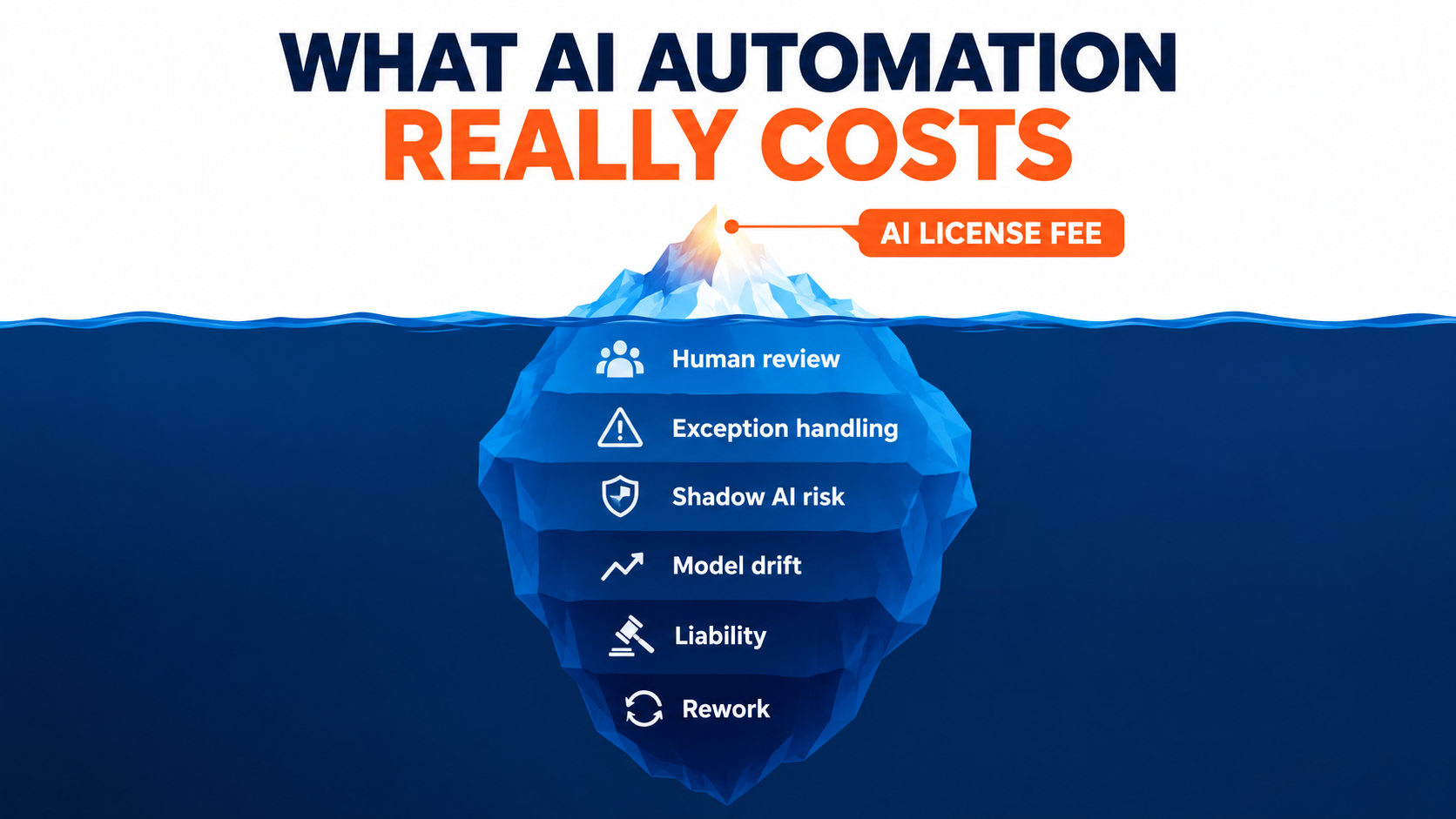
Why the Sticker Price Is the Smallest Number in the Business Case
When businesses evaluate traditional software, the purchase price and implementation cost usually dominate the total cost of ownership. AI automation inverts that pattern. The license or API cost is often modest. The expensive parts are the human systems you have to build around the automation to make it safe and useful.
The reason is structural. Classic rules-based automation is deterministic: given the same input, it produces the same output, and when it fails, it tends to fail loudly. Generative AI is probabilistic. It produces plausible output most of the time, wrong output some of the time, and — critically — the wrong output often looks just as polished as the right output.
Plausible errors change the economics
A system that fails loudly is cheap to supervise. You notice the crash, fix it, and move on. A system that fails quietly and convincingly needs ongoing inspection, because you can’t tell which outputs are bad without checking them. That inspection is labor, and labor is exactly what the automation was supposed to remove.
This is why AI automation projects can show strong demo results and weak production results. In a demo, a person evaluates a handful of outputs with full attention. In production, thousands of outputs flow through, and the organization has to decide how many to check, who checks them, and what happens when something slips through.
The costs shift rather than disappear
A useful mental model: automation rarely deletes work outright. It moves work — from creation to review, from the person who used the tool to the person who receives its output, from the front line to the exception queue, from operations to IT and legal. If your business case only measures the work removed and ignores where it moved, the savings will be overstated.
The rest of this article is a tour of those destinations. Each one is a line item. Some are small for some processes and enormous for others. The goal isn’t to argue against automation — it’s to make sure the decision is made with the full ledger visible.
Line Item 1: The Verification Tax
The first hidden cost is the time humans spend checking AI output. Almost every serious AI deployment includes some form of human review, at least initially. The question is how much that review costs and whether anyone is measuring it honestly.
The perception gap is real and measurable
One of the most cited pieces of evidence here comes from METR, an AI research nonprofit. In a randomized controlled trial published in July 2025, METR recruited 16 experienced open-source developers working on large, mature repositories they knew well. Across 246 real tasks, each was randomly assigned to allow or disallow AI tools.
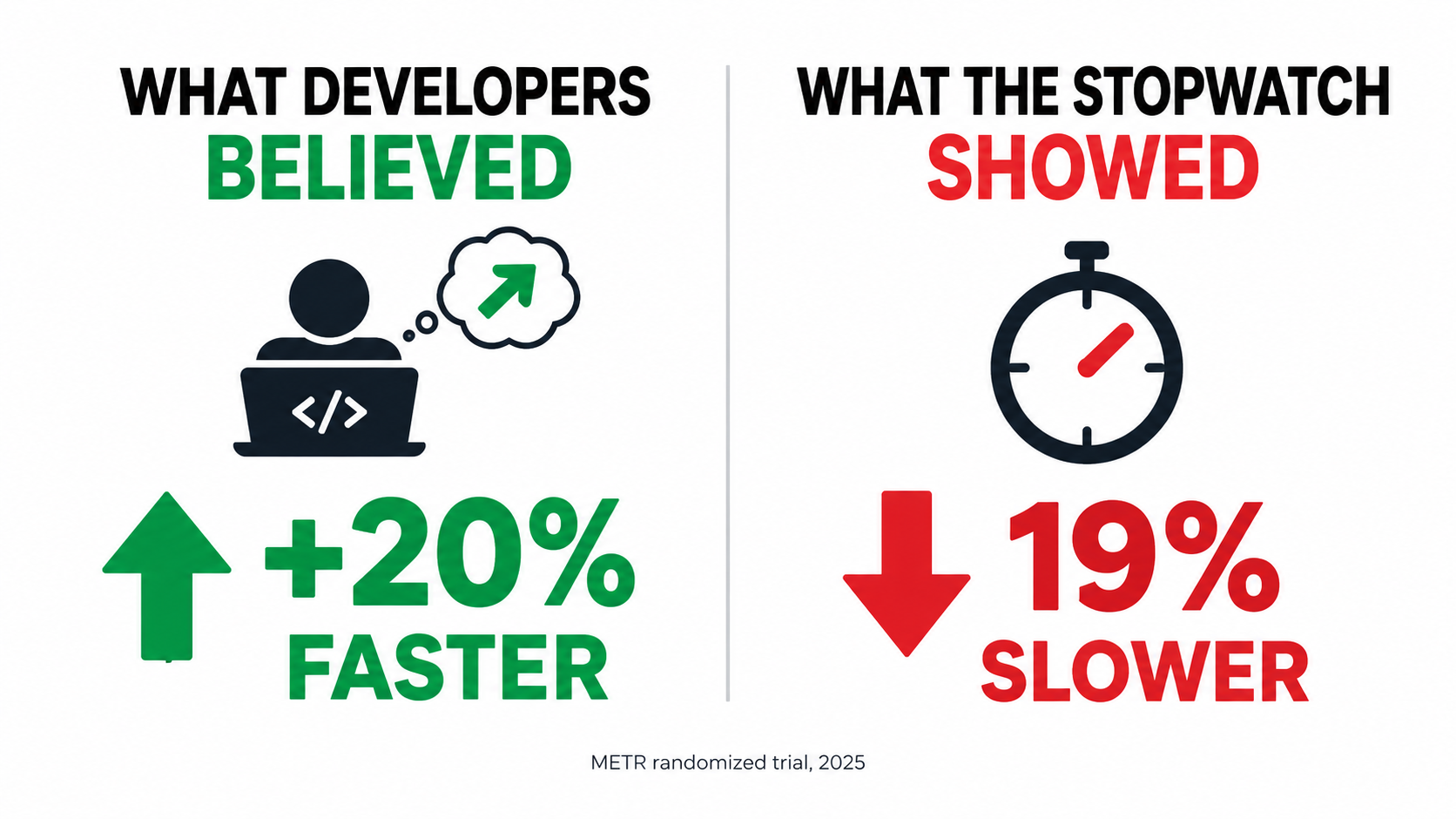
The result: when developers were allowed to use AI tools, they took 19% longer to complete their tasks. More striking was the perception gap. Before the study, developers expected AI to speed them up by 24%. After experiencing the slowdown, they still believed AI had sped them up by 20%.
Two caveats matter. METR itself has said these results reflect early-2025 tools and are now out of date; it published newer data in February 2026 on late-2025 tools. And the study was narrow — expert developers on familiar codebases, where AI has the least to add. The specific number shouldn’t be generalized to your business.
The lesson that does generalize is the gap between how fast work feels and how fast it is. If people who were literally timing themselves misjudged the effect by roughly 40 percentage points, self-reported time savings in your organization deserve skepticism too.
Where the review time goes
Verification time tends to hide in a few places:
- Reading and checking. Reviewing a generated contract summary, customer reply, or data extraction takes real time — sometimes close to the time it would take to do the work from scratch, especially for short tasks.
- Context switching. Prompting, waiting, reviewing, correcting, and re-prompting fragments attention in ways that don’t show up in a simple “minutes per task” estimate.
- Correction loops. When output is close but not right, people often spend longer fixing it than they would have spent writing it.
How to budget for verification
Instead of assuming review time is negligible, measure it. Run a short time-and-motion sample before and after launch: pick 30–50 real tasks, record actual elapsed time with and without the automation, and include review and correction. Then decide on a review policy explicitly — 100% review, sampled review, or exception-only review — and cost each one.
A practical rule: the review rate you can safely run at depends on the cost of an undetected error. Internal meeting summaries can tolerate sampled review. Customer-facing pricing, legal language, or financial postings usually can’t. The verification tax is highest exactly where the stakes are highest, which is often where the automation looked most attractive.
Line Item 2: Workslop and the Cost Pushed Downstream
The verification tax is paid by the person using the AI. A second, sneakier cost is paid by everyone who receives what they produce.
What “workslop” means
Researchers from BetterUp Labs and the Stanford Social Media Lab coined the term “workslop” for AI-generated work content that looks polished but lacks the substance to meaningfully advance a task. Their framing, published in Harvard Business Review in September 2025: slick slides, lengthy reports, overly compressed summaries, or code without context that create the illusion of progress while leaving colleagues to do the real thinking.
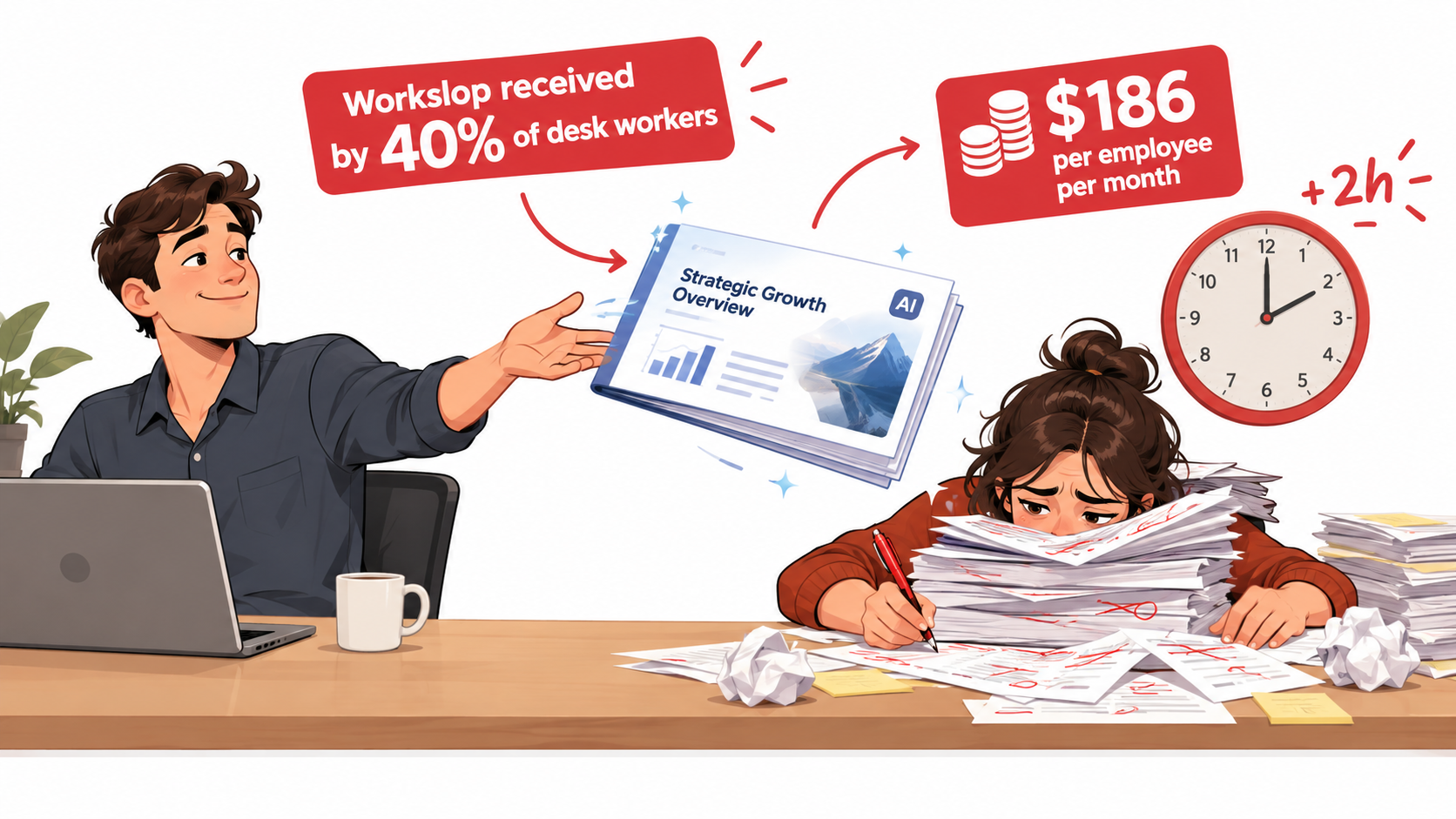
Based on a survey of 1,150 full-time U.S. desk workers conducted in September 2025, the researchers reported:
- 40% of respondents had received workslop in the past month.
- Each incident took an average of about two hours to resolve.
- That added up to an estimated $186 per employee per month in lost productivity.
- For a 10,000-person company, the estimated cost was roughly $9 million a year.
Why this cost is invisible to the business case
Workslop is an externality. The person who generates the content experiences a time saving. The person who receives it experiences a time cost. If you measure productivity only at the point of generation — “reports drafted per week,” “tickets responded to” — you record the gain and miss the loss.
The research also points to relational costs. One project manager quoted by BetterUp described receiving poor-quality AI output from a supervisor, feeling unable to push back, and redoing the work themselves at the expense of their own projects. That kind of friction erodes trust between colleagues and doesn’t show up anywhere in an automation dashboard.
Containing workslop
Workslop is less a technology problem than an accountability problem. A few practices help:
- Make the sender own the output. If AI drafted it, the person sending it is still responsible for its accuracy and usefulness. Say so explicitly in your AI policy.
- Measure at the receiving end. When evaluating an AI-assisted workflow, ask downstream recipients how much time they spend fixing or clarifying what they receive.
- Prefer shorter, purpose-specific outputs. Long, generic AI documents are the most common form of workslop. A two-paragraph answer to a specific question is easier to verify than a ten-page “analysis.”
- Model the behavior from the top. The BetterUp researchers emphasize that leaders who use AI thoughtfully — as a collaborator rather than a way to avoid work — set the norms others follow.
Line Item 3: The Exception Queue and the Long Tail
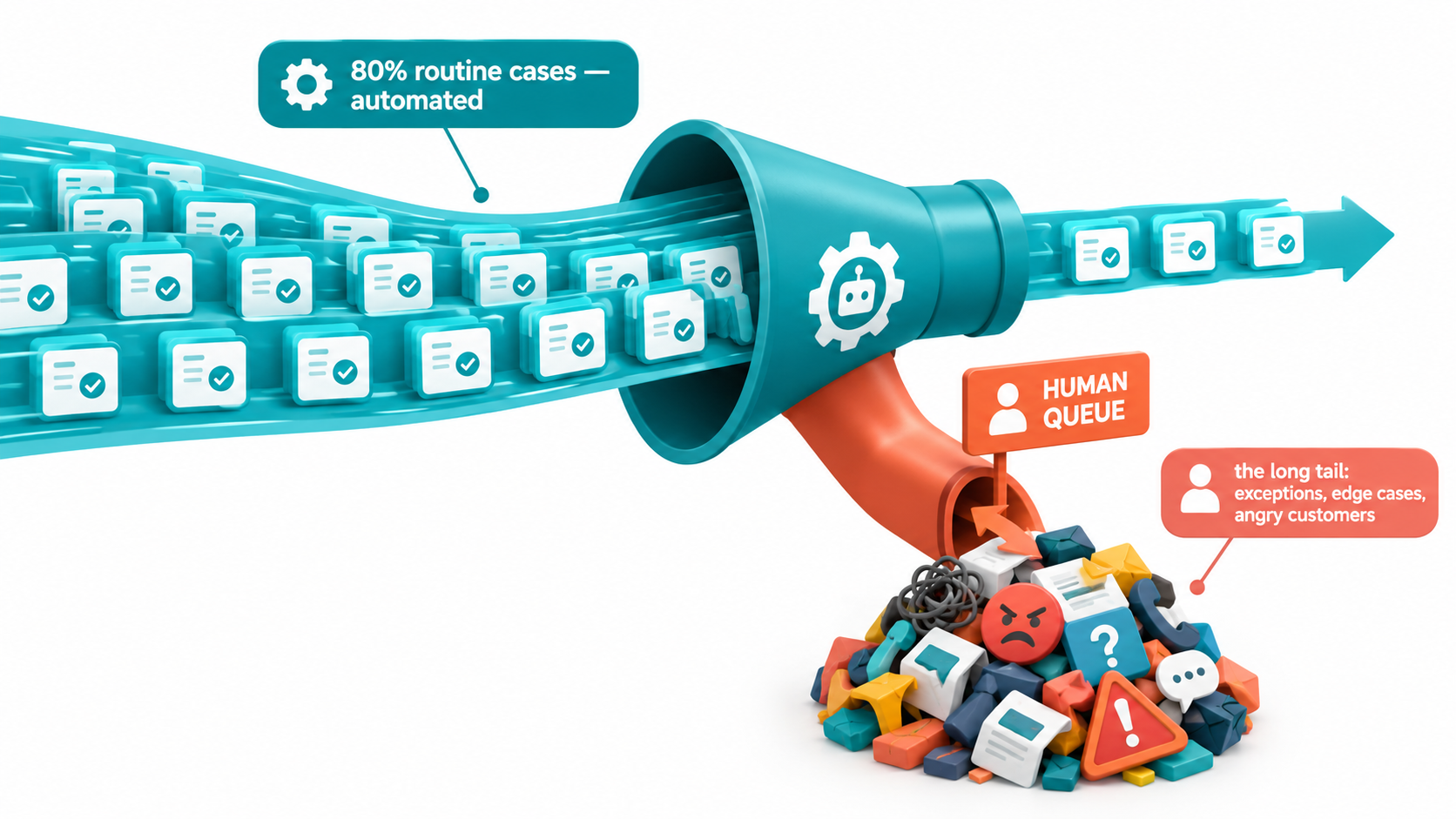
Nearly every business process has a core of routine cases and a long tail of unusual ones. Automation business cases are usually built on the routine core. The cost lives in the tail.
Why the tail is more expensive than it looks
Consider a hypothetical accounts payable process. Suppose most invoices arrive in standard formats from known vendors and match purchase orders cleanly. An AI extraction-and-matching system can handle those well. But a meaningful share won’t fit: handwritten notes, partial shipments, currency mismatches, vendors that changed bank details, disputes.
Before automation, those exceptions were spread across a team that also handled routine work. After automation, the routine work disappears and the exceptions concentrate. You now need people who can handle only the hardest cases — which often means more senior, more expensive staff — and their queue is harder per item than anything the original team handled on average.
The staffing trap
This creates a common trap. The business case projects headcount reduction proportional to the share of volume automated. If 75% of volume is automated, the plan assumes something close to 75% of the effort disappears. In practice, the remaining 25% of cases might represent a much larger share of the original effort, because exceptions were always the slow ones.
There’s a second-order problem too. When the routine work goes away, so does the training ground. Junior staff historically learned the process by handling simple cases before graduating to complex ones. If the simple cases are automated, you need a different way to develop the people who will handle the exceptions five years from now.
Mapping the tail before you commit
Before approving an automation project, pull a sample of historical cases and categorize them by complexity, not just volume. Estimate:
- What share of cases the automation can handle end-to-end with acceptable accuracy.
- What share of total handling time those cases represented — not just their share of count.
- How exceptions will be detected and routed (the automation has to know when it doesn’t know).
- Who handles exceptions, at what skill level and cost.
- How new staff will learn the process if routine cases no longer exist.
If the automated share of handling time is much smaller than the automated share of volume, the savings estimate needs to shrink accordingly.
Line Item 4: Liability for What the Automation Says
When automation interacts with customers, partners, or regulators, its mistakes become your obligations. This is one of the clearest hidden costs because it has already been tested in a tribunal.
The Air Canada precedent
In Moffatt v. Air Canada (2024 BCCRT 149), decided by British Columbia’s Civil Resolution Tribunal in February 2024, a customer asked Air Canada’s website chatbot about bereavement fares after his grandmother died. The chatbot told him he could buy a full-price ticket and apply for a partial refund within 90 days. That wasn’t Air Canada’s actual policy, and the airline refused the refund.
Air Canada argued, in a submission the tribunal member called “remarkable,” that the chatbot was a separate legal entity responsible for its own actions. The tribunal rejected that, holding that the chatbot was part of Air Canada’s website and the company was responsible for the information it provided. Air Canada was found liable for negligent misrepresentation and ordered to pay the fare difference plus interest and fees.
Why a small claim matters
The amount at stake was tiny — around CA$800. But the principle is what businesses should price in. The American Bar Association described the case as a reminder that companies remain liable for the actions of their AI tools. If your automation makes promises, quotes prices, describes policies, or gives advice, you should assume those statements bind you the same way an employee’s would.
Multiply a small error by thousands of customer interactions, and the exposure is no longer small. Add regulated contexts — financial advice, health information, employment decisions, credit — and the potential cost includes regulatory penalties, not just refunds.
Pricing liability into the business case
Liability doesn’t have a clean line item, but you can approximate it:
- Classify outputs by consequence. Informational (low), transactional (medium), contractual or regulated (high).
- Restrict what the automation can assert. Ground customer-facing answers in approved policy documents, and route anything outside that scope to a human.
- Keep audit trails. Log what the system said, to whom, and based on what source. If a dispute arises, you need to reconstruct it.
- Hold a risk reserve. For customer-facing automation, budget for refunds, goodwill gestures, and legal review the same way you’d budget for warranty claims on a physical product.
- Review contracts and disclosures. Legal review of how AI interactions are presented to customers is a real cost, but it’s cheaper before launch than after a complaint.
Line Item 5: Shadow AI and the Security Bill
Not every AI automation in your business was approved. Many were set up by employees who found a tool, connected it to their work, and never told IT. That unofficial layer carries its own costs.
How widespread unofficial AI use is
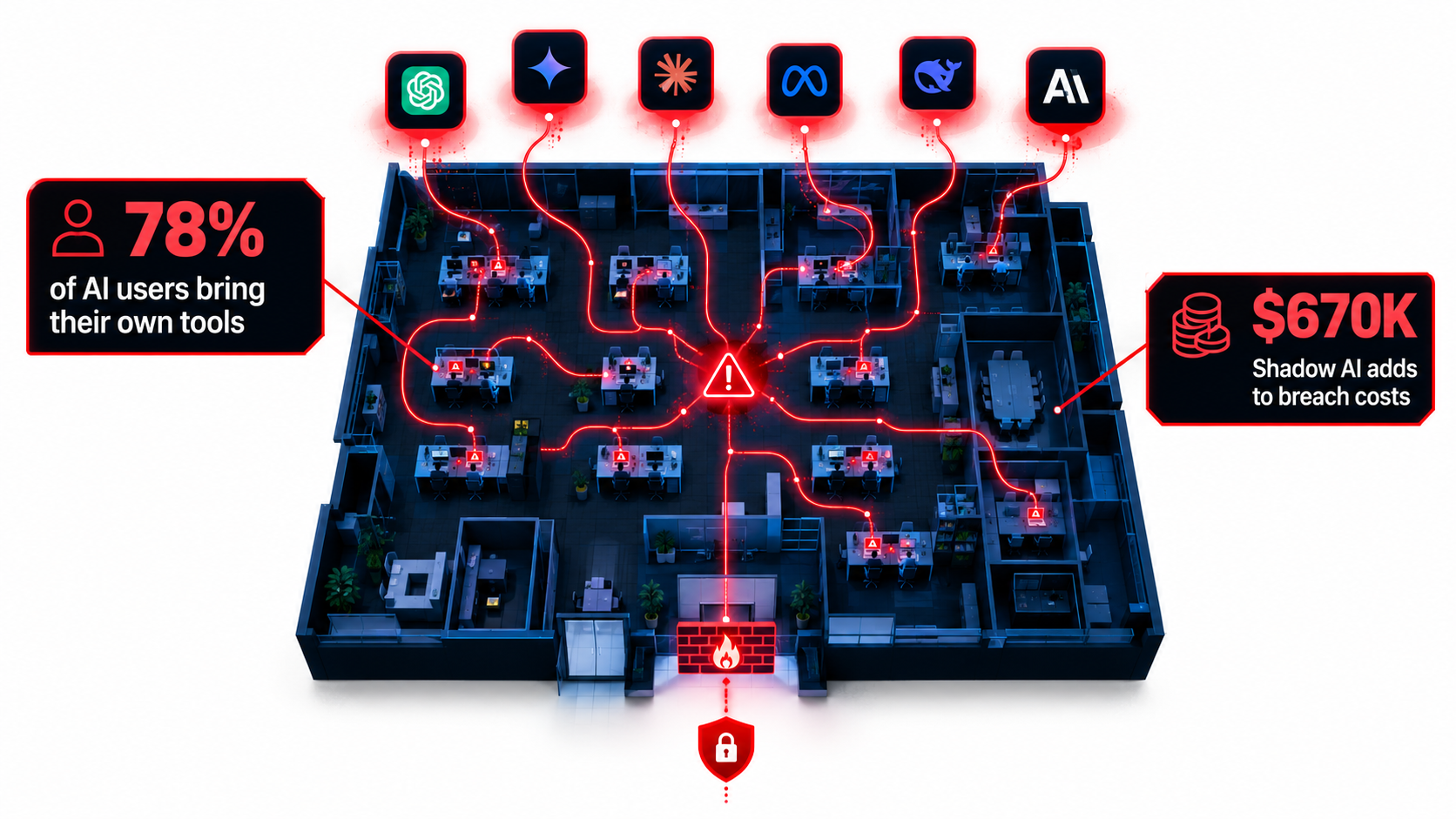
Microsoft and LinkedIn’s 2024 Work Trend Index, based on a survey of 31,000 people across 31 countries, found that 75% of knowledge workers were using generative AI at work. Of those users, 78% were bringing their own AI tools rather than using ones provided by their organization — and the figure was even higher, 80%, at small and medium-sized companies.
The same research found that 52% of people using AI at work were reluctant to admit using it for their most important tasks, and 53% worried that using it made them look replaceable. In other words, a large share of AI-assisted work in many organizations is happening out of sight of the people responsible for data security.
What it costs when something goes wrong
IBM’s 2025 Cost of a Data Breach Report, conducted by the Ponemon Institute across 600 organizations, put numbers on this for the first time:
- One in five organizations reported a breach due to shadow AI.
- Organizations with high levels of shadow AI saw an average of $670,000 in higher breach costs than those with low or no shadow AI.
- Shadow AI incidents led to more personally identifiable information (65%) and intellectual property (40%) being compromised than the global average (53% and 33%).
- 13% of organizations reported breaches of AI models or applications, and 97% of those lacked proper AI access controls.
- 63% of breached organizations either had no AI governance policy or were still developing one.
IBM’s Suja Viswesan summarized it bluntly: “The data shows that a gap between AI adoption and oversight already exists, and threat actors are starting to exploit it.”
The governance line item you can’t skip
The flip side of the IBM data is useful. The same report found that organizations using AI and automation extensively in their security operations saved an average of $1.9 million in breach costs and shortened the breach lifecycle by 80 days. AI isn’t inherently the risk — ungoverned AI is.
That means any honest AI automation budget includes a governance line item:
- An approved tools list that is genuinely useful, so employees have a sanctioned alternative to whatever they’d otherwise sign up for.
- Access controls on AI systems that touch sensitive data — who can connect what to which model.
- Periodic audits for unsanctioned AI. IBM found only 34% of organizations with governance policies actually audit for it.
- Data classification rules that tell employees plainly what can and can’t be pasted into an AI tool.
For a small business, this might be a few days of a contractor’s time and a one-page policy. For a large enterprise, it’s a standing function. Either way, it belongs in the cost of automation, not in a separate IT budget nobody connects to the AI project.
Line Item 6: Drift, Prompt Rot, and the Maintenance Nobody Owns
Traditional software, once built, mostly stays the same until someone changes it. AI automation built on third-party models changes underneath you whether you touch it or not.
Three sources of drift
Model updates. Vendors regularly release new model versions and retire old ones. A prompt that produced well-structured output on one version may behave differently on the next — more verbose, differently formatted, more or less cautious. If a downstream system parses that output, small changes can break things.
Input drift. The data flowing into your automation changes over time. New product lines, new customer segments, new document formats, seasonal language, regulatory changes. An automation tuned on last year’s inputs gradually becomes less accurate on this year’s.
Process drift. The business itself changes. Policies get updated, pricing changes, approval thresholds shift. If the automation’s instructions and reference documents aren’t updated in lockstep, it keeps confidently applying the old rules — which is precisely the failure mode that cost Air Canada.
The ownership problem
The deeper issue is organizational. Many AI automations are built by an enthusiastic individual or a small project team. Once launched, the project team moves on. Six months later, nobody is clearly responsible for checking whether the automation is still accurate, updating its prompts when policy changes, or testing it against a new model version.
This is how “prompt rot” happens: instructions that were correct at launch slowly drift out of alignment with reality, and nobody notices until something goes wrong. Because AI output stays fluent even when it’s wrong, there’s no obvious error message to trigger attention.
Budgeting for ongoing maintenance
Treat every production AI automation as a living system with recurring costs:
- A named owner with time allocated — not just an employee who “set it up once.”
- A test set of representative inputs with known-good outputs, re-run whenever the model, prompt, or reference data changes.
- Accuracy monitoring in production, even if it’s just a weekly sample of outputs reviewed against a checklist.
- A change process that links policy and pricing updates to the automations that depend on them.
- A migration budget for when a model version is retired or a vendor changes pricing or terms.
A reasonable starting assumption for planning is that maintenance will consume a recurring share of the original build effort every year. The exact share depends on how volatile your inputs and policies are, but it is never zero.
Line Item 7: The Quality Rebound
The final hidden cost is the one that shows up last: the cost of reversing course when automation degrades the customer or employee experience more than the savings justify.
The Klarna example
Klarna became one of the most visible examples of aggressive AI automation in customer service. In early 2024, the company announced that its AI assistant was handling about two-thirds of customer service chats in its first month, doing work it said was equivalent to roughly 700 full-time agents.
By 2025, the message had shifted. CEO Sebastian Siemiatkowski said publicly, as widely reported at the time, that cost had been too dominant a factor in the company’s approach and that the result was lower quality. Klarna said it would begin recruiting human customer service staff again so customers could always reach a person.
Klarna didn’t abandon AI — it remains a heavy user. But the episode illustrates a cost most business cases ignore: the expense of rebuilding human capacity after it’s been cut. Rehiring, retraining, and repairing customer trust all cost money, and they arrive after the savings have already been reported.
Leading indicators of a coming rebound
Quality rebounds rarely come out of nowhere. Watch for:
- Rising repeat contacts. Customers coming back about the same issue suggests the first interaction didn’t resolve it, even if it was marked “handled.”
- Escalation creep. A growing share of interactions being transferred to humans, often more frustrated than they would have been originally.
- Containment without satisfaction. High “deflection” or “containment” rates paired with flat or falling satisfaction scores are a warning, not a win.
- Internal workarounds. Employees building side processes to avoid or correct the automation.
Designing to avoid the rebound
The cheapest rebound is the one you never have to make. Practical safeguards include keeping an easy path to a human, measuring outcome metrics (resolution, satisfaction, repeat contacts) rather than activity metrics (chats handled, minutes saved), and reducing human capacity gradually rather than all at once. Retaining some experienced staff — even at lower volume — preserves the knowledge you’ll need if the automation underperforms.
Building a Total Cost of Automation Model
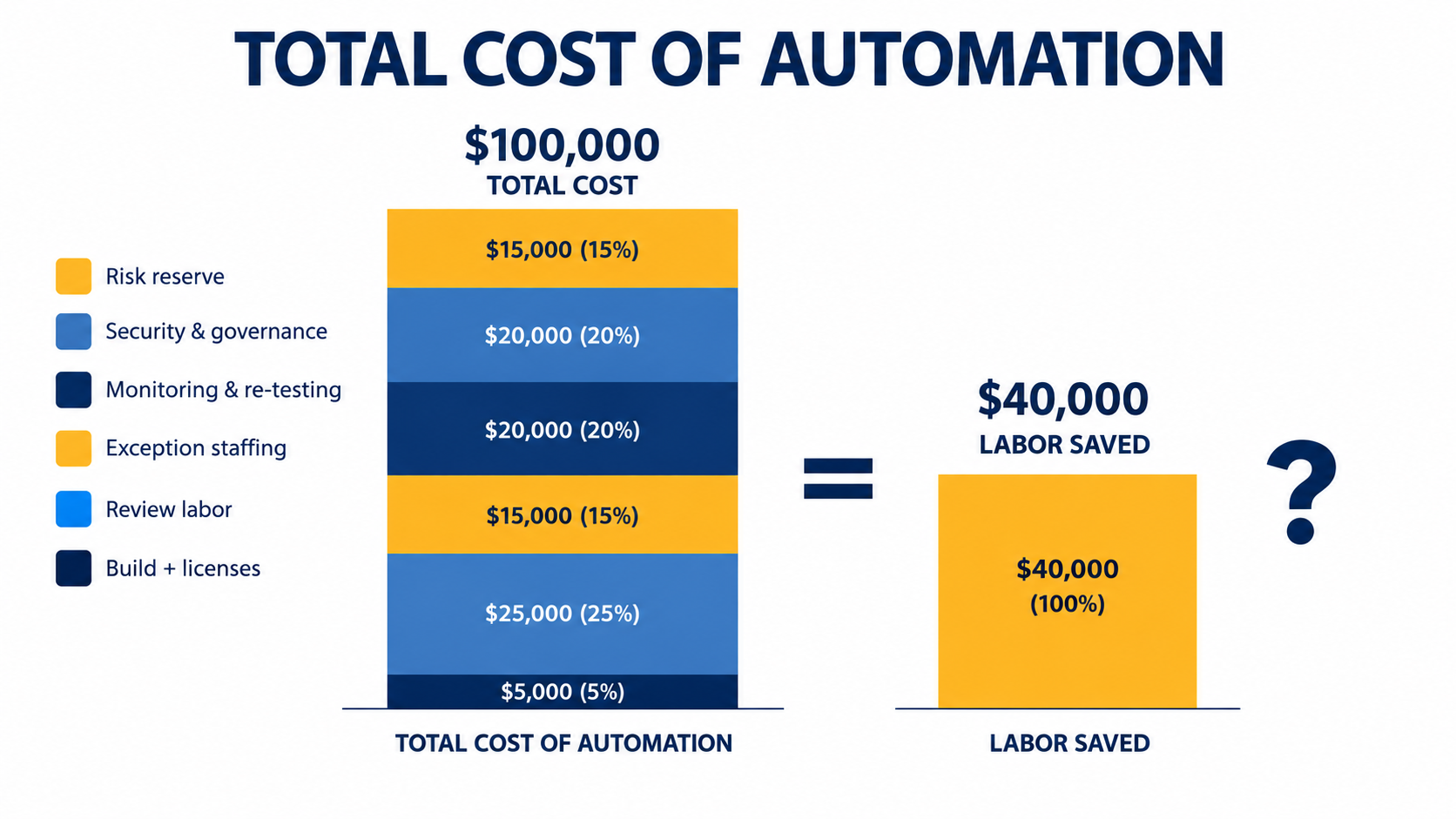
With the hidden line items mapped, you can assemble a more honest business case. Call it total cost of automation (TCA). The structure is straightforward; the discipline is in filling in every row.
The cost side
- Build and licensing. Development, integration, subscriptions, API usage. Include usage growth — per-call or per-token pricing scales with volume.
- Verification labor. Measured review time per item × volume × reviewer cost, at the review rate your risk level requires.
- Downstream rework. Time recipients spend correcting or clarifying output. Survey them; don’t guess.
- Exception handling. Staffing for the long tail, at the skill level those cases actually require.
- Governance and security. Policy, access controls, audits, data classification, legal review.
- Maintenance. Owner time, test-set upkeep, monitoring, model migrations.
- Risk reserve. An allowance for errors that reach customers: refunds, goodwill, disputes, potential rebound costs.
The benefit side
- Labor removed — based on the share of handling time automated, not the share of volume.
- Speed gains that have measurable value: faster cash collection, shorter quote turnaround, quicker onboarding.
- Quality gains where automation is genuinely more consistent than people, such as data entry accuracy or policy-compliant phrasing.
- Capacity gains — volume you can now handle without hiring — but only if that volume actually exists.
Stress-testing the model
Once the rows are filled, run three scenarios. In the base case, use your measured numbers. In the pessimistic case, double the verification and exception costs and halve the labor removed — a reasonable stress test given how often perceived savings exceed real ones. In the optimistic case, assume review rates fall over time as accuracy is proven.
If the project only pays off in the optimistic case, it’s an experiment, not an investment, and it should be funded and governed like one. If it pays off even in the pessimistic case, you’ve likely found a strong candidate.
A worked illustration
To make this concrete, consider a simplified, hypothetical example. A mid-sized company plans to automate first-draft responses to inbound customer emails. The original business case assumes 3,000 hours a year of drafting time eliminated.
A TCA review adjusts that picture. Agents still review every customer-facing reply, which a sample shows takes roughly a third of the original drafting time — so about 1,000 hours of verification come back. The complex emails, which took a disproportionate share of time, still go to senior agents. Someone has to own the prompt library and policy references. Governance work is needed to confirm customer data is handled appropriately with the vendor.
The project may still be worth doing. But the real saving might be a fraction of the original 3,000 hours — and knowing that before approval changes how much you’re willing to spend, how fast you cut staff, and what success should look like at the six-month review.
Where the Math Still Works: Choosing Automation That Survives the Full Ledger
None of this is an argument against AI automation for business. It’s an argument for selecting processes where the hidden costs are naturally low. Certain characteristics consistently predict a favorable total cost.
Characteristics of low hidden-cost automation
- Cheap verification. The output is quick to check relative to the time it takes to produce. Classifying a support ticket is fast to verify; writing a legal brief is not.
- Low cost of error. Mistakes are internal, reversible, or caught naturally by later steps. Tagging, routing, and first-pass sorting fit here.
- Stable inputs and rules. The documents, formats, and policies involved don’t change often, which keeps maintenance low.
- Thin long tail. Most cases genuinely look alike, so the exception queue stays small.
- Clear ownership. A specific team benefits from the automation and has a reason to maintain it.
- Measurable outcomes. There’s a business metric — cycle time, error rate, resolution rate — you can track before and after, rather than relying on self-reported time savings.
Patterns that tend to fare well
Applying those criteria, a few categories of automation usually hold up under full-cost scrutiny:
- Internal triage and routing — sorting incoming requests, tickets, or documents to the right queue, where a misroute is cheap and quickly noticed.
- Structured extraction with validation — pulling fields from documents where the results can be checked automatically against other systems, like matching invoice totals to purchase orders.
- Search and retrieval over approved knowledge — helping staff find the right internal policy or prior case, with the human still making the decision.
- Security operations support — where IBM’s data shows extensive AI and automation use associated with lower breach costs and faster containment.
Patterns that need extra caution
- Unreviewed customer-facing statements about policy, pricing, or eligibility — the Air Canada pattern.
- Long-form generated documents passed to colleagues without scrutiny — the workslop pattern.
- Wholesale replacement of a human team before outcome metrics prove the automation works — the Klarna pattern.
- Autonomous multi-step agents acting on systems of record without clear risk controls — the pattern behind Gartner’s cancellation forecast.
These aren’t off-limits. They simply carry higher hidden costs, and the business case needs to reflect that honestly.
A Practical Checklist Before You Approve the Next Automation
To turn this into something usable, here’s a short pre-approval checklist. If a proposal can’t answer these questions, it isn’t ready for a budget decision.
Measurement
- Have we measured actual task time with and without the automation on a real sample — including review and correction — rather than relying on estimates or self-reports?
- Have we calculated the automated share of handling time, not just volume?
- Do we know how much time downstream recipients spend on the output?
Risk
- Have we classified the outputs by consequence and set a review policy for each class?
- For customer-facing use, is the automation restricted to approved sources, with a clear route to a human?
- Are we logging inputs, outputs, and sources well enough to reconstruct a disputed interaction?
- Have security and legal reviewed data handling, access controls, and customer disclosures?
Operations
- Is there a named owner with allocated time for maintenance after launch?
- Is there a test set to re-run when models, prompts, or policies change?
- Are policy and pricing changes linked to the automations that depend on them?
- Do we have a plan for developing staff who will handle exceptions if routine work disappears?
Economics
- Does the project pay back in the pessimistic scenario, or only the optimistic one?
- Are we tracking outcome metrics (resolution, error rate, satisfaction, cycle time) rather than activity metrics?
- Are we reducing human capacity gradually, with checkpoints, rather than all at once?
Conclusion: Budget for the Whole Iceberg
The common story about AI automation for business is about capability — what the models can now do and how much work they can take on. That story is real, but it covers only half the ledger. The other half is what it costs to make that capability dependable inside a real organization, with real customers, real liability, and real people downstream.
The evidence on those costs is accumulating. Experienced developers in a controlled trial felt faster while measuring slower. Forty percent of surveyed desk workers reported receiving AI workslop in a single month, at an estimated $186 per employee per month. A tribunal held an airline responsible for its chatbot’s words. Shadow AI added an average of $670,000 to breach costs for organizations with high levels of it. A prominent fintech publicly rebalanced toward human service after prioritizing cost. None of these are reasons to stop automating. All of them are reasons to stop budgeting as if the license fee were the whole bill.
Key takeaways
- Measure, don’t estimate. Time real tasks with and without automation, including review. Perceived speed and actual speed can diverge sharply.
- Follow the work. Automation moves work as often as it removes it — to reviewers, recipients, exception queues, and IT. Count it wherever it lands.
- Cost the long tail. Base savings on the share of handling time automated, not the share of volume.
- Assume you own every word. Customer-facing automation creates obligations. Restrict it, log it, and hold a risk reserve.
- Fund governance up front. Approved tools, access controls, and shadow-AI audits are part of the project cost, not optional extras.
- Name an owner. Every production automation needs someone responsible for testing, monitoring, and updating it as models and policies change.
- Cut capacity slowly. Reduce human capacity in stages tied to outcome metrics, so a quality problem doesn’t become an expensive rebuild.
The businesses that get lasting value from AI automation won’t necessarily be the ones that automate the most. They’ll be the ones that see the whole iceberg before they set course — and choose the processes where what’s below the waterline is small enough to carry.