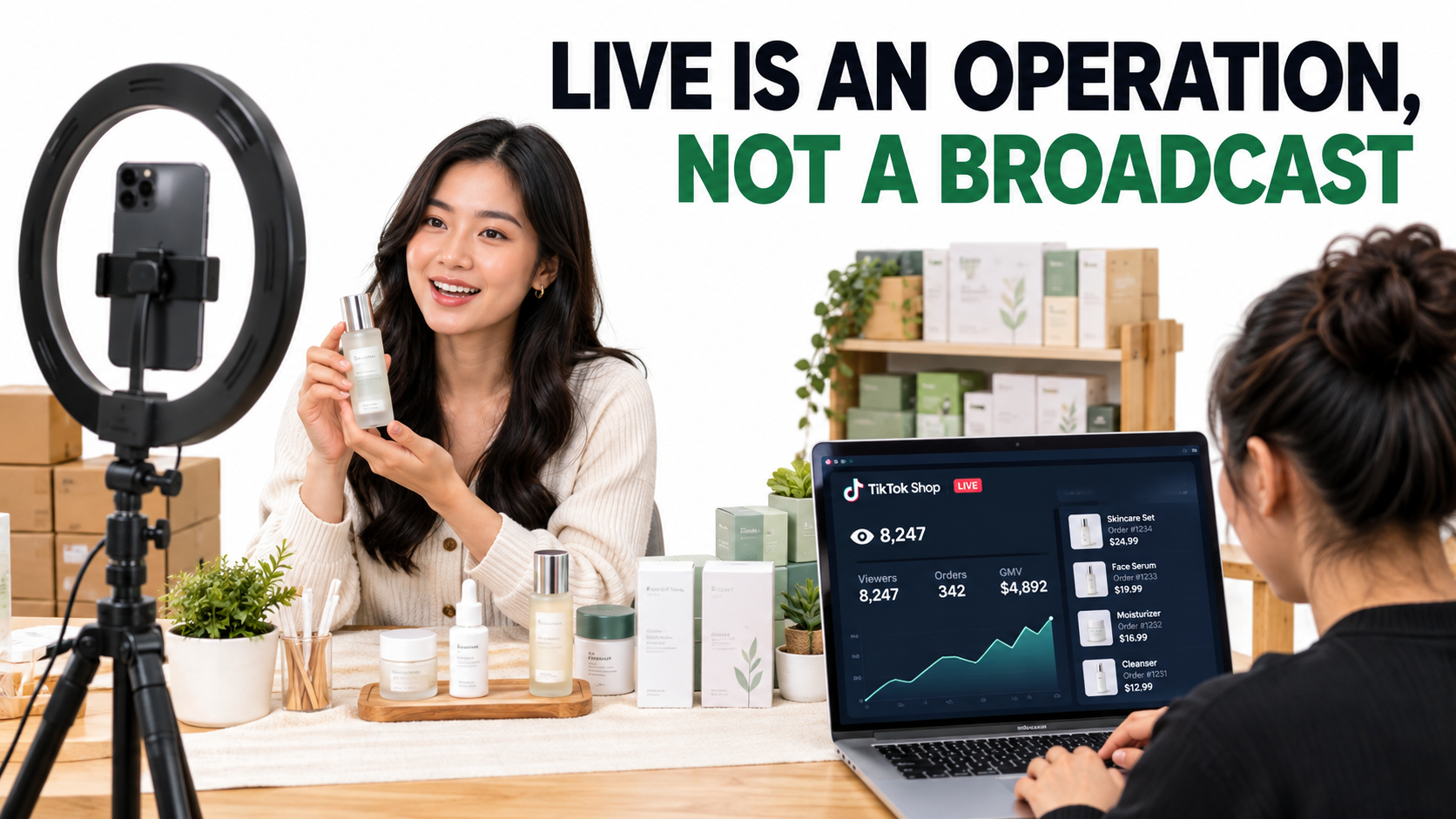

Most TikTok Shop sellers try LIVE the same way. Someone props a phone against a stack of boxes, hits “Go LIVE,” talks about the product for forty minutes to between three and thirty viewers, and gets one or two orders. Then they decide live selling “doesn’t work for our category” and go back to short video.
The format usually isn’t what failed. What failed is treating a LIVE session as a broadcast, meaning a person talking on camera, when it actually works like a small retail operation squeezed into an hour. A stream that sells has a script, a crew, a stocked offer stack, a traffic plan, and a review process. A stream that doesn’t sell usually has a host and some good intentions.
This guide is about that operational layer, which we’ll call the run-of-show problem. It isn’t about the ranking algorithm, commission rates, or creator matching, since those are covered elsewhere. The focus here is what happens between “we should do LIVE” and “LIVE is a reliable revenue line”: who does what, in what order, with which offers, and how you can tell whether it’s working.
The timing matters. TikTok says more than 8.5 million U.S. businesses are now powered by the platform. A PF Global economic impact report released in October 2026 credits those businesses with $81 billion in U.S. GDP and more than 400,000 jobs. TikTok Shop has grown from roughly $7 million in average daily sales in October 2023 to more than $100 million on Black Friday 2024 alone. Q4 2026 is coming, and LIVE is where a lot of that holiday demand gets captured in real time. Sellers who show up with a plan will get a large share of it.
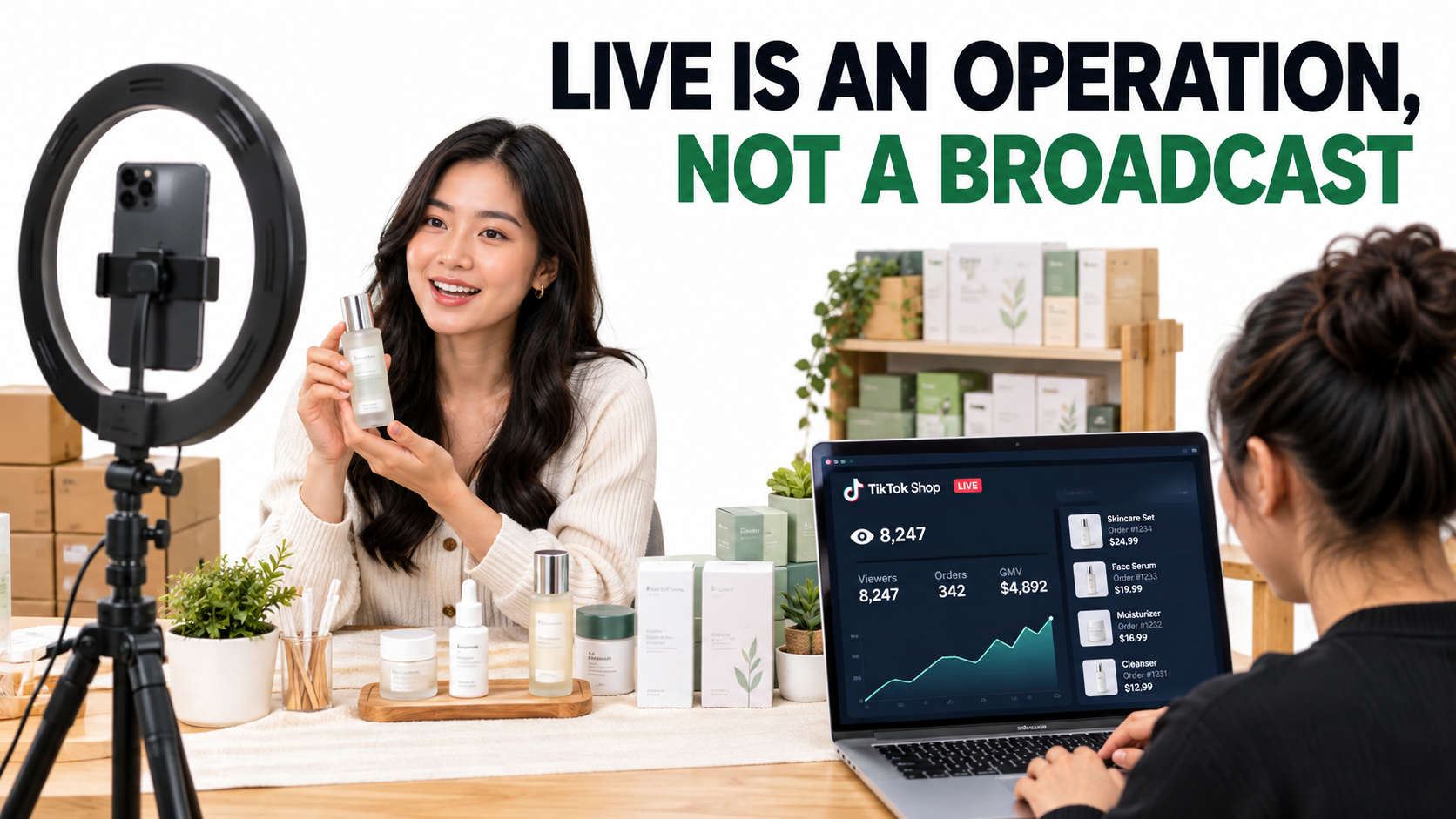
Why LIVE Is a Different Selling Channel, Not a Longer Video
The most common mistake is to treat LIVE as short-form video that runs longer. The two formats have different mechanics, different buyer psychology, and different failure points. If you plan for them the same way, you’ll get mediocre results from both.
Short video sells to a stranger; LIVE sells to a room
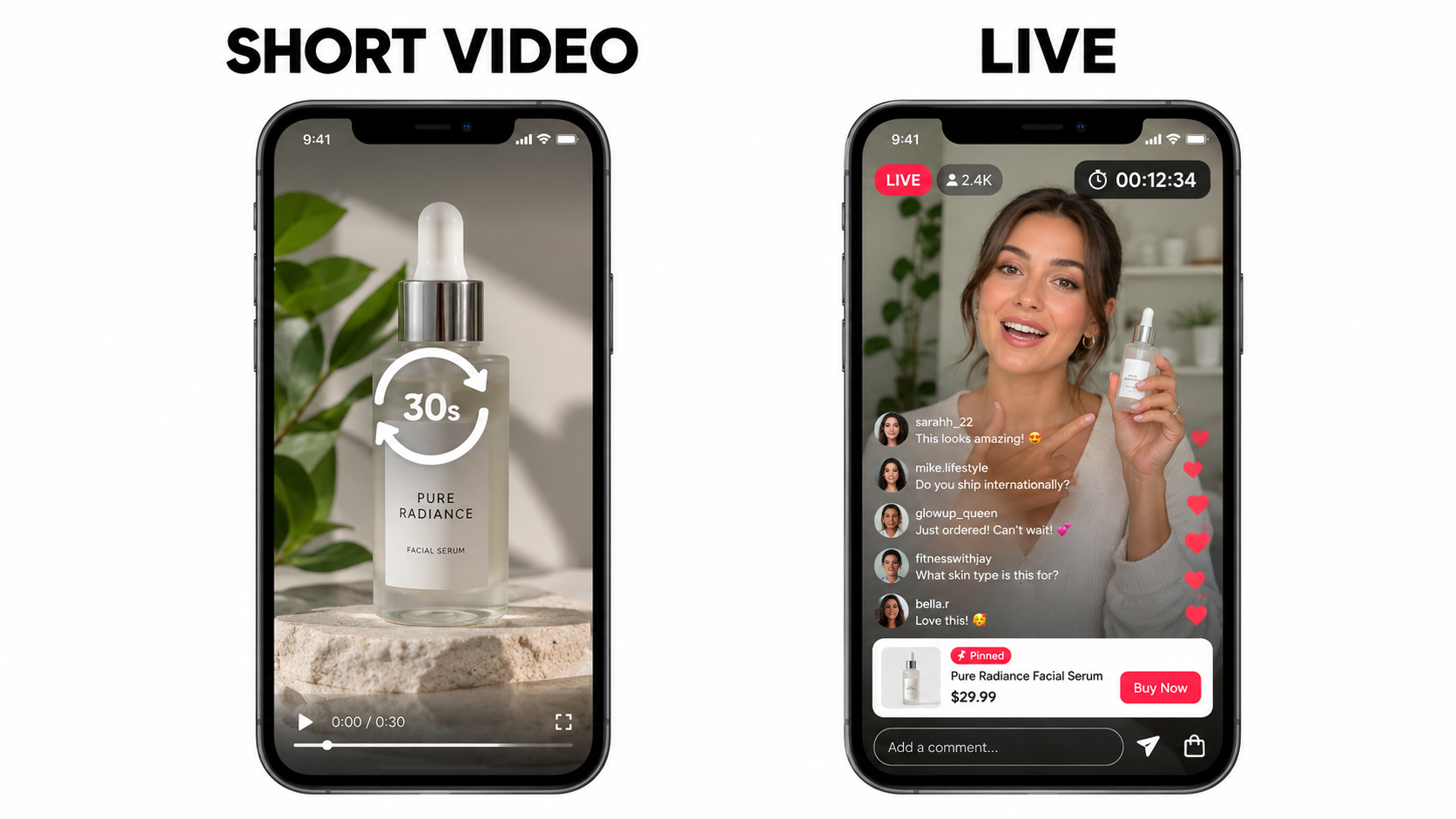
A short video is a sealed product. You script it, edit it, and publish it, and then the algorithm decides who sees it. The viewer watches alone, often with the sound off, and decides in seconds. The video has to sell everything (hook, problem, demo, proof, call to action) in a fixed order with no chance to adjust.
A LIVE stream is open-ended. The audience is a room that changes every minute as people come and go. Viewers ask questions you didn’t anticipate and raise objections you never scripted. Some of them compare you to a competitor out loud in the comments. The host can answer every one of those in real time, and that’s the reason LIVE converts. It’s also why it falls apart when nobody is prepared to answer.
The four mechanics that only exist on LIVE
- Real-time objection handling. A viewer asks “does it work on curly hair?” and gets an answer and a demo within 30 seconds. No product page can do that.
- Time-boxed offers. Flash pricing, limited quantities, and vouchers tied to the stream create a reason to buy now instead of saving the product for later.
- Social proof as it happens. On-screen purchase notifications and comments like “just ordered!” show the rest of the room that other people are buying.
- Pinned product cards. The item being discussed sits one tap away from checkout. Every second the pinned product doesn’t match what the host is holding costs you sales.
What this means operationally
Short video is a production problem: make enough good content and let distribution do the rest. LIVE is an execution problem. The content gets made and sold in the same moment, so quality depends on preparation, staffing, and how fast you react. A brand that’s great at short video can still be bad at LIVE, and the reverse is true too. Treat them as two separate channels with their own owners, budgets, and scorecards.
Should Your Shop Go LIVE at All? A Readiness Check
Not every shop should start streaming tomorrow. LIVE takes a lot of labor, and a weak stream does more than waste an hour. It can teach the platform that your sessions don’t hold viewers, and it can wear out your team. Before you put streams on the calendar, check readiness on four dimensions.
1. Product fit
LIVE rewards products that are demonstrable, explainable, or collectible. Skincare, haircare, cosmetics, kitchen gadgets, cleaning products, apparel, jewelry, trading cards, and hobby supplies all do well because there’s something to show, compare, or reveal on camera. Products whose value is invisible, like a phone case that looks the same as a thousand others or a supplement with no visible effect, are harder. They can still sell, but they need a much stronger offer or personality to carry them.
A quick test: can the host do something with the product on camera that a viewer couldn’t learn from the photos? If yes, it fits LIVE. If not, look for an angle (before/after, stress test, comparison, unboxing) before you build a stream around it.
2. Catalog depth
A one-product shop can stream, but it’s hard to fill an hour with one SKU. Most effective streams rotate through a hero product, two to four supporting products, and at least one bundle. If your catalog is thin, think about bundling variants, sizes, or complementary items before you launch. That gives the host something new to introduce every 10 to 15 minutes.
3. Margin room
LIVE offers usually go deeper than your everyday price, because the stream has to give people a reason to buy now. If your contribution margin is already thin after platform fees, shipping, and affiliate commissions, a flash discount can turn every LIVE order into a loss. Work out your floor price per SKU before you set any stream offer. The stream should never push the host into improvising discounts below it.
4. Team capacity
A sustainable LIVE program needs recurring hours from at least two people, plus prep and review time. If the founder is also the only host, producer, and customer service rep, the program will usually collapse within a month. Be honest about how many hours a week you can commit before you announce a schedule to your audience.
Readiness rule of thumb: If you can’t name your hero product, your floor price, your bundle, and the second person on the stream, you’re not ready to commit to a recurring schedule. Run a few test streams first.
Staffing the Stream: The Four Roles Every LIVE Needs
The quickest way to improve a LIVE stream is to stop asking one person to do everything. A host who is reading comments, pinning products, checking inventory, and adjusting vouchers can’t also sell well. Productive streams split the work into four roles, even if some people cover more than one.
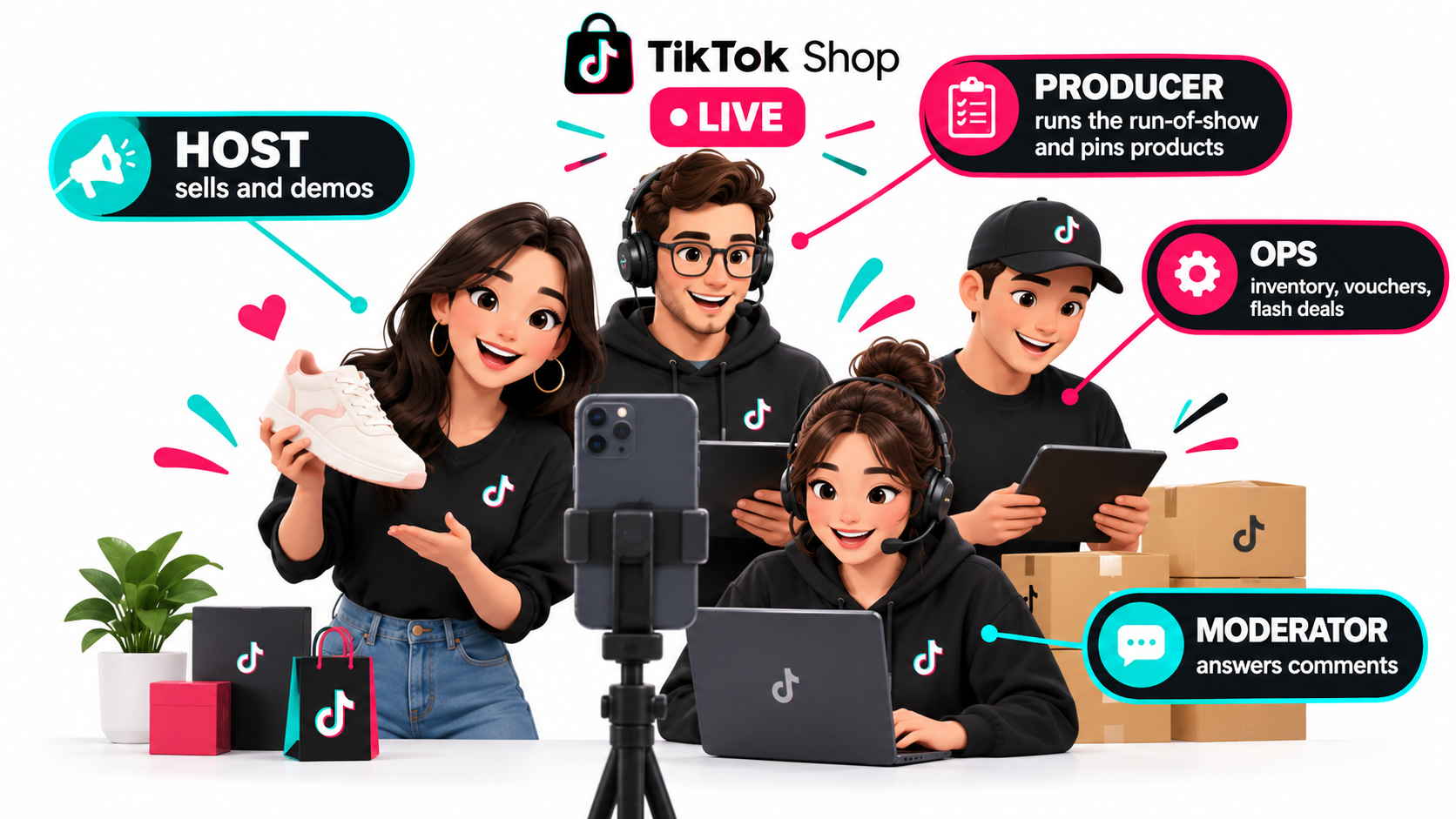
The Host: sells and demonstrates
The host only needs to keep the room engaged and move people toward checkout. That means demonstrating, telling stories, handling objections out loud, and repeating the offer often. New viewers arrive all the time and haven’t heard what was said five minutes ago.
The best hosts are rarely the most polished. They know the product inside out, they’re comfortable with silence and awkward questions, and they can say the price and the deal again for the twentieth time without sounding bored. Founders often make good hosts at first because their product knowledge is real. Over time, many brands train dedicated hosts or rotate in creators and affiliates.
The Producer: runs the show
The producer owns the run-of-show. They keep time, signal transitions, make sure the pinned product matches what the host is holding, and trigger flash deals on schedule. They also make the calls the host can’t make mid-sentence: extend this segment because it’s converting, cut this one because the room is leaving.
On a small team the producer is often the same person as the operator. Even so, keep the role separate from the host. Someone off-camera has to be watching the numbers.
The Moderator: manages the comments
Comments are where buying intent shows up. Questions about sizing, shipping times, ingredients, or compatibility are buying signals. When they go unanswered, buyers leave. The moderator answers what they can in text, flags the best questions so the host can answer them on camera, removes spam and abuse, and pins useful comments.
The moderator also protects the stream. Off-topic arguments, bad-faith comments, and claims you can’t support (for example, “will this cure my eczema?”) should be handled quickly and in line with policy rather than left to grow.
The Operator: inventory and offers
The operator works the back end. They confirm stock levels, activate and deactivate vouchers and flash deals, watch for cancellations or payment problems, and make sure an item selling out doesn’t leave viewers clicking a dead product card. On streams with big offers, this job is constant.
Minimum viable crew
- Two people: Host + Producer/Moderator/Operator combined. This is the realistic minimum for a recurring program.
- Three people: Host + Producer/Operator + Moderator. Response times and offer timing improve noticeably.
- Four or more: Every role is covered, which suits high-volume streams, holiday events, and launches.
Writing the Run-of-Show: Segments, Sequencing, and Price Anchors
The run-of-show is the script for the whole session. It doesn’t script every word. It sets the segment order, the product sequence, offer timing, and the reset points. Streams without one tend to drift: the host talks about whatever comes to mind, the best offer gets mentioned once at minute 37, and the room never builds momentum.
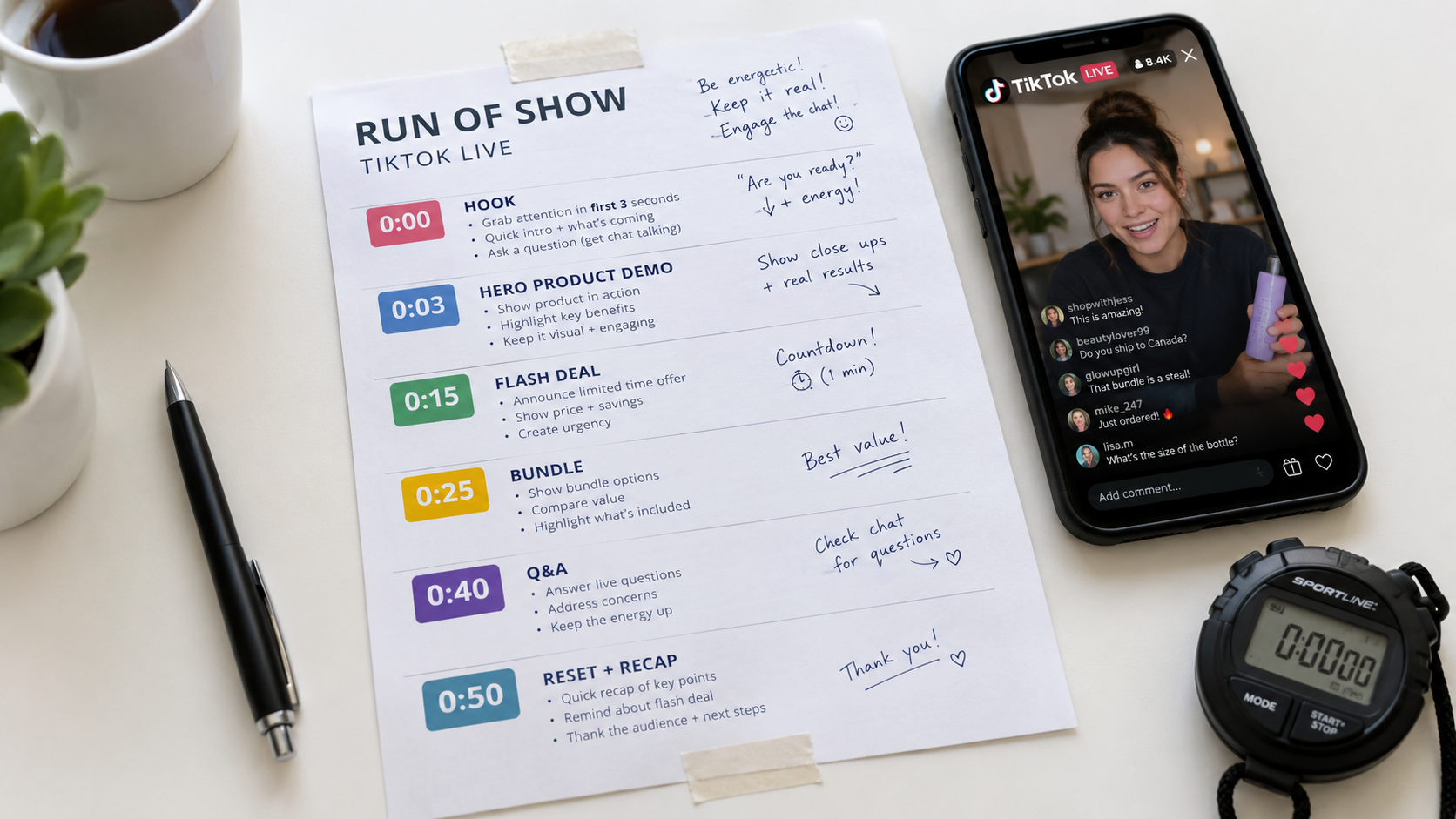
The segment loop
Because the audience keeps turning over, a run-of-show should work as a loop rather than a straight line. A common structure for a 60-minute stream looks like this:
- Hook (0:00–0:03): State the reason to stay in one sentence: “Today only, the full-size set at the travel-size price, and I’m testing it on camera.” Pin the hero product right away.
- Hero demo (0:03–0:15): Show the product doing its job. Handle the three most common objections before anyone types them.
- First offer (0:15–0:20): Trigger the flash deal or voucher. Repeat the price, the deal, and how to claim it several times.
- Supporting product (0:20–0:30): Introduce a complementary item. This keeps returning viewers interested and raises average order value.
- Bundle (0:30–0:40): Show the hero plus supporting product as a set, with the savings stated clearly.
- Q&A and proof (0:40–0:50): Answer questions the moderator has flagged. Read real reviews and show customer results where you have them and are allowed to.
- Reset and recap (0:50–0:60): Re-introduce the hero product for everyone who joined late, repeat the strongest offer, and close.
On longer streams, run this loop again with the products rotated. Every 10 to 15 minutes, the host should be able to say “If you just joined, here’s what’s happening.”
Product sequencing logic
The order you show products in matters. Some sequencing principles that tend to hold:
- Lead with your best converter, not your newest product. The early minutes set the room’s energy. Open with something you know sells.
- Follow a high-ticket item with an accessible one. Viewers who hesitated at the bigger price get an easy yes.
- Save the bundle until the parts are understood. A bundle only feels like a deal once viewers know what each item is worth on its own.
- Put new or test products in the middle. You’ll get real feedback without risking the opening or the close.
Price anchoring done honestly
Anchoring means stating the regular price before revealing the stream price. It works because buyers judge deals by comparison. The anchor has to be real. Inflated “was” prices damage trust, and depending on your market they can run into consumer protection rules and platform pricing policies. Anchor to your actual everyday price, the per-unit cost of buying items separately, or the price of a comparable alternative, and be ready to back it up.
The First Three Minutes and the Retention Curve
Every LIVE stream has a retention curve. Viewers arrive, decide quickly whether to stay, and either settle in or swipe away. For most streams, the steepest drop happens in the first few minutes, and that’s where the run-of-show has the most leverage on the result.
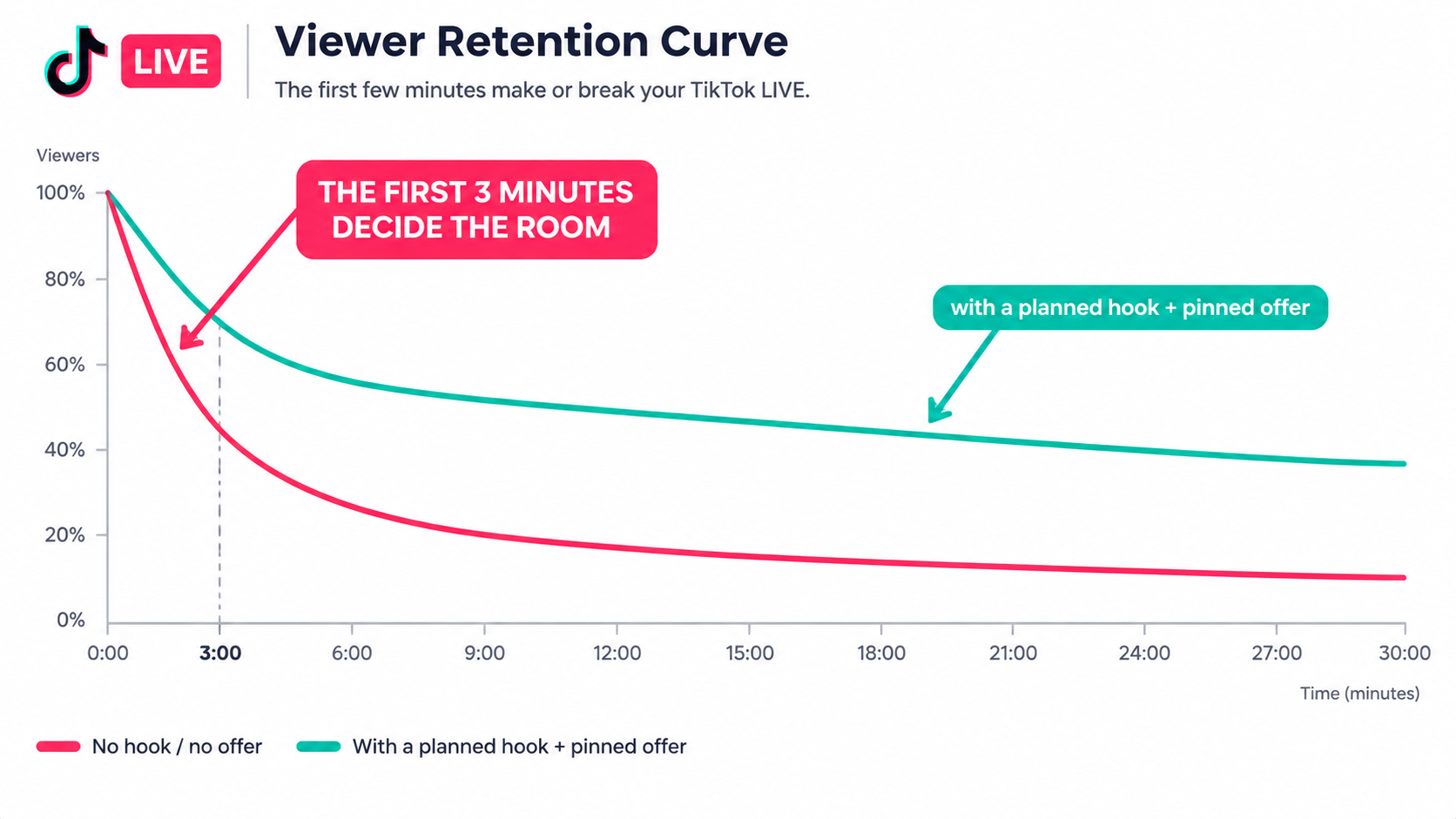
Why openings fail
Most weak streams open the same way: “Hi guys, give it a minute, waiting for people to join, how’s everyone doing?” That makes sense if you’re thinking of the stream as a meeting. It’s a bad way to sell. The viewers who show up in minute one are often the most motivated people you’ll get all session: followers who saw the notification, or people who caught a preview clip. If you make them wait, they leave.
What a strong opening does
- Starts mid-action. The host is already holding, applying, cutting, or unboxing the product when the stream starts.
- States the offer immediately. In the first sentence, the viewer learns what’s special about this stream.
- Pins the product at once. Anyone who arrived ready to buy can buy.
- Creates a reason to stay. “At the 15-minute mark I’m dropping the bundle price for 50 units only.” A scheduled reveal gives people something to wait for.
Managing the middle of the curve
After the opening, retention usually drops in steps at segment changes: a long explanation, a slow product, or a technical problem. Your post-stream review (covered below) should find these drops by timestamp. Common fixes include shortening explanations, adding a visual demo where the host was only talking, and moving offers to just before known drop points.
The “new viewer” problem
At any moment, a large share of your room has just arrived. If the host only speaks to people who’ve been there for 20 minutes (“as I said earlier…”), every newcomer is lost. Train hosts to re-state the context briefly and often: what the product is, what the deal is, how long it lasts. It feels repetitive to the host. The audience doesn’t experience it that way, because most of them weren’t there the last time.
Offer Architecture: Flash Deals, Bundles, Vouchers, and Real Scarcity
TikTok Shop gives sellers in-app tools for discounts, bundles, and promotional vouchers, and these tie directly into LIVE sessions. The tools aren’t the hard part. The hard part is designing a set of offers that gives viewers a reason to buy during the stream without wrecking your margin or training customers to wait for discounts.
The three-tier offer stack
A useful approach is to plan three tiers of offers for each stream:
- The door-opener: A modest, always-on stream incentive, such as a small voucher or free shipping threshold, available for the whole session. It rewards anyone who buys.
- The timed drop: A deeper discount on one product for a short window or limited quantity, triggered at a scheduled point in the run-of-show. This is your retention and urgency tool.
- The basket-builder: A bundle or tiered discount (for example, buy two, get a better unit price) that raises average order value. This is where margin is protected, because the discount is spread across more units.
Scarcity that’s real
Limited quantities work because they’re credible. If the “only 50 units” deal is still available three streams later, viewers learn to ignore your urgency. Make your scarcity real. Allocate a fixed number of units to the flash deal, end it when they sell out, and say so on camera. Being visibly honest about scarcity builds a loyal LIVE audience over time.
Avoiding the discount trap
If every stream has the deepest discount you can afford, your regular price stops meaning anything and your off-stream sales may suffer. Some ways to avoid that:
- Rotate which product gets the deep deal so no single SKU’s everyday price is undercut every week.
- Use value-adds instead of price cuts: a free mini, a gift-with-purchase, or an exclusive bundle that isn’t sold elsewhere.
- Reserve your biggest offers for genuine events such as launches, seasonal peaks, and milestone streams.
Pre-load everything
Every voucher, flash deal, and bundle should be built and tested in Seller Center before the stream starts. Setting up promotions mid-stream causes delays, pricing errors, and moments where the host announces a deal that doesn’t exist yet. The operator’s pre-stream checklist should confirm every offer is configured, timed correctly, and tied to the right SKUs.
Set, Gear, and the Boring Tech That Breaks Streams
Nobody buys because of production quality alone. Viewers do leave because of bad production, though. A frozen stream, muffled audio, or a product that blends into the background will cost you more than a plain set ever will.
Priorities in order
- Connection stability. A dropped stream loses most of the room, and many viewers won’t come back. Use a reliable wired-backed connection where you can, run a speed test before each session, and keep a backup option ready.
- Audio. Viewers will put up with average video. They won’t put up with audio they can’t understand. An inexpensive clip-on or wireless lavalier mic usually beats the phone’s built-in mic by a wide margin.
- Lighting. Even, front-facing light makes products and faces readable. A ring light or soft panel is enough for most setups. Watch for glare on glossy packaging.
- Framing. Vertical framing that keeps the host’s face and hands, plus the product, in view. Keep the product area in the middle of the frame, away from the parts the on-screen interface covers.
- Background. Clean and relevant. A shelf of your products works well. A messy room or bare wall doesn’t.
The pre-stream technical checklist
- Phone fully charged and plugged in, notifications silenced, do-not-disturb on
- Connection tested; backup hotspot ready
- Mic paired and tested with a short private recording
- Lighting checked against the actual products you’ll show, including reflective ones
- All products physically staged in the order of the run-of-show
- Second device logged in for the producer/moderator to monitor comments and the dashboard
- Offers pre-loaded and verified in Seller Center
Product staging is a tech problem too
Fumbling for the next product costs you momentum. Lay products out in run-of-show order, within reach, with any tools you need for demos (water, swatches, cutting boards, comparison items) ready to go. Treat the table the way a TV kitchen treats its prepped ingredients: everything is measured and placed before the cameras roll.
Traffic: How to Fill the Room Before and During the Stream
A good stream with no viewers sells nothing. LIVE traffic comes from a few sources, and the strongest programs use several of them deliberately instead of hoping the algorithm sends people.
1. Scheduled, consistent time slots
Going live at the same times each week trains your audience to show up and gives you comparable data across sessions. TikTok’s Seller Center includes a Live Planner tool for scheduling shopping streams. Announced streams give followers a chance to set reminders. Pick slots your team can actually keep for months, not just weeks.
2. Short-video warm-up
Your short-form content is your best promotion for LIVE. In the 24 to 48 hours before a stream, post clips that tease the offer, show the hero product, or pose a question you’ll answer live. During and after the stream, clip the best moments (a strong demo, a funny exchange, a product reveal) and post them as standalone shoppable videos. This creates a loop: videos feed the stream, and the stream produces more videos.
3. Paid promotion for LIVE
TikTok offers ad products that can promote LIVE sessions. Paid traffic helps most when the stream is already proven, meaning you know your conversion and retention numbers can turn paid viewers into orders. Paying to send traffic into an unproven stream mostly buys you an expensive look at how weak your opening is. Get the run-of-show working organically first, then add paid traffic to the formats that already convert.
4. Creators and affiliates hosting LIVE
Through TikTok Shop’s affiliate program, creators can promote your products, including on their own LIVE streams. Creator-hosted streams bring an audience that already trusts the host, which can be a strong shortcut. To make these streams work:
- Give the creator a short run-of-show brief with the hero product, key claims, offer timing, and what they can’t say.
- Ship samples early so they can actually use the product before going live.
- Offer a stream-exclusive deal so their audience has a reason to buy now.
- Agree on how you’ll share performance data afterward so you both learn from it.
5. Cross-channel announcements
Email lists, SMS subscribers, other social accounts, and even product inserts can all promote your recurring LIVE schedule. Existing customers often convert well on streams because they already trust the product, and a stream gives them a reason to reorder or try something new.
Compliance and Account Health on LIVE
LIVE is unscripted, so it’s also where sellers most often break rules without meaning to. A host who gets carried away can make a claim in five seconds that leads to a violation, and on TikTok Shop violations can affect your whole shop, not just one stream. Wikipedia’s overview of TikTok Shop notes that the platform has faced criticism over misinformation about products. That’s one reason platform enforcement around product claims gets attention.
The highest-risk moments
- Health and efficacy claims. Saying a product cures, treats, or prevents a condition is a common problem in beauty, wellness, and supplements. Stick to approved, supportable language.
- Comparative claims. “Better than [competitor]” or “the only product that…” need evidence. In the moment, hosts tend to overstate.
- Pricing claims. “Was” prices, “lowest price ever,” and “only today” have to be true.
- Off-platform redirection. Pointing viewers to buy elsewhere during a TikTok Shop LIVE can conflict with platform rules.
- Restricted categories and content. Some products and demonstrations carry extra restrictions. Review current category rules before featuring them.
Building a claims sheet
Every product in the run-of-show should have a one-page claims sheet: what the host can say, what they must not say, and approved answers to the most common sensitive questions. The moderator keeps it open during the stream. For creator-hosted streams, include it in the brief. A claims sheet is the cheapest insurance a LIVE program can have.
Fulfillment is part of compliance
A successful flash deal can produce more orders in an hour than your normal operation handles in a day. If those orders ship late or get cancelled because stock ran short, your shop’s performance metrics suffer. Before any big stream, confirm with your fulfillment team or partner that you have the inventory and the capacity to ship on time. Platform policies change, so review the current LIVE and shop performance rules in Seller Center regularly, not just once.
The Post-Stream Review: Metrics That Actually Matter
The stream ending is only half the job. Teams that improve fastest hold a short, structured review after every session while the details are still fresh. Teams that skip it tend to repeat the same mistakes for months.
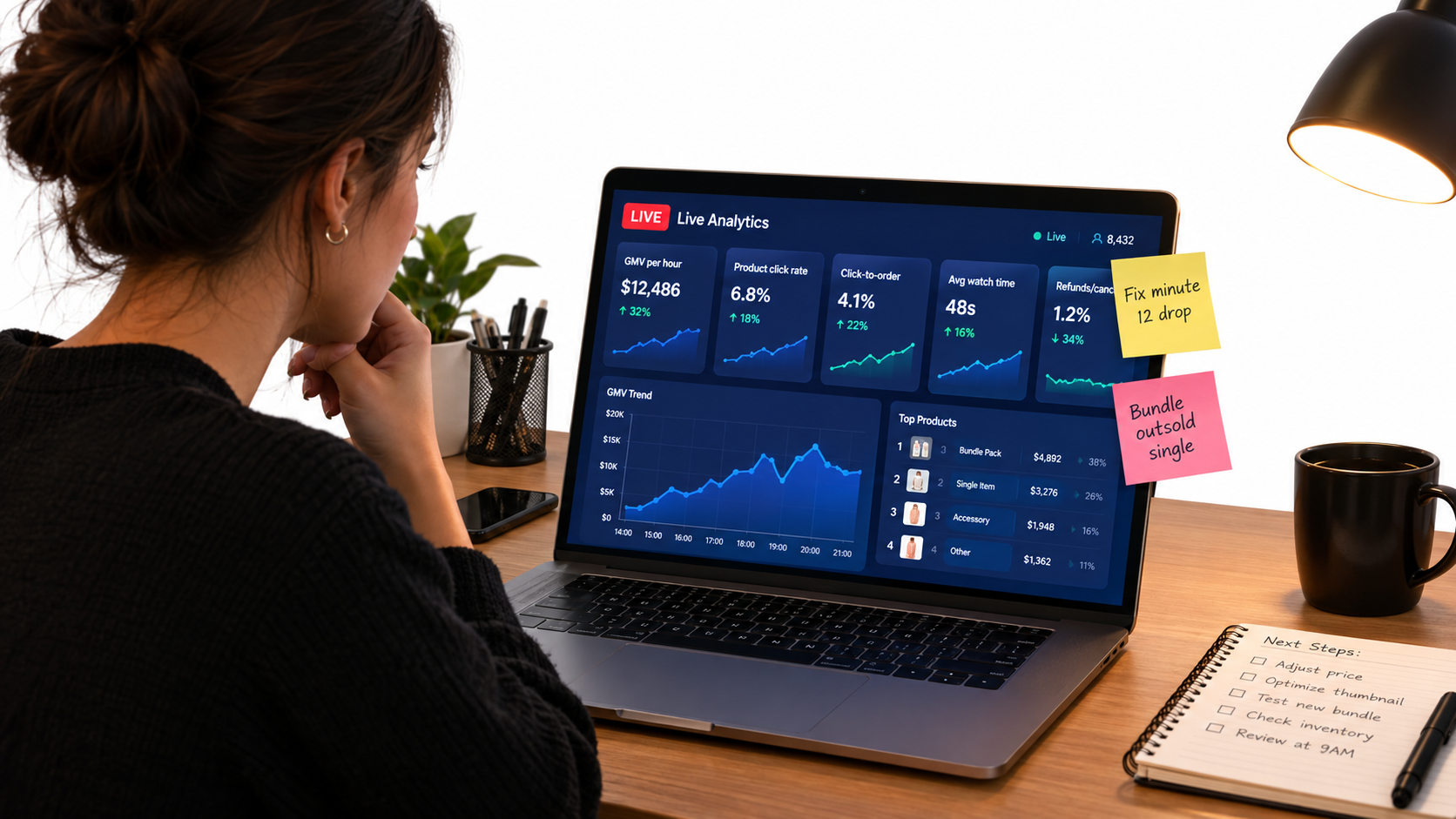
The core scorecard
Exact metric names in Seller Center can change, but the questions stay the same. Track these for every stream:
- GMV per streamed hour. This normalizes streams of different lengths. It’s the closest thing to a single headline number.
- Viewers and average watch time. Are people showing up, and are they staying?
- Product click rate. Of the viewers, how many tapped a product card? Low click rates usually point to a weak demo or a weak offer.
- Click-to-order conversion. Of those who tapped, how many bought? Low conversion here suggests a problem with price, product page, or shipping expectations.
- Average order value. Are bundles and tiered offers working?
- Cancellations and refunds. High numbers after a stream can mean overpromising, stock problems, or impulse buys the product didn’t live up to.
- Net contribution. Revenue after discounts, fees, commissions, shipping, and paid promotion. A stream with high GMV that loses money isn’t a success.
The timestamp review
Numbers tell you what happened. The recording tells you why. Watch the replay alongside the viewer and order data and note:
- Where viewer count dropped sharply, and what was happening on screen
- Where orders spiked, and what the host said or showed right before
- Questions that came up repeatedly and should be answered earlier next time
- Any moments where a claim, price, or offer was stated incorrectly
- Clips worth cutting into short videos
One change per stream
Pick the single most important fix from each review and apply it to the next stream. It might be a new opening line, a different product order, or a timed drop moved earlier. Changing everything at once makes it impossible to tell what worked. Over a dozen streams, one change at a time compounds into a much stronger program.
A 30-Day Plan to Launch (or Relaunch) a LIVE Program
Here’s a practical sequence for going from no LIVE program, or a struggling one, to a recurring schedule in about a month. It assumes a small team and can be expanded.
Week 1: Foundations
- Run the readiness check: product fit, catalog depth, margin floors, team capacity.
- Choose your hero product, two to four supporting products, and one bundle.
- Assign roles (at least host plus producer/moderator/operator).
- Write the first run-of-show and a claims sheet for each product.
- Set up your space and complete the technical checklist.
Week 2: Test streams
- Run two or three shorter streams (30 to 45 minutes) with modest offers. The goal is to rehearse, not to drive revenue.
- Practice the opening until the host can deliver it cold.
- Hold a post-stream review after each one and apply one fix per stream.
Week 3: Schedule and warm up
- Pick two recurring weekly slots you can keep and schedule them in Live Planner.
- Post short-video teasers 24 to 48 hours before each stream.
- Introduce your three-tier offer stack with real, limited scarcity.
- Brief one or two affiliates on a creator-hosted stream for the following weeks.
Week 4: Measure and expand
- Compare GMV per hour, conversion, and net contribution across all streams so far.
- Identify your best-performing segment format and product order and make them standard.
- Test paid LIVE promotion only on the format that already converts.
- Clip the best moments into shoppable short videos to feed the next cycle.
Planning for Q4 2026
If you’re reading this in the fall, the holiday season is the obvious target. With TikTok Shop’s Black Friday sales already passing $100 million in a single day in 2024, peak-season demand on the platform is real. It’s also crowded. Use the next few weeks to get your run-of-show working and your crew practiced, so your holiday streams are well rehearsed by the time Black Friday arrives. Lock in inventory and fulfillment capacity early. A sold-out hero product during a peak stream costs you sales, and it can hurt your shop metrics.
What Successful Shops Show About Consistency
The brands that grow fastest on TikTok Shop rarely do it with a single viral moment. TikTok highlighted haircare brand Bask & Lather, founded by Shaina Rainford, in its October 2026 economic impact announcement. The company reported 1,400% growth from 2024 to 2026 and more than $20 million in TikTok Shop GMV from January through August 2026. It also earned #1-ranking products on the platform. TikTok attributes that growth to the founder sharing her story, building brand affinity, and cultivating a highly engaged community over time.
That pattern applies directly to LIVE. A stream program builds the kind of community that turns one-time buyers into regulars: a recurring time slot, a recognizable host, honest offers, and real answers to real questions. No single stream has to be perfect. The program has to show up reliably and get a little better each week.
AI tools as support, not substitute
TikTok is also adding generative AI tools for sellers, including its Symphony suite for creating and adapting content. For LIVE programs, tools like these can help with the work around the stream: turning recordings into clips, drafting teaser videos, and producing creative variations for promotion. They don’t replace what makes LIVE work, which is a prepared person answering a real viewer’s question in real time, with a good offer one tap away.
Conclusion: Treat LIVE Like a Shift, Not a Show
Most TikTok Shop LIVE streams don’t fail because of the algorithm, the category, or the time of day. They fail because nobody planned the session as the retail operation it is. One person is doing four jobs, the offer gets mentioned once, the opening wastes the most motivated viewers, and nobody reviews the replay afterward.
The fix isn’t glamorous, but it works. Think of each stream as a shift with roles, a script, stocked offers, and a debrief afterward.
Key takeaways
- Check readiness before scheduling. Demonstrable products, enough catalog depth for a hero, supporting items, and a bundle, a known margin floor, and at least two people.
- Split the roles. Host, producer, moderator, and operator, even if some people cover two.
- Write a looping run-of-show. Hook, demo, offer, supporting product, bundle, Q&A, reset. Repeat it for the constant flow of new viewers.
- Win the first three minutes. Start mid-action, state the offer, pin the product, and promise a scheduled reveal.
- Build a three-tier offer stack with real scarcity, and pre-load every promotion before going live.
- Prioritize connection and audio over fancy video.
- Fill the room on purpose with consistent scheduling, short-video warm-ups, affiliate-hosted streams, and paid promotion only for proven formats.
- Protect the account with claims sheets, honest pricing, and fulfillment capacity that matches your offers.
- Review every stream by metric and by timestamp, and make one change at a time.
Run that process for 30 days and you’ll know whether LIVE belongs in your channel mix. Run it for a full quarter and you’ll know what it can do for your shop.