
Most conversations about Amazon selling still start on the product detail page. Better images, sharper titles, more reviews, a tighter PPC structure. Those things matter. But for a growing number of FBA sellers in 2026, the line between a profitable SKU and a break-even one is no longer drawn on the listing. It’s drawn weeks earlier, at the factory floor, the prep warehouse, and the loading dock.
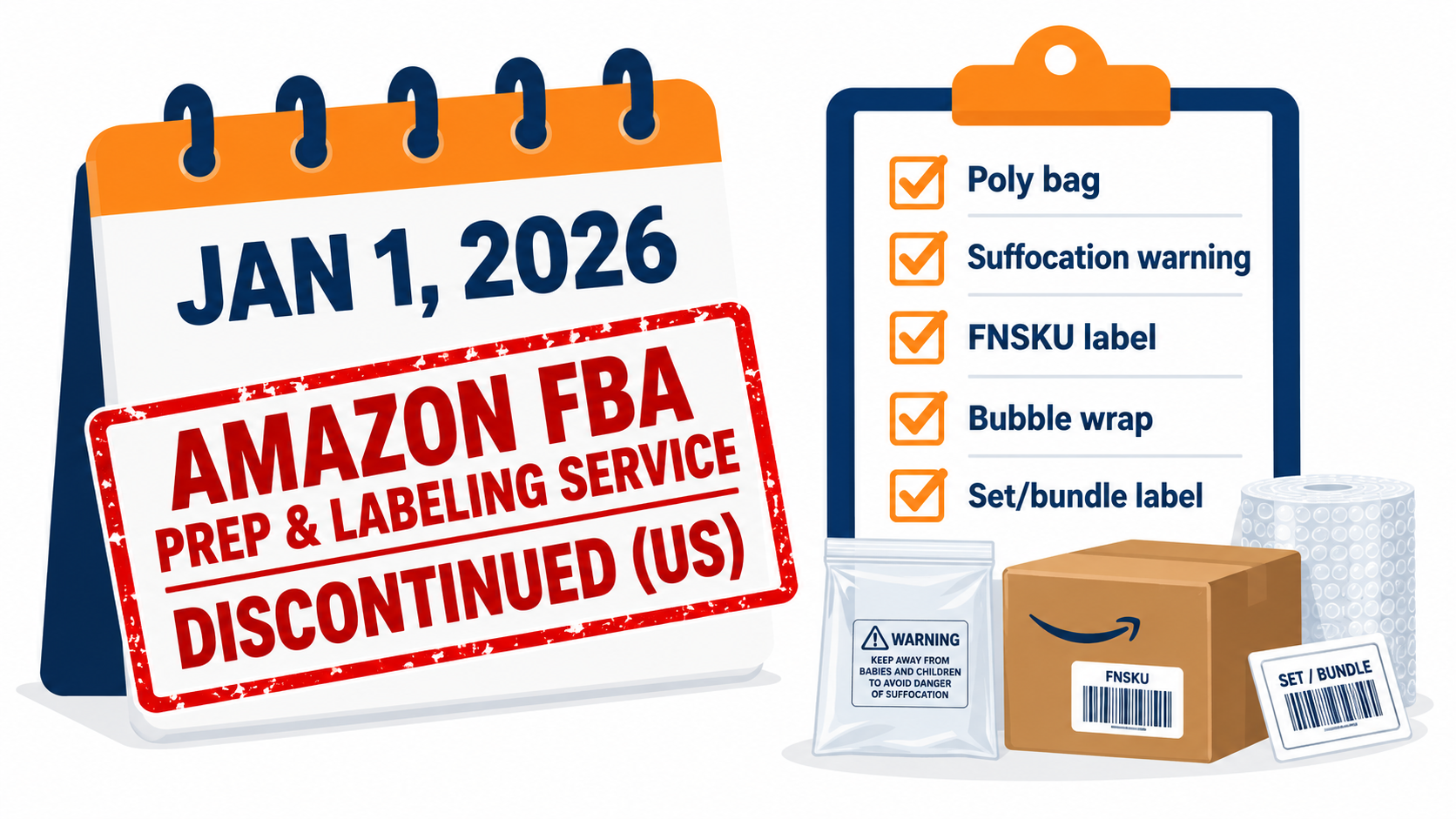
Over the past few years Amazon has steadily moved cost and responsibility upstream. It introduced an inbound placement service fee for inventory you want to send to fewer warehouses. It added a fee for running inventory too lean. It kept tightening surcharges for inventory that sits too long. And as of January 1, 2026, it stopped offering FBA prep and labeling services in the US entirely, so every unit now has to arrive fully prepared and labeled.
Taken one at a time, each change looks like a small line item. Taken together, they change how an Amazon business makes money. Inbound decisions such as how many units to ship, where they go, how they’re packed, and who preps them now set a big share of your per-unit cost before a customer ever sees the listing.
This article is not another list of listing tips or ranking tactics. It’s a walkthrough of the inbound and inventory side of FBA as it stands in 2026: what each fee actually penalizes, how the fees interact, where sellers quietly lose margin, and how to build an inbound plan that holds up under Amazon’s current rules.
We’ll cover the end of FBA prep, the three inbound split options, the “too lean versus too heavy” squeeze, IPI and capacity limits, two-tier inventory with Amazon Warehousing and Distribution (AWD), choosing a prep partner, and the newer Amazon logistics programs that reach beyond the marketplace. We finish with a worked cost model and a 90-day action plan.
One note on numbers: Amazon updates its fee tables regularly and varies them by size tier, weight, region and season. Where exact rates matter, confirm them in Seller Central’s current fee pages before you make sourcing or shipping decisions.
Why the Margin Moved Upstream
FBA launched on September 19, 2006, as a way for third-party sellers to hand off storage, picking, packing, shipping, returns and customer service to Amazon’s fulfillment network. By 2020, sellers had used FBA to fulfill more than 5.5 billion orders in the United States alone. The pitch was simple: send us your goods and we’ll handle the rest.
That pitch still mostly holds after the sale. What has changed is how Amazon prices everything that happens before the sale. Amazon’s network is big. The company reported roughly $716.9 billion in revenue for 2025. But a network that size still needs inventory spread across regions, arriving in predictable volumes, and moving out at a predictable pace. The fee changes of the last few years are Amazon putting a price on seller behavior that makes that harder.
The 2024 restructuring that set the pattern
The turning point was the 2024 fee overhaul. Amazon cut standard fulfillment fees for standard-size products by an average of about $0.20 per unit. At the same time, it introduced three mechanisms that shifted cost onto inbound and inventory decisions:
- An inbound placement service fee when sellers choose to send inventory to fewer fulfillment centers instead of splitting it the way Amazon prefers.
- A low-inventory-level fee for sellers whose stock runs low relative to customer demand.
- Updated aged inventory surcharges (long-term storage fees) for goods stored beyond 181 days.
Read as a whole, the message was clear. Amazon lowered the price of the step it controls best, delivering to the customer, and raised the price of seller decisions that disrupt its network planning. A seller who ships carelessly could end up paying more overall even though the headline fulfillment fee went down.
2026 adds the prep shift
The second major move came in 2025, when Amazon announced it would discontinue US FBA prep and labeling services effective January 1, 2026. Before that, a seller could send unbagged or unlabeled units and pay Amazon a per-unit fee to finish the job. That fallback is gone. Inventory now has to arrive ready to sell.
The effect is that the “inbound stack” is now one of the most important parts of an FBA operation. It includes:
- Factory packaging and carton configuration
- Prep and labeling, now always done by you or a third party
- Freight to Amazon and the placement choice that determines how many legs that freight takes
- How much stock you hold in FBA versus upstream storage
- How long each unit sits before it sells
Every one of those decisions now carries a direct, measurable cost. Sellers who treat inbound as a logistics chore to hand off and forget tend to see margin leak in ways that don’t show up in the PPC dashboard.
The End of FBA Prep: What January 1, 2026 Actually Changed
For years, Amazon’s prep service worked as a safety net. A supplier forgets the suffocation warning on poly bags, or a batch arrives without FNSKU labels, and Amazon fixes it at receiving for a fee. Many smaller sellers built their whole workflow around that net. They shipped straight from overseas factories to Amazon and let Amazon handle whatever the factory missed.
What “fully prepared” means in practice
With the US service discontinued, every inbound unit has to meet Amazon’s packaging and prep requirements before it reaches the dock. Depending on the product category, that can include:
- Labeling: a scannable FNSKU or eligible manufacturer barcode on each unit, with old or conflicting barcodes covered.
- Poly bagging: for apparel, textiles and items prone to dust or damage, with suffocation warnings on bags above specified sizes.
- Bubble wrap or boxing: for fragile goods such as glass, ceramics and some electronics.
- Set and bundle labeling: “Sold as set, do not separate” marks so multi-packs aren’t split at receiving.
- Taping and sealing: for items with openable packaging, liquids and loose parts.
- Expiration dating: for consumables and topicals, in the required format.
None of these requirements is new. What’s new is that there is no paid fallback at Amazon if they’re missed. Non-compliant shipments can run into receiving problems, delays, extra charges or refusal, and any of those can stall a launch or cause a stockout.
The three operating models sellers moved to
In practice, sellers have settled into one of three models:
- Factory-prepped direct-to-Amazon. The supplier labels, bags and cartons everything to Amazon’s spec before export. This is the cheapest option per unit, but quality control now has to happen at origin. One supplier mistake can affect a whole container.
- Third-party prep center. Goods land at a US prep warehouse that inspects, preps, labels and forwards them to Amazon. This adds a handling fee and a freight leg, but it gives you a checkpoint and somewhere to hold buffer stock.
- In-house prep. Sellers with their own warehouse space do it themselves. This makes sense at some volumes, but it brings labor, space and compliance overhead.
Amazon has backed the second model directly. In 2025 it launched a Recommended Prep Service Providers program, a vetted list of third-party prep companies. One of them, MyFBAPrep, operates more than 85 million square feet of US warehouse space, which gives a sense of how much capacity has been set up to absorb the work Amazon handed back to sellers.
The hidden cost: prep is now a quality-control problem
The easy mistake is to treat this as a simple cost swap: “Amazon charged me X per unit for prep, now a 3PL charges me Y.” The bigger change is about risk. When Amazon prepped your goods, mistakes were fixed at the dock. Now they get shipped into the network or bounced at receiving.
Practical safeguards worth putting in place:
- Write a one-page prep spec per SKU (bag type, label placement, warnings, carton count) and include it in every purchase order.
- Require pre-shipment inspection photos of a random sample of finished units and cartons before you release payment.
- Print FNSKU labels from Seller Central yourself and send them to the factory as files, so labels aren’t retyped and mistyped.
- For new SKUs, route the first shipment through a prep center even if you plan to go factory-direct later. Treat it as a compliance test.
Inbound Placement Fees: The Three Split Options and the Real Trade-Off
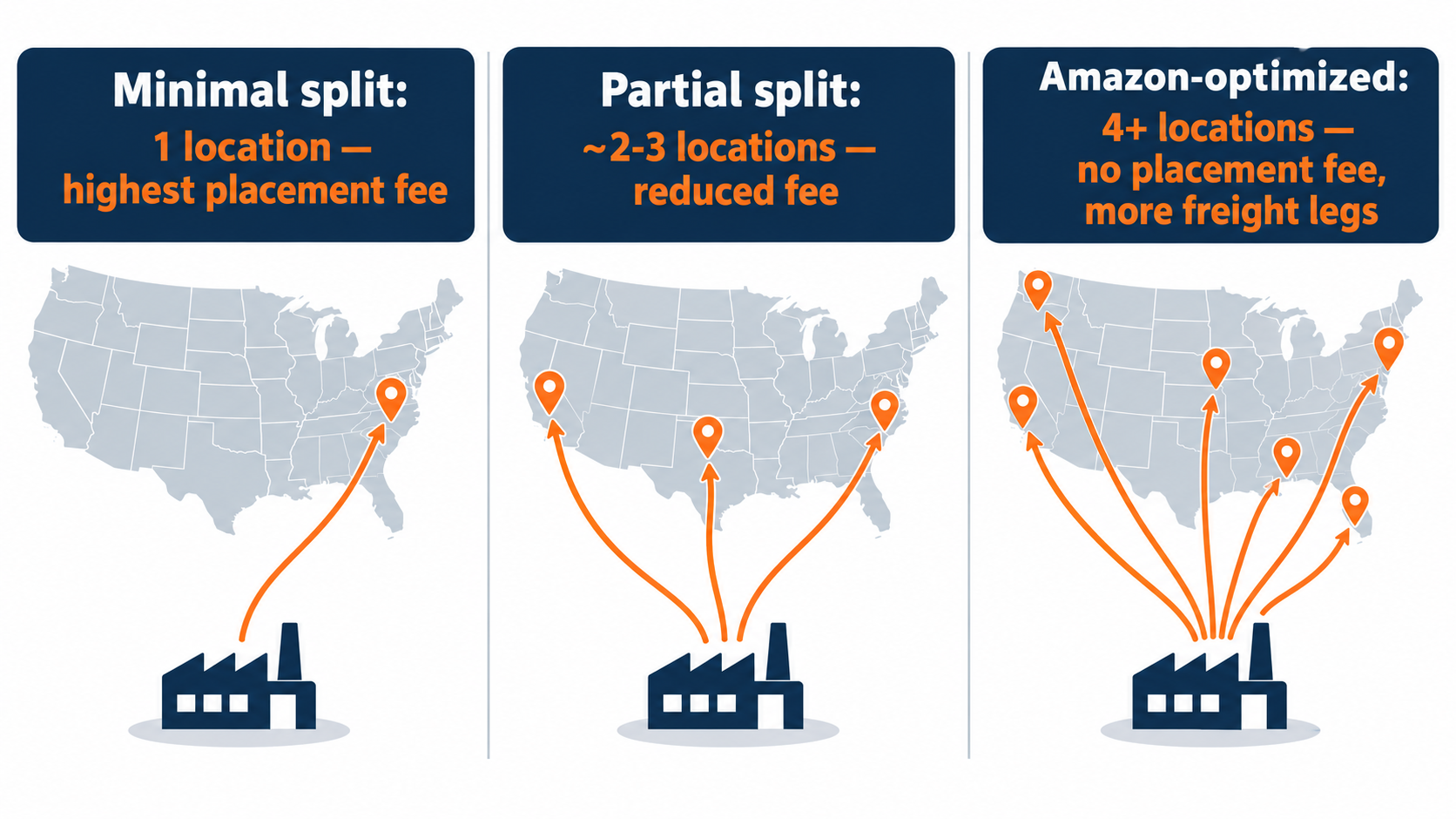
When you create an inbound shipment, Amazon offers placement options that decide how many fulfillment centers your inventory is split across. The fewer locations you choose, the higher the inbound placement service fee. The more locations Amazon picks, the lower or zero the fee, but you take on more shipments, more freight legs and more operational complexity.
How the options compare
- Minimal shipment split: inventory goes to a single location (or as few as possible). This is the simplest to ship and carries the highest placement fee per unit.
- Partial shipment split: inventory goes to a small number of locations, typically two or three, for a reduced fee.
- Amazon’s recommended multi-location split: inventory goes to however many locations Amazon chooses, often four or more, and the placement fee is waived or close to zero.
Placement fees are charged per unit and depend on size tier, unit weight, and the region you ship from and to. The exact rates appear when you build the shipment, so you can compare options before you commit.
Why “free” placement isn’t always cheaper
The no-fee option looks like the obvious pick, and for many sellers it is. But it has costs the fee screen doesn’t show:
- More freight legs. Splitting one pallet into four destinations can turn one LTL shipment into several smaller parcel or LTL shipments. Per-unit freight can rise, especially on heavy or bulky goods.
- Carton math. Splits are set at the carton level. If your case pack is large relative to your shipment size, you may end up with odd quantities and extra handling.
- Receiving time. More destinations means more chances for one shipment to get stuck at receiving, and more SKUs showing partial availability while the rest is still in transit.
- Labor at your prep center. Most 3PLs charge per outbound shipment or pallet built. Four shipments cost more to build than one.
For lightweight, small standard-size products shipped by parcel, the multi-location split is usually the cheapest overall. For heavy, bulky or palletized freight, a partial or even minimal split can win once freight is counted properly. The only way to know is to compare total landed inbound cost per unit: placement fee plus all freight legs plus prep-center build charges. Comparing the placement fee alone isn’t enough.
A simple decision rule
For each recurring SKU, run the comparison once across all three options using real quotes. Record the winner and the break-even shipment size. Then revisit only when something material changes: a new carrier rate, a different case pack, a seasonal volume spike. That keeps you from re-deciding every shipment by gut feel while still catching the cases where the “free” option costs you money.
The Low-Inventory-Level Fee: Paying for Being Too Lean
For most of FBA’s history, the main inventory risk was holding too much. The low-inventory-level fee, introduced in 2024, added a penalty for the opposite problem. If your FBA stock for a standard-size product runs consistently low compared with its sales rate, Amazon charges an additional per-unit fee on units shipped.
How Amazon measures “low”
The fee is tied to days of supply: how many days your available and inbound FBA inventory would last at your recent sales rate. Amazon compares both short-term and longer-term historical days of supply against a threshold of 28 days. When inventory is persistently below that threshold, the fee applies to the units you ship.
Amazon publishes exemptions, including for certain newly launched products and low-volume sellers. Thresholds and exemption rules have been adjusted since the fee launched, so check the current terms in Seller Central rather than relying on old summaries.
Why Amazon charges for leanness
The reasoning is about network placement. When a seller keeps only a week or two of stock in FBA, Amazon can’t spread that inventory across regions near customers. Orders ship from farther away, which raises Amazon’s cost and slows delivery. The fee makes sellers pay for that inefficiency, or at least pushes them to hold enough stock that Amazon can place it well.
The trap: just-in-time habits from other channels
Sellers who come from Shopify, wholesale or their own warehouse often run a just-in-time model. They hold most inventory upstream and top up the selling channel frequently. On FBA, that habit now triggers a fee. The fix isn’t to flood FBA with stock. That leads straight into the opposite penalty, covered next. The fix is to aim for a target range of FBA days of supply that sits comfortably above the low-inventory threshold without drifting toward aged inventory.
Many operators aim for roughly four to eight weeks of FBA cover for steady sellers, adjusted for lead time and seasonality. That isn’t an Amazon rule. It’s a practical band that keeps you clear of the 28-day trigger while leaving lots of room before the 181-day aging line.
Aged Inventory and Storage: Paying for Being Too Heavy
On the other side of the corridor sit storage costs. Amazon charges monthly storage fees by cubic foot, and those fees rise in the fourth quarter (October to December) when space is tightest. On top of that, the aged inventory surcharge applies to units stored longer than 181 days, with costs that rise as inventory ages further.
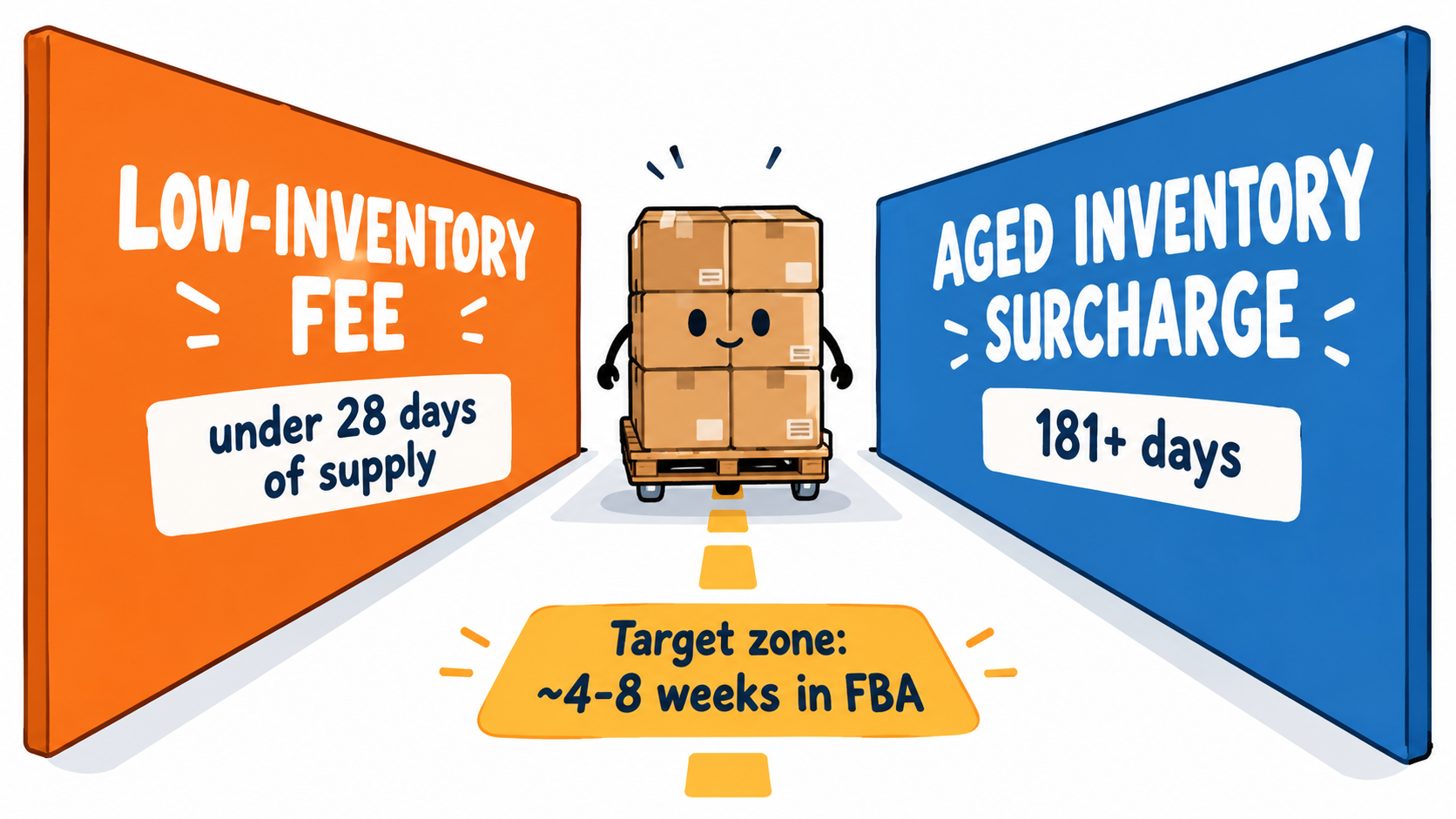
The squeeze in one sentence
Under 28 days of supply, you risk the low-inventory fee. Past 181 days of age, you pay aged surcharges. In between, monthly storage charges keep accruing, and they climb in Q4. Your FBA inventory has to stay in a corridor, and each wall of that corridor carries a penalty.
Where aged inventory actually comes from
Aged stock rarely comes from one bad decision. It usually builds up from a few predictable sources:
- Variant tails. A parent ASIN where two colors sell and four don’t. The slow variants age quietly while the parent looks healthy overall.
- Over-ordering to hit MOQs. A factory minimum order quantity forces more units than the SKU can sell in six months, and all of it gets shipped into FBA.
- Post-promotion hangover. Inventory sized for a Prime Day or Q4 forecast that didn’t materialize.
- Stranded and unfulfillable units. Units stuck because of listing errors, or returns that came back damaged, still counting against your space.
Practical controls
- Review aging at the child ASIN level every month. Parent-level views hide the problem.
- Keep MOQ overflow upstream in cheaper storage rather than sending it all to FBA.
- Set a rule for when a slow unit gets a price cut, a coupon, a removal order or a liquidation. Make the call at around 120–150 days, before the surcharge starts, not after.
- Clear stranded inventory weekly. Units that can’t sell still take up space.
- Plan Q4 inventory so the bulk of seasonal stock arrives in time to sell, not months early when it pays peak storage rates for longer than needed.
IPI and Capacity Limits: The Throttle on Growth
Even if you manage fees well, there’s a separate constraint: how much Amazon will let you send. Since 2018, Amazon has scored inventory efficiency with the Inventory Performance Index (IPI), a number from 0 to 1,000 based on metrics such as excess inventory, stranded inventory and in-stock rates. Storage capacity is managed partly through this score, alongside Amazon’s capacity limits, which set how much volume each seller can store and ship in.
Why IPI is a growth metric, not just a hygiene metric
Sellers often treat IPI as a report card they check now and then. In practice it works more like a credit limit. A weak IPI score, or capacity limits based on weak sales forecasts, can stop you sending enough inventory to stay in stock during a growth phase or a seasonal peak. If you run out, you lose sales, and stockouts can also weaken organic ranking momentum that took months to build.
What moves IPI
Amazon’s IPI inputs line up closely with the corridor described above:
- Excess inventory: units beyond what Amazon expects you to sell in a reasonable window. This is the same behavior that drives aged surcharges.
- Stranded inventory: units in FBA without an active, buyable offer.
- In-stock rate: how consistently your replenishable ASINs stay available. This links to the low-inventory side.
- Sell-through: how quickly units move relative to average inventory held.
That alignment is useful. The same discipline that keeps you away from both fee walls also tends to improve IPI, which in turn protects your capacity. Good inventory management pays off several ways at once.
Working with capacity limits
Capacity limits are recalculated regularly using projected sales and inventory performance. Some practical habits:
- Check upcoming capacity before placing purchase orders, not after goods are already on the water.
- Prioritize capacity for your highest-velocity, highest-margin ASINs. Slow movers belong upstream.
- Don’t use FBA as your main warehouse. Every cubic foot of slow stock in FBA is space your best sellers can’t use.
- Where Amazon offers ways to request more capacity, understand the cost and commitment terms before you use them in peak season.
Two-Tier Inventory: AWD and Upstream Storage
All of this pushes toward the same structure: a two-tier inventory model. Deep, cheap storage sits upstream. A lean but well-placed working layer sits in FBA. Upstream stock feeds FBA on a steady replenishment rhythm.
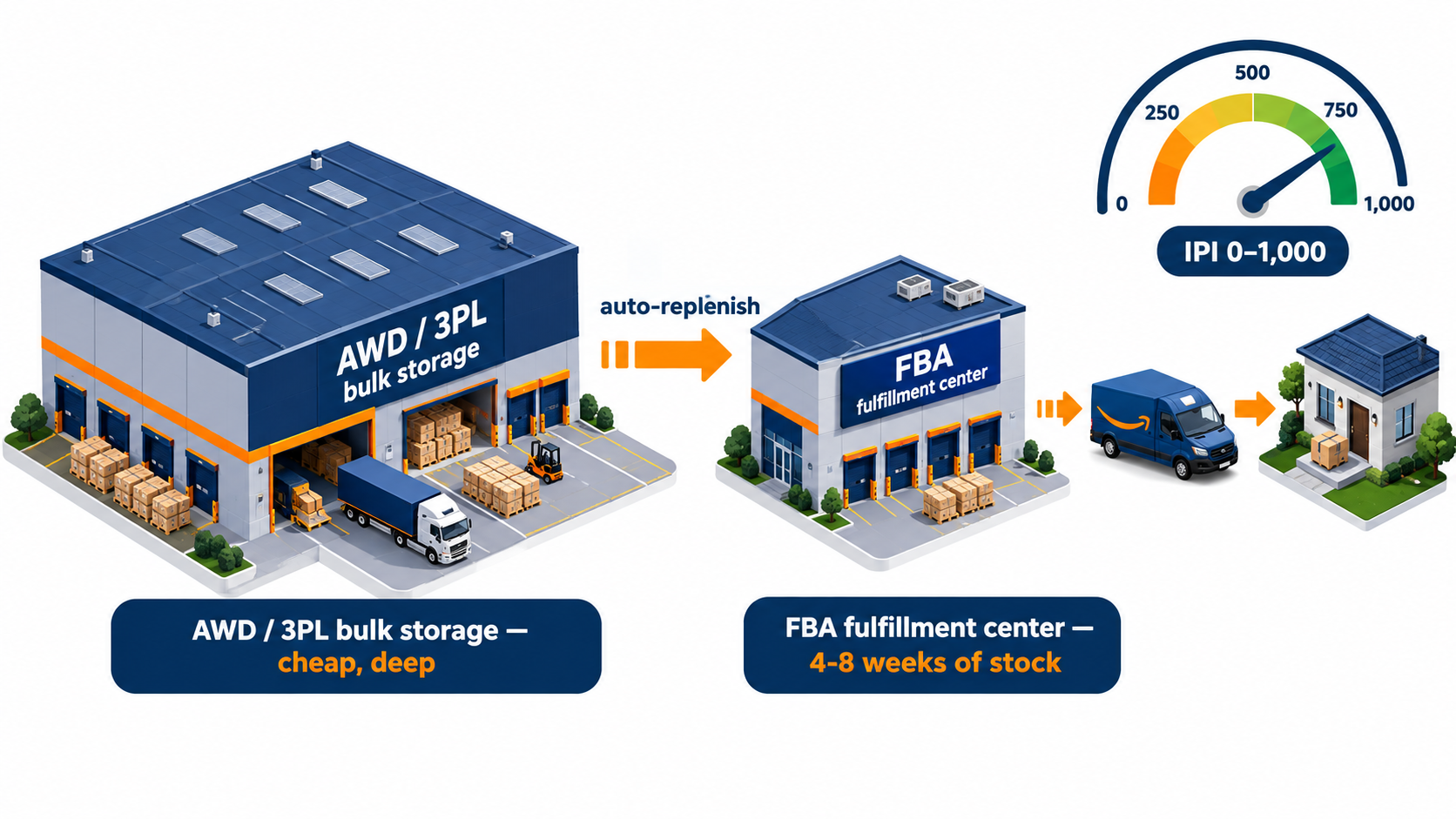
Option one: Amazon Warehousing and Distribution (AWD)
AWD is Amazon’s own bulk storage service. Sellers store inventory in AWD facilities, usually in full cases or pallets, and Amazon replenishes FBA from there. The appeal is integration: inventory sits inside Amazon’s system, and replenishment can run automatically based on demand.
Amazon has also used pricing to encourage this route, including favorable placement treatment for inventory that moves from AWD into FBA. Before committing, compare AWD’s storage, processing and transportation charges against an independent 3PL for your specific products and volumes.
Option two: an independent 3PL or prep center
A third-party warehouse gives more flexibility. The same inventory can feed Amazon, your own website, wholesale accounts and other marketplaces. That matters more now that many brands sell on several channels. The trade-off is that replenishment is manual or semi-automated, and you manage the handoff to Amazon, including the placement decisions covered above.
How to size each tier
A simple way to think about it:
- FBA tier: enough cover to stay well clear of the 28-day low-inventory trigger, plus the time a replenishment shipment takes from upstream to available. For many SKUs that works out to about four to eight weeks.
- Upstream tier: the rest of the purchase order, enough to bridge to the next production run, including ocean transit, customs and prep time.
- Replenishment cadence: fixed and predictable, such as weekly or biweekly, so FBA cover stays inside the corridor without constant firefighting.
The biggest mistake here is buying a two-tier setup without running it like one. Holding stock upstream only helps if replenishment actually happens on schedule. A forgotten pallet in a 3PL turns an FBA stockout into a lost-sales problem and a low-inventory-fee problem at the same time.
Choosing a Prep Partner After Amazon Stopped Prepping
With Amazon out of US prep, your prep partner is now one of your most important vendors. A good one protects your margin and IPI. A poor one quietly creates receiving problems, stranded units and late shipments that show up as lost sales weeks later.
What to evaluate
- Compliance track record. Ask about receiving problems on their outbound shipments to Amazon and how they handle them. Membership in Amazon’s Recommended Prep Service Providers program is a useful signal, though not a guarantee.
- Location relative to your freight. A prep center near your port of entry cuts a freight leg. One near major Amazon fulfillment clusters can reduce outbound freight.
- Fee transparency. Get a full rate card: receiving, per-unit prep by type, labeling, storage per pallet or cubic foot, shipment building, pallet fees and special projects. Hidden “miscellaneous” charges add up quickly.
- Turnaround time. Ask how many business days pass between receiving and shipping to Amazon at normal volumes and in peak season. Slow prep shrinks your effective FBA cover.
- Systems integration. Can they read your inbound plans, build shipments in Amazon’s tools and send you inventory data automatically? Manual spreadsheet handoffs cause mistakes.
- Multi-channel capability. If you also sell direct-to-consumer or wholesale, a partner that can fulfill those orders from the same stock makes the upstream tier more useful.
Red flags
- No written SLA for receiving and turnaround times
- Vague answers about who pays when a shipment is refused or flagged for prep errors
- No photo documentation of prepped units or cartons
- Rate cards that change without notice, or minimum monthly fees well above your actual volume
Run a pilot before switching
Don’t move your whole catalog at once. Send one or two SKUs through a new partner for a full cycle: receiving, prep, shipment to Amazon, check-in. Track total cost per unit and days from dock to available. Compare those numbers with your current setup before scaling up.
Beyond the Marketplace: MCF and Amazon Supply Chain Services
One more change has altered the economics of the inbound stack: Amazon’s logistics network is no longer only for selling on Amazon.
Multi-Channel Fulfillment (MCF)
Amazon’s Multi-Channel Fulfillment lets sellers use their FBA inventory to fulfill orders from other channels, such as a Shopify store. For brands selling in several places, that means one inventory pool can serve several storefronts. Sales from other channels add to the sell-through of FBA inventory, which helps with both aging and the in-stock side of IPI.
There are trade-offs. MCF fees differ from standard FBA fees, and some brands prefer unbranded packaging for off-Amazon orders, so check what’s available for your products. But in a world where Amazon penalizes both slow and lean inventory, extra demand from other channels flowing through the same stock can make the corridor easier to stay in.
Amazon Supply Chain Services (ASCS)
In 2026, Amazon announced Amazon Supply Chain Services, which opens its freight, distribution, fulfillment and parcel shipping network to businesses that don’t sell on Amazon’s marketplace. For marketplace sellers, the significance is that Amazon now presents itself as an end-to-end logistics provider, competing with freight forwarders, 3PLs and parcel carriers, not just a marketplace with a warehouse attached.
That gives sellers more options, but it also raises a strategic question. Running freight, upstream storage, FBA, and off-Amazon fulfillment all through Amazon can simplify operations and may bring pricing or placement benefits. It also concentrates your entire supply chain with one company whose fees and policies change on its own schedule. Many established brands keep at least one independent logistics relationship active, even at a small share of volume, as a fallback.
Questions to ask before going all-in on Amazon logistics
- If Amazon changes a fee or policy with 30–60 days’ notice, how quickly could you move volume elsewhere?
- Does your inventory data stay portable, or is it locked into Amazon’s tools?
- Are integration discounts big enough to justify the concentration risk?
Building an Inbound Cost Model: A Worked Example
Everything above comes together in one number: fully loaded cost per unit sold. Most sellers track product cost, referral fee and FBA fulfillment fee carefully. Far fewer track inbound costs per unit with the same discipline, and that’s where margin leaks.
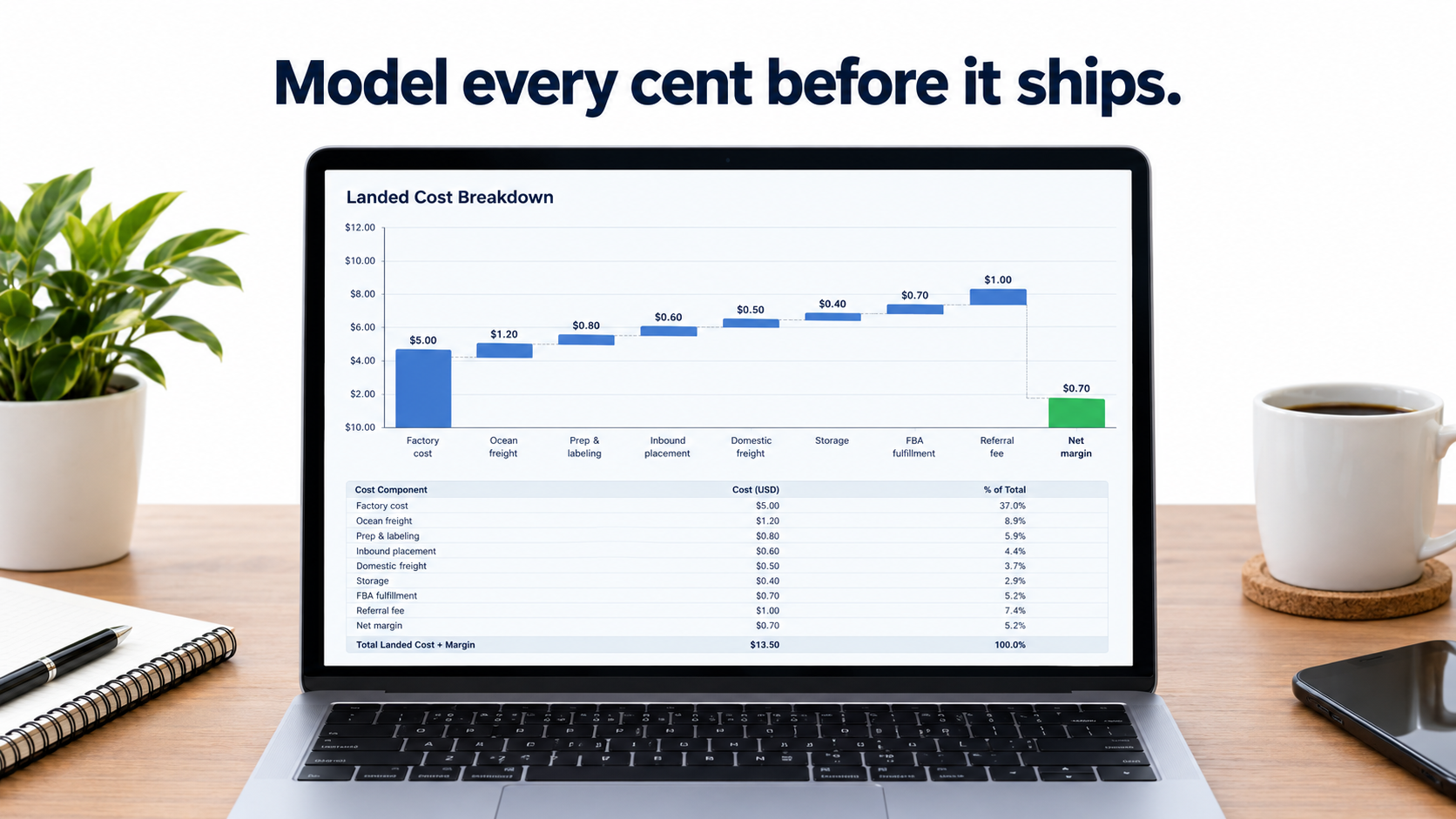
The line items to capture
- Product cost (ex-works or FOB unit price)
- International freight, divided by units in the shipment
- Duties, tariffs and customs brokerage, per unit
- Prep and labeling: factory, 3PL or in-house labor
- Upstream storage: AWD or 3PL monthly cost × average months held ÷ units
- Domestic freight to Amazon, across all legs created by your placement choice
- Inbound placement fee, if any
- FBA monthly storage, including Q4 rates, × average months in FBA
- Aged inventory surcharge, as an expected value based on your aging history
- Low-inventory-level fee, as an expected value based on how often you breach the threshold
- FBA fulfillment fee
- Referral fee
- Returns and unfulfillable write-offs
- Advertising cost per unit (TACoS-based)
An illustrative example
Picture a hypothetical small standard-size household product selling for $29.99. The numbers below are made up to show the structure. They are not real Amazon rates, so plug in your own.
Under an “old habits” plan, the seller ships factory-direct with spotty labeling, picks the minimal split for convenience, sends an entire 5,000-unit MOQ into FBA at once, and lets slow variants age. The listing-side costs (referral, fulfillment, ads) look healthy. But the inbound side picks up a placement fee on every unit, months of storage on the excess, some aged surcharges on the tail, and a batch of units stuck because of labeling errors. Each item is small, often well under a dollar per unit. Added together, they can take several points of net margin.
Under a “corridor” plan, the same seller routes goods through a prep center that inspects and labels them, holds most of the MOQ upstream, sends six weeks of cover into FBA, compares split options using real freight quotes, and replenishes every two weeks. Prep and upstream storage add cost. But placement fees drop or disappear, FBA storage falls, aging and stranding mostly go away, and the low-inventory fee never triggers.
The point isn’t that one setup always wins. A lightweight, fast-moving SKU might do best factory-direct with Amazon’s multi-location split. A bulky, slower SKU might be better with a partial split from a prep center. The point is that you can’t know without a model, and the difference between the two is often bigger than the gains sellers chase through listing tweaks.
Make the model a habit
- Build it once per SKU in a spreadsheet, then update quarterly or whenever Amazon publishes fee changes.
- Reconcile it against actual settlement reports monthly. Amazon’s fee lines show you what you really paid.
- Use it at the sourcing stage. A product that only works at the “best case” inbound cost is fragile.
A 90-Day Inbound Action Plan
Here’s a practical sequence for putting this into practice without rebuilding your operation in one go.
Days 1–30: Measure
- Pull the last three to six months of settlement data and total every inbound and inventory fee: placement, storage, aged surcharges, low-inventory fees, removals and disposals.
- Express each as a cost per unit sold, by SKU. Rank SKUs by total inbound leakage.
- Check IPI, current capacity limits, stranded inventory and aged inventory at the child ASIN level.
- Audit prep compliance: which suppliers ship ready-to-sell units, and which have caused receiving issues since January 1, 2026?
Days 31–60: Restructure
- Write per-SKU prep specs and send them to every supplier with the next purchase order.
- Get quotes from at least two prep or 3PL partners, including at least one from Amazon’s recommended provider list, and compare them with AWD for your top SKUs.
- For your top 10–20 SKUs by volume, run the three-option placement comparison using real freight quotes. Record the winner and break-even shipment size.
- Set a target FBA days-of-supply band per SKU and a fixed replenishment cadence.
- Deal with the aged tail: price changes, coupons, removals or liquidation for anything near the 181-day line.
Days 61–90: Operate and verify
- Run at least one full replenishment cycle under the new structure.
- Compare fees per unit sold with your baseline from days 1–30.
- Track IPI and capacity changes. Better sell-through and fewer stranded units should start to show.
- Write the process down: who checks the low-inventory risk report, who approves inbound plans, who reviews aging each month.
Ninety days won’t fix everything. But it will tell you exactly where your inbound money goes, and it typically surfaces two or three high-impact fixes that apply to the whole catalog.
Common Mistakes That Keep Inbound Costs High
The same handful of mistakes come up again and again in FBA inbound. Most are habits left over from before 2024 or before the prep change.
Treating fees as fixed overhead
Many sellers file placement fees, storage and surcharges under “Amazon fees” and never look at them by SKU. These fees respond directly to your decisions. Once they’re broken out per unit, they’re often the easiest margin to win back.
Reacting to one fee at a time
Fixing the low-inventory fee by shipping more stock can trigger storage and aging costs. Avoiding placement fees by accepting every split can raise freight. The fees interact, so manage them together using the corridor and the full cost model.
Letting the factory own compliance
Suppliers may mean well, but they don’t feel the cost when a shipment runs into trouble at Amazon receiving. Without written specs, photo checks and a payment tied to compliance, prep errors keep happening.
Ignoring Q4 until Q3
Peak-season storage rates, tighter capacity and longer receiving times all hit at once. Sellers who plan Q4 inventory in August are often stuck between paying for early arrival and risking late check-in. Start Q4 inbound planning in late spring.
Optimism in forecasting
Ordering against the best-case forecast is how aged inventory starts. Forecast against realistic sell-through, keep the upside stock upstream, and release it into FBA only when demand shows up.
Conclusion: The Seller Who Wins the Dock Wins the Margin
Amazon selling in 2026 still depends on the basics: a product people want, a listing that converts and advertising that pays back. But FBA’s economics have changed underneath those basics. Amazon has lowered the fees for what it does best and put clear prices on seller choices that disrupt its network: shipping to too few locations, running too lean, holding too long and, as of January 1, 2026, sending inventory that isn’t ready to sell.
That shift rewards a specific kind of operator. Not necessarily the one with the cleverest listing, but the one who knows their fully loaded inbound cost per unit, keeps FBA inventory between the 28-day and 181-day walls, treats prep as quality control, and uses upstream storage on purpose.
Key takeaways:
- Prep is your job now. US FBA prep and labeling ended January 1, 2026. Write per-SKU specs, inspect at origin or use a vetted prep partner, and pilot new SKUs through a checkpoint.
- Compare total landed inbound cost, not just the placement fee. The no-fee multi-location split is often cheapest, but not always for heavy or palletized freight.
- Stay in the corridor. Keep FBA cover above the 28-day low-inventory threshold and well clear of 181-day aging, typically about four to eight weeks for steady sellers.
- Treat IPI as a credit limit. Stranded units, excess stock and stockouts all reduce the capacity you need to grow.
- Run two tiers. Keep deep stock upstream in AWD or a 3PL, and a lean working layer in FBA, refilled on a fixed schedule.
- Use the wider network carefully. MCF and Amazon Supply Chain Services can simplify logistics, but keep an independent fallback.
- Model every cent. Build a per-SKU inbound cost model, reconcile it against settlement reports monthly, and use it before you source, not after you ship.
Your listing decides whether a customer buys. Your inbound plan decides whether that sale makes you money. In 2026, it’s worth giving the loading dock as much attention as the detail page.