


Seventy-five characters. Spaces included. That is now the entirety of the real estate Amazon gives you to convince a shopper — and an algorithm — that your product deserves to be clicked.
For years, Amazon sellers operated under a different assumption: that more keywords in a title meant more visibility, and that visibility meant more sales. Titles stretched to 150, 180, even 200 characters in some categories. They read like legal disclaimers. They stacked synonyms, materials, use cases, color variants, certifications, and brand taglines into a single breathless run-on sentence, and in many cases, the strategy worked — at least partially, at least temporarily.
That era ended on July 27, 2026, when Amazon began enforcing a hard 75-character limit across all non-media product categories. Not as a suggestion. Not as a guideline buried in a style document. As an operational policy with automated enforcement: titles exceeding the limit are now subject to AI-driven rewrites that Amazon controls, not you.
The limit has been widely reported. The enforcement date has been circulated across seller forums. What has not been clearly articulated is what the constraint actually demands from sellers — specifically the precision it requires in keyword selection, the strategic role of Amazon’s new companion field (Item Highlights), the real risk that auto-rewrites pose to keyword coverage, and the right framework for migrating a large catalog without losing organic rank.
This article covers all of it, in the order you need to act on it.
The Enforcement Timeline: What July 27, 2026 Actually Triggered
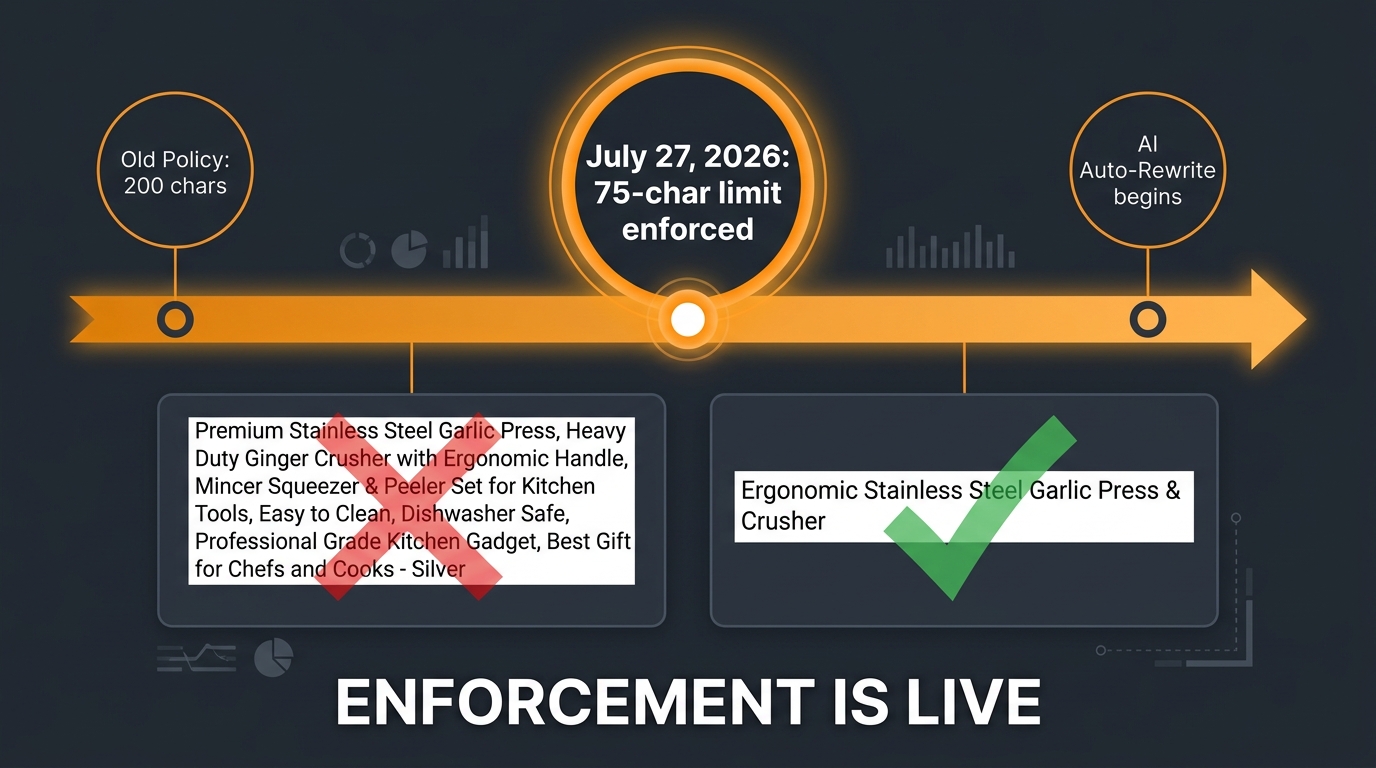
Amazon has had title style guidelines for years. The difference in 2026 is that those guidelines became enforced rules backed by automated systems rather than optional best practices sellers could mostly ignore.
Before July 27, 2026, most categories allowed titles up to 200 characters. Some sellers in competitive niches maxed that out deliberately, packing every long-tail variant and secondary keyword they could fit into the title field. The logic was defensible: Amazon’s algorithm treated the title as the highest-weighted text field for indexing, so more keywords meant more indexable surface area. Search coverage increased, even if readability suffered.
What the New Policy Actually Says
Amazon’s Seller Central help documentation now states that product titles in all categories except media must be 75 characters or fewer, including spaces. The scope is broad: it applies across all major stores with the exception of Saudi Arabia, Egypt, Türkiye, and the UAE, which operate under different regional policies. Media categories — books, music, video, and DVD — retain the older, longer title allowance.
For everyone else selling on Amazon’s core marketplace, the 75-character ceiling is the new permanent reality.
How Enforcement Actually Works
Amazon has been transparent about the mechanism: listings with non-compliant titles are not immediately suppressed. Instead, Amazon’s AI gradually rewrites overlong titles to bring them into compliance. Listings remain active and searchable throughout the process. Sellers registered with Brand Registry receive a 14-day review window in which they can inspect Amazon’s proposed rewrite and make counter-edits before the change goes live.
That 14-day window is critical. It is not unlimited — it is a defined review period. Sellers who are not monitoring their Brand Registry alerts may miss it entirely, allowing Amazon’s AI-generated version to become the live title by default.
For sellers without Brand Registry, the situation is more opaque. There is no documented review window in Amazon’s current guidance, which means auto-rewrites may apply with less seller visibility into when or how they happen.
Why This Is Not Just a Formatting Change
The practical impact goes beyond character counts. When Amazon’s AI rewrites a 180-character title down to 75 characters, it is not selecting the 75 most strategically valuable characters from your original title. It is generating a new title based on its own interpretation of the product’s primary attributes. If your original title contained high-value exact-match terms for long-tail searches — terms that were driving organic impressions and clicks — there is no guarantee those terms survive the rewrite.
This is the real risk: not suppression, but silent keyword loss. A listing that was indexing for 12 different search queries through title coverage may suddenly index for only 4 or 5, with the difference showing up gradually in organic rank and session data over the following weeks.
The Auto-Rewrite Risk: Why Keyword Control Is the Core Issue
The single most dangerous outcome of the 75-character policy is not that your title becomes shorter. It is that you lose control over which 75 characters represent your product in Amazon’s index.
Amazon’s auto-rewrite system is designed for compliance, not conversion optimization. It will produce a grammatically acceptable, policy-compliant title. It will not necessarily produce the title that maximizes your CTR for your highest-volume search queries, or that includes the exact phrase-match term your PPC campaigns depend on for quality score, or that mentions the specific differentiator that makes your product convert better than a competitor’s.
The Keyword Coverage Gap
Understanding why this matters requires a brief look at how Amazon’s algorithm uses titles for indexing. The title remains the highest-weighted text field in Amazon’s relevance scoring. Keywords that appear in the title carry more indexing weight than the same keywords placed in bullet points, the product description, or backend search terms. The first words of the title carry even more weight than later words, both for algorithm relevance and for human scanability in search results.
When a 180-character title drops to 75 characters, the total keyword surface area in the title shrinks by more than 50%. Those lost keywords do not simply migrate to bullets or backend fields with equal effectiveness — they lose the elevated title-level weighting they previously had. For niche products where long-tail keyword coverage drives a significant share of organic traffic, this is a measurable discoverability hit, not a cosmetic one.
What to Monitor Post-Rewrite
If you have listings that have already been auto-rewritten by Amazon, or if you suspect a rewrite happened during a period when you were not monitoring your account closely, there are specific metrics to track. Pull your Search Query Performance report from Brand Analytics and compare impressions by search term before and after the rewrite date. If you see a cluster of queries where your impressions declined sharply, those are likely terms that were in your original title and are now absent from the rewritten version. That data tells you exactly which keywords need to be restored — either by editing the title yourself to a compliant version that includes them, or by pushing them into Item Highlights and verifying they index.
The Two-Zone Architecture: How Title and Item Highlights Work as a System
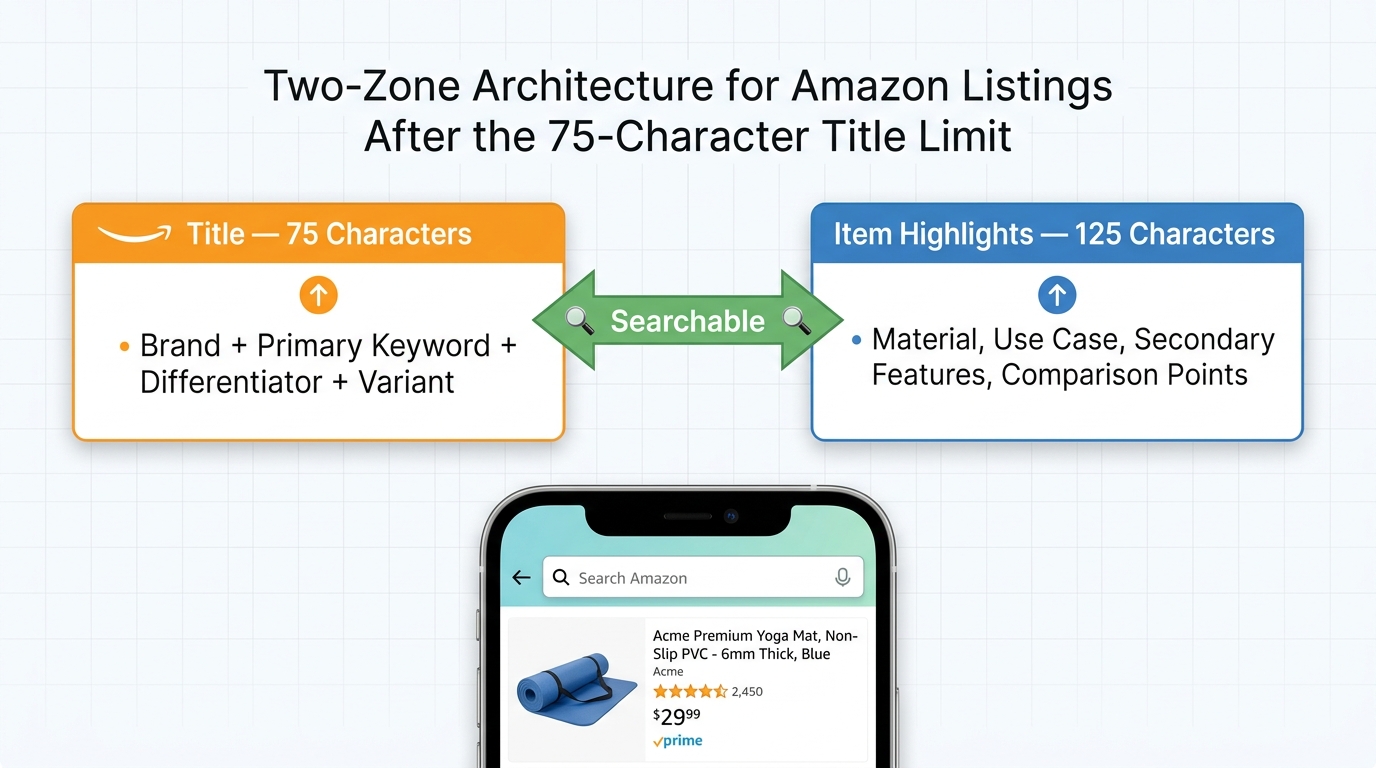
Amazon did not simply reduce title space without providing an alternative. Alongside the 75-character enforcement, Amazon introduced a new listing field called Item Highlights, with a 125-character allowance. Understanding how these two fields interact is essential to building a compliant listing that does not sacrifice discoverability.
What Item Highlights Actually Are
Item Highlights is a searchable field — Amazon has confirmed this explicitly. It is not a visual-only element that shoppers can read but the algorithm ignores. The field appears alongside the title in search results and on product detail pages, and the keywords within it are indexed for search relevance. Amazon’s own documentation specifies that Item Highlights should be written as comma-separated phrases rather than full sentences, and that the field is intended for materials, recommended use cases, and comparative product details.
That guidance is meaningful. Amazon is essentially telling sellers what belongs in each zone: the title carries identity (brand, product type, primary keyword, key differentiator), and Item Highlights carries context (what the product is made of, what it is used for, how it compares to alternatives).
The Strategic Division of Labor
The most effective way to think about this two-zone system is as a compressed but complete product story. The title must answer the question a shopper has before they click: what is this product, who makes it, and what makes it the right choice? Item Highlights must answer the follow-up questions: what is it made of, when or how is it used, and what makes it different from the next result?
Both zones are searchable. Both are visible in search results. But they carry different algorithmic weights, with the title still ranking higher for indexing purposes. This means your absolute highest-value keyword — the primary search term your best customers use when they are ready to buy — belongs in the title, as close to the beginning as your brand name and readability allow. The secondary and tertiary keywords belong in Item Highlights, where they can still generate indexing coverage without competing for the limited 75-character budget.
Treating the Two Fields as One Listing Unit
The practical implication is that you should now approach every listing optimization project as a 200-character exercise — 75 in the title, 125 in Item Highlights — rather than as a standalone title exercise. Keyword research should identify which terms go where based on search volume and purchase intent. High-volume, high-intent terms go in the title. Supporting terms that add specificity (specific materials, certifications, regional use cases, technical specs) go in Item Highlights.
When you audit a listing, check both fields simultaneously. A title that scores well but an Item Highlights field that is empty, generic, or stuffed with the wrong content is leaving indexable surface area unused.
The Anatomy of a Winning 75-Character Title
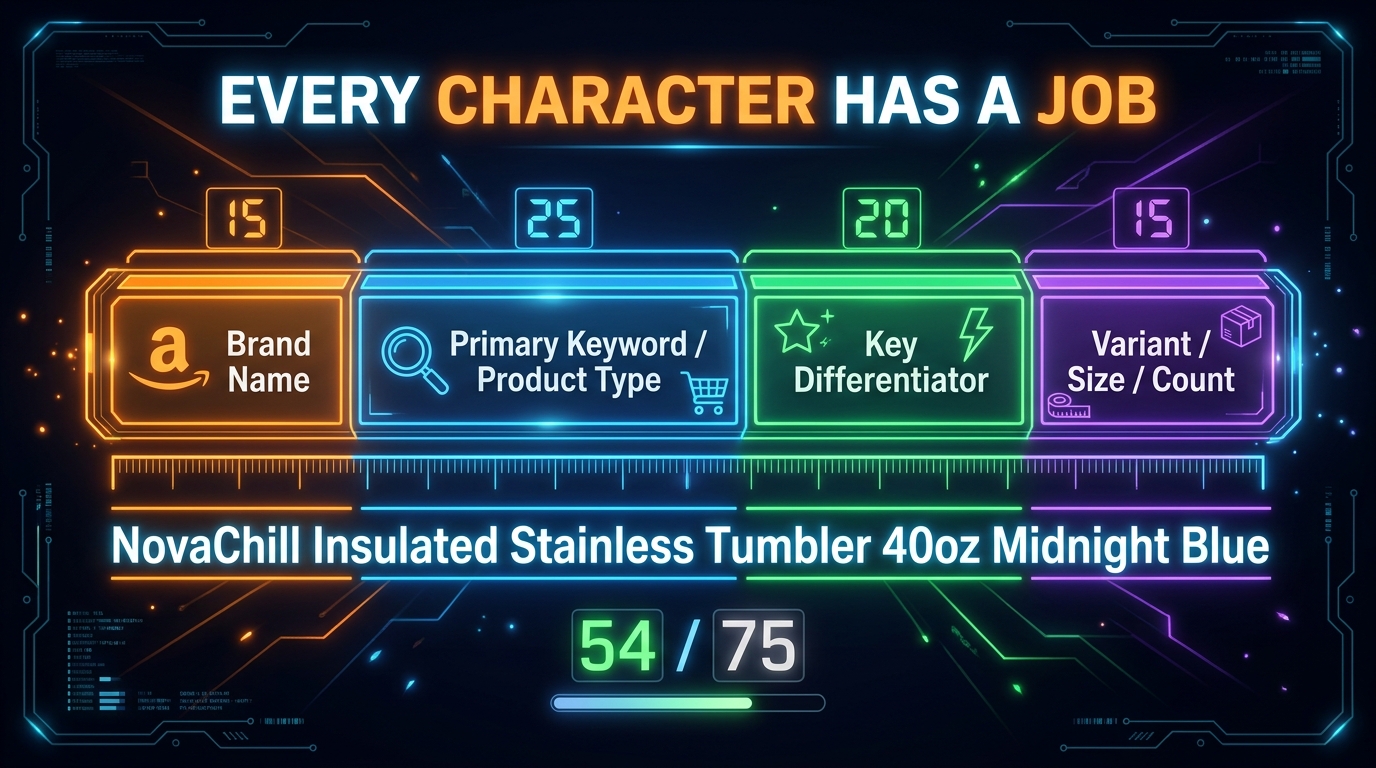
Seventy-five characters is not a lot of space. But it is enough — provided you understand what belongs there and what does not. The sellers who are navigating this constraint well are not cutting content randomly from their old titles. They are building titles with a deliberate internal structure that allocates every character to a specific strategic purpose.
The Four-Part Formula
The formula that consistently emerges from both Amazon’s own guidance and practitioner testing is: Brand + Primary Keyword / Product Type + Key Differentiator + Variant Detail.
Applied correctly, this formula produces titles that are readable, keyword-forward, and compliant. Here is what each element means in practice:
- Brand: Your brand name should appear first. Amazon’s style guidelines specify brand-first ordering, and it also serves a conversion purpose — shoppers who recognize a brand are more likely to click. Brand names typically consume 8–18 characters depending on length.
- Primary Keyword / Product Type: This is the exact search term your highest-intent customers use. Not a synonym. Not a related term. The specific phrase with the highest search volume and strongest purchase-intent signal for your product. This element deserves the most character investment — typically 20–30 characters for most product categories.
- Key Differentiator: One attribute that separates your product from generic alternatives at the same price point. “Leak-Proof,” “BPA-Free,” “Dishwasher-Safe,” “Odor-Resistant” — whatever the single most purchase-relevant feature is for your specific category. One differentiator. Not three. Not five. One.
- Variant Detail: Size, color, count, or model number — whichever variant attribute shoppers most commonly filter by in your category. If shoppers searching for your product type always look for a specific size or quantity, that belongs here. If color is irrelevant to their decision, skip it and use those characters elsewhere.
Real Examples Applied to the Formula
Abstract formulas are easier to internalize with concrete examples. Consider a brand selling a 40-ounce insulated water bottle:
Non-compliant (148 chars): “HydroMax 40oz Insulated Stainless Steel Water Bottle with Lid, BPA Free, Leak Proof, Wide Mouth, Keeps Cold 24 Hours, Hot 12 Hours, Perfect for Hiking”
Compliant, formula-based (72 chars): “HydroMax Insulated Water Bottle 40oz Stainless Steel Leak-Proof”
The second title covers Brand (HydroMax), Primary Keyword (Insulated Water Bottle), Variant (40oz), differentiator stack compressed to the most conversion-relevant pair (Stainless Steel Leak-Proof). Everything else — “Keeps Cold 24 Hours,” “Wide Mouth,” “Perfect for Hiking” — moves to Item Highlights, where it is still searchable.
Or consider electronics, where model numbers matter:
Compliant (69 chars): “Anker PowerCore 26800 Portable Charger USB-C Fast Charge Black”
Brand (Anker), Primary Keyword + Product Type (PowerCore 26800 Portable Charger), Differentiator (USB-C Fast Charge), Variant (Black). Complete. Readable. Compliant.
What “Readable” Actually Means Here
Readability matters not just for the human shopper but because Amazon’s mobile interface truncates titles further still — typically at around 60–80 characters depending on the device, layout, and font rendering. A title that front-loads the most important information within the first 60–65 characters performs better in mobile search results even within the 75-character limit. A title that buries the primary keyword at character position 50 may be compliant but still functionally invisible on the device format where the majority of Amazon traffic originates.
Character Budgeting: How to Allocate Every Character You Have
Treating title construction as a budgeting exercise changes the decision-making process significantly. Instead of starting with a long-form description and cutting it down, you start with a blank 75-character budget and allocate it deliberately. The question is never “what can I cut?” It is “what earns its place?”
Fixed Costs vs. Variable Costs
In the character budget, some elements are fixed costs. Your brand name is non-negotiable — it is both a guideline requirement and a conversion asset. Your primary keyword is non-negotiable — it is the core relevance signal for your most important search query. Together, these two fixed costs often consume 30–40 characters, leaving 35–45 for everything else.
That remaining budget is your variable cost pool. You choose what goes in it based on which attributes drive the highest CTR and conversion for your specific product and customer. The way to determine this is not intuition — it is data. Pull your Search Query Performance report and identify which terms appear most in queries that converted (not just clicked). Those terms, in order of purchase-intent strength, fill the variable budget from highest priority down until the 75-character limit is reached.
The Space Cost of Punctuation and Formatting
Punctuation characters count toward the 75-character total, and they can be surprisingly expensive relative to their informational value. A comma between two attributes costs 2 characters (the comma plus the space). A pipe character ( | ) used as a separator costs 3 characters. Amazon’s style guidelines also prohibit certain characters in titles entirely, including exclamation points, dollar signs, question marks, underscores, curly braces, carets, and several others. Running afoul of these restrictions can trigger its own compliance issues independent of the character limit.
The practical recommendation: use spaces and hyphens to separate title elements, avoid decorative punctuation, and reserve every character for words that carry search or conversion value.
Numbers vs. Words: A Clear Win for Numerals
Amazon’s title guidelines specifically recommend using numerals rather than spelled-out numbers. “40oz” costs 4 characters. “Forty Ounce” costs 11. “3-Pack” costs 6 characters. “Three Pack” costs 10. In a 75-character budget, these are not trivial differences. Consistent use of numerals can free up 10–15 characters across a title — enough to fit an additional keyword or a longer, more specific differentiator.
The Mobile Truncation Problem Within the Problem
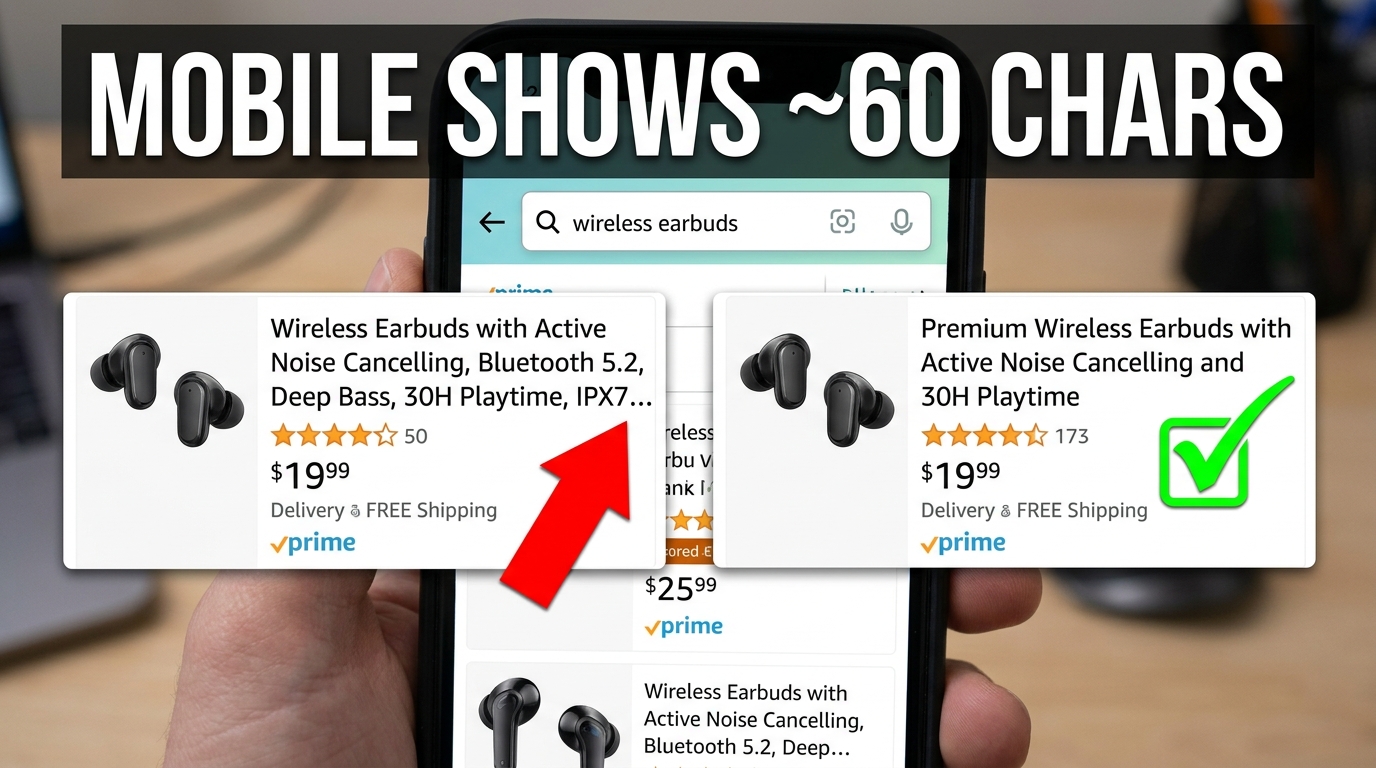
The 75-character limit is the policy constraint. Mobile truncation is the practical constraint that exists within it — and many sellers are not accounting for both simultaneously.
How Much Does Mobile Actually Show?
Amazon’s mobile app and mobile browser display does not show all 75 characters in every layout. Research across seller communities, SEO tools, and Amazon’s own documentation suggests that mobile search result tiles typically display approximately 60–80 characters before truncating with an ellipsis, depending on the device screen size, the Amazon app version, the specific search layout being served, and font rendering differences between Android and iOS.
The practical working assumption most experienced sellers use is that characters 1–60 are always visible on mobile, characters 61–75 may or may not display depending on the context, and anything beyond 75 is never shown. This means that even within the compliant 75-character limit, if your primary keyword or brand name does not appear in the first 60 characters, it may not be visible to a mobile shopper before they make their click-or-scroll decision.
Why This Is a CTR Problem, Not Just a Display Problem
Click-through rate on Amazon is driven by title visibility in search results, along with the main image and price. If your title is technically 75 characters but the critical keyword — the one that confirms to a shopper that this is the product they were searching for — appears at character position 65, a meaningful percentage of mobile shoppers will never see it. They will scan the visible portion, not identify a match to their intent, and scroll past.
This is why the front-loading principle is not just conventional wisdom. It is a geometric reality of mobile display. The first 60 characters of your title should carry the entire value proposition — brand, product type, and primary differentiator — so that a shopper scanning on any mobile device sees enough to understand what the product is and why it might be what they need.
Testing Your Title in Mobile Context
Before finalizing any new title, test what it actually looks like in a mobile search context. The simplest approach: search for your product category keyword on Amazon’s mobile app and observe how your current title displays relative to competitors. Count where the visible cutoff falls. Then build your new title so that the 60-character version makes complete sense even if the remaining 15 characters are not shown.
Category-Specific Rules and the Media Exception
Not all categories operate under identical rules. Understanding where exceptions apply — and where they do not — prevents unnecessary title compression for products that may still have more room to work with.
Media Categories: The Main Exception
Books, music, video, and DVD retain the older, longer title allowance. This makes operational sense: media titles often carry ISBNs, edition numbers, volume designations, and author or artist names that can easily exhaust 75 characters before the actual content title is stated. A book titled “The Oxford Handbook of International Relations: Second Edition, Revised and Expanded” has a legitimate reason to be longer than 75 characters, and Amazon has not applied the restriction to these categories.
For sellers who operate exclusively in media categories, the July 2026 policy change is largely irrelevant in terms of character limits. Style requirements around formatting and prohibited content still apply, but the hard 75-character ceiling does not.
Regional Market Exceptions
Amazon’s own documentation notes that the 75-character rule does not apply to listings in Saudi Arabia, Egypt, Türkiye, or the UAE. Sellers operating across multiple Amazon markets should apply the rule to their primary market listings and review the specific guidelines for each regional marketplace separately rather than assuming uniform global enforcement.
Gray Areas: Categories With Historical Flexibility
Some sellers in categories that historically had category-specific title limits — apparel, shoes, and certain home categories that previously allowed up to 80 or even 100 characters — are reporting variation in how strictly the 75-character rule is being applied to their specific subcategory. Amazon’s enforcement appears to be rolling out at different speeds across different product trees.
The safest approach: treat 75 characters as the universal limit unless Amazon’s category-specific style guide explicitly states otherwise in writing. Do not rely on the absence of enforcement as evidence that enforcement will not arrive. The policy is clear and the trajectory is toward broader, more consistent application.
Split Testing Under the New Limit: How to Use Manage Your Experiments
Once your titles are compliant, the optimization work is not finished — it has simply entered a more rigorous phase. With less character space to work with, the marginal value of every title element is higher. That makes structured testing more important than ever.
What Manage Your Experiments Can Measure
Amazon’s Manage Your Experiments tool, available to Brand Registry sellers, allows you to run controlled title tests in which Amazon splits traffic between two listing variants and collects performance data over a defined test window. The metrics reported include conversion rate (unit session percentage), units sold, total sales, and units sold per unique visitor. CTR is not directly reported within the experiment interface, but can be inferred from session and click data in conjunction with Business Reports.
The tool is powerful for one specific reason: it removes the noise of seasonality and external traffic changes by splitting traffic simultaneously between variants rather than comparing before-and-after periods sequentially. This gives you a cleaner read on which title version actually performs better, rather than attributing a performance shift to a title change when it may have been driven by a competitor going out of stock or a seasonal demand spike.
What to Test Within 75 Characters
With the limit enforced, the most productive testing variables are:
- Keyword position: Does moving the primary keyword from position 2 to position 1 (before the brand) improve CTR, and by how much does it affect conversion? Some brands find that brand-first performs better for established names, while keyword-first wins for less-recognized brands.
- Differentiator choice: When you have two or three credible differentiators, which one generates more clicks? “Leak-Proof” vs. “BPA-Free” vs. “Dishwasher-Safe” can each appeal to different shopper priorities within the same search query.
- Variant specificity: Does including size or color in the title improve conversion, or does it narrow the audience unnecessarily for a product where shoppers select variants on the listing page anyway?
- Title case vs. sentence structure: Amazon recommends title case (capitalize each major word), but some sellers test whether natural sentence structure reads better to their specific audience.
Test Duration and Sample Size
Amazon’s Manage Your Experiments requires a minimum of approximately 30 days of data before reporting statistical significance, and most practitioners recommend running title tests for 4–8 weeks to account for weekly demand variation. Launching a title test during a promotional event, a peak season, or immediately after a competitor’s listing change can corrupt the data significantly. Schedule experiments during representative baseline periods, and avoid changing any other listing element — images, bullets, price — during the test window.
Migrating Your Catalog: A Prioritization Framework
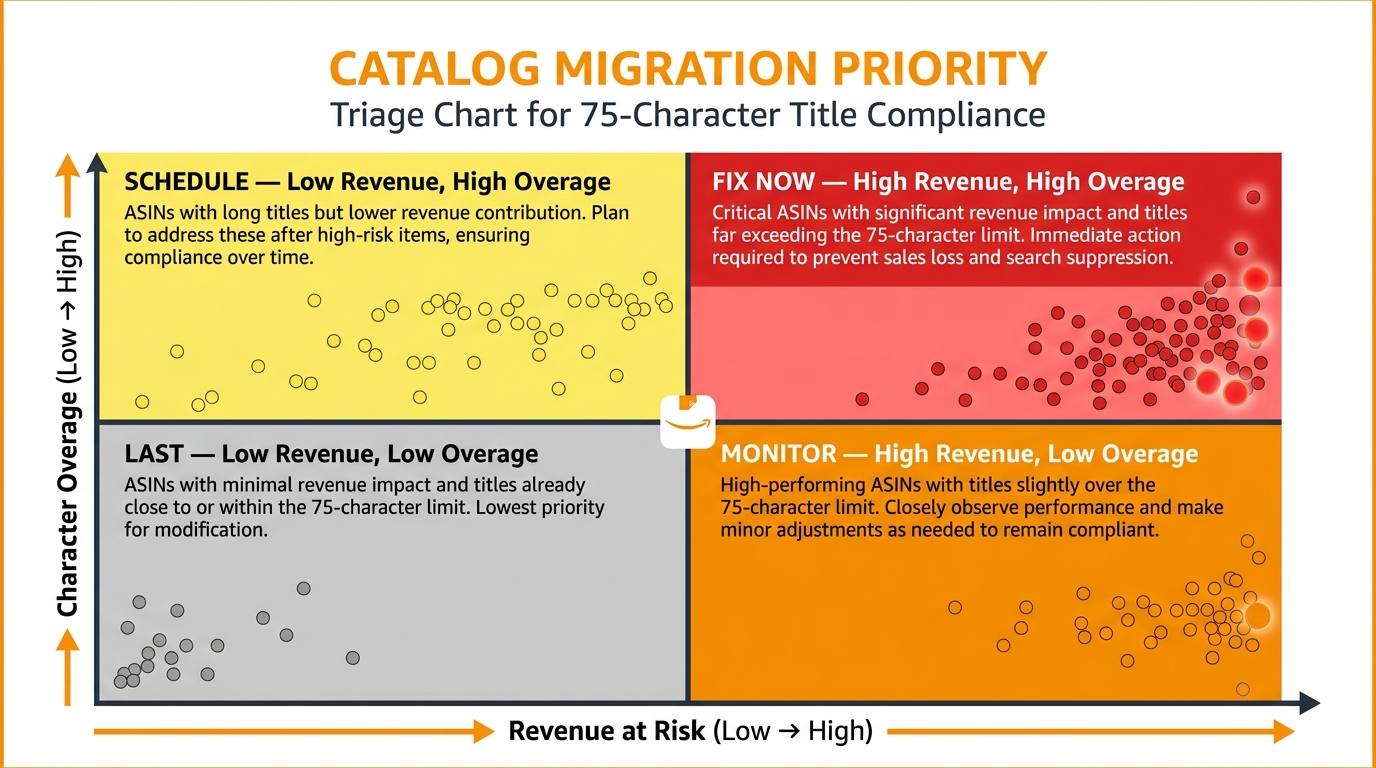
For sellers with catalogs of dozens or hundreds of ASINs, migrating all titles manually is not a one-day project. The risk of a poorly prioritized migration is that you spend the most time on the lowest-risk listings while your highest-revenue ASINs sit exposed to Amazon’s auto-rewrite system.
The Four-Quadrant Triage Model
The most effective catalog migration approach uses a simple two-variable triage: revenue at risk and degree of title overage. Plot every ASIN on a matrix using these two dimensions:
- High Revenue / High Overage (Fix Now): These are your most vulnerable listings. They generate significant revenue and their titles are substantially over the 75-character limit — meaning they are most likely to receive an auto-rewrite that removes high-value keywords. Attack these first, manually, with full keyword research and formula-based reconstruction.
- High Revenue / Low Overage (Monitor): Titles that are close to compliant but still technically over the limit on a high-revenue ASIN. These need attention soon — a small character overage still triggers the auto-rewrite system — but they are lower-risk because there is less keyword material to lose.
- Low Revenue / High Overage (Schedule): These listings are technically exposed but not generating meaningful revenue, so a bad auto-rewrite has limited financial impact. Schedule them into a second phase of the migration, using templated optimization rather than deep individual keyword research.
- Low Revenue / Low Overage (Last): Listings that are nearly compliant and not financially significant. These can be updated last, often in bulk, using category-level templates.
Building the Audit Export
Start by downloading your full inventory from Seller Central using the Manage Inventory bulk download function. Open the export in Excel or Google Sheets and add a character count column with a formula (=LEN(title_cell)) for each title. Add a second column that flags any title with a character count greater than 75. Sort by revenue (pull from Business Reports) and cross-reference against character count to populate the triage matrix.
This process takes a few hours for most catalog sizes and gives you a clear, data-driven action list rather than a subjective sense of what needs to be fixed.
Templating for Efficiency at Scale
For catalogs with many similar products — size variations, color variations, or slight feature variations within a product line — build title templates that encode the formula for each product type. A template might read: “[Brand] [Product Type] [Primary Keyword] [Size/Count] [Differentiator]” with character counts for each slot defined. Apply the template across the product line, swapping in variant-specific values for each ASIN. This approach keeps titles consistent across a product family while ensuring each one stays within the limit.
What NOT to Put in a 75-Character Title
Amazon’s title guidelines prohibit certain content types that previously appeared frequently in longer titles. With less space available, the temptation to slip borderline content into the title is lower simply because there is no room — but it is worth being explicit about what does not belong, both for compliance and for conversion reasons.
Prohibited Content by Policy
Amazon’s current title guidelines prohibit the following, regardless of character count: promotional language such as “Best Seller,” “Top Rated,” “#1 Choice,” or “Award-Winning”; subjective or unverified claims like “Premium Quality,” “Professional Grade,” or “World’s Best”; HTML tags, special formatting characters, or any of the specifically banned symbols (!, $, ?, _, {, }, ^); keyword repetition (using the same keyword twice in the same title); seller-centric information such as sale prices, shipping terms, or Amazon choice badges; and phrases referencing other ASINs or brand comparisons.
Each of these categories was present in many pre-2026 Amazon titles. The 75-character limit removes the space for most of them by necessity — but some sellers are still attempting to fit promotional language into their compliant titles, which creates a double compliance risk: both the length policy and the content policy can flag the same listing.
Content That Is Legal But Strategically Wrong
Beyond policy-prohibited content, there is content that is technically allowed but represents a poor use of scarce character space.
Secondary keywords that belong in Item Highlights or backend fields: If a keyword has meaningful search volume but lower purchase intent than your primary term, it belongs in Item Highlights — not the title. Every character the secondary keyword occupies in the title is a character denied to the primary keyword or differentiator.
Generic category descriptors that add no specificity: Words like “product,” “item,” “thing,” or overly broad category terms that do not narrow the search intent add length without adding precision. If your brand and product type already establish what the product is, a generic descriptor is redundant.
Redundant variant information: If your product is listed as a variation of a parent ASIN, the parent title and the child title together establish variant context. Repeating variant information that is already captured in the variation structure wastes title characters that could carry additional keyword or differentiator content.
The Conversion Argument Against Stuffing
There is also a conversion argument for restraint that is independent of policy compliance. Keyword-stuffed titles — even when compliant — read poorly to human shoppers. A title like “Yoga Mat Non-Slip Thick Exercise Mat Gym Floor Mat Home Workout Training Stretching” reads as if it was written by an algorithm for an algorithm, not by a brand for a customer. Shoppers who see it understand they are looking at a generic, undifferentiated product.
Clean, readable titles that lead with a recognizable brand name and a clear, specific product description signal confidence and quality. They convert better at the individual listing level and they support brand equity at the catalog level. The 75-character limit, when used well, forces a clarity that ultimately improves the shopping experience — which is, unsurprisingly, exactly what Amazon says it intended.
The Action Plan: What to Do Before Amazon Rewrites Your Title for You
The policy is live. The auto-rewrite system is active. The sellers who act on their own terms before Amazon acts on its own schedule retain control over one of the most important ranking signals on the platform. Here is a concrete sequence to follow:
Week 1: Audit and Prioritize
- Download your full inventory export from Seller Central.
- Run character counts on every title. Flag everything over 75 characters.
- Cross-reference with revenue data to build your triage matrix (Fix Now / Schedule / Monitor / Last).
- Pull your Search Query Performance report from Brand Analytics and document which keywords are currently driving impressions from your most over-limit titles. These are the terms you must preserve in the new title or Item Highlights field.
Week 2–3: Rebuild High-Priority Titles
- For each “Fix Now” ASIN, apply the four-part formula: Brand + Primary Keyword + Key Differentiator + Variant Detail.
- Count characters using a character counter tool or spreadsheet formula. Adjust until the title is between 65 and 75 characters — close enough to the limit to maximize indexing coverage, with a small buffer against accidental overage from future edits.
- Write your Item Highlights field simultaneously, using the 125-character allowance to capture the secondary keywords and attributes that did not fit in the title.
- Submit updates through Seller Central or your catalog management system.
- Monitor Brand Registry alerts daily during this period to catch any Amazon-initiated rewrites before the 14-day review window closes.
Week 4 and Beyond: Test, Measure, Iterate
- After titles have been live for at least two weeks, pull Search Query Performance again and compare impressions for the keywords you preserved versus the keywords you moved to Item Highlights. If specific terms show a significant impressions drop after moving to Item Highlights, investigate whether they need to return to the title or whether the drop is a normal indexing lag.
- Launch Manage Your Experiments tests on your top-revenue ASINs to A/B test different differentiator placements within the formula.
- Set a quarterly calendar reminder to audit character counts across the full catalog, since future edits, third-party tool updates, or catalog imports can inadvertently push titles back over the limit.
Conclusion: 75 Characters Is a Discipline, Not a Limitation
The sellers who are treating Amazon’s 75-character title limit as a problem to be managed are approaching it from the wrong direction. The constraint is real. The enforcement is live. The auto-rewrite risk is genuine. But the underlying dynamic is not adversarial — it is clarifying.
For years, Amazon’s title field rewarded sellers who could pack the most keywords into the most space. The result was a marketplace where titles functioned as keyword dumps rather than product descriptions, where readability was sacrificed for coverage, and where the difference between a well-optimized listing and a poorly-optimized one was often just a matter of how many keyword variations you could squeeze into 200 characters.
The 75-character limit ends that era. It replaces quantity with precision. It forces sellers to identify their single most important keyword, their single most compelling differentiator, and their most relevant variant detail — and to arrange those elements in a format that a shopper can read and respond to in the two seconds they spend scanning a search result page on their phone.
That is not a lesser skill than keyword stuffing. It is a harder one. It requires better keyword research, cleaner strategic thinking, and more deliberate writing. The sellers who master it will have listings that are both more compliant and more compelling. And in a marketplace where every other listing is being forced through the same 75-character funnel, the ones who navigate that funnel most skillfully will stand out.
The title limit is 75 characters. Use every single one of them with intention.