


Most Amazon sellers are still playing the wrong game. They’re optimizing for a search results page that matters less every week, while a parallel ranking system — one that most sellers have never deliberately targeted — quietly decides whether their products get recommended at all.
That system is Rufus, now officially rebranded as Alexa for Shopping as of May 2026. And its defining characteristic isn’t that it ranks your product — it’s that it often doesn’t show your product at all. For any given conversational query, Rufus surfaces approximately five products, not fifty. The competition isn’t for position one; it’s for inclusion.
That changes everything about how listing optimization should work. The traditional playbook — keyword density, title stuffing, volume-matched backend terms — was designed for a system that shows every result and lets shoppers scroll. Rufus doesn’t work that way. It filters first, ranks second, and the filter is semantic, attribute-driven, and largely invisible to sellers who haven’t specifically studied it.
This post breaks down the exact decision architecture Rufus uses to determine which products get recommended and which get filtered out before a shopper ever sees them. More importantly, it maps each layer of that architecture to specific, concrete listing changes you can make today — not vague advice to “write conversationally,” but the specific mechanisms behind why some listings surface and others don’t, and what the conversion data shows about why this matters enormously for your bottom line.
How Rufus Actually Decides What to Show: The 3-Layer Decision Stack
Before diving into tactics, it’s worth understanding the actual architecture. Rufus doesn’t use a single ranking algorithm. It operates through a three-layer decision stack, and each layer is a gate — a product has to pass through all three before it can convert a shopper.
Understanding these layers is what separates sellers who get measurable results from Rufus optimization from those who make cosmetic copy tweaks and wonder why nothing changed.
Layer 1: Semantic Filtering via COSMO
Before any ranking happens, Rufus determines which products are even eligible for a given query. This is handled primarily by COSMO — Amazon’s common-sense e-commerce knowledge graph. COSMO maps relationships between products, attributes, use cases, shopper contexts, and categories. When a shopper asks Rufus “what’s the best protein powder for women over 50 who run marathons?” — COSMO determines which products are semantically relevant to that question based on their structured attributes, not their copy.
Products that pass COSMO’s filter are handed to the next layer. Products that don’t are invisible, regardless of their sales rank, BSR, or ad spend.
Layer 2: Intent Matching via Listing Content
Once a product clears the attribute filter, Rufus evaluates how well its listing content — title, bullets, A+ copy, Q&A — maps to the specific intent behind the query. This is where natural-language, question-answering copy earns its keep. Rufus reads your listing the way a person would read an answer to a question: it looks for specificity, clarity of use case, and verifiable claims.
Layer 3: Performance Signals
Only after passing the first two layers does the traditional A9/A10 performance data come into play. Rufus currently appears to apply a quality floor of approximately 4.5 stars with meaningful review volume before surfacing products in most categories. Sales velocity, conversion rate, and click-through history all factor in — but they only matter once semantic eligibility is established.
Most sellers optimize exclusively for Layer 3. The products that win at Rufus optimize for all three — in order.
Layer 1: The COSMO Attribute Audit — What Gets You Filtered Before Ranking Even Starts
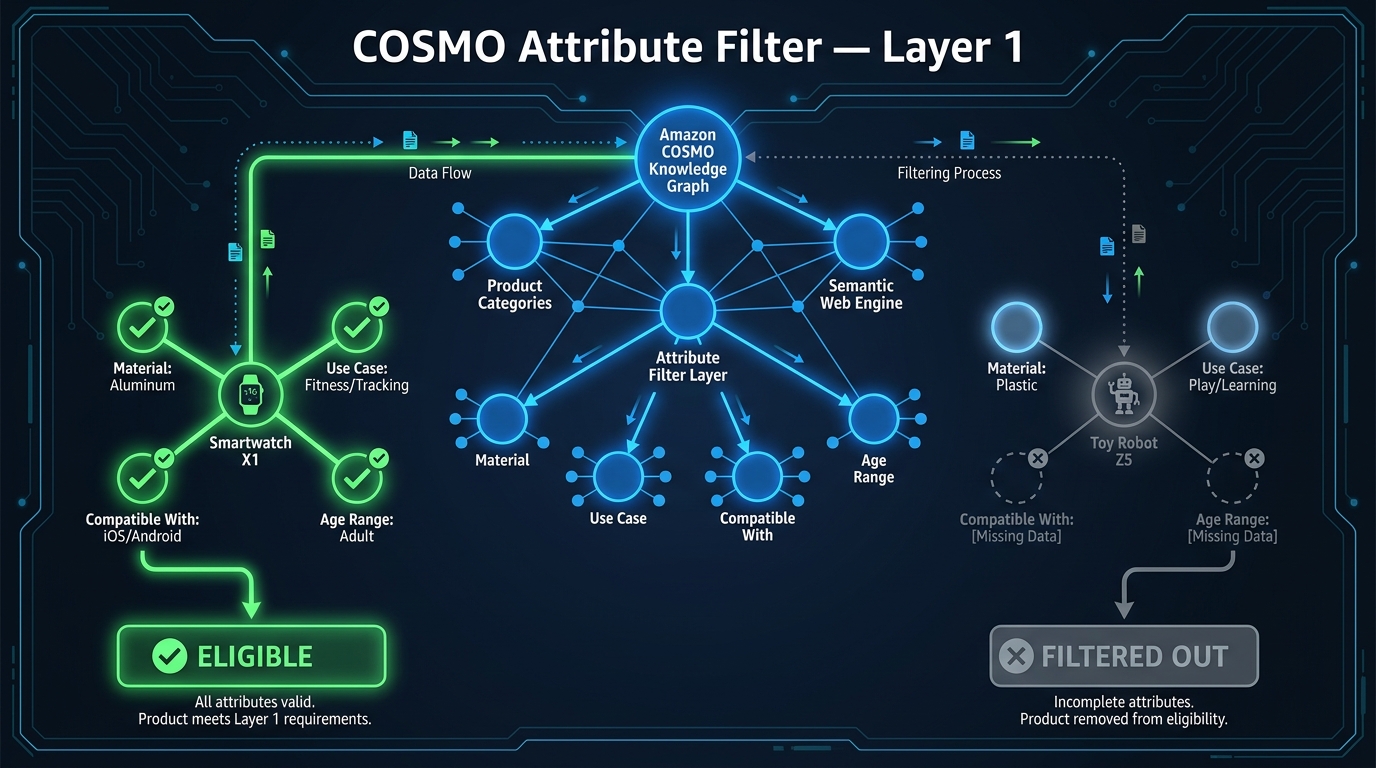
COSMO is the part of Rufus optimization that sellers most consistently underestimate — because it’s invisible. You can’t see your COSMO score, you can’t A/B test it directly, and Amazon has never published a checklist of the attributes it cares about. What we do know from reverse-engineering Rufus’s behavior is that the system uses structured product data to determine semantic eligibility before any content is ever read.
What COSMO Actually Reads
COSMO ingests your backend product attributes — the fields in Seller Central or Vendor Central that sellers often fill minimally or skip entirely. These include material composition, compatible devices, target audience (age range, gender), specific use cases, product dimensions, dietary certifications, finish type, operating environment, and dozens of category-specific fields.
The knowledge graph doesn’t just store these attributes — it maps relationships between them. A camping tent with “waterproof” listed as a material attribute will be semantically connected to queries about “camping in rain” or “festival gear.” The same tent with a blank material field may not appear in those results, even if the word “waterproof” appears in the title copy.
This is the core of why backend completeness matters so much in the Rufus era. The front-end copy is read by Layer 2. The structured attributes are what determines Layer 1 eligibility. Failing at Layer 1 means your Layer 2 optimization work is irrelevant — the product never gets evaluated.
Running a COSMO Attribute Audit
The practical approach to COSMO-proofing your listing is an attribute completeness audit. Here’s what that looks like in practice:
- Open your category’s full attribute template in Seller Central. Not just the required fields — all available fields. Categories like Home & Kitchen, Health & Personal Care, Sports & Outdoors, and Baby Products have 40–80+ optional attributes that COSMO uses for semantic mapping.
- Benchmark against your top-ranking competitors. Pull the top five products Rufus surfaces for your target queries and examine their attribute completeness. The attributes they’ve filled that you haven’t are typically your COSMO gap.
- Prioritize use-case and audience attributes. Fields like “intended use,” “target audience,” “occasion,” “compatible with,” “scenario,” and “style” have outsized impact on COSMO’s semantic mapping because they’re the exact dimensions shopper questions reference.
- Don’t leave numeric fields empty. Weight capacity, dimensions, battery life, wattage, coverage area — these are the fields Rufus uses to answer quantitative questions like “can this hold up to 300 pounds?” If the attribute is blank, Rufus can’t answer that question with your product, so it picks a competitor’s instead.
The Hidden Cost of Attribute Gaps
Expert analysis of Rufus behavior patterns suggests that incomplete attributes don’t just reduce Rufus visibility — they can create active misinformation. When a shopper asks Rufus a question your product could correctly answer, but your attribute data doesn’t confirm it, Rufus defaults to a competitor whose data does confirm it. The shopper never knew you were an option. Amazon’s own guidance on the Alexa for Shopping experience acknowledges that wrong answers from the AI typically trace back to missing or incorrect product detail page data.
The implication is significant: attribute gaps aren’t just missed opportunities. They are active handoffs of your most qualified traffic to your competitors.
Layer 2: Intent Signal Matching — How Rufus Reads Your Title, Bullets, and Copy
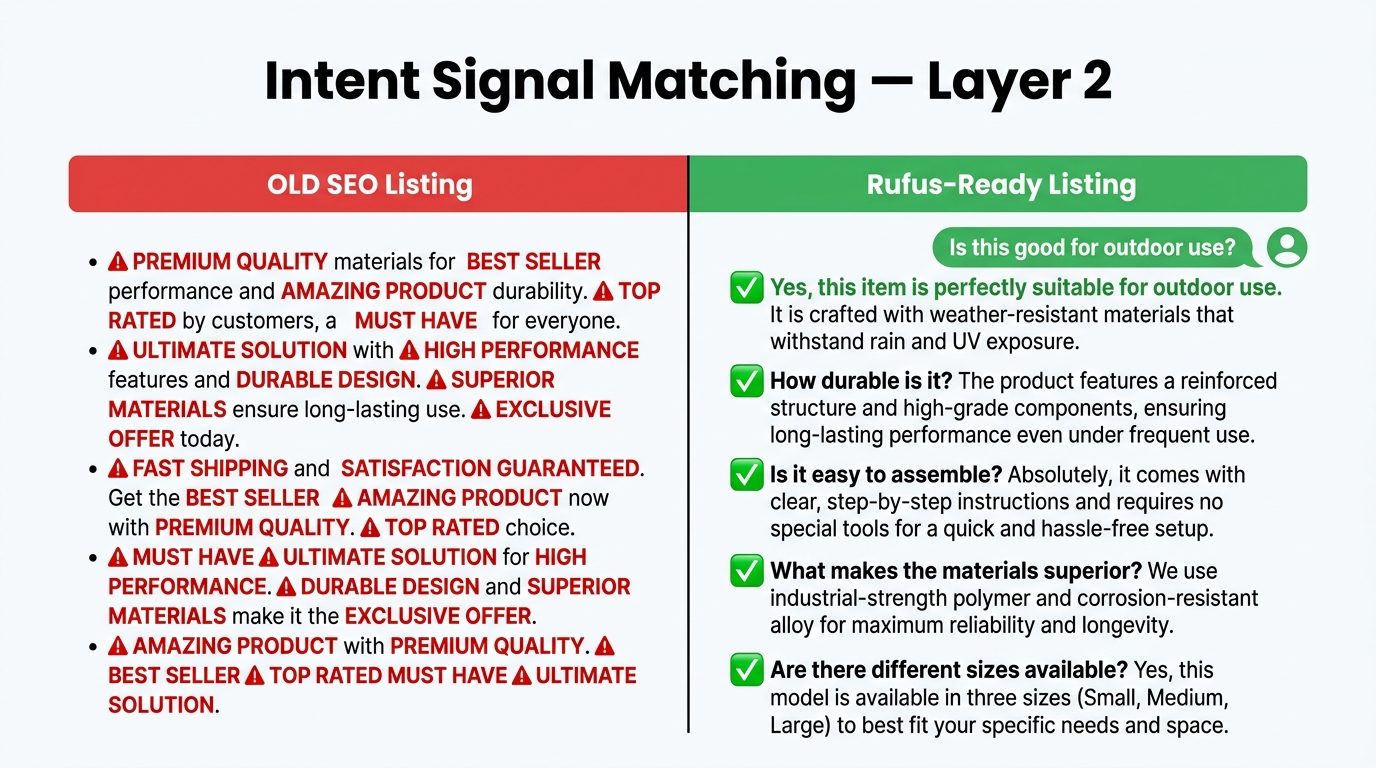
Once your product clears the COSMO filter, Rufus evaluates your listing content for intent relevance. This is where the conventional advice to “write conversationally” actually has real grounding — but the mechanism is more specific than most guides acknowledge.
How Rufus Reads a Title
Rufus treats your title as an answer to the query, not a keyword list. The structural implication is significant. A title optimized for traditional search might look like:
“Protein Powder Whey Isolate Vanilla Flavor 2lb — Best Protein Supplement for Men Women — Low Carb High Protein Shake Mix”
This title is trying to rank for ten things simultaneously. Rufus, reading it as an answer to a specific question, finds it confusing and specific to nothing. A title optimized for Rufus intent-matching looks like:
“Garden of Life Organic Whey Protein Powder — Vanilla, 2 lb — 22g Protein per Serving, Grass-Fed, Non-GMO, Ideal for Post-Workout Recovery”
The second title answers a narrow, specific question — “what’s a clean, high-protein post-workout supplement?” — with precision. COSMO’s attribute data handles the broad eligibility; the title sharpens the intent match for the specific query type.
The Bullet Point Rewrite Framework
Bullet points are where the most significant Layer 2 optimization opportunities exist. Traditional bullet points are structured as feature declarations: “Made with premium stainless steel” or “Adjustable strap for custom fit.” These are fine for visual scanning but they provide weak intent signals for Rufus.
Rufus-optimized bullets are structured as use-case answers: they answer the question a shopper would ask about the product in the context of a specific situation. The pattern looks like this:
- Old format: “Premium stainless steel construction” → Rufus format: “Built for outdoor use — 18/8 stainless steel body stays rust-free after years of camping, hiking, and dishwasher cycles”
- Old format: “Adjustable carry strap” → Rufus format: “Fits all body types — padded, adjustable strap distributes weight evenly for all-day comfort during hiking or travel”
- Old format: “BPA-free materials” → Rufus format: “Safe for kids’ daily use — BPA-free, phthalate-free, and FDA-approved materials, making it the go-to choice for school lunches and sports”
Notice what changed: every bullet now names a use case, a type of user, or a specific scenario. These are exactly the dimensions Rufus evaluates when answering a conversational shopping query. The feature is still present — Rufus also reads for accuracy — but it’s wrapped in the context that makes it retrievable for intent-based queries.
The Noun-Phrase Density Strategy
One technical pattern that consistently emerges from Rufus optimization case studies is the value of high noun-phrase density — compound noun phrases that carry use-case and specificity information. Phrases like “marathon training fuel,” “toddler-safe bath toy,” “low-light indoor plant,” or “noise-cancelling office headset” are more COSMO-readable than their keyword-list equivalents because they describe a product-context relationship, not just a feature.
Working 6–8 natural noun phrases of this type into your bullets and copy, across varied use contexts, appears to materially improve Rufus’s ability to retrieve your product for related conversational queries. This isn’t keyword stuffing — the phrases need to be contextually accurate and grammatically natural. The goal is semantic completeness, not density.
Layer 3: Social Proof as Data — How Reviews and Q&A Feed Rufus’s Answers
Rufus doesn’t just read your listing. It reads your entire product page as a document — and that includes reviews, Q&A content, and how those elements interact with your listing copy. This creates optimization opportunities that traditional Amazon SEO never surfaced.
How Rufus Uses Reviews
Rufus synthesizes review content when formulating answers to shopper questions. When a shopper asks “is this blender good for frozen fruit smoothies?”, Rufus doesn’t just check if you wrote “frozen fruit” in your bullets. It also scans reviews for mentions of frozen fruit, smoothies, ice crushing, and related terms — and uses the sentiment and frequency of those mentions to form part of its answer.
This creates two important implications:
- Review keyword patterns matter. If your reviews frequently mention specific use cases, Rufus is more confident recommending your product for those uses. Sellers who have strong review content around a specific use case but haven’t listed that use case prominently in their bullets are sitting on underutilized Rufus signal. Review language should inform your bullet rewrite strategy.
- Contradictory reviews hurt your Rufus accuracy. If your listing claims “perfect for sensitive skin” but five recent reviews mention irritation, Rufus has conflicting data and will either hedge its recommendation or omit your product for sensitive-skin queries. Review sentiment alignment with listing claims is now an SEO issue, not just a reputation issue.
Q&A as a Programmable Answer Layer
The Amazon Q&A section is the most underused Rufus optimization tool available to sellers. Unlike reviews — which you influence indirectly — Q&A content is something you can actively build with strategic question seeding.
Rufus pulls directly from Q&A when answering shopper questions. A question about compatibility, size, material safety, or use scenario that exists in your Q&A section — with a clear, accurate answer — becomes a retrievable data point for every future shopper asking the same thing via Rufus. Sellers who have 30+ well-seeded Q&A pairs covering their most common buyer questions have essentially built a mini-FAQ that Rufus reads and quotes directly.
The seeding approach works like this: identify the 15–20 questions that shoppers in your category most commonly ask (check competitor Q&A sections and review content for patterns), submit those questions through additional accounts or via the Q&A “Ask a question” feature, and answer them through your brand’s seller account with precise, factual responses. Prioritize questions about edge use cases, compatibility, sizing, safety, and durability — the queries Rufus handles most frequently for considered purchases.
Review Volume as a Quality Gate
Rufus currently applies a de facto quality filter across most categories: products with fewer than approximately 50 reviews, or average ratings below 4.3–4.5 stars, appear to have significantly reduced Rufus recommendation rates regardless of attribute completeness or copy quality. This isn’t a published threshold, but the pattern across multiple seller case studies and expert analyses is consistent enough to treat as a working benchmark.
For sellers with newer ASINs, this means Rufus optimization and review generation are inseparable strategies. A Rufus-optimized listing with 15 reviews will underperform a moderately-optimized listing with 200 reviews in most competitive categories. The path to Rufus visibility runs through the review floor first.
A+ Content in the Rufus Era — What Changed and What’s Now Critical
A+ Content’s role in Amazon listing optimization has evolved meaningfully with Rufus. Understanding what changed — and what specifically Rufus can and can’t read — prevents sellers from spending creative budget on A+ modules that don’t move the Rufus needle while neglecting the ones that do.
What Rufus Can (and Can’t) Read in A+ Content
This is a nuance most guides skip. Rufus’s indexing of A+ content is not uniform across module types. Standard A+ text modules — particularly comparison charts, spec tables, header/body text modules, and feature/benefit paragraph modules — appear to be indexed and readable by Rufus in the same way bullets and description copy are. These modules contribute to Rufus’s understanding of your product’s use cases, specifications, and competitive positioning.
Purely visual modules — lifestyle images without alt text, image-only comparison graphics, and decorative banner images — contribute little to Rufus’s data layer because the AI can’t extract structured information from image content alone (unlike Amazon’s vision algorithms, which serve a different function). This means a lavish A+ page built primarily on lifestyle imagery is visually compelling for human shoppers but largely opaque to Rufus.
The Modules That Matter Most for Rufus
Based on the available evidence of what Rufus reads and pulls from, the most Rufus-valuable A+ content investments are:
- Comparison modules. Rufus actively uses product comparison data when answering “how does this compare to X?” questions. A well-built comparison module — comparing your product variants or your product against category alternatives — gives Rufus structured data to cite. This is particularly high-value for electronics, home goods, and supplement categories where comparison questions are frequent.
- Technical specification tables. Precise specs in tabular format (dimensions, weight, capacity, certifications, compatibility) give COSMO additional structured data to work with and give Rufus a source for precise answers to technical questions.
- Use-case scenario text modules. A short paragraph describing “ideal for X situation” or “not recommended for Y use” gives Rufus explicit context for matching your product to the right queries and disqualifying it from the wrong ones — which actually improves your recommendation accuracy and conversion rate.
- Image alt text. Every image in your A+ content should have descriptive, keyword-rich alt text. This is the one area where image modules can contribute to Rufus indexing — through the text metadata attached to the image, not the image itself.
Brand Story as Intent Signal
The Brand Story module — available to brand-registered sellers — is increasingly read by Rufus as a signal for brand-specific queries. Shoppers who ask “what does [Brand] specialize in?” or “is [Brand] good quality?” prompt Rufus to reference Brand Story content. Sellers who have left this module empty or filled it with marketing platitudes are missing an opportunity to feed Rufus accurate brand positioning data that can influence brand-based query results.
The Conversion Gap: Why Rufus Traffic Converts 2.74x Better
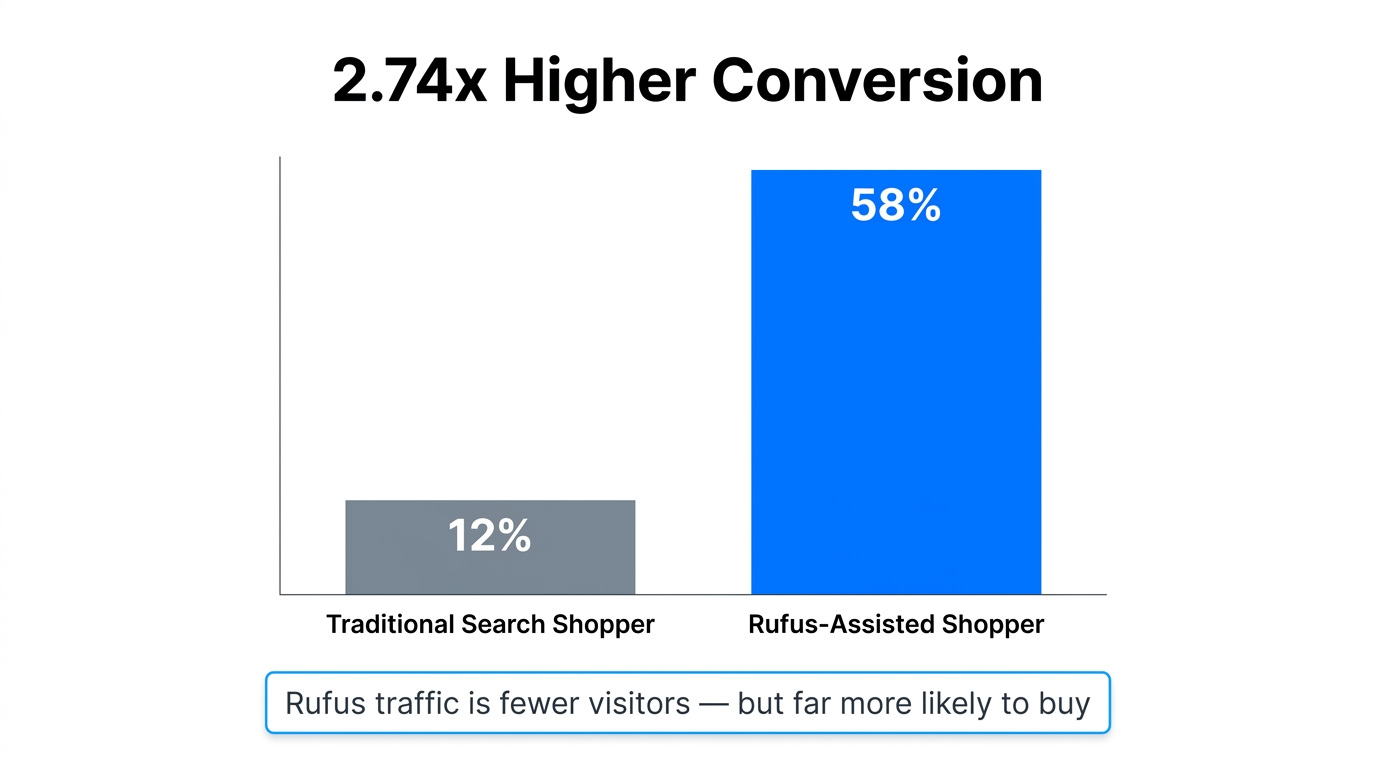
The conversion math for Rufus optimization is counterintuitive for sellers used to thinking about traffic volume. Rufus generates less traffic than broad search — because it shows five products instead of fifty, fewer shoppers visit any given product page from a Rufus interaction. But the shoppers it does send convert at dramatically higher rates.
The Data Behind the Gap
One large cohort study of Amazon shopping sessions found that heavy Rufus users converted at approximately 58% compared to approximately 21% for non-Rufus traditional search shoppers — a 2.74x difference. Across seller case studies from 2026, listings specifically optimized for Rufus report conversion rate lifts of 12–35% within 30–90 days of optimization, with some outlier cases showing larger jumps in categories with strong Q&A seeding.
The mechanism behind this gap is straightforward once you understand how Rufus interactions work. A shopper who opens Rufus and types “what’s the best stainless steel water bottle for marathon runners that keeps drinks cold for 24 hours?” has already pre-qualified themselves to an extraordinary degree. By the time they arrive on a product page via Rufus’s recommendation, they’ve received a personalized endorsement from an AI that confirmed the product matches their specific needs. The traditional purchase hesitation — “but does this actually work for my use case?” — has been substantially resolved before the click.
Why Volume Thinking Misses the Point
Sellers who evaluate Rufus optimization ROI primarily through traffic volume metrics will consistently underestimate its value. A listing that receives 1,000 visits from traditional search at a 12% conversion rate (120 purchases) and then receives 200 additional visits per month from Rufus at a 58% conversion rate (116 additional purchases) has nearly doubled its monthly sales from a 20% traffic increase. The per-visitor value of Rufus traffic is fundamentally different from traditional search traffic.
This reframes how to think about Rufus optimization investment. The question isn’t “how much traffic will this generate?” It’s “what is the per-visitor revenue value of Rufus-sourced traffic, and how does that change the math on optimization spend?”
The Velocity Feedback Loop
There’s also a second-order benefit to Rufus optimization that compounds over time. Higher conversion rates from Rufus-assisted visits feed back into Amazon’s traditional performance ranking signals — A9/A10 sees improved conversion on your ASIN and rewards it with better organic placement. The mechanism is: Rufus optimization → higher-intent traffic → higher conversion → stronger performance signals → better traditional search ranking → more total traffic → more Rufus-eligible sessions.
This feedback loop is why sellers who’ve done structured Rufus optimization report that the benefits extend well beyond Rufus-specific sessions. The listing quality improvements that make a product Rufus-eligible also tend to improve its performance across the entire Amazon ecosystem.
5 Common Listing Patterns That Rufus Penalizes (With Fixes)
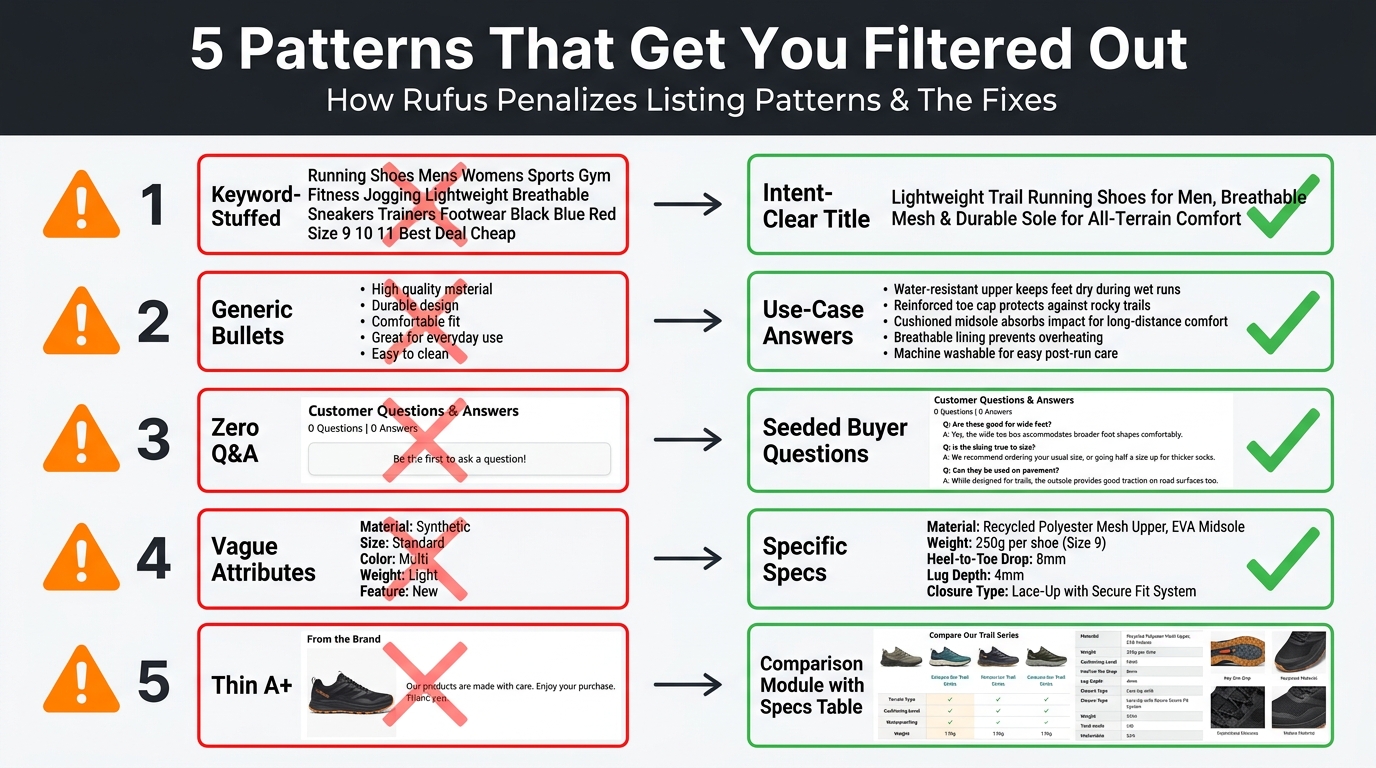
Rather than listing abstract best practices, it’s more useful to identify the specific patterns that actively hurt Rufus performance — along with the concrete fix for each.
Pattern 1: Titles Built for Keyword Volume, Not Intent Clarity
The classic long-tail-stuffed title (“Premium Dog Food Grain Free Chicken Recipe Adult Dogs Small Medium Large Breed Weight Management High Protein”) is trying to appear in as many keyword results as possible. Rufus reads this as a product with no clear identity and no specific use-case fit. It’s optimized to be mediocre for everything rather than excellent for something.
The fix: Identify your product’s primary use case and target audience. Build a title that answers one question very well: “What is this for and for whom?” The other use cases belong in bullets. A title like “Blue Buffalo Life Protection Adult Dog Food — Chicken & Brown Rice, 30 lb — Protein-Rich, No Artificial Preservatives, Supports Healthy Weight” is Rufus-legible because it answers a specific intent clearly.
Pattern 2: Bullets That List Features Without Context
Feature-list bullets (“Stainless steel body,” “Double-wall vacuum insulation,” “BPA-free lid”) are readable to human shoppers who already know what they want. They’re low-signal to Rufus because they don’t communicate why the feature matters for a specific use case. Rufus answers questions, and feature lists don’t answer questions — they describe specifications.
The fix: Rewrite each bullet as a use-case statement with the feature embedded as the proof point. “Stays cold for 32 hours on summer hikes — double-wall vacuum insulation keeps ice-cold drinks all day, even in 90°F heat” answers the question “will this keep my drink cold during a long outdoor activity?” directly. The spec is present, but it’s contextualized.
Pattern 3: Zero or Low-Quality Q&A Content
Listings with fewer than 10 Q&A entries — or Q&A sections populated entirely by generic customer questions with seller non-answers (“We recommend checking the product description”) — have virtually no Rufus answer layer. When a shopper asks a specific question via Rufus and your Q&A section can’t provide a sourced answer, Rufus either answers generically or pulls from a competitor’s better-documented listing.
The fix: Conduct a deliberate Q&A seeding exercise. Review competitor questions, search the related Amazon review sections for repeated questions, and identify the 15 highest-value questions your ideal buyer would ask. Seed these questions and answer them with specific, factual, detailed responses. Aim for 25–40 Q&A pairs for high-consideration products in your category.
Pattern 4: Backend Attributes Left at Minimum
Sellers who complete only the required attribute fields and skip optional ones are leaving COSMO eligibility points on the table. The required fields are required because Amazon needs them for basic catalog integrity — they’re not the fields COSMO uses most heavily for semantic matching. The optional fields — use case, audience, occasion, material composition, compatibility, certification, environmental rating — are where COSMO builds the relational mappings that determine query eligibility.
The fix: Export your product’s full attribute template from Seller Central and audit field-by-field against a competitor product that consistently appears in Rufus recommendations for your target queries. Every field they’ve completed that you haven’t is a potential COSMO gap to close.
Pattern 5: A+ Content That’s All Visual, No Text
High-production-value A+ pages built around full-bleed lifestyle images and minimal text are common — and they’re among the most Rufus-invisible pages on Amazon. Rufus’s text indexing of A+ modules can’t extract information from an image that says “premium quality, built to last” as an image overlay rather than as text in a text module. The visual signal is there for human shoppers; the structured data signal is absent for Rufus.
The fix: Audit your A+ modules for text density. Every lifestyle image should be accompanied by a text module that states the use case the image depicts. Add at minimum one comparison chart module, one spec table, and two use-case text paragraphs. These additions provide Rufus with readable, structured data without requiring you to rebuild your visual design.
Building a Rufus-Ready Listing From Scratch: A Practical Framework
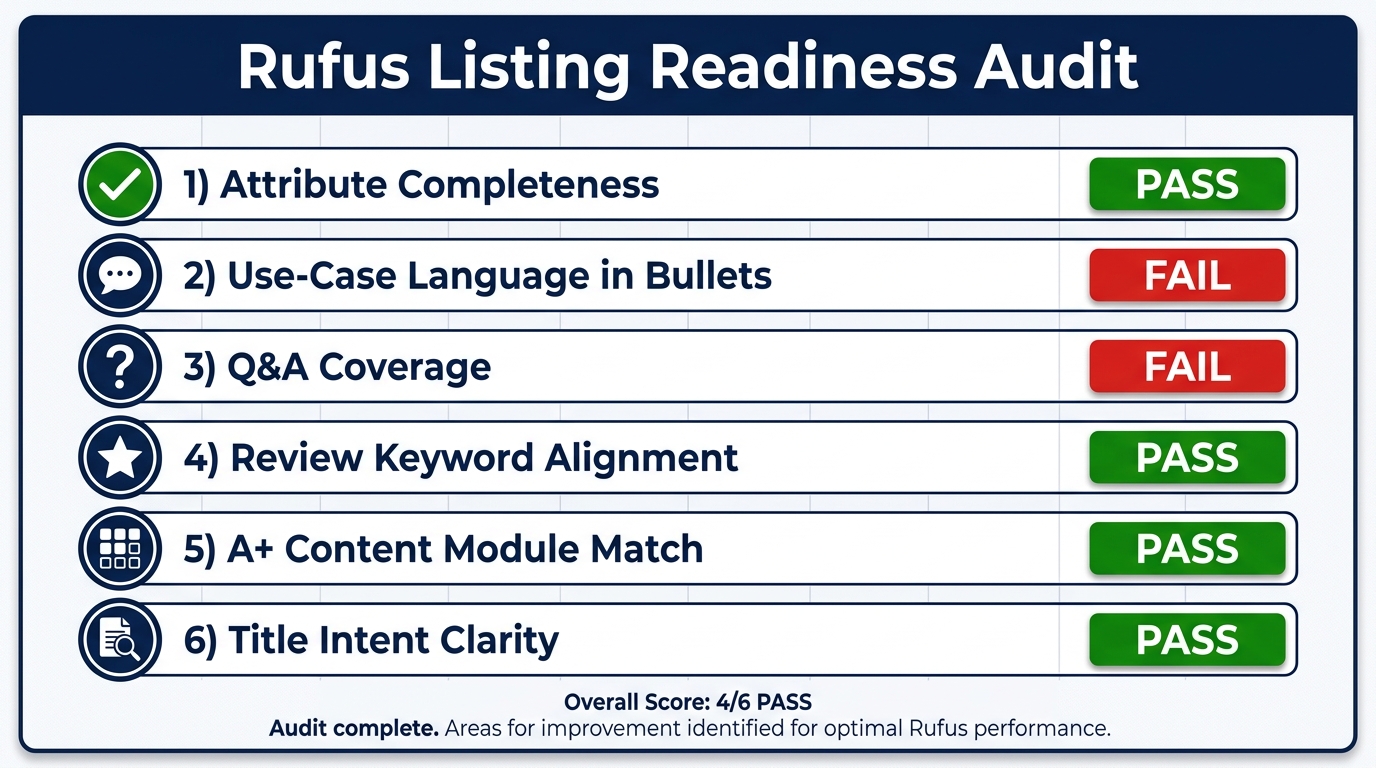
For sellers building a new listing or conducting a full optimization rebuild, here is a practical framework organized around the three-layer decision stack.
Phase 1: COSMO Foundation (Week 1)
Start by building your attribute completeness foundation before writing a single word of copy. This is counterintuitive for sellers used to leading with creative, but it’s the right sequence for Rufus optimization.
- Export the full attribute template for your product category from Seller Central. Download the inventory file template, not just the Add a Product wizard — the template exposes all available fields.
- Identify your top 5 Rufus-active competitors. For each of your primary target queries, open Rufus (the Alexa for Shopping interface in the Amazon app) and record which products it recommends. These are your attribute benchmarks.
- Complete every attribute your benchmarks have completed. Don’t limit yourself to the required fields. For each attribute your competitors have filled, fill yours with accurate, specific data. Use the most precise option available — “outdoor patio use” is more COSMO-valuable than “outdoor use.”
- Add certifications and compliance data. Safety certifications, third-party testing badges, and regulatory compliance attributes (CE, FDA, ASTM, OEKO-TEX, etc.) are highly COSMO-valuable because they answer safety and quality questions that high-consideration shoppers frequently ask via Rufus.
Phase 2: Intent Mapping (Week 1–2)
Once your attributes are complete, build the intent map that will drive your copy rewrite.
- List the 10 most common questions your target buyer would ask when considering your product. Source these from: competitor Q&A sections, “Customers also ask” boxes, review content analysis, and the questions Rufus actually generates when you search your product category in the app.
- Map each question to a listing element. Your title should answer the primary “what is this for?” question. Each bullet should answer one specific question from your list. Your A+ text modules should answer 2–3 deeper questions about use case or specs. Your Q&A section should answer all remaining questions explicitly.
- Identify your noun phrases. For your product, what are the 6–8 compound noun phrases that describe it in use-context? Write these out (e.g., “post-workout recovery supplement,” “sensitive skin-friendly formula,” “compact travel hair dryer”) and ensure each appears naturally at least once in your listing copy.
Phase 3: Copy and Content Build (Week 2–3)
With your attribute foundation and intent map in place, write and build your listing elements:
- Title: [Product name/brand] — [Primary use case], [Key differentiator spec], [Target audience or scenario]
- Bullets (5): Each opens with a use-case headline in caps, followed by 2–3 sentences that answer a specific buyer question with the feature as proof
- Description/A+ content: Text modules covering comparison, specs table, and 2 use-case scenarios minimum
- Q&A seeding: 20–40 questions covering compatibility, safety, size/fit, use scenario, durability, and comparison questions
Phase 4: Review Alignment (Ongoing)
Analyze your first 50+ reviews after launch for recurring themes. If reviews are consistently mentioning a use case or attribute you haven’t emphasized in your listing, add it. If review language is consistently contradicting a claim in your listing, either correct the listing or address the gap in the product itself. Review-listing alignment is an ongoing maintenance task, not a one-time setup.
Measuring Rufus Impact: The Metrics That Actually Tell You It’s Working
One of the legitimate challenges of Rufus optimization is attribution. Amazon doesn’t currently provide a “Rufus-sourced sessions” breakdown in standard Brand Analytics or Seller Central reporting. Measuring impact requires indirect signals, but those signals are readable if you know what to look for.
The Metrics That Indicate Rufus Activity
- Conversion rate trend without traffic increase. The clearest indirect signal of growing Rufus influence is a rising conversion rate on your ASIN that isn’t explained by a traffic spike or promotional event. Rufus traffic lands pre-qualified, so its growing share of your total sessions will pull your blended CVR up without corresponding traffic growth. A 3–6 percentage point CVR lift over 60 days following a Rufus optimization is a strong directional signal.
- Improved Unit Session Percentage (USP) on Brand Analytics. Monitor your USP monthly. If your overall session count is flat or slightly down (consistent with fewer-but-better-qualified visitors) while your USP climbs, you’re likely seeing Rufus’s filtering effect in action.
- Keyword ranking movement on conversational terms. Track 10–15 long-tail, conversational keyword phrases that represent the types of queries Rufus handles in your category. If these begin ranking in organic search while your head keyword positions are unchanged, it’s a signal that your listing’s intent signal clarity has improved — the same optimization Rufus uses.
- Q&A “helpful” votes. Amazon’s Q&A helpfulness signals indicate which answers are resonating with shoppers. If your seeded Q&A answers are receiving “helpful” marks, it’s evidence that shoppers are arriving with those questions — questions that Rufus is likely surfacing in their sessions.
- Search Query Performance in Brand Analytics. The Search Query Performance report shows which queries are driving clicks and purchases to your ASIN. After Rufus optimization, you should see growth in longer, more specific query strings (4+ words, use-case phrasing) relative to short head keywords. This is the fingerprint of Rufus-assisted discovery.
Setting Up a 90-Day Measurement Window
For structured Rufus optimization, the recommended measurement approach is a 90-day baseline-to-results comparison:
- Export your Conversion Rate, Unit Session Percentage, and Search Query Performance data for the 90 days prior to your optimization changes. This is your baseline.
- Complete your full attribute, copy, and Q&A optimization in a single concentrated push — ideally within a two-week window so you have a clear before/after date.
- Re-pull the same metrics at 30, 60, and 90 days post-optimization. The 30-day read will be noisy; the 90-day read will show the real trend.
- Specifically compare: overall CVR (expect +8–15% for solid optimization), USP, and the proportion of your search query traffic coming from long-tail vs. head terms (expect the long-tail proportion to grow).
From Keyword SEO to Semantic Completeness: What This Means for Your Catalog Strategy
Zooming out from individual listing tactics, Rufus optimization represents a structural shift in how Amazon catalog strategy needs to be approached — not just for individual ASINs but for entire product lines.
Priority Tier Your Catalog for Rufus Investment
Not every ASIN in your catalog warrants the same Rufus optimization investment. The highest-ROI targets for Rufus optimization share these characteristics: they’re in categories with high consideration purchase behavior (where shoppers ask many questions before buying), they already have 50+ reviews and 4.3+ ratings (clearing the quality floor), and they’re currently sitting below BSR positions where Rufus recommendation rates are highest. These are your Tier 1 Rufus optimization targets.
New ASINs without review floors and low-consideration commodity products (where shoppers don’t use Rufus because the decision is simple) are lower-priority. The optimization effort-to-impact ratio is substantially worse for these product types in the current Rufus environment.
Parent-Child ASIN Attribute Strategy
For parent-child variation structures, COSMO attribute data needs to be complete at the child ASIN level, not just the parent. Each variation — size, color, material — may be eligible for different sets of Rufus queries, and COSMO maps attributes at the individual child level. A parent ASIN with complete attributes but child ASINs with blank size or material fields will lose Rufus eligibility for the size- and material-specific queries that represent some of the most high-intent Rufus traffic in many categories.
The Long-Term Competitive Moat
Here’s the strategic reality that makes Rufus optimization worth the investment beyond immediate conversion lifts: the sellers who build deep semantic completeness into their listings now are building a competitive moat that compounds over time. COSMO’s knowledge graph learns from behavioral signals — which products shoppers interact with, add to cart, and purchase after Rufus recommendations. Products that accumulate strong Rufus interaction data build reinforced COSMO relevance that’s harder for competitors to displace than traditional keyword ranking positions.
The exit from pure keyword SEO competition isn’t immediate, but it’s directionally clear. Amazon’s stated product vision for Alexa for Shopping is to make the conversational AI the primary discovery interface for considered purchases. Brands that build for that future now will have compounding advantages when it fully arrives. Brands that wait will find themselves optimizing for a search architecture Amazon is actively moving shoppers away from.
Conclusion: The 5-Part Rufus Readiness Checklist
Rufus optimization isn’t a single tactic — it’s a comprehensive rethinking of what your listing is doing and for whom. The most important conceptual shift is recognizing that Rufus is a filter before it’s a ranking system. Winning at Rufus means passing the filter reliably, then being the best answer for the specific queries that matter.
Before closing, here’s a concise 5-part readiness checklist to benchmark where your listings currently stand:
- Attribute completeness score: Are you filling every optional attribute in your category template, especially use-case, audience, compatibility, and certification fields? If any are blank, you have COSMO eligibility gaps.
- Intent-mapped copy: Does each of your bullets answer a specific buyer question, or does it just list a feature? Use-case phrasing in bullets is the single fastest Layer 2 upgrade available.
- Q&A depth: Do you have 20+ seeded Q&A pairs covering compatibility, safety, size/fit, use scenario, durability, and comparison questions? If not, you have an answer layer that Rufus is currently pulling from competitors’ listings instead.
- Review floor: Have you cleared the approximate 50-review, 4.3+ star threshold? If not, Rufus optimization at the listing level should run in parallel with review velocity strategy, not instead of it.
- A+ content text density: Does your A+ content include at minimum one comparison chart, one spec table, and two use-case text modules? If it’s primarily lifestyle imagery with thin text, it’s contributing almost nothing to Rufus’s data layer.
The sellers who treat these five areas as a system — not a checklist of individual fixes — are the ones reporting 12–35% conversion lifts and accelerating sales velocity in the Rufus era. The optimization isn’t complicated, but it does require a deliberate shift from writing listings for keyword algorithms to building listings that function as complete, accurate, question-answering documents. That shift is the whole game now.