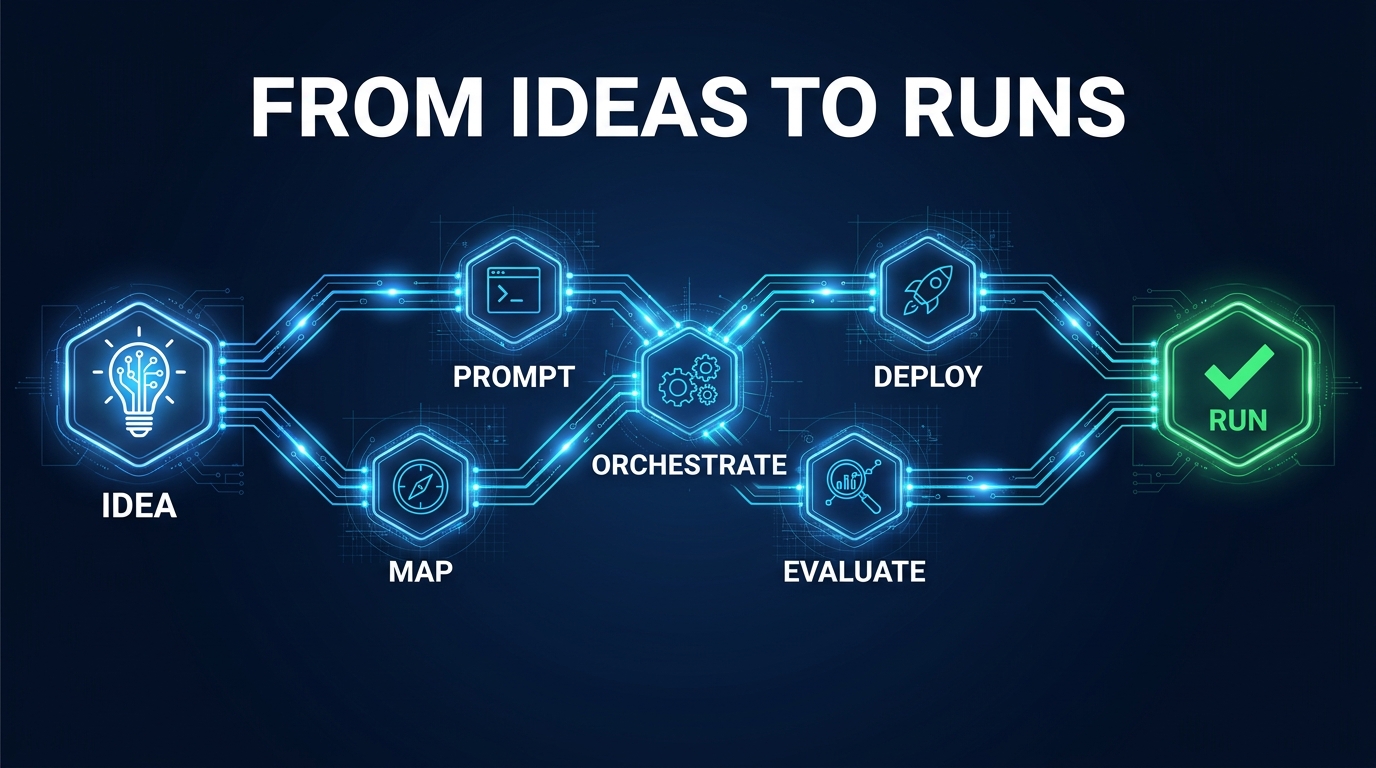

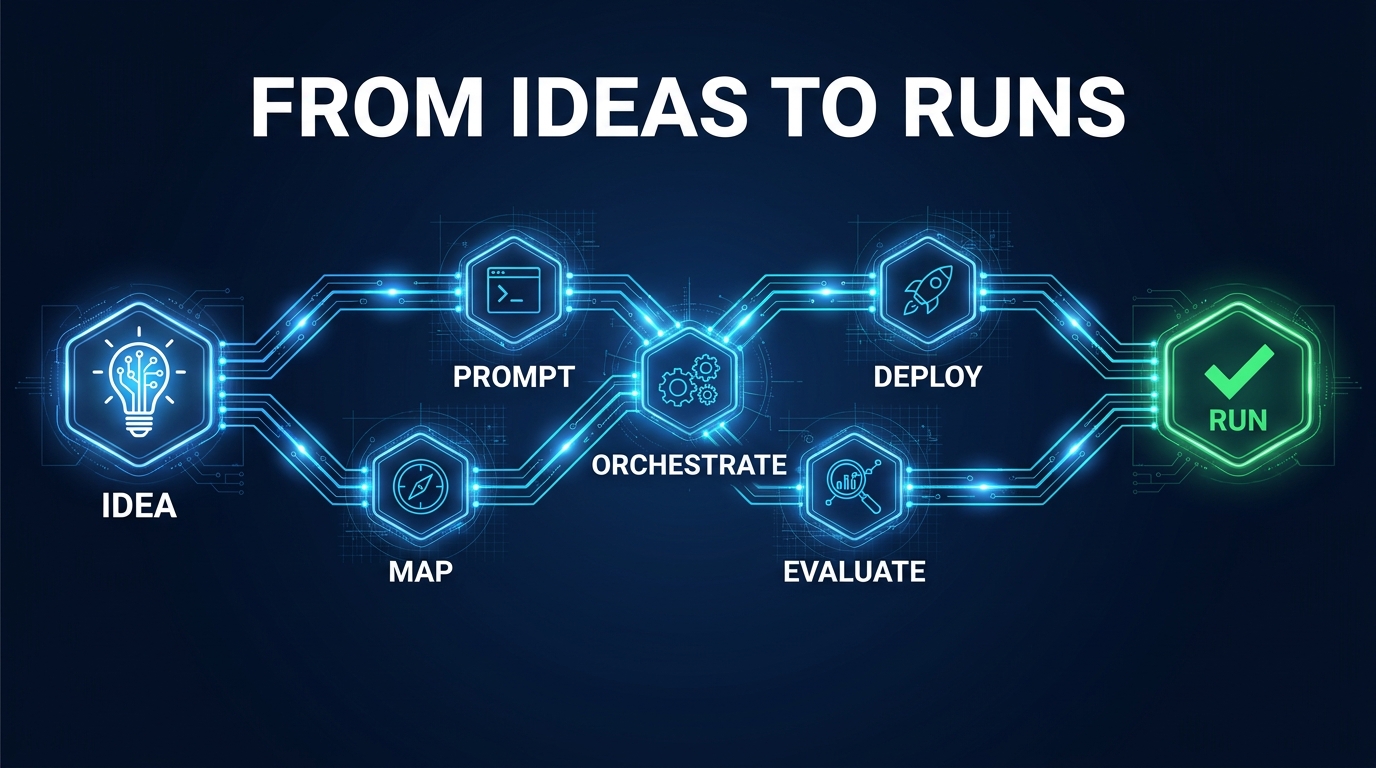
Every team has ideas. Plenty of teams have prototypes. Far fewer have runs — reliable, repeatable, production-grade executions of AI workflows that actually do what they were designed to do, on a schedule or trigger, without someone babysitting them.
That gap between idea and run is where most AI investment stalls. The model works. The demo lands. The pilot clears stakeholder review. Then the workflow hits real data, real users, and real edge cases — and something breaks in a way nobody thought to plan for. An exception with no owner. Context that disappears between steps. A prompt that quietly drifted and no one noticed for three weeks. A perfectly confident output that was completely wrong.
The problem is almost never the model itself. It’s the absence of a workflow design discipline — a structured approach to how you take an AI idea from concept through architecture, orchestration, evaluation, and hardening until it becomes something that runs reliably at production volume.
This post covers that discipline end to end. Not the theory — the actual stages, the specific decisions, the tools, and the failure modes you need to account for before you ever call something “deployed.” Whether you’re building internal automation or customer-facing AI products, the distance from idea to run is shorter than most people realize, and longer than most demos suggest.
The Language Problem: Why “Ideas” and “Runs” Are Farther Apart Than Teams Think
Before getting into the stages, it’s worth understanding why so many organizations stay trapped between a good idea and a working run. The answer has a lot to do with language — specifically, the fact that teams use different words to describe fundamentally different things.
In modern AI workflow tooling, a run is a specific technical object: a single execution of a workflow from trigger to completion, made up of discrete tasks, coordinated by an orchestration layer that manages state, retries, timing, and failure handling. A job is a schedulable or queued unit of work. A task is an individual step within a run. An agent is an AI component that can plan and execute across multiple tools or steps with some degree of autonomy.
Most teams don’t design at this level of precision. They design at the level of the idea — what they want the AI to do — and skip everything in between. The result is workflows built around the AI’s capability rather than the workflow’s requirements. They work in demos because demos don’t have retry logic, state management, exception routing, or monitoring. They fail in production because production has all of those things and the workflow wasn’t designed to handle them.
The Demo-to-Production Gap Is a Design Gap
This distinction matters because it reframes the problem. The reason AI workflows break in production isn’t usually that the model is wrong. Research into AI workflow failure patterns in 2026 consistently identifies the same culprits: missing process design, unclear ownership, no explicit stop or recovery conditions, and poor handoff logic between steps. These are workflow architecture problems, not AI capability problems.
Fixing them requires approaching workflow design the same way you’d approach software architecture: with deliberate structure, clear interfaces between components, explicit failure handling, and measurable success criteria at every stage. That’s what “AI-first” actually means — not that AI does everything, but that the workflow is designed from the ground up around what AI can reliably own, and what humans need to handle.
What a “Run” Signals About Your Workflow Maturity
Think of a run as a unit of accountability. If your AI process can’t be described as a run — with a clear trigger, a defined set of steps, observable state, and a completion condition — it’s not a workflow yet. It’s a tool being used informally. That’s fine as a starting point, but it’s not a foundation you can build on. The goal of this post is to give you the structure that takes you from that informal tool use to something that runs.
What an AI-First Workflow Actually Looks Like (And What It Doesn’t)
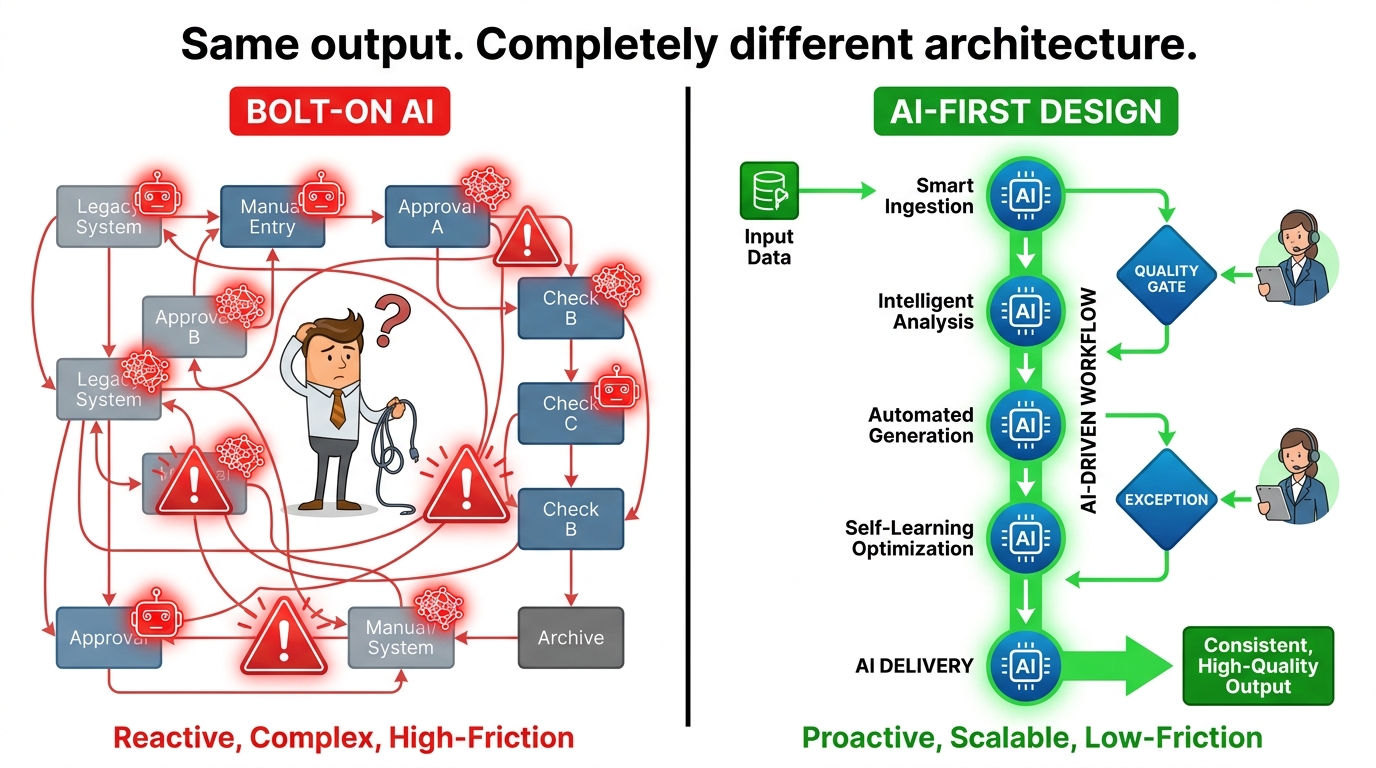
The term “AI-first” has been used to describe everything from adding a chatbot to a website to rebuilding entire operational processes from scratch. That range of usage has made it almost meaningless. For the purposes of this post, here’s a working definition: an AI-first workflow is one where AI is the default executor of routine steps, and humans are positioned as quality gates, exception handlers, and system designers — not as the primary labor doing the work.
This is architecturally different from what most teams do, which is bolt AI tools onto existing processes. Bolt-on AI looks like using ChatGPT to summarize emails in a workflow that was otherwise designed for humans. The human still owns the process; the AI is just an occasionally-useful shortcut. AI-first design looks like redesigning the email triage process around what AI can own end-to-end, with human review triggered only when confidence falls below a threshold or the email meets specific exception criteria.
The Three Structural Differences
In practice, AI-first workflows differ from AI-augmented human workflows in three structural ways:
- The default actor is the AI, not the human. In an AI-first workflow, the AI executes the step unless a rule says otherwise. In a bolt-on workflow, the human executes the step and may optionally use AI to help. That default matters enormously for speed, consistency, and scale.
- Decisions are explicit, not implicit. AI-first workflows force you to specify every decision point — what the AI decides, what triggers a human review, what constitutes failure, what happens on a retry. Bolt-on workflows leave most of these implicit because the human figures it out.
- The workflow is designed around the task, not the tool. AI-first teams start with the outcome they need and work backward to assign steps to AI or human actors based on reliability and judgment requirements. Bolt-on teams start with the tool and look for places to apply it.
What It’s Not
AI-first doesn’t mean fully autonomous. Some of the most robust AI-first workflows in production have multiple human checkpoints. It also doesn’t mean maximum AI involvement at every step. There are cases — high-stakes decisions, legally sensitive outputs, situations requiring empathy or contextual judgment that AI consistently fails at — where human involvement isn’t a concession to AI’s limitations but a deliberate design choice that makes the workflow more reliable overall.
The AI-first principle is about intent and default orientation, not about removing humans entirely. Keep that distinction clear as you design.
Stage 1 — Idea Validation: Before You Write a Single Prompt
Most AI workflow failures are planted before the first line of code is written. Teams jump from idea to implementation — excited by a capability they’ve seen, eager to show progress — without doing the foundational work of validating whether the idea is actually a good candidate for AI automation in the first place.
Idea validation in an AI-first workflow context is not a creativity exercise. It’s a risk and feasibility filter. The goal is to screen out ideas that will cost more to build and maintain than they save, and to sharpen the ideas that survive into something specific enough to design against.
The Four Questions Every Idea Has to Answer
Before any workflow design begins, every candidate AI idea should be able to answer four questions clearly:
- What is the exact job-to-be-done? Not “summarize documents” — that’s a capability. The job-to-be-done is specific: “extract the three most important action items from each client call transcript and route them to the correct Slack channel within 10 minutes of call completion.” Specificity is the test. If you can’t write the job-to-be-done in one sentence, you don’t have a workflow yet.
- What does success look like, measurably? Define a KPI before you build anything. Cycle time, error rate, volume processed, cost per transaction, exception rate — pick the metric that will tell you whether the workflow is actually working. Without this, you’ll end up measuring impressions rather than outcomes.
- What happens when it goes wrong? This question eliminates more ideas than any other. If the workflow produces a bad output, who catches it? How? What’s the recovery path? If the answer is “we’ll figure that out,” the idea isn’t ready to design.
- Is this a task AI can reliably own, or a task AI can reliably assist with? These are different workflow designs. Full AI ownership requires high reliability and low cost of error. AI assistance — where the AI generates a draft and a human reviews it — has a lower reliability bar but a different architecture and different efficiency profile. Be honest about which one you’re actually building.
Scoring and Prioritizing
Teams with mature AI workflow programs typically score ideas on two axes: value (impact on the KPI if it works) and complexity/risk (how hard it is to make it reliable and what breaks if it doesn’t). High value, low complexity ideas go first. High value, high complexity ideas go into a design-heavy second wave. Low value ideas, regardless of complexity, don’t get built — no matter how interesting the technology is.
The discipline of that scoring process is what separates teams that ship working workflows from teams that accumulate impressive demos.
Stage 2 — Workflow Mapping: Drawing the Shape of Your Run
Once an idea clears validation, the next step is to draw the workflow before building it. This is not a technical task — it’s a process design task. And it’s where most engineering-led teams underinvest because they’d rather write code than draw boxes.
Workflow mapping serves three specific functions in AI-first design: it makes decisions visible (you can’t automate a decision you haven’t acknowledged), it forces explicit handoff logic (who or what handles each step, and what triggers a transition), and it surfaces hidden complexity before it becomes a bug in production.
The Mapping Grammar
A useful workflow map for AI-first design needs five types of elements:
- Triggers: What starts the run? An API call, a schedule, a file upload, a form submission, a message event? Every workflow has one or more trigger types, and they need to be explicit.
- Steps: What happens in sequence (or in parallel)? Each step should be owned by exactly one actor — AI or human — and should produce a specific, named output.
- Decision points: Where does the path branch based on output? What are the conditions for each branch? Decision points are where most silent failures hide, because teams often leave them implicit.
- Human gates: Where does a human need to review, approve, or intervene? These should be intentional, not default. Every human gate adds latency; make sure the latency is worth the reliability gain.
- Failure paths: What happens if a step fails, times out, or produces output below the confidence threshold? Does the run retry? Escalate? Pause and wait? This is not optional to design — it’s the backbone of a reliable run.
Process Simplification Before Automation
A critical principle that experienced workflow designers emphasize: simplify the process before you automate it. If the current human process has redundant steps, unclear ownership, or unnecessary decision points, automating it will amplify those problems. AI does not fix broken processes — it scales them.
Before finalizing your workflow map, challenge every step: does this step need to exist? Can it be merged with another? Can its output be inferred rather than explicitly computed? The simplest workflow that achieves the outcome is almost always the most reliable in production. Complexity is debt you’ll pay in debugging time later.
From Map to Spec
The output of workflow mapping is a specification — not code, not a prompt, but a clear, written description of what the run does, step by step, including inputs, outputs, actors, branches, and failure paths. This spec becomes the reference document for everything that follows: prompt design, orchestration selection, evaluation criteria, and monitoring configuration. Teams that skip this step spend months debugging systems they never fully understood.
Stage 3 — Prompt Architecture and Context Design
With the workflow map and spec complete, you can now design the AI-facing components: the prompts, the context structures, and the output schemas for each AI-owned step. This is distinct from “prompt engineering” as it’s usually practiced, which tends to be ad hoc — tinker with the prompt until the demo output looks right.
Prompt architecture treats each prompt as a component in a larger system. It asks: what does this step need to receive to do its job reliably? What should it output, and in what format? How does its output feed the next step? What happens if the context changes between runs?
Separating Instructions from Context
One of the most important structural decisions in multi-step AI workflows is how to manage the separation between system instructions (what the AI should do and how) and runtime context (the specific data or state relevant to this particular run). Mixing these together inside a single prompt creates a system that’s hard to version, hard to debug, and prone to context contamination between steps.
Best practice in 2026 is to treat system instructions as versioned configuration — stored separately, tracked in version control, and updated deliberately. Runtime context is assembled at execution time based on what the workflow has collected so far. This separation makes it dramatically easier to isolate the cause of a failure: was it the instruction set, or was it bad runtime data?
Context Window Engineering
Multi-step workflows face a compounding challenge: as runs proceed through stages, the accumulated context can exceed what any single prompt can reliably handle. This is what practitioners call context collapse — the point at which the volume or complexity of context degrades the model’s ability to reason accurately about any specific part of it.
Managing this requires deliberate context architecture. Design each step to receive only the context it needs — not everything the workflow has collected. Use structured formats (JSON schemas, typed outputs) rather than free text wherever possible, so downstream steps can extract specific fields rather than parsing unstructured text. If a step genuinely requires large amounts of context, consider whether it should be split into multiple smaller steps with narrower inputs.
Output Schemas and Downstream Compatibility
Every AI step should produce output in a format that the next step can consume without additional parsing or transformation. In practice, this means designing output schemas — explicit structures that define what fields the AI should return and in what types — before writing the prompt, not after. Tools like structured output modes in OpenAI’s API, Anthropic’s tool-use features, and frameworks like Instructor enforce output schemas at the API level, making it much harder for a step to produce output that breaks the next step in the chain.
Stage 4 — Choosing Your Orchestration Layer
With the workflow designed and the prompt architecture in place, you need an orchestration layer — the infrastructure that actually executes runs, manages state, handles retries, routes exceptions, and coordinates multiple steps or agents. Choosing the wrong orchestration layer for your workflow type is one of the most expensive mistakes you can make, because it’s hard to change after you’ve built on top of it.
In 2026, the orchestration landscape has consolidated around a few clear patterns, each suited to different workflow types. Understanding where each tool belongs is more valuable than knowing every feature of each tool.
LangGraph: Agent Reasoning and Stateful Logic
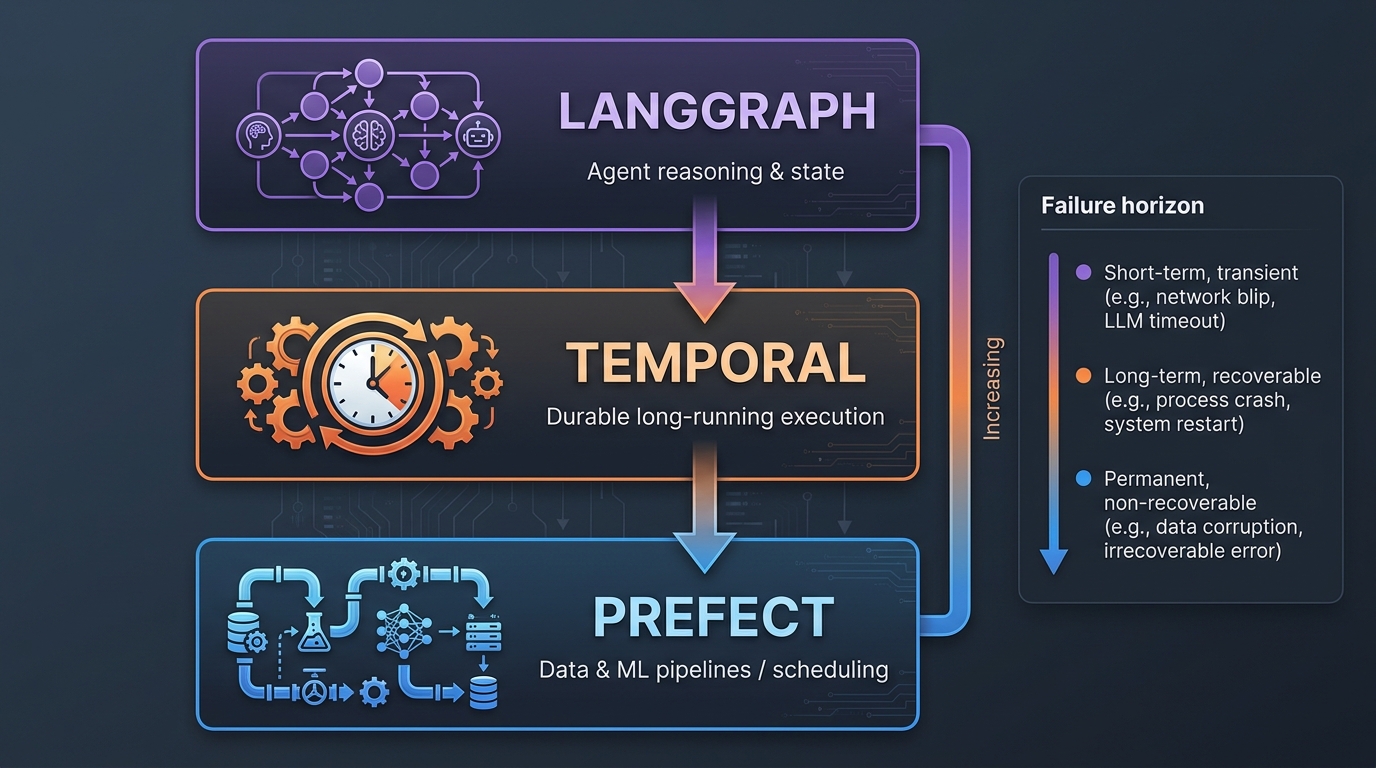
LangGraph is a framework for building multi-step, multi-agent workflows where the execution path isn’t fully predetermined. It’s the right choice when your workflow involves agent reasoning — where an AI component needs to decide what step to take next based on what it has learned so far, use tools dynamically, or execute loops with conditional termination. LangGraph manages graph state across steps, making it possible to build workflows that branch, loop, and compose agents without losing context.
Where LangGraph breaks down is in scenarios requiring durable, long-running execution. It’s designed for agent logic, not infrastructure reliability. A LangGraph workflow that needs to survive server restarts, wait for external events, or run for hours or days needs something underneath it to handle that durability.
Temporal: Durable Long-Running Execution
Temporal is the right tool when your workflow needs to be durable across time and infrastructure failures. It handles workflows that span minutes, hours, or days — workflows that include waits for external events (an API response, a human approval, a scheduled window), workflows that need guaranteed exactly-once execution semantics, and workflows where a server restart can’t mean a lost run.
The dominant architecture pattern among mature AI engineering teams in 2026 is what practitioners call the “Temporal outer loop, LangGraph inner loop” pattern: Temporal manages the durable execution of the overall run, while LangGraph handles the agent reasoning inside specific steps. This combination gives you infrastructure reliability at the outer layer and flexible agent logic at the inner layer.
Prefect: Data and ML Pipelines
Prefect sits in a different domain — it’s optimized for data and ML pipelines that need scheduling, dependency management, retry logic, and observability across data-heavy tasks. If your AI workflow involves significant data ingestion, transformation, model training or fine-tuning, batch inference, or evaluation pipelines, Prefect handles the scheduling and orchestration of those data-plane operations in a way that LangGraph and Temporal aren’t designed for.
In practice, teams often use Prefect around the outside of their agent workflows: Prefect handles data preparation and model evaluation pipelines, while LangGraph and Temporal handle the agent execution in the middle.
Simpler Options: When You Don’t Need All Three
Not every workflow needs a three-layer orchestration stack. For simpler automation — sequential steps, predictable paths, short execution times — tools like n8n, Inngest, or even Zapier handle orchestration without the infrastructure overhead of Temporal. The right principle is to use the minimum orchestration complexity that meets your workflow’s reliability and durability requirements. Over-engineering orchestration is its own form of failure mode.
Stage 5 — Evaluation Before Deployment
Evaluation is the stage most teams skip or rush, and it’s the single biggest predictor of whether a workflow will hold up in production. The typical skipping rationale is “the outputs look good in testing.” But looking good is not the same as performing reliably across the distribution of inputs the workflow will encounter in real use.
Proper evaluation before deployment has three components that are distinct from each other and all necessary.
Functional Correctness Testing
Does the workflow do what it’s supposed to do — on a representative sample of inputs? This means building an evaluation dataset that includes not just typical inputs but edge cases, adversarial inputs, low-quality inputs, and inputs that are close to the boundary of what the workflow is designed to handle. The evaluation dataset should be at least 50–100 representative examples for simple workflows, and several hundred for anything customer-facing or high-stakes.
Automated evaluation using an LLM judge (a separate model that scores the workflow’s outputs against defined criteria) has become standard practice. It’s not perfect, but it’s dramatically faster than manual review and catches the majority of regression issues before they reach production.
Failure Mode Testing
What happens when things go wrong? Test the failure paths explicitly. What does the workflow do when the input is malformed? When an API call times out? When the AI produces output below the confidence threshold? When the human gate is triggered and nobody responds? Every failure path in your workflow map should have a test case that exercises it. If a failure path breaks the run rather than routing it gracefully, that’s a design problem to fix before deployment — not after.
Load and Latency Profiling
Can the workflow handle production volume? What’s the latency per step, and does it meet the requirements of the use case? What’s the token cost per run at scale? A workflow that costs $0.04 per run in testing might cost $4 per run with longer production inputs, which changes the economics entirely. Profile latency and cost at realistic input sizes before you’re committed to a production rollout.
Stage 6 — Production Hardening: From Prototype to a Real Run
A prototype that passes evaluation is not a production workflow. Production hardening is the work of making the workflow reliable, observable, and maintainable at scale — and it typically takes as long as building the prototype in the first place. Teams that don’t allocate time for production hardening end up doing it reactively, which is slower and more painful.
Retry Logic and Graceful Degradation
Every external call in your workflow — API calls, database queries, model inference — can fail transiently. Retry logic is the mechanism that makes transient failures invisible to the workflow’s outcome. The standard pattern is exponential backoff with jitter: wait progressively longer between retries, with randomization to prevent thundering herd effects when many workflows retry simultaneously.
Beyond retries, design graceful degradation paths: what should the workflow do if a step fails after all retries are exhausted? In some cases, producing a partial output with a flag is better than failing the run entirely. In others, failing fast and routing to a human handler is the right call. Define this in advance.
Secrets, Credentials, and Security Posture
Production AI workflows often touch sensitive systems: customer data, internal APIs, financial records, communication platforms. The security posture of your workflow needs to match the sensitivity of what it touches. In 2026, the standard approach is zero-trust principles applied to AI workflows: every component authenticates separately, credentials are injected at runtime via a secrets manager (not hardcoded), and access is scoped to the minimum required for the workflow’s function.
Pay particular attention to what context is passed to the AI model. If runtime context includes sensitive data — PII, financial details, proprietary information — that data is being sent to an external API. Review your data agreements, apply anonymization or redaction where appropriate, and document what data the workflow transmits and where.
Versioning and Rollback
Treat your workflow definition, prompt configurations, and output schemas as versioned artifacts, not one-off scripts. Every change to a prompt or workflow step should be tracked, timestamped, and tied to a deployment record. This is what makes it possible to diagnose why a workflow’s performance changed after a particular release — and to roll back if a change breaks something in production.
The “workflow-as-code” approach — where the workflow definition, prompts, and configuration are all stored in version control alongside the application code — has become the standard among mature teams. It enforces the versioning discipline and makes the workflow’s behavior reproducible across environments.
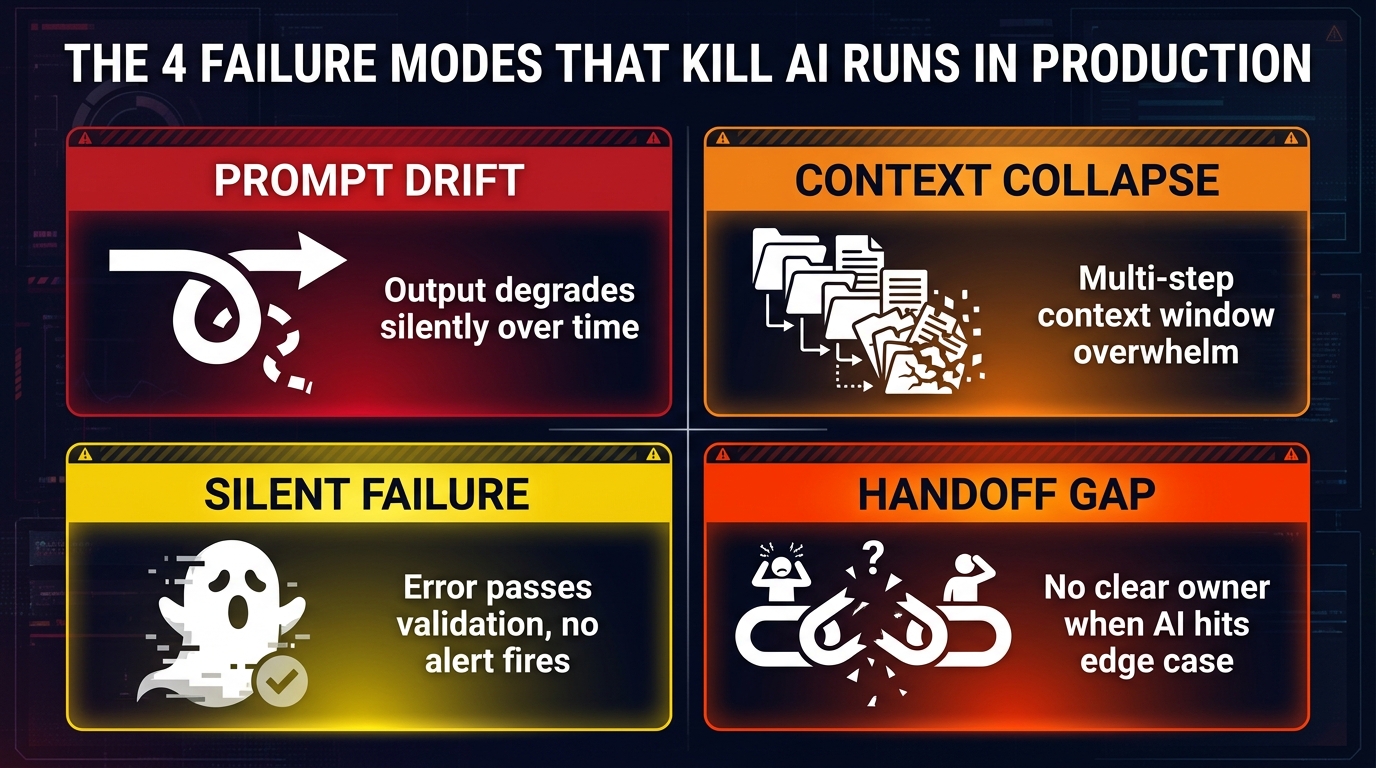
The Four Failure Modes That Kill Runs in Production
Even well-designed AI workflows break in predictable ways. Understanding the four most common production failure modes — and designing against them explicitly — is the difference between a workflow that runs for months without incident and one that requires constant firefighting.
1. Prompt Drift
Prompt drift is the gradual degradation of a workflow’s output quality over time without any explicit change being made. It happens because the AI models underlying the workflow change (providers update base models silently), because the distribution of real-world inputs shifts away from what you tested, or because prompts that weren’t precisely anchored produce outputs that slowly slide toward edge cases the original design didn’t anticipate.
The insidious thing about prompt drift is that it’s silent. The workflow keeps running, no errors are thrown, and the outputs continue to pass basic validation. They’re just subtly worse in ways that accumulate over time. The defense is continuous automated evaluation against a golden dataset — a fixed set of reference inputs and expected outputs that you run against the live workflow on a schedule. When quality scores drop below a threshold, you investigate before users notice.
2. Context Collapse
Context collapse occurs when a multi-step workflow accumulates more context than the AI component can reason over accurately. This happens most often in agentic workflows where each step’s output is fed into the next step’s context, causing the context window to grow progressively larger. Eventually the model’s attention is spread too thin — it starts ignoring earlier context, making contradictory conclusions, or producing outputs that are internally inconsistent.
Prevention requires disciplined context management from the design stage: structured outputs instead of free text, step-level context scoping (each step receives only what it needs), and explicit context summarization steps for long-running workflows that need to carry information across many steps.
3. Silent Failure
A silent failure is a run that completes without throwing an error but produces an output that is wrong in a way that passes downstream validation. This is the most dangerous failure mode because it’s the hardest to detect. An error that crashes the run is immediately visible. An output that’s confidently wrong but structurally valid can propagate through systems for hours before anyone notices.
The mitigation is layered validation: output schema enforcement catches structural errors, a confidence score or LLM-judge evaluation catches semantic errors, and downstream sanity checks (does this output make sense in the context of what we know?) catch logical errors. No single validation layer is sufficient; you need all three.
4. The Handoff Gap
The handoff gap is the organizational failure mode: a point in the workflow where neither the AI nor any human has clear ownership of what happens next. It typically appears at exception points — when the AI’s confidence is below threshold, when an edge case triggers a branch that wasn’t fully designed, or when a step produces output that falls outside the expected range. The workflow pauses, or routes to a generic queue, and sits there because no one knows whose job it is to resolve it.
Designing against the handoff gap means explicit escalation paths: every exception condition in the workflow should route to a named owner (a role, not necessarily a person), with a defined SLA for resolution and a defined recovery action once the exception is handled. This is an organizational design problem, not a technical one — and that’s exactly why it’s so often left unresolved.
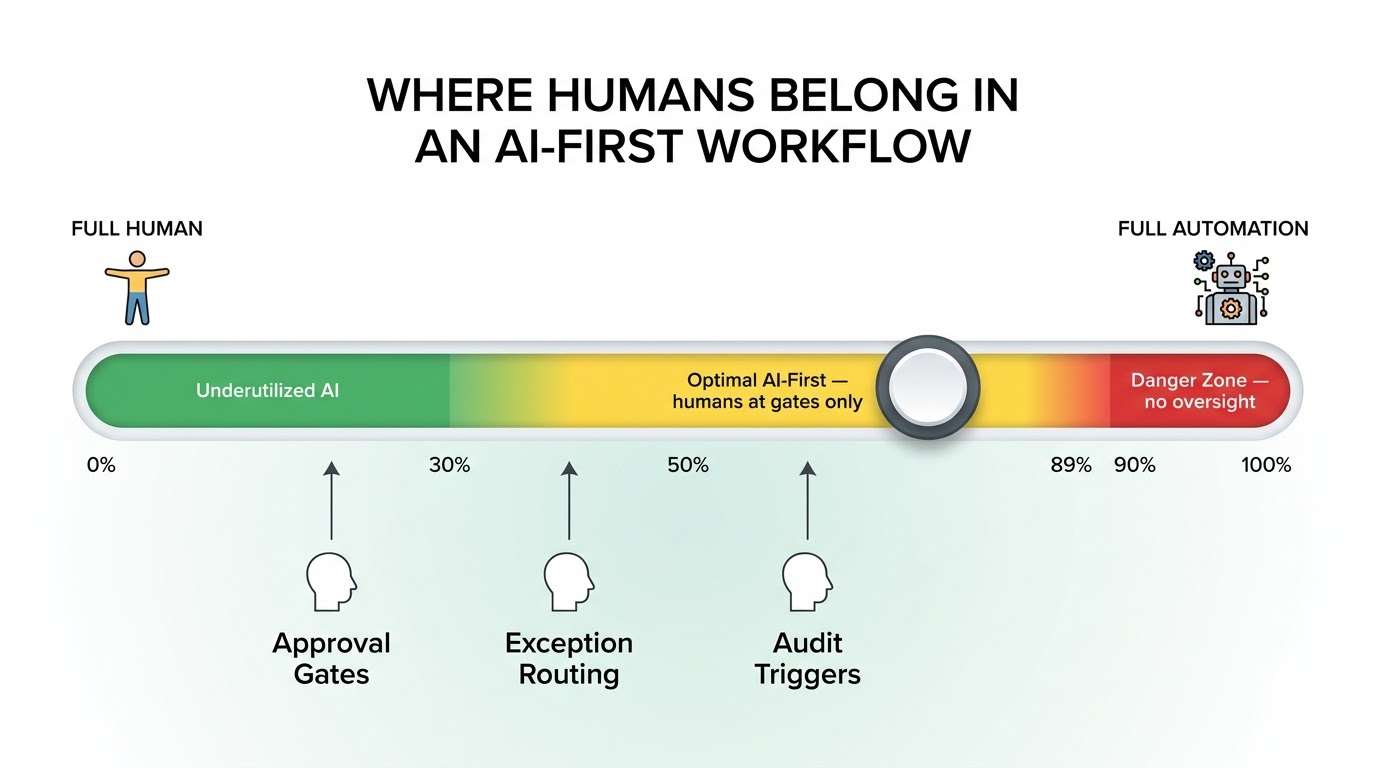
Human-in-the-Loop: Where to Put the Gates (And Why They’re Not What You Think)
Human-in-the-loop (HITL) is often discussed as if it’s a single feature you add to a workflow — a review step, a thumbs-up-or-down button, an approval queue. In reality, human involvement in AI-first workflows is a design variable with multiple distinct functions, and confusing those functions leads to gates that are placed in the wrong spots, reviewed by the wrong people, or add latency without adding reliability.
The Three Types of Human Gates
There are three structurally different reasons to include a human gate in an AI-first workflow:
- Quality gates: A human reviews the output to verify accuracy before it’s acted upon. This is appropriate when the cost of error is high enough to justify the review latency and when humans can reliably detect errors that automated validation cannot. Quality gates belong at the point of action — just before the output is sent to a customer, submitted to a system, or used to make a high-stakes decision. Putting them earlier just adds latency without catching errors that may occur in subsequent steps.
- Exception handlers: A human receives escalated runs that the AI couldn’t resolve — because confidence was too low, because the input fell outside the workflow’s designed scope, or because a retry limit was hit. Exception handling gates are reactive and should be designed with clear context: the human handler needs to see exactly what the AI tried, why it stopped, and what options are available for resolution.
- Audit triggers: A human reviews a sample of completed runs — not to catch errors in real time, but to monitor for systemic drift, bias, or quality decline over time. Audit triggers are statistical sampling mechanisms, not error-catching mechanisms. They should be designed separately from quality gates and exception handlers because they serve a different function.
Designing Gates That Don’t Become Bottlenecks
The most common HITL problem in practice is that gates designed as quality mechanisms become bottlenecks because the volume of reviews exceeds the capacity of the human reviewers. When this happens, reviewers start rubber-stamping outputs rather than actually reviewing them — which is worse than no gate at all, because it creates a false sense of oversight.
Fix this at the design stage by calibrating gate frequency to reviewer capacity. If you can only review 200 outputs per day, a gate that triggers on 80% of runs is not sustainable at 1,000 runs per day. Either reduce the trigger rate (improve the AI’s confidence so fewer runs need review) or reduce the review scope (review only high-stakes output types, not all output). Human review is a finite resource; design it as such.
The Disappearing Gate Problem
There’s also the opposite failure: gates that start as intentional oversight mechanisms and gradually get removed as the workflow matures and teams become confident in the AI’s performance. This is sometimes appropriate — if the AI’s error rate is genuinely low and the cost of errors is manageable, removing gates is a reasonable optimization. But it should be an explicit, documented decision with clear reintroduction criteria, not a gradual drift.
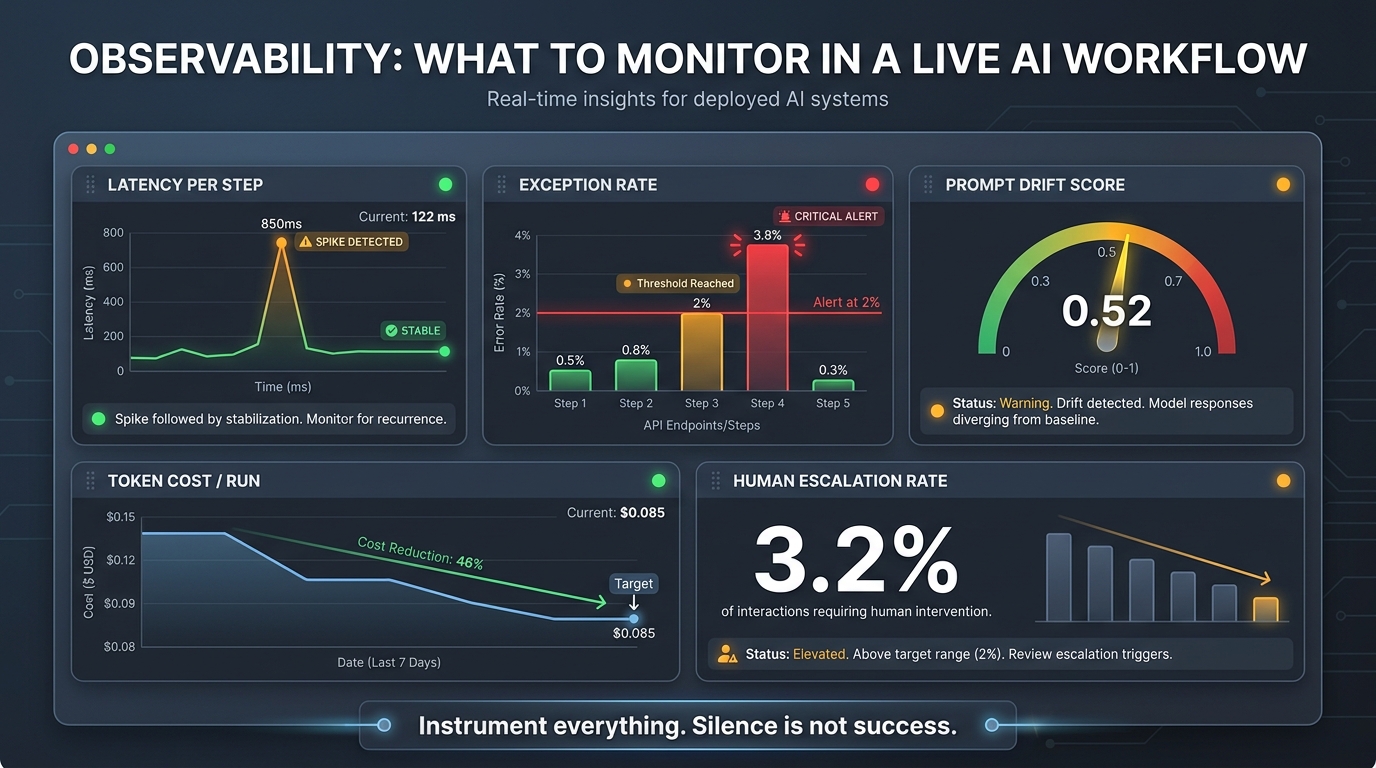
Observability and the Living Workflow
A workflow that runs but can’t be observed is a system you don’t actually control. You can see its outputs, but you can’t diagnose its behavior, predict its failures, or understand what’s happening inside it when something goes wrong. Observability — the practice of instrumenting your workflow so that its internal state is visible in real time — is what transforms a deployed workflow into something you can confidently operate.
What to Instrument
Production AI workflows need instrumentation at multiple levels:
- Step-level latency: How long does each step take? Spikes in step latency often precede failures and can indicate upstream issues with external APIs or model providers before they become outages.
- Token cost per run: Track the actual token consumption of each AI step, aggregated to a cost-per-run metric. Cost spikes often indicate context management problems — inputs getting unexpectedly large, prompts getting amended with unnecessary context — that also affect quality.
- Exception and escalation rate: What percentage of runs trigger a human escalation? A rising escalation rate is the earliest signal that the workflow is encountering input patterns it wasn’t designed for. A falling escalation rate that drops to zero is a signal to check your exception routing — silence is rarely good news in a production system.
- Output quality scores: If you’re running continuous automated evaluation, track the distribution of quality scores over time. Gradual drift in the score distribution is the signature of prompt drift or model drift before it becomes a visible quality problem.
- Retry rate: How often do steps retry? High retry rates indicate instability in external dependencies — model API reliability, tool integrations, downstream systems the workflow writes to.
The Silence-Is-Not-Success Principle
A principle that experienced workflow operators emphasize repeatedly: silence is not success. A workflow that runs without generating alerts or exceptions isn’t necessarily a workflow that’s performing well — it might be a workflow whose failure modes are invisible because its observability is incomplete. Build alerting that checks for the presence of expected signals, not just the absence of error signals. If you expect a workflow to generate a certain volume of human escalations and that volume drops to zero, investigate why — don’t assume everything got better.
Traces and Run-Level Visibility
Beyond aggregate metrics, production workflows need run-level visibility: the ability to look at a specific run and see exactly what happened at each step — what input was received, what output was produced, how long each step took, whether retries occurred, and what escalation was triggered. This is trace-level observability, and it’s the difference between “something broke” and “this specific run failed at step 3 because the input exceeded the context window limit and the retry logic routed it to the exception queue where it’s been waiting for 48 hours.”
Tools like LangSmith (for LangGraph-based workflows), Temporal’s built-in workflow history, and purpose-built LLM observability platforms like Langfuse and Honeycomb are the standard infrastructure for this level of visibility in 2026.
Building the Feedback Loop That Makes Your Workflow Smarter Over Time
A deployed AI workflow isn’t finished — it’s the beginning of an iteration cycle. The workflows that compound in value over time are the ones built with systematic feedback loops: mechanisms for capturing performance data, routing it back to the teams that can act on it, and translating those insights into improvements that are shipped and measured. Without this loop, workflows plateau at their initial performance level and gradually degrade as the world around them changes.
The Three Feedback Sources
Effective AI workflow feedback comes from three sources, each providing different signal types:
- Automated evaluation results: The continuous quality scoring against your golden dataset tells you whether the workflow’s output quality is stable, improving, or declining. This is your leading indicator — it detects problems before they manifest as user complaints or business impact.
- Human reviewer signal: When human reviewers in your quality gates or exception handling process approve, reject, or correct AI outputs, that signal is valuable training data. Capturing it systematically — what was rejected, why, and what the correct output was — creates a feedback loop that can inform prompt improvements, fine-tuning decisions, and evaluation dataset expansion.
- Downstream outcome tracking: Did the AI’s output actually achieve the intended business outcome? For a customer service workflow, did the AI’s response resolve the customer’s issue or did it escalate anyway? For a content workflow, did the AI-generated content perform at the expected engagement level? Connecting workflow outputs to downstream outcomes closes the feedback loop at the business level, not just the quality level.
Structured Improvement Cycles
The teams with the highest-performing AI workflows in production share a common practice: structured improvement cycles with explicit cadence and ownership. Weekly or bi-weekly reviews of quality metrics, exception patterns, and downstream outcomes, with a clear process for translating identified issues into prompt changes, workflow modifications, or evaluation dataset expansions. These aren’t ad hoc debugging sessions — they’re scheduled, documented, and measured against the previous cycle’s baseline.
This discipline is what makes the difference between a workflow that performs at 70% quality six months after deployment and one that’s at 90%. The underlying AI capabilities may be identical; the operational discipline around continuous improvement is not.
When to Retrain vs. Re-Prompt vs. Redesign
As you accumulate feedback, you’ll face decisions about how to act on it. These decisions have different costs and different scopes:
- Re-prompting (adjusting the instructions or context structure) is the lowest-cost intervention and should be the first option for most quality issues. It’s fast to implement, easy to version, and reversible.
- Fine-tuning (adapting the model’s weights on domain-specific data) is appropriate when the base model consistently fails at a specific task type despite well-designed prompts. It’s significantly more expensive and time-consuming than re-prompting and should be reserved for cases where re-prompting has been genuinely exhausted.
- Workflow redesign is necessary when the feedback reveals that the fundamental workflow architecture is wrong — the steps are in the wrong order, the wrong tasks are assigned to AI vs. human actors, or the failure modes are structural rather than fixable within the current design. This is the highest-cost intervention and the one teams are most reluctant to do, but it’s sometimes the only path to a reliably performing workflow.
From Ideas to Runs: The Discipline in Practice
The distance between an AI idea and a reliable production run is a structured set of decisions, not a single technical leap. Teams that consistently bridge that distance successfully share a characteristic that’s easy to overlook: they treat workflow design as a first-class discipline, equal in importance to model selection, prompt quality, and infrastructure choice.
They validate ideas against hard criteria before building. They map workflows before coding them. They design context architecture and output schemas before writing prompts. They choose orchestration layers based on their workflow’s actual requirements. They evaluate rigorously before deploying. They harden for production. They instrument for observability. And they close feedback loops with structural discipline, not ad hoc debugging.
None of this is beyond the reach of most teams. What it requires is the willingness to slow down between idea and implementation — to spend time on design that feels less exciting than building — because that investment is exactly what makes the difference between a run that holds up and a demo that doesn’t.
Actionable Takeaways
- Start with the four validation questions before touching a tool: job-to-be-done, success metric, failure handling, and AI vs. human ownership. If you can’t answer all four, you’re not ready to design.
- Draw before you code. A workflow map with explicit triggers, steps, decision points, human gates, and failure paths will catch more design flaws than any amount of testing after the fact.
- Separate instruction from context in your prompt architecture. Version your instructions; assemble context at runtime.
- Match your orchestration to your workflow type. LangGraph for agent reasoning, Temporal for durable execution, Prefect for data pipelines — and don’t use all three unless you need all three.
- Evaluate against a golden dataset before deploying, not just against the outputs that look right in testing. Include failure paths and edge cases in your test suite.
- Instrument five key metrics from day one: step latency, exception rate, output quality score, token cost per run, and retry rate. Alert on anomalies in all five.
- Design your feedback loop before you launch. Know in advance who reviews what signal, at what cadence, and what they do with it. A workflow without a feedback loop is a workflow that will degrade.
The teams building the most reliable AI-first workflows in 2026 aren’t necessarily the ones with the most advanced models or the largest engineering headcount. They’re the ones who’ve invested in the unglamorous discipline of workflow design — the work between the idea and the run. That’s where durable value is built.