
Most TikTok Shop sellers approach GMV Max like a traditional ad campaign: set a budget, set a bid, and let it run. That mental model worked fine when Video Shopping Ads still existed as a separate entity. It doesn’t work now. As of July 2025, GMV Max became the default and only supported campaign type for TikTok Shop Sales objective ads. There’s no fallback. No legacy format to retreat to. If you’re running TikTok Shop ads in 2026, you’re running GMV Max — whether you’ve studied its rules or not.
The problem is that GMV Max has its own internal logic for spending money, and that logic doesn’t behave like any ad platform most sellers have run before. It’s not Google’s broad match. It’s not Meta’s Advantage+ in a different skin. The budget system inside GMV Max operates on a set of interconnected rules — daily budget floors, auto-scaling triggers, optimization mode toggles, ROI guardrails, and learning phase thresholds — that interact with each other in ways that can silently destroy a campaign’s profitability or, equally, silently cap its growth.
This post breaks down every layer of the GMV Max budget architecture: what the rules actually say, how they behave in practice, where they diverge, and what the most expensive misunderstandings cost sellers in 2026. This isn’t a surface-level overview. If you’re spending $500/day or more on TikTok Shop, or planning to get there, this is the operating manual you need before you touch a single campaign setting.
What GMV Max Actually Is — And Why It’s Now the Only Game in Town
Before the budget rules make sense, the underlying architecture has to make sense. GMV Max is not a standard pay-per-click campaign with a TikTok logo on it. It’s an automated commerce optimization system — meaning TikTok’s AI takes your budget and your target return, then makes all downstream allocation decisions on your behalf.
You don’t choose placements. You don’t set manual bids at the ad group level. You don’t split test audiences the way you would in a traditional ad campaign. Instead, GMV Max pools all of your eligible shop content — your product pages, your creator affiliate videos, your livestream events — and distributes spend across them based on its own real-time prediction of where the next dollar of budget will produce the highest gross merchandise value.
The Consolidation That Changed Everything
Prior to mid-2025, TikTok Shop advertisers could run multiple discrete campaign types: standard Video Shopping Ads, LIVE Shopping Ads, and Product Shopping Ads, each with their own audience targeting, budget controls, and optimization goals. Sellers could stay hands-on. They could push budget toward specific products, specific videos, specific audiences.
GMV Max’s rise as the mandatory default format changed that entirely. The shift was a deliberate product decision by TikTok — consolidate all shop ad traffic into a single automated system so the algorithm can optimize across the full funnel rather than optimizing individual siloed campaigns against each other. From TikTok’s engineering perspective, this is the right call: one system with full signal access beats five systems competing with fragmented data.
From a seller perspective, it means the era of granular manual control is over. You now negotiate with an algorithm, not a bidding system. Understanding the budget rules isn’t optional background knowledge — it’s the primary lever you have for influencing outcomes.
The Two Core Inputs GMV Max Actually Responds To
Sellers often approach GMV Max as if it has dozens of levers. In practice, it responds meaningfully to two inputs: the daily budget you set and the Target ROI you choose. Everything else — placements, audiences, content selection — is handled internally. This simplicity is genuinely powerful when used correctly, and genuinely dangerous when misunderstood. The next several sections unpack each rule in detail.
The Core Budget Architecture: Daily Budgets, Floors, and the ROI Target System
GMV Max does not use lifetime budgets in the traditional sense. There is no “set $10,000 for the month and let TikTok spend it at its pace” option. The system operates on daily budget resets — you set how much you’re willing to spend per day, and the algorithm works within that number to maximize GMV at or above your target ROI.
The Platform Budget Floor vs. the Practical Minimum
TikTok’s platform hard minimum for a GMV Max campaign is approximately $50 per day. You can technically launch a campaign at this level. You probably shouldn’t.
The gap between TikTok’s platform minimum and the practical operational minimum is significant, and conflating the two is one of the most common budget mistakes new GMV Max operators make. At $50/day, the algorithm simply doesn’t have enough data throughput to optimize meaningfully. It may spend erratically, stall in the learning phase for weeks, or produce highly unstable ROI swings from day to day.
The range that consistently appears in agency playbooks, practitioner guides, and TikTok’s own soft guidance is $100–$200 per day as the minimum for reliable delivery and meaningful learning. At this level, the system has enough spend volume to collect conversion signals, test content allocation decisions, and begin building its predictive model of your specific product economics.
How the ROI Target System Works
The ROI target is not a bid. It’s a performance guardrail. When you set a Target ROI — expressed as a multiple (e.g., 3× means $3 in GMV for every $1 of ad spend) — you’re telling GMV Max: “Only deploy budget in situations where you predict the return will meet or exceed this threshold.”
The system then acts as a gatekeeper on your own budget. It won’t necessarily spend everything you’ve allocated if it can’t find inventory that meets your ROI target. This is a critical nuance: an underspending GMV Max campaign is often not a delivery problem — it’s a signal that your Target ROI is set too high for current market conditions, content quality, or product velocity.
Conversely, if your Target ROI is set too low, the system will aggressively deploy budget against lower-quality traffic to hit volume targets, potentially spending efficiently in terms of GMV but poorly in terms of actual margin. The ROI target needs to reflect your actual unit economics — not a wishful number, and not a panic number either.
No Manual Audience or Placement Controls
It bears repeating: in GMV Max, there are no audience targeting levers at the campaign or ad group level that function the way they do in conventional TikTok ad campaigns. TikTok’s system allocates across placements — For You Page video ads, search results, product showcase tabs — internally. You see the aggregate performance, but not the per-placement breakdown in the same way legacy campaigns allowed.
This means your ability to influence the campaign’s behavior sits almost entirely at the level of: budget size, ROI target, content volume and quality, and campaign structure choices (more on those below).
Auto Budget Increase: The 50% × 10 Rule Explained — And Why It Catches Sellers Off Guard
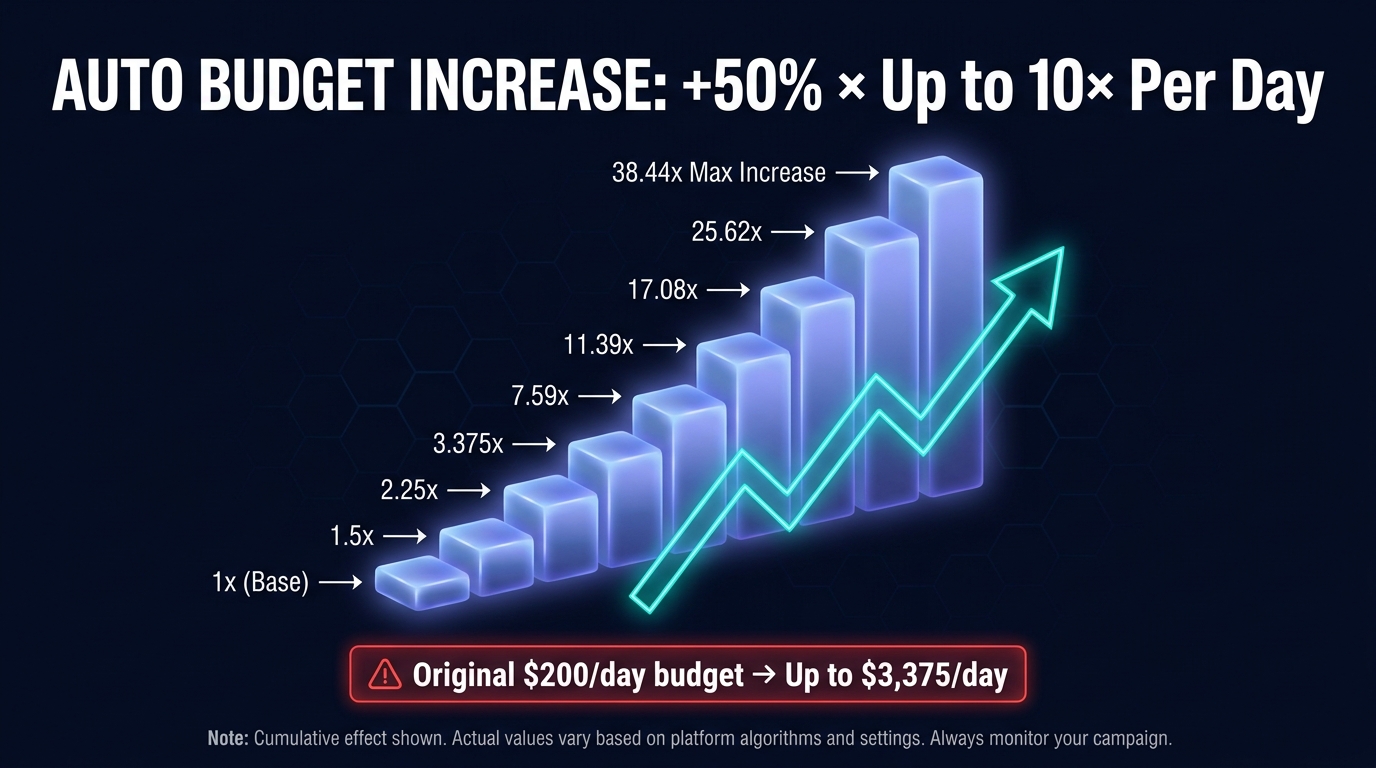
This is the budget rule that generates the most confusion — and the most unpleasant surprises — in 2026. GMV Max has a feature called Auto Budget Increase. When enabled, TikTok’s system can automatically raise your campaign’s daily budget by 50% of the original amount, repeatedly, up to ten times within a single day, whenever it determines that performance conditions justify the expansion.
The Math of a Single Day’s Potential Spend
The compounding here matters. If you set a daily budget of $200 and enable Auto Budget Increase, here is what the theoretical maximum spend for that day looks like:
- Original budget: $200
- After increase 1 (+$100): $300
- After increase 2 (+$100): $400
- After increase 3 (+$100): $500
- …continuing through 10 increases…
- Maximum potential same-day budget: $200 + (10 × $100) = $1,200
Each increase adds 50% of the original daily budget — not 50% of the current budget. So the math is additive, not multiplicative. But at higher starting budgets, the exposure is substantial. A $500/day budget with Auto Budget Increase enabled can theoretically reach $3,000 in a single day. A $1,000/day budget could touch $6,000.
What Triggers an Auto Budget Increase
TikTok doesn’t publish a precise algorithmic trigger for Auto Budget Increase activations, but the documented conditions are: the campaign must be consistently meeting or exceeding its Target ROI, and budget consumption must be tracking high — meaning the system has nearly exhausted the current daily budget and predicts further profitable deployment is available. Both conditions need to align simultaneously.
This means that in normal operating conditions, Auto Budget Increase won’t fire randomly. It fires when things are going very well — when your content is converting, your ROI is strong, and there’s demand signal available that the current budget cap is limiting. That’s a feature, not a bug. The problem arises when sellers haven’t accounted for this in their cash flow planning.
The Critical Limitation: You Cannot Edit the Rule
Here’s what makes Auto Budget Increase unusual compared to most ad platform features: it is On/Off only. You cannot modify the percentage increase (it’s always 50% of original daily budget). You cannot cap the number of daily triggers below 10. You cannot set a maximum daily spend ceiling that overrides the auto-increase logic. Your only choice is whether the feature is active or not.
The practical implication: if you’re operating with tight daily cash flow and can’t absorb unexpected 3–6× spend days, turn it off. If you have margin headroom and want TikTok’s system to exploit high-performance windows aggressively, leave it on. There is no middle ground on this specific rule.
Budget Reset at Midnight
Auto Budget Increase applies only within a single calendar day and resets at midnight. Your baseline daily budget returns to the original amount you set the following day. TikTok’s system will not carry over the auto-increased amount into the next day’s budget — each day starts fresh at your configured baseline. This is important to understand when interpreting day-over-day spend data in your dashboard. A $2,800 spend day followed by a $200 spend day isn’t necessarily a campaign problem; it may simply be Auto Budget Increase firing on one day but not the other.
Max Delivery vs. Target ROI Mode: Two Very Different Budget Philosophies
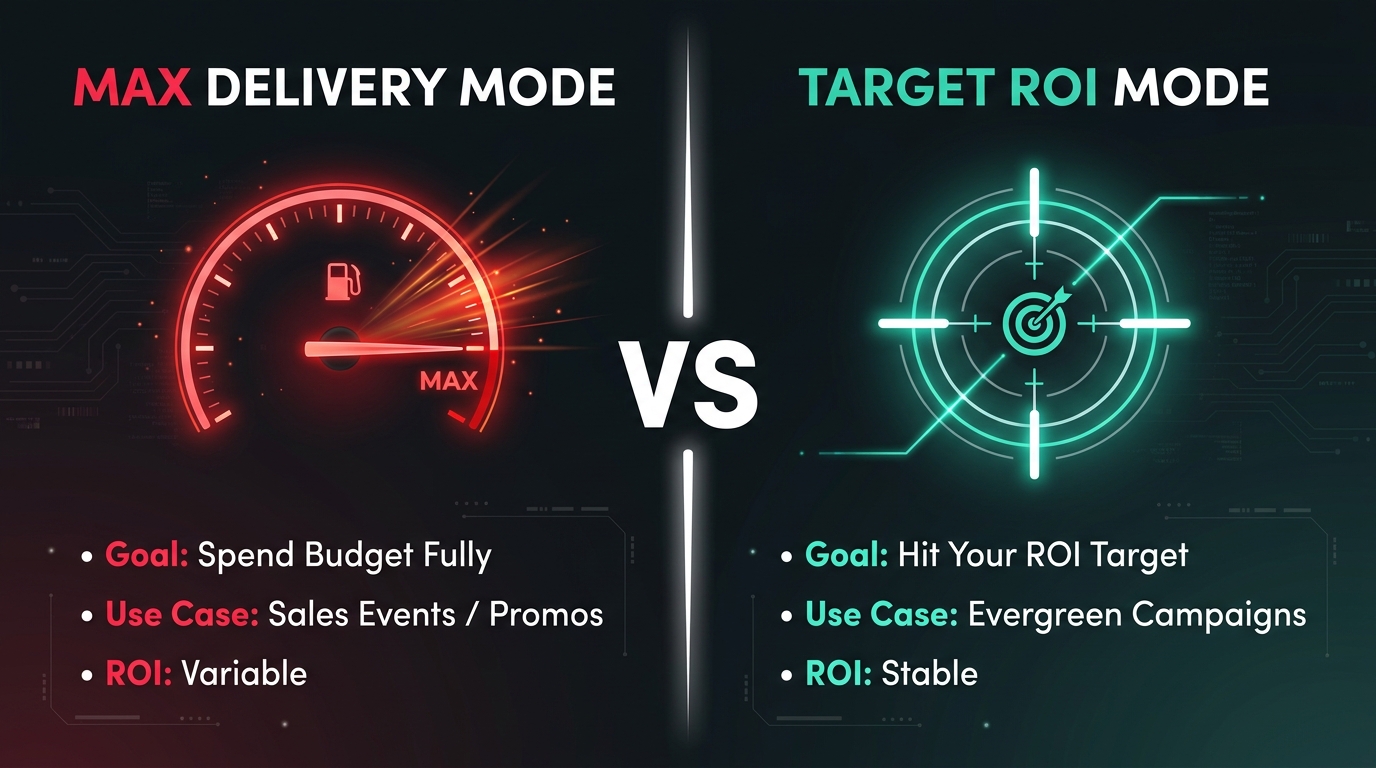
Within GMV Max, there are two distinct optimization modes, and they represent fundamentally different approaches to how your budget gets spent. Confusing them — or applying the wrong mode to the wrong situation — is a reliable way to either waste money or leave growth on the table.
Target ROI Mode: Efficiency-First Budget Deployment
Target ROI is the default mode for most ongoing GMV Max campaigns. As described above, you set a return multiplier and the system gates spend against that threshold. The budget is a ceiling; the ROI target is the filter determining how close to that ceiling TikTok will actually spend.
In Target ROI mode, the system may deliberately underspend your daily budget on days when it can’t find enough inventory that clears your ROI target. This is intentional — and it’s actually the system working correctly. What looks like a delivery problem is often ROI protection behavior. The algorithm is refusing to deploy budget against traffic it predicts will convert below your specified return threshold.
The practical use case for Target ROI: evergreen product campaigns where consistent, predictable margin matters more than volume. If you’re selling at a 30% product margin and need a 3× ROAS to stay profitable, Target ROI mode is your operational default. It’s the mode you run when the business can’t absorb ROI volatility.
Max Delivery Mode: Volume-First Budget Deployment
Max Delivery mode flips the priority. Instead of ROI as the primary filter, the system’s goal is to consume your full budget and maximize raw GMV output, even if that means accepting lower or variable ROI on some traffic. The system will spend aggressively to fill the budget.
TikTok’s official guidance recommends Max Delivery for specific contexts:
- New campaigns in the testing phase, where you’re trying to generate data quickly rather than optimize for efficiency immediately.
- Promotional events — sale days, flash events, seasonal pushes — where volume and inventory clearance matter more than margin precision.
- High-velocity products with proven conversion rates, where the seller can accept ROI variability because the average-case return is well above sustainable.
TikTok’s own published guidance suggests that for Max Delivery, you should set the budget at 1–5× the typical daily spend you see under Target ROI mode at the SKU level. This is a meaningful difference. If your product converts at $500/day under Target ROI, a Max Delivery budget for a promotional push might be set at $1,500–$2,500 to give the algorithm room to scale aggressively.
The Budget Size Implications of Each Mode
This is where the practical difference becomes financially significant. Under Target ROI mode, your daily budget is a theoretical ceiling that the system may not reach. You can set it relatively high without risk of overspend if your ROI target is appropriately conservative. Under Max Delivery, the system will attempt to spend everything you give it. Set a $5,000 Max Delivery budget without strong pre-existing conversion infrastructure, and you may genuinely spend $5,000 in a day without the GMV to justify it.
The mode selection decision should be informed by your current conversion data, the specific campaign goal, and your margin tolerance for a given window of time. Applying Max Delivery mode as a default is one of the more expensive mistakes that operators new to GMV Max make.
Product GMV Max vs. Shop GMV Max vs. LIVE GMV Max: Budget Differences by Format
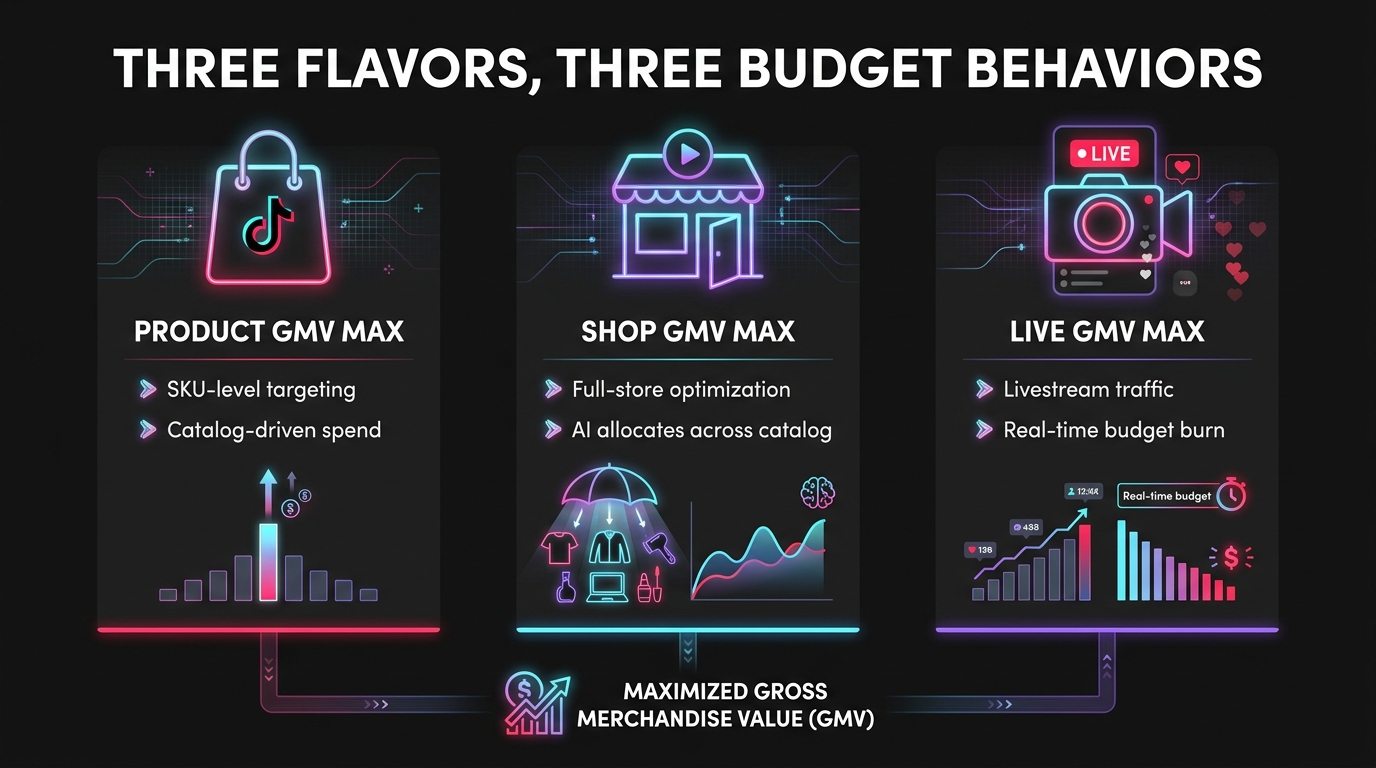
Not all GMV Max campaigns are built alike. TikTok offers three distinct GMV Max configurations, each targeting a different part of the commerce funnel and carrying different budget behavior patterns that sellers need to understand separately.
Product GMV Max: SKU-Level Optimization
Product GMV Max is the narrowest of the three configurations. You’re allocating budget toward specific SKUs or products within your TikTok Shop catalog. The algorithm uses product-level signals — conversion history, price point, review density, content availability — to allocate spend against the specific products you’ve identified.
Budget behavior in Product GMV Max tends to be more concentrated and predictable than shop-level GMV Max. The algorithm has a more constrained optimization target, so you see tighter day-over-day spend patterns. This makes it easier to diagnose performance issues — if a product GMV Max campaign is dramatically underspending, you have a direct signal that either the product’s conversion data is weak, the content available for that SKU is insufficient, or the ROI target is misaligned with current pricing and competition.
Budget recommendation for Product GMV Max: set budgets proportional to the product’s average order value (AOV). A product with a $15 AOV needs very different budget and ROI target calibration than a product with a $150 AOV. Many sellers fail by applying uniform budget rules across heterogeneous catalogs.
Shop GMV Max: The Full-Catalog Automation Layer
Shop-level GMV Max gives the algorithm its widest latitude. Instead of optimizing toward specific SKUs, you’re optimizing toward total shop GMV across your entire product catalog. TikTok’s system can allocate budget to whichever products it determines will produce the best return at any given moment.
This is GMV Max’s most powerful — and most opaque — configuration. Budget gets deployed fluidly across your catalog, meaning high-velocity products with strong conversion history will attract the majority of spend, while slower-moving SKUs may receive very little. This is the correct behavior from a system standpoint, but it can frustrate sellers who want to push specific products that don’t yet have conversion momentum.
Budget management in Shop GMV Max requires a different mental model: you’re funding a portfolio, not a product. Set your daily budget based on total shop revenue targets rather than individual product economics. And accept that the system will make its own allocation decisions — trying to fight that through campaign structure workarounds will generally produce worse results than letting the algorithm run.
LIVE GMV Max: Livestream-Specific Budget Dynamics
LIVE GMV Max operates under a fundamentally different time constraint than product or shop-level campaigns. Livestreams are finite events. A live shopping event that runs for two hours creates a completely different budget-pacing problem than an always-on product campaign running 24/7.
The critical budget consideration for LIVE GMV Max: the system needs to spend a meaningful budget within a compressed time window. If your livestream runs for 90 minutes and you’ve set a low daily budget, the algorithm may not have enough spend capacity to meaningfully amplify the stream’s reach before it ends. Agency guides consistently recommend setting LIVE GMV Max budgets at multiples of your typical hourly product campaign spend — the system needs room to accelerate quickly.
Additionally, LIVE GMV Max campaigns often benefit from Max Delivery mode during the actual livestream window, then either pausing or switching to Target ROI mode post-stream. The economics of livestream selling tend to be volume-oriented — the goal is maximum attendance and transaction velocity during the live window, not maximum per-sale margin efficiency.
The Learning Phase Budget Trap: Why Underfunding Kills Campaigns Before They Start
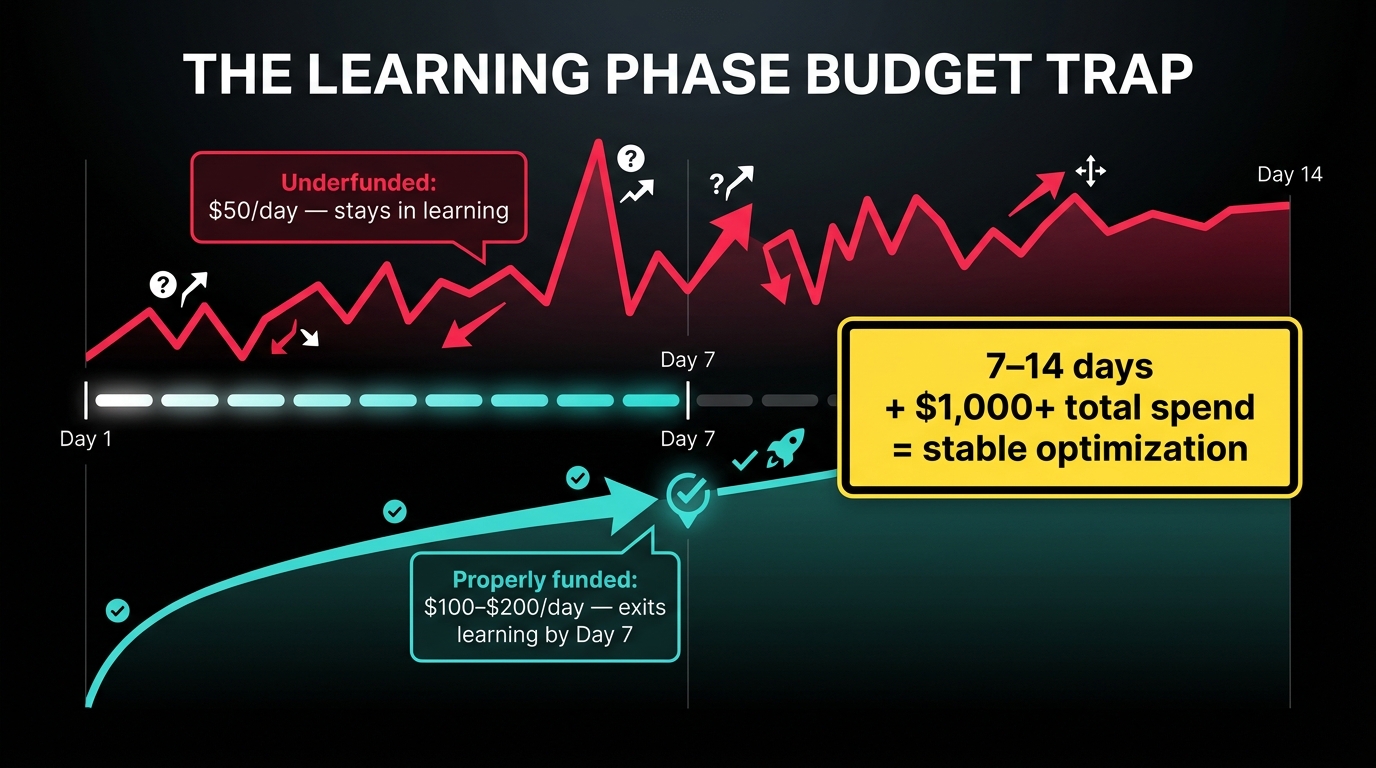
Every GMV Max campaign goes through an initial optimization period — commonly called the learning phase — during which TikTok’s system is gathering data about your product economics, your content performance, and the audience segments most likely to convert. The quality of this learning period determines the baseline performance you’ll see for the life of the campaign.
What Happens During the Learning Phase
During learning, the algorithm is actively exploring: testing different content pieces, different audience signals, different moments of day, different placements. This exploration phase is necessarily less efficient than steady-state operation. ROI may be unstable. Spend may be erratic. Conversion rates will fluctuate.
This is normal — and it’s why intervention during the learning phase is particularly damaging. Every time you change a significant campaign variable (budget, ROI target, creatives, campaign structure), the learning phase resets or is significantly disrupted. You’re forcing the algorithm to start its exploration over, burning budget and time in the process.
The Practical Budget Threshold for Learning Exit
Based on guidance from TikTok and performance agencies operating at scale, the benchmarks for a clean learning phase exit are:
- Timeline: 7–14 days of continuous, uninterrupted operation
- Minimum total spend: approximately $1,000+ over that window
- Daily budget during learning: $100–$200 minimum
A campaign running at $50/day will accumulate approximately $350–$700 in spend over a 7–14 day learning window. That is likely insufficient for the algorithm to build confident prediction models, particularly for products with longer consideration cycles or higher price points where conversion events are less frequent. The system may remain in an extended learning state for weeks, never building the signal density it needs to optimize effectively.
Why the Learning Phase Particularly Punishes Impatience
The learning phase has an asymmetric relationship with time: the cost of impatience is compounding. A seller who changes their ROI target on Day 3 because performance looks poor is likely extending the learning phase by multiple additional days. A seller who pauses the campaign on Day 5 to “give it a rest” is resetting significant portions of the accumulated learning signal.
The operators who consistently extract the best performance from GMV Max share a common habit: they set realistic parameters, fund the learning phase properly, and then leave the campaign alone until the learning window closes. This requires genuine discipline, particularly when early-phase ROI data looks alarming. But the alternative — intervening prematurely and repeatedly — reliably produces campaigns that never fully exit learning and perform well below their potential.
ROI Target Calibration During Learning
One specific calibration principle that consistent practitioners emphasize: set your Target ROI lower during the learning phase than your long-term goal. The reason is mechanical. A lower ROI target during learning allows the system to explore a wider range of traffic and conversion events, building richer signal data. Once learning is complete and the campaign reaches stable delivery, you can gradually raise the Target ROI toward your actual efficiency goal.
Starting with an aggressive ROI target on Day 1 is the equivalent of asking someone to run a marathon at world-record pace without any warm-up. The system will either stall (refusing to spend because it can’t find traffic that clears the target) or burn through budget chasing narrow, high-competition conversion windows. Neither outcome serves the long-term campaign.
The 7 Most Expensive Budget Mistakes GMV Max Sellers Make
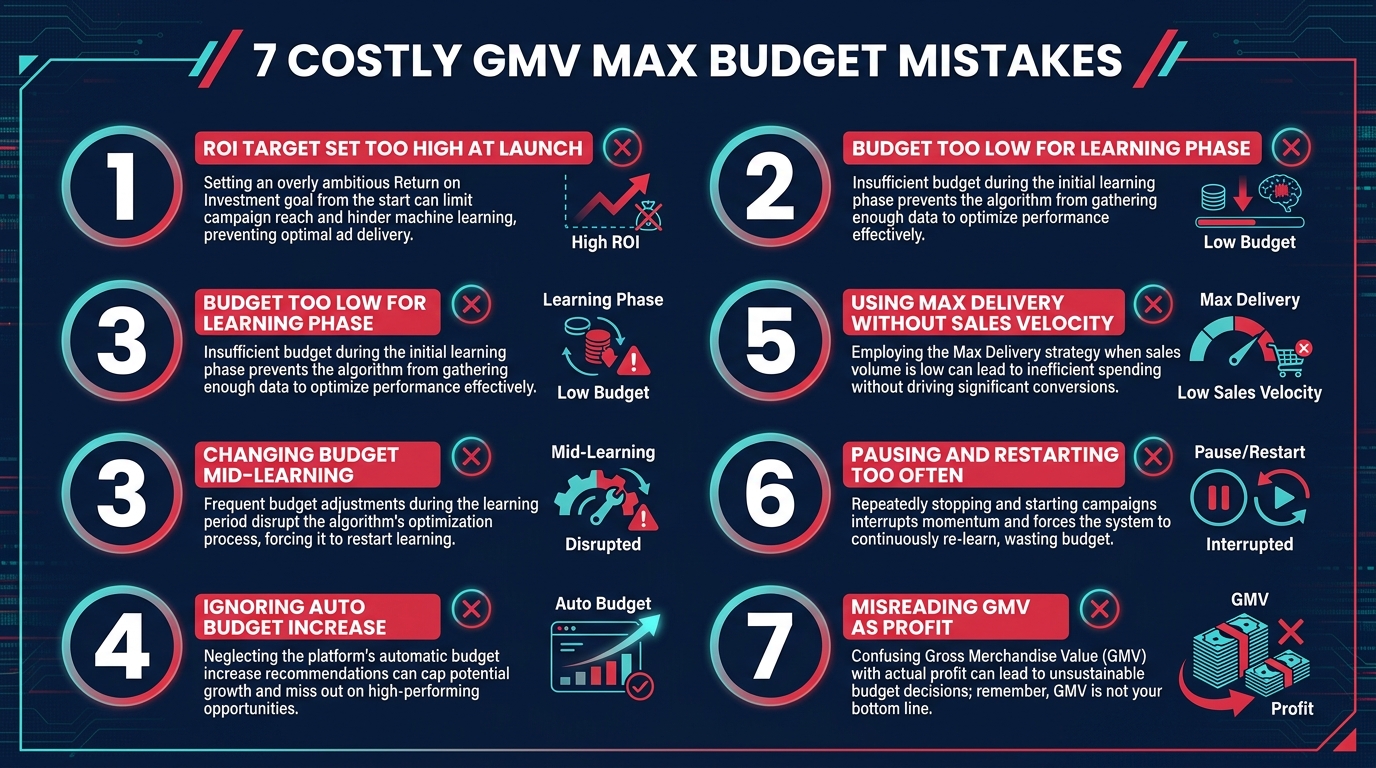
Pattern recognition across dozens of GMV Max campaigns reveals a consistent set of errors that account for the majority of budget waste and underperformance. These aren’t edge cases — they’re the default failure modes of sellers who approach GMV Max without understanding its specific rules.
Mistake 1: Setting Target ROI Too High at Launch
The most common error. A seller who needs 4× ROAS to be profitable sets their Target ROI at 4× from Day 1. The campaign underspends massively, delivers erratic conversions, and the seller concludes GMV Max “doesn’t work.” In reality, the ROI target was set so conservatively relative to the campaign’s current data quality that the algorithm couldn’t find sufficient qualifying traffic.
The fix: start at 50–70% of your target ROI and let the algorithm build signal. Move toward your actual target incrementally over the weeks following learning phase exit.
Mistake 2: Underfunding the Learning Phase
As detailed above, launching at $50/day and expecting meaningful optimization within two weeks is unrealistic. The practical minimum for reliable learning exit is $100–$200/day with at least $1,000 in total cumulative spend. Sellers who launch below this threshold and judge GMV Max by learning-phase performance are drawing conclusions from systematically unreliable data.
Mistake 3: Changing Budget or ROI During the Learning Phase
Adjusting either the daily budget or the Target ROI during the first 7–14 days of a campaign is the fastest way to extend the learning phase indefinitely. Every significant change forces the algorithm to re-explore from a partially reset state. The campaign never builds the stable predictive model it needs. Sellers end up perpetually in a learning state, burning budget at learning-phase efficiency forever.
Mistake 4: Ignoring Auto Budget Increase in Cash Flow Planning
Auto Budget Increase is enabled by default on most GMV Max setups. Sellers who don’t know it exists encounter alarming spend days — a $200/day campaign suddenly spending $800 — and either panic-pause the campaign (resetting learning) or exceed their credit card limits. Neither outcome is acceptable. Know whether Auto Budget Increase is enabled. Plan cash flow accordingly.
Mistake 5: Applying Max Delivery to Unproven Products
Max Delivery mode deployed against a product without an established conversion history is essentially handing the algorithm a large budget with no meaningful performance filter and asking it to spend all of it. The result is often high spend with mediocre GMV return. Max Delivery should be reserved for products or campaigns where conversion rate data is solid and the goal is scaling volume, not discovering whether something converts.
Mistake 6: Pausing and Restarting Campaigns Repeatedly
Repeated pause/restart cycles are among the most destructive patterns in GMV Max operation. Each pause interrupts the delivery algorithm’s active learning. Each restart requires a re-exploration period. Sellers who pause campaigns every time ROI dips below target spend significant cumulative budget in perpetual re-learning phases, never reaching the steady-state efficiency that sustained operation would produce.
If a campaign’s ROI is problematic, the preferred intervention is a gradual adjustment to the Target ROI — not a pause. If creative performance is declining, refresh creative assets while keeping the campaign running. If the product economics are genuinely unsustainable, that’s a product problem, not a campaign problem — pausing won’t fix it.
Mistake 7: Misreading GMV as Net Margin
This one isn’t technically a budget mistake, but it drives the worst budget decisions. GMV (Gross Merchandise Value) is topline revenue — it includes returns, refunds, and doesn’t account for cost of goods, fulfillment, platform fees, or affiliate commissions. A seller celebrating a 4× GMV Max ROAS without accounting for a 35% return rate and 10% affiliate commission is making decisions based on a misleading number.
Always connect your GMV Max ROI target to your actual net economics, not your gross revenue goal. Set the Target ROI at a level where the actual margin, after all costs, is sustainable — even at scale.
Budget Scaling Strategy: How to Grow Spend Without Destroying ROI
Assuming a campaign has successfully cleared the learning phase and is delivering stable results, the natural next question is: how do you scale budget without blowing up the ROI that stable performance delivered? This is one of the most operationally nuanced challenges in GMV Max.
The 20% Rule for Budget Increases
The most widely adopted scaling heuristic among experienced GMV Max operators is the 20% budget increase rule: increase daily budget by no more than 20% at a time, and allow at least 3–5 days of stable performance observation between each increase before making the next adjustment.
The logic is straightforward. Doubling a budget doesn’t double GMV — it pushes the algorithm into new traffic pools that may have lower conversion rates. A 20% increase gives the system room to explore adjacent inventory while maintaining most of the efficiency it’s built during the prior optimization period. A 100% overnight budget increase can functionally reset the algorithm’s calibration and produce a temporary performance deterioration that looks like campaign decay but is actually just re-optimization in progress.
Content Volume as a Prerequisite for Budget Scaling
A frequently overlooked prerequisite for budget scaling in GMV Max is creative volume. The system allocates budget toward content — specifically, video ads, affiliate creator content, and product showcase assets — and when you scale budget significantly, it needs more content to distribute that spend against. A campaign with three creative assets and a $100/day budget may run efficiently. The same three assets at $1,000/day will likely exhaust the productive inventory quickly, then default to lower-quality placements.
Before scaling budget aggressively, ensure your creative pipeline can absorb the increased spend. A general heuristic: for every 2–3× increase in daily budget, your active creative pool should grow proportionally. If you’re running 5 creatives at $200/day and want to push to $1,000/day, you need closer to 15–20 active, performing creative assets to sustain the efficiency gain.
When Auto Budget Increase Makes Scaling Easier
For sellers who’ve cleared the learning phase and have strong conversion data, enabling Auto Budget Increase is actually one of the cleanest scaling tools available. Rather than manually increasing budget and hoping performance holds, you set a conservative daily budget and let the algorithm self-scale on high-performance days. This means your spend naturally concentrates in windows when the system is confident about ROI, rather than being committed equally across all days regardless of demand signal quality.
The risk, as discussed, is cash flow unpredictability. But for sellers with margin headroom and reliable payment infrastructure, Auto Budget Increase-driven scaling produces more algorithm-aligned results than manual budget increases on arbitrary schedules.
Reading the Signals: When to Adjust Budget and When to Leave It Alone
One of the harder skills to develop in GMV Max operation is signal interpretation. The dashboard will show you numbers every day. Not all of those numbers should trigger action. In fact, many of the conditions that feel urgent and actionable are actually situations where the best decision is to do nothing.
Signals That Warrant Budget Adjustment
There are specific conditions where adjusting your daily budget or ROI target is the right call:
- Consistent budget exhaustion over 5+ days: If your campaign is fully spending its daily budget every day for a week while meeting or exceeding Target ROI, that’s a clear signal the budget is too low and growth opportunity is being left on the table. A 20% increase is appropriate.
- Significant product economics change: Price increases, new affiliate commission structures, changes to shipping costs — any meaningful shift in unit economics should prompt a Target ROI recalibration. Running a Target ROI that was set for a 30% margin product after your margins have dropped to 15% is a structural problem.
- Seasonal demand shifts: Predictable demand spikes — sale events, holidays, seasonal relevance — justify temporary budget increases and potentially a shift to Max Delivery mode for the duration of the elevated demand window.
Signals That Don’t Warrant Intervention
Equally important is knowing what not to react to:
- Normal daily ROI fluctuation during learning: Day-to-day variance of 20–30% in ROI during the learning phase is expected behavior, not a campaign crisis.
- Auto Budget Increase days: A single high-spend day caused by Auto Budget Increase, followed by a normal-spend day, is the feature working correctly — not evidence that the campaign is broken.
- Short-term underspend: One or two days of underspend against your daily budget doesn’t necessarily indicate a targeting problem. It may simply mean the system didn’t find enough inventory clearing your ROI target that day. Observe over 5–7 days before concluding there’s a structural issue.
- Creative fatigue without budget changes: Declining performance from creative fatigue should be addressed by refreshing creatives — not by cutting budget. Budget reduction doesn’t fix creative fatigue; new content does.
The 7-Day Rule for Performance Evaluation
The minimum meaningful evaluation window for GMV Max performance is 7 days. Single-day performance data in GMV Max is not a reliable signal for most decisions. The algorithm’s daily budget allocation, content distribution choices, and traffic source selection all vary based on day-of-week patterns, real-time inventory conditions, and competitive auction dynamics that smooth out over weekly windows but produce noisy day-level data.
Decisions about budget changes, ROI target adjustments, or creative refreshes should be based on 7-day rolling averages, not yesterday’s numbers. This is a discipline that separates experienced GMV Max operators from those who chase daily signals and create the very instability they’re trying to fix.
Conclusion: Budget Rules Are the Operating System — You’re Just the Operator
GMV Max is the most opinionated ad format TikTok has ever deployed. It made a deliberate decision to remove most of the manual controls that marketers spent years learning to operate, and replace them with an AI system that claims — and in well-run campaigns, delivers — superior optimization across the full shop funnel.
The budget rules are not an afterthought in that system. They’re the primary interface between your business objectives and TikTok’s algorithm. The daily budget tells the system how much room it has to work. The Target ROI tells it how efficiently to work. The learning phase is the period where it figures out how to actually deliver those outcomes for your specific products and content ecosystem. Auto Budget Increase is the mechanism by which it exploits windows of outperformance without requiring you to manually catch and scale every high-performance moment.
Understanding these rules at a mechanical level — not just conceptually, but in terms of the specific numbers, triggers, and behavioral thresholds they create — is the difference between running GMV Max and being run by it.
Actionable Takeaways
- Never launch below $100/day regardless of TikTok’s $50 platform minimum. The practical learning phase minimum is $1,000+ in total spend over 7–14 days.
- Start your Target ROI 30–50% below your actual goal during the learning phase. Raise it gradually after stable delivery is confirmed.
- Know whether Auto Budget Increase is enabled and build your cash flow planning around the potential daily maximum, not just your set daily budget.
- Match your optimization mode to your campaign goal: Target ROI for evergreen efficiency, Max Delivery for promotional volume events.
- Do not change budget or ROI settings during the first 7–14 days of a new campaign. Premature intervention is the most reliable way to extend the learning phase indefinitely.
- Scale budget in 20% increments with 3–5 day observation windows between increases. Scale creative volume proportionally as budget grows.
- Evaluate performance on 7-day rolling averages, not daily data. The signal-to-noise ratio in single-day GMV Max data is too low to inform meaningful decisions.
- Understand which GMV Max format you’re running — Product, Shop, or LIVE — and calibrate budget expectations accordingly. Each has different pacing behaviors and different minimum thresholds for effective operation.
The sellers who consistently get the most from GMV Max are not the ones who find clever workarounds to its rules. They’re the ones who understand the rules completely enough to work with the system rather than against it. In 2026, that understanding is table stakes for any serious TikTok Shop operator.