
Most organizations approach AI automation the way they approach a kitchen renovation — they pick out the cabinets before figuring out where the plumbing is. They select a tool, assign a champion, announce an initiative, and then spend six months trying to retrofit automation onto processes that were never mapped, measured, or cleaned up in the first place.
The 30-day AI automation sprint flips this order. It starts with the work, not the technology. It demands a narrow scope, a measured baseline, and a real deployment by day 30 — not a proof-of-concept slide deck, not a vendor demo, and not a committee recommendation.
This is a hands-on execution manual. It covers what to do in each of the four weeks, which departments typically see the fastest gains, what KPIs to track from day one, and — perhaps most usefully — exactly what causes sprints to stall or collapse. Whether you are a department head leading your first automation initiative or an operations manager who has already tried and failed, this guide gives you the practical framework to do it right inside a single calendar month.
The 30-day window is not arbitrary. It is short enough to maintain urgency, long enough to produce a real working system, and tight enough to force the scope discipline that most automation projects completely lack.
What a Sprint Actually Is — and What It Isn’t
The term “sprint” has been borrowed from software development, where it describes a fixed-length iteration in Agile methodology. In the context of AI automation, a sprint means something slightly different: a focused, time-boxed effort to research, select, build, and deploy one automated workflow — from zero to live — within 30 days.
Notice the word “one.” That is not a typo or a simplification. It is the entire point.
The Single-Workflow Rule
One of the most consistent findings across automation case studies is that initiatives fail in direct proportion to the number of workflows they attempt to tackle simultaneously. Teams that try to automate lead routing, invoice processing, and employee onboarding all in the same sprint do not move three times faster. They move three times slower, because each workflow introduces its own data dependencies, stakeholder approvals, edge cases, and integration challenges.
A sprint is not a roadmap. It is an execution. The roadmap might cover 12 workflows over 12 months. The sprint covers one of them — the highest-value, most clearly defined, most data-ready workflow on that list — and it delivers a working system by day 30.
What “Done” Means
A sprint is complete when the automated workflow is running in production with real data, real users interacting with it, and a documented set of performance metrics being actively tracked. A completed sprint is not a demo environment. It is not a tool that has been licensed but not configured. It is not a process that has been mapped but not built. Done means live, measured, and owned by a named person who will maintain it after the sprint team disperses.
Sprints vs. Projects vs. Pilots
A pilot tests whether something is technically possible. A project builds something over an extended timeline with multiple approval gates. A sprint does neither of those things. A sprint assumes that AI automation in the targeted category is already proven — because it is, in 2026 — and focuses entirely on execution speed and business impact. You are not proving that AI can process invoices. You are making AI process your invoices, in your system, by the end of the month.
This distinction matters because it changes who should be in the room. Pilots need researchers and evaluators. Projects need project managers and steering committees. Sprints need builders and decision-makers — people who can act immediately, not people who need three more meetings to reach alignment.
Why the 30-Day Window Actually Works
Thirty days is a deliberate constraint, not a deadline plucked from the air. There is a solid body of evidence — both from behavioral psychology and from the operational realities of organizational change — that explains why this window produces results that 90-day and 180-day timelines typically do not.
The Urgency Effect
Research in project psychology consistently shows that teams perform differently when a deadline is close enough to feel real. A 30-day window keeps the end of the sprint visible at all times. Every week of delay is not a minor setback — it is a significant portion of the total available time. This creates a natural forcing function that eliminates the procrastination that plagues longer initiatives.
Compare this to a six-month automation project, where the first two months are frequently consumed by tool evaluation, the third by stakeholder alignment, and the fourth by data cleanup — leaving only the final two months for actual building, which then gets compressed further by competing priorities. The 30-day sprint does not allow this pattern to develop.
Scope Discipline as a Feature
When a sprint is constrained to 30 days, teams cannot afford to automate a poorly defined process. The time pressure forces clarity before building begins. If the scope creeps — if someone suggests adding a second workflow, expanding the integration set, or rebuilding the underlying data model first — the sprint leader can simply say: “We have 30 days. Does this addition fit in 30 days?” The answer is almost always no, which keeps the work contained.
This is genuinely useful. Most automation projects expand their scope not because of bad intentions but because the absence of time pressure allows every good idea to be incorporated. Sprints make the cost of each addition visible and immediate.
The “Something Real” Motivator
Teams that ship something working within 30 days develop a fundamentally different relationship with automation than teams that participate in multi-month initiatives. When a workflow goes live at the end of a sprint — when real tasks are actually being handled by the system, when the time-savings are visible in the first week of production — the team experiences a proof point that no slide deck can replicate.
This motivational effect compounds. Teams that run one successful sprint nearly always want to run another. The organizational appetite for automation grows not from leadership mandates but from the direct experience of seeing a workflow that used to take three hours now completed in four minutes.
Pre-Sprint: The Workflow Audit Most Teams Skip
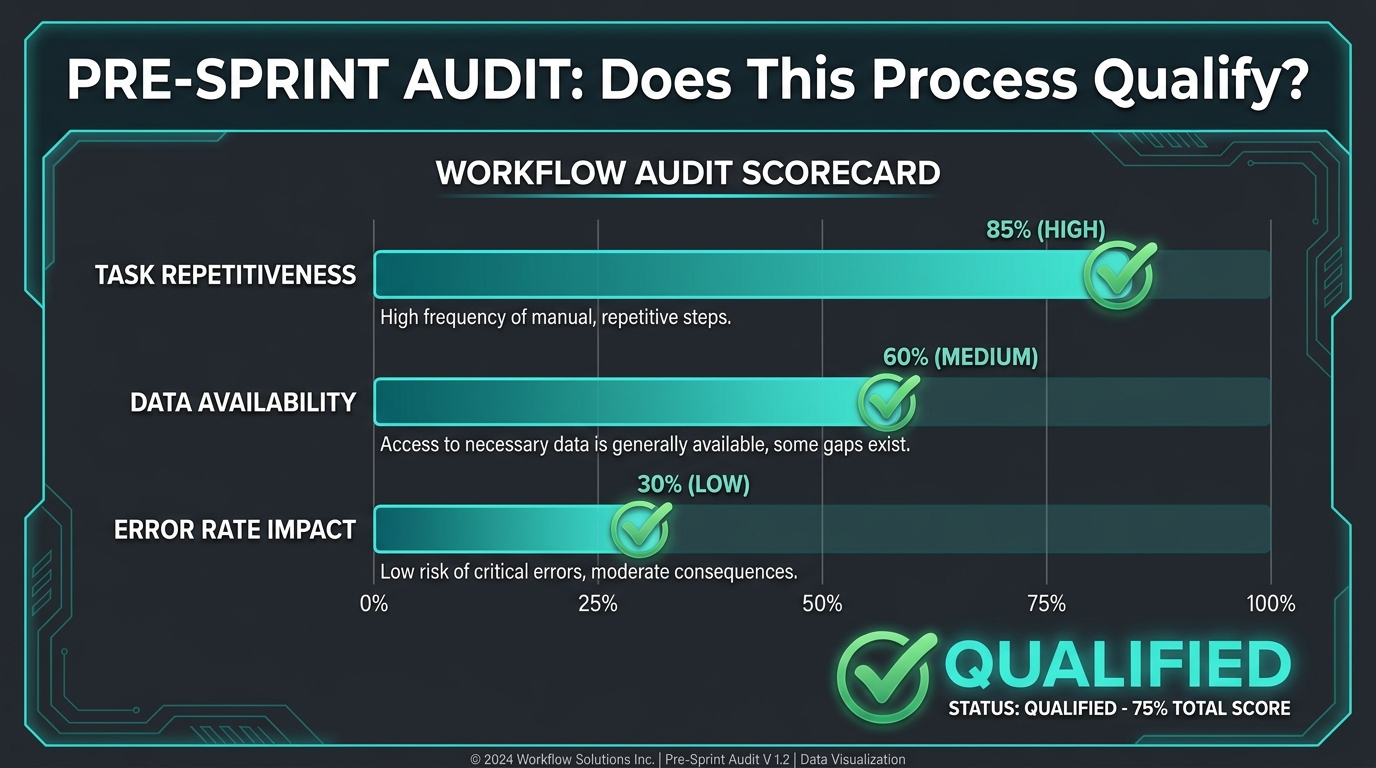
Before the sprint clock starts, there is a critical pre-sprint phase that most teams either rush through or skip entirely. This phase involves selecting the right workflow to automate — which is a far more consequential decision than which tool to use.
The wrong workflow choice is the single most common reason automation sprints produce disappointing results. Teams spend 30 days automating a process that either should not exist, is too complex for a 30-day timeline, or lacks the data infrastructure that automation requires. The pre-sprint audit exists to eliminate these failure modes before a single line of configuration is written.
The Four-Criteria Qualification Test
Any workflow under consideration for a 30-day sprint should pass all four of the following criteria. A workflow that fails even one should either be restructured before the sprint begins or moved further down the priority queue.
1. Repetitiveness: The workflow should involve the same steps being performed multiple times per week, ideally multiple times per day. Automation delivers maximum value when it replaces repetitive human effort. A process that happens twice a month is worth automating eventually, but it is not the right sprint target because the time savings will not be visible enough within 30 days to validate the effort.
2. Data Readiness: The inputs the workflow requires must already exist in accessible, structured or semi-structured form. If the automation needs clean customer data that currently lives across three disconnected spreadsheets, your sprint will spend its first two weeks on data cleanup rather than workflow design. That data cleanup project is real work that should happen — but it belongs in a separate initiative, not inside a 30-day sprint.
3. Decision Clarity: The process should have rules or logic that can be documented without significant ambiguity. “Send a follow-up email three days after a demo call if no reply has been received” is automatable. “Decide whether this lead is sales-qualified” involves judgment that may require human involvement or a much more sophisticated AI model. Clear decision logic does not mean simple logic — it means logic that can be written down and tested against real examples.
4. Ownership: Someone must want this workflow automated and be willing to own the outcome. This person does not have to be technical, but they must be available to answer questions during the sprint, sign off on the final configuration, and take responsibility for the workflow after go-live. Automation without ownership becomes orphaned software — it runs until it breaks, and then no one fixes it.
The Pre-Mortem Question
Before committing to a workflow for the sprint, run a five-minute pre-mortem. Ask the team: “Imagine it is day 31 and this sprint completely failed. What happened?” The answers to this question will surface hidden risks — a key stakeholder who is not bought in, a data source that is not as clean as assumed, a technical integration that will require vendor support — that can either be addressed before the sprint starts or used to disqualify the workflow entirely.
Pre-mortems are uncomfortable because they require teams to admit vulnerabilities before any work has begun. They are also extraordinarily efficient at preventing the most predictable failure modes.
Week 1: Discovery and Process Mapping
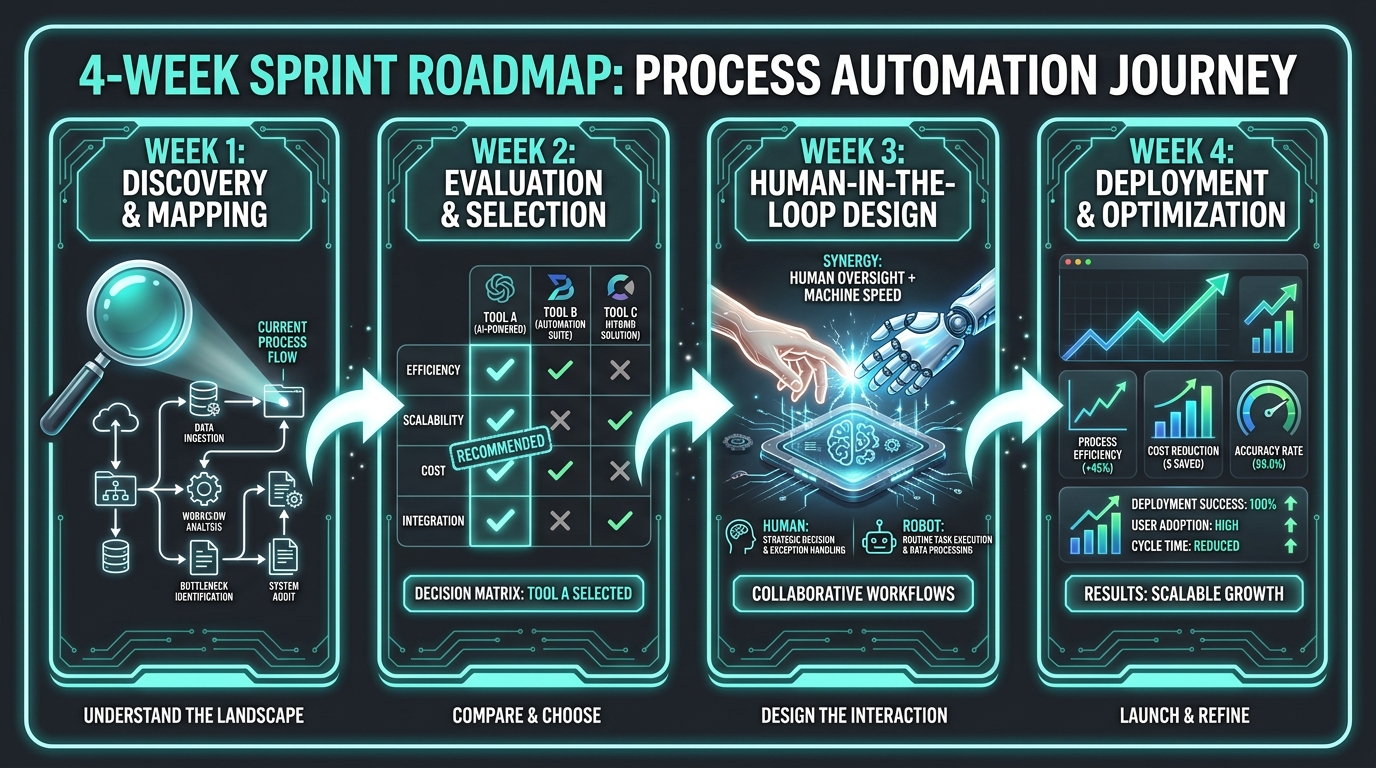
Week 1 has one job: produce an accurate, granular map of how the target workflow actually operates today — not how it is supposed to operate, not how the documentation says it operates, but how it actually runs when real people are doing it under real conditions.
This distinction matters enormously. Most organizations have a significant gap between documented processes and lived processes. The automation you build will have to handle the lived process — including its workarounds, exceptions, and informal steps — not the idealized version in the procedure manual.
The Process Interview
Spend days 1 through 3 interviewing every person who touches the workflow. This includes both the people who perform the primary task and the people who handle exceptions, receive the outputs, or rely on the data the workflow produces. Each interview should cover three questions: What do you actually do in this workflow? What goes wrong and how do you handle it? What takes the longest and why?
These interviews will almost certainly reveal steps that leadership did not know existed. They will surface unofficial data sources — a spreadsheet someone maintains independently because the CRM data is unreliable, a Slack channel where exceptions get resolved manually. These unofficial elements are not flaws to be embarrassed about. They are the most important data points in your discovery, because they reveal where the formal system is failing and what the automation will need to account for.
Volume and Frequency Mapping
By day 3, you should also have concrete numbers for the workflow’s current volume and frequency. How many times does this process run per day? Per week? How long does it take a human to complete each instance? What percentage of instances encounter exceptions that require additional handling time?
These numbers are your baseline. Without them, you cannot calculate ROI, cannot set realistic efficiency targets, and cannot prove at the end of the sprint that the automation actually worked. Teams that skip baseline measurement consistently underestimate the value of what they built, because they have no reference point for how bad the manual process was.
Exception Taxonomy
Spend days 4 and 5 building an exception taxonomy — a categorized list of all the things that can go wrong or deviate from the standard path in this workflow, along with how frequently each exception occurs and how it is currently resolved. This taxonomy will become the core of your human-in-the-loop design in Week 3. Exceptions that occur less than 2% of the time can often be handled by the automated system with a flag for human review. Exceptions that occur 20% of the time suggest that the process definition itself needs refinement before automation is applied.
By the end of Week 1, you should have a swim-lane process map, a documented baseline with real numbers, and a complete exception taxonomy. If any of these three deliverables cannot be completed in five days, that is a signal — not a minor inconvenience — that the workflow is not ready for automation in this sprint cycle.
Week 2: Tool Selection and Stack Decisions
Week 2 is where most teams instinctively want to start. They arrive at the sprint with a tool already in mind — sometimes already purchased — and are impatient to begin building. The process work of Week 1 exists in large part to prevent exactly this. By the time you are selecting tools in Week 2, you should know precisely what the tool needs to do, what data it needs to access, and what exceptions it needs to handle. Tool selection without this context produces solutions that technically function but practically fail.
Matching Tool Categories to Workflow Types
Not all automation tools are suited to all workflow types. In 2026, the major categories available to mid-market and enterprise teams are:
- Workflow orchestration platforms (Zapier, Make, n8n, Power Automate): Best for connecting multiple SaaS applications, triggering actions based on events, and handling linear workflows with clear if/then logic. Minimal technical skill required for basic configurations; moderate skill for complex branching.
- Robotic Process Automation (RPA) (UiPath, Automation Anywhere, Blue Prism): Best for workflows that involve legacy systems without APIs, screen-based interactions, or structured data extraction from documents. Higher setup cost but very broad application range.
- AI-native workflow builders (Relay.app, Bardeen, custom LLM-based agents): Best for workflows involving unstructured data, natural language inputs, or judgment-heavy tasks that traditional rule-based automation cannot handle. Require more configuration and ongoing monitoring.
- Document and data extraction tools (Rossum, Nanonets, AWS Textract): Best for workflows that begin with processing incoming documents — invoices, contracts, forms, emails. Often used as a first step before handing structured data to a downstream orchestration tool.
The Integration Audit
On days 6 and 7, map every system the workflow currently touches and confirm that those systems have accessible APIs or supported integrations with the tools you are considering. This audit will reveal integration gaps that can significantly affect your tool decision. A workflow orchestration tool that does not natively connect to your CRM will require custom API work — which may be feasible but adds complexity and time that the sprint may not accommodate.
Prioritize native integrations over custom-built ones wherever possible for a 30-day sprint. Custom integrations are not inherently bad, but they introduce a category of technical risk that is difficult to manage within a compressed timeline. If the workflow absolutely requires a custom integration, assess honestly whether that integration can be built and tested within the remaining 23 days.
The Build-vs-Configure Decision
Every sprint team will face a point where someone suggests building something custom — a proprietary AI model, a custom-coded script, a bespoke integration layer — rather than configuring an existing tool. Sometimes this is genuinely necessary. More often, it is the result of technical team members defaulting to familiar methods rather than evaluating available alternatives.
For a 30-day sprint, the default position should be: configure first, build only when configuration provably cannot achieve the requirement. Custom-built components take longer to develop, longer to test, and create ongoing maintenance obligations that outlive the sprint. Configuration is not a lesser technical achievement. In the context of a 30-day sprint, it is the strategically correct choice.
The Governance Checklist
Before finalizing tool selection, complete a brief governance checklist that covers data residency requirements, access control capabilities, audit trail functionality, and compliance with any relevant regulations (GDPR, SOC 2, HIPAA depending on the workflow and industry). This is not bureaucratic overhead — it is risk management. An automation that violates data governance requirements will be shut down at significant cost and embarrassment, regardless of how much time it saves.
Week 3: Build, Test, and Human-in-the-Loop Design
Week 3 is the densest week of the sprint. The process is mapped, the tool is selected, and now the actual automation must be configured, connected to live systems, tested against real data, and designed with appropriate human oversight built in. This is where most of the technical work happens — and where the sprint’s quality standards are set.
Configuration Sequence
Begin with the core workflow path — the sequence of steps that handles the most common, standard case. Get this working end-to-end before adding exception handling. This sequencing matters because it gives you a working system early in the week that you can test with real data, which generates practical feedback that informs how exceptions should be handled.
A common mistake is to try to build the entire workflow, including all exception paths, before testing any of it. This approach means that the first test happens very late in the week, with little time to address the issues it reveals. Building core path first, testing it against real data by day 16, and then layering in exception handling on days 17 and 18 is a far more reliable sequence.
Human-in-the-Loop Architecture
Every automated workflow needs a designed point — or multiple points — at which a human can intervene. This is not a concession to automation skeptics. It is a feature of well-designed automation systems, and it is what separates automation that organizations trust and use from automation that gets disabled the first time it makes a mistake.
Using the exception taxonomy built in Week 1, designate which categories of exceptions should trigger an automatic human review notification. Build these notification triggers into the workflow configuration during Week 3. The key design principle is specificity: a notification that says “exception occurred” is not useful. A notification that says “Invoice #4821 flagged: vendor name does not match PO — review needed by [owner name]” is actionable.
Also designate a clear override path — a way for a human to manually intervene in any live workflow instance, correct an error, and resume automated processing. This override capability is critical for building team trust in the automation. When people know they can step in if something goes wrong, they are far more willing to let the automation run without constant supervision.
Testing Protocol
On days 19 and 20, run the completed workflow configuration against at minimum 50 historical real-world cases — a mix of standard cases and known exceptions. Measure the accuracy and output quality of each case. Document every instance where the automation produced an incorrect or unexpected result. These failure cases become the final refinement list for the last two days of Week 3.
Fifty cases is a floor, not a target. If the workflow is high-volume and high-stakes, test against 200 or 500 historical cases. The goal is to surface edge cases that are too rare to show up in a small sample but common enough to cause real problems at production volume. Testing is not quality theater — it is the mechanism by which confidence in the automation is earned, by both the sprint team and the workflow’s future users.
Week 4: Go-Live, Measurement, and the First Iteration
Week 4 has three distinct phases: the go-live itself, the initial measurement period, and the first post-launch iteration based on what the measurement reveals. Teams that skip the measurement phase effectively guarantee that they will not be able to justify additional automation investment — not because the automation did not work, but because they cannot prove it worked.
The Go-Live Protocol
On day 22 or 23, move the automation from test to production. Do not do this silently. Announce it to the team with a brief explanation of what the automation does, what it does not do, and how to report issues. This announcement serves a change management function — it makes the automation visible, legitimizes it as an official system rather than a side project, and gives team members a clear channel for feedback.
For the first two days of live operation, have the sprint team monitor the workflow actively — not micro-managing every output, but reviewing the automation’s activity log at least twice daily and being immediately available to address any issues that arise. This “white-glove” period is important for catching real-world problems that did not appear in testing and for signaling to the team that someone is paying attention.
Measuring What Actually Matters
The metrics collected in Week 4 should be compared directly to the baseline numbers gathered in Week 1. The primary metrics for any workflow automation sprint are:
- Cycle time reduction: How long does each workflow instance take to complete now, compared to the pre-automation baseline? Express this as both an absolute number (minutes saved per instance) and a percentage.
- Error rate change: Is the automated workflow producing fewer errors than the manual process? Note that automation sometimes reveals errors that were previously invisible — this is not a failure, it is a data quality improvement.
- Throughput increase: How many instances per day is the workflow now processing, compared to the manual baseline? For high-volume processes, this is often the most dramatic metric.
- Human time reclaimed: Calculate the total hours per week that were previously consumed by this workflow and are now handled automatically. This is the number most relevant to business case calculations and team morale.
- Exception rate: What percentage of workflow instances are being flagged for human review? Compare this against your exception taxonomy from Week 1. If the automation is flagging significantly more exceptions than the historical exception rate suggested, investigate why.
The First Iteration
By day 28 or 29, the monitoring data will have surfaced specific issues — common exception types that could be handled automatically, edge cases that need configuration refinement, notification timing that could be improved. Address the top two or three of these in a brief refinement session on day 29, then document the remaining items as a backlog for the post-sprint period.
The goal of the first iteration is not perfection. It is momentum. A workflow that is slightly better on day 29 than it was on day 22 is a workflow with an active improvement cadence — which is exactly what distinguishes automation that becomes an operational asset from automation that quietly degrades until someone turns it off.
Department Playbooks: Where Sprints Deliver the Fastest Gains
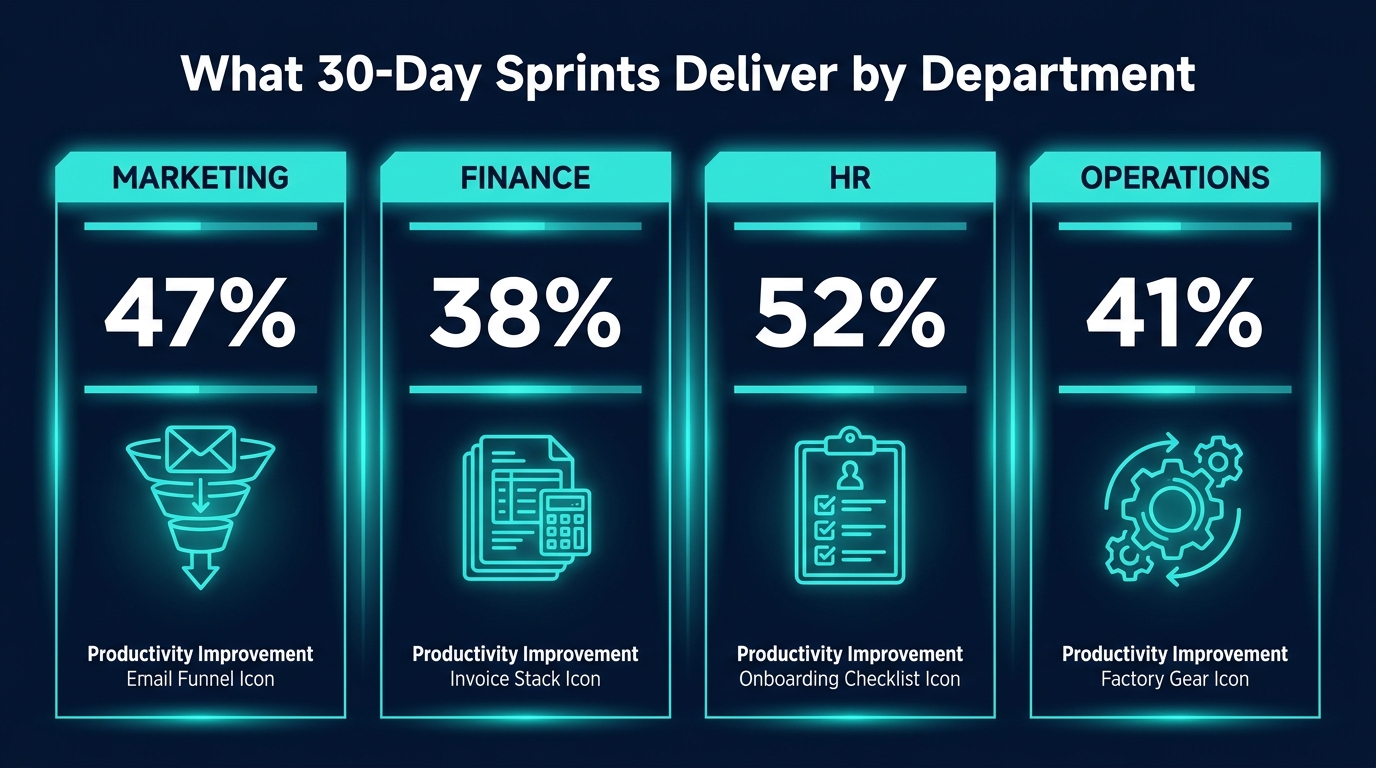
Different departments have fundamentally different workflow characteristics, which means they respond to automation sprints in different ways. Understanding the specific dynamics of each department — which workflows are most sprint-ready, what the typical friction points are, and what “done” looks like — is essential for selecting and executing the right sprint in each functional area.
Marketing Operations
Marketing is the department where automation sprints most often deliver results in the shortest time, because marketing workflows are typically high-volume, data-rich, and already partially tool-mediated. The most sprint-ready marketing workflows are those involving lead management, nurture sequencing, and reporting.
High-value sprint targets: Lead routing and assignment (triggered by form submission, demo booking, or CRM enrichment data), content republishing and distribution workflows, campaign performance reporting aggregation, and marketing-qualified lead scoring updates based on behavioral triggers.
Common friction point: Marketing data quality. Most marketing automation stumbles on inconsistent data — leads with incomplete records, CRM fields populated inconsistently, or multiple data sources that contradict each other. A sprint that touches marketing data should budget two to three days in Week 1 specifically for data quality assessment and cleanup of the fields the automation will rely on.
Realistic 30-day outcome: A functioning lead routing workflow that automatically assigns inbound leads to the correct sales rep based on territory, company size, and lead score — with a human review flag for leads that fall outside standard assignment rules — typically reduces average lead response time by 60-80% and virtually eliminates manual routing effort for the sales operations team.
Finance and Accounts Payable
Finance offers some of the highest-ROI automation targets because the processes are highly repetitive, the error costs are concrete and measurable, and the compliance requirements create a natural documentation discipline that makes the workflow audit phase faster.
High-value sprint targets: Invoice receipt and data extraction, three-way matching (purchase order, receipt, invoice), payment scheduling, expense report categorization, and month-end reconciliation report generation.
Common friction point: Legacy systems. Many finance workflows involve ERP systems — SAP, Oracle, NetSuite — that have complex integration requirements and often require IT involvement to access APIs or configure data connections. Sprint teams in finance should confirm system integration feasibility before the sprint begins, not during it. RPA tools are often the right choice when modern API integration is not available.
Realistic 30-day outcome: An automated invoice processing workflow using an AI-based document extraction tool can typically reduce invoice processing time from 4-8 minutes per invoice to under 30 seconds, with accuracy rates above 95% on standard invoices. For a team processing 200 invoices per week, this represents roughly 12-16 hours of weekly staff time reclaimed.
Human Resources
HR workflows are often underestimated as automation targets because they seem relationship-driven. In practice, HR operations teams spend a disproportionate amount of their time on administrative coordination — scheduling, document collection, notification chains, and status tracking — that is highly automatable and genuinely pulls time away from the people-focused work HR professionals find meaningful.
High-value sprint targets: New hire onboarding task tracking and document collection, interview scheduling and confirmation, offboarding checklist management, PTO request routing and approval, and employee handbook acknowledgment tracking.
Common friction point: Change management within the department. HR teams are often highly sensitive to process changes, particularly when those changes affect the employee experience. Sprint teams in HR should involve HR staff deeply in the workflow design phase — not just the audit phase — and should pilot the automation with internal HR team members before going live with the employee-facing components.
Realistic 30-day outcome: Automating the new hire document collection and task assignment workflow can reduce onboarding coordinator time per new hire from 2-3 hours to 20-30 minutes, while improving the new hire experience through faster response times and fewer dropped handoffs. The measurable outcome is both efficiency and quality.
Operations and Supply Chain
Operations workflows tend to be the most complex automation targets — involving more systems, more stakeholders, and more edge cases than other departments — but they also offer the highest absolute time savings because the volume of repetitive work is often enormous.
High-value sprint targets: Purchase order creation and status tracking, inventory level monitoring and reorder trigger notifications, customer order status update communications, and supplier performance report generation.
Common friction point: The sheer number of systems involved. Operations workflows typically touch ERP, WMS, TMS, and supplier portals — often with inconsistent data formats across all of them. An operations sprint that tries to integrate all of these systems simultaneously will fail. The scope discipline rule applies with particular force here: pick the one integration that delivers the most value, execute it cleanly, and leave the rest for subsequent sprints.
Realistic 30-day outcome: Automating purchase order status monitoring and exception notification — triggering alerts when expected delivery dates slip, when order confirmations are not received within 24 hours, or when supplier responses fall outside SLA — can reduce the time operations staff spend on manual tracking by 50-70%, while significantly improving the team’s ability to catch supplier issues before they become fulfillment problems.
The Metrics That Tell You Whether It Actually Worked
One of the quiet failures of many automation initiatives is the gap between the tool being technically operational and the automation actually delivering business value. A workflow can run without errors and still produce no meaningful benefit — if the workflow itself was not important enough to matter, or if the efficiency gains are too small to be noticed, or if the outputs of the automated workflow are not actually being used by downstream processes.
Measuring the right things closes this gap. The following framework distinguishes between four categories of metrics, each of which tells you something different about sprint success.
Operational Metrics
These are the direct performance indicators of the automated workflow itself. Cycle time, throughput, error rate, and exception rate fall into this category. Operational metrics tell you whether the automation is functioning as designed. They are necessary but not sufficient to prove business value.
Business Impact Metrics
These connect the automation’s operational performance to outcomes that matter to the organization. Examples include cost per transaction (reduced invoice processing cost per invoice), lead response time (marketing), time-to-hire reduction (HR), and order fulfillment cycle time (operations). Business impact metrics require more effort to calculate than operational metrics but are far more persuasive to stakeholders who control budgets for future automation investments.
Adoption Metrics
Even the best automation can fail if the team it was designed for does not actually use it. Track how often the human-in-the-loop review function is being used, whether manual workarounds have emerged alongside the automation (a signal that people do not trust it), and whether the team is reporting issues through the designated feedback channel or simply routing around the system informally.
Low adoption is not always a technology problem. It is often a change management problem — specifically, a communication problem about why the automation exists, what it is supposed to do, and how to use it correctly. The Week 4 go-live announcement and monitoring period are the primary tools for catching and addressing adoption issues early.
Sprint ROI
At the end of 30 days, calculate a simple sprint ROI: total staff hours saved per week multiplied by average hourly fully-loaded cost, annualized, minus the cost of the tool and the time invested in the sprint itself. This calculation does not need to be precise to be useful. Even a rough estimate — “this sprint saves approximately $28,000 per year in staff time and cost $4,500 to execute” — gives leadership a concrete financial justification for the next sprint and the one after that.
The Sprint Killers: What Goes Wrong and Why
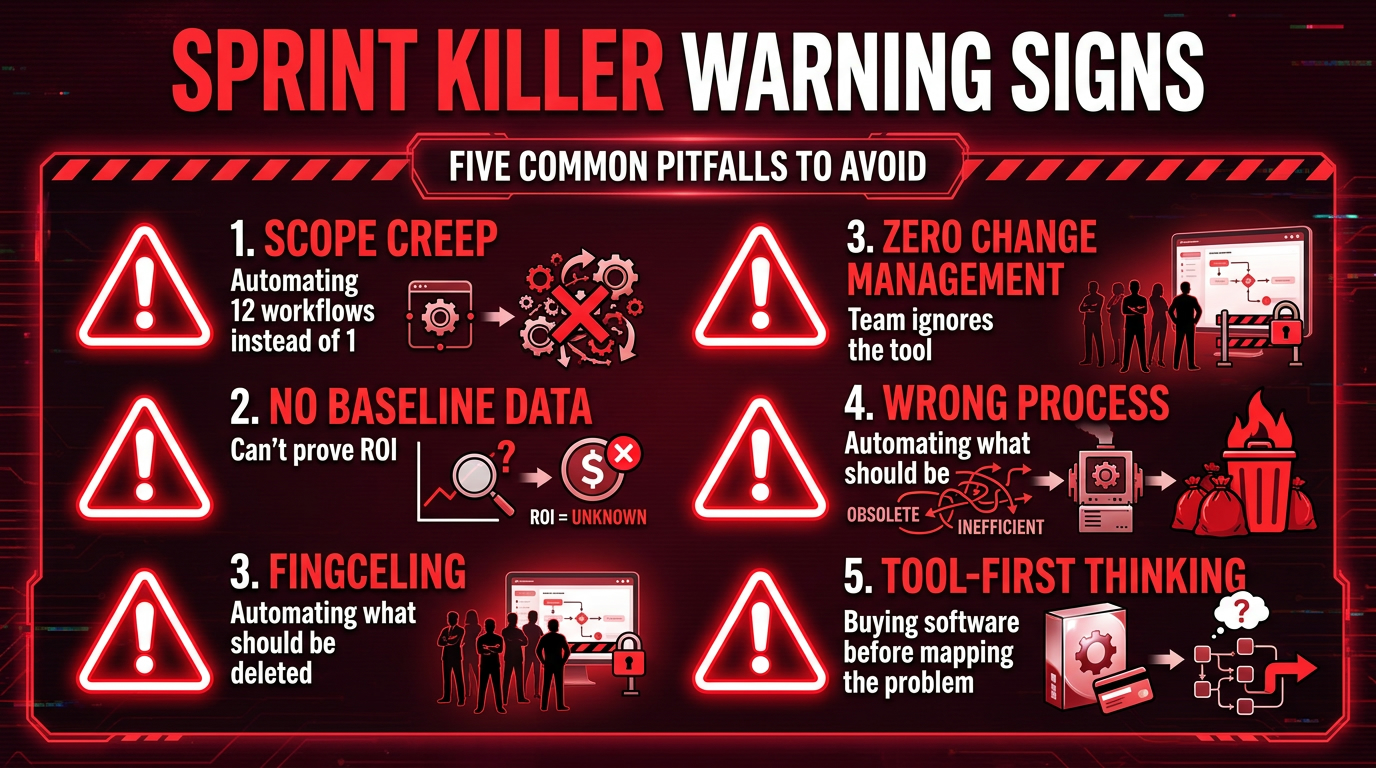
The conditions that cause AI automation sprints to stall or fail are well-documented across hundreds of implementation case studies. They are not primarily technical failures — they are organizational and process failures that show up consistently across industries, departments, and tool categories. Knowing them in advance is not a guarantee of success, but it removes the most preventable causes of failure.
Scope Creep Without a Sponsor Veto
Sprint scope expands because individual stakeholders see legitimate opportunities to add value. The VP of Sales suggests that while the team is configuring the lead routing workflow, they should also set up automated follow-up sequences. The IT manager recommends building a data validation layer that would benefit multiple downstream systems. These suggestions are not unreasonable — they are just wrong for this sprint.
Every sprint needs a single person with the authority and the willingness to say no to scope additions. This is the sprint sponsor, and their most important function is not resource allocation or executive air cover. It is the ability to decline perfectly reasonable suggestions in the interest of completing the sprint as designed.
Automating a Broken Process
Automation accelerates a process. If the process is broken, automation accelerates the production of broken results. Teams that skip the workflow audit in the pre-sprint phase — or rush through it so quickly that the actual current-state process is not accurately documented — frequently discover in Week 3 that what they are automating is not actually worth automating as designed. The process itself needs to be redesigned first.
This is the most expensive failure mode in terms of wasted effort, because it is typically not discovered until significant configuration work has already been done. The pre-sprint audit and the Week 1 process mapping exist specifically to catch this problem before it costs two weeks of sprint work.
No Baseline, No ROI
Teams that do not record baseline metrics before the sprint begins cannot prove what the sprint achieved. This problem is more damaging than it sounds, because organizational support for automation initiatives is never unlimited. Executives and budget owners need evidence that previous automation investments delivered returns before they fund the next sprint. Without baseline data, that evidence cannot exist — regardless of how much value the automation actually created.
Collecting baseline data takes less than a day in most cases. It involves documenting current cycle time, error rate, and processing volume for the target workflow. There is no legitimate justification for skipping it.
Tool Selection Before Process Understanding
In 2026, virtually every major SaaS vendor offers some form of automation or AI capability. This creates a powerful temptation for teams to begin automation sprints with a tool selection — particularly when a tool is already licensed and available. The problem is that tool-first thinking systematically distorts what gets automated. Teams automate what their existing tools can easily do, rather than what would deliver the most business value.
The workflow audit and process mapping of Week 1 ensure that tool selection follows process understanding rather than preceding it. This sequencing is not procedural formality — it is the mechanism by which automation initiatives stay connected to business outcomes rather than drifting into tool optimization for its own sake.
The Invisible Change Management Failure
Automation that changes how people work creates anxiety, even when the changes are objectively positive. People worry that their skills are being devalued, that their judgment is being replaced, or that errors in the automation will be attributed to them. These concerns are real and should be addressed directly and proactively.
Change management for a 30-day sprint does not require a formal change management program. It requires three specific actions: involve the people affected by the automation in the workflow mapping and exception handling design; communicate clearly what the automation will and will not do before go-live; and establish a visible, responsive feedback channel that makes it easy for team members to report issues without fear of being seen as resistant to change.
After Day 30: The Compounding Sprint Model
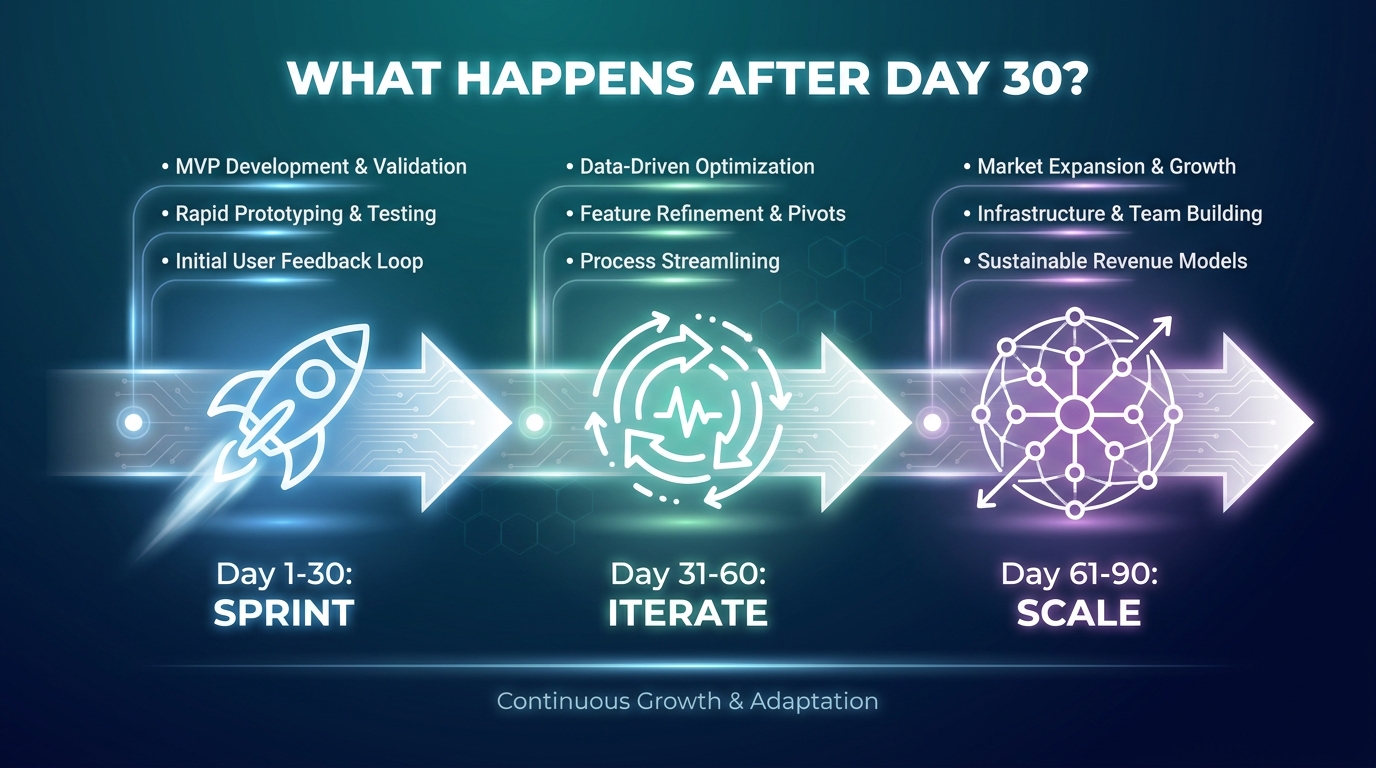
A single 30-day sprint is not a transformation. It is a proof point. The organizations that derive sustained, compounding value from automation sprints are those that treat each sprint not as a standalone project but as the first iteration of an ongoing automation program with a consistent methodology and an expanding scope.
The 30-60-90 Model
The most effective post-sprint structure is a rolling 30-day cadence: days 31-60 focus on iterating and optimizing the workflow deployed in the first sprint while simultaneously running the discovery phase for sprint two; days 61-90 involve deploying sprint two while beginning discovery for sprint three; and so on.
This rolling model means that the organization always has one automation in active operation, one in the build phase, and one in the discovery phase simultaneously. This three-track structure prevents the “automation initiative” from feeling like a series of disconnected projects and creates a visible, measurable acceleration in the organization’s automation maturity over time.
Building the Automation Backlog
Each sprint generates intelligence about adjacent automation opportunities — processes that touch the workflow that was just automated, data sources that became accessible through new integrations, team members who expressed interest in solving similar problems in their own areas. Capture these as a documented automation backlog, prioritized using the same four-criteria qualification test from the pre-sprint phase.
A well-maintained automation backlog is one of the most valuable organizational assets that comes out of early sprint work. It represents accumulated knowledge about where automation can create value — knowledge that is invisible before sprints begin and compounds in depth and specificity with every sprint completed.
From Sprint Team to Automation Center of Excellence
Organizations that run automation sprints consistently over 12 months typically reach a point where they have enough institutional knowledge — about methodology, tool configuration, integration patterns, and governance — to formalize a lightweight Automation Center of Excellence (CoE). This is not a large bureaucratic function. It is typically two to four people who maintain the automation backlog, run sprint methodology training for new team members, and serve as technical advisors for sprint teams across the organization.
The CoE model is important because it addresses the most significant long-term risk of automation programs: attrition. When the person who built an automation leaves the organization, the automation often breaks or becomes unmaintainable. A CoE creates institutional knowledge that does not live in any single person’s head.
Measuring Cumulative Impact
After four or five completed sprints, compile a cumulative impact report: total staff hours reclaimed per week across all automated workflows, total annual cost savings, reduction in error rates across automated processes, and — if available — downstream quality or customer experience metrics that improved as a result of automation. This report serves both an internal business case function (justifying continued investment) and a cultural function — it makes the organization’s automation progress visible and concrete in a way that individual sprint metrics cannot.
Building the Right Sprint Team
A 30-day sprint does not require a large team, but it does require a specific set of roles and capabilities. The ideal sprint team is small — five to seven people — with clearly defined responsibilities and no ambiguity about who makes which decisions.
Core Roles
Sprint Lead: Responsible for overall execution, daily standup facilitation, scope management, and stakeholder communication. Does not need to be the most technical person on the team, but must be comfortable making decisions under time pressure and pushing back on scope additions.
Process Owner: The person from the department whose workflow is being automated. Responsible for process knowledge, exception logic decisions, and post-sprint ownership. This is the most important non-technical role in the sprint.
Automation Builder: The person who actually configures the automation tooling. May be a developer, an IT analyst, or a technically proficient operations analyst depending on the complexity of the workflow and the tools being used.
Data Analyst: Responsible for baseline measurement, data quality assessment, integration of data sources, and metrics tracking through Week 4. In smaller organizations, this role may be combined with the Automation Builder role.
Sprint Sponsor: An executive or senior manager with budget authority and the organizational credibility to remove blockers. Does not attend daily standups but is available for escalations and has veto power over scope changes.
Time Commitment Reality
Be honest about time commitments before the sprint begins. A 30-day sprint does not require full-time participation from everyone — the Process Owner may need to invest two to four hours per day in Weeks 1 and 3, with less in Weeks 2 and 4. The Automation Builder will likely be at near-full capacity in Weeks 2 and 3. The Sprint Sponsor may need only two to three touchpoints per week.
What the sprint does require is that its highest-priority tasks get attention when they need it — that the Process Owner is available when the interview needs to happen, that the Automation Builder’s time is protected during the configuration phase, and that the Sprint Sponsor responds to escalations within 24 hours. Sprints fail not because team members do not have enough hours in total, but because critical-path items get delayed by competing priorities.
Conclusion: The Discipline of One
Every successful AI automation sprint can be traced back to the same foundational discipline: the decision to do one thing, completely and correctly, within 30 days. Not a portfolio of things. Not an initiative-scale transformation. One workflow, fully audited, carefully built, properly tested, and live in production by day 30 — with a real baseline to measure against and a named owner to maintain it.
This sounds deceptively simple. In practice, it requires constant resistance to the organizational tendency to expand scope, defer decisions, and subordinate execution to planning. The 30-day constraint is not a limitation to work around. It is the mechanism by which results stay possible.
The data behind sprint-style automation implementations is clear: focused, time-boxed deployments deliver faster ROI, higher adoption rates, and more durable outcomes than open-ended automation projects. The teams that have built the most sophisticated automation capabilities over time did not start with a grand vision — they started with one workflow, one sprint, one proof point. And then they did it again.
The pre-sprint audit, the week-by-week structure, the human-in-the-loop design, the baseline measurement, and the exception taxonomy are not overhead. They are the difference between automation that becomes a permanent organizational capability and automation that gets quietly abandoned when the initial enthusiasm fades.
Start with the workflow that costs the most time. Map it before you automate it. Build it in one tool. Measure it from day one. Ship it by day 30. Then pick the next one.
Actionable takeaways:
- Run the four-criteria qualification test on any workflow before committing to a sprint.
- Collect baseline metrics — cycle time, error rate, throughput — before any configuration begins.
- Build an exception taxonomy in Week 1; use it to design human-in-the-loop triggers in Week 3.
- Test against at least 50 real historical cases before going live.
- Name a single post-sprint owner before the sprint ends; automation without ownership degrades.
- Calculate sprint ROI within the first week of production using hours reclaimed multiplied by fully-loaded labor cost.