
Somewhere in your organization there is a file named something like Onboarding_Process_v3_FINAL_revised2.docx. It lives in a shared drive that half the team has forgotten exists. The last person to update it left the company fourteen months ago. And when someone new joined last quarter, they were pointed to it with the words: “Just use this as a starting point — but ask Sarah if you get stuck.”
This is the SOP graveyard. Every organization has one. And for years, the documents buried in it were merely inefficient — a minor tax on onboarding speed and process consistency. But now those same documents are being fed into AI agents, workflow automation tools, and orchestration pipelines. And what was once a minor inefficiency has become a hard blocker on reliability at scale.
The dirty secret of enterprise AI adoption in 2026 isn’t that the models aren’t good enough. It’s that the processes being handed to those models were never designed to be executed by anything other than a patient human who knows how to read between the lines, phone a colleague, and apply judgment that was never written down. AI doesn’t tolerate ambiguity. It follows instructions — exactly, literally, and at speed. Feed it a bad SOP and it will execute that bad SOP faster than any human ever could.
This post is about the gap between what organizations have (a folder of workflow documents that describe an idealized version of reality) and what AI pipelines actually need (structured, deterministic, exception-aware logic that a machine can follow without guessing). More importantly, it’s about how to close that gap — methodically, practically, and without burning the whole process library to the ground.
The SOP Graveyard: Why Most Process Documents Are Already Dead
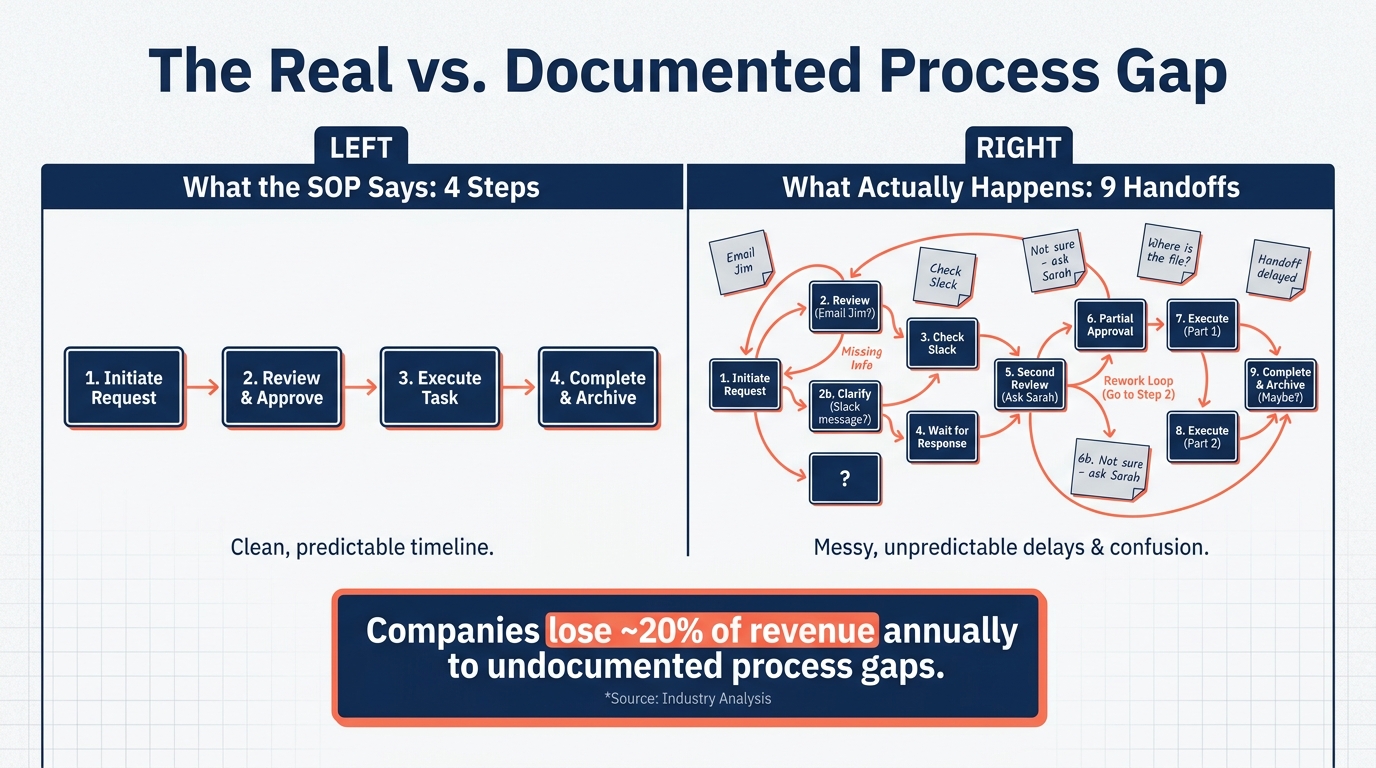
Before you can convert a workflow into an AI pipeline, you have to confront an uncomfortable truth: most SOPs don’t describe real work. They describe idealized work — the way a process should run on a perfect Tuesday when nobody is sick, the system is up, and the customer’s order came in correctly formatted.
Process mining data reveals just how wide this gap typically is. In SAP order-to-cash analyses, the documented process shows an average of four handoffs per order. The actual event log data shows seven to nine. Those extra handoffs aren’t rogue behavior — they’re how work actually gets done when the documented path doesn’t account for the edge cases that happen every day.
The Three Types of SOP Failure
When you examine why SOPs fail as inputs for automation, three patterns emerge repeatedly:
1. The Fictional SOP. This is the most common type. It was written by interviewing a subject-matter expert who described the process from memory — which means it captures the happy path and misses roughly 40% of the actual decision logic that plays out in practice. The exceptions, the workarounds, the “oh, but if it’s a European customer you do it slightly differently” — none of that made it onto the page. It lived in people’s heads and got transmitted through hallway conversations, not documentation.
2. The Fossilized SOP. This one was accurate — once. But the system it describes changed, the team structure shifted, and a new tool was introduced eighteen months ago that made step seven obsolete. Nobody updated the document because updating SOPs is everyone’s second priority and nobody’s first. So now the document is a historical artifact masquerading as active guidance. An AI agent that follows it faithfully will produce outputs that don’t match what the rest of the business expects.
3. The Vague SOP. This is the document full of instructions like “review for accuracy,” “ensure compliance with guidelines,” and “handle exceptions appropriately.” These are perfectly reasonable instructions for a human who brings fifteen years of institutional context to the reading. For an AI system, they’re not instructions at all. They’re invitations to hallucinate a plausible interpretation and act on it.
Why This Matters More Now Than Ever
Research from 2026 indicates that approximately 84% of organizations have not properly documented the workflows they intend to automate. Simultaneously, 80% of enterprise applications now embed at least one AI agent — up from just 33% in 2024. The collision of widespread AI deployment with massively underdocumented processes is producing a predictable result: automation that works in demos, breaks in production, and generates results that nobody can audit or explain.
The 90% of automation projects that fail due to technical issues almost always trace back to the same root: not bad technology, but bad input. Garbage in, garbage out — it’s the oldest principle in computing, and it applies just as brutally to AI pipelines as it ever did to databases.
AI Doesn’t Fix a Bad Process — It Amplifies It
There’s a persistent belief in operations circles that AI will clean up messy workflows as part of the automation process — that you feed the chaos in and structured, reliable outputs emerge on the other side. This belief has destroyed more automation projects than almost any other misconception in the space.
AI amplifies whatever you give it. A well-structured process, handed to an AI pipeline, becomes faster, more consistent, and more scalable. A poorly structured process, handed to that same pipeline, becomes a faster, more consistent, and more scalable source of errors. The errors compound at machine speed, touch every record in the dataset, and are often impossible to trace because nobody built in the observability to catch them.
The Compounding Error Problem
Consider a customer onboarding workflow that has an undocumented exception: if the customer is in a specific industry vertical, a compliance check step is required before account activation. A human working through that process would eventually notice the pattern, ask a question, and figure it out. An AI agent will activate accounts in that industry vertical without the compliance check — and do it for every record, at scale, until someone catches the problem in an audit.
This isn’t a failure of the AI model. The model did exactly what it was instructed to do. The failure is in the instruction set — the SOP that didn’t encode the exception because the human who wrote it assumed the compliance check was “obvious.”
The Speed-Risk Multiplication Effect
What makes this particularly dangerous in AI pipeline contexts is the multiplication of speed and risk. A human operator makes an error in a workflow and processes perhaps twenty records before someone notices. An automated pipeline processes twenty thousand records before the morning standup. The blast radius of a process design error scales with the throughput of the system executing it.
This is why organizations that rush to automate without first fixing their process documentation don’t just fail to improve — they actively create new risk. The 72% of organizations that report their automation initiatives cannot keep up with business needs are often, at the root, dealing not with a technology problem but a documentation and process design problem that was baked in at the start.
What “Fixing the Process First” Actually Means
Fixing the process before automating it doesn’t mean spending six months in a documentation exercise before touching a single tool. It means being deliberate about which workflows you attempt to automate and in what order. It means choosing processes where the decision logic is genuinely understood — even if it isn’t yet written down — before committing to pipeline architecture. And it means treating the documentation exercise as a discovery exercise, not a transcription exercise. You’re not writing down what the SOP says. You’re discovering what the process actually is.
The Anatomy of a Pipeline-Ready Workflow
Not every workflow is suitable for AI pipeline conversion at the same point in its maturity. The ones that convert well share a specific set of structural characteristics — and understanding those characteristics is the fastest way to triage your existing SOP library and identify where to start.
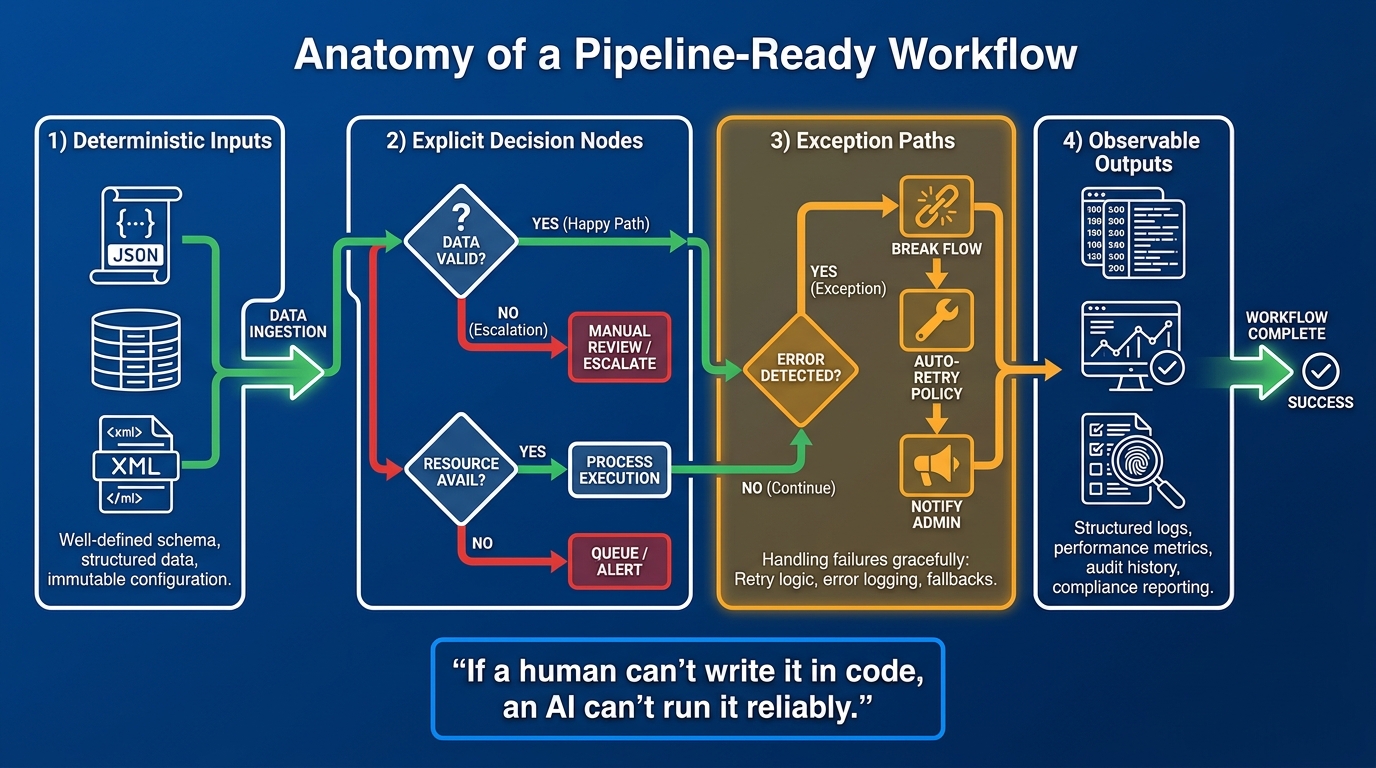
Characteristic 1: Deterministic Inputs
A pipeline-ready workflow has inputs that can be described with a schema. Not “a customer inquiry” — but a structured object with defined fields: customer ID, inquiry type, source channel, timestamp, associated order ID if applicable, and priority flag. When inputs are ambiguous or unstructured, the first stage of your pipeline has to be a normalization layer that converts incoming information into a consistent format before any decision logic can run. That normalization layer itself has to be designed and governed — it doesn’t happen automatically.
Workflows that receive unstructured inputs (emails, phone call summaries, hand-filled forms) aren’t disqualified from pipeline conversion, but they require an explicit preprocessing stage that transforms the input before passing it downstream. That stage must be tested independently, with its own error handling, before the rest of the pipeline runs.
Characteristic 2: Explicit Decision Nodes
Every point in a workflow where a human currently makes a judgment call is a decision node. In a well-documented SOP, these are diamond shapes in a flowchart: “Is the order value above $10,000? If yes, go to approval step. If no, proceed to fulfillment.” In most real SOPs, these decision points are buried in prose or implied by context rather than stated explicitly.
Before a workflow can become a pipeline, every decision node needs to be surfaced, named, and given explicit logic. That logic doesn’t have to be perfectly algorithmic — AI models can handle probabilistic decisions. But the decision itself has to be named. “Use judgment” is not a decision node. “If the invoice amount exceeds $10,000 OR the customer account is flagged for credit review, route to finance team” is a decision node.
Characteristic 3: Mapped Exception Paths
This is where most SOP-to-pipeline conversions fail. The happy path — the sequence of steps that runs when everything goes correctly — is usually documented. The exception paths are almost never documented with enough specificity to be machine-executable.
An exception path isn’t just “if there’s a problem, escalate to a supervisor.” That’s a human instruction that depends on the human recognizing that a problem exists, which in turn depends on implicit knowledge about what “normal” looks like. A machine-executable exception path defines the specific condition that triggers the exception, the action taken when that condition is met, the data passed to the next step, and the timeout or fallback if no resolution occurs within a defined window.
Characteristic 4: Observable Outputs
A pipeline-ready workflow produces outputs that can be measured. Not just “the task was completed” — but what was produced, with what inputs, at what time, with what confidence score if AI was involved in a decision. Every step in the pipeline should emit a log entry that allows a human to reconstruct exactly what happened and why, even if they’re doing that reconstruction six months later during an audit.
Observable outputs are not optional. They are the mechanism by which you maintain accountability in an automated system and the primary tool by which you detect when the pipeline is drifting from intended behavior.
Decomposing a Messy SOP: A Step-by-Step Methodology
Given a real-world SOP that looks nothing like the clean, machine-executable structure described above, here is the practical process for converting it into a pipeline-ready workflow design. This is a discovery and design process, not a technical implementation guide — the technical implementation comes after.
Step 1: Run the Process, Don’t Just Read It
The first step is to run the process with a human operator and record what actually happens — not what the document says. This is process observation, not documentation review. Sit with someone who does this work daily. Watch them execute it. Note every system they touch, every decision they make, every time they consult something external to the SOP (a Slack message, a spreadsheet, institutional memory), and every time they do something that the document doesn’t mention.
If you have access to system event logs, use process mining tools to reconstruct the actual process from log data. Modern process intelligence platforms can reconstruct workflow execution paths from event data and surface the real process map — including variants, rework loops, and exception rates — in a fraction of the time that manual observation requires. The SAP order-to-cash example cited earlier is a perfect illustration: the log data showed more than double the handoffs the documentation claimed.
Step 2: Map Every Decision and Every Exception
Take the real workflow — not the documented one — and identify every point where a decision is made. Circle every branch. For each branch, ask: what data determines which path is taken? Is that data always available? Is the threshold for the decision clearly defined, or does it involve subjective judgment?
Then identify every exception you observed or heard about. For each exception: how often does it occur? What triggers it? What happens when it does? Who gets involved? How long does resolution typically take? Is there a standard resolution, or is it handled differently every time?
Exceptions that occur rarely but require entirely custom handling may not belong in the automated pipeline at all — they may be better handled as human escalations. Exceptions that occur frequently and have a consistent resolution pattern are prime candidates for encoding as explicit logic.
Step 3: Write in “If-Then-Else” Language
Rewrite the process steps in conditional logic language, even in plain English. Replace “review the order for accuracy” with “if order total matches quoted amount AND all required fields are populated AND customer ID resolves in CRM, approve. If any condition fails, flag for manual review with the specific condition that failed.” This exercise forces specificity and surfaces every implicit assumption that was hiding inside vague verbs like “review,” “ensure,” and “handle.”
Wherever you cannot write the condition in this format — because the logic is too contextual, too subjective, or genuinely unknown — you have identified a human-in-the-loop checkpoint. Don’t try to automate what you can’t specify. Mark it, preserve the human role, and move on.
Step 4: Define Inputs, Outputs, and Contracts for Each Stage
Break the workflow into discrete stages. For each stage, define a data contract: what comes in (schema, required fields, acceptable formats), what comes out, and what constitutes success versus failure for that stage. A stage that doesn’t have a clear output contract can’t be tested, monitored, or debugged reliably. This is the step where many teams discover that they actually have three or four different processes disguised as one — because the inputs vary significantly enough that a single pipeline can’t handle all variants cleanly.
Decision Architecture: Building Exception Handling That Doesn’t Break
Exception handling is the part of pipeline architecture that separates workflows that survive contact with reality from workflows that work in controlled tests and break in production. The goal is not to handle every possible exception — that’s impossible. The goal is to build a system that fails gracefully, captures information about what failed, and provides a clear path to resolution for the cases it wasn’t designed to handle.
The Three Layers of Exception Architecture
Layer 1: Expected Exceptions. These are exceptions you know about and can encode. They’re the cases you discovered during Step 2 of the decomposition process — the frequent deviations with consistent resolution patterns. These should be built into the pipeline as explicit logic branches, treated as first-class paths rather than error conditions. A pipeline that handles its most common exceptions without escalating is dramatically more resilient than one that escalates constantly.
Layer 2: Detected Unknowns. These are cases where something is wrong, but the pipeline can identify that something is wrong even if it doesn’t know how to resolve it. A confidence threshold for an AI classification step, a data validation check that returns unexpected results, a timeout on an external API call — these are all detectable failure conditions. The pipeline should catch them, log what it detected, stop rather than continue with unreliable data, and route the record to a human review queue with full context attached. Stopping with context is far more useful than completing with a bad output.
Layer 3: Silent Failures. These are the dangerous ones — cases where the pipeline doesn’t know it’s failing and produces an output that looks plausible but is wrong. The primary defense against silent failures is observability: monitoring pipeline outputs against expected distributions, running statistical checks on batch outputs to detect drift, and building canary tests that run known records through the pipeline and verify the outputs match expected results. Silent failures don’t announce themselves; you have to build the systems that catch them.
The Confidence Threshold Architecture
For AI-powered decision steps — classification, extraction, summarization, recommendation — the pipeline should always expose a confidence score alongside the output, and that confidence score should drive routing logic. Records where the model is highly confident proceed automatically. Records where confidence falls below a defined threshold route to a human reviewer before the output is used. The specific threshold depends on the cost of an error in that process context: a low-stakes classification step might route at confidence below 50%; a compliance-critical decision might route anything below 95%.
This isn’t a failure of the AI system — it’s the correct architecture for a system that has to be reliable at scale. No model is 100% accurate. The question is whether your pipeline is designed to handle the cases where it isn’t.
Choosing Your Orchestration Layer
Once the workflow design is solid — the logic is explicit, the exceptions are mapped, the data contracts are defined — the next decision is which tool or framework will execute it. The orchestration layer is the operational backbone of your pipeline: the system that sequences steps, passes data between them, handles retries, manages state, and surfaces failures.
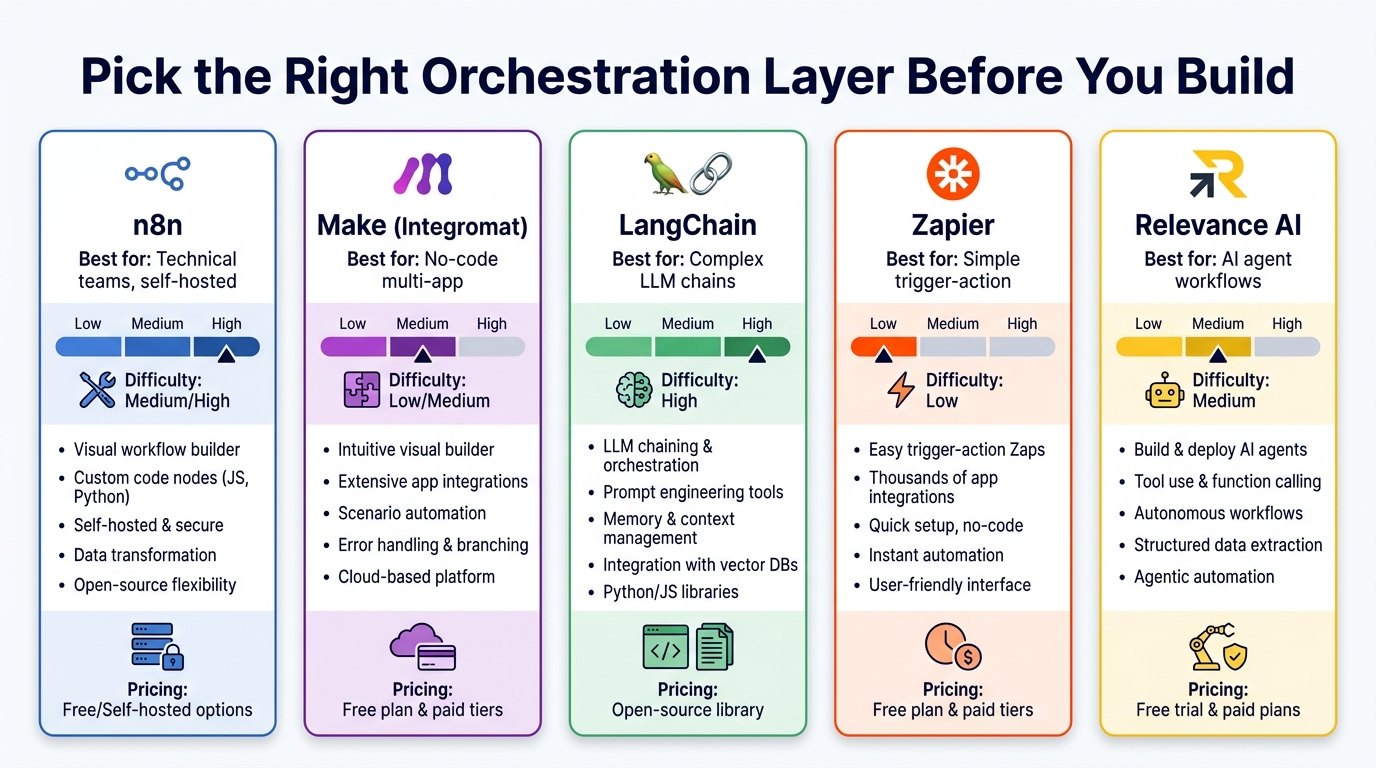
Zapier: The Fast Start, The Ceiling You’ll Hit
Zapier is the right tool for simple trigger-action workflows with clearly defined integrations and minimal conditional logic. It excels when you need to connect two or three SaaS tools and execute a linear process: when X happens in App A, create a record in App B and send a notification in App C. Its native AI steps add LLM capability for text classification and transformation. The ceiling appears when you need complex branching, error handling that goes beyond basic retry logic, or the ability to maintain state across multiple steps over extended time windows. Most enterprise-grade processes hit that ceiling quickly.
Make (formerly Integromat): The Visual Middle Ground
Make occupies the space between Zapier’s simplicity and developer-native frameworks. Its visual flow builder handles multi-path branching, iterators, aggregators, and error routers in a way that non-technical operators can understand and maintain. For operations teams who need to own their pipeline logic without engineering support for every change, Make offers a reasonable balance of power and accessibility. Its AI module support is growing but still trails dedicated AI orchestration tools.
n8n: The Self-Hosted Power Option
n8n has emerged as the preferred choice for technical teams who want the flexibility of a visual builder combined with the ability to write custom code at any step, self-host the platform (critical for data privacy requirements), and build AI agent workflows with fine-grained control. Its open-source core means the logic is auditable and portable — not locked into a vendor’s platform. The trade-off is a steeper setup curve and the need for engineering involvement in initial configuration and maintenance.
LangChain / LangGraph: When the Logic IS the AI
LangChain and its graph-based extension LangGraph are the frameworks of choice when the AI model isn’t just one step in a workflow but the primary reasoning engine for the entire process. Complex multi-step agent workflows — where the model decides which tools to call, in what order, based on the results of previous steps — require a framework that can manage that kind of state, handle tool call orchestration, and support the kind of conditional looping that agentic reasoning requires. The framework is code-native, requires engineering investment, and pays off when the workflow complexity genuinely demands it. It’s not the right choice for a five-step linear process.
Relevance AI: The Agent-Native Platform
Relevance AI and similar agent-native platforms (Crew AI, AutoGen for enterprise use cases) are designed specifically for workflows that center on AI agents executing multi-step tasks with tool access. They abstract away much of the orchestration complexity while still providing the agent autonomy that LangChain frameworks enable. They tend to be the right choice for teams that want to deploy AI agents quickly without the overhead of building orchestration infrastructure from scratch — and are willing to accept the vendor dependency that comes with a managed platform.
The Selection Framework
The right choice follows from the process design, not the other way around. If your workflow is a linear sequence with straightforward integrations, Zapier or Make. If it requires complex branching, custom code, and self-hosting, n8n. If the AI model is doing the primary reasoning, LangChain/LangGraph. If you need agent autonomy without building the plumbing yourself, Relevance AI or equivalent. The failure mode is choosing a tool based on familiarity or marketing and then trying to make the process fit the tool’s constraints.
Observability and Governance: What Most Teams Skip Until It’s Too Late
The workflow is designed. The exception paths are mapped. The orchestration tool is chosen. The pipeline is built and deployed. Most teams at this point consider themselves done. The teams that are still running reliable pipelines six months later know that this is actually where the real work begins.
Observability — the ability to understand what is happening inside a running system from its external outputs — is not a nice-to-have in AI pipelines. It is the mechanism by which you maintain control. Without it, you have no way to know whether the pipeline is running as designed, drifting from expected behavior, or systematically producing wrong outputs at a rate you haven’t detected yet. And given that 96% of IT leaders in 2026 report that observability spending is flat or increasing, the industry has already learned this lesson the hard way.
What Observability Actually Means in Practice
For AI workflow pipelines, observability means three things:
Logging at every step. Every stage in the pipeline emits a structured log entry: what came in, what decision was made (and with what confidence, if AI was involved), what went out, and how long it took. This is not optional — it’s the audit trail that allows you to reconstruct any specific execution and understand what happened.
Aggregate monitoring. Beyond individual executions, you need aggregate metrics that surface systemic patterns. What percentage of records are routing to the human review queue? Is that percentage stable, or is it drifting upward (indicating that the pipeline is encountering more edge cases than expected)? What’s the average confidence score for AI classification steps? Is it declining over time (indicating model drift)? These aggregate signals often surface problems before any individual error does.
Distribution alerting. Define expected distributions for key outputs and set up alerts when actual distributions deviate significantly. If 15% of orders normally route to manual review and that rate suddenly jumps to 40%, something has changed — either upstream data quality has degraded, the input distribution has shifted, or something in the pipeline has broken. The alert doesn’t tell you what’s wrong; it tells you to go look.
Governance: The Controls That Make AI Defensible
Governance for AI pipelines means having clear, documented answers to the questions that auditors, regulators, and executives will ask when something goes wrong: What decisions did the AI system make? On what data? With what confidence? What human oversight existed? What change management controls governed updates to the pipeline logic?
These requirements aren’t theoretical — the EU AI Act’s enforcement provisions are active in 2026, and domestic equivalents are advancing in multiple jurisdictions. Organizations operating AI pipelines in regulated industries (financial services, healthcare, insurance, legal) are already facing governance requirements that make comprehensive observability a compliance obligation, not just an operational best practice.
Version-control your pipeline logic the same way you version-control code. Every change to decision logic, confidence thresholds, or routing rules should be tracked, with a record of who made the change, when, and why. Deploy changes through a testing environment before pushing to production. Document the expected behavior of each pipeline version. These practices feel like overhead until the moment a pipeline starts behaving unexpectedly — at which point they’re the only thing that lets you isolate what changed and fix it quickly.
Human-in-the-Loop Checkpoints: Designing the Handoffs That Actually Work
The goal of an AI pipeline is not to eliminate humans from processes — it’s to focus human attention on the decisions where human judgment actually adds value. A well-designed human-in-the-loop architecture identifies precisely where in a pipeline a human’s time is most valuable and routes work to those points, while automating everything else.
The mistake most teams make is treating human-in-the-loop checkpoints as failure states — something the pipeline falls back to when it can’t handle a case. That framing creates checkpoints that arrive without context, without clear instructions, and without a defined response time expectation. The humans in that loop quickly become backlog owners rather than value-adders, and the benefits of automation erode.
Three Criteria for a Well-Placed Checkpoint
Criterion 1: The pipeline cannot reliably make this decision. If an AI model’s confidence in a classification falls below your defined threshold, that’s a signal that the decision genuinely requires human judgment. This checkpoint is appropriate and necessary. But the record that arrives at the human reviewer should include the model’s top candidate outputs, its confidence scores for each, and the specific context that made the decision ambiguous — not just a blank record with a flag that says “needs review.”
Criterion 2: The stakes exceed the cost of a mistake. Some decisions are appropriate for human oversight not because the AI can’t handle them reliably, but because the consequences of an error are significant enough that human accountability is required. High-value financial transactions, compliance-sensitive approvals, and customer-facing communications in sensitive contexts are examples. The threshold for routing to human review in these categories may be higher than confidence alone.
Criterion 3: The exception isn’t in the known ruleset. When the pipeline encounters a case that doesn’t match any defined exception path, the safest response is to route to a human — with full context, including what the pipeline did with the case up to that point. This is the “detected unknown” category from the exception architecture section. The human’s job in this case is not just to resolve the current case but to provide feedback that helps improve the exception ruleset for future cases.
Designing Checkpoints So They’re Actually Useful
A human-in-the-loop checkpoint should arrive with: the record in full, the pipeline’s interpretation of that record, the specific reason the checkpoint was triggered, the options available to the reviewer, the expected response time, and clear instructions for what happens next depending on the reviewer’s decision. A checkpoint that arrives as an unexplained record in a queue is a checkpoint that will be handled slowly, inconsistently, and with high error rates — defeating the purpose of building a reliable pipeline in the first place.
Set SLAs for checkpoint resolution. If a checkpoint sits unresolved for longer than the defined window, it should auto-escalate or fall back to a defined default action. Pipelines that depend on humans but have no SLA on human response time will stall unpredictably under load.
Where This Is Working in 2026: Industry Patterns Worth Studying
Across industries with high process volume and significant documentation complexity, the SOP-to-pipeline conversion is producing measurable results — but the patterns of success are consistent enough to extract general principles.
Financial Services: Claims and Document Processing
Insurance claims processing has become one of the clearest success stories for AI pipeline conversion. The underlying process — ingest a claim, extract structured data from unstructured documents, validate against policy records, route to appropriate adjudicator based on claim type and complexity, flag for investigation if anomalies are detected — maps reasonably well onto a structured pipeline architecture. The key was that successful implementations didn’t try to automate the adjudication decision itself. They automated the pre-adjudication data gathering, validation, and routing, which accounted for a significant portion of total cycle time. The human reviewer arrived at a fully prepared case rather than a raw document pile.
Organizations doing this well report 20–30% cycle time reductions on claims processing — not from eliminating human judgment, but from eliminating the time humans spent assembling information before they could exercise that judgment.
Operations and Supply Chain: Exception-Driven Orchestration
Order-to-cash and procure-to-pay processes contain enormous amounts of workflow complexity that gets handled through informal exception management — emails, Slack messages, phone calls that aren’t tracked anywhere. Converting these to AI pipelines requires exactly the kind of process observation described earlier: you have to capture the informal exception handling before you can formalize it. Teams that took the time to do this discovered that the majority of their “exceptions” were actually predictable patterns — the same five types of issues accounting for 80% of exception volume. Encoding those five patterns as explicit pipeline logic, and routing only the remaining 20% to human review, produced dramatic efficiency improvements.
Customer Operations: Tiered Resolution Pipelines
Customer support and success teams have successfully deployed tiered pipeline architectures where the AI handles Tier 0 and Tier 1 resolution — standard queries, FAQ-type responses, status lookups, simple account changes — and escalates Tier 2 and above to human agents. The critical design decision is the escalation routing: it must pass full conversation context, the specific reason for escalation, and a proposed classification of the issue to the human agent. Teams that pass raw transcripts without context create agent frustration and inconsistent handling. Teams that pass structured escalation packets with clear context see significantly higher first-contact resolution rates on the escalated cases.
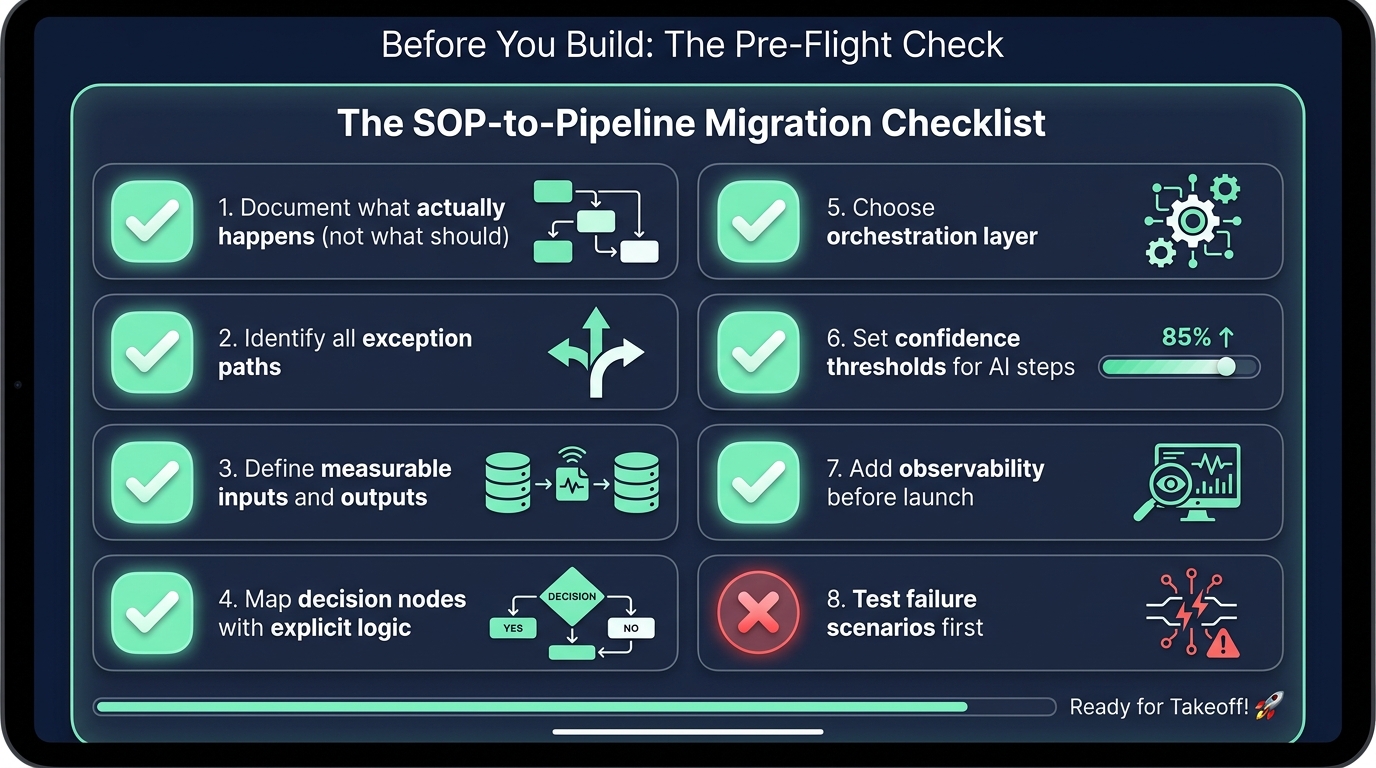
The SOP-to-Pipeline Migration Checklist
Before committing engineering resources to building an AI pipeline from an existing SOP, run through this checklist. It won’t tell you whether to proceed — that depends on your organization’s priorities and risk tolerance — but it will tell you whether you’re actually ready to proceed, or whether you have foundational work to do first.
Process Readiness
- Have you observed the process being executed by a human, not just read the documentation? If not, do this before anything else. The documentation will contradict the observation.
- Can you write every decision node in explicit if-then-else language? If you have decision points where the condition is still “use judgment,” you either need to define the judgment criteria or preserve human decision-making at that step.
- Have you identified and documented the top five exception types by frequency? If not, you haven’t finished the discovery phase.
- Does the process have a consistent input structure, or does it receive inputs in multiple formats? If the latter, design your normalization layer before designing anything downstream.
Technical Readiness
- Is the output of each stage clearly defined, with success and failure conditions specified? Undefined success criteria make testing impossible and monitoring meaningless.
- Have you defined confidence thresholds for any AI-powered steps? Without these, you have no routing logic for uncertain outputs.
- Does your logging plan capture enough information for a full audit reconstruction? Log what came in, what was decided, what went out, and the reasoning for each AI decision.
- Have you defined SLAs for human-in-the-loop checkpoints? If not, your pipeline has an undefined bottleneck.
Governance Readiness
- Is your pipeline logic version-controlled with change tracking? If not, you can’t safely iterate or debug in production.
- Do you have a testing environment that mirrors production data characteristics? A test environment that doesn’t reflect real data distributions will pass tests that fail in production.
- Have you tested failure scenarios — not just happy paths? Deliberately run records through that trigger every exception path and every confidence threshold. Make sure the routing works as designed before you go live.
- Is there a defined rollback plan if the pipeline needs to be taken offline? Manual fallback procedures should be documented and the team should know how to execute them. The worst time to figure out a rollback is when you need one.
From Static Document to Living System: What Changes After Deployment
The final piece of the SOP-to-pipeline conversion story is what happens after deployment — and it’s the part that determines whether the pipeline stays reliable over time or degrades into a new version of the problem it was built to solve.
Traditional SOPs rot because nobody maintains them. AI pipelines rot for the same reason, plus several new ones: model drift (the underlying AI model’s behavior shifts as its providers update it), data drift (the distribution of inputs changes as your business evolves), and rule decay (the business logic encoded in the pipeline becomes outdated as policies and products change). The pipeline that was accurate and reliable at launch can become quietly wrong twelve months later if nobody is maintaining it.
The Continuous Evaluation Cycle
Leading AI operations teams are adopting a continuous evaluation cycle for their pipelines — modeled on CI/CD practices from software engineering. Every change to pipeline logic goes through a defined review and testing process. Aggregate output metrics are reviewed on a defined cadence (weekly for high-volume pipelines, monthly for lower-volume ones). Samples of AI-assisted decisions are reviewed by human experts to validate that the model is still performing as expected. Exception rates are tracked as a leading indicator: a rising exception rate is almost always the first signal that something in the pipeline’s input distribution or logic has drifted from when it was calibrated.
Treat the Pipeline as a Product
The most important cultural shift in organizations that run reliable AI pipelines long-term is treating the pipeline as a product — with an owner, a roadmap, a maintenance schedule, and a user base whose feedback shapes its evolution. The alternative is treating it as a project: a thing you build, declare done, and hand off. Projects get built and forgotten. Products get maintained and improved. The companies that have successfully converted their SOP libraries to AI pipelines in 2026 almost universally have assigned clear ownership for each pipeline, with that owner accountable not just for the build but for ongoing reliability, performance, and alignment with business outcomes.
This is the real reason the SOP model was always fragile: documents don’t have owners who are accountable for their accuracy. They have authors who moved on to other things. An AI pipeline that inherits that ownership model inherits the same fragility — just at higher speed and larger scale.
Conclusion: The Pipeline Mindset, Not the Document Mindset
The shift from SOPs to AI pipelines is not primarily a technology transition. It’s a mindset transition — from thinking about processes as things you document to thinking about processes as things you design, build, operate, and continuously improve. Documents are static. Pipelines are living systems. Documents describe intent. Pipelines execute behavior. Documents rot without anyone noticing. Pipelines fail visibly — which, paradoxically, makes them more maintainable, because at least you know when something is wrong.
The organizations that are winning at this transition in 2026 are not the ones with the most sophisticated AI models. They’re the ones that took the time to understand what their processes actually are — not what their documentation claims they are. They mapped the real exceptions. They defined real decision logic. They built in observability from day one. And they kept humans in the loop at the places where human judgment genuinely matters, rather than trying to automate their way around every edge case.
The technical tools to build reliable AI pipelines from messy workflows are available and mature. The limiting factor has never been the tooling. It’s the process thinking that has to come before the tooling — the disciplined, honest, observational work of understanding a workflow well enough to describe it precisely. Do that work, and the pipeline architecture is straightforward. Skip it, and no amount of sophisticated orchestration will save you from the SOP graveyard in digital form.
The key takeaway: AI doesn’t need perfect SOPs — it needs honest ones. Your process documentation doesn’t have to describe an ideal. It has to describe reality, exceptions and all. That’s the foundation every reliable pipeline is built on.
Your Next Three Steps
- Pick one high-volume, well-understood process and spend two hours observing it being executed — not reading the documentation, watching someone do it. Write down every deviation from the SOP you observe.
- Run the pipeline readiness checklist against that process. Identify the specific gaps between where it is now and where it needs to be to support reliable automation.
- Before writing a single line of code or configuring a single automation tool, write out the complete decision logic in plain if-then-else language. If you can’t do that yet, you’re not ready to build — and that’s useful information.