


Most TikTok Shop sellers are still thinking about the platform as a content channel. Post a good video, hope the algorithm picks it up, watch the views roll in, make some sales. That’s the discovery model — and it still works. But something quiet has been happening alongside it.
TikTok’s search bar has grown into a serious buying tool. Users — particularly those with explicit product intent — are bypassing the For You Page entirely, typing what they want, and purchasing from the results. And those results are shaped by a system most sellers haven’t spent ten minutes studying: autocomplete.
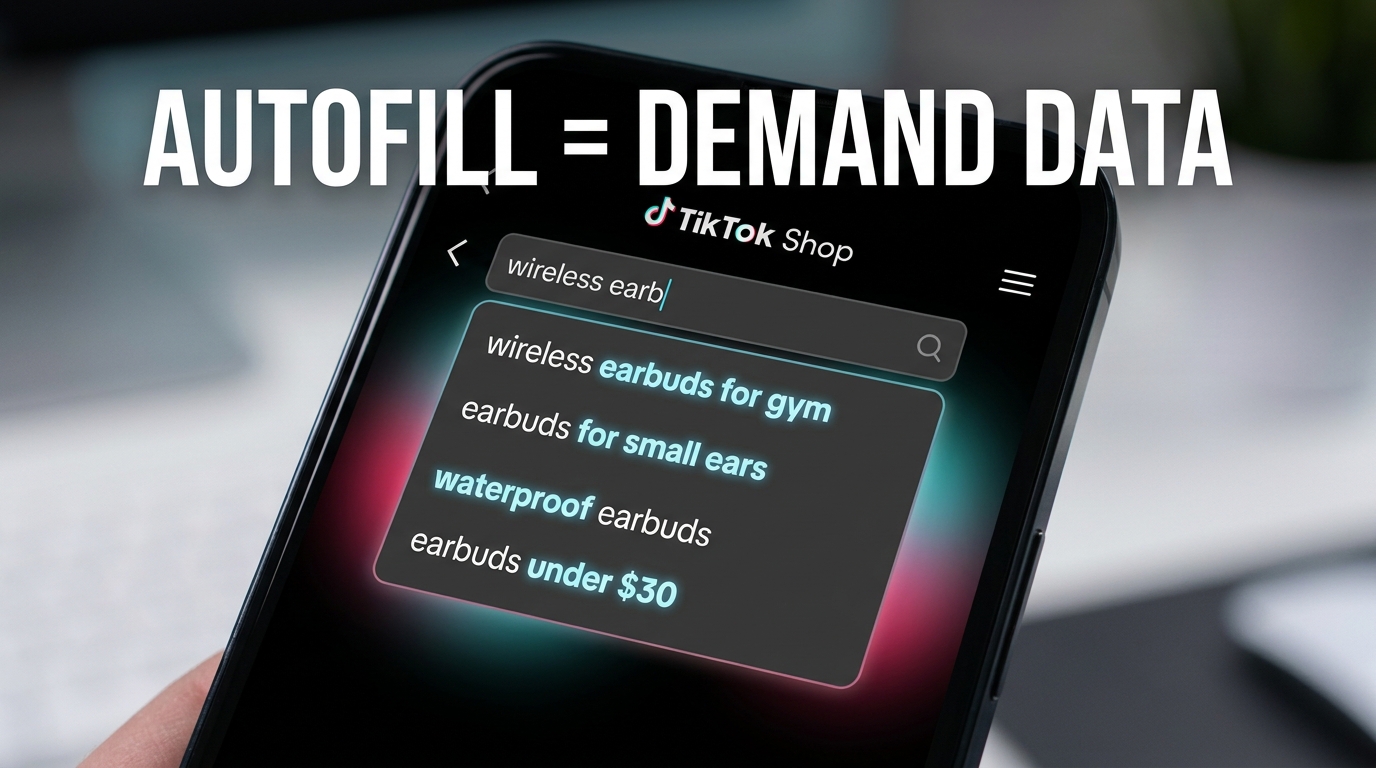
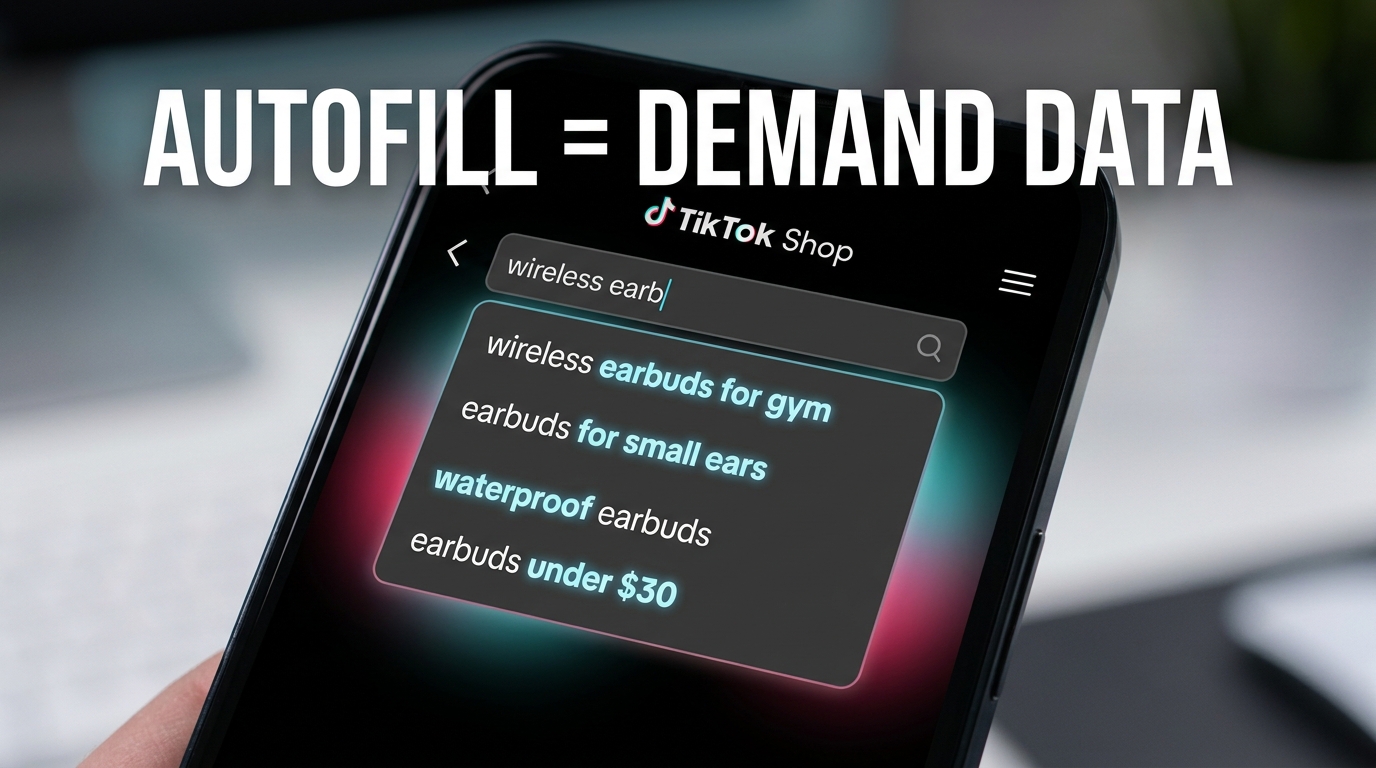
The autofill suggestions that drop down when a user starts typing in TikTok Shop’s search bar are not random. They are a ranked, real-time record of what buyers are actually searching. Which means every suggestion that surfaces is a window into live demand — the kind of demand data that would cost you hundreds of dollars per month on third-party tools if TikTok weren’t surfacing it for free, every day, right inside the app.
This article covers how to treat autofill as a structured research system rather than a curiosity. That means a specific mining workflow, a method for classifying the intent behind each term, a priority map for where those terms go inside your listings, and a way to use the same data to find keyword gaps your top competitors haven’t plugged. The sellers doing this systematically aren’t just ranking higher in TikTok Shop search — they’re converting that search traffic at rates that make the feed look inefficient by comparison.
Why TikTok’s Search Autofill Is a Demand Map, Not Just a Feature
There’s a meaningful difference between a feature and a signal. Most sellers treat TikTok’s search autofill as a feature — a convenience that helps users find things faster. What it actually is, is a compressed summary of buyer behavior at scale.
TikTok conducts billions of searches per day across its platform, with search volume growing roughly 40% year-over-year according to available platform data. The autocomplete suggestions that surface when a user types a partial query are drawn from that pool of actual searches. They aren’t editorially curated, they aren’t sponsored (in the organic autofill layer), and they aren’t populated by guesswork. They represent what real buyers typed, often enough, recently enough, for the system to surface as a completion.
What that makes autofill, practically speaking
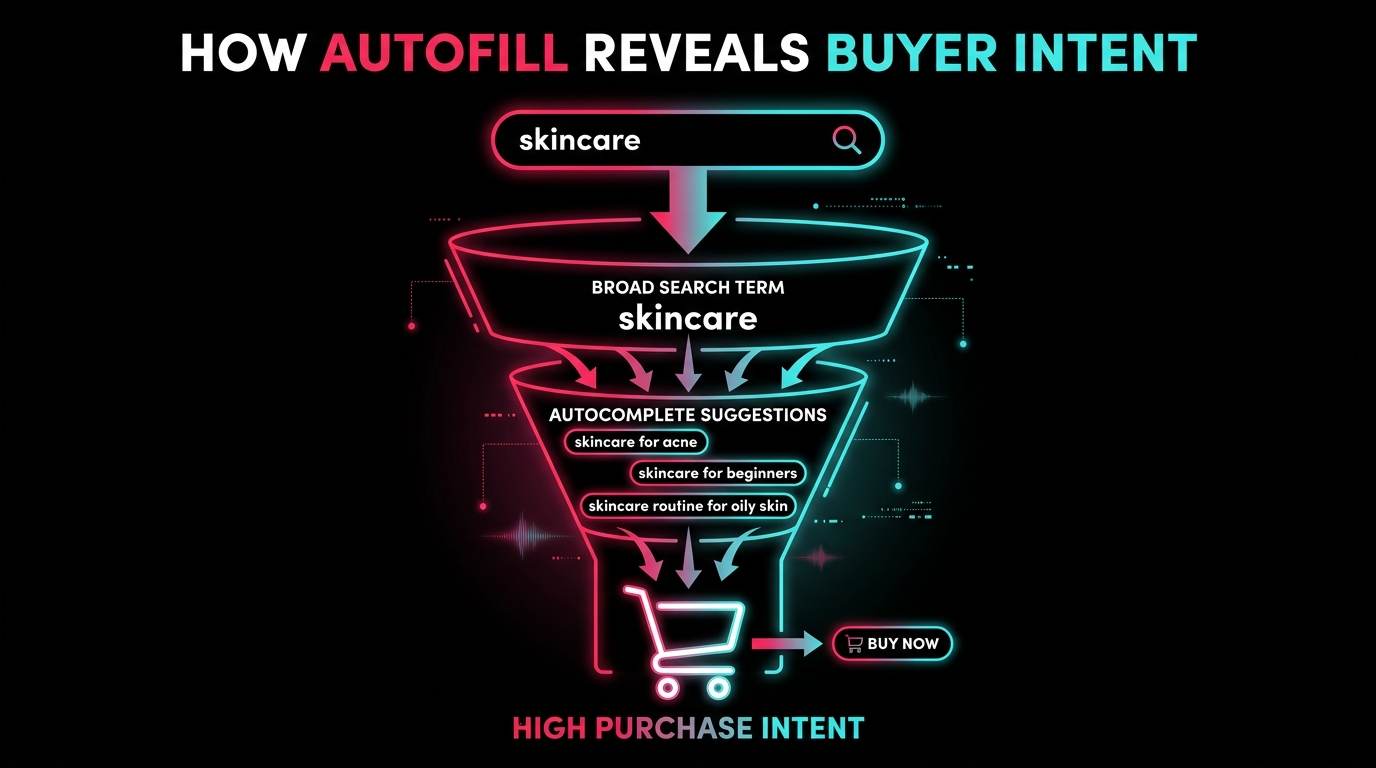
When a user types “skincare” into TikTok Shop’s search bar and sees “skincare for acne prone skin,” “skincare routine for beginners,” and “skincare for mature skin over 50,” each of those completions represents a cluster of actual shoppers who searched that exact phrase. The order matters too — completions closer to the top generally reflect higher query frequency.
This is not an approximation or an estimate. It is the nearest thing to real-time demand data that any seller can access without a paid subscription. Google Trends gives you directional traffic curves. Amazon’s Brand Analytics gives you rank-ordered searches — but only to Brand Registered sellers. TikTok’s autofill gives every Shop seller, regardless of account tier, a live read on what their category’s buyers are searching for today.
The intent density problem with broad terms
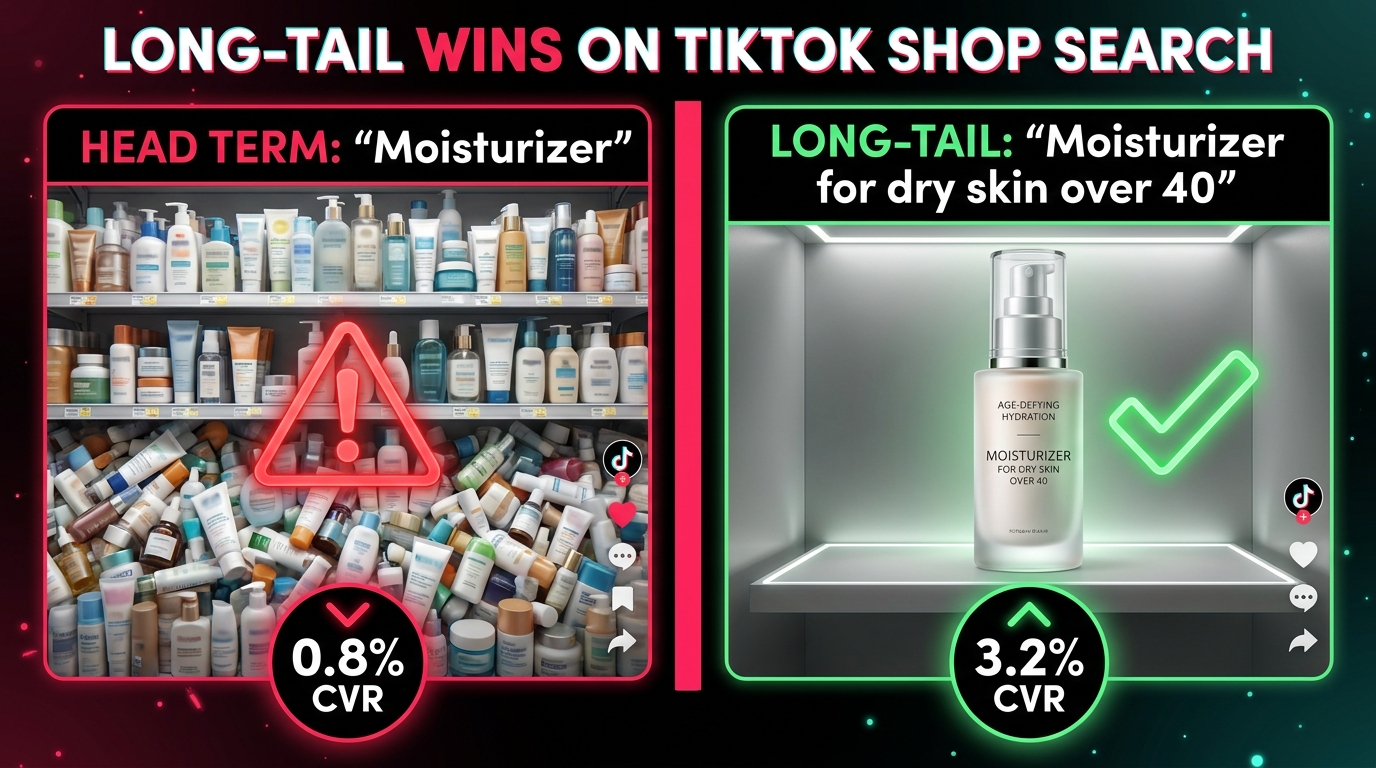
Here’s the dynamic that makes autofill especially valuable: broad search terms on TikTok Shop, just like on Amazon, contain mixed intent. Someone who types “moisturizer” might be browsing, comparing, curious, or in full purchase mode. The autofill completions strip that ambiguity. “Moisturizer for dry skin over 40” is not a browsing query. Neither is “moisturizer for redness sensitive skin fragrance free.” The specificity of the phrase is itself a purchase signal — the searcher has already decided they have a problem and are looking for the matching product.
Long-tail queries converted 2–3x better than broad head terms in comparable commerce search environments, a pattern that has been consistent across Amazon, Google Shopping, and TikTok Shop’s emerging search layer. Autofill is, in this sense, a conversion-rate filter: it reveals which phrases carry the most purchase intent, and gives you exact wording to match.
The Mechanics: How TikTok Shop Search Autocomplete Actually Works
Before building a strategy around autofill, it helps to understand what the system is actually doing. TikTok hasn’t published a detailed technical brief on its autocomplete algorithm — no major platform does — but the mechanics follow a recognizable pattern, and enough is visible from the outside to inform a smart approach.
Query frequency and recency
Autocomplete suggestions on TikTok are weighted by a combination of query frequency and recency. A term gets surfaced because a lot of people searched it, recently enough that it still reflects current demand. This is different from Google’s autocomplete, which has a longer historical averaging window. TikTok’s search trends move fast — research indicates that trending search terms on TikTok can peak and fade within 48 to 72 hours for viral topics, which is part of why weekly autofill audits outperform monthly ones.
Personalization layer
TikTok does apply some personalization to search suggestions based on a user’s content history, location, and previous searches. This means that if you’re mining autofill, you should do so from a clean profile or an account that matches your target buyer’s characteristics as closely as possible. Logging into TikTok Shop on a device that has been used primarily for business account activity — rather than genuine consumer browsing — may surface a slightly different set of completions than what your target customer would see.
One practical workaround: conduct autofill research from the TikTok app logged into a consumer-facing account, or from a fresh browser session in TikTok’s web experience, to reduce the personalization skew. The differences may be modest, but for competitive categories where a few keyword variations matter, it’s worth the extra step.
The Shop tab vs. the main search bar
TikTok has two distinct search entry points that sellers often conflate. The main TikTok search bar (accessed from the home screen) returns a blended mix of videos, accounts, sounds, hashtags, and products. The Shop-specific search (accessed inside the Shop tab) returns primarily product listings and Shop content. The autocomplete suggestions differ meaningfully between these two entry points.
For product keyword research, the Shop tab search bar is the more relevant tool. Its completions skew toward commercial intent — the users who reach that search bar are already in a shopping context, which means the completions reflect a higher-purchase-intent population. Build your core keyword list from Shop tab autofill first, then use the main search bar as a supplementary layer for content and hashtag research.
The Alphabet Soup Method: Systematic Autofill Mining at Scale
Typing a single seed term and noting the suggestions is a starting point. Doing it systematically across a full keyword alphabet — what practitioners call the “alphabet soup” method — turns autofill into a structured research database.

Step 1: Identify your seed terms
Start with 3–5 seed terms per product, covering different entry angles:
- Category term — what the product type is called generically (e.g., “hair serum”)
- Problem term — the problem the product solves (e.g., “frizzy hair”)
- Use-case term — when or how the product is used (e.g., “hair serum for overnight”)
- Customer term — who the product is for (e.g., “hair serum for men”)
- Format term — the product’s physical format or variant (e.g., “leave-in hair oil”)
These five angles ensure you’re capturing how different buyer segments phrase their searches, rather than only how you as a seller think about your product.
Step 2: Run the A–Z expansion
For each seed term, open TikTok Shop’s search bar and type the seed followed by a space and then each letter of the alphabet in sequence. For “hair serum a,” record all completions. Then “hair serum b,” and so on. Not every letter will produce completions — that’s expected. What you’re doing is forcing the autocomplete system to surface the full range of what it knows about that seed term’s query universe.
A well-executed alphabet soup pass on a single seed term typically yields between 40 and 80 unique completions, depending on the category depth. Run it across your five seed terms and you’re looking at 150–300 raw keyword candidates before any filtering.
Step 3: Run modifier expansions
Beyond letters, autofill responds to common shopping modifiers. After capturing the A–Z results, separately search your seed term followed by:
- Price modifiers: “under $20,” “cheap,” “affordable,” “best value”
- Review modifiers: “that actually works,” “reviewed,” “before and after”
- Skin/hair/body type modifiers: “for sensitive skin,” “for thick hair,” “for combination skin”
- Occasion modifiers: “for beginners,” “for daily use,” “for travel”
These modifier expansions are particularly productive in beauty, health, and personal care categories, where buyer identity and specificity drive purchase decisions heavily. They often surface the highest-converting long-tail terms because they match the exact self-identification language buyers use.
Step 4: Build a tracking spreadsheet
Paste all raw terms into a spreadsheet with columns for: the original seed term, the full autofill suggestion, the letter or modifier that surfaced it, and a column for intent classification (covered in the next section). Add a “date captured” column — this matters because autofill rotates with trends, and you’ll want to know which terms are stable versus seasonal when you revisit the list in four to six weeks.
Step 5: Deduplicate and prioritize
After running the full mining pass, many terms will overlap. Remove exact duplicates, group near-synonyms, and note which terms appeared across multiple seed term expansions — those cross-appearing terms often reflect the highest search volume in the set, since they’re surfacing from multiple starting points.
Intent Classification: Sorting Autofill Terms By What Buyers Actually Want
A keyword list of 200 terms is only as useful as your ability to act on it. Without classification, you end up stuffing every term into every listing and getting neither the ranking precision nor the conversion rate you’re chasing. Intent classification is the filter that turns a raw autofill list into a prioritized action plan.
The four intent buckets
Transactional intent — These terms signal the buyer is ready to purchase. Examples: “best [product] under $30,” “[product] that actually works,” “[product] for [specific condition].” These belong in your product title and primary keyword field first. They’re the terms your listing must rank for because ranking for them drives actual purchases, not just impressions.
Comparative intent — These terms signal a buyer who is evaluating options. Examples: “[Product A] vs [Product B],” “best [product type] 2026,” “[product] alternatives.” These are harder to win directly in product listings, but they’re useful for content — TikTok videos that appear for comparative queries can drive traffic to your Shop while positioning your product against the field.
Educational intent — These terms signal a buyer who is researching but hasn’t committed. Examples: “how to use [product],” “does [product] really work,” “what is [product] for.” These belong in your content strategy — short videos that answer these questions surface in search results and can funnel viewers toward your product page. Including them in your description and caption helps your content appear for these queries.
Inspirational/Discovery intent — These terms signal a buyer at the top of the funnel. Examples: “[category] ideas,” “[aesthetic] home decor,” “cute [product type].” These are better suited to hashtag and content strategy than product listing optimization. Ranking for them in search brings visibility, but conversion will be lower since the user intent is browsing rather than buying.
Practical classification rule
For each term on your list, ask: if someone searched this exact phrase and saw my product, how likely are they to add it to their cart? High likelihood = transactional. Moderate = comparative or educational. Low = inspirational. Most sellers should prioritize their first 10–15 transactional terms as the core set for listing optimization, with educational terms reserved for content creation and inspirational terms parked for hashtag and campaign strategy.
Where Keywords Go: Placement Priority for Maximum Search Visibility
Having the right keywords is one thing. Knowing where TikTok Shop’s search system looks for them — and in what order of priority — is what turns keyword research into actual ranking performance. The system pulls from multiple listing fields, but they’re not weighted equally.
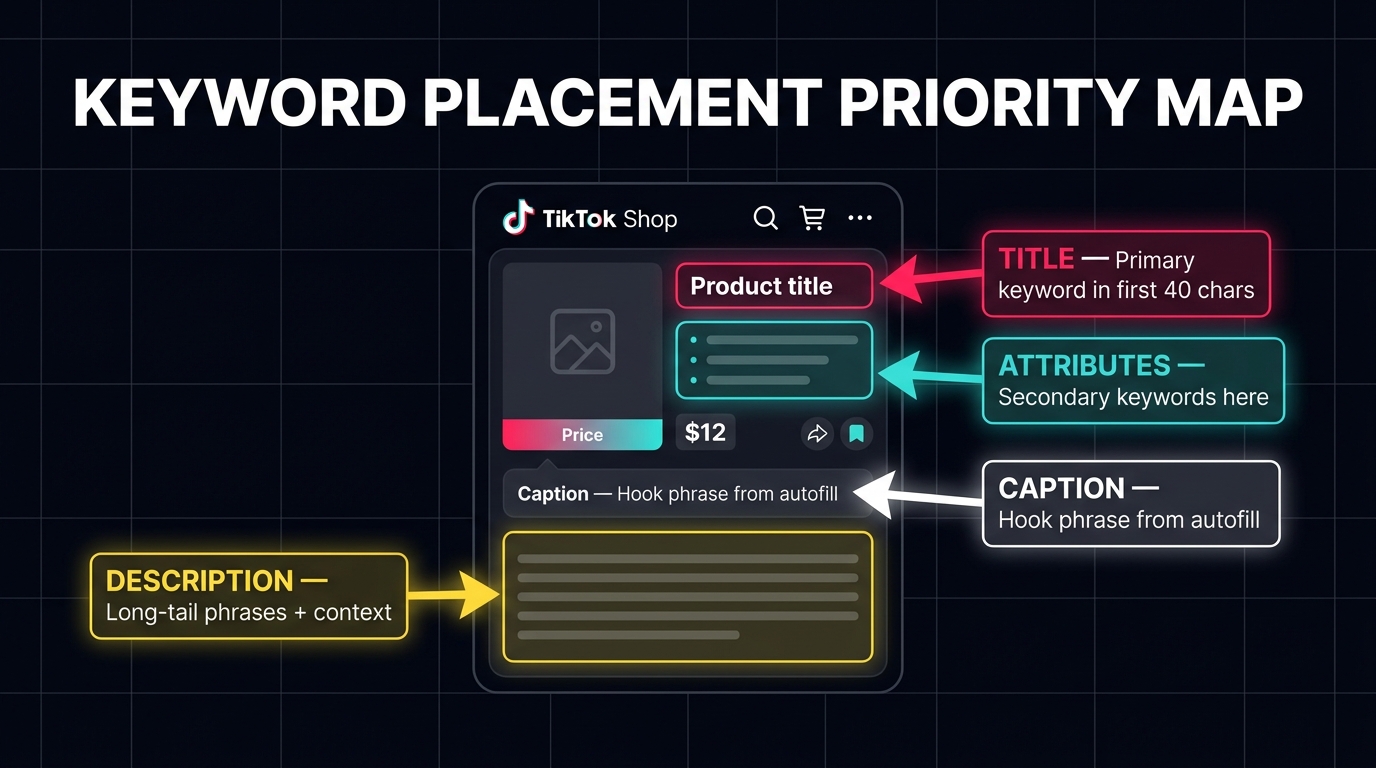
Priority 1: Product title
The product title carries the heaviest weight in TikTok Shop’s search matching. TikTok Seller Center guidance consistently points to the title as the primary field the search system reads for relevance matching. This makes it the most critical real estate in your entire listing.
Optimal title structure, based on current Seller Center guidance and third-party practitioner testing:
- Length: 60–80 characters. TikTok officially allows up to 200 characters in some markets, but mobile display truncates after roughly 60–80 characters. Anything beyond that point becomes invisible to most mobile shoppers.
- Keyword placement: Primary keyword in the first 40 characters, ideally the first word or phrase. This is the portion that renders fully on mobile screens and gets the most algorithmic weight.
- Structure template: [Primary keyword] + [key differentiator] + [secondary keyword or use-case]. Example: “Vitamin C Serum for Oily Skin – Brightening, Fragrance-Free, 1 oz.”
- Avoid: Promotional language (“best ever,” “sale”), excessive punctuation, keyword stuffing through repetition, all-caps, and brand names that aren’t actually your brand.
One critical discipline: use the exact phrasing from autofill, not synonyms. TikTok’s search matching reads phrases, and the difference between “face moisturizer for dry skin” and “dry skin face cream” may be the difference between ranking and not ranking for a high-intent query.
Priority 2: Product attributes
Attributes are the structured fields in your Seller Center listing: material, size, color, skin type, use case, and so on depending on your category. They are an underused keyword placement that many sellers fill in carelessly or leave incomplete.
The opportunity here is that TikTok Shop’s search system uses attribute data to match products to more specific queries, particularly filter-based and qualifier-based searches. A buyer who searches “face moisturizer for sensitive skin” is likely triggering a filter-enhanced result set that prioritizes products with “sensitive skin” properly filled in their attributes. If that field is blank or marked “all skin types,” you may be invisible to that specific query despite having an otherwise well-optimized title.
Review your complete attribute fields against your top 20 transactional keywords. For every qualifier in those keywords (skin type, hair type, age group, material, occasion), verify that the corresponding attribute field is filled in with the matching value.
Priority 3: Search keywords field
TikTok Seller Center provides a dedicated “Search Keywords” or “Product Keywords” field depending on your market and category. This is where you place additional keywords that don’t fit naturally in the title or that represent secondary and long-tail terms you want to rank for.
This field is not visible to shoppers — it functions like the hidden keyword field in Amazon’s backend — but it is indexed by TikTok’s search system. Use it to place your secondary transactional terms, common misspellings, regional variations of product names, and modifier-heavy long-tail phrases that would make your title look cluttered if included there.
Do not repeat keywords already in your title in this field. TikTok’s system does not give extra weight for repetition, and you’d be wasting limited slots that could carry unique terms instead.
Priority 4: Product description
The description is the least algorithmically weighted field for search matching among the four priority areas, but it’s not irrelevant. It contributes to search relevance for longer-form, multi-word queries and educational intent phrases. More importantly, it’s the field that a buyer reads after clicking — which makes it a conversion tool as much as an SEO field.
Use your educational intent keywords here naturally, woven into copy that explains the product’s benefits, use cases, and differentiators. Avoid listing keywords in a bulleted keyword dump at the bottom of descriptions — TikTok’s quality system has flagged this practice as potential keyword stuffing in its published guidance, and it does nothing for the buyer experience.
Priority 5: Video captions and on-screen text
If you’re creating content to support your Shop listing — which you should be — your video captions and on-screen text are additional signals that TikTok’s search system reads. A video caption that includes “best moisturizer for dry skin over 40” makes that video eligible to surface for that search query, which can then route viewers to your Shop product.
Use one or two high-intent autofill terms in each video caption as the opening phrase. This doubles as a hook for the viewer (since it speaks directly to the problem they care about) and as a search optimization signal for TikTok’s indexing system.
The Competitor Gap Tactic: Using Autofill to Find What Top Sellers Miss
The alphabet soup method surfaces what buyers are searching. Competitor analysis tells you which of those searches are already well-served by established sellers. The gap between those two lists is where your actual opportunity lives.
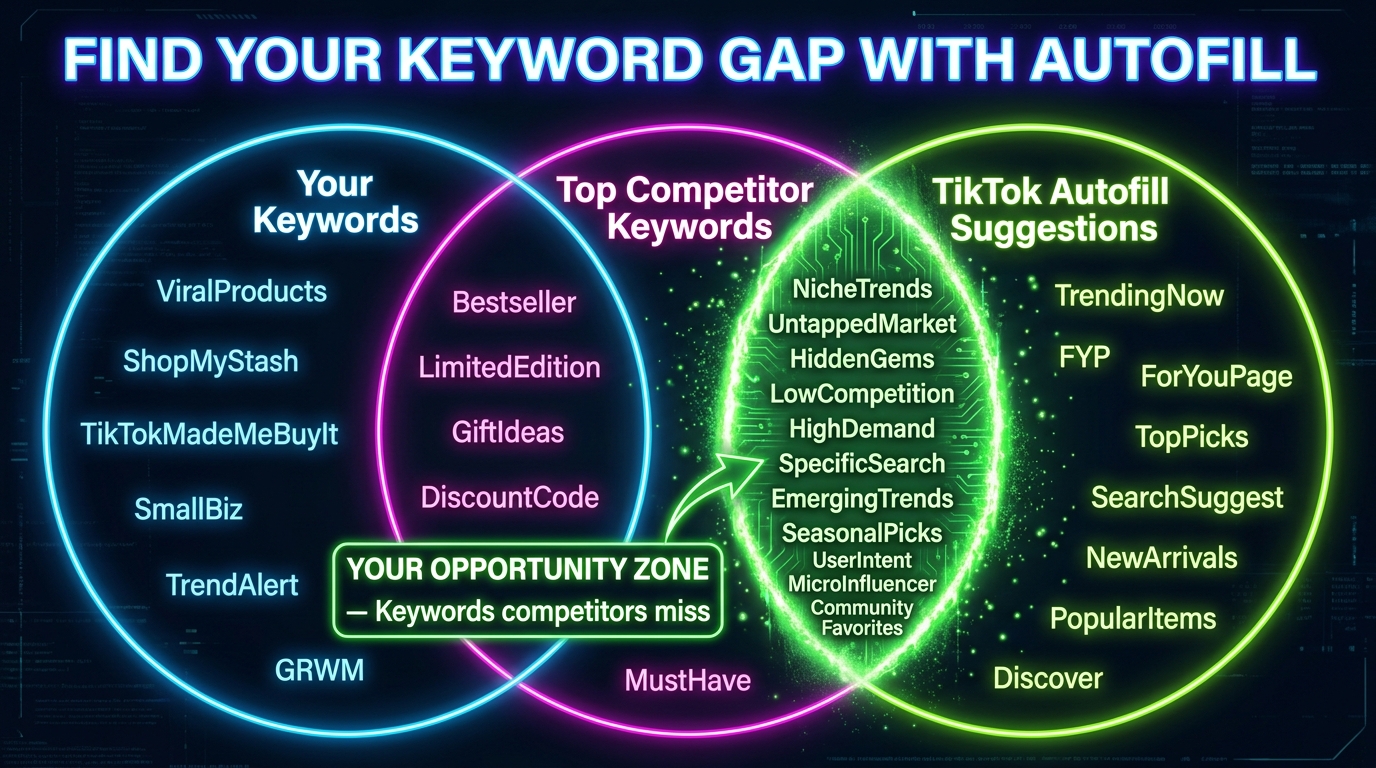
Step 1: Identify the top 5 competitors in your category
Search your primary category keyword in TikTok Shop and note which product listings consistently appear in the top 5–10 positions. These are your benchmarks. You’re not looking at their social following or ad spend — you’re looking at which listings TikTok’s search system has already validated as highly relevant for your core keywords.
Step 2: Reverse-engineer their keyword strategy
Click into each competitor listing and read the title, description, and any visible keyword-adjacent content carefully. Build a keyword list for each competitor: which autofill terms appear verbatim in their title? Which modifiers have they included? Which intent buckets are they covering?
Be systematic about this. For each of your 20–30 top autofill terms, mark whether each competitor has that term visible in their listing. After doing this for all five competitors, you’ll have a coverage map: which terms are covered by all five, which by two or three, and which by none or only one.
Step 3: Identify high-intent gaps
Terms that appear in your autofill list (confirming buyer demand exists) but are absent from most competitor listings represent a gap. These are queries that real buyers are running — the platform confirms this by surfacing them in autofill — but the current top-ranked products aren’t explicitly targeting. You can move into these gaps with a well-optimized listing or a targeted video and face lower competition for a term that carries real purchase intent.
This is especially productive in three scenarios:
- Modifier gaps: Top competitors use the category term but not the modifier. “Collagen serum” is covered; “collagen serum for neck and décolleté” is not.
- Use-case gaps: Top competitors describe what the product is; no one describes when or how it’s used. “LED lamp” is covered; “LED lamp for video calls home office” is not.
- Audience gaps: Top competitors use generic audience language; specific demographics are untargeted. “Resistance bands” is covered; “resistance bands for seniors low impact” is not.
Step 4: Validate before building
Before restructuring a listing or creating content around a gap term, do a final check: search that exact phrase in TikTok Shop and look at what surfaces. If the results are sparse or filled with clearly irrelevant products, that confirms genuine opportunity. If three highly rated listings already appear that just didn’t show up in your initial competitor research, the gap is smaller than it looked. This five-minute check can save you from optimizing toward a term where the competition is already stronger than your surface scan suggested.
Native Tools That Amplify Your Autofill Research
Manual autofill mining is free and powerful, but TikTok has also built native tools that can validate and extend what you find. These tools exist in two places: TikTok Shop Seller Center and TikTok Ads Manager.
Product Opportunities and Trending Searches (Seller Center)
Inside TikTok Shop Seller Center, the Product Opportunities module contains a Trending Searches feed. This feed surfaces queries that are gaining search volume on the platform — not historical averages, but current upward movers. Think of it as a curated version of your own autofill mining, pre-filtered for momentum.
Cross-reference your autofill list against Trending Searches weekly. Terms that appear in both your autofill research (confirming they have existing volume) and in Trending Searches (confirming they’re growing) represent a prioritization signal: these are the terms worth aggressively targeting right now, before they peak and competition catches up. The window of advantage on a trending term is often short — days to a couple of weeks — so acting fast on these overlapping signals is the operational discipline that separates opportunistic sellers from reactive ones.
Keyword Rankings data (Seller Center)
Seller Center’s analytics also provide keyword ranking data for your own listings — which search terms your products currently appear for and at what position. This serves two functions. First, it confirms which of your autofill keyword optimizations are working, allowing you to double down on what the system has already recognized. Second, it reveals terms for which you’re ranking but haven’t explicitly targeted — these are organic opportunities you didn’t mine but that the algorithm found anyway, and they’re worth adding to your active keyword set to reinforce ranking.
Search Ads Keyword Planner (TikTok Ads Manager)
If you run TikTok Search Ads, the Search Ads Keyword Planner in Ads Manager provides competitive intelligence that extends your organic research. It shows estimated search volume, competition level, and suggested bid ranges for keyword clusters. Volume data here functions as a proxy validator for your autofill findings: if an autofill term you found organically shows up in the Keyword Planner with substantial search volume and moderate competition, that’s a compound signal to prioritize it both for listing optimization and for paid search coverage.
Note that the Keyword Planner is a paid ads tool and reflects the ads auction environment, not organic search directly. The competitive landscape in paid search may differ from organic — a term could be expensive in ads and yet largely uncontested in organic listings, which is exactly the kind of asymmetry that makes organic autofill research valuable even for sellers who run ads.
Seasonal and Trend Timing: When to Refresh Your Keyword Set
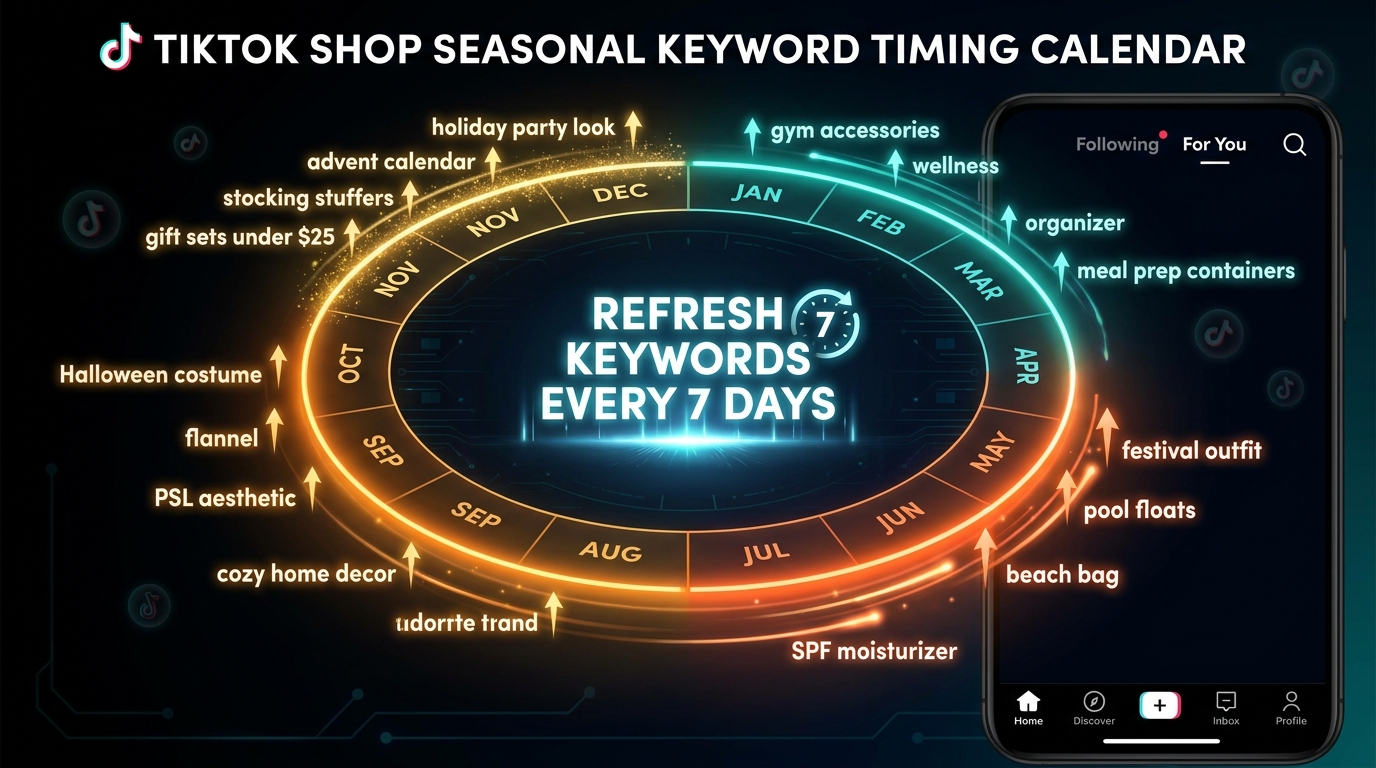
One of the most common mistakes sellers make with autofill research is treating it as a one-time exercise. They mine keywords during launch week, build their listings around those terms, and leave the listing static for months. TikTok’s search landscape doesn’t work that way.
Trend velocity on TikTok vs. other platforms
Search trends on TikTok move faster than on any other major e-commerce or content platform. A term that enters autofill on Monday because of a viral video can dominate search completions by Wednesday and begin fading by the following weekend. Seasonal terms follow a more predictable arc, but even those shift faster on TikTok than on Amazon or Google, where trends tend to build and taper over months rather than days.
The practical cadence that emerges from this velocity: run a full autofill audit weekly for your top 2–3 product categories, and check Trending Searches inside Seller Center at least twice a week. This isn’t as time-consuming as it sounds once you have the spreadsheet template built — a full A–Z pass on three seed terms takes about 20–30 minutes if you move efficiently.
Pre-season vs. in-season keyword timing
Seasonal keywords follow a predictable two-phase pattern on TikTok. The pre-season phase — roughly two to four weeks before a seasonal moment — is when early adopter and gift-forward buyers start searching. This is when terms like “Christmas gift ideas for men under $50” start appearing in autofill for the first time, with low search frequency. If you update your listings to include these terms during the pre-season window, TikTok’s system has time to index and rank you before the peak traffic arrives.
Sellers who wait until the seasonal moment itself to update listings typically find that competitors who moved earlier have already locked in the top search positions. The ranking signals that TikTok’s algorithm has collected for those early-updated listings — click-through rates, conversions, engagement — create a momentum advantage that a late-arriving listing can’t easily displace mid-season.
The major seasonal windows worth planning around in the 2026 US TikTok Shop calendar include: Valentine’s Day (optimize in mid-January), spring cleaning and Mother’s Day (March–April), Back-to-School (July), Halloween (late August), and the Q4 peak from Black Friday through New Year’s (begin optimizing in October). Each window has distinct autofill language that’s different from the preceding season — “last minute gift” terms dominate the week before major holidays in ways that rarely appear six weeks out.
Trend hijacking: when viral terms appear in autofill
TikTok’s unique dynamic is that a single viral video can create a search term that didn’t exist a week earlier. When a creator posts a video featuring an unusual use-case for a product type you sell, and that video reaches millions of views, the use-case phrase may start appearing in autofill within 48 hours as curious viewers search to learn more or find the product.
Sellers who catch these emergent autofill terms early — before they appear in Trending Searches, before competitor listings update to include them — capture search traffic in a window of near-zero competition. The trick is monitoring. Check autofill for your category seed terms daily during high-content periods (a new viral product trend, a TikTok challenge that touches your category, a celebrity endorsement of a product type you sell). Most days nothing notable appears. But the days when something does appear, moving within 24 hours on that term is often the difference between owning the search result and fighting for position alongside twenty other sellers who caught the signal two days later.
Common Autofill Mistakes That Kill Search Visibility
Understanding what works is only half the picture. The other half is recognizing the patterns that actively hurt your search performance, even when sellers believe they’re following good practice.
Mistake 1: Using near-synonyms instead of exact phrases
This is the most expensive mistake in autofill keyword strategy. TikTok’s search matching is phrase-based. If autofill shows “vitamin c serum for dark spots” and you optimize your title for “vitamin c serum for hyperpigmentation,” you are not ranking for the same query — even though the terms are medically equivalent. The platform doesn’t do semantic synonym matching the way Google’s more sophisticated language models do for general search.
Use the exact phrasing that appears in autofill, including articles, prepositions, and qualifiers. “Face wash for acne” and “acne face wash” are different queries with different result sets. “Leggings with pockets” and “pocketed leggings” are different. This is not intuitive if you’ve spent years writing copy for Google, where synonyms and semantic intent matching are more robust.
Mistake 2: Front-loading the brand name
Many sellers instinctively put their brand name at the start of the product title. Unless your brand name is also a category keyword (which is rare), this wastes the most valuable real estate in your listing for search purposes. The first 40 characters are the most heavily weighted by TikTok’s relevance system and the most visible on mobile screens. Filling them with a brand name that shoppers aren’t searching for is an SEO anchor that holds your listing back.
Brand name belongs either at the end of the title or in a dedicated brand field, not competing for keyword space at the front. If brand recognition is a commercial priority for your business, build it through content, not title placement.
Mistake 3: Static keyword sets
Covered in the seasonal section, but worth emphasizing as a standalone failure mode: a listing that was well-optimized in January may be actively under-optimized by March, not because you did anything wrong, but because the autofill landscape has shifted. Sellers who run a keyword audit once at launch and don’t revisit it are competing in a current market with outdated intelligence.
Mistake 4: Over-optimizing for one query, under-optimizing for the long tail
A common pattern is sellers identifying one high-volume autofill term and engineering their entire listing around it. The title, attributes, description, and keyword field all repeat the same phrase. This approach has two problems. First, the repetition signals keyword stuffing to TikTok’s quality system, which can actively suppress a listing. Second, it leaves all other autofill terms — including many high-converting long-tail terms — completely unaddressed.
A stronger distribution: one primary transactional term in the title, four to six secondary terms across attributes and the keyword field, and educational long-tail terms woven naturally into the description. This multi-term coverage means your listing is eligible to surface for dozens of queries rather than competing fiercely for a single one.
Mistake 5: Ignoring the description as a search field
Some sellers write descriptions that are pure marketing copy — benefits, brand story, feature lists — with no attention to the natural language phrases that buyers actually search. The description is an indexable field. It contributes to search relevance for longer, more specific queries. Integrating 2–3 educational intent phrases from your autofill research into the description naturally — as complete sentences, not lists of keywords — expands your reach into the educational and comparative intent segments without any additional listing fields or paid tools.
Measuring Keyword Performance Inside Seller Center
Running autofill research and updating listings is not the end of the workflow — it’s the beginning. The second half is measurement: understanding which keyword optimizations drove ranking improvements, which drove actual sales, and which terms need to be refreshed or replaced.
Key metrics to track per keyword
TikTok Shop Seller Center provides analytics that, when used deliberately, allow you to assess keyword performance at a granular level. The metrics that matter most for autofill keyword strategy:
- Search impressions: How often does your listing appear in results for a given term? Rising impressions after a keyword update confirms the system has indexed the new term and is surfacing your listing for it.
- Click-through rate from search: The percentage of search impressions that become clicks. A high impression count with a low CTR suggests your title or main image isn’t compelling enough once you appear in results — a content and creative problem, not a keyword problem.
- Conversion rate from search traffic: The percentage of search-driven page visits that convert to a purchase. Low conversion from high-intent search terms is often a product page problem (price, images, reviews) rather than a keyword issue.
- Keyword ranking position: Where your listing appears in results for specific terms. Track this weekly for your top 10–15 priority terms after each listing update to measure the impact of keyword changes.
The 14-day assessment window
After updating a listing’s keywords, give TikTok’s search index 7–14 days to fully process and reflect the changes before drawing conclusions. Many sellers make the mistake of updating keywords on Monday and checking ranking on Wednesday, then changing them again when they don’t see movement. This constant churn prevents the system from ever stabilizing and means the listing rarely builds the sustained engagement signals that drive durable search rankings.
Update, wait 14 days, measure, then iterate. This cadence feels slow compared to TikTok’s usual fast-moving content environment, but listing optimization is an algorithmic system, not a social feed — it responds to stability and sustained performance signals, not rapid-fire changes.
Building a keyword performance log
For each product, maintain a simple log: keyword, date added, ranking position at add date, ranking position at 14-day check, search impressions delta, and conversion impact. Over time, this log becomes a playbook for your category — you learn which types of autofill terms consistently outperform, which modifier patterns your specific buyer segment responds to, and which terms look compelling in autofill but don’t translate to actual purchase behavior for your product.
This institutional knowledge is what separates sellers who are perpetually chasing keywords from sellers who have developed a reliable, repeatable search optimization system tied to real performance data in their specific category.
Building a Durable Autofill Keyword System — Not a One-Time Tactic
The sellers who get the most out of TikTok Shop autofill keyword research aren’t the ones who run the best one-time audit. They’re the ones who’ve built keyword research into a repeatable operational rhythm — a system that runs on schedule, generates fresh intelligence, feeds into listing updates and content creation, and measures what it produces.
The weekly keyword loop
A sustainable keyword loop for a TikTok Shop seller with 10–30 active listings might look like this:
- Monday — Autofill check: Spend 20–30 minutes mining autofill for your top 3 categories. Log any new terms that weren’t present the previous week. Cross-reference with Trending Searches in Seller Center.
- Tuesday — Gap analysis: For any new autofill terms, quickly check whether top-ranked competitors are using them. Flag gap terms for listing update priority.
- Wednesday — Listing update day: Update titles, attributes, and keyword fields for listings where the gap analysis identified actionable opportunities. One change per listing maximum to preserve measurement clarity.
- Thursday — Content integration: Incorporate this week’s top autofill terms into upcoming video captions, hooks, and on-screen text. Brief your content creator or affiliate partners on which terms to work into their upcoming posts.
- Friday — Performance review: Review ranking and traffic data for any listings that were updated 14 days ago. Log the results and note which keyword changes drove measurable movement.
This five-day loop requires roughly two to three hours per week once the spreadsheet templates and review processes are established. That’s a modest operational investment relative to the compounding value of ranking improvements in a search channel that carries 40% year-over-year growth in query volume.
When to scale the system
Sellers managing larger catalogs — 50+ SKUs — will need to make prioritization decisions rather than applying the full audit to every product weekly. Prioritize the full loop for your top 20% of products by revenue and any products in categories where you’ve identified meaningful gap opportunities. Apply a monthly (rather than weekly) audit cadence for mid-tier products, and quarterly for tail SKUs. This tiered cadence keeps the system manageable without letting any product go stale for more than a quarter.
The broader principle: treat search as a market intelligence channel
The most enduring takeaway from systematic autofill research isn’t a specific keyword or a particular rank position. It’s a shift in how you see TikTok Shop’s search bar: not as a navigation tool that buyers use to find things, but as a continuous broadcast of what buyers want, how they describe their problems, which product attributes they care about enough to specify in a search query, and how that language evolves week by week.
Sellers who internalize this shift stop guessing about what buyers want and start reading what buyers actually say. That changes how you write listings, how you brief content creators, how you set up ad campaigns, and ultimately how you think about which products to source and position. Autofill isn’t just a keyword tool. It’s the clearest signal TikTok will ever give you about what your next customer is looking for right now.
Actionable Takeaways
The sellers who build a repeatable autofill mining workflow — not just a one-time keyword list — are the ones who compound their search advantage over time while competitors stay static.
To start immediately:
- Run the alphabet soup method today on your top product category. Start with five seed terms, expand A–Z, and collect all completions in a spreadsheet. Budget 45 minutes for the first pass.
- Classify every term by intent — transactional, comparative, educational, or inspirational — before touching a single listing. This classification step prevents you from stuffing every term into every field and diluting your focus.
- Audit your product titles against the front-40 rule: is your primary transactional keyword from autofill in the first 40 characters? If not, that’s your first update priority.
- Run the competitor gap analysis on your top 5 ranking competitors before your next listing update. Note which autofill terms they’ve missed entirely — those are your lowest-competition, highest-intent targets.
- Check Trending Searches in Seller Center twice this week and cross-reference with your autofill list. Any term that appears in both is worth prioritizing for an immediate listing update.
- Build the 14-day measurement habit: after every listing update, set a reminder to check ranking and traffic impact two weeks later. Log the result before changing anything else.
- Set a recurring weekly calendar block for your keyword loop. Two to three hours per week, structured against the five-day cadence above, is sufficient to run a live autofill system across a full product catalog.
TikTok Shop’s search channel is still developing. The sellers who build search expertise now — before the search layer becomes as competitive as Amazon’s — will hold positional advantages that are genuinely difficult to displace once they’re established. Autofill is the easiest and most cost-effective entry point into that expertise. Start there.