
A brand manager runs a creator program with forty affiliates. One of them — a mid-tier creator with 280,000 followers — consistently posts compelling content that drives clear spikes in product searches. But month after month, the Affiliate Center shows that creator generating almost no attributed sales. Eventually the brand cuts her from the program. Three weeks later, sales drop by 22%. The creator wasn’t underperforming. The attribution system was failing to see what she was actually doing.
This isn’t a hypothetical. It’s a pattern that plays out across thousands of TikTok Shop programs every month, and it’s costing brands both money and their best creative relationships. The failure isn’t always a bug. It’s often structural — baked into how TikTok Shop’s reporting architecture was designed, how its attribution windows interact across tools, and how the platform’s native last-touch model fundamentally misrepresents multi-creator purchase journeys.
This post is not about complaining that TikTok’s attribution is imperfect. Every major commerce platform has attribution blind spots. This post is about diagnosing exactly where TikTok Shop’s attribution breaks, why it breaks at those specific points, and what a properly built measurement stack looks like when you’re serious about giving creators the credit they’ve actually earned — and making budget decisions based on real data rather than dashboard noise.
We’ll work through the structural fragmentation across TikTok’s three reporting systems, the last-click problem and its real-world impact, where Spark Ads create credit conflicts, how Open vs. Targeted Collaboration silently scrambles commission logic, what a proper Events API setup actually requires, and — critically — how to build a reconciliation layer that finally gives you a single source of truth.
Three Dashboards, Three Different Answers: Why TikTok Shop Reporting Fragments By Design
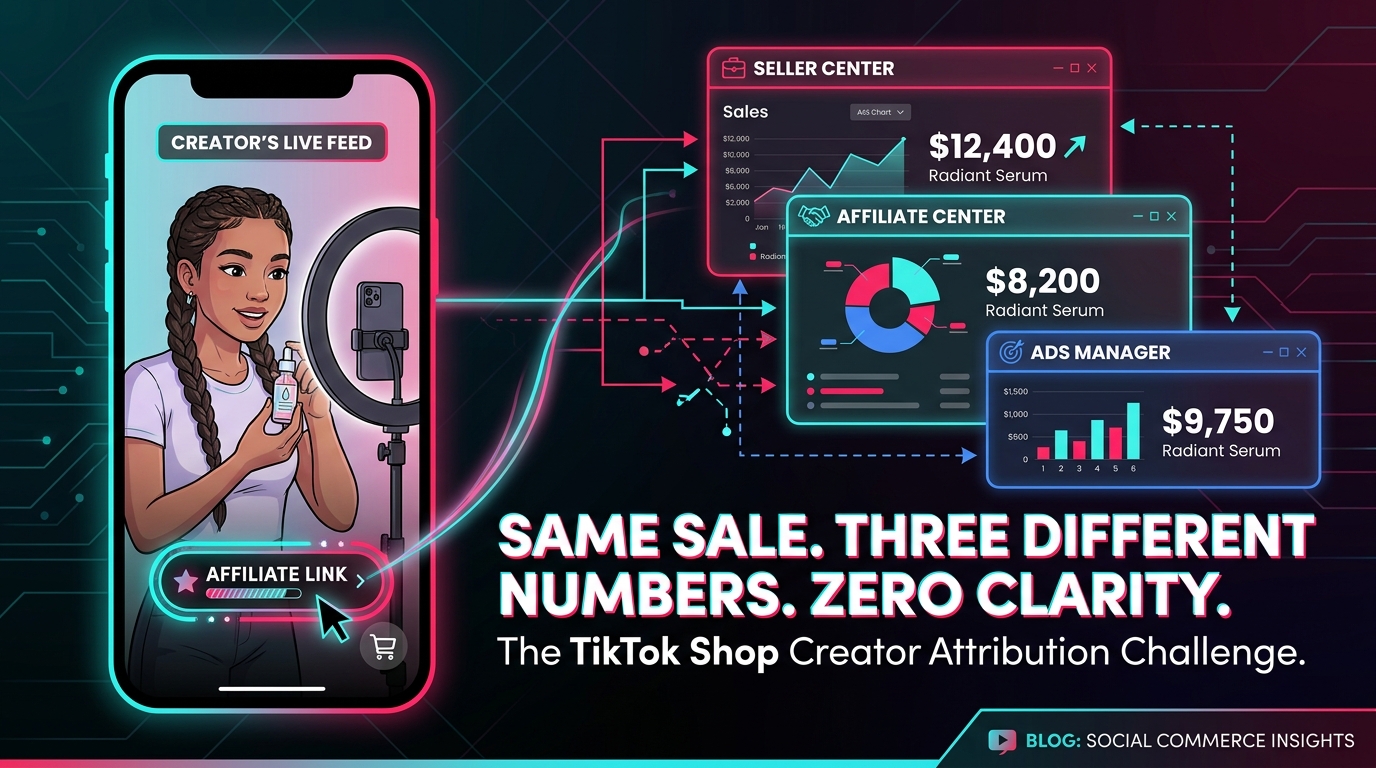
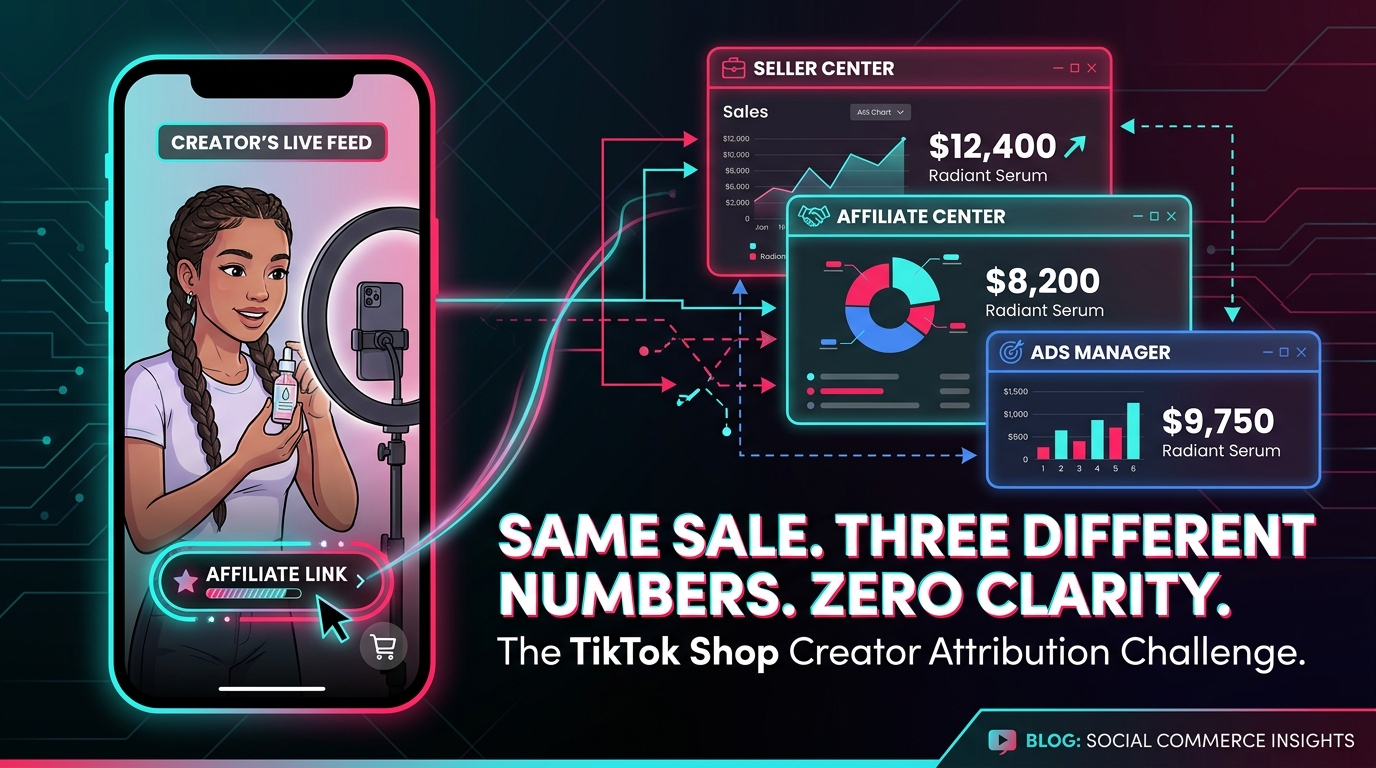
The first thing to understand about TikTok Shop attribution is that the platform does not have one reporting system. It has three — and they answer fundamentally different questions. Most attribution confusion doesn’t start with bad data. It starts with teams pulling numbers from different dashboards and assuming they’re looking at the same thing.
Seller Center: The Transaction Record
Seller Center is TikTok’s core commerce management interface for brands and merchants. When it comes to sales data, Seller Center reports on the basis of when a transaction actually occurred. If a customer clicks a creator’s affiliate link on Monday and completes the purchase on Tuesday, Seller Center records the sale on Tuesday — the transaction date. Full stop.
This makes Seller Center a reliable ledger for total GMV and order volume. But it is not an attribution tool. It tells you what sold and when the money changed hands. It does not, by itself, tell you which creator, which piece of content, or which touchpoint drove that purchase decision. Teams that use Seller Center as their primary measure of creator performance are measuring the wrong thing.
Affiliate Center: The Commission Layer
Affiliate Center is where creator collaboration programs live — commission rates, performance metrics, and payout data. Critically, Affiliate Center’s reporting is based on its own attribution logic, which tracks when a qualifying creator interaction led to a purchase within the attribution window. This means a sale can show up in Seller Center on day 3, but be attributed in Affiliate Center to a creator link that was clicked on day 1.
The divergence compounds when refunds occur. TikTok explicitly documents that affiliate GMV figures can differ from commission GMV when refunds or cancellations are applied — the gross sale might appear in one system while the adjusted figure appears in another. For brands running volume programs with any return rate above zero, this creates persistent numerical gaps that look like bugs but are actually policy-driven discrepancies.
Ads Manager: The Ad Attribution Engine
Ads Manager runs on its own attribution windows — the standard TikTok Shop Ads defaults are 7-day click and 1-day view. That means if someone clicks a Shop Ad and purchases within 7 days, that conversion is attributed to the ad, regardless of what other creator content they interacted with during that window. Ads Manager also explicitly does not distinguish between affiliate creator content and non-affiliate creator content when attributing conversions.
The practical result: when you run paid Shop Ads while also running an active creator affiliate program, the same purchase can reasonably appear in Ads Manager as an ad conversion and in Affiliate Center as a creator-driven commission event. These are not duplicated payments — TikTok’s system is designed to prevent double commission payouts — but they are duplicated attribution claims that make it impossible to understand the true contribution of each channel without external reconciliation.
The core diagnosis: Seller Center records when money moved. Affiliate Center records which creator link was in the path. Ads Manager records which ad interaction preceded the purchase. None of these systems is wrong. They’re just answering different questions — and teams that conflate them will always produce misleading performance reports.
The Last-Click Trap: How TikTok’s Native Model Systematically Under-Credits Your Creators
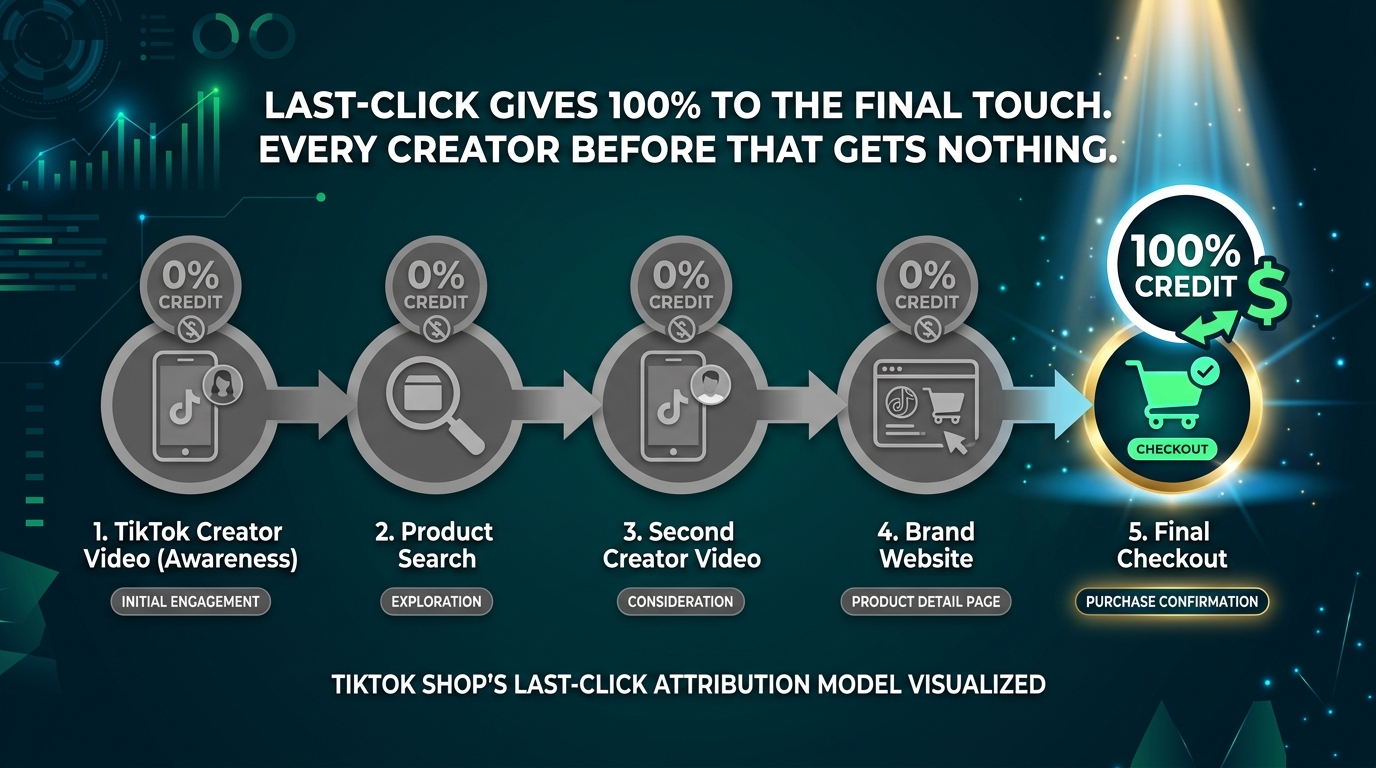
TikTok Shop’s native attribution model is built on last-touch logic. The most recent qualifying interaction within the attribution window receives 100% of the credit for the conversion. Clicks take precedence over views. And TikTok explicitly states that a single order cannot be attributed to multiple ad interactions simultaneously.
On paper, this is clean and simple to implement. In practice, it systematically misrepresents how TikTok-driven commerce actually works — particularly for creator-led programs where the purchase journey routinely involves multiple creator touchpoints over days or weeks.
The Multi-Creator Journey Problem
Consider a typical high-consideration purchase on TikTok Shop — a skincare device, a kitchen appliance, or a fitness product priced above $60. Research consistently shows that consumers making these purchases will often encounter multiple pieces of content before converting. A buyer might see a macro creator’s educational video on Monday, revisit the product after seeing a micro-creator’s testimonial on Thursday, then finally click a different creator’s link to complete the purchase on Saturday.
Under last-click attribution, Saturday’s creator receives 100% of the credit and the associated commission revenue. Monday’s macro creator and Thursday’s micro-creator receive nothing — no commission, no performance data that reflects their contribution, no signal to the brand that their content was part of the funnel. If you’re making creator budget decisions based purely on Affiliate Center attributed sales, you will systematically defund your top-of-funnel discovery creators and over-invest in whoever happens to capture the final click.
The 7-Day Window Problem
TikTok’s standard 7-day click window means any purchase occurring more than seven days after a creator’s link was clicked will not be attributed to that creator at all — even if their content was the primary driver of the purchase decision. For products with longer consideration cycles, this creates a structural floor on measurable creator impact that has nothing to do with actual performance.
The practical fix many teams are adopting is to run parallel attribution window analysis — comparing 7-day, 14-day, and 28-day windows in audit reports — to identify categories of creator impact that the default window is cutting off. This doesn’t change TikTok’s attribution logic, but it gives you directional data about the size of the attribution gap before you act on any performance number.
View-Through Attribution: The Hidden Lever
TikTok’s Engaged View-Through Attribution (EVTA) offers a partial counterweight to the last-click problem. When a user views a TikTok ad for six seconds or more and subsequently converts within the attribution window, EVTA credits that view-through conversion. TikTok explicitly recommends enabling View-Through Attribution to capture a more complete picture of content influence.
But EVTA is not enabled by default for all campaign types, and many teams running creator affiliate programs don’t have it configured. If your current setup relies purely on click-through attribution, you are systematically blind to the impact of view-driven conversions — which, on a video-first platform, represents a substantial share of creator-driven demand.
Spark Ads vs. Organic Affiliate Links: Where the Real Credit Conflict Lives
One of the most misunderstood attribution conflicts in TikTok Shop programs involves Spark Ads — TikTok’s format that allows brands to boost creator-made organic content as paid advertising. The surface-level promise is appealing: amplify your best-performing creator content with paid distribution. The attribution reality is considerably more complicated.
How Spark Ads Handle Engagement Credit
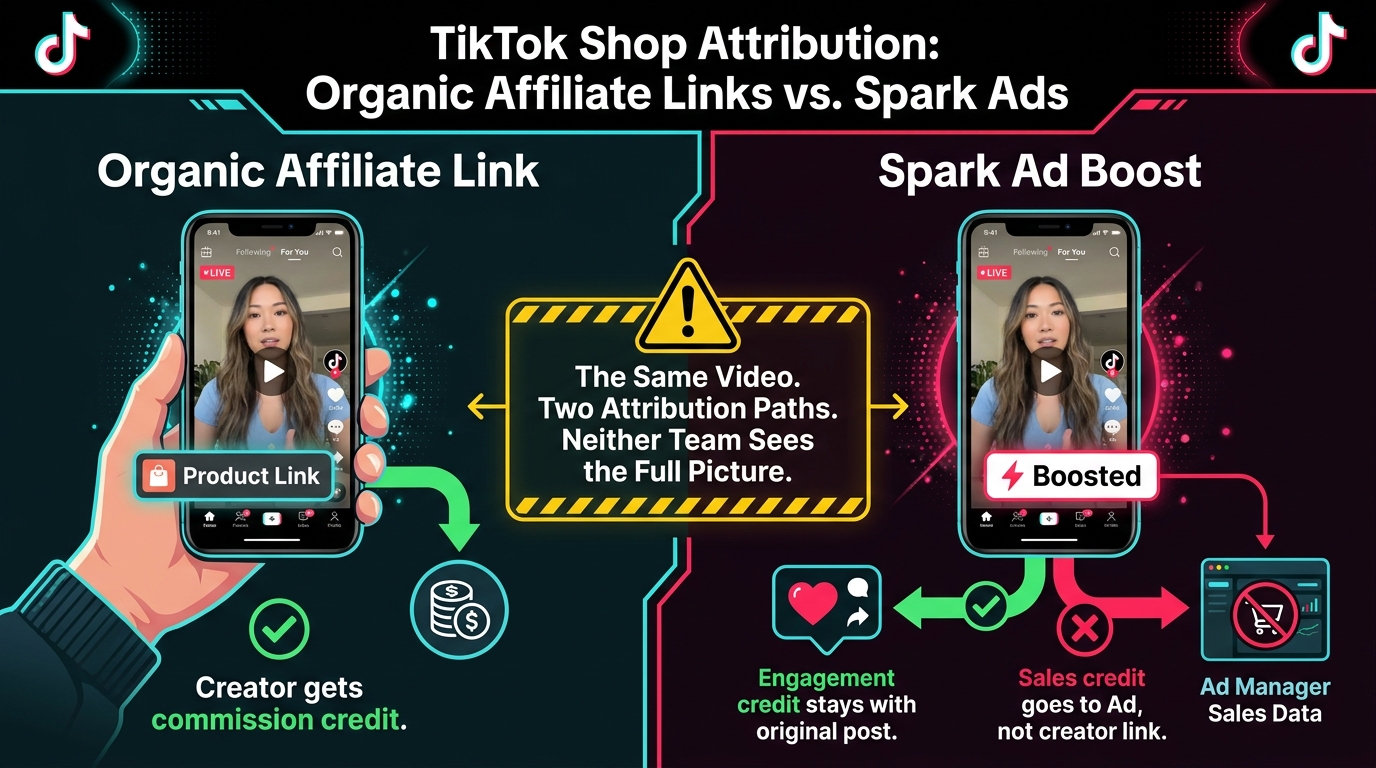
TikTok’s Spark Ads are designed so that engagement from the paid promotion stays attached to the creator’s original organic post. Likes, comments, shares, follows, and profile visits generated by the ad all accumulate on the organic video. For creators, this means boosted performance metrics — which is part of the appeal of approving their content for Spark Ads use.
TikTok also surfaces Anchor Clicks as a metric within Spark Ads, which captures clicks on product links embedded in the boosted post. This is where engagement attribution and commerce attribution begin to diverge.
How Spark Ads Handle Sales Credit
When a Spark Ad drives a purchase, TikTok’s Shop Ads attribution engine credits the sale to the ad interaction within the standard attribution window — 7-day click, 1-day view. This means the sale appears in Ads Manager as an ad-attributed conversion. If the original video also had an active affiliate product link, the affiliate commission chain may apply separately depending on whether the product’s affiliate plan was active and whether the Spark Ad’s link configuration preserved the original affiliate link or replaced it.
This creates a specific scenario that generates widespread confusion: a creator’s organic affiliate video is boosted via Spark Ads. The brand’s Ads Manager shows strong ad-attributed conversions. The creator’s Affiliate Center report shows flat commission revenue. The brand concludes the creator’s content is performing well as an ad but hasn’t shown “organic” commission performance — and may reassess the creator’s baseline commission rate accordingly.
What actually happened: the Spark Ad captured click credit that the organic affiliate link would have otherwise received. The creator’s content did the work; the ad infrastructure captured the attribution. Neither party has visibility into the full picture without deliberately setting up cross-surface measurement.
The Fix: Explicit Attribution Agreements Before Boosting
The practical resolution here is operational rather than technical. Before a brand boosts any creator content via Spark Ads, the attribution rules need to be explicitly agreed upon in writing:
- Will the creator receive commission credit on Spark Ad-driven sales? This requires confirming that the product’s affiliate plan covers ads GMV, not just organic GMV, and that TikTok’s commission rules for the collaboration type apply to ad-driven sales.
- How will performance be reported? Decide in advance whether creator performance will be measured from Affiliate Center data, Ads Manager data, or a reconciled combination of both — and communicate that clearly to the creator.
- Is the attribution window consistent? If Ads Manager is using a 7-day click window and the affiliate program is using its own window, the two performance figures will never align cleanly. Standardize windows before comparing numbers.
The absence of this agreement is the root cause of most Spark Ads creator credit disputes. The platform’s systems are doing what they’re designed to do. The problem is that no one told both parties what “correct” looked like before the campaign started.
Open Collaboration vs. Targeted Collaboration: The Commission Override That Silently Kills Tracking
TikTok Shop’s affiliate structure offers two primary collaboration modes, and the interaction between them is one of the most commonly overlooked sources of commission attribution errors in active programs.
Open Collaboration: The Public Marketplace
Open Collaboration is TikTok Shop’s self-serve affiliate marketplace. Brands set a commission rate for a product, and any eligible creator can discover that product, add it to their storefront, and begin promoting it. The open commission rate is the default reward for any creator who drives a qualifying sale through their affiliate link.
For brands building scale quickly, Open Collaboration is an efficient starting point. You set the rate, publish the product, and let the marketplace surface it to interested creators. The tradeoff is low control over who promotes your product and limited ability to differentiate reward levels based on creator quality or audience fit.
Targeted Collaboration: The Invite-Only Layer
Targeted Collaboration lets brands invite specific creators to promote specific products, often at a custom commission rate distinct from the open rate. TikTok’s commission rule for products active in both collaboration types is explicit: the Targeted Collaboration commission rate overrides the Open Collaboration rate for the duration of the targeted collaboration. The creator receives only one commission rate per product.
Where the Attribution Problem Emerges
The problem emerges when brands run both collaboration types simultaneously on the same product without fully understanding how the override works. Consider this sequence:
- A brand sets an open commission rate of 12% on a product.
- A high-priority creator is invited to a Targeted Collaboration at 18%.
- Three additional creators from the open marketplace are also actively promoting the same product.
- One of the open creators generates a sale during the same window as the targeted creator’s active collaboration period.
The targeted collaboration’s commission override applies at the product level, not the creator level. Depending on how TikTok resolves the attribution and commission rules in this overlap, commission reporting can produce numbers that don’t match what either the brand or the creators expected. Some brands discover this discrepancy only when creators contact them about commission rates that appear different from what was agreed.
The Audit Fix
The operational fix is straightforward but requires discipline. Before launching any Targeted Collaboration on a product that already has an active Open Collaboration:
- Pull the product’s current affiliate status from Seller Center and note all active collaboration types.
- Document the intended override behavior explicitly — which rate should apply to which creators during which window.
- Set explicit end dates for Targeted Collaborations to prevent indefinite rate overrides that silently affect the open creator pool.
- After each campaign period, reconcile Affiliate Center payout records against the commission rates you intended to apply, flagging any discrepancies for manual review.
This is a 30-minute audit per product per campaign cycle. It is consistently the difference between a creator program that builds trust and one that bleeds creator relationships through unexplained commission variances.
The Events API Fix: Building Server-Side Attribution Your Dashboard Can’t Break
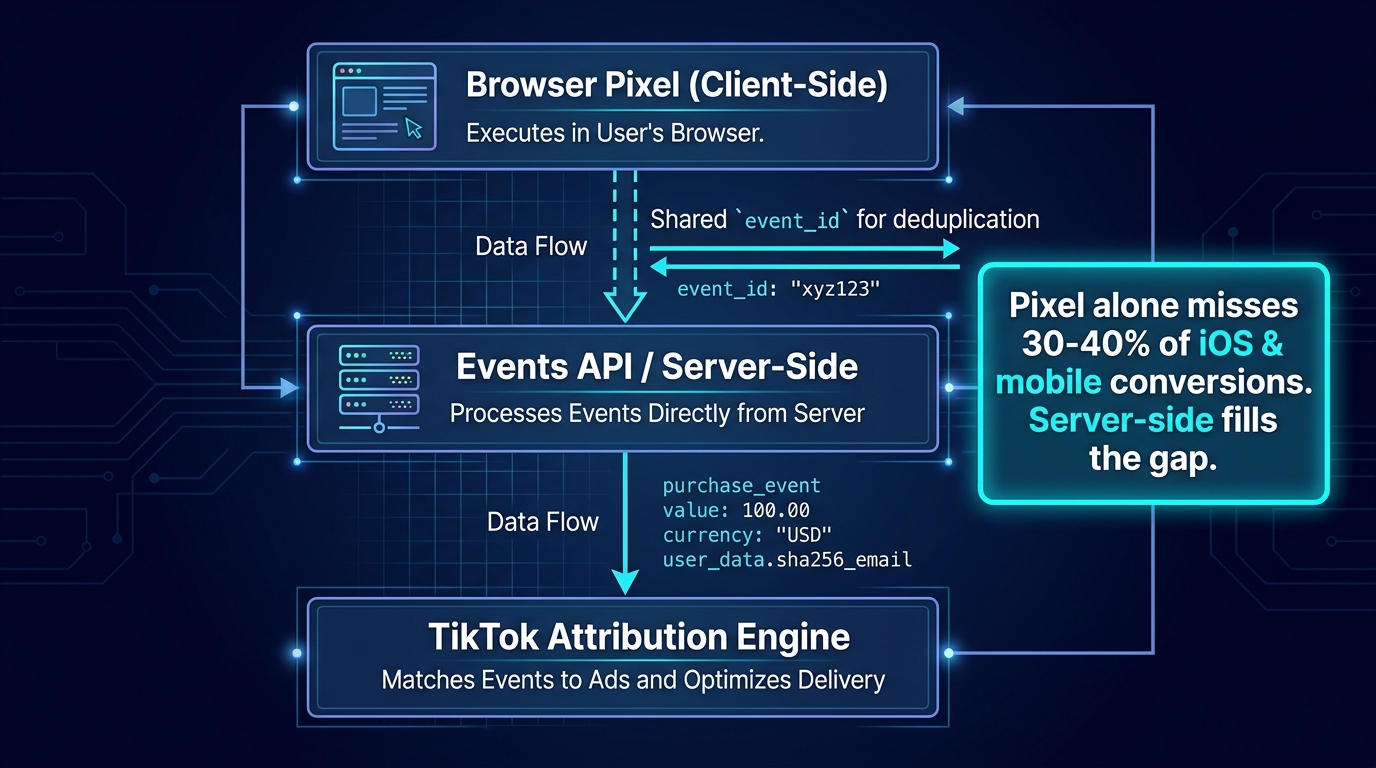
If your TikTok Shop creator program depends solely on browser-side pixel tracking for conversion measurement, you are missing a meaningful share of your actual conversions — and the creators driving those conversions are being systematically under-credited as a result.
The pixel-only gap is not a new problem, but it has become materially worse as iOS privacy restrictions, browser tracking prevention, and ad blockers have grown in prevalence. Estimates from measurement practitioners suggest that browser-pixel-only setups can miss between 20% and 40% of mobile conversions depending on the category and audience demographics. On TikTok — a platform where the vast majority of traffic is mobile — that gap is not a rounding error.
What the Events API Does Differently
TikTok’s Events API is a server-to-server integration that sends conversion events directly from your server to TikTok’s attribution infrastructure, bypassing the browser entirely. Because the call originates from your server rather than the user’s device, it is not subject to browser-side tracking restrictions, ad blockers, or iOS app tracking limitations.
When deployed alongside the browser pixel — the recommended architecture — the Events API creates a redundant conversion signal. TikTok’s system uses a shared event_id parameter to deduplicate events that arrive from both sources for the same conversion, preventing double-counting while maximizing the completeness of conversion capture.
What the Setup Actually Requires
Setting up the Events API properly for TikTok Shop creator attribution is not a one-click integration. Here’s what the complete setup requires:
- A TikTok Pixel in Events Manager: This is the baseline. The pixel should be installed with standard purchase event tracking already firing correctly before you layer in the API.
- An Events API access token: Generated from TikTok’s Business API platform. This token authenticates your server’s calls to TikTok’s event tracking endpoint.
- A server-side purchase event call: Sent to TikTok’s event tracking endpoint at the moment a purchase is confirmed on your server. The call must include the same
event_idused by the browser pixel for the same conversion event — this is what enables deduplication. - TikTok Click ID (ttclid) capture: Where possible, capture the
ttclidparameter from TikTok-driven traffic and pass it in the server-side event call. The click ID is TikTok’s mechanism for tying a conversion back to a specific ad or creator interaction, and including it significantly improves attribution accuracy. - User data matching parameters: Events API calls can include hashed user data (email, phone, IP address) to improve match rates between server-side events and TikTok user profiles, increasing the share of conversions that are successfully attributed.
Shopify-Specific Considerations
For brands running on Shopify, TikTok’s native Sales Channel integration provides browser-side pixel tracking automatically — but as of 2026, it does not provide native server-side Events API coverage. True server-side attribution on Shopify requires one of three approaches: a third-party tracking app that supports Events API (several exist in the Shopify App Store), a custom server-side implementation via Shopify’s webhook infrastructure, or a server-side Tag Manager setup that intercepts purchase confirmation events and relays them via API.
The most common mistake Shopify brands make is assuming the native TikTok Sales Channel integration is comprehensive. It covers basic pixel tracking, but “comprehensive” and “browser pixel” are not the same thing — particularly for mobile conversion capture.
Testing Your Setup
Once Events API is deployed, the most important validation step is confirming deduplication is working as intended. TikTok’s Events Manager provides a “Test Events” interface where you can fire test events and verify they are received correctly. After launch, monitor your Event Match Quality score in Events Manager — TikTok scores the quality of your event matching on a scale that directly predicts how well attributed conversions will be recovered. Scores above 7.0 out of 10 are the target; below 6.0 indicates significant matching failures that are undermining your attribution accuracy.
UTM Hygiene for Off-Platform Tracking: What Works, What Doesn’t, and Why Most Teams Get This Backwards
UTM parameters are the default tool most brands reach for when they want to track creator performance across platforms. The problem is that UTMs and TikTok Shop attribution are solving different problems, and confusing one for the other creates measurement setups that generate data without generating insight.
What UTMs Can and Cannot Do in TikTok Shop
UTM parameters — utm_source, utm_medium, utm_campaign, utm_content, utm_term — are designed to tag URL traffic so that analytics platforms like GA4 can attribute website sessions to their originating source and campaign. They work exceptionally well for tracking which creator drove traffic to a brand’s website or landing page.
What they cannot do is override or supplement TikTok Shop’s internal attribution logic. When a purchase happens inside TikTok Shop — through the in-app checkout rather than a redirect to a brand website — the conversion is recorded in TikTok’s commerce infrastructure, and UTM parameters on the affiliate link do not affect how TikTok attributes that conversion. Seller Center, Affiliate Center, and Ads Manager are reporting on TikTok’s internal event data, not on URL parameters that a web analytics tool would read.
This is the backward assumption that catches most teams: they add UTM parameters to affiliate links expecting it to fix their TikTok Shop attribution reports. The UTMs appear in GA4 session data for whatever off-platform traffic those links generate. But the Affiliate Center numbers remain unchanged, because TikTok Shop attribution does not read UTM tags.
Where UTMs Actually Belong in a Creator Attribution Stack
UTMs serve a distinct and genuinely useful function in creator tracking — just not the one most teams are using them for. The right use cases are:
- Link-in-bio tracking: When creators direct audiences to a brand website via their link-in-bio, UTMs reliably identify which creator drove that session and any resulting on-site conversion.
- Landing page funnels: When brands use creator-specific landing pages that bridge TikTok traffic to a brand website (for email capture, segmented offers, etc.), UTMs track that traffic accurately in GA4.
- Cross-platform traffic analysis: Understanding how TikTok creator traffic behaves on-site — bounce rate, session depth, conversion path — compared to traffic from other channels.
- Creator-level segmentation: Using
utm_contentor a custom parameter to tag individual creators so that off-site analytics can segment performance by creator handle rather than just by campaign.
A Practical UTM Naming Convention for Creator Programs
For the off-site use cases where UTMs do apply, a clean and consistent naming convention is non-negotiable. Inconsistency at the UTM level produces fragmented analytics data that is as hard to use as no data at all. A workable standard:
utm_source=tiktok— static, never variesutm_medium=affiliateorutm_medium=spark— reflects the traffic typeutm_campaign=[product-name-or-campaign-id]— the specific campaign or productutm_content=[creator-handle]— the specific creator, using their actual handle for easy lookup
Enforce this convention at the program level, not the creator level. If creators are generating their own links, provide a link-building template with pre-populated UTM values and a single variable for their handle. Do not rely on creators to write their own UTM strings consistently — the variance will make the data unusable within three weeks.
The Reconciliation Stack: How to Build a Single Source of Truth Across All Three TikTok Systems
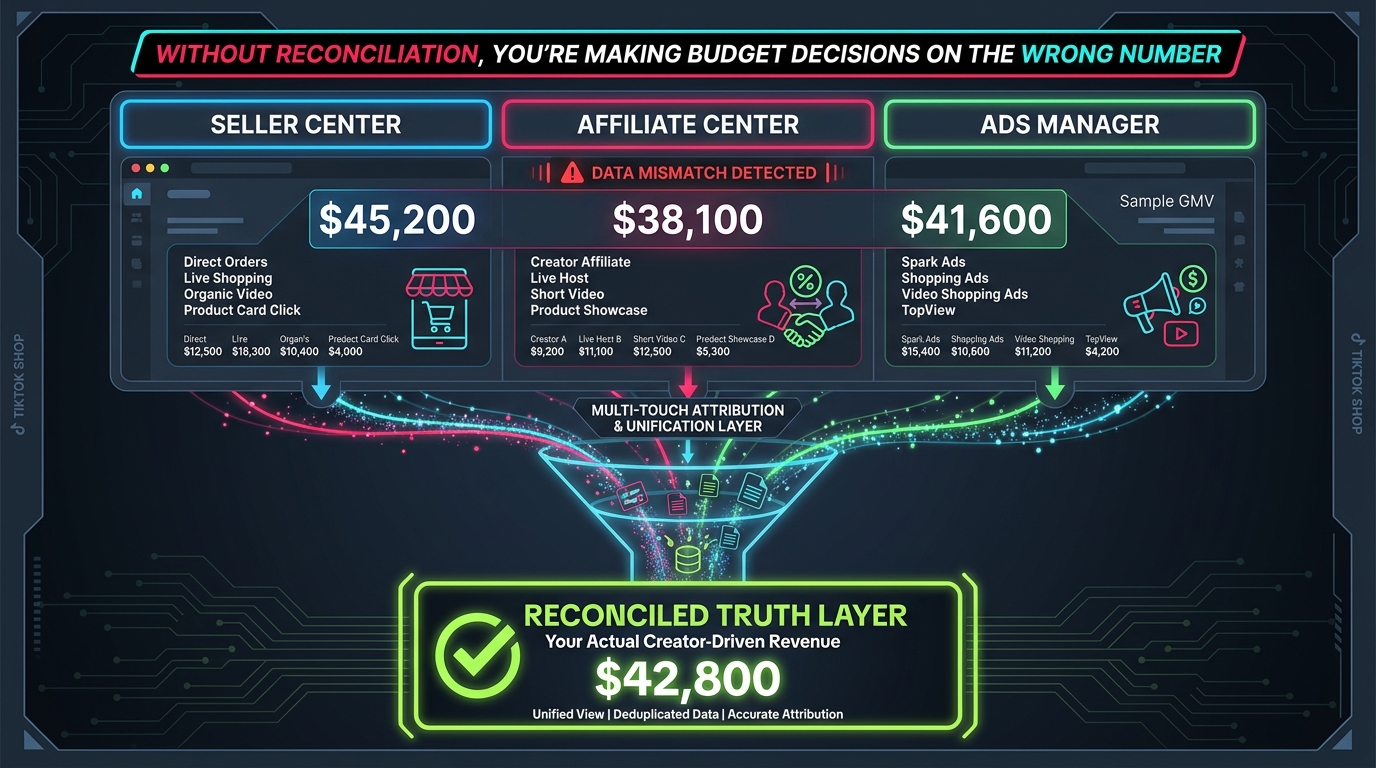
Given that TikTok Shop’s three reporting systems will never produce identical numbers — because they’re designed to track different things — the goal is not to find one dashboard that’s “correct.” The goal is to build a reconciliation layer that translates each system’s numbers into a coherent picture of creator-driven revenue.
Step 1: Define What Each System Is Allowed to Answer
Before building any reconciliation structure, document which business questions each TikTok system is authorized to answer in your org:
- Seller Center answers: Total GMV by product, total orders, return rates, fulfillment data. Use it for operational and inventory planning.
- Affiliate Center answers: Which creators generated qualifying affiliate sales, commission amounts owed, collaboration-level performance comparisons. Use it for creator payout calculations and program-level performance reviews.
- Ads Manager answers: Which paid campaigns and ad-attributed conversions occurred within your active attribution windows. Use it for paid media budget decisions and ad-level creative performance.
Once every team member knows which system answers which question, you eliminate the most common source of attribution confusion: people citing incompatible numbers from incompatible sources as if they should be equal.
Step 2: Build the Weekly Reconciliation Report
The practical reconciliation output is a weekly report that pulls from all three systems into a single document with explicit column definitions. The structure:
| Metric | Source | Definition | Use For |
|---|---|---|---|
| Total Shop GMV | Seller Center | All orders, transaction date | Business performance baseline |
| Affiliate GMV | Affiliate Center | Creator-linked orders, attribution window | Creator payout + program ROI |
| Ad-Attributed GMV | Ads Manager | 7-day click / 1-day view window | Paid media ROI, bid optimization |
| Server-Side Events | Events API / Data Warehouse | Purchase events with creator metadata | Ground truth conversion count |
| GA4 / Off-Site Sessions | GA4 + UTM data | Creator-tagged website traffic | Off-platform creator traffic analysis |
The reconciliation report doesn’t try to make these numbers equal. It makes the deltas between them visible and interpretable. A $6,000 gap between Affiliate GMV and Ad-Attributed GMV on the same product in the same week isn’t an error — it’s a signal that the same conversions are being claimed by two different attribution paths, which means you need to investigate whether Spark Ads are cannibalizing your organic affiliate attribution.
Step 3: Add Your Data Warehouse as the Ground Truth Layer
For brands running at meaningful scale, the definitive fix for attribution confusion is adding a data warehouse layer that captures raw order data from your commerce platform (Shopify, WooCommerce, etc.) alongside TikTok-sourced creator metadata. This lets you reconcile TikTok’s platform reports against actual order records that you own and control.
The minimum viable warehouse setup for creator attribution requires:
- Order-level data from your commerce platform, including order ID, product, timestamp, and revenue
- Creator metadata for each order that originated from a creator touchpoint (captured via TikTok click ID, affiliate link ID, or UTM parameters for off-site orders)
- A weekly export from Affiliate Center with creator-attributed order IDs and commission amounts
- A weekly export from Ads Manager with attributed conversions and campaign/ad IDs
With order ID as the join key, you can identify every case where a single order is being attributed differently across TikTok’s systems, trace the attribution path, and make an informed judgment about which attribution reflects the causal driver of that sale. This is the foundation of every high-quality creator program measurement setup in 2026.
Beyond Last-Click: Running Incrementality Tests to Prove True Creator Lift
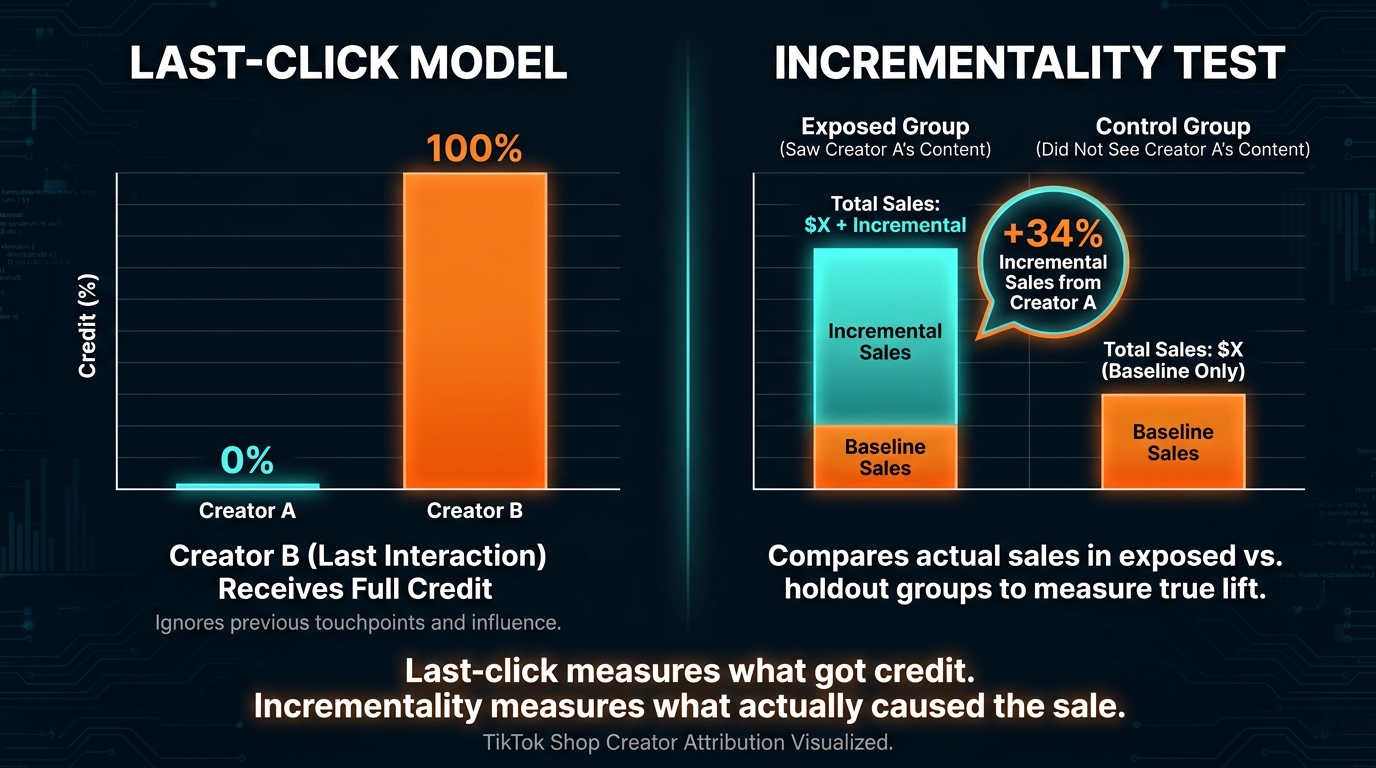
Even a perfectly reconciled attribution stack still measures what got credit for a sale, not what actually caused the sale. For brands that want to understand the real causal impact of their creator programs — and make resource allocation decisions that hold up to finance-level scrutiny — incrementality testing is the necessary next layer.
What Incrementality Testing Measures
An incrementality test answers a specific question: would this sale have happened anyway, without the creator’s content? The methodology involves comparing outcomes between an exposed group (users who saw the creator’s content) and a control group (a comparable group who did not). The difference in conversion rate between the two groups represents the incremental lift attributable to the creator’s content — the sales that would not have occurred without that exposure.
This matters enormously because last-click attribution doesn’t measure causality. A creator whose content reaches audiences that were already highly likely to purchase the product will show strong attributed sales in a last-click model. An incrementality test might reveal that most of those sales would have happened without the creator — the creator’s content appeared in the path, but it wasn’t the causal driver. Conversely, a discovery-stage creator whose content reaches audiences who had no prior awareness of the product might show weak last-click attribution but strong incremental lift — meaning they are genuinely generating demand that would not have existed without their content.
TikTok’s Native Lift Testing Options
TikTok offers Conversion Lift Studies and Geographic Lift (Geo Lift) studies through its measurement tools, accessible typically in partnership with TikTok’s measurement team or certified measurement partners. These are designed specifically to estimate the incremental impact of TikTok content exposure on purchase behavior, using randomized exposed and control populations.
For creator programs specifically, Conversion Lift Studies can be structured around specific creator content or campaign periods to isolate creator-driven incrementality. The practical minimum requirements are sufficient conversion volume to achieve statistical significance (typically 10,000+ exposed users and meaningful conversion events during the test period) and a clean holdout group that does not receive the creator’s content organically.
DIY Incrementality: Holdout Testing for Smaller Programs
For brands that don’t have the scale or budget for formal TikTok lift studies, a simplified holdout approach provides directional incrementality data without requiring a formal measurement partner:
- Geographic holdout: Select two geographic markets that are comparable in baseline purchase behavior. Run your creator program at full intensity in one market while maintaining a clean hold-out in the other. Compare GMV growth rates over a 4–6 week period.
- Creator cohort holdout: Pause one cohort of creators for 4–6 weeks while maintaining the rest of the program. Monitor overall GMV for a decline that exceeds what last-click attribution would predict for that creator’s “attributed” sales. If sales drop more than the attributed figure suggested, that creator’s true lift was being under-measured.
- Coupon code tracking: Issue creator-specific coupon codes alongside affiliate links. Coupon redemption provides a clean conversion signal that is less vulnerable to the attribution window and last-click issues that affect link-based tracking. While not a formal incrementality test, coupon redemption rates give a directional view of true conversion intent driven by specific creator content.
What to Do With Incrementality Data
The output of incrementality testing is a calibration factor — essentially a multiplier that adjusts each creator’s last-click attributed sales to better reflect their true contribution. A creator whose content shows 1.4x incremental lift relative to their attributed sales should be weighted accordingly in budget allocation decisions. A creator whose attributed sales are high but incrementality is low (meaning they’re capturing credit for sales that would have happened anyway) should be scrutinized before commission rates or collaboration budgets are increased.
This data also informs how you structure your creator mix. Discovery creators who drive strong incremental lift at the top of the funnel deserve different attribution treatment — and different compensation models — than conversion creators who are primarily capturing demand that awareness creators already built.
Building Your Attribution Audit Checklist: The 90-Minute Weekly Review That Protects Your Program
Attribution problems compound over time. A misconfigured Events API, an expired Targeted Collaboration with a silent commission override, a Spark Ad campaign that isn’t correctly linked to your affiliate attribution setup — each of these is manageable if caught within a week. Left unaddressed for a quarter, they produce creator performance data that has drifted so far from reality that you’re effectively making program decisions blind.
The fix is a consistent weekly audit routine. Here’s the framework, designed to be completed in 90 minutes or less with the right data already pulled:
Section 1: System Health Check (20 minutes)
- Open TikTok Events Manager. Check your pixel’s event match quality score. Flag any score below 7.0 for immediate investigation.
- Verify that the most recent Events API calls are appearing in the test events log. If server-side events haven’t fired in more than 24 hours, treat it as an incident.
- Confirm the
event_iddeduplication is active by checking that the same purchase event is not appearing doubled in Events Manager’s event count. - Spot-check Seller Center’s reported GMV against your commerce platform’s native order count for the past 7 days. A gap of more than 5% warrants investigation.
Section 2: Attribution Window Review (15 minutes)
- Pull the past 7 days of Affiliate Center data. Note any creators showing zero attributed sales despite active posting activity (check their TikTok posting frequency separately).
- Pull the same 7-day period from Ads Manager. Identify any products where ad-attributed GMV exceeds Affiliate Center GMV by more than 20% — this is often a signal that Spark Ads are capturing attribution that was organically earned.
- Check whether any active Targeted Collaboration windows have expired in the past 7 days without being renewed or formally closed. Expired target collaborations can leave commission rate configurations in an undefined state.
Section 3: Creator-Level Performance Sanity Check (30 minutes)
- Identify the top 10 creators by posting volume in the past 7 days. Cross-reference with their Affiliate Center attributed sales. Flag any creator with high posting volume but near-zero attributed sales — this indicates either a link configuration problem, an attribution window mismatch, or a content type that is driving view-through demand rather than direct click conversions.
- Check whether any creator’s affiliate links have been recently modified, regenerated, or replaced. Link changes reset attribution history and can cause attribution gaps that look like performance drops.
- Verify that your UTM naming convention is intact by pulling a sample of creator-specific links and confirming the parameters match the standard you’ve defined. UTM drift usually starts here.
Section 4: Reconciliation Delta Review (25 minutes)
- Update your weekly reconciliation report with the latest numbers from all three systems.
- Calculate the delta between Affiliate GMV and total Seller Center GMV. Document the percentage and compare to the previous two weeks. A growing delta may indicate that more sales are occurring outside the attribution window or through channels not captured by your affiliate links.
- Note any products where the Ads Manager attributed sales figure and the Affiliate Center figure together exceed Seller Center’s total sales figure. This shouldn’t be possible — if it occurs, it indicates double-attribution at the system level and requires escalation to TikTok support with order-level evidence.
What a Fixed Attribution Stack Actually Looks Like in Practice
Pulling all of these fixes together into a coherent operating model requires decisions at three levels: technology, process, and people. Attribution is a systems problem, not a dashboard problem, and solving it means addressing all three.
Technology Layer
A properly configured attribution technology stack for a serious TikTok Shop creator program includes:
- TikTok Pixel + Events API in dual-signal mode with deduplication active
- Commerce platform webhook integration to capture order-level data server-side
- A data warehouse or reporting database that stores creator-attributed order records independently of TikTok’s native dashboards
- GA4 with a consistent UTM taxonomy for off-platform creator traffic analysis
- A BI tool or Google Sheets-based reconciliation report that pulls from all sources on a weekly cadence
Process Layer
Technology can only do its job if the surrounding processes enforce data quality. The non-negotiable process elements are:
- A written attribution agreement with every creator before any Spark Ad boost is authorized
- A documented window policy (which attribution windows apply to which measurements) shared with everyone who touches performance data
- A weekly 90-minute audit run by a designated owner — not ad hoc, not delegated to whoever is available
- A quarterly incrementality review that calibrates creator-attributed sales against actual lift data
People Layer
Attribution confusion is often a communication problem wearing a technology costume. The people-level fixes are:
- Briefing creators on exactly how their performance will be measured before they start promoting. Not a vague “we’ll track your sales” — a specific statement of which dashboard, which window, and which events count as a qualifying conversion.
- Establishing an internal escalation path for attribution disputes. If a creator flags that their commission report doesn’t match their subjective sense of how their content performed, there should be a person and a process for investigating that claim with actual data, not just asking them to trust the dashboard.
- Training whoever owns Affiliate Center and Ads Manager to understand that their dashboards are not the same. A creator program manager who treats Affiliate Center as the ground truth for total business performance, and a paid media manager who treats Ads Manager as the same, will produce conflicting reports that leadership has no way to reconcile.
Conclusion: Attribution Is an Engineering Problem, Not a Platform Excuse
The most costly attribution mistake TikTok Shop brands make is treating misattribution as TikTok’s problem to fix. The platform’s last-touch model, its three-system architecture, its Spark Ads engagement-vs-commerce split, its Open and Targeted Collaboration commission overrides — these are documented, consistent, and largely predictable. They are the rules of the environment, not temporary bugs waiting for a patch.
Brands that build around those rules — with server-side event tracking, clean UTM disciplines, explicit attribution agreements, regular reconciliation, and incrementality testing — consistently outperform those waiting for a simpler dashboard. They don’t just get better data. They make better creator decisions: keeping discovery creators who drive real incremental lift even when last-click gives them no credit, identifying conversion creators who are harvesting demand they didn’t create, and investing in the program elements that actually generate GMV rather than the ones that merely capture attribution of it.
The creators who drive your TikTok Shop results are making real business decisions about which products to feature, how to script their content, and where to focus their energy. They deserve measurement that reflects what they’ve actually done. Building that measurement infrastructure isn’t a luxury feature for enterprise brands — it’s the baseline for running a creator program that is both fair and financially defensible.
Key Takeaways
- Never compare Seller Center, Affiliate Center, and Ads Manager numbers as if they should match. Document what each system measures and enforce those definitions across your team.
- Deploy TikTok Events API alongside your browser pixel. Pixel-only setups miss 20–40% of mobile conversions — which means creators driving mobile purchases are being systematically under-credited.
- Establish written attribution agreements before any Spark Ad boost. The credit conflict between organic affiliate links and paid Spark Ads is operational, not technical — solve it before campaigns launch.
- Audit your Open and Targeted Collaboration overlap monthly. Undocumented commission rate overrides are one of the most common sources of creator trust erosion in active programs.
- Run incrementality tests before making major creator budget decisions. Last-click data tells you who got credit. Incrementality data tells you who caused the sale. They are not the same answer.
- Build a 90-minute weekly attribution audit into your operating calendar. Attribution problems compound silently. A consistent review catches issues before they distort a quarter’s worth of program decisions.