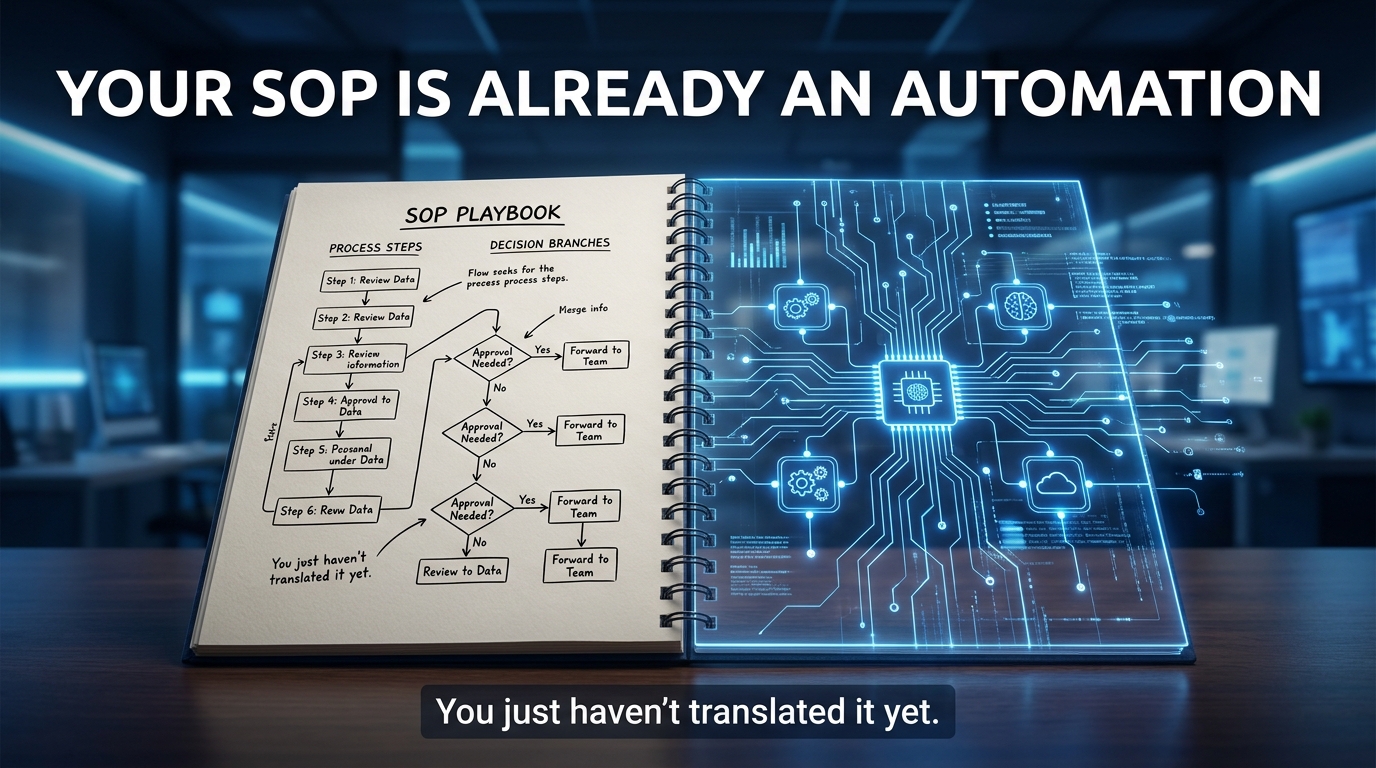

Here is a claim that sounds obvious only in hindsight: your SOPs are not the input to an automation project. They are the automation, written in human language.
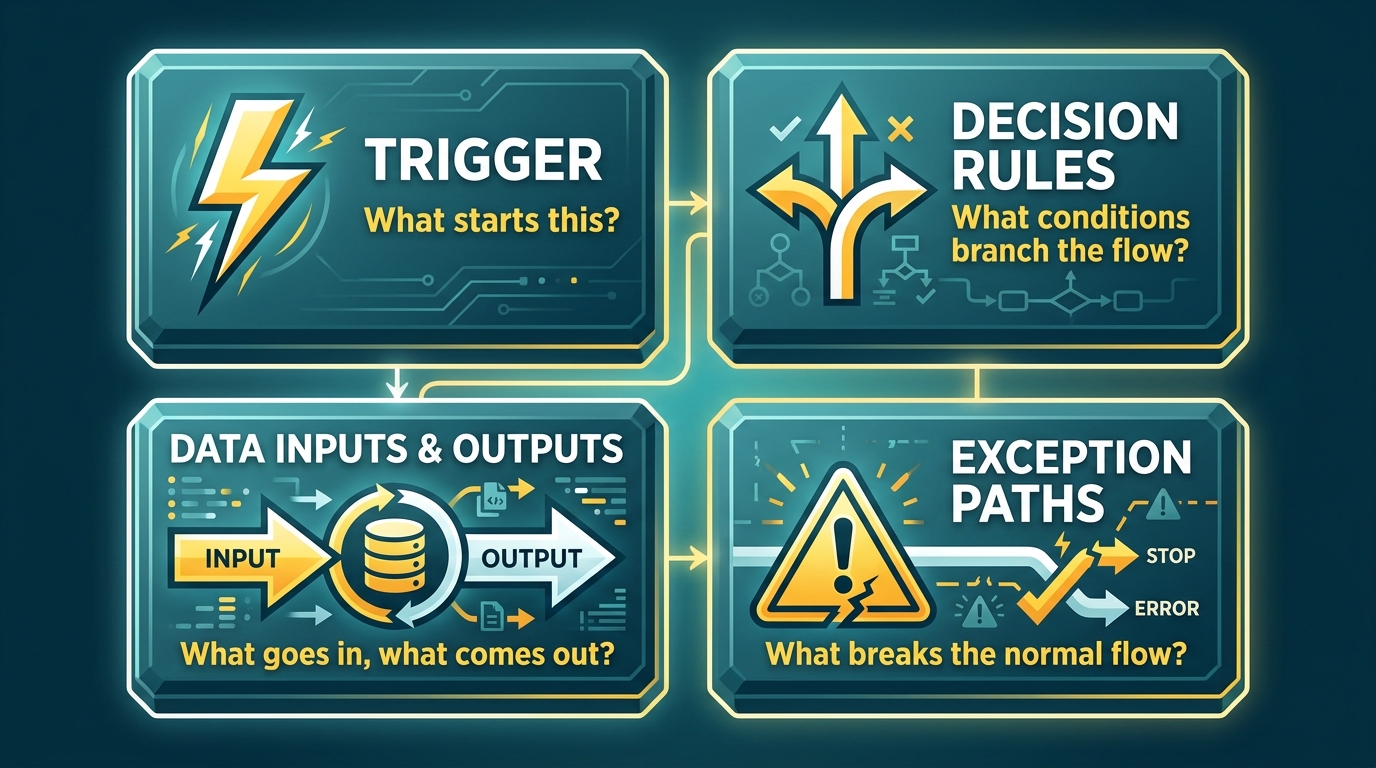
Every standard operating procedure your team has ever written contains the same structural DNA as every automated workflow ever built. There is a trigger — the condition that starts the process. There are decision rules — the “if this, then that” logic your team follows without thinking. There is data flowing in and data flowing out. And there are exception paths, the edge cases your most experienced people handle almost instinctively. Those are not human qualities that resist automation. They are the exact logic that automation systems run on.
So why are most companies treating their SOP libraries as documentation artifacts to be translated into workflows, rather than recognizing them as workflows waiting to be executed? The answer is partly habitual and partly architectural — and closing the gap requires both a mindset shift and a methodical technical approach.
In 2026, approximately 60% of companies have introduced some level of process automation, with that figure reaching 84% among large enterprises, according to survey data compiled by Duke University’s CFO Survey and aggregated by automation researchers. Yet the majority of those implementations started with tools, not SOPs. They started with “we bought a license for this platform” rather than “we have 47 documented processes and we need to figure out which eight to automate first.”
This post is about doing it in the right order. It covers how to read your existing SOPs as latent automation blueprints, how to score them for readiness, how to translate human decision logic into machine-executable structure, and how to choose the right tier of automation — from basic RPA through to LLM-driven agentic workflows — for each process. The goal is not to automate everything. It is to automate the right things, in the right sequence, with the right guardrails.
The SOP as a Latent Automation
Open any SOP that your team actually uses — not an aspirational document, but one that governs a real, recurring process. Read the first three steps. It almost certainly begins with some version of: “When [event] occurs, check [data source]. If [condition A], proceed to step 4. If [condition B], escalate to [role].”
That is not a human instruction. That is a state machine written in prose.
Automation engineers build workflow logic using the same components: an event trigger, a conditional branch, a state transition, an output action. The only meaningful difference between your SOP and an executable workflow is the layer of translation required to move from natural language to structured logic. In 2026, that translation layer is thinner than it has ever been, thanks to large language models that can parse process descriptions, identify branching conditions, and surface the latent structure of documented procedures.
The Hidden Workflow Logic Inside Every SOP
Consider a typical invoice processing SOP from a mid-sized finance team. It might read something like: “Upon receipt of invoice via email, verify vendor against approved vendor list. If vendor is approved and invoice total is under $5,000, route to department manager for sign-off. If total exceeds $5,000, route to CFO approval queue. If vendor is not on approved list, hold invoice and notify procurement.”
Parsed out, this SOP contains: one trigger (invoice received via email), two data lookups (vendor list, invoice total), three conditional branches, three output actions, and two role-based routing rules. Every one of those elements maps directly to a node in an automated workflow. The SOP is the design document.
The problem is that most organizations never read their SOPs as design documents. They read them as training materials — instructions for new employees, compliance artifacts for auditors, or reference guides for occasional exceptions. That reframing, from instruction to blueprint, is the first and most important cognitive shift in an SOP-to-automation program.
Why This Matters More Now Than It Did Three Years Ago
In earlier automation cycles — particularly the first wave of robotic process automation that peaked around 2019–2021 — building automation from SOPs required substantial manual re-engineering. A business analyst would interview process owners, map workflows in Visio, hand off to developers, and iterate through multiple build-test cycles. The SOP was a starting point at best.
Today, workflow orchestration platforms including n8n, Make, and Zapier support LLM-powered agents that can ingest a process description, propose a workflow structure, and identify the integration points required to execute it. AI SOP tools can parse text procedures and generate structured decision graphs automatically. The gap between documentation and deployment has compressed dramatically — which means the quality of your underlying SOP documentation now directly determines the speed and accuracy of your automation builds.
Why Most Automation Projects Start in the Wrong Place
The standard failure pattern for enterprise automation programs is well-documented, even if it continues to repeat itself. A leadership team hears about automation at an industry conference or in a vendor pitch. Licenses are procured. A small team is assembled. The team searches for “low-hanging fruit” — processes that seem simple enough to automate quickly. Something gets built. It works for a while, then breaks when the underlying process changes. The ROI calculation gets murky. The program stalls.
The root cause of this pattern is almost never the technology. It is the sequence: tools before clarity.
The Tool-First Trap
Purchasing an automation platform before documenting your processes is equivalent to buying kitchen appliances before you have recipes. You now own a very expensive tool that can technically do many things, but you have no clear specification for what it should actually produce. Teams in this position tend to default to automating whatever happens to be most visible, rather than whatever is most impactful.
The processes that get automated first under tool-first programs are typically the ones that someone’s loudest manager complained about most recently, or the ones that best match the vendor’s pre-built templates. These are not bad automations. They just are not strategic automations. They do not compound. They do not free up meaningful human capacity at scale. They get built, they run, and they add marginal value.
Process Clarity Before Platform Selection
The correct sequence is: document → audit → prioritize → specify → build → govern. Platform selection happens after prioritization, because the right tool depends on the nature of the process you are automating. A high-volume, highly repetitive data entry task calls for a different tier of automation than a complex, judgment-heavy workflow with multiple exception types and compliance requirements.
Organizations that have achieved the most significant automation outcomes started with process maps, not platform demos. EDP Global Solutions — the shared services arm of the EDP Group — reviewed 128 candidate automation projects before building a single bot. They scored each by potential hour savings, process complexity, and ROI horizon. Starting with that prioritized portfolio, they automated 85 processes in the first 12 months and reached 450+ critical business processes automated in under three years, saving more than 220,000 hours. The platform came second. The process audit came first.
The Documentation Quality Problem
A subtler version of starting in the wrong place is starting with SOPs that are not actually ready to become automation blueprints. Many organizations have SOP libraries that are either incomplete, inconsistent, or aspirational — documenting how a process is supposed to work rather than how it actually works on the floor.
Automating an idealized SOP that does not match operational reality produces automation that fails at the exact moments that matter most: the exceptions, the edge cases, the variations that experienced humans navigate instinctively but that nobody ever bothered to write down. When the automation hits one of those gaps, it either fails silently, produces incorrect outputs, or escalates every edge case to a human — which defeats much of the efficiency gain. The fix is a process reality audit before any technical build begins.
The Four Structural Elements Every Automatable SOP Must Have
Before a process can be reliably automated, its documentation must contain four distinct structural components. The absence of any one of them does not mean the process cannot eventually be automated — it means the documentation is not yet ready. These four elements are not a framework invented for this post. They are the actual components that every workflow automation system, from the simplest Zapier Zap to the most complex agentic orchestration system, requires to execute a process correctly.
1. A Defined Trigger
Every automated process begins with a condition that initiates execution. In SOP language this is often implicit — processes begin when something arrives, something changes, or a calendar event fires. For automation purposes, the trigger must be explicit and machine-detectable: an email received in a specific inbox, a form submission, a database record update, a scheduled time, a webhook from another system, or a status change in your CRM.
SOPs that begin with vague triggers such as “when a customer has a problem” or “as needed” cannot be automated without first tightening the trigger definition. The automation needs to know precisely what event starts the clock. Ambiguous triggers are one of the most common reasons automation projects require significant rework after an initial build.
2. Explicit Decision Rules and Branching Conditions
This is the structural element that separates an automatable SOP from an unautomatable one. Decision rules are the “if/then/else” logic embedded in the process. In well-written SOPs they are clear: “If the application credit score is above 720, proceed to approval. If between 620 and 720, require manual review. If below 620, decline.” In poorly written SOPs they appear as judgment calls: “Use discretion based on the customer’s situation.”
Judgment calls are not inherently bad. But they cannot be directly automated. They must first be resolved into decision rules — by interviewing the subject matter experts who exercise that judgment and extracting the actual criteria they use. In most cases, experienced employees do follow consistent rules; they have simply never articulated them explicitly. The pre-automation work involves surfacing that implicit logic and codifying it.
Recent research from arXiv (Zhang et al., “Empower General Purpose AI Agent with Domain-Specific SOPs,” 2026) formalizes this concept: SOPs should be represented as directed acyclic graphs where nodes are actions and edges are explicit IF/ELSE conditions. Non-mutually-exclusive conditions support parallel branches and looping structures. This is the academic formalization of what experienced automation architects do in practice.
3. Structured Data Inputs and Outputs
Every step in an automated workflow operates on data: it reads data from somewhere, applies logic, and writes results somewhere else. The SOP must specify what data each step needs (and where it comes from), and what data each step produces (and where it goes). This includes field names, data types, acceptable value ranges, and the source systems or storage locations involved.
SOPs that reference data sources vaguely — “check the relevant records” or “refer to the customer file” — require disambiguation before automation. Which system? Which fields? What is the data format? Automation fails when a step in the workflow tries to read from a source that was not anticipated in the original design, or writes output in a format that downstream steps cannot parse.
4. Documented Exception Paths
Every real process has conditions under which the normal flow breaks down: data is missing, a third-party system is unavailable, a value falls outside expected ranges, or the situation simply does not fit any predefined category. Exception paths — the handling logic for those situations — are often the most under-documented part of any SOP, because they are the parts that experienced humans manage through judgment and informal escalation rather than written procedure.
For automation purposes, exception paths require explicit documentation: what constitutes an exception, how it is detected, what action the automation takes (pause, escalate, default behavior), and who receives notification. Automated processes without documented exception handling tend to fail silently — continuing to execute through situations they were never designed to handle, producing incorrect outputs with no notification to anyone.
How to Audit Your Existing SOPs for Automation Readiness
Not every SOP should be automated, and not every SOP that should eventually be automated is ready to be automated right now. A structured readiness audit lets you triage your SOP library objectively, separate processes that are genuinely ready for immediate build from those that need documentation work first, and identify the handful of high-impact processes that deserve prioritized investment.
A Five-Dimension Readiness Scoring Model
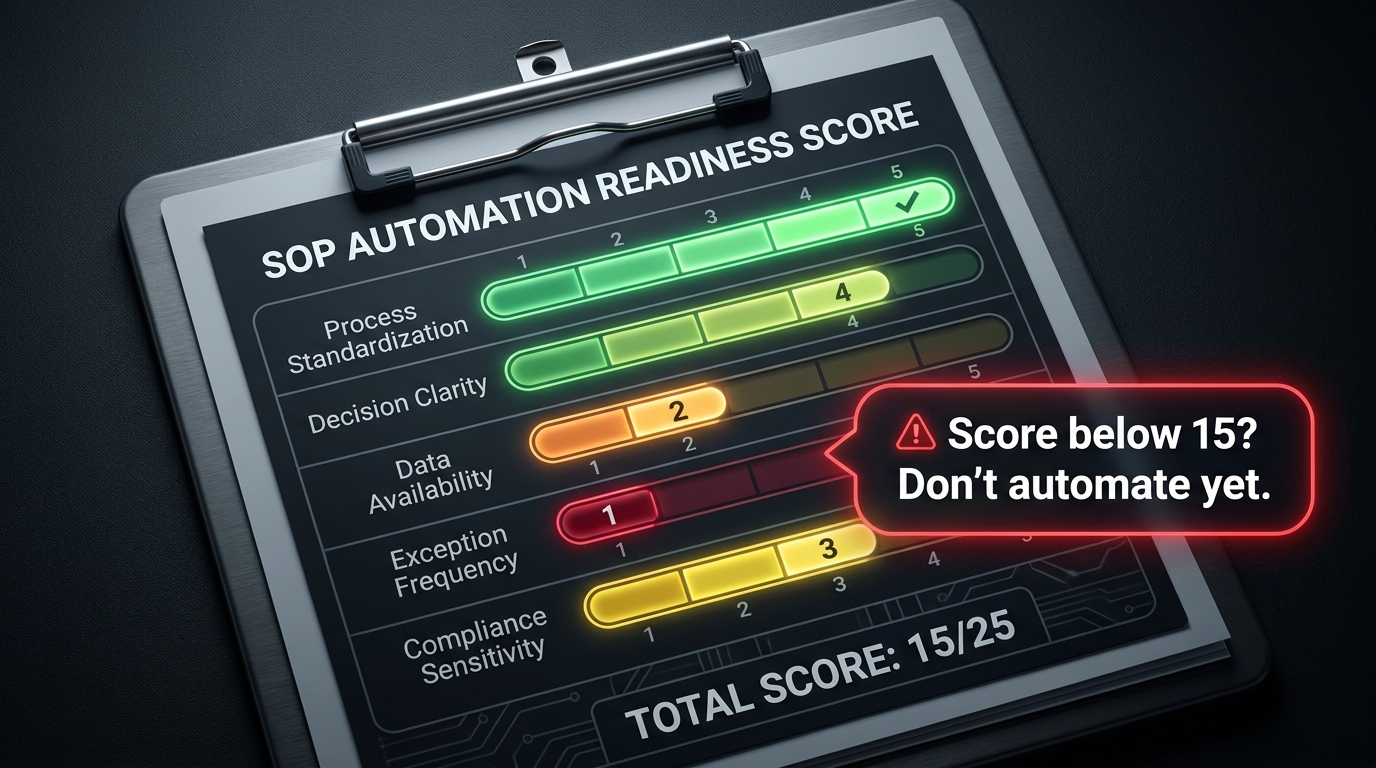
Score each SOP candidate on a scale of 1–5 across five dimensions. Total scores range from 5 to 25. Treat any process scoring below 15 as documentation-first before any technical build begins.
Process Standardization (1–5): Does the process run the same way every time, regardless of who executes it? A 1 means the process varies significantly by employee or by situation. A 5 means every execution follows identical steps with no deviations. Low standardization means you are automating a moving target — the automation will encode one version of the process while humans continue executing others.
Decision Clarity (1–5): Are the branching conditions in the SOP explicit and measurable? A 1 means decisions are largely judgment-based and informal. A 5 means every decision point has documented criteria with specific, measurable conditions. This is the single most important dimension for automation readiness. Implicit judgment cannot be reliably executed by a machine without first being codified.
Data Availability (1–5): Is the data the process requires available in structured, accessible form? A 1 means key inputs exist only in email threads, verbal communication, or unstructured documents. A 5 means all required data is structured, accessible via API or database query, and consistently formatted. Automating a data-poor process produces a system that constantly hits dead ends waiting for information it cannot retrieve.
Exception Frequency (1–5, inverted): How often does the process encounter situations not covered by its documented rules? A 1 means exceptions occur frequently (more than 20% of cases). A 5 means exceptions are rare (under 2% of cases). High exception rates are not disqualifying, but they require robust exception-handling design — which in turn requires understanding what those exceptions actually are before building.
Compliance Sensitivity (1–5, inverted): Does the process involve regulatory obligations, SOX-relevant financial controls, or high-stakes decisions where error consequences are severe? A 1 means errors or autonomous decisions could trigger regulatory penalties, financial misstatement, or significant legal exposure. A 5 means errors are easily detectable, low-stakes, and quickly correctable. Highly regulated processes are automatable, but they require more extensive governance design than the readiness score alone can indicate.
Using the Scores Strategically
Processes scoring 20–25 are typically ready to move directly to specification and build. Processes scoring 15–19 need documentation gap-filling before build — usually in the dimensions of decision clarity or exception handling. Processes scoring below 15 should go into a documentation backlog: they need process redesign work, not automation work. Trying to automate a low-scoring process produces exactly the failures that give automation programs a bad reputation internally.
The audit also generates a prioritized portfolio for your automation roadmap. High-volume, high-readiness, high-hour-impact processes should enter the first build wave. Low-volume processes, however well-documented, rarely justify the build investment. The goal is to match readiness with impact.
Mapping the Translation Layer: From Human-Language Steps to Machine-Executable Logic
Once a process has passed the readiness audit, the next task is the translation itself — converting the human-language SOP into a specification that an automation platform can execute. This is not a technical step. It is a design step, and it can and should be done without writing a single line of code or configuring a single workflow node.
The Three-Column Specification Method
One of the most practical approaches to SOP translation is the three-column specification table. For each step in the SOP, document three things in adjacent columns:
- What the human does: The natural-language description from the SOP as written.
- What the system needs: The structured requirement — the specific data source, API endpoint, field name, condition operator, and expected output format.
- What breaks this step: The known failure conditions — missing data, system unavailability, out-of-range values, or exception scenarios that this step must handle.
This exercise typically takes two to four hours per process for an experienced operations or business analyst working with the process owner. Its output is not a workflow diagram — it is a structured requirements document that a developer or automation builder can work from directly. It also surfaces every gap in the existing SOP: the steps where the process owner realizes they cannot answer the “what does the system need” question, or where exception handling has never been documented.
The Role of LLMs in Accelerating Translation
In 2026, large language models have become useful translation accelerators, though not autonomous translators. Platforms such as Whale’s SOP suite, Process Street, and emerging AI-native tools can ingest a text SOP and generate a proposed workflow structure — identifying potential triggers, flagging ambiguous decision points, and suggesting integration points with common business systems. What they cannot do is resolve the underlying ambiguities in the process itself. They can surface where the SOP says “use discretion”; only the process owner can explain what that discretion actually means in practice.
The practical workflow in 2026 is to use an LLM tool to generate a first-pass workflow structure from the SOP text, then bring that draft to a working session with the process owner to resolve every ambiguity the model flagged. This reduces the translation work by roughly 40–60% compared to starting from a blank workflow canvas — but it does not eliminate the human judgment required to make the resulting automation accurate.
Decision Trees as the Bridge
The most critical translation output for complex SOPs is a formal decision tree: a visual map of every condition branch in the process, with explicit criteria at each node and clear outputs for every terminal path. Decision trees serve as the bridge between the human-readable SOP and the machine-executable workflow configuration.
A well-constructed decision tree for a moderately complex SOP typically has between 8 and 25 nodes. Every node requires a binary or categorical condition (not a judgment call). Every terminal node requires a defined action, output, or escalation path. Building this tree is where the true process design work happens — and where most teams discover that their SOPs contain three or four implicitly different processes that experienced employees distinguish automatically but that have never been documented as separate paths.
Which Processes Should NOT Be Automated — And Why Most Lists Get This Wrong
Most guidance on which processes to avoid automating focuses on complexity: avoid automating “complex” or “creative” work. This is correct in direction but too vague to be operationally useful. The more precise answer involves four specific conditions under which automation produces worse outcomes than human execution, regardless of how sophisticated the automation technology is.
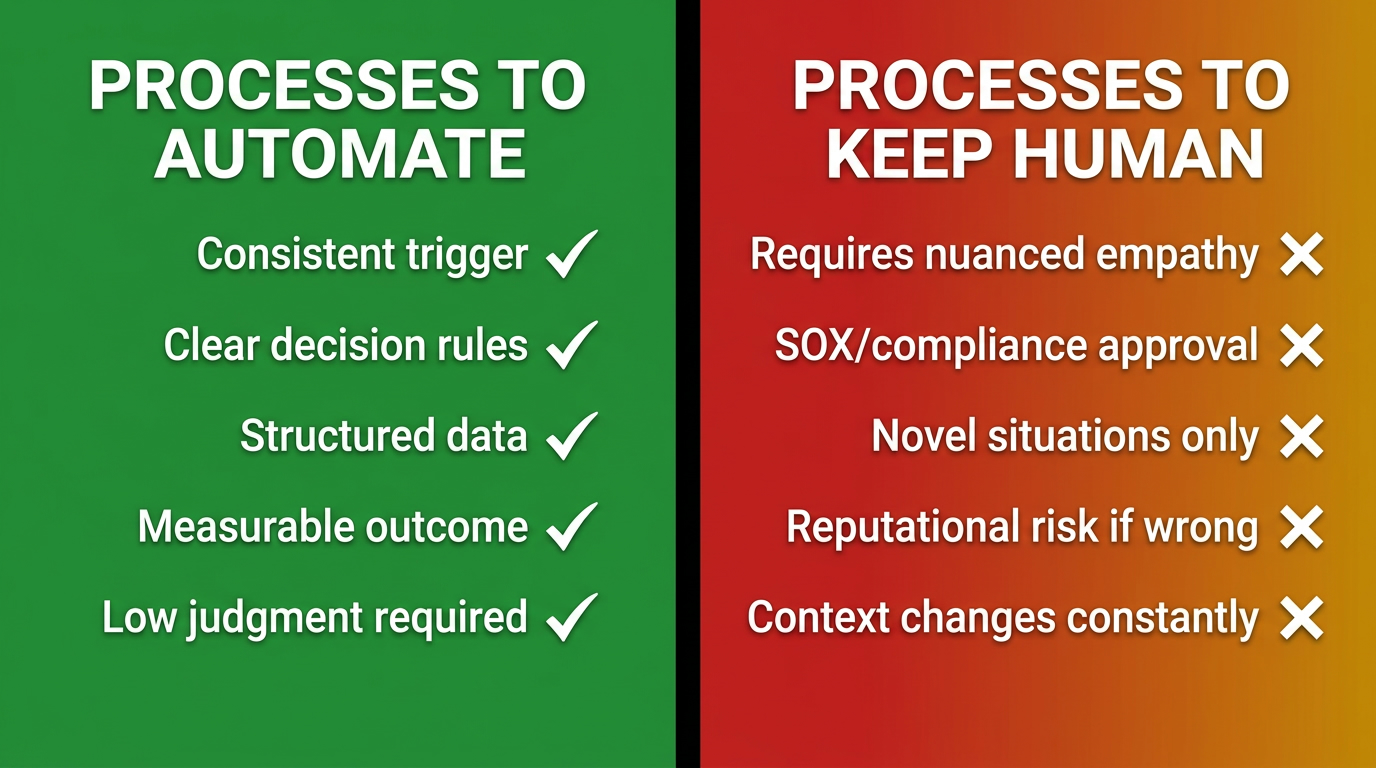
Condition 1: The Decision Logic Changes Faster Than the Automation Can Be Updated
Some processes are highly dynamic: the criteria for decisions shift frequently based on market conditions, regulatory changes, competitive dynamics, or evolving customer expectations. Automating these processes creates a maintenance burden that can exceed the value of the automation. Every time the underlying logic changes, the workflow must be updated — and in most organizations, workflow updates require developer involvement, change management review, and testing cycles. If the process logic changes monthly, automation may not be worth the overhead.
The threshold test: if you expect the core decision rules of the process to change more than twice per quarter, prioritize better tooling and documentation for the human executors before considering automation.
Condition 2: The Process Requires Contextual Empathy
Customer escalations, employee performance conversations, sensitive supplier negotiations, and crisis communications all involve a type of contextual reading that current AI systems handle poorly when the stakes are high and the context is novel. These processes often have SOPs — but the SOPs are guidance frameworks, not decision trees. They describe principles, not procedures. Automating them does not speed them up; it degrades the quality of the output in ways that can damage relationships and reputation.
The distinction here is between processes where the correct outcome is deterministic (given the inputs, there is a right answer that can be specified in advance) and processes where the correct outcome is contextually emergent (the right answer depends on subtle cues that experienced humans read in real-time). Only the first category is a good automation candidate.
Condition 3: SOX-Relevant Financial Controls and Regulatory Approval Requirements
This is the condition that most automation lists underemphasize, and it has become more pressing in 2026 as audit frameworks catch up with automation adoption. SOX (Sarbanes-Oxley) requires that certain financial controls include human sign-off in the audit trail. Automating these controls without explicit human-in-the-loop checkpoints can create SOX compliance failures even if the automated output is technically correct.
Current guidance from PCAOB and internal audit practitioners is unambiguous: do not automate processes where control logic is probabilistic, where change logs are not deterministic, or where the audit trail requires demonstrable human review of specific decision points. These processes can incorporate automation for data gathering, preparation, and presentation — but the control itself must remain human-executed and explicitly logged.
Condition 4: Novel Situations That Require Institutional Judgment
Every organization has processes that exist specifically to handle situations outside the normal operating envelope: major client escalations, regulatory inquiries, crisis response, and strategic exceptions. These are often the most documented processes in an SOP library, because they were written in response to specific past incidents. But the documentation describes past scenarios, not future ones. Novel situations require the kind of pattern-recognition and contextual judgment that comes from institutional experience — which, currently, cannot be reliably encoded into an automation system for genuinely novel inputs.
The Three Automation Tiers: RPA, Workflow Orchestration, and Agentic AI
Choosing the right automation technology is not a matter of selecting the most sophisticated option available. It is a matter of matching the technology tier to the structural characteristics of the process. Applying agentic AI to a process that could be handled by a simple workflow is expensive, brittle, and hard to govern. Applying basic RPA to a process that requires judgment creates a rigid system that breaks constantly. The fit between process type and automation tier is a primary determinant of long-term automation success.
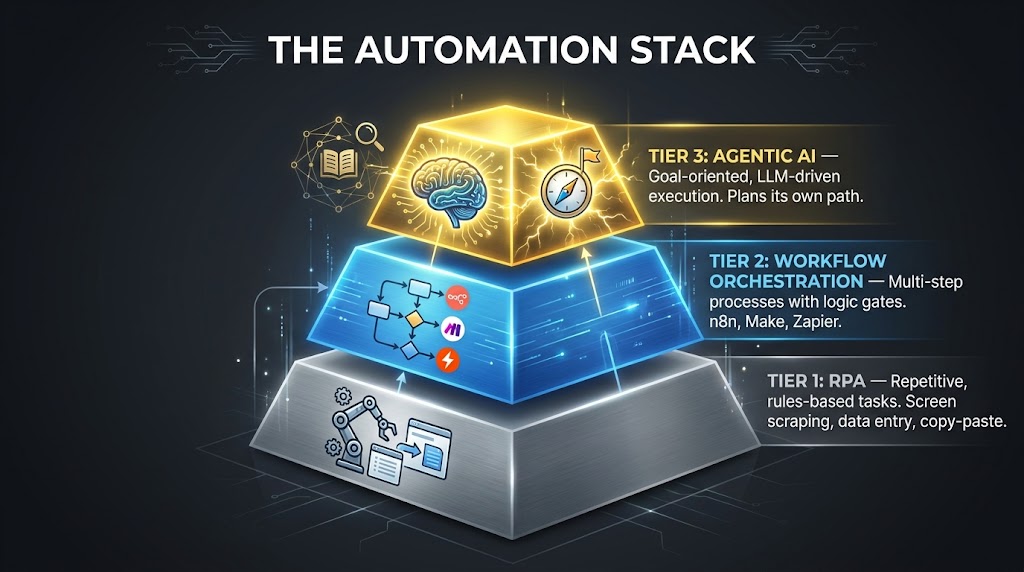
Tier 1: Robotic Process Automation (RPA)
RPA operates at the UI layer — it mimics human interactions with software interfaces to move data between systems, fill forms, extract information, and execute rule-based tasks. It is the right choice for processes that are highly repetitive, fully deterministic, involve structured data, and require interaction with legacy systems that lack modern APIs.
RPA’s strengths are its speed, accuracy, and ability to work with systems that otherwise require human GUI interaction. Its weaknesses are its brittleness (it breaks when UI layouts change), its narrow scope (it can only do exactly what it was programmed to do), and its inability to handle judgment or ambiguity. RPA is the automation tier most likely to break when the underlying software is updated — which is why robust RPA programs include maintenance cycles as a line item in their operational budgets.
Best-fit process characteristics for Tier 1: high transaction volume, fully standardized inputs, no branching beyond simple conditionals, and clear success/failure criteria. Data entry, report generation, scheduled data reconciliation, and standard form submissions are canonical Tier 1 use cases.
Tier 2: Workflow Orchestration
Workflow orchestration platforms — including n8n, Make (formerly Integromat), and Zapier — operate at the API and data layer rather than the UI layer. They connect systems through their native APIs, execute conditional logic, manage data transformations, and coordinate multi-step sequences across multiple applications. They are the right choice for processes that involve multiple systems, moderate conditional complexity, and structured but potentially varied data inputs.
Orchestration platforms handle branching logic well, support loops and parallel execution, and can incorporate human approval steps as checkpoints within a larger automated flow. They are significantly less brittle than RPA because API contracts tend to be more stable than UI layouts. They are also easier to maintain: most modern orchestration platforms provide visual workflow builders that process owners can update without developer involvement, reducing the overhead of keeping automations aligned with evolving processes.
In 2026, all three major orchestration platforms have added AI-augmented capabilities. Zapier Agents support goal-oriented execution across its 8,000+ app integrations. n8n has introduced native LangChain-based agent nodes for RAG retrieval and multi-step reasoning. Make launched Maia, an AI orchestration layer that can propose workflow modifications and handle dynamic routing. These additions push Tier 2 into territory that previously required Tier 3 architecture.
Tier 3: Agentic AI
Agentic AI systems are goal-oriented: you specify an objective and the constraints within which the agent must operate, and the agent plans and executes the path to the objective using available tools and reasoning capabilities. They are the right choice for processes that involve moderate judgment, variable execution paths, unstructured data inputs (such as emails or documents), and situations where the specific steps required to reach the goal are not fully known in advance.
The defining characteristic of Tier 3 automation is that it can deviate from a fixed execution path in response to what it discovers along the way. An agentic workflow handling a customer onboarding process might encounter an anomaly in the customer’s documentation and decide to route it differently, request additional information, or flag it for human review — without having been explicitly programmed for that specific anomaly.
This flexibility is also the source of Tier 3’s main risk: compounding errors. Each decision an agent makes autonomously affects the context available to subsequent decisions. An incorrect early judgment can cascade through a multi-step agentic workflow in ways that are difficult to detect and harder to audit. This is why Tier 3 implementations require more sophisticated governance design than Tiers 1 and 2, not less. The answer to agentic AI’s flexibility risk is not to avoid Tier 3 automation — it is to build robust human-in-the-loop checkpoints and output review mechanisms into every agentic workflow from the start.
Governance, Human-in-the-Loop Checkpoints, and Auditability
Governance is not a bureaucratic afterthought in automation programs. It is the structural mechanism that allows automation to scale without accumulating operational risk. Organizations that treat governance as a compliance checkbox — something to document after the automation is built — invariably encounter the failure modes that governance was designed to prevent: silent errors, audit trail gaps, undetected process drift, and automations that run correctly for 98% of cases while producing catastrophic errors in the remaining 2%.
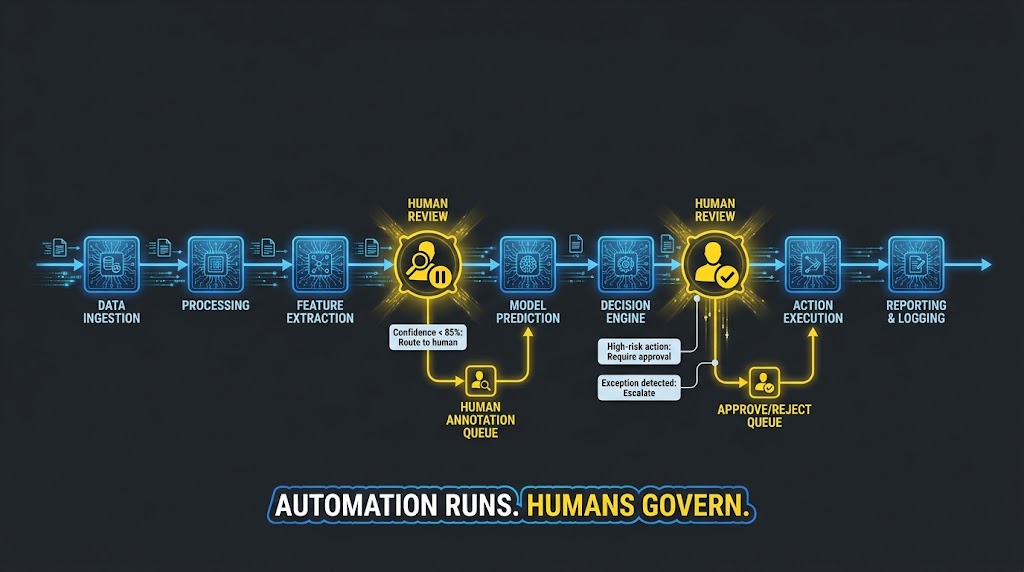
Designing Human-in-the-Loop Checkpoints
Effective HITL (human-in-the-loop) design is not about inserting humans into every step. It is about identifying the specific conditions under which human review adds genuine value — either because the automation’s confidence in its output is below an acceptable threshold, because the action being taken is irreversible, or because the downstream consequences of an error are severe enough to justify the review overhead.
The standard framework for HITL checkpoint design uses three trigger conditions:
- Confidence threshold triggers: When the automation’s certainty about its decision falls below a defined threshold — for example, when an LLM-based classification produces a confidence score below 85% — the item is routed to human review rather than executed automatically. The threshold is calibrated based on the cost of errors in that specific workflow.
- Action consequence triggers: Any action that is difficult or impossible to reverse — sending a communication to a customer, executing a financial transaction, modifying a production record — should include an approval step regardless of the automation’s confidence level. Reversible actions can be executed automatically; irreversible ones require a human sign-off.
- Exception detection triggers: When the process encounters an input or condition not covered by its documented decision rules, the automation should pause and escalate rather than attempt to continue. This requires the automation to have an explicit “none of the above” path that routes to human review with full context about what was encountered.
Building an Auditable Automation Audit Trail
Every automated workflow should produce an immutable log of every decision made, every data transformation applied, every external system called, and every human interaction triggered. This is not optional for processes that touch customer data, financial records, or compliance-relevant workflows. It is a baseline requirement.
The audit trail should record: the process that was executed, the version of the workflow that executed it, the input data (or a hash/reference to it), the decision path taken, the outputs produced, the timestamp of each step, and the identity of any human who reviewed or approved a step. Version control for workflow logic is as important as version control for software code — if the process changes, the old version must remain accessible for retrospective audit purposes.
Process Drift and Maintenance Cycles
One of the most underappreciated risks in automation programs is process drift: the gradual divergence between what the automation does and what the process is supposed to do, as the underlying business evolves without corresponding updates to the automated workflow. Processes change for many reasons — regulatory updates, system migrations, organizational restructuring, product changes — and automated workflows do not update themselves.
Leading automation programs build scheduled review cycles into their operational cadence: typically quarterly for high-volume, high-risk automations and semi-annually for lower-volume processes. Each review cycle includes a comparison of the current automation logic against the current SOP, a review of exception rates and escalation patterns, and an assessment of whether the automation’s performance metrics have shifted in ways that suggest underlying process changes.
What the Real Build Looks Like: Tools, Stacks, and Sequencing
Once process selection, specification, and governance design are complete, the technical build is often the most straightforward phase — provided the upstream work was done rigorously. Choosing tools involves matching process characteristics against platform capabilities, then sequencing the build to enable early validation before investing in full deployment.
Platform Selection in Practice
For Tier 1 (RPA) use cases, the dominant platforms in 2026 remain UiPath and Automation Anywhere for enterprise-scale deployments, with Microsoft Power Automate Desktop increasingly relevant for organizations deeply embedded in the Microsoft ecosystem. The key selection criterion is not features — all three handle standard RPA use cases competently — it is the maintenance and governance tooling available for managing a portfolio of bots over time.
For Tier 2 (orchestration), platform selection depends on technical capability within the team. n8n is the strongest choice for technical teams who need complete control over workflow logic, custom code integration, and on-premises deployment. Make (Integromat) suits operations teams that need visual workflow building without coding requirements, with strong support for complex branching and data transformation. Zapier serves teams that prioritize access to a wide integration ecosystem over fine-grained logic control. The recent AI additions to all three platforms make them viable for moderately complex SOP execution without Tier 3 architecture.
For Tier 3 (agentic AI), the technology landscape in 2026 is more fragmented. Options range from building custom agent systems on top of LangChain or LlamaIndex, to using managed agent platforms from established vendors, to leveraging the agent capabilities now embedded in orchestration platforms. The right choice depends on process complexity, data sensitivity, compliance requirements, and the technical depth available in the team.
The Build Sequence That Reduces Rework
The sequencing of an automation build matters enormously for reducing rework and catching specification gaps early. The recommended sequence:
- Manual simulation first: Before building anything, run the workflow specification manually using the actual data and systems it will eventually operate on. This identifies data quality issues, integration problems, and specification gaps at zero development cost.
- Happy path only: Build the automation for the most common, clean-input case first. Get that working and validated before adding complexity.
- Exception handling second: Add exception detection, escalation paths, and error handling as a distinct build phase. This ensures exception logic does not compromise the core flow and can be tested independently.
- Parallel run before cutover: Run the automation in parallel with the human process for at least two weeks, comparing outputs and tracking every discrepancy. Only cut over to full automation when the discrepancy rate is below your defined acceptable threshold.
- Staged volume expansion: Start with 10–20% of actual volume, monitor for issues, then expand to full volume incrementally. This limits the blast radius of any bugs that escaped the testing phase.
Measuring What Matters After the Switch Goes On
Post-automation measurement is where most programs make their second significant mistake (the first being starting with tools instead of process). The error is measuring activity rather than outcomes: tracking how many transactions the automation processed rather than whether the outcomes of those transactions improved.
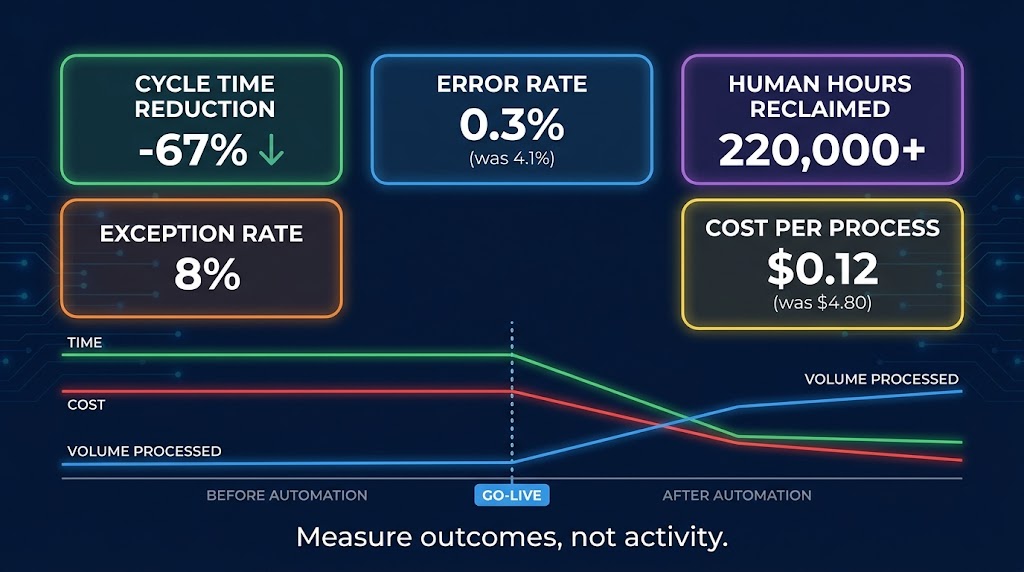
The Right Metrics Framework
Every automated process should have a baseline measurement taken before the automation goes live. Without a pre-automation baseline, you cannot measure what the automation actually changed. The baseline should capture: average cycle time per case (time from trigger to completed output), error rate (percentage of cases requiring rework or correction), cost per case (human time multiplied by loaded hourly cost), and exception rate (percentage of cases requiring human intervention).
Post-automation metrics should compare against these baselines on a consistent schedule. The meaningful outcome metrics are:
- Cycle time reduction: How much faster is the process now completing from trigger to output? Time compression is often the most visible early signal of automation value.
- Error rate delta: Is the automation producing fewer errors than human execution did? Well-designed automations should produce significantly lower error rates on in-scope cases, because they do not have bad days, do not misread specifications, and do not skip steps when busy. However, their error types are different — they fail systematically on out-of-scope inputs rather than randomly.
- Human capacity reclaimed: How many full-time equivalent hours has the automation returned to the team? This is the metric most organizations care about from a resource-planning perspective. It answers the question of what the reclaimed capacity was redeployed to — whether those hours went to higher-value work or simply disappeared without impact determines whether the automation delivered real organizational value.
- Exception rate: The percentage of cases the automation escalates to human review. An exception rate that is too high (over 15%) suggests specification gaps or data quality problems. An exception rate that is too low (under 1%) in a complex process may suggest the automation is processing cases it should be escalating — worth investigating for silent errors.
The Cost-Per-Process Signal
One metric that gives automation programs a powerful comparative benchmark is cost per process execution. For human-executed processes, this is typically in the range of $4–$15 per transaction for administrative tasks, depending on labor cost and cycle time. Well-designed Tier 1 and Tier 2 automations routinely bring this below $0.50 per transaction at scale, with Tier 2 orchestration often landing in the $0.05–$0.20 range for high-volume processes.
This metric also enables honest ROI calculation. Cost-per-process multiplied by annual volume, compared against the automation build and maintenance cost, gives a clear payback period. Processes with high volume and high current cost-per-execution have the best ROI profiles. Low-volume processes with low cost-per-execution often have payback periods exceeding three years — which rarely survives a business case review.
Tracking Automation Health Over Time
Automation performance tends to degrade gradually rather than failing catastrophically. Exception rates creep up. Cycle times lengthen slightly as integrations age. Error rates in specific sub-categories increase as the upstream data or process drifts. These signals are only visible if you are actively monitoring them — which requires dashboards and alerting, not just periodic manual reviews.
The most operationally mature automation programs build monitoring into the deployment from day one: automated alerts for exception rates above threshold, automated flags for cycle time increases beyond a defined percentage, and scheduled health reviews that compare current performance against the baseline established at go-live. An automation that was delivering strong results at launch and is now underperforming is almost always experiencing process drift — and process drift is far easier and cheaper to fix early than after it has been running undetected for six months.
The Playbook Is the Blueprint: A Closing Framework for Getting Started
The thesis of this post is not that SOPs automatically become automations when you connect them to the right platform. It is that the intellectual work of building a good automation is largely the same as the intellectual work of building a good SOP — and most organizations have already done a significant portion of it. The gap is not the work; it is the translation.
What separates the organizations that build automation portfolios with compounding value from those that accumulate expensive technical debt is discipline about sequence. They document before they build. They audit before they prioritize. They specify before they configure. They test in parallel before they cut over. They measure outcomes before they claim success.
A Practical Starting Framework
If you are beginning an SOP-to-automation program and want a concrete starting point, the following sequence has proven reliable across industries and organization sizes:
Week 1–2: SOP inventory and scoring. Identify every documented, recurring process in your target department. Score each against the five readiness dimensions. Shortlist the top 5–10 by combined readiness and annual hour impact. Discard any process scoring below 15 until documentation work is complete.
Week 3–4: Specification work. For each shortlisted process, run the three-column specification exercise with the process owner. Build the decision tree. Identify every ambiguous branch and resolve it. Confirm data sources and integration availability. Estimate exception rates from recent history.
Week 5–6: Tier assignment and platform selection. Assign each specified process to its appropriate automation tier. Select platforms based on process characteristics and team capability. Identify the single highest-impact process that is also fully specified as your first build.
Week 7–10: Build, test, and parallel run. Build the happy path. Add exception handling. Run the manual simulation. Execute the parallel run with baseline metrics tracking. Resolve discrepancies before cutover.
Week 11+: Deploy, measure, and expand. Go live with staged volume expansion. Begin the metrics tracking cadence. Use learnings from the first build to refine the specification process for subsequent waves.
The Compounding Advantage
There is a reason organizations like EDP Global Solutions automated 85 processes in their first 12 months and accelerated from there: automation builds capability. Every process you automate produces learnings about your data architecture, your integration patterns, and your governance model that make the next automation faster and more reliable to build. Teams develop institutional knowledge about which processes translate cleanly and which require upstream documentation work. Platforms embed institutional patterns as reusable components. What takes weeks in year one takes days in year three.
The organizations that are pulling ahead in operational efficiency in 2026 are not doing so because they bought better tools. They are doing so because they started earlier, built more rigorously, and treated their SOPs as the intellectual capital they actually are — not documentation to be filed, but blueprints to be executed. The gap between a playbook and a system is smaller than it looks. Most of the logic is already there. The work is in the translation.
“Treat SOPs as structured specifications for AI workflows: clear inputs, steps, decision rules, outputs. The process-first discipline that makes a great SOP is the same discipline that makes a great automation.”
Key Takeaways
- Your SOPs already contain the logic of automation — triggers, conditions, branches, outputs. Recognizing them as design documents is the first step.
- Audit before you build. Use the five-dimension readiness scoring model to triage your SOP library and prioritize the right processes for the first wave.
- The translation gap — from human-language steps to machine-executable logic — is smaller than it appears, but it requires explicit work: three-column specification, formal decision trees, and exception path documentation.
- Match the automation tier to the process characteristics. Not every process needs agentic AI. Many of your highest-value automations belong in Tier 1 or Tier 2.
- Governance is a design requirement, not a compliance checkbox. Build human-in-the-loop checkpoints, audit trails, and maintenance cycles in from the start.
- Measure outcomes, not activity. Cycle time, error rate, cost per process, and exception rate are the signals that tell you whether the automation is delivering real value.
- Automation compounds. The capability you build on the first wave makes every subsequent wave faster, cheaper, and more reliable.