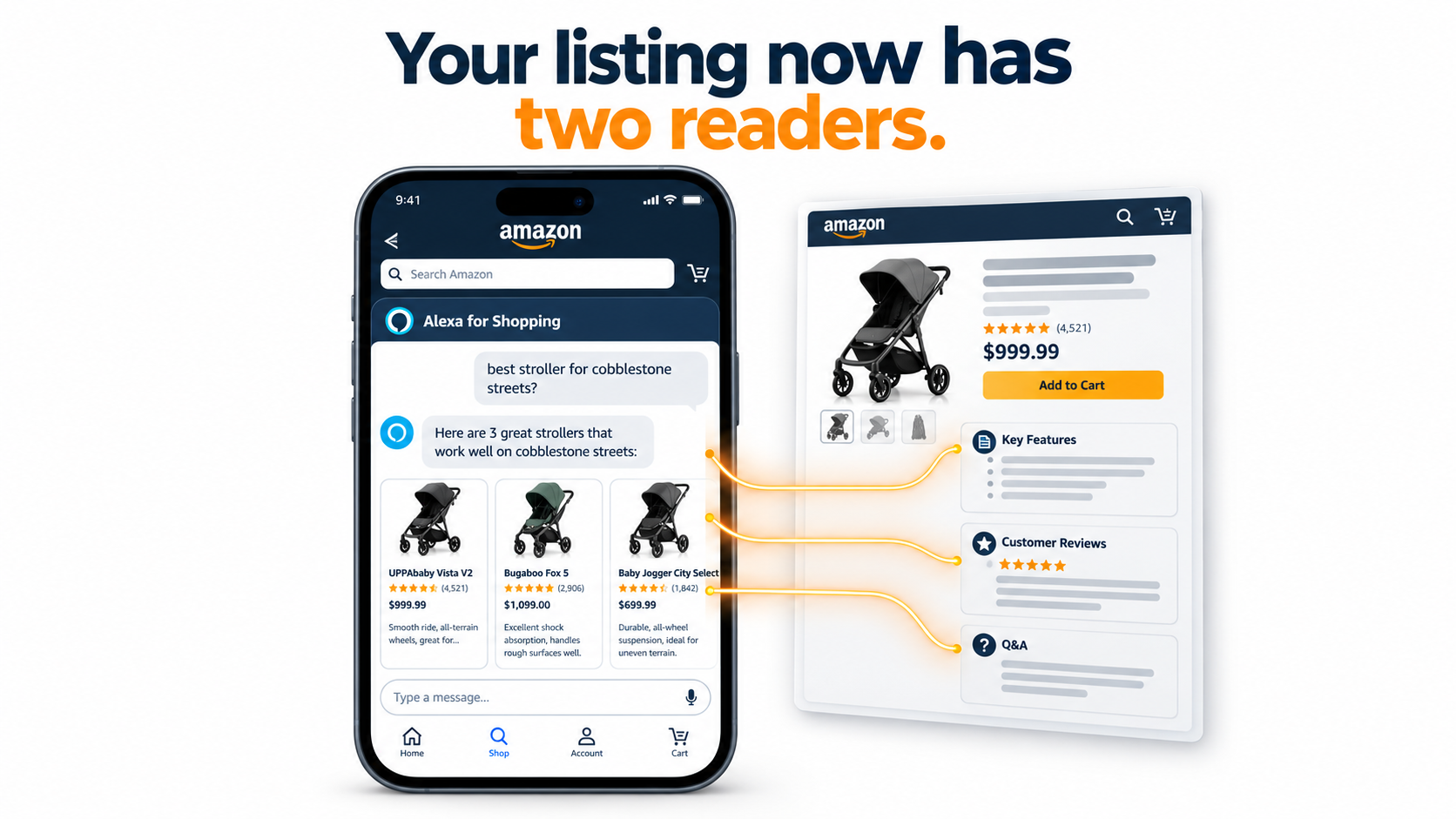

For most of Amazon’s history, a product listing had one job: persuade a human who was scrolling a search results page. Sellers wrote titles for the algorithm and bullets for the shopper, and the two audiences rarely collided.
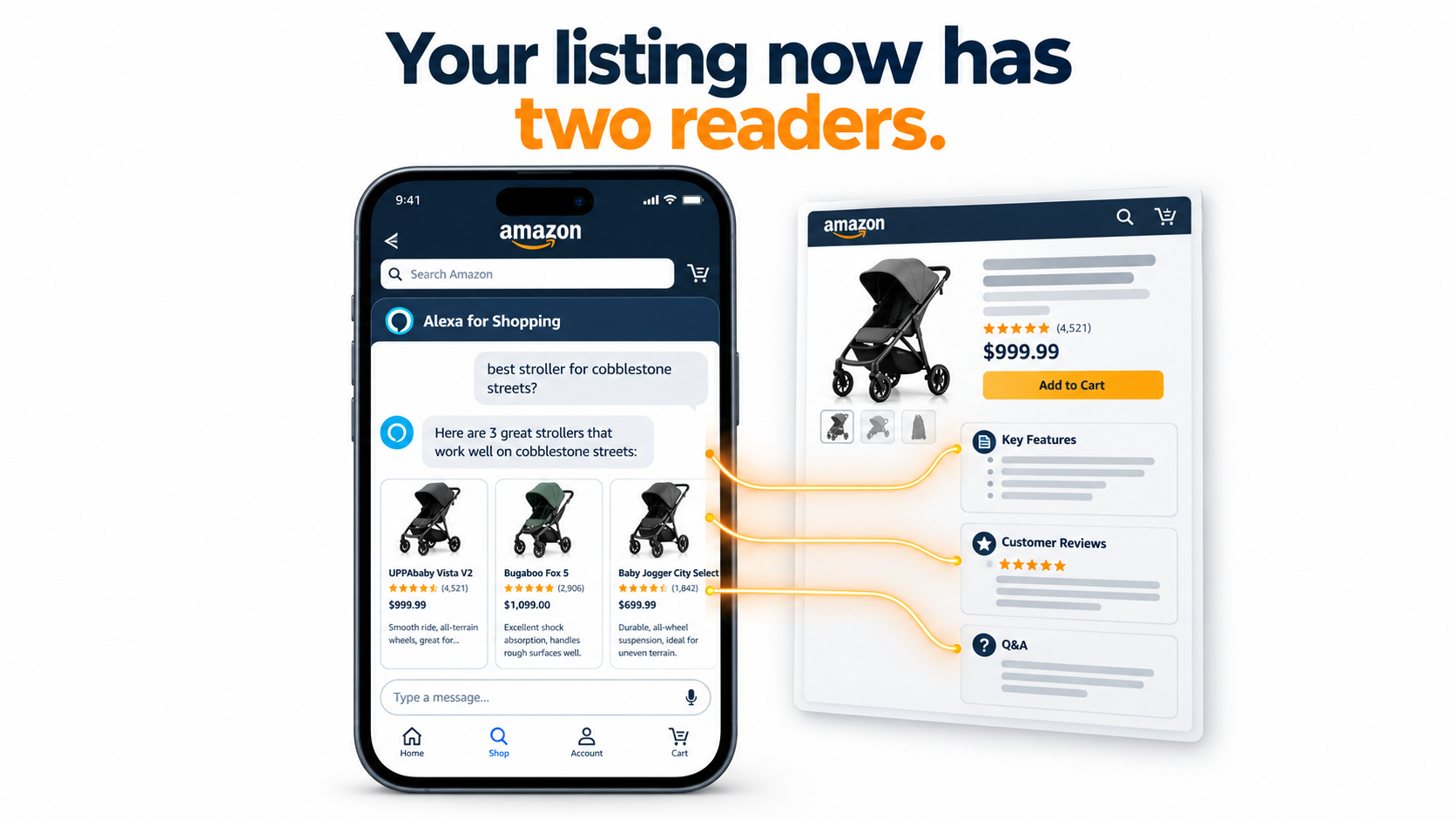
That arrangement is over. A growing share of Amazon shoppers now start their trip by asking a question instead of typing a keyword. An AI assistant reads your listing, your reviews, and your customer Q&A, decides whether your product answers that question, and summarizes it in a sentence or two. Often the shopper sees that summary before they ever see your main image.
On May 13, 2026, Amazon renamed its Rufus shopping assistant Alexa for Shopping, bringing Rufus and Alexa+ together under one brand. The rename sounds cosmetic. For sellers, it signals something bigger: conversational shopping is no longer a side feature inside the app. It is becoming the front door.
This article is not another list of general Amazon selling tips. It focuses on one specific question: what does it take for your product to be the one an AI assistant recommends? We will look at how Amazon says the assistant works, what Amazon’s own published research reveals about how it connects products to real-world needs, and what sellers can practically change before the Q4 2026 holiday rush.
The goal is not to game a black box. Amazon has been clear that the assistant pulls from listing details, customer reviews, and community Q&A. That means the most reliable approach is also the most boring one: make your product information complete, specific, and honest enough that a machine can confidently answer a shopper’s question with it.
Let’s get into what changed, what the data shows, and what to do about it.
What Actually Changed When Rufus Became Alexa for Shopping
Rufus launched in beta in early 2024 to a small subset of U.S. customers in the Amazon Shopping app. Amazon described it as a generative AI shopping assistant trained on the product catalog, customer reviews, community Q&As, and information from across the web. Within months it rolled out to all U.S. customers on mobile and desktop, and Amazon reported that customers had already asked it tens of millions of questions.
Over the following two years, the assistant moved from novelty to infrastructure. Amazon says it introduced more than 50 technical upgrades, enhancements, and new features, including stronger reasoning, better product research and comparison, and account memory.
From chat bubble to shopping layer
The May 2026 rebrand to Alexa for Shopping folds the store assistant and Alexa+ into one identity. Practically, this means the same assistant logic can follow a shopper across the app, desktop, and voice. A question asked to an Echo device in the kitchen and a question typed into the app on a train are increasingly handled by the same system.
For sellers, that matters because voice and chat both strip away the visual shelf. There is no grid of twenty thumbnails. There is an answer, maybe a handful of product suggestions, and a follow-up question.
Where shoppers meet the assistant
Amazon has placed the assistant prominently throughout the store. According to Amazon, it appears in the Shopping app, on desktop, on the homepage, on product detail pages, and inside the Amazon Lens Live experience. Shoppers can type natural-language questions or tap a microphone and speak.
That placement on product detail pages is worth pausing on. Even shoppers who arrive on your listing through traditional search can now ask the assistant about your product directly: “Is this good for beginners?” or “What’s the battery life?” The answer they get is assembled from your content and your customers’ words. You no longer fully control the pitch on your own page.
The features that change the buying path
Amazon has described a range of use cases that go well beyond simple product lookups:
- Category education: “What should I consider when buying headphones?”
- Shopping by occasion or purpose: “What do I need for cold-weather golf?” or “I want to start an indoor garden.”
- Category comparisons: “What’s the difference between lip gloss and lip oil?”
- Recommendations: “Best dinosaur toys for a 5-year-old.”
- Product-specific questions on the detail page: “Is this pickleball paddle good for beginners?”
- Order history: “When did I last order sunscreen?”
Amazon has also added related tools such as Help Me Decide, which aims to pair shoppers with the right product at the tap of a button. Each of these moves the decision point earlier in the journey, often before a shopper has formed a keyword at all.
The key takeaway: the assistant is not just answering questions about products shoppers have already found. It is shaping which products they find in the first place.
The Adoption Numbers Sellers Can’t Ignore
It is easy to dismiss AI shopping assistants as something a small group of early adopters use. Amazon’s own figures make that position hard to hold.
What Amazon has reported
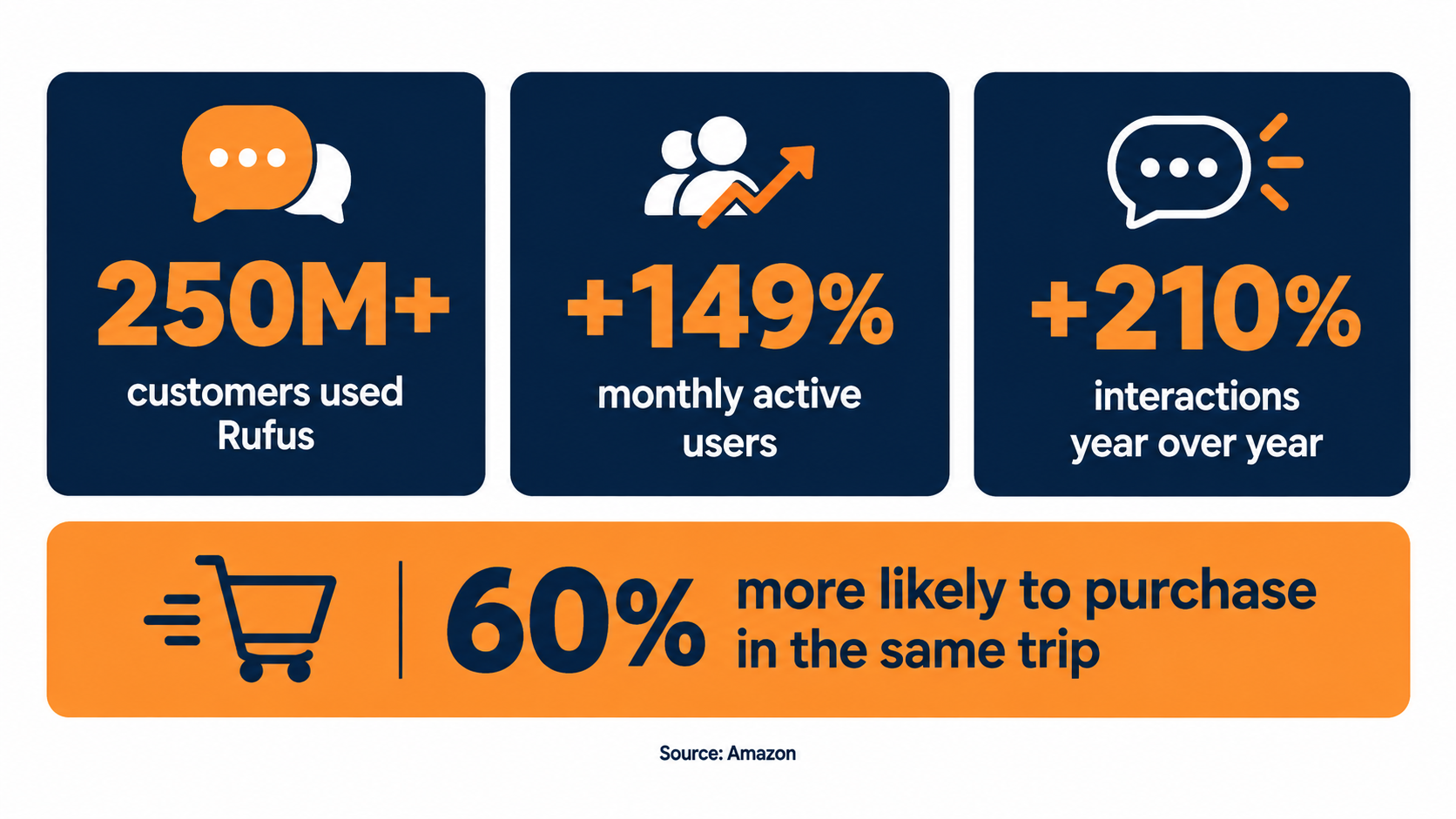
In its published update on the assistant, Amazon stated that:
- More than 250 million customers had used Rufus during the year.
- Monthly average users were up 149% over the prior year.
- Interactions were up 210% over the prior year.
- Customers who use the assistant while shopping are over 60% more likely to make a purchase during that shopping trip.
Amazon also says the assistant “has helped customers billions of times.” These numbers predate the Alexa for Shopping rebrand, which unified the assistant with Alexa+ and widened its reach further.
How to read the 60% figure carefully
The purchase-likelihood number is the one sellers quote most, and it deserves some caution. Shoppers who open a shopping assistant are often already further along in their buying intent. Some of that 60% lift likely reflects who chooses to use the tool, not only what the tool does.
Even with that caveat, the direction is clear. Assistant users are high-intent shoppers. Interactions are growing faster than users, which suggests people who try the assistant come back and use it more. That is exactly the shopper segment a seller most wants to reach.
Why interaction growth matters more than user growth
When interactions grow faster than users, each shopper is asking more questions per session. In practical terms, that means more follow-ups: “Which of these is quieter?” “Does it come with a case?” “Will it fit a 15-inch laptop?”
Every follow-up is a filter. A product that cannot be confirmed as quieter, or as including a case, or as fitting a 15-inch laptop, gets dropped from the conversation. Your listing does not lose because a competitor outbid you. It loses because the assistant couldn’t find the answer in your content.
What this means for Q4 2026
Holiday shopping is heavily question-driven. Gift buyers often don’t know the category well: they are buying for a niece, a father-in-law, or a coworker. Questions like “good gift for a 10-year-old who likes science” or “present for a dad who grills” are natural fits for a conversational assistant.
If assistant usage keeps growing at anything like the rates Amazon has reported, Q4 2026 will be the largest test yet of whether your listings can answer gift-giver questions. Sellers who prepare in October will be in a very different position from those who notice in December.
How the Assistant Builds an Answer — and Where Your Listing Fits
You do not need to be a machine learning engineer to sell well on Amazon. But understanding the basic shape of how the assistant generates an answer helps explain why certain listing changes matter and others don’t.
The model layer
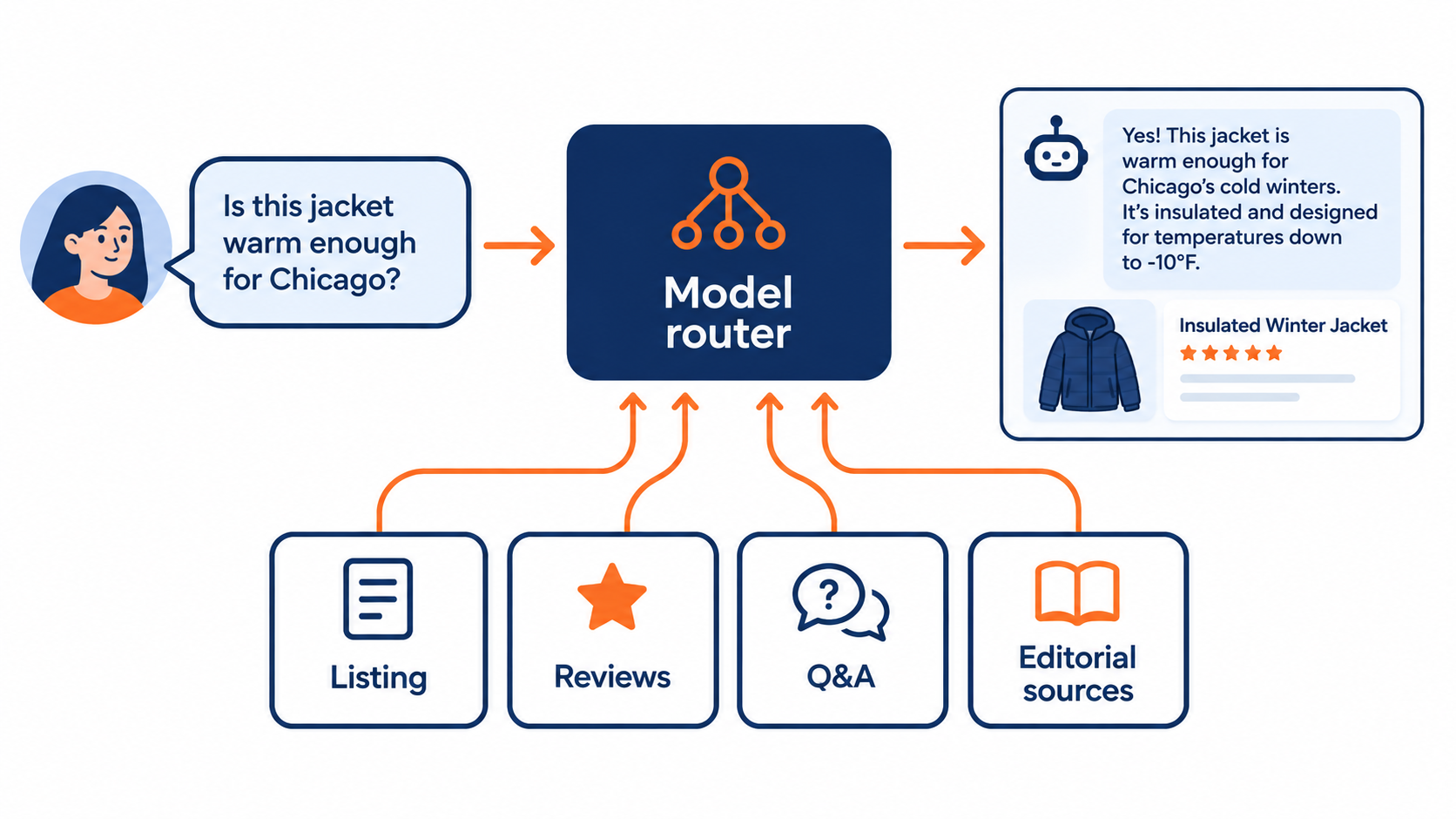
According to Amazon, the assistant is built on Amazon Bedrock and uses a real-time router to send each query to the most suitable model. The models Amazon names include Anthropic’s Claude Sonnet, Amazon Nova, and a custom model built on Amazon’s store knowledge. Different query types go to different models depending on the required capability, speed, and answer quality.
For sellers, the specific model matters less than the principle: a large language model reads text, reasons over it, and writes a summary. It rewards clear, unambiguous statements. It struggles with vague claims, contradictory information, and keyword lists that don’t say anything.
The retrieval layer
Amazon says the assistant uses retrieval-augmented generation (RAG). In plain terms, before the model writes an answer, the system pulls relevant information from sources and gives it to the model as context. Amazon has named several kinds of sources:
- Product listing details — titles, bullets, descriptions, and attributes
- Customer reviews
- Community Q&As
- Information from across the web, including editorial outlets Amazon names such as The New York Times, USA Today, Good Housekeeping, and Vogue
- The customer’s own shopping activity, through account memory
Notice that only the first item is fully under your control. Reviews and Q&A are written by customers. Editorial coverage is written by journalists. Account memory belongs to the shopper.
The knowledge graph layer
Amazon also describes “expanding its knowledge graph of product attributes and customer preferences.” A knowledge graph stores relationships: this product is waterproof, this product is used for hiking, this product suits beginners. When your listing states attributes explicitly and fills in structured fields, it becomes much easier for those relationships to be recorded correctly.
What this means in practice
Think of your listing as source material for a summary you don’t get to write. If a shopper asks “Is this blender loud?” the assistant will look for evidence. If your bullets mention a decibel rating or a noise-dampening shield, and several reviews say “surprisingly quiet,” the answer is easy and favorable. If none of that exists, the assistant may hedge, pull from a single complaint, or simply recommend a competitor whose listing makes the answer obvious.
The practical rule: every claim you want the assistant to repeat must exist as plain text somewhere it can read. Claims that live only in an infographic image, a brand video, or your own head are much less likely to show up in an answer.
COSMO and the Shift from Keywords to Human Context
One of the clearest windows into how Amazon thinks about product discovery comes from its own research. In 2024, Amazon scientists presented a paper at the ACM SIGMOD conference describing COSMO, a system for generating and serving “commonsense knowledge” across the Amazon store.
What COSMO does
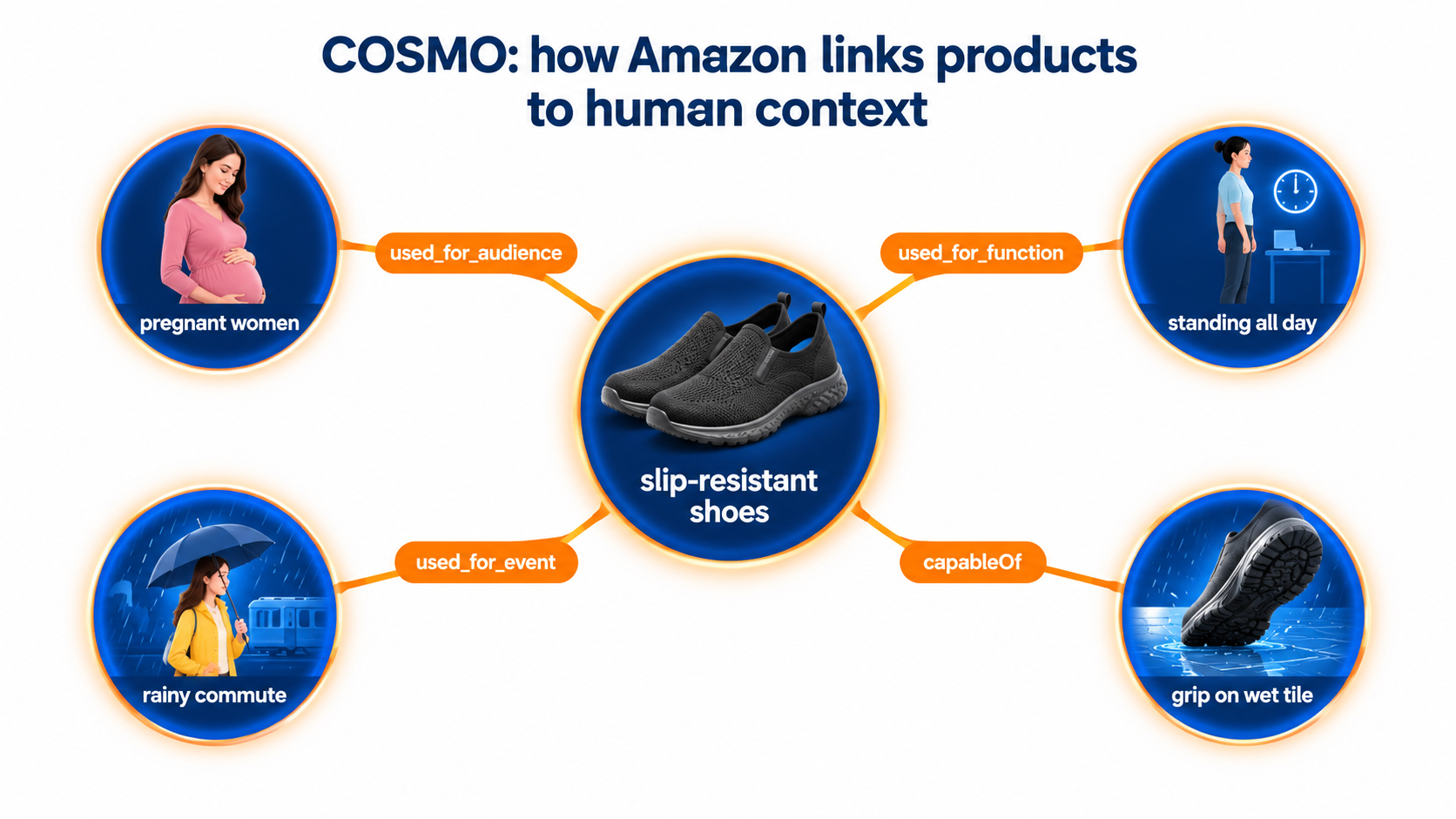
Amazon’s example is simple. If a customer searches for “shoes for pregnant women,” a good recommendation engine should infer that pregnant women may want slip-resistant shoes, even if neither the query nor the product title spells that out.
To make these inferences, COSMO builds a knowledge graph linking products to the human contexts in which they are used: their functions, their audiences, the locations and events where they matter. In Amazon’s example, a used_for_audience relationship links slip-resistant shoes to pregnant women.
How it learns those relationships
According to Amazon Science, COSMO starts with two types of behavioral data:
- Query-purchase pairs — a search followed by a purchase within a set window
- Co-purchase pairs — products bought together in the same session
An LLM is asked to explain the relationship behind each pair using broad relations such as usedFor, capableOf, isA, and cause. Those are refined into finer-grained relationships like used_for_function, used_for_event, and used_for_audience. Human reviewers and filtering models then remove weak or empty explanations, such as “customers bought them together because they like them.”
Why the results matter
Amazon tested COSMO on its Shopping Queries Data Set. When model encoders were held fixed, a model enhanced with COSMO relationships achieved a 60% increase in macro F1 score over the best baseline. When the models were fine-tuned, the COSMO-enhanced model still held a 28% edge in macro F1 and a 22% edge in micro F1.
In plain language: adding knowledge about who uses a product, for what, and when made Amazon’s relevance matching meaningfully better. That is a strong hint about where the store’s discovery systems are heading.
The seller lesson
Keyword matching asks: “Does this listing contain the word ‘shoes’?” Context matching asks: “Is this product suitable for someone who is pregnant, on their feet all day, and commuting in the rain?”
COSMO learns many of these relationships from shopper behavior, so you can’t simply write them into existence. But your listing can make the right relationships easy to confirm, and avoid contradicting them. If your product is genuinely good for a specific audience, function, or occasion, say so plainly:
- Audience: “Designed for nurses and retail workers who stand for 10+ hour shifts.”
- Function: “Rubber outsole tested for grip on wet tile and polished floors.”
- Event or setting: “Water-resistant upper for rainy commutes.”
Each of these sentences maps cleanly onto the kind of relationship COSMO is designed to capture. A bullet that reads “Premium Comfortable Non-Slip Women’s Work Shoes Lightweight” maps onto almost nothing.
Rewriting Listings for Questions, Not Queries
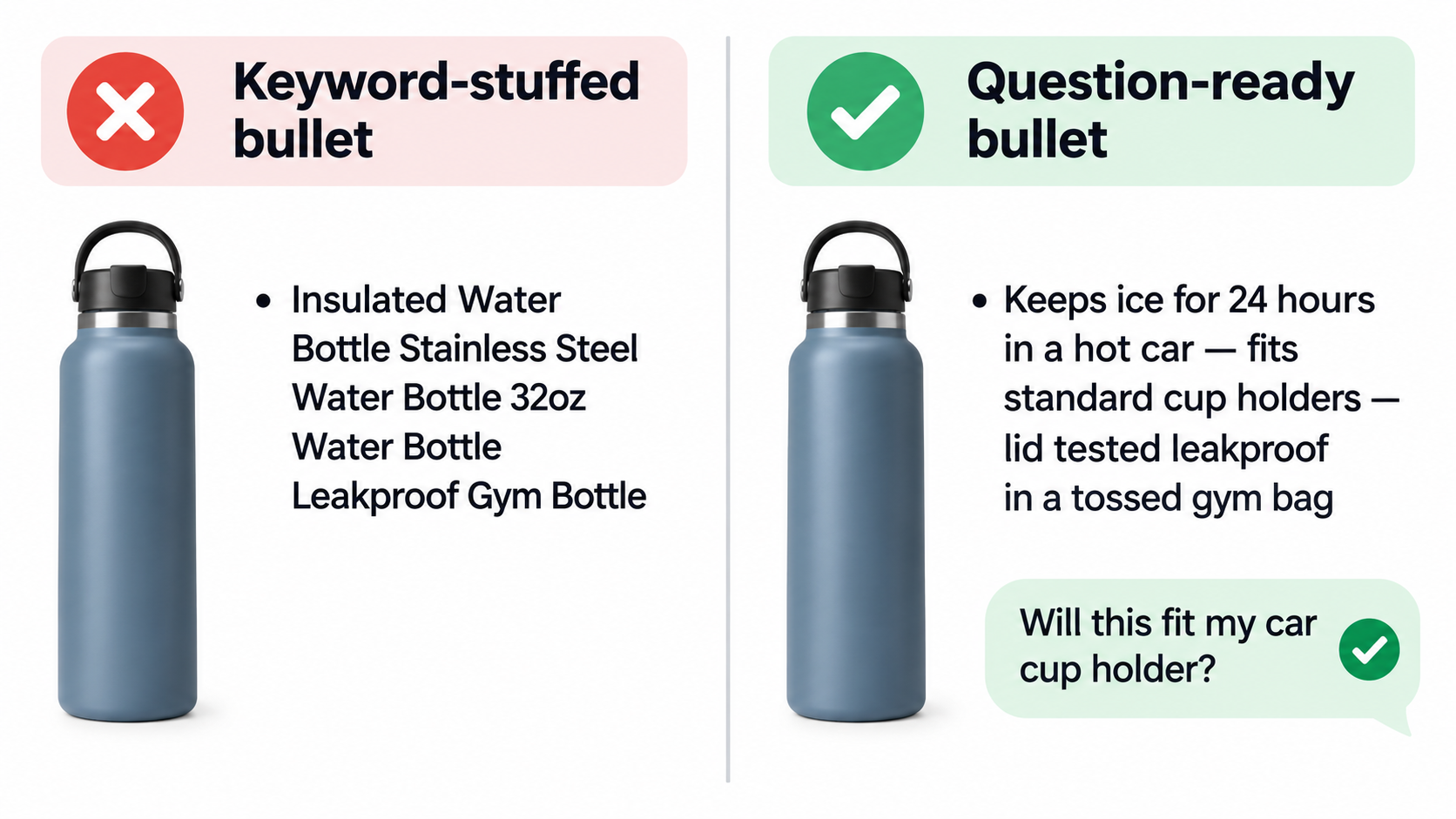
Traditional Amazon SEO trained sellers to think in search terms: find high-volume keywords, place the most important ones in the title, and fill the rest into bullets and backend fields. That work still matters for classic search. But conversational shoppers don’t type “insulated water bottle 32 oz leakproof.” They ask, “Will this keep my water cold in a hot car all day?”
Start by collecting real questions
Before rewriting anything, build a list of the questions shoppers actually ask about your category. Good sources include:
- Your existing Customer Questions & Answers section
- Your reviews, especially 3-star reviews, where people explain what they expected
- Competitor Q&A and reviews
- Buyer-seller messages and return reasons in Seller Central
- The assistant itself: ask it about your category and your product, and note the follow-up questions it suggests
That last source is underused. The assistant often surfaces suggested follow-up questions on product pages. Those suggestions are a direct signal of what Amazon’s system considers relevant for your product type.
Turn questions into answerable statements
For every high-value question, ask: Can the assistant find a direct, specific answer in my listing? If not, write one. A useful pattern is to pair a feature with the situation it solves:
- Weak: “Long battery life.”
- Strong: “Up to 30 hours of playback per charge — enough for a round-trip international flight.”
- Weak: “Compact design.”
- Strong: “Folds to 12 x 8 inches and fits in standard airline overhead bins.”
- Weak: “Kid friendly.”
- Strong: “Recommended for ages 6–10; no small parts; rounded edges.”
The strong versions contain numbers, conditions, and audiences. Those are exactly the details an LLM needs to answer confidently, and exactly what a knowledge graph can record as attributes.
Fill structured attributes completely
Backend attributes and category-specific fields — material, dimensions, age range, compatibility, care instructions — are easy to neglect because shoppers rarely see them directly. For an assistant that relies on a knowledge graph of product attributes, they are prime source material.
Go through every available attribute field for your product type and fill in what applies. Make sure attribute values match your bullets. If your bullet says “BPA-free Tritan” and your material field says “plastic,” you have created ambiguity a machine will notice.
Keep titles readable
Amazon has steadily pushed sellers toward shorter, cleaner titles. A title stuffed with repeated keywords is harder for both humans and language models to interpret. Lead with what the product is, the brand, and the one or two attributes that define it. Let bullets and attributes carry the rest.
Don’t abandon images, but don’t hide information in them
Infographic images are still powerful for human shoppers. The problem is when critical information exists only in an image. If your comparison chart, sizing guide, or compatibility list lives solely inside a JPG, restate the essentials in text. Assume the assistant answers primarily from what it can read.
Reviews and Q&A Are Now Part of Your Copy
From the first Rufus announcement, Amazon has been explicit: when shoppers ask product-specific questions, the assistant answers based on “the helpful information found in product listing details, customer reviews, and community Q&As.” Customers can also tap “What do customers say?” for an overview of reviews.
That makes your reviews and Q&A more than social proof. They are raw material the assistant quotes, paraphrases, and summarizes.
Review themes become product claims
Amazon already displays AI-generated review highlights that summarize common themes across reviews. The assistant extends that idea into conversation. If 40 reviews mention that a backpack’s zipper broke, a shopper asking “Is this durable?” may hear about it, even if your bullets say “built to last.”
The reverse is also true. If many reviewers independently praise a specific attribute — “fits my 16-inch MacBook Pro perfectly” — that becomes credible evidence the assistant can draw on, often more persuasive than your own claim.
Use reviews as a product feedback loop
The most durable way to improve assistant answers is to fix the product problems reviewers complain about. That sounds obvious, but many sellers treat negative reviews as a reputation problem rather than an engineering problem.
A practical process:
- Export or manually review your last 100–200 reviews.
- Tag each review by theme: durability, sizing, noise, assembly, packaging, and so on.
- Rank themes by frequency and by star rating impact.
- For the top negative themes, decide whether the fix is product, packaging, instructions, or expectations in the listing.
- Update the listing to set accurate expectations where the issue is a mismatch rather than a defect.
For example, if reviewers complain that a rug is “thinner than expected,” state the pile height in millimeters in your bullets. Shoppers who need a thick rug will filter out, and the shoppers who stay will be happier — which, over time, improves the review base the assistant reads.
Treat Q&A as a publishing channel
Community Q&A is one of the few customer-facing text areas where sellers can directly contribute answers. Monitor new questions closely and answer them accurately and specifically. A clear answer from the brand to “Does this work with the iPhone 17?” gives the assistant a direct, attributable fact.
Avoid vague answers like “Yes, it works great!” Instead, give the conditions: “Yes — compatible with all iPhone 17 models via USB-C. Not compatible with Lightning devices without an adapter.” The more precise the answer, the more useful it is to both shoppers and the system summarizing it.
Stay within the rules
None of this justifies manipulating reviews. Amazon’s policies prohibit incentivized reviews outside approved programs, review swapping, and planting questions. Beyond the policy risk, artificial content tends to read as artificial — and an assistant summarizing hundreds of reviews is likely to weight broad patterns over a handful of suspicious outliers. Use legitimate tools like Amazon Vine and the Request a Review button, and let the product earn its themes.
Account Memory Means There Is No Single “Rank” Anymore
Amazon says the assistant now has account memory, understanding customers based on their individual shopping activity. In Amazon’s words, whether a shopper is “an avid trail runner, a budding artist, a fashionista, or a documentary film buff,” the assistant can tailor answers and product suggestions accordingly.
The end of the universal results page
Personalization is not new to Amazon. Recommendations, “Customers also bought,” and personalized homepages have existed for decades. But conversational answers compress choices dramatically. A search results page might show 48 products. A chat answer might show three.
When those three are personalized, two shoppers asking the identical question may receive entirely different recommendations. A shopper who has bought ultralight backpacking gear may hear about the lightest tent. A shopper who has bought family camping gear may hear about the roomiest one.
Why this is good news for focused products
For sellers, this has an upside. You no longer need to be the “best” product for everyone. You need to be the clearest match for a specific type of customer.
A generic listing that tries to appeal to everyone — “perfect for camping, hiking, backpacking, festivals, beach, and backyard” — gives the system little to work with. A focused listing that clearly states “a 3.2 lb two-person tent for backpackers who count every ounce” gives a strong signal for exactly the shoppers most likely to buy and least likely to return it.
Know who your best customer actually is
Use your own data to clarify positioning. Seller Central’s Brand Analytics tools, including demographics and search query performance reports where available, can help show which customer segments convert best. Combine that with review language: how do your happiest customers describe themselves and their use cases?
Then make sure your listing speaks to those customers explicitly. If your best customers are new parents, say so. If they’re professional contractors, say so. Personalization works in your favor when the system can clearly see which shopper profile your product fits.
Think in terms of share of answers
Because there is no single rank to track, a more useful mental model is share of answers: across the realistic questions your target customers ask, how often does your product appear in the assistant’s response? You cannot measure this perfectly, but you can sample it — more on that in the measurement section below.
The Off-Amazon Layer: Editorial Sources and Brand Reputation
One detail in Amazon’s description of the assistant gets surprisingly little attention from sellers. Amazon says the assistant uses RAG to draw insights and recommendations from popular sources like The New York Times, USA Today, Good Housekeeping, and Vogue when answering questions about products and trends.
Why this matters
For years, Amazon sellers could largely ignore what happened outside Amazon. Rankings were driven by on-platform sales velocity, conversion, and advertising. Off-Amazon reputation mattered mostly for brands running external traffic.
An assistant that consults editorial coverage changes that. When a shopper asks “What’s the best air fryer for a small kitchen?” the answer may be shaped partly by what product reviewers and journalists have written. A brand that appears in credible roundups has a potential advantage that never existed on a pure search results page.
What sellers can realistically do
Most small sellers will not land a product in a major national publication next month. But off-Amazon reputation can be built gradually and legitimately:
- Send samples to category reviewers and independent testing publications, with no strings attached on coverage.
- Maintain a brand website with clear specifications, FAQs, and sizing information that matches your Amazon listing.
- Pitch genuinely useful angles to gift guides ahead of the holiday season — editorial gift guides are typically planned months in advance.
- Keep product names and specs consistent across every channel, so mentions anywhere can be connected to your listing.
Consistency is the underrated factor
If your website says a speaker has 20 hours of battery life, a review site says 18, and your Amazon bullets say “all-day battery,” you have three conflicting sources. A system summarizing those sources may choose the lowest number, hedge, or skip the claim entirely. Pick accurate specs, publish them everywhere, and update them everywhere when they change.
Don’t overestimate it either
Amazon has not published how heavily editorial sources are weighted relative to listing content and reviews. For most product-specific questions, on-Amazon information is likely to dominate. Treat off-Amazon reputation as a meaningful secondary layer, not a replacement for getting your listing and product right.
Why This Matters More When Costs Are Rising
Adapting to conversational shopping might look like a nice-to-have compared with the daily pressures of running an Amazon business. The cost picture suggests otherwise.
The pressure sellers are under
Jungle Scout’s State of the Amazon Seller 2025 report, based on a survey of nearly 1,500 sellers and businesses, found rising costs were a leading concern. Among the top challenges cited:
- 38% named higher shipping costs
- 34% named the rising cost of goods
- 32% named growing advertising expenses
Every one of those pressures squeezes margin. When shipping and product costs rise, the cost of acquiring each customer through paid ads becomes harder to absorb.
Organic answers are a margin lever
A recommendation inside a conversational answer is a form of discovery that you don’t pay for per click. If your product is consistently surfaced when shoppers ask relevant questions, you reduce your dependence on paid placements to get seen.
That doesn’t make advertising obsolete. Sponsored placements continue to appear throughout the store, and Amazon has been experimenting with ad formats in AI-driven experiences. But a listing that the assistant can confidently recommend is likely to convert better on both organic and paid traffic, which improves the return on every ad dollar.
Better answers mean fewer returns
There is a second cost benefit that is easy to overlook. When the assistant answers a shopper’s question accurately — “No, this won’t fit a king bed” — that shopper doesn’t buy the wrong product and return it. Clear, precise listing information reduces mismatched purchases.
Returns are expensive: return shipping, restocking, unsellable inventory, and potential impact on your account health metrics. Listings that answer questions honestly filter out the wrong buyers before they purchase.
The compounding effect
Better information leads to better-matched buyers. Better-matched buyers leave better reviews. Better reviews give the assistant more positive evidence to cite. That evidence leads to more recommendations. This loop has always existed on Amazon, but conversational shopping tightens it, because reviews feed directly into the answers shoppers see.
A 30-Day Q4 2026 Audit for the AI Shopper
Here is a practical, four-week plan any seller can run in October or early November to prepare top listings for holiday traffic. Start with your top 5–10 ASINs by revenue; don’t try to fix your whole catalog at once.
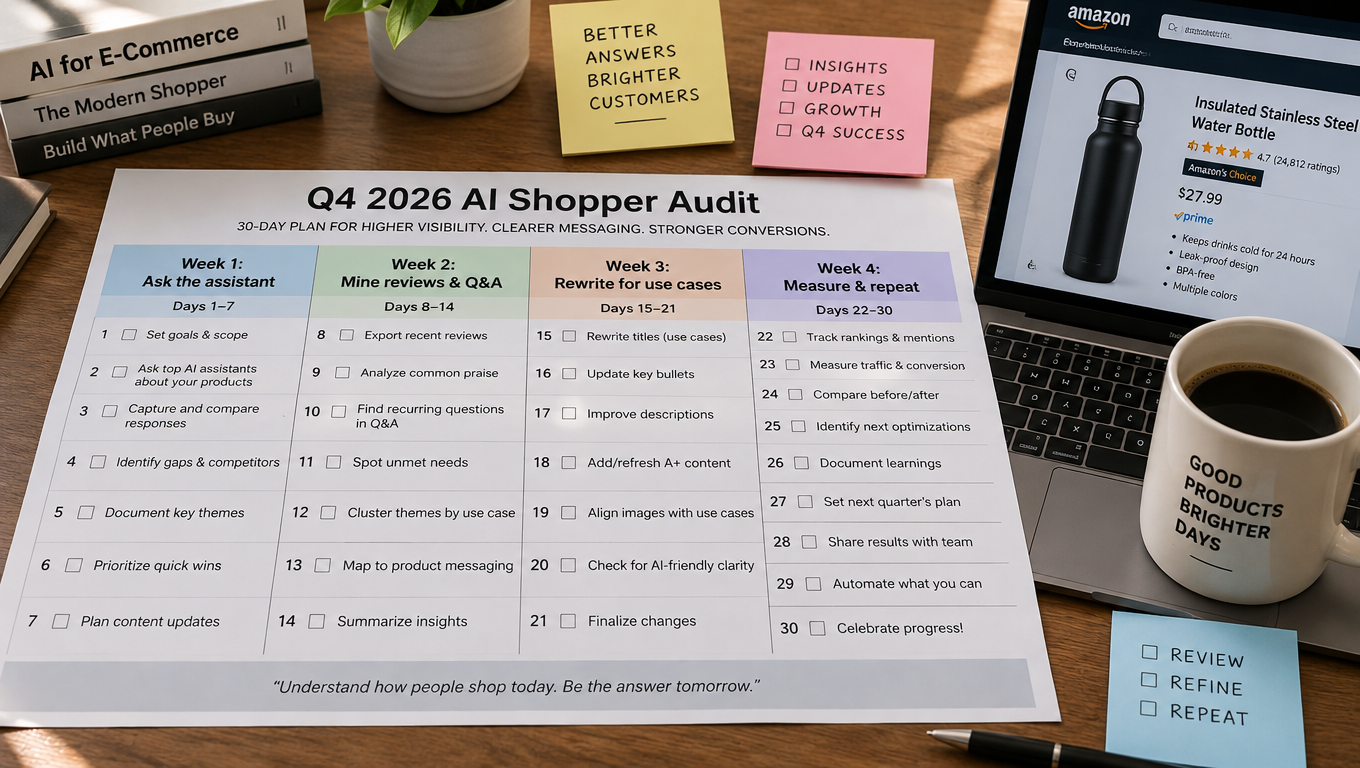
Week 1: Ask the assistant
Use the Amazon Shopping app as a customer. For each priority product, write 15–25 realistic questions a shopper might ask, including:
- Broad category questions (“What’s a good gift for a teen who likes photography?”)
- Comparison questions (“Which is better for travel, X type or Y type?”)
- Product-page questions (“Is this easy to clean?” “Does it come with batteries?”)
Record whether your product appears, how it is described, and which competitors appear instead. Screenshot everything. Note any answer that is wrong, vague, or unflattering — that is where your listing or reviews are failing you.
Week 2: Mine reviews and Q&A
Tag your recent reviews by theme, as described earlier. List the top five positive themes and the top five negative themes. Read your full Q&A section and flag unanswered or poorly answered questions.
Compare this to your Week 1 notes. Often you will find that the assistant’s unflattering answers trace directly to a recurring review complaint or a missing Q&A answer.
Week 3: Rewrite for use cases
Now update the listing:
- Rewrite bullets so each one pairs a specific feature with a specific situation, audience, or outcome.
- Add measurable details: dimensions, weights, capacities, durations, compatibility.
- Fill every applicable attribute field and make values consistent with bullets.
- Restate key infographic information in text.
- Answer open Q&A questions precisely.
- Add gift-relevant context where accurate: recipient type, age range, occasions.
Make changes in batches and document what you changed and when, so you can connect later results to specific edits.
Week 4: Measure and repeat
Re-run your Week 1 question set. Listing updates may take time to propagate, so don’t expect overnight changes. Compare answers, note improvements, and check conversion and session data in Business Reports.
Then schedule the next round. Conversational shopping isn’t a one-time fix; question patterns shift with seasons, trends, and competitor activity.
Prioritization tip
If you only have time for one thing, fix wrong answers first. A product the assistant describes inaccurately is actively losing sales. A product the assistant describes vaguely is merely missing opportunities.
Measuring Impact When the Assistant Is a Black Box
The biggest frustration sellers have with conversational shopping is visibility. Seller Central was built around keywords, impressions, clicks, and conversions. There is no standard report that says “your product was recommended in 4,000 assistant conversations this week.”
Build a question panel
The most practical workaround is a fixed panel of questions you test regularly. Keep a spreadsheet of 30–50 questions across your category, tested on a consistent schedule — weekly during Q4, monthly otherwise. For each one, record:
- Whether your product appears
- Its position among suggested products
- How the assistant describes it
- Which competitors appear
Because of personalization, results will vary between accounts. Where possible, test from more than one account, and focus on trends over time rather than any single result.
Watch the metrics you can see
Several existing metrics indirectly reflect assistant performance:
- Unit session percentage (conversion rate) — better-matched traffic should convert better.
- Return rate and return reasons — clearer answers should reduce “not as described” returns.
- Organic vs. paid sales ratio — growth in organic share can signal improved discovery.
- Search query performance in Brand Analytics, where available — watch for growth in longer, more natural-language queries.
- Review themes — track whether negative themes decline after listing or product changes.
Separate signal from noise
Q4 introduces huge seasonal swings, so it is easy to misattribute results. Compare against the same period last year where possible, and against a few ASINs you deliberately didn’t change. Even an informal control group makes your conclusions far more trustworthy.
Be honest about uncertainty
Amazon has not published how much weight the assistant gives to each source or exactly how recommendations are selected. Any vendor or consultant claiming precise “AI ranking factors” is guessing. Base decisions on what Amazon has publicly described — listings, reviews, Q&A, web sources, account memory — and on your own testing.
Mistakes to Avoid with Conversational Shopping
Every shift in Amazon’s discovery systems produces a wave of shortcuts. Most of them backfire. Here are the most common traps.
Stuffing listings with questions
Some sellers respond to conversational search by writing bullets that literally list questions: “Is this good for camping? Yes! Is this waterproof? Yes!” This reads poorly to humans and adds little information. Answer questions through clear statements of fact instead.
Overclaiming
Writing “perfect for everyone” or “works with all devices” might seem like a way to appear in more answers. In reality, it creates contradictions with reviews and Q&A, increases returns, and risks policy issues. An assistant that finds conflicting evidence is less likely to recommend your product confidently.
Ignoring the detail page assistant
Sellers often focus on whether their product appears in recommendations and forget that shoppers ask questions on the detail page itself. Test what the assistant says about your product when asked directly. That is where many sales are won or lost.
Treating it as a one-time project
Amazon has made more than 50 upgrades to the assistant, and the May 2026 rebrand shows the product is still evolving. Answers that look good today may change as models, sources, and features change. Build the question panel into your regular operations.
Manipulating reviews or Q&A
Because reviews and Q&A feed the assistant directly, the temptation to manipulate them grows. Don’t. Amazon enforces strictly against review abuse, and the account risk far outweighs any short-term gain.
Forgetting the human
Finally, the assistant is a filter, not the final buyer. A human still looks at your images, reads your price, and decides. Listings that work well for the assistant — clear, specific, honest — almost always work better for people too. That overlap is the strongest argument for this approach.
Conclusion: Write for the Reader That Summarizes You
The rename of Rufus to Alexa for Shopping in May 2026 marks a clear point in Amazon selling. Conversational shopping has grown past the experimental phase. Amazon reports more than 250 million users, triple-digit growth in usage and interactions, and assistant users who are significantly more likely to buy in the same trip.
For sellers, the core shift is this: your listing now has two readers. One is a human shopper. The other is an AI system that reads your listing, your reviews, your Q&A, and sometimes what the wider web says about you — then decides whether your product answers the shopper’s question.
Amazon’s own research on COSMO shows where discovery is heading: away from pure keyword matching and toward understanding who a product is for, what it does, and when it’s used. The sellers who benefit will be the ones whose information makes those relationships easy to confirm.
Key takeaways
- Write answerable statements. Pair features with specific situations, audiences, and measurable outcomes.
- Fill structured attributes completely and keep them consistent with your bullets and off-Amazon specs.
- Treat reviews as product feedback. Fix recurring complaints, because the assistant will repeat them.
- Answer Q&A precisely. It is one of the few customer-facing text areas you can directly contribute to.
- Position for a specific customer. Personalization rewards clear fit over broad appeal.
- Build off-Amazon credibility gradually through samples, gift guides, and consistent brand information.
- Measure with a question panel and track conversion, returns, and organic share alongside it.
- Start now. A 30-day audit of your top ASINs in October puts you ahead before holiday demand peaks.
None of this requires special tools or tricks. It requires doing the basics of Amazon selling — accurate information, a product that delivers, and attention to what customers say — with a new reader in mind. The assistant isn’t looking for the cleverest listing. It’s looking for the one it can describe with the most confidence.