
There is no shortage of enthusiasm around AI automation. Vendors promise 10x productivity. Consultants tout transformation timelines measured in weeks. Case studies from large enterprises describe sweeping efficiency gains that read more like science fiction than operational reality. And yet, most businesses — after months of planning, piloting, and spending — find themselves running harder just to stay in the same place.
The gap between what AI automation promises and what most organizations actually experience is not a technology problem. The models are good. The platforms are mature. The integration tooling has never been better. The gap is almost always a strategy problem: businesses are automating the wrong things, in the wrong order, with the wrong expectations about what automation actually changes.
This post is not about which AI tool to buy or which workflow to automate next. It is about the patterns that separate the businesses getting measurable, compounding value from automation from those stuck in an expensive loop of pilots that never scale. It covers the structural mistakes most teams make, the frameworks that actually produce durable results, and the honest truth about what AI automation can and cannot do for your operations in 2026.
The Three Layers of Business Automation (And Why Most Companies Only Reach Layer One)
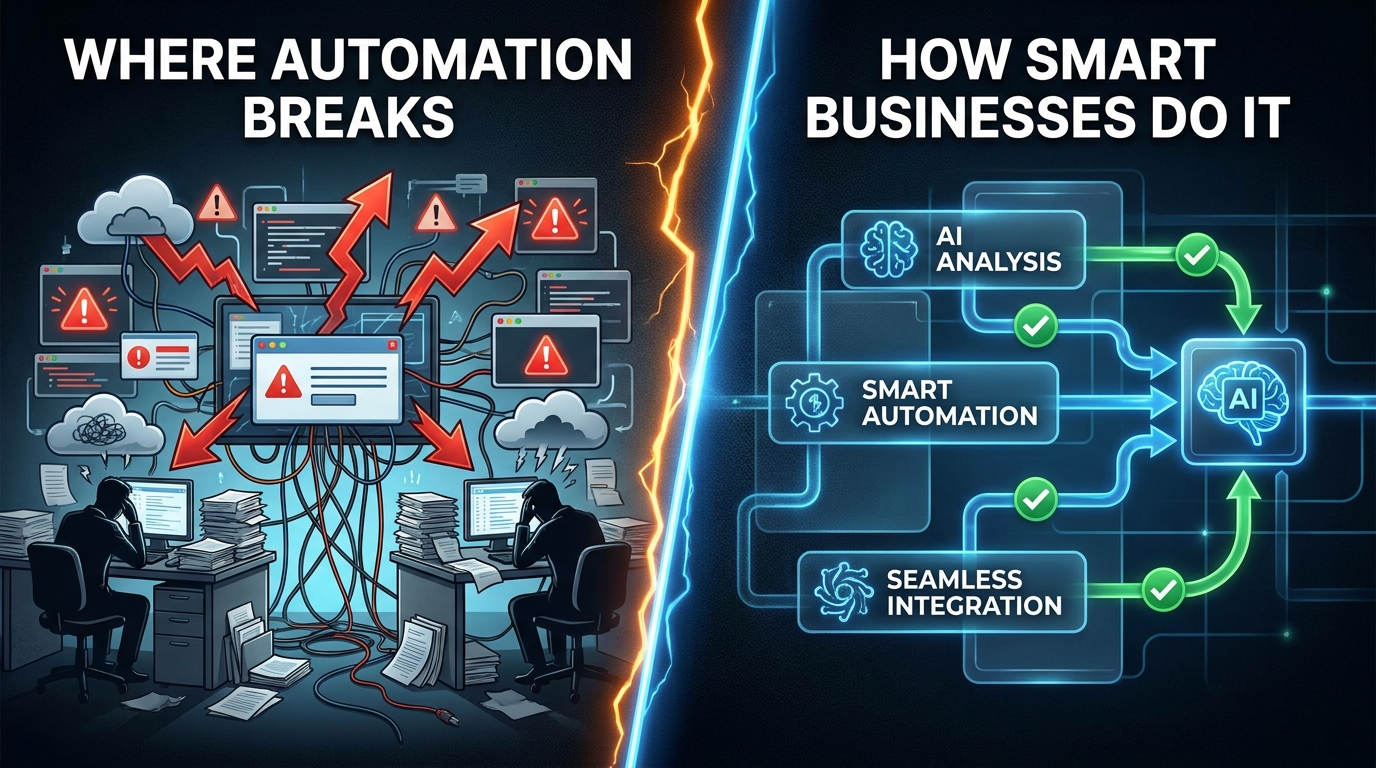
Before diagnosing what goes wrong, it helps to understand what AI automation actually looks like across its full range. Most organizations treat automation as a single category — you either have it or you don’t. In practice, automation exists on three distinct layers, each more complex and more valuable than the one below it. The frustrating reality is that most businesses invest heavily in the bottom layer and never climb higher.
Layer One: Task Automation
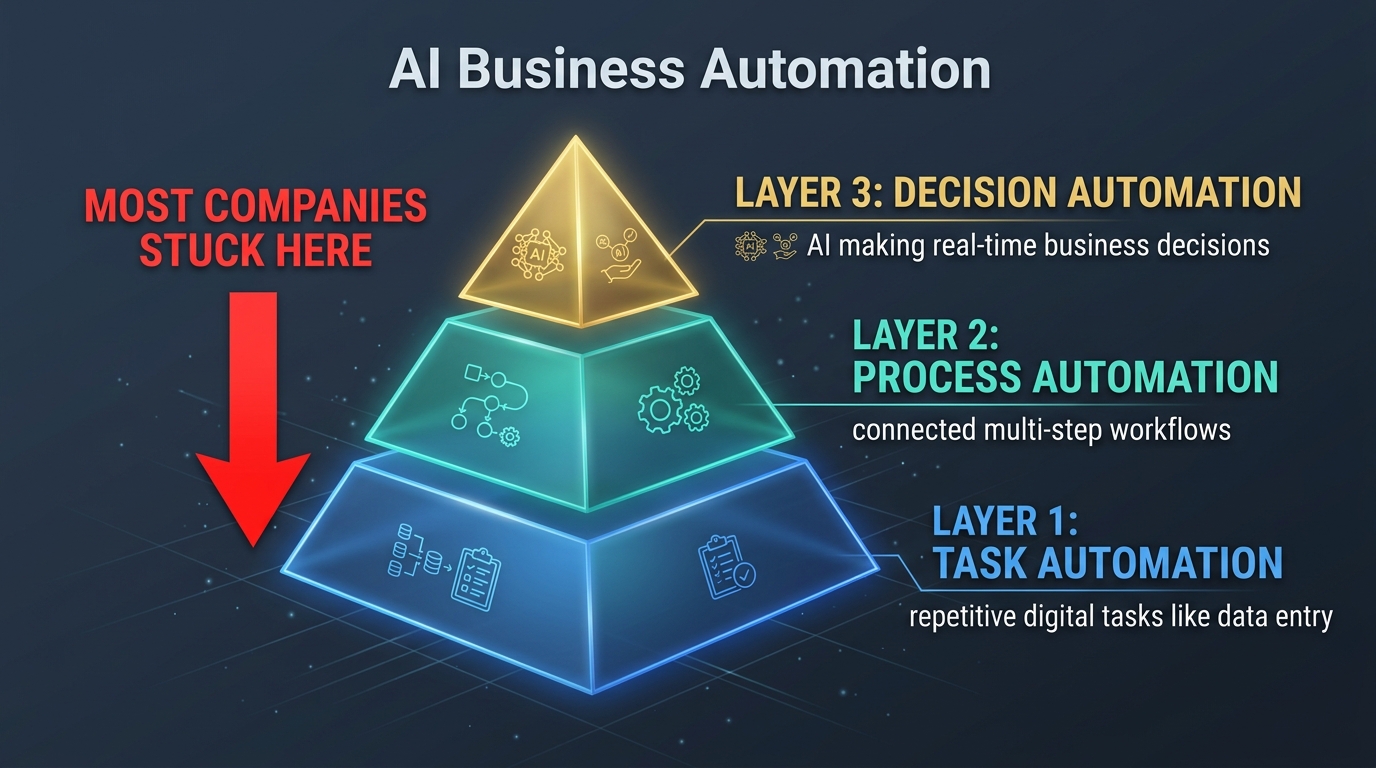
This is the entry point for most businesses. Task automation targets individual, discrete actions — data entry, document formatting, email routing, form completion, report generation. These tasks share a common characteristic: they are rule-based, repetitive, and require no judgment to execute. Robotic Process Automation (RPA) tools like UiPath and Automation Anywhere built entire markets around this layer. Zapier and Make (formerly Integromat) democratized it for smaller teams.
Task automation delivers real value. Eliminating 20 hours a week of manual data entry is genuinely meaningful, particularly in finance and operations teams. But the ceiling is low. Task automation does not change how a process works — it simply makes one step within a process faster. And because most processes contain dozens of steps, automating a single task rarely moves the needle on end-to-end cycle time or output quality in any significant way.
The trap here is that task automation is also the most visible form of automation. Teams can point to a bot running a report or a workflow firing an email and declare the automation initiative a success. Leadership sees activity. Budget gets renewed. And the business stays exactly where it was, just with fewer manual keystrokes.
Layer Two: Process Automation
Process automation connects multiple tasks into end-to-end workflows that run with minimal human touchpoints. Instead of automating a single data entry step, you automate the entire accounts payable cycle: invoice receipt, data extraction, three-way matching, approval routing, and payment execution. Instead of automating one email response, you automate the full customer onboarding sequence, triggered by signals across your CRM, billing platform, and product database simultaneously.
This layer is where meaningful efficiency gains appear. A 2024 study by Deloitte found that organizations reaching true process automation — not just task automation — reported average cycle time reductions of 60 to 80 percent for the processes involved. That is not 60 to 80 percent faster at one step. That is the entire process completing in a fraction of the original time.
Getting to Layer Two requires something most businesses underestimate: a thorough understanding of how processes actually work today, not how they are supposed to work on paper. Process documentation is almost always incomplete, outdated, or aspirational. The gap between documented process and lived process is where most Layer Two automation projects fail — because you cannot automate what you do not accurately understand.
Layer Three: Decision Automation
Decision automation is the frontier, and it is where AI earns its seat at the table in a way that pure RPA never could. At this layer, systems do not just execute steps — they analyze data, evaluate options, and make choices that previously required human judgment. Dynamic pricing engines that adjust product prices based on competitor data, inventory levels, and demand signals. Credit underwriting systems that assess loan applications using hundreds of variables in milliseconds. Content moderation systems that evaluate posts against community guidelines without human review queues.
Decision automation requires machine learning models, not just workflow logic. It requires high-quality training data, continuous model monitoring, and clear accountability structures for when the system makes a wrong call. It is genuinely difficult to build and maintain. But it is also where the competitive moats get built. Businesses that reach Layer Three do not just operate more efficiently — they operate in ways their competitors structurally cannot match without making the same investments.
Most organizations in 2026 have some Layer One automation, partial Layer Two automation in one or two departments, and very little Layer Three. Closing that gap is the actual opportunity — and the actual challenge.
What “Automation Debt” Actually Costs You Year Over Year
Businesses talk about technical debt — the accumulated cost of shortcuts taken during software development that eventually slow down the entire system. Automation debt is the equivalent concept applied to operational processes, and it is significantly more expensive and harder to see.
Automation debt accumulates in three ways. First, through deferred decisions: processes that everyone knows should be automated but haven’t been, requiring ongoing manual labor that compounds over time as volume grows. Second, through fragile automations: bots and workflows that were built quickly for short-term needs, without regard for edge cases or system changes, that now break regularly and require constant maintenance. Third, through automation sprawl: dozens of disconnected point solutions across different departments that don’t share data, create duplicated effort, and generate their own maintenance burden.
The Real Cost Calculation
Organizations often frame automation debt in terms of the direct labor cost of manual processes — the hours spent doing things a system could do. That calculation, while valid, dramatically understates the true cost. The fuller picture includes:
- Error propagation costs: Manual processes introduce human error at rates far higher than automated ones. Those errors — a transposed number in a financial report, a missed field in a customer record — propagate downstream and create correction costs that are often two to five times the cost of the original error.
- Opportunity costs: Every hour a skilled employee spends on automatable work is an hour not spent on judgment-intensive, high-value work. A financial analyst spending 40 percent of their time pulling and formatting data is an analyst spending 40 percent less time on analysis.
- Speed-to-market costs: Manual processes are slow processes. Slow processes mean slow responses to customers, slow product updates, and slow adaptation to market changes. In markets where response time is competitive, this is a revenue problem, not just an efficiency problem.
- Talent retention costs: Employees doing heavily manual, repetitive work report lower job satisfaction and higher turnover rates. Replacing a knowledge worker costs, on average, 50 to 200 percent of their annual salary in recruiting, onboarding, and lost productivity.
When organizations do a full accounting of automation debt — direct labor, error costs, opportunity costs, speed penalties, and talent costs — the figure is almost always two to three times what they estimated when looking at labor alone. That fuller number changes the investment calculus for automation projects significantly.
How Debt Compounds
The insidious property of automation debt is that it grows faster than the business does. As transaction volume increases, manual processes scale poorly. A team that handles 500 monthly invoices manually might manage. At 5,000, they are overwhelmed, error-prone, and expensive. The same dynamic plays out in customer service, HR, operations, and every other function that hasn’t automated its core workflows. The businesses that defer automation are not holding steady — they are falling further behind with every quarter of growth.
The Department-by-Department Reality Check: Where AI Automation Delivers and Where It Doesn’t
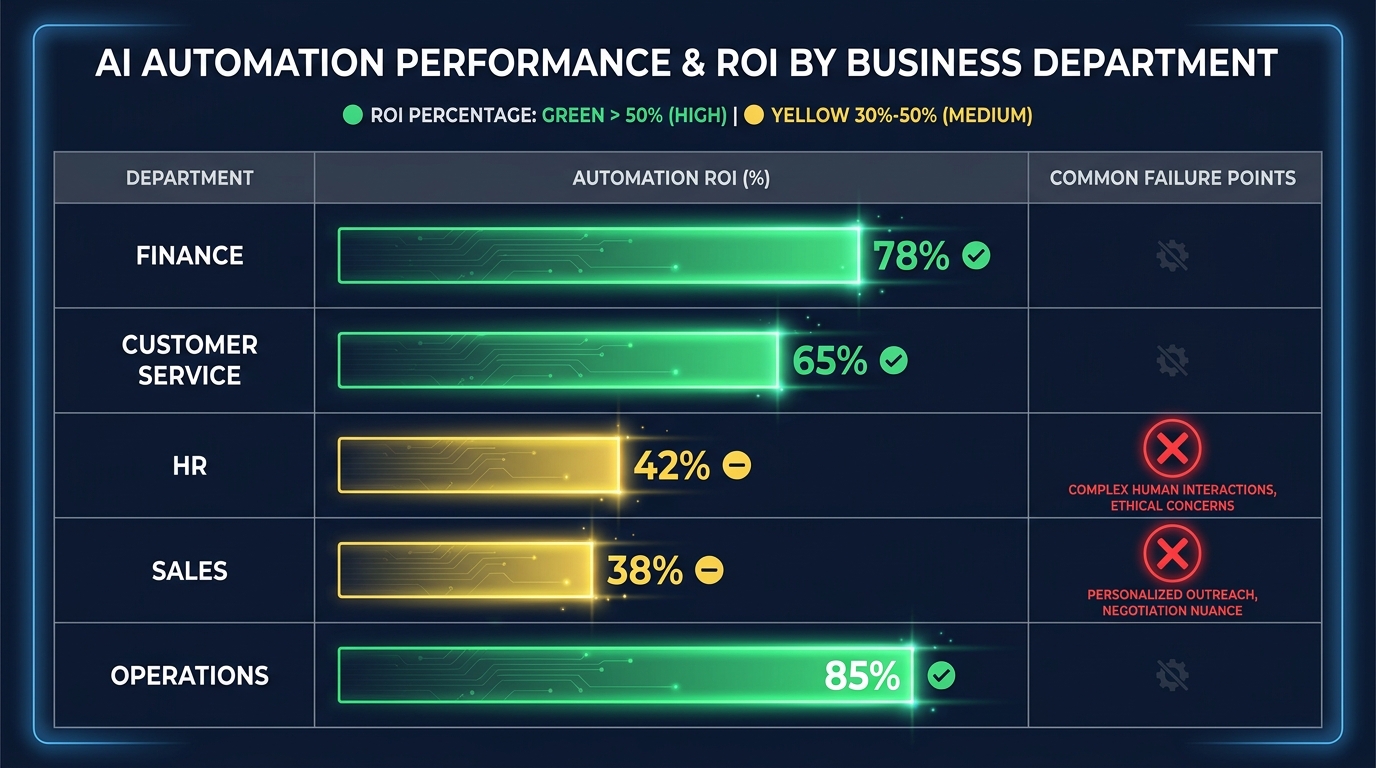
One of the most persistent mistakes in automation strategy is treating it as a uniform capability. The same AI automation platform will deliver dramatically different results depending on where it is deployed. Understanding which departments represent high-return automation opportunities — and which ones are more complex — prevents organizations from chasing the wrong targets first.
Finance and Accounting: High Return, High Readiness
Finance is the most automation-ready department in most organizations, and the data backs this up. Accounts payable automation — invoice capture, matching, routing, and payment — routinely delivers 70 to 80 percent reductions in processing time and error rates. Financial close automation compresses what used to be 10-day close cycles down to two or three days for many mid-market companies. Expense report processing, tax document handling, and financial statement preparation all sit squarely in the high-volume, rule-based category that automation handles best.
The reason finance delivers so consistently is structural: financial data is highly structured, the rules governing it are well-defined (often legally mandated), and the processes are transaction-heavy and repetitive. These are exactly the conditions under which automation excels. Organizations that have not yet aggressively automated their finance function are leaving measurable money on the table.
Customer Service: Strong Returns With Important Caveats
Customer service automation has become both more powerful and more nuanced in recent years. AI-powered chatbots and virtual agents can now handle 40 to 65 percent of inbound customer contacts autonomously — significantly higher than the figures from even two years ago, driven by large language model improvements. PayPal reportedly used AI chatbots to handle 65 percent of message-based customer inquiries during periods of surge demand, while simultaneously improving satisfaction scores.
The important caveat is that customer service automation works best on high-frequency, lower-complexity interactions. Password resets, order status queries, return initiations, basic troubleshooting, and FAQ responses are natural candidates. Complex complaints, nuanced billing disputes, emotionally sensitive situations, and anything requiring creative problem-solving still require skilled human agents. The mistake is automating for volume without protecting quality on the cases that need human attention most. Organizations that automate indiscriminately see customer satisfaction scores drop — not because AI is bad at service, but because they are routing the wrong cases to AI.
Human Resources: Moderate Returns, Significant Complexity
HR automation produces genuine efficiency gains in specific areas: job posting distribution, resume screening, interview scheduling, onboarding document processing, and benefits enrollment. These are repetitive, document-heavy processes that automation handles well. However, HR also contains some of the most judgment-sensitive processes in any organization — performance management, compensation decisions, terminations, and complex employee relations matters.
Automating the wrong HR processes creates real legal and reputational risk. AI resume screening tools, for example, have faced scrutiny and regulatory attention in multiple jurisdictions for introducing or perpetuating bias in hiring decisions. The return on HR automation is real but requires more careful scoping than finance or operations. The wins are in administrative burden reduction; the risks are in using automation to make or heavily influence consequential people decisions.
Operations and Supply Chain: Exceptional Returns at Scale
For businesses with significant operational complexity — manufacturing, logistics, distribution, retail fulfillment — operations automation delivers some of the highest absolute returns of any department. Demand forecasting, inventory optimization, supplier communication, quality control monitoring, and logistics routing are all areas where AI automation not only reduces cost but actively improves output quality.
The key difference in operations is that the data is abundant and continuous. Sensors, ERP systems, warehouse management platforms, and logistics tracking tools generate a constant stream of structured data that AI models can learn from and act on. Operations is where the jump from Layer Two to Layer Three automation is most achievable and most valuable — because the decisions being automated (reorder points, routing choices, quality escalations) are frequent, data-rich, and high-impact.
Sales: Real Potential, Often Misapplied
Sales automation has a complicated track record. CRM hygiene automation, lead scoring, follow-up sequencing, and meeting scheduling all deliver real productivity improvements for sales teams. AI-powered pipeline forecasting has improved materially and now provides useful signal in organizations with sufficient historical data.
Where sales automation tends to underperform is in prospecting and outreach. AI-generated outreach at scale has flooded inboxes to the point where response rates have declined across the industry. The automation is working — it is sending more messages than any human team could — but the return per contact is shrinking because every competitor is doing the same thing. Sales automation creates real value in the backend (CRM, forecasting, scheduling, coaching) and is delivering diminishing returns at the front end (mass outreach) in 2026.
Why Process Mapping Is the Unglamorous Step That Determines Everything
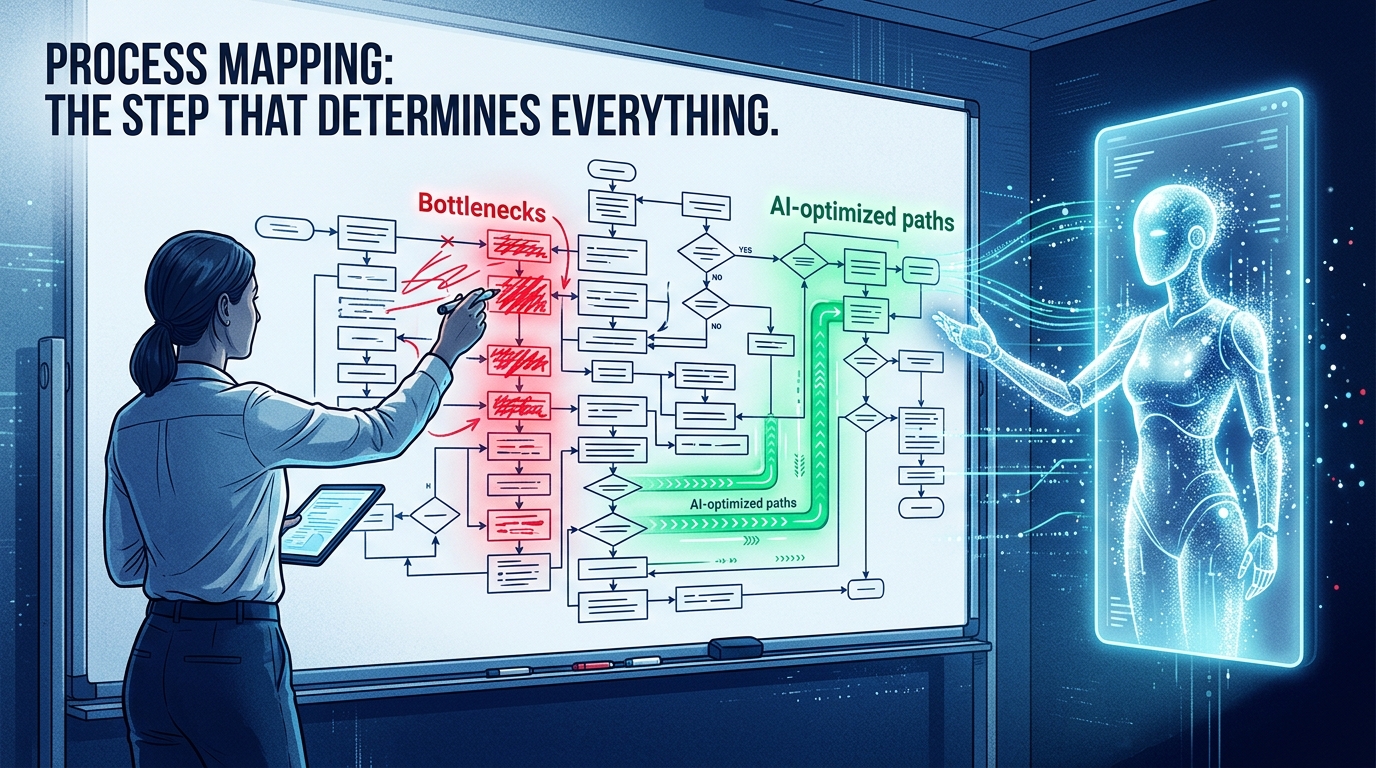
Ask any experienced automation practitioner what the most common reason for project failure is, and the answer is almost always the same: teams tried to automate processes they didn’t fully understand. Process mapping — the thorough documentation of how work actually flows through a system — is the least exciting part of any automation initiative and the one most frequently skipped or shortchanged. It is also the step that predicts success or failure more reliably than any other.
The Gap Between the Process on Paper and the Process in Practice
Every organization has documented processes. Standard operating procedures, workflow diagrams, training materials — these artifacts describe how things are supposed to work. What they almost never capture is how things actually work. The workarounds that developed because the ERP system doesn’t handle a specific edge case. The informal approval step that happens via Slack because the formal approval system is too slow. The data correction that an analyst quietly does every Monday morning before the report goes to leadership.
These informal adaptations are not failures of process design — they are evidence that people are solving real problems creatively. But when you automate the documented process without capturing the informal adaptations, you create an automation that breaks in all the situations the humans had already figured out how to handle. The bot encounters the edge case and either errors out, produces a wrong result, or stalls waiting for input that was never designed into the workflow.
Process Mining as the Modern Alternative
Process mining tools — Celonis, UiPath Process Mining, and IBM’s process intelligence platform among them — have matured significantly and address this gap directly. Rather than relying on documentation or interviews (both of which are subject to memory, bias, and selective recollection), process mining analyzes the actual event logs from enterprise systems — ERP, CRM, ticketing systems — to reconstruct how processes actually execute in practice.
The output is a data-driven process map that shows not just the intended flow but every variant, every exception, every deviation from the expected path, and how frequently each occurs. This is invaluable before automation because it identifies the edge cases that will need handling, the bottlenecks that will constrain throughput, and the handoffs that are most likely to introduce errors.
Organizations that invest in process mining before building automation consistently report fewer mid-project scope changes, fewer post-deployment failures, and faster time to stable performance than those that skip it. The upfront investment pays back quickly in avoided rework.
What to Map and How to Prioritize
Not every process needs to be mapped to the same depth. A pragmatic approach focuses intensive mapping effort on processes that meet three criteria: they are high-volume (running hundreds or thousands of times per month), they are high-cost (consuming significant human time or generating significant error rates), and they are bounded (they have clear start and end points that make automation feasible). Processes that are low-volume, highly variable, or that require extensive creative judgment should be mapped but not prioritized for early automation.
The Human-in-the-Loop Trap: When Keeping Humans Involved Kills Efficiency
One of the most well-intentioned decisions in automation design — keeping humans in the loop for review and approval — is also one of the most common causes of automation projects failing to deliver their promised returns. The instinct is reasonable: AI can make mistakes, so having a human review outputs before they take effect prevents errors from propagating. In practice, this instinct, applied too broadly, creates approval bottlenecks that eliminate much of the efficiency the automation was supposed to generate.
The Approval Bottleneck Problem
Consider an accounts payable automation that processes invoices and routes them for human approval before payment is executed. If the automation is processing 1,000 invoices per day and each human review takes three minutes, the approval queue requires 50 hours of daily review capacity. The automation eliminated data entry and matching time but created a new constraint: human review at scale. The overall process may actually be slower than before — not because the automation is slow, but because the human approval step cannot keep pace with the automation’s throughput.
This pattern repeats across departments. Automated customer service responses that route every response for human approval before sending. Automated social media monitoring that flags every post for a human to review before any action is taken. Automated contract redlines that require legal review of every suggested change before it can be accepted. Each of these is defensible in isolation — but together, they create an organization that has invested heavily in automation and gained almost no speed.
Designing Tiered Review Instead of Universal Review
The resolution is tiered review architecture: a design where the automation makes independent decisions on the cases where its confidence is high and its error risk is low, and routes only the genuinely ambiguous or high-stakes cases to human review. This requires defining clear decision rules about what qualifies for each tier.
In accounts payable: invoices that match purchase orders exactly, from known vendors, below a threshold dollar amount, execute automatically. Invoices with discrepancies, from new vendors, or above threshold go to human review. In customer service: standard queries with high-confidence responses are handled autonomously. Queries flagged as emotionally sensitive, legally complex, or involving account-level risk are escalated immediately. In content moderation: clearly policy-violating content is removed automatically; borderline cases go to human review.
The goal is not to eliminate human judgment — it is to apply human judgment only where it adds value that the automation genuinely cannot provide. That distinction, built carefully into the system design from the start, is what separates automations that deliver their promised efficiency from those that create elaborate new manual processes.
Data Quality as the Hidden Ceiling on Automation Performance
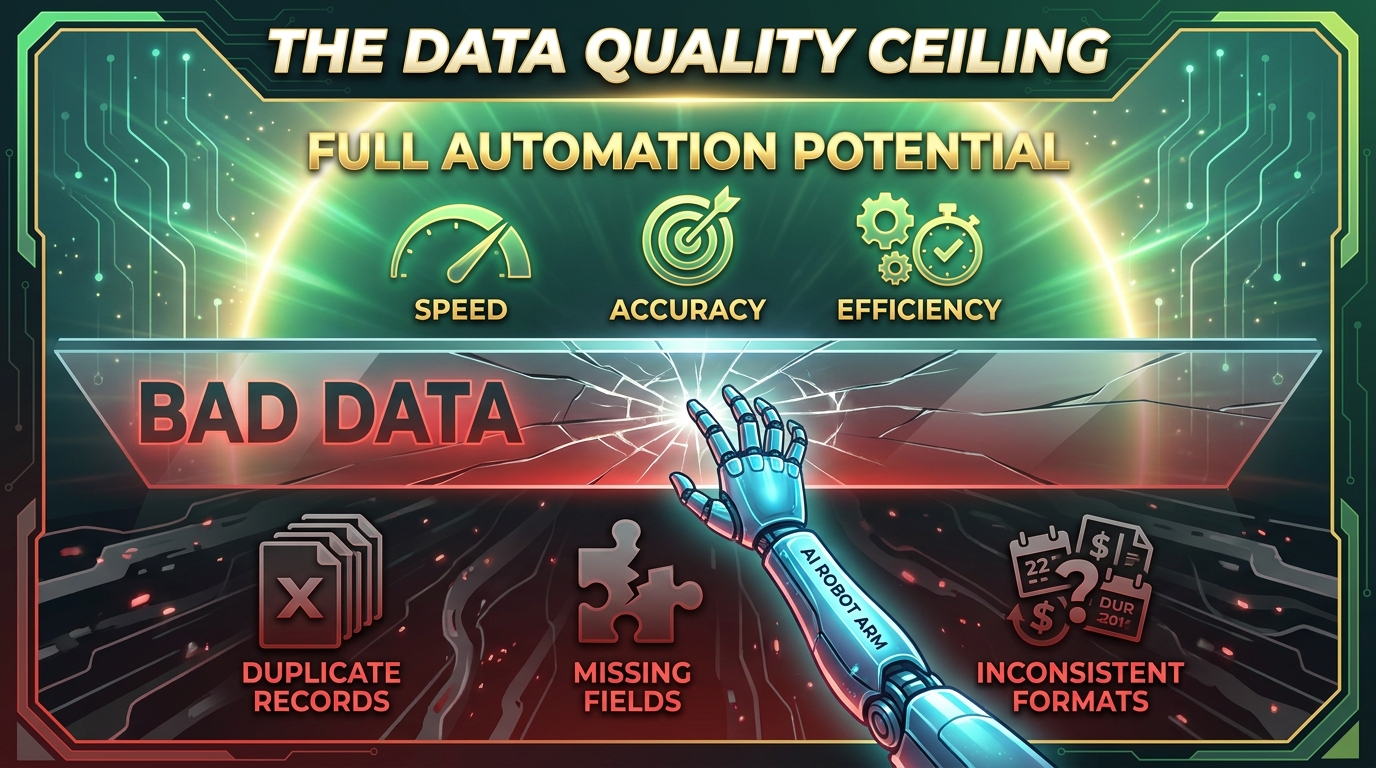
Every AI automation system, regardless of how sophisticated its models or how elegant its workflow design, performs at the ceiling set by the quality of the data it operates on. This is not a metaphor or an approximation — it is a hard technical reality. An automation built to extract and process customer records will produce wrong outputs at exactly the rate at which those records are wrong. A demand forecasting model trained on historical sales data will inherit every anomaly, missing entry, and inconsistency in that data as built-in noise. Data quality is not a peripheral concern in automation strategy. It is the foundational constraint.
The Four Dimensions of Data Quality That Matter Most
Data quality is often discussed in vague terms — “our data isn’t clean” — that obscure the specific problems and make solutions harder to identify. In practice, data quality problems that affect automation fall into four distinct categories, each with different causes and different fixes.
Completeness: Are all required fields populated? Missing data forces automations to either skip records, apply defaults that may be wrong, or fail outright. Completeness problems often originate in data entry processes — fields that are not required in the source system but are needed downstream. Fixing completeness requires going back to the source: making fields required, improving data capture UI, or adding validation at the point of entry.
Accuracy: Is the data correct? Inaccurate data is harder to detect than missing data because wrong data looks like data. An automation processing a customer address for shipping that has a typo will execute successfully from a system perspective and fail from a business perspective. Accuracy problems are addressed through validation rules, cross-reference checks against authoritative sources, and anomaly detection that flags records that fall outside expected ranges.
Consistency: Is the same information stored the same way across systems? A customer name recorded as “IBM Corporation” in the CRM and “International Business Machines” in the ERP and “IBM” in the billing system creates a matching problem that breaks any automation trying to correlate records across those systems. Consistency problems are the most common source of integration failures and are addressed through master data management — establishing a single authoritative source of record for key data entities.
Timeliness: Is the data current? Automations that make decisions based on stale data make stale decisions. Inventory level data that is updated once a day may be adequate for weekly reporting but is inadequate for real-time order fulfillment decisions. Timeliness requirements vary by process, and automation design needs to account for the data refresh rate of every input it relies on.
Building Data Quality Into the Automation Roadmap
The practical implication is that data quality improvement is not a prerequisite that happens before automation — it is an ongoing parallel track. Organizations that try to “fix the data first” and then automate find that the data improvement project takes longer than expected, the automation timeline slips indefinitely, and momentum collapses. A more effective approach is to start with processes where data quality is already adequate, use early automations to identify and surface data quality issues in adjacent processes, and run a continuous improvement cycle that cleans data as automation coverage expands.
Build vs. Buy: The Decision Framework Most Teams Get Wrong
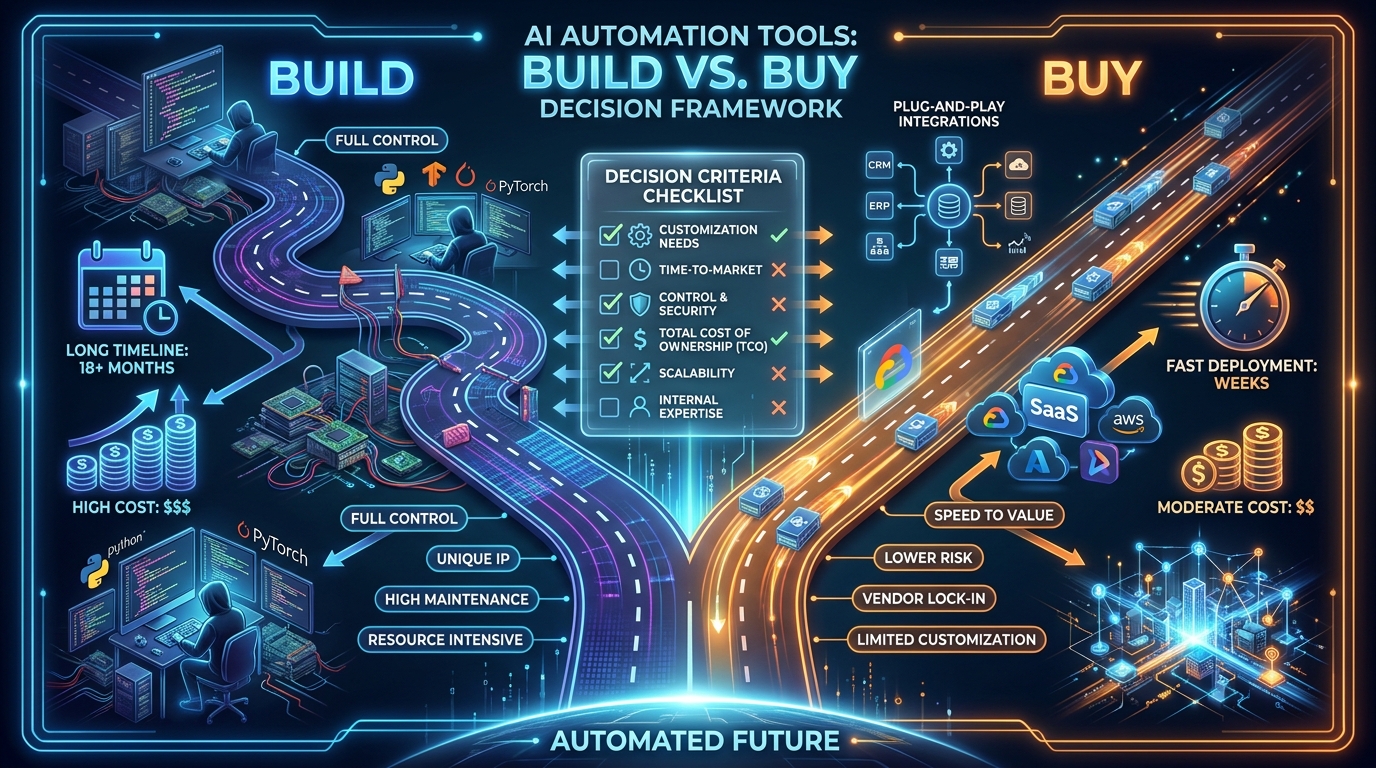
Every organization deploying AI automation eventually faces the build-versus-buy question: should we use an off-the-shelf platform or build custom automation capability? It sounds like a straightforward make-or-buy analysis, but in practice it is more nuanced than most teams appreciate — and the default answers many organizations apply (“buy for speed,” “build for control”) lead to poor outcomes regularly.
When Buying Makes Sense
For the vast majority of business processes, buying an established automation platform is the right call. The reasons are practical: the development time for custom automation is measured in months to years; the maintenance burden is substantial and ongoing; the vendor’s engineering team will outpace what any internal team can build for standard use cases. Finance automation, HR workflow tools, customer service platforms, and sales CRM automation are all areas where the market has produced mature, well-tested products. Building custom solutions here is spending significant engineering resources to recreate what already exists.
The “buy” case is strongest when the process you are automating is not a source of competitive differentiation, when established platforms handle it adequately, and when your team lacks the specialized expertise to build and maintain AI systems reliably. That describes most business processes for most organizations.
When Building Makes Sense
Custom development makes sense when you are automating a process that is genuinely unique to your business — one where the specific logic, data relationships, or decision criteria cannot be adequately expressed in a general-purpose platform. It also makes sense when the automation is core to your product or competitive positioning: if how you do something is part of your value proposition to customers, you probably do not want that logic sitting inside a third-party platform you do not control.
A third case for building is when integration requirements are complex enough that a custom solution would be simpler than forcing a purchased platform to connect to your specific system landscape. This is more common than vendors like to admit — enterprise system landscapes are frequently idiosyncratic enough that off-the-shelf integration is harder in practice than in the demo.
The Hybrid Reality
In practice, most mature automation architectures are hybrid: established platforms for standard use cases, custom logic for proprietary processes, and a data integration layer that connects them. The mistake is treating it as a binary choice. Teams that try to use a single vendor for everything find themselves bending processes to fit the tool. Teams that build everything custom spend most of their budget on infrastructure and maintenance before automating anything consequential. The most productive approach is a clear principle for when each approach applies, applied consistently across the automation portfolio.
Integration Hell and How to Avoid It
Automation connects systems. That is its fundamental value — taking data from one place, processing it, and acting on it in another. But connection requires integration, and integration is where automation projects go to die more often than anywhere else. The term “integration hell” exists for a reason: the last 20 percent of integration work routinely consumes 80 percent of the project budget and timeline.
Why Integration Is Harder Than It Looks
In a vendor demo, integration looks simple. Two systems connect, data flows, the workflow runs. What the demo does not show: the edge cases where the source system’s API returns inconsistent data formats. The rate limits that throttle data ingestion during peak periods. The authentication tokens that expire on unexpected schedules. The legacy system that has no API at all and can only be accessed via a fragile screen-scraping RPA bot. The ERP customizations that were built ten years ago and whose behavior is not documented anywhere.
Enterprise system landscapes are not the clean, API-first architectures that vendors assume in their product designs. They are accumulations of decisions made over many years, by many different teams, under many different constraints. Connecting automation into that landscape requires understanding its full complexity — which is almost never visible until you actually start building the integration.
Practical Strategies That Reduce Integration Complexity
Several architectural choices consistently reduce integration complexity for automation projects. First, building through an integration middleware layer — an iPaaS (Integration Platform as a Service) like MuleSoft, Boomi, or Workato — rather than direct point-to-point connections between systems. Middleware creates a managed connectivity layer where data transformations, error handling, and rate limiting are handled centrally rather than rebuilt for every integration.
Second, designing automations to be tolerant of data variability rather than brittle about format. Automations that fail every time a data field is slightly off from expected format create maintenance nightmares. Building in data validation, normalization, and graceful handling of unexpected inputs adds development time upfront but eliminates hours of support work downstream.
Third, automating integrations with well-documented, stable APIs first and treating legacy system integrations as a separate, more complex workstream. The temptation to automate everything simultaneously is understandable but typically leads to a project where the hardest integration problems block the entire delivery timeline. Sequencing matters.
How to Measure Automation Success Beyond Time Saved
Time saved is the most common metric for automation — and the most misleading one when used in isolation. Hours saved is a straightforward calculation: if a process took 10 hours manually and takes 1 hour automated, you saved 9 hours. But “hours saved” frequently does not translate directly into cost saved, because the humans who were doing that work are still employed and still need to be productive somewhere. The real value materializes only when those recovered hours are redirected to genuinely higher-value activities.
The Metrics That Actually Tell the Story
A more complete measurement framework for automation value looks at five dimensions simultaneously:
Throughput increase: How many more units of output is the process now producing per unit of time? In finance, this might be invoices processed. In customer service, contacts resolved. In HR, applications screened. Throughput measures whether the automation is actually doing more, not just doing the same thing faster with fewer people watching.
Error rate reduction: What percentage of outputs required manual correction or contained errors before automation, and what is that percentage after? Error rate is a quality metric that directly translates to cost — every corrected error is a support ticket, a rework cycle, or a customer complaint that did not need to happen.
Cycle time compression: How long does it take to complete the process end-to-end? For customer-facing processes, this directly affects satisfaction and retention. For internal processes, it determines how quickly decisions can be made and acted on. A financial close that takes 10 days instead of 20 provides two extra weeks of accurate visibility into company performance every month.
Employee experience impact: Are the employees whose work intersects with the automation reporting higher job satisfaction, less repetitive strain, and more time on meaningful work? This is measurable via pulse surveys and turnover data, and it matters both intrinsically and because it affects retention economics.
Business outcome correlation: Is the automation associated with measurable improvements in the business outcomes it was designed to support? A customer service automation should correlate with improved CSAT scores and reduced churn. A sales automation should correlate with improved conversion rates or faster deal cycles. If the technical metrics are good but the business outcome metrics are not moving, the automation is not actually solving the right problem.
The Change Management Problem Nobody Talks About
Every automation initiative is also a change management initiative. The technology is the easier part. Getting people — employees, managers, and executives — to actually use, trust, and work effectively alongside automated systems is where the majority of adoption failures occur. Change management for automation has some specific dynamics that differ from general organizational change, and most automation teams are not adequately prepared for them.
The Trust Deficit
Employees are, understandably, skeptical of systems that take over work they have been doing themselves. That skepticism expresses itself in several ways: shadow processes (continuing to do things manually as a backup even when the automation is running), excessive exception handling (routing things to human review that the automation could handle), and quiet workarounds that bypass the automated system entirely.
These behaviors are rational from the employee’s perspective — the automation is new, its reliability is unproven, and if something goes wrong with the system’s output, the person whose name is on the work is accountable. Building trust requires a track record: starting with lower-stakes automations, measuring and communicating accuracy rates, and visibly demonstrating that the system’s outputs are reliable. Telling people the automation is trustworthy is far less effective than showing them it has been trustworthy for the last three months.
Reskilling as a Strategic Necessity, Not a Courtesy
When automations absorb repetitive work from employees, two things need to happen: the employees need to be clear about what their role is now, and they need to be equipped to perform that role. Neither happens automatically. Without clarity on what their work looks like post-automation, employees experience role ambiguity that is genuinely demotivating and disorienting. Without reskilling, they may lack the capabilities to take on the higher-judgment work that automation is supposed to free them up for.
Organizations that invest in explicit reskilling — training analysts to do more analysis and less data collection, training customer service agents to handle more complex escalations with better tools, training operations staff to manage automated systems rather than operate manual ones — see significantly better adoption rates and meaningfully better retention during automation transitions. This is not altruism. It is operational pragmatism: automation that is sabotaged or worked around by the people it displaced is automation that doesn’t deliver its promised return.
Executive Behavior Sets the Tone
Perhaps the least discussed change management factor is executive behavior. When leadership talks about automation in terms of headcount reduction first and productivity improvement second, they send a signal that shapes every employee’s interpretation of subsequent automation initiatives. When they talk about it in terms of enabling the business to do more — serve more customers, process more transactions, expand faster — and then actually reinvest the productivity gains in growth rather than cuts, they build the organizational credibility that makes future automations easier to deploy.
Neither framing is universally right. Some automation genuinely does reduce required headcount, and leaders who pretend otherwise lose credibility too. The effective approach is honest, specific communication about what is changing, for whom, and on what timeline — combined with visible commitment to supporting the transition rather than treating it as someone else’s problem.
A Practical 12-Month Roadmap for AI Automation in 2026
Bringing together the principles covered in this post, a practical AI automation roadmap for most mid-market and enterprise organizations follows a four-phase sequence that builds capability progressively and generates early wins to sustain momentum.
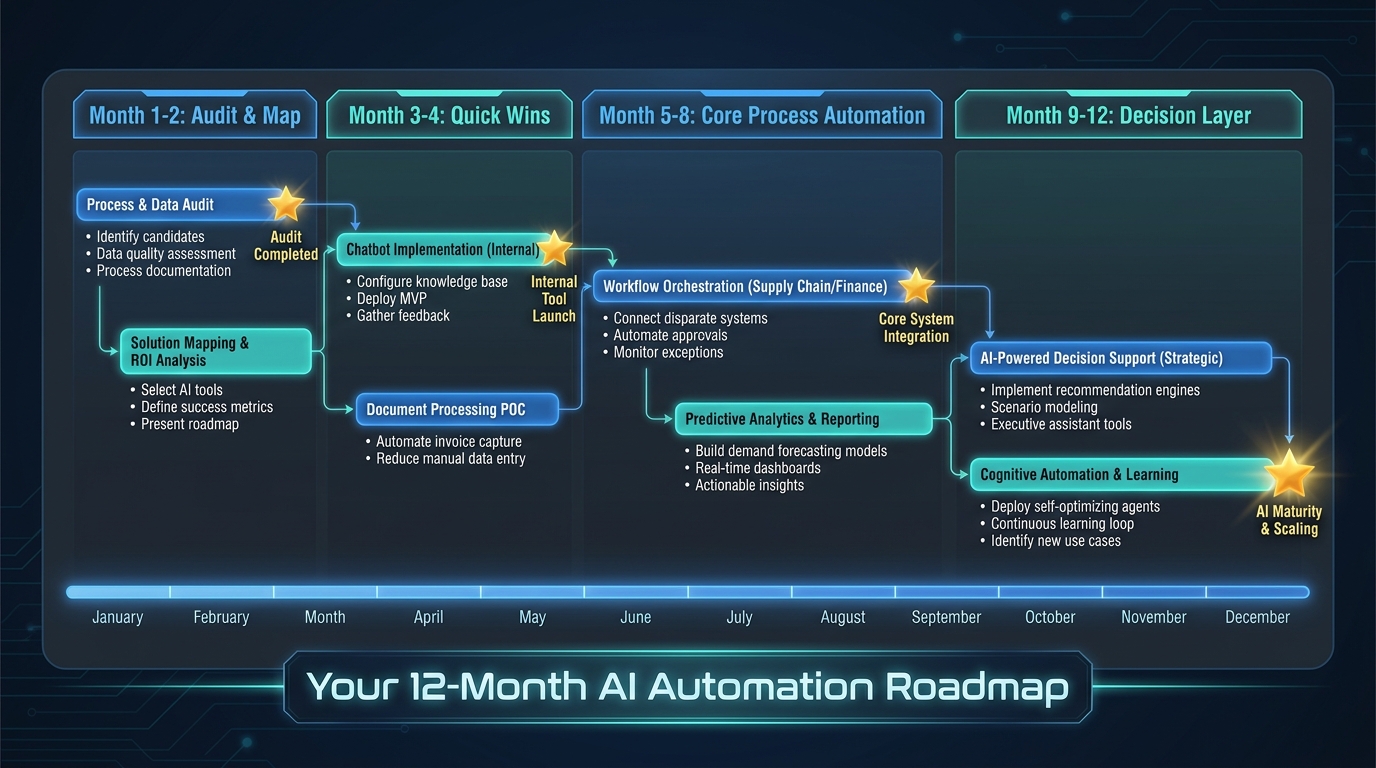
Phase One: Audit and Map (Months 1–2)
Before building anything, invest in understanding what you actually have. Catalog existing automations — including the informal ones employees have built themselves using Zapier, macros, or manual workarounds — and assess their reliability and maintenance burden. Identify the ten to fifteen highest-cost, highest-volume manual processes in the organization using both time-study data and interviews with department heads. Run a data quality assessment on the systems those processes touch. Establish your baseline metrics for the processes you intend to automate so you have a real before-picture to measure against.
This phase is primarily analytical and does not require significant technology investment. The output is a prioritized automation target list with documented process maps, data quality gaps, and system integration requirements for each target.
Phase Two: Quick Wins (Months 3–4)
Select three to five automation targets from your prioritized list that share three characteristics: high confidence in process understanding (you have mapped them thoroughly), adequate data quality (no significant gaps that would compromise automation accuracy), and meaningful but bounded scope (each can be designed, built, and deployed in four to six weeks). Build and deploy these automations. Measure their performance rigorously against your baselines. Communicate results visibly — both the efficiency gains and the quality improvements — to build organizational confidence in the program.
Quick wins serve multiple purposes beyond their direct business value. They validate your technology choices and integration architecture. They surface unexpected complexity while the stakes are still low. They generate the track record of reliability that makes employees more willing to trust subsequent automations. And they generate the ROI evidence that sustains executive sponsorship and budget for the more ambitious phases ahead.
Phase Three: Core Process Automation (Months 5–8)
With the integration infrastructure tested and the change management playbook refined, move to automating end-to-end processes rather than individual tasks. This is the Layer Two work: connecting multiple tasks into fully automated process flows, building tiered review architectures, and beginning to connect automations across departmental boundaries where processes naturally span multiple functions. Finance-to-operations handoffs. Customer service to CRM to billing. HR onboarding to IT provisioning to payroll.
This phase also introduces more sophisticated AI components — document understanding, intelligent routing, predictive elements — that go beyond simple rule-based automation. Data quality improvement runs in parallel, building toward the clean, connected data foundation that Layer Three decision automation requires.
Phase Four: Decision Layer (Months 9–12)
With stable process automations running and data quality materially improved, begin piloting decision automation in one or two areas where the data richness and business impact are highest. The goal in year one is not to have decision automation running at scale everywhere — it is to have it running reliably somewhere, with the monitoring, governance, and model management infrastructure in place to expand responsibly.
Decision automation requires ongoing maintenance in a way that process automation does not. Models drift as the world changes. The inputs that predicted outcomes well during training become less predictive as market conditions shift. A decision automation deployed without a plan for monitoring and retraining is a risk, not an asset. Building that operational discipline alongside the capability is what makes the difference between decision automation that performs at deployment and decision automation that continues to perform eighteen months later.
The Honest Conclusion: Automation Is a Practice, Not a Project
The businesses getting the most from AI automation in 2026 share a common characteristic that has nothing to do with which tools they use or how much they spend: they treat automation as an ongoing organizational practice rather than a discrete project with a start and end date. They have standing teams responsible for identifying automation opportunities and maintaining existing automations. They have data governance functions keeping their inputs clean. They have change management capabilities embedded in every new automation deployment. And they are constantly moving — improving existing automations, extending into new processes, pushing up the layers from task to process to decision.
This is a fundamentally different posture from the “automation initiative” framing that most organizations still use — a time-bounded project, executed by a temporary team, measured by whether it delivered the automations it promised on schedule. That framing treats automation as a destination. The organizations outperforming their peers on automation ROI have realized it is more like a capability that compounds over time, with each layer of capability making the next layer more accessible.
The starting point is less important than many organizations believe. You do not need to begin with the most ambitious automation. You need to begin with the most honest assessment of where you actually are — what your processes look like in practice, what your data quality actually is, what your integration landscape genuinely requires — and build from that reality, not from the one on your vendor’s slide deck.
The organizations that will look back in three years and wish they had started earlier are the ones spending this year building business cases instead of building automations. The business case for automation is not made in a spreadsheet — it is made by running automation and measuring what happens.
Key Takeaways
- Most organizations are stuck at Layer One (task automation). The real value is in Layer Two (process automation) and Layer Three (decision automation). Build a deliberate path to move up.
- Automation debt is more expensive than it looks. Add error costs, opportunity costs, speed penalties, and talent costs to get the real number — it is almost always two to three times the direct labor calculation.
- Process mapping is non-negotiable. Automating a process you don’t fully understand produces an automation that fails on the edge cases humans had already figured out how to handle.
- Design tiered review, not universal review. Human-in-the-loop on everything kills throughput. Reserve human judgment for the cases where it genuinely adds value.
- Data quality is the ceiling. No automation performs above the quality of its inputs. Run data quality improvement as a parallel track, not a prerequisite.
- Buy for standard processes, build for competitive differentiation. Most processes are standard. Save your engineering budget for the ones that actually matter to your competitive position.
- Measure five things, not one. Throughput, error rate, cycle time, employee experience, and business outcome correlation together tell the real story that “hours saved” alone never will.
- Change management is not optional. Trust is built through track record, not communication. Start small, measure rigorously, and communicate results — then expand.