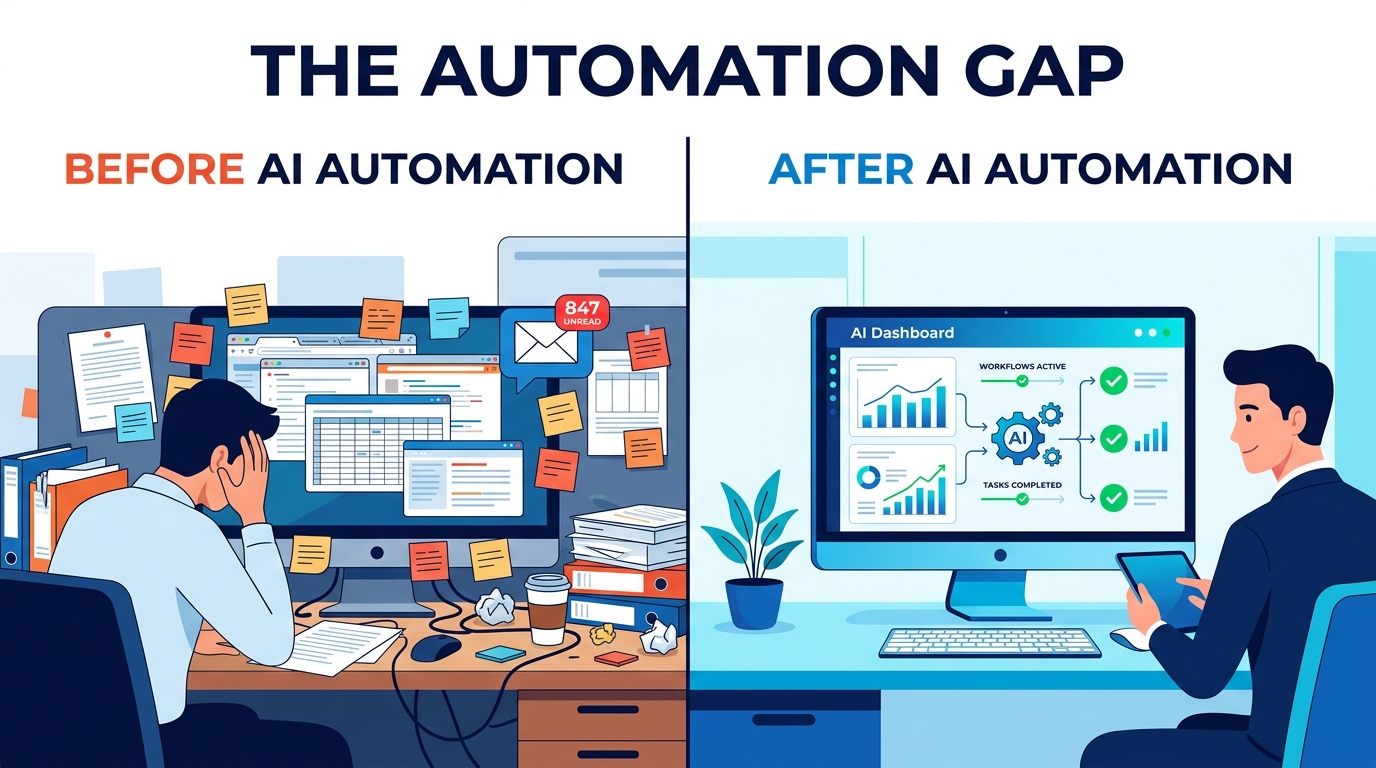

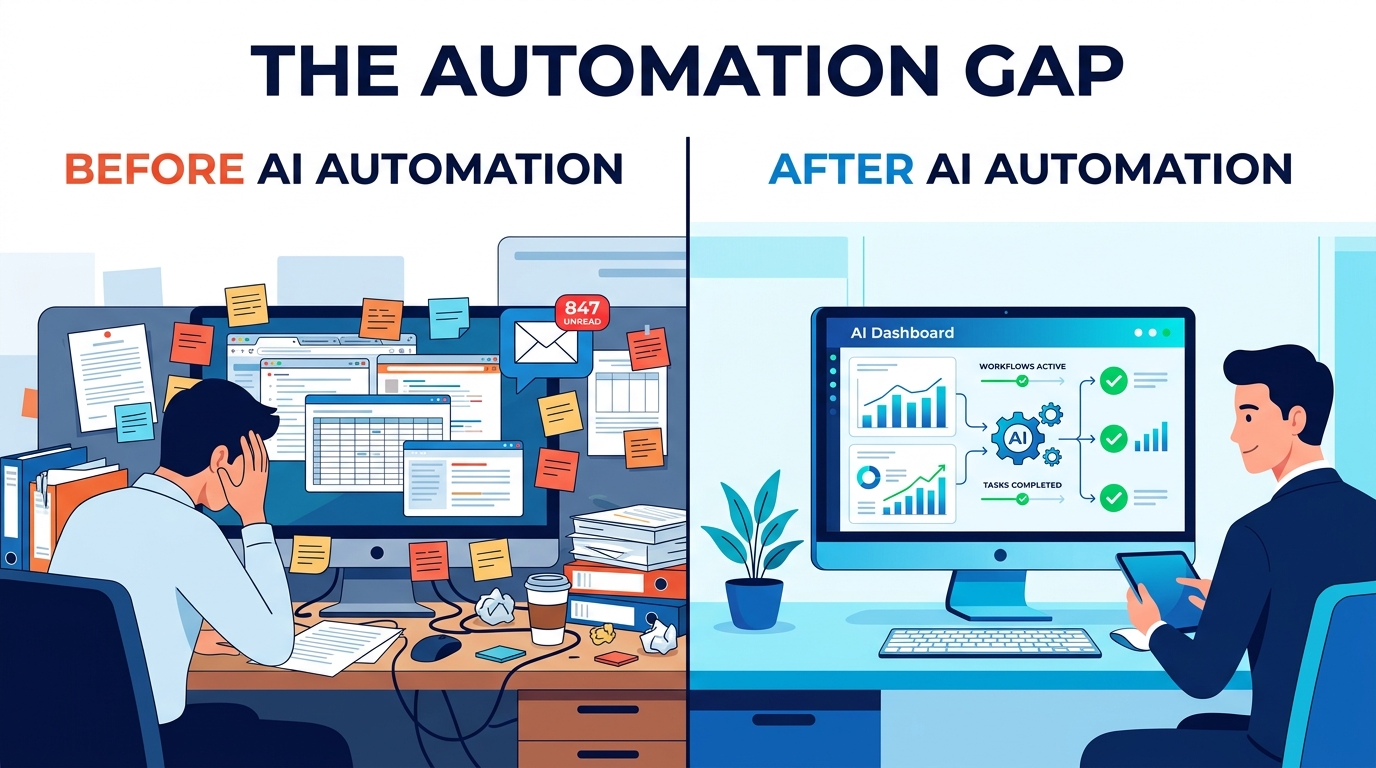
Most businesses approach AI automation the way someone approaches a diet on January 1st — with tremendous enthusiasm, a vague plan, and an uncomfortable reckoning coming around week three. They pick a tool, wire it into an existing process, watch it produce inconsistent results, and conclude either that the tool is broken or that AI “isn’t ready yet.” Neither conclusion is usually correct.
The real problem is almost always earlier in the process. Before the tool. Before the vendor call. Before the pilot program budget got approved. The problem is that most businesses have never actually mapped what their processes do, step by step, decision by decision — and so when they hand those processes to an AI system, they’re handing over something that was already fragile, inconsistent, and held together by institutional memory and tribal knowledge.
This guide isn’t about which AI tools to buy. It’s about understanding what AI automation actually changes at the process level — function by function, task by task — and how to restructure your operations so that when you do introduce automation, it has something solid to work with. We’ll cover the categories of work AI genuinely excels at, the customer-facing and back-office functions where adoption is already delivering results, the common structural problems that make automation fail, and how to measure whether your automation is actually working once it’s running.
If you’ve already started automating and things aren’t going as expected, this post will help you understand why. If you’re still planning your approach, it’ll help you avoid the mistakes that cause most implementations to underdeliver.
The Four Categories of Business Work — and Where AI Actually Fits
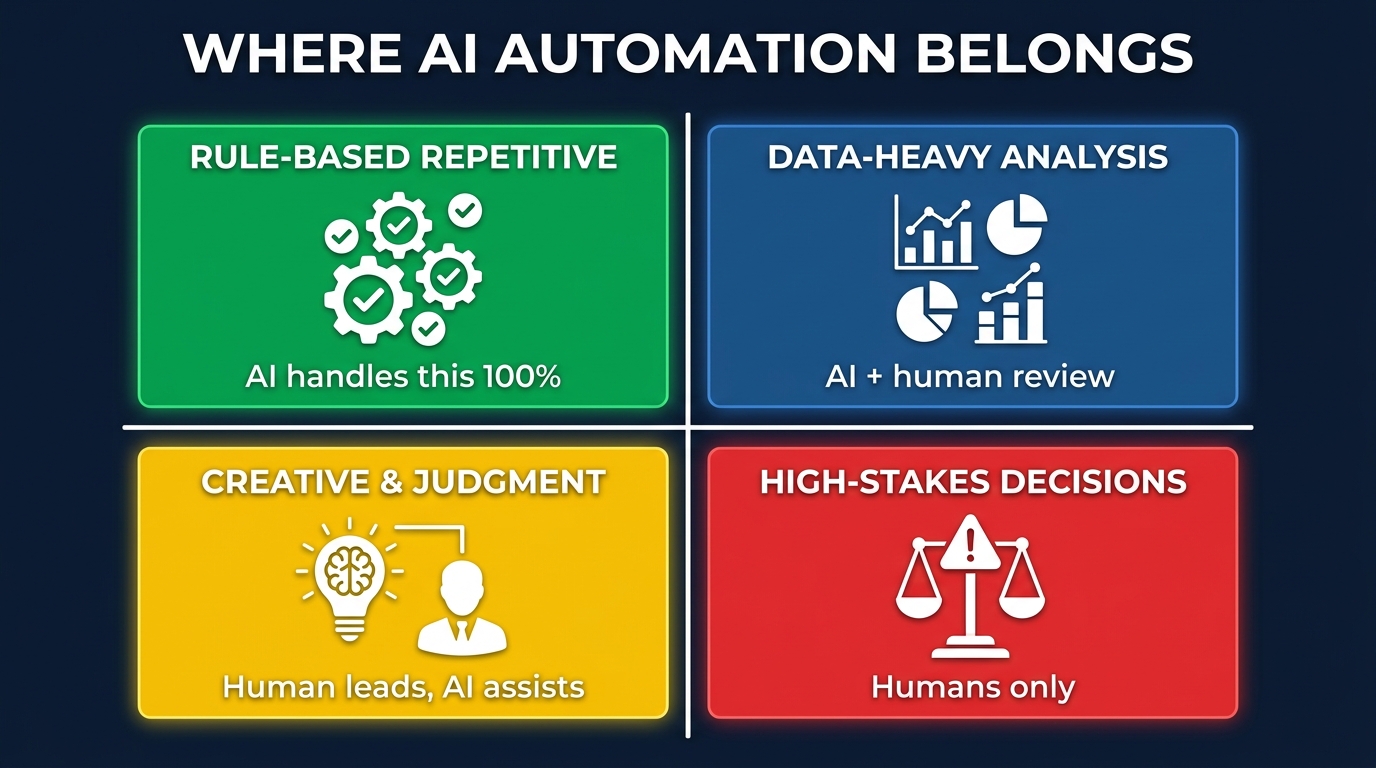
Before deciding what to automate, you need a framework for thinking about the different types of work happening across your business. Not all tasks are equally suited to AI — and the businesses that automate well tend to have a clear understanding of which category each process falls into.
Category 1: Rule-Based, Repetitive Tasks
This is the native territory of AI automation. These are tasks where the inputs are predictable, the rules are consistent, and the correct output can be defined in advance. Think: routing incoming emails to the right department based on keywords, generating invoices from approved purchase orders, updating CRM records when a deal stage changes, or sending a follow-up email 48 hours after a demo call.
For this category, AI doesn’t just perform better than humans — it performs more consistently, at any hour, at any volume. A human doing invoice entry at 4pm on a Friday makes more errors than the same human at 9am on a Tuesday. An AI system doesn’t have that variance. Accuracy doesn’t drift with fatigue or distraction.
The automation decision here should almost always be “yes” — the question is only which tool and how tightly you want it integrated into your existing systems.
Category 2: Data-Heavy Analysis Tasks
This is where AI augments humans rather than replacing them. Tasks like analyzing customer sentiment across thousands of support tickets, identifying anomalies in financial transactions, forecasting demand based on historical patterns, or summarizing competitor activity from multiple data sources — these require the kind of pattern recognition across large datasets that AI handles far faster than any human team could.
But the outputs of these tasks usually still need human interpretation before action is taken. An AI model can flag 37 anomalous transactions in your accounts receivable, but a finance professional needs to determine which ones represent actual fraud, which are legitimate outliers, and which are data errors. The AI compresses hours of analysis into minutes; the human converts that analysis into sound judgment.
Category 3: Creative and Judgment-Intensive Tasks
This is where many businesses currently overestimate AI’s ability. Writing a first draft of a marketing email, generating product descriptions, transcribing meeting notes, producing an initial competitor analysis — AI contributes meaningfully here. But the quality ceiling is set by the human who reviews, refines, and contextualizes the output.
AI in this category is best understood as a capable first-draft engine. It removes the blank-page problem, generates options quickly, and handles volume. But it doesn’t yet understand brand voice with nuance, organizational politics, customer relationship history, or the kind of soft context that separates adequate output from genuinely good output. Human ownership here isn’t optional — it’s what makes the output worth using.
Category 4: High-Stakes Decisions
Hiring, firing, major client negotiations, M&A decisions, legal strategy, crisis communications — these are areas where AI can inform but must not decide. The risks of error are too significant, the context too layered, and the accountability too human to delegate the decision itself. AI can surface data, model scenarios, and highlight risk factors. The decision belongs to a person who can be held accountable for it.
Mapping your business processes against these four categories before deploying any automation tool is one of the highest-return exercises you can do. It prevents both under-automation (leaving obvious rule-based tasks to humans) and over-automation (putting AI in charge of things that require human judgment and accountability).
Customer-Facing Automation: Where AI Saves You — and Where It Costs You Customers
Customer-facing automation is the most visible type of AI deployment, and consequently the one with the highest potential for both gains and damage. Getting it right requires understanding something counterintuitive: customers don’t object to automation. They object to bad automation — and they object loudly, publicly, and often permanently.
What Customer-Facing AI Gets Right
When a customer reaches out to report a shipping delay at 2am on a Sunday, they don’t necessarily want to talk to a human — they want their question answered. An AI-powered support system that can pull their order status, confirm the delay, provide an updated delivery estimate, and offer a discount code for the inconvenience has just delivered a genuinely useful customer experience. No human would have been available to do that at that hour, and even during business hours, waiting 45 minutes on hold to get the same information isn’t a better experience.
This is the value center of customer-facing automation: availability, speed, and consistency for high-volume, predictable interactions. Live chat bots handling FAQ queries, automated order confirmation and shipping notification emails, AI-powered return processing systems, and intelligent ticket routing (sending complex issues to the right specialist rather than making the customer start over repeatedly) — all of these have demonstrably improved customer satisfaction when implemented well.
Salesforce research has consistently shown that customers’ primary frustrations with customer service aren’t with automated systems per se, but with automated systems that can’t resolve their issue and provide no clear path to a human. This is the design failure to avoid.
The Escalation Design Problem
The most common mistake in customer-facing automation is designing for the easy path and leaving the hard path unbuilt. Companies deploy a chatbot that handles 70% of inquiries well. The other 30% — the complex, emotional, edge-case interactions — hit a dead end, get looped in circles, or receive generic non-answers that increase frustration rather than resolve it.
An escalation pathway must be as intentional as the automation itself. Define clearly: at what point should a conversation be handed to a human? What signals indicate a customer is frustrated (repeated rephrasing, negative sentiment words, explicit requests for a human)? When escalation happens, how much context travels with the customer so they don’t have to start over? These questions should be answered before a single chatbot message is written.
Personalization at Scale
One of the legitimate advances in customer-facing automation in recent years is genuine personalization — not the “Hi [First Name]” personalization of a decade ago, but behavioral personalization based on actual purchase history, browsing patterns, support history, and engagement data. AI systems can now surface product recommendations that reflect what a specific customer actually buys, send re-engagement emails timed to when that particular customer typically opens their inbox, and adjust messaging tone based on customer segment profiles.
This works because personalization, at its core, is a data problem. And data problems are where AI excels. The limitation is data quality and data privacy compliance — both of which require deliberate human governance that the automation layer alone cannot provide.
Internal Operations: The Back-Office Functions AI Is Quietly Dominating
While customer-facing automation gets the headlines, some of the most significant business gains from AI are happening invisibly, inside the operations layer that most customers never see. Back-office automation is often less glamorous than a conversational AI, but it delivers some of the most measurable, consistent, and durable returns of any automation investment.
Document Processing and Data Extraction
One of the highest-volume, highest-error, most time-consuming categories of back-office work across almost every industry is processing documents — contracts, invoices, applications, reports, compliance filings, and forms. Historically, this required either humans reading and manually entering data, or rigid rules-based OCR systems that broke whenever a document’s format changed slightly.
Modern AI-powered document processing systems — often called Intelligent Document Processing (IDP) — use machine learning models trained to understand document structure contextually rather than positionally. They can extract data from a purchase order even if the vendor uses a different template than the last one. They can read handwritten amendments on a scanned contract. They can identify discrepancies between what a document says and what a system record shows, flagging the exception rather than silently passing through an error.
For businesses processing hundreds or thousands of documents per month, this represents a substantial labor cost reduction combined with a significant accuracy improvement. The implementation investment pays back quickly at almost any meaningful volume.
Workflow Routing and Approvals
In most organizations, a significant amount of time is spent not on actual work, but on moving work from one place to the next — submitting for approval, waiting for approval, chasing the approval, resubmitting after revision. AI automation can dramatically compress these cycles by intelligently routing work based on content (not just predefined rules), predicting which approvals are likely to be flagged for revision, and sending proactive prompts to approvers before deadlines are missed.
A procurement approval workflow that might take five business days through email chains can be compressed to same-day completion when the routing logic is automated, approvers receive context-rich summaries rather than raw documents, and reminders fire automatically at set intervals. The work itself doesn’t change — only the time lost between steps disappears.
IT and System Operations
IT operations automation has been one of the fastest-growing applications of AI within organizations. AI systems now monitor infrastructure in real time, detect anomalies before they become incidents, automatically attempt remediation for known issue types, and escalate to human engineers only when the issue falls outside the automated resolution playbook. This reduces the volume of incidents that require human attention while dramatically reducing mean time to resolution (MTTR) for the issues that do require intervention, since the AI has already diagnosed the problem and gathered the relevant logs by the time an engineer looks at it.
Finance and Accounting Automation: From Invoice Processing to Predictive Cash Flow
Finance functions have historically been both data-intensive and highly rule-governed — which makes them exceptionally well-suited for AI automation. The transformation happening in finance departments right now is significant, and it’s worth examining in some detail because it illustrates the full arc of what mature AI automation looks like in practice.
Accounts Payable and Receivable
Accounts payable (AP) automation is one of the most widely deployed finance automations, and for good reason. The traditional AP process — receiving an invoice, matching it to a purchase order, getting a three-way match with the goods receipt, routing for approval, scheduling payment — involves multiple steps, multiple systems, and multiple opportunities for human error or delay.
AI-powered AP automation can handle the entire workflow for matched invoices without human intervention, flagging only exceptions (mismatches, missing POs, duplicate invoices, unusual amounts) for human review. Organizations that have deployed this at scale report processing cost reductions of 50–80% per invoice, with processing time dropping from days to hours or minutes.
On the receivable side, AI models can predict which customers are likely to pay late based on historical payment patterns, segment the collections outreach strategy by risk profile (high-risk customers get early outreach, low-risk customers get standard reminders), and automatically apply cash receipts to the correct invoices — one of the most tedious and error-prone tasks in most accounting departments.
Expense Management
Expense management is another finance function where AI is delivering straightforward wins. AI-powered expense tools can extract line items from photos of receipts, categorize expenses against a company’s chart of accounts, flag policy violations automatically, and route for approval or reimbursement without manual data entry at any step. The audit trail is cleaner, the processing time is shorter, and the policy enforcement is more consistent than any manual review process.
Predictive Financial Modeling
More sophisticated finance teams are using AI for forward-looking tasks — cash flow forecasting, budget variance prediction, and scenario modeling. These applications sit in Category 2 (data-heavy analysis with human oversight) and are among the highest-value AI applications in the finance function.
An AI model trained on a company’s historical cash flows, payment patterns, seasonal revenue curves, and external economic indicators can produce cash flow forecasts with meaningfully better accuracy than a CFO building a model in Excel from experience and intuition alone. This doesn’t make the CFO’s judgment obsolete — it gives that judgment better raw material to work with. The finance leader still decides which scenario to plan for, which risks to hedge, and which assumptions to override based on context the model doesn’t have. But the starting point is better, and the analysis time is shorter.
Sales and Marketing Automation: What AI Handles vs. What Humans Must Own
Sales and marketing represent perhaps the most complex automation landscape in most businesses, because these functions involve both high-volume, repeatable activities that are perfect for automation and deeply human, relationship-driven activities where automation can actively undermine results.
The High-Automation Zone in Marketing
Lead scoring, email segmentation, campaign scheduling, A/B test analysis, social media post scheduling, SEO metadata generation, ad copy variant testing, attribution reporting — these are the marketing functions where AI automation delivers consistent, measurable value. They are high-volume, data-dependent, and benefit from the kind of consistency and speed that AI provides.
Marketing automation platforms have been mature for years, but the integration of generative AI has meaningfully expanded what they can do. AI can now generate multiple variants of ad copy for testing, personalize landing page content dynamically based on the source of the click, and summarize campaign performance across channels into plain-language reports that a non-technical manager can act on immediately.
The Low-Automation Zone in Sales
Sales is where automation enthusiasm most often outpaces reality. CRM data entry, follow-up reminders, deal stage updates, call transcription, and activity logging are all legitimate automation targets — and freeing sales reps from these tasks has a real and documented impact on selling time. But the sales activities that actually close deals — understanding a customer’s specific business problem, navigating a complex buying committee, negotiating pricing and terms, managing the relationship through a long cycle — these are still deeply human skills that AI currently assists rather than replaces.
The most common sales automation mistake is deploying AI-generated outreach at scale and calling it personalized. Bulk-sending AI-written emails that include a person’s company name and job title is not personalization — it’s mail merge with extra steps. Sophisticated buyers recognize AI-generated outreach immediately, and the response rates and reputation effects reflect that. Human-written, genuinely researched outreach to a smaller, better-qualified list still outperforms AI-blasted outreach to a larger list in most complex B2B sales contexts.
Where AI and Sales Actually Work Together Well
The genuinely productive intersection of AI and sales is in the intelligence layer — not the outreach layer. AI tools that analyze CRM data to identify which deals are most at risk of going cold, surface the right case studies or competitor battle cards at the right moment in a sales cycle, transcribe and analyze sales calls to identify the phrases and objections associated with wins versus losses, and forecast pipeline with more accuracy than intuition-based forecasting — these create real, compounding value for sales teams without replacing the human skills that actually drive revenue.
HR and Talent Operations: The Sensitive Automation Layer
Human resources is one of the most important — and most consequential — areas to approach carefully with AI automation. Done well, HR automation reduces administrative burden, speeds up talent acquisition, and provides better data for workforce planning. Done poorly, it introduces bias, creates compliance risk, and damages the employee experience in ways that are hard to recover from.
Where HR Automation Is Safe and Valuable
Administrative tasks are the unambiguous starting point: onboarding paperwork, benefits enrollment, PTO tracking, payroll processing, policy document distribution, and internal FAQ responses. These processes are rule-based, document-heavy, and time-consuming for HR teams — making them ideal automation candidates with minimal risk of the kind of harm that misapplied HR automation can cause.
Recruiting coordination is another area where AI reliably adds value: scheduling interviews across multiple calendars, sending reminder communications to candidates and interviewers, tracking application status, and generating structured summaries of job requirements for job board postings. These tasks consume a disproportionate amount of recruiter time relative to their strategic value.
Where HR Automation Requires Extreme Care
Resume screening, candidate ranking, and any automated scoring of human beings for employment decisions is an area that demands rigorous governance, legal review, and ongoing bias auditing. AI models trained on historical hiring data can encode and amplify historical biases — if your company’s past hiring decisions reflected demographic biases, an AI trained on that data will reproduce those biases at scale and speed.
Several high-profile cases have demonstrated this risk clearly enough that regulatory frameworks around AI in employment decisions are now active in multiple jurisdictions. In the EU, the AI Act specifically classifies employment-related AI systems as high-risk, requiring conformity assessments and human oversight. In the US, the EEOC has published guidance on the application of anti-discrimination law to AI hiring tools. This is an area where the legal landscape is moving fast, and where assuming your AI vendor has handled the compliance question is a significant risk.
The principle to follow: AI can help structure and accelerate the recruiting process, but a human must make every significant employment decision and must be able to explain that decision in terms that don’t rely on “the algorithm said so.”
The Process Redesign Imperative — Why You Can’t Automate a Broken Process
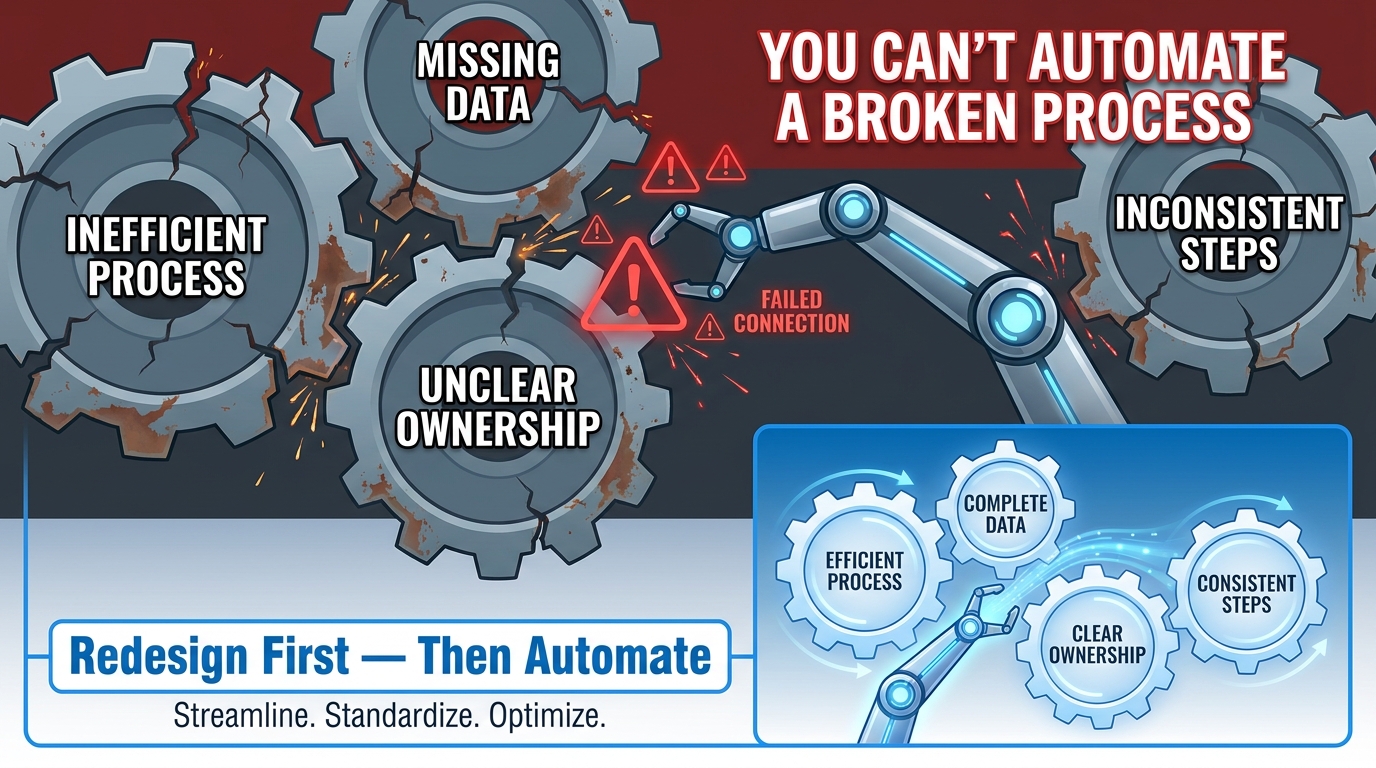
This is the principle that most AI automation conversations skip over entirely, and it’s the one that explains most implementation failures. You cannot automate a process you don’t fully understand. And the act of trying to automate often reveals that the process was never as defined, consistent, or logical as everyone assumed.
The Process Documentation Gap
In most organizations, processes exist in three forms simultaneously: the documented process (what the procedure manual says), the actual process (what people actually do day-to-day), and the exception process (what people do when the documented process doesn’t cover the situation, which is more often than anyone admits).
These three versions frequently diverge significantly. A new employee follows the documented process. An experienced employee does something faster and more effective based on years of contextual knowledge. And when something unusual happens, the most experienced people improvise in ways that depend on institutional knowledge that is nowhere written down.
When you automate the documented process without accounting for the actual and exception processes, you get an AI that handles the simple cases correctly and fails on everything that makes the job actually complex. This is why so many automations work beautifully in a controlled test environment and struggle in production — because the test environment uses clean, typical examples, and production serves the full range of real-world messiness.
The Process Mapping Requirement
Before automating any significant process, the following questions need clear answers:
- What are every step and every decision point in this process, including the non-obvious ones?
- What are the inputs, and how consistent are they? If inputs arrive in 12 different formats from 8 different sources, the automation must handle all of them — or your process must be changed to standardize inputs first.
- What are the exceptions, and how are they currently handled?
- Who owns the process, and who do they escalate to when something goes wrong?
- What does “correct output” look like, and is there an objective way to verify it?
This mapping exercise is not glamorous. It often takes longer than the automation itself. And it frequently reveals that the process needs to be redesigned before it’s automated — which is frustrating to hear but vastly preferable to learning it six months after go-live when your automation is producing systematically incorrect outputs at scale.
Simplify Before You Automate
One of the most useful principles from lean operations is that you should eliminate waste before you automate. An automated broken process is faster than a manual broken process — it still produces the wrong output, just more efficiently. The right sequence is: map the process, identify and remove unnecessary steps, standardize inputs and outputs, then automate what remains.
This also means that the best time to do process improvement is when an automation project is on the table — because the scrutiny of preparing for automation forces the kind of process examination that organizations should be doing regularly but rarely do.
Data Quality: The Silent Killer of AI Automation
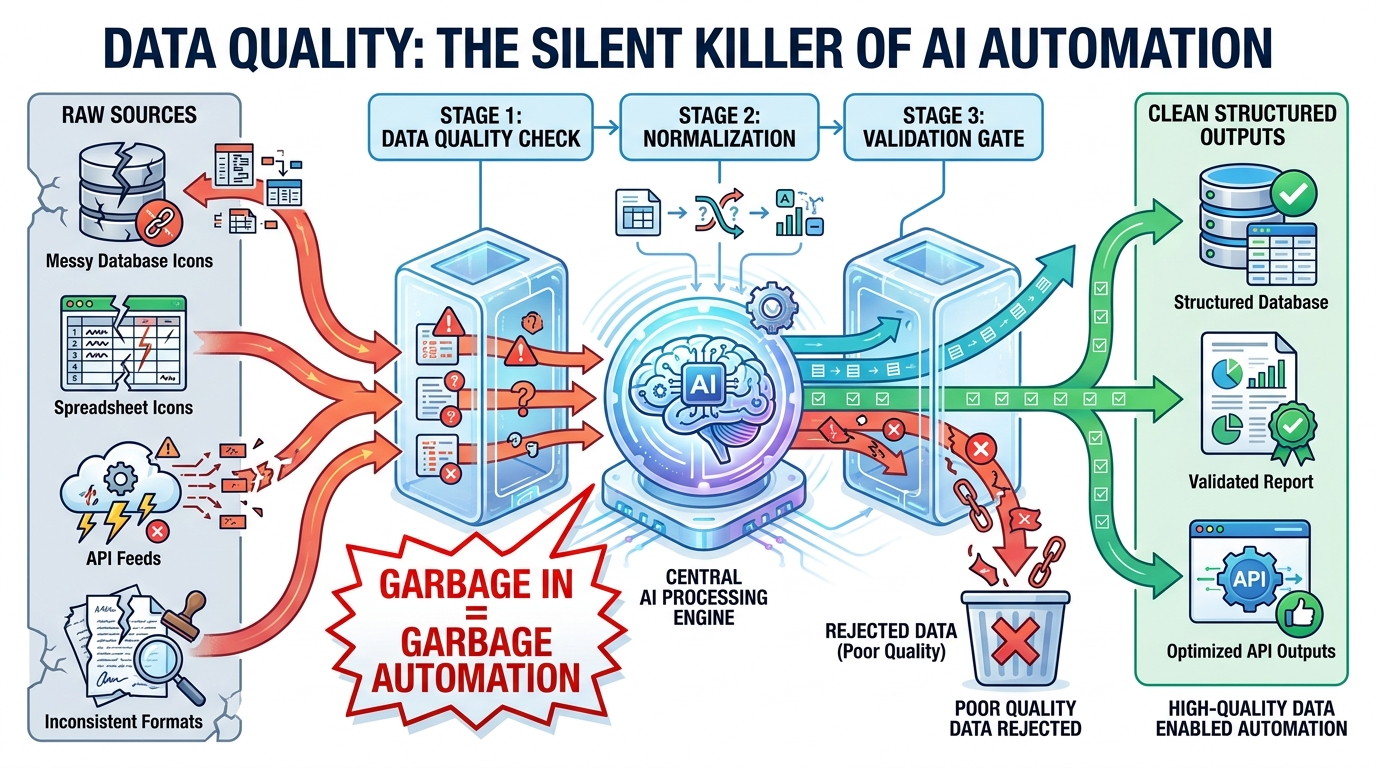
If the process redesign imperative is the most commonly overlooked structural issue in AI automation, data quality is the most commonly underestimated operational issue. AI systems do not improve bad data — they operationalize it. Every error, inconsistency, and gap in your data becomes embedded in your automated outputs, often invisibly.
What Data Quality Problems Actually Look Like
Data quality issues in business systems rarely look like obvious errors. They look like:
- Inconsistent formatting: Customer names entered as “Smith, John” in one system and “John Smith” in another, making deduplication difficult and merge-based automations unreliable.
- Missing fields: CRM records where deal size, industry, or close date are blank because reps didn’t fill them in, making any AI model trained on that data work from an incomplete picture.
- Stale records: Contact information, pricing, and product details that haven’t been updated in months or years, causing automated communications or calculations to reference incorrect data.
- Definitional inconsistency: “Revenue” meaning different things to different teams — one team counting booked revenue, another counting recognized revenue, another counting invoiced — making any cross-department reporting or automation unreliable.
- Unstructured fields used to store structured data: Addresses, dates, product codes, or customer segments stored in free-text notes fields because the right field didn’t exist in the system, making programmatic access unreliable.
The Data Audit as a Pre-Automation Requirement
Before deploying AI automation against any dataset, a basic data audit should establish: completeness (what percentage of records have all required fields populated), consistency (are the same things described the same way across the dataset), accuracy (does the data reflect current reality), and timeliness (how recently was the data updated and how frequently it changes).
If this audit reveals significant problems — as it often does — there are two paths forward. The first is a data remediation effort: systematically cleaning, standardizing, and completing the dataset before automation begins. The second is building data quality controls into the automation itself: validation rules that catch and route exceptions before they propagate, normalization logic that handles known inconsistencies, and alert thresholds that flag unusual patterns for human review.
Most robust automation implementations require some combination of both — initial remediation to establish a clean baseline, and ongoing quality controls embedded in the automated workflow to prevent drift over time.
The Compounding Effect of Bad Data
What makes data quality so critical in an AI context specifically — as opposed to a rules-based automation context — is that AI models can amplify data errors in ways that rules-based systems typically cannot. A rules-based system that encounters a malformed input usually produces an error and stops. An AI model that encounters a malformed input often produces a plausible-sounding output that is confidently wrong — and without a clear error signal, that wrong output may propagate through downstream systems before anyone notices.
This is why data governance — the organizational policies and processes that ensure data quality is maintained over time — is not a nice-to-have for AI automation deployments. It’s load-bearing infrastructure.
The Human-in-the-Loop Model: Where to Keep Humans and Why
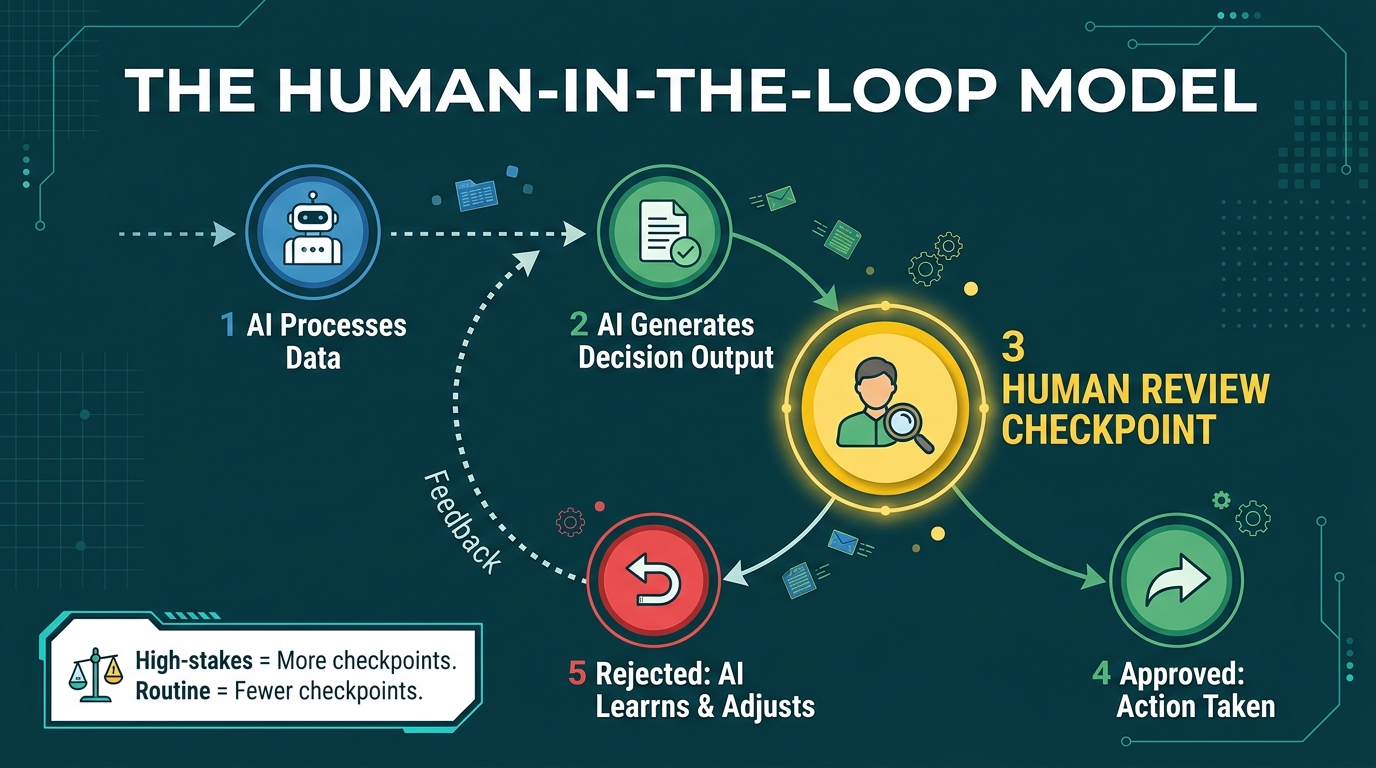
The phrase “human-in-the-loop” gets used frequently in AI discussions, but it often functions more as a reassurance than a design principle. Saying your AI automation has a human in the loop without specifying where, under what conditions, with what information, and with what authority is a bit like saying your car has brakes without specifying how well they work or when to use them.
Designing the Checkpoint, Not Just Adding It
Effective human-in-the-loop design starts with a clear answer to a specific question: for this particular automated process, what decisions or outputs are consequential enough that a wrong answer would cause meaningful harm — financial, reputational, legal, or relational — before anyone catches it?
The answer to that question defines where checkpoints belong. A checkpoint is not just a human reading an AI output and clicking approve — it’s a structured moment where a human with relevant context and authority reviews specific information, applies judgment the AI cannot apply, and takes explicit responsibility for the decision to proceed.
This distinction matters because rubber-stamp checkpoints — where humans nominally review but practically never question the AI’s output — provide the appearance of oversight without its substance. They’re common in organizations that faced internal resistance to full automation and compromised with a review step that nobody actually uses. Worse, they create liability: if something goes wrong, the record shows a human approved the output, but the human may have had no meaningful chance to catch the error.
Calibrating Checkpoint Frequency to Risk
A practical framework for calibrating human involvement:
- High volume, low stakes, reversible outcomes: Run fully automated with exception alerts only. Example: automated email follow-up sequences, routine report generation, calendar scheduling.
- Medium volume, medium stakes, partially reversible: Batch review — a human reviews a sample of AI outputs on a schedule, and exceptions trigger immediate review. Example: AI-drafted customer proposals, automated invoice approvals below a threshold amount.
- Low volume, high stakes, difficult to reverse: Individual human review before action. Example: AI-recommended vendor contract terms, AI-generated financial forecasts used for board reporting, AI-flagged compliance issues.
- Any volume, irreversible outcomes: Human decision required, AI provides supporting information only. Example: employment decisions, large financial commitments, legal filings, public communications during a crisis.
Building Feedback Loops Into the Human Review
The human checkpoint should not just be a gate — it should be a learning mechanism. When a human reviewer overrides, corrects, or rejects an AI output, that signal should feed back into how the system performs going forward. This requires that the review interface captures not just the decision (approve/reject) but the reason — which is a design choice that many automation implementations skip because it adds friction to the human’s workflow.
The organizations that build strong feedback loops into their human review steps consistently see their AI automations improve over time in ways that fully autonomous systems cannot, because the human corrections are rich training signals that help the AI learn the judgment calls it was getting wrong.
Measuring Automation Health Beyond Cost Savings
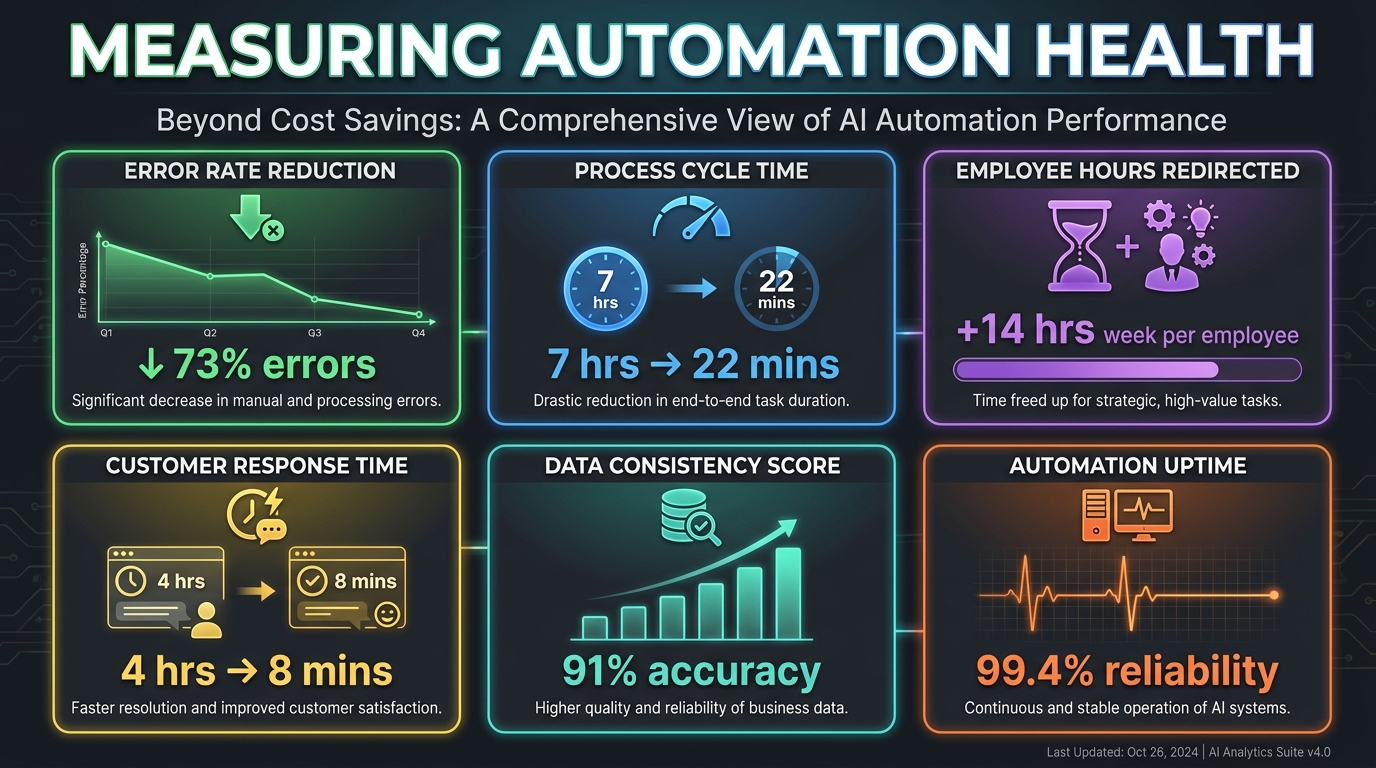
Most organizations measure their AI automation investments through a narrow lens: cost savings. Did we reduce headcount? Did we reduce the number of vendor hours billed? Did we reduce the time spent on a specific task? These are valid metrics, but they capture only a fraction of what automation actually changes — and they can actively mislead when an automation is technically saving labor costs while creating problems elsewhere that outweigh the savings.
Process Quality Metrics
Error rate is often the first non-cost metric organizations track, and it’s one of the most revealing. If your automated process is producing more errors than the manual process it replaced — even if it’s doing so faster and at lower cost — you have a quality problem that will eventually manifest as customer complaints, compliance issues, or downstream operational failures. Tracking error rate should be standard practice from day one of any automation deployment.
Exception rate — the percentage of cases that can’t be processed automatically and require human intervention — is a useful proxy for how well the automation is handling the real-world range of inputs. A high and rising exception rate may indicate that inputs are becoming more variable, that the automation’s model is drifting, or that edge cases are accumulating faster than the system’s rules can accommodate them. A declining exception rate typically indicates a maturing automation that is getting better at handling variety.
Speed and Throughput Metrics
Cycle time — the time from when a process starts to when it completes — is a meaningful metric that goes beyond cost. A process that was manual and slow was often creating downstream bottlenecks: decisions delayed, customers waiting, opportunities missed. Measuring how cycle time changes with automation quantifies the operational velocity gain, which frequently has value beyond the labor cost it replaces.
Throughput capacity measures how much volume the automated process can handle relative to the manual process. Most automations can handle significantly higher volume than the manual process they replace, at marginal cost. This creates strategic optionality — the ability to grow volume without proportionally growing costs — that has real business value even if it isn’t exercised immediately.
Employee Experience Metrics
This is one of the most undertracked dimensions of automation success, and it’s becoming increasingly important as organizations recognize that sustainable automation requires employee buy-in and engagement, not just executive mandate.
When you automate a task that employees found tedious, repetitive, and low-value, satisfaction often increases — if employees understand that the time freed is being reinvested in higher-value work they find more meaningful. When employees perceive automation as threatening or as management’s way of extracting more output for the same pay, resistance emerges, workarounds proliferate, and the automation delivers a fraction of its potential value.
Tracking what employees say about specific automations — through surveys, manager conversations, and engagement data — and actively communicating what automation is making possible for their careers rather than just for the company’s cost structure, makes a measurable difference in adoption quality and long-term automation health.
Strategic Capacity Metrics
The highest-value but least-tracked automation metric is strategic capacity: what can the organization now do that it couldn’t do before, because time and attention have been freed from processes that are now automated?
This requires intentional redirection of the capacity created by automation. If a marketing team’s campaign coordination is automated and saves 10 hours per week per person, but those 10 hours get absorbed into other administrative tasks rather than redirected to strategy, creative, or customer insight work — the strategic value of the automation was never captured. This isn’t a measurement problem, it’s a management problem. But measuring strategic capacity metrics forces the conversation: where did the time go, and is that the highest-value use of it?
Building an Automation Strategy That Ages Well
The organizations that are getting the most out of AI automation in 2026 are not necessarily the ones that started earliest or spent the most. They’re the ones that built their approach on principles that hold up as the technology evolves — because the technology is evolving fast enough that a strategy built around a specific tool or capability may be obsolete within 18 months.
Process Ownership Comes First
Every automated process should have a named human owner who is responsible for its performance, its compliance with relevant regulations, and its evolution as business needs and technology capabilities change. This is not a bureaucratic formality — it’s the single most effective safeguard against the slow drift and silent failure that affects automations when nobody feels accountable for them.
Process ownership doesn’t mean the owner does the work manually when the automation fails. It means the owner notices when performance metrics change, investigates why, and takes action. Without this, automations gradually accumulate exceptions, produce increasing errors, and eventually get quietly abandoned — with the original cost savings reversed but without the official acknowledgment that the initiative didn’t sustain.
Start with a Portfolio View
The most sophisticated automation programs manage their implementations as a portfolio — a mix of high-certainty foundational automations (document processing, workflow routing, data entry) that deliver reliable returns, medium-risk augmentation automations (AI-assisted analysis, intelligent recommendations, personalization) that require more ongoing attention, and exploratory automations (newer capabilities being tested in controlled environments) that represent the next generation of capability.
Managing a portfolio means allocating resources across these categories deliberately, rather than chasing the newest capability with all available budget while letting foundational automations atrophy from neglect. It also means having a clear process for graduating an exploratory automation to production status: what evidence of performance is required, what oversight model applies, and who makes the call.
Treat Automation as a Capability, Not a Project
Perhaps the most important strategic shift for organizations serious about AI automation is from project thinking to capability thinking. A project has a start date, an end date, a budget, and a delivery milestone. It gets handed off. It gets closed. A capability is ongoing — it’s built, maintained, improved, and expanded over time by people who understand it and own it.
Organizations that treat AI automation as a series of projects tend to deploy, check a box, and move on — only to find six months later that the automation is underperforming because it hasn’t been updated, its training data is stale, or the underlying process it was built on has changed. Organizations that treat automation as a capability build the operational infrastructure to sustain it: ownership, monitoring, regular performance reviews, and a continuous improvement cadence.
Actionable Takeaways
- Map your processes to the four categories (rule-based, data-heavy, judgment-intensive, high-stakes) before deciding what to automate.
- Redesign before you automate. Document the actual process, not just the documented process. Find and handle the exceptions first.
- Audit your data before deployment. Completeness, consistency, accuracy, and timeliness — problems here will propagate through your automation at scale.
- Design your human checkpoints deliberately, calibrated to the stakes and reversibility of each decision point in the workflow.
- Measure beyond cost savings. Track error rate, exception rate, cycle time, throughput, employee experience, and strategic capacity.
- Assign a process owner to every automation and give them the tools and mandate to maintain performance over time.
- Build a portfolio view across foundational, augmentation, and exploratory automation tiers — and manage resource allocation across all three.
AI automation, done correctly, doesn’t just make existing processes faster or cheaper. It changes what an organization is structurally capable of — how quickly it can respond to change, how consistently it delivers across volume and time, and how much of its human talent is focused on work that actually requires human judgment. That’s the transformation that well-designed automation creates. And it starts not with picking the right tool, but with understanding the process deeply enough that any tool you apply to it has a solid foundation to work on.