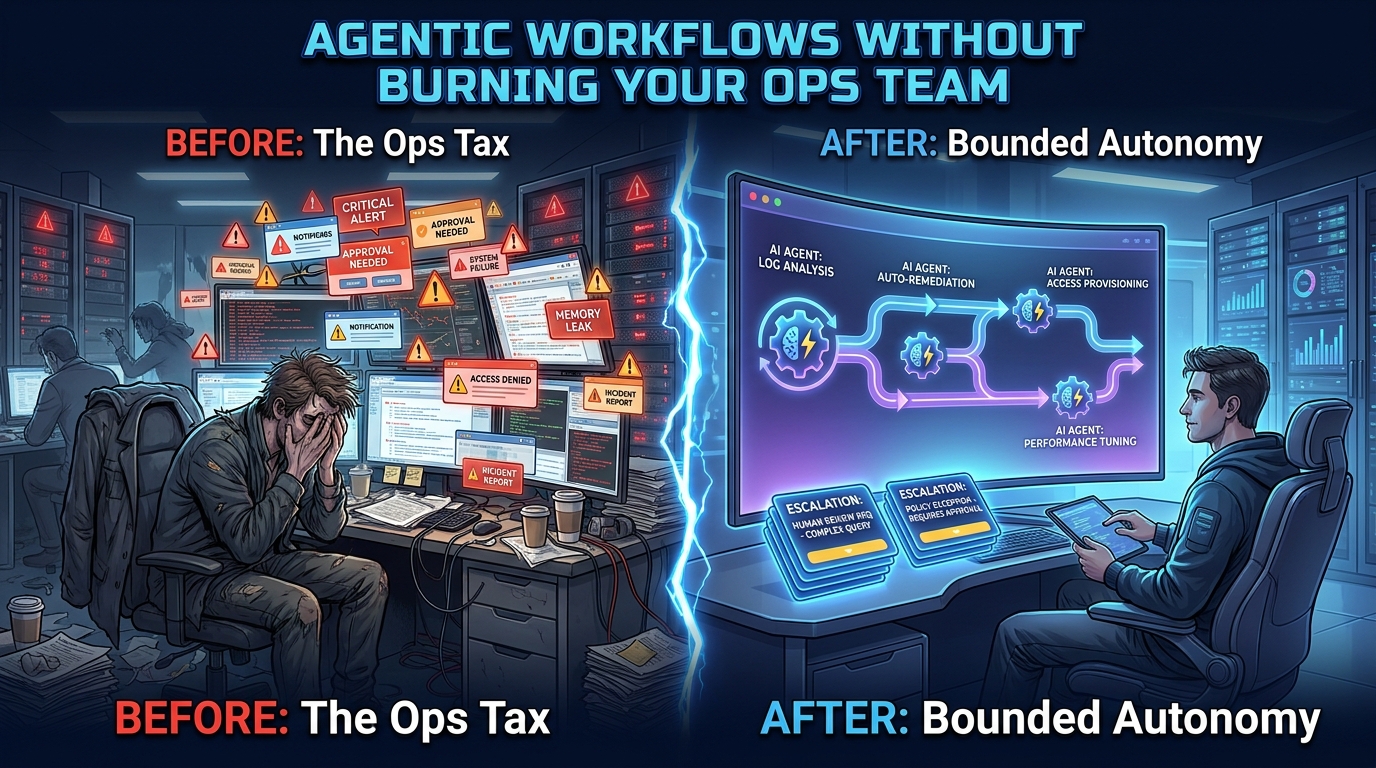

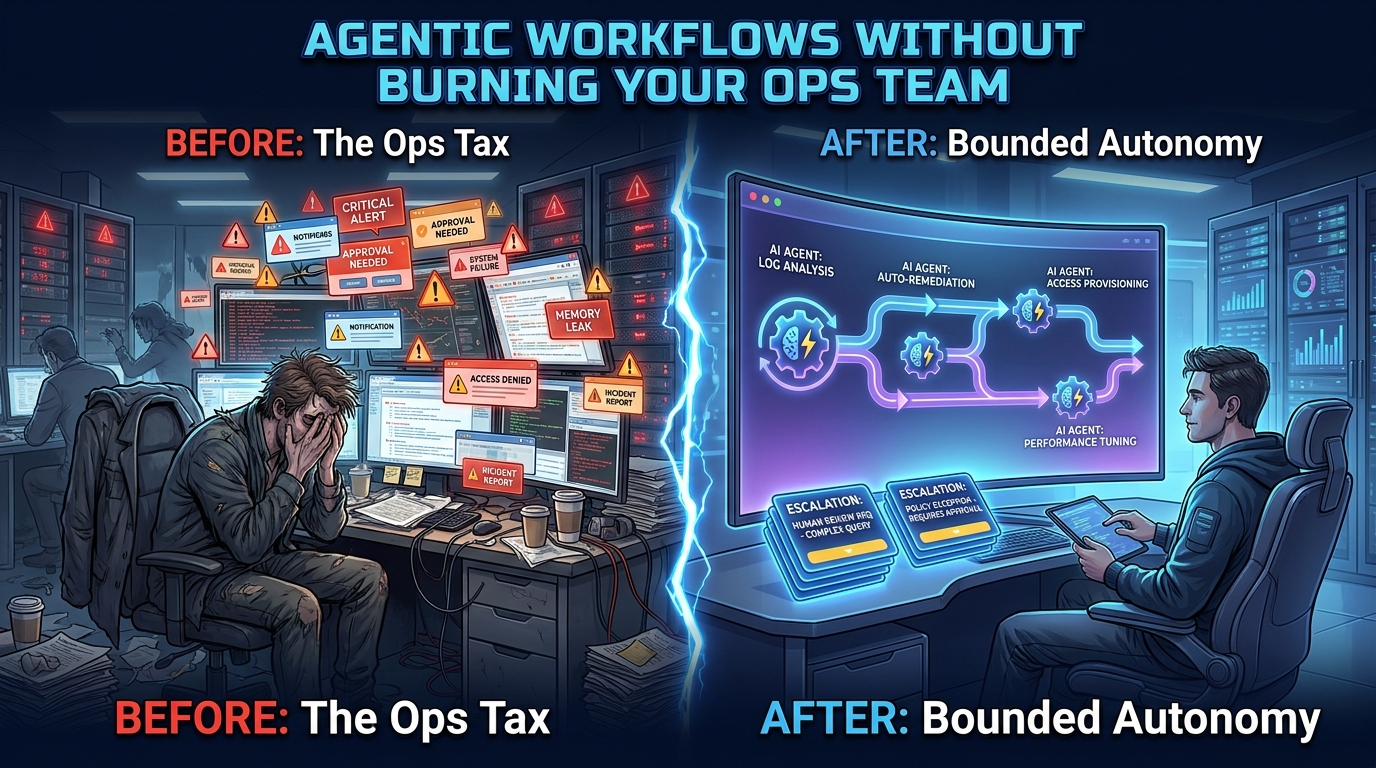
Here is the irony at the centre of most agentic AI deployments in 2026: the technology that was sold to your leadership team as a way to free your ops engineers is, in many organisations, making their jobs harder.
Not because the agents don’t work. Many of them do. They execute tasks, fire off API calls, update records, and coordinate across systems with a speed no human team can match. The problem is what happens on the edges — the approvals that pile up in Slack, the alerts that need a human to validate, the monitoring dashboards that need a human to watch, the governance reviews that need a human to sign off. This is the ops tax: the hidden cost of running agentic workflows that nobody calculated when the business case was approved.
According to recent SRE surveys, the median ops team still spends about 34% of its working time on toil — repetitive, low-value work — even after AI tooling has been introduced. About half of practitioners report that AI has reduced their toil. The other half report no change, or an increase, because maintaining and supervising the agents themselves has become a new category of toil. Meanwhile, 88% of heavy AI users report increased feelings of burnout, and 39% of workers say they feel overwhelmed by AI-driven changes to their day-to-day roles.
This post is about that gap — and how to close it. Not by deploying fewer agents, but by designing them differently from the start. The organisations getting this right are not the ones with the most sophisticated models. They are the ones who treat operational overhead as a first-class design constraint, not an afterthought.
What the Ops Tax Actually Looks Like in Practice
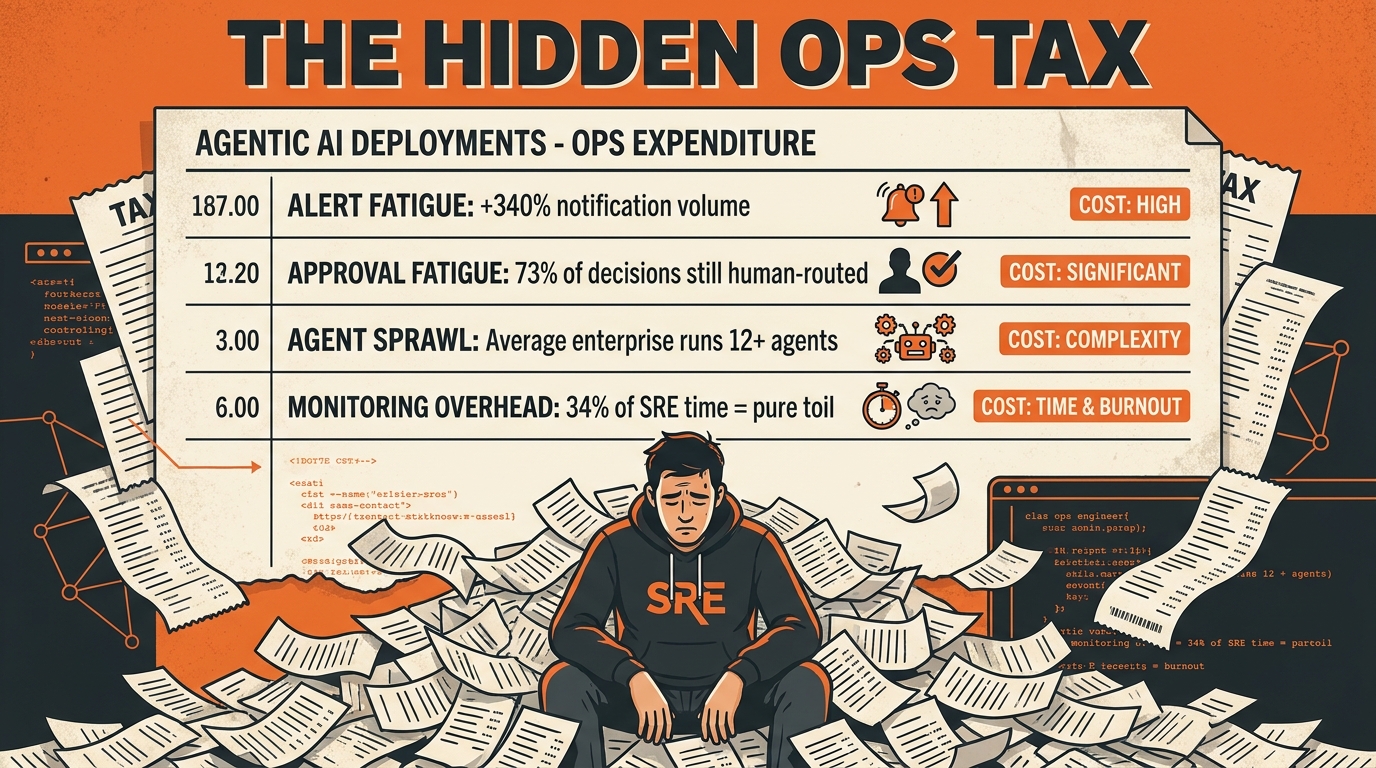
The ops tax is not a single cost. It is a compound of four distinct burdens, each of which grows as you deploy more agents. Understanding what each one looks like in practice is the first step to designing against them.
Approval Fatigue
Approval fatigue happens when an agentic workflow is designed with too many human checkpoints. The instinct is understandable — nobody wants an AI agent taking consequential action without oversight. But the result is that your ops team becomes a queue. Every time an agent hits a decision point it cannot resolve autonomously, it fires a notification asking for human approval. Multiply that across dozens of workflows running in parallel and your engineers are spending their mornings clicking “approve” on decisions they barely have time to read.
Recent enterprise surveys show that in poorly designed deployments, 73% of agent decisions are still being routed to a human for sign-off — essentially the same load as before automation, with the added friction of a new interface. The agents are doing the legwork, but humans are still the bottleneck. That is not agentic automation. That is a slightly faster version of the same manual process wrapped in a chatbot interface.
Alert Overload
Modern agentic frameworks are, by default, verbose. They emit events, log state transitions, flag anomalies, and raise exceptions — often all at once, and often into the same Slack channel or PagerDuty queue as your existing incident alerts. Security Operations Centres (SOCs) were already dealing with thousands of alerts per day before agentic AI entered the picture. Adding workflow agents that surface their own health signals into that stream can push alert volume to unmanageable levels.
The data here is stark. In organisations where agentic monitoring has not been deliberately decoupled from operational alerting, teams report signal-to-noise ratios that make meaningful triage nearly impossible. Analysts miss critical incidents because they are buried under a flood of low-severity agent state changes that nobody ever bothered to suppress.
Agent Sprawl
Agent sprawl is what happens when individual teams spin up their own agents without central visibility. A 2026 enterprise survey found that the average organisation is now running 12 or more AI agents in production, with approximately 50% of them sitting in isolated silos — meaning no shared governance, no centralised inventory, and in many cases, no clear owner. Only 18% of organisations surveyed maintained a complete, current inventory of their running agents.
Each of those undocumented agents represents latent ops load. When something breaks — and eventually something always breaks — the on-call engineer has to figure out what the agent was doing, why it has access to the systems it has access to, and who built it. That investigation takes time your team doesn’t have during an incident.
Monitoring Overhead
Finally, there is the cost of watching the watchers. Agentic workflows need their own observability layer: traces, logs, cost metrics, latency data, error rates, and output-quality signals. Building and maintaining that instrumentation is not free. In many organisations, it falls to the same ops team that is supposed to be benefiting from automation — meaning they are spending a non-trivial fraction of their capacity managing infrastructure for a system that was supposed to reduce their infrastructure burden.
Taken together, these four costs explain why so many agentic deployments feel like they are generating work as fast as they are eliminating it. The good news is that all four are designable. They are not inevitable features of agentic systems — they are symptoms of systems that were not designed with operational overhead in mind.
Why Most Agentic Deployments Transfer Work Instead of Eliminating It
The most common mistake in agentic AI deployment is treating it as a layer of automation that sits on top of existing processes rather than a redesign of those processes. Teams take their current workflow — with all its manual checkpoints, human approval gates, and escalation paths — and map it directly onto an agent framework. The agent executes the mechanical steps. The humans still do everything that requires judgment.
This is not wrong in principle. There is real value in automating the mechanical steps. But it misses the deeper opportunity, and it tends to make the remaining human work worse, not better. Here is why:
The Handoff Problem
When a human does a manual task end-to-end, the cognitive context lives in their head. They can see the full picture and make small, real-time adjustments. When an agent does the mechanical steps and hands off to a human for the judgment calls, the human has to reconstruct that context from logs, status messages, and outputs they weren’t watching in real time. That reconstruction takes time. It also introduces error, because the human is working from a summary rather than from lived experience of the task.
The result is that the handoff points in a poorly designed agentic workflow cost your ops team more time than the equivalent moment in a fully manual process. The agent has sped things up in between — but it has made the human checkpoints slower and more cognitively taxing.
The Scope Mismatch Problem
Most ops workflows are not neatly decomposable into “mechanical” and “judgment” steps. They are interleaved. A skilled engineer doing incident triage is constantly switching between gathering information, making small interpretive decisions, executing actions, and updating their mental model. Designing an agent that handles the gathering and execution while routing all interpretation to a human creates an artificial division that does not map well onto how the work actually flows.
When the scope of what the agent handles does not match natural task boundaries, the human finds themselves constantly re-engaging with partial context. They approve one step, disengage, get paged back in two minutes later for the next approval, disengage again. This context-switching is cognitively expensive — research on developer productivity consistently shows that recovery from an interruption takes far longer than the interruption itself.
The “We’ll Fix It Later” Problem
Agentic workflow deployments are almost always launched under time pressure. The governance model, the escalation policy, and the observability layer get deferred to “phase two.” Phase two rarely arrives. The workflow runs in production with whatever oversight model was bolted together at the last minute, and the ops team inherits the cost of managing it indefinitely.
The organisations that avoid the ops tax are the ones that treat governance, escalation design, and observability as part of the initial scope — not as enhancements to be added after launch. This adds some up-front time to deployment but dramatically reduces the ongoing burden on the people who have to live with the system.
The Tiered Autonomy Model: Matching Oversight to Risk
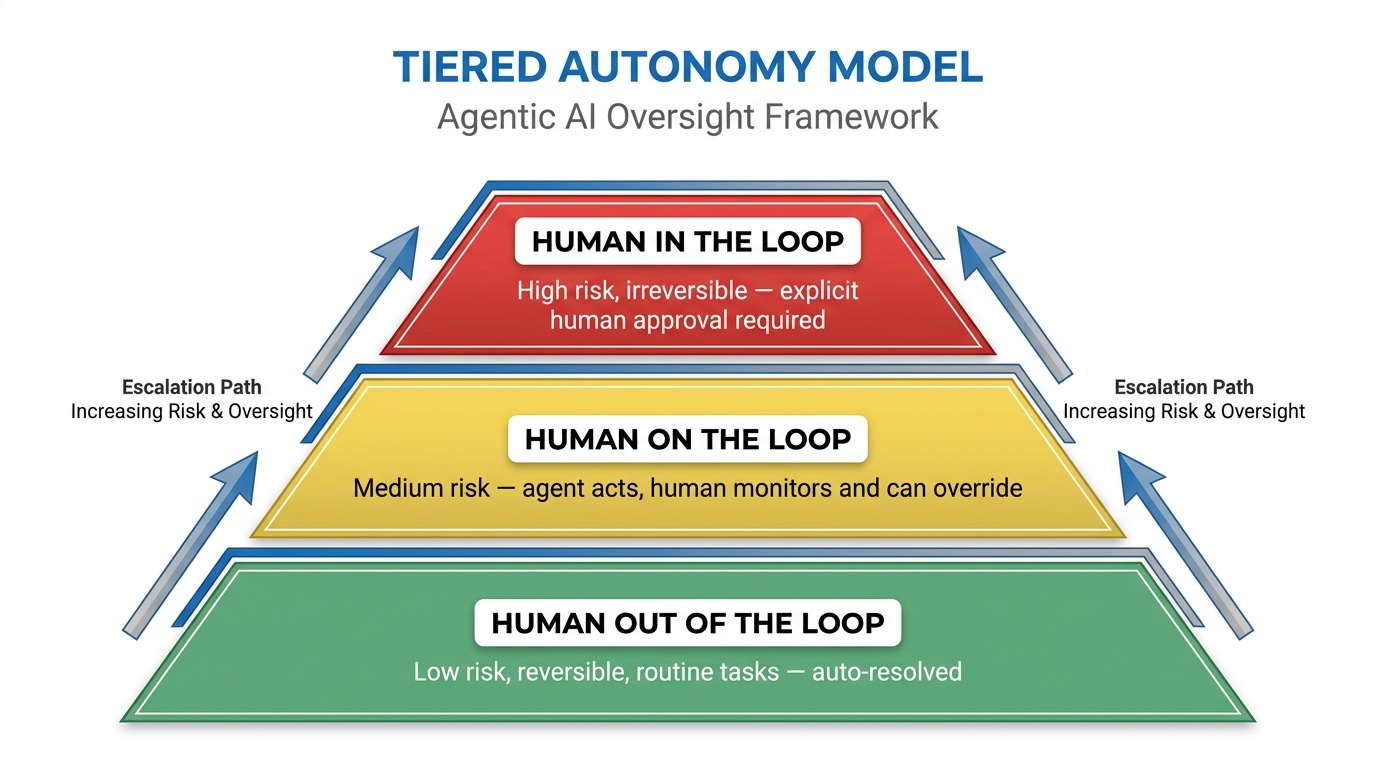
The most practically useful framework for reducing ops load while maintaining appropriate control is the tiered autonomy model. Rather than applying a single oversight approach to all tasks, it maps the level of human involvement to the actual risk and reversibility of each action.
The model has three tiers, and the goal is to keep as much task volume as possible in the lowest tier while providing clean, well-instrumented paths to the higher tiers for the cases that genuinely need them.
Tier 1: Human Out of the Loop
These are actions the agent takes completely autonomously, with no human involvement unless something goes wrong. They share two characteristics: they are low-risk and reversible. If the agent makes a wrong call, the impact is contained and correctable without significant effort.
Examples include: restarting a known-flaky service using a validated runbook step; updating a log entry; sending an auto-generated status notification; scaling a resource within pre-approved bounds; closing a ticket that meets a defined resolution pattern. The agent executes, logs everything, and moves on. A human sees the outcome in the audit log but does not need to review it in real time.
The key design requirement for Tier 1 is a robust audit trail. The agent must log every action with enough context to reconstruct what happened and why. That log is not for real-time monitoring — it is for retrospective review and model improvement. Humans check it periodically, not continuously.
Tier 2: Human on the Loop
At this tier, the agent takes action autonomously, but a human receives an asynchronous notification and has a defined window to intervene before the action becomes irreversible. The agent does not wait for approval — it proceeds after a timeout unless a human actively overrides.
Examples include: applying a configuration change to a non-critical environment; provisioning a resource that exceeds normal size thresholds but is within policy; routing a customer escalation to a specific team. The human gets a Slack message or email: “Agent is about to do X. If this looks wrong, click here to stop it. Will proceed in 15 minutes.” Most of the time, nobody clicks. The agent proceeds. On the rare occasions where a human does intervene, their feedback becomes training data for improving the agent’s judgment.
The timeout duration is a tunable parameter and should be calibrated to the actual risk profile of each action type. A 15-minute window for a configuration change on a staging environment is reasonable. A 15-minute window for anything touching a production database with customer data is probably not.
Tier 3: Human in the Loop
The agent cannot proceed without explicit human approval. This tier is reserved for actions that are high-risk, high-impact, or irreversible — the kind of actions where a mistake has consequences that are expensive or impossible to undo.
Examples include: decommissioning infrastructure that other systems depend on; executing a database migration in production; making a change that affects billing or financial records; any action that crosses an external system boundary with regulatory implications. The agent assembles the context, prepares a recommendation, and presents it to a human in a structured format optimised for fast, informed decision-making. The human approves or rejects.
The critical design principle for Tier 3 is that the agent’s presentation must be designed to minimise the human’s cognitive load. If the engineer needs to dig through logs to understand what the agent is proposing, the review takes longer and error rates go up. The agent should surface the relevant context, the proposed action, the likely outcomes of approval versus rejection, and its own confidence level — all in a format that lets the human make a decision in under two minutes.
Keeping Tier 3 Small
The size of your Tier 3 bucket is a direct measure of your ops team’s ongoing burden. Every action that sits in Tier 3 requires a human touch, which means every Tier 3 action is a potential interruption. The goal is not to eliminate Tier 3 — some actions will always need human sign-off — but to ensure that only actions that genuinely need it end up there.
In well-designed deployments, Tier 3 typically handles no more than 10–15% of total agent actions. If you are seeing higher numbers, the triage criteria probably need to be recalibrated, or the agent’s scope has drifted into territory it should not be touching unsupervised.
Designing Escalation Policies That Don’t Create New Bottlenecks
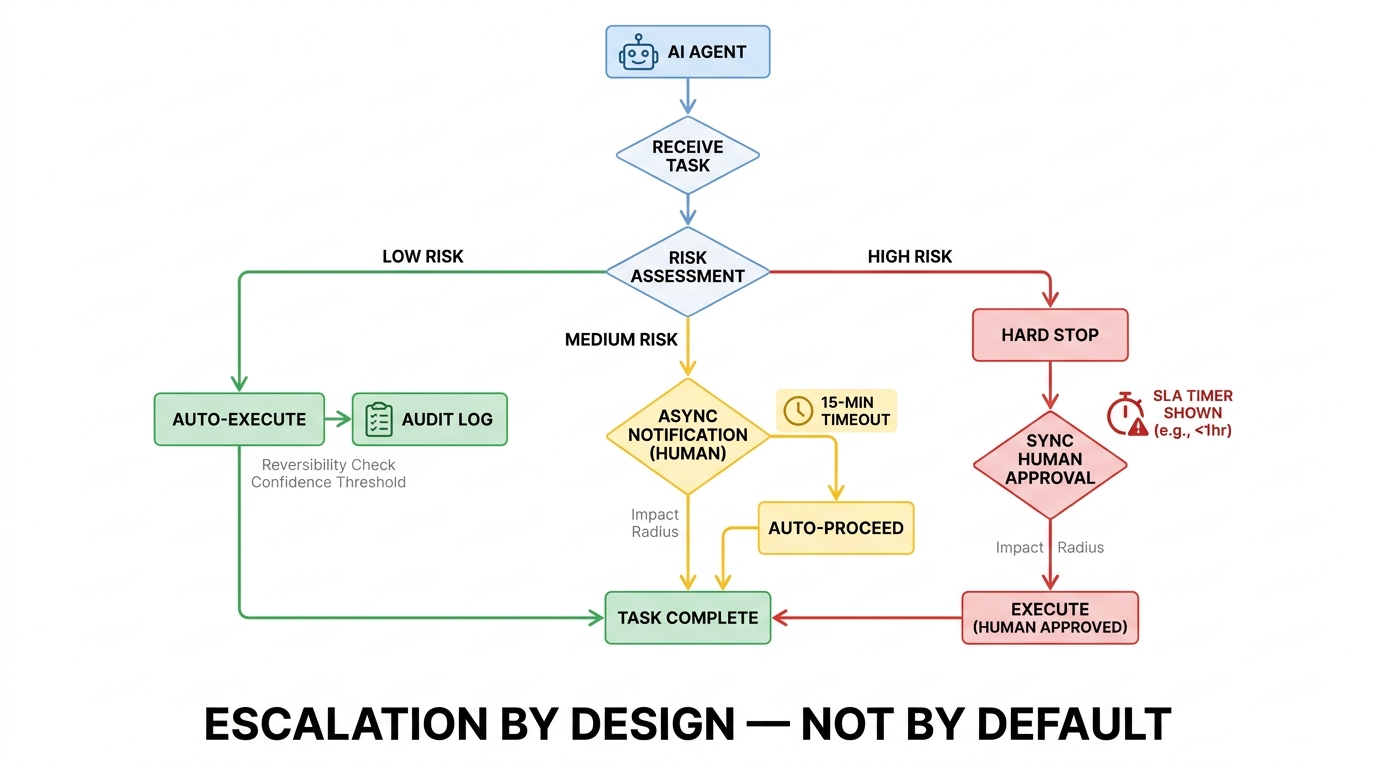
Escalation policy is where most agentic deployments get into trouble. The escalation logic is usually designed in one of two ways, and both are wrong: either it escalates too aggressively (generating constant interruptions for your ops team) or it escalates too conservatively (letting agents take actions they shouldn’t, until something breaks badly enough to require a post-mortem).
Good escalation policy is not a binary switch. It is a structured decision framework that the agent applies at runtime, consistently, based on observable properties of the task at hand. Here is how to build one that actually reduces rather than amplifies ops load.
Define the Three Escalation Triggers
An agent should escalate when at least one of three conditions is true:
- Impact radius is large. The action will affect more systems, users, or data records than a defined threshold. This threshold should be set based on your organisation’s risk tolerance, not on what feels intuitively right during a planning session.
- Reversibility is low. Undoing the action would require significant effort, create data loss, or trigger downstream side effects. Any action that cannot be reverted within your recovery time objective (RTO) should require human sign-off.
- Agent confidence is below threshold. The agent’s own uncertainty estimate for the action exceeds a defined level. This requires agents that can meaningfully assess and communicate their own confidence — a capability that should be a selection criterion when evaluating agent frameworks, not an afterthought.
Notice what is not on the list: action type alone. Escalating based on “this is a database action” rather than “this database action meets the impact and reversibility thresholds” is what creates blanket approval requirements that generate toil without providing meaningful risk reduction. Be specific about the conditions that actually justify human involvement.
Route Escalations to the Right Person, Not Just the On-Call
One of the most common causes of approval fatigue is routing all agent escalations to the on-call engineer regardless of their domain expertise. The agent working on a billing reconciliation workflow escalates to the infrastructure on-call, who has no context for whether the proposed action is correct or not. They either approve without understanding (which defeats the purpose of the escalation) or they spend 20 minutes digging into a system they don’t know (which is exactly the kind of interruption cost you were trying to avoid).
Escalation routing should be governed by the same policy that determines who owns the workflow in the first place. The billing reconciliation agent escalates to the finance ops team during business hours, and to a senior finance ops member for true out-of-hours emergencies. The infrastructure agent escalates to the SRE on-call. The customer operations agent escalates to the CX lead. Routing logic is not glamorous to build, but it is one of the highest-leverage investments you can make in keeping your escalation queue manageable.
Set Response SLAs — and Make the Agent Respect Them
Without SLAs, escalations either pile up or create pressure to approve things without proper review. With SLAs, the human knows they have a defined window to respond, and the agent knows what to do if the window closes without a response: it either auto-proceeds (for Tier 2) or it parks the task and notifies the requester (for Tier 3).
SLAs also create a feedback loop. If a particular escalation type is consistently hitting its response-time limit, that is a signal either that the escalation criteria are too aggressive (it should have been Tier 2) or that the routing is wrong (it is going to people who don’t have the context to act quickly). Tracking SLA adherence by escalation type is one of the most useful inputs for iteratively improving your oversight model.
Agent Sprawl: The Silent Budget and Bandwidth Killer
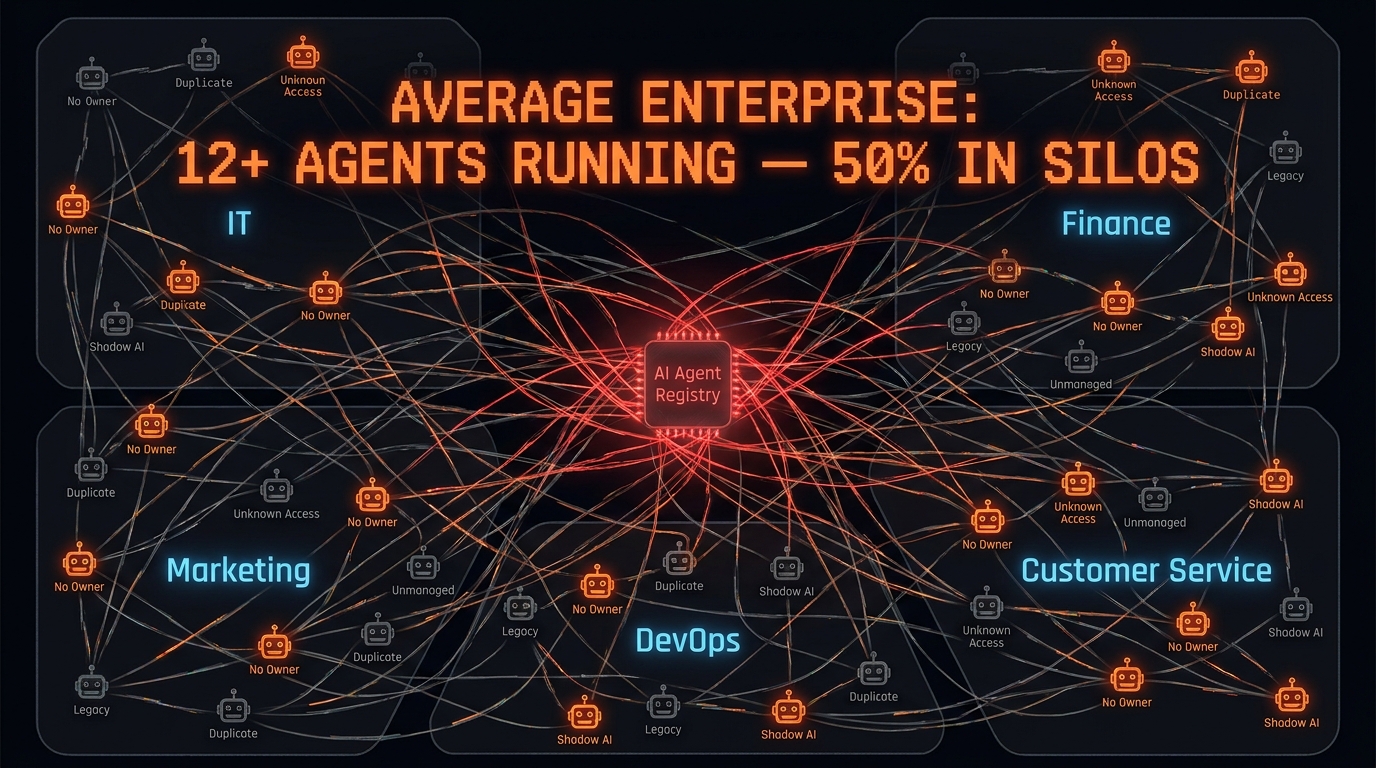
If approval fatigue is the most visible symptom of the ops tax, agent sprawl is the most dangerous. It grows silently, under the radar, until something breaks at exactly the wrong moment.
The dynamic is familiar to anyone who lived through the early days of cloud infrastructure. Individual teams, empowered to build quickly, spin up resources without central coordination. Each team’s solution makes sense in isolation. The aggregate is chaos. With cloud, the consequence was spiralling infrastructure costs and a security posture that nobody fully understood. With agents, the consequences are the same — plus the added risk of autonomous systems taking actions on your production environment with credentials that nobody has reviewed in months.
The Scale of the Problem in 2026
The numbers from current enterprise surveys are striking. The average organisation now runs more than 12 AI agents in production. About half of them live in isolated silos — no shared governance framework, no connection to any central inventory. Only 18% of organisations report having a complete, up-to-date inventory of the agents they are running. That means the majority of enterprises cannot answer the most basic question about their agentic infrastructure: what do we have, and what is it doing?
The cost of that ignorance compounds over time. Duplicate agents get built by separate teams solving the same problem independently. Orphaned agents keep running after the projects that spawned them are cancelled. Agents accumulate permissions that made sense for one use case and are quietly inherited by successors that don’t need them. All of it adds up to ops burden that is invisible until it isn’t.
The Agent Registry as a First-Class Infrastructure Component
The solution is not to restrict teams from building agents. It is to make visibility into running agents as standard as visibility into running services. Every agent that reaches production should be registered in a central inventory that captures, at minimum: what the agent does, who owns it, what systems it has access to, when it was last reviewed, and what its current operational status is.
This does not require a sophisticated platform. Many teams start with a shared configuration file in a version-controlled repository, governed by a simple pull-request process. The important thing is not the tooling — it is the norm. Agents that are not registered are not permitted to run in production. That single rule, consistently enforced, eliminates the majority of sprawl risk at the cost of a few minutes of onboarding friction per new agent.
Least-Privilege Credentials as a Sprawl Control
One of the most effective sprawl controls is also one of the most basic: every agent gets only the permissions it needs to complete its defined scope, and no more. This sounds obvious. In practice, it is consistently violated because granting broad permissions is faster during development and it is easy to forget to scope them down before production deployment.
Least-privilege credentialing makes sprawl self-limiting. An agent that escapes the registry cannot do much damage if its credentials only cover a narrow slice of your systems. It also makes the blast radius of a compromised agent dramatically smaller — a consideration that is increasingly relevant as agents are used for workflows that touch production data and external APIs.
The operational benefit is equally significant. When a least-privilege agent does something unexpected, the range of systems it could have affected is small and well-defined. Incident investigation is faster, remediation is easier, and the post-mortem is less terrifying.
The Observability Trap: When Monitoring Your Agents Becomes a Full-Time Job
Observability is non-negotiable for production agentic workflows. When an agent fails, you need to know why. When an agent produces an unexpected output, you need to trace it back through the chain of reasoning and actions that led there. Without deep instrumentation, agentic systems are black boxes — and black boxes in production ops contexts are genuinely dangerous.
The observability trap is not that teams monitor too much. It is that they monitor without discipline, creating instrumentation that generates signal nobody ever acts on, and dumping that signal into channels that humans are already overwhelmed by.
Separate Operational Alerting from Agent Health Telemetry
The most common observability mistake is routing agent health signals into your existing operational alert channels. Your PagerDuty queue is for incidents that require immediate human response. An agent’s internal state transitions — task started, subtask completed, retry attempted — are not incidents. They are telemetry. Mixing them creates the alert fatigue described earlier and, more critically, trains your team to ignore alerts in channels they know are noisy, which is exactly when the actually important alerts start getting missed.
The right architecture keeps three layers separate:
- Audit logs: comprehensive, structured records of every action the agent took. Retained for compliance and retrospective analysis. Not surfaced in real time.
- Health telemetry: metrics on agent performance (task success rate, latency, cost per task, error rates). Surfaced in a dedicated observability dashboard. Reviewed periodically by the team responsible for agent maintenance, not by the on-call.
- Operational alerts: a small, carefully curated set of signals that indicate the agent is failing in a way that requires immediate human attention — runaway cost, repeated failure on a critical path, degraded output quality below a defined threshold. These, and only these, go into the primary alert channel.
Build for Retrospective Review, Not Real-Time Supervision
One of the most liberating realisations in agentic ops is that most agent activity does not need to be watched in real time. If your tiering model is calibrated correctly and your Tier 1 and Tier 2 actions are genuinely low-risk, the audit log is sufficient. Your ops team reviews it at a cadence that makes sense — weekly for routine workflows, daily for anything touching production — and uses what they find to improve the agent over time.
Real-time supervision should be reserved for the first weeks after a new agent is deployed, while you are establishing confidence in its behaviour, and for situations where the agent is operating in genuinely novel territory. As confidence grows, the supervision cadence relaxes. That relaxation is not negligence — it is the intended outcome of well-designed observability. The logs exist. If something goes wrong, you can always go back and find out why.
Cost Observability as an Ops Control
In 2026, with token-based pricing and API call costs varying dramatically by model and provider, cost observability is as important as performance observability. An agent that is functioning correctly from a task-completion perspective can still be burning through budget at an alarming rate if its underlying model selection, context window management, or retry logic is suboptimal.
Every agent should emit cost metrics as a first-class signal. Set budget alerts that fire when a workflow’s cost per task exceeds a defined ceiling. Review cost trends as part of your regular agent health check. Cost anomalies are often the earliest signal of a behavioural change — an agent that suddenly starts spending 3x more per task than usual has usually encountered a new class of inputs that is pushing it into a longer reasoning loop, and that is worth investigating before it shows up as a billing shock at the end of the month.
What “Bounded Autonomy” Actually Means in Practice
The term “bounded autonomy” appears frequently in 2026 discussions of agentic AI governance, but it often stays at the level of a principle without translating into specific design choices. Here is what it actually means when you are building a workflow that will run in production and be maintained by a real team.
Narrow the Job to Be Done
Bounded autonomy starts with a narrow, specific task definition. Not “manage our incident response process” but “triage P2 and P3 tickets by categorising them, assigning them to the correct team based on the classification taxonomy, and generating an initial diagnostic summary.” The more specifically you can define what the agent is trying to accomplish, the more precisely you can define the boundaries of its authority — and the easier it is to detect when it is operating outside those boundaries.
Agents with broad, vague mandates tend to expand their own scope over time, especially when they are built on reasoning models that are good at finding creative paths to a goal. An agent tasked with “improving operational efficiency” will find ways to do that which you did not anticipate and did not sanction. An agent tasked with “reducing P2 ticket first-response time to under 30 minutes by automating the first three triage steps” has a measurable goal, a defined scope, and a clear boundary at step four.
Separate Policy from Execution
One of the most valuable architectural patterns for bounded autonomy is keeping the agent’s policy — the rules that govern what it is allowed to do and when — separate from its execution logic — the mechanics of how it does it. When policy lives in the execution layer, changing what the agent is allowed to do requires modifying and redeploying code. When policy is externalised into a configuration that can be updated independently, adjusting the agent’s guardrails is fast, auditable, and does not require engineering intervention.
This pattern also makes governance reviews tractable. A compliance or security team reviewing an agent’s authority can read the policy configuration directly without reverse-engineering the agent’s behaviour from its code. That transparency significantly reduces the governance overhead of running agents in regulated environments.
Hard Stops Are Not Failures — They Are Features
Every production agent should have defined conditions under which it stops completely and waits for human intervention rather than attempting to recover or find an alternative path. These are not edge cases to be engineered around. They are intentional safety mechanisms that protect your systems and your team from agent behaviour that has moved outside its validated envelope.
Common hard-stop conditions include: encountering a state that does not match any training example with sufficient confidence; attempting an action that would exceed a defined cost threshold; receiving an error code that indicates a downstream system is behaving unexpectedly; detecting a pattern that matches a previously identified failure mode. The agent should log the stop condition clearly, notify the relevant human, and park the task in a state from which it can be safely resumed after human review.
Designing hard stops requires teams to think carefully about failure modes during the design phase — which is exactly the kind of thinking that tends to get deferred under delivery pressure. Treat it as non-negotiable. The cost of a well-designed hard stop is a deferred task. The cost of an agent that has no hard stop and encounters an unexpected state in production is potentially much higher.
Runbook-to-Agent Conversion: The Right Way to Migrate Ops Work
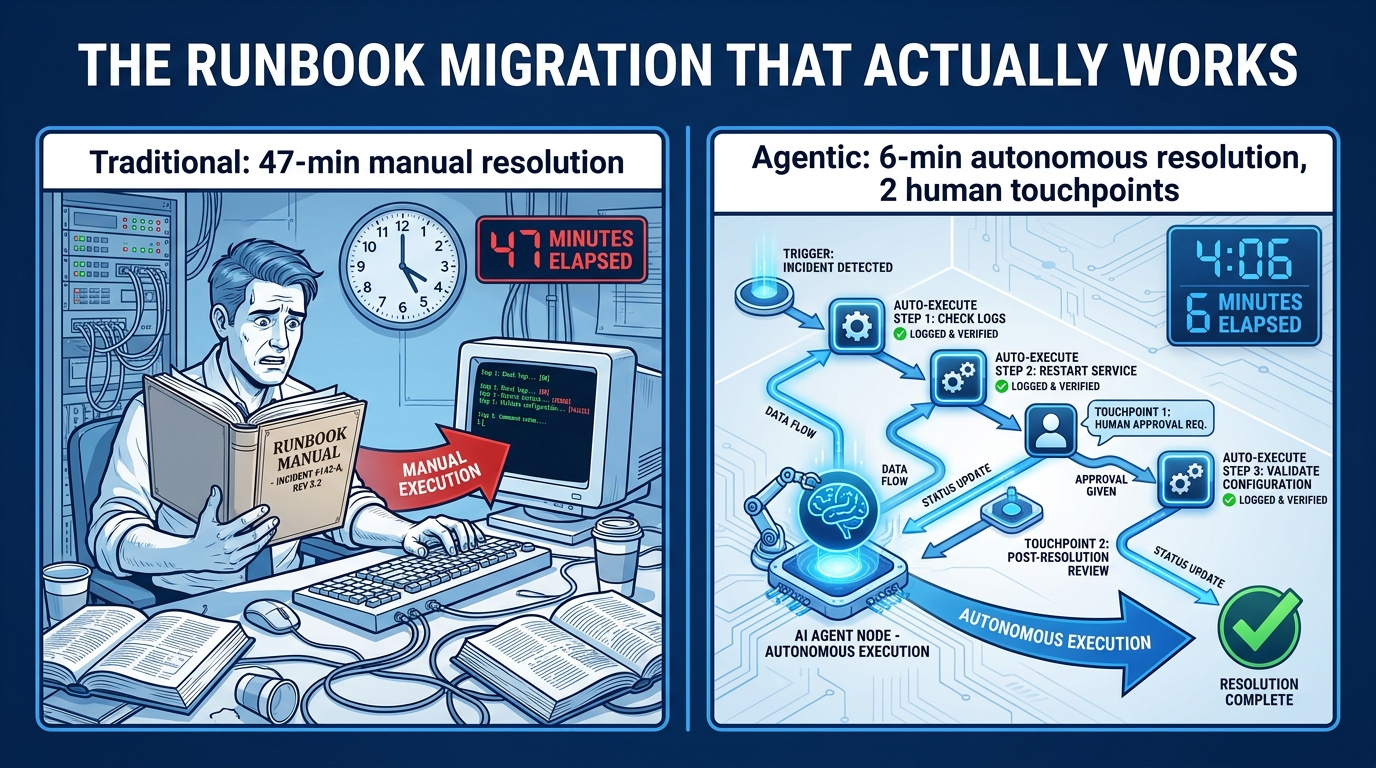
For most ops teams, the most practical entry point for agentic automation is the existing runbook library. Runbooks represent documented, validated procedures — processes that someone already decided were repeatable enough to write down. That makes them natural candidates for agent-driven execution, and they provide a concrete scope boundary that reduces the risk of the agent overreaching.
But converting a runbook to an agent workflow is not as simple as feeding the document to an LLM and asking it to execute the steps. Runbooks written for human execution contain implicit context, assumed knowledge, and judgment calls embedded in language that an agent may interpret differently than intended. The conversion process needs to be systematic.
Step 1: Audit and Classify Before You Automate
Start by reviewing your runbook library and classifying each runbook against the tiered autonomy model. Which runbooks consist almost entirely of Tier 1 actions? Those are your first candidates for agentic automation — the ones where you can realistically get to a functioning, low-oversight deployment fastest. Which runbooks have a mix of tiers? Those need more design work to identify where the human touchpoints should sit. Which runbooks are predominantly Tier 3? Those may not be worth automating yet, or may be worth automating partially (the information-gathering steps) while leaving execution to humans.
This classification step also forces a useful conversation about whether your runbooks are still accurate. Runbooks have a tendency to drift from actual practice over time. Automating an outdated runbook just automates the wrong process at scale.
Step 2: Make Implicit Steps Explicit
The most common source of failure in runbook-to-agent conversion is the implicit step — the thing that an experienced engineer does automatically, without thinking, because it is obvious to anyone who knows the system. “Check that the service is not in a maintenance window before restarting it” is obvious to a human who has been on-call for six months. It is not obvious to an agent that was not given that context.
Go through the runbook line by line and ask: “What would an engineer who had never seen this system need to know to execute this step correctly?” Every piece of assumed context you surface is a gap that needs to be either filled in the agent’s prompt, handled by a pre-execution check, or covered by a hard-stop condition. This is tedious work. It is also the work that separates agents that run reliably from agents that fail in subtle ways during incidents when you can least afford it.
Step 3: Define the Handoff Points Precisely
For runbooks that mix tiers, define the handoff points between agent-executed steps and human-executed steps with surgical precision. The agent runs steps 1 through 4 autonomously, logs its findings, and then presents a structured summary to the on-call engineer before proceeding to step 5. The summary format should be defined in the agent’s system prompt, not left to the model’s discretion. It should include: what was found, what was done, what the current system state is, what step 5 will do, and what the agent recommends (approve to proceed, or flag for review).
Structured handoffs reduce the cognitive load of the human review step dramatically. When the engineer gets a notification, they are reading a consistent format they have seen dozens of times — not a novel block of free-form text they have to parse from scratch under pressure.
Step 4: Shadow Mode First
Before deploying any runbook-to-agent conversion into active production, run it in shadow mode — the agent goes through the motions and logs what it would have done, but does not actually execute anything. Compare the agent’s proposed actions to what your engineers actually do when they handle the same scenarios manually. Divergences are not necessarily wrong (the agent might be finding a more efficient path), but they need to be reviewed and either validated or corrected before going live.
Shadow mode is not just a quality check. It is a trust-building exercise for your team. Engineers who have watched an agent handle fifty incidents in shadow mode without errors are meaningfully more willing to let it operate in production with appropriate autonomy. That buy-in matters. Agentic workflows deployed over the objections of the team that has to maintain them accumulate ops tax faster than almost any other factor.
Metrics That Tell You Whether Agents Are Helping or Hurting Your Team
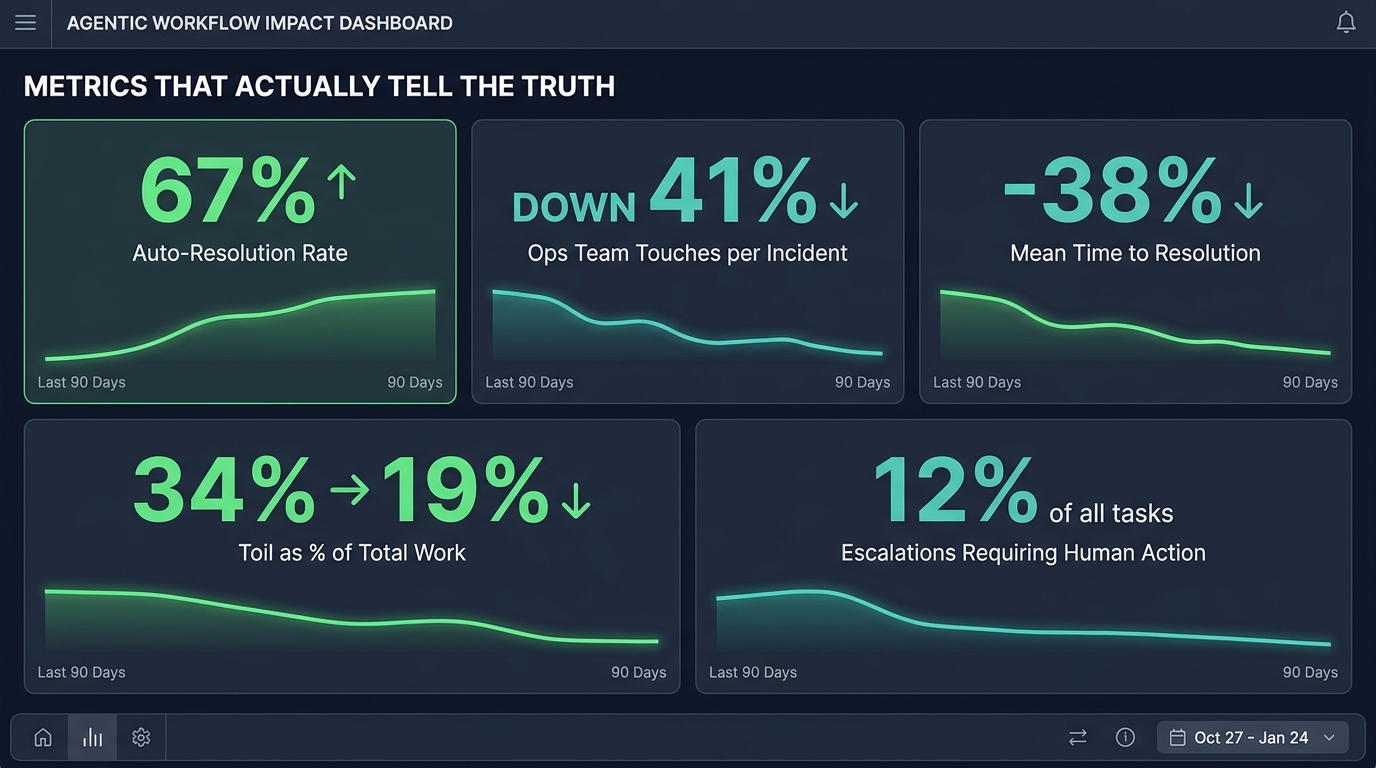
One of the reasons the ops tax goes unchallenged in many organisations is that teams are measuring the wrong things. They track whether the agents are completing tasks (they usually are) and whether the agents are making errors (rarely, in early phases). What they are not tracking is whether the humans who have to work alongside those agents are better or worse off than they were before.
Here is the metrics framework that actually answers that question.
The Team-Level Metrics That Matter
Toil as a percentage of total work time. This is the most direct measure of whether automation is improving the human experience. Catchpoint’s 2026 SRE report set the baseline: median toil is approximately 34% of working time even in AI-assisted teams. Your target should be to drive that number down measurably over a defined period. If it is not moving — or if it is going up — your agent design is transferring rather than eliminating work.
Human touches per resolved incident. How many times does a human need to intervene in the lifecycle of a typical incident? If your agents are working well, this number should decline over time as agents build confidence across a wider range of scenarios and your tiering calibration matures. If it is flat or rising, you are not getting the autonomy gains you paid for.
Escalation response time by tier. Measure how long it takes your team to respond to Tier 2 and Tier 3 escalations. This tells you two things: whether your escalation routing is getting requests to the right people (response times will be shorter when routing is accurate), and whether your SLAs are realistic (if engineers routinely miss the response window, the SLA is either too tight or the escalation volume is too high).
On-call interruption rate. Track the number of times on-call engineers are paged outside business hours, and distinguish between interruptions that required human judgment versus interruptions that could in principle have been handled autonomously. Every item in the second category is a design gap — an action that should have been moved to a lower autonomy tier but hasn’t been yet.
The Agent-Level Metrics That Matter
Auto-resolution rate. The percentage of tasks the agent completes without any human involvement. For a mature, well-calibrated agent in a narrow domain, this should be in the range of 60–75%. Below 50% suggests your tiering model is over-escalating. Above 80% should prompt a review of whether you have the right governance in place — high auto-resolution rates are only a good outcome if you have confidence that the agent’s judgment is actually sound at that volume.
Cost per task. The fully-loaded cost of a single agent-executed task, including model API costs, tool call costs, and infrastructure overhead. Track this as a baseline and set alerts for deviations. A cost per task that is creeping upward is usually a signal of context window bloat, inefficient tool use, or the agent encountering increasingly complex inputs.
Error rate by action type. Not all agent errors are equal. A mistake in a Tier 1 action is cheap to correct. A mistake in a Tier 3 action that slipped through without proper escalation could be genuinely costly. Break out your error rate by tier and by action type. Where errors cluster tells you where your agent needs either better training, tighter guardrails, or a forced reclassification to a higher-supervision tier.
The Leading Indicator You Probably Are Not Tracking
Perhaps the most important metric is the one most teams ignore: engineer satisfaction with the agentic system, measured qualitatively through regular retrospectives. Are the people who work alongside these agents finding them helpful or annoying? Do they trust the agent’s outputs, or do they re-verify everything the agent does? Are they comfortable letting the agent operate in Tier 1 and Tier 2, or are they constantly second-guessing and intervening?
Engineer trust is not a soft metric. It is the mechanism by which all the other metrics improve over time. Engineers who trust their agents let them operate with appropriate autonomy, provide useful feedback that improves agent behaviour, and design their own workflows to take advantage of agent capabilities. Engineers who distrust their agents treat them as a source of noise and risk, and route around them wherever possible — which means you paid the deployment cost without getting the operational benefit.
Survey your team every six to eight weeks. Ask two questions: “Does this agent make your job easier or harder?” and “What would make you more comfortable giving it more autonomy?” The answers are your product roadmap for agent improvement.
Building for the Team, Not the Demo
The most successful agentic deployments in 2026 share a characteristic that has nothing to do with the sophistication of their models or the elegance of their orchestration architecture. They were built by teams that treated the operational experience of the humans working alongside the agents as a primary design criterion — not a secondary consideration that would be addressed post-launch.
That shift in priority changes everything downstream. It changes how you define the scope of each agent. It changes how you design escalation policy. It changes what you instrument and monitor. It changes how you measure success. And it changes what you do when the data tells you something is not working.
The ops tax is not an inherent property of agentic AI. It is a consequence of design choices made under delivery pressure, optimised for demo-readiness rather than operational sustainability. You can avoid it — but you have to decide upfront that you are going to, and you have to build that decision into the process that governs how agents move from prototype to production.
Key Takeaways
- Treat ops overhead as a design constraint from day one. Governance, escalation design, and observability architecture belong in the initial scope, not phase two.
- Use the tiered autonomy model. Map every agent action to a tier based on risk and reversibility. Keep Tier 3 (human-in-the-loop) to 10–15% of total volume or less.
- Design escalation policies around three core triggers: impact radius, reversibility, and agent confidence. Never escalate based on action type alone.
- Route escalations to domain experts, not just the on-call. Misrouted escalations waste everyone’s time and create approval-without-understanding.
- Build an agent registry before sprawl starts. The rule is simple: agents not in the registry do not run in production.
- Keep operational alerts separate from agent health telemetry. Mixing them is the primary cause of alert fatigue in agentic deployments.
- Convert runbooks systematically, not by feeding them to a model. Make implicit steps explicit, define handoffs precisely, and always run shadow mode first.
- Measure team-level impact, not just task completion. Track toil percentage, human touches per incident, and engineer satisfaction alongside auto-resolution rate and MTTR.
Agentic AI genuinely can reduce the burden on your ops team. The evidence for real toil reduction — 25–60% MTTR improvements, 50–90% alert noise suppression, and measurable decreases in manual workload — is real and growing. But those outcomes require agents that were designed for the humans who have to work with them. Build for the team, not for the demo, and the ops tax takes care of itself.