
Most companies didn’t plan their automation stack. It assembled itself — one Zap at a time, one team at a time, across three years and four different operations managers. Today, that stack quietly does an enormous amount of work: routing leads, syncing CRMs, firing Slack notifications, kicking off onboarding sequences, and triggering invoices. Nobody fully knows how much work, or which workflows are still actually functioning.
Now there’s a new pressure arriving from the top of the org: can we upgrade these to AI agents? The answer, in almost every case, is: some of them, yes — if you approach it carefully. The harder truth is that a poorly planned migration from trigger-action workflows to agentic systems introduces a new class of failure that traditional automation just doesn’t have. Agents make decisions. Decisions have downstream consequences. A misconfigured Zap stops. A misbehaving agent acts.
This post is a practical map for teams standing at that fork. It’s not about whether AI agents are better than Zapier in the abstract — they’re different tools with different contracts. It’s about how to audit what you have, decide what to move, move it without causing incidents, and govern the thing that replaces it. The goal is the same as any good upgrade: end up with a system that’s more capable, more maintainable, and less likely to surprise you at 2am.
Zap Sprawl: The Hidden Debt Inside Your Automation Stack
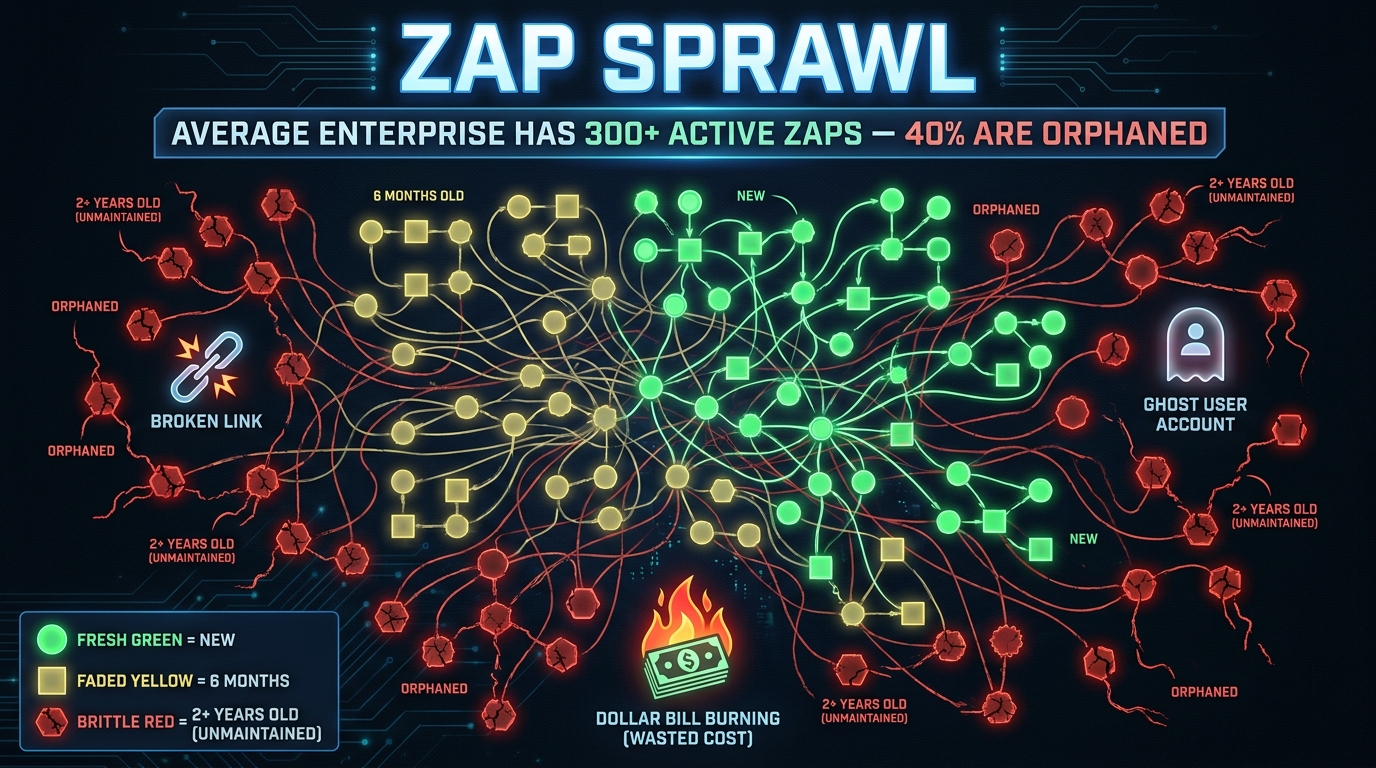
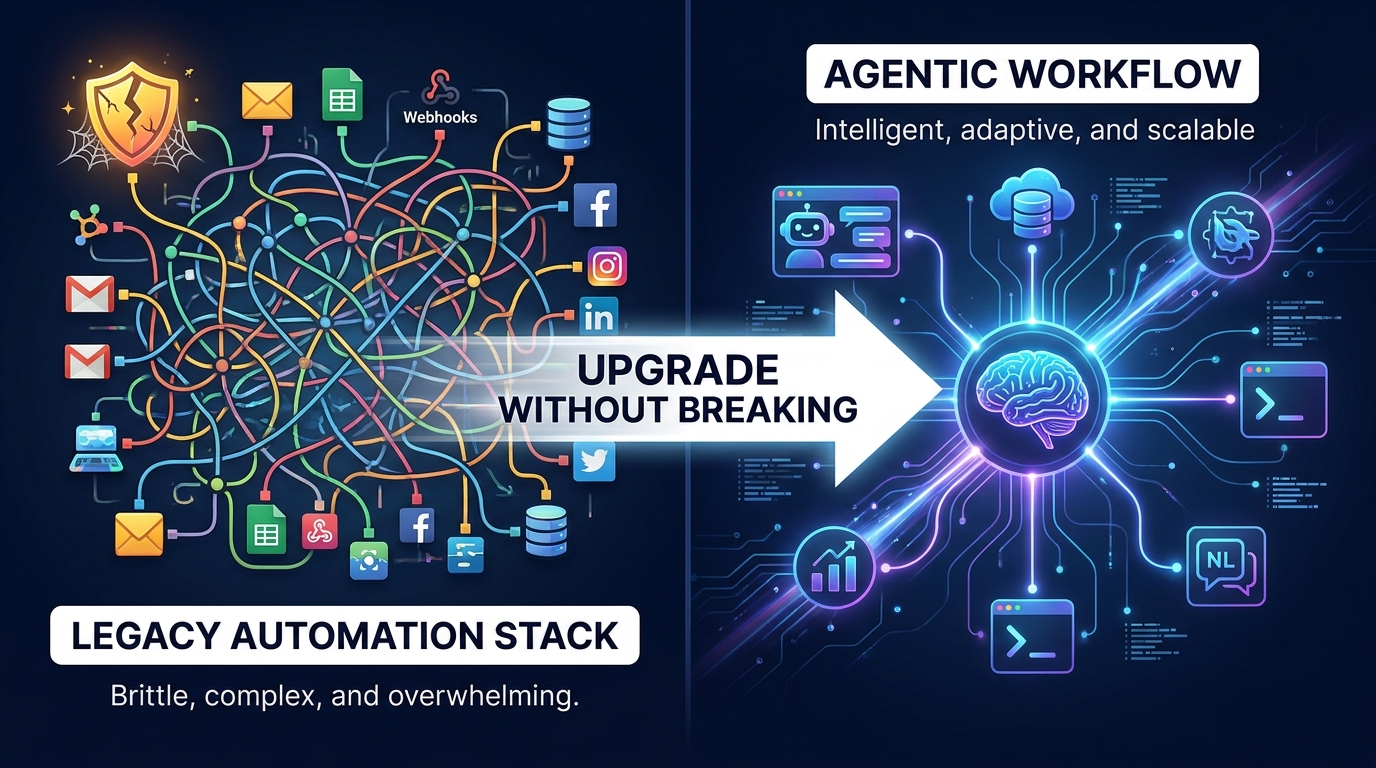
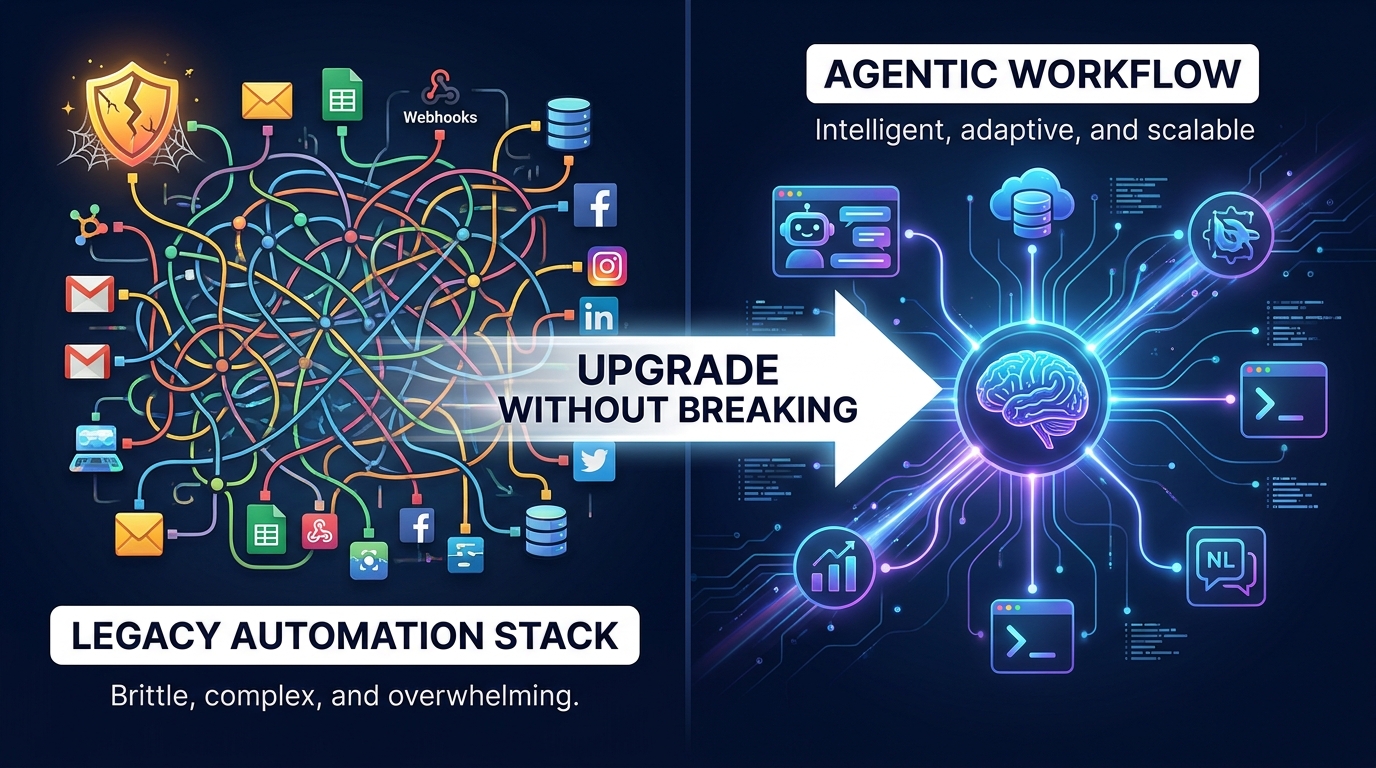
Before you can migrate anything, you need to reckon with what you’ve actually built. Most teams are surprised by the audit. Automation platforms like Zapier make it frictionless to create new workflows, which means they accumulate faster than they get reviewed. The result is what engineers are increasingly calling Zap sprawl — a population of workflows that has outgrown the team’s ability to understand, own, or maintain it.
The Three Generations of Workflow Debt
In a typical mid-size company, the automation stack has roughly three generations living side by side. The first generation was built when someone first signed up for Zapier — usually simple stuff like “new form submission → add row to spreadsheet.” Many of these still run, but they often connect to apps that have since changed their APIs or data schemas. They work until they don’t, and when they break, nobody knows why because the person who built them left two years ago.
The second generation came when the team got more ambitious: multi-step Zaps with filters, formatters, and conditional paths. These were often built to solve specific operational problems and tend to be the highest-value automations in the stack. They’re also the most brittle, because their logic is encoded in the UI configuration rather than version-controlled code. When a connected app updates a field name, the whole chain silently fails or produces bad data.
The third generation — the newest — is where teams started adding Zapier’s own AI features: summarizing emails, classifying tickets, extracting fields from unstructured text. These work reasonably well for simple cases but tend to hit ceilings quickly when the inputs get messier than the examples used to set them up.
What Sprawl Actually Costs
The financial case against unchecked sprawl is increasingly well-documented. TCO modeling from digital transformation practitioners estimates that maintaining a no-code workflow fleet on task-based pricing platforms costs roughly 10% of one full-time employee per 100 active workflows annually — just in time spent debugging, updating, and re-testing. That’s before you count the cost of data errors that slipped through a broken workflow and got into your CRM or billing system.
On pricing: as usage scales, Zapier’s per-task model compounds. A workflow that fires 500 times a day on a two-step Zap costs differently than one that fires 500 times a day on a seven-step Zap with premium app integrations. Many teams only discover the compounding effect when they get an unexpected invoice and start auditing for the first time.
The more insidious cost is organizational confidence erosion. When workflows break silently — processing records incorrectly rather than erroring out — the team learns not to trust the outputs. That distrust spreads. People add manual verification steps that were supposed to be eliminated. The automation’s efficiency gain shrinks from 80% to 20%, and nobody updates the ROI model.
Orphaned Workflows and Ghost Connections
A significant portion of any mature automation stack consists of what practitioners call orphaned workflows — automations still running under credentials for employees who have since left the company. These create both operational and security risks. When the authentication token expires or the departed employee’s account is deprovisioned, the workflow breaks in an opaque way. When it doesn’t break, you have live automations running under unmonitored access credentials, which is a compliance problem in regulated industries.
Conducting your audit means accounting for every workflow’s current owner, the last time it was tested, and whether the output is actually consumed by anyone. Many teams find that 30–40% of their active Zaps are either orphaned, untested for over six months, or producing outputs that nothing downstream actually reads.
What Trigger-Action Automation Was Never Built to Handle
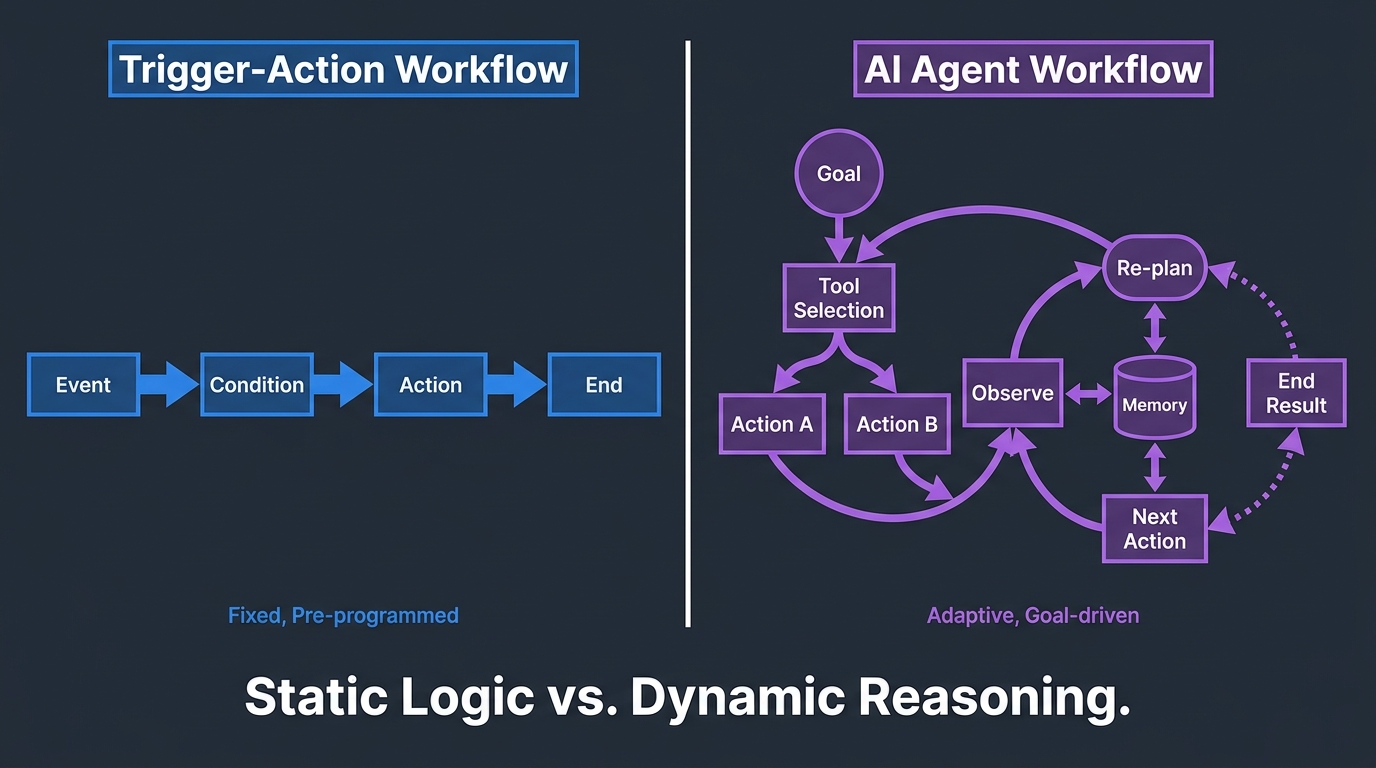
Zapier and tools like it were built on a fundamentally sound and durable idea: when this event happens, do that action. This model covers an enormous range of genuinely useful work. It’s predictable, auditable, fast to build, and integrates with thousands of apps. The problem isn’t that trigger-action automation is bad — it’s that organizations have been asked to stretch it beyond the shape it was designed for.
The Rigidity Problem
The core limitation of trigger-action workflows is that they are logic-complete at build time. Every condition, every branch, every edge case has to be anticipated and encoded before the workflow runs. In a stable, well-defined process — like “send a receipt when a payment clears” — that’s fine. The process doesn’t change, the inputs are predictable, and the correct action is unambiguous.
But the real world throws far more variety at most business processes than anyone wants to admit. A customer support routing workflow works perfectly until a ticket arrives in a language the conditions weren’t set up for. An invoice processing Zap works until a vendor sends a PDF in an unusual format. A lead qualification automation works until your sales team changes the scoring criteria and nobody updates the conditions in all 14 relevant Zaps.
Each new edge case that arrives at a trigger-action workflow has two possible outcomes: the workflow handles it wrongly (silently routing it to the wrong place or skipping it entirely), or someone adds a new condition branch. That second outcome is how you end up with Zaps that have 40-step paths with conditions nested four layers deep — technically functional, practically unmaintainable.
The Exception Escalation Gap
Traditional automation has no native concept of graceful exception handling with reasoning. When a Zap hits a case it wasn’t programmed for, its options are: proceed with incorrect outputs, error out, or do nothing. There’s no mechanism for the workflow to assess the situation, consult context, and make a judgment call about the best available path. That assessment capability — the ability to reason about novel inputs — is precisely where AI agents offer something genuinely new.
Consider a mid-market SaaS company routing inbound emails to departments. Their Zapier workflow uses keyword matching: emails containing “invoice” go to accounting, emails containing “bug” or “error” go to engineering. This works for 70% of traffic. But 30% of real-world emails don’t use those keywords, contain multiple topics, or use phrasing that falls between categories. The team ends up with a catch-all “manual review” bucket that grows steadily and never actually gets reviewed.
An AI agent workflow handles that routing problem differently. It reads the full email, understands context, and makes a classification decision. It can also express uncertainty — flagging low-confidence cases for human review rather than silently routing them incorrectly. That’s a fundamentally different capability, not a marginal improvement.
Multi-Step Reasoning and Tool Orchestration
A third category of limitation is the inability of trigger-action systems to handle goal-oriented multi-step tasks that require dynamic tool selection. A trigger-action workflow follows a fixed sequence: A → B → C. An agent workflow can pursue a goal — “resolve this support ticket” — by dynamically selecting from available tools (search the knowledge base, look up the customer record, check order status, draft a response), adapting its approach based on what it finds at each step.
This is the key architectural difference. The trigger-action model is a recipe. The agent model is a cook who reads the situation and decides what to make. Both are useful. Neither is always better. Understanding which one fits which task is the core skill the migration requires.
The Audit-First Framework: Map Before You Move
The single most common mistake teams make when planning an automation migration is starting with tools instead of starting with inventory. Picking n8n, or Make, or a dedicated agent platform before you’ve documented what you’re migrating is like renovating a house without a floor plan. You’ll make decisions that look reasonable in isolation and create contradictions in context.
Step One: Build the Workflow Registry
A workflow registry is simply a structured inventory of every automation currently in production. For each workflow, you want to capture: the trigger source, all connected applications, the number of tasks processed per month, the current owner, the date it was last modified, and a brief description of business purpose. This takes time. It’s not glamorous work. It’s also the only basis on which every subsequent decision in the migration rests.
Most teams find that the registry reveals three categories of surprise. First, there are workflows nobody knew existed — automations built by departed team members that have quietly been running for 18 months. Second, there are multiple workflows doing overlapping things, built independently by different departments without coordination. Third, there are workflows with circular dependencies: Workflow A triggers an event that triggers Workflow B, which under certain conditions creates an event that re-triggers Workflow A.
Step Two: Score Each Workflow on Four Dimensions
Once you have the registry, score every workflow across four dimensions that determine agent readiness:
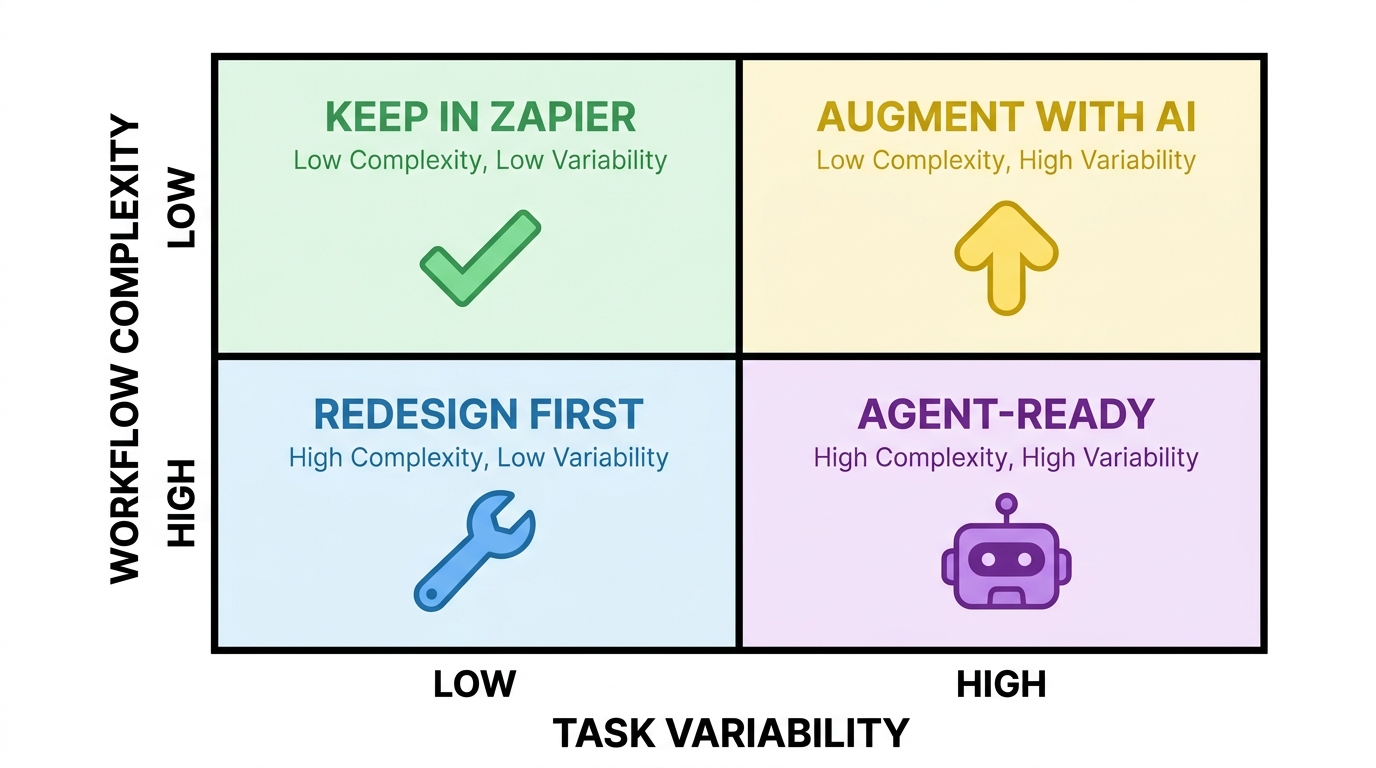
- Task Variability: How much do the inputs and required outputs vary from run to run? A workflow that processes identical, structured data (payment confirmations, calendar invites) scores low. One that handles freeform text, ambiguous requests, or edge-case exceptions scores high.
- Workflow Complexity: How many steps, conditions, and branch paths does the current automation have? Simple linear chains score low. Multi-branching conditional workflows with exception handling score high.
- Business Risk: What’s the downside if the workflow produces an incorrect output? Sending a mislabeled Slack notification is low risk. Moving money, modifying customer accounts, or sending external communications is high risk.
- Exception Volume: What percentage of runs currently require manual intervention or produce an error? High exception volume is a strong signal that the current workflow is straining against the limits of its design.
Step Three: Place Each Workflow in a Migration Tier
Using those four scores, each workflow falls into one of four tiers. Keep as-is: low variability, low complexity, low risk, minimal exceptions — these are working well and don’t need to move. Augment in place: low complexity but high variability or exception volume — add an AI classification or extraction step within the existing workflow rather than rebuilding from scratch. Redesign first: high complexity but stable, well-defined outputs — these need architectural simplification before any migration is safe. Migrate to agent: high variability, high complexity, judgment-dependent decisions — these are the genuine candidates for an agent-native rebuild.
The most important insight from this framework is that most workflows should not move to agents. In a mature automation stack, the “migrate to agent” tier typically contains 15–25% of total workflows by count, but those workflows may represent 60–70% of the operational value that’s currently being left on the table. The audit tells you where to focus.
The Anatomy of an AI Agent Workflow: What You’re Actually Building
Before committing to migration, teams need a clear-eyed picture of what an agent workflow actually is at the architectural level — not the marketing level. The gap between those two descriptions is where most migration plans go wrong.
The Core Loop: Observe, Plan, Act, Reflect
At its simplest, an AI agent workflow is a loop rather than a line. The agent receives a goal or an input, observes the current state of relevant data or systems, selects an action from its available tools, executes that action, and then observes the result of the action before deciding on the next step. This loop continues until the goal is met, a predefined stop condition is reached, or a human intervention point is triggered.
This loop-based architecture is fundamentally different from the sequential chain of a trigger-action workflow. It means the agent’s behavior is not fully predictable from its configuration alone — it depends on what the agent observes during execution. That’s the source of both its power and its principal risk in production.
Memory and Context
Agent workflows maintain some form of context or memory across their execution steps, which trigger-action workflows do not. This context can be short-term (what the agent learned in earlier steps of the current run), session-level (information accumulated across multiple interactions with the same user or record), or long-term (knowledge persisted in a vector store or external memory system).
Managing this memory correctly is one of the more technically demanding aspects of agent workflow design. Context windows have limits. Stale or irrelevant context can degrade decision quality. Sensitive data in an agent’s working memory needs the same access controls as sensitive data in any other system — a consideration many initial agent deployments skip entirely.
Tool Access and Permissions
The other major architectural difference is that agents act on the world through tools — APIs, database queries, web searches, file operations, outbound messages. Each tool connection is a potential blast radius. An agent that has been granted write access to your CRM, your billing system, and your customer email platform can cause significantly more damage through a logic error or prompt injection attack than a Zap that writes to a single spreadsheet.
Principle of least privilege applies directly here. Agent workflows should be granted access only to the tools required for their specific scope. Those tools should be granted write access only where write access is genuinely required, and read-only access elsewhere. This isn’t optional governance — it’s the architectural decision that determines how bad a production incident can get.
Shadow Mode and Parallel Running: The Safety Net That Isn’t Optional
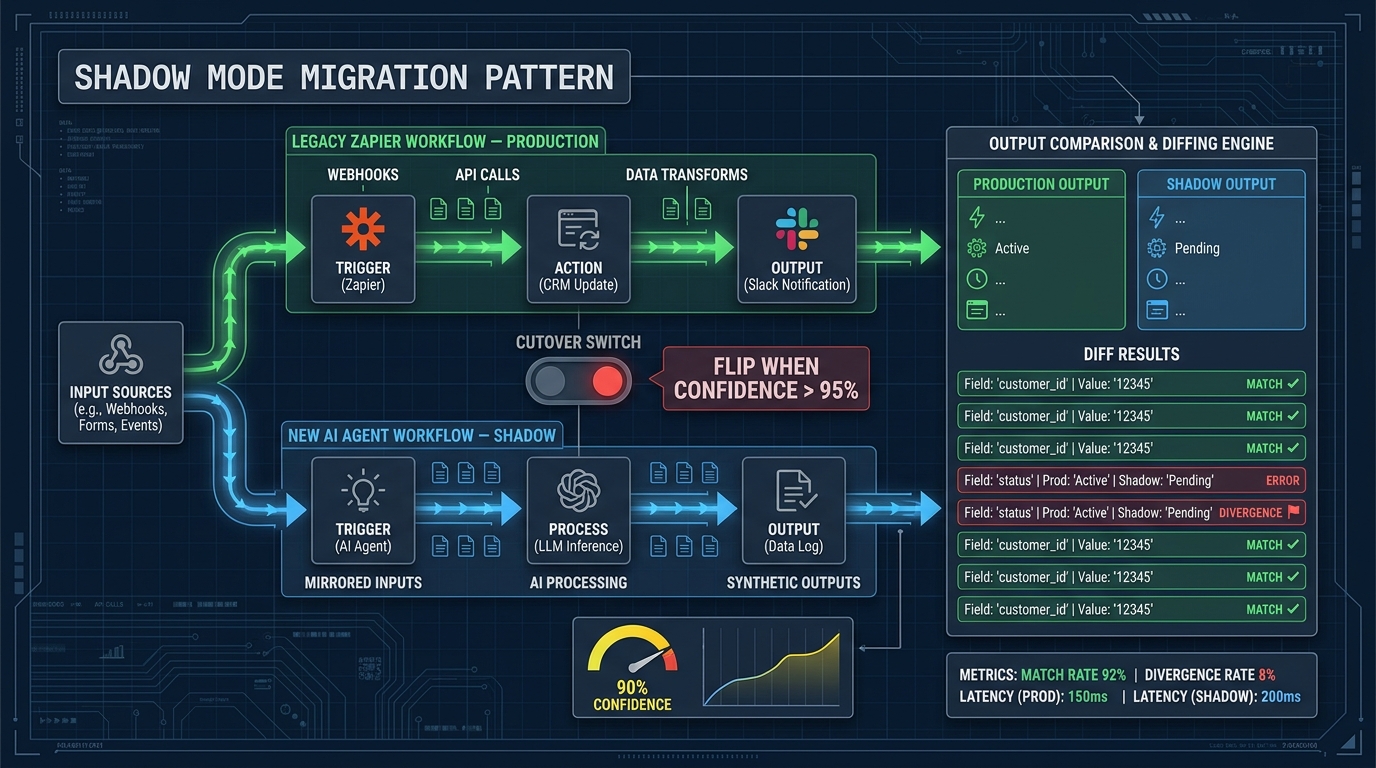
The shadow mode pattern is now considered the baseline safe migration approach for any production automation — and it’s especially critical for agent workflows. The principle is simple: before decommissioning the legacy workflow, run the new agent workflow in parallel, processing the same inputs, but without its outputs touching production systems. Then compare the outputs.
How Shadow Mode Works in Practice
In a shadow deployment, live production traffic is mirrored to both the legacy workflow and the new agent workflow simultaneously. The legacy workflow’s outputs continue to drive production behavior. The agent workflow’s outputs are captured, logged, and diffed against the legacy outputs — but not acted upon.
This gives you real-world signal that no staging environment can replicate. You discover the inputs the agent handles worse than the legacy system. You discover edge cases that neither the legacy workflow nor your test suite anticipated. You discover latency differences that matter to downstream systems. All of this before any production data is affected by the new system.
The comparison threshold for cutover should be defined before shadow mode begins, not after. A common pattern is to require agreement rate above a defined threshold (often 95–98% depending on the workflow’s risk level) across a statistically meaningful sample before the cutover switch is flipped. Defining this threshold in advance prevents the temptation to rationalize early cutover when the agent looks “good enough.”
The Reverse Shadow Pattern
After initial shadow validation, a more cautious approach flips the assignment: the agent workflow handles a small slice of live production traffic (typically 5–10%) while the legacy workflow handles the remainder and acts as the ground truth. This is sometimes called a canary deployment or reverse shadow. Disagreements between the two systems trigger alerts and human review, but the agent is now operating in production at limited scale.
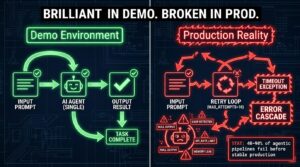
The reverse shadow phase is where most production-specific failure modes surface. Agents that performed well in shadow mode can start misbehaving when their outputs have real consequences — not because the model changed, but because the live input distribution is subtly different from the shadowed distribution. This phase is where you tune the edge case handling before full cutover.
Kill Switches and Rollback Plans
Every agent workflow in production needs a kill switch — a mechanism to instantly revert to the legacy workflow or to a safe manual fallback state. This is not just good engineering hygiene; it’s the difference between a recoverable incident and a compounding one. The kill switch should be a one-step operation, executable by whoever is on-call, not a multi-hour re-deployment process.
Rollback plans should also account for the business-process layer, not just the technical layer. If the agent workflow has been running for three days before the kill switch is pulled, what happens to the records it processed? Is there a reconciliation path? Are there downstream systems that received outputs from the agent that now need to be corrected? These questions need answers before shadow mode begins, not in the middle of an incident.
Governance, Guard Rails, and Human-in-the-Loop Gates
The governance question is where many migration projects get genuinely stuck — not because teams disagree that governance is important, but because the mental model from traditional automation doesn’t map cleanly onto agent workflows. With Zapier, governance is largely structural: if you didn’t build the action into the Zap, the Zap can’t take that action. With agents, the boundaries are softer and require explicit policy to maintain.
Defining Autonomy Levels
The most useful governance framework for agent workflows is a tiered autonomy model. Rather than trying to define rules for every possible scenario, you define three or four broad levels of autonomy and assign each action type to a level.
A practical tiered structure might look like this. Level 1 — Fully autonomous: the agent executes without notification or approval. This is appropriate for read-only operations, internal logging, and low-stakes notifications. Level 2 — Notify and proceed: the agent executes the action but sends a notification to a human who can override within a defined window (say, 15 minutes). Useful for medium-stakes actions like creating draft documents or tagging records. Level 3 — Require approval: the agent proposes the action and waits for explicit human confirmation before executing. Mandatory for outbound communications, financial transactions, or modifications to production data. Level 4 — Escalate only: the agent identifies the situation requires human judgment, flags it, and takes no autonomous action.
This tiered model gives agents genuine speed for low-stakes, high-frequency work while maintaining human control over consequential decisions. The key discipline is assigning action types to tiers conservatively at first, then relaxing the assignment as confidence in the agent’s performance is established through production data.
Identity, Credentials, and Audit Logs
In 2026, the governance conversation around agent workflows has expanded significantly to include the question of identity. When an agent sends an email or modifies a record, whose identity is it acting under? Many early agent deployments made a pragmatic but problematic choice: they used a shared service account with broad permissions. This is the automation equivalent of giving every contractor a master key.
Best practice now points toward per-workflow credential scoping: each agent workflow has its own identity with permissions granted only for the specific tools and actions that workflow requires. This makes the audit log actually useful — you can see exactly what each workflow did, not just that something happened under the service account. It also dramatically reduces blast radius when a workflow behaves unexpectedly.
Audit logs for agent workflows need to capture more than traditional automation logs. Beyond the standard “trigger received, action taken” record, agent workflow logs need to capture the agent’s reasoning chain: what context it had, what tool calls it made, what intermediate outputs it generated, and what confidence level influenced each decision. This log is the only basis on which you can debug unexpected behavior after the fact, and the only evidence you have in a compliance review.
Prompt Injection and Security Considerations
Agent workflows that process external content — emails, form submissions, web page content — are exposed to a class of attack called prompt injection, where malicious content in the input attempts to override the agent’s instructions and redirect its behavior. This is not a theoretical concern. Teams running production email-processing agents have encountered injections that attempted to get the agent to forward sensitive data, execute unauthorized actions, or bypass approval gates.
Defense requires both architectural and governance measures: input sanitization before content reaches the agent, strict scoping of what actions the agent is permitted to take regardless of instruction, and regular adversarial testing of agent workflows with crafted malicious inputs. This last point should be part of the deployment checklist, not an afterthought.
The Platform Landscape: Choosing Where to Run Your Agent Workflows
By mid-2026, the platform choices for running agent workflows have expanded considerably, and the right choice depends on factors that are specific to your technical context, not just feature comparison tables.
Zapier’s Own AI Evolution
Zapier itself has moved meaningfully toward agentic capabilities, adding AI steps, natural language workflow building, and agent-style orchestration features. For teams that have significant investment in Zapier’s integrations and don’t want to manage infrastructure, staying within the Zapier ecosystem for augmented workflows — adding AI steps to existing Zaps rather than rebuilding in a different platform — is often the lowest-friction path for the “Augment in place” tier.
The ceiling of this approach is real, though. Zapier’s agentic features are still scaffolded on top of the trigger-action model, which means the deeper architectural benefits of a true agent loop (dynamic tool selection, multi-step reasoning, persistent memory) are constrained by the platform’s design assumptions. For the highest-value, most complex agent workflows, Zapier’s architecture will feel limiting.
Make.com: Visual Power with More Flexibility
Make.com (formerly Integromat) positions itself as a more powerful visual automation platform with deeper scenario logic and a more flexible data transformation layer. In 2026, Make has added substantial AI integrations, with over 560 AI-connected apps reported in the platform. Its pricing model (operation-based rather than task-based) tends to be significantly cheaper than Zapier at scale, which matters when high-volume workflows are part of the migration plan.
Make is best suited for teams that need richer visual workflow logic, more granular data transformation, and competitive pricing, but aren’t ready to manage infrastructure. Its agent capabilities are still workflow-orchestration-oriented rather than fully autonomous-agent-oriented, making it a strong choice for the “Augment in place” and “Redesign first” tiers.
n8n: The Engineer-Friendly Option
n8n has grown substantially as the go-to option for engineering-forward teams that want full control over their automation infrastructure. Its self-hosted option eliminates per-task pricing entirely, making it economically attractive for high-volume workflows. Its code nodes allow arbitrary JavaScript or Python within workflows, and its community library provides both standard integrations and agent-oriented templates.
The tradeoff is operational overhead. Self-hosted n8n requires someone to manage the deployment, updates, and infrastructure. Its roughly 400+ native integrations are fewer than Zapier’s 7,000+, though custom HTTP nodes cover most cases where native integrations are absent. For teams with engineering bandwidth who want to build genuinely complex agent workflows without platform-imposed constraints, n8n in 2026 is hard to overlook.
Purpose-Built Agent Platforms
A growing category of platforms — including tools like LangChain, CrewAI, and commercial offerings built on similar foundations — are designed specifically for agent orchestration rather than workflow automation. These give maximum architectural flexibility for complex multi-agent systems but require the most engineering investment and operational maturity.
These platforms are appropriate for the top 5–10% of workflows by complexity: long-running autonomous tasks, multi-agent coordination, and processes that require rich tool use and persistent memory management. Using them for simpler workflows is overengineering. The discipline is matching platform capability to actual workflow requirements.
What Actually Breaks in Production: A Practical Failure Taxonomy
One of the most useful preparation steps for a migration is building a clear picture of how agent workflows fail in production. The failure modes are different from traditional automation failures, and the debugging approach is different too.
Integration and Permission Failures
The most common production failure category, according to teams operating agent workflows at scale, is not model failure — it’s integration and permission failure. An agent that was tested against one version of an API breaks when the API updates its schema. A tool call that worked with developer credentials fails in production under the scoped service account. An action that succeeded in a staging environment fails in production because production data contains a character encoding the staging data didn’t.
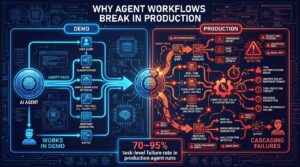
These failures feel familiar because they’re the same failures that break traditional automations. What’s different is that agent workflows often mask them. Instead of a clean error state, the agent may attempt a fallback strategy, successfully complete an adjacent action, and return a result that looks plausible but is incorrect. Detection requires active monitoring and output quality evaluation, not just error-rate tracking.
Context Window and Memory Failures
Agent workflows that accumulate context across long execution chains can hit context window limits in ways that cause subtle behavioral degradation rather than hard failures. The agent starts dropping earlier context as the window fills, which means decisions made late in a long workflow may not correctly account for context established early in the same run. The symptom is decisions that seem reasonable in isolation but are inconsistent with earlier steps.
The mitigation is explicit context management: summarizing and compressing accumulated context at defined intervals, storing key facts externally rather than relying on in-context memory, and testing workflows with inputs that push toward the realistic upper bound of context length.
Reasoning Drift and Instruction-Following Failures
Agent workflows are sensitive to the quality and specificity of their system instructions in ways that static automations are not. An agent given vague instructions will use its model’s priors to fill in the gaps — and those priors may not match your intended behavior. As inputs shift (a new product category, a new type of customer request, a seasonal pattern), the agent’s behavior can drift without any explicit change to the workflow configuration.
Defending against reasoning drift requires periodic evaluation runs: taking a sample of recent production inputs, running them through the agent, and comparing outputs against a human-reviewed ground truth. This evaluation loop is foreign to teams accustomed to set-it-and-forget-it automations. It’s also non-negotiable for production agent workflows.
Cascading Failures in Multi-Agent Systems
Teams building multi-agent systems — where one agent’s output feeds another agent’s input — face a compounding failure risk. An error or quality degradation in an upstream agent propagates and amplifies through downstream agents. A 5% error rate in Agent A becomes a 9.75% error rate in Agent B’s inputs if both are independent. In practice, errors tend to be correlated, which can make the compound failure rate worse than independent estimates suggest.
The mitigation is explicit quality gates between agents: validation of each agent’s output before it’s passed downstream, with defined rejection behavior when quality thresholds aren’t met. Treating each agent-to-agent interface as a typed API contract — with defined schemas for both the happy path and the error path — makes these systems significantly more robust.
Building the Business Case: Metrics That Actually Matter After Migration
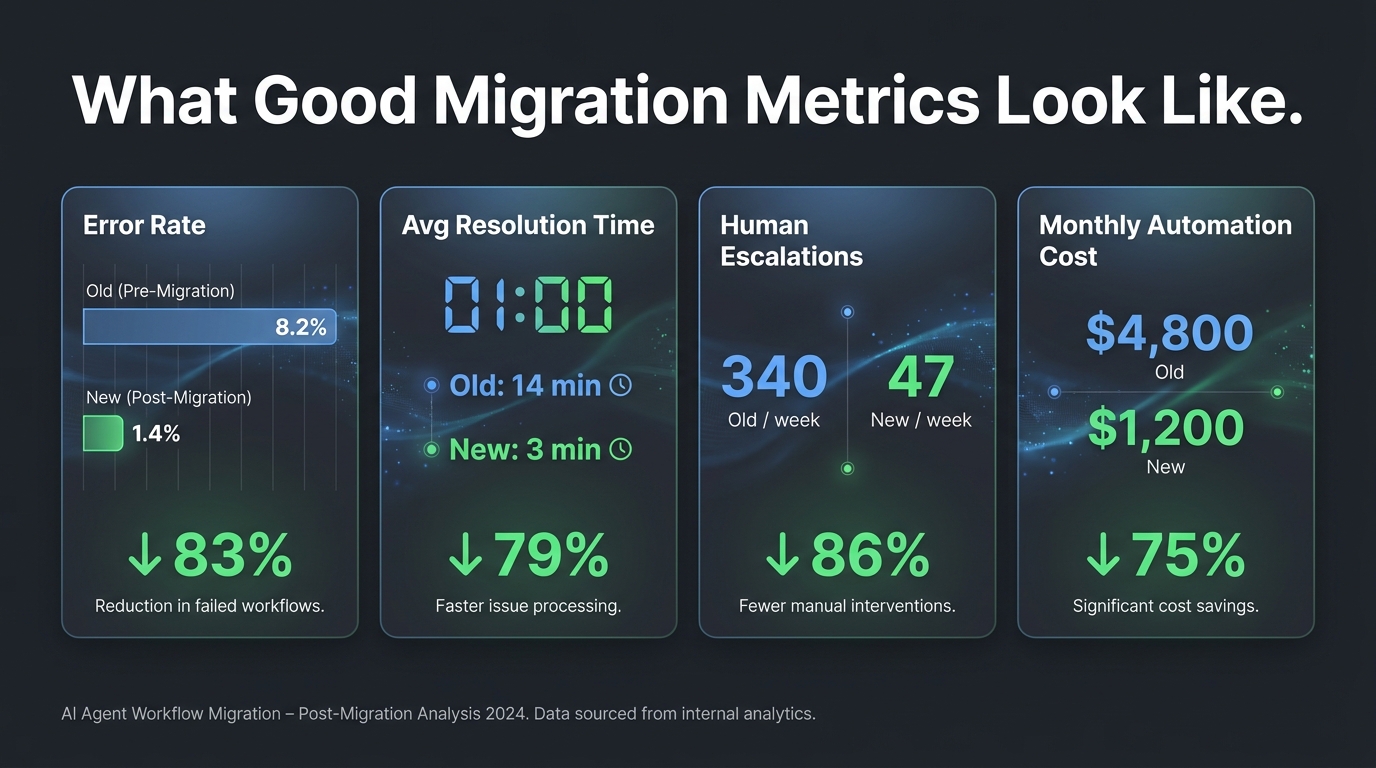
The business case for migrating legacy automations to agents is straightforward in principle but easy to muddy in practice. The mistake most teams make is measuring the same things they measured before — task completion rate, workflow uptime, tasks-per-month — rather than measuring the outcomes that agent capabilities actually change.
The Right Metrics for Agent Workflows
Traditional automation metrics measure efficiency: is the workflow running? How fast? How many tasks? These are necessary but insufficient for agent workflows, which add a quality dimension that trigger-action systems simply didn’t have.
The metrics that capture agent workflow value fall into three categories. Decision quality metrics: for any workflow where the agent is making classification, routing, or judgment calls, measure the accuracy of those decisions against ground truth. This typically requires a human-review sampling process and a defined quality threshold. Exception handling metrics: track the rate of cases that require human escalation, the type of escalations (genuinely ambiguous vs. workflow gaps vs. errors), and the resolution time. Improvement in exception handling rate and type is often the clearest leading indicator that the agent workflow is delivering value. Downstream outcome metrics: connect the workflow’s outputs to the business outcomes they were designed to drive. If the workflow is routing support tickets, measure first-contact resolution rate. If it’s qualifying leads, measure conversion rate of agent-qualified leads versus manually qualified leads.
Total Cost of Ownership After Migration
The cost structure of agent workflows is different from traditional automation in ways that affect TCO calculations. Token-based inference costs are variable — they scale with the length and complexity of inputs, not just the number of workflow runs. A workflow that was $200/month on Zapier based on task count might be $80/month or $350/month on an agent platform depending on average input length and model choice. Neither estimate is reliable without production data.
The cost model also has a quality dimension that traditional automation lacked. Using a more capable (and more expensive) model often reduces the exception handling rate enough that the net cost — inference cost plus human review time — is lower than using a cheaper model with higher exception rates. This optimization requires production data, which is another reason the shadow mode and canary phases have value beyond safety: they generate the cost curves you need to make informed model selection decisions.
The Maintenance Dividend
One of the most underappreciated financial benefits of a well-executed migration is reduced maintenance overhead. A well-designed agent workflow that handles edge cases through reasoning rather than explicit conditional logic is significantly cheaper to maintain than a multi-branch Zapier workflow with 40 conditions. When an edge case arrives that the agent handles correctly through reasoning, no configuration change is required. The Zapier equivalent requires identifying the gap, testing a new condition branch, and deploying the update.
This maintenance dividend compounds over time. Teams that have migrated their highest-complexity, highest-exception workflows to agents consistently report that the proportion of engineering time spent on automation maintenance decreases significantly in the 12 months after migration — not because the systems are perfect, but because they’re less brittle.
The Migration Sequence: Getting the Order Right
Having covered the audit, the architecture, the safety patterns, and the metrics, the final practical question is: in what order do you actually execute this? The sequencing matters more than most teams realize, because early migrations create the organizational and technical infrastructure that later migrations depend on.
Start With a “Golden Workflow”
The first migration should not be the highest-stakes workflow or the most technically ambitious one. It should be what practitioners call the golden workflow: a workflow that is genuinely complex enough to benefit from agent capabilities, but not so mission-critical that a production incident would be catastrophic. Ideal candidates are internal-facing workflows where the affected audience is your own team rather than customers, and where humans can easily catch and correct errors in the early production period.
The purpose of the golden workflow migration is organizational, not just technical. It forces your team to build the shadow mode infrastructure, define the approval tiers, establish the evaluation process, and test the rollback procedure — all before the stakes are high. The institutional knowledge and tooling created during this first migration makes every subsequent migration faster and safer.
The Right Sequencing Principle: Value Before Complexity
After the golden workflow, a common instinct is to migrate the most complex workflows next, on the theory that solving the hard problems first clears the path. The evidence from teams who’ve been through this suggests the opposite sequencing is better: migrate workflows that deliver the highest measurable business value first, regardless of complexity.
High-value migrations build organizational confidence and generate the business case evidence that sustains the project through its more difficult phases. They also create stakeholder alignment: when the business can see concrete improvement in customer support resolution rates or lead qualification accuracy, the appetite for continued investment in the migration program grows. Starting with technically interesting but low-value workflows does the opposite.
Maintain the Hybrid Stack Indefinitely
The final principle, and arguably the most important one: the goal of this migration is not to eliminate Zapier or traditional automation from your stack. The goal is to have each type of work handled by the type of system best suited to it. Many of the workflows in your stack should stay in Zapier indefinitely — they’re working well, they’re simple, and there’s no agent capability that adds value for them.
A mature automation architecture in 2026 is explicitly hybrid: traditional trigger-action workflows handling the deterministic, high-volume, structured-data work, and agent workflows handling the judgment-intensive, variable, reasoning-dependent work. The two systems can interact — agents can trigger Zaps, Zaps can dispatch to agents — and that interaction is where some of the most powerful hybrid patterns emerge.
Conclusion: The Migration Is a Redesign, Not a Rewrite
The frame that best serves teams undertaking this work is not “migration” in the technical sense — moving code from one platform to another. It’s redesign: rethinking which tasks need deterministic execution and which need reasoning, which processes need speed and which need judgment, which workflows are stable enough to encode in static logic and which are too variable to constrain that way.
That redesign begins with an honest audit of what you’ve built. It requires the discipline to leave well-functioning automations alone, even when there’s organizational pressure to “upgrade everything to AI.” It demands an architecture that keeps agents on a short leash until they’ve demonstrated reliable behavior under production conditions. And it needs governance that was designed for a system that makes decisions, not just executes them.
Five Principles to Take Away
- Audit before you migrate. Build the workflow registry, identify the orphaned workflows, and classify everything before you touch a tool setting. The audit will surprise you, and the surprises matter.
- Migrate selectively. Only 15–25% of most automation stacks genuinely benefit from agent capabilities. That minority often represents the majority of the value. Identify it carefully rather than migrating everything.
- Shadow mode is not optional. For any production workflow touching real data or real customers, run the new agent in parallel for a meaningful period before cutover. Define the cutover threshold before shadow mode begins.
- Govern with tiered autonomy. Assign every action type to an autonomy level. Start conservative. Loosen as production performance data justifies it. Never give agents permissions they don’t need for their specific scope.
- Measure decision quality, not just uptime. Track accuracy, exception rates, and downstream outcomes. These are the metrics that tell you whether the migration delivered value, and they’re the only early warning system you have before problems compound.
The upgrade from legacy automation to agentic workflows is genuinely worth doing — for the right workflows, in the right order, with the right controls in place. The teams getting the most value from it in 2026 are not the ones who moved fastest. They’re the ones who moved carefully enough to still be running.