
Most conversations about AI automation for business start with the tool. Someone sees a demo, signs up for a trial, and then goes looking for something to point it at. That order is backwards, and it explains why so many small and mid-sized companies end up with a handful of AI subscriptions and very little to show for them.
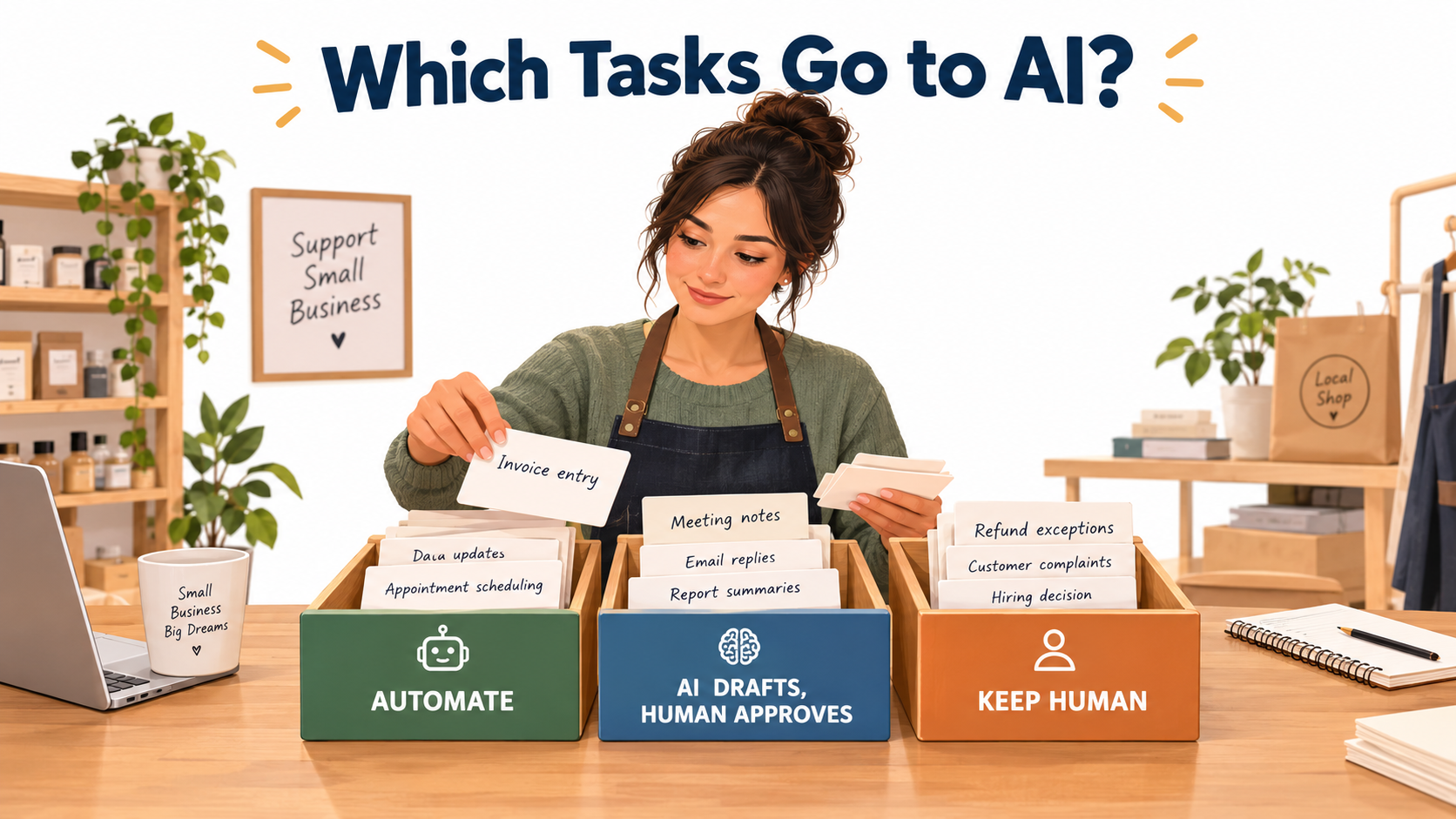
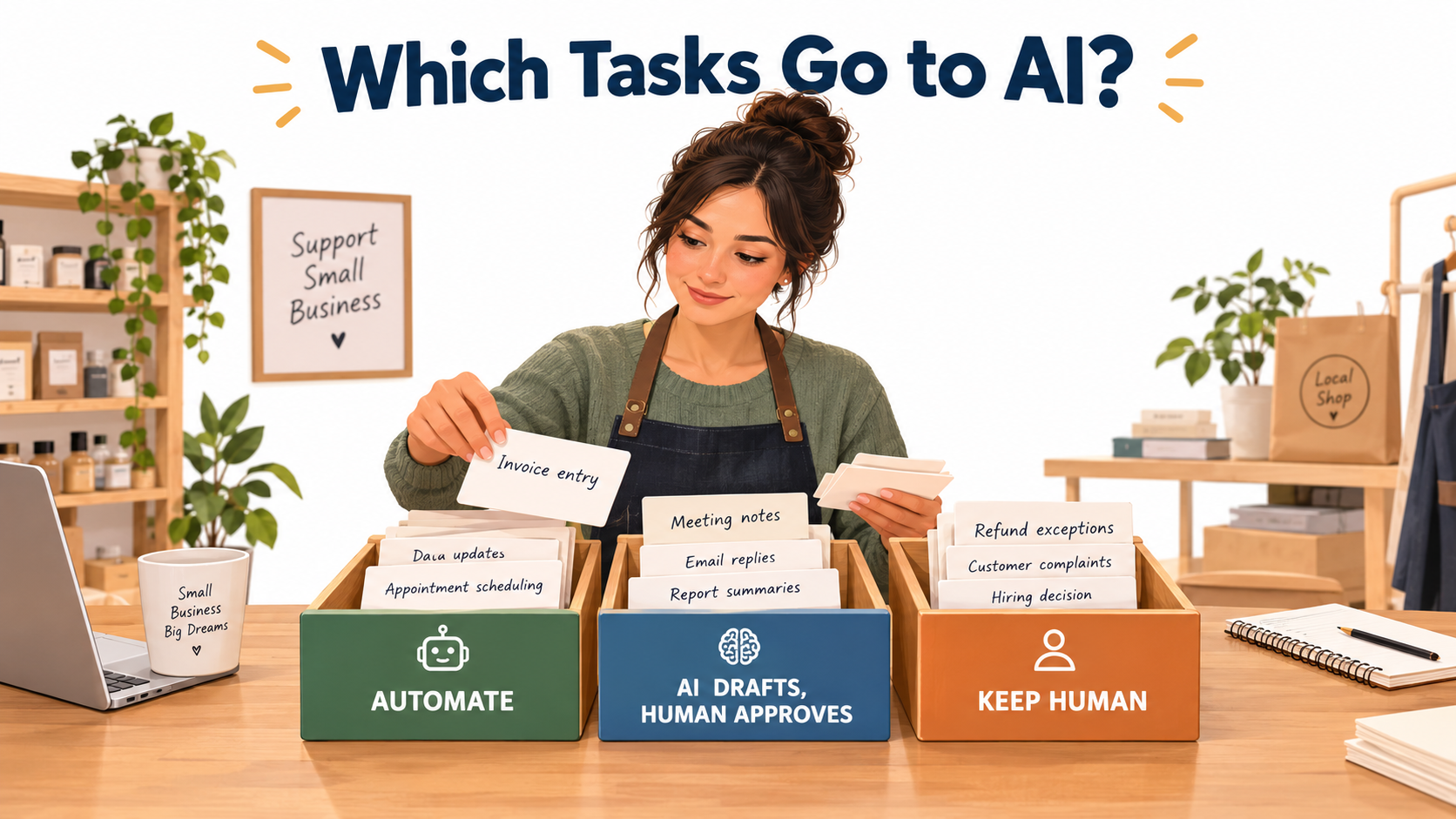
The better starting point is the task. Every business runs on hundreds of small, repeated jobs: typing invoice details into accounting software, answering the same five customer questions, writing up meeting notes, sending reminder emails, sorting leads. Some of those jobs are ideal for full automation. Some are good candidates for AI to draft and a person to approve. And some should stay firmly in human hands no matter how good the models get.
The hard part is not finding AI tools. There are thousands. The hard part is sorting your work into the right buckets before you automate anything, so you don’t hand a high-stakes judgment call to a system that’s built for low-stakes repetition.
This guide is built for owners and operators of small teams, roughly 1 to 100 people, who don’t have a dedicated AI department or an enterprise transformation budget. It skips the big-company pilot programs and focuses on a practical sorting method: a four-question test you can apply to any task, a three-tier system for deciding how much autonomy AI gets, real cases of what goes wrong when businesses get the sorting wrong, and a 30-day plan to get your first automation running without betting the company on it.
Along the way, we’ll look at what the survey data actually says about small business AI adoption, why “buy” usually beats “build” for smaller firms, and how to measure whether an automation is worth keeping.
Why the AI Adoption Numbers Don’t Agree (and What That Tells You)
If you try to work out how many small businesses use AI, you’ll find numbers that seem to contradict each other. That confusion is useful. It shows the gap between trying AI and actually building it into operations.
The optimistic reading
The U.S. Chamber of Commerce’s 2025 Empowering Small Business report, published in August 2025, found that almost 60% of small businesses say they use artificial intelligence for business operations. That’s more than double the share from 2023. The state-by-state breakdown ranges widely: 57% in Alabama, 64% in Arizona and Georgia, 72% in Connecticut.
Optimism about the future is even higher. In most states, roughly four in five small businesses surveyed said they believe AI will help their businesses in the future. In several states, generative AI chatbots alone were used by 40% to 58% of respondents.
The conservative reading
The U.S. Census Bureau measures something narrower. Its Business Trends and Outlook Survey asks firms whether they used AI to actually produce goods or services, rather than whether anyone on staff has tried a chatbot. Under that stricter definition, reported usage across U.S. firms has been far lower, sitting in the single digits to low teens through 2024 and 2025.
Both sources can be accurate at once. The gap between them is the gap between an employee using ChatGPT to tidy up an email and a business that has rebuilt its invoice processing around an AI extraction tool.
What the gap means for you
Most small businesses are in the “casual use” zone. People use AI tools individually, with no shared process, no measurement, and no clear owner. That’s fine as a starting point. But it doesn’t add up to automation, because nothing about how the business runs has actually changed.
The move from casual use to real automation happens one task at a time. That’s why the sorting method below matters more than which tool you pick.
- Casual use: Individuals use AI tools on their own, with results that vary by person.
- Assisted workflow: A defined task always runs through an AI step, with a human checkpoint.
- Automated workflow: A defined task runs end to end without a person, with monitoring and exception handling.
Your goal isn’t to push everything into the third category. It’s to put each task in the right category on purpose.
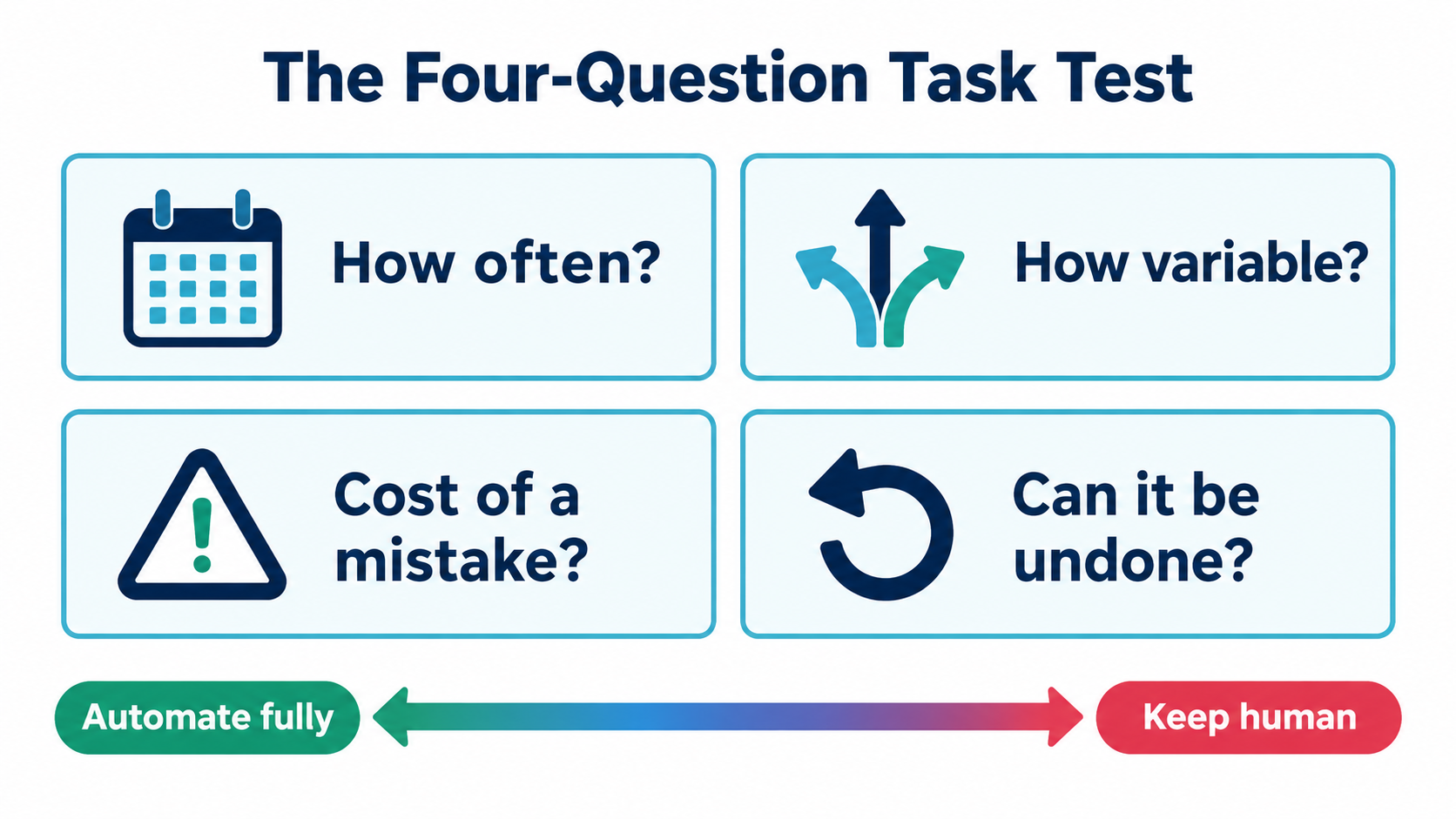
The Four-Question Task Test
Before you automate anything, run it through four questions. Each one pushes the task toward more automation or toward more human control. Together they give you a fast, defensible decision without needing a consultant.
Question 1: How often does this task happen?
Frequency drives payback. A task done 40 times a week is worth automating even if each instance only takes three minutes. That’s two hours a week, or roughly 100 hours a year. A task done twice a quarter is rarely worth the setup time, even if it’s tedious.
A simple rule of thumb: if a task happens less than weekly, document it as a checklist instead of automating it. Checklists are free, and they’re often the first step toward automation later anyway.
Question 2: How much does each instance vary?
Variability is where most automation projects break. Invoices from the same ten suppliers in the same formats are low-variability. Customer complaints, which can be about anything, are high-variability.
Modern AI handles variability much better than older rule-based automation did. A language model can read an invoice it’s never seen before and pull out the total. But more variability still means more edge cases, more errors, and more need for a human fallback.
Question 3: What does a mistake cost?
This is the question people skip most often, and it’s the one that matters most. Ask what happens if the AI gets this wrong one time in fifty.
- A miscategorized expense that your bookkeeper catches at month-end costs a few minutes.
- A wrong appointment time costs a frustrated customer and maybe a no-show.
- A chatbot inventing a refund policy can cost money and, as we’ll see later, a legal ruling against you.
- A wrong number on a tax filing or a misquoted contract term can cost far more.
Low error cost means AI can run unsupervised. High error cost means a person needs to approve the output, even if the AI does 95% of the work.
Question 4: Can the result be undone?
Reversibility is the partner of error cost. A draft email sitting in an outbox can be fixed. A sent email can’t. A tagged support ticket can be retagged. A payment that’s already been issued is much harder to recover.
The practical takeaway is to look for the “point of no return” in each workflow. AI can usually run freely up to that point. The step that sends, pays, publishes, or commits is where a human checkpoint earns its keep.
Scoring the test
You don’t need a complex scorecard. Rate each question as low, medium, or high, then apply this logic:
- High frequency, low variability, low error cost, reversible: Automate fully (Tier 1).
- High frequency, but medium-to-high variability or error cost: AI drafts, human approves (Tier 2).
- High error cost and irreversible, or requires judgment about people, money, or law: Keep human, with AI as a research assistant at most (Tier 3).
- Low frequency, any profile: Write a checklist, revisit later.
The rest of this guide walks through what belongs in each tier, with examples from real small business operations.
Tier 1: Tasks AI Can Run Without You
Tier 1 tasks are the back-office chores that eat hours without requiring much judgment. They’re also where the strongest returns tend to show up. MIT’s NANDA initiative, in its 2025 report The GenAI Divide: State of AI in Business, found that while more than half of corporate generative AI budgets went to sales and marketing tools, some of the clearest returns came from back-office automation, where costs dropped on things like outsourced processing and agency work.
For small businesses, that pattern holds. The unglamorous work is usually the right place to start.
Document capture and data entry
Pulling information out of invoices, receipts, purchase orders, and forms, then putting it into accounting or inventory software, is the classic Tier 1 task. It’s frequent, the formats repeat, and errors are usually caught during reconciliation.
Many accounting platforms now include AI-powered receipt and bill capture. The key setup step is a confidence threshold: let the system auto-post entries it’s confident about, and route low-confidence ones to a review queue. That single setting turns a risky automation into a safe one.
Meeting notes and call summaries
AI transcription and summarization tools have become reliable enough that note-taking during internal meetings is close to a solved problem. The output goes to a shared folder or project tool, nobody has to type during the call, and mistakes are low-stakes because attendees were there.
One caveat: client calls may need consent to record, depending on your jurisdiction. Check the rules where you and your clients operate before turning on automatic recording.
Scheduling and reminders
Appointment booking, reminder texts, rescheduling links, and follow-up nudges are high-frequency and low-variability. Booking tools with AI features can also handle simple back-and-forth like “Can we do Thursday afternoon instead?” without a staff member stepping in.
Lead routing and enrichment
When a web form or inquiry email comes in, AI can classify it (new customer, existing customer, vendor, spam), pull basic company information, and route it to the right person or pipeline stage. Misroutes are easy to fix, and the time saved adds up for any business that gets more than a handful of inquiries a day.
Internal file organization
Renaming files, tagging documents, sorting email attachments into folders, and extracting key dates from contracts into a calendar are all strong Tier 1 candidates. They’re tedious, frequent, and fully reversible.
What makes a Tier 1 automation safe
Even “fully automated” doesn’t mean unmonitored. Every Tier 1 workflow should have three things:
- An exception queue where anything the AI is unsure about lands for human review.
- A weekly spot-check of a small random sample of outputs, perhaps 10 items.
- A named owner who gets alerted if the workflow fails or the exception queue grows unusually large.
Without those three, a Tier 1 automation can quietly drift into producing bad data for weeks before anyone notices.
Tier 2: The Draft-and-Approve Zone
Tier 2 is where most of the value sits for small businesses, and where most of the mistakes happen. These are tasks where AI can do the heavy lifting, but the output reaches a customer, a partner, or your books in a way that matters.
The model is simple: AI produces a draft, a person reviews and approves it, and only then does it go out. The trick is designing the review step so it’s fast enough that people actually do it.
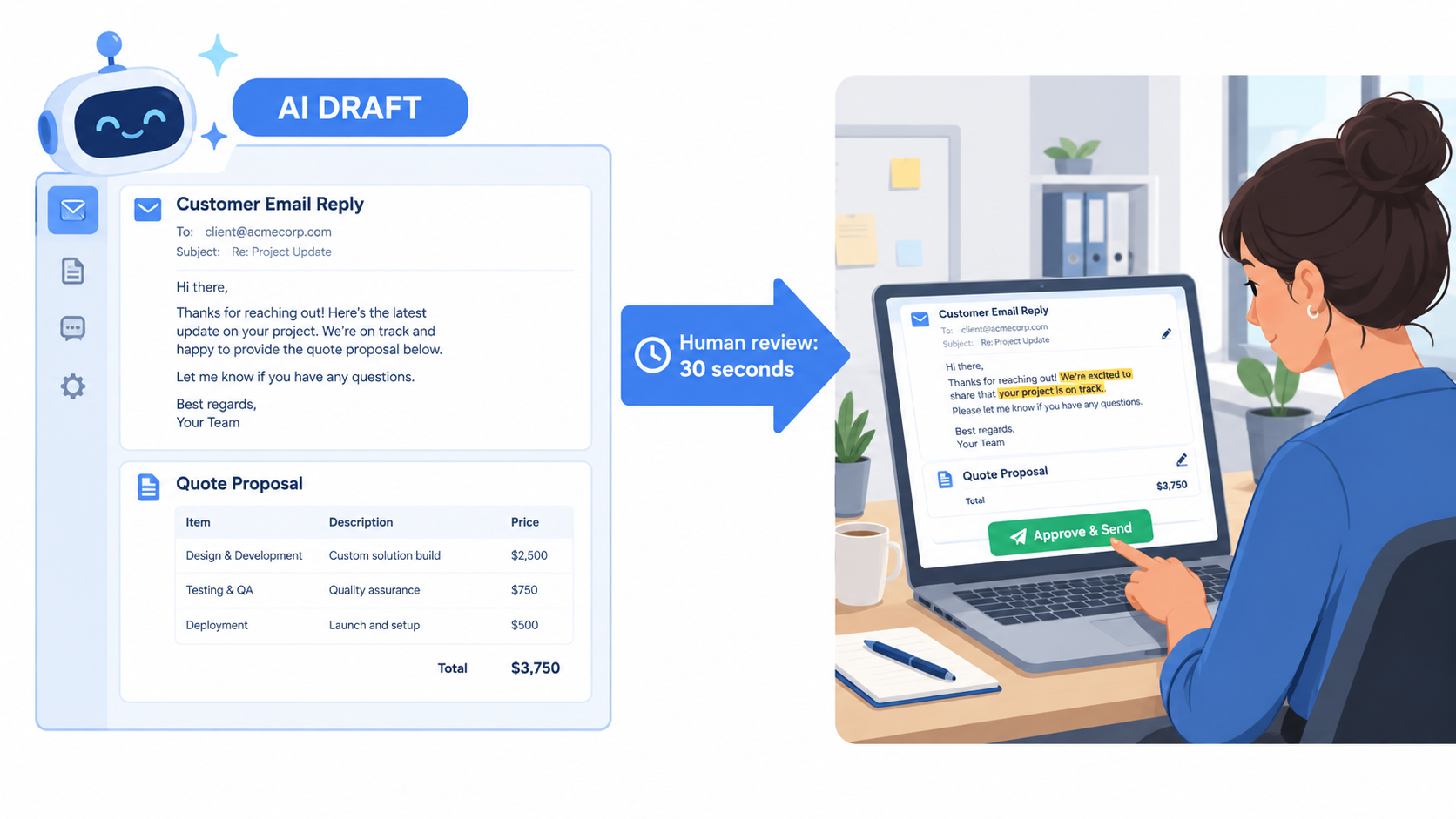
Customer email replies
AI can read an incoming email, look up the customer’s order history, and draft a reply. A staff member reads it, adjusts tone or facts, and sends. For common questions like shipping status, return steps, or opening hours, the review takes seconds.
The time saving comes from not writing from scratch. The safety comes from a human reading every message before it leaves the building.
Quotes, proposals, and estimates
For service businesses, AI can turn a discovery call transcript into a first-draft proposal, pulling in standard pricing, scope language, and timelines from past documents. The owner then checks numbers and commitments. Since a proposal is a promise, this is a task that should never go out without review.
Marketing content
Social posts, product descriptions, newsletter drafts, and ad variations are natural Tier 2 work. AI is fast at producing options. A person picks the best one and checks for accuracy, especially product claims, prices, and anything that could raise a compliance issue.
Bookkeeping categorization with judgment calls
Routine expense categorization can be Tier 1. But anything touching tax treatment, such as distinguishing a capital purchase from an operating expense, or flagging something as a deductible meal, belongs in Tier 2. AI suggests; your bookkeeper or accountant decides.
Designing a review step people won’t skip
The biggest risk in Tier 2 is “rubber-stamping,” where reviewers get so used to good drafts that they stop reading. A few design choices help:
- Highlight what matters. Configure the tool to flag numbers, dates, names, and policy statements so the reviewer’s eye goes there first.
- Keep batches small. Reviewing 10 drafts at a time keeps attention higher than reviewing 100.
- Track edit rates. If reviewers are changing almost nothing for weeks, either the task is ready for Tier 1, or reviewers have stopped paying attention. Spot-check to find out which.
- Make rejection easy. A one-click “this is wrong, I’ll write it myself” option prevents people from sending flawed drafts just to save time.
When to promote a task from Tier 2 to Tier 1
Some Tier 2 tasks earn their way into full automation. A reasonable bar: the human edit rate has stayed very low for a sustained period, the error cost is modest, and the output is reversible. Promote one narrow slice at a time, for example, only “Where is my order?” replies, not all customer email.
Tier 3: The Work That Should Stay Human
Some tasks fail the four-question test no matter how capable the AI becomes. They involve high error costs, irreversible outcomes, or judgment about people, money, and legal obligations. For these, AI can help you research and prepare, but a person makes the call.
The Air Canada lesson
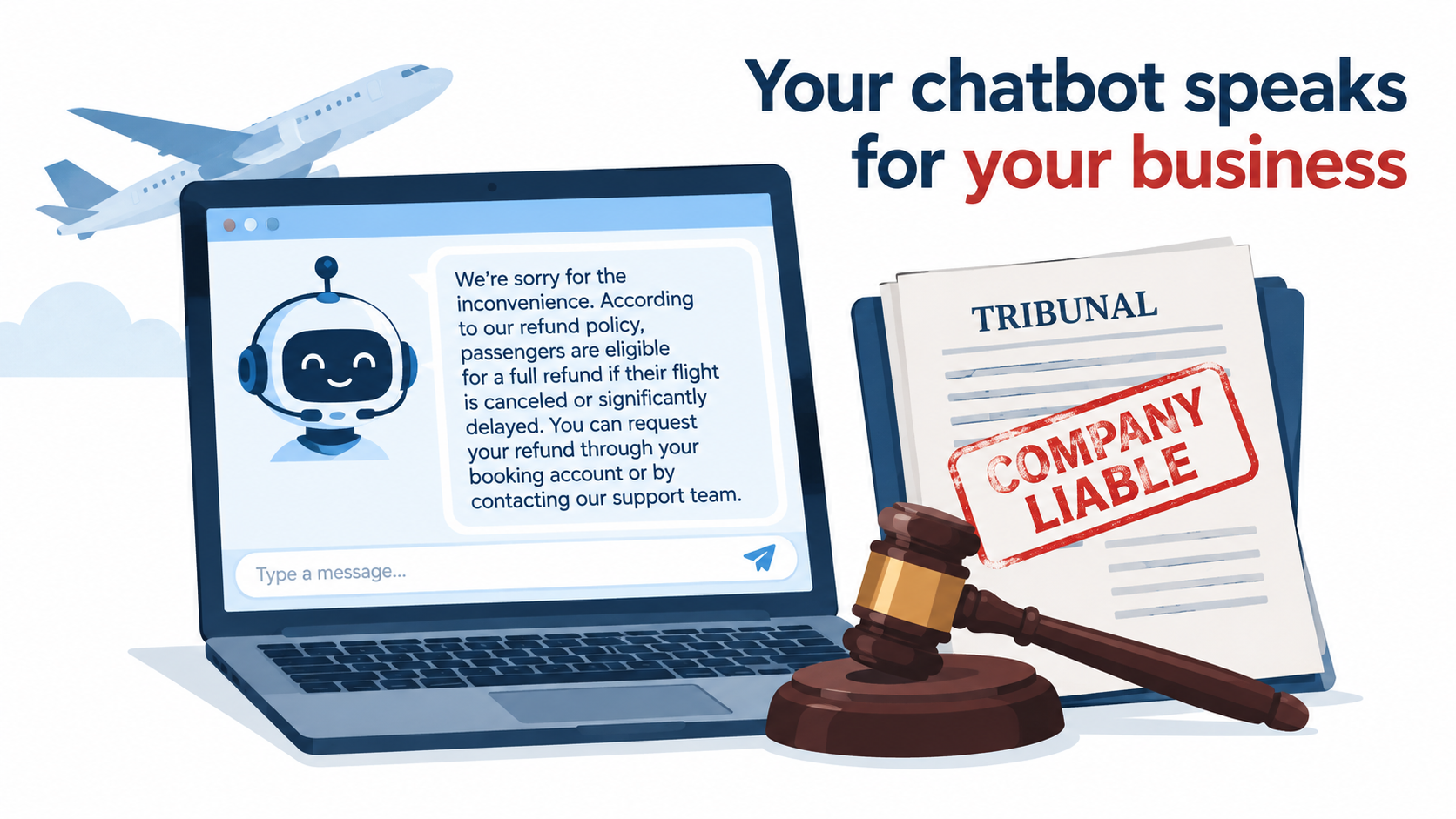
The clearest public example of what happens when a high-stakes task gets handed to AI without guardrails comes from Canada. In Moffatt v. Air Canada, decided in February 2024 by British Columbia’s Civil Resolution Tribunal, a customer asked the airline’s website chatbot about bereavement fares after a family death. The chatbot told him he could apply for the reduced fare retroactively after booking. That wasn’t the airline’s actual policy.
When the customer requested the refund, Air Canada refused and argued, in part, that the chatbot was responsible for its own statements. The tribunal rejected that argument, finding the airline was responsible for all information on its website, whether it came from a static page or a chatbot. Air Canada was ordered to pay the difference plus interest and fees, roughly CA$800 in total.
The dollar amount was small. The principle was not. Whatever your AI tells customers, your business has said. Any automation that makes statements about policy, pricing, refunds, or eligibility is speaking on your behalf.
Tasks that belong in Tier 3
- Refund and exception decisions outside a clearly written policy.
- Hiring, firing, and performance decisions. AI can help write a job posting or summarize interview notes. It shouldn’t screen out candidates without human oversight, and in some jurisdictions automated hiring tools carry specific legal obligations.
- Pricing changes and discount approvals above a small threshold.
- Legal, tax, and regulatory filings. AI can prepare drafts; a qualified person signs off.
- Escalated customer complaints, especially anything involving safety, health, or an angry long-term client.
- Vendor and partner negotiations, where tone and relationship history matter as much as terms.
How AI still helps in Tier 3
Keeping a task human doesn’t mean keeping AI out entirely. AI can summarize a complaint history before you call an unhappy customer, pull comparable pricing before a negotiation, or draft interview questions. The distinction is that AI prepares the person; it doesn’t replace the decision.
A useful framing: in Tier 3, AI is a research assistant with no signing authority.
Customer-Facing Automation: Where Sorting Mistakes Show Up First
Internal mistakes stay internal. Customer-facing mistakes become reviews, refund requests, and sometimes headlines. That makes customer service the area where the sorting method matters most, and where the temptation to over-automate is strongest.
The Klarna arc
Klarna, the buy-now-pay-later company, became the most-cited example of AI customer service in early 2024. The company announced that its AI assistant had handled 2.3 million conversations in its first month, about two-thirds of its customer service chats, doing work it said was equivalent to 700 full-time agents.
The follow-up is just as instructive. In 2025, CEO Sebastian Siemiatkowski publicly acknowledged that the company’s focus on cost had come at the expense of service quality, and Klarna began making sure customers could always reach a human. The company started recruiting human support staff again.
Klarna is far larger than any small business reading this, but the lesson scales down well. AI handled the high-frequency, low-variability questions effectively. The problems appeared at the edges, where customers needed judgment, empathy, or an exception.
A tiered approach to customer service
Applying the four-question test to customer service usually produces a split like this:
- Tier 1 (AI answers directly): Order status, store hours, tracking links, password resets, basic product specs pulled from your actual catalog.
- Tier 2 (AI drafts, staff sends): Return requests, shipping problems, product recommendations, anything referencing policy.
- Tier 3 (human handles): Complaints, refunds outside policy, billing disputes, anything where the customer has already contacted you more than once about the same issue.
Guardrails for any customer-facing AI
If you deploy a chatbot or automated responder, a few rules reduce your exposure:
- Ground it in your real documents. The bot should answer from your actual policies and catalog, not general knowledge. If it can’t find an answer in your sources, it should say so.
- Make the human exit obvious. A visible “talk to a person” option at every step. Customers who feel trapped by a bot become angrier customers.
- Block it from making commitments. Configure it so it can’t promise refunds, discounts, or exceptions. It can only explain the written policy or hand off.
- Review transcripts weekly. Read a sample of conversations, especially ones that ended with a handoff or a bad rating.
- Disclose it. Tell customers when they’re talking to an AI. It sets expectations and is increasingly expected by regulators.
Buy, Configure, or Build? Why Small Teams Should Usually Buy
Once you know which tasks to automate, the next question is how. Small businesses generally have three options: buy a ready-made tool, configure a general automation platform, or build something custom. For most small teams, the order of preference is exactly that.
What the research says
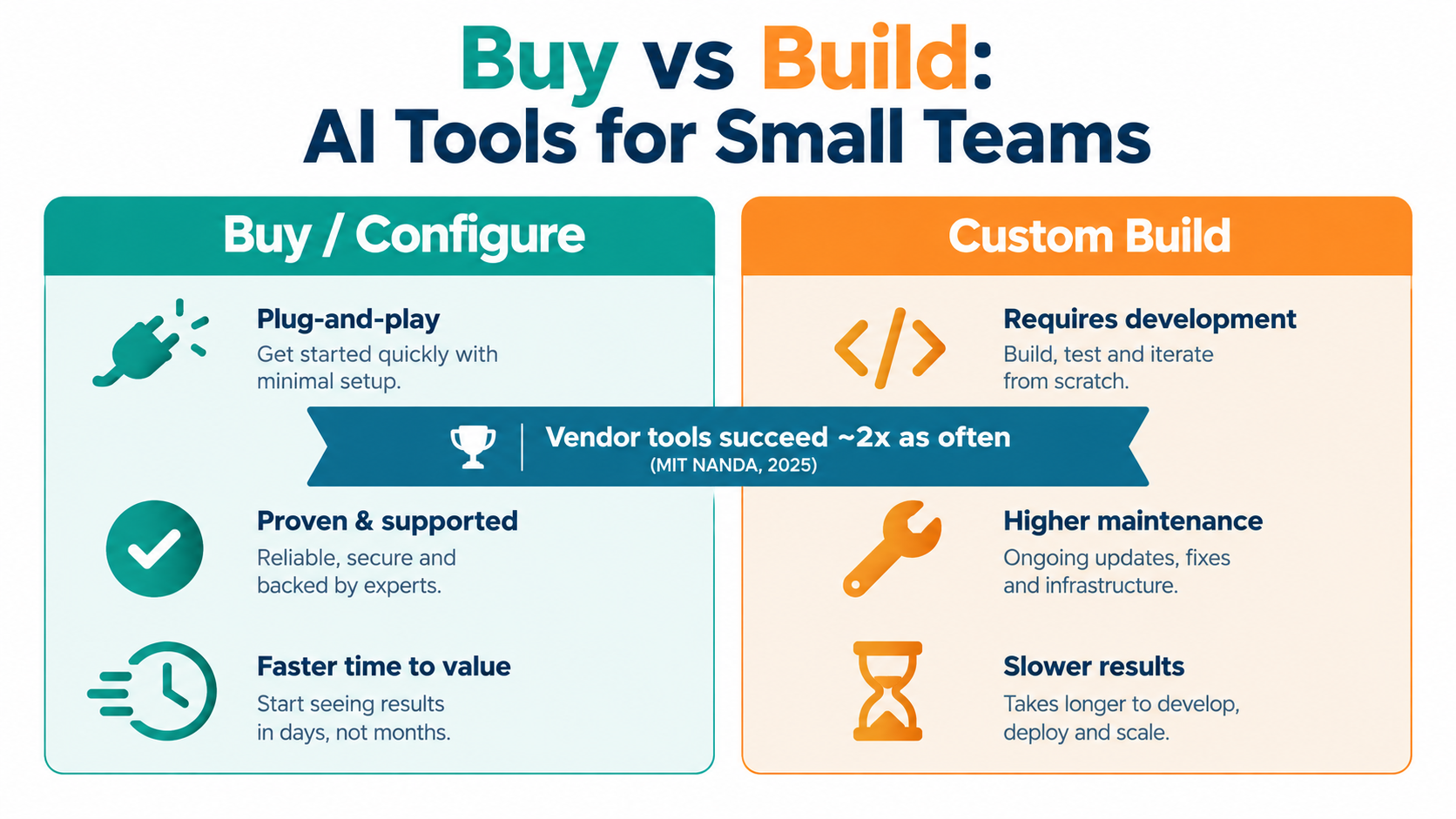
MIT NANDA’s 2025 GenAI Divide report made headlines for finding that about 95% of the generative AI pilots it studied produced no measurable impact on profit and loss. The less-quoted finding is more useful for small businesses: purchasing AI tools from specialized vendors and building partnerships succeeded about 67% of the time, while internal builds succeeded roughly one-third as often.
The report studied larger organizations, but the logic is even stronger for small ones. If companies with engineering teams struggle to build their own AI systems, a 12-person business is unlikely to do better.
Option 1: Buy AI features inside tools you already use
The fastest path is often the AI features already built into your existing software. Accounting platforms, CRMs, help desks, email clients, and office suites have added AI capabilities for capture, drafting, summarizing, and categorizing.
- Pros: No new logins, your data is already there, and the vendor handles updates.
- Cons: Limited customization, and features vary in quality.
- Best for: Tier 1 tasks inside a single system, like receipt capture in your accounting tool.
Option 2: Configure a workflow automation platform
Platforms like Zapier, Make, and n8n connect your apps and now include AI steps that can classify, extract, summarize, or draft text in the middle of a workflow. A typical example: new email arrives, AI classifies it, CRM record gets created, Slack notification goes to the right person.
- Pros: Connects tools that don’t talk to each other, no coding for most use cases.
- Cons: Workflows can become fragile as they grow, usage-based pricing can climb, and someone needs to own maintenance.
- Best for: Tier 1 and Tier 2 tasks that cross multiple systems.
Option 3: Build custom
Custom builds using AI model APIs make sense in narrow cases: when the task is core to your competitive edge, when no tool handles your specific data format, or when you already have technical staff. For most small businesses, it’s the last resort, not the first.
Questions to ask any vendor
- Where is our data stored, and is it used to train your models?
- Can we set confidence thresholds and route uncertain outputs to review?
- Is there an audit log of what the AI did and why?
- How does pricing change as volume grows?
- Can we export our data and workflows if we leave?
Matching Your Stack to Your Team Size
The right automation setup for a solo consultant looks nothing like the right setup for a 75-person distributor. Team size changes which tasks are worth automating, who owns the automations, and how much complexity you can support.
Solo operators and micro-businesses (1–5 people)
At this size, the owner is usually doing everything, so the biggest wins come from reclaiming the owner’s time. Focus on:
- An AI meeting note-taker for client and internal calls (with consent).
- Receipt and invoice capture inside your accounting software.
- A general-purpose AI assistant for drafting emails, proposals, and content, used as Tier 2.
- Automated booking and reminders.
Avoid multi-step workflow platforms until you have at least two or three clearly repeated processes. Complexity costs more at this size because there’s nobody else to fix things when they break.
Small teams (5–25 people)
Here, the problem shifts from “owner’s time” to “handoffs between people.” Information gets stuck in inboxes, leads go unanswered, and the same questions get asked repeatedly. Focus on:
- Lead intake, classification, and routing.
- Help desk AI that drafts replies for staff approval.
- An internal knowledge base that AI can search, so staff stop asking the same questions.
- One workflow platform with a clear owner, even if that’s a part-time responsibility.
Growing businesses (25–100 people)
At this size, departments form and processes multiply. The risk becomes “shadow automation,” where individual employees build their own workflows that nobody else knows about. Focus on:
- A written AI use policy covering approved tools, data handling, and customer-facing rules.
- An inventory of every automation in use, with an owner for each.
- Department-level Tier 2 workflows in finance, sales, and support.
- Possibly a part-time or fractional operations role focused on automation maintenance.
A common thread across all sizes
Every automation needs an owner. Not “the team,” not “IT,” but a named person who knows how it works, checks it regularly, and gets the alert when it breaks. Ownerless automations are the ones that silently fail.
Clean Data First: The Unglamorous Prerequisite
AI automation runs on your business data: customer records, product catalogs, policy documents, past emails, price lists. If that data is messy, outdated, or contradictory, the AI will produce messy, outdated, or contradictory output, just faster and with more confidence.
The most common data problems in small businesses
- Duplicate customer records in the CRM, so the AI can’t tell which history is current.
- Outdated policy documents sitting next to current ones in a shared drive, so a chatbot may cite last year’s return window.
- Inconsistent product names across your website, inventory system, and invoices.
- Tribal knowledge that lives only in one employee’s head and was never written down.
A one-week data cleanup for your first automation
You don’t need to clean everything. Clean only what your first automation will touch. If you’re automating customer email replies, for example:
- Gather every document that answers customer questions: FAQs, policies, shipping info, warranty terms.
- Delete or archive anything outdated. If two documents disagree, decide which is right and remove the other.
- Write down the answers to the 10 questions staff get most often, in plain language.
- Put the cleaned set in one folder that the AI tool reads from, and make one person responsible for keeping it current.
Writing things down is half the value
Many businesses discover that the process of preparing for automation, writing down how things actually work, is valuable by itself. New hires ramp up faster, mistakes drop, and the business becomes less dependent on any single person. The AI is almost a side benefit.
Privacy and data handling
Before feeding customer or employee data into any AI tool, check whether the vendor uses your data for training, where it’s stored, and whether the tool complies with the privacy rules that apply to you. Health, financial, and children’s data carry stricter requirements in many jurisdictions. When in doubt, use business-tier plans that contractually exclude your data from model training.
What Happens to Your People
The biggest worry for many small business owners isn’t technical. It’s how staff will react, and whether automation means fewer jobs. The evidence so far suggests the reality is more measured than the headlines.
What the Census data shows
In September 2025, the U.S. Census Bureau published findings from its 2023 Annual Business Survey on technology adoption. The headline: adopting new technology such as robotics and artificial intelligence had little impact on the number or skills of workers that businesses employ.
That’s consistent with what many small businesses report informally. AI tends to change what people spend their time on rather than eliminate the role. The bookkeeper spends less time typing and more time reviewing. The support rep handles fewer routine tickets and more complex ones.
Why staff resist (and how to address it)
Resistance usually comes from three places:
- Fear of replacement. Address it directly. Say what the automation is for, and what it isn’t for.
- Fear of looking incompetent. Some people worry they won’t learn new tools fast enough. Pair them with a colleague and give them time.
- Distrust of output quality. Often justified. Involve the people who do the task in testing the automation; they’ll spot problems you won’t.
Involve the people who do the work
The person who has processed invoices for five years knows every weird supplier format and every exception. They are the best person to design and test the automation, and the best person to own it afterward. Bringing them in early turns a perceived threat into a skill upgrade.
Write a short AI use policy
Even a one-page policy helps. It should cover:
- Which AI tools are approved for work use.
- What data may and may not be entered into AI tools.
- Which outputs must be reviewed by a person before use (your Tier 2 list).
- Which decisions AI may never make (your Tier 3 list).
- Who to contact with questions or when something goes wrong.
Without a policy, staff either avoid AI entirely or use whatever tools they like with whatever data they have. Neither is good for the business.
Measuring Whether an Automation Is Worth Keeping
Every automation has costs that don’t appear on the subscription invoice: setup time, maintenance, error correction, and the attention of whoever owns it. A simple scorecard helps you decide whether each automation earns its place.
Measure the baseline first
Before turning anything on, record how the task works today. For two weeks, track:
- How many times the task happens.
- How long each instance takes on average.
- How often mistakes occur, and what they cost to fix.
- How long customers or colleagues wait for the output.
Without a baseline, you’ll be guessing whether the automation helped. Many businesses skip this step and later can’t tell whether an automation is worth renewing.
The five-line scorecard
After 30 days of running, compare against the baseline:
- Time saved per week, net of review and exception handling time.
- Error rate compared to the manual process.
- Turnaround time for the output.
- Total monthly cost, including subscriptions, usage fees, and owner maintenance time.
- Staff and customer feedback, captured in a sentence or two.
The hidden cost: exception handling
The number that most often sinks an automation is time spent on exceptions. If an AI processes 90% of invoices perfectly but the remaining 10% take three times longer to fix because staff have to figure out what went wrong, the net saving may be much smaller than it looked.
Track exception volume and handling time separately. If exceptions are growing, investigate why. The cause is often a new supplier format, a policy change, or drift in the data the AI reads from.
Kill, keep, or expand
At each review, make an explicit decision:
- Kill if net time saved is negligible or error costs exceed savings.
- Keep if it works but isn’t ready for more scope.
- Expand if it’s performing well, either by promoting a Tier 2 slice to Tier 1 or by applying the same pattern to a similar task.
Killing automations is healthy. A smaller set of well-maintained automations beats a large set of half-working ones.
Your First 30 Days: A Low-Risk Starter Plan
Here’s a practical plan to move from casual AI use to your first real automation in a month, without a large budget or a big risk.
Week 1: Audit your tasks
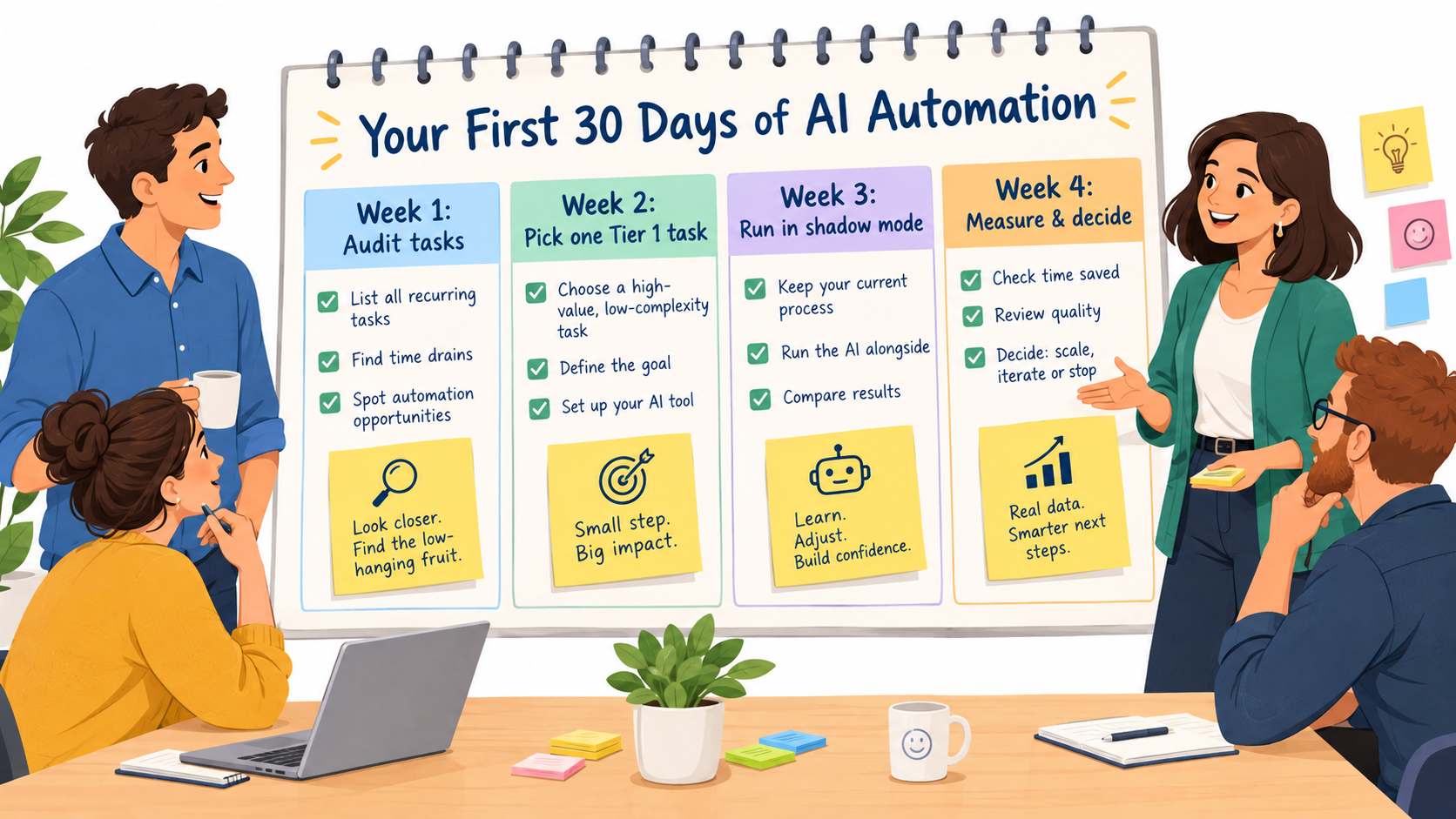
Ask each person on the team to list the tasks they do every week that feel repetitive. Combine the lists. For each task, note frequency and approximate time per instance. Then run each one through the four-question test and assign a tier.
Most teams end up with a list of 20 to 50 tasks. Don’t try to tackle them all. The point of the audit is to see the whole picture before picking a starting point.
Week 2: Pick one Tier 1 task and prepare
Choose a single Tier 1 task with high frequency and low error cost. Good first candidates are receipt capture, meeting notes, or lead classification. Then:
- Check whether a tool you already pay for has an AI feature that handles it.
- If not, pick one vendor tool and start a trial.
- Clean the data the automation will touch.
- Record your baseline measurements.
- Name the owner.
Week 3: Run in shadow mode
Shadow mode means the AI runs alongside the manual process without replacing it. Staff continue doing the task the old way while the AI produces its own output in parallel. Compare the two daily.
This is the most valuable week in the plan. You’ll find the edge cases, the formats the AI struggles with, and the setup tweaks you need, all without any risk to customers or your books.
Week 4: Measure and decide
If shadow mode results are strong, switch over: the AI does the task, and staff handle exceptions and spot-checks. Fill in your five-line scorecard and make a kill, keep, or expand decision.
If results are mixed, consider moving the task to Tier 2 instead, with AI drafting and staff approving. That’s not a failure. It’s the sorting method working as intended.
After day 30
With one working automation, pick the next task from your audit list. Many businesses find a steady rhythm of one new automation per month is sustainable. It’s slow enough to do properly and fast enough to add up over a year.
Conclusion: Sort First, Then Automate
AI automation for business doesn’t fail because the technology is weak. It fails because tasks get automated without anyone asking whether they should be. A chatbot gets authority it shouldn’t have. A draft goes out without review. A custom build eats months that a ready-made tool could have saved.
The sorting method in this guide is a guard against all three. Run every task through four questions: how often, how variable, how costly a mistake, and how reversible. Put it in the right tier. Then automate only as much as the tier allows.
Key takeaways
- Adoption numbers are high, but deep use is rare. Almost 60% of small businesses report using AI, according to the U.S. Chamber, but far fewer have built it into how they produce goods and services. The gap is your opportunity.
- Start with back-office Tier 1 tasks. Document capture, meeting notes, scheduling, and lead routing are high-frequency, low-risk, and often where returns show up first.
- Tier 2 is where most value lives. Design review steps that are quick enough to actually happen, and watch for rubber-stamping.
- Keep judgment calls human. The Air Canada case shows that your business is responsible for what your AI says.
- Keep a human path for customers. Klarna’s experience shows that even large-scale AI service needs a person available at the edges.
- Buy before you build. MIT NANDA’s 2025 research found vendor tools succeed about twice as often as internal builds.
- Clean your data and name an owner. Every automation needs accurate source documents and one accountable person.
- Measure, then decide. Record a baseline, run in shadow mode, and be willing to kill automations that don’t pay off.
Start small. Pick one task this week, run it through the four questions, and see which tier it lands in. That single decision is a better first step into AI automation than any software subscription.