
Most conversations about AI automation for business start with the same question: what can we automate? It’s a fair question, and the tools available in 2026 answer it generously. Drafting emails, triaging support tickets, reconciling invoices, qualifying leads, summarizing contracts, scheduling crews. The list gets longer every quarter.
But there’s a second question that gets asked far less often, usually only after something goes wrong: when the automation makes a mistake, who owns it?
That question isn’t hypothetical anymore. A Canadian tribunal has already ruled that a company is responsible for what its chatbot tells customers. Field experiments with hundreds of consultants have shown that AI can make skilled people measurably worse on certain tasks. And at least one high-profile fintech has publicly walked back part of an aggressive AI-first customer service strategy after quality slipped.
Meanwhile, adoption keeps climbing. The U.S. Chamber of Commerce reported in August 2025 that almost 60% of small businesses were using AI for business operations, more than double the 2023 figure. Usage is spreading faster than the internal structures that decide who reviews, approves, and answers for AI-generated work.
This article isn’t about picking tools or calculating payback periods. It’s about the operating model underneath automation: decision rights, guardrails, escalation paths, and the metrics that tell you whether an automated process is quietly creating risk. If you’re a founder, operations lead, or department head rolling out AI across real workflows, this is the layer that decides whether your automation compounds value or compounds liability.
We’ll walk through the legal precedent, the research on where AI helps and hurts, a practical framework for sorting tasks into “automate,” “assist,” and “human only,” and a 30-day audit you can run on whatever you’ve already deployed.
The Liability Line Already Moved: What Moffatt v. Air Canada Established
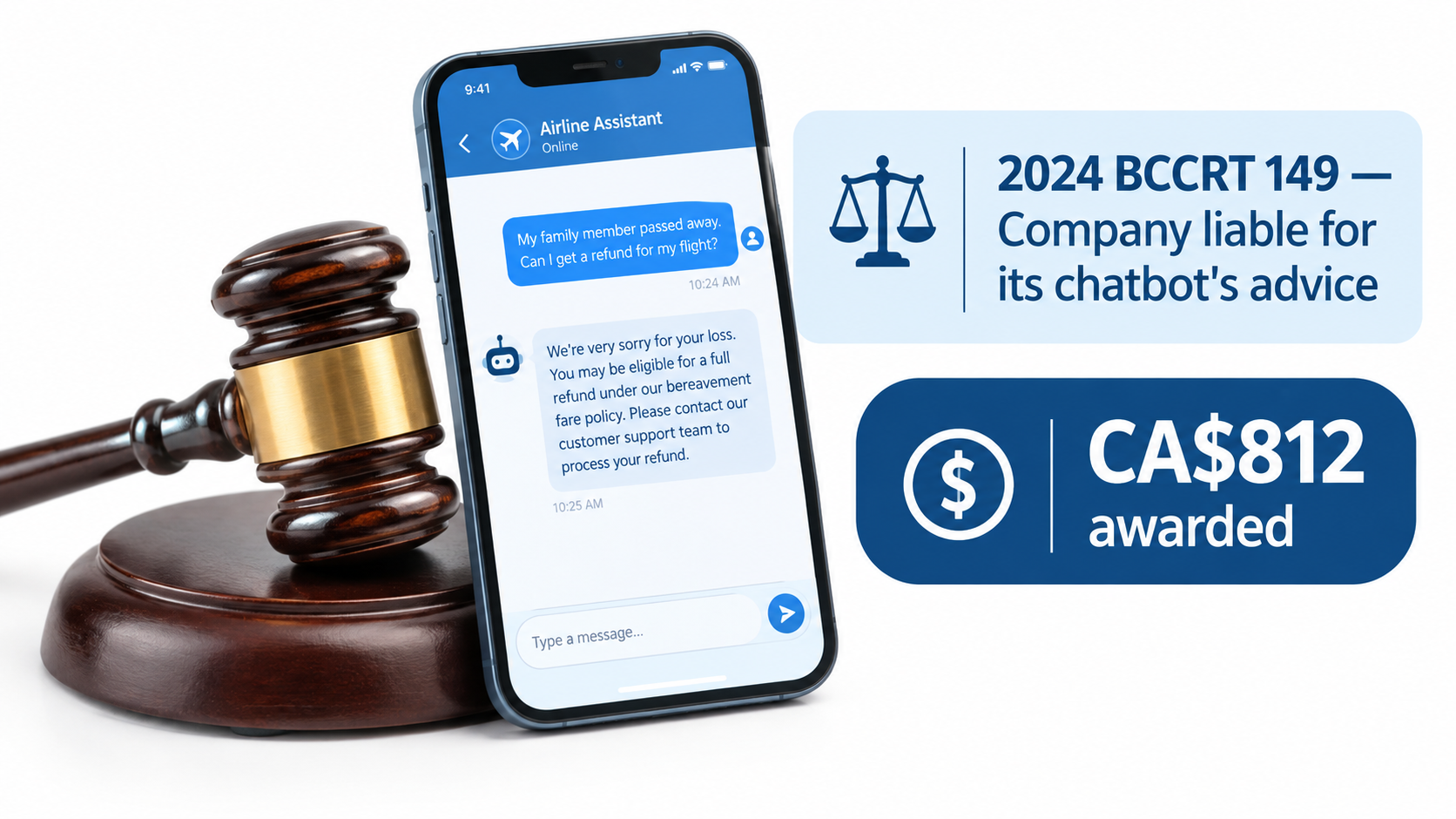
In November 2022, Jake Moffatt’s grandmother died. He went to Air Canada’s website to book a last-minute flight from Vancouver to Toronto and asked the site’s support chatbot about bereavement fares. The chatbot told him he could buy a full-price ticket and then apply for a partial refund within 90 days.
That wasn’t the airline’s policy. A different page on the same website said bereavement fares couldn’t be applied retroactively. When Moffatt applied for the refund, Air Canada refused.
The “separate legal entity” argument
The case went to British Columbia’s Civil Resolution Tribunal. Air Canada’s defense was striking: according to the decision, the airline argued that the chatbot was “a separate legal entity that is responsible for its own actions.” Tribunal member Christopher Rivers called that submission “remarkable” and rejected it.
His reasoning was direct: “It should be obvious to Air Canada that it is responsible for all the information on its website. It makes no difference whether the information comes from a static page or a chatbot.” The tribunal found the airline liable for negligent misrepresentation and awarded Moffatt CA$812.02 in damages and fees (Moffatt v. Air Canada, 2024 BCCRT 149, decided February 14, 2024).
Why a small claim matters so much
The dollar amount was trivial. The principle wasn’t. Gabor Lukacs, president of the advocacy group Air Passenger Rights, summarized it for the BBC: “If you are handing over part of your business to AI, you are responsible for what it does.” The American Bar Association described the ruling as “a helpful reminder that companies remain liable for the actions of their AI tools.”
For business owners, three takeaways follow:
- Your automation speaks for you. Customers don’t distinguish between a policy page, a human agent, and a bot. Neither, it turns out, do tribunals.
- Contradictions are your problem. Air Canada’s correct policy existed on its website. That didn’t help, because the company’s own tool contradicted it.
- Disclaimers aren’t a shield. Pointing customers to “verify elsewhere” doesn’t transfer responsibility when your system gave them the wrong answer in the first place.
Beyond customer-facing chat
It’s tempting to read this as a chatbot-only issue. It isn’t. The same logic applies to any automated output that reaches a customer, vendor, employee, or regulator: an AI-generated quote, an automated collections email, a model-drafted job rejection, an invoice dispute response. If your business sent it, your business said it.
That reframes the entire automation question. The real unit of analysis isn’t “the task.” It’s “the commitment the task creates.” An AI that summarizes an internal meeting creates almost no external commitment. An AI that tells a customer what they’re entitled to creates a binding one.
Adoption Is Outrunning Ownership
The speed of uptake is one reason the accountability gap exists. When a tool goes from “experiment” to “everyone uses it” in eighteen months, governance rarely keeps pace.
What the small business data shows
The U.S. Chamber of Commerce Technology Engagement Center’s 2025 Empowering Small Business report found that almost 60% of small businesses said they were using AI for business operations, more than double the rate from 2023. State-level breakdowns showed adoption ranging widely, with Connecticut at 72% and many states clustering around 57% to 64%.
Optimism runs even higher than usage. In most states, roughly eight in ten small business owners said they believed AI would help their businesses in the future, with some states topping 90%. Generative AI chatbots specifically were in use at somewhere between roughly a third and well over half of small businesses, depending on the state.
The pattern behind the numbers
High adoption plus high optimism is a familiar setup for under-governed technology. In practice, AI tends to enter a small or mid-sized business through three doors at once:
- Individual employees sign up for consumer or prosumer AI tools to speed up their own work.
- Existing software vendors switch on AI features inside the CRM, help desk, accounting platform, or e-commerce stack, often by default.
- Leadership-sponsored projects deliberately automate a defined workflow.
Only the third door typically comes with a project owner, a scope, and a review process. The first two happen organically, which means a business can have dozens of AI-touched workflows without anyone having formally decided that AI should be involved in them.
Regulatory unease is already visible
The same Chamber report surfaced a related anxiety: in state after state, a majority of small businesses worried that a patchwork of state-level tech policies would drive up legal and compliance costs. The figures ranged from the mid-50s to as high as 84% in the District of Columbia.
That worry is rational. When rules vary by jurisdiction and your automation runs across all of them, the only defensible posture is knowing exactly where AI is operating in your business and who signs off on it. You can’t comply with rules for systems you haven’t inventoried.
The first practical step
Before evaluating any new automation, build an AI inventory. It doesn’t need to be elaborate. A shared spreadsheet with these columns is enough to start:
- Workflow or process name
- Tool or vendor feature involved
- What the AI produces (draft, decision, message, data entry)
- Who receives the output (internal, customer, vendor, regulator)
- Whether a human reviews before it’s sent or acted on
- Named owner accountable for errors
Most businesses that do this exercise discover that the “named owner” column is the one with the most blanks. That blank column is the accountability gap, made visible.
The Jagged Frontier: Why “AI Is Good at This” Is the Wrong Frame
One of the most useful pieces of research for anyone designing automation comes from a 2023 field experiment run by researchers from Harvard Business School, Wharton, MIT, and other institutions in collaboration with Boston Consulting Group.
What the experiment found
The preregistered study involved 758 BCG consultants. After a baseline assessment, participants were randomly assigned to work with no AI, with GPT-4, or with GPT-4 plus a prompt engineering overview. They then tackled realistic consulting tasks.
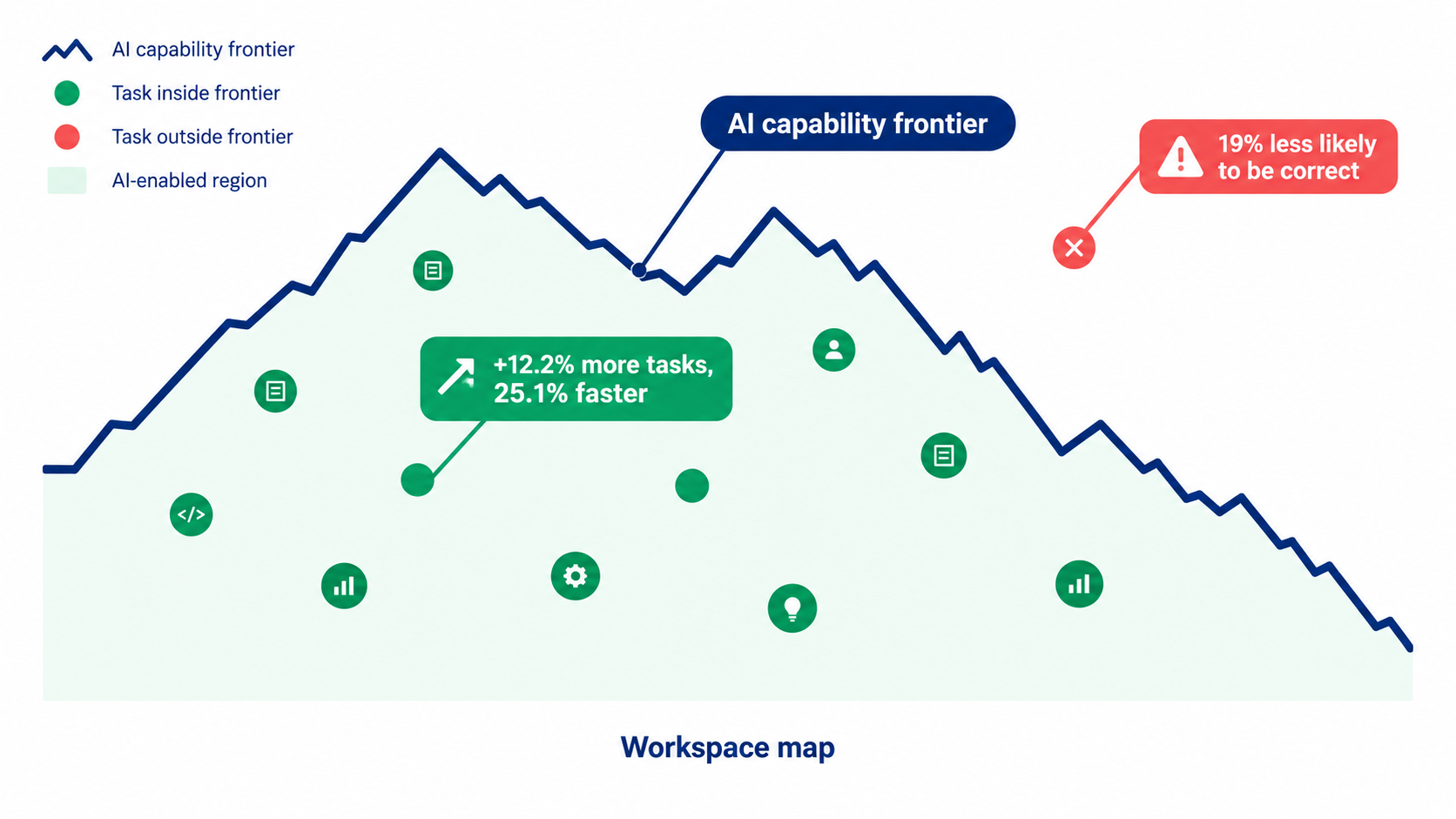
On 18 tasks that fell inside AI’s capability frontier, the results were strong. Consultants using AI completed 12.2% more tasks, finished them 25.1% faster, and delivered significantly higher-quality work.
But the researchers also included a complex business problem deliberately chosen to fall outside the frontier. On that task, consultants using AI were 19 percentage points less likely to produce a correct solution than those working without it.
Why “jagged” is the key word
The researchers coined the phrase “jagged technological frontier” to describe how AI’s strengths and weaknesses don’t line up with human intuitions about difficulty. Two tasks that look equally hard to a manager can sit on opposite sides of the line. One gets faster and better with AI; the other gets confidently wrong.
That has a direct implication for business automation: you can’t approve AI for a job function, only for specific tasks within it. “Use AI for customer service” is too coarse. “Use AI to draft responses to order-status questions where the answer comes from the order database” is a task you can actually evaluate.
The confidence problem
The most dangerous part of the outside-the-frontier result isn’t that AI failed. It’s that skilled professionals followed it into the failure. AI output tends to be fluent and well-structured regardless of whether it’s correct. That polish lowers people’s guard.
In an automated workflow with no human in the loop, there’s no guard to lower. The error simply ships.
How to map your own frontier
You don’t need a research lab to find where the frontier sits in your workflows. A lightweight approach:
- Break the workflow into discrete tasks. Not “handle returns” but “classify return reason,” “check eligibility against policy,” “draft customer reply,” “issue refund.”
- Run a shadow period. Have AI produce outputs for each task alongside the humans who currently do it, without the AI output being used.
- Score agreement and errors by task. You’ll typically find some tasks with near-perfect agreement and others with error rates that would be unacceptable in production.
- Look at the kind of errors, not just the rate. A 2% error rate on refund eligibility may be far worse than a 10% error rate on tone in a draft that a human edits anyway.
The output is a task-level map showing where AI is inside the frontier for your business, with your data and your edge cases. That map is the foundation for every decision-rights choice that follows.
Who Actually Benefits: The Novice Effect and What It Means for Staffing
A second major study reshapes how businesses should think about AI and their people. It’s also one of the largest real-world studies of generative AI in a working business.
The customer support study
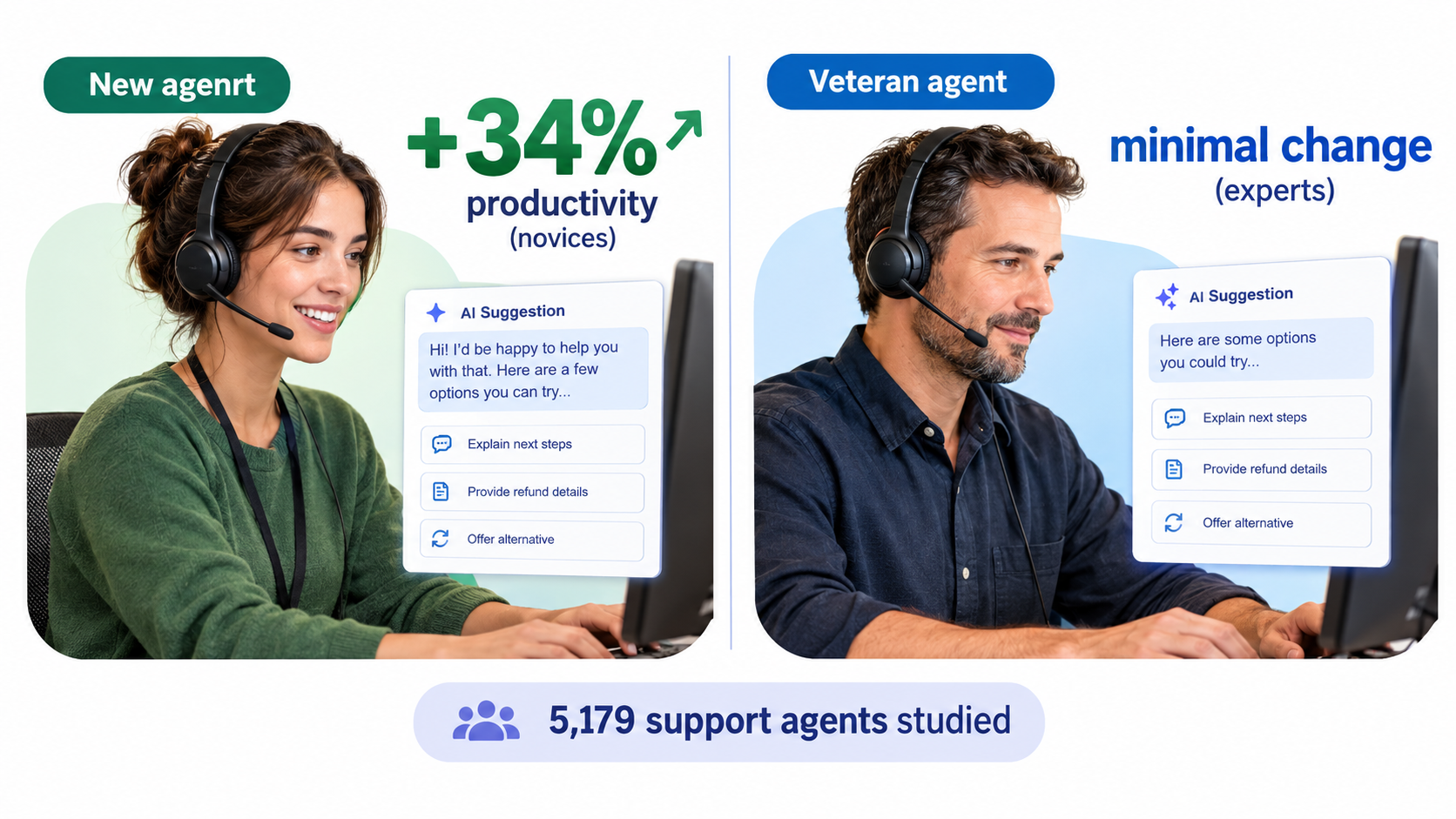
Economists Erik Brynjolfsson, Danielle Li, and Lindsey Raymond studied the staggered rollout of a generative AI conversational assistant to 5,179 customer support agents. Their paper, “Generative AI at Work,” was later published in The Quarterly Journal of Economics in 2025.
Access to the AI assistant increased productivity, measured as issues resolved per hour, by 14% on average. But the average hid a striking split: novice and low-skilled workers improved by 34%, while experienced and highly skilled workers saw minimal impact.
The authors also found that AI assistance improved customer sentiment, increased employee retention, and offered suggestive evidence that the tool was spreading the best practices of top performers to newer workers, helping them “move down the experience curve” faster.
The uncomfortable implication
Read carefully, this study suggests the AI was valuable in part because it encoded what experienced agents already knew. The top performers were, in effect, the training signal.
That creates a strategic trap for businesses that see AI primarily as a headcount reduction tool. If you cut the experienced people whose judgment the system reflects, you may weaken the very knowledge base that made the automation work. You also lose the people best positioned to spot when the AI is wrong.
Rethinking roles rather than eliminating them
A more durable pattern treats experienced staff as the owners of AI quality rather than as competitors to it. In practice, that might look like:
- Senior agents as reviewers and escalation handlers. They handle the cases AI flags as uncertain and audit samples of AI-assisted work.
- Experts as knowledge curators. They maintain the policy documents, response templates, and edge-case notes the AI draws from.
- Faster onboarding for new hires. If AI compresses the learning curve, you can hire for attitude and train for skill more quickly, which matters in high-turnover roles.
Accountability follows expertise
This connects back to the ownership question. The natural owner of an AI-assisted process is usually the person who best understands what “correct” looks like. In a support team, that’s a senior agent or team lead, not the IT person who configured the tool.
When you fill in the “named owner” column in your AI inventory, the right name is almost always someone with domain expertise and the authority to change how the process runs. Technical administrators keep the system running. Domain owners answer for what it produces.
The Klarna Lesson: Cost per Contact vs. Cost of a Bad Contact
No company has done more to popularize the idea of AI replacing customer service teams than Klarna. Its trajectory is a useful case study precisely because it went publicly in both directions.
The 2024 headline
In February 2024, Klarna announced that its AI assistant, built with OpenAI, had handled 2.3 million conversations in its first month, roughly two-thirds of the company’s customer service chats. The company said the assistant was doing the equivalent work of 700 full-time agents, that resolution times had dropped from around 11 minutes to under 2, and that repeat inquiries had fallen by 25%. Klarna projected the change would drive a $40 million profit improvement that year.
Those numbers became a reference point for boardrooms everywhere. The implied message was simple: customer service is a cost center, and AI shrinks it.
The 2025 correction
By mid-2025, the tone had shifted. CEO Sebastian Siemiatkowski told Bloomberg that cost had been too dominant a factor in the company’s evaluation, and that the result had been lower quality. Klarna began recruiting human agents again, describing a flexible model in which customers would always be able to reach a person.
This wasn’t an abandonment of AI. The assistant continued to handle a large share of interactions. It was a recalibration of where the human-AI boundary should sit.
What the metrics missed
The original metrics measured efficiency: volume handled, time to resolution, cost per contact. Those are real and worth tracking. But they don’t capture:
- The cost of a wrong resolution. A fast answer that’s incorrect can generate a chargeback, a complaint, a regulatory issue, or a lost customer.
- The cost of an unresolved emotional need. Some contacts are about a problem; others are about frustration, fear, or grief. Remember that the Air Canada case started with a bereavement question.
- The long tail. Two-thirds of chats being routine means one-third aren’t. That third often carries most of the risk and most of the relationship value.
A better economic frame
Instead of asking “what does each contact cost?”, ask “what is the expected cost of each contact type, including errors?” A simple version:
Expected cost per contact = handling cost + (error rate × average cost of an error)
For password resets, the error cost is tiny, so automation wins easily. For disputes, refunds, cancellations, and anything involving money or legal entitlement, the error cost can dwarf the handling savings. Run the math by contact type, and the right boundary between AI and human handling usually becomes obvious.
The Klarna story doesn’t prove that AI customer service fails. It proves that measuring only the savings side of the ledger produces decisions that later need to be reversed, publicly and expensively.
Decision Rights: Sorting Work into Automate, Assist, and Human Only
With the frontier mapped and the economics clear, you can make deliberate decisions about how much autonomy AI gets in each task. A three-tier model works for most businesses.
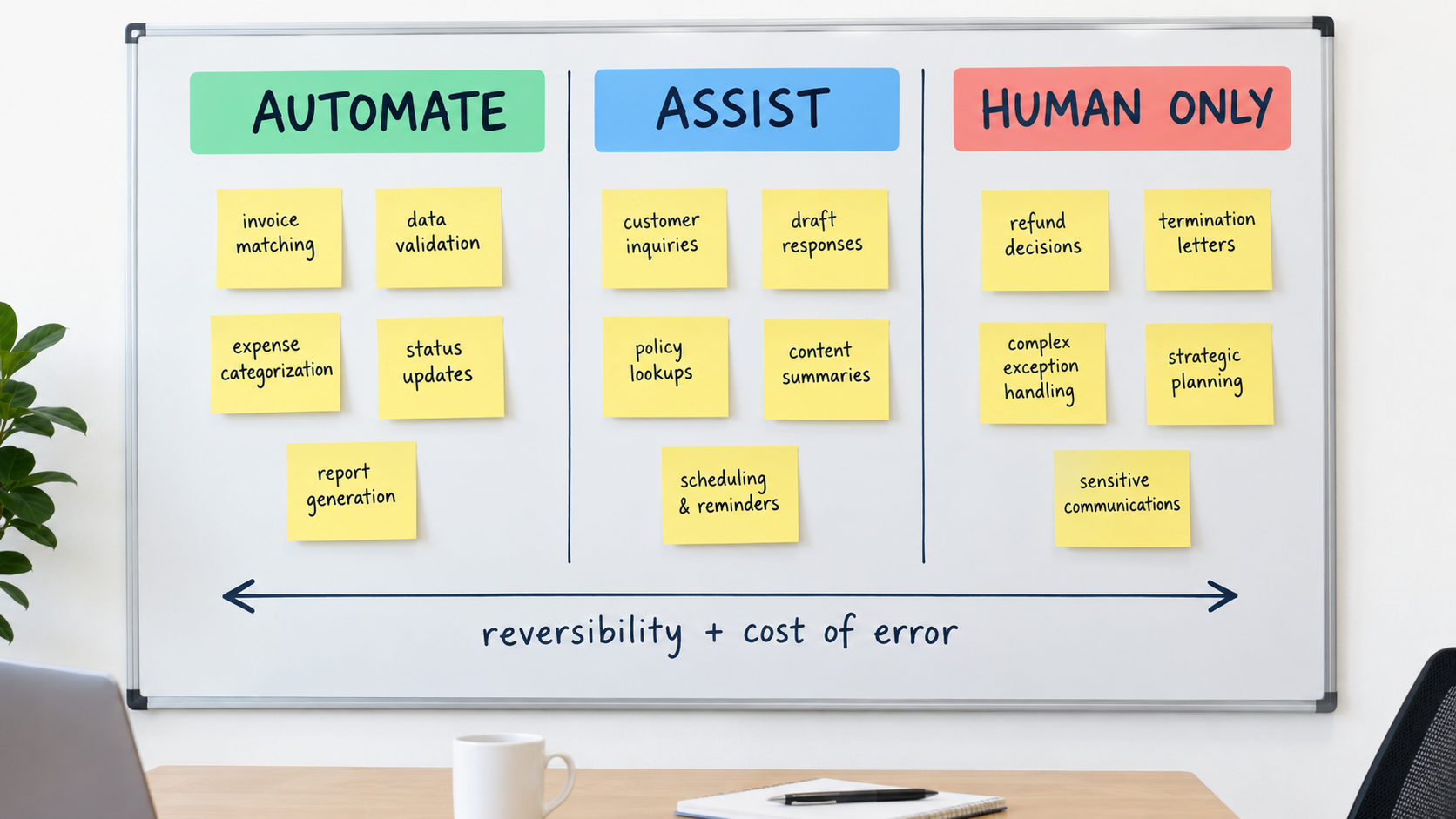
Tier 1: Automate
AI acts without per-item human review. Humans monitor aggregate performance and audit samples.
Good candidates share three traits: errors are cheap, errors are reversible, and outputs can be checked against a source of truth. Examples include categorizing expenses, routing tickets to the right queue, extracting fields from standard invoices, tagging inbound leads, and transcribing and summarizing internal meetings.
Tier 2: Assist
AI drafts, recommends, or pre-fills. A human reviews and approves before anything is sent or committed.
This tier fits tasks where AI is mostly inside the frontier but errors carry meaningful cost. Examples: customer replies involving policy, sales proposals, contract redlines, performance review drafts, marketing claims, and supplier negotiations. The NBER support study is essentially a Tier 2 deployment, and it produced large gains without removing human judgment.
Tier 3: Human only
AI may provide background research, but the decision and the communication are human.
This tier covers decisions that are high-stakes, irreversible, legally sensitive, or deeply relational: terminations, credit and lending decisions, medical or safety guidance, responses to legal threats, crisis communications, and conversations with customers in distress. Many of these also fall under existing or emerging regulation, which we’ll cover below.
The two questions that sort any task
When a task’s tier isn’t obvious, two questions usually settle it:
- If this is wrong, can we undo it cheaply? A misrouted ticket can be rerouted. A sent termination letter can’t be unsent.
- If this is wrong, who is harmed and how badly? An internal summary error inconveniences a colleague. A wrong eligibility answer harms a customer and creates liability.
Low harm and high reversibility point to Tier 1. High harm or low reversibility point to Tier 3. Everything else lands in Tier 2.
Promotion and demotion
Tiers aren’t permanent. A task can earn promotion from Tier 2 to Tier 1 after a sustained period where reviewers rarely change the AI’s output. Equally, a task should be demoted if error rates rise, a model update changes behavior, or the underlying policy changes.
Write the promotion criteria down before you start. For example: “Promote to Tier 1 after 90 days with reviewer edit rate below 3% and zero material errors.” Pre-committing to criteria keeps the decision grounded in evidence rather than enthusiasm.
Guardrails That Hold Up in Real Operations
Decision rights define who decides. Guardrails define how the system behaves when it’s operating in the gray areas. The best ones are boring, mechanical, and hard to bypass.
Ground answers in your sources
The Air Canada chatbot invented a policy that contradicted the company’s own website. The most direct defense is to restrict customer-facing AI to answering from approved, current source documents, and to make it decline or escalate when the answer isn’t there.
Practical steps:
- Maintain a single, versioned policy repository that the AI draws from.
- Assign an owner to each policy document who updates it when the policy changes.
- Configure the system to cite which document an answer came from, so reviewers can check it quickly.
- Test the AI against known tricky questions every time policies or models change.
Set explicit escalation triggers
Don’t rely on the AI to decide when it’s out of its depth. Define triggers that force a handoff to a human, such as:
- Any mention of refunds, legal action, cancellation, injury, or bereavement
- Transaction values above a set threshold
- Customers who have contacted you multiple times about the same issue
- Negative sentiment that persists across several messages
- A direct request to speak with a person
Make the human path easy to find. Klarna’s recalibration centered on ensuring customers could always reach a person. A hidden or looping escalation path turns a guardrail into a trap.
Limit what automation can commit to
Separate the ability to say from the ability to do. An AI that can explain a refund policy is lower risk than one that can issue refunds. Where AI does take actions, cap them: maximum refund amounts, maximum discount percentages, restricted account changes. Anything above the cap routes to Tier 2 review.
Log everything
When a dispute arises, you’ll need to know exactly what the system said, what source it used, and whether a human approved it. Keep logs of prompts, outputs, sources, reviewer actions, and timestamps for customer-facing and decision-related automation. Retention periods should match your existing record-keeping obligations for the relevant process.
Be transparent with customers
Tell people when they’re interacting with AI. Beyond being good practice, disclosure is increasingly a legal expectation, and it sets reasonable expectations about when to ask for a human.
Regulation as a Design Input, Not an Afterthought
Treating compliance as something to bolt on after deployment is expensive. The more efficient approach is to let regulatory direction shape how you design automation from the start.
The EU AI Act
The European Union’s Artificial Intelligence Act (Regulation (EU) 2024/1689) entered into force on August 1, 2024, with provisions phasing in over the following 6 to 36 months. It classifies AI applications into four risk levels: unacceptable, high, limited, and minimal, plus a separate category for general-purpose AI.
Unacceptable-risk applications are banned. High-risk applications must meet security, transparency, and quality obligations and undergo conformity assessments. Limited-risk applications carry transparency obligations, such as making clear that users are interacting with AI. Minimal-risk applications aren’t regulated.
Crucially, the Act places duties not only on AI providers but also on organizations that use AI in a professional context. If you sell into the EU or serve EU customers, you may have obligations as a deployer even if you didn’t build the system. Timelines for some provisions have been subject to ongoing discussion in Brussels, so check the current application dates for any category relevant to you.
The U.S. patchwork
In the United States, there’s no single federal AI statute equivalent to the EU Act. Instead, businesses face a mix of state laws, sector regulators, and existing consumer protection, anti-discrimination, and privacy rules that apply regardless of whether AI is involved. That’s exactly the patchwork small businesses told the Chamber they were worried about.
The Air Canada case is instructive here too: it wasn’t decided under any AI-specific law. It was ordinary negligent misrepresentation. Existing law already reaches most AI failures.
Design principles that travel across jurisdictions
Rather than tracking every rule individually, build automation around principles that satisfy most regimes:
- Disclosure: Tell people when AI is involved in interactions or decisions affecting them.
- Human review for consequential decisions: Employment, credit, housing, insurance, and access to essential services should stay in Tier 2 or Tier 3.
- Documentation: Keep records of what each system does, what data it uses, and how it was tested.
- Contestability: Give people a way to challenge an automated outcome and reach a human.
- Vendor diligence: Ask AI vendors what data their models were trained on, how they handle your data, and what testing they’ve done.
A business that follows these principles will rarely be caught flat-footed by a new rule, because most new rules codify some version of them.
Measuring What Matters: Metrics That Expose Hidden Risk
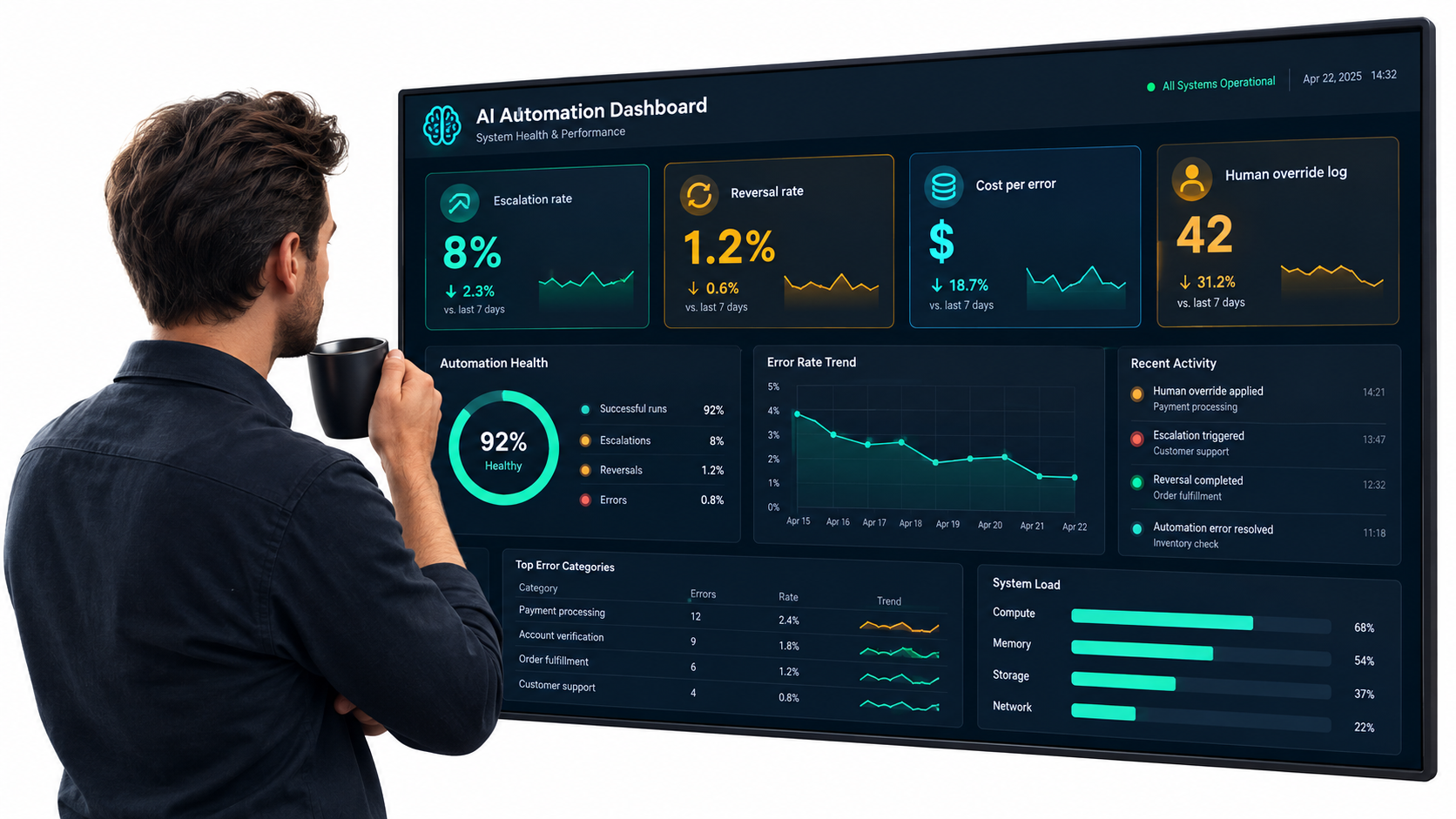
Most automation dashboards are built to show success: volume handled, hours saved, response time. Those metrics matter, but they’re structurally incapable of showing you the accountability gap. You need a second set of metrics designed to surface problems.
Reviewer edit rate
For Tier 2 tasks, track how often and how much reviewers change the AI’s output. A falling edit rate suggests the task may be ready for promotion. A sudden rise often signals a model update, a policy change, or drift in incoming requests.
Watch for edit rates that fall to near zero too quickly. That can mean the AI is excellent, or it can mean reviewers have stopped reading carefully. The BCG experiment showed how readily skilled people follow fluent AI output. Periodic blind audits, where a second reviewer checks approved items, help tell the difference.
Reversal rate
How often is an automated outcome later undone? Refunds re-processed, tickets reopened, invoices corrected, decisions overturned on appeal. Reversals are the most honest measure of error in Tier 1 automation because they capture mistakes someone else had to notice and fix.
Escalation rate and escalation quality
Track what percentage of interactions escalate to humans, and also whether escalations are appropriate. Too few escalations on sensitive topics suggests triggers aren’t firing. Too many on routine topics suggests the AI isn’t grounded well enough to be useful.
Cost of error
Assign an approximate cost to each error type: staff time to fix, refunds or credits issued, customer churn, and any legal or regulatory exposure. Multiply by frequency. This is the number that belongs next to “hours saved” in every automation report. Without it, you’re only reading half the ledger, which is precisely the trap the Klarna example illustrates.
Repeat contact rate
When a customer comes back about the same issue, the first resolution didn’t work. Klarna’s own 2024 figures cited a 25% drop in repeat inquiries, a sign the company understood this metric’s value. It belongs in every customer-facing automation dashboard.
Owner review cadence
Finally, track a process metric: has the named owner of each automation actually reviewed its performance in the last month? An automation with a named owner who never looks at it is functionally unowned.
A 30-Day Accountability Audit for Automations You’ve Already Deployed
Most businesses reading this already have AI running somewhere. The following four-week audit is designed to close the accountability gap without pausing operations.
Week 1: Inventory
- Survey each team about AI tools they use, including free and personal accounts used for work.
- List AI features enabled in existing software: help desk, CRM, accounting, HR, e-commerce, email marketing.
- Fill in the inventory spreadsheet described earlier, leaving gaps visible rather than guessing.
- Flag every automation whose output reaches someone outside the company.
Week 2: Assign ownership and tiers
- Assign a named domain owner to every inventory item. If no one will accept ownership, that’s a signal the automation should be paused or demoted.
- Classify each task as Automate, Assist, or Human Only using the reversibility and harm questions.
- Identify mismatches: tasks currently running in Tier 1 that should be in Tier 2 or 3. Prioritize customer-facing and money-related mismatches.
Week 3: Install guardrails
- For each customer-facing automation, confirm it answers from current, approved sources and escalates when it can’t.
- Write explicit escalation triggers and test them with realistic examples, including sensitive scenarios.
- Set action caps on any automation that can issue refunds, discounts, credits, or account changes.
- Turn on logging and confirm you can retrieve a specific interaction if needed.
- Add AI disclosure where customers interact with automated systems.
Week 4: Measure and schedule
- Add reversal rate, edit rate, escalation rate, and estimated cost of error to existing reports.
- Document promotion and demotion criteria for each Tier 2 task.
- Schedule a monthly owner review for each automation and a quarterly review of the full inventory.
- Create a simple incident process: how staff report an AI error, who investigates, and how fixes are communicated.
What a successful audit produces
At the end of 30 days, you should have a complete inventory, a named owner for every automation, a tier classification for every task, working guardrails on customer-facing systems, and a metrics view that shows risk alongside savings. None of this requires new software. It requires decisions, written down.
Common Objections, and Why They Don’t Hold
When businesses start putting accountability structures around AI, a few objections come up repeatedly. They’re worth addressing directly.
“Human review defeats the purpose of automation”
It doesn’t, according to the research. The NBER study found a 14% average productivity gain with AI assisting humans, not replacing them. The BCG study found 25% faster completion with humans in control. Tier 2 automation captures much of the value while keeping judgment where it’s needed. And Tier 1 remains available for the many tasks where errors are cheap and reversible.
“Our vendor handles the risk”
Vendor contracts often limit the vendor’s liability, and as Air Canada learned, a tribunal will look to the business that deployed the tool, not the technology behind it. Vendor diligence matters, but it doesn’t transfer accountability to customers.
“We’re too small to need governance”
Smaller businesses arguably need it more. A single bad automated interaction that goes viral, or a pattern of incorrect automated invoices, can hurt a small business far more than a large one. The good news is that governance at small scale is lightweight: a spreadsheet, a few named owners, and a monthly review.
“The models are getting better, so this will solve itself”
Models are improving, and the frontier will move. But the jagged-frontier research suggests it will stay jagged: improvements won’t arrive evenly across every task. Model updates can also change behavior in ways that break previously reliable workflows. Ownership and monitoring are what let you take advantage of improvements safely, rather than discovering regressions through customer complaints.
“Agentic AI changes everything”
More autonomous AI agents that take multi-step actions raise the stakes on accountability rather than lowering them. Gartner predicted in June 2025 that over 40% of agentic AI projects would be canceled by the end of 2027, citing escalating costs, unclear business value, and inadequate risk controls. The more an AI system can do on its own, the more important it becomes to know who answers for what it does.
Conclusion: Automation Is a Delegation Decision
Every time a business automates a task with AI, it’s making a delegation decision. It’s handing part of its voice, its judgment, or its authority to a system. The question isn’t whether to delegate; the evidence from adoption surveys and productivity research makes clear that AI automation for business delivers real gains when it’s well placed. The question is whether the delegation is deliberate.
The research and cases covered here point in a consistent direction:
- You own what your automation says and does. Moffatt v. Air Canada made that explicit, and existing law already reaches most AI failures.
- AI capability is jagged. Approve AI task by task, based on testing with your own data, not job function by job function.
- Experienced people are the quality layer. AI can lift novices dramatically, but it draws on expert knowledge. Keep the experts and make them owners.
- Measure both sides of the ledger. Savings without error costs produce decisions that later need public reversal.
- Tier your tasks. Automate, Assist, or Human Only, based on reversibility and harm, with written criteria for promotion and demotion.
- Guardrails should be mechanical. Grounded sources, hard escalation triggers, action caps, logs, and disclosure.
Your next three actions
- This week: Start the AI inventory. Include vendor features and employee-adopted tools, and leave the owner column blank where no owner exists.
- This month: Run the 30-day audit, prioritizing customer-facing and money-related automations.
- This quarter: Add reversal rate and cost of error to every automation report, and hold the first quarterly inventory review.
The businesses that get the most from AI in 2026 won’t be the ones that automate the most tasks. They’ll be the ones that can answer, for every automated output, a simple question: whose name is on this?