
Most conversations about AI automation for business end at launch. The workflow goes live, someone posts a screenshot in the team channel, and the hours saved get written into a quarterly update. Then everyone moves on to the next project.
That point is where the real cost starts. An AI automation is not a finished asset like a printed manual. It sits on top of things that keep moving: a language model that its vendor updates or retires, SaaS tools whose fields and APIs change, internal processes that shift as the business grows, and staff who leave and take their knowledge with them.
Software engineers have had a name for this problem for more than 30 years: technical debt. When the same thing happens inside business automations (the email triage flows, the invoice extractors, the support bots, the CRM enrichment agents), we can call it automation debt. It is the growing gap between what an automation was built to do and what it actually does today, plus the cost of closing that gap.
This article is not about choosing your first use case or working out payback periods. It covers what happens to AI automations in months 3, 9 and 18. Why do they decay? How does that decay turn into legal and financial exposure? And what practical habits keep a growing set of automations healthy rather than slowly falling apart?
The argument is simple. The businesses that get lasting value from AI automation treat it as a product with a lifecycle, not a project with an end date. Everything below explains what that means in practice.
What Automation Debt Actually Is (and Why the Metaphor Fits)
Ward Cunningham came up with the term “technical debt” in 1992 to explain to non-engineers why code needed rework. His framing still holds up: “Shipping first time code is like going into debt. A little debt speeds development so long as it is paid back promptly with a rewrite… The danger occurs when the debt is not repaid.”
The important part is the interest. Every shortcut you don’t go back and fix makes each later change slower and riskier. If enough of it builds up, Cunningham warned, entire organizations “can be brought to a stand-still.”
Machine learning made the debt worse
In 2015, a team of Google engineers led by D. Sculley published Hidden Technical Debt in Machine Learning Systems at NeurIPS. It remains one of the most cited papers on running AI in production. Their main finding was blunt: it is “dangerous to think of these quick wins as coming for free,” and it is “common to incur massive ongoing maintenance costs in real-world ML systems.”
The paper lists risk factors specific to ML systems: boundary erosion, entanglement, hidden feedback loops, undeclared consumers, data dependencies, configuration issues and “changes in the external world.” It also includes a well-known diagram showing that the model code is a small box surrounded by much larger boxes for data collection, configuration, monitoring and serving infrastructure.
Why business automations inherit all of it
Most businesses using AI automation in 2026 don’t train models. They connect a hosted LLM to their tools through a no-code platform, an internal script or an agent framework. That sounds as if it should avoid the problems Sculley described. Mostly it doesn’t.
A typical automation still has:
- Data dependencies. It reads from a CRM, inbox, spreadsheet or ticketing system whose structure can change at any time.
- Undeclared consumers. Other teams quietly start relying on its outputs, often without the builder knowing.
- Configuration sprawl. Prompts, model settings, routing rules and API keys live in several places.
- External-world dependence. The model provider controls the most important component, and you don’t.
The difference is that the debt is now spread across operations, finance, marketing and support teams, not held in one engineering group that at least knows what technical debt is. That spread is what makes automation debt hard to see.
A working definition
For this article, automation debt means the accumulated cost of every assumption an automation makes that is no longer true, or that nobody is checking. That covers stale prompts, unpinned model versions, undocumented logic, missing tests, unclear ownership and integrations that work only because nothing upstream has changed yet.
Like financial debt, some of it is a reasonable trade. Shipping a rough version to learn quickly is often the right call. The trouble comes when the debt is unrecorded, unowned and never paid down.
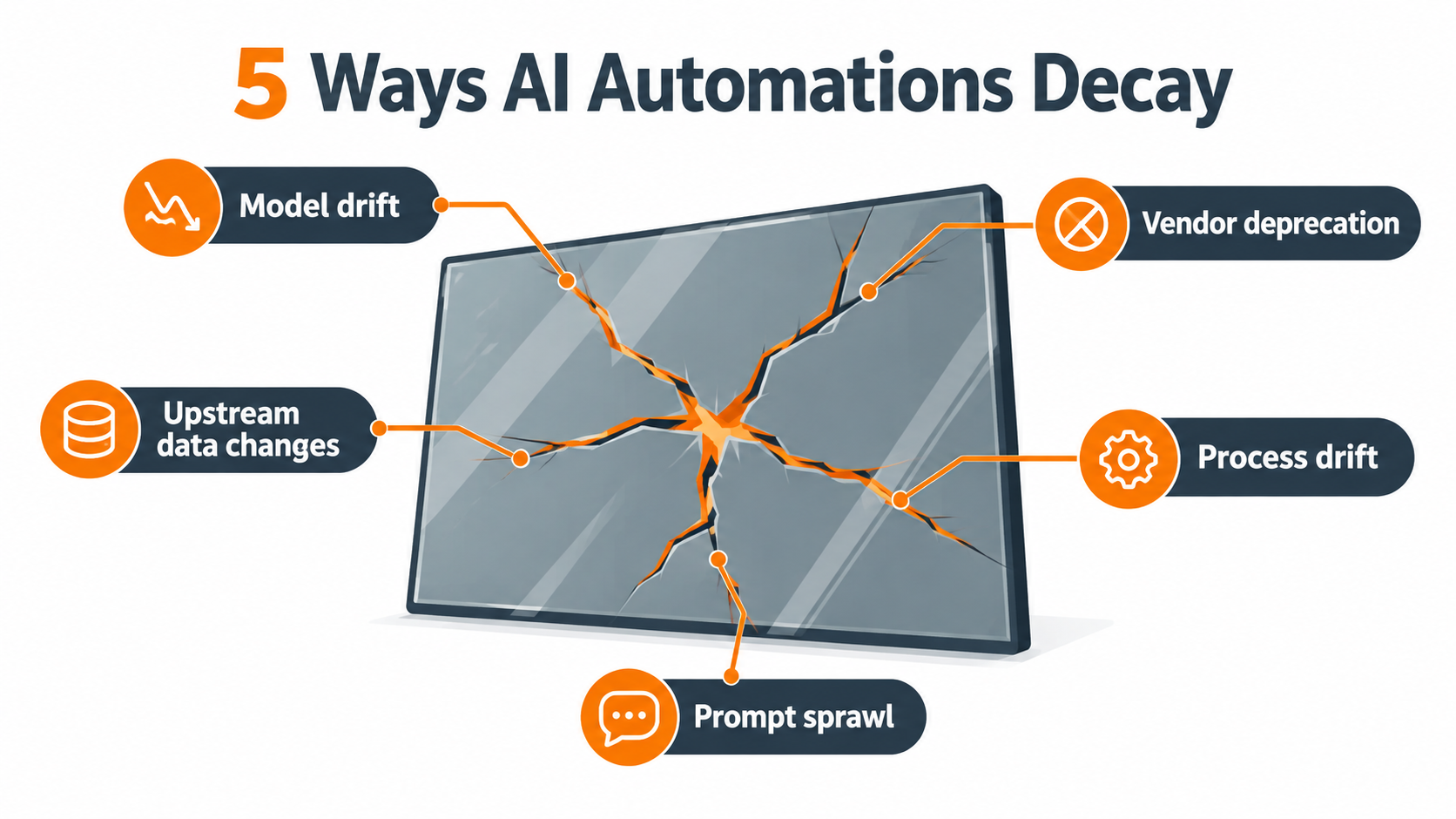
The Five Ways AI Automations Decay
Traditional rule-based automation usually fails loudly. A field gets renamed, the script throws an error, and somebody gets an alert. AI-based automation adds a worse kind of failure: it keeps running and produces outputs that look plausible but are slightly wrong. Below are the five most common sources of decay.
1. Model behavior drift
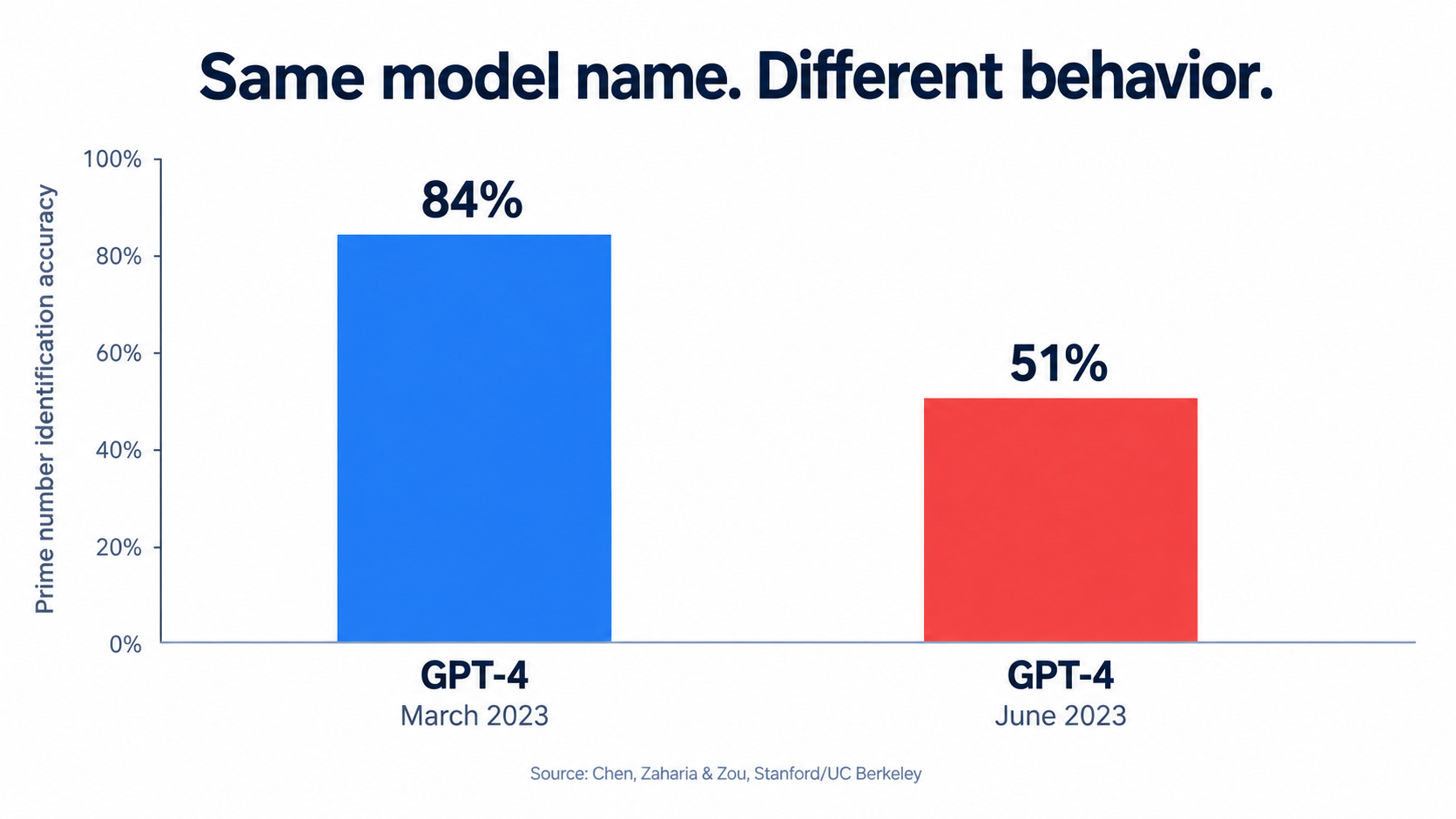
The best-known evidence comes from researchers Lingjiao Chen, Matei Zaharia and James Zou. They compared the March 2023 and June 2023 versions of GPT-3.5 and GPT-4 on the same tasks. GPT-4’s accuracy at identifying prime versus composite numbers fell from 84% to 51% between the two versions. Both models also made more formatting mistakes in code generation in June than in March.
The authors connected much of the change to a decline in GPT-4’s willingness to follow instructions. Their conclusion is the one that matters for any business: “the behavior of the ‘same’ LLM service can change substantially in a relatively short amount of time, highlighting the need for continuous monitoring.”
For a business automation, “formatting mistakes” is not a small issue. If your invoice extractor expects clean JSON and the model starts wrapping it in commentary, the next step in the chain either breaks or, worse, reads the output incorrectly.
2. Vendor deprecations and forced migrations
Even if you pin a specific model version to avoid drift, that version won’t last forever. OpenAI’s deprecation documentation states that the company “regularly retire[s] older models” and that “software relying on OpenAI models may need occasional updates to keep working.”
The published minimum notice periods are useful planning inputs:
- Generally available models: at least 6 months’ notice.
- Specialized variants (such as chat, Codex or deep research variants): at least 3 months.
- Preview models: possibly as little as 2 weeks. OpenAI explicitly does not recommend them “for business-critical production workloads unless you can migrate on short notice.”
The page also lists widely used GPT-4o and GPT-4.1 snapshots as scheduled for removal from the API in January 2027. Any automation built on those snapshots in 2024 or 2025 has a fixed date by which it must be migrated and retested. Fine-tuned versions follow the same shutdown schedule as their base models, so custom work goes when the base model goes.
3. Upstream data and schema changes
Your automation reads from systems you don’t control. A CRM admin adds a required field. A vendor redesigns its invoice template. The marketing team renames lifecycle stages. A SaaS provider releases a new API version and sunsets the old one.
Rule-based steps usually break visibly when this happens. LLM steps often adapt in ways nobody asked for. They guess at the new layout, map fields by similarity, and keep producing output. The automation looks healthy while its accuracy is falling.
4. Process drift
This is the quietest form of decay, and the most underestimated. The business changes its own rules. Refund thresholds shift, the approval matrix gets a new tier, a product line is discontinued, a new region adds tax requirements.
The automation was built to reflect the process as it was on the day someone wrote the prompt. Unless updating it is part of the change-management checklist, it keeps enforcing old policy. Customers and staff only notice when the gap causes a visible mistake.
5. Prompt and configuration sprawl
Once an automation exists, people patch it. A sentence is added to the prompt to handle an edge case. Another goes in for a different edge case. Someone copies the workflow for another region and edits the copy. Six months later there are four versions, each with slightly different instructions, and nobody can say which edits were deliberate.
Sculley’s team named a related principle “Changing Anything Changes Everything.” In LLM systems it applies directly. A one-line prompt edit made to fix one case can change behavior on dozens of others nobody re-checked.
The Ownership Gap: Automations Nobody Owns
Ask a mid-sized company how many AI automations it runs and you’ll often get a confident number. Ask who owns each one, meaning who gets called when it misbehaves and who approves changes, and the answer gets much vaguer. That vagueness is the ownership gap, and it is where most automation debt builds up.
How the gap forms
No-code platforms and AI assistants made building automations easy for non-engineers. That is mostly good: the people closest to a process understand it best. But building an automation and owning it over time are different jobs.
The usual pattern looks like this:
- An operations analyst builds a workflow on a personal or team account.
- It works, and other people start depending on it.
- The analyst changes roles, gets busier, or leaves the company.
- The automation keeps running on credentials tied to someone who no longer looks at it.
- Something upstream changes and output quality slips. Nobody is watching.
The undeclared consumer problem
Sculley’s paper warned about “undeclared consumers”: systems that quietly depend on another system’s outputs without the owner knowing. In business automation this happens constantly. A lead-scoring workflow built for sales ends up feeding a marketing dashboard. A support-ticket classifier’s tags get used in a finance forecast.
When the original builder changes the prompt to suit their own needs, those downstream users are affected without warning. The person making the change has no reason to think anyone else is relying on it.
Why IT can’t absorb it all
The obvious answer, “let IT own everything,” doesn’t hold up either. Central teams rarely have the process knowledge to judge whether a classification is correct. They also can’t keep up with the number of small automations a business produces once building becomes easy.
A workable model splits the job. Business owners are accountable for whether the output is correct. A central function is accountable for the platform, credentials, monitoring and standards. That split is covered in more detail later in this article.
A quick diagnostic
For each automation in production, you should be able to answer these in under a minute:
- Who is the named business owner?
- Whose credentials does it run on?
- Which model and version does it call?
- Who else consumes its outputs?
- When was its accuracy last checked against known-good examples?
Any question you can’t answer is automation debt you already have.
When Decay Becomes Liability: Two Public Lessons
Automation debt sounds like an internal efficiency problem until an automation speaks to customers or the public. At that point, stale or wrong output becomes a legal and reputational problem. Two well-documented cases show how.
Moffatt v. Air Canada: you own what your bot says
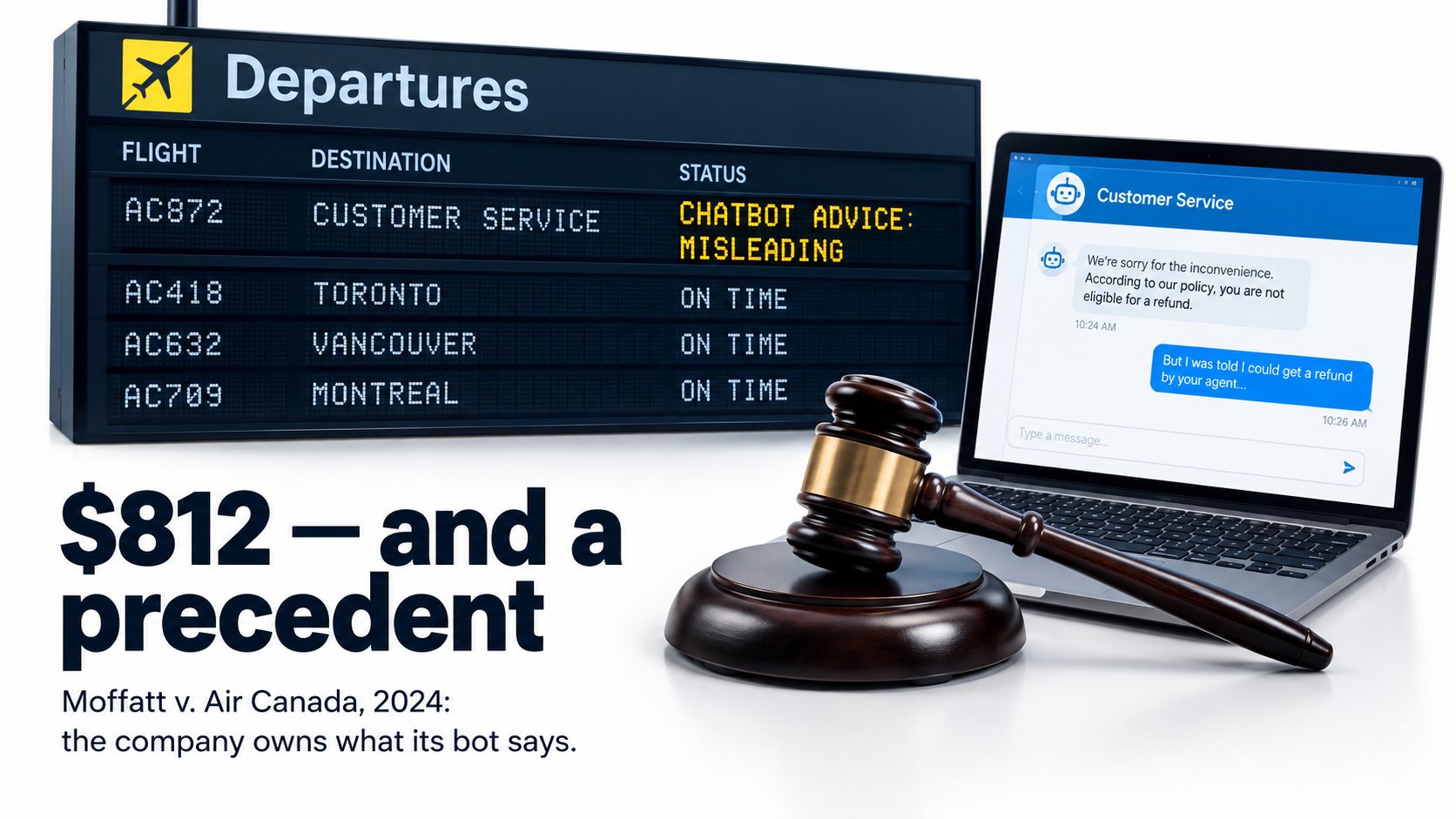
In November 2022, Jake Moffatt used Air Canada’s website chatbot after their grandmother died. The bot told them they could buy full-fare tickets and apply for a reduced bereavement rate within 90 days of the ticket being issued. A different page on Air Canada’s site said bereavement rates did not apply to completed travel.
When Moffatt asked for the refund, Air Canada refused. In the tribunal case that followed, the airline argued that the chatbot was “a separate legal entity that is responsible for its own actions.” Tribunal member Christopher Rivers called this “a remarkable submission” and wrote: “It should be obvious to Air Canada that it is responsible for all the information on its website. It makes no difference whether the information comes from a static page or a chatbot.”
He found that Air Canada “did not take reasonable care to ensure its chatbot was accurate,” and ordered the airline to pay $812 to cover the difference in fares. The amount is small. The principle is not: a business cannot separate itself from what its automation tells customers.
Note also that an Air Canada representative admitted the chatbot had provided “misleading words” and said the company had “noted the issue so it could update the chatbot.” That is automation debt surfacing in public. The bot’s information and the company’s policy had diverged, and nobody caught it until a customer did.
NYC’s MyCity chatbot: authoritative tone, wrong answers
In October 2023, New York City launched an AI chatbot to help business owners deal with city regulations. Five months later, an investigation by The Markup, co-published with Documented and The City, found the bot was giving answers that were “often incomplete and in worst-case scenarios ‘dangerously inaccurate.'”
In testing, the bot said landlords did not need to accept housing vouchers, which is illegal source-of-income discrimination in NYC. It said businesses could go cash-free, even though a 2020 city law requires them to accept cash. It said employers could take a cut of workers’ tips.
The Markup also documented inconsistency. At one point the bot gave a correct answer about housing vouchers, but when ten separate staffers asked the same question, all ten were told the wrong answer. That kind of variability is exactly what one-off spot checks miss.
The lesson for business automation
Neither case involved an exotic technical failure. Both involved an AI system whose knowledge and behavior weren’t continuously checked against the organization’s actual rules. Both were found by outsiders, not by internal monitoring.
For any automation that touches customers, pricing, policy, compliance or regulated advice, the standard is not “it worked when we tested it.” It is “we can show we take reasonable care to keep it accurate.” That is an ongoing obligation, and it has to be budgeted for.
Pricing the Full Lifecycle: Build, Run, Maintain
Most automation business cases count two costs: the cost to build, and the cost to run (platform subscriptions plus API usage). The third cost, maintenance, is usually left out or treated as zero. That omission is how automation debt grows without anyone approving it.
Why the maintenance line matters
Gartner has repeatedly pointed to cost and value problems in AI programs. In July 2024 it predicted that at least 30% of generative AI projects would be abandoned after proof of concept by the end of 2025, citing poor data quality, inadequate risk controls, escalating costs or unclear business value. In June 2025 it predicted that over 40% of agentic AI projects would be canceled by the end of 2027 for similar reasons: escalating costs, unclear business value or inadequate risk controls.
“Escalating costs” and “inadequate risk controls” are largely what unmanaged maintenance looks like from a budget review. Costs rise because nobody planned for migrations and fixes. Risk controls fall short because nobody was assigned to keep them current.
The three cost layers
- Build cost: discovery, process mapping, prompt and workflow design, integration, initial testing, rollout and training.
- Run cost: platform seats, per-task or per-execution fees, model API tokens, hosting, vector storage, and the human review time built into the workflow.
- Maintain cost: monitoring, periodic accuracy checks, prompt updates when processes change, model migrations, integration fixes, incident handling, documentation upkeep and eventual retirement.
An illustrative worksheet
The figures below are a hypothetical example to show the structure, not benchmarks. Plug in your own numbers.
Suppose an accounts-payable invoice extraction automation saves a team roughly 40 hours a month. A realistic maintenance plan might include:
- A monthly 1-hour review of exceptions and a sample of outputs.
- A quarterly re-run of the test set (about 2 hours including fixing anything that fails).
- One model migration per year (perhaps 8–16 hours of testing and adjustment).
- Two or three upstream changes per year, such as new vendor templates or ERP field changes (a few hours each).
Added up, that may be 30–50 hours a year, which is small next to roughly 480 hours saved. The point isn’t that maintenance is expensive. It’s that it’s predictable and cheap when planned, and unpredictable and expensive when it isn’t. An unplanned migration done under deadline pressure, or a silent accuracy problem found after three months of bad data, costs far more than the scheduled version.
Ask this before approving any automation
Add one line to every automation proposal: “Annual maintenance hours and named maintainer.” If nobody can fill it in, the automation isn’t ready for production. That’s not because it won’t work, but because nobody will notice when it stops working.
Designing for Maintainability From Day One
Much automation debt is taken on in the first week, through design choices that seem harmless when everything is new. A few build habits make later maintenance far cheaper.
Pin model versions deliberately
Many APIs let you call a floating alias that always points to the latest model, or a dated snapshot that stays fixed until it’s retired. Floating aliases are convenient for experiments. For production automations they mean the behavior can change without any action on your part, which is exactly the drift Chen, Zaharia and Zou measured.
Use dated snapshots in production and record which one each automation uses. Then a model change becomes a decision you make and test, not something that happens to you. OpenAI’s documentation also notes that the models endpoint exposes a shutdown_date field, so retirement dates can be checked automatically instead of relying on someone reading the email.
Demand structured outputs
Free-text output is the hardest to validate. Wherever the next step is another system rather than a human reader, require a defined schema: fixed fields, allowed values and types. Then validate every output against that schema before passing it on.
A schema failure is a loud failure, and loud failures are good. They turn silent drift into an alert you can act on.
Separate the prompt from the policy
Don’t write business rules, such as refund limits, approval thresholds or eligible regions, directly into prompt text. Keep them in a referenced source, like a configuration table, a policy document the automation retrieves, or a lookup step. When the policy changes, you update one place, and the change is visible and reviewable.
This directly addresses the Air Canada failure mode, where the bot’s version of the policy and the official one diverged.
Build in human checkpoints by risk, not by habit
Not every step needs review. Grade each automated decision by the cost of being wrong:
- Low risk (internal tagging, draft summaries): fully automated, with sampled review.
- Medium risk (customer-facing drafts, data updates to core systems): automated with confidence thresholds, so low-confidence cases go to a person.
- High risk (payments, legal or policy statements, regulated advice): a person approves before anything goes out.
Use service accounts, not personal credentials
Automations that run on an employee’s personal login fail when that person leaves, and nobody can easily see what they have access to. Run production automations on dedicated service accounts owned by a team, with permissions limited to what the workflow needs.
Write the one-page runbook before launch
Every production automation should have a short document covering what it does, what it reads and writes, which model it uses, who owns it, who consumes its outputs, how to pause it, and what to do when it fails. If writing that page is hard, the automation probably isn’t understood well enough to run unattended.
Evaluation Sets: The Cheapest Insurance You’ll Buy
If you adopt only one practice from this article, make it this one. An evaluation set, or “golden set,” is a fixed collection of real inputs with known correct outputs, which you run through the automation whenever something changes.
Why it matters so much
The Stanford and Berkeley drift study was only possible because the researchers ran the same tasks against different model versions. That is exactly what an evaluation set lets a business do for its own workflows. Without one, the only way to learn that a model update hurt your automation is to wait for complaints.
The Markup’s NYC finding, where ten staff asking the same question got the same wrong answer, also shows why one test run proves little. Evaluation needs enough examples, and sometimes repeated runs, to show the real pattern.
How to build one without a data science team
- Collect 30–100 real examples from the automation’s actual inputs. Include the messy ones: unusual formats, ambiguous requests, edge cases that caused trouble before.
- Record the correct output for each, agreed by the business owner. This is the step that needs process knowledge, not technical skill.
- Define what counts as a pass. For structured fields this can be exact match. For text, use a simple rubric: did it include the required facts, avoid prohibited claims, follow the format?
- Store it somewhere versioned, such as a shared spreadsheet with change history or a repository.
- Run it on every meaningful change: prompt edits, model migrations, integration updates, and on a fixed schedule even when nothing changed.
Grow it from failures
Every time a real error gets past the automation, add that case to the evaluation set. Over time the set becomes a record of everything that has gone wrong, and a guarantee that those specific mistakes won’t come back unnoticed.
Make migrations boring
With an evaluation set, a forced model migration becomes routine. Run the set against the current model to get a baseline, run it against the replacement, compare, adjust the prompt where needed, and switch. Six months’ notice is plenty of time if you have the test set ready. Without one, the same migration turns into weeks of nervous guessing.
A note on using AI to grade AI
For free-text outputs, many teams use a second model to score results against a rubric. That’s reasonable at volume, but the grader is also a model that can drift. Spot-check its judgments against a person’s regularly, and keep the most important criteria checkable by simple rules where you can.
Monitoring in Production: Signals Beyond Uptime
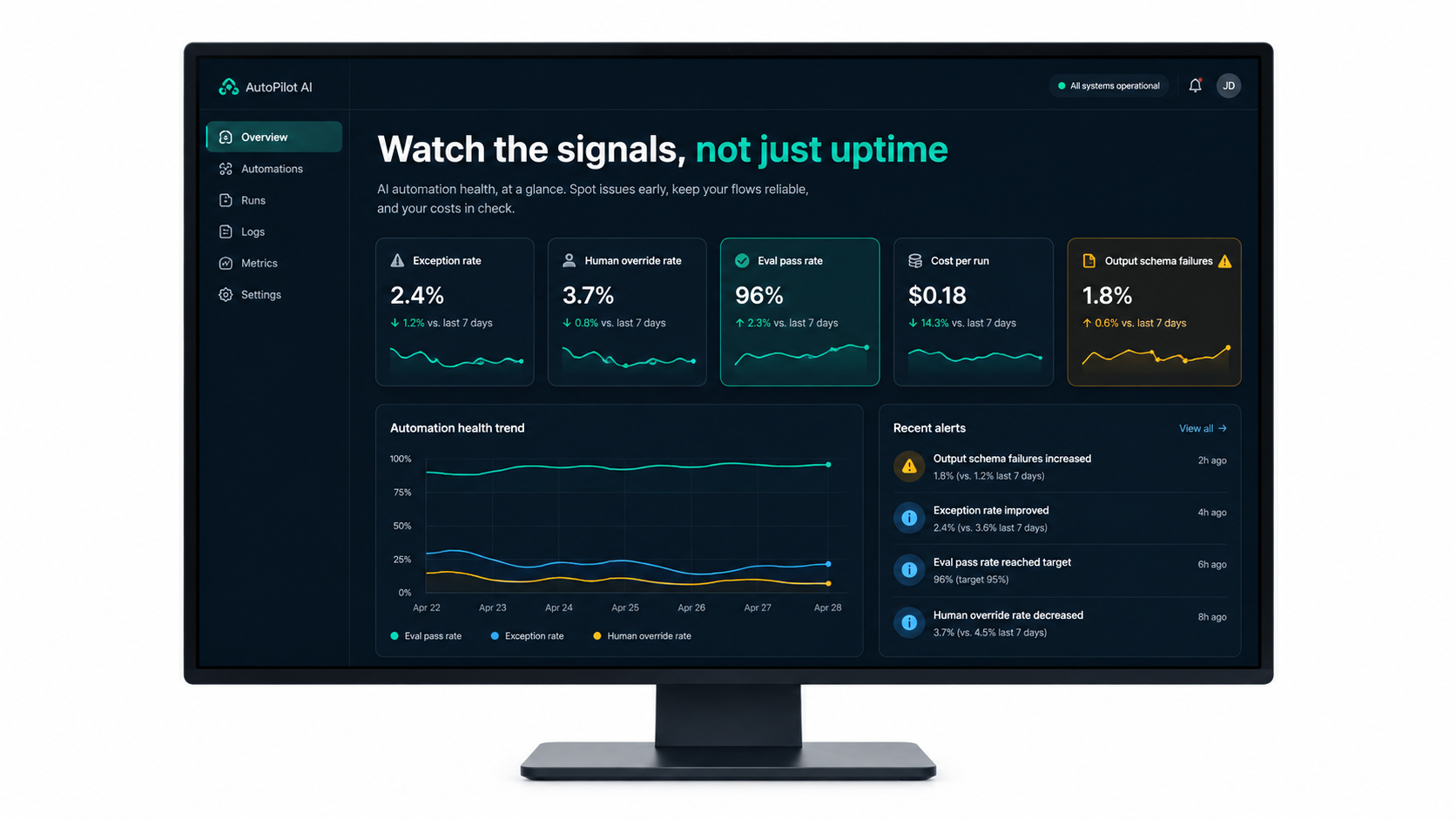
Traditional monitoring asks one question: is it running? For AI automations that’s the least useful question, because the most damaging failures happen while everything is technically running. You need signals that track output quality and human behavior around the automation.
The core signals
- Schema or validation failure rate. The share of outputs that fail structural checks. A sudden rise often means model behavior changed or an upstream input changed.
- Exception and escalation rate. How often cases go to a person. A sharp rise suggests the automation is struggling. A sharp drop can be just as worrying, since it may mean the automation has become overconfident.
- Human override rate. When reviewers change or reject an automated output, log it. This is often the earliest and most honest signal of decay.
- Scheduled evaluation pass rate. The result of re-running the golden set weekly or monthly, tracked over time.
- Cost per run. Token usage per execution can creep up as prompts grow, retries rise or inputs get longer. Cost spikes often show up alongside quality problems.
- Volume against expectation. If an automation that normally handles 500 items a day handles 50, something upstream has probably broken.
Sampling output for review
Even with good metrics, have a person read a small random sample of outputs on a regular schedule. Metrics catch patterns. People catch outputs that are technically valid but wrong in context: the polite reply that promises something the company doesn’t offer, or the summary that leaves out the one fact that mattered.
Alerts that reach a person
An alert that goes to a shared inbox nobody reads isn’t monitoring. Send each automation’s alerts to its named owner, set thresholds that reflect real problems rather than noise, and agree in advance what happens when an alert fires: pause, route everything to manual handling, or investigate while it keeps running.
Build a kill switch
Every automation should have a documented, tested way to stop it quickly and fall back to a manual process. Customer-facing automations should be able to switch to a safe holding response (“A team member will follow up shortly”) within minutes. If pausing an automation takes a developer and a deployment, it will be left running too long when something goes wrong.
Log enough to reconstruct decisions
For automations that make or inform decisions, log the input, the model version, the prompt version and the output. When a customer disputes something, as Moffatt did, you need to be able to show what the system said and why. That is also how you demonstrate the “reasonable care” the Air Canada tribunal found missing.
Inventory, Versioning and Knowing When to Retire
You can’t manage automation debt you can’t see. The foundation of every practice above is a simple, current inventory of what is running.
The automation register
A spreadsheet is enough to start. Each row is one production automation. Columns should include:
- Name and short description
- Business owner and technical maintainer
- Platform and credential or service account used
- Model provider and pinned version, plus known shutdown date
- Systems read from and written to
- Known downstream consumers
- Risk tier (low, medium, high)
- Link to runbook and evaluation set
- Last evaluation date and result
- Next scheduled review
Finding what already exists
Building the first version of the register usually surprises people. Practical ways to find automations include reviewing workspace lists on automation platforms, checking API usage by key with your model providers, auditing connected apps in core systems such as your CRM, email and accounting tools, and simply asking each team what they’ve built.
Expect to find duplicates, abandoned experiments still consuming API credits, and at least one important workflow running on a former employee’s account.
Version prompts like code
Prompts are the logic of an AI automation. Treat changes to them the way you’d treat changes to a pricing rule: recorded, explained and reversible. At minimum, keep a change log with the date, the person, the reason, and the evaluation result before and after. Many platforms now support prompt versioning natively. Where they don’t, a shared document with history is better than nothing.
Retirement is a feature
Not every automation should live forever. Some were built for a process that no longer exists. Some have been replaced by features now built into the SaaS tools they connected. Some cost more in upkeep than they save.
Retire an automation when:
- Its volume has fallen to the point where manual handling is cheaper than maintenance.
- A native feature in an existing tool now does the same job.
- Nobody is willing to own it.
- A forced migration would cost more than rebuilding with a simpler approach.
Retirement needs its own checklist: notify downstream users, revoke credentials, archive logs according to your retention policy, and remove it from the register. An automation switched off without that cleanup leaves its own debt behind, usually as live API keys and broken dependencies elsewhere.
Who Owns Maintenance: An Operating Model That Works
Practices only hold if someone is responsible for them. Most organizations that keep automations healthy settle on a split model, whatever they call it.
The business owner
Each automation has a named owner in the team whose process it runs. This person is accountable for whether the output is correct. They approve the evaluation set’s expected answers, review sampled outputs, decide on changes when the process changes, and make the call on retirement.
The owner doesn’t need to be technical. They need to know the process and have the authority to change how it’s handled.
The maintainer
Someone, whether the original builder, an operations engineer or an automation specialist, is responsible for the mechanics: making prompt and workflow changes, running evaluations, carrying out model migrations and fixing integrations. In small companies the owner and maintainer may be the same person. That’s fine as long as both roles are named.
The platform or enablement function
A central group, which might be IT, a small automation center of excellence or a single operations lead in a smaller business, is responsible for the shared foundation:
- Approved platforms and model providers
- Service accounts and credential management
- The automation register
- Monitoring and alerting standards
- Tracking provider deprecation notices and flagging affected automations
- Templates for runbooks and evaluation sets
- Risk-tier definitions and what each tier requires
Change management integration
The most effective single step against process drift is to add one question to every process or policy change: “Which automations does this affect?” When finance changes the approval matrix or support changes the refund policy, the register shows which automations encode that rule, and their owners get notified before the change goes live, not after a customer finds the mismatch.
Making it sustainable in small businesses
A 15-person company doesn’t need a center of excellence. It does need the same functions handled at a lighter level: one person who keeps the register, a named owner per automation, an evaluation set for anything customer-facing, and a calendar reminder for quarterly reviews. The structure scales down. Leaving it out entirely doesn’t work.
The Quarterly Automation Health Review
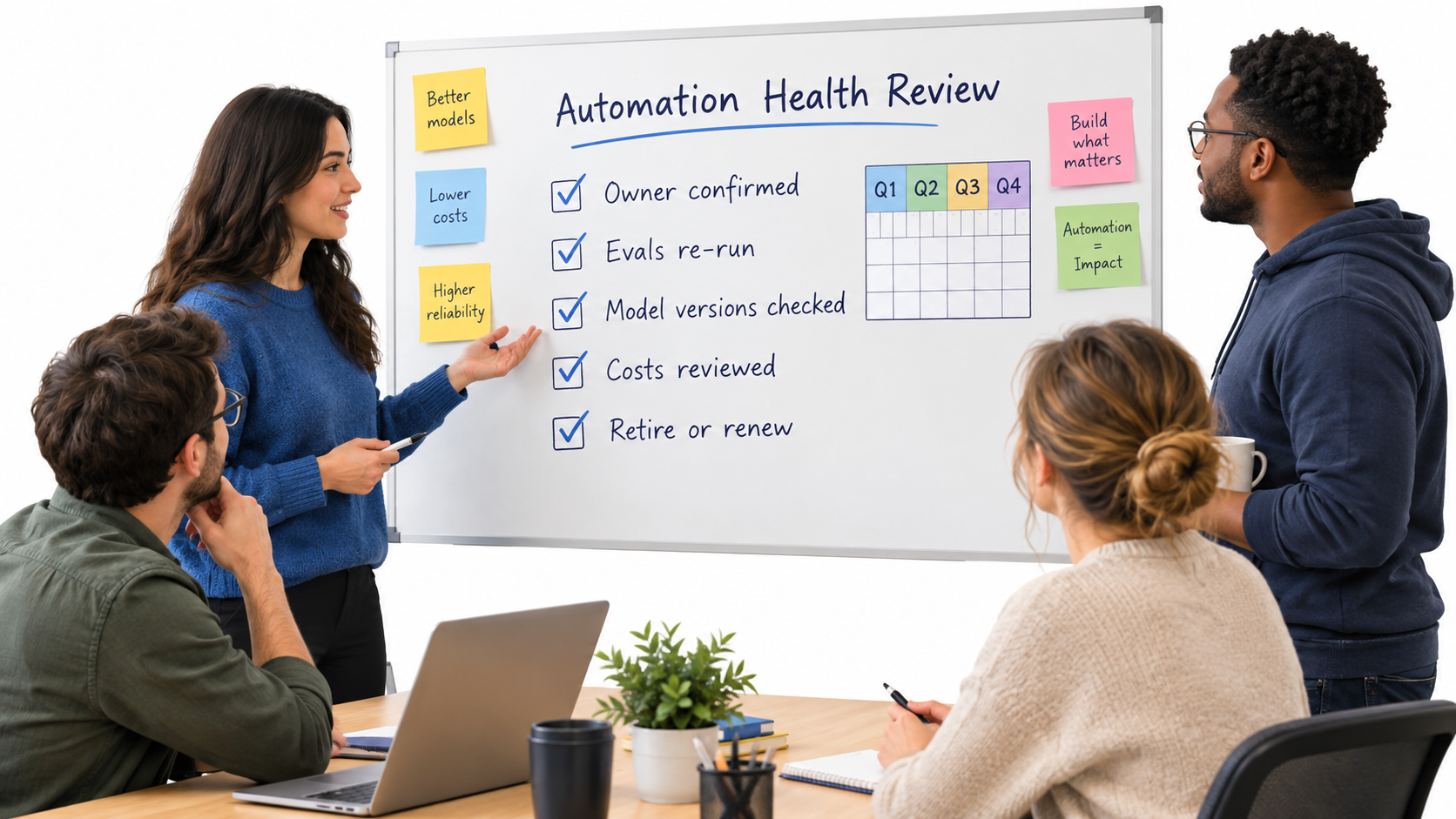
Debt gets paid down through routine, not heroics. A short quarterly review, around 30 minutes per important automation and less for low-risk ones, catches most decay before it becomes an incident.
The checklist
- Ownership confirmed. Is the named owner still in the role and still accountable? Is the maintainer still available?
- Evaluation re-run. Run the golden set. Compare results to the last quarter. Investigate any decline.
- Model status checked. Is the pinned model version deprecated or scheduled for shutdown? If so, is a migration planned with enough time to test?
- Upstream changes reviewed. Have any connected systems changed fields, templates or API versions? Have any been announced?
- Process alignment checked. Has any policy or process this automation encodes changed since the last review? Does the prompt or configuration still match?
- Monitoring trends reviewed. Override rates, exception rates, schema failures and cost per run over the quarter.
- Consumers confirmed. Has anyone new started depending on the outputs? Do they know who the owner is?
- Value re-checked. Is the volume and time saved still worth the run and maintenance cost?
- Documentation current. Does the runbook still describe what actually happens?
- Decision recorded. Renew, fix, rebuild or retire, plus the date of the next review.
Prioritizing by risk
Don’t give every automation the same attention. High-risk, customer-facing automations may warrant monthly evaluation runs and quarterly full reviews. Low-risk internal helpers may need only an annual check and automated alerts in between. The risk tier in the register should set the review frequency.
Tracking the debt itself
Over time, the review produces a useful metric: the share of production automations that are “healthy,” meaning they have a named owner, a current evaluation set, a pinned and supported model, an up-to-date runbook, and a passing recent review. That number, tracked quarter to quarter, tells leadership more about whether the automation program is sustainable than any count of workflows launched.
Conclusion: Treat Automations Like Products, Not Projects
AI automation for business delivers real value. The hours saved are real, and so is the speed. But the value is not locked in on launch day. It depends on a set of assumptions about models, data, processes and people that start to drift as soon as the automation goes live.
The evidence is consistent. Researchers have shown that the same model service can change behavior noticeably within months. Providers publish formal retirement schedules for the models businesses rely on. Tribunals have ruled that companies own what their automations tell customers. Public deployments have shown how confidently an unchecked system can give wrong answers. And analysts keep naming escalating costs and weak risk controls as the reasons AI projects get canceled.
None of this is an argument against automation. It is an argument for budgeting for its upkeep honestly.
Actionable takeaways
- Build a register this month. List every production automation with an owner, a maintainer, the model version and the systems it touches.
- Add a maintenance line to every proposal. No named maintainer and annual hours estimate means it’s not ready for production.
- Pin model versions in production and track shutdown dates automatically.
- Create an evaluation set of 30–100 real examples for every medium- and high-risk automation, and add every real failure to it.
- Require structured outputs and validate them, so drift fails loudly.
- Keep policy out of prompts. Reference business rules from a single source that changes when the policy changes.
- Monitor override and exception rates, not just uptime, and route alerts to a named person.
- Test your kill switch before you need it.
- Ask “which automations does this affect?” in every process change.
- Run a quarterly health review and be willing to retire what no longer earns its keep.
Ward Cunningham’s warning from 1992 applies here unchanged: a little debt speeds things up, as long as it gets paid back. The businesses that keep getting value from AI automation over the next few years won’t necessarily be the ones that build the most workflows. They’ll be the ones that can still say, at any point, exactly what each workflow is doing and who is making sure it stays right.