
Most writing about AI automation for business is aimed at large companies. It covers enterprise pilots, data platforms, centers of excellence, and procurement cycles that take months. If you run a company with 8 people, or 40, most of that advice doesn’t apply. You don’t have a data science team. You don’t have a transformation budget. You probably don’t have an IT department at all.
That leaves a fair question that rarely gets a straight answer: is AI automation actually worth it for a small business, or is it something built for organizations with far more people and money?
The evidence points somewhere you might not expect. Several of the most carefully designed studies of generative AI at work found that the biggest gains go to the people and teams with the least built-up expertise and support. That describes most small businesses. At the same time, the same research shows clear ways AI can make work worse when it’s pointed at the wrong tasks. A small team has less room to absorb those mistakes.
This article works through that tension using published research rather than vendor marketing. We’ll look at how fast small businesses are adopting AI, why small teams may be in a better position than large ones, what the “novice effect” and the “jagged frontier” mean for your choices, which workflows tend to pay off by function, what it really costs, and a practical 30-day plan for a company that has never automated anything with AI.
The goal isn’t to convince you to automate everything. It’s to help you work out which of your tasks are worth handing to AI, which ones aren’t, and how to tell the difference before it costs you a customer or an error in your books.
The Adoption Gap Between Small and Large Businesses Is Closing Fast
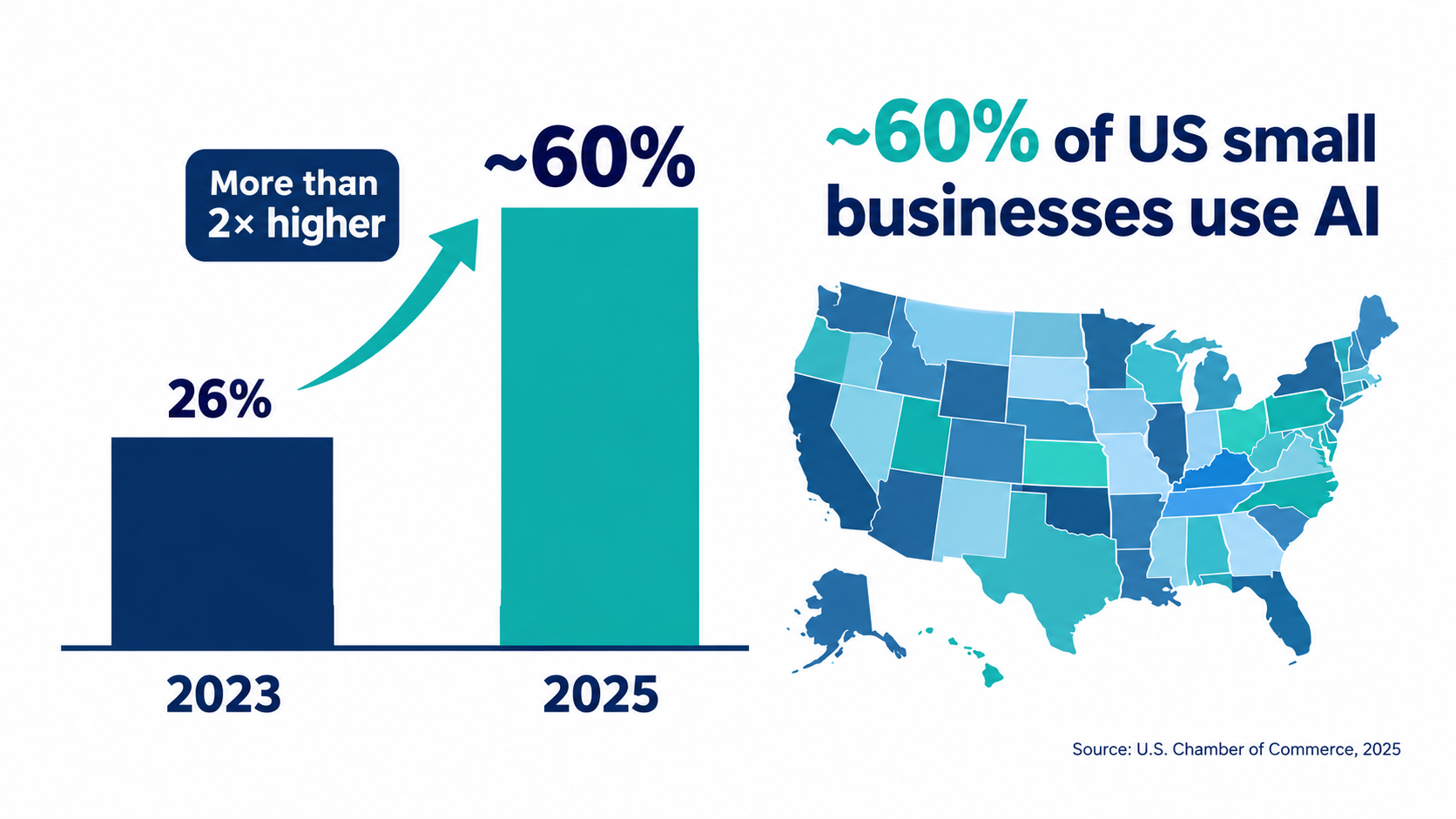
A few years ago, it was reasonable to think of AI as a big-company technology. That view no longer matches the data. The U.S. Chamber of Commerce’s 2025 Empowering Small Business report found that almost 60% of small businesses say they are using artificial intelligence for business operations, more than double the share in 2023.
That’s a remarkable shift in roughly two years. It means that, for many small business owners, the question is no longer whether to use AI. It’s whether they’re using it in ways that actually save time and money, or just poking at a chatbot now and then.
Adoption varies a lot by state
The Chamber’s state-level breakdown shows how uneven this picture still is. In its data, 57% of small businesses in Alabama and Colorado reported currently using an AI platform, while Connecticut reached 72%. Use of generative AI chatbots specifically ranged from the mid-30s in some states (36% in Arkansas and the District of Columbia) to 58% in Connecticut.
Those differences matter for one practical reason: your competitors are local. If you run a regional accounting firm, a landscaping business, or a specialty retailer, the relevant benchmark isn’t the national average. It’s what the other firms in your market are doing. In some places, AI use is already the norm among small businesses.
Optimism is high, and so is regulatory anxiety
Small business owners are broadly positive about where this is going. In the Chamber’s state data, the share who believe AI will help their businesses in the future ranged from 67% (Delaware) to 92% (District of Columbia), with most states clustering around 78% to 82%.
But the same survey surfaces a real worry. Large shares of small businesses said they’re concerned that a patchwork of state-level tech policies will drive up legal and compliance costs, from 55% in Georgia to 76% in Colorado and 84% in the District of Columbia. For a small firm without in-house counsel, uncertainty about rules can be as much of a barrier as cost or skills.
What “using AI” usually means in practice
It’s worth being careful with the headline number. “Using AI” in a survey can mean anything from an owner asking a chatbot to rewrite an email once a week to a fully connected workflow that classifies incoming orders and updates inventory. Most small businesses are much closer to the first end of that range.
That’s the real gap this article is about. Adoption is widespread. Automation, meaning AI built into repeatable workflows that run with defined inputs, outputs, and checks, is much less common. The distance between those two things is where most of the remaining value sits for small companies.
Why Small Teams May Get More From AI Than Big Companies Do
It’s easy to assume that big companies get the most out of AI because they can spend the most on it. But spending and value aren’t the same thing. Several structural features of small businesses work in their favor.
Short decision chains
In a large organization, adding an AI step to a workflow can require sign-off from IT, security, legal, procurement, and the business unit. Each group has valid concerns, and each review takes time. Many enterprise AI projects stall in exactly this phase.
In a 15-person company, the owner can decide on Tuesday to try an AI tool for drafting quotes and have it running by Thursday. That speed matters. It means small businesses can run more experiments, learn faster, and drop what doesn’t work without much sunk cost.
Less legacy software to work around
Large companies often run on decades-old systems that weren’t designed to connect to anything. Getting data in and out of them is slow and costly. Small businesses tend to run on newer, cloud-based tools such as accounting software, CRMs, help desks, and e-commerce platforms. Many of these now include AI features or connect easily with automation services.
That doesn’t mean integration is free. But the starting point is usually simpler, which lowers the cost of the first few automations.
Generalist roles create more automation surface
In a small business, one person often handles customer email, invoicing, scheduling, social posts, and supplier communication, all in the same day. That spread of duties is exhausting. It’s also where AI tends to help most, because many of those tasks involve reading, writing, summarizing, and sorting information.
In a large company, those tasks are split across specialists who already have templates, tools, and support staff. The marginal gain from AI is smaller. In a small company, an hour saved on admin is an hour the owner can spend on sales, product, or simply not working until midnight.
The counterweight: thin margins for error
There’s a real downside to being small, and it’s worth stating plainly. A large company can absorb a bad AI rollout. A badly worded automated reply to an angry customer, an incorrect figure in a tax filing, or a leaked client file can do serious damage to a small firm’s reputation and finances.
That’s why the rest of this article focuses so heavily on task selection. Small businesses have structural advantages in adopting AI, but those advantages only pay off when the tasks are chosen carefully.
The Novice Effect: AI Narrows the Skill Gap on Your Team
One of the most useful pieces of research for small business owners comes from a study of customer support work. Economists Erik Brynjolfsson, Danielle Li, and Lindsey Raymond studied the staggered rollout of a generative AI conversational assistant across 5,179 customer support agents. Their findings were later published in the Quarterly Journal of Economics in 2025.
What the study found
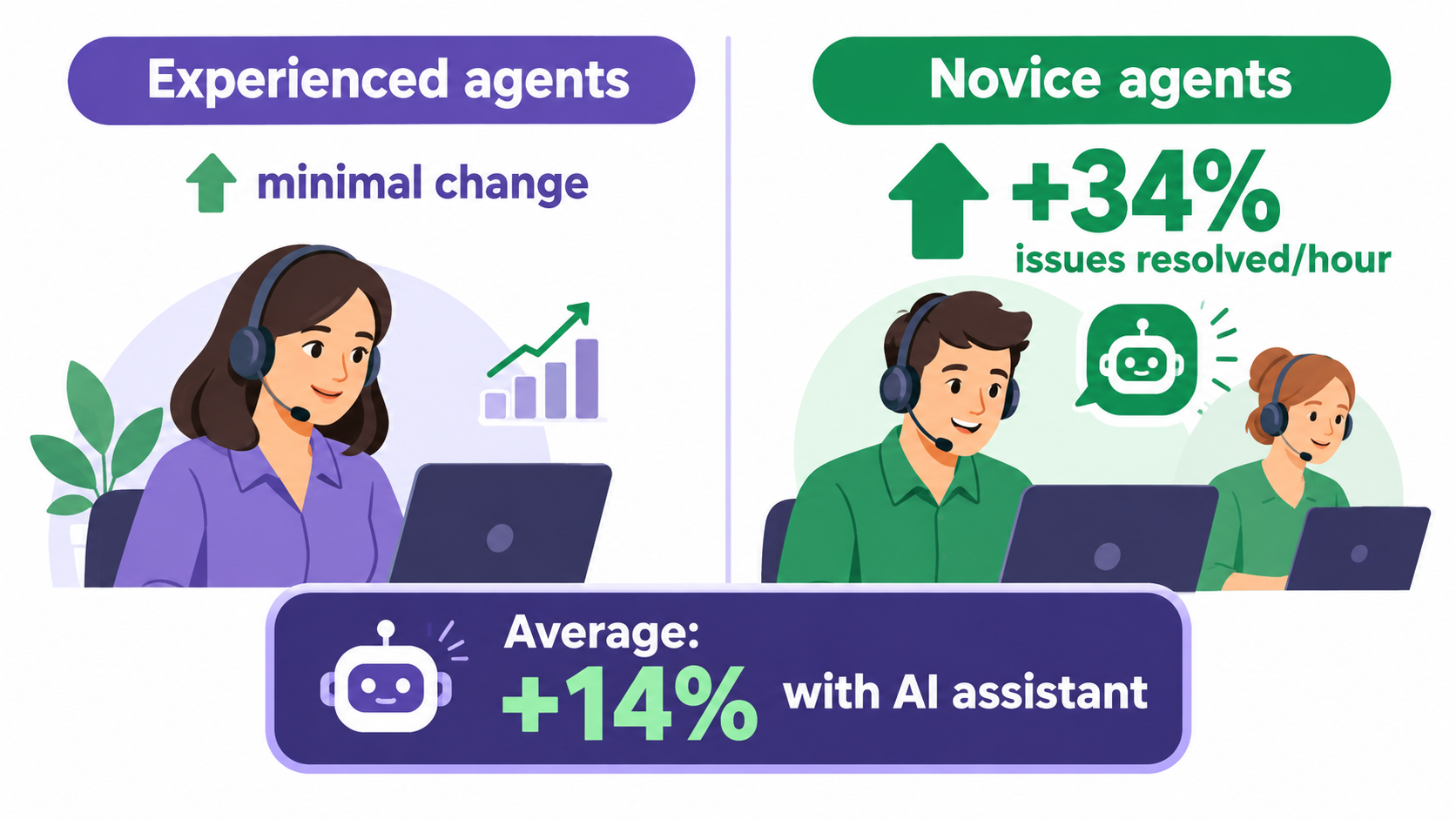
Access to the AI tool increased productivity, measured as issues resolved per hour, by 14% on average. But the average hides the most interesting part. Novice and low-skilled workers saw a 34% improvement, while experienced and highly skilled workers saw minimal impact.
The researchers offer suggestive evidence for why. The AI model appeared to spread the best practices of the most capable workers to everyone else, helping newer agents “move down the experience curve” faster. The study also found that AI assistance improved customer sentiment and increased employee retention.
Why this matters more for small businesses
Small businesses deal with a skill gap problem constantly. You hire someone new, and for months they don’t know the products, the customers, or the unwritten rules for how things get done. The owner or a senior employee becomes the bottleneck, answering the same questions again and again.
The novice effect suggests that AI can shorten that ramp-up. If your best salesperson’s way of handling objections, or your most experienced bookkeeper’s way of categorizing tricky expenses, can be captured in instructions, examples, and reference documents an AI tool can draw on, newer staff get access to that knowledge on demand.
Turning tacit knowledge into reusable instructions
Here’s what that looks like in practice for a small team:
- Document your best answers. Collect the 20 to 50 replies your most experienced staff member sends most often. These become examples an AI assistant can learn the tone and content from.
- Write down the judgment calls. When do you offer a refund versus a credit? When does a client request need the owner’s approval? Rules like these are what make AI drafts usable rather than generic.
- Keep the expert in the loop at first. Have senior staff review AI-assisted drafts from new hires for the first few weeks. That catches errors and improves the reference material over time.
A caution about experienced staff
The study’s finding that skilled workers saw minimal gains is also worth noting. Don’t expect your best people to become dramatically faster. Their value may shift instead, from doing every task themselves to shaping the knowledge base that helps everyone else. For a small business, that can be a better use of their time than handling routine tickets.
The Jagged Frontier: Where AI Helps and Where It Quietly Hurts
If the novice effect is the encouraging news, the “jagged frontier” is the warning. The term comes from a field experiment run by researchers from Harvard Business School and other institutions with Boston Consulting Group, involving several hundred of the firm’s consultants working on realistic tasks.
Inside versus outside the frontier
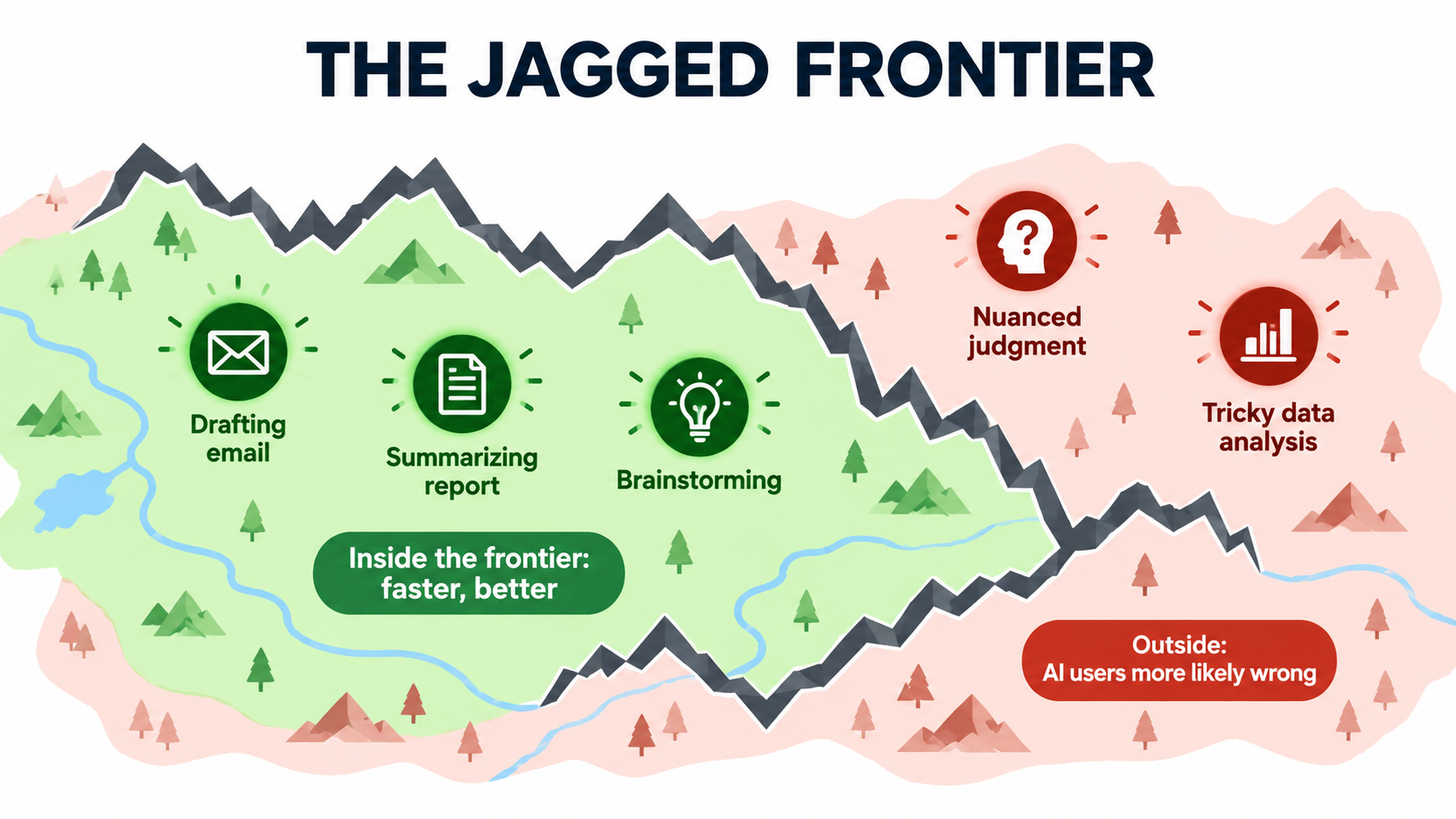
The researchers found that AI capabilities form an uneven, “jagged” boundary. Some tasks that seem hard are well within what AI can do. Others that seem similar in difficulty fall just outside it.
For tasks inside the frontier, consultants using GPT-4 completed about 12% more tasks, finished roughly 25% faster, and produced work rated more than 40% higher in quality than a control group. But on a task deliberately designed to sit outside the frontier, consultants using AI were about 19 percentage points less likely to produce a correct answer than those working without it.
The danger is that people don’t notice when they’ve crossed the line. AI output looks equally confident and polished whether it’s right or wrong.
What tends to sit inside the frontier for a small business
Based on the research and how these tools work, tasks that tend to fall inside the frontier share some common traits. They involve language more than precise calculation. They have clear examples of good output. And errors are easy to spot on review.
- Drafting routine emails, quotes, and follow-ups
- Summarizing long documents, meeting notes, or customer feedback
- Rewriting product descriptions or web copy in a consistent tone
- Sorting incoming messages into categories (billing, support, sales)
- Pulling key fields out of invoices, receipts, or forms for human checking
- Brainstorming options for a marketing campaign or a process change
What often sits outside it
Tasks outside the frontier usually involve context the model doesn’t have, judgment calls with real consequences, or numbers that have to be exactly right.
- Final decisions on pricing, credit, or hiring
- Tax positions, legal interpretations, or regulatory filings
- Analysis where a subtle data detail changes the conclusion
- Sensitive conversations with upset customers or employees
- Anything that depends on knowing facts the AI hasn’t been given
The practical rule
For small businesses, the lesson isn’t “avoid AI for hard things.” It’s “match the level of human review to how costly an error would be.” A draft social post that misses the mark costs nothing. A miscategorized expense that triggers a tax problem costs a lot. Build your review steps around that difference.
The Writing Dividend: Where Small Teams See the Fastest Payback
If you’re looking for the single category of work where AI most reliably saves small businesses time, it’s writing. A study by MIT economists Shakked Noy and Whitney Zhang, published in Science, offers some of the clearest evidence.
What the MIT experiment measured
The researchers gave 453 college-educated professionals, including marketers, grant writers, consultants, data analysts, HR professionals, and managers, writing tasks specific to their occupations. These were 20- to 30-minute assignments like cover letters for grant applications, emails about organizational restructuring, and plans for customer data analysis.
Participants given access to ChatGPT finished tasks about 40% faster, roughly 11 minutes quicker than the control group. Their output quality, judged by experienced professionals who didn’t know which submissions used AI, rose by 18%. Like the customer support study, the gap between stronger and weaker performers also narrowed.
The limits the researchers flagged
The authors were candid about the study’s limits, and small business owners should take them seriously. The tasks didn’t require precise factual accuracy or detailed context about a specific company or customer. Instructions were explicit, while real work is often vaguer. And the researchers didn’t fact-check outputs, noting that accuracy remains a major problem for generative AI.
In other words, the 40% speed gain applies most directly to writing that is structured, well defined, and checkable. That happens to describe a large share of small business communication.
Writing tasks that add up in a small business
Consider how much of a typical small business week is spent writing:
- Responding to customer inquiries and follow-ups
- Writing proposals, quotes, and statements of work
- Drafting job postings and onboarding materials
- Creating newsletters, social posts, and product listings
- Summarizing calls and sending recap emails
- Drafting policies, standard operating procedures, and checklists
Even if only part of that work fits neatly inside the frontier, the time adds up. For an owner who spends several hours a week on written communication, a meaningful share of that time can shift back to higher-value work.
Making writing automation reliable
The difference between “I asked a chatbot once” and a dependable writing workflow comes down to three things:
- Templates with context. Give the AI your company details, product facts, pricing rules, and tone guidelines every time, ideally through a saved project, custom instructions, or a shared reference document.
- Examples of good output. Three or four strong past examples usually improve results more than long written instructions.
- A defined review step. Decide who checks what before anything goes out. Facts, prices, dates, and promises always get a human look.
A Function-by-Function Map for a 5–50 Person Company
Rather than starting with tools, it helps to start with the work. Below is a practical map of where AI automation tends to fit in a small business, organized by function, with notes on review needs. Treat it as a starting point for your own audit, not a prescription.
Customer service
This is where the strongest research evidence sits, thanks to the Brynjolfsson study. Common starting points include AI-suggested replies for agents to edit, automatic tagging and routing of incoming tickets, and summaries of long email threads so whoever picks up the conversation doesn’t have to reread everything.
Review level: Medium. Suggested replies should be reviewed before sending at first. Fully automated replies work best for narrow, factual questions like opening hours, order status, or return policy, with an easy route to a human.
Finance and administration
Many accounting platforms now include AI features for categorizing transactions, reading receipts, and flagging unusual entries. AI can also help draft payment reminders and summarize financial reports in plain language for owners who aren’t accountants.
Review level: High. Numbers must be right. Use AI to do the first pass and surface exceptions, and keep a human, ideally your bookkeeper or accountant, responsible for what gets filed.
Sales and marketing
Common uses include drafting outreach emails, personalizing follow-ups based on CRM notes, writing product descriptions and ad variations, summarizing sales calls, and repurposing one piece of content into several formats.
Review level: Low to medium. Brand tone and factual claims need checking, but the cost of a weak draft is usually small. This is often the easiest place to get started.
Operations
Operations work in small businesses often involves reading and moving information between systems: pulling details from supplier emails into a spreadsheet, turning a customer request into a work order, or drafting a schedule based on availability. AI can handle the extraction and formatting, while a rules-based automation tool moves the data.
Review level: Medium. Spot-check outputs regularly, especially at first. Watch for edge cases, such as unusual order formats, that the AI may handle incorrectly without warning.
HR and people
AI is useful for drafting job descriptions, onboarding guides, training materials, and internal policies. It can also help new hires find answers in your documentation rather than interrupting colleagues.
Review level: High for anything involving decisions about people. Hiring, performance, and pay decisions carry legal and ethical risk and belong outside the frontier. Use AI for drafting and documentation, not for judging candidates or employees.
A simple scoring method
For each task you’re considering, score it from 1 to 5 on three questions:
- Volume: How often does this task happen each week?
- Language-heaviness: How much of the task is reading, writing, summarizing, or sorting text?
- Error tolerance: How cheap is it to catch and fix a mistake?
Tasks scoring high on all three are your best first candidates. Tasks scoring low on error tolerance can still be automated, but they need a stronger review step.
Assist, Automate, or Delegate: Three Levels of AI Automation
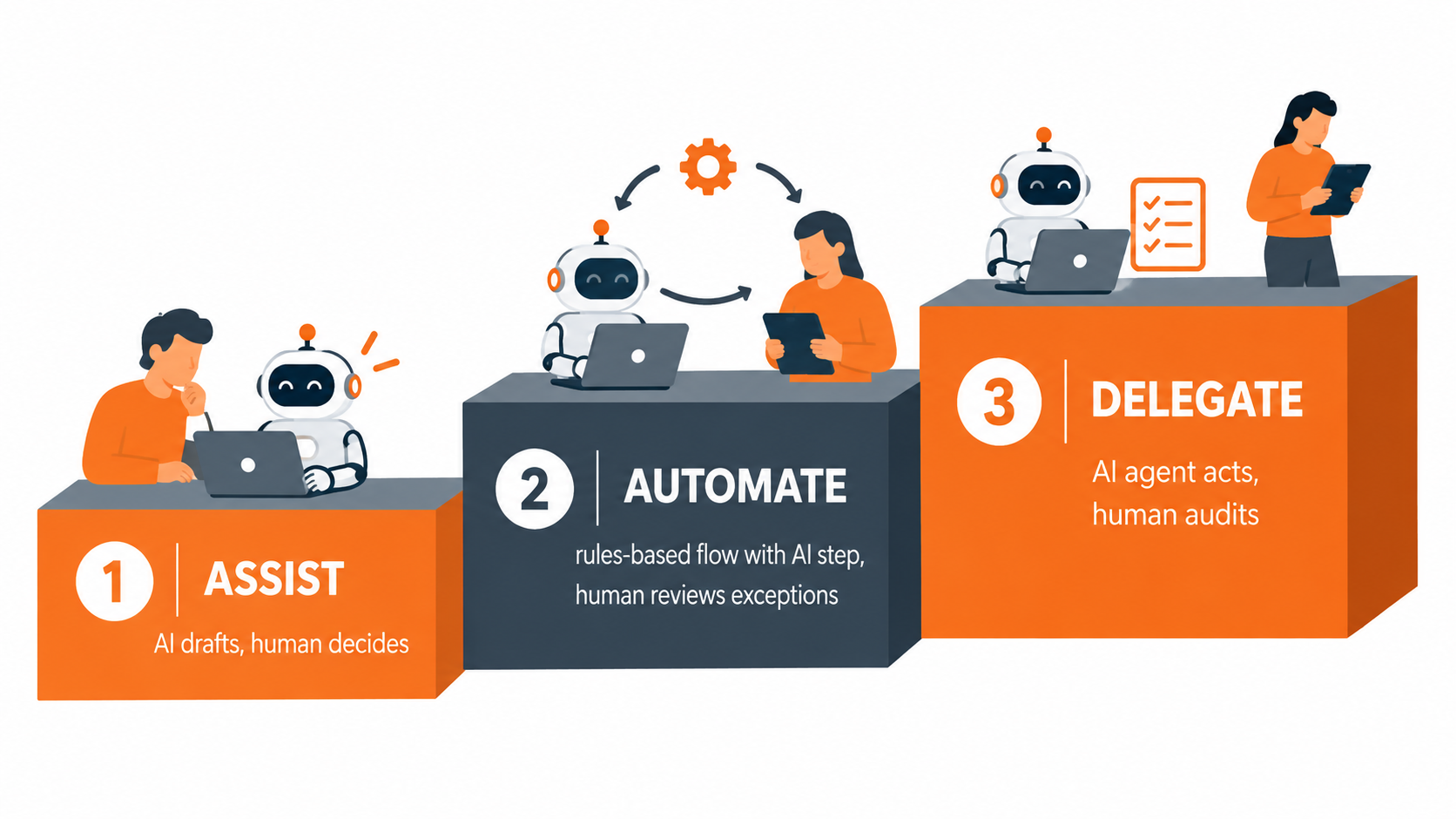
A lot of confusion about AI automation for business comes from treating it as a single thing. In practice, there are three distinct levels, each with different costs, risks, and payoffs. Small businesses usually do best by moving up them gradually.
Level 1: Assist
At this level, a person uses an AI tool directly to help with a task. They write a prompt, get a draft, edit it, and send it. The human stays fully in control.
This is where most small businesses are today, and it’s where the research evidence is strongest. Both the customer support and MIT writing studies measured AI assisting people, not replacing them. The upside is real, the risk is low, and the cost is usually just a subscription.
Limitation: Assist mode depends on people remembering to use the tool, and results vary by who’s prompting. Gains are real but uneven across the team.
Level 2: Automate
Here, AI becomes one step inside a defined workflow. For example: a new support email arrives, an automation tool sends it to an AI model to classify and draft a reply, the draft lands in the agent’s queue, and the agent approves or edits it. Or: an invoice arrives by email, AI extracts the vendor, amount, and due date, and the data goes into your accounting system for a bookkeeper to confirm.
The key difference is consistency. The same instructions, examples, and checks apply every time, regardless of who is working that day. Humans review exceptions or approve outputs rather than starting from scratch.
Limitation: Someone has to build and maintain the workflow. When a connected app changes or an unusual input appears, things can break quietly. Plan for monitoring.
Level 3: Delegate
At the top level, an AI agent takes actions on its own, such as replying to customers, updating records, or scheduling appointments, with humans auditing results after the fact rather than approving each one.
This is where much of the current excitement about “agentic AI” sits. For small businesses, it should be used narrowly. The jagged frontier research is a reminder that AI can fail confidently, and at the delegate level, nobody is checking before the action happens.
Where it can work: narrow, reversible, low-stakes actions with clear rules, like booking appointments into open calendar slots or answering a limited set of factual FAQs, with a clear route to a human.
Moving between levels
A sensible path is to run a task at Level 1 until you understand where AI gets it right and wrong, then move it to Level 2 with a review step, and only consider Level 3 once the error rate at Level 2 is consistently low and errors are easy to reverse. Skipping levels is the most common way small businesses end up with automations they don’t trust.
What AI Automation Really Costs a Small Business
Vendors tend to talk about the subscription price. The full cost picture is broader, and small businesses should budget for all of it before deciding whether an automation is worth doing.
Direct costs
- AI tool subscriptions. Per-user plans for general-purpose AI assistants, or AI add-ons to software you already use, such as your help desk, CRM, or accounting platform.
- Automation platforms. Services that connect your apps and pass data between them, usually priced by the number of tasks or runs each month.
- Usage-based AI fees. If you connect directly to AI models through an API, costs scale with how much text you process. These can be small for light use but should be monitored as volume grows.
Indirect costs that often get missed
- Setup time. Writing instructions, collecting examples, building workflows, and testing them. For a first automation, this often takes more hours than people expect.
- Review time. Every human check is time spent. If reviewing an AI draft takes nearly as long as writing it from scratch, the automation isn’t paying off yet.
- Maintenance. Apps update, prompts drift out of date, and business rules change. Someone needs to own each automation.
- Error costs. The cost of a mistake that slips through, whether that’s a refund, a correction, or a lost customer.
A simple way to check payback
You don’t need a complex model. For each automation, estimate:
- Hours per month the task currently takes
- Hours per month it takes with AI, including review
- The value of an hour of that person’s time
- Monthly tool costs plus a reasonable allowance for maintenance
If the time saved, multiplied by the hourly value, clearly exceeds the monthly cost, the automation is worth keeping. If it’s close, look at whether reducing review time (with better instructions or examples) would tip it. If it’s negative after a fair trial, drop it without regret.
The value that doesn’t show up in hours
Some benefits are harder to measure but real. The customer support study found improved customer sentiment and better employee retention. For small businesses, where losing one experienced employee can be a serious setback, those effects may matter as much as the time saved. Faster response times can also win business that would otherwise go to a competitor.
The Risks Small Businesses Can’t Afford to Ignore
AI automation brings real risks, and small businesses often have fewer safeguards than large companies. Here are the main ones and practical ways to manage each.
Accuracy and confident errors
As both the MIT researchers and the jagged frontier study made clear, AI can produce output that is fluent and wrong. The bigger risk isn’t obvious nonsense. It’s plausible errors that a busy person waves through.
What to do: Require a human check on anything involving numbers, dates, prices, legal terms, or commitments to customers. Give the AI the facts it needs, such as price lists and policies, rather than letting it fill gaps from general knowledge. Periodically audit a sample of automated outputs, even ones that seem to be working well.
Data privacy and confidentiality
Pasting customer data, employee records, or financial details into AI tools raises real questions about where that data goes and how it’s used. Policies vary considerably between consumer and business versions of the same tools.
What to do: Use business or team plans where available, and read the data-handling terms, especially whether your inputs are used to train models. Set a clear internal rule about what kinds of information can and can’t be entered into AI tools. If you handle regulated data, such as health, financial, or children’s information, get specific advice before automating anything that touches it.
The compliance patchwork
The Chamber’s survey found that a majority of small businesses in most states worry that inconsistent state-level tech rules will raise their compliance costs. That concern is reasonable. Rules around AI disclosure, automated decision-making, and data privacy are still evolving and differ by location.
What to do: Keep a simple record of which AI tools you use and for what purposes. Avoid fully automated decisions about people, such as hiring, credit, or eligibility, where regulatory attention is highest. Be transparent with customers when they’re interacting with an AI system. Revisit your practices periodically as rules develop.
Over-reliance and skill erosion
If new staff rely on AI for everything from day one, they may never build the underlying judgment the business depends on. The novice effect is a benefit, but it shouldn’t replace learning entirely.
What to do: Pair AI assistance with explanation. Encourage staff to understand why a suggested answer is right, not just to accept it. Have experienced team members review and discuss AI-assisted work during onboarding.
Vendor dependence
Building critical workflows around one tool can leave you exposed to price changes, feature changes, or the vendor shutting down a product.
What to do: Keep your instructions, examples, and reference documents in files you control, not just inside one platform. That makes it much easier to switch tools if you need to.
A 30-Day Plan for Your First Real AI Automation
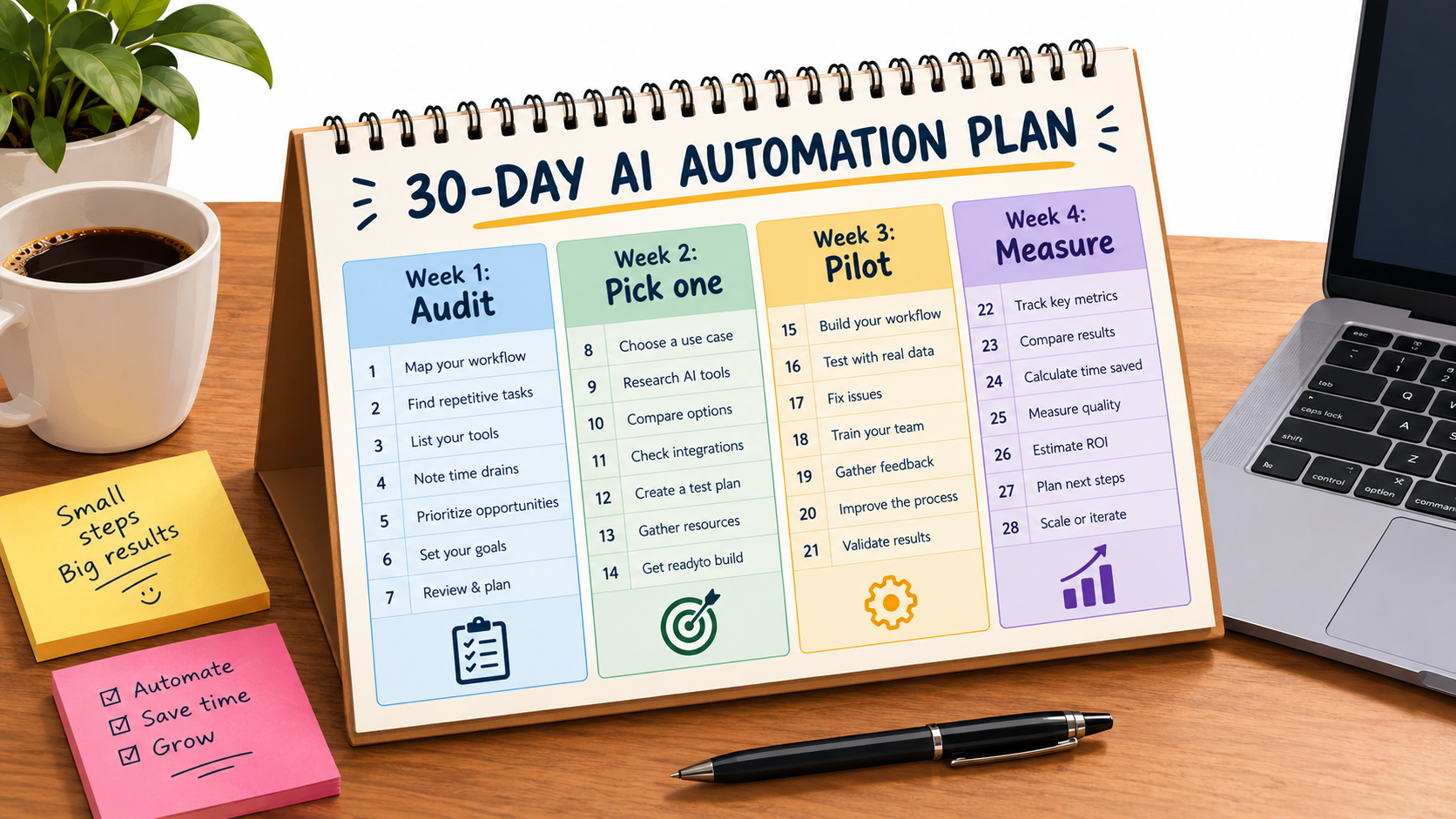
If your business is currently at the “we use ChatGPT sometimes” stage, here’s a practical plan to get one real automation running in a month. The aim isn’t to automate a lot. It’s to automate one thing well and learn how the process works.
Week 1: Audit where time actually goes
Ask each person on the team to keep a rough log of their tasks for a week, noting what they did and about how long it took. Don’t overcomplicate this. A shared spreadsheet or even notes on paper works.
At the end of the week, list the recurring tasks and score them using the volume, language-heaviness, and error-tolerance method described earlier. You’ll likely find a handful of tasks that take more time than anyone realized.
Week 2: Pick one workflow and prepare it
Choose a single task that scores high on volume and language-heaviness and has reasonable error tolerance. Customer email replies, quote drafting, and call summaries are common good choices.
Then prepare the materials an AI tool needs:
- A short description of the task and what good output looks like
- Three to five examples of strong past outputs
- Key facts: prices, policies, product details, tone guidelines
- Clear rules for what should always go to a human
Record a baseline: how long the task takes now and roughly how often it happens.
Week 3: Pilot with full review
Run the task with AI assistance, at Level 1 or a simple Level 2 workflow, with a human reviewing every single output. Keep notes on what the AI gets right, what it gets wrong, and what kinds of inputs cause problems.
Use those notes to improve the instructions and examples during the week. Most of the quality gains in a first automation come from this refinement, not from switching tools.
Week 4: Measure and decide
Compare the time spent per task, including review, against your baseline. Look at quality too: did any errors slip through, and how serious were they? Ask the people doing the work whether it actually feels easier.
Then make one of three decisions:
- Keep and expand: The automation clearly saves time with acceptable quality. Assign an owner, reduce review to spot checks where appropriate, and choose the next task.
- Refine and retest: Results are promising but review is taking too long. Improve the instructions and run another two weeks.
- Drop it: The task sits outside the frontier or the savings aren’t there. Note what you learned and move to a different task.
After the first 30 days
Once one automation is working, repeat the cycle. Many small businesses find that by their third or fourth automation, the setup goes much faster because they’ve built up reusable reference documents, examples, and a sense of what AI handles well in their specific business.
Conclusion: Small Is an Advantage, If You Choose Carefully
So, is your business too small for AI automation? Based on the evidence, almost certainly not. Nearly 60% of U.S. small businesses already use AI in some form, according to the U.S. Chamber of Commerce, more than double the share in 2023. The real question is whether you’re getting dependable value from it or just occasional help.
The research offers small businesses some genuinely encouraging findings. AI assistance produced the largest gains for less experienced workers in the customer support study, a 34% productivity improvement versus 14% on average. Writing tasks were completed about 40% faster with 18% higher quality in the MIT experiment. Small teams, with their short decision chains, newer software, and generalist roles, are well placed to capture those gains.
But the jagged frontier is a serious warning. AI helps a great deal on tasks it handles well and can make people meaningfully worse on tasks just outside its reach, without anyone noticing. For a small business with little room for error, task selection and review design matter more than which tool you pick.
Key takeaways
- Start with the work, not the tool. Audit where your team’s time goes before buying anything.
- Prioritize high-volume, language-heavy, error-tolerant tasks. Customer replies, drafting, summarizing, and sorting are reliable starting points.
- Use AI to spread expertise. Capture your best people’s answers and judgment calls so newer staff benefit from them.
- Match review to the cost of mistakes. Numbers, legal terms, and decisions about people always get a human check.
- Move up gradually. Assist first, then automate with review, and delegate only narrow, reversible tasks.
- Count all the costs. Include setup, review, and maintenance time, not just subscriptions.
- Protect your data and stay alert to regulation. Use business-grade plans, set clear internal rules, and keep a record of what you automate.
- Automate one thing well before automating many. A single dependable workflow teaches you more than ten half-finished experiments.
Small businesses don’t need enterprise budgets to benefit from AI automation. They need clear thinking about which tasks to hand over, a willingness to check the output, and the discipline to measure whether it’s actually working. That combination is well within reach for a team of any size.